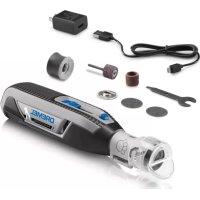
PawControl 7760PGK - Shaver DREMEL - Free user manual and instructions
Find the device manual for free PawControl 7760PGK DREMEL in PDF.


| Product type | Pet nail grinder |
| Brand | Dremel |
| Model | PawControl 7760PGK |
| Use | Nail care for dogs and cats |
| Power supply | Lithium-ion battery 3.6 V / 4 V-Max, 2.0 Ah |
| Charger | USB mains adapter 5 V / 1 A (model 510) |
| Charging time | Approximately 2 h 45 min |
| Variable speed | 8,000 – 25,000 rpm, 4 settings |
| Collet capacity | 0.8 / 1.6 / 2.4 / 3.2 mm |
| Included accessories | EZ Lock™ mandrel EZ402, sanding disc SD60-PGA, grooming accessory AT01-PGA |
| Operating temperature | -20 °C to 60 °C |
| Charging temperature | 0 °C to 50 °C |
| Safety | Overload protection, automatic shut-off, electronic monitoring |
| Maintenance | Clean accessory with hot water, tool with damp cloth |
| Warranty | 2 years |
| Spare parts | Sanding discs, mandrel, grooming accessory |
| Accessory compatibility | Standard Dremel accessories (collets, mandrels, grinding wheels) |
Frequently Asked Questions - PawControl 7760PGK DREMEL
User questions about PawControl 7760PGK DREMEL
0 question about this device. Answer the ones you know or ask your own.
Ask a new question about this device
Download the instructions for your Shaver in PDF format for free! Find your manual PawControl 7760PGK - DREMEL and take your electronic device back in hand. On this page are published all the documents necessary for the use of your device. PawControl 7760PGK by DREMEL.
USER MANUAL PawControl 7760PGK DREMEL
IMPORTANT Read Before Using
IMPORTANT Lire avant usage
IMPORTANTE Leer antes de usar

natural_image
Silhouette of a person reading a book inside a circle (no text or symbols)Operating/Safety Instructions Consignes d'utilisation/de sécurité Instrucciones de funcionamiento y seguridad
Dremel PawControl 7760-PGK
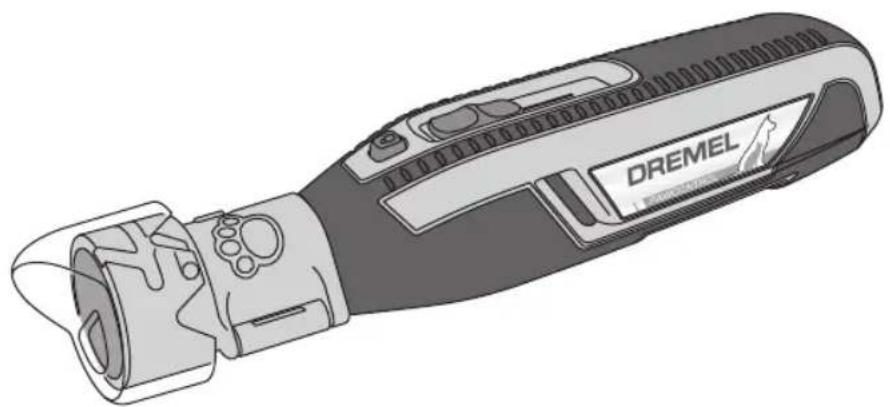
natural_image
Illustration of a DREMEL handheld device with internal components and ports (no text or symbols on the device itself)DREMEL®
Call Toll Free for Consumer Information and Service Locations Pour obtenir des informations et les adresses de nos centres de service après-vente, appelez ce numéro gratuit Llame gratis para obtener información para el consumidor y ubicaciones de servicio
1-800-4-DREMEL (1-800-437-3635) www.dremel.com
For English Version See page 2
| Safety SymbolsThe definitions below describe the level of severity for each signal word. Please read the manual and pay attention to these symbols. | |
 | This is the safety alert symbol. It is used to alert you to potential personal injury hazards. Obey all safety messages that follow this symbol to avoid possible injury or death. |
 | DANGER indicates a hazardous situation which, if not avoided, will result in death or serious injury. |
 | WARNING indicates a hazardous situation which, if not avoided, could result in death or serious injury. |
 | CAUTION indicates a hazardous situation which, if not avoided, could result in minor or moderate injury. |
Important Safety Instructions
WARNING
When using electrical appliances, basic precautions should always be followed, including the following:
a) Read all the instructions before using the appliance
b) To reduce the risk of injury, close supervision is necessary when appliance is used near children
c) Do not contact moving parts
d) Only use attachments recommended or sold by the manufacturer
e) Do not use outdoors
f) To reduce the risk of electrical shock, do not put 7760-PGK in water or other liquid. Do not place or store appliance where it can fall or be pulled into a tub or sink.
g) Use only the power adapter recommended by the manufacturer to recharge.
SAVE THESE INSTRUCTIONS
Safety Rules for Pet Grooming
WARNING
Read all safety warnings and all instructions. Failure to follow the warnings and instructions may result in fire and/or serious injury to a
person or animal.
Keep away from water. Use extra caution when using rotary tool near a tub or pet washing area. Water entering a power tool will increase the risk of electric shock.
Use personal protective equipment.
Always wear eye protection.
This product is intended only for grooming the toenails of a dog or cat. This product is not intended for use as a dental drill, in human or veterinary medical applications. Serious injury may result.
Use only sanding disc accessory SD60-PGA and EZ Lock™ mandrel EZ402 with
AT01-PGA attachment. Use of any other accessory may result in serious injury.
Do not use AT01-PGA attachment without all components installed according to operating instructions. Any other use is a misuse and could result in injury.
Recommended maximum operating speed for most pet grooming applications is 10,000/min. Recommended speed setting is "1". Nail thickness and other factors may require use of higher speeds. Use extreme caution when operating at higher speeds and limit the amount of time that
Safety Rules for Pet Grooming
the nail is exposed to the sanding surface.
Use of higher operating speeds may cause heat buildup and injury to the pet. Always monitor pet for signs of discomfort and stop grooming if observed.
Keep pet hair away from spinning parts.
Hair can entangle in the tool, causing injury to your pet. Refer to ‘Pet Safety Tips’ section for more information.
General Power Tool Safety Warnings
WARNING
Read all safety warnings and all instructions. Failure to follow the warnings and instructions may result in electric shock, fire and/or serious
injury.
SAVE ALL WARNINGS AND INSTRUCTIONS FOR FUTURE REFERENCE
The term “power tool” in the warnings refers to your mains-operated (corded) power tool or battery-operated (cordless) power tool.
▶ Work area safety
Keep work area clean and well lit.
Cluttered or dark areas invite accidents.
Do not operate power tools in explosive atmospheres, such as in the presence of flammable liquids, gases or dust. Power tools create sparks which may ignite the dust or fumes.
Keep children and bystanders away while operating a power tool. Distractions can cause you to lose control.
▶ Electrical safety
Power tool plugs must match the outlet. Never modify the plug in any way. Do not use any adapter plugs with earthed (grounded) power tools. Unmodified plugs and matching outlets will reduce risk of electric shock.
Avoid body contact with earthed or grounded surfaces such as pipes, radiators, ranges and refrigerators. There is an increased risk of electric shock if your body is earthed or grounded.
Do not expose power tools to rain or wet conditions. Water entering a power tool will increase the risk of electric shock.
Do not abuse the cord. Never use the cord for carrying, pulling or unplugging the power tool. Keep cord away from heat, oil, sharp edges or moving parts. Damaged or entangled cords increase the risk of electric shock.
When operating a power tool outdoors, use an extension cord suitable for outdoor use. Use of a cord suitable for outdoor use reduces the risk of electric shock.
If operating a power tool in a damp location is unavoidable, use a Ground Fault
Circuit Interrupter (GFCI) protected supply. Use of an GFCI reduces the risk of electric shock.
▶ Personal safety
Stay alert, watch what you are doing and use common sense when operating a power tool. Do not use a power tool while you are tired or under the influence of drugs, alcohol or medication. A moment of inattention while operating power tools may result in serious personal injury.
Use personal protective equipment.
Always wear eye protection. Protective equipment such as dust mask, non-skid safety shoes, hard hat, or hearing protection used for appropriate conditions will reduce personal injuries.
Prevent unintentional starting. Ensure the switch is in the off-position before connecting to power source and / or battery pack, picking up or carrying the tool. Carrying power tools with your finger on the switch or energizing power tools that have the switch on invites accidents.
Remove any adjusting key or wrench before turning the power tool on. A wrench or a key left attached to a rotating part of the power tool may result in personal injury.
Do not overreach. Keep proper footing and balance at all times. This enables better control of the power tool in unexpected situations.
Dress properly. Do not wear loose clothing or jewelry. Keep your hair, clothing and gloves away from moving parts. Loose clothes, jewelry or long hair can be caught in moving parts.
If devices are provided for the connection of dust extraction and collection facilities,
General Power Tool Safety Warnings
ensure these are connected and properly used. Use of dust collection can reduce dust-related hazards.
▶ Power tool use and care
Do not force the power tool. Use the correct power tool for your application.
The correct power tool will do the job better and safer at the rate for which it was designed.
Do not use the power tool if the switch does not turn it on and off. Any power tool that cannot be controlled with the switch is dangerous and must be repaired.
Disconnect the plug from the power source and/or the battery pack from the power tool before making any adjustments, changing accessories, or storing power tools. Such preventive safety measures reduce the risk of starting the power tool accidentally.
Store idle power tools out of the reach of children and do not allow persons unfamiliar with the power tool or these instructions to operate the power tool.
Power tools are dangerous in the hands of untrained users.
Maintain power tools. Check for misalignment or binding of moving parts, breakage of parts and any other condition that may affect the power tool's operation. If damaged, have the power tool repaired before use. Many accidents are caused by poorly maintained power tools.
Keep cutting tools sharp and clean.
Properly maintained cutting tools with sharp cutting edges are less likely to bind and are easier to control.
Use the power tool, accessories and tool bits etc. in accordance with these instructions, taking into account the working conditions and the work to be performed. Use of the power tool for operations different from those intended could result in a hazardous situation.
▶ Battery tool use and care
Recharge only with the charger specified by the manufacturer. A charger that is suitable for one type of battery pack may create a risk of fire when used with another battery pack.
Use power tools only with specifically designated battery packs. Use of any other battery packs may create a risk of injury and fire.
When battery pack is not in use, keep it away from other metal objects like paper clips, coins, keys, nails, screws, or other small metal objects that can make a connection from one terminal to another. Shorting the battery terminals together may cause burns or a fire.
Under abusive conditions, liquid may be ejected from the battery, avoid contact. If contact accidentally occurs, flush with water. If liquid contacts eyes, additionally seek medical help. Liquid ejected from the battery may cause irritation or burns.
▶ Service
Have your power tool serviced by a qualified repair person using only identical replacement parts. This will ensure that the safety of the power tool is maintained.
Safety Rules for Rotary Tools
▶ Safety warnings common for grinding, sanding, wire brushing, polishing, carving or abrasive cutting-off operations:
This power tool is intended to function as a grinder, sander, wire brush, polisher, carving or cut-off tool. Read all safety warnings, instructions, illustrations and specifications provided with this power tool. Failure to follow all instructions listed below may result in electric shock, fire
and/or serious injury.
Do not use accessories which are not specifically designed and recommended by the tool manufacturer. Just because the accessory can be attached to your power tool, it does not assure safe operation.
The RATED SPEED of the accessories must be at least equal to the operating speed setting marked on the power tool.
Accessories running faster than their RATED SPEED can break and fly apart.
The outside diameter and the thickness of your accessory must be within the
Safety Rules for Rotary Tools
capacity rating of your power tool.
Incorrectly sized accessories cannot be adequately controlled.
The arbor size of wheels, sanding drums or any other accessory must properly fit the spindle or collet of the power tool.
Accessories that do not match the mounting hardware of the power tool will run out of balance, vibrate excessively and may cause loss of control.
Mandrel mounted wheels, sanding drums, cutters or other accessories must be fully inserted into the collet or chuck. If the mandrel is insufficiently held and/or the overhang of the wheel is too long, the mounted wheel may become loose and be ejected at high velocity.
Do not use a damaged accessory. Before each use inspect the accessory such as abrasive wheels for chips and cracks, sanding drum for cracks, tear or excess wear, wire brush for loose or cracked wires. If power tool or accessory is dropped, inspect for damage or install an undamaged accessory. After inspecting and installing an accessory, position yourself and bystanders away from the plane of the rotating accessory and run the power tool at maximum no-load speed for one minute. Damaged accessories will normally break apart during this test time.
Wear personal protective equipment. Depending on application, use face shield, safety goggles or safety glasses. As appropriate, wear dust mask, hearing protectors, gloves and workshop apron capable of stopping small abrasive or workpiece fragments. The eye protection must be capable of stopping flying debris generated by various operations. The dust mask or respirator must be capable of filtrating particles generated by your operation. Prolonged exposure to high intensity noise may cause hearing loss.
Keep bystanders a safe distance away from work area. Anyone entering the work area must wear personal protective equipment. Fragments of workpiece or of a broken accessory may fly away and cause injury beyond immediate area of operation.
Hold power tool by insulated gripping surfaces only, when performing an operation where the cutting accessory may contact hidden wiring. Cutting accessory contacting a “live” wire may make exposed metal parts of the power tool “live” and could give the operator an electric shock.
Always hold the tool firmly in your hand(s)
during the start-up. The reaction torque of the motor, as it accelerates to full speed, can cause the tool to twist.
Use clamps to support workpiece whenever practical. Never hold a small workpiece in one hand and the tool in the other hand while in use. Clamping a small workpiece allows you to use your hand(s) to control the tool. Round material such as dowel rods, pipes or tubing have a tendency to roll while being cut, and may cause the bit to bind or jump toward you.
Position the cord clear of the spinning accessory. If you lose control, the cord may be cut or snagged and your hand or arm may be pulled into the spinning accessory.
Never lay the power tool down until the accessory has come to a complete stop. The spinning accessory may grab the surface and pull the power tool out of your control.
After changing the bits or making any adjustments, make sure the collet nut, chuck or any other adjustment devices are securely tightened. Loose adjustment devices can unexpectedly shift, causing loss of control, loose rotating components will be violently thrown.
Do not run the power tool while carrying it at your side. Accidental contact with the spinning accessory could snag your clothing, pulling the accessory into your body.
Regularly clean the power tool's air vents. The motor's fan will draw the dust inside the housing and excessive accumulation of powdered metal may cause electrical hazards.
Do not operate the power tool near flammable materials. Sparks could ignite these materials.
Do not use accessories that require liquid coolants. Using water or other liquid coolants may result in electrocution or shock.
Use only in well-ventilated area. Working in a safe environment reduces risk of injury.
Allow for sufficient space, at least 6", between your hand and the spinning bit. Do not reach in the area of the spinning bit. The proximity of the spinning bit to your hand may not always be obvious.
Do not touch the bit or collet after use. After use the bit and collet are too hot to be touched by bare hands.
Do not alter or misuse tool. Any alteration or modification is a misuse and may result in serious personal injury.
Safety Rules for Rotary Tools
This product is not intended for use as a dental drill, in human or veterinary medical applications. Serious injury may result.
▶ Kickback and Related Warnings
Kickback is a sudden reaction to a pinched or snagged rotating wheel, backing pad, brush or any other accessory. Pinching or snagging causes rapid stalling of the rotating accessory which in turn causes the uncontrolled power tool to be forced in the direction opposite of the accessory's rotation.
For example, if an abrasive wheel is snagged or pinched by the workpiece, the edge of the wheel that is entering into the pinch point can dig into the surface of the material causing the wheel to climb out or kickout. The wheel may either jump toward or away from the operator, depending on direction of the wheel's movement at the point of pinching. Abrasive wheels may also break under these conditions.
Kickback is the result of power tool misuse and/or incorrect operating procedures or conditions and can be avoided by taking proper precautions as given below.
Maintain a firm grip on the power tool and position your body and arm to allow you to resist kickback forces. The operator can control kickback forces, if proper precautions are taken.
Use special care when working corners, sharp edges etc. Avoid bouncing and snagging the accessory. Corners, sharp edges or bouncing have a tendency to snag the rotating accessory and cause loss of control or kickback.
Do not attach a toothed saw blade. Such blades create frequent kickback and loss of control.
Always feed the bit into the material in the same direction as the cutting edge is exiting from the material (which is the same direction as the chips are thrown). Feeding the tool in the wrong direction causes the cutting edge of the bit to climb out of the work and pull the tool in the direction of this feed.
When using rotary files, cut-off wheels, high-speed cutters or tungsten carbide cutters, always have the work securely clamped. These wheels will grab if they become slightly canted in the groove, and can kickback. When a cut-off wheel grabs, the wheel itself usually breaks. When a rotary file, high-speed cutter or tungsten carbide cutter grabs, it may jump from the groove and you could lose control of the tool.
▶ Safety warnings specific for grinding and abrasive cutting-off operations:
Use only wheel types that are recommended for your power tool and only for recommended applications. For example: do not grind with the side of a cut-off wheel. Abrasive cut-off wheels are intended for peripheral grinding, side forces applied to these wheels may cause them to shatter.
For threaded abrasive cones and plugs use only undamaged wheel mandrels with an unrelieved shoulder flange that are of correct size and length. Proper mandrels will reduce the possibility of breakage.
Do not jam a cut-off wheel or apply excessive pressure. Do not attempt to make an excessive depth of cut.
Overstressing the wheel increases the loading and susceptibility to twisting or snagging of the wheel in the cut and the possibility of kickback or wheel breakage.
Do not position your hand in line with and behind the rotating wheel. When the wheel, at the point of operation, is moving away from your hand, the possible kickback may propel the spinning wheel and the power tool directly at you.
When wheel is pinched, snagged or when interrupting a cut for any reason, switch off the power tool and hold the power tool motionless until the wheel comes to a complete stop. Never attempt to remove the cut-off wheel from the cut while the wheel is in motion otherwise kickback may occur. Investigate and take corrective action to eliminate the cause of wheel pinching or snagging.
Do not restart the cutting operation in the workpiece. Let the wheel reach full speed and carefully re-enter the cut. The wheel may bind, walk up or kickback if the power tool is restarted in the workpiece.
Support panels or any oversized workpiece to minimize the risk of wheel pinching and kickback. Large workpieces tend to sag under their own weight. Supports must be placed under the workpiece near the line of cut and near the
Safety Rules for Rotary Tools
edge of the workpiece on both sides of the wheel.
Use extra caution when making a pocket cut into existing walls or other blind areas. The protruding wheel may cut gas or water pipes, electrical wiring or objects that can cause kickback.
▶ Safety warnings specific for wire brushing operations:
Be aware that wire bristles are thrown by the brush even during ordinary operation. Do not overstress the wires by applying excessive load to the brush. The wire
bristles can easily penetrate light clothing and/or skin.
Allow brushes to run at operating speed for at least one minute before using them. During this time no one is to stand in front or in line with the brush. Loose bristles or wires will be discharged during the run-in time.
Direct the discharge of the spinning wire brush away from you. Small particles and tiny wire fragments may be discharged at high velocity during the use of these brushes and may become imbedded in your skin.
Additional Safety Warnings
GFCI and personal protection devices like electrician's rubber gloves and footwear will further enhance your personal safety.
Do not use AC only rated tools with a DC power supply. While the tool may appear to work, the electrical components of the AC rated tool are likely to fail and create a hazard to the operator.
Keep handles dry, clean and free from oil and grease. Slippery hands cannot safely control the power tool.
Develop a periodic maintenance schedule for your tool. When cleaning a tool be careful not to disassemble any portion of the tool since internal wires may be misplaced or pinched or safety guard return springs may be improperly mounted. Certain cleaning agents such as gasoline, carbon tetrachloride, ammonia, etc. may damage plastic parts.
WARNING
Some dust created by power sanding, sawing,
grinding, drilling, and other construction activities contains chemicals known to cause cancer, birth defects or other reproductive harm. Some examples of these chemicals are:
- Lead from lead-based paints,
- Crystalline silica from bricks and cement and other masonry products, and
- Arsenic and chromium from chemically-treated lumber.
Your risk from these exposures varies, depending on how often you do this type of work. To reduce your exposure to these chemicals: work in a well ventilated area, and work with approved safety equipment, such as those dust masks that are specially designed to filter out microscopic particles.
Safety Rules for Charging
WARNING
This manual contains instructions for power
adapter model 510. If power adapter is not included, charge tool using 5V/1A minimum USB power adapter.
Before using power adapter, read all instructions and cautionary markings on (1) power adapter, and (2) product using battery.
Charge only Dremel PawControl 7760-PGK. Other types of cordless tools may burst causing personal injury and damage.
Charge tool in temperatures above +32 degrees F (0 degrees C) and below +122 degrees F (50 degrees C). Store tool in locations where temperatures will not exceed 140 degrees F (60 degrees C). This is important to prevent serious damage to the battery cells.
Do not recharge tool in damp or wet environment. Do not expose power adapter to rain or snow. Water entering power adapter may result in electric shock or fire.
Battery leakage may occur under extreme usage or temperature conditions. Avoid contact with skin and eyes. The battery liquid is caustic and could cause chemical burns to tissues. If liquid comes in contact with skin, wash quickly with soap and water. If the liquid contacts your eyes, flush them with water for a minimum of 10 minutes and seek medical attention.
Place tool on flat nonflammable surfaces and away from flammable materials when recharging. Carpeting and other heat insulating surfaces block proper air circulation, which may cause overheating of the power adapter and tool. If smoke or melting of the power adapter or tool is observed, unplug the charger immediately and do not use the tool or charger. Contact customer service immediately.
Make sure that USB cable is located so that it will not be stepped on, tripped over, or otherwise subjected to damage or stress. Damaged plug and cable may result in electric shock or fire.
Disconnect the tool from the power adapter by pulling the plug rather than the cable. Do not operate power adapter with damaged USB cable or plug; have them replaced immediately. Damaged plug or cable may result in electric shock or fire.
Do not disassemble power adapter or operate the power adapter if it has received a sharp blow, been dropped or
otherwise damaged in anyway. Incorrect reassembly or damage may result in electric shock or fire.
Before each use, check the power supply, USB cable and plug. If damage is detected, do not use the power adapter. Never open the power adapter yourself, take it to a Dremel Factory Service Center, or qualified serviceman only using original spare parts. Incorrect reassembly may result in electric shock or fire.
Do not use attachments not recommended or sold by Dremel. Using attachments not recommended may result in electric shock or fire.
Unplug tool from power adapter when battery in tool is fully charged. Tool left plugged in the power adapter over a long period of time could lead to tool damage and fire.
Unplug power adapter from outlet before storage, attempting any maintenance or cleaning. Such preventive safety measures reduce the risk of electric shock or fire.
Keep the power adapter clean by wiping it with a damp cloth. Contamination may result in electric shock or fire.
Replace battery pack if a substantial drop in operating time per charge is observed. Battery pack may be nearing the end of its life.
▶ Battery Care
WARNING
When batteries are not in tool, keep them away
from metal objects. For example, to protect terminals from shorting DO NOT place batteries in a tool box or pocket with nails, screws, keys, etc. Fire or injury may result.
DO NOT PUT BATTERIES INTO FIRE OR EXPOSE TO HIGH HEAT. They may explode.
Battery leakage may occur under extreme usage or temperature conditions. Avoid contact with skin and eyes. The battery liquid is caustic and could cause chemical burn to tissues. If liquid comes in contact with skin, wash quickly with soap and water. If the liquid contacts your eyes, flush them with water for a minimum of 10 minutes and seek medical attention.
▶ Battery Disposal
WARNING
Do not attempt to disassemble the tool or
remove any component projecting from
Safety Rules for Charging
the tool. Fire or injury may result. Prior to disposal, protect exposed terminals with heavy insulating tape to prevent shorting.
▼ LITHIUM-ION BATTERIES
If equipped with a lithium-ion battery, the battery must be collected, recycled or disposed of in an environ mentally sound manner.

"The EPA certified RBRC Battery Recycling Seal on the lithium-ion (Li-ion) battery indicates Robert Bosch Tool Corporation is voluntarily participating in an industry program to collect and recycle these batteries at the end of their useful life, when taken out of service in the United States or Canada. The RBRC program provides a convenient alternative to placing used Li-ion batteries into the trash or the
munici pal waste stream, which may be illegal in your area.
Please call 1-800-8-BATTERY for information on Li-ion battery recycling and disposal bans/restrictions in your area, or return your batteries to a Bosch/Dremel Service Center for recycling. Robert Bosch Tool Corporation's involvement in this program is part of our commitment to preserving our environment and conserving our natural resources."
WARNING
Do not open the tool or attempt to remove
battery from your tool. Dispose of tool through your local waste removal authority or a Bosch/Dremel Service Center.
SAVE THESE INSTRUCTIONS
Symbols
Important: Some of the following symbols may be used on your tool. Please study them and learn their meaning. Proper interpretation of these symbols will allow you to operate the tool better and safer.
| Symbol Designation / Explanation | |
| V Volts (voltage) | |
| A Amperes (current) | |
| Hz Hertz (frequency, cycles per second) | |
| W Watt (power) | |
| kg Kilograms (weight) | |
| min Minutes (time) | |
| s Seconds (time) | |
| ∅ Diameter (size of drill bits, grinding wheels, etc.) | |
| n0 | No load speed (rotational speed at no load) |
| n Rated | speed (maximum attainable speed) |
| .../min | Revolutions or reciprocation per minute (revolutions, strokes, surface speed, orbits etc. per minute) |
| 0 Off position (zero speed, zero torque...) | |
| 1, 2, 3, ...I, II, III, | Selector settings (speed, torque or position settings. Higher number means greater speed) |
| 0 | Infinitely variable selector with off (speed is increasing from 0 setting) |
| → | Arrow (action in the direction of arrow) |
| ~ | Alternating current (type or a characteristic of current) |
| --- | Direct current (type or a characteristic of current) |
| ~ | Alternating or direct current (type or a characteristic of current) |
| □ | Class II construction (designates double insulated construction tools) |
| ⊕ | Earthing terminal (grounding terminal) |
Symbols
Important: Some of the following symbols may be used on your tool. Please study them and learn their meaning. Proper interpretation of these symbols will allow you to operate the tool better and safer.
| Symbol Designation / Explanation | |
 | Alerts user to read manual |
 | Alerts user to wear eye protection |
 | This symbol designates that this tool is listed by Underwriters Laboratories. |
 | This symbol designates that this component is recognized by Underwriters Laboratories. |
 | This symbol designates that this tool is listed by Underwriters Laboratories, to United States and Canadian Standards. |
 | This symbol designates that this tool is listed by the Canadian Standards Association. |
 | This symbol designates that this tool is listed by the Canadian Standards Association, to United States and Canadian Standards. |
 | This symbol designates that this tool is listed by the Intertek Testing Services, to United States and Canadian Standards. |
 | This symbol designates that this tool complies to NOM Mexican Standards. |
 Energy Verified Rendement Énergétique Vérifié Energy Verified Rendement Énergétique Vérifié | This symbol designates that this product is verified by Underwriters Laboratories to comply with Natural Resources Canada energy efficiency standards. |
 | Designates Li-ion battery recycling program |
Functional Description and Specifications
WARNING
Battery tools are always in an operative condition. Be aware of the possible hazards.
SAVE THESE INSTRUCTIONS
▶ Cordless Rotary Tool PawControl 7760-PGK
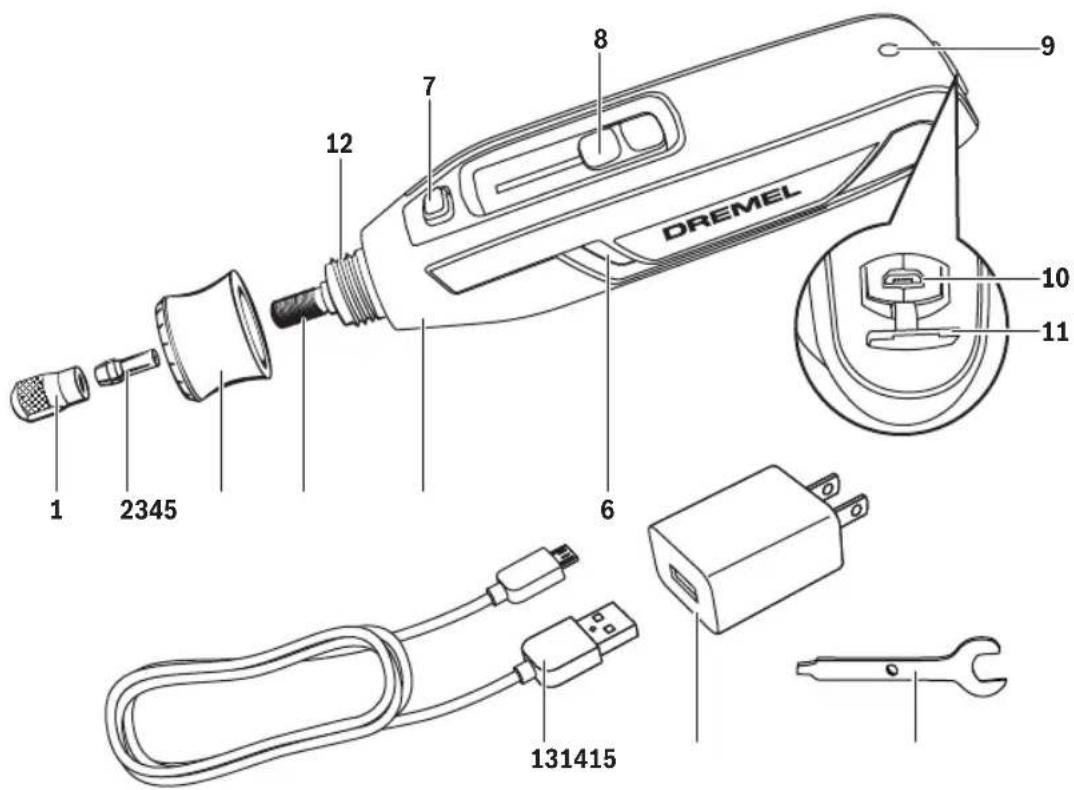
1 Collet nut
2 Collet
3 EZ TWIST™ integrated wrench/nose cap
4 Tool shaft
5 Insulated gripping surface
6 Ventilation Openings
7 Shaft Lock Button
8 On/Off switch and speed dial
9 Battery charge indicator
10 Micro USB port
11 Micro USB port cover
12 Threaded nose
13 USB cable
14 Power adapter*
15 Collet wrench
* Not included in all kits
Model number .....7760-PGK
Voltage rating .....3.6V / 4V-Max
Rated Speed (n) .....8,000-25,000/min
Collet Capacities .....1/32", 1/16", 3/32", 1/8"
Allowed ambient temperature
- during charging . . . . . . .32...122 °F (0...+50 °C)
- during operation/
storage....-4...140 °F (-20...+60 °C)
Model number .....510
Voltage rating .....120V 60 Hz
Amperage rating .....1A
Chemistry .....Li-ion
Capacity .....2.0Ah
Charge time .....2 Hr 45 min.
Power Adapter
Battery
Functional Description and Specifications
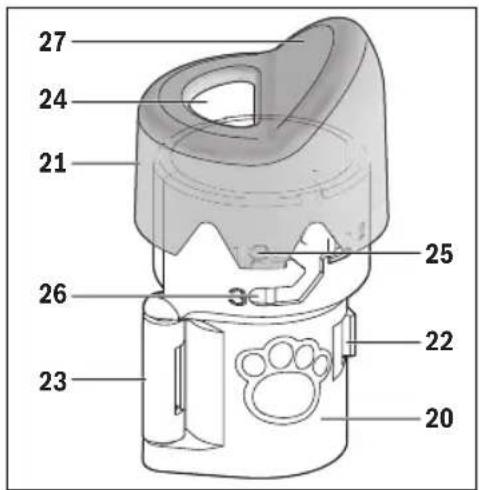
▶ AT01-PGA Pet grooming attachment
20 Attachment housing
21 Clear cap
22 Clasp
23 Hinge
24 Sanding disc opening
25 Tab (part of clear cap)
26 Depth guide
27 Ramp
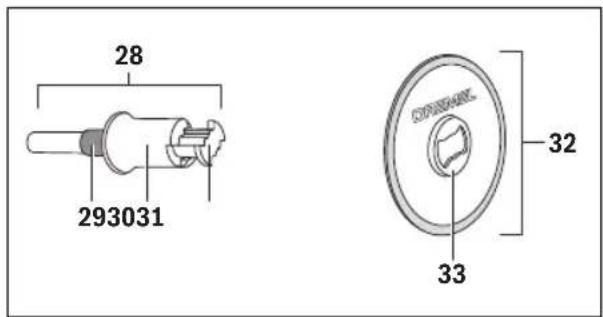
▶ EZ402 EZ Lock™ Mandrel and SD60PGA Sanding disc
28 EZ Lock™ mandrel EZ402
29 Blue spacer
30 Spring-loaded sleeve
31 Bow tie interface
32 Sanding disc SD60PGA
33 Bow tie interface
Charging the Tool
Your Dremel PawControl 7760-PGK does not come completely charged from the factory. Be sure to charge tool prior to initial use.
- Insert USB cable 13 into USB port of power adapter 14 (Fig. 1). If power adapter is not included, charge tool using 5V/1A minimum USB power adapter.
- Plug power adapter 14 into standard power outlet.
- Open Micro USB port cover 11 and plug micro USB plug into Micro USB port 10.
The battery charge indicator 9 indicates the charging progress. During the charging process, the indicator will glow green. The battery is fully charged when the indicator light turns off. Charge time is approximately 2 hours and 45 minutes.
It is normal for the handle of the tool to get warm during charging.
Note: charging function stops while tool is running and resumes again after tool is turned off.
When the battery is fully charged, disconnect the Micro USB end of the cable 13 from the tool and close the cover 11.
Unplug the power adapter from the power outlet (unless you are charging another tool).
▶ Battery Charge Indicator
This tool is equipped with a charge indicator 9 that tells you how much charge your battery has. When the light is red, the battery is almost empty.
Note: Red light may also indicate that the tool is stalling. Refer to “Electronic Monitoring” on page 16.
When the battery is depleted, the tool will turn off automatically. This will be a sudden stop as opposed to a gradual slow down of the tool. Simply recharge the tool.
▶ Important Charging Notes
- Lithium-ion battery will hold its charge while in storage for up to 2 years so it's always ready when you need it.
- The power adapter was designed to fast charge the battery only when the battery temperature is between 32^ F ( 0^ C) and 122^ F ( 50^ C).
- A substantial drop in operating time per charge may mean that the battery pack is nearing the end of its life and should be replaced. For service of your tool, please contact Dremel at 1-800-437-3635.
- If battery does not charge properly:
a. Check for voltage at outlet by plugging in some other electrical device.
b. Check to see if outlet is connected to a light switch which turns power "off" when lights are turned off.
c. Check USB terminals for dirt. Clean with cotton swab and alcohol if necessary.
d. Check to see if USB cable is properly connected to the tool and the power adapter.
e. If you still do not get proper charging, send tool and power adapter to your Dremel Service Center.
Note: Use of power adapters or battery packs not sold by Dremel may void the warranty.
Assembly Instructions for pet nail grooming
WARNING
Always be sure the tool is turned "OFF" before changing accessories, changing collets or servicing your cordless rotary tool.
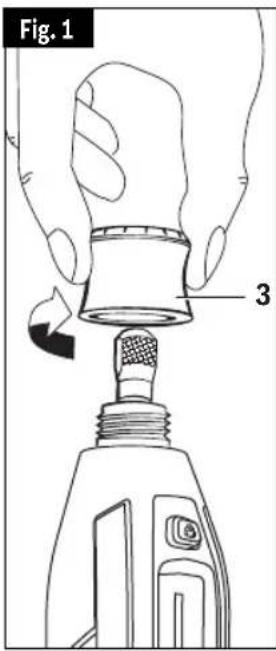
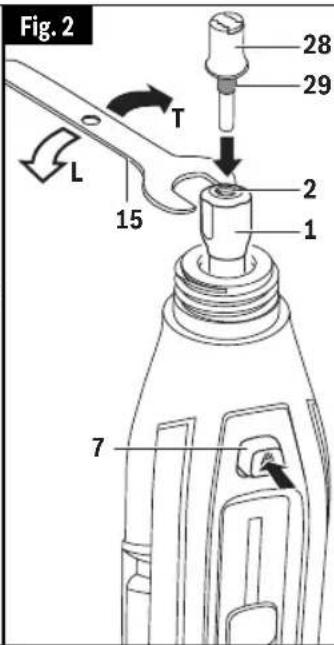
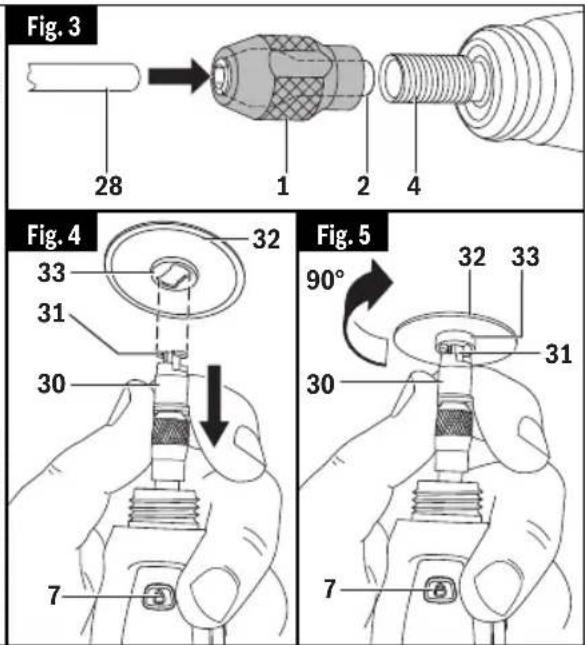
▶ To load mandrel:
A. Unscrew and remove the nose cap 3 from the tool by twisting it counterclockwise until it comes off the tool (Fig. 1).
B. To loosen the collet nut, first press shaft lock button 7 and rotate the collet nut 1 by hand until the lock engages the shaft preventing further rotation (Fig. 2).
CAUTION
Do not engage shaft lock while the tool is
running.
C. With the shaft lock 7 engaged, loosen the collet nut 1 (turn counterclockwise, L). Use the wrench 15 if necessary. The collet nut must be loosely threaded on when inserting an accessory (Fig 2).
D. Insert EZ Lock™ mandrel 28 into collet 2 (Fig. 2).
CAUTION
Make sure the blue spacer 29 on the
mandrel bottoms out on the collet nut, setting the mandrel to the correct depth. Failure to set the mandrel to the correct depth can result in damage to the attachment.
E. With the shaft lock 7 engaged, tighten the collet nut 1 securely (turn clockwise, T) with wrench 15 (Fig. 2).
Note: If the EZ Lock™ mandrel does not fit into the collet, it is possible that the collet is stuck within the collet nut. If this happens, remove the collet nut from the tool by continuing to twist it counterclockwise. If the collet does not separate from the collet nut when removed from the tool, push the shank of the EZ Lock™ mandrel 28 into the hole in the collet nut 1. This should cause the collet 2 to pop out of the collet nut 1. Re-assemble by placing the collet 2 into the output shaft 4 and twisting the collet nut 1 clockwise over the collet to tighten it back onto the output shaft 4 (Fig. 3).
▶ To load sanding disc:
A. Pull spring-loaded sleeve 30 DOWN towards tool with one hand and hold. You can brace the tool on the body or workbench for extra leverage (Fig. 4).
B. With the other hand, align bow tie interface 31 on mandrel with metal bow tie interface 33 on bottom of sanding disc 32 (Fig. 4).
C. Place sanding disc on the mandrel to a point just below the bow tie on the mandrel 31 and twist 90 degrees until the bow tie interface 33 on the sanding disc 32 aligns with the sleeve
Assembly Instructions for pet nail grooming
- Release sleeve 30. Sanding disc 32 should lock in place (Fig. 5).
WARNING
Incorrect seating of sanding disc on
mandrel may lead to personal injury or property damage. To check for proper seating, hold shaft lock button 7 and twist the sanding disc 32. The sanding disc 32 will not be able to rotate on mandrel.
▶ To unload sanding disc:
A. Pull spring-loaded sleeve 30 DOWN toward tool with one hand (Fig. 5).
B. Hold sleeve 30 down while twisting sanding disc 32 90 degrees (Fig. 5).
C. Remove sanding disc 32 (Fig. 5).
▶ To attach nail guard attachment:
Note: Make sure that the mandrel and the sanding disc are mounted properly before mounting the attachment.
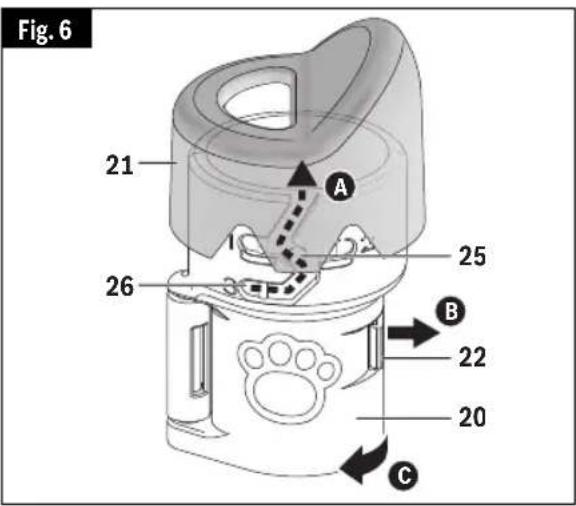
A. Detach the clear cap 21 from the attachment by running the small knobs 25 on the inside of the clear cap up along the height adjustment guide 26 until they reach the guided opening (Fig. 6).
B. Unlock the clasp 22.
C. Open the attachment 20 (Fig. 6).
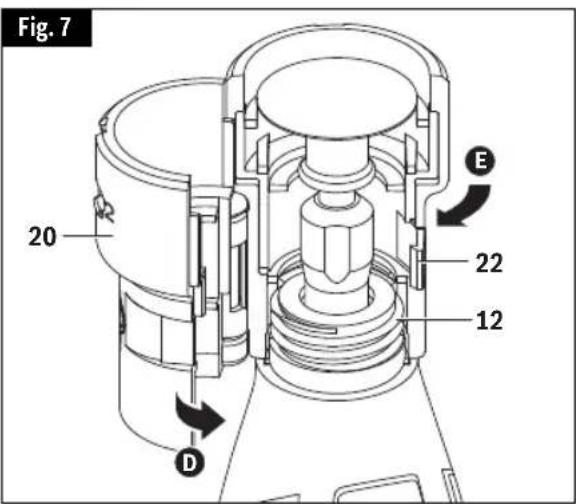
D. Position the attachment 20 around the threaded nose of the tool 12 and close the attachment together until the clasp 22 is fully engaged (Fig. 7).
E. Turn the whole attachment 20 clockwise to screw it into place on the threaded nose 12. Make sure that it is securely tightened so that it will not shift positions during use (Fig. 7).
F. Re-attach the clear cap 21 (simply perform step A in reverse order).
G. Turn the clear cap so that the small knobs are all the way to the end of slot 26 (next to number "3") on the attachment. You will hear the cap click into place when fully installed. Do not force the clear cap out of the guides (Fig. 6).
Note: Refer to the AT01-PGA manual on the Dremel website for additional information regarding attachment compatibility.
Nail Grooming Operating Instructions
WARNING
Observe all warnings and safety
instructions when using the rotary tool.
Failure to follow recommended procedures could result in personal injury or property damage.
process may take a couple of days or weeks. Before long, both you and your pet will be able to relax and even enjoy the grooming time that you share together.
▶ Why Use a Dremel Rotary Tool to Groom Pet Nails?
Scissors and guillotine-type clippers apply pressure and pinch the nail, which can be uncomfortable for pet toes and feet. Clipping toenails also increases the likelihood of cutting the internal blood supply to the nail, called the quick; grinding is more gradual and controlled. If the quick is nicked using a rotary tool, the cut is usually smaller and will heal quicker than a cut made with a nail clipper.
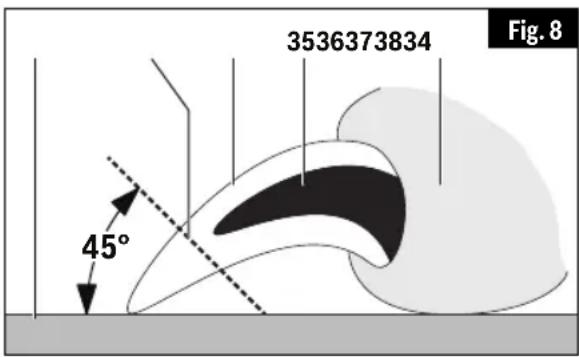
34 Nail / Claw
37 Floor
35 Quick
38 Trim line
36 Paw
▶ Before you start
Grooming a pet's nails for the first time can be a worrisome experience for both the pet and pet owner. Rest assured that nail grooming does not have to be a stressful experience. By starting early and considering grooming to be part of your pet's training, your pet will grow used to the experience.
First, train your pet to feel comfortable with their paws being touched and handled before exposing them to the rotary tool. One way to do this is to massage their legs, paws, and individual toes for a few minutes at least once a day. Afterwards, create a positive association with this experience by rewarding your pet with its favorite snack.
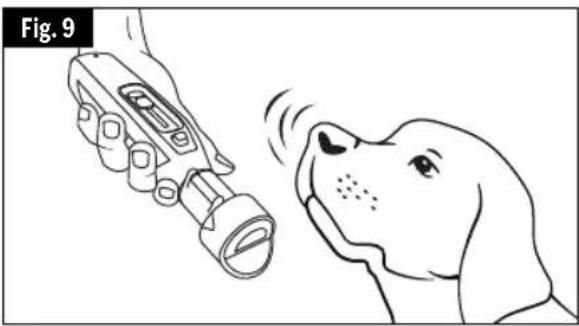
Next, help your pet grow gradually accustomed to the rotary tool. Let your pet sniff the tool while it is turned off. Then, while keeping the tool in your hand, let your pet listen to the sound the tool makes when it is turned on. Ideally, have your pet sit or lay on its side while the tool is in your hand and running. Gradually work up to having your pet's toenails touch the rotating sanding disc for less than a second. Do not grind the nails yet; simply let your pet become familiar with the tool. Throughout the acclimation process, continue to praise your pet and reward good behavior with a snack. This
▶ Nail Anatomy
The nails/claws containing quick vessels described in this section are relevant to several types of pets, including dogs and cats.
Before trimming your pet's nails, you will need to identify the quick. The diagram (Fig. 8) shows the basic anatomy of a pet's toenail. The outer nail is hard and has no feeling because it has no nerve endings. The core of the nail is the quick. It is made up of tiny blood vessels and nerve endings and is very sensitive. The quick is a vein that "feeds" the toenail. Should you cut the quick while trimming a nail, the nail will start to bleed.
Light colored nails are often transparent enough to allow you to see the quick's pink core. Dark colored nails may not allow you to see where the quick is located. Pets may have both light and dark colored nails that allow you to estimate the length of the quick.
The diagram also shows an estimate of the proper angle at which to trim a pet's nails. A rule of thumb for the proper angle is 45 degrees upwards from the bottom of the paw. The proper angle may vary according to the pet owner's wishes or the pet's unique anatomy. Trim nails so that they almost touch the ground when your pet is walking.
Nail Grooming Operating Instructions
▶ The Nail Grooming Process
CAUTION
Use only "golf grip" or "hand grip"
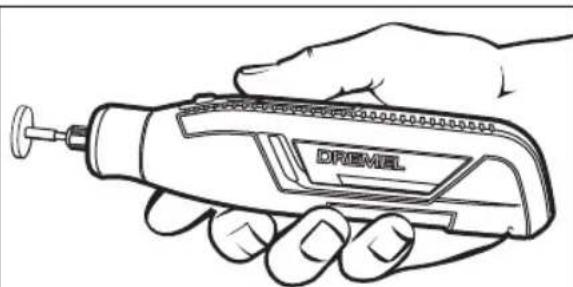
method of holding the tool. Never hold the tool by the attachment. Holding the tool by the attachment could cause it to unexpectedly shift, causing loss of control (Fig. 9).
Place the pet's paw 36 on the ramp 27 so that the nail 34 is close to - but not touching - the sanding disc 32 (Fig. 10).
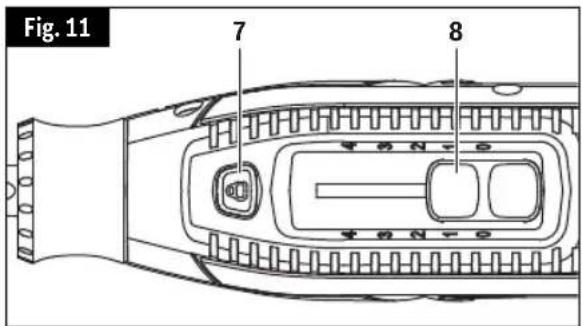
The tool is controlled by the blue "On/Off" / Speed Switch 8 located on the topside of the recessed part of the housing (Fig. 11).
TO TURN THE TOOL "ON" gently slide the switch 8 up with your thumb. The tool will start working at a speed of 8,000 RPM (Position "1").
WARNING
Recommended maximum operating
speed for most pet grooming applications is 10,000/min.
Recommended speed setting is "1". Nail thickness and other factors may require use of higher speeds. Use extreme caution when operating at higher speeds and limit the amount of time that the nail is exposed to the sanding surface. Use of higher operating speeds may cause heat buildup and injury to the pet. Always monitor pet for signs of discomfort and stop grooming if observed.
Support the toe and nail in one hand while using the rotary tool in the other hand. This is more comfortable for your pet as it lessens vibration on the paw. Pushing gently on the bottom of the paw's pad extends the nail slightly for easier grooming.
It is important to let the speed of the rotary tool do the work; never apply pressure to the toenail with the spinning sanding disc. Pressure may cause the nail to grow too hot, resulting in discomfort for your pet. The rotary tool's spinning sanding disc should not be kept against the nail longer than three seconds at a time. Instead of focusing on completing one nail at a time, it is recommended to briefly trim each nail on one paw, and then the other, in several passes. This allows time for the nails to cool. You may repeat this process as needed. Trim nails so that they almost touch the
natural_image
Illustration of a dog using a handheld device to interact with a dog's nose (no text or symbols present)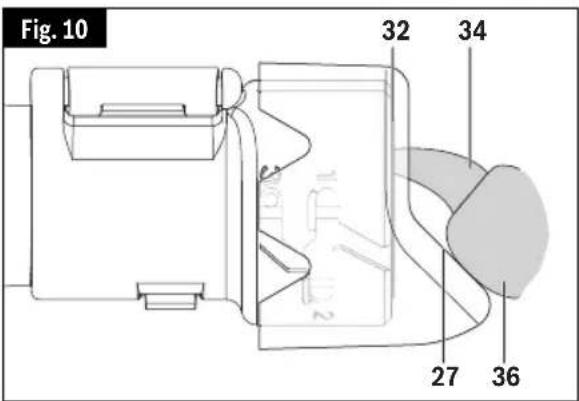
ground when your pet is walking.
Turn the tool off by sliding the tool switch 8 to "0" position (Fig. 11).
▶ Pet Safety Tips
Some pets may become nervous in the presence of the tool so it is best to secure your pet. The operator will need both hands to groom the nails so it may be helpful to have another person assist in restraining your pet.
If hair is accidentally caught in the rotary tool, immediately turn off the tool and untangle the hair from the tool. For pets with particularly long hair, use an old sock to cover the toe, foot, and leg of the pet and isolate the nail. Push the nail out through a small opening at the tip of the sock to groom the nail. Keep styptic powder on hand in case of bleeding. Styptic powder is available at
Nail Grooming Operating Instructions
most pet supply stores. Follow the directions on the packaging for proper use instructions.
▶ Cleaning the Pet Grooming Attachment
Remove the pet grooming attachment from the rotary tool as needed to clean
out any nail dust or debris. Wash only the attachment with warm water and dry thoroughly with a clean cloth before reinstalling on rotary tool.
Assembly Instructions for applications other than pet nail grooming
WARNING
Always be sure the tool is turned “OFF” before changing accessories, changing collets or servicing your cordless rotary tool.
PawControl 7760-PGK can also be used with a variety of Dremel accessories that will turn this tool into a carver, a grinder, polisher, sander, cutter, power brush, drill and more.
First, reverse the assembly steps on pages 15 and 16 to remove pet grooming attachment, EZ Lock™ mandrel and reinstall the nose cap.
▶ Collets
Dremel accessories such as engraver bits, grinding stones and mandrels are mounted on the tool using collet and collet nut system.
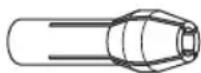
PawControl 7760-PGK comes with the 1/8" collet No 480. There are also three other collets to accommodate smaller diameter accessories. Identification (ID) rings will help you choose the right collet for your bits (Fig. 12).
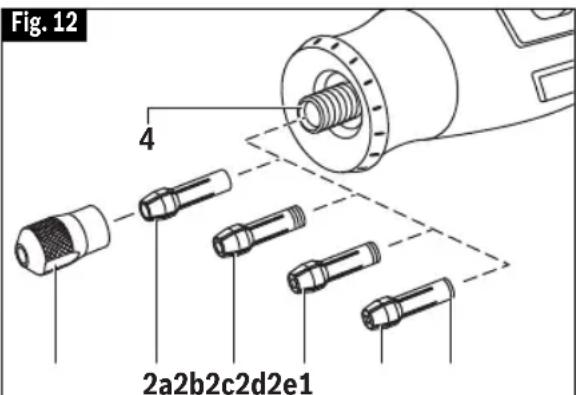
1 Collet nut
2a 1/8" collet 480 - no ID rings
2b 3/32" Collet 481 - three ID rings
2c 1/16" Collet 482 - two ID rings
2d 1/32" Collet 483 - one ID ring
2e ID ring
Assembly Instructions for applications other than pet nail grooming
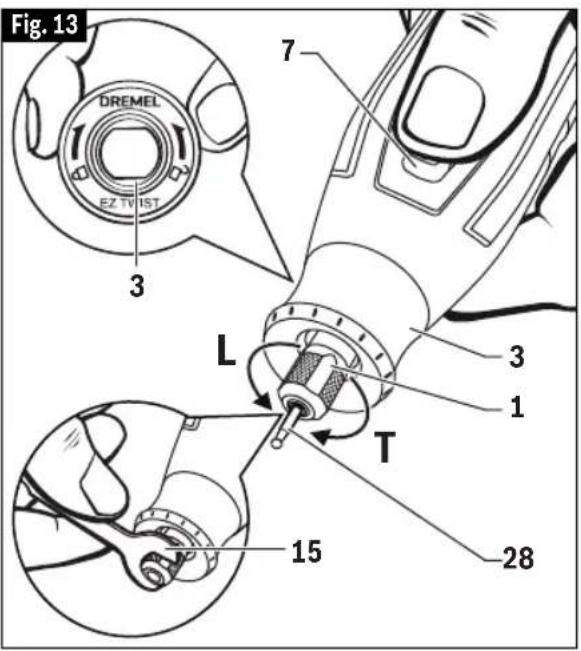
To loosen collet nut 1, first press shaft lock button 7 and rotate the collet nut counterclockwise (L) by hand until the lock engages the shaft preventing further rotation (Fig. 13).
CAUTION
Do not engage shaft lock while the Rotary
Tool is running.
With the shaft lock 7 engaged, use the EZ TWIST™ integrated wrench / nose cap 3 or collet wrench 15 to loosen (turn counterclockwise, L) the collet nut 1 (Fig. 13). The collet nut must be loosely threaded on when inserting an accessory.
Change accessories by inserting the new one into the collet as far as possible to minimize runout and unbalance. With the shaft lock 7 engaged, tighten the collet nut 1 securely (turn clockwise, T) with wrench 15 or EZ TWIST™ integrated wrench/ nose cap 3 (Fig. 13). Avoid excessive tightening of the collet nut when there is no bit inserted.
CAUTION
Always use the collet which matches the
shank size of the accessory you plan to use. Never force a larger diameter shank into a collet.
To install a different collet, completely unscrew the collet nut 1 and remove the old collet 2. Insert the unslotted end of the collet in the hole in the end of the tool shaft 4. Replace collet nut on the shaft (Fig. 12).
Note: Most rotary tool kits do not include all four collets sizes.
▼ FIXING STUCK COLLETS
It is possible for a collet to get stuck within the collet nut especially if a collet nut is tightened onto the tool without a bit in place. If this happens, remove the collet nut from the tool by continuing to twist it counterclockwise. If the collet does not separate from the collet nut when removed from the tool, push the shank of the EZ Lock™ mandrel 28 into the hole in the collet nut 1. This should cause the collet 2 to pop out of the collet nut 1. Re-assemble by placing the collet 2 into the output shaft 4 and twisting the collet nut 1 clockwise over the collet to tighten it back onto the output shaft 4 (Fig. 3).
▶ Balancing Accessories
For precision work, it is important that all accessories be in good balance (much the same as the tires on your automobile). To true up or balance an accessory, slightly loosen collet nut and give the accessory or collet a 1/4 turn. Re tighten collet nut and run the Rotary Tool. You should be able to tell by the sound and feel if your accessory is running in balance. Continue adjusting in this fashion until best balance is achieved. To maintain balance on abrasive wheel points, before each use, with the wheel point secured in the collet, turn on the Rotary Tool and run the 415 Dressing Stone lightly against the revolving wheel point. This removes high spots and trues up the wheel point for good balance.
Operating Instructions for applications other than pet nail grooming
WARNING
Observe all warnings and safety
instructions when using the rotary tool.
Failure to follow recommended procedures could result in personal injury or property damage.
▶ Introduction
Your Cordless Rotary Tool has a small, powerful electric motor, is comfortable in the hand, and is made to accept a large variety of accessories including abrasive wheels, drill bits, wire brushes, polishers, engraving cutters, and cutting wheels. Accessories come in a variety of shapes and permit you to do a number of different jobs. As you be come familiar with the range of accessories and their uses, you will learn just how versatile your Cordless Rotary Tool is. You'll see dozens of uses you hadn't thought of before now.
The real secret of the Cordless Rotary Tool is its speed. To understand the advantages of its high speed, you have to know that the standard portable electric drill runs at speeds up to 2,800 revolutions per minute. The typical electric drill is a low-speed, high torque tool; the Cordless Rotary Tool is just the opposite — a high-speed, low torque tool. The chief difference to the user is that in the high speed tools, the speed combined with the acces sory mounted in the collet does the work. You don't apply pressure to the tool, but simply hold and guide it. In the low speed tools, you not only guide the tool, but also apply pres sure to it, as you do, for example, when drilling a hole.
It is this high speed, along with its
natural_image
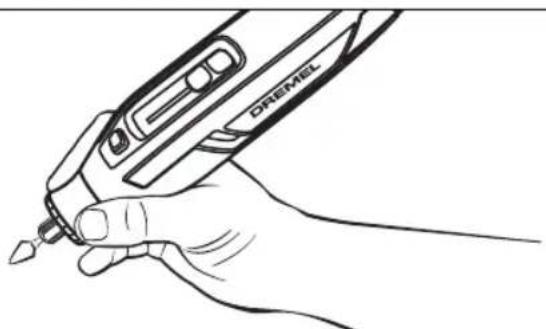
Line drawing of a hand holding a handheld electric shaver with a pointed tip (no text or symbols)For best control in close work, grip the Rotary Tool like a pencil between your thumb and forefinger.
compact size and wide variety of special accessories, that makes your Cordless Rotary Tool different from other power tools. The speed enables it to do jobs low speed tools cannot do, such as en-graving glass, etc.
Getting the most out of your Cordless Rotary Tool is a matter of learning how to let this speed work for you.
▶ Using the Cordless Rotary Tool
The first step in learning to use the Cordless Rotary Tool is to get the "feel" of it. Hold it in your hand and feel its weight and balance. Feel the taper of the housing. This taper permits the tool to be grasped much like a pen or pencil.

When you turn on the tool for the first time, hold it away from your face. Accessories can be damaged during handling,
and can fly apart as they come up to speed. This is not common, but it does happen.
Practice on scrap materials first to see how the Cordless Rotary Tool cuts. Keep in mind that the work is done by the speed of the tool and by the accessory in the collet. You should not lean on or push the tool into the work.
Instead, lower the spinning accessory lightly to the work and allow it to touch the point at which you want cutting (or sanding or etching, etc.) to begin. Concentrate on guiding the tool over the work using very little pressure from your
natural_image
Line drawing of a hand holding a DREAM electric shaver (no text or symbols on the device itself)The "handgrip" method of holding the tool is used for operations such as grinding a flat surface or using cutoff wheels.
Operating Instructions for applications other than pet nail grooming
hand. Allow the accessory to do the work.
Usually, it is best to make a series of passes with the tool rather than attempt to do all the work in one pass. To make a cut, for example, pass the tool back and forth over the work, much as you would a small paint brush. Cut a little material on each pass until you reach the desired depth. For most work, the deft, gentle touch is best. With it, you have the best control, are less likely to make errors, and will get the most efficient work out of the accessory.
▶ Electronic Monitoring
▶ “On/Off” / Speed Switch
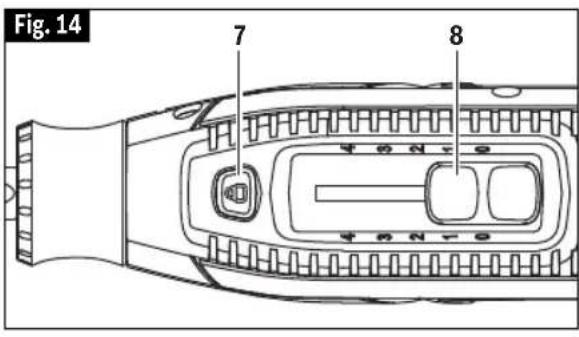
The tool is controlled by the blue "On/Off" / Speed Switch 8 located on the topside of the recessed part of the housing (Fig. 14).
TO TURN THE TOOL "ON" gently slide the switch 8 up with your thumb. The tool will start working at a speed of 8,000 RPM.
The speed may be adjusted during operation by continuing to gently slide the switch 8 up with your thumb.
Your tool is equipped with an internal electronic monitoring system that helps to maximize motor and battery performance by limiting the current to the tool when overload and stall conditions occur. If you stall the tool for too long, or bind the bit in a work piece, especially at high speeds, the tool will automatically turn itself off thanks to the fallback built into it. Once this happens, slide speed switch to "0" position, simply take the tool out of the material you were stalled in, turn it back on again, adjust the speed if necessary, and continue using it. When the battery is close to empty, the tool may shut down automatically more frequently than normal. If this happens, it is time to recharge the tool.
▶ Settings for Approximate Revolutions:
| Speed Setting Speed Range | |
| 1 8,000 RPM | |
| *2 14,000 RPM | |
| 3 21,000 RPM | |
| 4 25,000 RPM | |
| *2 is the maximum speed setting for wire brushes. |
You can refer to the charts on pages 34–36 to determine the proper speed, based on the material being worked and the type of accessory being used. These charts enable you to select both the correct accessory and the optimum speed at a glance.
▶ Needs for Slower Speeds
Certain materials, however, (some plastics, for example) require a relatively slow speed because at high speed the friction of the tool generates heat and causes the plastic to melt.
Maintenance
WARNING
To avoid accidents, always disconnect the tool and/or power adapter from the power supply before servicing or cleaning.
▶ Service
WARNING
NO USER SERVICEABLE
PARTS INSIDE. Preventive maintenance performed by un authorized personnel may result in misplacing of internal wires and components which could cause serious hazard. We recommend that all tool service be performed by a Dremel Service Center. SERVICE MEN: Disconnect tool and/or power adapter from power source before servicing.
▶ Batteries
Be alert for batteries that are nearing their end of life. If you notice decreased tool performance or significantly shorter running time between charges then it is time to replace the battery. Failure to do so can cause the tool to operate improperly or damage the power adapter.
▶ D.C. Motors
The motor in your tool has been engineered for many hours of dependable service. To maintain peak efficiency of the motor, we recommend it be examined every six months. Only a genuine Dremel replacement motor specially designed for your tool should be used.
▶ Cleaning
CAUTION
Certain cleaning agents and solvents
damage plastic parts. Some of these are: gasoline, carbon tetrachloride, chlorinated cleaning solvents, ammonia and household detergents that contain ammonia.
Ventilation openings and switch levers must be kept clean and free of foreign matter. Do not attempt to clean by inserting pointed objects through opening.
Extension Cords
WARNING
If an extension cord is necessary, a cord
with adequate size conductors that is capable of carrying the current necessary for your tool must be used.
This will prevent excessive voltage drop, loss of power or overheating. Grounded tools must use 3-wire extension cords that have 3-prong plugs and receptacles.
NOTE: The smaller the gauge number, the heavier the cord.
RECOMMENDED SIZES OF EXTENSION CORDS
120 VOLT ALTERNATING CURRENT TOOLS
| Tool's Ampere Rating | Cord Size in A.W.G. | Wire Sizes in mm 2 | ||||||
| Cord Length in Feet | Cord Length in Meters | |||||||
| 25 | 50 | 100 | 150 | 15 | 30 | 60 | 120 | |
| 3-6 | 18 | 16 | 16 | 14 | 0.75 | 0.75 | 1.5 | 2.5 |
| 6-8 | 18 | 16 | 14 | 12 | 0.75 | 1.0 | 2.5 | 4.0 |
| 8-10 | 18 | 16 | 14 | 12 | 0.75 | 1.0 | 2.5 | 4.0 |
| 10-12 | 16 | 16 | 14 | 12 | 1.0 | 2.5 | 4.0 | - |
| 12-16 | 14 | 12 | - | - | - | - | - | - |
Dremel Accessories
WARNING
Use only Dremel ^® , high-performance accessories. Other accessories are not designed for this tool and may lead to personal injury or property
damage.
Store accessories in a dry and temperate environment to avoid corrosion and deterioration.
The number and variety of accessories for the Rotary Tool are almost limitless. There is a category suited to almost any job you might have to do and a variety of sizes and shapes within each category which en ables you to get the perfect accessory for every need.
COLLETS
If you expect to use a variety of accessories, we recommend that in the beginning you purchase a complete set of four collets. Store these so that you will have the proper size of collet for any accessory or drill bit you want to use. Currently, the 1/8", 3/32",1/32" and 1/16" collets accommodate all of the available Dremel accessories. 1/8" collets are included in most rotary tool kits.
MANDRELS
A mandrel is a shank with a threaded or screw head, which are required when you use polishing accessories, cutting wheels, sanding discs, and polishing points. The reason mandrels are used is that sanding discs, cutting wheels and similar accesso ries must be replaced frequently. The mandrel is a per manent shank, allowing you to replace only the worn head when necessary, thus saving the expense of replacing the shaft each time.
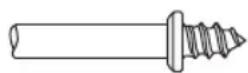
Screw Mandrel No 401
This is a screw mandrel used with the felt polishing tip and felt polishing wheels. 1/8" shank.
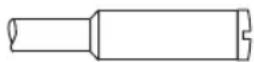
Small Screw Mandrel No 402
This is a mandrel with a small screw at its tip, and is used with emery and fiberglass cutting wheels, sanding discs and polishing wheels. 1/8" shank.

EZ Lock Mandrel No 402
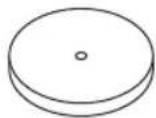
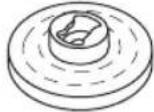
The Dremel EZ Lock makes accessory changes easy as PULL - TWIST - RELEASE. The one-piece mandrel design simplifies the process of changing cutting wheels, buffs and detail abrasive brushes (EZ Lock compatible accessories).
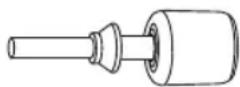
EZ Drum™ Mandrel No EZ407SA
The Dremel EZ Drum makes accessory changes easy as PULL - INSERT - PRESS DOWN. The one-piece mandrel design simplifies the process of changing sanding bands.
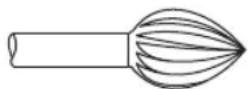
High Speed Cutters
Available in many shapes, high speed cutters are used in carving, cutting and slotting in wood, plastics and soft metals such as aluminum, copper and brass. These are the accessories to use for freehand routing or carving in wood or plastic, and for precision cutting. Made of high quality steel. 1/8" shank.

Tungsten Carbide Cutters
These are tough, long-lived cutters for use on hardened steel, fired ceramics and other very hard materials. They can be used for engraving on tools and garden equipment. 1/8" shanks.
Dremel Accessories

Engraving Cutters
This group has a wide variety of sizes and shapes, and are made for intricate work on ceramics (greenware), wood carvings, jewelry and scrimshaw. They often are used in making complicated printed circuit boards. They should not be used on steel and other very hard materials but are excellent on wood, plastic and soft metals. 1/8" shank.
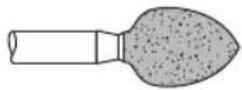
Silicon Carbide Grinding Stones (blue/green)
Tougher than aluminum oxide points, these are made especially for use on hard materials such as glass and ceramics. Typical uses might be the removal of stilt marks and excess glaze on ceramics and engraving on glass. 1/8" shank.
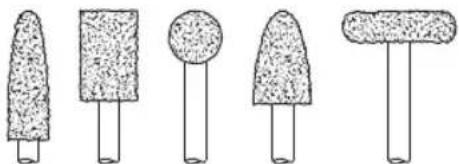
natural_image
Five simple line drawings of mushroom-shaped objects with textured surfaces, arranged horizontally (no text or symbols)Structured Tooth
Tungsten Carbide Cutters
Fast cutting, needle-sharp teeth for greater material removal with minimum loading. Use on fiberglass, wood, plastic, epoxy and rubber. 1/8" shank.
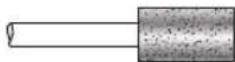
Diamond Wheel Points
Excellent for fine detail work on wood, jade, ceramic, glass and other hard material. Bits are covered with diamond particles. 1/8" shanks. (Not recommended for drilling)
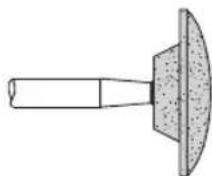
Aluminum Oxide Grinding Stones (red/brown)
Round, pointed, flat — you name the shape and there is one available in this category. These are made of aluminum oxide and cover virtually every possible kind of grinding application. Use them for sharpening lawn mower blades, screwdriver tips, knives, scissors, chisels and other cutting tools. Use to remove flash from metal castings, deburring any metal after cutting, smoothing welded joints, grinding off rivets and re moving rust. These grinding stones can be resharped with a dressing stone. In machine shops, high speed drills and cutters normally are ground with aluminum oxide wheels. 1/8" shank.
natural_image
Simple line drawing of a hammer and sickle (no text or symbols)Wire Brushes
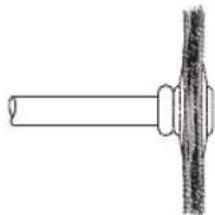
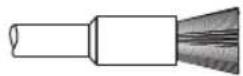
Three different shapes of wire brushes are available. For best results wire brushes should be used at speeds not greater than 15,000 RPM. Refer to Operating Speeds section for proper tool speed setting. The three shapes come in three different materials: stainless steel, brass and carbon wire. The stainless steel perform well on pewter, aluminum, stainless steel, and other metals, without leaving "after-rust". Brass brushes are non sparking, and softer than steel; making them good for use on soft metal like gold, cooper and brass. The carbon wire brushes are good for general purpose cleaning.
Dremel Accessories
Bristle Brushes
These are excellent cleaning tools on silverware, jewelry and antiques. The three shapes make it possible to get into tight corners and other difficult places. Bristle brushes can be used with polishing compound for faster cleaning or polishing.
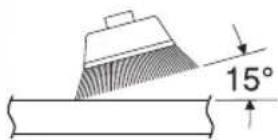
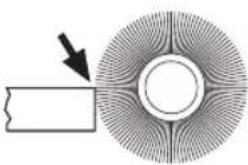
INCORRECT:
Excessive pressure can cause wire breakage.
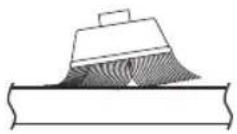
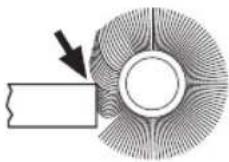
CORRECT: Wire tips doing the work.
natural_image
Diagram of a circular object with radial lines and a rectangular block, no text or symbols presentBrushing Pressure
- Remember, the tips of a wire brush do the work. Operate the brush with the lightest pressure so only the tips of the wire come in contact with the work.
- If heavier pressures are used, the wires will be overstressed, resulting in a wiping action; and if this is continued, the life of the brush will be shortened due to wire fatigue.
- Apply the brush to the work in such a way that as much of the brush face as possible is in full contact with the work. Applying the side or edge of the brush to the work will result in wire breakage and shortened brush life.
EZ Lock
Polishing Accessories
These include an impregnated polishing point and an impregnated polishing wheel for bringing metal sur faces to smooth finish; a felt polishing tip and felt polishing wheel, and cloth polishing wheel, all used for polishing plastics, metals, jewelry and small parts. Also included in this group is a polishing compound (No. 421) for use with the felt and cloth polishers.
Polishing points make a very smooth surface, but a high luster is obtained using felt or cloth wheels and polishing compound. For best results polishing accessories should be used at speeds not greater than 15,000 RPM.
No polishing compound is needed when using the 425 Polishing Wheel.
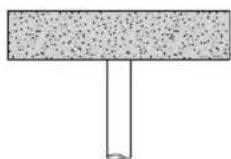
Aluminum Oxide Abrasive Wheels
Use to remove paint, deburr metal, polish stainless steel and other metals. Available in medium grit. 1/8" shank.
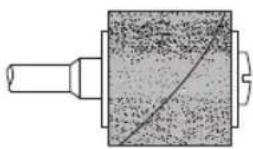
Sanding Accessories
Sanding bands in fine, medium and coarse grades are made to fit mandrel No. 402 and EZ407. They can be used for nearly any small sanding job you might have, from model making to fine furniture finishing. In addition, there is the drum sander, a tiny drum which fits into the Rotary Tool and makes it possible to shape wood, smooth fiberglass, sand inside curves and other diffi cult places, and other sanding jobs. You replace the sanding bands on the drum as they become worn and lose their grit. Bands come in fine medium and coarse grades. Flapwheels grind and polish flat or
Dremel Accessories
contoured surfaces. They are used most effectively as a finishing sander after heavier surface sanding and material removal is completed. Flapwheels come in fine and coarse grades. Buffs are a great finishing accessory for cleaning and light sanding. They work effectively on metal, glass, wood, aluminum and plastics. Coarse and medium buffs are sold together. All buffs are sold individually. Do not exceed 15,000 RPM in speed. 1/8" shank.
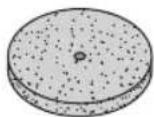
Grinding Wheel
Use for deburring, removing rust, and general purpose grinding. Use with Mandrel #402.

Brad Point Drill Bits
Titanium coated brad points stay on center and begin drilling immediately. For use on wood. Size 1/8", 5/32", 3/16", 1/4", 1/8" shank.

HSS Drill Bits
HSS drill bit for use in metal and plastic. Size 1/8", 7/64", 3/32", 5/64", 1/16", 3/64", 1/32". Shank size matches the drill bit size. Different collet size (481, 482, 483) or Dremel chuck (4486) required according to drill bit being used.

Glass Drill Bits
Diamond tipped drill bits for use on glass and ceramic wall tile. Lubricant included.
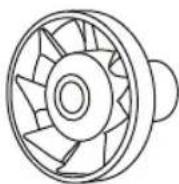
Dust Blower
Blows dust away for greater visibility to work piece. Great for sanding, engraving and carving. Do not use dust blower to stop or slow down the tool. Do not contact dust blower with fingers or workpiece during use.
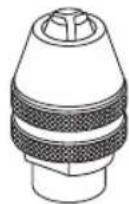
Dremel Chuck
This chuck allows you to quickly and easily change accessories on Dremel Rotary Tools without changing collets. Accepts accessories with 1/32" - 1/8" shank. Read instruction manual. Insert and securely tighten the shank of the accessory well within the jaws of the chuck.

CAUTION
Do not use Dremel chuck
with AT01-PGA pet grooming attachment. Use only 1/8" collet and collet nut. Use of the Dremel chuck may result in damage to the attachment.
Dremel Attachment Compatibility
| Model No. | Description Compatibility with 7760 | ||
| 220 / 220-01 | 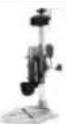 | Workstation Not Advised | |
| 225 Flex | Shaf  ised ised | ||
| 231 Router Ta | 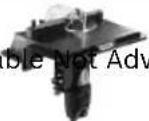 advised advised | ||
| 335 / 335-01 | 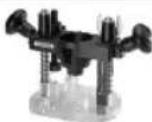 | Plunge Router No | |
| 490 Dust Blowe |  | ||
| 4486 |  | Dremel Chuck Not Advised | |
| A550 Shield Ye |  | ||
| 565 Multi-pur |  ing Kit Not Advised ing Kit Not Advised | ||
| 568 Grout Ren |  Not Advised Not Advised | ||
| 575 Right Ar | 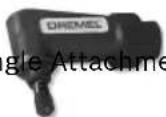 ent ent | Not Advised | |
| A576 Shaping | 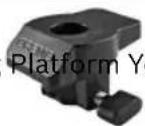 es es | ||
Dremel Attachment Compatibility
| Model No. | Description Compatibility with 7760 | ||
| A577 Detaile | 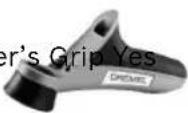 | ||
| 670 / 670-01 | 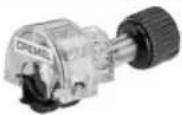 | Mini-saw No | |
| 675 |  | Lawn Mower and Garden Tool Sharpener | Yes |
| 678 / 678-01 |  | Circle Cutter and Straight Edge Guide | Not Advised |
| A679-02 Chair |  | Yes | |
| 2500 / 2500-01 |  | Multi-vise Yes | |
Dremel Accessories
natural_image
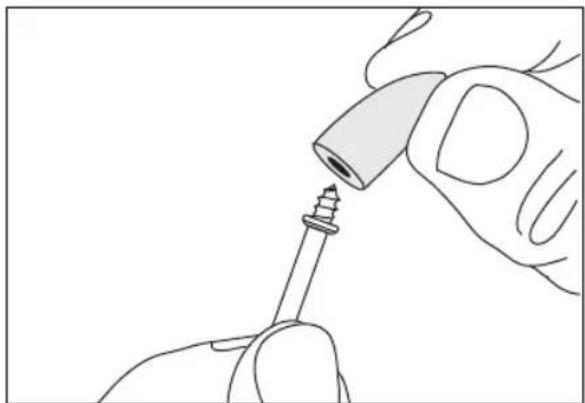
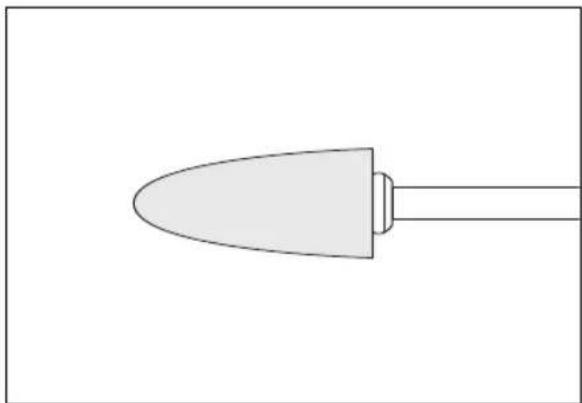
Line drawing of a hand holding a screwdriver with a screw tip inserted (no text or symbols)Mandrel No. 401 is used with the felt polishing tip and wheels. Thread the tip on to the screw carefully. The felt tip must
natural_image
Simple line drawing of a pen or stylus with a pointed tip and handle (no text or symbols)thread down straight on the screw Mandrel, and be turned all the way to the collar.
natural_image
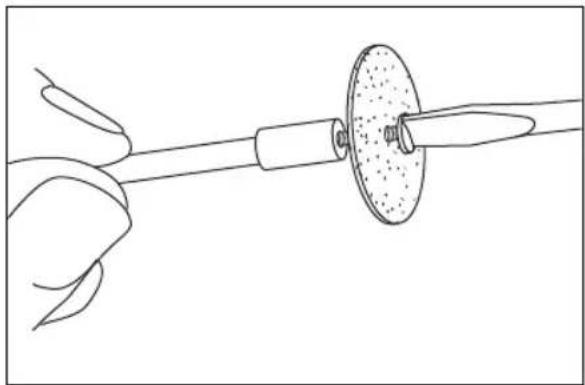
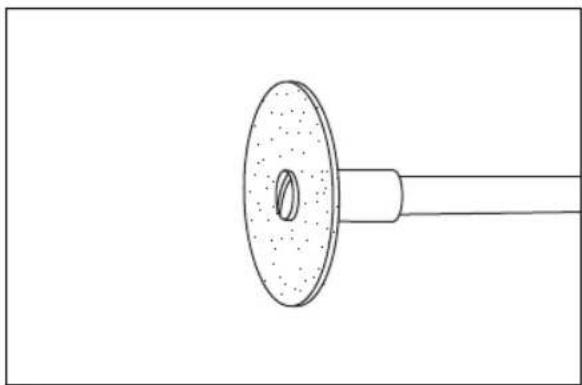
Line drawing of a hand holding a tool with a circular component inserted, no text or symbols presentMandrel No. 402 has a small screw at its tip, and is used with emery cutting wheels and sanding discs. Higher speeds, usually
natural_image
Line drawing of a showerhead with a circular head and central hole (no text or symbols)maximum, are best for most work, including cutting steel. Which is shown here.
natural_image
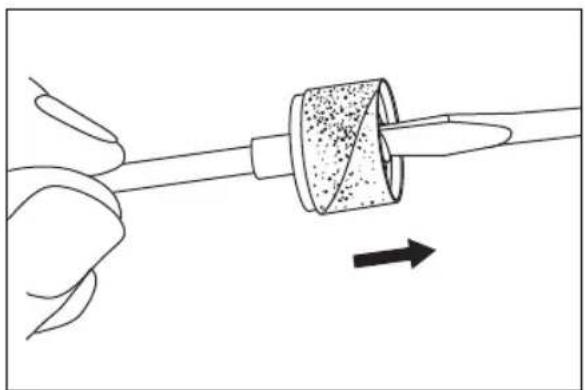
Diagram of a hand holding a tool with a circular component and an arrow indicating direction (no text or symbols)To replace a band on the Drum Sander, loosen the screw without removing it to contract the drum then slide the old band off. Slide the new sanding band on and then expand the drum by tightening the screw once again.
natural_image
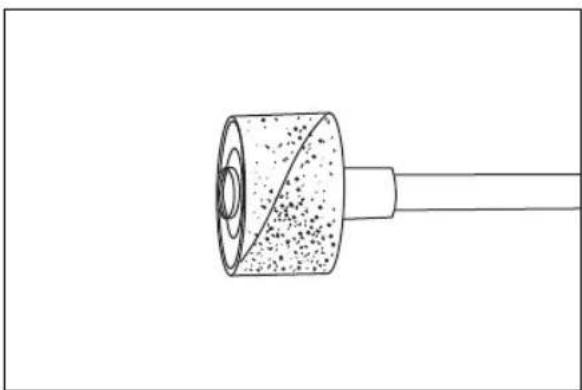
Simple line drawing of a cylindrical object with a pointed tip and textured surface, connected to a rod (no text or symbols)WARNING Before each use, check to make certain that all components are assembled to accessory shank and that the drum is sufficiently expanded to secure the band during use. If sanding band is loose on the drum during operation it may "fly" off and strike you or bystanders.
EZ Lock™ Operating Instructions
EZ Lock™ Mandrel No. EZ402 has a spring loaded sleeve and is used with cutting wheels, abrasive buffs and polishing cloth.
WARNING
Always make sure the rotary tool is "OFF" and disconnect the plug from the power source or the battery pack from the tool before changing accessories. Such preventative safety measures reduce the risk of starting the power tool accidentally.
Always make sure accessory is properly seated on mandrel before use. Incorrect seating of accessory on mandrel may lead to personal injury or property damage.
To load accessory:
- Place EZ Lock™ mandrel into collet as deep as possible and tighten collet nut. Note: There is a blue spacer that will bottom out on the collet nut, setting the mandrel to the correct depth. When using with Dremel chuck, back the mandrel out slightly before tightening.
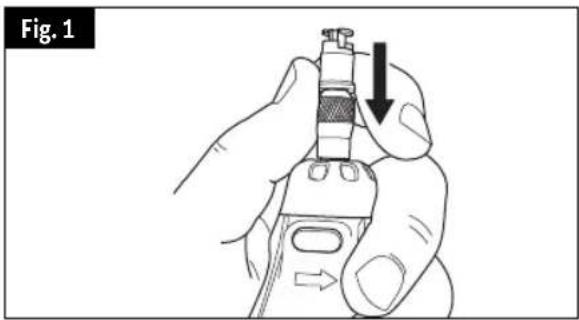
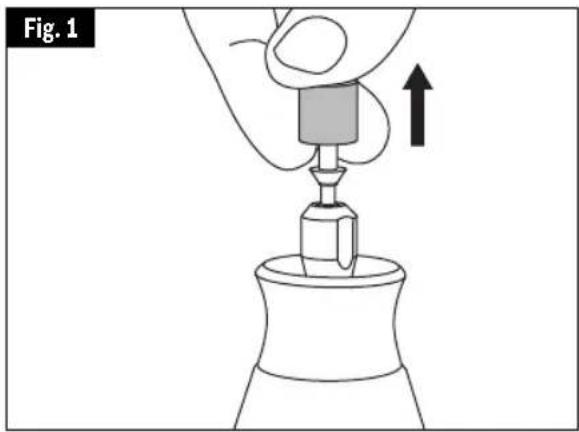
- Pull spring-loaded sleeve DOWN towards tool with one hand and hold. You can brace the tool on the body or work-bench for extra leverage (Fig. 1).
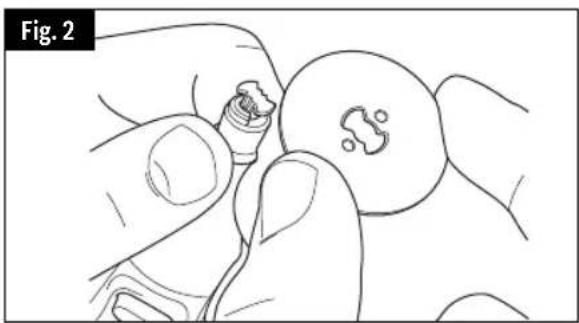
- With the other hand, align bowtie shape on cut-off wheel with mandrel and make sure metal insert is facing away from the tool (Fig. 2).
- Place wheel on the mandrel to a point just below the bowtie on the mandrel and twist 90 degrees until the bowtie shape on the wheel aligns with the sleeve. Release sleeve. Wheel should lock in place (Fig. 3).
- When mounting sanding and polishing accessories, align bowtie with metal insert on bottom of accessory (Fig. 4 & 5).
To check for proper seating, hold shaft lock button and twist accessory.
Accessory will not be able to rotate on mandrel.
To unload accessory:
- Pull spring-loaded sleeve DOWN toward tool with one hand (Fig. 1).
- Hold sleeve down while twisting accessory 90 degrees.
- Remove accessory.
During use
Avoid damage to EZ lock™ mandrel by not letting it contact the workpiece.
natural_image
Line drawing of a hand holding a small object with a circular base, showing no text or symbols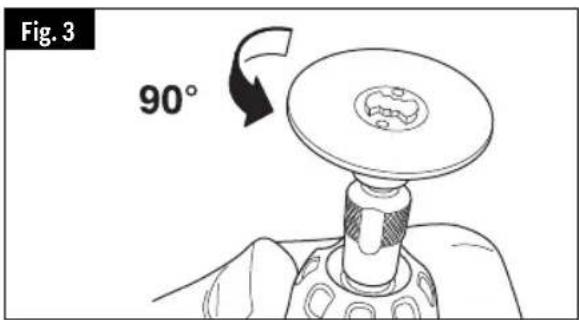
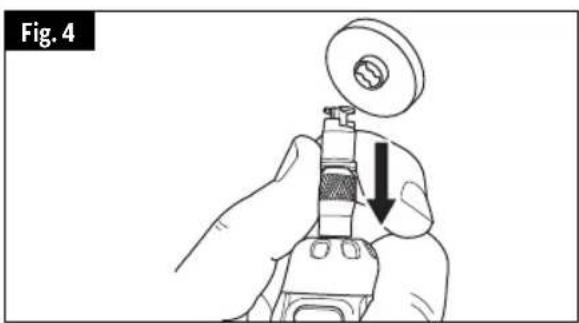
natural_image
Illustration of a hand using a mechanical tool to adjust a component, with a downward arrow indicating the process (no text or symbols present)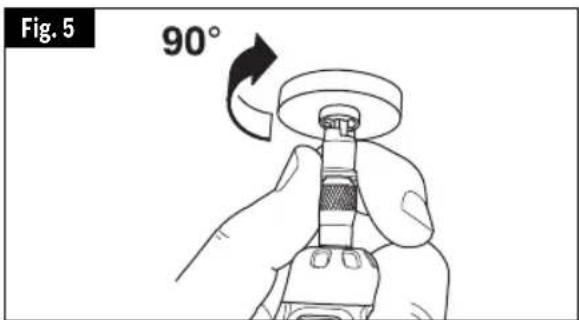
EZ Drum™ Operating Instructions
EZ Drum™ Mandrel No. EZ407SA has a spring loaded sleeve and is used with sanding bands.
WARNING
Always make sure the rotary tool is "OFF" and disconnect the plug from the power source or the battery pack from the tool before changing accessories. Such preventative safety measures reduce the risk of starting the power tool accidentally.
Always make sure accessory is properly seated on mandrel before use. Incorrect seating of accessory on mandrel may lead to personal injury or property damage.
To load accessory:
- As indicated, place two fingers underneath the mandrel and pull firmly up. This will place the EZ Drum™ in the "unlocked" position (Fig. 1).
- Keeping two fingers beneath the mandrel, slide the sanding band down until the entire blue mandrel is covered (Fig. 2).
- To return to "locked" position, press firmly down on the top of the mandrel (Fig. 3).
Removing the sanding band on the mandrel:
- Place two fingers underneath the mandrel and pull firmly up. This will place the EZ Drum™ in the "unlocked" position (Fig. 1).
- Sanding band will now easily slide off mandrel (Fig. 2). Do not squeeze sanding band when removing from EZ Drum™ mandrel. This can lead to rubber band pulling off mandrel and becoming inoperable.
natural_image
Illustration of a hand using a tool to press or install a component, with an upward arrow indicating motion (no text or symbols present)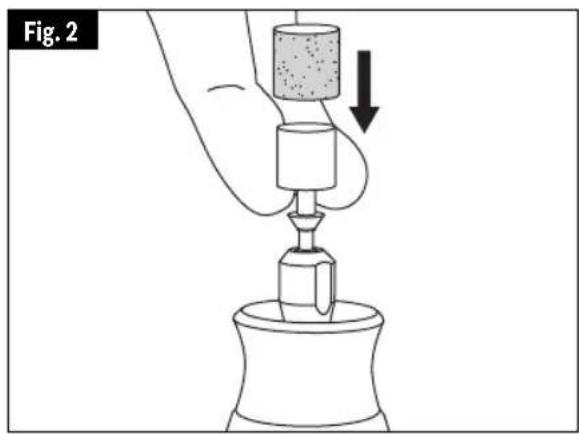
natural_image
Illustration of a hand using a tool to press or install a component, with no visible text or symbols.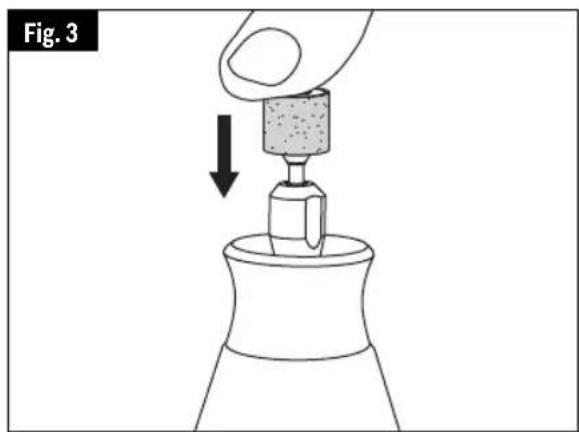
Speed Settings
Note: Each number settings listed in the speed charts = x 1,000 RPM
* Speed for light cuts, Caution - burning on deep grooves.
- Depending on cutting direction relative to grain.
Note that the recommended speed may not be suitable for your rotary tool model.
| High Speed Cutters | ||||||||
| Catalog Number | Soft Wood | Hard Wood | Laminates /Plastics | Steel | Aluminum, Brass, etc. | Shell/ Stone | Ceramic | Glass |
| 100, 121, 131 25 | -35 25-35 | 12-17 | 12-17 18-24 | -- | ||||
| 114, 124, 134, 144 | 25-35 12 | -17 9-11 | 12-17 12-17 | --- | ||||
| 118, 190, 191, 192, 193, 194 | 25-35 2 | 5-35 9-1 | 12-17 25-35 | --- | ||||
| 116, 117, 125, 196 | 25-35 12 | -17 9-11 | 12-17 12-17 | --- | ||||
| 115 25-35 25 | 5-35 9-11 | 12-17 | 2-17 --- | |||||
| 198, 199 25-35 | 18-24 9 | -11 12-17 | 12-17 --- | |||||
| Engraving Cutters | ||||||||
| Catalog Number | Soft Wood | Hard Wood | Laminates /Plastics | Steel | Aluminum, Brass, etc. | Shell/ Stone | Ceramic | Glass |
| 105, 108 25-35 | 25-35 1 | 8-24 9-1 | 1 12-17 --- | |||||
| 106, 107, 109, 110 | 25-35 25 | -35 12-17 | 9-11 12-17 | --- | ||||
| 111 | 25-35* | 25-35* | 18-24* 9-11 | 12-17 | -- | |||
| 112, 113 | 25-35* | 25-35* | 12-17* 9-11 | 12-17 | -- | |||
| Diamond Wheel Points | ||||||||
| Catalog Number | Soft Wood | Hard Wood | Laminates /Plastics | Steel | Aluminum, Brass, etc. | Shell/ Stone | Ceramic | Glass |
| 7103, 7105, 7117, 7120, 7122, 7123, 7134, 7144 | 25-35 | 18-24 | - | - | - | 25-35 | 25-35 | 25-35 |
| Structured Tooth Tungsten Carbide Cutters | ||||||||
| Catalog Number | Soft Wood | Hard Wood | Laminates /Plastics | Steel | Aluminum, Brass, etc. | Shell/ Stone | Ceramic | Glass |
| 9931, 9932, 9933, 9934, 9935, 9936 | 25-35 | 8-24 9-11 | - | 12-17 | --- | |||
Speed Settings
Note: Each number settings listed in the speed charts = x 1,000 RPM
* Speed for light cuts, Caution - burning on deep grooves.
- Depending on cutting direction relative to grain.
Note that the recommended speed may not be suitable for your rotary tool model.
| Tungsten Carbide Cutters | ||||||||
| Catalog Number | Soft Wood | Hard Wood | Laminates /Plastics | Steel | Aluminum, Brass, etc. | Shell/ Stone | Ceramic | Glass |
| 9901, 9902, 9903, 9904, 9905, 9906, 9912 | 25-35 | 18-24 9-11 | 25-35 12-17 | 18-24 | 18-35 18-35 | |||
| 9909, 9910, 9911 | ---- 18 | 24 18-35 | 18-35 | |||||
| Silicon Carbide Grinding Stones (blue/green) | ||||||||
| Catalog Number | Soft Wood | Hard Wood | Laminates /Plastics | Steel | Aluminum, Brass, etc. | Shell/ Stone | Ceramic | Glass |
| 83142, 83322, 83702, 84922, 85422, 85602, 85622 | -- 12 | -17 25-35 | 9-11 12-17 | 25-35 25-35 | ||||
| Abrasive Wheels / Points | ||||||||
| Catalog Number | Soft Wood | Hard Wood | Laminates /Plastics | Steel | Aluminum, Brass, etc. | Shell/ Stone | Ceramic | Glass |
| 516 | 4-6 | 4-6 | - | 18-24 | 12-17 | - | - | - |
| 500 | 4-6 | 4-6 | - | 18-24 | 9-17 | - | - | - |
| EZ541GR | - | - | - | 12-24 | 9-17 | - | - | - |
| Aluminum oxide grinding stones (orange/brown) | ||||||||
| Catalog Number | Soft Wood | Hard Wood | Laminates /Plastics | Steel | Aluminum, Brass, etc. | Shell/ Stone | Ceramic | Glass |
| 541, 903, 911, 921, 932, 941, 945, 952, 953, 954, 971, 997, 8153, 8175, 8193, 8215 | 25-35 | 5-35 - | 18-24 | 9-11 | 12-17 25-35 | - | ||
| Chain Saw Sharpening Stones | ||||||||
| Catalog Number | Soft Wood | Hard Wood | Laminates /Plastics | Steel | Aluminum, Brass, etc. | Shell/ Stone | Ceramic | Glass |
| 453, 454, 455 | - | - | - | 25-35 | - | - | - | - |
Speed Settings
Note: Each number settings listed in the speed charts = x 1,000 RPM
* Speed for light cuts, Caution - burning on deep grooves.
- Depending on cutting direction relative to grain.
Note that the recommended speed may not be suitable for your rotary tool model.
| Cutting Accessories | ||||||||
| Catalog Number | Soft Wood | Hard Wood | Laminates /Plastics | Steel | Aluminum, Brass, etc. | Shell/ Stone | Ceramic | Glass |
| 409, 420, 426, 540, EZ409 | -- 5- | 11 25-35 | 25-35 25-35 | 25-35 - | ||||
| 543, EZ544 25-35 | 18-35 | 5-11 --- | -- | |||||
| 545, EZ545 | 18-35 | 18-24 | - | - | - | 12-24 | 12-24 | - |
| EZ456 | --- | 25- | 35 25-35 | --- | ||||
| EZ476 | -- 5- | 11 ---- | ||||||
| Polishing Accessories | ||||||||
| Catalog Number | Soft Wood | Hard Wood | Laminates /Plastics | Steel | Aluminum, Brass, etc. | Shell/ Stone | Ceramic | Glass |
| 461, 462, 463 | - | - | - | 18-24 | 18-24 | 18-24 | 18-24 | 18-24 |
| 414, 422, 429 | - | - | - | 12-17 | 12-17 | 12-17 | 12-17 | 12-17 |
| 425, 427 | --- | 18 | 24 18-24 | --- | ||||
| 423E | - | - | - | 12-24 | 5-8 | 5-8 | 5-8 | 12-24 |
| Wire Brushes | ||||||||
| Catalog Number | Soft Wood | Hard Wood | Laminates /Plastics | Steel | Aluminum, Brass, etc. | Shell/ Stone | Ceramic | Glass |
| 403, 404, 405 | 9-11 | 9-11 | 5-11 | 12-17 | 5-8 | - | - | - |
| 428, 442, 443 | 9-11 | 9-11 | 5-8 | 9-11 | 9-11 | - | - | - |
| 530, 531, 532 | - | 9-11 - | 9-11 | - - - - | ||||
| 535, 536, 537 | 9-11 | 9-11 | - | 9-11 | 9-11 | 9-11 | - | - |
| Sanding Bands and Discs | ||||||||
| Catalog Number | Soft Wood | Hard Wood | Laminates /Plastics | Steel | Aluminum, Brass, etc. | Shell/ Stone | Ceramic | Glass |
| 407, 408, 430, 431, 432, 438, 439, 440, 444 | 5-35 | 5-35 | 5-17 | 25-35 | 25-35 | 5-35 | 5-35 | - |
| 411, 412, 413 | 12-17 | 12-17 | 5-8 | - | 5-8 | - | - | - |
Speed Settings
Note: Each number settings listed in the speed charts = x 1,000 RPM
* Speed for light cuts, Caution - burning on deep grooves.
- Depending on cutting direction relative to grain.
Note that the recommended speed may not be suitable for your rotary tool model.
| Flapwheels | ||||||||
| Catalog Number | Soft Wood | Hard Wood | Laminates /Plastics | Steel | Aluminum, Brass, etc. | Shell/ Stone | Ceramic | Glass |
| 502, 503, 504, 505 | 25-35 18-24 5-8 | 25-35 18-35 --- | ||||||
| Finishing Abrasive Buffs | ||||||||
| Catalog Number | Soft Wood | Hard Wood | Laminates /Plastics | Steel | Aluminum, Brass, etc. | Shell/ Stone | Ceramic | Glass |
| 511E, 512E | 12-17 | 12-17 | 9-11 | 12-17 | 12-17 | - | - | - |
| Detail Abrasive Brushes | ||||||||
| Catalog Number | Soft Wood | Hard Wood | Laminates /Plastics | Steel | Aluminum, Brass, etc. | Shell/ Stone | Ceramic | Glass |
| EZ471SA, EZ472SA, EZ473SA | 5-17 | 5-17 | 5-17 | 5-17 | 5-17 | - | - | - |
| Drill Bit | ||||||||
| Catalog Number | Soft Wood | Hard Wood | Laminates /Plastics | Steel | Aluminum, Brass, etc. | Shell/ Stone | Ceramic | Glass |
| 150 | 25-35 | 18-35 | 5-11 | - | 12-17 | - | - | - |
| Glass Drilling Bits | ||||||||
| Catalog Number | Soft Wood | Hard Wood | Laminates /Plastics | Steel | Aluminum, Brass, etc. | Shell/ Stone | Ceramic | Glass |
| 662DR, 663DR | - | - | - | - | - | 5-17 | 5-17 | 5-17 |
| Grout Removal Bits | ||||||||
| Catalog Number | Soft Wood | Hard Wood | Laminates /Plastics | Steel | Aluminum, Brass, etc. | Shell/ Stone | Ceramic | Glass |
| 569, 570 | For use on wall and floor grout | - | 12-24 | - | ||||
Always be sure the tool is turned "OFF" before changing accessories, changing collets or servicing your cordless rotary tool.
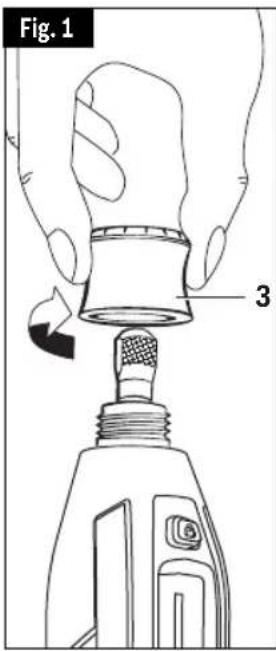
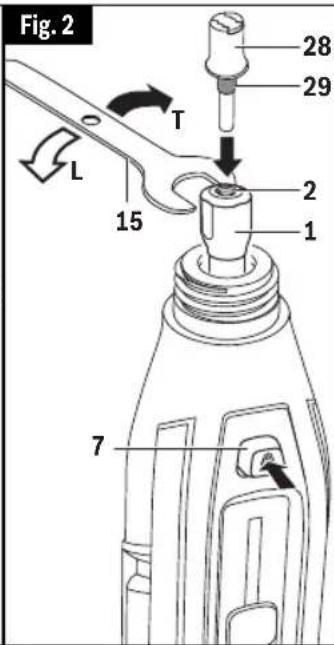
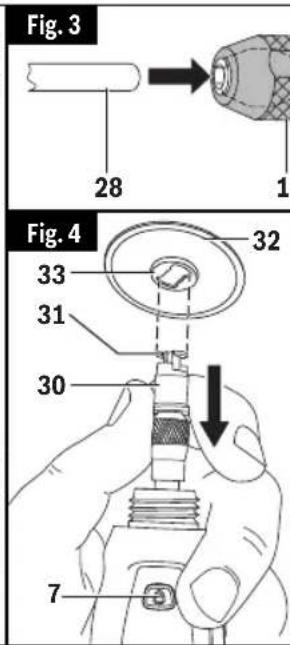
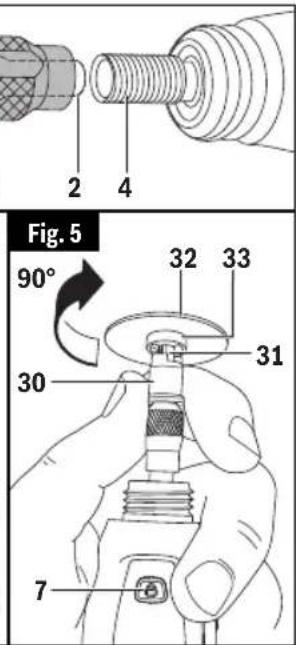
▶ Pour charger le mandrin :
natural_image
Illustration of a dog using a handheld device to interact with a dog's nose (no text or symbols present)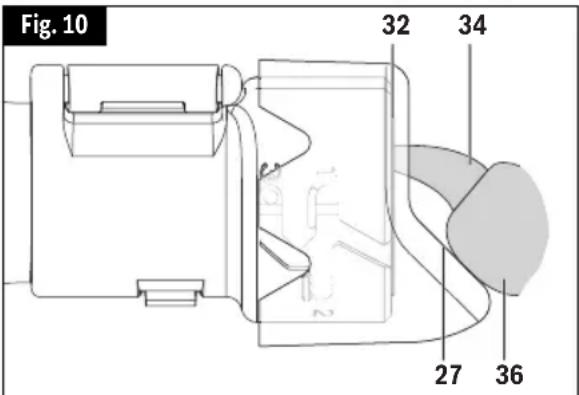
natural_image
Line drawing of a hand holding a Dremel electric shaver tool (no text or symbols on the diagram itself)natural_image
Line drawing of a hand holding a handheld device with a syringe (no text or symbols visible)natural_image
Five simple line drawings of different types of mushrooms or plant stems, no text or symbols presentnatural_image
Simple line drawing of a hammer and a textured surface (no text or symbols)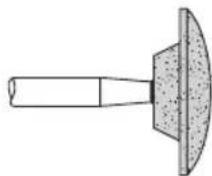
natural_image
Diagram showing a circular structure with radial lines and a rectangular block, no text or symbols presentnatural_image
Line drawing of a hand holding a screwdriver with a small component inserted (no text or symbols)natural_image
Simple line drawing of a pointed tool or blade with a handle, no text or symbols presentnatural_image
Line drawing of a hand holding a tool with a circular component inserted (no text or symbols)natural_image
Technical line drawing of a mechanical component with a circular flange and shaft (no text or symbols)natural_image
Illustration of a hand holding a tool with a textured cylindrical component and an arrow indicating direction (no text or symbols)natural_image
Simple line drawing of a cylindrical object with a pointed tip and textured surface, no text or symbols present.natural_image
Illustration of a hand holding a medical or laboratory instrument with a downward arrow indicating force or movement (no text or symbols present)Fig. 2
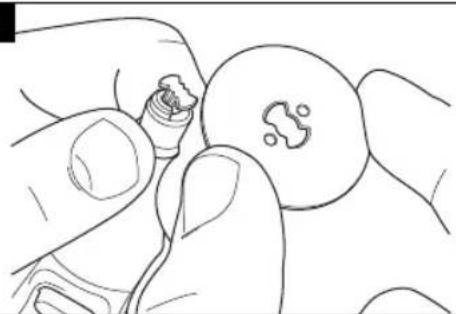
natural_image
Line drawing of a hand holding a small object with a small mark, no text or symbols presentFig. 3
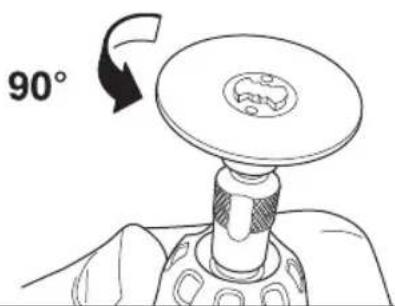
Fig. 4
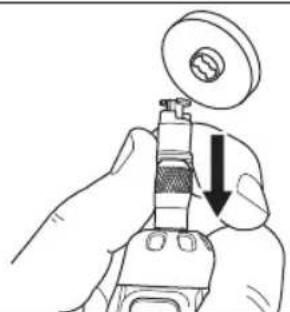
natural_image
Illustration of a hand using a mechanical tool to adjust a circular component (no text or symbols visible)Fig. 5
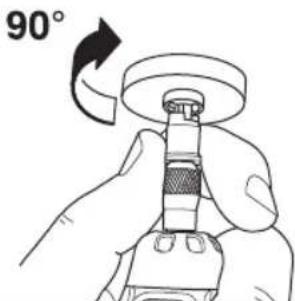
natural_image
Illustration of a hand using a tool to press or install a component, with an upward arrow indicating motion (no text or symbols present)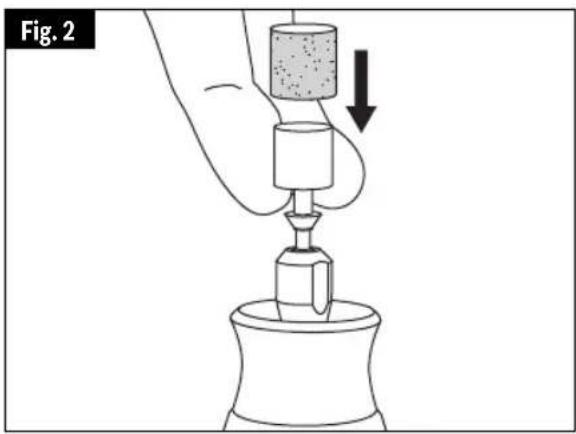
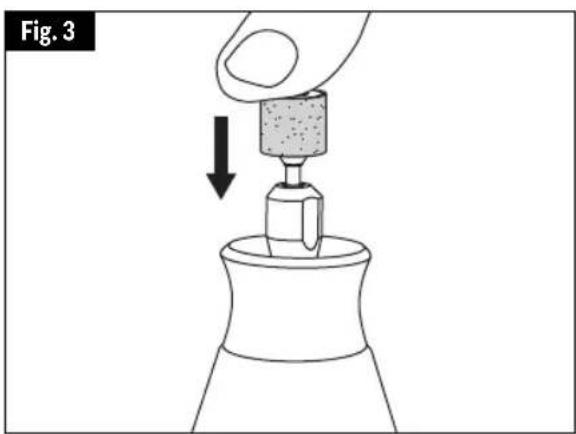
natural_image
Diagram showing a hand pressing down on a mechanical component with an arrow indicating downward motion (no text or symbols)Réglages de vitesse
Walnut Ridge, AR 72476
CANADA
Giles Tool Agency
OU 47 Granger Av.
Scarborough, Ontario Canada
M1K 3K9 1-416-287-3000
Dremel Repairs 173 Lawrence 428 Dock #2 Walnut Ridge, AR 72476
Safety Rules for Pet Grooming
natural_image
Illustration of a dog using a handheld device to interact with a dog's nose (no text or symbols present)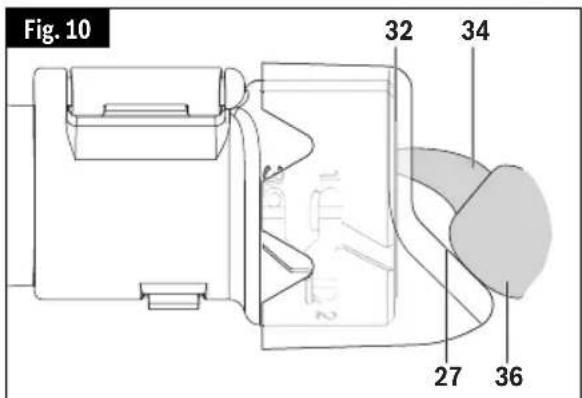
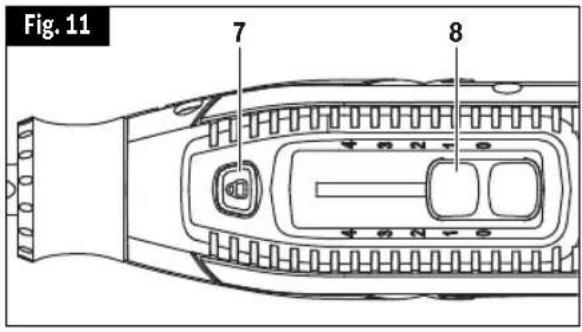
natural_image
Line drawing of a hand holding a Dremel pen tip, no text or symbols presentnatural_image
Line drawing of a hand holding a DREAM electric shaver (no text or symbols on the device itself)Vástago EZ Drum™ No. EZ407SA
natural_image
Five simple line drawings of different types of mushrooms or plant stems, no text or symbols presentnatural_image
Simple line drawing of a hammer and sickle (no text or symbols)Escobillas de alambre
natural_image
Diagram showing a circular structure with radial patterns and an arrow pointing to it, no text or symbols present.natural_image
Line drawing of a hand holding a screwdriver with a clip attached (no text or symbols)natural_image
Simple line drawing of a pointed tool or blade with a handle, no text or symbols presentnatural_image
Line drawing of a hand holding a tool with a circular component inserted (no text or symbols)natural_image
Line drawing of a showerhead with a circular head and handle (no text or symbols)natural_image
Diagram of a hand holding a tool with a circular component and an arrow indicating direction (no text or symbols)natural_image
Simple line drawing of a cylindrical object with a pointed tip and textured surface, no text or symbols present.natural_image
Illustration of a hand holding a micrometer with a downward arrow indicating force or movement (no text or symbols present)Fig. 2
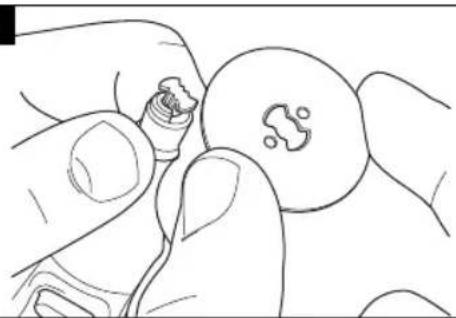
natural_image
Line drawing of a hand holding a small object near a circular object (no text or symbols)Fig. 3
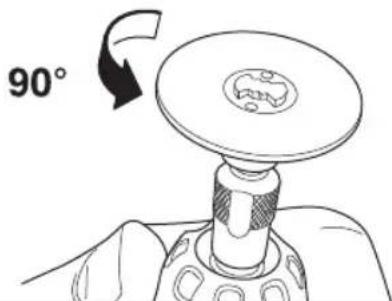
Fig. 4
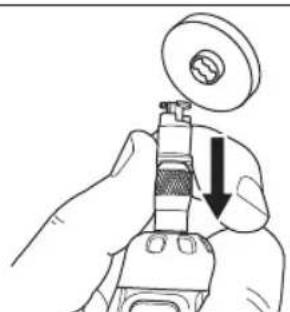
natural_image
Illustration of a hand using a mechanical tool to adjust a component, with no visible text or symbols.Fig. 5
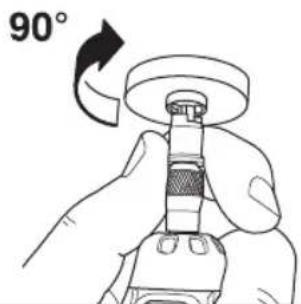
natural_image
Illustration of a hand using a tool to press or install a component, with an upward arrow indicating motion (no text or symbols present)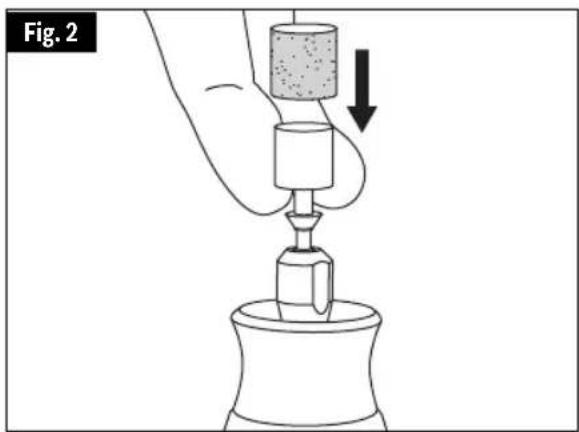
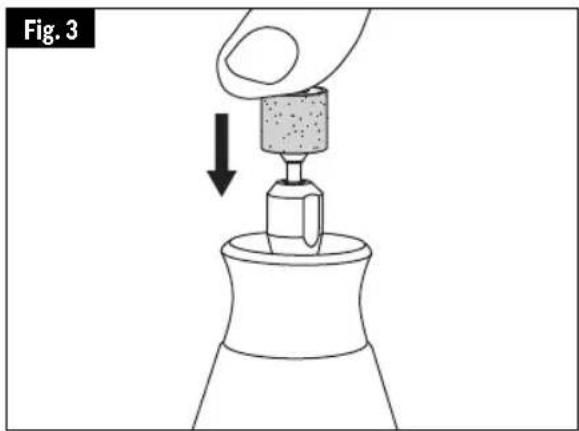
Walnut Ridge, AR 72476
CANADÁ
Giles Tool Agency
0 47 Granger Av.
Scarborough, Ontario Canada
M1K 3K9 1-416-287-3000
Dremel Repairs 173 Lawrence 428 Dock #2 Walnut Ridge, AR 72476
Dremel® Limited Warranty
Your Dremel product is warranted against defective material or workmanship for a period of two years from date of purchase. In the event of a failure of a product to conform to this written warranty, please take the following action:
- DO NOT return your product to the place of purchase.
- Carefully package the product by itself, with no other items, and return it, freight prepaid, along with:
A. A copy of your dated proof of purchase (please keep a copy for yourself).
B. A written statement about the nature of the problem.
C. Your name, address and phone number to:
UNITED STATES
Robert Bosch Tool Corporation
Dremel Repairs 173 Lawrence
428 Dock #2
Walnut Ridge, AR 72476
CANADA
Giles Tool Agency
OR 47 Granger Av.
Scarborough, Ontario Canada
M1K 3K9
1-416-287-3000
OUTSIDE CONTINENTAL UNITED STATES CONTINENTAL UNITED STATES
See your local distributor or write to:
Dremel Repairs 173 Lawrence 428 Dock #2 Walnut Ridge, AR 72476
We recommend that the package be insured against loss or in transit damage for which we cannot be responsible.
This warranty applies only to the original registered purchaser. DAMAGE TO THE PRODUCT RESULTING FROM TAMPERING, ACCIDENT, ABUSE, NEGLIGENCE, UNAUTHORIZED REPAIRS OR ALTERATIONS, UNAPPROVED ATTACHMENTS OR OTHER CAUSES UNRELATED TO PROBLEMS WITH MATERIAL OR WORKMANSHIP ARE NOT COVERED BY THIS WARRANTY.
No employee, agent, dealer or other person is authorized to give any warranties on behalf of Dremel. If Dremel inspection shows that the problem was caused by problems with material or workman ship within the limitations of the warranty, Dremel will repair or replace the product free of charge and return product prepaid. Repairs made necessary by normal wear or abuse, or repair for product outside the warranty period, if they can be made, will be charged at regular factory prices.
DREMEL MAKES NO OTHER WARRANTY OF ANY KIND WHATEVER, EXPRESSED OR IMPLIED, AND ALL IMPLIED WARRANTIES OF MERCHANTABILITY AND FITNESS FOR A PARTICULAR PURPOSE WHICH EXCEED THE ABOVE MENTIONED OBLIGATION ARE HEREBY DISCLAIMED BY DREMEL AND EXCLUDED FROM THIS LIMITED WARRANTY.
This warranty gives you specific legal rights and you may also have other rights which vary from state to state. The obligation of the warrantor is solely to repair or replace the product. The warrantor is not liable for any incidental or consequential damages due to any such alleged defect. Some states do not allow the exclusion or limitation of incidental or consequential damages, so the above limitations or exclusion may not apply to you.
For prices and warranty fulfillment in the continental United States, contact your local Dremel distributor.
Exportado por:© Robert Bosch Tool Corporation Mt. Prospect, IL 60056 -2230, E.U.A.