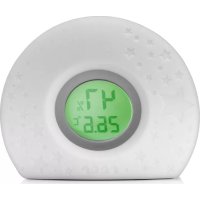
HygroTemp 94020 - Thermometer Reer - Free user manual and instructions
Find the device manual for free HygroTemp 94020 Reer in PDF.



| Product type | 2-in-1 digital thermometer and hygrometer with light indicator |
| Brand | Reer |
| Model | HygroTemp 94020 |
| Dimensions (L×W×H) | Approximately 12 × 4.5 × 9 cm |
| Net weight | Approximately 180 g |
| Power supply | 3 AAA batteries (not included) or micro USB (cable included, adapter not included) |
| Temperature measurement range | 0 °C to 50 °C |
| Temperature accuracy | ± 1 °C |
| Humidity measurement range | 15% to 95% |
| Humidity accuracy | ± 5% (at 40%) |
| Light indicator colors | Blue (<15°C), green (15.1–20.9°C), orange (21–26.9°C), red (≥27°C) |
| Humidity alarm | Flashing light if humidity <40% or >80% |
| Material | Plastic and silicone |
| Protection rating | IP00 (not waterproof) |
| Package contents | 1 device, 1 micro USB cable, 1 instruction manual |
| Care and cleaning | Soft dry cloth; do not immerse in water |
| Warranty | Through the retailer (keep the proof of purchase) |
| Safety | Keep away from children under 3 years; do not open; avoid contact of batteries with metal |
| Batteries | 3 AAA (1.5 V) batteries not rechargeable via USB; remove for external charging |
Frequently Asked Questions - HygroTemp 94020 Reer
User questions about HygroTemp 94020 Reer
0 question about this device. Answer the ones you know or ask your own.
Ask a new question about this device
Download the instructions for your Thermometer in PDF format for free! Find your manual HygroTemp 94020 - Reer and take your electronic device back in hand. On this page are published all the documents necessary for the use of your device. HygroTemp 94020 by Reer.
USER MANUAL HygroTemp 94020 Reer
Page 10-15 Instructions for use
HygroTemp / 2in1 digital hygrometer and thermometer with colour changes
HygroTemp / 2in1 digital hygrometer and thermometer with colour changes

We would like to thank you for purchasing the HygroTemp 2in1 digital hygrometer and thermometer with colour changes by reer. Temperature and air humidity monitoring is particularly important for small children. In order to help you with this, the HygroTemp has 4 changing colours to indicate whether the temperature and air humidity are within the optimal range or whether particular attention or possibly action needs to be taken.
The HygroTemp is recommended for the whole family. It makes it easy to monitor the indoor climate and create an atmosphere of wellbeing.
IMPORTANT! READ CAREFULLY BEFORE USE RETAIN FOR FUTURE REFERENCE.
Table of Contents
Technical data
Safety notes
Scope of delivery
Before first use
Cleaning and care advice
Notes on environmental protection
Warranty
Copyright information
Technical data
Dimensions: approx. 12cm× 4.5cm× 9cm (W x D x H)
Material: plastic, silicone
Output/nominal voltage: 0,3W / 4,5V
Bulb type: 4 LED
Protection category: IP00
Mode of operation: Battery or USB
Type of battery: 3 × AAA batteries (not included)
USB type: Micro USB, length: 100 cm
(USB mains adapter not included)
Battery life: No light, only display indicator, approx. 10,000 h
Light colour: red/orange approx. 30 hours
Light colour: green & blue approx. 100 hours
Temperature measurement range: 0^ 50^;
Temperature measurement accuracy: +/-1^
Air humidity measurement range: 15% - 95%
Air humidity measurement accuracy: + / - 5% (40% 80%) , + / - 8% (< 40%; >80%)
Net weight: ca. 180 g
Safety notes

Please read the instructions carefully prior to installing or using this device. Otherwise, the item's safety functions could be impaired. Please keep the instructions in a safe place for future reference.
Danger
- Avoid bringing the battery and/or electrical connection contacts on the unit into contact with metal objects.
- Risk of swallowing! Keep the battery out of the reach of children.
- Risk of strangulation! The power lead must be secured out of the reach of children to avoid any risk of strangulation.
- If batteries have leaked, use chemical resistant protective gloves and protective glasses.
Warning
- Check the unit for visible damage before each use. If you detect any damage, do not use the unit.
- Avoid extreme heat and direct sunlight.
- Do not subject the device to physical shocks.
Except for the battery compartment cover, never open the unit, as there is a risk of electric shock. If a unit does not work correctly, please do NOT try to fix the problem yourself. Please contact your dealer regarding any problems. - To avoid the risk of electric shock and/or fire hazard, do not submerge the unit or the plug in water, other fluids or flammable cleaning materials.
Caution:
- Please use the product only for its intended purpose.
- The unit is to be used for personal use only, and is not intended for commercial operation.
This product is not a toy! Do not allow children to play with the unit. - The unit should be kept out of reach of children under the age of 3 years.
- Do not use the unit outdoors.
- The bulb in this lamp is not replaceable; when the bulb has reached the end of its life, the entire lamp needs to be replaced
- Remove all packaging material before use.
Scope of delivery
See page 3 (Fig. A)

1 x HygroTemp 2in1 digital hygrometer and thermometer with colour changes
1 x Micro USB cable (USB mains adapter not included)
3 1 x Operating instructions
Putting into operation
The HygroTemp device may be operated with batteries or using the micro USB connector and included cable.
The unit will automatically switch to battery mode as soon as you disconnect the USB connector, provided that batteries have been inserted. If no batteries have been inserted, the unit will switch off.
The USB supply is not for charging batteries. Batteries must be removed from the unit and recharged using an appropriate charging appliance.
USB operation
See page 3 (Fig. B)
- Connect the USB cable with the unit and a USB mains adapter to a suitable power supply. Check whether the details on the rating plate match your mains voltage.
- Click on the button on the back of the unit. This will activate the air humidity and temperature display as well as the indicator light all at once.
- Position the device in such a way that the measurement units on the back of the unit are kept clear and the indoor climate can be optimally measured and evaluated.
- E.g., avoid placing the unit near heating, at an open window or in direct sunlight.
Inserting batteries
See page 3 (Fig. C)
① Open the battery compartment on the underside of the unit.
② Insert the batteries.
③ Close the battery compartment.
Note: Do not use different battery types, or combine new and used batteries together. Batteries must be inserted with the correct polarity.
Temperature indicator light & humidity warning

The indicator light is illuminated in 4 colours to help estimate the optimal room temperature. According to health experts, the best ambient temperature for a children's bedroom is between 16 and 21^ and the optimal sleeping temperature is between 16 and 18^ . The temperature in the room during play should not exceed 21^ .
The optimal air humidity in the room should be between 55% and 60% . It is important to adhere to the maximum lower (40%) and upper (80%) limits for a healthy indoor climate. When the air humidity is below 40% , or exceeds 80% , the light will flash in 10 second intervals.
| Temperature | Light colour | Measurement range | Recommended handling for indoor climate |
| blue <15.0 °C | (<59.0 °F) | If necessary, raise the room temperature | |
| green 15.1°C - | 20.9°C(59 - 69.9 °F) | The temperature lies in the optimal range | |
| orange 21.0°C | - 26.9°C(70.0 - 79.9°F) | Increased room temperature. Lower the temperature by airing or adjusting the heating | |
| red ≥27.0 °C | (≥80.0 °F) | Room temperature is much too high. Lower the temperature by airing, ad-justing the heating or using additional cooling devices | |
| Air humidity | flashing light <40% The air humidity is too | low. Please use an air humidifier or some other means for increasing the air humidity | |
| flashing light >80%, The air humidity is too | high. Caution, risk of mould! Please air the room out 3-4 times a day for approx. 10 min-utes, and put out a bowl of salt or rice | ||
Cleaning and care advice
A soft, dry cloth or alcohol pad is recommended for cleaning. The unit is not waterproof, and must not be submerged in water or be exposed to direct moisture. This product does not require any special maintenance. Repairs to the unit must be carried out by trained personnel only.
Remove the batteries if the unit is left unused for longer periods. Otherwise, the unit may be damaged by leaks and corrosion of the batteries.
Notes on environmental protection
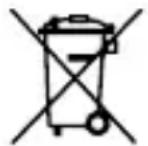
Batteries and waste electronic devices are raw materials and should not be disposed of with household waste, but should rather be handed in at a collection point for batteries and electronic devices.
Users are obliged by law to dispose of batteries and waste electronic devices appropriately.
By reusing the unit, recycling its components or otherwise reusing old batteries and waste electronic devices, you are making an important contribution to protecting the environment.
Battery collection containers are available free of charge in stores that sell batteries, from mail-order warehouses and at municipal collection points. For the disposal of waste equipment, please ask your local authority as to the appropriate disposal point.
The adjacent symbol indicates the obligation of proper disposal.
Warranty
Please retain your receipt, the instruction manual and product number. Claims under warranty or other promises of guarantee shall be processed by the dealer alone.
All technical data, information and characteristics of the product described herein were compiled to the best of our knowledge and belief, and are correct at the time of publication.
The information provided by reer should be correct and reliable. Nevertheless, reer does not accept liability for potential errors in this document and reserves the right to make changes to the product design and/or specifications without prior notice.

Copyright information
Reproduction and disclosure of the information contained in this copyright-protected document, in any form or by any means-graphical, electronic or mechanical, by photocopying, recording on tape or a data retrieval system require prior written consent from reer (even for parts of such information).
USB-type: Micro-USB, length: 100 cm