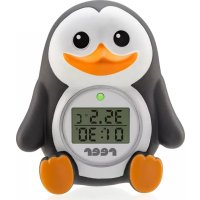
Pinguin 24041 - Thermometer Reer - Free user manual and instructions
Find the device manual for free Pinguin 24041 Reer in PDF.



| Product Type | Digital Bath & Room Thermometer |
| Reference | 24041 |
| Weight | Approximately 68 g |
| Measurement Range | 0 °C to 50 °C |
| Measurement Accuracy | ± 1 °C |
| Over-Temperature Alarm | Adjustable from 37 °C to 40 °C, preset to 39 °C |
| Timer | Up to 59 min 59 s |
| Display | LCD Screen |
| LED Indicator | Flashing green (< 30 °C), flashing red (temperature exceeded or timer off) |
| Audible Signal | When temperature exceeded or timer off |
| Power Supply | 2 LR44 button cells (1.5 V) |
| Battery Life | Approximately 2 years |
| Water Resistance | Suitable for use in water (bath) |
| Main Functions | Temperature measurement, overheat alarm, timer, stopwatch, room thermometer |
| Care and Cleaning | Clean with a soft, slightly damp cloth; do not use abrasive products or solvents |
| Safety | Check for damage before each use; keep out of reach of children; do not ingest batteries |
| Warranty | Keep proof of purchase; contact the retailer for any claims |
Frequently Asked Questions - Pinguin 24041 Reer
User questions about Pinguin 24041 Reer
0 question about this device. Answer the ones you know or ask your own.
Ask a new question about this device
Download the instructions for your Thermometer in PDF format for free! Find your manual Pinguin 24041 - Reer and take your electronic device back in hand. On this page are published all the documents necessary for the use of your device. Pinguin 24041 by Reer.
USER MANUAL Pinguin 24041 Reer
Page 10-15 Instructions for use
Pinguin / Digital bath and room thermometer

| STEP | Uhrzeit einstellen Setting the time | max. Badetemperatur einstellen: setting the maximum bath temperature: | Verwendung des Timers Using the timer |
| 1 | 5 sec. MODE | If the time has already been set: | short PRESS! MODE |
| 2 | hours | 3 sec. MODE | |
| 3 | or MIN+ SEC | 2× set MODE | minutes / second PRESS! MN+ or SEC |
| 4 | short MODE | 6.3 T 12:22 | short PRESS! MODE |
| 5 | minutes | or MIN+ SEC | = 26.3 T 109.55 |
| 6 | or MIN+ SEC | press! MODE | PRESS! MIN+ and SEC |
| 7 | 12:22 The time can be set as soon as the digits stop blinking. | ||
| 8 | Further with maximum temperature setting | ||
Configuración de las functions / Instellen van de functies

| STEP | Stoppuhr Funktion Stopwatch function | Temperatureinheit °F oder °C Setting the temperature unit: °C or °C |
| 1 | The stopwatch starts automatically as soon as the device comes in contact with water. | Time must be displayed 26.3 °C 12:22 |
| 2 | start count up | PRESS! MIN + and SEC |
| 3 | reset time: PRESS! MIN + and SEC | 82.1°F 12:22 |
Pinguin / Digital bath and room thermometer
We would like to thank you for choosing the bath and room thermometer with temperature alarm by reer.
With its integrated functions, you can keep track of your little darling's bathing fun. Supported by two LED colours and an acoustic signal, you can make sure that the bath temperature is optimal. This way, you can avoid scalding and overcooling hazards. The timer and stopwatch functions help in keeping track of the desired bathing time. After bathing, the thermometer can be dried with a soft cloth and placed in your child's room for use as a room thermometer. We are sure you and your family will enjoy the quality of our product for many years to come. Please take a few minutes to read through the safety instructions carefully. You will only be able to use the reer bath and room thermometer with confidence if all of the points mentioned here have been checked. Please keep the instruction manual in a safe place for future reference.
Technical specification
type: digital Bath and room thermometer
item No: 24041
weight: approx. 68 g
measuring range: 0^ to 50^
measuring accuracy: +/-1^
excess temperature: can be set from 37^ to 40^ / 99^ to
104°F; default 39°C
timer: can be set for up to 59 min 59 sec
display: LCD display
LED: blinking green < 30^ C , blinking red if the
temperature is too high or if the timer runs out.
acoustic signal: if the temperature is too high or if the
timer runs out.
General safety instructions
It is imperative that this safety information is observed. Failure to observe this information will render any warranty claim void. Improper handling or operation, and any damage resulting from this (damage to property or personal injury), will render any warranty claim void.
! Read the instruction manual before using the equipment! It contains important instructions on how to start and operate the product.
! Please keep the instruction manual in a safe place for future reference. Ensure the manual is passed on to third parties with the unit.
! Please use the article only for its intended purpose.
! The product is only intended for private use, it is unsuitable for medical purposes or for public facilities.
! Repairs may only be made by our Customer Service engineers or authorised dealers. Do not open the equipment or repair it, as proper functioning cannot be guaranteed in such case. Non-compliance voids the warranty. If you have any questions about the use of our equipment, please contact your dealer.
! These safety instructions must be observed!
Safety instructions on first use
Remove all packaging and any surplus components before first use to prevent your child being injured or choking. Before every use, check the equipment for any obvious damage. If you detect any damage, do not use this equipment.
The battery (LR44) has already been inserted into the new device.
The batteries included must not be recharged or reactivated by other means and may not be disassembled, exposed to fire or short-circuited. Remove the batteries from the device if it is not used for a long period of time.

With the digital bath and room thermometer by reer, you can set the optimal bathing temperature for your baby and determine the maximum temperature. If this temperature is exceeded, an acoustic signal is produced, and a red LED starts blinking.
The optimum water temperature should be between 36.5^ and 38^ To avoid overcooling, the green LED blinks as soon as the water temperature falls below 37^
Warning: scalding hazard. A water temperature of more than 39^ can lead to severe burns to your child's skin.
The device complies with all the EU safety regulations for toys, so that safe fun in the bath is ensured.
Cleaning and care instructions
Clean the unit with a soft, slightly damp cloth. Do not use any abrasive cleaners or solvents.
- Remove the batteries if the unit will be not be in use for a longer period of time.
Deliverables and unit description
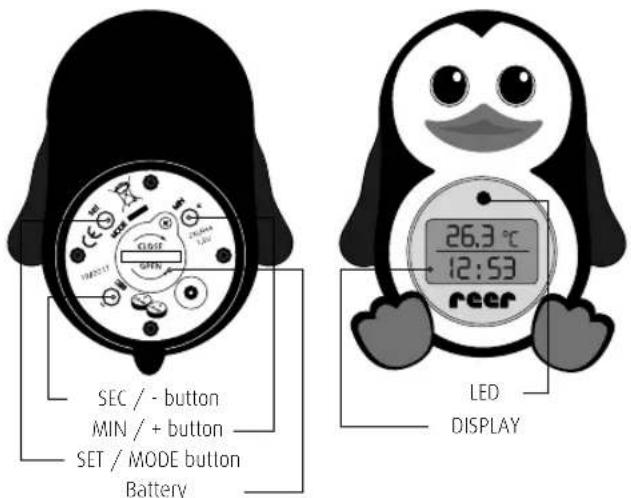
Preparing for first use
The bath and room thermometer helps keep track of the temperature of bathwater and the optimum room Temperature for your baby.
After 30 minutes, the temperature display switches off, and the time is displayed constantly.
The temperature display can be reactivated by pressing any button.
Setting the functions

on page 6-7

Application as a bath thermometer
Before using the product as a bath thermometer, please select your preferred temperature unit: ^ C or ^ F .
- You can put the thermometer in the bath when filling it with water. This guarantees a fast and precise temperature measurement.
The stopwatch starts automatically as soon as the thermometer is placed in the water.
- Mix the water well, so that its temperature is evenly distributed.
- Leave the thermometer in the water for about 90 seconds, so that the exact temperature can be determined.
- As soon as you put your baby in the water, you can start the timer. This way, you can set a specific bathing time. After the timer runs out, an acoustic signal will be produced.
Changing the batteries
The battery life is approximately two years, depending on the frequency of use. If the display becomes too dim, please change the batteries. Proceed as follows:
- Remove the safely screw from the battery cover with a screwdriver.
- Rotate the battery cover outwards.
-
Carefully remove the empty batteries with tweezers.
-
Insert new batteries (two LR44 button cells) and affix the battery cover. Make sure that the sealing ring does not slip.
- Add some silicone grease onto the edge of the battery cover, so that it remains as watertight as possible.
Note: After changing the battery, it cannot be guaranteed that the device will be watertight.
ATTENTION - Risk of injury:

Before every use, check the equipment for any obvious damage. If you find any damage, do not use this equipment.
The unit and batteries should always be kept out of reach of children.
- Batteries can be extremely dangerous if swallowed. In the event of batteries being swallowed seek medical help immediately.
- Batteries contain acids which are hazardous to health. To avoid discharge from batteries they must be properly disposed of by a dealer, or at a municipal collection point.
- Never use old and new batteries, or batteries of different types, simultaneously.
Use chemical-resistant protective gloves and goggles in the event of discharge from batteries.
Environmental protection
At the end of its life, this product must not be disposed of as normal domestic waste, but should be recycled at a collection point for electrical appliances. Please see the relevant symbol on the product, in the user manual and packaging. Materials can be recycled as specified. An important contribution to the protection of the environment can be made by reusing the unit, recycling its components or otherwise reusing old appliances. Please contact your local council to find out more about an appropriate disposal centre.
Batteries must be properly disposed of. Appropriate bins for the disposal of batteries are available for this purpose at battery retailers, and also at communal collection points.
Warranty
Please retain your receipt, the user manual and part number. Warranty claims or claims from promises of guarantee must be processed by the dealer.
The technical specification, instructions and characteristics of the product described herein have been compiled to the best of our knowledge and belief and are correct at the time of printing.
Any instructions provided by reer should be correct and authoritative. Nevertheless, reer does not accept liability for potential errors in this document and reserves the right to make changes to the product design and/or specifications without prior notice.
Copyright-protected
Reproduction and disclosure of information contained in this copyright-protected document, in any form or by any means - graphical, electronic or mechanical by photocopying, recording on tape or storage in a data retrieval system (even in part), require prior written consent from reer.