ManualGo.com
KD65A85 - TV SONY - Free user manual and instructions
Find the device manual for free KD65A85 SONY in PDF.



Download the instructions for your TV in PDF format for free! Find your manual KD65A85 - SONY and take your electronic device back in hand. On this page are published all the documents necessary for the use of your device. KD65A85 by SONY.
USER MANUAL KD65A85 SONY
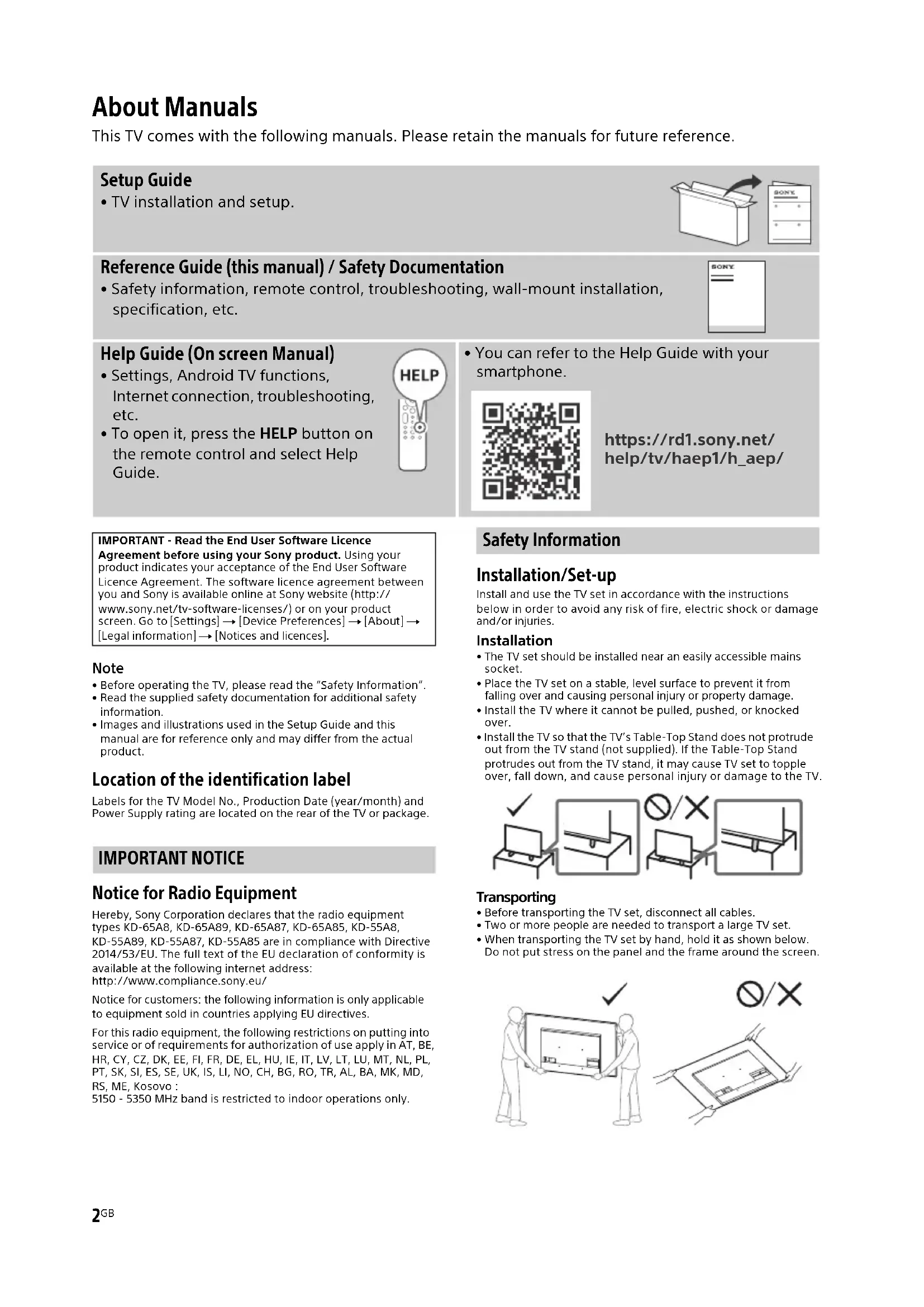
This TV comes with the following manuals. Please retain the manuals for future reference.
Setup Guide
- TV installation and setup.
Reference Guide (this manual) / Safety Documentation
- Safety information, remote control, troubleshooting, wall-mount installation, specification, etc.
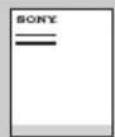
Help Guide (On screen Manual)
- Settings, Android TV functions, Internet connection, troubleshooting, etc.
- To open it, press the HELP button on the remote control and select Help Guide.
- You can refer to the Help Guide with your smartphone.
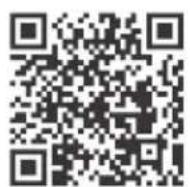
https://rd1.sony.net/help/tv/haep1/h_aep/
IMPORTANT - Read the End User Software Licence
Agreement before using your Sony product. Using your product indicates your acceptance of the End User Software Licence Agreement. The software licence agreement between you and Sony is available online at Sony website (http:// www.sony.net/tv-software-licenses/) or on your product screen. Go to [Settings] [Device Preferences] [About] [Legal information] [Notices and licences].
Note
- Before operating the TV, please read the "Safety Information".
- Read the supplied safety documentation for additional safety information.
Images and illustrations used in the Setup Guide and this manual are for reference only and may differ from the actual product.
Location of the identification label
Labels for the TV Model No., Production Date (year/month) and Power Supply rating are located on the rear of the TV or package.
IMPORTANT NOTICE
Notice for Radio Equipment
Hereby, Sony Corporation declares that the radio equipment types KD-65A8, KD-65A89, KD-65A87, KD-65A85, KD-55A8, KD-55A89, KD-55A87, KD-55A85 are in compliance with Directive 2014/53/EU. The full text of the EU declaration of conformity is available at the following internet address: http://www.compliance.sony.eu/
Notice for customers: the following information is only applicable to equipment sold in countries applying EU directives.
For this radio equipment, the following restrictions on putting into service or of requirements for authorization of use apply in AT, BE, HR, CY, CZ, DK, EE, FI, FR, DE, EL, HU, IE, IT, LV, LT, LU, MT, NL, PL, PT, SK, SI, ES, SE, UK, IS, LI, NO, CH, BG, RO, TR, AL, BA, MK, MD, RS, ME, Kosovo : 5150 - 5350 MHz band is restricted to indoor operations only.
Safety Information
Installation/Set-up
Install and use the TV set in accordance with the instructions below in order to avoid any risk of fire, electric shock or damage and/or injuries.
Installation
- The TV set should be installed near an easily accessible mains socket.
- Place the TV set on a stable, level surface to prevent it from falling over and causing personal injury or property damage.
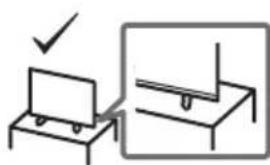
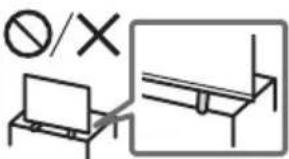
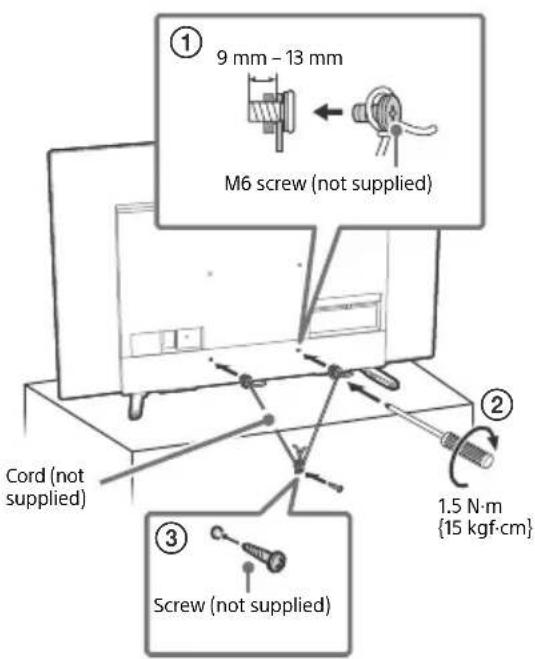
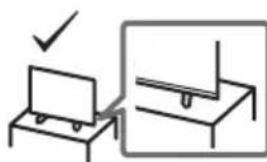
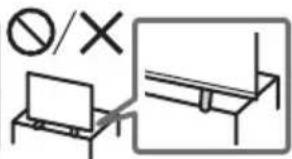
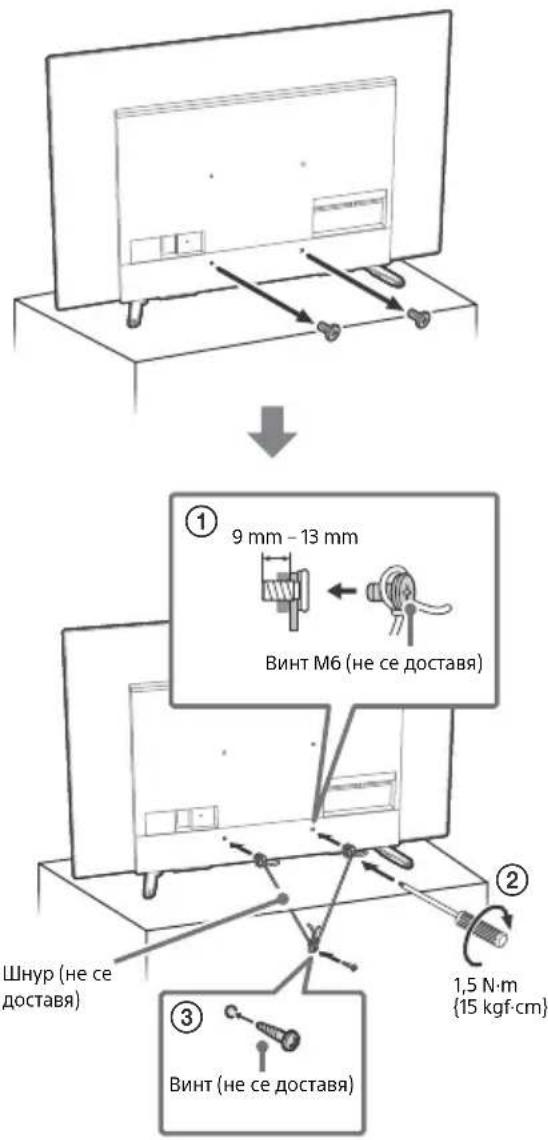
Install the TV where it cannot be pulled, pushed, or knocked over. - Install the TV so that the TV's Table-Top Stand does not protrude out from the TV stand (not supplied). If the Table-Top Stand protrudes out from the TV stand, it may cause TV set to topple over, fall down, and cause personal injury or damage to the TV.
Transporting
- Before transporting the TV set, disconnect all cables.
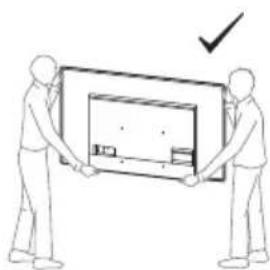
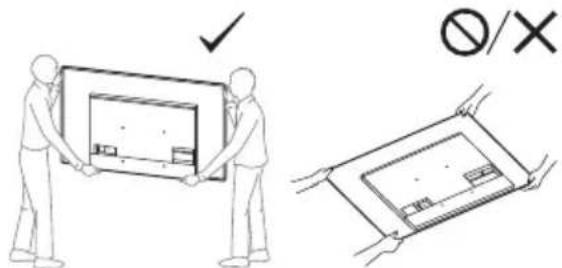
- Two or more people are needed to transport a large TV set.
- When transporting the TV set by hand, hold it as shown below. Do not put stress on the panel and the frame around the screen.
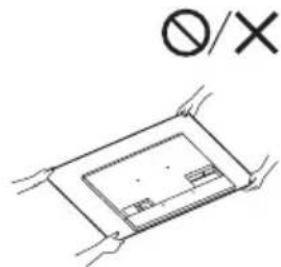
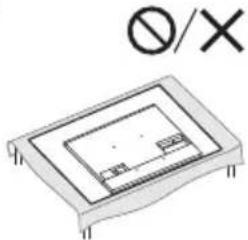
- When handling or mounting the TV set, do not lay down the TV.

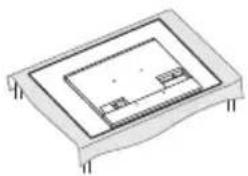
- When transporting the TV set, do not subject it to jolts or excessive vibration.
- When transporting the TV set for repairs or when moving, pack it using the original carton and packing material.
Topple prevention
Protecting the TV Screen (OLED TV)
Precautions to Protect the Screen from Damage
Image retention
OLED TV's are susceptible to image retention (burn-in) due to the characteristics of the materials used. Image retention may occur if images are displayed in the same location on the screen repeatedly or over extended periods of time. This is not a malfunction of the TV. Avoid displaying images that may cause image retention.
The following are examples of images that may cause image retention:
Content with black bars either on the top and bottom and/or the left and right sides of the screen. (for example, Letterboxed, 4:3 screen, Standard definition)
Static images such as photos.
Video games that might have static content in some part of the screen.
- On-screen menus, programme guides, channel logos etc.
Static content from applications.
- On-screen tickers, such as those used for news and headlines.
To reduce the risk of image retention:
- Sony recommends that you turn off the TV normally by pressing the power button on the remote control or the TV.
- Fill the screen by changing [Wide mode] to eliminate the black bars. Select [Wide mode] other than [Normal].
- Turn off the OSD (On Screen Display) by pressing the button, and turn off the menus from connected equipment. For details, refer to the instruction manuals for the connected equipment.
- Avoid displaying static images with bright colours (including white), clocks or logos on any portion of the screen.
- Set the picture settings based on the ambient conditions. The Standard Picture is recommended for home use and when viewing content that often displays the station logos, etc.
The TV has following features to help reduce/prevent image retention.
Panel refresh
A notification to perform a panel refresh will appear after the TV has been in use for long periods of time. It is recommended to perform a panel refresh when you receive this notification. A panel refresh will adjust the panel uniformity. Panel refresh can also be performed manually and should only be used when image retention is very noticeable.
Caution:
- The Panel refresh function may affect the panel. As a reference, perform the Panel refresh only once a year, do not perform it more than once a year as it may affect the usable life of the panel.
- Panel refresh takes about one hour to complete.
- A white line may be displayed on the screen during the Panel refresh, this is not a malfunction of the TV.
- Panel refresh will only work when the room temperature is between 10^ and 40^ .
Pixel shift
Automatically moves the image on the screen to prevent image retention.
Other feature
The screen brightness is automatically reduced when displaying still images, clocks, bright colours or logos etc.
Remote Control and TV
The remote control shape, location, availability and function of remote control buttons may vary depending on your region/ country/TV model.
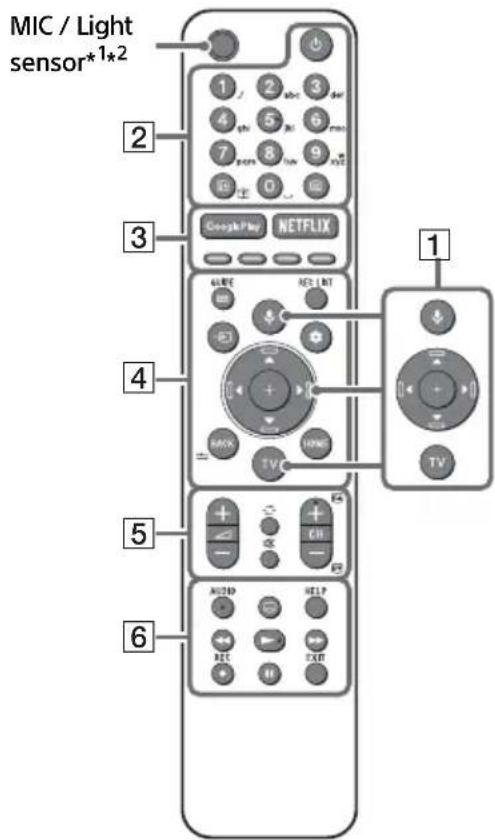
1 (Microphone): Use the Google Assistant*3*4 or voice search*4. For hints on how to control your TV press (Microphone) button and speak the phrase "voice hints".*3
/ / / / On screen menu navigation and selection. TV: Display TV channel list or switch to input.
2 (TV standby) Number buttons
+/Info/Text reveal): Display information.
( Text):Display text information
3 Google Play / NETFLIX*3 / Colour buttons
GUIDE:Display the digital programme guide of TV or TV box*3*5.
REC LIST: Display the Rec list of USB HDD/ DVR*5.
Input select):Display and select the input source,etc.
Quick settings):Display Quick Settings. BACK/ HOME
5 +/-(Volume)
(Jump) (Mute)*6
CH + / - / 日 : Select the channel, or next (B) / previous (B) page.
6 AUDIO: Select the sound of multilingual source or dual sound (depend on programme source).
(Subtitle setting)
HELP: Display the Help menu.
<</>>/>>/11
- RECRd record the currently viewed programme on USB HDD/DVR*5.
EXIT
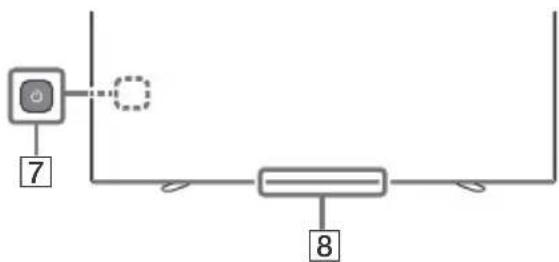
7 (Power)
Remote Control sensor / Light sensor / LED
1 The remote control backlight will illuminate when the light sensor detects the ambient light is low. Automatic illumination of the backlight can be turned off.
2 RMF-TX611E only. To see the model name of the remote control, open the remote control cover and see the label on the remote control.
3 Only on limited region/country/TV model/language.
4 The Google Assistant or voice search requires an Internet connection.
5 [TV box setup] setting is required.
6 Accessibility shortcut is available by pressing and holding × (Mute).
For more information, refer to the Help Guide.
Installing the TV to the Wall
Using the optional Wall-Mount Bracket (SU-WL850 or SU-WL450)* (not supplied)
To Customers:
For product protection and safety reasons, Sony strongly recommends that installation of your TV be performed by Sony dealers or licensed contractors. Do not attempt to install it yourself.
To Sony Dealers and Contractors:
Provide full attention to safety during the installation, periodic maintenance and examination of this product.
Wall-Mount Bracket Installation Information
This TV's instruction manual only provides the steps to prepare the TV for Wall-Mount installation before it is installed on the wall. For instructions on Wall-Mount Bracket installation, see the Installation Information (Wall-Mount Bracket) on the product page for your TV model. https://www.sony.eu/support
Preparing for Wall-Mount Installation
- Prepare the TV for the Wall-Mount Bracket before making cable connections.
- Follow the instruction guide provided with the Wall-Mount Bracket for your model. Sufficient expertise is required in installing this TV, especially to determine the strength of the wall for withstanding the TV's weight.
- Be sure to entrust the attachment of this product to the wall to Sony dealers or licensed contractors and pay adequate attention to safety during the installation. Sony is not liable for any damage or injury caused by mishandling or improper installation.
- The screws for Wall-Mount Bracket are not supplied (SU-WL450 only).
- Only qualified service personnel should carry out wall-mount installations.
- For safety reasons, it is strongly recommended that you use Sony accessories, including:
- Wall-Mount Bracket SU-WL850
-
Wall-Mount Bracket SU-WL450
-
Be sure to use the screws supplied with the TV when attaching the Wall-Mount Bracket to the TV set (SU-WL850 only). Be sure to use the screws supplied with the Wall-Mount Bracket when attaching the Wall-Mount Bracket to the TV set (except SU-WL850).
The supplied screws are designed as indicated by illustration when measured from the attaching surface of the Wall-Mount Bracket. The diameter and length of the screws differ depending on the Wall-Mount Bracket model. Use of screws other than those supplied may result in internal damage to the TV set or cause it to fall, etc.
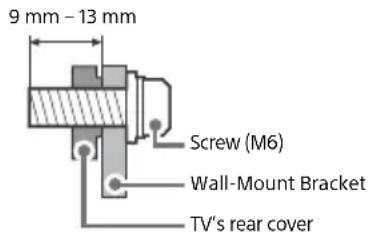
- Be sure to store the unused screws and Table-Top Stand in a safe place until you are ready to attach the Table-Top Stand. Keep the screws away from small children.
- Only on limited region/country/TV model.
Installing the TV to the Wall from Carton
1 Remove the centre cushion.
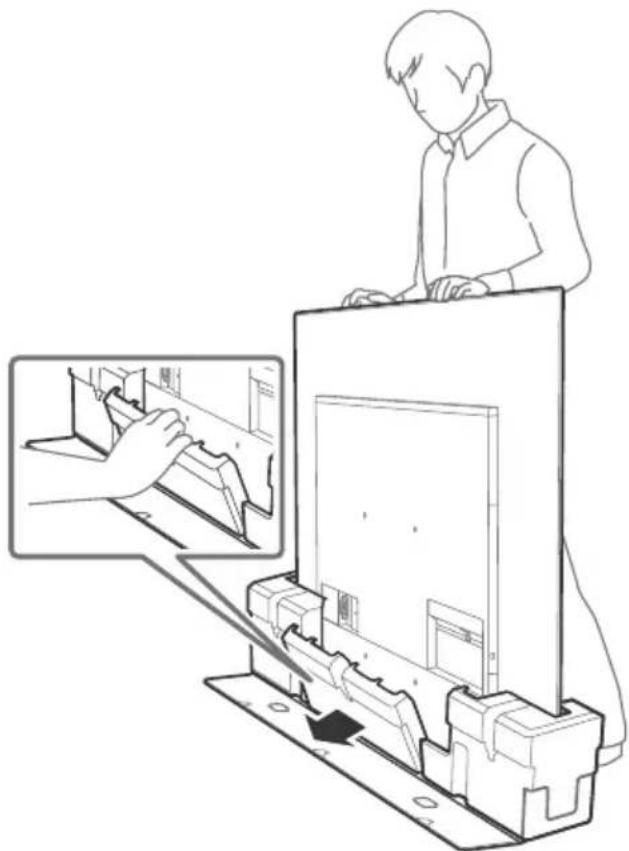
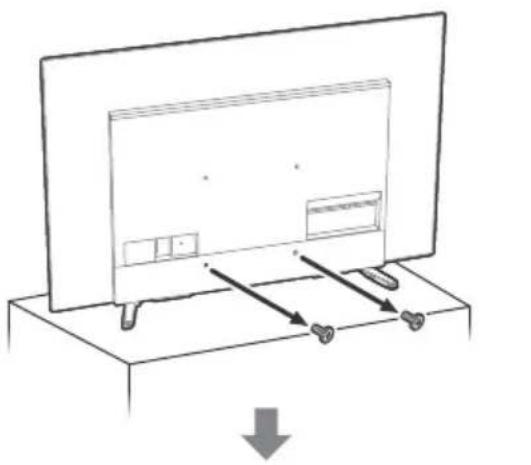
2 Remove the screws from the rear of the TV.
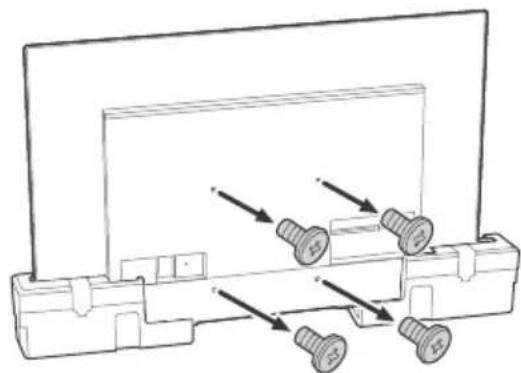
Note
- Be sure to store the removed screws and reuse when attaching the Wall-Mount Bracket to the TV set (SU-WL850 only). Keep the screws away from small children.
Installing the TV to the Wall from Table-Top Stand
Remove the screws from the rear of the TV.
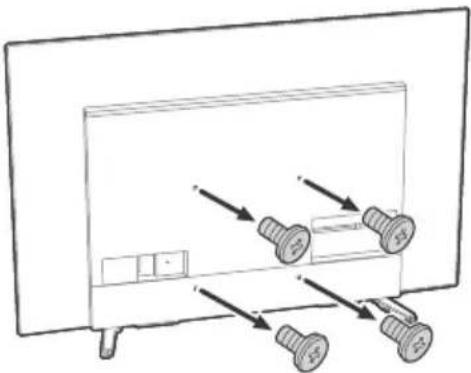
Note
- Be sure to store the removed screws and reuse when attaching the Wall-Mount Bracket to the TV set (SU-WL850 only). Keep the screws away from small children.
Detaching the Table-Top Stand from the TV
1 Remove one side of the Table-Top Stand at a time. Firmly hold the Table-Top Stand securely with both hands while the other people lift up the TV.
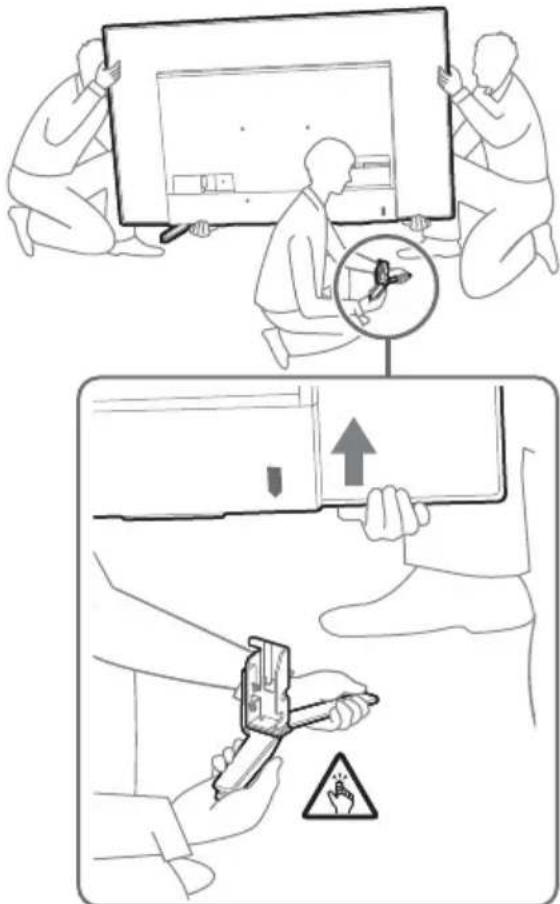
2 Repeat the previous step and remove the other side of the Table-Top Stand.
Note
- Three or more people are required to detach the Table-Top Stand.
- Be careful not to use excessive force while detaching the Table-Top Stand from the TV as it may cause the TV set to fall resulting in personal injury or physical damage to the TV.
Take care when handling the Table-Top Stand to prevent damage to the TV. - Be careful when lifting the TV as the Table-Top Stand is detached, the Table-Top Stand may topple over and cause personal injury.
Take care when removing the Table-Top Stand from the TV to prevent it from falling over and damaging the surface that the TV is sitting on.
Troubleshooting
General troubleshooting for issues like: black screen, no sound, frozen picture, TV does not respond, or network is lost, do the following steps.
1 Restart your TV by pressing the power button on the remote control for about five seconds. The TV will restart. If the TV does not recover, try unplugging the mains lead. Then press the power button on the TV, and release it. Wait for two minutes, and plug in the mains lead.
2 Refer to the Help menu by pressing HELP on the remote control.
3 Connect your TV to the Internet and perform a software update. Sony recommends you to keep your TV software updated. Software updates provide new features and performance improvements.
4 Visit Sony support website (information provided at the end of this manual).
When you plug in the TV, the TV may not be able to turn on for a while even if you press the power button on the remote control or the TV.
It takes time to initialize the system. Wait for about one minute, then operate it again.
The remote control does not function.
- Replace the batteries.
The parental lock password has been forgotten.
- Enter 9999 for the PIN and enter the new PIN.
The screen becomes darker while watching TV.
- If the whole image or part of the image remains still, the screen brightness will be gradually reduced to prevent image retention. This is not a malfunction of the TV.
You are concerned about image retention.
If the same image is displayed repeatedly or for long periods of time, image retention may occur. To reduce image retention, we recommend that you turn off the TV normally by pressing the power button on the remote control or the TV.
Note
- Perform Panel refresh manually only when image retention is particularly noticeable. As a reference, perform it only once a year. Avoid performing it more than once a year because it may affect the usable life of the panel.
- Images that include clocks, logos and bright colours (including white) easily cause image retention. Avoid displaying these types of images for long periods of time, otherwise image retention may occur.
A white line appears on the screen.
- Panel refresh automatically runs after the TV has been used for long periods of time to reduce image retention. Panel refresh starts after the TV is turned off and takes about one hour to complete. A white line may be displayed on the screen during the Panel refresh. This is not a malfunction of the TV.
The message [Panel refresh did not finish...] is displayed.
When i) the TV is turned on, ii) the mains lead is unplugged, or iii) the room temperature falls outside of the range between 10^ and 40^ during the Panel refresh, the Panel refresh is not completed. Please avoid the above three conditions during the Panel refresh.
![SONY KD65A85 - The message [Panel refresh did not finish...] is displayed. - 1](/content/2026/04/586206/images/d621a4c21ed5a885fd6eb3c4cd70e48d6829a2f10b6f7f6f27cdc0f32dd1c2b1.jpg)
For more information on troubleshooting, refer to the Help Guide.
Specifications
System
Panel system: OLED (Organic Light Emitting Diode) Panel
TV system: Depending on your country/area selection/TV model
Analogue: B/G, D/K, I
Digital: DVB-T/DVB-C/DVB-T2*1
Satellite*1: DVB-S/DVB-S2
Colour system: PAL/SECAM/NTSC3.58 (Video only)/NTSC4.43 (Video only)
Channel coverage: Depending on your country/
area selection/TV model
Analogue: UHF/VHF/Cable
Digital: UHF/VHF/Cable
Satellite*1:IF Frequency 950-2,150 MHz
Sound output: 10W + 10W + 5W + 5W
Wireless technology
Protocol IEEE 802.11a/b/g/n/ac
Bluetooth® Version 4.2
Frequency band(s)
| Frequency range Output power | |
| Wireless LAN (TV) | |
| 2400-2483.5 MHz | < 20.0 dBm |
| 5150-5250 MHz | < 23.0 dBm |
| 5250-5350 MHz | < 20.0 dBm |
| 5470-5725 MHz | < 20.0 dBm |
| 5725-5850 MHz | < 13.9 dBm |
| Bluetooth® (TV) | |
| 2400-2483.5 MHz < 10.0 dBm | |
| Bluetooth® (Remote control) | |
| 2400-2483.5 MHz < 10.0 dBm | |
Input/Output jacks
Antenna (aerial)/cable
75 ohm external terminal for VHF/UHF
Satellite antenna*
Female F Type Connector, 75 ohm.
DiSEqC1.0, LNB 13 V/18 V & 22 kHz tone, Single Cable Distribution EN50494.
一 / 一 AVIN
Video/Audio input (mini jack)
HDMI IN 1/2/3/4 (support 4K resolution, HDCP
2.3-compatible)
Video:
4096 × 2160p (50, 60 Hz)*²*³, 4096 × 2160p
(24Hz)^2 3840×2160p (50, 60 Hz) ^3 , 3840 ×
2160p (24, 25, 30 Hz), 1080p (30, 50, 60, 100,
120 Hz), 1080/24p, 1080i (50, 60 Hz), 720p
(30, 50, 60 Hz), 720/24p, 576p, 480p, PC
Formats*4
Audio:
In eARC (Enhanced Audio Return Channel) mode
Refer to the Help Guide for details.
Except eARC mode
5.1 channel linear PCM: 32/44.1/48/88.2/
96/176.4/192 kHz 16/20/24 bits, Dolby
Audio, Dolby Atmos, DTS
eARC/ARC (Enhanced Audio Return Channel/
Audio Return Channel) (HDMI IN 3 only)*5
In eARC mode
Refer to the Help Guide for details.
In ARC mode
Two channel linear PCM: 48 kHz 16 bits,
Dolby Audio, Dolby Atmos, DTS
DIGITAL AUDIO OUT (OPTICAL)
Digital optical jack (Two channel linear PCM:
48 kHz 16 bits, Dolby Audio, DTS)
(Stereo mini jack)
Headphone
1,2,3 (HDD 6 REC)*
USB device port (3 USB HDD device for REC feature)
USB port 1 and 2 support High Speed USB (USB 2.0)
USB port 3 supports Super Speed USB (USB 3.1 Gen 1)
CAM (Conditional Access Module) slot
LAN
10BASE-T/100BASE-TX connector (Depending on the operating environment of the network, connection speed may differ. The
communication rate and quality are not guaranteed.)
Power, Product Fiche and others
Power requirements
220V-240VAC,50Hz
Energy Efficiency Class
KD-65A8 / KD-65A89 / KD-65A87 / KD-65A85:
A
KD-55A8 / KD-55A89 / KD-55A87 / KD-55A85:
B
Screen size (measured diagonally) (Approx.)
KD-65A8 / KD-65A89 / KD-65A87 / KD-65A85:
163.9 cm / 65 inches
KD-55A8 / KD-55A89 / KD-55A87 / KD-55A85:
138.8 cm / 55 inches
Power consumption
In [Standard] mode
KD-65A8 / KD-65A89 / KD-65A87 /
KD-65A85:161W
KD-55A8 / KD-55A89 / KD-55A87 /
KD-55A85:131W
In [Vivid] mode
KD-65A8 / KD-65A89 / KD-65A87 /
KD-65A85:479W
KD-55A8 / KD-55A89 / KD-55A87 /
KD-55A85:363W
Annual energy consumption*
KD-65A8 / KD-65A89 / KD-65A87 / KD-65A85:
223 kWh per year
KD-55A8 / KD-55A89 / KD-55A87 / KD-55A85:
182 kWh per year
Standby power consumption*8*9
KD-65A8 / KD-65A89 / KD-65A87 / KD-65A85:
0.50 W (28 W in software/EPG update mode)
KD-55A8 / KD-55A89 / KD-55A87 / KD-55A85:
0.50 W (33 W in software/EPG update mode)
Display resolution
3,840 dots (horizontal) × 2,160 lines (vertical)
Output Rating
USB 1/2
5V-500mA MAX
USB3
5V-900mA MAX
Dimensions (Approx.) (w× h× d) (cm)
with Table-Top Stand
Standard position:
KD-65A8: 144.8 × 85.7 × 32.6
KD-65A89 / KD-65A87 / KD-65A85: 144.8 ×
86.3 × 29.5
KD-55A8: 122.7 × 73.3 × 32.6
KD-55A89 / KD-55A87 / KD-55A85: 122.7 × 73.9
× 29.5
Sound bar position:
KD-65A8: 144.8 × 90.8 × 32.3
KD-55A8: 122.7 × 78.4 × 32.3
without Table-Top Stand
KD-65A8 / KD-65A89 / KD-65A87 / KD-65A85:
144.8 × 83.6 × 5.2
KD-55A8 / KD-55A89 / KD-55A87 / KD-55A85:
122.7 × 71.2 × 5.2
Mass (Approx.) (kg)
with Table-Top Stand (without Table-Top Stand) KD-65A8:23.6 (21.8)
KD-65A89 / KD-65A87 / KD-65A85: 23.2 (21.8)
KD-55A8: 18.6 (16.8)
KD-55A89 / KD-55A87 / KD-55A85: 18.2 (16.8)
Others
Optional accessories
Wall-Mount Bracket: SU-WL850 / SU-WL450
Operating temperature: 0^ - 40^
Operating humidity: 10% -80% RH
(non-condensing)
1 Not all the TV sets have DVB-T2 or DVB-S/S2
technology or satellite antenna terminal.
2 When 4096 × 2160p is input and [Wide mode] is set to [Normal], the resolution is displayed as 3840 × 2160p . To display 4096 × 2160p , set [Wide mode] setting to [Full 1] or [Full 2].
3 To support 18 Gbps, set [HDMI signal format] to [Enhanced format].
4 Refer to the online Help Guide for details.
5 Connect your audio system to the HDMI IN 3 to route TV audio to your audio system.
6 Only on limited region/country/TV model.
7 Energy consumption in kWh per year, based on the power consumption of the television operating 4 hours per day for 365 days. The actual energy consumption will depend on how the television is used.
8 Specified standby power is reached after the TV finishes necessary internal processes.
*9 Standby power consumption will increase when your TV is connected to the network.
Note
- Optional accessories availability depends on countries/region/TV model/stock.
- Design and specifications are subject to change without notice.
- Subscriptions for services and applications may be required and additional terms, conditions and/or charges may apply when using the Google Assistant.
Notes on Digital TV function
- Digital TV (DVB terrestrial, satellite and cable), interactive services and network functions may not be available in all countries or areas. Some functions might not be enabled or might not operate correctly with some providers and network environments. Some TV service providers may charge a fee for their services.
- This TV supports digital broadcasting using MPEG-2, H.264/MPEG-4 AVC and H.265/HEVC codes, but compatibility with all operator/service signals, which may change over time, cannot be guaranteed.
Trademark Information
- The terms HDMI, HDMI High-Definition Multimedia Interface, and the HDMI Logo are trademarks or registered trademarks of HDMI Licensing Administrator, Inc.
- Dolby, Dolby Vision, Dolby Atmos, Dolby Audio, and the double-D symbol are trademarks of Dolby Laboratories. Manufactured under license from Dolby Laboratories. Confidential unpublished works. Copyright © 2012-2018 Dolby Laboratories. All rights reserved.
- Gracenote, the Gracenote logo and logotype, "Powered by Gracenote" logo are either registered trademarks or trademarks of Gracenote, Inc. in the United States and/or other countries.
- Google, Google Play, Chromecast, YouTube, Android TV and other related marks and logos are trademarks of Google LLC.
- For DTS patents, see http://patents.dts.com. Manufactured under license from DTS, Inc. DTS, the Symbol, DTS and the Symbol together, and Digital Surround are registered trademarks or trademarks of DTS, Inc. in the United States and/or other countries. © DTS, Inc. All Rights Reserved.
- Netflix is a registered trademark of Netflix, Inc.
- DiSEqC™ is a trademark of EUTELSAT. This TV supports DiSEqC 1.0. This TV is not intended for controlling motorized antennas.
TUXERA is a registered trademark of Tuxera Inc. in the US and other countries. - All other trademarks are the property of their respective owners.
https://rd1.sony.net/help/tv/haep1/h_aep/
Analogue: B/G, D/K, I
Analogue: UHF/VHF/Cable
2160p (24, 25, 30 Hz), 1080p (30, 50, 60, 100,
120 Hz), 1080/24p, 1080i (50, 60 Hz), 720p
(30, 50, 60 Hz), 720/24p, 576p, 480p,
Formats PC*
Audio :
En mode eARC (Enhanced Audio Return
Channel)
eARC/ARC (Enhanced Audio Return Channel/
Audio Return Channel) (HDMI IN 3
uniquement)*5
En mode eARC
DIGITAL AUDIO OUT (OPTICAL)
https://rd1.sony.net/help/tv/haep1/h_aep/
https://www.sony.eu/support
Digital: UHF/VHF/Cable
2160p (24, 25, 30 Hz), 1080p (30, 50, 60, 100,
120 Hz), 1080/24p, 1080i (50, 60 Hz), 720p
(30, 50, 60 Hz), 720/24p, 576p, 480p,
Formatos de PC*
Audio:
En el modo eARC (Enhanced Audio Return
Channel)
eARC/ARC (Enhanced Audio Return Channel/
DIGITAL AUDIO OUT (OPTICAL)
Toma digital optica (PCM lineal de dos
canales: 48 kHz 16 bits, Dolby Audio, DTS)
(minitoma estereo)
Auricular
1,2,3 (HDD 6 REC)*
https://rd1.sony.net/help/tv/haep1/h_aep/
2160p (24, 25, 30 Hz), 1080p (30, 50, 60, 100,
120 Hz), 1080/24p, 1080i (50, 60 Hz), 720p
(30, 50, 60 Hz), 720/24p, 576p, 480p,
Pc-formaten* 4
Audio:
In eARC (Enhanced Audio Return
Channel)-modus
eARC/ARC (Enhanced Audio Return Channel/
Audio Return Channel) (alleen HDMI IN 3) ^5
eARC-modus
Tweekanaals lineaire PCM: 48 kHz 16 bits,
Dolby Audio, Dolby Atmos, DTS
DIGITAL AUDIO OUT (OPTICAL)
https://rd1.sony.net/help/tv/haep1/h_aep/
2160p (24, 25, 30 Hz), 1080p (30, 50, 60, 100,
120 Hz), 1080/24p, 1080i (50, 60 Hz), 720p
(30, 50, 60 Hz), 720/24p, 576p, 480p,
Computerformate* 4
Audio:
Im eARC (Enhanced Audio Return
Channel)-Modus
eARC/ARC (Enhanced Audio Return Channel/
Audio Return Channel) (nur HDMI IN 3)* 5
Im eARC-Modus
DIGITAL AUDIO OUT (OPTICAL)
High-Speed-USB (USB 2.0)
SuperSpeed-USB (USB 3.1 Gen 1)
https://rd1.sony.net/help/tv/haep1/h_aep/
(Saltar) (Sem som)*6
CH + / - / 巴 / : Secciona o canal ou a pagina seguin ()/anterior()
6 AUDIO:Seleciono osom da fontemultilingue ou som duplo (dependendo dafonte do programa).
(Configurarellegandas)
HELP: Apresentar menu de Ajuda.
<</>>/11
https://www.sony.eu/support
2160p (24, 25, 30 Hz), 1080p (30, 50, 60, 100,
120 Hz), 1080/24p, 1080i (50, 60 Hz), 720p
(30, 50, 60 Hz), 720/24p, 576p, 480p,
Formatos PC* 4
Áudio:
No modo eARC (Enhanced Audio Return
Channel)
eARC/ARC (Enhanced Audio Return Channel/
Audio Return Channel) (Apenas HDMI IN 3)*
No modulo eARC
DIGITAL AUDIO OUT (OPTICAL)
Tomada digital otica (PCM linear deinous
canais: 48 kHz 16 bits, Dolby Audio, DTS)
(Mini-tomada estereo)
Auscultador

1,2,3 (HDD 6 REC)*
Portado dispositivo USB (3dispositivo
USB HDD para a funcionalidade REC)
As portas USB 1 e 2 suportam High Speed USB (USB 2.0)
A porta USB 3 suporta Super Speed USB
(USB 3.1 Gen 1)

Anhura CAM (Modulo de Accesso Condiional)
LAN
Conector 10BASE-T/100BASE-TX (Dependendo
https://rd1.sony.net/help/tv/haep1/h_aep/
2160p (24, 25, 30 Hz), 1080p (30, 50, 60, 100,
120 Hz), 1080/24p, 1080i (50, 60 Hz), 720p
(30, 50, 60 Hz), 720/24p, 576p, 480p, Formati PC*4
Audio:
eARC/ARC (Enhanced Audio Return Channel/
DIGITAL AUDIO OUT (OPTICAL)
https://rd1.sony.net/help/tv/haep1/h_aep/
2160p (24, 25, 30 Hz), 1080p (30, 50, 60, 100,
120 Hz), 1080/24p, 1080i (50, 60 Hz), 720p
(30, 50, 60 Hz), 720/24p, 576p, 480p,
PC-format*4
Ljud:
I eARC (Enhanced Audio Return
Channel)-lage
Se Hjalpguiden for mer detaljer.
Forutom eARC-Iage
5,1-kanals linjär PCM: 32/44,1/48/88,2/96/
176,4/192 kHz 16/20/24-bitars, Dolby
Audio, Dolby Atmos, DTS
eARC/ARC (Enhanced Audio Return Channel/
Audio Return Channel) (Endast HDMI IN 3)*5
I eARC-lage
Se Hjalpguiden for mer detailjer.
IARC-lage
Soundbar-enhetens position:
KD-65A8:144,8×90,8×32,3
KD-55A8: 122,7 × 78,4 × 32,3
utan bordsstativ
KD-65A8 / KD-65A89 / KD-65A87 / KD-65A85:
144,8×83,6×5,2
KD-55A8 / KD-55A89 / KD-55A87 / KD-55A85:
122,7×71,2×5,2
Vikt (Ca.) (kg)
med bordstativ (utan bordstativ)
KD-65A8:23,6 (21,8)
KD-65A89 / KD-65A87 / KD-65A85: 23,2 (21,8)
KD-55A8:18,6(16,8)
KD-55A89 / KD-55A87 / KD-55A85: 18,2 (16,8)
Övrigt
Valfritt tillbehör
Väggfaste: SU-WL850 / SU-WL450
https://rd1.sony.net/help/tv/haep1/h_aep/
2160p (24, 25, 30 Hz), 1080p (30, 50, 60, 100,
120 Hz), 1080/24p, 1080i (50, 60 Hz), 720p
(30, 50, 60 Hz), 720/24p, 576p, 480p,
Pc-formater*
Lyd:
I eARC (Enhanced Audio Return
Channel)-tilstand
eARC/ARC (Enhanced Audio Return Channel/
Audio Return Channel) (kun HDMI IN 3)*5
I eARC-tilstand
To-kanals lineer PCM: 48 kHz 16 bit, Dolby
Audio, Dolby Atmos, DTS
DIGITAL AUDIO OUT (OPTICAL)
Digitalt optisk stik (to-kanals lineaer PCM:
48 kHz 16 bit, Dolby Audio, DTS)
(Stereo-minijack)
Hovedtelefoner
1,2,3 (HDD 6 REC)*
USB-port (3-USB HDD-enhed for
REC-funktion)
USB-port 1 og 2 understotter High Speed USB
(USB 2.0)
USB-port 3 understotter Super Speed USB
(USB 3.1 Gen 1)

CAM (Conditional Access Module)-holder
LAN
10BASE-T/100BASE-TX-stik
(Forbindelseshastigheden kan variere,
I [Standard]-tilstand
KD-65A8 / KD-65A89 / KD-65A87 /
KD-65A85:161W
KD-55A8 / KD-55A89 / KD-55A87 /
KD-55A85:131W
I [Kraftig]-tilstand
KD-65A8 / KD-65A89 / KD-65A87 /
KD-65A85:479W
KD-55A8 / KD-55A89 / KD-55A87 /
KD-55A85:363W
https://rd1.sony.net/help/tv/haep1/h_aep/
2160p (24, 25, 30 Hz), 1080p (30, 50, 60, 100,
120 Hz), 1080/24p, 1080i (50, 60 Hz), 720p
(30, 50, 60 Hz), 720/24p, 576p, 480p,
PC-muodot*4
Audio:
eARC (Enhanced Audio Return
Channel)-tilassa
eARC/ARC (Enhanced Audio Return Channel/
Audio Return Channel) (Vain HDMI IN 3)*
eARC-tilassa
DIGITAL AUDIO OUT (OPTICAL)
https://rd1.sony.net/help/tv/haep1/h_aep/
(Teksting-innstilling)
HELP: Vis Hjelp-menyen.
<</>>/>>/11
Meldingen [Paneloppateringen ble/DD fullf...] vises.
Hvis i) TV-en slas pa, ii) strmledningen kobles fra, ether iii) romtemperaturen faller utenfor omraret mellom 10^ og 40^ under Paneloppdatering, fullfores不信 prosessen. Vennligst unnga de tre tilstandene ovenfor under paneloppdateringen.
![SONY KD65A85 - Meldingen [Paneloppateringen ble/DD fullf...] vises. - 1](/content/2026/04/586206/images/2741f14ba145d86e55f9c7a465fc05b20de63b492f651272b9a55e9903d0650c.jpg)
2160p (24, 25, 30 Hz), 1080p (30, 50, 60, 100,
120 Hz), 1080/24p, 1080i (50, 60 Hz), 720p
(30, 50, 60 Hz), 720/24p, 576p, 480p,
PC-formater*4
Lyd:
I eARC (Enhanced Audio Return
Channel)-modus
eARC/ARC (Enhanced Audio Return Channel/
Audio Return Channel) (kun HDMI IN 3)*5
I eARC-modus
DIGITAL AUDIO OUT (OPTICAL)
Digital optisk kontakt (tokenans lineer PCM:
48 kHz 16 biter, Dolby Audio, DTS)
( minijack, stereo)
Hodetelefon
1,2,3 (HDD 6 REC)*
https://rd1.sony.net/help/tv/haep1/h_aep/
https://www.sony.eu/support
2160p (24, 25, 30 Hz), 1080p (30, 50, 60, 100,
120 Hz), 1080/24p, 1080i (50, 60 Hz), 720p
(30, 50, 60 Hz), 720/24p, 576p, 480p, formaty
komputerowe* 4
Audio:
W trybie eARC (Enhanced Audio Return
Channel)
eARC/ARC (Enhanced Audio Return Channel/
Audio Return Channel) (tylko HDMI IN 3)*5
V trybie eARC
DIGITAL AUDIO OUT (OPTICAL)
Port USB 3 obslugue standard Super Speed USB (USB 3.1 Gen 1)
![SONY KD65A85 - Meldingen [Paneloppateringen ble/DD fullf...] vises. - 2](/content/2026/04/586206/images/b0600f72f40c73996ee4aa13904a4a3e0c67eab973e1da49bf78746bf8c9552f.jpg)
https://rd1.sony.net/help/tv/haep1/h_aep/
DULEZITE - Pred pouzitim Vami zakupeneho vyrobku firmy Sony si prectete Licencni smlouvu na software s koncovym uizatelem. Pouzivanim vyrobku potvrzujete, ze souhlasite s Licencni smlouvu na software s koncovym uzivatelem. Licencni smlouva na software mezi vami a spelecnosti Sony je k dispozici online na webovych strankach spelecnosti Sony (http:// www.sony.net/tv-software-licenses/) nebo na obrazovce Vami zakupeneho vyrobku. Pprejdtete na [Nastaveni] [Predvolby zafrzeni] [O zafrzeni] [Pravni informace] [Upozorneni a licence].
Poznámka
2160p (24, 25, 30 Hz), 1080p (30, 50, 60, 100,
120 Hz), 1080/24p, 1080i (50, 60 Hz), 720p
(30, 50, 60 Hz), 720/24p, 576p, 480p, PC formaty*4
Audio:
V režimu eARC (Enhanced Audio Return
Channel)
eARC/ARC (Enhanced Audio Return Channel/
Audio Return Channel) (pouze HDMI IN 3)*
V rezimu eARC
DIGITAL AUDIO OUT (OPTICAL)
https://rd1.sony.net/help/tv/haep1/h_aep/
DOLEZITE - Pred pouzitim vyrobku Sony si precitaje licencnu zmluvu tykajucu sa softvero koncovedo hou pouzivatela. Pouzivanie vasho vyrobku znamena, ze suhlasite s licencnou zmluvou tykajcou sa softvero koncovedo hou pouzivatela. Licencná zmluva tykajca sa softvero medzi varmi a spolocnostou Sony je k dispozicii online na webovej stranke spolo矫nesti Sony (http://www.sony.net/tv-software-licenses/) alebo na obrazovke vasho vyrobku. Prejdte na [Nastavenia] [Predvolby zaniadenia] [Informacia] [Pravne informacia] [Upozornenia a licencie].
Poznámka
Pred uvedenim tohto televizneho prijima do cinnosti si precitajte Informacia o bezpecnosti.
- Precitajte si dodanu bezpecnostnuk Dokumentaciu ohladom dodatochnych bezpecnostnych informaci.
Obrázky a ilustracie použité v Sprievodcovi nastavenim a v tomto navode slúzia len na referencné účely a možu sa lišit od samotného produktu.
2160p (24, 25, 30 Hz), 1080p (30, 50, 60, 100,
120 Hz), 1080/24p, 1080i (50, 60 Hz), 720p
(30, 50, 60 Hz), 720/24p, 576p, 480p,
Formaty PC* 4
Audio:
V režime eARC (Enhanced Audio Return
Channel)
Podrobnosti najdete v Priruce.
Okrem režimu eARC
eARC/ARC (Enhanced Audio Return Channel/
Audio Return Channel) (Len model HDMI IN 3)*5
V rezime eARC
Podrobnosti najdete v Prirucke.
V rezime ARC
Dvojkanálovy lineárny PCM: 48 kHz 16 bitov,
Dolby Audio, Dolby Atmos, DTS

DIGITAL AUDIO OUT (OPTICAL)
https://rd1.sony.net/help/tv/haep1/h_aep/
2160p (24, 25, 30 Hz), 1080p (30, 50, 60, 100,
120 Hz), 1080/24p, 1080i (50, 60 Hz), 720p
(30, 50, 60 Hz), 720/24p, 576p, 480p, PC
formátumok*4
Audio:
eARC (Enhanced Audio Return Channel)
üzemmódban
eARC/ARC (Enhanced Audio Return Channel/
Audio Return Channel (csak HDMI IN 3)*5
eARC üzemmodban
DIGITAL AUDIO OUT (OPTICAL)
https://rd1.sony.net/help/tv/haep1/h_aep/
https://www.sony.eu/support
Analogic: B/G, D/K, I
Digital: DVB-T/DVB-C/DVB-T2
Satelit*1:DVB-S/DVB-S2
Sistem culoare: PAL/SECAM/NTSC3.58 (Numai video)/NTSC4.43 (Numai video)
Analogic: UHF/VHF/Cablu
Digital: UHF/VHF/Cablu
Satelit*: Frecventa IF 950-2.150 MHz
lesire audio: 10W + 10W + 5W + 5W
Tecnologie wireless
Protocol IEEE 802.11a/b/g/n/ac
Bluetooth® versusunea 4.2
Banda (benzi) de frecventa
| Gama de freCNTă Putere de iesire | |
| LAN wireless (Televizor) | |
| 2.400-2.483,5 MHz | < 20,0 dBm |
| 5.150-5.250 MHz | < 23,0 dBm |
| 5.250-5.350 MHz | < 20,0 dBm |
| 5.470-5.725 MHz | < 20,0 dBm |
| 5.725-5.850 MHz | < 13,9 dBm |
| Bluetooth® (Televizor) | |
| 2.400-2.483,5 MHz < 10,0 dBm | |
| Bluetooth® (Telecomandă) | |
| 2.400-2.483,5 MHz < 10,0 dBm | |
Mufe intrare/iesire
2160p (24, 25, 30 Hz), 1080p (30, 50, 60, 100,
120 Hz), 1080/24p, 1080i (50, 60 Hz), 720p
(30, 50, 60 Hz), 720/24p, 576p, 480p,
Formate PC* 4
Audio:
In modul eARC (Enhanced Audio Return
Channel)
Pentru detaili, consultati ghidul de
asistenta.
eARC/ARC (Enhanced Audio Return Channel/
Audio Return Channel) (Numai HDMI IN 3)*5
In modul eARC
DIGITAL AUDIO OUT (OPTICAL)
Mufa optica digitala (PCM liniar pe doua
canale: 48 kHz 16 biti, Dolby Audio, DTS)
(Mini mufa stereo)
Castei

1,2,3 (HDD 6 REC)*
Port dispositiv USB (dispositive HDD
https://rd1.sony.net/help/tv/haep1/h_aep/
BAKHO - PpeHn Da n3non3BaTe Baun npoDyKT Sony, npOyeTe NmueH3noHHTo cnopa3ymHeNe 3a coFtyeP c KpaHn noTpe6nte. N3NoJ3BaHeTo Ha Baun npoDyKT O3HaayBa, Ye npEMaTe NmueH3noHHTo cnopa3ymHeNe 3a coFtyeP c KpaHn noTpe6nte. NmueH3noHHTo cnopa3ymHeNe 3a coFtyeP mExdy Bac n Sony e oCtbnHo OHnHa YebcaTa Ha Sony (http://www.sony.net/ tv-software-licenses/) nnHa ekpaHa Ha Baun npoDyKT. OTuDeTe Ha [HacTpoKn] [PpeNouHTaHn 3a yCTpoIcTBOTO] [InHΦopMaun] [PpaBHa InHΦopMaun] [YBeDomJIeHn n IInceH3n].
3a6eJekka
-Ппдддддддддддддддддддддддддддддддддддддддддддддддддддддддддддддддддддддддддддддддддддддддддддддддддддд徳а Млгяпсуетe "Инфорmaцьзвбебонachoct".
- PpoyeTe DaHeHaT aDokymeHtauN 3a 6e3oNaCHOCT 3a DOnbHnTeHN CBeDeHn 3a 6e3oNaCHOCTTa.
-ИЗбрахенЯТи ИЮстрацNTe,ИЗNotBAHINВ PБКOBODCTBOTO 3a HAcTpoIka N TOBa pБKOBOIDCTBO, Ca CamO 3a CnpaBka Mоже Да ce pa3JIuHabAT OT DeIcTBITENHn npoDyKT.
MrcToHaIeHTnΦKaUHnEeTKeT
ETKETTE 3a HOMep Ha MoJena, DaTa Ha npOn3BOcTBO (roDHa/ Meceu) n KLnac Ha 3axpaHbAHe, ca pa3nOJKeHn Ha rbp6a Ha TeNeBUN3opa nn OnaKOBkata.
BAKHA 3A6EJIEXKA
3a6eJekka 3a paIIO o6OpyDbaHe
C HacToaTo Sony Corporation deknappa, Ye TnnoBete padnoo6opyDbahe KD-65A8, KD-65A89, KD-65A87, KD-65A85, KD-55A8, KD-55A89, KD-55A87, KD-55A85 cboTBeTcBaT ha DineKtna 2014/53/EC. LioNCTHnT TeKT Ha EC deKnapaueta 3a cBoTBeTcTBne MoKe Da ce HameRn Ha CneHnI INHTepHET aDpec: http://www.compliance.sony.eu/
3a6eKka 3a NOTpeBnteH: CnEhata INHfOpMaunCe OTHacraMo 3a o6bpyBaHe, npoDaBaHO BCTpaH, KbTeTo ce npnlaratDnpeKtNBte Ha EC.
3a ToBa paIIO obOpUdBaHe BaxKaT cIeIHnTe OrpaHnueHn 3a
BbBExJaHe B E KcIIOaTaunr Nm 3a pa3peWeHne 3a yNoTpe6a B
AT, BE, HR, CY, CZ, DK, EE, FI, FR, DE, EL, HU, IE, IT, LV, LT, LU, MT,
NL, PL, PT, SK, SI, ES, SE, UK, IS, LI, NO, CH, BG, RO, TR, AL, BA, MK,
MD, RS, ME, Kocobo:
5150-5350 MHz qecToTa e OrpaHnueHa cMo 3a pa6ota Ha
3akpTuO.
HΦopMaζη 3a 6e3oanchoCT
HCTaJauHaCtpoKa
HCTaIpaTe nN3NoJIbAaTe TeJeBnOpa B cBoTBeTcBne C HnCTpyKUInTe, ONuCaHn No-DoNy, 3a Da N3BerHeTe pnck OT IOKAp, TOKOB yad np INIOBpeDa n/INHapaHbAHNA.
HCTaIauia
TeBn30pTpr6Ba da 6bde nHCTannpaH 6n3o do necho DOCTbNEH KOHTK.
- Tocabete TeneBn30pa HcT6mHna, paBHa NOBbpxHOCT, 3a da 136berHe NaHaeTo My, KoETo MoKeJa pNUnHn HapaHraBaHe HaOboKnn NOBpeHa HAmyIeCTBO.
- MoHTnpaIte TELeBn3Opa Ha MRCTo, KbJeTO He MOKe Da 6bJe DpbNHaT, 6yTHaT uIN ppeo6bpHAt.
IocTabeTe TeneBn3opa TaKa, Ye CToKATA 3a Maca Ha TB Da He e CTbpyoT MaCata, Ha KOrTO e NocTabeH TeNeBn3OpBT (He ce DoCTAB). Ako CToKATA 3a Maca e N3daJeHa HabBH CNpRMO MacaTa, Ha KOrTO e NocTabeH TeneBn3Opa, ToBA MoKe da DOBeDe IOn Pneo6pbUaHe NIn NaJaHe Ha TeneBn3Opa I da DOBeDe IOn HapAnBaHe Ha YOBek NIOBpeDa Ha TeneBn3Opa.
Ppehahe
-ПпeДи Дa МecTHTe TeteBUN3Opa,ИЗКЛIOUeTe BCNUKn Ka6eIи OTHero.
-ПпснacяНTo Ha rOJIaM TeIeBn3Op nIcKBa IbAma NIN NOBeue duWu.
Korato MeCTnte TeJIeBn3Opa Ha pIe, IpbXTe ro, KaKTo e noka3aHo no-dony. He HATNcKaIte naHela n paMKata OKoNo ekpHa.
Korato60paBnte CTeBn3opa nIro 3akpenBaTe, He ro cnaarTeJeHaJ.
- Pn npenacane He n3naarate Te TeneBn3opa Ha cbtpcehenn nnnpekaneHN B6paun.
Korato npehacate TeeneBn3opa npnpemOH nI npncmHa Ha KINIWSeTo, naKeTupaTe ro, KaTo n3NO3BaTe opuHnHaHata onakOBka mATEpnaJI 3a naKeTupaHe.
PpeDToBpaTaBaHe Ha naDaHe
3aunTaHaekpaHaHaTeJeBn3Opa(OLED TEJEBN3OP)
Ipepa3Hm Mepkn 3a 3aunTa Ha ekpaHa OT nobpeda
3aBpKaHe Ha KapTuHaTa
OLED TeIeBn3Opnte ca noaTnBn Ha 3aDbpKaHe Ha KapTnHaTa (npereapH) npaHxapaKtePncTKite Ha n3No13BaHnTe MaTePmAn. 3aDbpKaHTo HA KapTnHaTa MoKe Da Ce NoRbA, aKO Ha eHNO h CbIO MCTo HA ekpaHa Ce NokaBAT N3o6paKeHn MHorokpAto Hnn B npOdbJnxKeHne Ha dblrN nepnoDn OT BpeMe. Toba He e Henn3npabHocHT Ha TeIeBn3opa. IV368BaTte rIpeHaTe Ha n3o6paKeHn, KOTo MORat Da npedn3BnKAT 3aDbpKaHe Ha KapTnHaTa.
No-dony mma npimepn 3a n3o6paxeHna, KOnto MORaT da npedn3BnKaT 3aIbpxKaHe Ha kapTuHaTa:
CbIbpxHaHne CepHNJeHTN NINB RopHATA HOnJHATA qact N/NN IN B JBAtA IN DaChTa YAcT Ha ekpHa. (HanPmep BBBfOpomat Letterboxed, ekpaH 4:3, CTaNDapTHa pezoiouci)
- CtaTnUHn n3o6paXeHna KaTo CHMKN.
BUNEO INPNI, KOUTO IMAT CTaTNUHO CbDpbXHaHe B HAKOYacT Ha ekpaHa.
MeHToHa eKpaHa, pBkoOIOCTBa 3a npoRpaMn, 3ana3eHm MapKn Ha KaHaJIn N T.H.
- CtaTnHc bDbpXaHHe oT npInIOxehn.
-БрогиHa ekpaHa, KaTo HApPmEp Te3N, KOnTO ce 3nOJI3BaT 3a HOBnH N 3aRnAbn.
3a da HamaJInte pUCKa OT 3aIbPJaHe Ha KapTINHaTa:
- Sony npenopbUba Da n3KIOUHTe TeNeBnOpa, KaKTo obKNHOBeHo, Kato HAtNCHeTe 3axpaHuaSmy BToH NaDCtAHuOHHOYnpaBHeNMe IIN Ha TELeBnOpa.
3aBnHeTe ekpaHa, KaTo npMeHnTe [UnpokoeKpaHeh pekm], 3a Da oCTpHaNte YepHnTe JeHTn. 3a [UnpokoeKpaH e n pe, paXm pa3nueH ot [HopmaH]. - ɪnʌkɪnəyTe OSD (EkpɑaHɛn ἀπcπηne), kaTo haɪnchete 6byToHa i+/(rɪn3kɪnOHTe MEHOTaT a O Cbþp3aHOTo o6bOpYdBaHe. 3a noɪpɒbOCTn BIXTe pBkoBOdCTBaTa 3a yɒntpe6a 3a Cbþp3aHOTo o6bOpYdBaHe.
I36BaIe Da rIaeTe CTaTNHINIO6paXehnC IepKn 1BcTeOBe (BKNQUHTENHO bIIO, YacOBHNu NIN EMBJIEMN B KOrTo N da e aCT Ha ekpaHa.
HactpoIe KapTHHaTc CnopeJ yCNoBnTa Ha OKoJIHaTc Cpea. CtaHdAPThNtpeKJMa HA KapTHHaTa ce npenOpbYBa 3a DomaSHA yOnTpEka N KOraTo rJeale cBbDpXaHne, KoTeO YecTO NOKa3Ba HEnoOBnXHn Em6Lemn I.T.H.
TeneBn3OpbT NMa CneHnTe FyHKUm, KOtTO NOMaRat 3a HaMaJIaBAHeTO/peDoTbPaTaBAHeTo Ha 3aIbPxAHeTo HA kapTuHaTa.
06HOBBAHe Ha naHeJa
CnEi KaTo TeneBn3OpBt e 6nI n3non3BaH npOdbJnxTeHNO,ue Ce noBn n3BeCTne da n3bNHTe npOeDpya No o6HOBAHe Ha naHEA. IpenopbYBa ce Da n3bNHTe npOeDpyra No O6HOBAHe Ha naHEA, KOaTO NOyUHTe TOBa n3BeCTne. O6HOBAHeTo Ha naHEA ue yedhKnBu o6paHa naHEA. O6HOBAHeTo Ha naHEA, KoETo MoXe Da ce n3BbpUn npBHyc, CnEJa Da ce npInara cAmO, aKO 3aDbpxaHTo Ha KapTHaTa e MHOrO BnHO.
BHHMaHHe:
Функиета3aobOBBAHeHa naHelaMOKe da nobnre Ha nahanela.KaTo npedna3Ha MApKa n3BbPwBaIte o6HOBAHe Ha naHela camo BeDhX roDnHo.He rO n3BbPwBaIte NOe OBeHNbX roDnHo,Tb KaTO TOBa MoKe da nobnre Ha XINHEHNAKkblHa nahanela.
- O6HOBRAHeTo Ha nAHeJa OThema OKOJeHNH ac.
-ПОВЕМЕHAOBOBBAHETOHa NaHEnaMOKeДа ce NOBn6JNaJeHTA Ha ekpaHa,TOBa He e HEn3npaBHOCT Ha TeNeBu3Opa.
- O6HOBRAHeTo Ha nHaHeJa pa6Tu cMo KOraTo TemnepaTpaTa B CTaTaeMEXdy 10 ^ C n 40 ^ C
N3MeCTBaHe Ha NmKceJIn
ABTomaTHNO npemecBa n3o6paXeHneTo Ha ekpaHa, 3a da npedOTbPaTn 3aIbPkaHe Ha KapTINHaTa.
Dpyra yHKmna
RpkocTa Ha ekpaHa ABTOMATUHO HAMALRA, KORAto CE noka3BaH HeNoDnBxNn 3o6paXeHn, YacOBnUs, RpnCtBeToBe nJIn EMBneMn T.H.
MOHTAX Ha TeLeBn3Op Ha CTeHa OT KyTna
BbBeTe 99993a INH KOJa u BbBeJeTe HOBnI INH KOJ.
EkpaHbT NOTbMnRABa, DOKaTO rIeJaTe TeneBu3n.
- AkoIJIto I3O6paXeHne IINu YAcT O Hero OCTaHe HEnoDBNXHO,ApKocTTa Ha ekpaHa NOCTeNEHHO Ⅲe HAmalee,3a Da Ce npEIOBpATn 3aIbpxAHe Ha KapTuHaTa. Toba He e Hen3npabHOCr Ha TeJeBn3Opa.
PnTecHbBA Bn 3aDbpKaHeTo Ha KapTHHaTa.
Ako eHNo n cbIoo n3o6paXeHne ce noKa3Ba MHOrOKpaTHO IJIIN 3a IbJIIn nepIOOn OT BpeMe, MOKe Da Ce NOBu 3aIbPkaHe Ha KapTuHaTa. 3a Da HamaInTe 3aIbPkaHeTo Ha KapTuHaTa, BN npenOpBvBaMe Da N3KlIOUbaTe TeJeBu3Opa Upe3 KOnUeTO 3a N3KlIOUBaHe OT DnCTaHcNOHHOT OynpaBNeHne.
3a6eJekka
- 06HOBaIte naHeIa pUHcMo KOrato 3aIbpxKaHTo Ha KapTHHaTa e Oco6eHO BnDHo. KaTo npeiNa3Ha MApKc o6HOBaIte NaHeJa cMo BoHNbX roNtHo. He 6HOBaIte naHeJa NOBeYe OT BeHNbX RoNDuHHO, TbKATO TOBa MoKe Da HAmann JKNBOT Ha naHeJa.
- N3o6paXeHnTa, KOnTO BKNIOuOBAu YacOBnU, em6IeMn IApKu ZBeTOBE (BKnIOuHTeJIHO 6aNo), neCHO npEduN3BnKbAT 3aIbPkaHe Ha KapTnHaTa. N36BaTe NOKa3BaHeTo Ha TaKbTnN 3o6paXeHn3a DblrN nepNOdN OT BpeMe, B npOTINBcUYaM MoKe Da ce NOrBn 3aIbPkaHe Ha KapTHHaTa.
Ha ekpaHa ce noBbBa 6aIeHTa.
Haekpaha ce noyBa 6yaJeHTa.
O6HOBaHTo Ha nHaJa Ce BKnIOUcBa aBTOMaTnUHO CneI KaTO TeJeBn3OpbTe 6nI n3NoJ3BaH npOdbJxKtEnHo, 3a Da Ce HamaII n 3aDbpxKaHTo Ha KapTuHaTa. O6HOBaHTo Ha nHaJa 3aNoOyBa CneI KaTO TeJeBn3OpbTe n3KJIuoyen N OTHeMa OKoI0 eDIn Yac. IIO BpeMe Ha o6HOBaHTo Ha nHaJa MoKe da ce noRbN 6Ja NaHTa Ha ekpaHa. Toba He e Hen3npabHocT Ha TeJeBn3Opa.
Ioka3Ba ce cbo6ueHneTo [O6HOBraHeto Ha naHeJa He e 3aBbPseHo...].
Ako no Bpeme Ha 06HOBraHeto Ha nHeJa i) TeJeBn3OpbT ce BKJIOU, ii) 3axpaHbauIaT Ka6e ce n3BaAn nn iii) Tempepatyata B cTaTa n3Ne3e ot dnaNa3OHa ot 10 ^ C do 40^, npoecbT Hma da 6bJe 3aBbpweH. MoJ, n36rBaIte roPHnte Tpu ycNoBna,doKaTo naHeIbT ce 06HOBra.
![SONY KD65A85 - Ioka3Ba ce cbo6ueHneTo [O6HOBraHeto Ha naHeJa He e 3aBbPseHo...]. - 1](/content/2026/04/586206/images/2180e1f3c7ec5ace4d18d7c4df63705b64a1e9b9ff7c30fc6744bf2cabd859ab.jpg)
3a NOBue HNΦOpMaζηr OTHOCHOOTCPaHЯBaHe Ha npO6JIeMn, BxKTe POMoUHOTOp bKOBOdCTBO.
Cneunkaaun
Cnctema
CnCTemaHa naneJa:PaHeJ3a OLED (opraHnueH cBeToIONoI)
TB CnCTema: B 3aBncmocT OT BaWaTa Ibpxkaba/u36op Ha 30Ha/MoJeI Ha TeJIeBu3Opa
AHaIorOB:B/G,D/K,I
LunΦρον: DVB-T/DVB-C/DVB-T2* 1
CateJnt*1:DVB-S/DVB-S2
LBeToBa cnCTema: PAL/SECAM/NTSC3.58 (camo BnJeO)/NTSC4.43 (camo BnJeO)
Pokntne Ha KaHaJInte: B 3aBcUmocT OT BaWata DbpxKaBa/N36Op Ha 30Ha/MoDen Ha
TeJIeBn3Opa
Analorob: UHF/VHF/ka6eI
UHF/VHF/ka6eJ
CateJnt*1:IFyeCTota950-2150MHz
3BykoB u3xoJ: 10 W + 10 W + 5 W + 5 W
BézknuHa texHOJIOgna
IEEE 802.11a/b/g/n/ac npotokon
Bluetooth® Bepcsna 4.2
YeCToTHa(n)JeHTa(n)
| Чебъ�ен обхьат Истюма мошноct |
| Бezжужен LAN (Телевизор) |
| 2400-2483,5 MHz <20,0 dBm |
| 5150-5250 MHz <23,0 dBm |
| 5250-5350 MHz <20,0 dBm |
| 5470-5725 MHz <20,0 dBm |
| 5725-5850 MHz <13,9 dBm |
| Bluetooth® (Телевизор) |
| 2400-2483,5 MHz <10,0 dBm |
| Bluetooth® (Дистанцемноу уразавлие) |
| 2400-2483,5 MHz <10,0 dBm |
BxOJHO/3XoDnJkaKObE
AHTeHa/ka6eJ
75 OMa BbHWeH TepMnHaJ 3a VHF/UHF
CateJnTHa aHTeHa
KoHeKTOp TnF, XeHcKn, 75 oMa.
DiSEqC 1.0, LNB 13 V/18 V & 22 kHz TOH,
Pa3npedeJne no 1 ka6eJ EN50494.
一 / 一 AVIN
eARC/ARC (Enhanced Audio Return Channel/
Audio Return Channel) (camo HDMI IN 3)*
BpeKm eARC
3a NOBue HOpMaun BuxTe NOMOHTOPbKOBOCTBO.
Bpekm ARC
Дыканен Лионец PCM: 48 kHz 16 6nta, Dolby Audio, Dolby Atmos, DTS
DIGITAL AUDIO OUT (OPTICAL)
UΦpOB ONTnueH Jka (Дыкалнлн HeeN
PCM: 48 kHz 16 nTa, Dolby Audio, DTS)
(CTepeo MmHn XaK)
CnywaJkn
6
1,2,3(HDBREC)*
nopT 3a USB yctpoiCTBO (2 USB HDD yctpoiCTBO 3a φyHKζnREC)
USB npot 1 n 2 no nnbpxkat High Speed USB (USB 2.0)
USB nopT 3 noДьрka Super Speed USB (USB 3.1 Gen 1)
CAM (MOyI 3a yCIOBEn IOCTbn) rHe3do
LAN
10BASE-T/100BASE-TX KOHeKTop (B 3aBnCmOcT OT yCJIOBnRA Ta Ha pa6oTa Ha MpeKaTa, cKOpocTTa Ha npeHoc Ha daHHnTe MoKe Da ce pa3nUaBa. KaNauTeTbT n KaueCTBOTo Ha KOMyHnKaunraTa He ca rapaHTnpaHn.)
3axpaHbAhe, nsh Ha npodykTa n dpyrN
N3nCKBaHna 3a 3axpaHbAHeTo
220V-240VAC,50Hz
EheprnEn Knae
KD-65A8 / KD-65A89 / KD-65A87 / KD-65A85: A
KD-55A8 / KD-55A89 / KD-55A87 / KD-55A85: B
Pa3mep Ha ekpaHa (n3MepeH no dnafoHaJa)
(πριδπ.)
KD-65A8 / KD-65A89 / KD-65A87 / KD-65A85:
163,9 cm / 65 inHua
KD-55A8 / KD-55A89 / KD-55A87 / KD-55A85:
138,8 cm / 55 in/ua
KohcymaunHa eHepnra
B [CtaHdapTeH]peXmM
KD-65A8 / KD-65A89 / KD-65A87 /
KD-65A85:161W
KD-55A8 / KD-55A89 / KD-55A87 /
KD-55A85:131W
B [a]pck] pekmm
KD-65A8 / KD-65A89 / KD-65A87 /
KD-65A85:479W
KD-55A8 / KD-55A89 / KD-55A87 /
KD-55A85:363W
TOnuHa KOHCmaun Ha eHepn*
KD-65A8 / KD-65A89 / KD-65A87 / KD-65A85:
223 kWh rodiusho
KD-55A8 / KD-55A89 / KD-55A87 / KD-55A85:
182 kWh roDnHNO
KoHcyMaunHa eHepnBpeXmM
FOTOBHOCT*89
KD-65A8 / KD-65A89 / KD-65A87 / KD-65A85:
0,50 W (28 W B peKIM Ha aKtyaJIn3aunHa coΦTyep/EPG)
KD-55A8 / KD-55A89 / KD-55A87 / KD-55A85:
0,50 W (33 W B pexm Ha aKtyaIIn3aunHa coΦTyep/EPG)
Pe3oIounHa dnCnneJ
U3XoHN HOMHaJIH DaHHN
USB 1/2
5V-500mA(makc.)
USB3
5V-900mA(makc.)
Pa3mepn (npn6π.) (w × B × d) (cm)
C NOCTaBka 3a Maca
CTaHdapTHo noloxHe:
KD-65A8:144,8×85,7×32,6
KD-65A89 / KD-65A87 / KD-65A85: 144,8 ×
86,3× 29,5
KD-55A8: 122,7 × 73,3 × 32,6
KD-55A89 / KD-55A87 / KD-55A85: 122,7 × 73,9 × 29,5
Pa60Tha BnaXHOCT: OTHOCnTeJHa BnaXHOCT
10% - 80% (6e3 o6pa3yBaHe Ha KOHdeH3)
1 He BCNUKn TeJIeBn3Op nMaT DVB-T2 nNn DVB-S/S2 TexHOJOrnA NNI KOHEKTop 3a CaTeJInTHa aHTeHa.
^2 Korato ce nodaBa 4096 × 2160p n [UnpokoeKpaHe npexn] e hactpoen Ha [HopmaIeH], pe3oIoueta Ta ce noka3Ba kaTo 3840× 2160p .3a noka3Bahe Ha 4096× 2160p cNoxete hActpoKaTa [UnpokoeKpaHe npexn] Ha [TbJeH 1] nn [TbJeH 2].
3 3a noДьрkaHe Ha 18 Gbps HabTpoIe [ФорMaT Ha HDMI сигна] Ha [ПоДбpeH ФорMaT].
4 3a NOBHeu INΦOpMaζην BuxkTe OHnaH NOMOùHOTo pBkoBOdCTBO.
5 CbpxKeTe ayDnO cnCTeMaTa cn KbM HDMl IN 3, 3a Da HacouHrTe TeIeBn3nOHnra ayDnO cnHrHaN KbM BaWata AyDnO cnCTeMa.
6 Camo 3a onpeedeHn pernoHn/ctpaHn/MoJeN TeneBn3Opn.
*7IoguHata KOHCyMaunHa eHepnB kWh e 6a3npaHa Ha KOHCyMaunTa Ha TeLEBn3Op, KOHTo pa60t4 Yaca Ha DeH, 365 dH. JeNCTBnTeJHaTa KOHCyMaunHa eHepnB 3abncn OT TOBA KaK ce n3NOJ3Ba TELEBn3Opa.
*8 Yka3aHaTa KOHCyMaζnHa eHeprna BpeKIM TOTOBHOCT Ce DOCTnra CneI KaTO TeJeBn3OpbT npNKNoH Heo6XoDmNte BbTpewH nPouecn.
*9 KoHcyMaúrTa Ha eHeprIa B pexIM rOTOBHOCT ue Ce yBéNIuN, KOraTO BaIurT TeJIeBu3Op e Cbbp3aH KbM MPexa.
3a6eJexkka
- HajiunyeTo Ha donbHInTeHN akcecoapn 3aBncu OT DbpXkBaTa/perHOHa/MoJeHa TeJeBuN3opa N HajiunyHOCTTa.
Дизайньи ссенифкадитпдлжат на ромянабe3прунржденue. - Moxe da ce n3nckBaT aboHaMeHTn 3a yCnyrN npuIoxKeHn r MoRaT da ce npuIarat DOnbHnTeHN cPOKOB, yCIOBn r/INn TaKcN npu N3NoJ3BaHe Ha Google AcnCTeHT.
3a6eJekka 3a uΦpoBaTa ΦyHKuŋHa TeIeBn3opa
LnΦoBaTeIeBn3n(DVBHa3emHo, caTeJIHTHO nKa6eJIHO),HHTepaKTbBnYcnyn mpeXOBnФyHKuIMOKe Da He ca DoCTbHN BbB BCNUCKn CTpaHn Nn paNoH. HrkONΦyHKUIMOKe Da He ca AKTUBnpaHn NnMOKe Da He pa6OTr npaBnHO C HrkON DoCTabuNm MpeNi. HrkON DoCTabuNn Ha TeJeBn3NOHHn YcnyrMoKe Da NaHCJBAt TaKCa 3a YcNyΓnteCn.
To3n TeIeBn3Op noIdIbPka zuΦpOBO npedabaHe, n3noI3BaIKN MPEG-2, H.264 / MPEG-4AVC n H.265/HEVC KoIeU, Ho He moKe Ia 6bJe rapaHTnpaHa cBbMeCTUMocTTa C BCNUKn CnHaN Ha OpepaTopu/YcIyru, KOINTo MoKe Da Ce npOMeHrT C TeueHne Ha BpeMeTO.
https://rd1.sony.net/help/tv/haep1/h_aep/
EHMANTIko - DiaBaeTe Tn SuuWvia aElaac XpnoC
Loyioukou Teikou xpnt npotou xpoaiooioeTe
Poiov Sony. HxonTou npoiovtoc unoNwve Tnv
Anooyn Tc SuaWvia ac aElaic xponC Loyoukou TEikou
XpOtn.H ouWvia aElaic xponC loyoukou avaeeo a
eoac kai Tn Sony biatetai nAektpovka otny tooTeoi
web Tng Sony (http://www.sony.net/TV-software-licenses/) n
otny oovn Tou poiovtoc, Metaeite OTo OToiexio
[puoiie] [Poutmuoeic oukeuc] [Pnnpoopiec] [Noukeic nnpoopiec] [Neueiwocic kai aEiec xponc].
Σημειωη
IpoTOUoEoE aeitoupyia tyn tnleopaon, diaaote tvn Evotnta "Nnpoopoeic oxetuk a e ty a
Tia nepioootepe c npoopoeic oxetikae, tyn aoaaleia, avatpeTe otnv evotnta "Eyypao n tekunpiwn oxetikae tyn aoaaleia".
Oi Eikovec kai ta ypaqka Tou xpoaumolovtai oTov Osbnyo Ekyataockai oe auto ToeYxepidio npexovtal mvo ia loyouc avapopac kai evbexetai va diapepouv anto tpaymuiko poiov.
OeON TnC avaywpiotiknc Etiketac
Ol ETKETES TOV ApIO MOVTEAO, TNV HUEPOUNVAI
TAPAYWNG (ETOC/UNVAC) KAI TNV OVOAOTIK TNILOXUC
Bpiokovta oTO NiOW MEOC TNS TNEOPAON CTOU NAKETOU.
ZHMANTIKH ZHMEIOZH
2160p (24, 25, 30 Hz), 1080p (30, 50, 60, 100,
120 Hz), 1080/24p, 1080i (50, 60 Hz), 720p
(30, 50, 60 Hz), 720/24p, 576p, 480p, PC
MopΦες unολογιστή*4
Hxoc:
λειτουργία eARC (Enhanced Audio
Return Channel)
AvatpeEeOToV O8nyo BoontheIaC yia
Eeipεiαιηλεitoupyia eARC
eARC/ARC (Enhanced Audio Return Channel/
Audio Return Channel) (óvo yα HDMI IN 3)*5
e A R C
AvatpeEeTcTov O8nyo Boontheiaoc yia o e .
DIGITAL AUDIO OUT (OPTICAL)
https://rd1.sony.net/help/tv/haep1/h_aep/
https://www.sony.eu/support
Dijital: UHF/VHF/Kablolu
Uydu*1:IF Frekansi 950-2.150 MHz
Ses cikisi: 10 W + 10 W + 5 W + 5 W
2160p (24, 25, 30 Hz), 1080p (30, 50, 60, 10
120 Hz), 1080/24p, 1080i (50, 60 Hz), 720p
(30, 50, 60 Hz), 720/24p, 576p, 480p, PC
Formatl*4
Ses:
eARC (Enhanced Audio Return Channel)
modunda
Ayrintilar icin Yardim Kilavuzuna bakin.
eARC modu harc
5,1 kanal dogrusal PCM: 32/44,1/48/88,2/
96/176,4/192 kHz 16/20/24 bit, Dolby
Audio, Dolby Atmos, DTS
eARC/ARC (Enhanced Audio Return Channel/
Audio Return Channel) (sadece HDMI IN 3)*5
eARC modunda
Ayrintilar icin Yardim Kilavuzuna bakin.
ARC modunda
Iki kanal dogrusal PCM: 48 kHz 16 bit, Dolby
Audio, Dolby Atmos, DTS
DIGITAL AUDIO OUT (OPTICAL)
Dijital optik jak (iki kanal dogrusal PCM: 48 kHz
16 bit, Dolby Audio, DTS)
(Stereo Mini Jak)
Kulakhlik
1,2,3 (HDD 6 REC)*
USB cihaz portu (3Kayit ozelligi icin USB HDD cihazi)
1 ve 2 USB portu High Speed USB'yi (USB 2.0)
destekler
3 USB portu Super Speed USB'yi (USB 3.1)
Gen 1) destekler

CAM (Kosullu Erisim Modulu) yuvasi
LAN
10BASE-T/100BASE-TX konektoru (Agin calisma ortamina bagli olarak böglanti hizi degişehir. Iletisim hizi ve iletism kalitesi
garanti edilmez.)
https://www.保养.eu/support