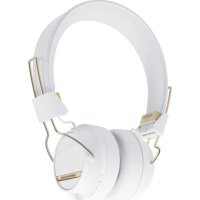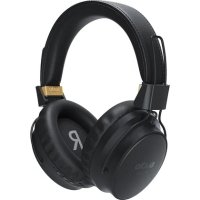
Tolv R - Earplug Sudio - Free user manual and instructions
Find the device manual for free Tolv R Sudio in PDF.


| Product type | Earplug (true wireless earbuds) |
| Brand | Sudio |
| Model | Tolv R |
| Bluetooth Version | V5.0, Class II |
| Bluetooth Profiles | HFP, HSP, A2DP, AVRCP, SPP |
| Bluetooth Range | 10 meters |
| Battery life (playback) | 5.5 hours |
| Battery life (talk time) | 5.5 hours |
| Charging time | 2 hours |
| Battery type (earbuds) | Rechargeable lithium polymer, 50 mAh |
| Battery type (charging case) | Rechargeable lithium polymer, 500 mAh |
| Operating temperature | -10°C to 40°C |
| Power on | Automatic lifting of earbuds |
| Voice control | Voice assistant accessible via button (1 second) |
| Cleaning | Slightly damp cloth |
| Safety | Do not listen at high volume; do not use in traffic. |
| Recycling | Do not dispose of with household waste (WEEE symbol) |
Frequently Asked Questions - Tolv R Sudio
User questions about Tolv R Sudio
0 question about this device. Answer the ones you know or ask your own.
Ask a new question about this device
Download the instructions for your Earplug in PDF format for free! Find your manual Tolv R - Sudio and take your electronic device back in hand. On this page are published all the documents necessary for the use of your device. Tolv R by Sudio.
USER MANUAL Tolv R Sudio
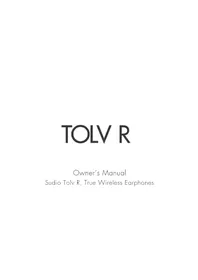
Owner's Manual Sudio Tolv R, True Wireless Earphones
LANGUAGES TABLE OF CONTENTS
| ENGLISH 4 | Русский 70 | |
| SVENSKA 10 | Tiếng Việt 74 | |
| DANSK 14 | ||
| NORSK 18 | ||
| SUOMI 22 | ||
| ISLAND 26 | ||
| FRANÇAIS 30 | ||
| DEUTSCH | 34 | |
| NEDERLANDS | 38 | |
| ESPAÑOL | 42 | |
| PORTUGUÊS | 46 | |
| UGE | 50 | |
| 한국어 | 54 | |
| 简体中文 58 | ||
| 繁體中文 62 | ||
| 66日本語 |
PRECAUTIONS AND USAGE
Do not use the product in other ways than described. Handle with care at all times and protect from damage. Do not expose the earphones to heat, magnetism, cold, damp environments or abnormal wear and tear e.g. by bending or pulling them. Avoid dropping, strong impact or winding the cable tightly. Clean with a slightly damp fabric.
The WEEE-symbol means that the product should Not be mixed with normal household waste, please return to facilities for Waste Electrical and Electronic Equipment.
WARNING
Never listen to music at an uncomfortably high volume, this may permanently damage your hearing. Never use the earphones in traffic or in other places where your hearing is needed to perceive dangers. Always store small accessories out of small children's range. Always lower the volume before you connect.
SPECIFICATIONS
Bluetooth Version: V5.0, class II
Bluetooth Profile: HFPv1.7 HSPv1.2 A2DFv1.3
AVRCPv1.6, SPP1.2
Bluetooth Range: TOM
Music Time: 5,5 hours
Talking Time: 5.5 hours
Charging Time: 120 minutes
Charging Type: 3.7V, 50mAh (earphone)
rechargeable lithium polymer battery
Operating Temperature: -10 - 40°C
Charging case: 500mAh (case) rechargeable
lithium polymer battery
POWER ON / PAIRING MODE
You do not need to press any button. Simply Lift both earbuds at the same time and they will be visible in the bluetooth list of your device. Make sure to lift the second earbud within 1.5 seconds of lifting the first one.
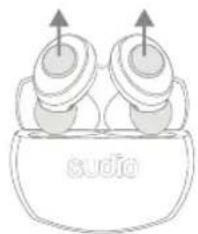
natural_image
Simple line drawing of two cups with upward arrows above them, labeled 'sudio' at the base (no other text or symbols)6
MUSIC CONTROLS
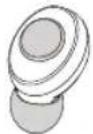
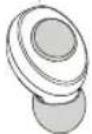
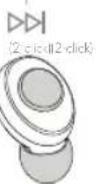
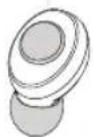
Play/Pause = Press either button once Next song = Press R button two times Previous song = Press L button two times
△△
2 click
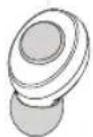
L
(1 click) click
△△
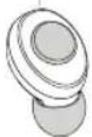
R
PHONE CONTROLS
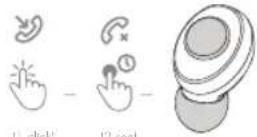
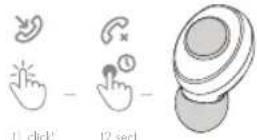
| click
VOICE CONTROL
Press and hold for
I second on either side to start the voice assistant.
TROUBLESHOOTING
If the earphones are behaving unexpectedly or you're having difficulty pairing, we recommend a reset.
-
Turn off both earphones by pressing and holding both buttons for six seconds. Start the earphones again by pressing and holding both sides for thirteen seconds, until the lights stop blinking.
-
Put the earphones back in the case and wait for 10 seconds. They are now reset.
More information and FAQ at
www.sudio.com/faq
English Eng is
FCC RADIATION EXPOSURE STATEMENT:
This equipment complies with FCC radiation exposure limits set forth for an uncontrolled environment. This transmitter must not be co-located or operating in conjunction with any other antenna or transmitter. Note: This equipment has been tested and found to comply with the limits for a Class B digital device, pursuant to part 1.5 of the FCC Rules. These limits are designed to provide reasonable protection against harmful interference in a residential installation. This equipment generates, uses, and can radiate radio frequency energy and, if not installed and used in accordance with the instructions, may cause harmful interference to radio communications. However, there is no guarantee that interference will not occur in a particular installation. If this equipment does cause harmful interference to radio or television reception, which can be determined by turning the equipment off and on, the user is encouraged to try to correct the interference by one or more of the following measures:
—Reorient or relocate the receiving antenna. —Increase the separation between the equipment and receiver.
—Connect the equipment into an outlet on a circuit different from that to which the receiver is connected.
—Consult the dealer or an experienced radio/TV technician for help.
Product name: Audio Wireless. Swedish design, made in China.
Any Changes or modifications not expressly approved by the party responsible for compliance could void the user's authority to operate the equipment. This device complies with part 15 of the FCC Rules. Operation is subject to the following two conditions: (1) This device may not cause harmful interference, and (2) this device must accept any interference received, including interference that may cause undesired operation.
ADMINISTRATIVE REGULATIONS ON LOW POWER RADIO WAVES RADIATED DEVICES WARNING
Without permission granted by the NCC, any company, enterprise, or user is not allowed to change frequency, enhance transmitting power or alter original characteristic as well as performance to a approved low power radio-frequency devices.
The low power radio-frequency devices shall not influence aircraft security and interfere
legal communications; If found, the user shall cease operating immediately until no interference is achieved.
The said legal communications means radio communications is operated in compliance with the Telecommunications Act.
The low power radio-frequency devices must be susceptible with the interference from legal communications or ISM radio wave radiated devices.
ADDRESS
Sudio AB
Grev Turegatan 35
SE-11438 Stockholm
Sweden
FÖRSIKTIGHETSÅTGÄRDER OCH ANVÄNDNING
natural_image
Simple line drawing of two earphones with upward arrows above a bowl labeled 'sudio' (no text or symbols on the objects)natural_image
Simple line drawing of two cups with upward arrows above them, labeled 'sudio' at the base (no other text or symbols)16
text_image
to gange (1 click) (2 click) L R (1 click + click) (2 click)TELEFONSTYRINGMUSIKSTYRING
STEMMEKONTROL
Lad: 3.7V, 50mAh (earphone) rechargeable lithium
polymer batteri
natural_image
Simple line drawing of two cups with upward arrows above them, labeled 'sudio' at the base (no other text or symbols)natural_image
Simple line drawing of two cups with upward arrows above them, labeled 'sudio' at the base (no other text or symbols)natural_image
Simple line drawing of two speakers with sound waves, no text or symbols presentTÓNLIST STJÓRNAĐ
Spila / Hlé = Ýttu einu sinni á takkann Næsta lag = Ýttu tvisvar sinnum ó R-takkann Fyrra lag = Ýttu tvisvar sinnum ó L-takkann
△△
[2 click]
L
1 click1 click
△△
7.518
R
natural_image
Simple line drawing of two earphones with upward arrows above a bowl labeled 'sudio' (no text or symbols on the objects)natural_image
Simple line drawing of two cups with upward arrows above them, labeled 'sudio' at the base (no other text or symbols)36
Deutsch Deutsch
natural_image
Simple line drawing of two earphones with upward arrows above a base (no text or symbols)40
MUZIEK-BEDIENINGSKNOPPEN
natural_image
Simple line drawing of two cups with upward arrows inside a bowl labeled 'sudio' (no text or symbols on the cups themselves)▷ || (I check! click)
R
COMANDOS DEL TELÉFONOCOMARESOLUO MÚSICA CONVENIENTES
natural_image
Simple line drawing of two earphones with upward arrows above a bowl labeled 'sudio' (no text or symbols on the objects)48
Português Português
CONTROLOS DE MÚSICA
natural_image
Simple line drawing of two cups with upward arrows above them, labeled 'sudio' at the base (no other text or symbols)natural_image
Simple line drawing of two cups with upward arrows above them, labeled 'sudio' at the base (no other text or symbols)36
음악 컨트롤
natural_image
Simple line drawing of two earphones with upward arrows above a bowl labeled 'sudio' (no text or symbols on the objects)60
natural_image
Simple line drawing of two cups with upward arrows above them, labeled 'sudio' at the base (no other text or symbols)natural_image
Simple line drawing of two cups with upward arrows above them, labeled 'sudio' at the base (no other text or symbols)
[2 click]
L
(1 click1 click)
△△|
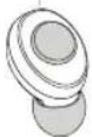
R
通話機能音楽操作
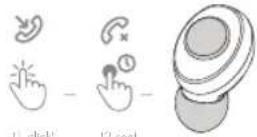
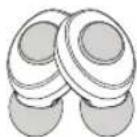
声コントロール
natural_image
Simple line drawing of two cups with upward arrows above a container labeled 'sudio' (no text or symbols on the cups themselves)72
Русский
natural_image
Simple line drawing of two earphones with upward arrows above a bowl labeled 'sudio' (no text or symbols on the objects)text_image
Three black recycling symbols: a crossed-out pie chart, a standard C€ symbol, and a recycling circle.For more information, visit: www.sudio.com/faq