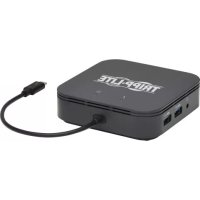
MTB3DOCK04 - Computer accessory Tripp Lite - Free user manual and instructions
Find the device manual for free MTB3DOCK04 Tripp Lite in PDF.



| Product Type | Thunderbolt 3 Docking Station |
| Brand | Tripp Lite |
| Model | MTB3-DOCK-04 |
| Input Connector | Integrated Thunderbolt 3 Type-C (Male) |
| Video Outputs | 1x DisplayPort (Female), 1x HDMI (Female) |
| Max DisplayPort Resolution | 8K (7680 x 4320) @ 30 Hz |
| Max HDMI Resolution | 4K (3840 x 2160) @ 60 Hz (HDR and 4:4:4) |
| Multi-Monitor Support | Yes, two simultaneous displays (8K + 4K) |
| USB-A Ports | 2x USB 3.2 Gen 2 Type-A (10 Gbps each) |
| Ethernet Port | RJ45 Gigabit (10/100/1000 Mbps) |
| Audio Port | 3.5mm Jack (Female) |
| PD Charging Port | USB-C PD 3.0 (Female), 60W Output (20V/3A) |
| Power | Self-powered mode (via PD) or bus-powered mode (via host) |
| System Compatibility | Windows 10, macOS 10.15.3 or later (Thunderbolt 3 required) |
| Warranty | 3-Year Limited |
| Operating Temperature | 0 to 35°C |
| Storage Temperature | -20 to 70°C |
| Relative Humidity | 0 to 90% |
| Maintenance | Clean with a soft, dry cloth |
| Safety | Use in accordance with provided instructions |
Frequently Asked Questions - MTB3DOCK04 Tripp Lite
User questions about MTB3DOCK04 Tripp Lite
0 question about this device. Answer the ones you know or ask your own.
Ask a new question about this device
Download the instructions for your Computer accessory in PDF format for free! Find your manual MTB3DOCK04 - Tripp Lite and take your electronic device back in hand. On this page are published all the documents necessary for the use of your device. MTB3DOCK04 by Tripp Lite.
USER MANUAL MTB3DOCK04 Tripp Lite
Thunderbolt 3 Dual-Monitor Docking Station with 8K DisplayPort, 4K HDMI, USB-A Hub Ports, 3.5 mm Audio, Gigabit Ethernet and 60W PD 3.0 Charging
Model: MTB3-DOCK-04
Espanol 13 • Français 25 • Pycckn 37 • Deutsch 49
WARRANTY REGISTRATION
Register your product today and be automatically entered to win an ISOBAR® surge protector in our monthly drawing!
tripplite.com/warranty


Manufacturing Excellence.
1111 W. 35th Street, Chicago, IL 60609 USA · tripplite.com/support
Copyright © 2020 Tripp Lite. All rights reserved.
Package Contents
MTB3-DOCK-04
- Owner's Manual
Optional Accessories
P568-Series High-Speed HDMI Cables
U428-Series USB 3.1 A/C Cables
N201-Series High-Speed Cat6 Gigabit Ethernet Cables
P580-Series DisplayPort Cables
Product Features
- Thunderbolt 3 input supports data transfer rates up to 40 Gbps when used with a Thunderbolt 3-enabled host computer
Note: Product is compatible only with a Thunderbolt 3 port and will not work with a standard USB-C port - DisplayPort output supports 4-lane DP 1.4 video resolutions up to 8K (7680 x 4320) @ 30 Hz
- HDMI output supports UHD 4K @ 60 Hz (HDR and 4:4:4), as specified by HDMI 2.0
Product Features
Transmits video from both ports simultaneously to two displays Note: See Multi-Monitor Requirements for exact product features
- RJ45 port supports 10/100/1000 Mbps Gigabit Ethernet speeds to connect to a wired network
- Dual USB 3.2 Gen 2 ports individually support 10 Gbps data transfer speeds for connecting USB-A peripherals
Supports self-powered mode when using the PD Charging port and bus-powered mode when plugged into the host laptop or computer
Note: Product features vary based on type. See Specifications Table for exact product features
- 3.5 mm audio port enables connection of speakers or headset
- USB-C Power Delivery (PD) 3.0 port supports 20V 3A (60W) power output for charging host computer
- Plug-and-play operation with no software required for easy, immediate installation
System Requirements
- Source computer with Windows 10 or Mac OS 10.15.3 and above and Thunderbolt 3 port
- Displays with DisplayPort and/or HDMI input
- Ethernet network with speeds up to 10/100/1000 Mbps (1 Gbps)
Product Overview
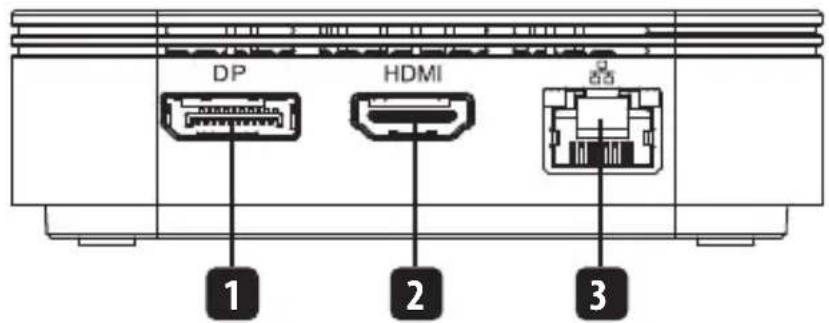
Front
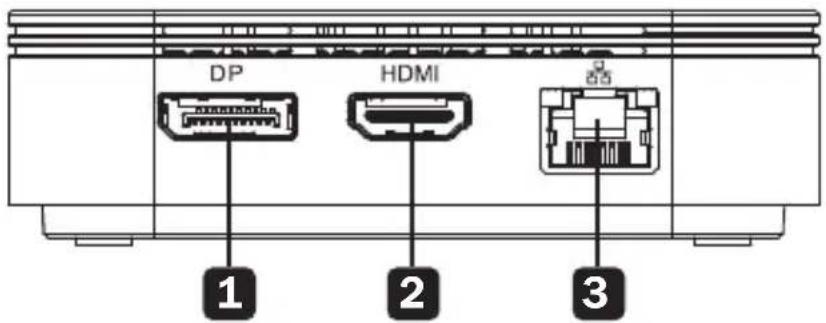
1 DisplayPort output
2 HDMI output
3 RJ45 Gigabit Ethernet jack
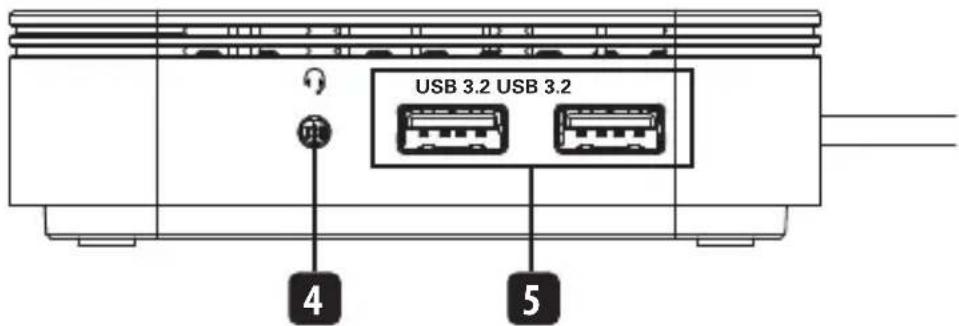
Rear
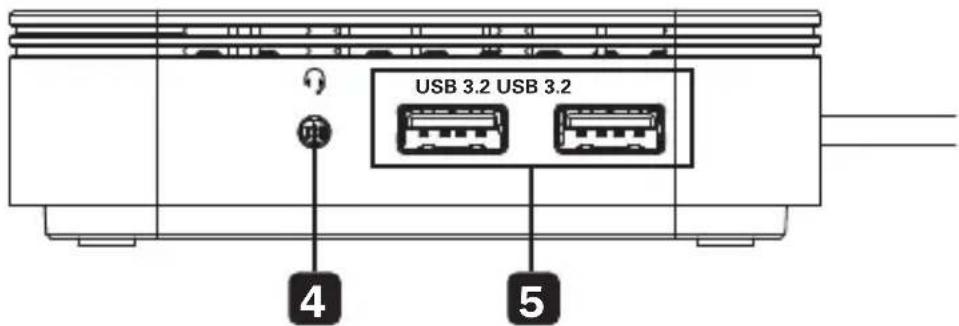
4 3.5 mm audio jack
USB 3.2 Gen 2 Type-A ports
Product Overview
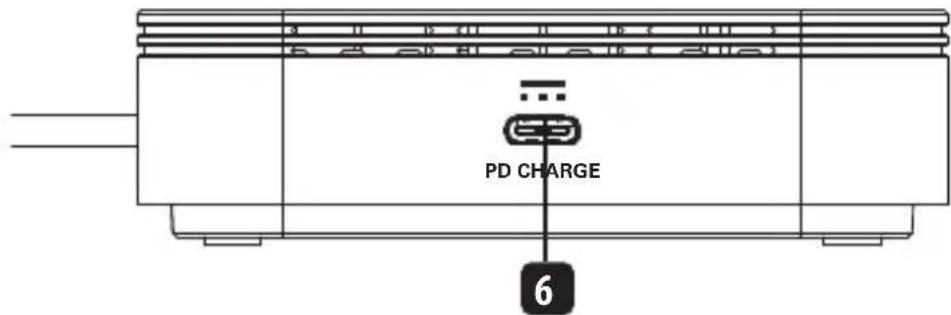
Side
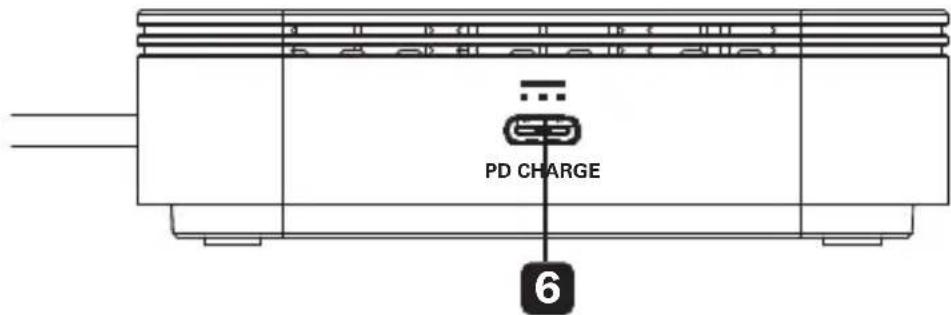
6 60W (20V 3A) PD 3.0 Charging port
Installation
Notes:
- Docking station must be connected to a dedicated Thunderbolt 3 port to function. It will not function with a standard USB-C port.
Supports the connection of two monitors at the same time: one via DisplayPort and a second via HDMI. See Multi-Monitor Requirements section for details.
See Optional Accessories section for suggested cables. - When the dock is in self-powered mode, both USB-A ports support full USB 3.2 Gen 2 speeds up to 10 Gbps. When using bus-powered mode, one port supports USB 3.2 Gen 2 (10 Gbps) and the other will support USB 2.0 speeds on a first-come, first-serve basis.
- When the docking station is connected to the USB-C port on the host computer and to a network using UTP patch cabling, a network connection will be established automatically. If no connection is made, one can be established manually by going to the host computer's network settings. For example, on a Mac, navigate to the Network section in System Preferences, click the "Assist Me" button to get to the Network Setup Assistant, and then follow the prompts to establish a connection.
- Connect the docking station's built-in Thunderbolt 3 plug to the Thunderbolt 3 port on your computer or laptop.
- Connect the DisplayPort output to a DisplayPort monitor with a user-supplied DisplayPort cable.
AND/OR
- Connect the HDMI output to an HDMI monitor with a user-supplied HDMI cable.
Note: The DisplayPort and HDMI outputs can be used to transmit video simultaneously. See Multi-Monitor Requirements section for details.
Installation
- Connect an external speaker, microphone, headset or other audio device to the 3.5mm audio jack.
- Connect up to two USB peripherals to the USB-A ports.
- Connect the RJ45 jack to a wired Gigabit Ethernet network with a user-supplied UTP patch cable.
Multi-Monitor Requirements
The MTB3-DOCK-04 supports the connection of a DisplayPort monitor and an HDMI monitor simultaneously for dual 8K + 4K video via Thunderbolt 3 technology. The following limitations must be taken into account when connecting multiple monitors at the same time:
Does the Source Computer Support DisplayPort 1.4 Alternate Mode?
When connecting to a Thunderbolt 3 source that supports DisplayPort Alt Mode, the EDID information of both connected monitors will be read by the computer and appear as separate displays that can be shown in mirror mode or extended mode. The DisplayPort output can achieve video resolutions up to 8K (7680 x 4320) @ 30 Hz when used with a Thunderbolt 3-enabled source computer and 8K DisplayPort cable. The HDMI output supports UHD 4K (3840 x 2160) @ 60 Hz when used with a 4K HDMI cable. Both ports can be used simultaneously for dual 8K + 4K resolutions.
Does the Source Computer Support a Thunderbolt 3 Connection?
The MTB3-DOCK-04 can be used to transmit video from source computers that have a Thunderbolt 3 port. The docking station will not work with a standard USB-C port. Be sure your computer or laptop includes a dedicated Thunderbolt 3 port prior to use.
Specifications
| Input Connector | |
| Thunderbolt Thunderbolt | 3 Type-C (Male) |
| Output Connectors | |
| DisplayPort DisplayPort | (Female) |
| HDMI HDMI (Female) | |
| USB (x2) USB 3.2 Gen 2 | Type-A (Female) |
| PD Charging USB-C PD | 3.0 Charging (Female) |
| Audio 3.5 mm (Female) | |
| Display Specifications | |
| DisplayPort 8K (7680 x 4320) @ 30 Hz | |
| HDMI 4K (3840 x 2160) @ 60 Hz | |
| Network Specifications | |
| Ethernet 10/100/1000 Mbps (1 Gbps) | |
| USB Functionality | |
| USB-A 3.2 Gen 2 (Self-Powered Mode) | Self-Powered Mode means the PD Charging port is being used by the host computer and the docking station is powered via PD pass-through. Both USB-A ports support USB 3.2 Gen 2 speeds up to 10 Gbps. |
| USB-A 3.2 Gen 2 (Bus-Powered Mode) | Bus-Powered Mode means the docking station is only being powered by the host computer. Only one USB-A port will support USB 3.2 Gen 2 speeds up to 10 Gbps. The other will support USB 2.0 on a first-come, first-serve basis. |
Specifications
| Electrical Specifications | |
| PD Charging PD 3.0 Charging up to 60W (20V 3A) | |
| Environmental Specifications | |
| Operating Temperature Range | 32° to 95°F / 0° to 35°C |
| Storage Temperature Range | -4° to 158°F / -20° to 70°C |
| Relative Humidity Range | 0 to 90% |
Warranty and Product Registration
3-Year Limited Warranty
Seller warrants this product, if used in accordance with all applicable instructions, to be free from original defects in material and workmanship for a period of 3 years from the date of initial purchase. If the product should prove defective in material or workmanship within that period, Seller will repair or replace the product, at its sole discretion.
THIS WARRANTY DOES NOT APPLY TO NORMAL WEAR OR TO DAMAGE RESULTING FROM ACCIDENT, MISUSE, ABUSE OR NEGLECT. SELLER MAKES NO EXPRESS WARRANTY OTHER THAN THE WARRANTY EXPRESSLY SET FORTH HEREIN. EXCEPT TO THE EXTENT PROHIBITED BY APPLICABLE LAW, ALL IMPLIED WARRANTYES, INCLUDING ALL WARRANTYES OF MERCHANTABILITY OR FITNESS, ARE LIMITED IN DURATION TO THE WARRANTY PERIOD SET FORTH ABOVE; AND THIS WARRANTY EXPRESSLY EXCUSES ALL INCIDENTAL AND
CONSEQUENTIAL DAMAGES. (Some states do not allow limitations on how long an implied warranty lasts, and some states do not allow the exclusion or limitation of incidental or consequential damages, so the above limitations or exclusions may not apply to you. This warranty gives you specific legal rights, and you may have other rights which vary from jurisdiction to jurisdiction.)
WARNING: The individual user should take care to determine prior to use whether this device is suitable, adequate or safe for the use intended. Since individual applications are subject to great variation, the manufacturer makes no representation or warranty as to the suitability or fitness of these devices for any specific application.
Warranty and Product Registration
Product Registration
Visit tripplite.com/warranty today to register your new Tripp Lite product. You'll be automatically entered into a drawing for a chance to win a FREE Tripp Lite product!*
- No purchase necessary. Void where prohibited. Some restrictions apply. See website for details.
Tripp Lite has a policy of continuous improvement. Specifications are subject to change without notice. Photos and illustrations may differ slightly from actual products.


Manufacturing Excellence.
1111 W. 35th Street, Chicago, IL 60609 USA · triplite.com/support
1111 W. 35th Street, Chicago, IL 60609 EE UU • triplite.com/support
20-07-207 -93-3CD4 RevA
1111 W. 35th Street, Chicago, IL 60609 USA • tripplite.com/support
20-07-207 93-3CD4RevA
PykoBODCTBO N0Ib30BaTeJIa
Дok-stанця Thunderbolt 3 на за монитора С концентра_TOPьIMN потам 8К DisplayPort / 4К HDMI / USB-A, audионoptom 3,5 MM и поведжков с来不及 Gigabit Ethernet и Тхнологи зарадкn PD 3.0 (60Вт)
Mодель:MTB3-DOCK-04
English 1 • Espanol 13 • Français 25 • Deutsch 49


1111 W. 35th Street, Chicago, IL 60609 USA · tripplite.com/support
OxpaHareTcA BTOpCKnM npaBOM © 2020 Tripp Lite. IepeneuTaKta ZanpeuaeTcA.
CopejxHMOe ynaKOBKn
- UcTpoIcTBoMoI.MTB3-DOCK-04
-PykoBoDCTBONoIb30BaTeJRA
OnuHaBbIe KOMnKeKtUoIne
- BbICOKoCKOpocThbIe HDMI-ka6eJInc cepnn P568
Ka6eIncepnU428cpa3bemamnUSB3.1(A/C) - BbICOKoCKOpocThbIe Ka6eN Cat6 Gigabit Ethernet cepnn N201
- Ka6eIi cepn P580 DisplayPort
XapakTepeNCTnKn npOdyKta
Bxodno npT Thunderbolt 3 noDepKnBaet ckopocn nepeaun daHbix do 40 Tcnpn nCNoJb3OBAHm C XoCT-KOMNbIePOM, IMeUuM uHTepFeic Thunderbolt 3. PpmeHne. DaHHoe n3dJeNHe COBMecTmo TolbKO c nopToM Thunderbolt 3 n He fynKIOHHPyET npn noDKJIoueHm K CTaNapTHOMy npTy USB-C
- BbIXoHoi nHTepfeciC DisplayPort noIDepKnBaet Bndeopa3peWeHnra CtAnapTa 4-Lane DP 1.4 do 8K (7680 x 4320) npn 30 Tc
- BbIXoHoi nHTepfeic HDMI noDdepxnBaet pa3peweHnaCTaCbePbICOKOy eTkoCTn (UHD)do 4K npi 60 Tc (c pacuHpeHHbIM dHaMueckm dnaNa3oHOM (HDR) n cBeTOBov cy6dNCKpeTu3aune 4:4:4) corlacho Tpe6OBAHm CTaHapTa HDMI 2.0
XapakTepnCTnKn npOdyKta
- 06ecneuBaet nepaCy BndeocnHaNoB OndHOBpeMeHNo C o6oNX nopTOB Ha DBA INcPJIe
IpmeHne.ToHbIe XapaKTePnCTnKn n3dJIy npedctabHeB b pa3dene "Tpe6oBaHn K MHOROMOHHTOpHbIM CNTeMaM" - IopT RJ45 noДeprЖиBaet ckopoCTn 10/100/1000 M6uT/c Gigabit Ethernet nIpy noДКЛHueHЯ K npOBoHNo CEtu
-Два пораз USB 3.2 Gen 2 no OTденибости подерхиBaIoT ckopoctи по dedaun daHHbIxdo 10 6nt/c ДЯ подклоченя пофериньix устpoiCTB сИNTepфeicom USB-A - ПодержиBaet peЖIM pa60tI c aВTOHmHbIM nITaHnEМ npИ nCIOJIb3OBAHn 3apJHOro nopTa PD Charging u peЖIM pa60tI c nITaHnEМ OT shInb Iprn POKJIuYeHn K rIaBHomY (nopTaTUBHOMy nII nCTaCNoHapHOMy) KOMNbIoTepy
IpmeaHne. Bo3MOxHOCTn 3dEtna MoYr pa3muaTbC B 3aBNCMooCTn OT Tnna.ToHbEx xapaKTepuCTnKu n3dEtna npedctabHeBb Ta6nue "TexHueckne xapaKTepuCTnKu"
- AydnoopT dnaMeTpom 3,5 MM o6ecneuNbae T B03MOxHOctb NOKJIIOUeHnRA KOLOHOKIIN raphHTypbl
- IopT USB-C Power Delivery (PD) 3.0 noДeprKnBaet BbIXOHyo MoUHocTb 60 BT (20 B / 3 A) ДяЗapЯdkn ГаВно КOMMbIoTepa
- Поклочаетс по Тхногиn Plug-and-play 6e3 Heo6xOДМоCTN B nporpaMMHOM obecneueHn,уTO obecneuBaet MrHOBeHHyU n 6ecnPenTCTBeHHyU yCTaHOBky
CnCTeMHbIe Tpe6oBaHnIa
- KomlbioTeP-nCTOuHnK c OC Windows 10 uIN Mac OS 10.15.3 (u6oJee no3dHnx Bepcn) n nopTOM Thunderbolt 3
-Диспени c DisplayPort-n/nHDMI-BxOdom - Cetb Ethernet c noidepcko knkopoctei 10/100/1000 M6nt/c (1Γ6nt/c)
KpaTkoe onncanne n3dennn
Лицеваясторна
1 BbIXoHNo pa3bem DisplayPort
2 BbIXoHNo pa3bem HDMI
3 Pa3beM RJ45 Gigabit Ethernet
TbIbHa CTOpOHa
4Aynopa3beM 3,5 MM
5 NopTbI USB 3.2 Gen 2 Type-A
KpaTkoe onncanHe n3dennr
Бokobаясторна
6 3apnHbI npT PD 3.0 Charging c noDepKko Moocn 60 Bt (20 B/3 A)
yctaHOBka
Птумецань:
-ДяфунониоганяdoK-caHцnHeo6xOIMo ee noKNoeHne K BbIeHHomy npTy Thunderbolt 3.ПриpoKNoueHnK cTaHapTHOMy npTy USB-CdoK-cTaHznaФункnoHnpOBaTb He 6yudet.
PaccuHa Ha oHOBpeMeHHoe pokKIOueHne DByx MOHTOpOB: Ondoro uepe3 DisplayPort u Btopo rye3 HDMI.Bolee noDpo6Na IhOopMaun npedctabNeHa B pa3dJe Tpe60BaHnK MHOROMOHITOpHbIM CNTeMaM
- PekomeHdyemble TINbI Ka6eNei nepeuCneHb I pa3dene OunnoHaJIbHbIe KOMnIeKTyUOme.
- Пи рабote дok-staци в ржиме abtoHOMHOrO nHTAHnO oba nopTa USB-A noJIHOceHNO
noДерЖИBAIOT ckopocTи INTEPфeЯca USB 3.2 Gen 2do 10Γ6nt/c. Пи ee icNoJIb3OBaHn B
ржиме пТаньо OT shNbl OdnH nopT noДерЖИBaET INTEPфeic USB 3.2 Gen 2 c orpaHnueHneM
ckopocTи do 10Γ6nt/c, a Дугов поТ noДерЖИBaET ckopocTи, ppeDyCMOTpeHHbIe INTEPфeICOM
USB 2.0, в поядke oupeDnoCTи.
- EcINdoK-staHnnaIpoKnIOUeHa KnopTy USB-C rnaBHOrO KOmNbIOTePa N K cetNupe3 coeHNHTbHbIe Ka6eN UTP, To ceteBOe coeHNHeHne yCTaHbNBAeTcA BtOMaTNUeCK. PpO OTCyTCTBn COeHNHeHn OHO MoKeT 6bITb yCTaHOBNeH OByuHyo YpeE3 cTeBbIe HAcTPOkN rnaBHOrO KOmNbIOTepa. HanPIMep, Ha yCTpoNCTBe Mac cneDyET nepeiTu B pa3Den Network ("Cetb") B MeHIO System Preferences ("IpaAMTePbI CnCTeMbI"), HaxaTb Ha KNOnKy Assist Me ("Tpe6yETc nOMoUs") dJIy BblOBA yTNIITb I Network Setup Assistant ("IomOuHnK NaCTPOkN ceTeBbIX napaMeTPOB"), a 3aTeM CNEIOBaT b NOcka3KaM dJIy yCTaHOBHeHn COeHNHeHn.
- CoeHnHTe BCTpoEHbI uTeKepehBpa3bem Thunderbolt 3 JOK-CTaHcN K npOpTy Thunderbolt 3 cBoero cTaunOHaPHoro nnn nopTaTnBHorO KOMnbIoTepa.
yctaHOBka
- CoeHHTe BbIXoHoi pa3bem DisplayPort c MoHITOpom DisplayPort uepe3 Ka6eIb DisplayPort (B KOMnJIeKT nocTaBKn He BxOuT) H/IN
- CoeHHnte BbIXoHoi HDMI-nopT c HDMI-mOnHTOpom uepe3 HDMI-ka6eBb (B KOMnJIeKT nOCTaBKn He BXoDNT).
IpmeHne. BixoHbIe pa3bembl DisplayPort n HDMl moryt oNHOpeMeHHO
ncnolb30BaTbcra Iny nepedaun BuDeocuHaNoB. bonee noDpo6NaH uHphiOpMaua npeCTabHeHa
B pa3dene Tpe6OBaHna K MHorOMOHHTOpHbIM CnCTeMaM
- Поклочи Всшни Колони, Мкрфон, rapнтуpy ппдуге aydnoocpoCTBO kaydnopa3bemy dnaMeTpom 3,5 MM.
5.Поdkлioчnte do DByIx nepiΦepnHbIX USB-устpoиCTB K npotam USB-A. - CoeHHnTe pa3bem RJ45 c npoBHOH cetbIO Gigabit Ethernet uepe3 coeHHnTeIbHbI UTP-Ka6enb (B KOMnJIeKT nOCTaBKn He BXoIIT).
Tpe6obAHnK MHOROMOHHTOpHbIM CNTeMaM
ДOK-станця мод. MTB3-DOCK-04 дусят одовременhoe подочецmoнлсрс displayPort n HDMI严禁пегачдвух вдесогнobcразpeшени 8K + 4К no texholorn Thunderbolt 3. Пи одовременюнлдкочецн Heckolbknx MOHlTOpOB Heo6xOДМо yuNTbIBaTb cneуюше orpaHnueHЯ:
ПодерхиBaet ЛКOMпьОтep-ИсточнК ржIM DisplayPort 1.4 Alternate?
При подклочени К IncToHnky c pa3beMOM Thunderbolt 3, подерхиBaIoUeMy pexIM DisplayPort Alt, pacUnpeHHbIe dAnHbIe nIeHTnФИkaun (EDID) obOux noDknIOUeHHbIX MOHITOpOB 6ydyT cHtBtBaTbcr KOMNbIOTepOM N BbIBODNTbcr B KaueCTBe OTdJIbHbIX INcPJIeeB, KOToPbIe MOrYr OTO6paKaTbcr B 3epKaJIbHOM peXIMe IIN paCShnPENHOM peXIMe. BbIXoHNoI nopT DisplayPort moKet noDdEpxHBaTb BIndeopazpeHnrydo8K(7680x4320)/30TupnncnoJb3OBAHnN C KOMNbIOTepOM-ICTOHNKOM, IMeIoUm INTepeFec Thunderbolt 3, n Ka6eMe 8K DisplayPort. BbIXoHNoI nopT HDMI noDdEpxHBaET BIndeopazpeHnry cTaHdApTa UHD do 4K (3840 x 2160)/60 TpnpinCNOB3OBAHnN C Ka6eMe 4K HDMI. 06a npota mOryr nCnoJb3OBAtbcr OndHOBpeMeHo DЯпетачдыxBuX BIndeocnHaNoB c pa3peSeHnma8K+4K.
Manufacturing Excellence.
1111 W. 35th Street, Chicago, IL 60609 USA • tripplite.com/support
Manufacturing Excellence
1111 W. 35th Street, Chicago, IL 60609 USA • tripplite.com/support
20-07-207 -93-3CD4 RevA


- WARRANTY REGISTRATION
- Package Contents
- Optional Accessories
- Product Features
- System Requirements
- Product Overview
- Front
- Rear
- Side
- Installation
- Notes:
- AND/OR
- Multi-Monitor Requirements
- Does the Source Computer Support DisplayPort 1.4 Alternate Mode?
- Does the Source Computer Support a Thunderbolt 3 Connection?
- Specifications
- Warranty and Product Registration
- 3-Year Limited Warranty
- Product Registration
- PykoBODCTBO N0Ib30BaTeJIa
- CopejxHMOe ynaKOBKn
- OnuHaBbIe KOMnKeKtUoIne
- XapakTepeNCTnKn npOdyKta
- XapakTepnCTnKn npOdyKta
- CnCTeMHbIe Tpe6oBaHnIa
- KpaTkoe onncanne n3dennn
- Лицеваясторна
- TbIbHa CTOpOHa
- KpaTkoe onncanHe n3dennr
- Бokobаясторна
- yctaHOBka
- Птумецань:
- Tpe6obAHnK MHOROMOHHTOpHbIM CNTeMaM
- ПодерхиBaet ЛКOMпьОтep-ИсточнК ржIM DisplayPort 1.4 Alternate?
Brand : Tripp Lite
Model : MTB3DOCK04
Category : Computer accessory