U442DOCK14MS - Docking Station Tripp Lite - Free user manual and instructions
Find the device manual for free U442DOCK14MS Tripp Lite in PDF.


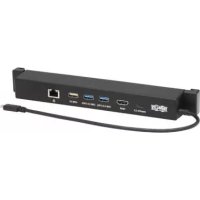
| Product Type | USB-C Docking Station for Microsoft Surface |
| Brand | Tripp Lite |
| Model | U442DOCK14MS |
| Dimensions (H x L x D) | 33 x 233 x 32 mm |
| Weight | 0.16 kg |
| Power Supply | PD 3.0 charging up to 100 W (20 V 5 A) via USB-C port |
| Input Connector | USB-C Male |
| Output Ports | 1 x USB-C PD 3.0, 2 x USB 3.2 Gen 2, 1 x USB 2.0, 1 x HDMI, 1 x RJ45 |
| Maximum Video Resolution | 4K (3840 x 2160) @ 30 Hz |
| Ethernet Speed | 10/100/1000 Mbps (Gigabit) |
| USB Standard | USB 3.2 Gen 2 (10 Gbps), USB 2.0 (480 Mbps) |
| Supported Operating Systems | Windows 8, 10, 11 |
| Operating Temperature | 5 to 35 °C |
| Storage Temperature | -10 to 50 °C |
| Relative Humidity | 20 to 80% RH |
| Cable Length | 300 mm (11.8 in) |
| Compatible Surface Models (attachment) | Surface GO, GO 2, GO 3, Pro 7, Pro 8, Pro X |
| Warranty | 1-Year Limited Warranty |
| Maintenance | Clean with a soft, dry cloth. Do not use abrasive products or liquids. |
| Repairability | No user-serviceable parts. Contact Tripp Lite support for repairs. |
Frequently Asked Questions - U442DOCK14MS Tripp Lite
User questions about U442DOCK14MS Tripp Lite
0 question about this device. Answer the ones you know or ask your own.
Ask a new question about this device
Download the instructions for your Docking Station in PDF format for free! Find your manual U442DOCK14MS - Tripp Lite and take your electronic device back in hand. On this page are published all the documents necessary for the use of your device. U442DOCK14MS by Tripp Lite.
USER MANUAL U442DOCK14MS Tripp Lite
USB-C Dock with 4K HDMI, USB Hub and Gigabit Ethernet for Microsoft® Surface
Model: U442-DOCK14-MS
Espanol 9·Français 17·Pycckn 25·Deutsch 33
WARRANTY REGISTRATION
Register your product today and be automatically entered to win an ISOBAR® surge protector in our monthly drawing!
tripplite.com/warranty
TRIPP·LITE
1111 W. 35th Street, Chicago, IL 60609 USA · triplite.com/support
Copyright © 2022 Tripp Lite. All rights reserved.
Product Features
- Adds 4K HDMI, USB-C and USB-A ports, Gigabit Ethernet and 100W PD 3.0 charging to your Surface tablet
Supports HDMI resolutions up to 3840 x 2160 @ 30 Hz - USB hub ports include two USB 3.2 Gen 2 (10 Gbps) ports and one USB 2.0 port
- Adjustable bracket clamps to the rear of select Microsoft Surface devices. See Compatible Models for details.
- Connect to a wired Gigabit Ethernet network via the RJ45 port
- USB-C PD 3.0 port supports 20V 5A (100W) power output for charging host Surface and 10 Gbps for connecting a peripheral
- Plug-and-play--no software or drivers required to operate
Package Contents
- U442-DOCK14-MS USB-C Dock for Microsoft Surface
- Owner's Manual
Optional Accessories:
N201-Series Cat6 Gigabit Snagless Patch Cables
P569-Series High-Speed HDMI Cables
- U322-Series USB 3.2 Gen 1 USB-A to USB-B Device Cables
U420-Series USB 3.2 Gen 1 USB-C Cables
U428-Series USB 3.2 Gen 1 USB-A to USB-C Cables
- M100-Series USB Sync/Charge Cable - USB-A to Lightning
Product Overview
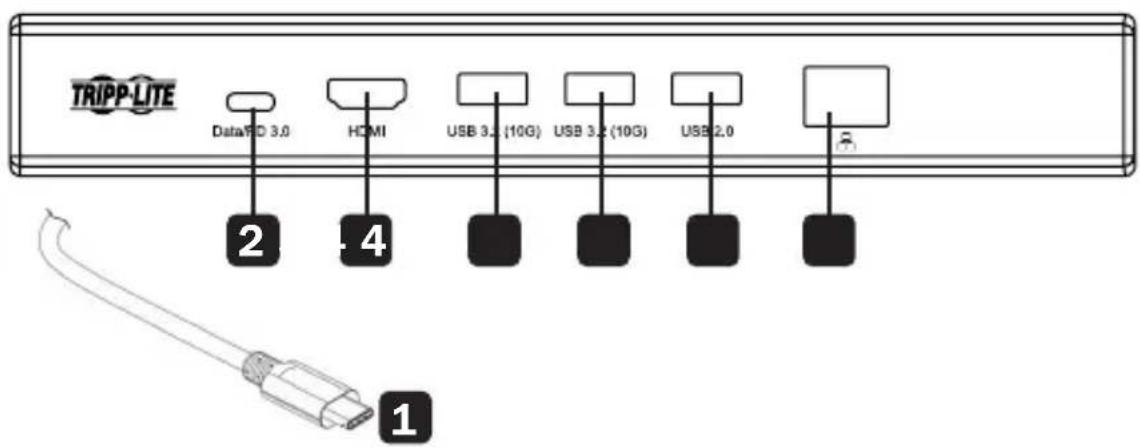
USB-C (Male) Input Connector:
Connect to the USB-C port on a Microsoft Surface device
2 USB-C Data/PD 3.0 Port (Female):
Provides up to 100W (20V 5A) of power via PD 3.0 charging to the Surface, or capable of USB 3.2 Gen 2 (10 Gbps) data transfer rates
3 HDMI Port (Female):
Connect a 4K HDMI monitor
4 USB 3.2 Gen 2 Ports (x2, Female):
Connect up to two USB 3.2 peripherals
5 USB 2.0 Port (Female):
Connect a USB 2.0 peripheral, such as a mouse or keyboard
6 RJ45 Port (Female):
Connect to a wired Ethernet network
Installation
Notes:
- This product supports video resolutions up to 4K (3840 x 2160) @ 30 Hz. If your display is unable to transmit video from the dock, refer to the Troubleshooting section of this manual for details.
-
The dock is compatible with any Microsoft Surface device with a USB-C port. The rear clamp is adjustable and can adjust to any compatible Surface device.
-
Secure the U442-DOCK14-MS unit to the rear of your Microsoft Surface unit via the flexible securing clamps on either end of the dock.
- Connect the dock's USB-C male input connector to the USB-C port on your Microsoft Surface device.
- Connect a USB-C peripheral device to the USB-C Data/ PD 3.0 port.
OR
Charge the Surface device by connecting its USB-C PD Charger to the docking station's USB-C PD Charging port for up to 100W (20V 5A) of charging power.
- Connect up to two USB peripheral devices such as hard drives, smartphones and tablets to the USB 3.2 Gen 2 ports.
- Connect a mouse or keyboard to the USB 2.0 port.
- Connect to a wired Ethernet network at speeds up to 10/100/1000 Mbps (Gigabit) via the RJ45 port.
- Transmit 4K video to a connected display via the HDMI port.
Compatible Models
The U442-DOCK14-MS can be clamped to the back of any Microsoft Surface device with a USB-C port and a width of 12 inches or less, including the following models:
- Surface GO
Surface GO 2
Surface GO 3
Surface Pro 7
Surface Pro 8 - Surface Pro X
The U442-DOCK14-MS also functions as a desktop docking station with all other Surface devices with a USB-C port, but cannot be clamped to them.
Specifications
| Input Connector | |
| USB-C USB Type-C (Male) | |
| Output Connector(s) | |
| USB-C USB Type-C Data/PD 3.0 | Charging (x1 Female) |
| USB-A USB 3.2 Gen 2 (10 Gbps) | (x2 Female); USB 2.0 (x1 Female) |
| Ethernet RJ45 (x1 Female) | |
| Video HDMI (x1 Female) | |
| Environmental | |
| Operating Temperature Range 4 | 1° to 95°F (5° to 35°C) |
| Storage Temperature Range 14° | to 122°F (-10° to 50°C) |
| Relative Humidity 20% to 80% RH | |
| Mechanical | |
| Unit Dimensions [H x W x D] 1.2 | 9 x 9.17 x 1.26 in. (33 x 233 x 32 mm) |
| Cable Length 11.8 in. (300 mm) | |
| Unit Weight 0.35 lb. (0.16 kg) | |
| Specifications | |
| HDMI Specification 2.0 | |
| HDCP Specification 2.3, 1.4 | |
| Maximum Supported Video Resolution | 4K (3840 x 2160) @ 30 Hz |
| Network Speed 10/100/1000 Mbps or 1 Gbps | |
| PD Charging Specification PD 3.0 | O (100W) |
| Data Specification | USB 3.2 Gen 2 (10 Gbps); USB 2.0 (480 Mbps) |
| Operating Systems Supported Windows 8, 10, 11 | |
Warranty and Product Registration
1-Year Limited Warranty
Seller warrants this product, if used in accordance with all applicable instructions, to be free from original defects in material and workmanship for a period of one (1) year from the date of initial purchase. If the product should prove defective in material or workmanship within that period, Seller will repair or replace the product, at its sole discretion.
THIS WARRANTY DOES NOT APPLY TO NORMAL WEAR OR TO DAMAGE RESULTING FROM ACCIDENT, MISUSE, ABUSE OR NEGLECT. SELLER MAKES NO EXPRESS WARRANTY OTHER THAN THE WARRANTY EXPRESSLY SET FORTH HEREIN. EXCEPT TO THE EXTENT PROHIBITED BY APPLICABLE LAW, ALL IMPLIED WARRANTYES, INCLUDING ALL WARRANTYES OF MERCHANTABILITY OR FITNESS, ARE LIMITED IN DURATION TO THE WARRANTY PERIOD SET FORTH ABOVE; AND THIS WARRANTY EXPRESSLY EXCUSES ALL INCIDENTAL AND CONSEQUENTIAL DAMAGES. (Some states do not allow limitations on how long an implied warranty lasts, and some states do not allow the exclusion or limitation of incidental or consequential damages, so the above limitations or exclusions may not apply to you. This warranty gives you specific legal rights, and you may have other rights which vary from jurisdiction to jurisdiction.)
WARNING: The individual user should take care to determine prior to use whether this device is suitable, adequate or safe for the use intended. Since individual applications are subject to great variation, the manufacturer makes no representation or warranty as to the suitability or fitness of these devices for any specific application
PRODUCT REGISTRATION
Visit triplite.com/warranty today to register your new Tripp Lite product. You'll be automatically entered into a drawing for a chance to win a FREE Tripp Lite product!*
*No purchase necessary. Void where prohibited. Some restrictions apply. See website for details.
FCC Notice, Class B
This device complies with part 15 of the FCC Rules. Operation is subject to the following two conditions: (1) This device may not cause harmful interference, and (2) this device must accept any interference received, including interference that may cause undesired operation.
Note: This equipment has been tested and found to comply with the limits for a Class B digital device, pursuant to part 15 of the FCC Rules. These limits are designed to provide reasonable protection against harmful interference in a residential installation. This equipment generates, uses and can radiate radio frequency energy and, if not installed and used in accordance with the instructions, may cause harmful interference to radio communications. However, there is no guarantee that interference will not occur in a particular installation. If this equipment does cause harmful interference to radio or television reception, which can be determined by turning the equipment off and on, the user is encouraged to try to correct the interference by one or more of the following measures:
- Reorient or relocate the receiving antenna.
- Increase the separation between the equipment and receiver.
- Connect the equipment into an outlet on a circuit different from that to which the receiver is connected.
- Consult the dealer or an experienced radio/TV technician for help.
Any changes or modifications to this equipment not expressly approved by Tripp Lite could void the user's authority to operate this equipment.
Warranty and Product Registration
WEEE Compliance Information for Tripp Lite Customers and Recyclers (European Union)
Under the Waste Electrical and Electronic Equipment (WEEE) Directive and implementing regulations, when customers buy new electrical and electronic equipment from Tripp Lite they are entitled to:
- Send old equipment for recycling on a one-for-one, like-for-like basis (this varies depending on the country)
- Send the new equipment back for recycling when this ultimately becomes waste
Use of this equipment in life support applications where failure of this equipment can reasonably be expected to cause the failure of the life support equipment or to significantly affect its safety or effectiveness is not recommended.
Tripp Lite has a policy of continuous improvement. Specifications are subject to change without notice. Photos and illustrations may differ slightly from actual products.

1111 W. 35th Street, Chicago, IL 60609 USA • tripplite.com/support
22-01-368 9340A3_RevB
- Surface GO
Surface GO 2
Surface GO 3 - Surface Pro 7
Surface Pro 8 - Surface Pro X
1111 W. 35th Street, Chicago, IL 60609 USA • tripplite.com/support
22-01-368 9340A3 RevB
PyKOBODCTBO N0JIb30BaTeJIa
Дok-станения USB-C с 4K HDMI, USB-xa60m и Gigabit Ethernet對於 Microsoft Surface
Mоделы: U442-DOCK14-MS
English 1 • Espanol 9 • Français 17 • Deutsch 33

1111 W. 35th Street, Chicago, IL 60609 USA - triplite.com/support
OxpaHareTcA BTOpCKnM npaBOM © 2022 Tripp Lite. IepeneuTaKta zanpeuaetca.
XapakTepncnKu n3denn
- 06ecneuBaet PnaHwet Surface nopTAm 4K HDMI, USB-C u USB-A, Gigabit Ethernet u BO3MOxHocTbIO 3apAdkn no cTaHdApTy PD 3.0 MoUHocTbIO 100 Bt
- Поведжимает пазеценья HDMI до 3840 x 2160 рп 30 Гц
- USB-xa6 nmeet dba nopTa USB 3.2 Gen 2 (10 Γ6nt/c) n odnn nopT USB 2.0
- Perynupemybik KpoHsTeH KpeNTcA TbIbHOc TOpOHbI HeKOToPbIX yCTpOuCTB Microsoft Surface. PoDpO6Hee cm. B pa3dene CoBmecmumbie modenu.
- Поклочи поведу сеты Gigabit Ethernet уpe3 пот RJ45
- Iopr USB-C PD 3.0 noДeprЖиBaet BbIXOHyo MoUHocTb 100 Bt (20 B / 5 A) ДпяЗapЯнxOCT-yCtpoiCTBa Surface n ckOpocTb nepeaun daHbIx 10 Γ6nt/c ДпяnoДКЛЮЧЕнЯ nepiΦepnHOrO yCtpoiCTBa
- Подклочене по Тхногиn Plug-and-play 6e3 Heo6xOДМОCTN ИСПОЛьЗВАнЯ nporpaMMHOrO obecneченя пл драиверов Дг рабOTы
CopejxHMOe ynaKOBKn
- ДOK-станця USB-C мд. U442-DOCK14-MS за Microsoft Surface
PykoBOdCTBO noIb30BaTeJRA
OnuHaJIbHbIe KOMnIeKTyIOUne:
- Be3pa3pbIbHbIe coeINHITeJIbHbIe Ka6eIi Cat6 Gigabit cepn N201
- BbICOKoCKOpocThbIe HDMI-ka6eHn cepnn P569
- Ka6eI I I I I I I I I I I I I I I I I I I I I I I I I I I I I I I I I I I I I I I I I I I I I I I I I I I I I I I I I I I I I I I
Ka6eN USB 3.2 Gen 1 USB-C cepn U420 - Ka6eni cepni U428 c pa3bemamn USB 3.1 Gen 2 (USB-A / USB-C)
CnHxpoHn3aUOnHno-3apJnBm USB-Ka6eJIb cepnn M100 cpa3beMaMn USB-A n Lightning
KpaTkoe onncanne n3dennn
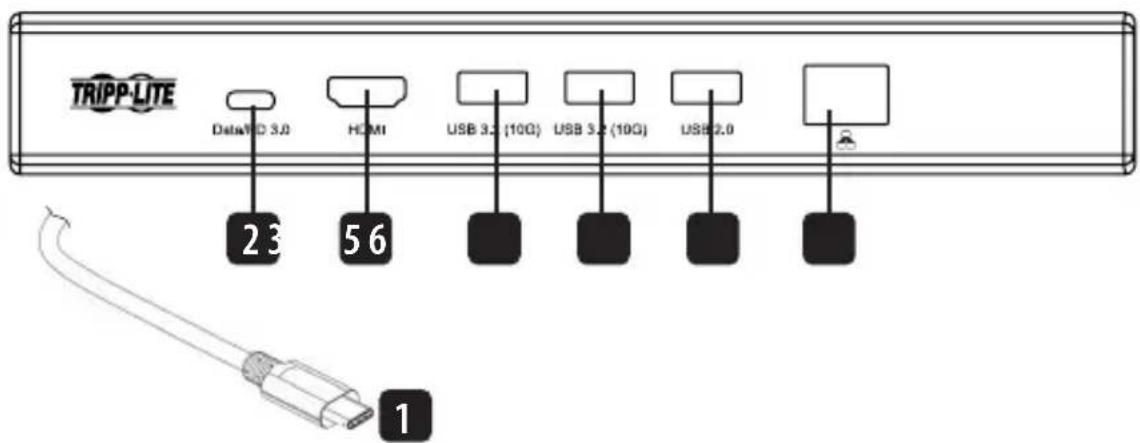
1 Bxodno pa3bem USB-C (wTekepbH) o6ecneuBaet noKluueHne K npTy USB-C yctpoiCTBa Microsoft Surface
2 NopT USB-C Data/PD 3.0 (rHe3doBoi): o6ecneuBaet noauy MoUHocn do 100 Bt (20 B / 5 A) uepe3 zapAky no TexHoIorNi PD 3.0 h a yctpoiCTBO Surface nnn Bo3MoXHOCTb nepeDaun daHHbIX uepe3 nHTepfecn USB 3.2 Gen 2 h a ckopocTax do 10 T6nt/c
3 NopT HDMI (rHe3doBoi): o6ecneuBaet noKluoyeHMeHDMI-MoHTopa c pa3peSeHnem 4K
4 NopTb USB 3.2 Gen 2 (rHe3doBble, 2 wT.): o6ecneuBAOT noDKIIOUeHne do 2 nepnepnHbIX yCTpoiCTB c nHTeppeom USB 3.2
5 IopT USB 2.0 (rHe3doBoi): o6ecneuBaet noKluoyHne nepnepnHoro yctpoiCTBa c nHTeppeom USB 2.0 (Ha npimep,MbIu nn KnaBnaTypbl)
6 IopT RJ45 (rHe3doBoi): o6ecneuBaet noKluyeHne K npoBOHOcTe Ethernet
yctahOBka
IpumueaHua:
-Данhoe u3dene nooepkubae mubeopazpeuhena do 4K (3840 x 2160) npu 30Tu. B cnyuae Heb03moXnOcmu nepedaunubeocuzHana cdoK-cmaHuu cm. pa3den "BbIaBneHue u ycmpaHHeuucnpaBnOcme"HaCmoueO pykoBODmba.
-Дok-cmaцua coBmumac nObbl ycmpoucmbom Microsoft Surface, ochaueHHbIM nopom USB-C.3adHu 3axumЯbnemca pezynupyembl u moxem 6bimb noo2Hah nod lo6oe coBmumoe ycmpoucmbo Surface.
- PnKpeNte yctpoiCTBO MoI. U442-DOCK14-MS cTBInbHoi CTopoHbI CBoero yctpoiCTBa Surface c nOmoBIO r6kIX fIKCnpyUoix 3aXIMOB Ha IIO6OM KOHe DOK-CTAHm.
- CoeINHte BxOAnHOJ WTeKePbI pa3bEm USB-C DOK-CTaHcUN C nopTOM USB-C cBoero yCtpoiCTBa Microsoft Surface.
- Пдклочпесершернoe yctpoiCTBO c pa3beMOM USB-C к порту USB-C Data/PD 3.0.
NIN
3apjkaTe yctpoCTBO Surface, noKIOUa ero 3apJHbI 6IOK c pa3beMOM USB-C PD K 3apJHOMy npTy USB-C PD IOK-CTaHcN, o6ecneuBaIOUeMy MoUHOCTb 3apJKn Do 100 Bt (20 B / 5 A).
Surface GO
Surface GO 2
Surface GO 3
Surface Pro 7
Surface Pro 8
Surface Pro X
Дok-станця мд. U442-DOCK14-MS takke Функционует в каессе настовдддддддддддддддддддддддддддддддддддддддддддддддддддддддддддддддддддддддддддддддддддддддддддддддддддд徳н Surface c nopTom USB-C, Ho He может Крппься К НМ.
TexHnueckne xapaKTepeNCTnKN
TapaHTnHbIe 06aTeJIbCTBa
OrpauHueHHa rapaHTn cpoKoM 1 roD
IpoaBe rapaHTpyet OTCyCTBne 3HaayabHbIX deEeKToB Maepnana nn nroTOBHeHn B TeHne 1 (Ondoro) Ro aCMoMeTn nepBoHaahbHO nokynk daHnro n3dien npn yC0Bn erno hncNoB3OBaHn B COOTBcTBrN co BcEmn pnpMeHHmblnn K HeMy yKa3aHnMn. B cnyae npoRbHeHn KaKnx-Im6o deEeKToB Maepnana nn n3rTOBHeHn B TeHne Hne yKa3aHHOro nepnoa IpoaBeocUyecTBnEePemOHnn 3aMeHy daHnro n3dien NCKIOuHTeBNO NO CBOeMy YCMOTpeHIO.
DEICTBNE HACTOIEI IAPAHNTNHE PACIPOCTPAHETCR HA CNYAM ECTECTBEHHHO 3HOCA NIN NOBPEXDEHNI B PE3YbTATE ABAPNN, HEHAJIEXKAUSEO ICNOIL3OBAHNIA, HAPUYEHNAIPABUNI KCKLIYATAUM INJIN XANATHOCTN. IPODABEU HE IPEIOCTABIANTHKAKIX YBHBO BIPAXEHHbIX IAPAHNTN 3A NCKLIQUEHHEM IPRMO IN3IOKEHHOH B HACTOUISEM JOKUMEHTE. 3A NCKLIQUEHME CNYAAEB, 3ANPEUHHbIX DEICTBYUOM 3AKOOHDATEJBCTBOM, BCE IOIDPA3YMBAEMbIE IAPAHNTN, BKIOUCHAR BCE IAPAHNTN PIPROHOCTDN IPOPOJAXN MNCIOJI3OBAHNIA PO HA3HAUEHNO, OPAHUMEHBI NOIPOJOIKHTIELBOHCTN DEICTBNU BblSEYKA3AHBBIM IAPAHNTN HbIM CPOKOM; KPOME TO, IN3 HACTOUIE IAPAHNTN RBHbIM OBpA3OM NCKIIOUHOTCR BCE IO6OHyBIE, CNYAURHIE KOCBEHHbIE YbItKN. (B HeKOToBx uTaatax He DnyckaTeCB BBeDEHnne OrpaHueHn Ha npoIONKtELbHOCTb DeiCTBNU Tex ININbX IOpda3yMeBaembIX rapaHTN, a B HeKOTOpbX - NCKLIQUEHNE INN ORpaHueHHe Na pOboHNkTeBbHOCTb DEIcTBNU Tex ININbX IOpda3yMeBaembIX rapaHTN, a B HeKOTOpbX - NCKLIQUEHNE INN ORpaHueHHe pa3mepa NoOboHyBn INN KOCEHHbX y6bItKN. B 3TNX cnyAax BwSeu3IOXeHHHeBc OPAHueHn INN NCKIQUEHNE MOYrHa BC He pAcnpocTpaHbTcBc. HaCToaHra rapaTHn ppeoctabnert KOHKPeTbHe IopdUneeckne Ipaba, a hAbop dpynx npab MoKet 6bItb pa3NJHbIM B 3aBnCmOCTn OTOpncnKnn).
BHIMAHHE! Do hauana nncnbsobahnna dahnhoro yctpoctba noh3oBaTeNb dojneH y6eHbTcB TOM, YTO OHO RBNtca pnproHbIM, COOTBeCTByUOUM MM NII 6eONaChbM DnI npEOnaRaEMOro npmHeHn. B CBA3N C6bJbMM pa3Ho06pa3Hem KOHKpeTHbIX npmHeHn npo3BOuNTbe He daet KaKnx-Jin6o 3aBepeHHn IIN rapaHTM OTHCHTbHO npriOHOCTn DaHHbx IN3denn IIN kaKoro-Jin6o KOHKpeTHORO npmHeHn IIN IX COOTBeCTBMA KAKM-Jin6o KOHKpeTHBM Tpe6OBAHNM.
TapaHTnHbIe 06aTeJIbCTBa
HnfoMaJno BbIopHeHIO Tpe6oBAnu IpuKeTtBbI WEE Jn noKynaTeNei nepepaOHTKOB npOdyKunn KOMNaHn Tripp Lite (AraIooxca pe3ndentAm Ebponeckoro co103a)
Cornacno noonokhenm DnpekTbbl ob tyinnaaun OTxOoOB 3eKtpueckoro n 3eKtpoHoro o6opyoBaHn (WEEE) mCNIOHNTEbHbX pacnpopjexhen no ee npimeheHIO, pni NOKyNke NOTpe6nteMaHOBTO 3eKtpueckoro nn 3eKtpoHoro o6opyoBaHn npOHBOcTBa KOMnAHn Tripp Lite OHn NOyuaot npaboHa:
- PpOdaKy CTaporo 06bpyoBaHnNo pInHunny "OinH 3a OINH" N/IMn HA KMBBaIeHTHO OHOBe (B 3aBMCMOCTN OT KOHKpeTHO CTpaHBs)
OTnpaBky HOBOrO obopyoBaHnHa npepea60tky noCte OOKHATeHbHb Bbpa60TK erpocpa
He peKomeHnyeTc HcNcIb3ObaHnE daHrO obOpuyobAHnB CNTeMaX KIn3Heo6ecneYHn, rTe eTo BbIXoI 3C TPO npEIOJNOxuTeBHO MOKET npBeCTN K npe6oAM B pa6Ote ObopyuOBaHn KIn3Heo6ecneYHn IM B 3NaHTeBHO Mepe CHMHTb e 0e 63oNaCHOTb m Nn 3ΦeKMTBHOCTb.
KoMaHnI Tripp Lite noctOaHHo COBepHeCTByET CBOIO npOdykuuio. B CBa3n C 3mM BO3MOxHO H3MeHeHne TEXHuecknx XapaKTepnCTMK 6e3 npEBApHTbHorO yBeDOMLeHn. BHeuHn BuD peAIBhIX M3dEnm MOKeT HeCKOnbKO OTNmuTaBCaOT npECDabHeHOrO Ha foTOrpaHnx IInlloCTpaunix.

1111 W. 35th Street, Chicago, IL 60609 USA · triplite.com/support
22-01-368 9340A3 RevB
Bedienungsanleitung
- Surface GO
- Surface GO 2
- Surface GO 3
- Surface Pro 7
- Surface Pro 8
- Surface Pro X
1111 W. 35th Street, Chicago, IL 60609 USA • tripplite.com/support
22-01-368 9340A3 RevB