B127A4X2BH2PH - Video adapter Tripp Lite - Free user manual and instructions
Find the device manual for free B127A4X2BH2PH Tripp Lite in PDF.


User questions about B127A4X2BH2PH Tripp Lite
0 question about this device. Answer the ones you know or ask your own.
Ask a new question about this device
Download the instructions for your Video adapter in PDF format for free! Find your manual B127A4X2BH2PH - Tripp Lite and take your electronic device back in hand. On this page are published all the documents necessary for the use of your device. B127A4X2BH2PH by Tripp Lite.
USER MANUAL B127A4X2BH2PH Tripp Lite
HDMI over Cat6 Matrix Switch Kits, 4K/60 Hz
2-Output Switch Kit: B127A-4X2-BH2PH
4-Output Switch Kit: B127A-4X4-BH4PH
Español 13 • Français 25 • Русский 37 • Deutsch 49
WARRANTY REGISTRATION
Register your product today and be automatically entered to win an ISOBAR ^® surge protector in our monthly drawing!
tripplite.com/warranty
text_image
QR code image containing encoded data, no visible human-readable text
text_image
TRIPP·LITE
1111 W. 35th Street, Chicago, IL 60609 USA • tripplite.com/support
Copyright © 2022 Tripp Lite. All rights reserved.
Product Features
- Transmit 4K video with audio from 4 HDMI source devices to 2 HDMI displays (B127A-4X2-BH2PH) or 4 HDMI displays (B127A-4X4-BH4PH), extend the signals up to 230 ft. from the sources, and switch between sources
- Supports Ultra HD video resolutions up to 4K x 2K (3840 x 2160) @ 60 Hz, as specified in HDMI 2.0, with 4:4:4 chroma subsampling
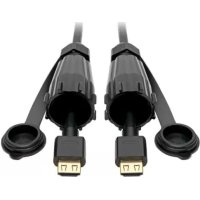
- Compatible with Tripp Lite B127A-Series receivers, such as B127A-1A0-FH or B127A-1A0-BH (sold separately); Tripp Lite B127A-1P0-PH receivers are included (2 with B127A-4X2-BH2PH; 4 with B127A-4X4-BH4PH)
- Supports High Dynamic Range (HDR) for richer contrast and expanded color accuracy
- Complies with HDCP 2.2 standards to display up-to-date 4K video content
- Multi-resolution support allows receivers to be used on any display that supports 1080p, 4K/30 Hz or 4K/60 Hz without affecting the video resolution of the other connected receiver
- Power over Cable (PoC) technology provides power to the connected receivers via Cat6 cable
- Boost the signal distance between each source and display to a total of 400 ft. by adding Tripp Lite B127A-010-H signal boosters (maximum of 2 with B127A-4X2-BH2PH, 4 with B127A-4X4-BH4PH)
- Included mounting hardware allows the switch to be wall-, rack- or pole-mounted
- Plug-and-play operation with no software required for easy, immediate installation
Package Contents
• 2-Port or 4-Port Matrix Switch
- Pigtail Receiver Units (2x B127A-4X2-BH2PH or 4x B127A-4X4-BH4PH)
• External Power Supply
o B127A-4X2-BH2PH - Input: 100-240V, 50/60 Hz, 1.5A; Output: 24V 1A
o B127A-4X4-BH4PH - Input: 100-240V, 50/60 Hz, 1.5A; Output: 24V 2A
- IR Cable
- Remote Control
- Surface Mount Kit
- RS-232 Adapter
- Owner's Manual
Optional Accessories
• N202-Series Cat6 24 AWG Solid Wire Ethernet Cables
• P569-XXX-CERT or P568-XXX-2A Series HDMI 2.0 Cables
• B127A-010-H Signal Booster
• B127A-1A0-BH Box-Style Receiver
• B127A-1A0-FH Face Plate Receiver
Disclaimer
Before installation, please check the following settings of your source(s) and TV/monitor(s):
- Set display(s) to 60 Hz. Double-check factory settings, as default can be set to a lower frequency (Hz) than advertised.
- Ensure the input setting of your monitor is set at HDMI 2.0. Some displays may have default setting at HDMI 1.4.
- Verify your monitor has the HDR feature enabled. Some displays may have this feature disabled as a factory setting.
- Check if the Ultra HD (UHD) Deep Color setting is enabled on your display. Confirm with your display manufacturer which HDMI ports support UHD Deep Color.
Note: To connect a local display to your installation, its UHD Deep Color setting may need to be disabled to achieve 4K/60 Hz resolution.
Mounting Instructions
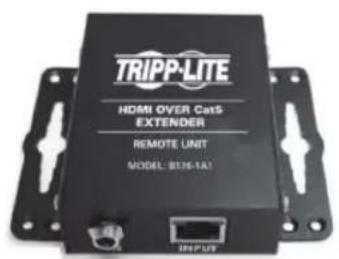
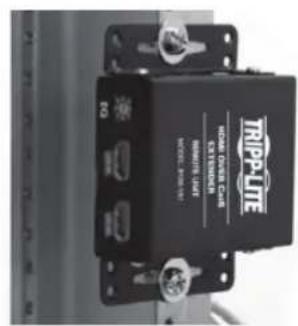
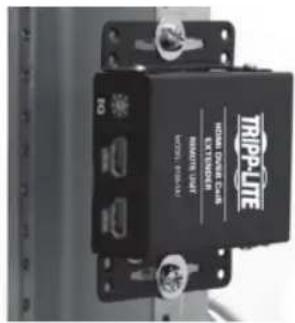
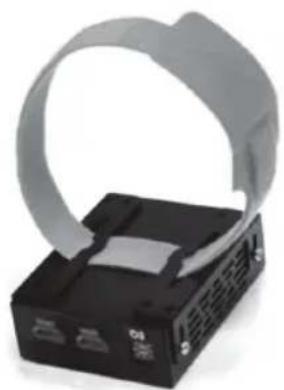
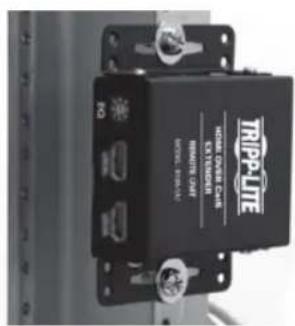
The B127A-4X2-BH2PH and B127A-4X4-BH4PH include mounting hardware that allows for a variety of mounting methods. The following images illustrate how the included mounting brackets can be attached for different installations.
Note: The model shown in the below images is for illustrative purposes only. Your product may vary by model number, size or port orientation. The mounting options for all over Cat6 units are the same.
Wall-Mount
text_image
TRIPP-LITE HDMI OVER CatS EXTENDER REMOTE UNIT MODEL: BT376-1A1 INPUT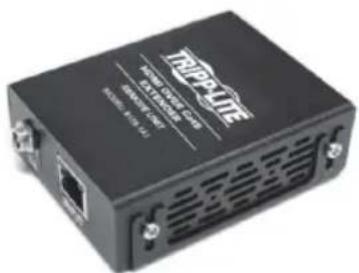
text_image
TRIP-PLATE USB Connection (USB) USB 10.000-12.000 USB 10.000-12.000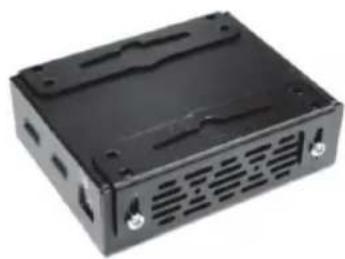
natural_image
Black plastic electronic device casing with ventilation slots and mounting holes (no visible text or symbols)19" Rack-Mount Pole-Mount
text_image
TRIPP-LITE HDMI PRESS CUB EXTENDED MINIMUM LIFT MASC. MAX 100V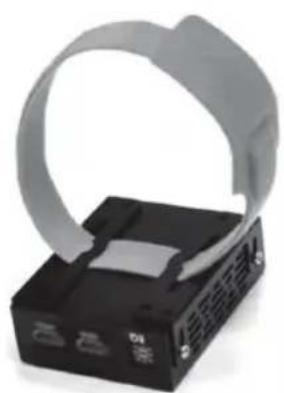
natural_image
Close-up of a black electronic device with a gray plastic strap and control buttons (no visible text or symbols)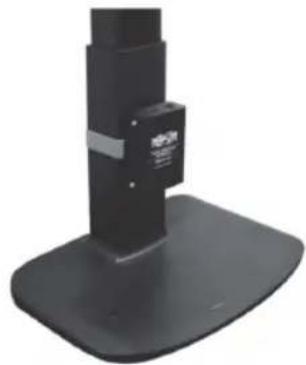
natural_image
Black mechanical device with a base and mounting base, no visible text or symbolsInstallation
B127A-4X2-BH2PH Installation
Notes:
- Test to ensure the entire installation works properly before pulling cables through ceilings/walls.
- To achieve maximum distance and performance, use 24 AWG solid wire Cat6 cable. Using stranded wire Cat6 cable or cable with a gauge (AWG) size higher than 24 AWG will result in shorter extension distance. Higher gauge cabling, such as 26 AWG, has a more limited transmission capability than lower gauge cabling. All Tripp Lite N202-Series Cat6 cables are made with 24 AWG solid wire cabling.
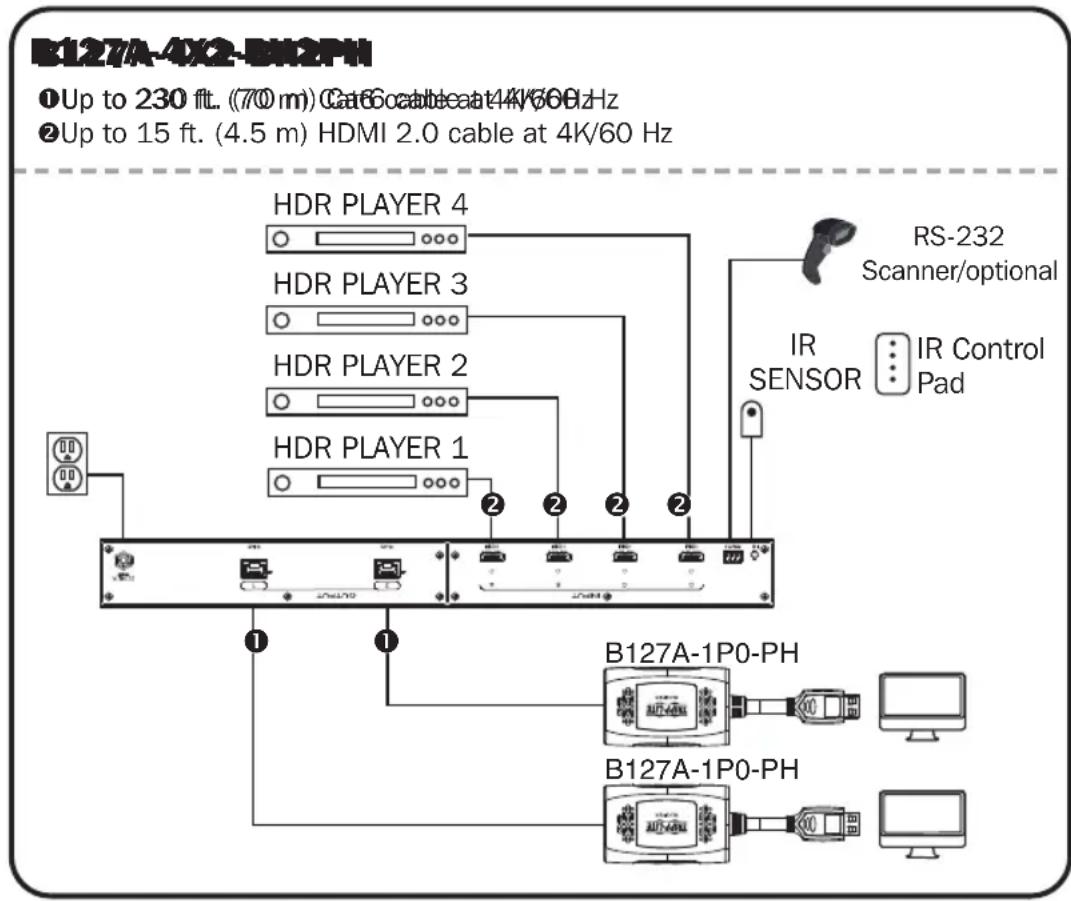
- The installation diagram shows a B127A-4X2-BH2PH kit, which includes a quad-input/dual-output switch unit and two B127A-1P0-PH pigtail receiver units.
- External power is not required for remote receivers due to Power over Cable (PoC) technology incorporated in the switch.
flowchart
graph TD
    A["HDRL Player 1"] -->|②| B["IR SENSOR"]
    C["HDRL Player 2"] -->|②| B
    D["HDRL Player 3"] -->|②| B
    E["HDRL Player 4"] -->|②| B
    F["B127A-1P0-PH"] --> G["IR Control Pad"]
    H["B127A-4X2-BH2PH"] --> I["RS-232 Scanner/optional"]
    style A fill:#f9f,stroke:#333
    style C fill:#f9f,stroke:#333
    style D fill:#f9f,stroke:#333
    style E fill:#f9f,stroke:#333
    style F fill:#f9f,stroke:#333
    style H fill:#f9f,stroke:#333
    style B fill:#ccf,stroke:#333
    style G fill:#ccf,stroke:#333
    style I fill:#ccf,stroke:#333
Installation
- Make sure all equipment in the installation—such as displays, HDR players and the switch—is powered off.
- Connect the HDMI sources to the input ports on the local switch with user-supplied HDMI cables.
3.Optional: For extended range, connect up to two B127A-010-H signal boosters between the switch and each receiver with user-supplied Cat6 cables. - Connect the RJ45 ports on the local switch to the RJ45 port on the remote receivers with user-supplied Cat6 cable.
- Connect the built-in HDMI connector on the receivers to the HDMI input of the remote displays.
- Turn on the power to your connected displays.
- Connect the external power supply to the switch. Plug it into an available wall outlet or a Tripp Lite surge protector, PDU or UPS system. The Power (green) LED on the switch will illuminate to indicate the unit is receiving power from the external power supply. The numbered HDMI ports' LEDs (green) will illuminate to indicate the ports are receiving power.
- Turn on the power to the HDMI source(s). The Output 1-2 (orange) LEDs next to the port selection buttons will illuminate to indicate both ports are receiving power and transmitting video to the connected receivers.
- Connect the included IR cable to the IR Input port. Select the desired source for the two outputs using the included remote control or the push buttons located on the front of the switch.
- The screen should now display the desired video on the connected display(s).
Installation
B127A-4X4-BH4PH Installation
Notes:
- Test to ensure the entire installation works properly before pulling cables through ceilings/walls.
- To achieve maximum distance and performance, use 24 AWG solid wire Cat6 cable. Using stranded wire Cat6 cable or cable with a gauge (AWG) size higher than 24 AWG will result in shorter extension distance. Higher gauge cabling, such as 26 AWG, has a more limited transmission capability than lower gauge cabling. All Tripp Lite N202-Series Cat6 cables are made with 24 AWG solid wire cabling.
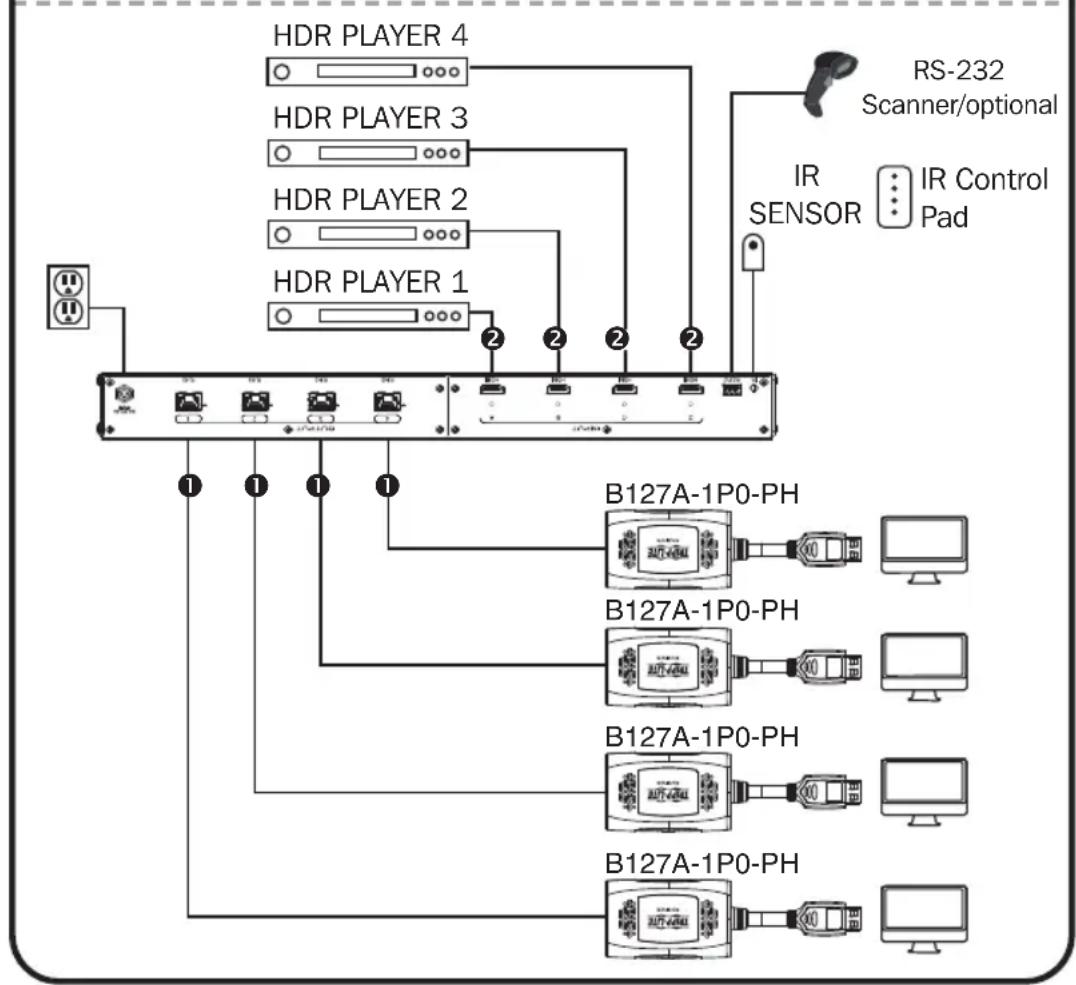
- The installation diagram shows a B127A-4X4-BH4PH kit, which includes a quad-input/quad-output switch unit and four B127A-1P0-PH pigtail receiver units.
- External power is not required for remote receivers due to Power over Cable (PoC) technology incorporated in the switch.
B127A-4X4-BH4PH
Up to 230 ft. (700m) Ga66cableat4/6GHz
② Up to 15 ft. (4.5 m) HDMI 2.0 cable at 4K/60 Hz
flowchart
graph TD
    A["HDR PLAYER 1"] -->|2| B["B127A-1P0-PH"]
    C["HDR PLAYER 2"] -->|2| B
    D["HDR PLAYER 3"] -->|2| B
    E["HDR PLAYER 4"] -->|2| B
    F["RS-232 Scanner/optional"] --> B
    G["IR Sensor"] --> B
    H["IR Control Pad"] --> B
    I["B127A-1P0-PH"] --> B
    J["B127A-1P0-PH"] --> B
    K["B127A-1P0-PH"] --> B
Installation
- Make sure all equipment in the installation—such as displays, HDR players and the switch—is powered off.
- Connect the HDMI sources to the input ports on the local switch with user-supplied HDMI cables.
3.Optional: For extended range, connect up to four B127A-010-H signal boosters between the switch and each receiver with user-supplied Cat6 cables. - Connect the RJ45 ports on the local switch to the RJ45 port on the remote receivers with user-supplied Cat6 cable.
- Connect the built-in HDMI connector on the receivers to the HDMI input of the remote displays.
- Turn on the power to your connected displays.
- Connect the external power supply to the switch. Plug it into an available wall outlet or a Tripp Lite surge protector, PDU or UPS system. The Power (green) LED on the switch will illuminate to indicate the unit is receiving power from the external power supply. The numbered HDMI ports' LEDs (green) will illuminate to indicate the ports are receiving power.
- Turn on the power to the HDMI source(s). The Output 1-4 (orange) LEDs next to the port selection buttons will illuminate to indicate both ports are receiving power and transmitting video to the connected receivers.
- Connect the included IR cable to the IR Input port. Select the desired source for the four outputs using the included remote control or the push buttons located on the front of the switch.
- The screen should now display the desired video on the connected display(s).
RS-232 Serial Control
Before using RS-232 Serial Control, you must first access the Terminal Emulation Software and update the COM port settings.
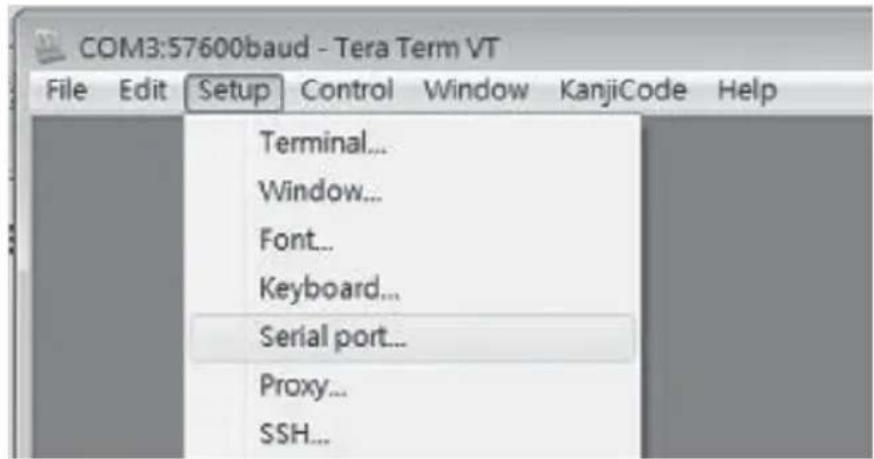
1 Go to the Setup drop-down menu and select the Serial Port option.
text_image
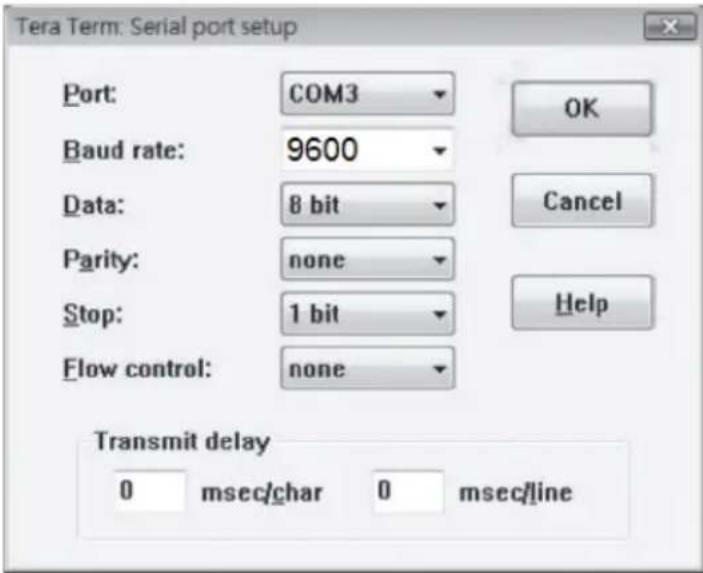
COM3:57600baud - Tera Term VT File Edit Setup Control Window KanjiCode Help Terminal... Window... Font... Keyboard... Serial port... Proxy... SSH...2 Select the COM port that is being used, and update the remaining settings as follows: Baud Rate (9600), Data (8 bit), Parity (none), Stop (1 bit), Flow Control (none).
text_image
Tera Term: Serial port setup Port: COM3 Baud rate: 9600 Data: 8 bit Parity: none Stop: 1 bit Flow control: none OK Cancel Help Transmit delay 0 msec/char 0 msec/lineRS-232 Serial Control
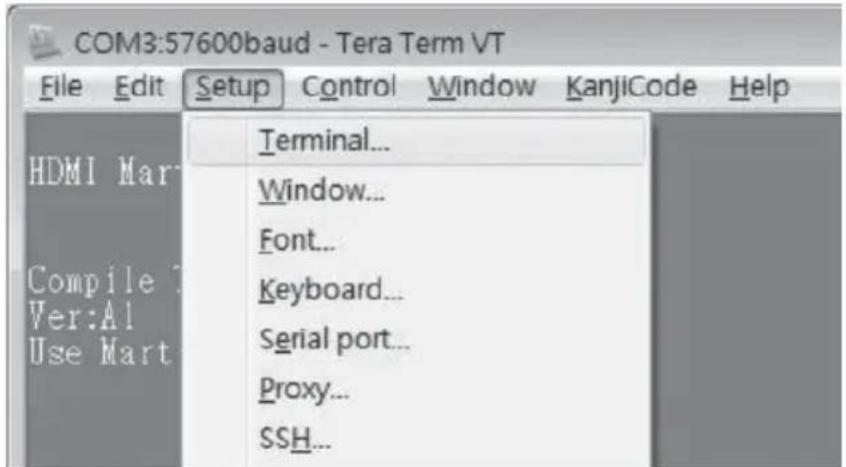
3 Next, you will need to configure your software to allow input control. Go to the Setup drop-down menu and select the Terminal option.
text_image
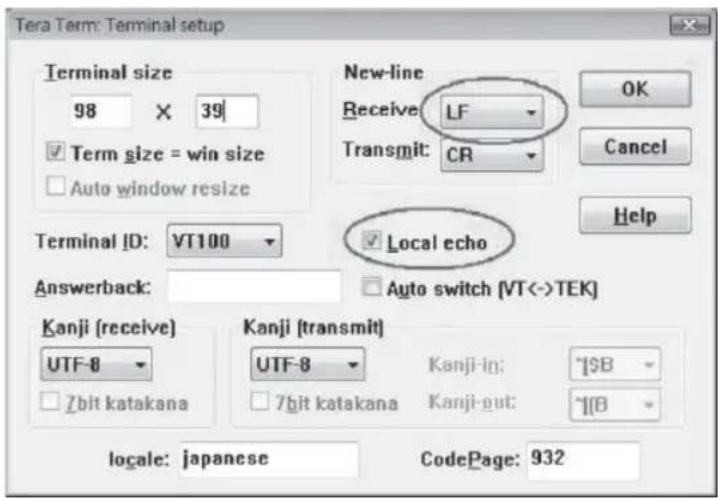
COM3:57600baud - Tera Term VT File Edit Setup Control Window KanjiCode Help HDMI Mar Compile Ver:Al Use Mart Terminal... Window... Font... Keyboard... Serial port... Proxy... SSH...4 Update the following settings: Receive (LF), Local Echo (enable). The other settings can remain unchanged.
text_image
Tera Term: Terminal setup Terminal size 98 X 39 Term size = win size Auto window resize Terminal ID: VT100 Answerback: New-line Receive: LF Transmit: CR Local echo Auto switch [VT<->TEK] Kanji (receive) UTF-8 7bit katakana Kanji (transmit) UTF-8 7bit katakana Kanji-in: ~$B Kanji-out: ~$B locale: japanese CodePage: 9325 Once these settings are updated, the Terminal Emulation Software will recognize the switch, allowing you to enter commands to control the unit. The following table lists the available commands:
| Command Action | |
| sw[x] [n] Switches the source being displayed on the selected output. [x] is the output (1, 2, 3, or 4) and [n] is the desired source (A, B, C, or D). For example, a command of sw1 A would display source A on output 1. | |
| PWD Turns power to the switch on/off. | |
| STE Displays the current output state, showing which source is being displayed on each output. |
Warranty and Product Registration
1-Year Limited Warranty
Seller warrants this product, if used in accordance with all applicable instructions, to be free from original defects in material and workmanship for a period of one (1) year from the date of initial purchase. If the product should prove defective in material or workmanship within that period, Seller will repair or replace the product, at its sole discretion.
THIS WARRANTY DOES NOT APPLY TO NORMAL WEAR OR TO DAMAGE RESULTING FROM ACCIDENT, MISUSE, ABUSE OR NEGLECT. SELLER MAKES NO EXPRESS WARRANTIES OTHER THAN THE WARRANTY EXPRESSLY SET FORTH HEREIN. EXCEPT TO THE EXTENT PROHIBITED BY APPLICABLE LAW, ALL IMPLIED WARRANTIES, INCLUDING ALL WARRANTIES OF MERCHANTABILITY OR FITNESS, ARE LIMITED IN DURATION TO THE WARRANTY PERIOD SET FORTH ABOVE; AND THIS WARRANTY EXPRESSLY EXCLUDES ALL INCIDENTAL AND CONSEQUENTIAL DAMAGES. (Some states do not allow limitations on how long an implied warranty lasts, and some states do not allow the exclusion or limitation of incidental or consequential damages, so the above limitations or exclusions may not apply to you. This warranty gives you specific legal rights, and you may have other rights which vary from jurisdiction to jurisdiction.)
WARNING: The individual user should take care to determine prior to use whether this device is suitable, adequate or safe for the use intended. Since individual applications are subject to great variation, the manufacturer makes no representation or warranty as to the suitability or fitness of these devices for any specific application.
PRODUCT REGISTRATION
Visit triplite.com/warranty today to register your new Tripp Lite product. You'll be automatically entered into a drawing for a chance to win a FREE Tripp Lite product!*
* No purchase necessary. Void where prohibited. Some restrictions apply. See website for details.
WEEE Compliance Information for Tripp Lite Customers and Recyclers (European Union)
Under the Waste Electrical and Electronic Equipment (WEEE) Directive and implementing regulations, when customers buy new electrical and electronic equipment from Tripp Lite, they are entitled to:
- Send old equipment for recycling on a one-for-one, like-for-like basis (this varies depending on the country)
- Send the new equipment back for recycling when this ultimately becomes waste
Use of this equipment in life support applications where failure of this equipment can reasonably be expected to cause the failure of the life support equipment or to significantly affect its safety or effectiveness is not recommended.
Tripp Lite has a policy of continuous improvement. Specifications are subject to change without notice. Photos and illustrations may differ slightly from actual products.

text_image
TRIPP·LITE
1111 W. 35th Street, Chicago, IL 60609 USA • tripplite.com/support
text_image
Tera Term: Serial port setup Port: COM3 Baud rate: 9600 Data: 8 bit Parity: none Stop: 1 bit Flow control: none OK Cancel Help Transmit delay 0 msec/char 0 msec/lineControl Serial RS-232
text_image
Tera Term: Terminal setup Terminal size 98 X 39 ✓ Term size = win size □ Auto window resize Terminal ID: VT100 Answerback: New-line Receive: LF Transmit: CR Local echo Auto switch (VT<->TEK) Kanji (receive) UTF-8 □ 7bit katakana Kanji (transmit) UTF-8 □ 7bit katakana Kanji-in: ^$B □ Kanji-out: ^$B locale: japanese CodePage: 9321111 W. 35th Street, Chicago, IL 60609 USA • tripplite.com/support
text_image
Tera Term: Serial port setup Port: COM3 Baud rate: 9600 Data: 8 bit Parity: none Stop: 1 bit Flow control: none OK Cancel Help Transmit delay 0 msec/char 0 msec/linetext_image
Tera Term: Terminal setup Terminal size 98 X 39 Term size = win size Auto window resize Terminal ID: VT100 Answerback: New-line Receive: LF Transmit: CR Local echo Auto switch [VT<->TEK] Kanji (receive) UTF-8 7bit katakana Kanji (transmit) UTF-8 7bit katakana Kanji-in: ^$B Kanji-out: ^$(B) locale: japanese CodePage: 9321111 W. 35th Street, Chicago, IL 60609 USA • tripplite.com/support
1111 W. 35th Street, Chicago, IL 60609 USA • tripplite.com/support
natural_image
Black plastic electronic device casing with ventilation slots and mounting holes (no visible text or symbols)Монтаж в стойку 19"
text_image
TRIP-LITE HIGH DRYER AIR EXTENDER RAVATE WIRE KONOMO RAILМонтаж на мачте
natural_image
Black electronic device with a gray ribbon and control panel, no visible text or symbols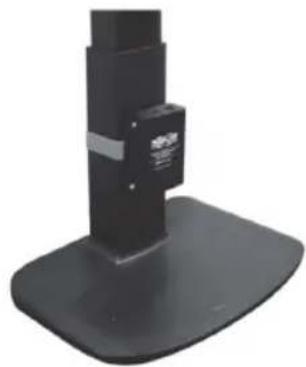
natural_image
Black mechanical device with a base and mounting base, no visible text or symbolsУстановка
Установка мод. В127А-4Х2-BH2РН
Примечания:
text_image
Tera Term: Serial port setup Port: COM3 Baud rate: 9600 Data: 8 bit Parity: none Stop: 1 bit Flow control: none OK Cancel Help Transmit delay 0 msec/char 0 msec/linetext_image
Tera Term: Terminal setup Terminal size 98 X 39 Term size = win size Auto window resize Terminal ID: VT100 Answerback: New-line Receive LF Transmit: CR Local echo Auto switch (VT<->TEK) Kanji (receive) UTF-8 7bit katakana Kanji (transmit) UTF-8 7bit katakana Kanji-in: ^SB Kanji-out: ^IB locale: japanese CodePage: 9321111 W. 35th Street, Chicago, IL 60609 USA • tripplite.com/support
Bedienungsanleitung
1111 W. 35th Street, Chicago, IL 60609 USA • tripplite.com/support
natural_image
Black plastic electronic device casing with ventilation slots and mounting holes (no visible text or symbols)19-Zoll-Rackmontage Mastmontage
text_image
TRIP-LITE NEAR GAS-CAIR ENGLISH MINUTE LIGHT NO. 100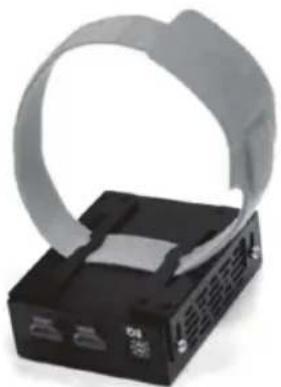
natural_image
Close-up of a black electronic device with a gray plastic strap and ventilation slots (no visible text or symbols)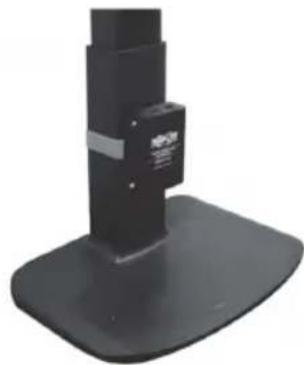
natural_image
Black mechanical device with a base and mounting base, no visible text or symbolsInstallation
B127A-4X2-BH2PH-Installation
Hinweise:
text_image
Tera Term: Serial port setup Port: COM3 Baud rate: 9600 Data: 8 bit Parity: none Stop: 1 bit Flow control: none OK Cancel Help Transmit delay 0 msec/char 0 msec/linetext_image
Tera Term: Terminal setup Terminal size 98 X 39 Term size = win size Auto window resize Terminal ID: VT100 Answerback: New-line Receive LF Transmit: CR Local echo Auto switch (VT<->TEK) Kanji (receive) UTF-8 7bit katakana Kanji (transmit) UTF-8 7bit katakana Kanji-in: ^SB Kanji-out: ^IB locale: japanese CodePage: 9321111 W. 35th Street, Chicago, IL 60609 USA • tripplite.com/support