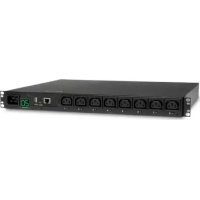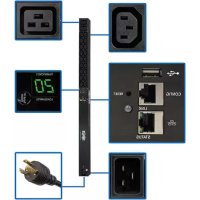
PDUMNV20HV2LX - Power strip Tripp Lite - Free user manual and instructions
Find the device manual for free PDUMNV20HV2LX Tripp Lite in PDF.


User questions about PDUMNV20HV2LX Tripp Lite
0 question about this device. Answer the ones you know or ask your own.
Ask a new question about this device
Download the instructions for your Power strip in PDF format for free! Find your manual PDUMNV20HV2LX - Tripp Lite and take your electronic device back in hand. On this page are published all the documents necessary for the use of your device. PDUMNV20HV2LX by Tripp Lite.
USER MANUAL PDUMNV20HV2LX Tripp Lite
Monitored Rack PDU Switched Rack PDU
0U (Vertical) Format
PDUMNV20HVLX
(208/230V 16 Amp Moni
tored Model)
Series Number: AGPD7897
PDUMV20HVNET2LX
(208/230V 16 Amp
Switched Model)
Series Number: AGPD7897
PDUMNV30HVLX
(208/240V 24 Amp Moni
tored Model)
Series Number: AGPD7898
PDUMV30HVNETLX
(208/230V 24 Amp Switched Model)
Series Number: AGPD7898
PDUMNV32HV2LX
(200-240V 32A Monitored Model)
Series Number: AG-00CA
Important Safety Instructions 2
Monitored Rack PDU Features 2
Switched Rack PDU Features 3
Installation 3
Features 8
Configuration and Operation 11
Service 11
Warranty and Product Registration 12
Espanol 13
Français 25
Pycckn 37
Deutsch 49
PROTECT YOUR INVESTMENT!
Register your product for quicker service and ultimate peace of mind. You could also win an IS0BAR6ULTRA surge protector—a $100 value!
www.triplite.com/warranty


Manufacturing Excellence.
1111 W. 35th Street, Chicago, IL 60609 USA • www.triplite.com/support
Copyright © 2019 Tripp Lite. All rights reserved.
Important Safety Instructions
SAVE THESE INSTRUCTIONS
This manual contains instructions and warnings that should be followed during the installation, operation, and storage of this product. Failure to heed these instructions and warnings will void the product warranty.

- The PDU provides the convenience of multiple outlets, but DOES NOT provide surge or line noise protection for connected equipment.
- The PDU is designed for indoor use only, in a controlled environment, away from excess moisture, temperature extremes, conductive contaminants, dust or direct sunlight.
- Keep indoor ambient temperature between 0^ and 50^ ( 32^ and 122^ ).
- The PDU must be installed by a qualified technician only.
- Do not attempt to mount the PDU to an insecure or unstable surface.
- Install in accordance with National Electrical Code standards. Be sure to use the proper overcurrent protection for the installation, in accordance with the plug/equipment rating.
- Connect the PDU to an outlet that is in accordance with your local building codes and that is adequately protected against excess currents, short circuits and earth faults.
- The electrical outlets supplying power to the equipment should be installed near the equipment and easily accessible.
- Do not connect the PDU to an ungrounded outlet or to extension cords or adapters that eliminate the connection to ground.
- Be sure to provide a local disconnect device on any models that are permanently installed without a plug that is easily accessible.
- Never attempt to install electrical equipment during a thunderstorm.
- Individual equipment connected to the PDU should not draw more current than the individual PDU's outlet's rating.
- The total load connected to the PDU must not exceed the maximum load rating for the PDU.
- Do not attempt to modify the PDU, input plugs or power cables.
- Do not drill into or attempt to open any part of the PDU housing. There are no user-serviceable parts inside.
- Do not attempt to use the PDU if any part of it becomes damaged.
- Use of this equipment in life support applications where failure of this equipment can reasonably be expected to cause the failure of the life support equipment or to significantly affect its safety or effectiveness is not recommended.
Monitored Rack PDU Features
Network interface enables remote power monitoring and event notification.
Digital amp meter for on-site load monitoring.
- Optional EnviroSense2 modules (E2MT, E2MTDO, E2MTDI, E2MTHDI) allow for a variety of environmental monitoring and control options.
- Toolless button-mount installation in Tripp Lite SmartRack and many third-party enclosures.
Switched Rack PDU Features
Network interface enables remote power monitoring and individual outlet control.
- Individually controllable outlets allow remote rebooting of locked-up network devices.
Digital amp meter for on-site load monitoring.
- Optional EnviroSense2 modules (E2MT, E2MTDO, E2MTDI, E2MTHDI) allow for a variety of environmental monitoring and control options.
- Toolless button-mount installation in Tripp Lite SmartRack and many third-party enclosures.
Installation
Mounting the PDU
Note: The illustrations may differ somewhat from your PDU model. Regardless of configuration, the user must determine the fitness of hardware and procedures before mounting. The PDU and included hardware are designed for common rack and rack enclosure types and may not be appropriate for all applications. Exact mounting configurations may vary. Screws for attaching the mounting brackets and cord retention shelf to the PDU are included. Use only the screws supplied by the manufacturer, or their exact equivalent (#6-32, 14 flat head).
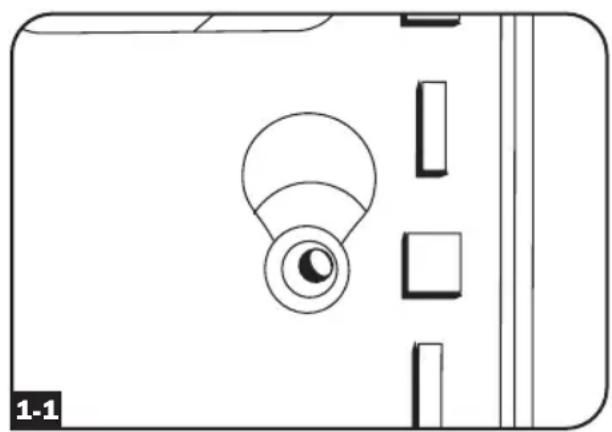
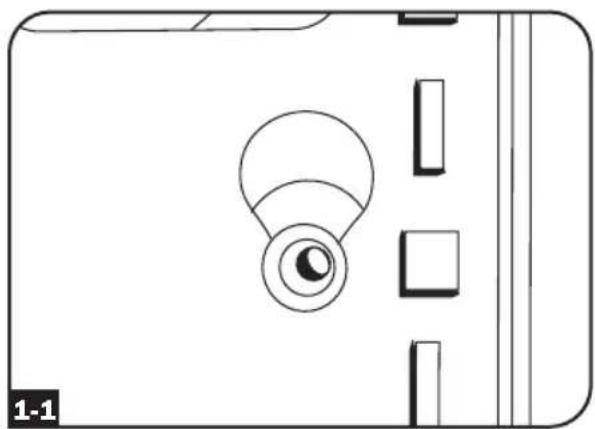
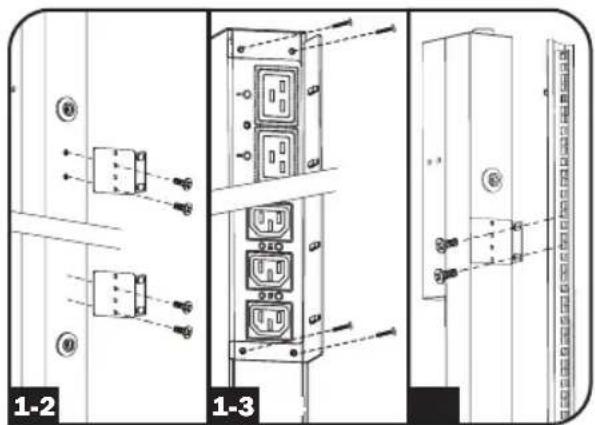
If installing the PDU in a rack that has button-mount slots, you only need to perform step 1-1. If your rack enclosure does not have button-mount slots, proceed to step 1-2.

To install the PDU in a rack equipped with button-mount slots, insert the mounting buttons on the rear of the PDU into the button-mount slots on the rack and slide the PDU down until the mounting buttons engage the narrow section of the button-mount slots.
Note: To install the PDU with its outlets facing the rear of the rack, use the included PDUMVROTATEBRKT accessory. This V-shaped bracket provides a mounting button on one leg of the V and a button-mount slot on the other, effectively repositioning the mounting buttons. See Features section for image.

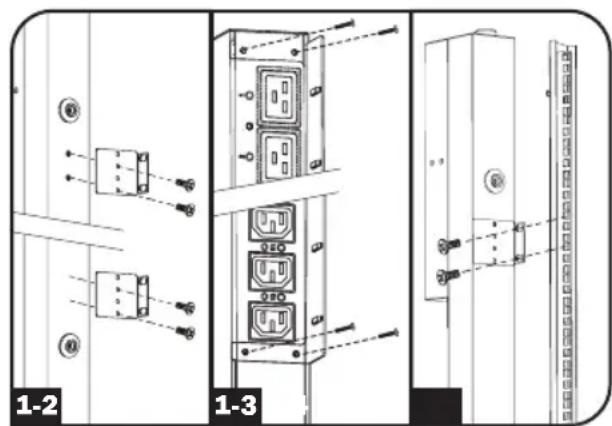
Attach the mounting brackets to the PDU.

(Optional) Attach the cord retention bracket(s) to the PDU.

Attach the PDU to a vertical rail in your rack or rack enclosure. Use the included mounting hardware to attach the mounting brackets to the rail.
Installation
Connecting the PDU

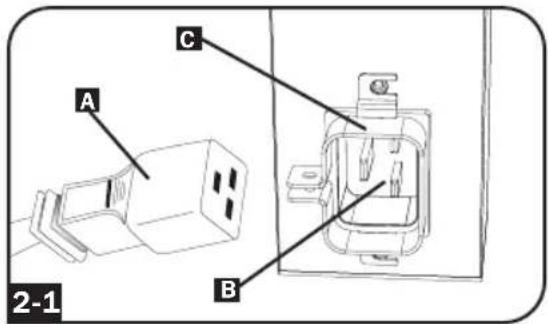
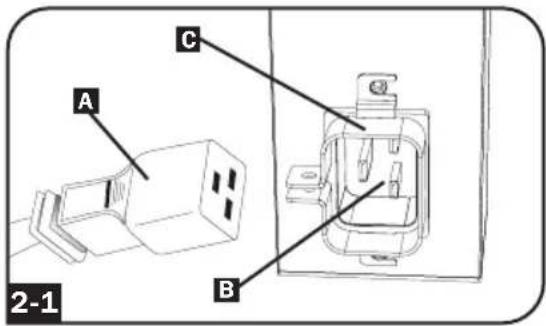
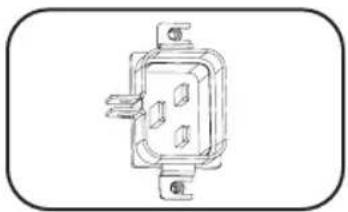
(Models with IEC power inlet or 3-pole IEC 309 plug only) Select models have a detachable power cord. Attach the included power cord to the PDU by inserting the IEC connector A of the power cord into the IEC power inlet B located near the end of the PDU. Use the included bracket C to secure the power cord connection.
Note:Optionally, a user-supplied power cord can be attached to the PDU by connecting it to the IEC inlet. Do not attempt to attach a user-supplied power cord unless it is certified to be compatible with the input power source that will be used by the PDU.

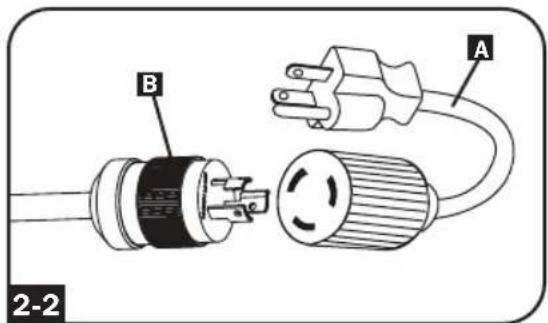
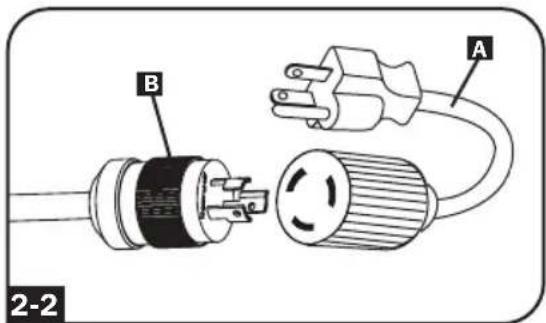
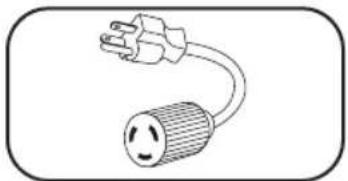
(Optiona-l models with input plug adapter only) Select models include an input plug adapter that converts the twist-lock input plug to a straight-blade input plug. Attach the input plug adapter A to the input plug B if you wish to plug the PDU into a compatible straightblade outlet.

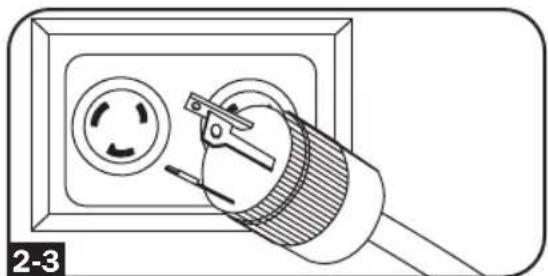
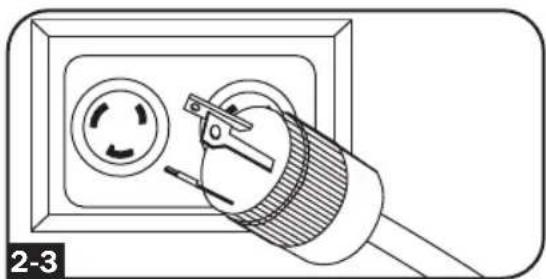
Connect the input plug to a compatible AC power outlet. If the PDU does not have a circuit breaker, it should be provided with a branch-rated overcurrent protection device that matches the rated amperage of the PDU.
Note: The AC power source should not share a circuit with a heavy electrical load.

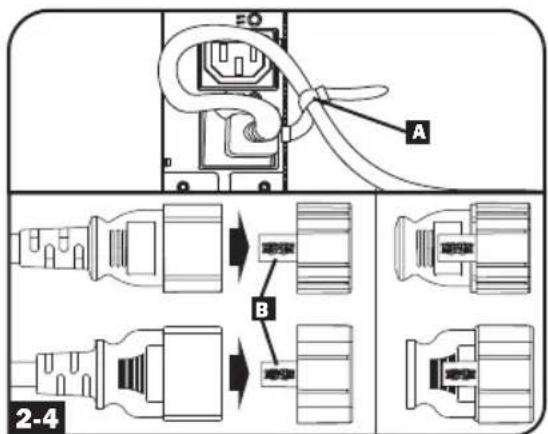
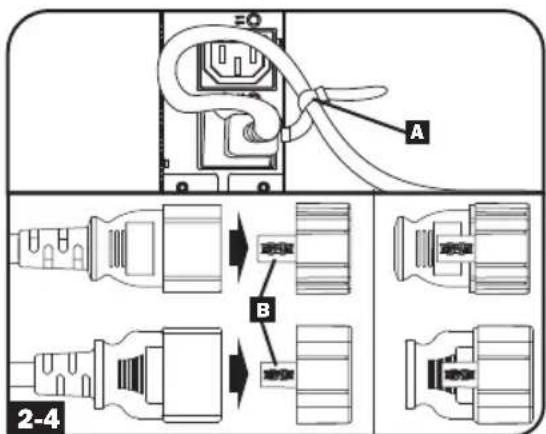
(Option 1 - select models only) If you attached the cord retention bracket(s), tie each equipment power cord to the retention bracket. Attach each cord to the retention shelf by looping the cord and securing it with one of the included cable ties A. Make sure that each cord can be unplugged from the PDU without removing the cable tie.
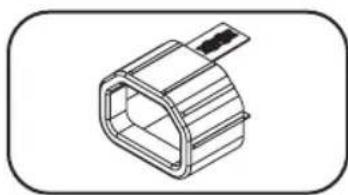
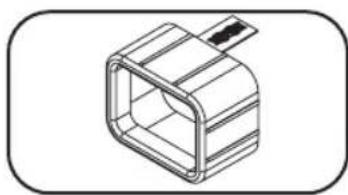
(Option 2) Use the included C14 and C20 plug-lock inserts to secure plugs to receptacles. Attach the insert onto the plug, making sure that the pull tabs B remain outside the plug and that the fit is secure. To unplug equipment properly, use the pull tabs to remove the plug and insert from the receptacle.
Installation

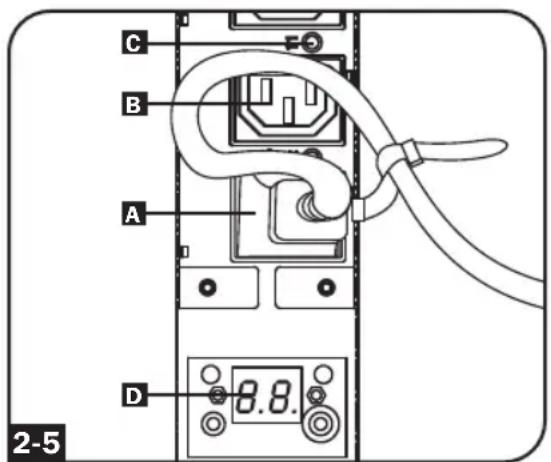
Connect your equipment's input plugs A to the outlets B of the PDU. The LED
near each outlet (Switched Models
Only) illuminates when the outlet is ready to distribute live AC power. The digital load meter displays the total connected equipment load in amps. (Select models provide additional load data. See the Features section for more information.)
Note: In order to minimize interference among connected devices, connect each device to the nearest PDU outlet and coil excess power cord length.
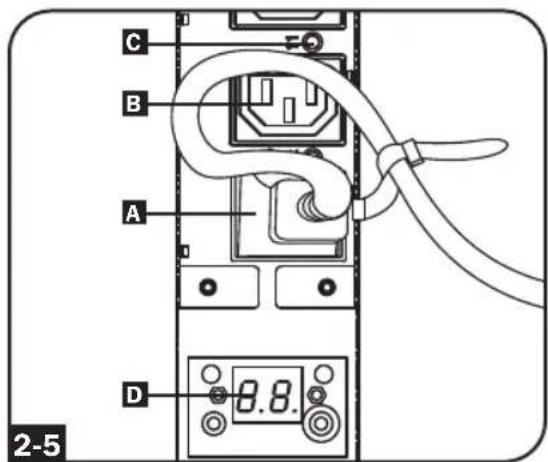
(Configuration may vary by model.)
Networking the PDU
Note: The MAC address of the PDU (a 12-digit string in this format: 00 06 67 XX XX) is printed on a label attached to the PDU enclosure.
If your network's DHCP server will assign a dynamic IP address to the PDU automatically, go to Step 3-1. If you will assign a static IP address to the PDU manually, go to Step 4-1. If you are uncertain which method to use, contact your network administrator for assistance before continuing the installation process.
Dynamic IP Address Assignment

Connect Web Management Card to
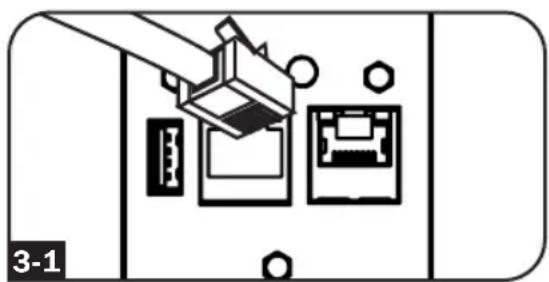
Network: Connect a standard Ethernet patch cable to your network using the RJ45 Ethernet port on your Web Management Card.
Note: This port does not support PoE (Power over Ethernet) applications.
The card will attempt to obtain an IP address via DHCP. This may take as long as several minutes, depending on your network environment.
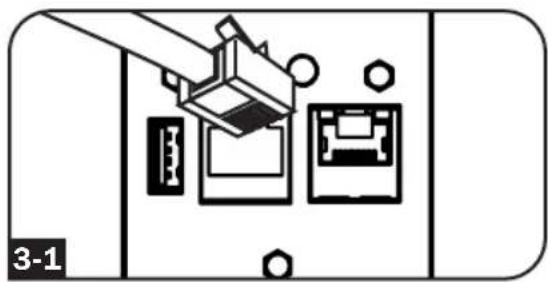

Determine IP Address: To identify the IP address assigned to the Web Management Card, contact your network administrator and provide the MAC address of the Web Management Card. You can also determine the IP address locally at the card.
Start a terminal emulation program, such as Tera Term Pro. Configure the COM port intended for use by following these settings: 115.2 Kbps, 8, NONE, 1. Using the included RJ45 to DB9 cable (part number 73-1243), connect your PC to the PDU's CONFIG port. When the login prompt appears, login as localadmin / localadmin. When the Menu appears, navigate to "3- Network Configuration", then to "1- IP Configuration". The assigned IP address will be displayed. After you have determined the IP address, proceed to the Test Network
Connection section.
Note: You may wish to request a long-term lease period for the IP address, depending on your application.
Note: PowerAlert Device Manager and the Web Management Card support both IPv4 and IPv6. The card is set up by default to receive a DHCP address for IPv4, IPv6 or both. Receiving both addresses allows connection to the card via either the IPv4 or IPv6 address.
Installation
Static IP Address Assignment / Terminal Menu Configuration Settings

Determine IP Information: The Web management card can support a single static IPv4 address (requires setting the IP address, subnet mask and gateway) and/or a single static IPv6 address. In addition, the Web management card can support a single static IPv4 or an IPv6 DNS address that is required to be entered.

Configure Terminal Emulation Program: Set your terminal emulation program to use the COM port with its corresponding USB port.
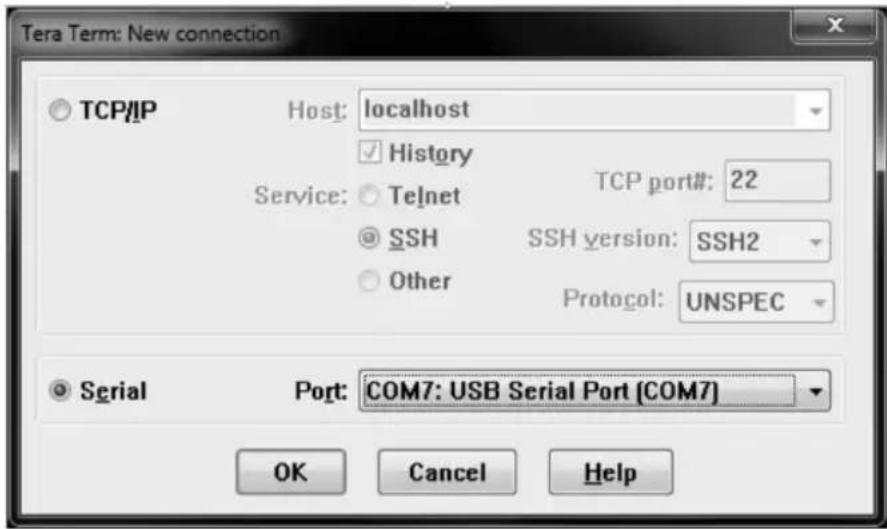

Select Option 3: IPv4 setting, or Option 4: IPv6 settings. Select Option 1: Method. Select Option 2: Static.
Assign the address, subnet mask, gateway, etc. Save your settings by selecting "A" (apply). Choose "y" to restart PowerAlert now. Close your terminal session.

Remove Cable: Remove the cable and proceed to the Test Network Connection section.
Installation
Testing Network Connection

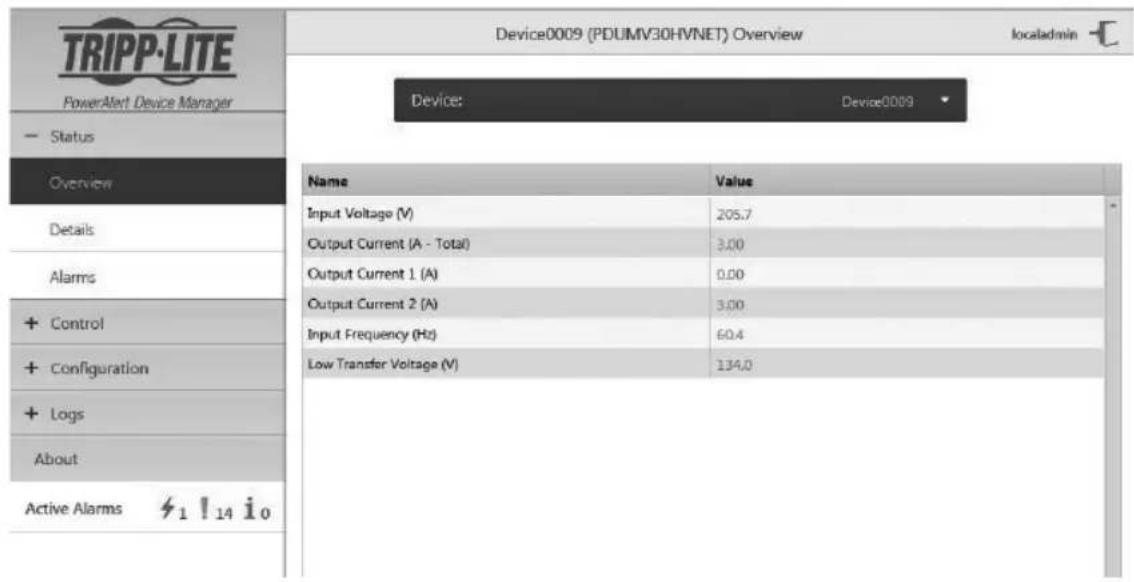
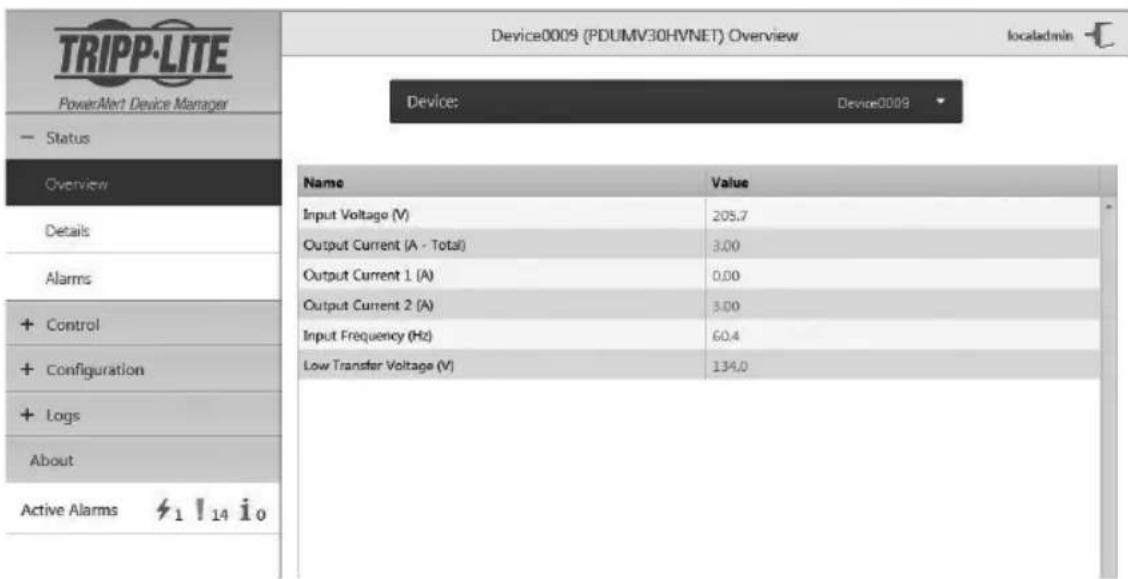
Test Network Connection: After an IP address has been assigned to the card, try to access it with a Web browser. Open Firefox or Chrome on a computer connected to the network and enter http:// or https:// followed by the IP address. The login screen for PowerAlert Device Manager will display. The default user name is localadmin and the password is localadmin. After you enter the user name and password, the PowerAlert Device Manager Overview page will appear in the browser window. For more information about configuration and operation of the managed device, refer to the LX Platform User's Guide located in the support section of the product web page.
Features
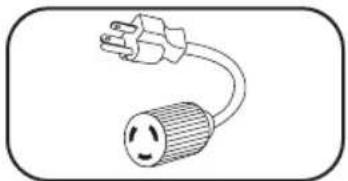
Input Plug Adapter (Select Models): Converts the PDU's twist-lock input plug to a straight-blade input plug.
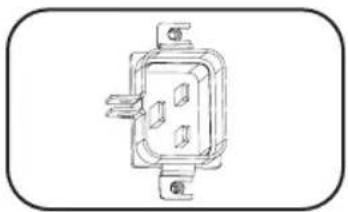
Power Inlet (Select Models): The IEC power inlet connects to the included power cord or a compatible user-supplied power cord. The inlet includes a bracket to secure the cord connection.
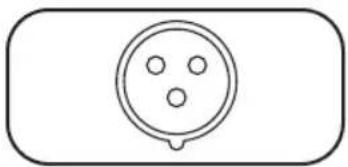
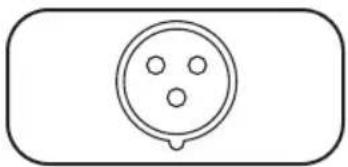
IEC 309 3-Pole Input Plug: Available on select models.
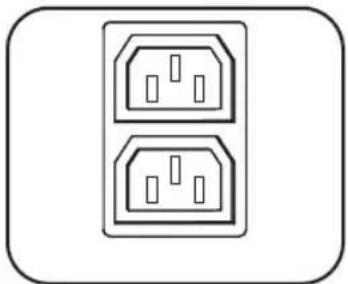
Outlets (Vary by Model): During normal operation, the outlets distribute AC power to connected equipment. Select models feature an LED that indicates outlet status.
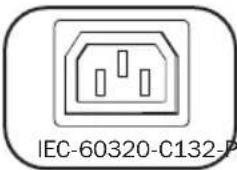
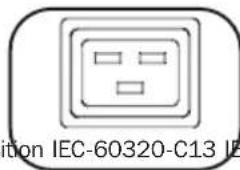
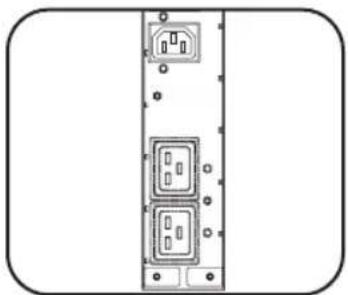
Outlet LEDs: On switched models, each outlet LED illuminates when the associated outlet is ready to distribute live AC power.
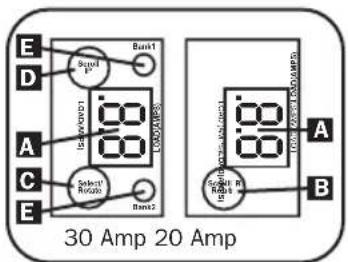
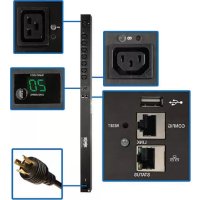
Digital Load Meter (Ammeter): The total connected equipment load in amperes is displayed by the digital meter A. 20-amp models feature a Scroll IP/Rotate Switch B. Press this switch for one second to display the PDU's IP address (two characters at a time). Press for two seconds to rotate the LED display for ease of reading in vertical installations with the input cord at the top or bottom of the PDU. 30-amp models feature a Select/Rotate Switch C and a dedicated Scroll IP Switch D. Press the Select/Rotate Switch once to display the total load (in amps) on the PDU. Press again to display the load on Bank 1 of the PDU and again to display the load on Bank 2. The Load Bank LEDs E will indicate display status as follows. Both outlet bank LEDs illuminated: total PDU load displayed. Bank 1 or Bank 2 LED illuminated: load on corresponding load bank displayed. Press the Select/Rotate Switch for two seconds to rotate the LED display for ease of reading in vertical installations with the input cord at the top or bottom of the PDU.
Features
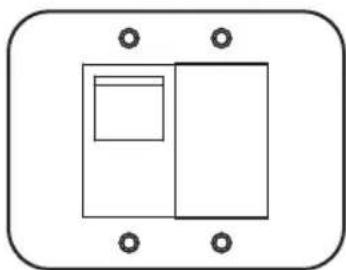
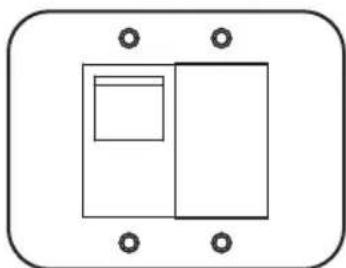
Circuit Breakers (Select Models): If the connected equipment load on a load bank exceeds the Maximum Load Rating of the load bank, the circuit breaker will trip. Disconnect excess equipment and switch breaker to the on position to reset the breaker. Models with multiple outlet banks have a circuit breaker for each bank. Circuit breakers are only used to protect output load banks.
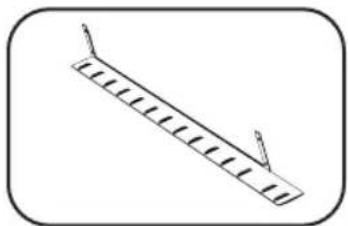
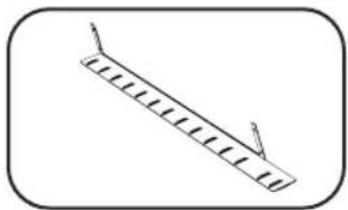
Cord Retention Bracket (Select Models): Provides secure attachment points for connected equipment cords.
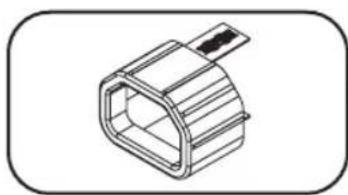
C14 Plug-Lock Inserts (Optional): Use the included C14 plug-lock inserts to secure plugs to C13 receptacles. Attach the sleeve to the plug making sure the pull tabs remain outside the plug and that the fit is secure. To unplug equipment properly, use the pull tabs to remove the plug and insert from the receptacle.
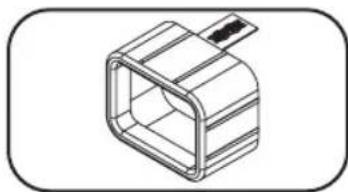
C20 Plug-Lock Inserts (Optional): Use the included C20 plug-lock inserts to secure plugs to C19 receptacles. Attach the sleeve to the plug making sure the pull tabs remain outside the plug and that the fit is secure. To unplug equipment properly, use the pull tabs to remove the plug and insert from the receptacle.
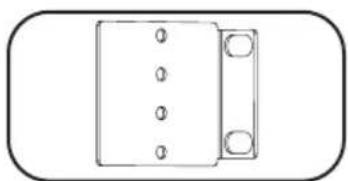
Mounting Brackets: Use these brackets to mount the PDU.
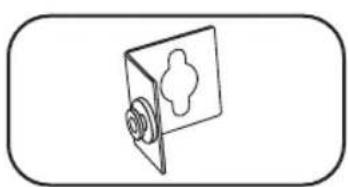
PDUMVROTATEBRKT Mounting Accessory: Use these V-shaped brackets to mount the PDU with its outlets facing the rear of the rack.
Features
Web Management Card
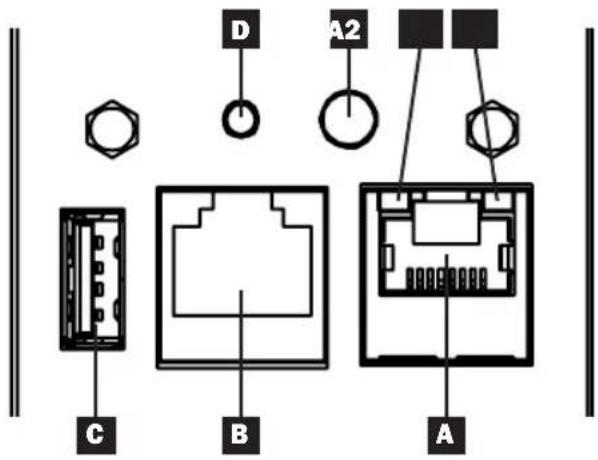
A Ethernet Port: RJ45 jack connects the WEBCARDLX to the network using a standard Ethernet patch cable. LEDs A1 and A2 indicate the operating conditions (shown in the table below).
B RJ45 Configuration Port: Use this port to provide a direct terminal connection to a computer with a terminal emulation program. An RJ45 to DB9 cable (part number 73-1243) is included with the PDU. To request a replacement cable, visit www.triplite.com for ordering information.
USB Type-A Port: Use this port to connect a Tripp Lite EnviroSense2 module (E2MT, E2MTDO, E2MTDI, E2MTHDI) for a variety of environmental monitoring and control options. See www.triplite.com for more information about these modules.
Note: Do not connect a keyboard or mouse to this port.
D Reset Button: Accessible through a small hole on the faceplate above the RJ45 Configuration Port. Press once to reset the Web Management Card. Press and hold for 15 seconds to reset the Web Management Card to factory default settings.
Note: PDU loads will not be affected.
E Status LED: Shows Web Management Card status (shown in the table below).
| Identifier | LED Function LED | Color Status | Description | |
| A1 | Ethernet Link/ Activity Indicator | Green Flashing | There is network activity on the port | |
| Off There is no network activity on the port | ||||
| A2 | Ethernet Network Speed Indicator | Yellow On steady 100 Mbps network speed | ||
| Off 10 Mbps speed if A1 is flashing | ||||
| Off No network activity if A1 is also off | ||||
| E | Web Management Card Status | Green On steady Norma | ||
| Green Single flash | Power up indicator | |||
| Green/ Orange | Off No power or card is initializing | |||
| Green/ Orange | Alternating (~1/sec.) | |||
| Green/ Orange | Alternating (~2/sec.) | |||
Configuration and Operation
Remote Monitoring and Control
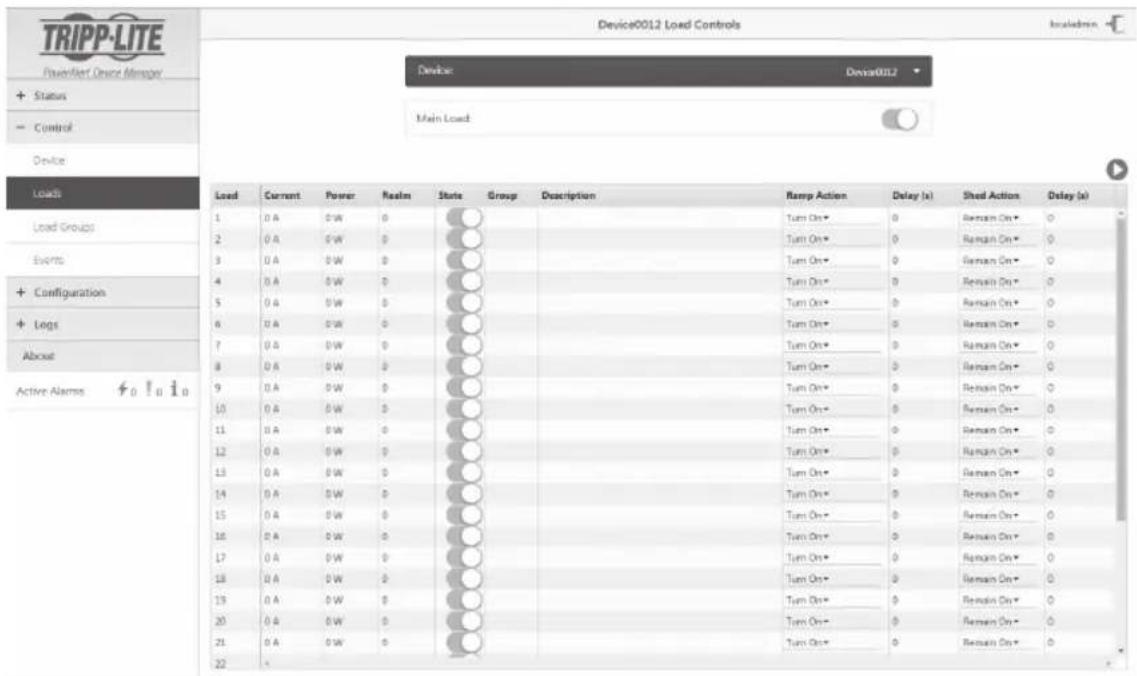
The PDU provides remote monitoring, outlet control and more via Web browser, telnet and SNMP-based Network Management Systems. For more information about configuration and operation of the PDU via the PowerAlert Device Manger, refer to the LX Platform User's Guide User's Guide, which can be found by going to www.triplite.com/support and typing LX Platform in the search field.
Service
Your Tripp Lite product is covered by the warranty described in this manual. A variety of Extended Warranty and On-Site Service Programs are also available from Tripp Lite. For more information on service, visit www.triplite.com/support. Before returning your product for service, follow these steps:
- Review the installation and operation procedures in this manual to insure that the service problem does not originate from a misreading of the instructions.
- If the problem continues, do not contact or return the product to the dealer. Instead, visit www.triplite.com/support.
- If the problem requires service, visit www.triplite.com/support and click the Product Returns link. From here you can request a Returned Material Authorization (RMA) number, which is required for service. This simple on-line form will ask for your unit's model and serial numbers, along with other general purchaser information. The RMA number, along with shipping instructions will be emailed to you. Any damages (direct, indirect, special or consequential) to the product incurred during shipment to Tripp Lite or an authorized Tripp Lite service center is not covered under warranty. Products shipped to Tripp Lite or an authorized Tripp Lite service center must have transportation charges prepaid. Mark the RMA number on the outside of the package. If the product is within its warranty period, enclose a copy of your sales receipt. Return the product for service using an insured carrier to the address given to you when you request the RMA.
Warranty and Product Registration
LIMITED WARRANTY
Seller warrants this product, if used in accordance with all applicable instructions, to be free from original defects in material and workmanship for a period of 2 years (except internal UPS system batteries outside USA and Canada, 1 year) from the date of initial purchase. If the product should prove defective in material or workmanship within that period, Seller will repair or replace the product, in its sole discretion. Service under this Warranty can only be obtained by your delivering or shipping the product (with all shipping or delivery charges prepaid) to: Tripp Lite, 1111 W. 35th Street, Chicago, IL 60609 USA. Seller will pay return shipping charges. Visit www.triplite.com/support before sending any equipment back for repair.
THIS WARRANTY DOES NOT APPLY TO NORMAL WEAR OR TO DAMAGE RESULTING FROM ACCIDENT, MISUSE, ABUSE OR NEGLECT. SELLER MAKES NO EXPRESS WARRANTY OTHER THAN THE WARRANTY EXPRESSLY SET FORTH HEREIN. EXCEPT TO THE EXTENT PROHIBITED BY APPLICABLE LAW, ALL IMPLIED WARRANTYES, INCLUDING ALL WARRANTYES OF MERCHANTABILITY OR FITNESS, ARE LIMITED IN DURATION TO THE WARRANTY PERIOD SET FORTH ABOVE; AND THIS WARRANTY EXPRESSLY EXCUSES ALL INCIDENTAL AND CONSEQUENTIAL DAMAGES. (Some states do not allow limitations on how long an implied warranty lasts, and some states do not allow the exclusion or limitation of incidental or consequential damages, so the above limitations or exclusions may not apply to you. This Warranty gives you specific legal rights, and you may have other rights which vary from jurisdiction to jurisdiction).
WARNING: The individual user should take care to determine prior to use whether this device is suitable, adequate or safe for the use intended. Since individual applications are subject to great variation, the manufacturer makes no representation or warranty as to the suitability or fitness of these devices for any specific application.
PRODUCT REGISTRATION
Visit www.triplite.com/warranty today to register your new Tripp Lite product. You'll be automatically entered into a drawing for a chance to win a FREE Tripp Lite product!*
- No purchase necessary. Void where prohibited. Some restrictions apply. See website for details.
FCC Notice, Class A
This device complies with part 15 of the FCC Rules. Operation is subject to the following two conditions: (1) This device may not cause harmful interference, and (2) this device must accept any interference received, including interference that may cause undesired operation.
Note: This equipment has been tested and found to comply with the limits for a Class A digital device, pursuant to part 15 of the FCC Rules. These limits are designed to provide reasonable protection against harmful interference when the equipment is operated in a commercial environment. This equipment generates, uses, and can radiate radio frequency energy and, if not installed and used in accordance with the instruction manual, may cause harmful interference to radio communications. Operation of this equipment in a residential area is likely to cause harmful interference in which case the user will be required to correct the interference at his own expense. The user must use shielded cables and connectors with this equipment. Any changes or modifications to this equipment not expressly approved by Tripp Lite could void the user's authority to operate this equipment.
Regulatory Compliance Identification Numbers
For the purpose of regulatory compliance certifications and identification, your Tripp Lite product has been assigned a unique series number. The series number can be found on the product nameplate label, along with all required approval markings and information. When requesting compliance information for this product, always refer to the series number. The series number should not be confused with the marketing name or model number of the product.
Tripp Lite has a policy of continuous improvement. Specifications are subject to change without notice.


1111 W. 35th Street, Chicago, IL 60609 USA • www.triplite.com/support
21-03-417 93-3667_RevD
(Modelo 208/230V 24 Amp, Controllable)
1111 W. 35th Street, Chicago, IL 60609 USA • www.triplite.com/support
Dynamic IP Address Assignment

1111 W. 35th Street, Chicago, IL 60609 USA • www.triplite.com/support
21-03-417 93-3667 RevD
1111 W. 35th Street, Chicago, IL 60609 USA • www.triplite.com/support
1111 W. 35th Street, Chicago, IL 60609 USA • www.triplite.com/support
21-03-417 93-3667_RevD
PykoBODCTBO NOIb3OBaTeJIa
KoHTpoJIpyeMbI cToeHbI PDU YnpaBJaEmbI cToeHbI PDU
ΦopMaT 0U (BepTNkaJIbHbI MOHTaJ)
PDUMNV20HVLX
(MoIeJIb 208/230 B 16 A, KoHTpOIpuPyembl) CepnHbI Homep: AGPD7897
PDUMV20HVNET2LX
(MoIeIb 208/230 B 16 A, YnpaBnembl) CepnHbH Homep: AGPD7897
PDUMNV30HVLX
(MoJIb 208/240 B 24 A, KOnTpOJIpyEmbl) CepnHbI Homep: AGPD7898
PDUMV30HVNETLX
(MoIeIb 208/230 B 24 A, YnpaBnembl) CepiHbI Homep: AGPD7898
PDUMNV32HV2LX
(MoIeIb 208/240 B 32 A, KoHTpOJIpyEmbl) CepnHbI Homep: AG-00CA
Baxkhble yka3aHnno texHnke 6e3oNaChocTH 38
Bo3MOxHocTn KOHTpOJnpyEmbIX CToeHbIX PDU 38
Bo3MoXHoCTn ynpabIeMbIX cToeHbIX PDU 39
YcTaHOBka 39
Bo3MOxHocTH 44
1111 W. 35th Street, Chicago, IL 60609 USA • www.triplite.com/support
OxpanaTcA ABTopcNIM npabom © 2019 Tripp Lite. NepeneuataK3anpeuaetca.
Baxhblc yka3aHnno texHnke 6e30nacHOCTN
COXPAHNTE HACTOUINE YKA3AHNIA
B hactoem pykooboctbe codepkatayka3aHn H npdynpexdeHn, KOtOpbIe Heo6xOIMo co6nIOaTb B npoucece yctAHOBKn, kcnnyatauun n xpaHeHn DaHHoro n3dEInn. IrhopopoBaHne 3TNx yka3aHn H npdynpexdeHn MOKeT npNBecTN K notepe rapaHTn Ha n3dEInne.

BIOK paCnppeJeHnna (PDU) yO6Ho OCHaue H HeCKoJIbKIMn po3ETkAMn, Ho HE o6ecneuBaet 3aunTy noKnUoyehHoro obOpyDobAHnO T Bbl6pocOB HanpJKeHn I yM0B B JINHN.
- ENoK pacnpeJeHnna (PDU) npEHa3Naueh ToIbKO IJRA NcONb3OBAHN B 3aKpbITbIX NOMeUeHnX C peYInpUyEmbIM MKNPKoINMaTOM BdAnOT INCTOCHNKOB NOBbIeHHO BnAaXHOCTN, 3KCTpeMaJIbHbIX TemHePaTyp, 3JeKtpOnpOBoNDhbIX 3arpy3Htenei, PbInn n pIpmORO cONHeHoro CBeta.
-ПодерхиBaite Tempepatу BO3dyxa BHytpn POMeueHnB Duaana3oHe ot 0^ do 50^
- YctahOBka 6JIOka pacnpedeeneHnIHTAHN (PDU) DOJXHa npOn3BOINbCra TObKO KBaINΦuIpOBAHHbIM TEXHueCKIM CNEuaJIInCTOM.
- He yctaHabIbaiTe 6nok paCnpedeJeHnna (PDU) Ha He3akpeJIeHHo nII HeycTouBOB noBepxHOCTn.
- YCTaHOky CJIeDyET IPOIN3BOOHTB B COOTBECTCBN C MECTHBIM NJIeKTPOTEXHNUECKMIM HOpMaM IN npabINAMM. O6raTeNbHO nCNOJb3yIte NOxODJaUe IINr yCTaHaBnBaEMOc CNTeMbI yCTpoCTBa 3aunTbI OT nepeRpy3OK NO TOKY B COOTBECTCBN C HOMHaJAmN, yka3aHHbIMN Ha pa3beMax/obopydoBaHIM.
- POKNUHTe 6nok pacnpedeJeHnna (PDU) K po3eTke, COOTBeCTByUoIe npINrTaBIM Baue CTpaHe CToPteNbHbIM HopMaM n HaJNeXaUm 6pa3OM 3aUuIeHHoN OT N36bIToCHbIX TOKOB, KOPOTKnx 3aMbIKAHn i 3aMbIKAHn Ha 3emIIIO.
3JIeKTPnueckne po3ETKN,Yepe3 KOtOpbIe OcyuieCTBnIeTcR 3JIeKTPoNTaHHe O6OpyIOBaHn,doJXHbI 6bITb yCTaHOBNEHb IBJeIKoOocTyNHOM MeCte B6JIN3n Hero.
- He nodknouaTe 6Iok pacnpedeHHe NITaHn (PDU) K He3a3eMJIeHHo Po3eTke, a TAKKe K yDINHHTeMa M IIN nepexOHDnKam, He IMeIOUIM 3a3eMNeHn.
- 063aTeJbHo Cha6kaIte JIO6bIe MoDEJI, NOKJIIOUaEMbIe Hepa3bEmHbIM CnOCo6OM,JeIKOIOCTyINHbIM JOKaJIbHbIM YcTPOINCTBOM 3aUNTHOIO TKNHOYENIA.
- Hn B KoeM cnyuae He npoun3BoOnTe MoTax 3JleKtpoo6OpdyObaHn BO BpeM rpo3bl.
- Tok, notpe6nembl otDneBbIMn 3IeMeHTamn o6opydoBaHn, noKJIouaEmbIMn K 6Ioky pacnpedeHn nItan (PDU), He dONKeH npEbbIaTb HOMHaH coOTBeTCTByIOux po3eTOk 6Ioka pacnpedeHn nItan (PDU).
CymmaHnHa Harpzka, co3daBaemar notpe6nteJMyn, noKnIOHeHHbIMK 6Ioky pacnpedeHnnaNTaHn (PDU), He doJIxHa npeBbIwAtb erO MaKcImaJIbHO dOncyTmYIO Harpy3ky.
He BHOCTe H3MeHEnB KOHcTpyKcIIO 6Ioka paCnpeJeHnra nTaHnra (PDU), BxOHNbIX pa3beMOB nn Ka6eJIe nITaHnRA.
- He BbICBepINBaIe OTBepCTn B KOpnyce 6noka pacnPpeHEnn nITaHn (PDU) n He nbTaIeTcB BCKpbITb Kakyo-Jn6o erO yactb. BHTpn Hero Het dTean, o6CnykBaembIX NOJb30BeTJeM.
He ncoNb3yTe 6noka pacnpedeHn HnA (PDU) B cnyae nobpeKdHn IIO6oI n3 erO cachTei.
- He pekomehyetcnaonb3oBaHnne daHHoro o6opyoBaoHn B cIcTeMaX Jn3Heo6ecNeeyHn, rIe erOBbIXO n3 CTPO npEINOIOKHTeBHO MOKET pINBeCTN K nepe6oM B paBoTe o6opyoBaoHnJn3Heo6ecneHn HIn B 3HaUHTeBHO Mepe CHN3NTb Ero 6e3OnaCHOCTb INn 3ΦeKTHBHOCTb.
Bo3moXHocTn KOHTpoJInpyEmbIX CToeHbIX PDU
CetbeOn INHTepfecn o6ecneuBaet BO3MOXHOCTb DCtAHcHNOHHo KOHTPOJRA peKIMOB 3JIeKTPONITAHN yBeDMJeHnO cOcbItnRx.
LundpoboB amnepmetp nKoHTpona Harpy3Kn Ha Mecte yCTaHOBKn.
- OnuHaBbIe MoDyIe EniroSense2 (E2MT, E2MTDO, E2MTDI, E2MTHD) o6ecneuBaOT BO3MOXHOCTb BblIOJIHeHnIcMbIX pa3NIUHbIX ΦyHKIe KOHTpOJa npaMeTPOB OKpykaHoei cpebl.
B03MOXHOCTb 6e3bHCTpyMeHTaJIbHOrO MOHTaKa Ha 3aueJIK B ukaqax cepnn Tripp Lite SmartRack MHOxEcTBe ukaqob dpynX Mapok.
Bo3MOxHocTn ynpabIЯEmbIX cToeHbIX PDU
CetBoH INHTepFeIc oBecneuBaET BO3MOXHOCTb DnCTaHcNOHHOro KOHTPOJRAPEKIMOB NITAHN ynpabHeHr OTeJIbHbIMn PO3eTKAMN.
HnBnaybHo npabnemble po3eTKn no3BOJIO T pOu3BOJNT b nCTaHmOHHy IO nepe3arpy3ky 3a6IOKnpoBaHHbIX cTeBBX yCTpOInCTB.
LHpOBoAMnepMeTp dIa KOHTpOHa HApy3Kn Ha MeCTe yCTaHOBKM.
- OπηοHaJIbHbIe MoUJIn EnviRoSense2 (E2MT, E2MTDO, E2MTDI, E2MTHD) o6ecneuBaIOT BO3MOXHOCTb BblIOJIHeHnI CaMbIX pa3JIuHbIX ΦyHKmI KOHTpOJI napaMeTPOB OkpykaIoUeI cpebl.
B03MOXHOCTb 6e3bHCTpyMeHTaJIbHOrO MOHTaKaHa 3aUeJIKN B uKaΦax cepuN Tripp Lite SmartRack MHOxKecTBe uKaΦOB dpynX MapOK.
yctaHObKa
MoHTax PDU
PpmeHne. YcpoCTBO, 306paKeHHoe Ha nllnoctpaunx, MoKet HeckoBKO OTnuaTbCt OBaWe moeIN PDU. He3aBncmO oT KOHpyraun, nonb3oBateBdoJKeH yctahOBnt npiroDHOCTb OCHACTN npednonaraembIX npoueyp do hauana mONTaxa. BLOK pacnpedeHnna (PDU) nBXOJaA B erO KOMNkEOT OChactka npedHa3NaHeB dIg obuHbix TnOB cToek N uKaFOB-cToek Moryr He noXoNTB dIy BCEx ueen npimeHnry. YcTaHOBOUHbe KOHpyaun MOrY pAnuTbcB DetanR. B KOMNkEET NOCTABKN BXOJAT BVHTbl IJI KpeJIeHnmaontkHbIX KPOHTeHOB IN pIKpenJeMbIK PDU kPoHsteHn DII FHKCaUN shypa. IcNoIb3yIte ToIbKO BVHTbl, NoCTABJIeMbI npOn3BOIDTEJEM, INI IN Xn NOnHbI anAnor (#6-32, 1 / 4 " c NotaiHO rONOBK).
Pn yctaHOBKe PDU B u KaC n3aAMn DnA MOHTaxa Ha 3aueKn Bam Heo6xOIMo BbINONHTb TOnbKO WAr 1-1. Pn OTCyTCTBnB BAeM u KaCy n3OB DnA MOHTaxa Ha 3aueKn NepexOdTe K Wary 1-2

IyCTaHOBKn PDU B uKaΦ, OChaueHHbI na3AMn Dn moTaXka Ha 3aUeKn, BCTaBbTe MOHTaxHbIe 3aUeKn, HaxOJaUneCn Ha 3aHNe IaHEni PDU, B COOTBeTcTBYUoJe n3bI uKaΦa n npOdBnHbTe PDU no HanpaBHeHIO BHN3 Do 3aUePHeHn 3aUeNOK C y3kOuacTbIO na3OB.
PpmeaHne.ДЯ yCTaHOBKn PDU tAKM
Obpa3OM,уTO6bI erO po3eTKN 6bln O6paueHb K
3aJHeN CTOpOE uKa4a, nCNoJIb3yTe BXoJaUeB Eero KOMnNEKT npncnocO6NeHne
PDUMVROTATEBRKT.3TOT KINHOO6pa3HbIKPOHHTeN ObecneuBaET paONIOKeHne MOHTaxHO 3aJeKN Ha OHOH rpaHN "KInHa", aMOHTaxHO rna3-a Na dpyroE erO rpaHn, YTO NO3BOJRAET ONepaTHBNO nepeMeuaTb MOHTaxHbIE
3aueJKN.Cxema TaKOrO MOToXa npVBedeHa B
pa3dene "Bo3MOxHOCTn".

PnKpeNITe MOHTaXHbIe KPOHtEiHbIK PDU.

(Heo63aTeNbHO) PnKpeNtKe K PDU KpoHHTeHH(bI)ДЯФнКcaunuHypa.

PpKpeNTE PDU K BepTnKaIbHOH HAnpaBnaIOuee BaWero 1kaΦa IIN CToiKn. PpKpeNTE MOHTaXHbIe KPOHwTeHbIK HApBaNIOUeC NOMOuB MoHTaXHOH OCTACTKN, NOCTABNEmoB B KOMnJIeKTe.
yctahobka
PoioknloueHne PDU
2-1 (TOnbKO JnI MaOJEn C pa3BeMOM NITAHN Tnna IEC nII 3-nIOHcHbIM pa3BeMOM IEC 309) HeKOTOpBle MoJeN KOMPJIeKTyIOTcR OTcoEINHReMbIM shHypOM NITAHN. PnICoeDHNITE COepeKaUmC B KOMPJIeKTe WHyp NITAHN K PDU, BCTaHB pa3bEM IEC Tnna A shHypa NITAHN B pa3bEm NITAHN IEC Tnna B pacNoJoxHeHHy kpa naHeN PDU.ДЯФNKCaUN NOcOeDInHeHHoro shHpya NITAHN BOcNOJb3yIteCb IOCTaBJIeMbIM B KOMPJIeKTe KPOHHTeHOM C
PnmeaHne. Pn JeaHnn NOIb3OBeTbn MOKeT NOKIOuHTb PDU npn NOMOUs CBOero CO6ctBEHHORo Hhypa nITAHN, BCTABJIeMOrO BO BXoHn PA3bEM TnA IEC. He CNeJyET pON3BODHTb NOKIOUeHHe C NOMOUsHO nIb3OBaTeNbCKoro SHypa NITAHN, He cepTNΦNcIPoBaHHOrHO HA COBMeCTNMOCtB C NCTOCHNKOM NITAHN, nCNoIb3yEmbIM Ha BXOe PDU.
2-2 (OnuHaJIbHO-TOJbKO dIy MoJeHc BXoHbIM pa3bEMOM, OCHaUeHHbIM nepexoHOBuIKo) HeKOTOpBIE moJIIN KOMJIeKtYIOCTa nepexoHOBuIKo, npeo6pa3yIOSeBxOHDHO pa3bEm C NOBOPOTbIM 3AMKOM BO BXoHOH pa3bEm C IIOCKIMN KOHTaKTAMn. HaDeHbTe nepexoDnK BXoDHoro pa3bema HA BxOHOH pa3bEm E cnn XeJaTe BkIOHyTb PDU B COBMeCTmMyo po3eTKy C IIOCKIMN KOHTaKTAMn.
2-3 BkIIOUHTeBXOHNpo3bEMBCOMMcyH C HmP03eTKy 3NEKTPoNTaHnnepeMeHHoro ToKa.EcPiPDU He IMeET aBtOMaTHeCKORo BbIKIOuAten,Toero cNe dyet OCHACTNt bYCTPOrCTBOM 3aunTbI OTpeERpy3OK NO TOKY B COOTBETCTBMnCnapaMeTpamn cENI nITaHn, corlaCoBaHHbIM CHomHaJIbHOH amnepHOH harpy3KOI PDU.
PpmeaHne. NcOHTNH INTaHnNEpeMeHHOro TOKa He DOnKeH HaxOHTbC B O6UeM KOHTpe C 60JIbwoI 3NeKTPueckO Harpy3kOi.
2-4 (Bapnant 1 -ToIbKO dIJI HeKoTOpbIX MoIeN.) EcIN Bbl npIKpeHNI KPOHHTeH(bI) IJIa FHKcaUN WHypa,TO 3aФNKcpyIte Cero NOMOuHbU WHypa NIITAHNA OTO BCEx NOKJIIOUeHHbIX 3JIeMeHTOB O6OpyIDOBAHNA.3aKpeNTe KaKDbI WHyp H KPOHHTeHne IJIa FHKcaUN, CO6pAB ERO B NtTIIO H 3aФNKcnpOBabC NOMOuBIO ODHOn I3 KaEBhBIX CTJKeK, BXODaX B KOMPJIeKT A. Y6eINTecb B TOM, YTO KaXdbI WHyp MOKET 6bITb OTCoEINHeH OT PDU 6e3 ChrTna KaEBhHOCTJKKN.
(BapnT 2)3aФнксуTe BUNB Bpo3eTKax npn NOMOu BXODAUX B KOMNKeT BCTABOKДЯФNKcaun pa3bEmOB C14 n C20.HaedeHbTe BCTABky Ha BNJy,y6eINBWHCB TOM,TOY3bIcK B OCTaIncb Chapyk,a TaIOke B NIOTHOM pPInerAHm MyoTb.IIpaBnIbHOrO OTKnIOueHnO6OpyDoBaHnO IT NOCHNYKa PINTAHN BbIHMaTe BUNKy CO BCTaBKO IN3 po3ETKN,DEpXac 3a Ra3bUKN.
yctahobka

IopKnHouHte BxOndHbe pa3bEmbl BaUero
obopyoBaHnA A K po3eTKaM E PDU.
CBeToNDnHbI INDnKaTOp C pRdOM C KaXDoI
po3eTKo (ToIbKO DnYnpabNMeBIX
Moden) 3arOpaeTcB M0MEHT TOTOBHOCTN
po3eTKn K pacnPpeJeHnIO nOdaEBMOr HO Hee
3JIeKTPoINHa HnepeMeHHOro ToKa. UΦpOBoI
H3MpTeNb Harpy3Kn OTo6paXaET
cymMapHyIO Harpy3Ky (B aMnepax),
co3DaBaEMyIO NOKIIOHHeIM OObopyoBaHNmE.
(B OTDeNbHbIX MoeJnx OTo6paXaOTcN IpyrVe
napaMeTpbl Harpy3Kn. BoJee NoDpO6HyO
InHΦopMaCuHIO CM. B pa3deJe Bo3MoXHoCTN).
PpmeaHne. B cEJx CBeDeHnK MmHmMy B3aMHOrO BnHnM MeKdy NIOKJIHOeHHbIMN yCTpoiCTBaMn BKIOuayTe KaKdoe yCTpoiCTBO B 6nIXkaiyIO K Hemy po3eTKy PDU, CMaTbIbA npn 3tOM OCTabWyoCry aactb Whypa nITAHn.
(B3aHmOpacnOIOXeHne 3IeMeHToB MoKeT pa3JIuHaTbCRA B3aBcHMoCTN OT MOJeLI).
IopdkloueHne PDU K cetn
PnmeuHne. MAC-ape PDU (12-3aHa a CToKa B fOpMaTe 00 06 67 XX XX) HaneaTaH Ha NaKJIeKe, pacnoJoxeHHo Ha Kopnyce PDU.
EcHDP-cepBepBaeweCtenABTOMaTHuecknPpncBaNAeT PDU DnHaMueckn IP-aDpec,nepexoNTe K 3-1.Ecn Bbl npncBaNaBeTe PDU cTaTneckn IP-aDpec BpyHyto,nepexoNTe K 4-1.Ecn Bbl He MoKeTe ONpeDenTbcra TEm,KakOuN3 3TNX CnOCo6OB NcONb30BaTb,To npeJde Yem npdoonKntb npouecc yCTaHOBKn,ObpaTNECb 3a NMOUbK aDMNHnCTpaTopy CBOe e CTn.
PpncBaBbHne DnHaMnYeckoro IP-aDpeca

IpoKIOUOHeBe6-KapTbI ynpaBNeHnCeTbIO K cTeN: IooKIOUHTe CTaHdAPTHbI COeINHtJIbHbIKabeB Ethernet K CBOeI cTeu cep3 Ethernet-nopt RJ45 KapTbI ynpaBNeHn CeTbIO.
PpmeaHne. TaHHbI npOT He noDnepKnaeT NOKJIuOeHnnoTexHOJOrn PoE (NtAHne No Ka6eJIIO BNTOn napbl).
KapTa nonbIaTeTc nOnyUHTb IP-aDPEC no npotoKoNy DHCP. B 3aBnCmOCTn OT BaWei ceTeBOI cpeDbI 3TO MOKeT 3aHrTb Do HECKONbKnx MInHyT.

OnpeJeHne IP-aPeca: IJIy BbIcHHeHr IP-aPepca, npncBoeHHoro Be6-KapTe ynpabHeHnCeTbIO, o6paNTecb K aDMNHnCTpATopy CBOe cETn COo6uNTe EMy MAC-aPec Be6-KapTbI ynpaBHeHn CeTbIO. Kpome TOrO, IP-aPec MoKet 6bITb ONpeJeH NIOkAIBHO Ha MeCte yCTaHOKn KapTbI.
3anycntte nporpaMMy 3mylaun termHaana (Hapnep, Tera Term Pro). Hacpoite npeDnonaraemblnncnoB30BaHnra COM-nopT, nCnoB3y cIeDyUoNne npaMaTepb1: 115,2 K6nt/c, 8, NONE, 1. Pnp nooBxOdaJcero B kOMnEKT noCTabKn Ka6en C pa3bEmAm RJ45 u DB9 (Kat. No 73-1243), noCoEHHnte PIK K npTy PDU CONFIG. Ppi noBHeHn 3anpoca Ha BBOD peHnctpaOnOHbIX daHHbX BOiInTe B cnCTeMy kak localadmin / localadmin. Ppi noBHeHn MeHIO Bb6epnte "3- Network Configuration" ("3-HacptoKa cetn"), 3atem "1- IP Configuration" ("1-HactpoKa IP-adpeca"). Ha ekpahe oTo6paKaetc npinCboEHnBIP-adpec. Nocne onpeDeleHnIP-adpeca nepeXoDnTe K pa3dEny "PpOBepKa ceTeBOrcoeDHHena".
PnmeuHne. B 3aBNCIMOCTN OT CBOe CNCTeMbI Bbl MOKeTe npN XeHaHN 3anPoCtB DoJroCpoHbI nepnoD apenDbI IP-aDpeca.
PnmeuHne. PporpaMMbMyb PowerAlert Device Manager n Be6-kapTa ynpaBHeHc CeTbIO npdeepKBAOT o6e Bercn IP-npotoKoHa:IPv4 n IPv6. Iyo mOJuaHHO kApTa HAcTpoEHa Ha noIpyHeHc DHCP-aDpeCa Ira npotoKoHa:IPv4, IPv6 nII IOBX. NOnyueHHe O6oix aDpecoB o6ecNeuBaet BO3MOxHOCTb NOkIouHn KaPTb IIO 60 no aDpecy:IPv4, IIO 60 no aDpecy:IPv6.
yctahobka
PpOBePKa cTeBOro coeHHeHHa

Tecnpobahne cTeBOrno noknoueHn: nocne npncBoEHn KapTe IP-apeca nonpo6yTe o6paNTbcK Heuepe3 Be6-bay3ep. OTkpoIte Ha KomnbTope 6pay3ep Firefox nn Chrome Ha KomnbTope, noknOeHHOM K cTeN, n BBeIte http://nnn https://, a 3aTeM IP-aDpec. Ha ekpae ot6paKaetcra OKHO BXoA B nporpamMy PowerAlert Device Manager. No ymonuHIO: mma noh30BaTeNa - localadmin, napoiIb - localadmin. Iocne BBOda IMeHn noh30BaTeN n napoJI B OKHe 6pay3epa noBHTcR CTpanuca cTatycOB nporpammbl PowerAlert Device Manager Overview. DOnonHInTeNbIe CBeDeHnO KOhFpyaunn n peKmMax pa6oTbI ynpabIeMo rO yctpoCTBa cm. B PykoBODCTBe noh30BaTeN LX Platform, pa3MeueHHom B pa3deJe "POndepkka" Ha Be6-ctpaHnce n3dEInr.
Bo3MOxHOCTH
IpepexoHnBxOHO rpa3bema (nraOTdJIbHbIX moJeNe): npEBypaaet BxOHOH pa3bem C NOBOPOTbIM 3aMKOM BO BXOHO pa3bem C NIOCKIMKOHTaTAMN.
Bxodho pa3bem nHTAHN (Jn OTdEBhIX moJe): BxODHO pa3bem nHTAHN TnA IEC noKJIIOUaETcK nOCTABREMOMY B KOMNKeTte WHPy nHTAHN INI K NOB3OBATEbckOMy WHPy nHTAHN, COBMEcTMOMY C HIM. JIg PkCAuIN NODCOEINHHeHORo WHPa nHTAHN BxODHO pa3bem OChaueH CneuaNaHBiM KPOHHTeHOM.
3-noiocbBxOHOH pa3bem Tnna IEC 309: IMeETcHa HEKOTOpBX MoJeJX.
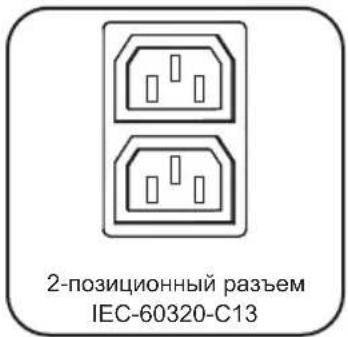
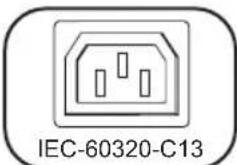
Po3eTKn (pa3nHoro Tnna B 3aBNCMOCTN OT MOeHN):B WtATHom peKHeMaPobTb po3eTKn paCnpedeJIaHT MoUHOCTb NpeMeHHOro TOKa MExdY NOkIIOeHHbIM K Hm 3JeMeHTAmO bOpdyOBaHn. HeKOTopbIe MoeJI OCHa7aIoTcBcTeODNoHDbIM INDikAtOPOM, OTo6paxaIOuM COCTOHaHne po3eTKn.
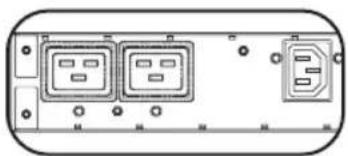
CBeToNOHbIe HnNkAToPbI po3eTOK:Ha ynpaBnEMyx MoJeX KaxdApo3ETKa ChabKeHa CBeToIONDhIM INDkaTOpOM, 3aropaUcIMc B MOMeHT rOToBHOCTN CB3aHHoC HmM PO3eTKI K pacpeJeHIO NOBaEMoro Ha Hee 3neKTpOnNTaHna NepemeHHOr TOKA.
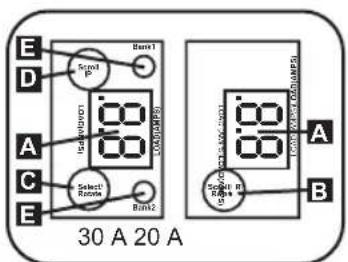
UHpOBn H3Mepntb Harpy3k (amnpMeTp): cymmaHar Harpy3ka, co3daBaemna NOKIOueHHbIM O6OpYIOBAHNEM, OT6paKaETcB A ampeax ufoobim n3MepnteA 20-ampehhe moen OchaIOTcra NOBOPoTHbIM nepeKIOUaTeHc B 03MOXHOCTbIO npOKpyTKN IP-aDpecoB 3. Haxmte Ha 3TOT bblIOuatoN ydepXNBaTe erO B TeueHne OHOH CEyHbI dNRA OTO6paKeHrIP-aDpeca PDU (no Da CBMBOLA 3a OIN PA3). Haxmte Ha 3TOT bblIOuatoN ydepXNBaTe erO B TeueHne DByx CEyHd dNRA NobopoTa KK-dncnner c ceIbIO 6bnreHnna IPOCMOTpa B eptNKaJIbHbIX yCTaHOBkAX Co BXODHBIM UHPOM, NOCDoeINHEMbIM K PDU CBepxy nII CNH3y. 30-ampehble
MOdeHIO OCHaIaOTcM HOROIO3NIOOHbIM NOBOPOTbIM nepeKIOUaTeMe C nCneuaJIbHbIM nepeKIOuatoeM dI npOKpykIP-aPecOB D Nocne nepBoro HaxaTnHa MHOROIO3NIOHOHbI IOBOPHTbI nepeKIOUaTeMb Ha dinCnnee oTObpaXaETcR cyMMapHae Harpy3Ka Ha PDU (B aMnepax).Pnp NOBtOpHOM HaxaTMn OTo6paXaETcHarpy3Ka Ha rpynn1, a npn cNeIyoUeM HaxaTMn - Harpy3Ka Ha rpynn2. CBetOnoNDhIE INDkaTopbI rpynn Harpy3OK E yka3bIAoT coCToHne DCnCnEe CNEIyoUm 6p30M. Topr 6Ba CBtOIONDhIX INDkaTopa rpynn po3Etok: Ha dinCnnee OTObpaXaETcR cyMMapHae Harpy3Ka Ha PDU. TOprrCBtOIOHDhI INDkaTopr rpynnbI 1 nnr rpynnbI 2: Ha dinCnnee OTObpaXaETcHarpy3Ka Ha COOTBeCTByIOUyIO rpynn. Haxmte Ha MHOroIO3NIOOHbI NOBOPOTbH BbIKIOUaTeNB u YdepKNaBteero BVteHe IByx cekHyd IJRA NobOPoTa KK-dncnner c ceJIbIO obNeIeHnnpOCMOTpa B BepTKaJIbHbIX ycTaHOBkax Co BXOHNbIM shHypom, NoDCoeINHReEMbIM K PDU cbepxy nII CN3y.
Bo3MOxHocTn
ABTomaTneckn BbIKIOaTeN (dIg OTeINbHbIX MoJIeN): ecNI CO3daBaem NaKIOUeHHbIM O6OpyOBAHNm HArpy3ka npBbIaet MaKcMaIbHbI HOMHaH HArpy3Kn Ha rpynnY, To 3TO npIBoND T Cpa6aTbIbAHNO ABTomaTneCKOro BbIKIOuATEJ. OToeDInHTe NlUIHee O6OpyOBAHN e NpeBeJeNTe ABTomaTneCKn BbIKIOuATeNB B NoIOKeHne "BKN." c cIeNbEO ernopezanycka.MoJIeN C HECKONkIMn rpynnAmn PO3ETOK IMeHOT NO ODHOMy ABTomaTneCKOMy BbIKIOuATeHn Ha KaXdyo rpynnny. ABTomaTneckn BbIKIOuATeN INCIIb3yOTcraTbKO dIaunTb rpynnBbXODHBx HArpy30K.
KpohwTeH dnn fckcaunn whypa (nJr OTeJIbHbIX moJe): oecneuBaet HaeXHyo fikcaunu LHypOB noKnHoueHHoro o6OpydoBaHna.
BCTABKn DnA FHKcaun pa3bEmoB C14 (Heo6raTeNbHO): 3aFHKcnpyIe BUNK B PO3eTKax C13 npn NOMOu BNODaunx B KOMNJIeKT BCTABOK DnA FHKcaun pa3bEmoB C14. HadeHbTe MyfTy Ha BUNKy, y6eINBUnCb B TOM, YTO Ra3bUKN OCTaIINCb CHAPyKn, a TAKKE B IIOTHOM PpInerAHm MyfTbI.ДЯ nPaBUNbHOrO OTKIOueHn OBOpYDoBaHNr OT NCTOHTHkA INTAHnBA IHIMaTe BUNKy CO BCTABKOIN3 PO3eTKn, DEpXacb 3a Ra3bUKN.
BCTABKN DnA FHKcaun pa3bEmOB C14 (Heo6raTeNbHO): 3aФHKcnpyIe BUNK B po3eTkax C19 npn nomou n BXOJxuX B KOMIIeKT BCTABOK DnA FHKcaun pa3bEmOB C20. HAdeHbTe MyfTy Ha BNJKy, y6eINBUNCb B TOM, YTO r3bUKN OCTaJInc ChapyKn, a TAKKe B NNOTHom pInnerAHm MyfTbI. IJa IpaBUNBOrO OTKIOueHn OBOpYIOBAHn O NTocOHnKa NITAHN BbIHMaIte BNJKy CO BCTABKOIN3 PO3ETKn, DePjAcB 3a R3bUKn.
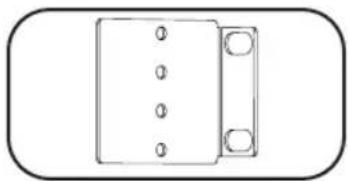
MOHTaXHbIe KPOHtEiHbI: NcNoJIb3yITe 3TN KPOHtEiHbI DnA MOHTaKa PDU.
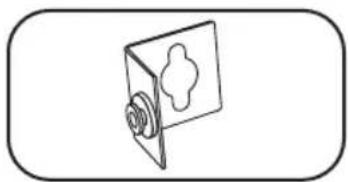
BcnomoratbHoe moTaxHoe npncnoc6neHne PDUMVROTATEBRKT: 3TN V-0bpa3hble KPOHHTeHb CneJeT nCIOJIb3OBAt bIy yCTaHOBKn PDU TAKIM o6pa3OM, YTO6bl erO po3ETKn 6blnn O6paueHb K 3aJHe CTOpOE CTOnKn.
Bo3MOxHOCTH
Kapta ynpablenna obopydoBaHne m uepe3 Be6-nHTeppeic
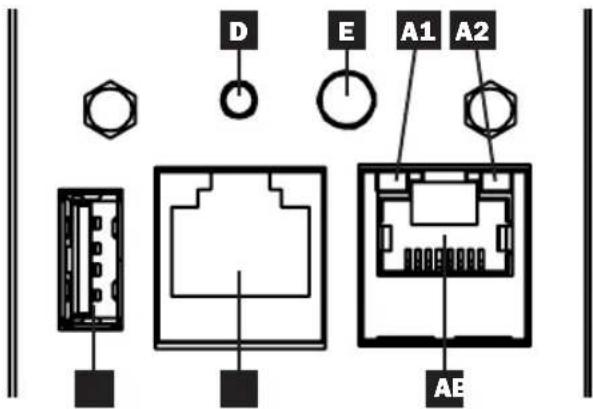
A Nopt Ethernet: pa3bem RJ45 nCnOJb3yeTcIy IIOKIIuChEnI KApTb WEBCARDLX K cTeN Upe3 CTaHdapTHbI COeINHITeNBbI Ka6eB Ethernet. CBeToNDHbIe INDkATOpbI A1 N A2 nCnOJIb3yOTcI DnI Obo3NaueHn pa6oHx peKIMOB (kak noka3aHO B npBHeEHNO HnKe Ta6JIne).
KoHpyauNoHHb nopt RJ45: nOJIb3yIte 3OT noPT dJa o6ceueHn npAmoro TepMHaJIbHO rnoKJIIOUeHnK KOMNbIOTepy c NOMOu bIO npOrpaMMbl 3MyJauu TepMHaJIa. PDU KOMnEKeTyeTcra KaBemc pa3bemAMR J45 u DB9 (Kat. No 73-1243). Ira 3aka3a 3anaCHO rKa6en naocTe caNT www.triplite.com, Ha KOtOpom npedctabHe nHΦopMaunr no pa3MeueHn 3aka3OB.
C Nopr USB Type-A: nCnONb3yIte 3OT nOpT dIaN NOdKnIOUeHnMaOdyIa Tripp Lite EnviroSense2 (E2MT, E2MTDO, E2MTDI, E2MTHD) B cIeJx BblOnHeHnPa3NHybIX fYHKm KoHTpOJIu I ynpaBNeHn npaMeTpamn OkpyKaIoUe cpebl. BoJe e NoDpo6Ha HnΦopMaun O6 3tX MoDeJIx npedctabIeHa Ha caIe We www.triplite.com.
PnpmeaHne. He noKIOUoAte K 3OTMy npTy KnaBnAtpy nnMbIb.
Khonka nepe3anycka:doCTynha che3 He6bIbwoe OTBepCTne B InueBOI naHEn,paCNOJOKeHHoe NOkOHpIpyaunHOHbIM nopTOM RJ45.Pn ODHOKpaTHOM HaxaTN BblONHReTcN pe3anyck Kaptby UnpabHeHIOOBaHMe Ype3 Be6-INTePfEnc. Pn HaxaTN C ydepKaHmEM B TeueHne 15 cekyHd npo3BOiNTc8 cbpc HAcTpoek KapTbI ynpabHeHIOOBaHMe O6pe3 Be6-INTePfEnc do 3ABODCKNX 3HaHeHn.
PpmeaHne. Ka3aHHbIe DeiCtBnH He BnHIOH Na CoCToHne NOTpe6nteNe, NOkKIOUeHHbIX K PDU.
E CND Status (Ctaryc): OTO6paXaet CTAtyc KapTbI ynpabJeHnO o6OpydoBaHm Yepe3 Be6- INHTepceic (KAK NOKa3aHO B npBHeHNo Hxke Ta6nue).
| Овознaya: Б尊: Фуночь A1 | Φуночь CIVД Ц比特 СIVД | Статус Onи Саимп Зелень М Маганne Быкл OTCYТВИЕ Быкл АктуНо Б尊: Фуночь С A2 | Зелень М Маганne Быкл ОТСУТВИЕ Быкл АктуНо Н С A2 | ||||
| Зелень М Маганne Быкл ОТСУТВИЕ С A2 | |||||||
| Зелень M Маганne Быкл ОТСУТВИЕ С A2 | |||||||
| Зелень M Маганne Быкл ОТСУТВИЕ С A2 | |||||||
| Зелень M Маганne Быкл ОТСУТВИЕ С A2 | |||||||
| E | Стаус кар уразаленя оборUDованием чered Бeб-интерф。 3eileнь П Одоград 3eileнь/ opahxe 3eileнь/ opahxe | Стоянhoe rope С Зелень M Одоград 3eilenB/ opahxe | Зелень M п Зелень M Ор Зелень M Ор Зелень M Ор Зелень M Ор Зелень M Ор Зелень M Ор Зелень M Ор Зелень M Ор Зелень M Ор Зелень M Ор Зелень M Ор Зелень M Ор Зелень M Ор 3eilenB Ор 3eilenB Ор 3eilenB Ор 3eilenB Ор 3eilenB Ор 3eilenB Ор 3eilenB Ор 3eilenB Ор 3eilenB Ор 3eilenB Ор 3eilenB Ор 3eilenB | П П П П П П П П П П П П П П П П П П П П П П П П П П П П П П П П П П П П П П П П П П П П П П П П П П П 3eilenB Ор 3eilenB Ор 3eilenB Ор 3eilenB Ор 3eilenB Ор 3eilenB Ор 3eilenB Ор 3eilenB Ор 3eilenB Ор 3eilenB Ор 3eilenB Ор | П П П П П П П П П П П П П П П П П П П П П П П П П П П П П П П П П П П П П П П П П П П 3eilenB Ор 3eilen Ор 3eilen Ор 3eilen Ор 3eilen Ор 3eilen Ор 3eilen Ор 3eilen Ор 3eilen Ор 3eilen Ор 3eilen Ор 3eilen Ор 3eilen Ор 3eilen Ор | П П П П П П П П П П П П П П П П П П П П П 3eilen Ор 3eilen Ор 3eilen Ор 3eilen Ор 3eilen Ор 3eilen Ор 3eilen Ор 3eilen Ор 3eilen Ор 3eilen Ор 3eilen Ор 3eilen Ор 3eILEN Ор 3eILEN Ор 3eILEN Ор 3eILEN Ор 3eILEN Ор 3eILEN Ор 3eILEN Ор 3eILEN Ор 3eILEN Ор 3eILEN Ор 3eILEN Ор 3eILEN Ор 3eILEN Ор | П П П П П П П П П П П П П П П П П П 3eILEN Ор 3eILEN Ор 3eILEN Ор 3eILEN Ор 3eILEN Ор 3eILEN Ор 3eILEN Ор 3eILEN Ор 3eILEN Ор 3eILEN Ор 3eILEN Ор 3eILEN Ор 3eILLEN Ор 3eILLEN Ор 3eILLEN Ор 3eILLEN Ор 3eILLEN Ор 3eILLEN Ор 3eILLEN Ор 3eILLEN Ор 3eILLEN Ор 3eILLEN Ор 3eILLEN Ор 3eILLEN Ор 3eILLEN Оз 3eILLEN Ор 3eILLEN Ор 3eILLEN Ор 3eILLEN Ор 3eILLEN Ор 3eILLEN Ор 3eILLEN Ор 3eILLEN Ор 3eILLEN Ор 3eILLEN Ор 3eILLEN Ор 3eILLEN Ор 3eilleN Ор 3eILLEN Ор 3eILLEN Ор 3eILLEN Ор 3eILLEN Ор 3eILLEN Ор 3eILLEN Ор 3eILLEN Ор 3eILLEN Ор 3eILLEN Ор 3eILLEN Ор 3eILLEN Ор 3eILLEN Ос 3eILLEN Ор 3eILLEN Ор 3eILLEN Ор 3eILLEN Ор 3eILLEN Ор 3eILLEN Ор 3eILLEN Ор 3eILLEN Ор 3eILLEN Ор 3eILLEN Ор 3eILLEN Ор 3eILLEN Ор 3eillesN Ор 3eILLEN Ор 3eILLEN Ор 3eILLEN Ор 3eILLEN Ор 3eILLEN Ор 3eILLEN Ор 3eILLEN Ор 3eILLEN Ор 3eILLEN Ор 3eILLEN Ор 3eILLEN Ор 3eILLEN Оп 3eILLEN Ор 3eILLEN Ор 3eILLEN Ор 3eILLEN Ор 3eILLEN Ор 3eILLEN Ор 3eILLEN Ор 3eILLEN Ор 3eILLEN Ор 3eILLEN Ор 3eILLEN Ор 3eILLEN Ор 3e GillesN Ор 3eILLEN Ор 3eILLEN Ор 3eILLEN Ор 3eILLEN Ор 3eILLEN Ор 3eILLEN Ор 3eILLEN Ор 3eILLEN Ор 3eILLEN Ор 3eILLEN Ор 3eILLEN Ор 3eILLEN О 3eILLEN О 3eILLEN O 3eILLEN O 3eILLEN O 3eILLEN O 3eILLEN O 3eILLEN O 3eILLEN O 3eILLEN O 3eILLEN O 3eILLEN O 3eILLEN O 3eILLEN O 3eILLEN O 3eILLEN O 3eILLEN O O 3eILLEN O 3eILLEN O 3eILLEN O 3eILLEN O 3eILLEN O 3eILLEN O 3eILLEN O 3eILLEN O 3eILLEN O 3eILLEN O 3eILLEN O 3eILLEN O 3eILLEN O 3eILLEN O 3eILLEN O 3eILLEN O 3eILLEN O 3eILLEN O 3eILLEN O 3eILLEN O 3eILLEN O 3eILLEN O 3eILLEN O 3eILLEN O 3eILLEN O 3eILLEN O 3eILLEN O 3eILLEN O 3cILLEN O 3eILLEN O 3eILLEN O 3eILLEN O 3eILLEN O 3eILLEN O 3eILLEN O 3eILLEN O 3eILLEN O 3eILLEN O 3eILLEN O 3eILLEN O 3eILLEN O 3eILLEN O 3eILLE N O 3eILLEN O 3eILLEN O 3eILLEN O 3eILLEN O 3eILLEN O 3eILLEN O 3eILLEN O 3eILLEN O 3eILLEN O 3eILLEN O 3eILLEN O 3eILLEN O 3eILLEN O 3eILLEN 0 3eILLEN O 3eILLEN O 3eILLEN O 3eILLEN O 3eILLEN O 3eILLEN O 3eILLEN O 3eILLEN O 3eILLEN O 3eILLEN O 3eILLEN O 3eILLEN O 3eILLEN O 3eILLEN O O 3eILLEN O 3eILLEN O 3eILLEN O 3eILLEN O 3eILLEN O 3eILLEN O 3eILLEN O 3eILLEN O 3eILLEN O 3eILLEN O 3eILLEN O 3eILLEN O 3eILLEN O 3eILLEN O 3eILLEN O 3eILLEN O 3eILLEN O 3eILLEN O 3eILLEN O 3eILLEN O 3eILLEN O 3eILLEN O 3eILLEN O 3eILLEN O 3eILLEN O 3eILLEN O 3eILLEN O 3eILLEN O 3cILLEN O 3eILLEN O 3eILLEN O 3eILLEN O 3eILLEN O 3eILLEN O 3eILLEN O 3eILLEN O 3eILLEN O 3eILLEN O 3eILLEN O 3eILLEN O 3eILLEN O 3eILLEN O 3eILLE N O 3eILLEN O 3eILLEN O 3eILLEN O 3eILLEN O 3eILLEN O 3eILLEN O 3eILLEN O 3eILLEN O 3eILLEN O 3eILLEN O 3eILLEN O 3eILLEN O 3eILLEN O 3eILLEN 0 3eILLEN 0 3eILLEN 0 3eILLEN 0 3eILLEN 0 3eILLEN 0 3eILLEN 0 3eILLEN 0 3eILLEN 0 3eILLEN 0 3eILLEN 0 3eILLEN 0 3eILLEN 0 3eILLEN 0 3eILLEN 0 4eILLEN 0 4eILLEN 0 4eILLEN 0 4eILLEN 0 4eILLEN 0 4eILLEN 0 4eILLEN 0 4eILLEN 0 4eILLEN 0 4eILLEN 0 4eILLEN 0 4eILLEN 0 4eILLEN 0 4eILLEN 0 4eilleN 0 4eilleN 0 4eilleN 0 4eilleN 0 4eilleN 0 4eilleN 0 4eilleN 0 4eilleN 0 4eilleN 0 4eilleN 0 4eilleN 0 4eilleN 0 4eilleN 0 4eilleN 0 4eilleN |
Iopraok hactpoiKn n 3Kcnnyatau
TapaHTnHbIe 06aTeJIbCTBa
ORPAHnueHHaTAPAHTNIA
IpoaBeu rapaHTpyeOTcYCTBne 3nHaayabHbix DeEeKToB MaTePnAna IIN n3roTOBHeHn B TeueHne 2 neT (aNCKNoUeHnEM BHTpeHHnx 6bataep N5P 3a npdeIamn CWA u KaHaDb - B 3tOM cNyae rapaTHnHbI cPoK COCTABJRE T 10d) C MOMENTA nepBOI pOKyIKN daHHoro n3DeJIInn PpN yCIOBn ERO nCNOb3OBAHnB CCOOTBECTBmN COBCEMnpimeHmblM K Hemy yKa3AHnMa. B cnyae npoBHeNn KaKx-Jn6o DeEeKToB MaTePnAna IIN n3rTOBHeHn B TeueHne yka3aHHoro nepINOda IpoaBeu ocUeCTBnREt peMOHT INN 3aMeHy dAnHO r3DJIENN NCKNoHTeJbHO NO CBOeMy YCMOTpeHIO. ObcLyXBaHne NO HactOJeI RapaHTn IpOn3BOIDTCr TOIbKO ppiYcIOBm DOCTABKn IIN OTpAbKn Bam6paKOBaHOrO n3DeJIIn (c npedBaPteNbHOn OnilaTOn BcexC pacxoOBo NO erTpahCnpTPOBKe IIN DoCTBaKe) No aDpeCy: Tripp Lite, 1111 W. 35th Street, Chicago, IL 60609 USA. PacxoDi no o6paTHo TpAHCnOpTIPOBKe n3DeJIIn OrlaNaBACOT PpOaBuOM. Pepeq Bo3Bpatom IIO6oro O6OpyOBAHn DnI ppoBeHeHn PemOHTa O3HaKoMbTEcB C InHfOpMaunéH na CTpaHnue www.triplite.com/support.
JECTBVE HACTOIEI IAPAHNTHE PACNPOCTPAHRETCA HA CNYAEN ECTECTBEHHORO 3HOCA INIOBPEKJDEHNA BPE3YbTATE ABAPIN, HEHAJIEXKAUERO NcNOBJ3OBAHN, HAPUJEHNA PPABNI 3KCNJLYATAUIN INNXANATHOCTNI. IPODABELHE PEPDOCTABJAREHIKAKNX BHBOPAXEHHBXI IAPAHNT3A NCKLIQUEHNEIM IPRMO IN3JLOXEHHOB HACTORAEM DOKUMHETE. 3A NCKLIQUEHNEM CJUYAEB, 3ANPESEHHbIX DEICTBYIOUM 3AKOHODATEJBCTBOM, BCE NOIDPA3YMBAEMBIE IAPAHNTIN, BKJIOUCHA BCE IAPAHNTIN INPINOHOCTIN INI IPODAJKN ININ NCNOBJ3OBAHN IO HA3HAUEHIO, ORPAHNUEHBI NO IPODOJKNTEJBHOCTIN DEICTBNI BIIWEKYKA3AHHBIM IAPAHNTINHBIM CPOKOM; KPOME TOBO, IN3 HACTOIEI IAPAHNTIN RHBbIM OBPA3OM NCKLIQUAIOTCBA NIOSOUYBIE, CJUYAHbIE IN KOCBEHHbIE YbblTKN. (B HeKOToBPbX 7taTaeHJeOnyckaTeCBVeDeHne OrpaHueHn Ha npoJokntbHocTB DeiCTBnTex ININ INbIX INpOpa3ymBaembIX rapaHTN, a B HeKOToBPbX - NCKLIQUEHNE INI orpaHueHne pa3mepa no6ouhbx ININ KOCBEHHbX y6bIKOB. B 3tNx cnyaax BbiWEn3IOKeHHbE OrpaHueHn INI ncklouehn MoryT Ha Bac He pacnpocptpanraTbcR. Hactoiaar IapAHNTn peDoctabJareT Bam KOHKpeThbie opndueckne npaba, a Habop dpyuix Baunx npab MoKet 6bItb pa3NJHyBM 3abNCIMOCTn OT JOpncDNkui).
BHIMAHHE! Do hauana nCnoIb3ObaHn daHoro yctpoIcTa b noIb3oBaTeIb doJKeH y6eIITbcB TOM, YTO OHO ABJIaTc npiroDthBM, COOTBeCTByIOUIM INI 630NaChbIM IIN ppeIOnaRaEMOro npimeHeHn. B CBraN C 60IbMm pa3Hoo6pa3neM KOHKpeTHbIX npimeHeHn IPOUN3BOIDTeJI He DaET KaKx-Im63abepeHn INI rapaHTn OTHCInTeJIbHO npiroDHOCTn DaHHbx IN3DeJIIN IIN KAKO-Im6 KOHKpeTHO IOpimeHeHn INI INX COOTBeTCTBnA KAKM-JIN6 KOHKpeTHbIM Tpe6OBaHnM.
NdeHTnKauHbIe Homepa, CBnTeJIbCTByIOUne O COOTBeTCTBn HOpMaTHBbIM Tpe6oBaHmM
C cIbIO nIeHTnHnKaUIN, a TAKKc cepTnHnKaUIN COOTBETCTBnH HOpMaTnBbIM Tpe6oBaHnM, pNIO6peTeHHOMy Bamn I3dJIIO KOMnAHn Tripp Lite npucBOeH yHKaIbHbI CepnHbI Homep. CepnHbI Homep, BmecTe co BCen Heo6xOJIMo INHopMaUne I MapKnPOBkAMn 6 OOn6peHN, Yka3aHa JApNbIke N3rTOBtEnA, npNKpePJIeHHOM K n3dJIIO. Ppi 3anPoCe INHopMaUIn O COOTBETCTBnH HopMaTnBbIM Tpe6oBaHnM BcERda Coo6uain Te cepnHbI Homep I3dJIIn. He cJeNyET NyTaTB CepnHbI Homep C MapKOIN NnHOMepom MOneIN I3dJIIn.
KomnaHn Tripp Lite noctoHHo COBepueHCTBye T CBOIO npOdyKuHO. B CBA3N C 3TNM BO3MOXHO n3MeHeHn texHnuecknx xapaKtepncTik 6e3 npedBaPntelbHorO yBeDOMJIeHn.


PnOyukIn BbIcTe KINCTTg.
1111 W. 35th Street, Chicago, IL 60609 USA • www.triplite.com/support
21-03-417 93-3667_RevD
Benutzerhandbuch
(208/230 V 16 Ampere
Uberwachtes Modell)
(208/230 V 16 Ampere
(208/240 V 24 Ampere
Uberwachtes Modell)
1111 W. 35th Street, Chicago, IL 60609 USA • www.triplite.com/support
BESCHRANKTE GARANTIE
1111 W. 35th Street, Chicago, IL 60609 USA • www.triplite.com/support
21-03-417 93-3667 RevD