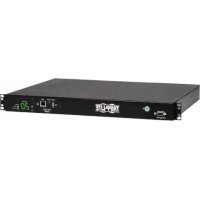
PDUMH20HVATNET - Power strip Tripp Lite - Free user manual and instructions
Find the device manual for free PDUMH20HVATNET Tripp Lite in PDF.


| Product Type | Power strip with automatic transfer switch (ATS) and meter |
| Model | PDUMH20HVATNET |
| Brand | Tripp Lite |
| Form Factor | 1U rack-mount |
| Primary Input | IEC C20 (detachable C19-C20 cord) |
| Secondary Input | IEC C20 (detachable C19-C20 cord) |
| Rated Voltage | 200-208 V (LO) or 220-240 V (HI) |
| Rated Current | 20 A |
| Switched Outlets | 8 outlets (NEMA 5-15R, 5-15/20R, IEC C13) network-controlled |
| Non-switched Outlets | 2 outlets (always on) |
| Display | Digital ammeter, source and voltage indicator |
| Network Interface | Yes (SNMP, Web, SSH, Telnet) |
| Automatic Transfer Switch | Automatic switching between primary and secondary input |
| Protection | Does not provide surge or line noise protection |
| Operating Temperature | 0°C to 50°C (32°F to 122°F) |
| Installation | By qualified technician only |
| Included Accessories | 2 C19-C20 cables, interconnection cables, cable ties, cable retention tray |
| Warranty | 2 years |
| Maintenance | No user-serviceable parts |
| Usage | Indoor only, controlled environment |
Frequently Asked Questions - PDUMH20HVATNET Tripp Lite
User questions about PDUMH20HVATNET Tripp Lite
0 question about this device. Answer the ones you know or ask your own.
Ask a new question about this device
Download the instructions for your Power strip in PDF format for free! Find your manual PDUMH20HVATNET - Tripp Lite and take your electronic device back in hand. On this page are published all the documents necessary for the use of your device. PDUMH20HVATNET by Tripp Lite.
USER MANUAL PDUMH20HVATNET Tripp Lite
Switched/Metered Rack PDU with Automatic Transfer Switch
Models: PDUMH15AT, PDUMH15ATNET, PDUMH15HVAT, PDUMH15HVATNET, PDUMH20AT, PDUMH20ATNET, PDUMH20HVAT, PDUMH20HVATNET
Series Number: AGAC7625
- Important Safety Instructions 2
- Installation 3
2.1 Mounting the PDU 3
2.2 Connecting the PDU 3
2.3 Networking the PDU 6
- Features 7
- Configuration and Operation 10
4.1 Automatic Transfer Switch 10
- Technical Support 12
- Warranty and Product Registration 12
Espanol 13
Français 25
Pycckn 37
Deutsch 49
WARRANTY REGISTRATION
Register your product today and be automatically entered to win an ISOBAR surge protector in our monthly drawing!

www.triplite.com/warranty
TRIPP·LITE

Manufacturing Excellence.
1111 W. 35th Street, Chicago, IL 60609 USA • www.triplite.com/support
Copyright © 2019 Tripp Lite. All rights reserved.
1. Important Safety Instructions
SAVE THESE INSTRUCTIONS
- This manual contains instructions and warnings that should be followed during the installation, operation and storage of this product. Failure to heed these instructions and warnings may affect the product warranty.
- Warning: This equipment is compliant with Class A of CISPR 32. In a residential environment, this equipment may cause radio interference.

CAUTION Only those who are properly trained or qualified to use this device should do so. Anyone who is not trained or qualified should not use this device unless it is under the supervision of someone who is properly trained or qualified to do so.
Children must be supervised to ensure that they do not use the device as a toy.
Never use the device if the cord and plug are damaged; if it is not working properly, or if it has been dropped or damaged, take it to an authorized service center for inspection and repair.
If the power cord is damaged, it must be replaced by the manufacturer, its authorized service agent, or by qualified personnel in order to avoid a danger.
- The PDU provides the convenience of multiple outlets, but DOES NOT provide surge or line noise protection for connected equipment.
- The PDU is designed for indoor use only, in a controlled environment, away from excess moisture, temperature extremes, conductive contaminants, dust or direct sunlight.
- Keep indoor ambient temperature between 32^ and 122^ (0^ and 50^)
- The PDU must be installed by a qualified technician only.
- Do not attempt to mount the PDU to an insecure or unstable surface.
- Install in accordance with National Electrical Code standards. Be sure to use the proper overcurrent protection for the installation, in accordance with the plug/equipment rating.
- Connect the PDU to an outlet that is in accordance with your local building codes and that is adequately protected against excess currents, short circuits and earth faults.
- The electrical outlets supplying power to the equipment should be installed near the equipment and easily accessible.
- Do not connect the PDU to an ungrounded outlet or to extension cords or adapters that eliminate the connection to ground.
- Be sure to provide a local disconnect device on any models that are permanently installed without a plug that is easily accessible.
- Never attempt to install electrical equipment during a thunderstorm.
- Individual equipment connected to the PDU should not draw more current than the individual PDU's outlet's rating.
- The total load connected to the PDU must not exceed the maximum load rating for the PDU.
- Do not attempt to modify the PDU, input plugs or power cables.
- Do not drill into or attempt to open any part of the PDU housing. There are no user-serviceable parts inside.
- Do not attempt to use the PDU if any part of it becomes damaged.
- Use of this equipment in life support applications where failure of this equipment can reasonably be expected to cause the failure of the life support equipment or to significantly affect its safety or effectiveness is not recommended.
2. Installation
2.1 Mounting the PDU
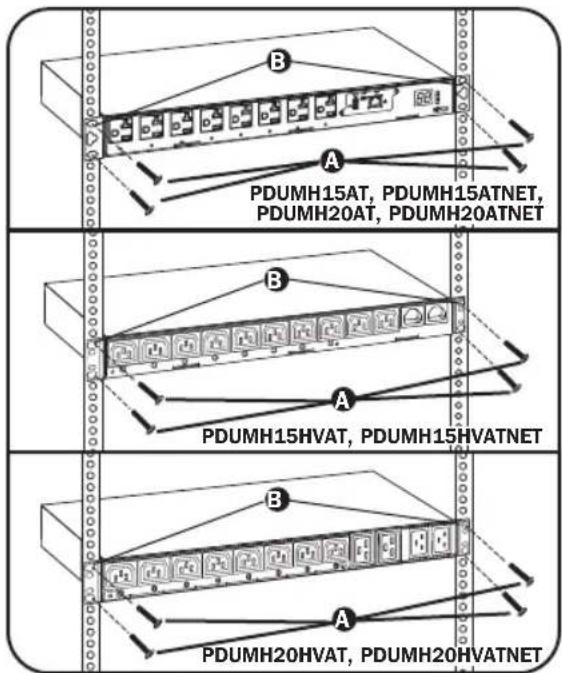
The PDU supports 1U Rack configurations.
Note: The user must determine the fitness of hardware and procedures before mounting. The PDU and included hardware are designed for common rack and rack enclosure types and may not be appropriate for all applications. Exact mounting configurations may vary.
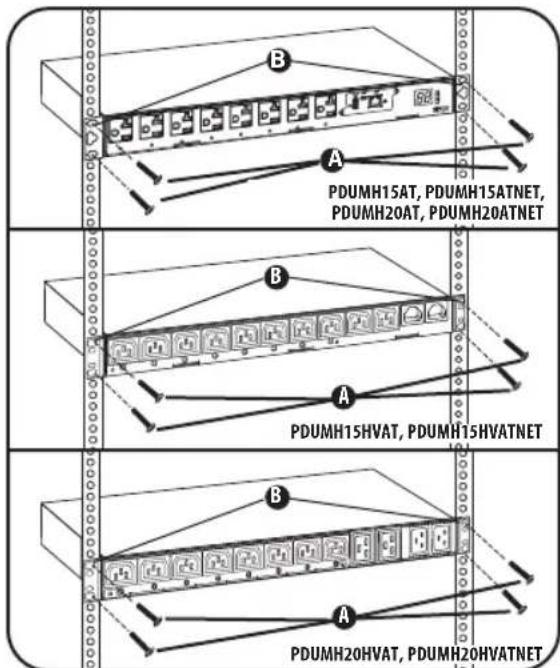
1U Rack Mounting: Attach the PDU to the rack by inserting four user-supplied screws A through the PDU mounting brackets B and into the mounting holes of the rack rail as shown.
2.2 Connecting the PDU
All PDU models include a primary and secondary AC power input (see diagram). The reference table below lists each model's primary and secondary inputs:
| Model Primary Input Secondary Input | |
| PDUMH15AT NEMA 5-15P (permanent cord) IEC C14 inlet | |
| PDUMH15ATNET NEMA 5-15P (permanent cord) IEC C14 inlet | |
| PDUMH15HVAT* IEC C14 inlet (detachable cord) IEC C14 inlet | |
| PDUMH15HVATNET* IEC C14 inlet (detachable cord) IEC C14 inlet | |
| PDUMH20AT NEMA L5-20P (permanent cord) IEC C20 inlet | |
| PDUMH20ATNET NEMA L5-20P (permanent cord) IEC C20 inlet | |
| PDUMH20HVAT* IEC C20 inlet (detachable cord) IEC C20 inlet | |
| PDUMH20HVATNET* IEC C20 inlet (detachable cord) IEC C20 inlet |
*PDU includes one C13 to C14 (PDUMH15HVAT/NET) or two C19 to C20 (PDUMH20HVAT/NET) interconnection cables for the two primary and secondary inlets, which may be used to connect to upstream UPS sources. Alternately, the user can supply IEC cables fitted with country-specific plugs.
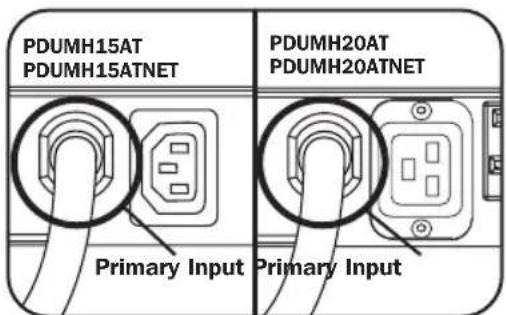
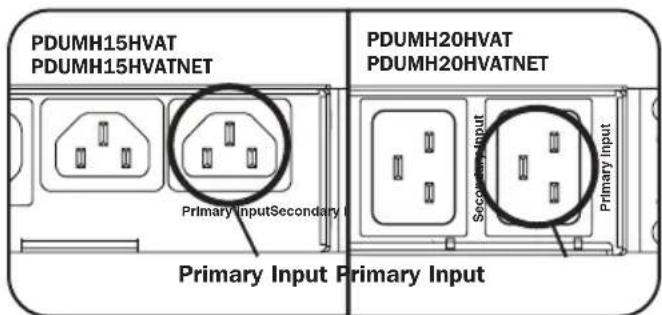
Primary Input (120V Models) Primary Input (208-240V Models)
2. Installation
2.2.1 Connect Secondary Input Cord to PDU:
Although the PDU will operate without connecting the Secondary input cord, the Secondary input is required for the PDU's Automatic Transfer Switch function.
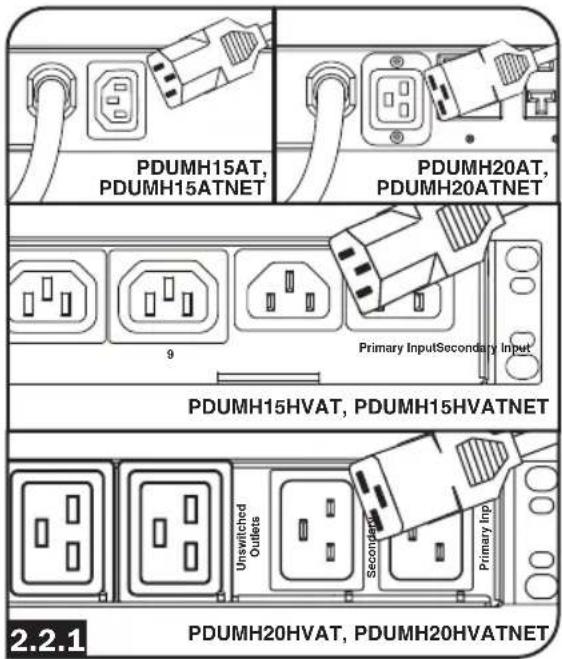
Models PDUMH15AT, PDUMH15ATNET, PDUMH20AT, PDUMH20ATNET only:
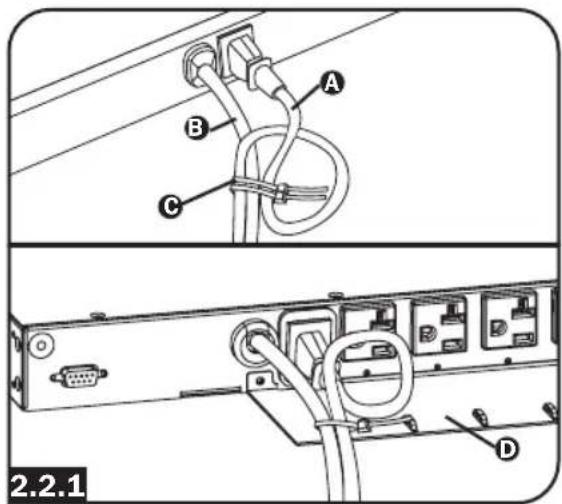
To connect the secondary input cord, form a loop in the Secondary cord A and secure the juncture of that loop to the Primary cord B with a zip tie. Be sure the zip tie is secured around the Secondary and Primary cords, as well as through the loop created in the Secondary cord C. (See diagram).
Note: Allow the cord as much slack as possible between the loop and the cord's outlet.
Both cords should be tied to the Cable Retention Tray (See diagram).
Once two cords are secured and the Secondary cord has an acceptable amount of slack, insert the Secondary cord outlet into the IEC power inlet.
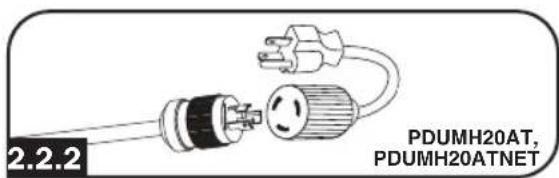
2.2.2 Connect Input Plug Adapters (Optional - Models PDUMH20AT, PDUMH20ATNET Only):
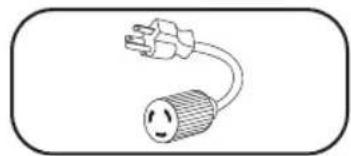
The PDU includes two adapters that convert one or both of the L5-20P input plugs to 5-20P input plugs. Connecting the adapters is optional. The PDU will function normally without connecting the adapters.
2. Installation
2.2.3 Connect PDU Input Plugs:
(See the Configuration and Operation section for more information.) Connect the Primary input plug A to a preferred source of grounded 120V/230V AC power, such as a SmartOnline UPS System. The UPS system must not share a circuit with a heavy electrical load (such as an air conditioner or refrigerator). Under normal operating conditions, the PDU will distribute AC power from the Primary input source. Connect the Secondary input plug B to an alternative source of grounded 120V/230V AC power, such as a redundant SmartOnline UPS System. Do not plug the Secondary input into the same power source as the Primary input. The PDU will distribute AC power from the Secondary input only if the Primary input becomes unavailable.
Note: Immediately after the PDU is connected to live AC power, you may notice a series of soft clicking sounds emitted by electrical relays within the PDU. The relays may also click occasionally during the operation of the PDU. This is normal.
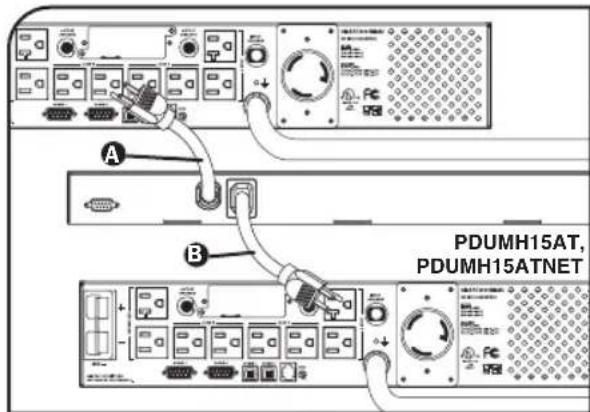
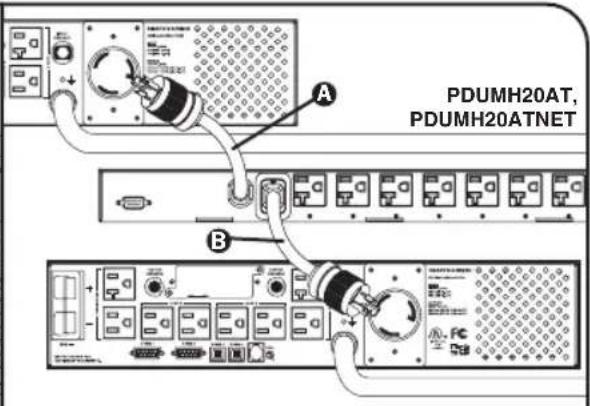
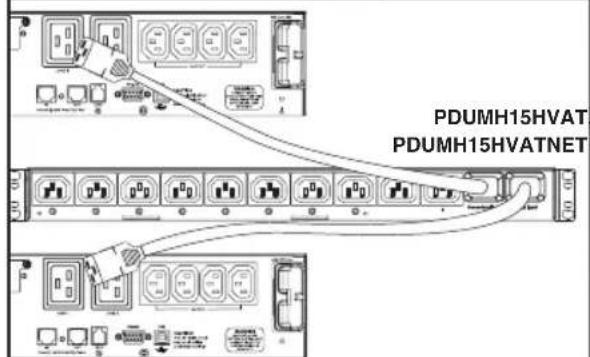
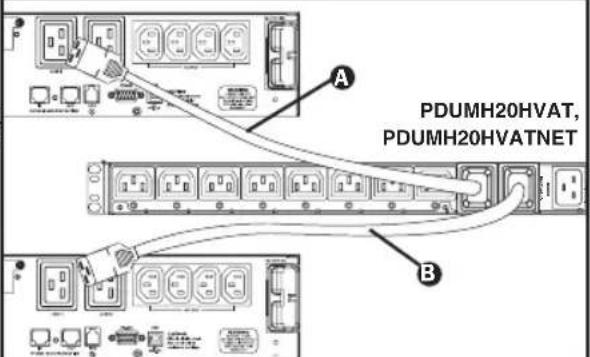
2.2.3
2. Installation
2.2.4 Selecting Input Voltage Range (optional: Models PDUMH15HVAT, PDUMH15HVATNET, PDUMH20HVAT and PDUMNH20HVATNET only):
These models have two selectable nominal input voltage ranges: 200V-208V ("LO") and 220V-240V ("HI"). Press the button next to the display to toggle the nominal voltage setting to the desired "HI" or "LO" range. This setting adjusts the voltage ranges for the primary and secondary inputs. The display will indicate "HI" or "LO" for five seconds.
2.2.5 Connect Equipment to PDU:
Do not exceed the load rating of the PDU. The total electrical current used by the PDU will be displayed on the digital meter in amperes. Each outlet includes a green LED that illuminates when the outlet is receiving AC power.
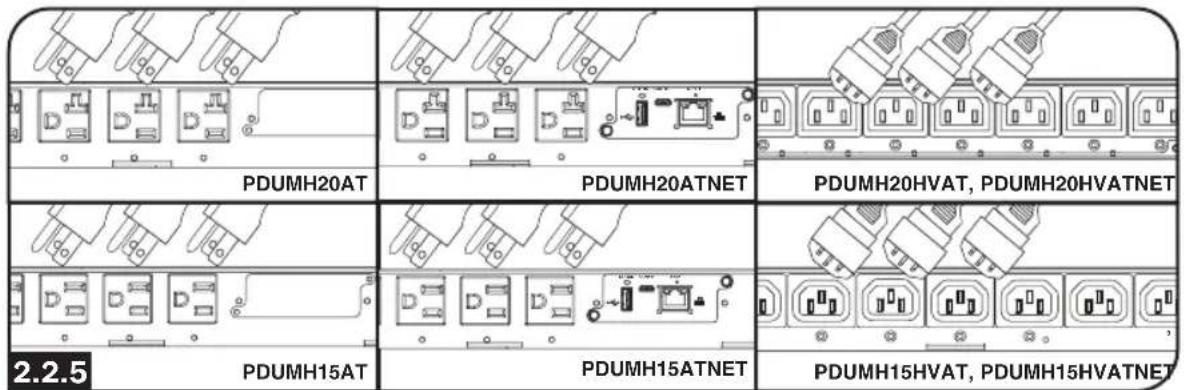
2.3 Networking the PDU
For network configuration instructions, please refer to the WEBCARDLX Owner's Manual included with this product.
3. Features
Models PDUMH15AT/NET: The cord is permanently attached to the PDU and has a NEMA 5-15P plug.
Models PDUMH15HVAT/NET: The C13-C14 cord is detachable.
Models PDUMH20AT/NET: The cord is permanently attached to the PDU and has a NEMA L5-20P plug.
Models PDUMH20HVAT/NET: The C19-C20 cord is detachable.
Secondary Input Inlet (detachable on all models)
Models PDUMH15AT/NET, PDUMH15HVAT/NET: The IEC-320-C14 inlet connects to the detachable Secondary AC Input Power Cord.
Models PDUMH20AT/NET, PDUMH20HVAT/NET: The IEC-320-C20 inlet connects to the detachable Secondary AC Input Power Cord.
Switched Outlets: During normal operation, the outlets distribute AC power to connected equipment. On Models PDUMH15ATNET, PDUMH15HVATNET, PDUMH20ATNET and PDUMH20HVATNET, the NEMA 5-15R, NEMA 5-15/20R and IEC-320-C13 outlets may be switched On and Off via software control. When an outlet is live, the associated LED illuminates.
4 Unswitched Outlets (Models PDUMH15HVAT/NET, PDUMH20HVAT/NET): These outlets receive power from either input source, but are not individually switchable.
5 Factory Configuration Port: The port is reserved for configuration by factory authorized personnel only. No user information is available. Connecting to this port may render the unit inoperable and void its warranty.
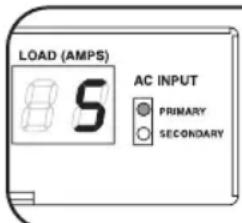
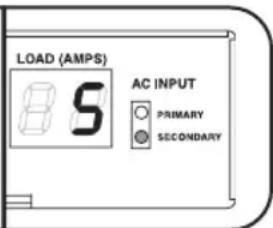
6 Digital Load Meter (Ammeter): The total electrical current used by the connected equipment is displayed on the digital meter in amperes.
Input Voltage Range Select Switch (Models PDUMH15HVATNET, PDUMH20HVATNET): The button to the lower left of the display may be used to toggle between "HI" or "LO" voltage ranges. The display will indicate "HI" or "LO" for five seconds. Press the switch once to display ranges. Press again within five seconds to change setting. Setting can also be changed via PowerAlert (PDUMH15HVATNET and PDUMH20HVATNET only).
IP Address Display (Models PDUMH15HVAT/NET, PDUMH20HVAT/NET): Press and hold the switch to display the IP address of the SNMP card in the PDU.
Network Interface (Models PDUMH15ATNET, PDUMH15HVATNET, PDUMH20ATNET, PDUMH20HVATNET): Allows you to operate the PDU as a managed network device, accessible via SNMP network management platform, web browser, SSH or Telnet.
Input Source Indicator: When the PDU is connected to a live AC power source, the Primary or Secondary input LED illuminates to indicate which source is supplying power to the outlets.
3. Features
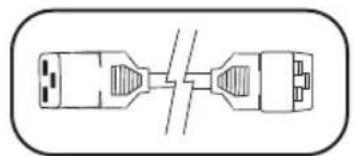
Primary and Secondary AC Input Power Cord (Models PDUMH20HVAT, PDUMH20HVATNET): Two C19-C20 cables are included: one for Primary Input and one for Secondary Input.
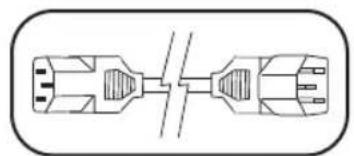
Primary AC Input Power Cord (Models PDUMH15HVAT, PDUMH15HVATNET): A C13-C14 cable is included.
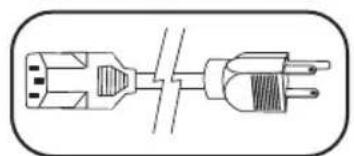
Secondary AC Input Power Cord (Models PDUMH15AT, PDUMH15ATNET): The detachable cord has an IEC-320-C13 connector and a NEMA 5-15P plug.
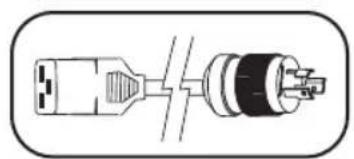
Secondary AC Input Power Cord (Models PDUMH20AT, PDUMH20ATNET): The detachable cord has an IEC-320-C19 connector and a NEMA L5-20P plug.
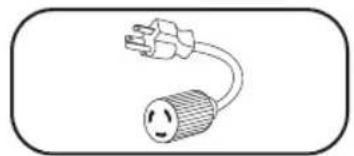
Input Plug Adapters (Models PDUMH20AT, PDUMH20ATNET): The adapters convert NEMA L5-20P input plugs to NEMA 5-20P input plugs.
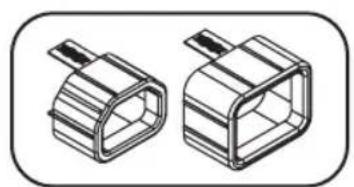
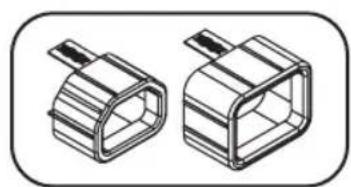
Plug Lock Inserts (Models PDUMH15HVAT, PDUMH15HVATNET, PDUMH20HVAT and PDUMH20HVATNET): Prevent accidental disconnection of C13-C14 or C19-C20 power cords.
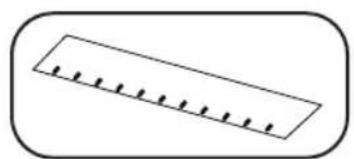
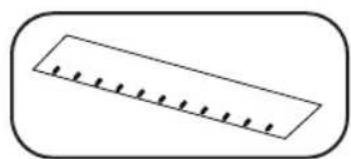
Cable Retention Tray (Models PDUMH15AT, PDUMH15ATNET, PDUMH20AT, PDUMH20ATNET): Tie the Primary and Secondary Input cords to the Cable Retention Tray. Once you've secured the two cords together and ensured that the Secondary cord has a comfortable amount of slack, insert the Secondary cord outlet into the IEC power inlet.
4. Configuration and Operation
4.1 Automatic Transfer Switch
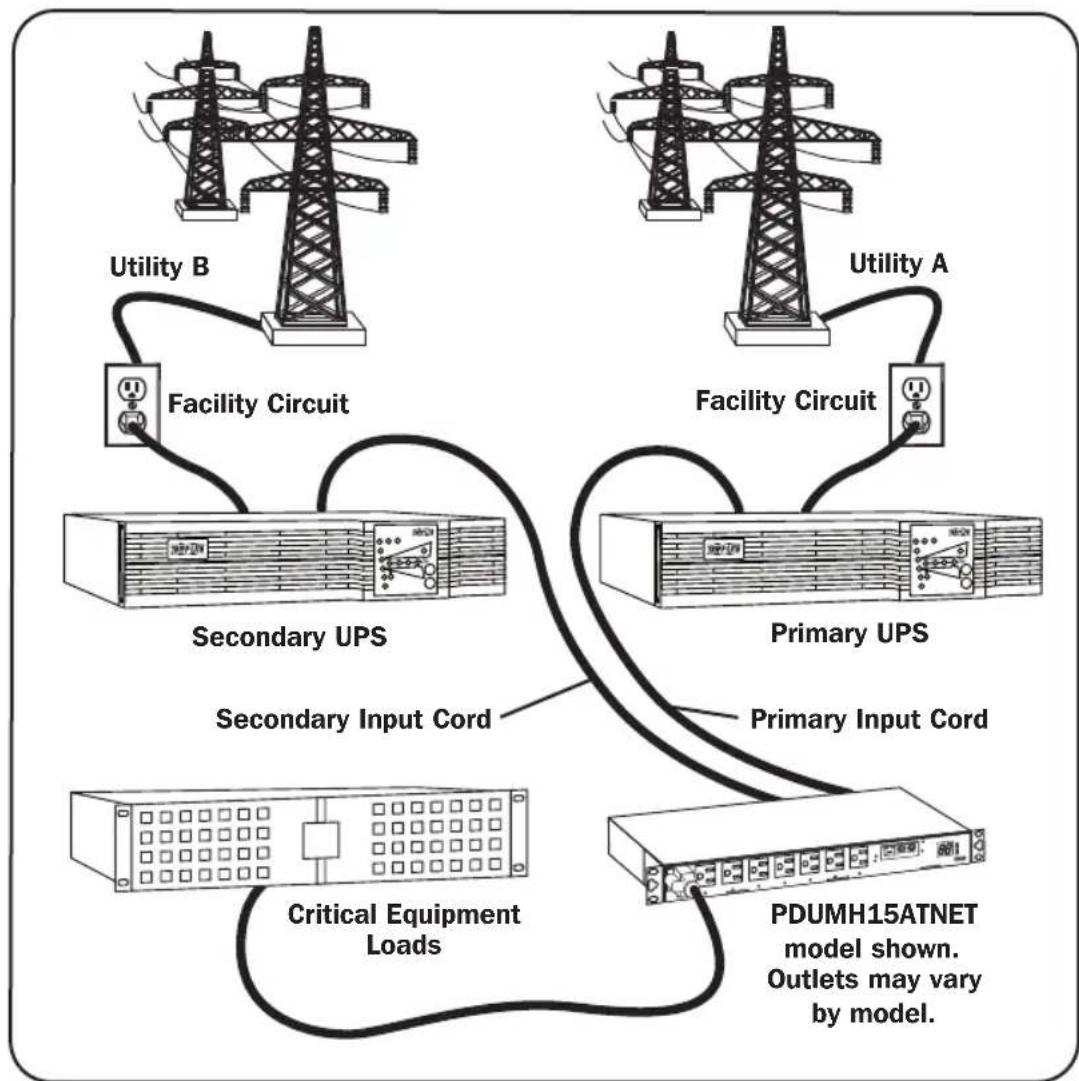
When the Primary and Secondary inputs are both connected to Tripp Lite UPS Systems, the PDU operates as an Automatic Transfer Switch, providing redundant input power for high availability applications. Under normal operating conditions, the PDU will distribute power from the Primary input source, switching to the Secondary input source under certain conditions. The PDU will switch to the Primary source whenever it is "Good" according to the PDU input voltage definitions (see section 4.1.2 for more information).
4.1.1 Preferred Configuration
The Automatic Transfer Switch function provides increased availability when the Primary and Secondary inputs of the PDU are connected to separate Tripp Lite UPS Systems that are connected to separate utility power sources. For maximum availability, Tripp Lite recommends using matching SmartOnline UPS Systems with pure sine wave output for the Primary and Secondary input power sources. The automatic transfer switch function will be compromised if the primary and secondary inputs are connected to the same utility power source.
Warning: DO NOT connect the primary input to a line-interactive UPS, due to transfer time issues, or to any source that does not supply a pure sine wave. Such sources may be used to power the secondary input.
4. Configuration and Operation
4.1.2 Automatic Transfer Switch Source Selection
The PDU will power up if one of the input sources is greater than the minimum startup voltage. In normal operation (after power-up), if the presently selected source (primary or secondary) degrades to a lesser condition, the unit should switch to the alternate source, if that source is of better quality. The unit prefers the primary source, and will always switch to it in the event that both sources are of the same (fair or good) quality. If the present source is becoming bad and the alternate source is at least fair, the unit will switch to the alternate source.
| Nominal Voltage of PDU | |||
| Low-Voltage Models High-Voltage Models | |||
| 120V 200-208V | 220-240V | ||
| Minimum Startup Voltage | 85V 163V 163V | ||
| Good Voltage Range | 99-139V 172-241V | 190-266V | |
| Fair Voltage Range | 75-98V 144-171V | 144-189V | |
| Bad Voltage Range | 0-74V 0-143V 0-1 | 43V | |
4.1.3 Quick Test
After installing the PDU and connecting equipment, you may test the Automatic Transfer Switch function by temporarily shutting down the UPS system connected to the Primary AC input. When the Primary input UPS is no longer supplying AC power, the PDU will switch from the Primary input to the Secondary input, and the Secondary input LED will illuminate. When the Primary input UPS has been restarted and resumes supplying AC power, the PDU will switch back to the Primary input.
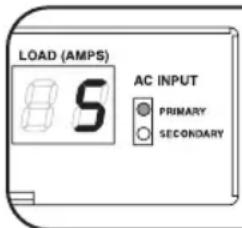
Primary Input Active
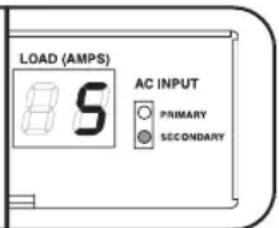
Secondary Input Active
Note: The primary and secondary inputs must be connected to separate sources of utility power. The automatic transfer switch function will be compromised if the primary and secondary inputs are connected to the same utility power source. Do not perform a test with equipment that must remain in productive operation. Any test procedure must prepare for the contingency that the equipment may lose power. Do not test the PDU by detaching power cords which are connected to live power sources, as this eliminates the connection to ground and places your equipment at risk.
5. Technical Support
www.triplite.com/support
E-mail: techsupport@tripplite.com
6. Warranty and Product Registration
LIMITED WARRANTY
Seller warrants this product, if used in accordance with all applicable instructions, to be free from original defects in material and workmanship for a period of 2 years (except internal UPS system batteries outside USA and Canada, 1 year) from the date of initial purchase. If the product should prove defective in material or workmanship within that period, Seller will repair or replace the product, in its sole discretion. Service under this Warranty can only be obtained by your delivering or shipping the product (with all shipping or delivery charges prepaid) to: Tripp Lite, 1111 W. 35th Street, Chicago, IL 60609 USA. Seller will pay return shipping charges. Visit www.triplite.com/support before sending any equipment back for repair.
THIS WARRANTY DOES NOT APPLY TO NORMAL WEAR OR TO DAMAGE RESULTING FROM ACCIDENT, MISUSE, ABUSE OR NEGLECT. SELLER MAKES NO EXPRESS WARRANTY OTHER THAN THE WARRANTY EXPRESSLY SET FORTH HEREIN. EXCEPT TO THE EXTENT PROHIBITED BY APPLICABLE LAW, ALL IMPLIED WARRANTYES, INCLUDING ALL WARRANTYES OF MERCHANTABILITY OR FITNESS, ARE LIMITED IN DURATION TO THE WARRANTY PERIOD SET FORTH ABOVE; AND THIS WARRANTY EXPRESSLY EXCUSES ALL INCIDENTAL AND CONSEQUENTIAL DAMAGES. (Some states do not allow limitations on how long an implied warranty lasts, and some states do not allow the exclusion or limitation of incidental or consequential damages, so the above limitations or exclusions may not apply to you. This Warranty gives you specific legal rights, and you may have other rights which vary from jurisdiction to jurisdiction).
WARNING: The individual user should take care to determine prior to use whether this device is suitable, adequate or safe for the use intended. Since individual applications are subject to great variation, the manufacturer makes no representation or warranty as to the suitability or fitness of these devices for any specific application.
PRODUCT REGISTRATION
Visit www.triplite.com/warranty today to register your new Tripp Lite product. You'll be automatically entered into a drawing for a chance to win a FREE Tripp Lite product!*
- No purchase necessary. Void where prohibited. Some restrictions apply. See website for details.
FCC Notice
This device complies with part 15 of the FCC Rules. Operation is subject to the following two conditions: (1) This device may not cause harmful interference, and (2) this device must accept any interference received, including interference that may cause undesired operation.
This equipment has been tested and found to comply with the limits for a Class A digital device, pursuant to part 15 of the FCC Rules. These limits are designed to provide reasonable protection against harmful interference when the equipment is operated in a commercial environment. This equipment generates, uses, and can radiate radio frequency energy and, if not installed and used in accordance with the instruction manual, may cause harmful interference to radio communications. Operation of this equipment in a residential area is likely to cause harmful interference in which case the user will be required to correct the interference at his own expense. The user must use shielded cables and connectors with this product. Any changes or modifications to this product not expressly approved by the party responsible for compliance could void the user's authority to operate the equipment.
Regulatory Compliance Identification Numbers
For the purpose of regulatory compliance certifications and identification, your Tripp Lite product has been assigned a unique series number. The series number can be found on the product nameplate label, along with all required approval markings and information. When requesting compliance information for this product, always refer to the series number. The series number should not be confused with the marking name or model number of the product.
Tripp Lite has a policy of continuous improvement. Specifications are subject to change without notice. Photos and illustrations may differ slightly from actual products.


1111 W. 35th Street, Chicago, IL 60609 USA • www.triplite.com/support
21-03-429 93-3721RevE
www.triplite.com/support
Correo Electrónica: techsupport@tripplite.com
6. Garantía
GARANTÍA LIMITADA
1111 W. 35th Street, Chicago, IL 60609 USA • www.triplite.com/support
www.triplite.com/support
1111 W. 35th Street, Chicago, IL 60609 USA • www.triplite.com/support
21-03-429 93-3721RevE
PykoBODCTBO N0JIb30BaTeJЯ
Стоechны упраьемble PDU / PDU cn3Мерпелем саВТOMaTическIM BBODOM peЗерВa
Mодели: PDUMH15AT, PDUMH15ATNET, PDUMH15HVAT, PDUMH15HVATNET, PDUMH20AT, PDUMH20ATNET, PDUMH20HVAT, PDUMH20HVATNET
Homep cepwn: AGAC7625
- Baxkhbte yka3aHn no TexHnke 6e30naChoctn 38
2.yctaHObKa 39
2.1 MoHTaX PDU 39
2.2ПоdkлioченеPDU 39
2.3 BKJIIOUeHHe PDU BCetb 42
3.Bo3MOxHOCTH 43
4. NopraDOK hactpOikn n 3KcPnyatau nn 46
4.1 ABToMaTnueckn BBOJ pe3epBa (ABP) 46
- Texnuecka nopekka 48
- TapaHTnHbIe 06a3aTeNbCTBa 48
English 1
Espanol 13
Francais 25
Deutsch 49
EAC


Pnpynkina Bbucera KNACTBA.
1111 W. 35th Street, Chicago, IL 60609 USA - www.triplite.com/support
OxpanaHTcra ABTOpCKIM npabOM © 2019 Tripp Lite. IpepeeataZanpeaaetca.
1. BaЖные уka3aHЯ no TextHuke 6e30naChOCTn
COXPAHNTE HACTOUIYKA3AHNA
B Hactoem pykoOCTBe cOepKatayka3aHnI npdynpkdeHn, KOtObie HeoXIOIMO CO6HnOaTb B npocce yctahOBKn, kcnnyataun XpaHHeN daHHoro n3dHn. rHopnpobAHne 3TNx yka3aHn I npdynpkdeHm moKeT npuBcTe K noTepe rapaHTn Ha n3dJe.
BHHMaHHe! DaHHe O6OpOBAHHe COOTBeTCTByET Tpe6oBaHnM CTaHApTa CISPR 32 (Knacc A). Pn INCNoB3OBAHn B XINOM NOMEeEHn DaHHe N3DeJeN MeoKet Bb3bBaTpaDnIOmExn.

5nok pacnpedeeneHHa(PDU) ochaue HeeckonbKmM ydo6hbiM po3eTkAMn, Ho HE oecneuBaet 3aunTy noKnHOrO 06OpDobAHn O TBb6pocOB HapraKeHn mUyMOB B IINHM.
PDU npedhaueh ToBko nIHCNoB30BaHnB 3aKpbTbIX NOMEeHnX C perynnyeMbIM MKNpOKnMaTOM BdaNOT HCTOHNOB NObIeHHoBnAaxHOCTN, EKTpeMaBbHbIX TEmnepaTp, 3NEKTPoPBOOBHbIX 3aRpa3HntTeJI, bNIN IN PMArO CoJHeHOrO CBeta.
-ПодерхиьайтtemпетурВОЗДУХВИТРиnomeшенивДиANA3OHeOTdo 50^
- YctaHOBKa PDU JONJKA HPOIN3BOIDTBCA TOLBJK KBAJIHΦIUPOBAHHBIM TEXHNUECKM CNEUJAINCTOM.
- He yctaHabuaBaiTe PDU Ha He3akpePneHHo Hn HyeCTOuHBIO NOBepxHOCTM.
- UCTAHOBKY CNEyET Ipon3BODNTB COOTBECTBNI CTpe6OBAHnM HAIOHOJIbHbIX 3NEKtpoTeHXueCkX HOpMaTINBO.06a3aTeNbHO
HcNOJb3yIe NOxOJaIe NDI YCTaHaBnBaEMOn CNTEmbl yCTpOCTBa 3aUHTb OT NepeRpy3OK NO TOKY B COOTBeCTBNI C
HOMIHANAMN, Yka3aHHBMn HA pa3bemax/obopyoDAHMN.
IoiKnIOHTe 6nok pacnpedeHEn HnTaHn (PDU) K pO3eTKe, COOTBcTCTByIOuee npINrA TbIM B BAwe CTpaHe CTPoNTeNbHbIM HopMaM nHaJIEXaUIM O6p3OM 3aunuEHHO NT 36bItoHbIX TOKOB, KOPOTKnx 3AmbKaHm N 3AmbKaHn Ha 3emJIO.
3Jektpnueckne po3etkn, uepe3 KOtOpBle OcyuectBnareTc3 JIeKTPoNTaHHe 6OpyoBaHn, DOnjHb6bTyCtAHOBnHb B neKoOCTVHom MecTe BnHr Hero.
He noKnouaTe 6nok pacnpedeHnna PNDU) K He3a3emHeHHo po3eTke, a TaKKe K yDInHHTenM nn npeXoHNkAm, He NMEIOHM 3a3EmHeHn.
IIO6bIe MoEIN, yCTaHABnBaEMbIe Ha NoCTOHHo OCHOBe 63 NERKOIOCTyIHORo WTENCEHBORo pa3bema, dONKbI B O6raTeNBOM NOPAKe OCHAATbCg IOKaJIbHbIM YCTPOINCTBOM 3aUNTHORO OTKNIOHNE.
HnB Koem Cnyuae He npOn3BODIne MOHTax 3JeKTPoO6OpyOBoHaN BO BpEmr Ipo3bl.
ToK, nontpe6nembmy otJeBbHmN 3JemeHTaMn o6OpyOBaHnI, noKKnIOaEMbIMn K 6IoKY paCnppeeneHn IITaHn (PDU), He D0JIKeH npeBbIaMb HOMHaON COOTBEcTCTBYUHX PO3eTOK 6noka paCnppeeneHn IITaHn (PDU).
CymmaHarpy3ka ot notpe6ntenei, noKnHoueHHbIX K 6noKy paCnpedeHnna (PDU), Heonna npBbIaTb erMaKcMmAbHo donyCTMMyo Harpy3ky.
He BHOCTe N3MeHEN B KOHCTpyKUIO 6Ioka paCnpedeJIeHn IITAHN (PDU), BXOHBIX pa3bEmOB INI KAbEe IITaHIN.
He bICBepnBaTe OTBepCTn B KOpTyCe 6Ioka PaCnpdeJeHnna NITaHnna (PDU) Hne NbITaTcB BCKpbITb KaKyIO-Ni6o erO aactb. BHyTPN Hero Het Detane, O6CNYKBAeMbIX PON30BATEmE.
- He nCnoB3yIe 6Ioka pacnPepdelenHn IITAHN (PDU) B cIyuea noBpeKdEHN IIObO H3 erO aCTei.
He peKomeHnyetcNcNoJIb3OBAHnE daHnHO 6OpUyOBaHnB CnCTeMaX Knn3Heo6ecneueHn, Ige erO BbIXoI n3 cTPO npEnnoJIOxNtBnHO MoKET pInBeCTN K nepe6oAM B pa6ote 6OpUyOBaHnR Knn3Heo6ecneueHn IIN B 3HaHTeBHO Mepe CHN3NTb er0 6e3OnaCHOCTb mN NΦeKtNBHOCTb.
2.YctaHOBka
2.1 MoHTaX PDU
PDU noDiepKnBaet KOHpyaun C nCnoB3oBaHem cToek pa3Mepom 1U.
PnmeaHne. PnIb30BaTeB DOnJKeH yCTaHOBt B npRIOHocTb OCHACTK IN ppeIOnlaeMbIX npOeDpy Do hauana MoNTaka. Bnok pacnPpeJeHHe HHTAHN (PDU) IN BxOJaAaB Eero KOMNIeKT OChAcTK ppeHa3NaHcHbI dIg ObHbIX TINOB IkaΦOB MOrTy HE NDOXoITb DnB BcEx cenei npMeHeHHe. YCTaHOBQHbIE KOHpyaun MOrTy pa3IuHaTcB C BTeTaNIX.
MOHTaK B CToIky pa3Mepom 1U: npnKpEnrte PDU K LkaФy NytEm BBePbIbAHnue YeTbIpeX BnHTOB A (He BXOJIaIXN B KOMIIeK T NOCTaBKn) Uepe3 MOHTaKHbIe KpoHUsTeHbI PDU B B MOHTaKHbIe OTBePcTna HApBaJIouSeI WkaΦa, KaK nOKa3aHo Ha pCsyHKe.
2.2ПоdkлioуенеPDU
Bce moJI PDU IMeOT OCHOBHIO pe3epBHy BxOdbI nTahmNE peMeHHoro ToKa (cm. cxemy). B npEcdTabHeHHo HnKe cnpaBOuHOI Ta6nue nepeHCNEHbOCOBHbIE p3epBbIe BXObl NO kaxdoMoeJI:
Ipeekuoyateb Bby6opa dana3oHOB BXOHyBx HappKeHH (Ja moJeep PDUMH15HVATNET
PDUMH20HVATNET):ДЯпескючени ДИАЗAOHнаняжени Мжд"HI"ИИ"LO"Может ИспьзOBаТСКНОКа, paCNoIoxeHHa сеBa NOД дсплел.Пocne 3ToRo Ha dIcNCEE B TeeyHne PAn TceKHyD bIcBeeHbAeTc INdkaUH "HI"ИИ"LO".ДЯ OTOбражени DmApazHOH haxMITE Ha KONKуpeKIIIOuATEЯ OIN pa3;ДЯИЗMeHENHa HAcTpOKn CJIeYET HaxKaTb Ha Hee NOBtropHo B TeeyHne pAn TceKHyD.ИЗMeHEnHe NaCTpoiKN TAKKe MoXet npOn3BODITbCnocpeIcTBOM ITO PowerAlert (TOnbkoДЯ moI.D.PUDMH15HVATNET u PDUMH20HVATNET).
0To6paKeHne IP-apeca (Ia moeepi PDUMH15HVATNET pPDUMH20HVAT/NET): Ia oTo6paKeHn iP-apeca SNMPKapTb, yctahOBHeHHoB PDU, haxMITE n yedeXuBaIe KhoNky nepeKluOaTeIa.
7 Cetebo nHTepoeic (nra moeJePDUMH15ATNET, PDUMH15HVATNET, PDUMH20ATNET, PDUMH20HVATNET):
06cneuBaET Bo3MOxKHOCTb EKcIIyatauP DPU B KaueCTBe ynpabIeMOro cTeBOrO yctpoiCTBa, DCtynHOrO uepe3 nnaTfOpMy cTeBOrO ynpabIeHnHa oChOBe SNMP, Be6-6pay3ep, npotoKoSH nn Telnet.
8 INHdkaTOp BXoDHorO nctOuyHKa: npn noKIOUeHH PDU KJeCTbYIOeMy nctOUYHKy nHTaHnpeMeHHOrTo kTaropaetc CBETOIOIDhI INHdkaTOp OCHOBHO rno npe3epBHO BxOda, yKa3bBaHa To, OT KaKOrIO CTOUYHKa OcyIeCTBIAETc pHTaHne p03eTOK B KOHKpTeHb MoMeHT BpeMeHN.
3.Bo3MOXHOCTH
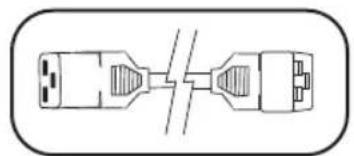
UHpyI NTaHnO OCHOBHO rpe3epBHO BxOIOB NpeMeHHORo TOKa (dma moJeP PDMH20HVAT n PDUMH20HVATNET):B KOMJIeKT NOCTABKN BXODT DAba Ka6ena c pa3bemamC19 u C20: oIN dna ochOBHO r oIN h I nepe3epBHO BXOJa.
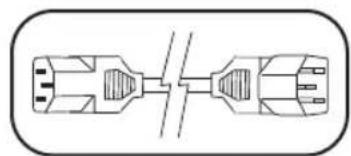
Hyp ntaHnO cHOBHO BXoJa nepemHoro ToKa (dma moJeep PDMH15HVAT u PDUMH15HVATNET): Ka6eB c pa3beMaMn C13-C14 noctabnaTcR B KOMIIeKeTe.
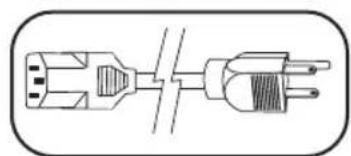
Hyp nnta HpeepbHoro bxoda nepemehoro ToKa (mnoe PDMH15ATn PDUMH15ATNET):3OTOTcoeHnEmbI hHyp mMeet pa3bEM IEC-320-C13 uTencnbHbI pa3bEM NEMA 5-15P.
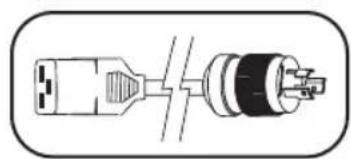
Hyp nTahmpe3epBHO BXoJa nepMeHHoro ToKa (Ima moJeP PDMH20ATn PDUMH20ATNET): 3OT OToeMHReMb IHyp mMeet pa3bem IEC-320-C19 uTencnbHbI pa3bem NEMA L5-20P.
IpexodnKn Dn Bxohbix pa3beMoB (mnoepen PDMH20AT n PDUMH20ATNET): 3tn nepeoxoHKn ppeo6pa3yOT Bxohhpe pa3beMb tNa NEMA L5-20P BO Bxohhble pa3beMb tNa NEMA 5-20P.
3aRnyuKn c6loKnpOBko (dma moJepei PDUMH15HVAT n PDUMH15HVATNET): npedeTbpaiaot cnuyaHoe otKIOUeHne shyropnHTaHnC pa3bemamn C13-C14 nn C19-C20.
Ka6eBnHbI Jxeno6
(DJa MoJeEi PDUMH20HVAT n PDUMH20HVATNET): npKpeNITe 1hpybIOcHOBHO pe3epBHoro BxOIOB K Ka6eBHomy Xeno6y. Iocne cKpeNIIeHN yDByX 1hypOB BMeCTe IN pNOBepKn TOrO, YTO6bl pe3epBHyI WHyp 6bl N DocTaToOH CTeneHN Ocna6JIe, BCTaBbTe pa3bEm Pe3epBHorO 1hpya BO BXoHOn Pa3bEm NiTaHmIEC.
4.1.3 BbICTpa npOBepka
Iocne yctahOBKn PDU nnoKJIIOUeHnO6OpyOBaHnBb MoKeTe npOBepntB DeiCTBne fYHKcnn ABToMaTuYeCKOro BBOda pe3epBa nyTem BpeMeHHoro OTKIOUeHn I6N, noKIOUeHHoro K OCHOBHOMy BXOy nepeMeHHoro ToKa. Iocne npEpaueHn NOaCh 3NeKtPOnNTAHn C OCHOBHOro BXOdHoro N5P DPU nepeKIOHTCn C OCHOBHOro Ha pe3epBHyB BXOD, B pe3yNbTaTe Yero 3arOpNTcCBToNDHb INHnKaTOp pe3epBHOrO BXOda.
3aDeHCTBOBaH OCHOBHO BXO
3aDeHtBOBaH pe3epBHyI BxOd
Pocne nobToHoro 3anycka oChOBHoro BXoHoro IVbI IN BO3o6HOBJIeHn IOnaun 3JIeKTPonITaHn C Hero PDU nepeKJIouHTc8 oBaTHO h OCHOBHn BXoD.
PnmeHne. OCHBHO HpeEBHBI BxObldoHNb6bTbNOKIOeHb K OTdNbIM MTOUYHKM CetEBORo 3eKTPONHTAHN. B cIyae NOKNIOHNE OCHBOHOr n peEBHOr BOxOB N OHOMY I TOMy Jc HCTOHNYC CEIBORO NITAHN AYHKUa ABOTMAuCEKORO BBODa peEBpHa He dIeCTByE. H npOn3BOiNTe PnpEBpy Prn HAMM NIOKNIOHNO O6OpD0BaHm, KOtOpoe DOnXHO OCTaBaTcB Ca6o6em CoCTOHN. PnO cUSeCTBHeHNIIO6oB npOBepOHn IpOeDpybHyKHO bTb rTOBBIM K TOMy, YTO o6OpDIOBAHMe octaHETcB 63 eKTPONHTAHN. He npOBepAte PDU nyTeM oTCoeHNHn CTeBbix huyOB, NOKNIOeHHbIX K HxOJaUMMCn Oid HapJxHEm MTOUYHKM NITAHN, NocKoJIbky PnI 3OM TepaETc3aEMNeHne, yTo NOdBepraet onaChocTn Baie O6OpD0BaHne.
www.triplite.com/support
3π. noúτa: techsupport@tripplite.com

Manufacturing Excellence.
1111 W. 35th Street, Chicago, IL 60609 USA • www.triplite.com/support
www.triplite.com/support
E-Mail: techsupport@tripplite.com
6. Garantie
BESCHRANKTE GARANTIE
1111 W. 35th Street, Chicago, IL 60609 USA • www.triplite.com/support
21-03-429 93-3721_ReV