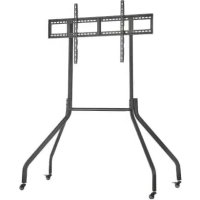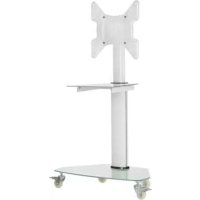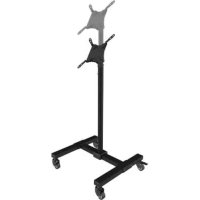
DMC1342S - TV Stand Tripp Lite - Free user manual and instructions
Find the device manual for free DMC1342S Tripp Lite in PDF.


| Product Type | Mobile TV Cart |
| Brand | Tripp Lite |
| Model | DMC1342S |
| Usage | Indoor Only |
| Compatible VESA Standards | 75x75 mm, 100x100 mm, 200x100 mm, 200x200 mm |
| Lockable Casters | Yes |
| Number of Casters | 4 |
| Cable Management | Cable Tie Included |
| Warranty | 5-Year Limited |
| Assembly | Required, Instruction Manual Included |
| Package Contents | Base, Vertical Support, VESA Plate, Cable Tie, Screws, Key, Optional VESA Adapters |
| Mounting Type | VESA Plate Attached to Screen Panel |
| Maintenance | Check Safety Every 3 Months |
| Safety | Do not exceed weight capacity; use an assistant for lifting |
| Technical Support | Website tripplite.com/support |
Frequently Asked Questions - DMC1342S Tripp Lite
User questions about DMC1342S Tripp Lite
0 question about this device. Answer the ones you know or ask your own.
Ask a new question about this device
Download the instructions for your TV Stand in PDF format for free! Find your manual DMC1342S - Tripp Lite and take your electronic device back in hand. On this page are published all the documents necessary for the use of your device. DMC1342S by Tripp Lite.
USER MANUAL DMC1342S Tripp Lite
Mobile TV Cart with Locking Casters
MODEL: DMC1342S
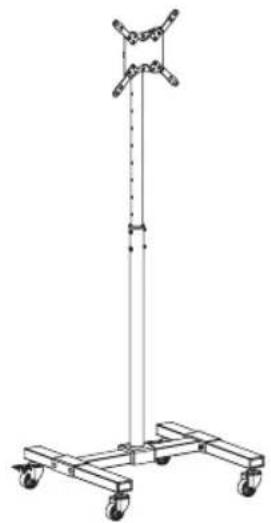
CAUTION:DO NOT EXCEED MAXIMUM LISTED WEIGHT CAPACITY.SERIOUS INJURY OR PROPERTY DAMAGE MAY OCCUR!

75x75/100x100/ 200x100/200x200


Espanol 9 • Français 17 • Pycckn 25 • Deutsch 33
WARRANTY REGISTRATION
Register your product today and be automatically entered to win an ISOBAR surge protector in our monthly drawing!
tripplite.com/warranty

1111 West 35th Street, Chicago, IL 60609 USA · triplite.com/support
Copyright © 2019 Tripp Lite. All rights reserved.
NOTE: Read the entire instruction manual before you start installation and assembly.

WARNING
- Do not begin the installation until you have read and understood the instructions and warnings contained in this manual. If you have any questions regarding any of the instructions or warnings, please visit tripplite.com/support.
- This cart was designed to be installed and utilized ONLY as specified in this manual. Improper installation of this product may cause damage or serious injury.
- This product should only be installed by someone of good mechanical ability, with basic building experience and a full understanding of this instruction manual.
- Make sure that the unit can safely support the combined load of the equipment and all attached hardware and components.
- Always use an assistant or mechanical lifting equipment to safely lift and position equipment.
- This product is intended for indoor use only. Using this product outdoors could lead to product failure and personal injury.
Warranty & Product Registration
5-Year Limited Warranty
Seller warrants this product, if used in accordance with all applicable instructions, to be free from original defects in material and workmanship for a period of 5 years from the date of initial purchase. If the product should prove defective in material or workmanship within that period, Seller will repair or replace the product, in its sole discretion. THIS WARRANTY DOES NOT APPLY TO NORMAL WEAR OR TO DAMAGE RESULTING FROM ACCIDENT, MISUSE, ABUSE OR NEGLECT. SELLER MAKES NO EXPRESS WARRANTY OTHER THAN THE WARRANTY EXPRESSLY SET FORTH HEREIN. EXCEPT TO THE EXTENT PROHIBITED BY APPLICABLE LAW, ALL IMPLIED WARRANTYES, INCLUDING ALL WARRANTYES OF MERCHANTABILITY OR FITNESS, ARE LIMITED IN DURATION TO THE WARRANTY PERIOD SET FORTH ABOVE; AND THIS WARRANTY EXPRESSLY EXCUSES ALL INCIDENTAL AND CONSEQUENTIAL DAMAGES. (Some states do not allow limitations on how long an implied warranty lasts, and some states do not allow the exclusion or limitation of incidental or consequential damages, so the above limitations or exclusions may not apply to you. This warranty gives you specific legal rights, and you may have other rights which vary from jurisdiction to jurisdiction).
WARNING: The individual user should take care to determine prior to use whether this device is suitable, adequate or safe for the use intended. Since individual applications are subject to great variation, the manufacturer makes no representation or warranty as to the suitability or fitness of these devices for any specific application.
PRODUCT REGISTRATION
Visit tripplite.com/warranty today to register your new Tripp Lite product. You'll be automatically entered into a drawing for a chance to win a FREE Tripp Lite product!*
- No purchase necessary. Void where prohibited. Some restrictions apply. See website for details. Tripp Lite has a policy of continuous improvement. Specifications are subject to change without notice. Photos and illustrations may differ slightly from actual products.
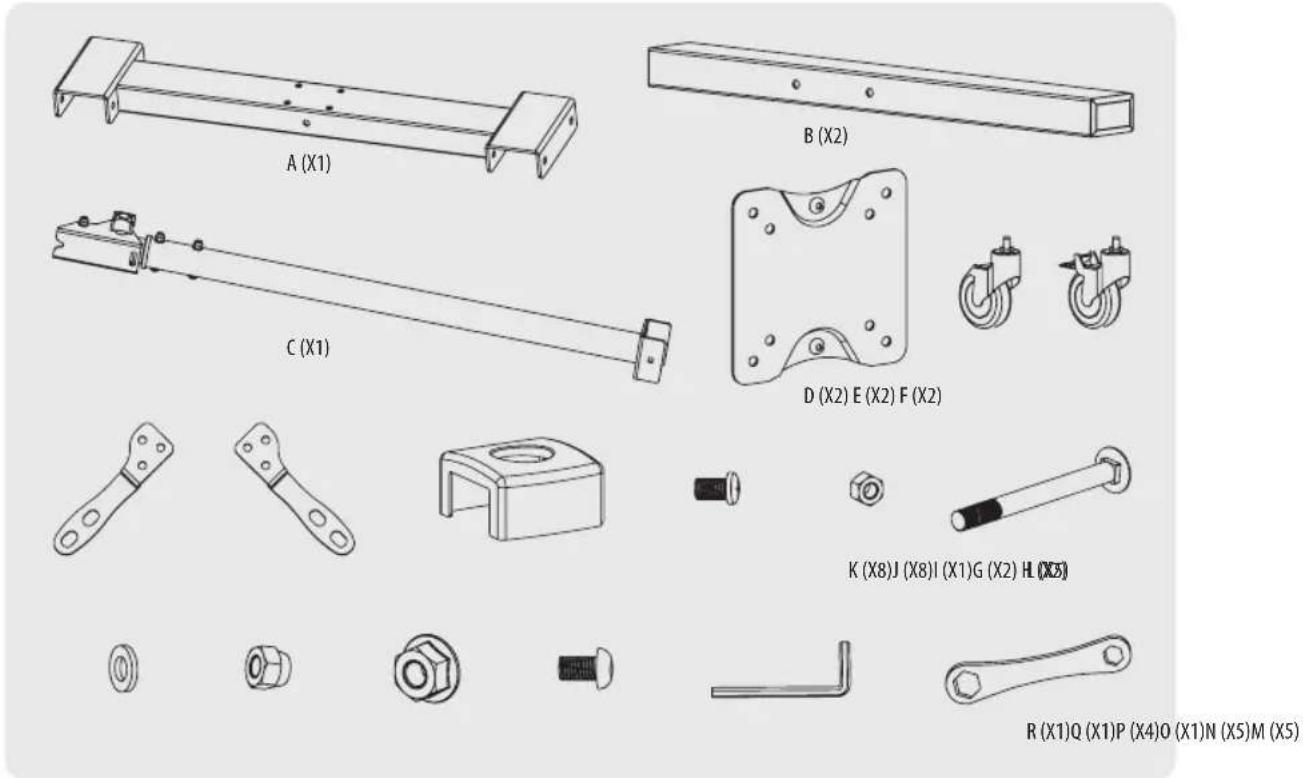
Component Checklist
Ensure you have received all parts according to the component checklist prior to installing. If any parts are missing or faulty, visit triplite.com/support for service.
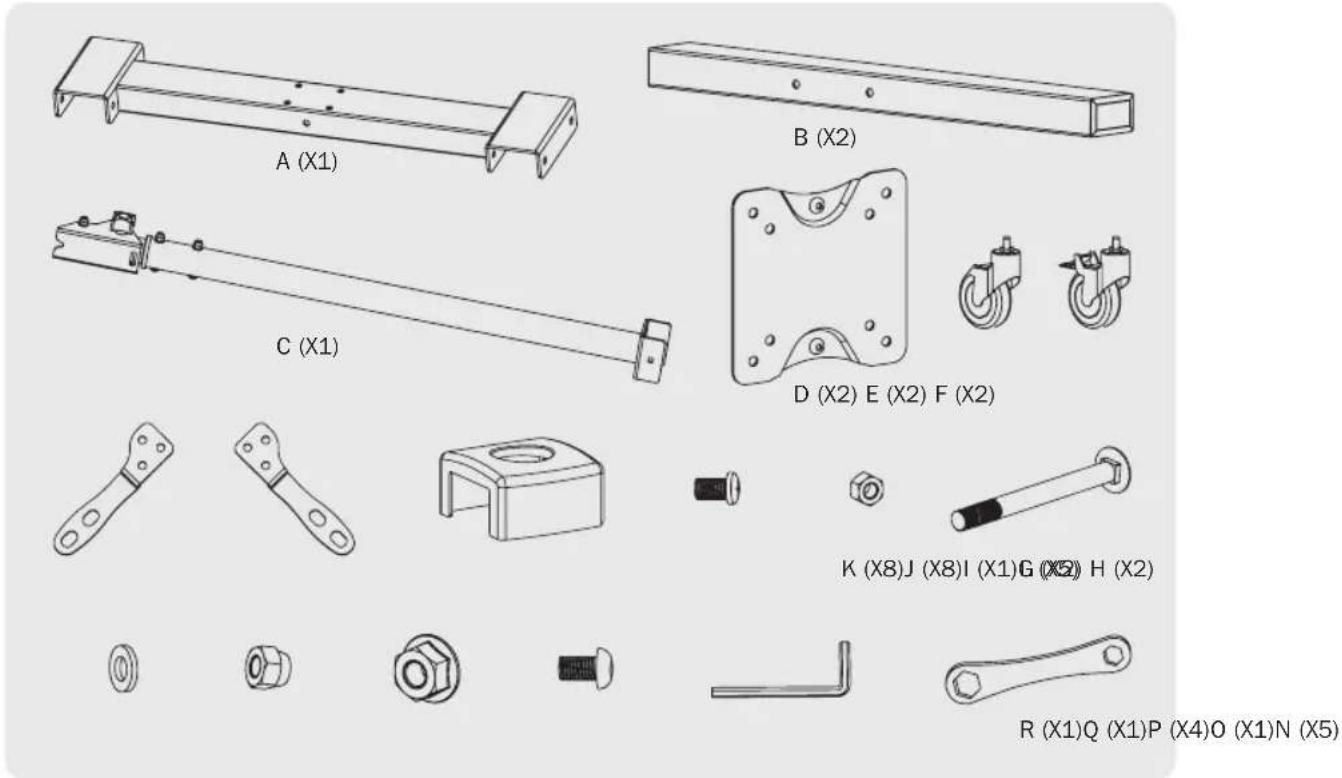
IMPORTANT:

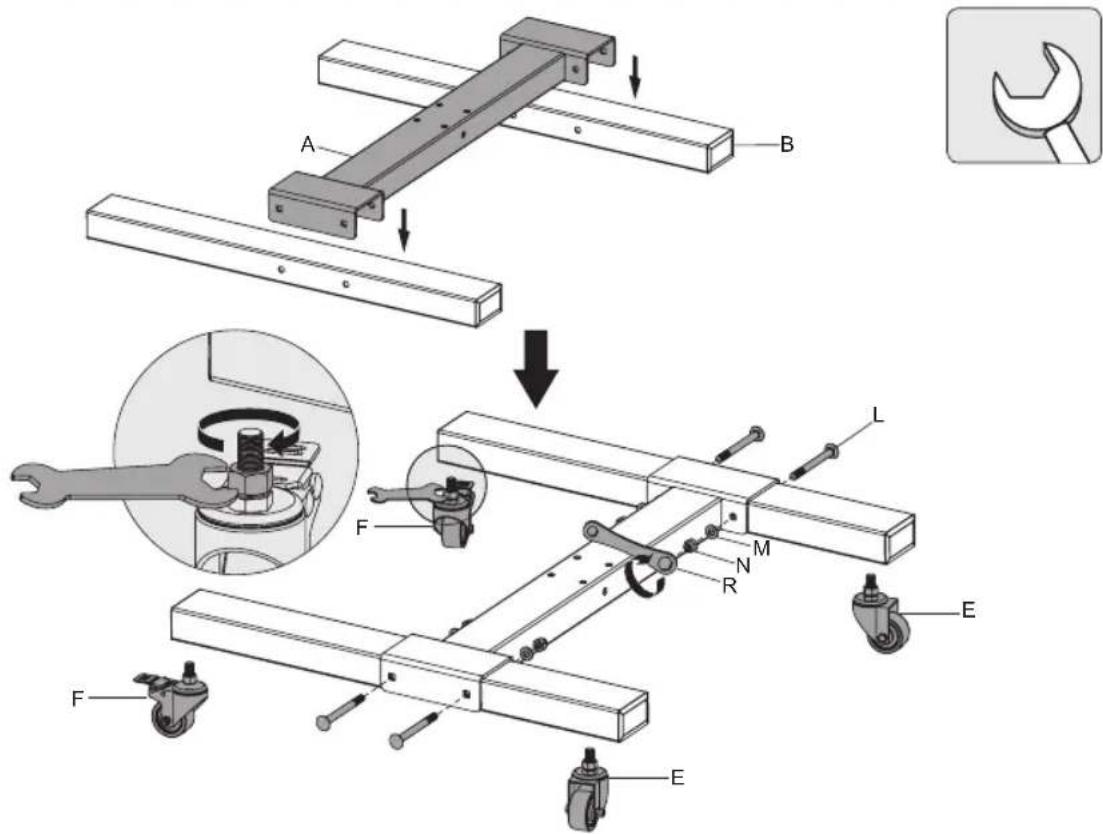
1. Assemble Base
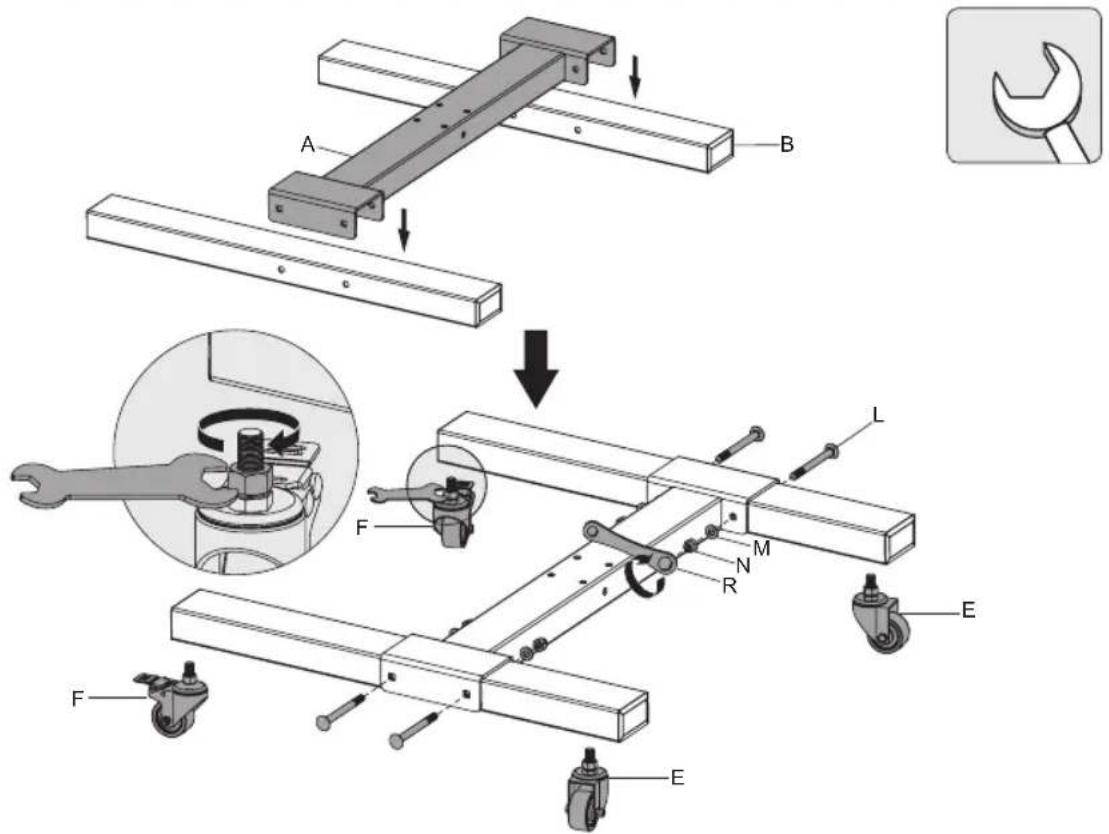
2. Assemble Vertical Support
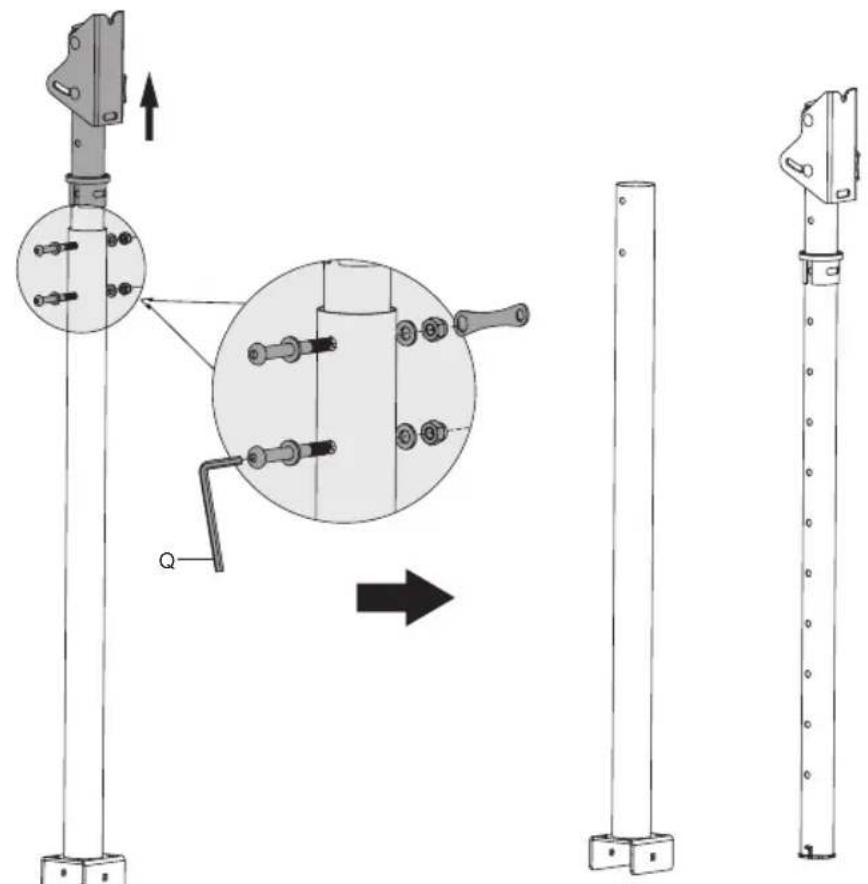
3. Attach Cord Management Collar to Vertical Support
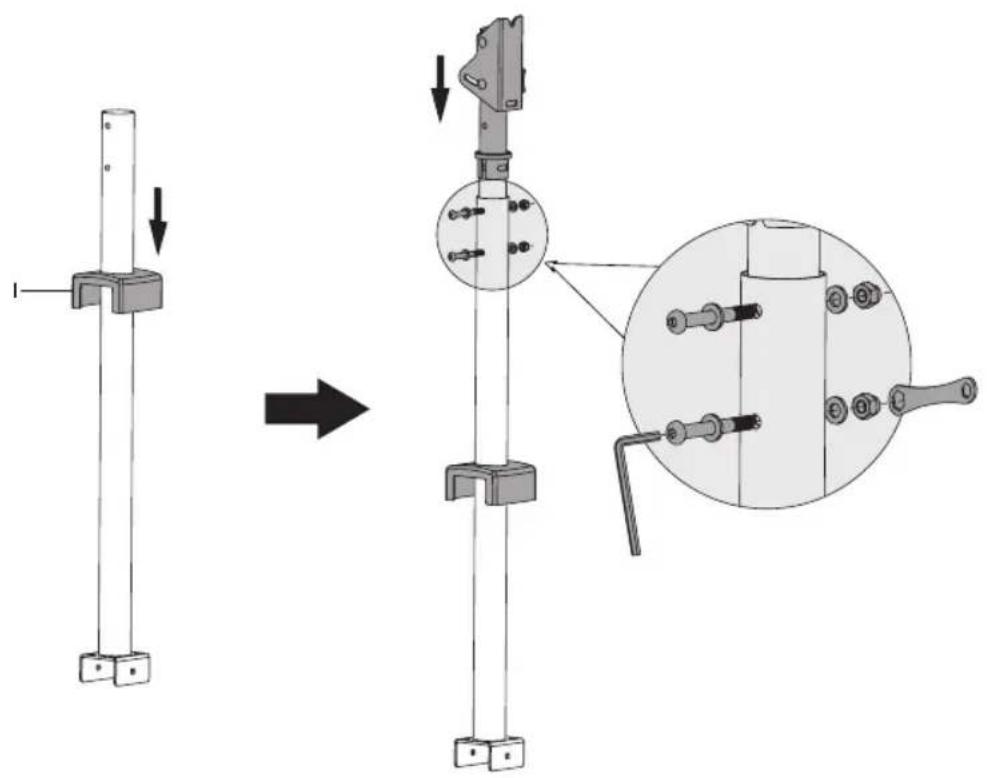
4. Attach Vertical Support Assembly to Base
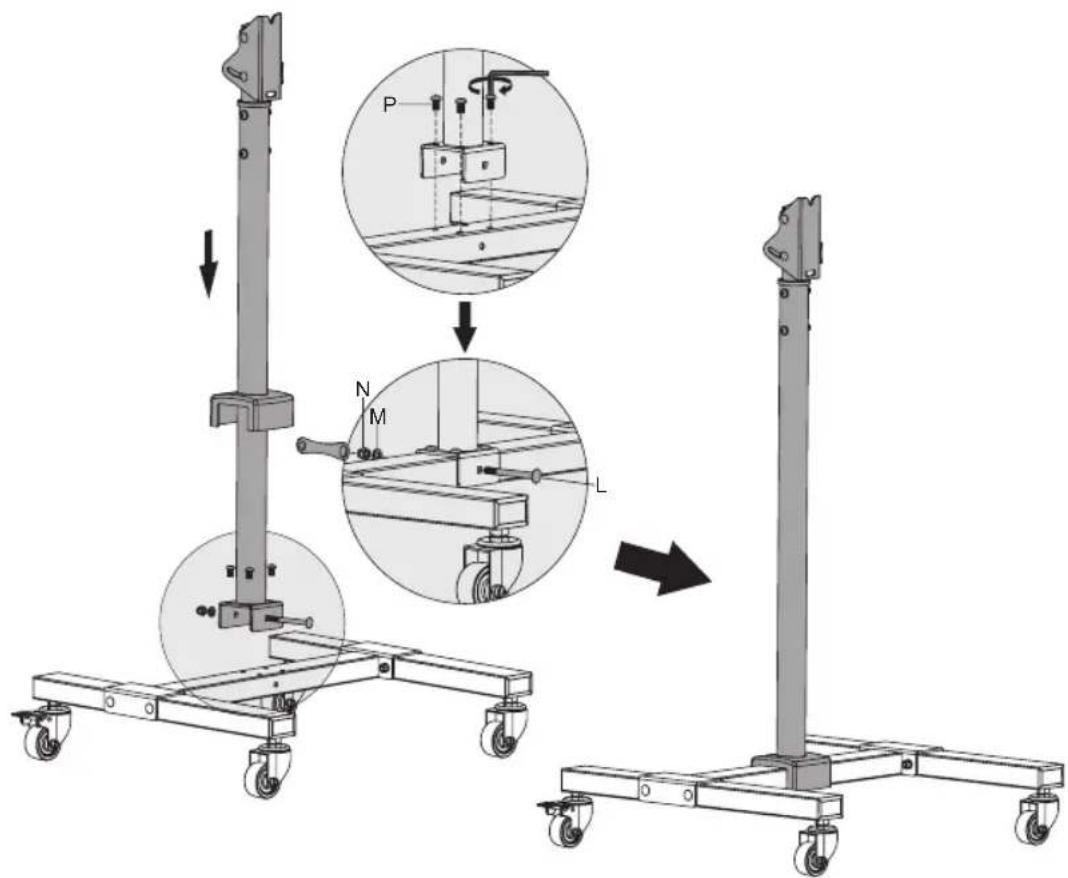
5. Attach VESA Plate to Display Panel
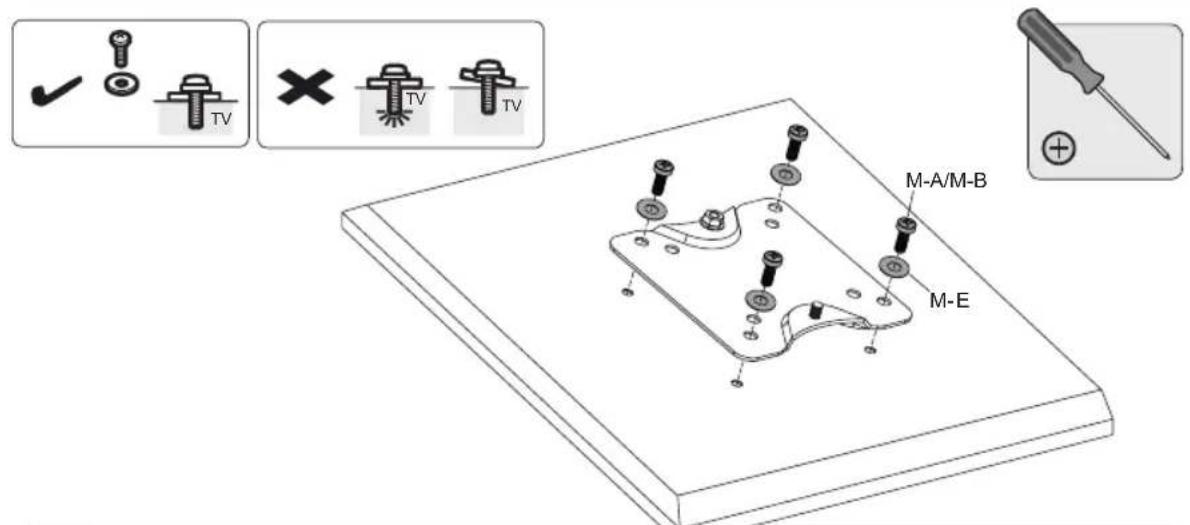
5a. For Small and Medium Displays

Attach the display to the VESA plate with the appropriate included screws. Do not over-tighten screws.
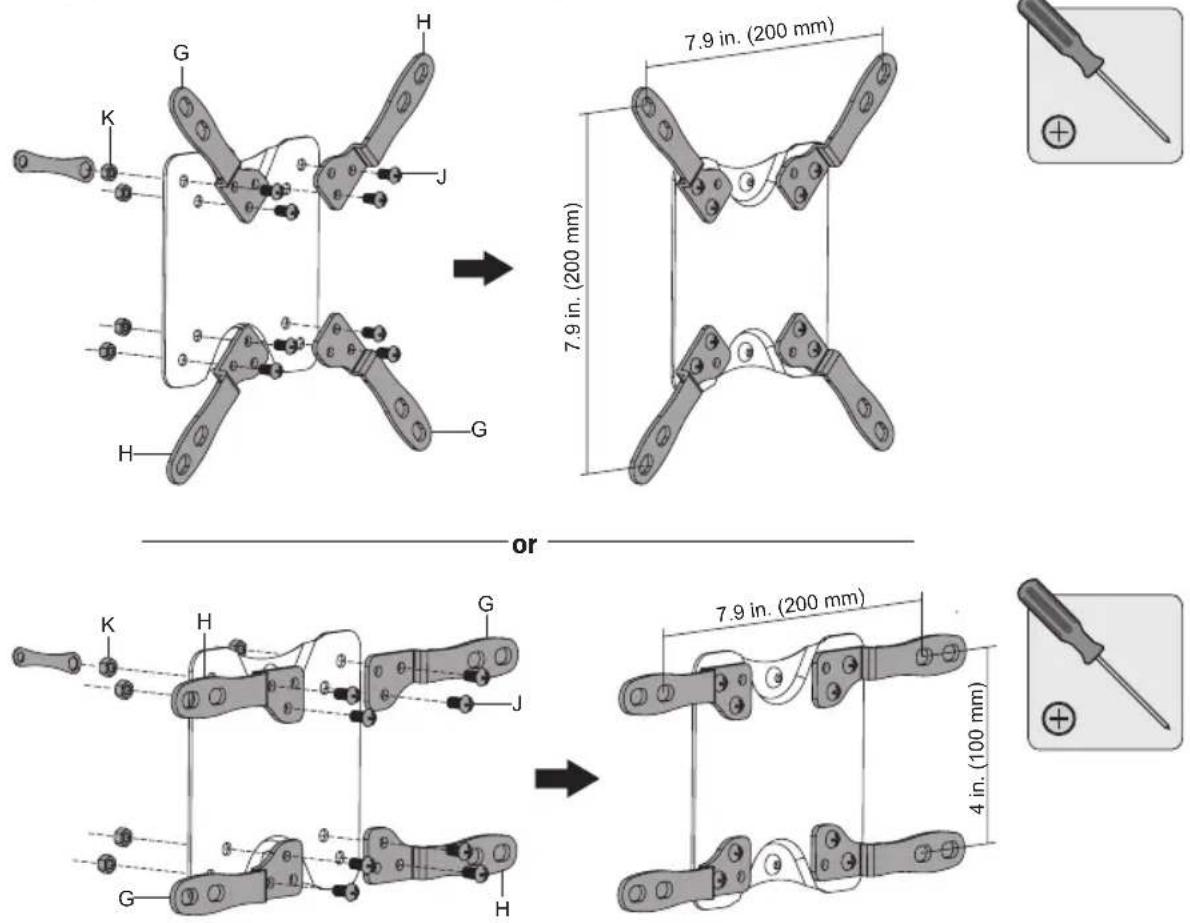
5b. For Larger Displays Using VESA Plate Adapters (Optional)
5b-1. Attach Adapters to VESA Plate
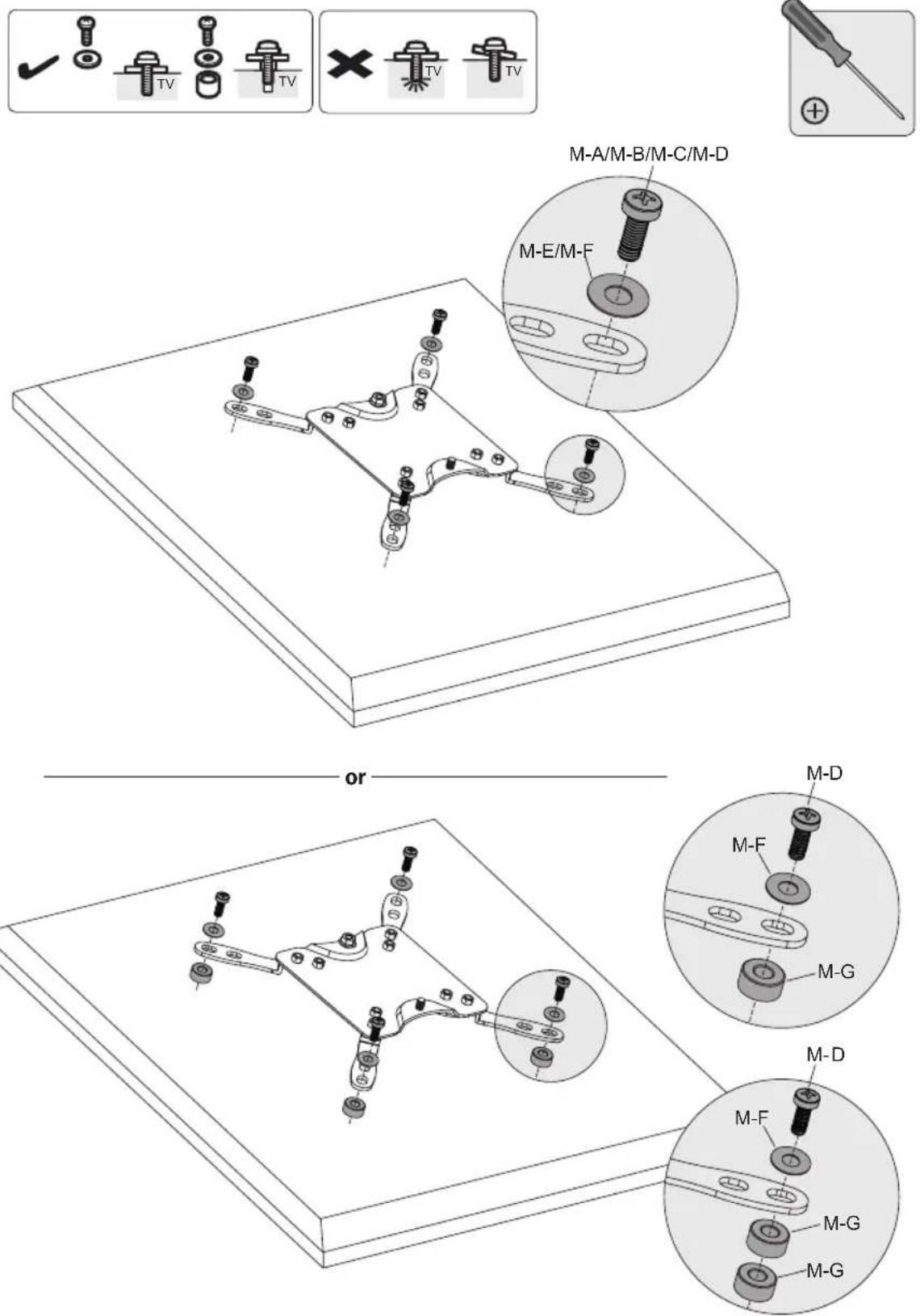
5b-2. Attach VESA Plate with Adapters to Display

Attach the display to the VESA plate with the appropriate included screws. Do not over-tighten screws.
6. Attach Display with VESA Plate to Vertical Support
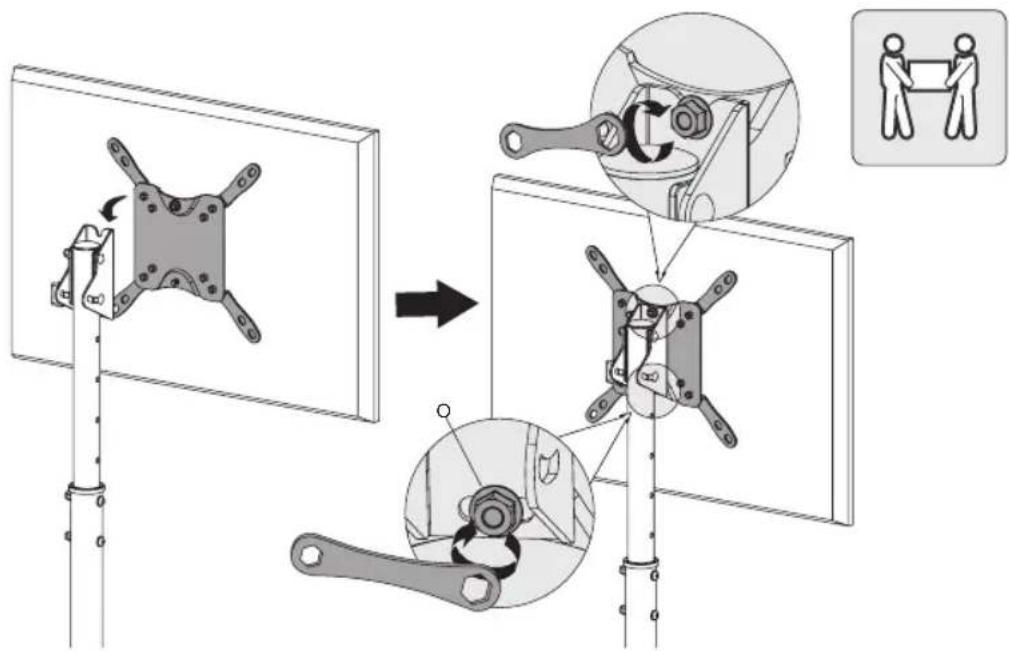
Use the included wrench to secure the VESA plate and display to the vertical support. Make sure the display is secure before releasing.
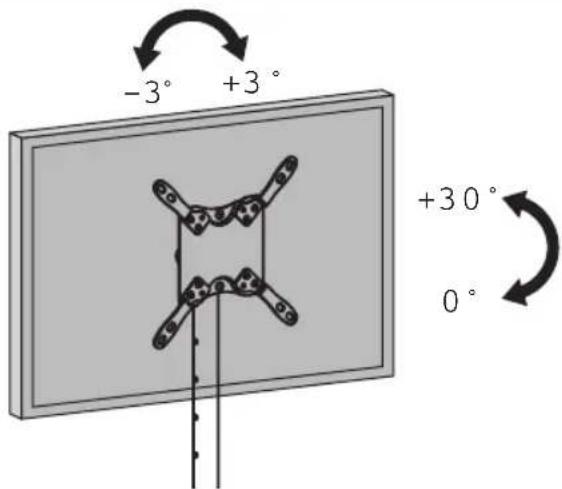
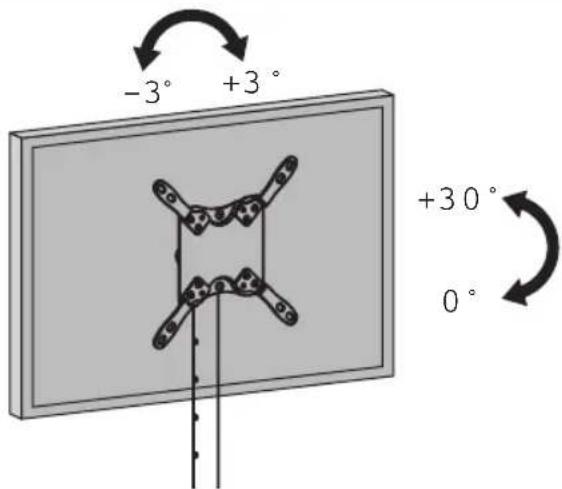
7. Adjustment
Maintenance
- Check to ensure the bracket is secure and safe to use at regular intervals (at least every three months).
- Please visit tripplite.com/support if you have any questions.

75x75/100x100/ 200x100/200x200

English 1 • Français 17 • Pycckn 25 • Deutsch 33

1111 W. 35th Street, Chicago, IL 60609 EE. UU. triplite.com/support
1111 West 35th Street, Chicago, IL 60609 USA • triplite.com/support
PykoBODCTBO N0JIb30BaTeЯ
TPABMAM WIN INMYJCTBEHHOMY USEPBY!

75x75/100x100/200x100/200x200

English 1 • Espanol 9 • Français 17 • Deutsch 33
EAC


1111 West 35th Street, Chicago, IL 60609 USA - tripplite.com/support
OxpaHReTcA ABTOpCKM pAbOM © 2019 Tripp Lite. NpepeaTa KaIpeaTa

BHUMAHVE!
He hauHaiTe yCTaHOBky Do Tex nop, NOKa He O3HaKOMITEcB CO BCEMN YKa3aHnA MIn IpeDynpexJeHnA MIn B HAcToIeM pyKOBOdCTBe N He NoIMeTe IMCmbl. PpN BO3HNKHOBeHn BOpocOB OTHCnTbHo IIO6bIX yKa3aHn mnn ppeDynpexJeHn nocTeITe ctpanu TY triplite.com/support.
- DAnHnA TeIeXkA npEHa3HaueHa IyCTaHOBKn NcNoJIb3OBAHnra TOIbKO B cIeJax, yKa3aHHbIX B HAcTOrIeM pyKoBOndTe. HenpaBnBHaY cTaHOBka DaHHoro n3dennr MoKeT pNBeCTN K pNpUHeHIO MaTePnAbHOrO yIep6a nn cyueCTBeHHOrO BpeDa 3DopOBbIO IIOJe.
- YctaHOBKa DaHHOrO 3dEJIy DOJXHa IpnI3BOIDbCra TOnbKO CneuaJIACrOM C DoCTaTOUHOI TexHueCKoKBAIIINKauNei H6a30BbIMn HABbIKAMN CTpOHTeJIbCTBa, B NOHIO MEpe NOHMaIOUM CMBIC INHΦOpMaUN, H3IOKeHHoB H hactOJIeM pykoBDCTBe.
- y6eIITecb B TOM, yTO DaHHoe I3dJIeM MoKcT C 3aIacOM BblJePKNBaTb CymMapHyIO HArpy3ky, c03daBaemyO6OpyIOBaHnEM IN BCEMN BXoJUIMM IN KOMIIeKT DeTaNIMN OCHACTKn IN DpyrIMN KOMNOHeHTAMN.
-Дябз�норnoIbemaHnHnEkaIero pa3MeueHnO6OpyOBaHnO6BaTcB3a nOMoUIO HnINONb3yItecb rpy30nObeMHbIM O6OpyOBaHm.
JaHHOe H3dJIeNnpeHa3HaueHo IJIa NcNoB30BaHnra TOnbKO B 3aKpbItbIX NOMeUHeHX. NcNoB30BaHne DaHHoro H3dJIINHa OTKpbITOM BO3dYxe MoXe IprNBecTn K eTo BbIXOdy n3 CToPnIpNHnIO BpeDa 3doPOBbHIOIIOJei.
TapaHTnHbIe 06a3aTeNbCTBa
YcnoBn5-NetHeOrgaHmeyHnHraPANTM
IpoDaeue rapaHTpyeOT cyTCTBne 3nHaayabHbX DEeKTOB MaTePnana nn 3rTOBHeHn B TeeyHne 5 nct C MoMeHTa nepBOHaayabHoN NOkynKn daHHORIOENnnnpyCNOBN erO nCnoJIb3OBaHnB COOTBeTCTBn CO BcEMN npmEHmblIMN K HeMy YKa3AHMn. B cnyae npoRbNEHn KaKx-NINO DeEeKTOB Maepnana nn 3rTOBHeHn B TeeyHne Yka3AHHOrO nepNoA IpoDaeue oCyIeCTBnEePMOHT nn 3ameHy daHHoro N3dNnckHouHtBJHO NO CBOeMy yCMOTpeHnIO.
DECTBNE HACTOIEI TAPAHNTI HE PACNPOCTPAHRETCA HA CNYAEN ECTECTBEHHOTIO 3HOCA IIN NOBPEKDEHNI B PE3YbTATE ABAPNI, HEADKEJAIEO INCIOJI3OBAHNIA, HAPUHEHNAIPABUNI 3KCNIVATAUINI INXAIATHOCTN.IPODABELI HE PTEIOCTABJREITHKAKNX RBHO BIPAKEHHBIX TAPAHNTI 3A NCKJIOUYEHME INPMAO I3NOXEHHO B HACTOIAEM DOKYMHE.3A NCKJIOUYEHME CNYAEB, 3ANPEUHHbIX DECTBYUOM 3AKOHODATEJBCTBOM, BCE IIOPA3UMEBAEMBLE TAPAHNTI, BKIOUYAR BCE TAPAHNTI IPIROHOCTIN IPODAJKN IIN INCIOJI3OBAHNIA IOHA3HAUEHNI, OPAHUNEHBI IO PNOJOLIKHTIELBOCTN DEICTBNA BblEUKKA3AHBBIM TAPAHNTI HBIM CPOKOM; KPOME TOI, IN HACTOIEI TAPAHNTI RHBIM OBpAOM NCKJIOAYOTCA BCE NIOOCHBE, CNYAUYHBE IM KOCBEHNBE YbItKN. (B HeKOTopbix Wtatax He donyckaetc BBeJeHne ORpaHueHnHa IPODOJIIX TE BcETBNA TXII INHbIX IOpa3UMeBAeMHIX rapaHTNI, a B HeKOTopbIX -NCKIOUYEHNE INI ORpaHueHne pa3Mepa NoobuHbIX INKocBHeHbIX y6bItkOB. B 3TNX cnyaAX BblEIm3IOXeHHBe ORpaHueHn IM NKIOUYEHNE MOrYT Ha Bac He pacnpocTpaHbC. HactoiaarapaHTNlpeoCTabJIeT BAM KOHKPeTHbIe IOpNJmueckMe npaba, a H60p dpynx BAuNX npab MoKet 6bItb Pa3NJHbIM B 3ABNCIMOCTN OT kpcncknn).
BHIMAHHEI Do hauha nCnoB3OBAHnA daHnHO yTpoCTBa noNb3oBATEnb doJxHeY6eHTbCB TOM, 0TO OHO RAJIETcPnIPOHbIM, COOTBETCTBYUIMM NII 630NaChbIM dI pyedNoIraeMoro npmEHeHnR. B CBA3N C6OJIbWIM pa3HOo6pa3NeM KOHKeTHbIX npmHeHn PpON3BOIDTeMb He daet KaHX-1603aBepeHHN IIN rapaHTMH OTHOCTeHbNO pnpRDHOCTn DAHHbX IN3dEHN DIA KAKOrO-NIOKOHKPeTHORO npmHeHn INN IX COOTBETCTBnK KaKM-160KOHKeTHbIM TpeOBaHnM.
NpeueHb KOMnneKtaun
Ipeep naaHOM yCTAHOBKN y6eTeCB HnauuM Bcex daneen cornaOnepeuHIO KOMnkeTACm. B cnyae OTCyTbna NIN NOBpeKdEHHa KaNX-Im6 do taneen o6paTntec 3a nmoUHO HA CTPAHUY tripplite.com/support.
BHIMAHHE!

1.C6opkaOCHOBaHHa
2.C6opKaBepTnKaJIbHoI onOpbl
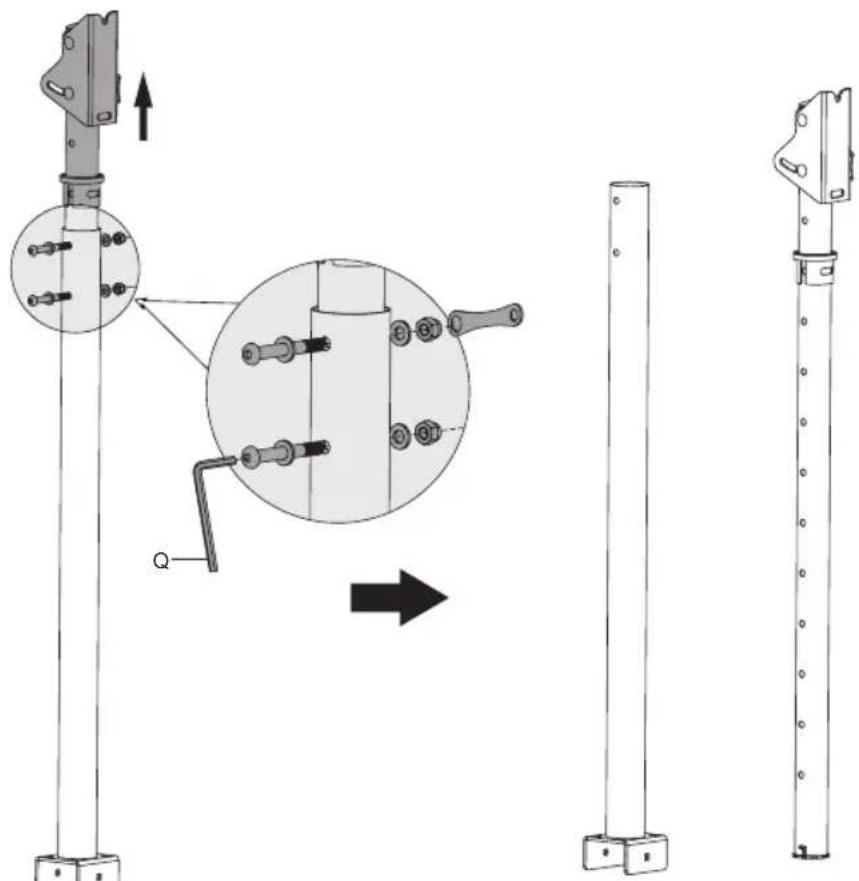
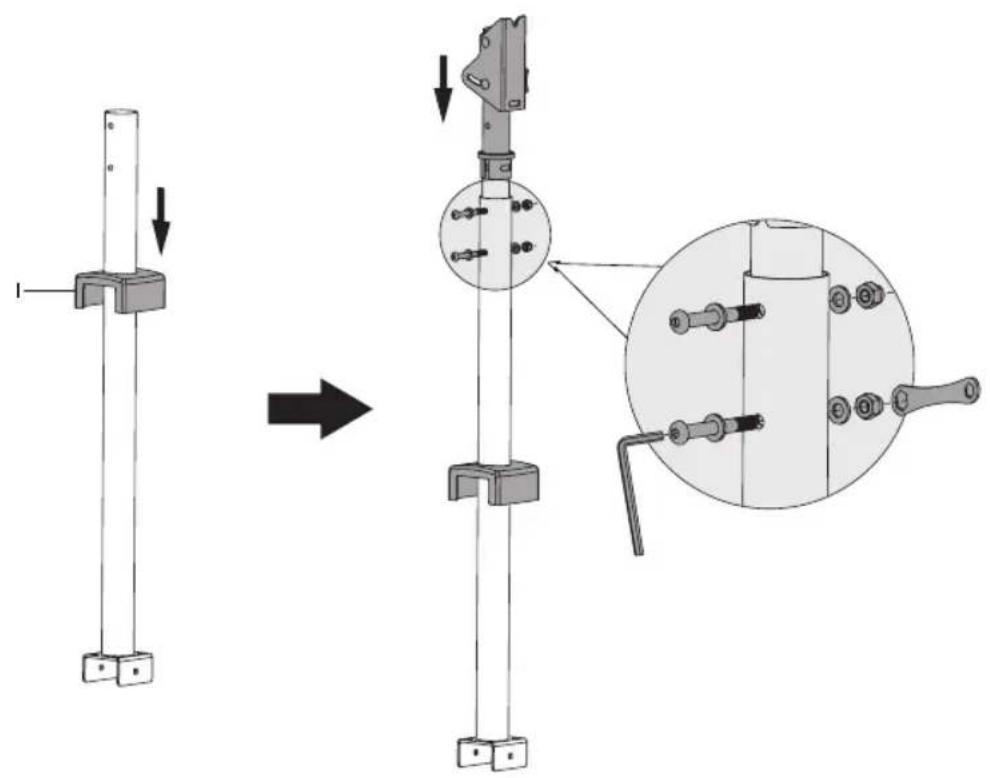
3. Kpenenne Ka6eIbHoro opraHn3aTopa K BepTnKaJIbHoI onope
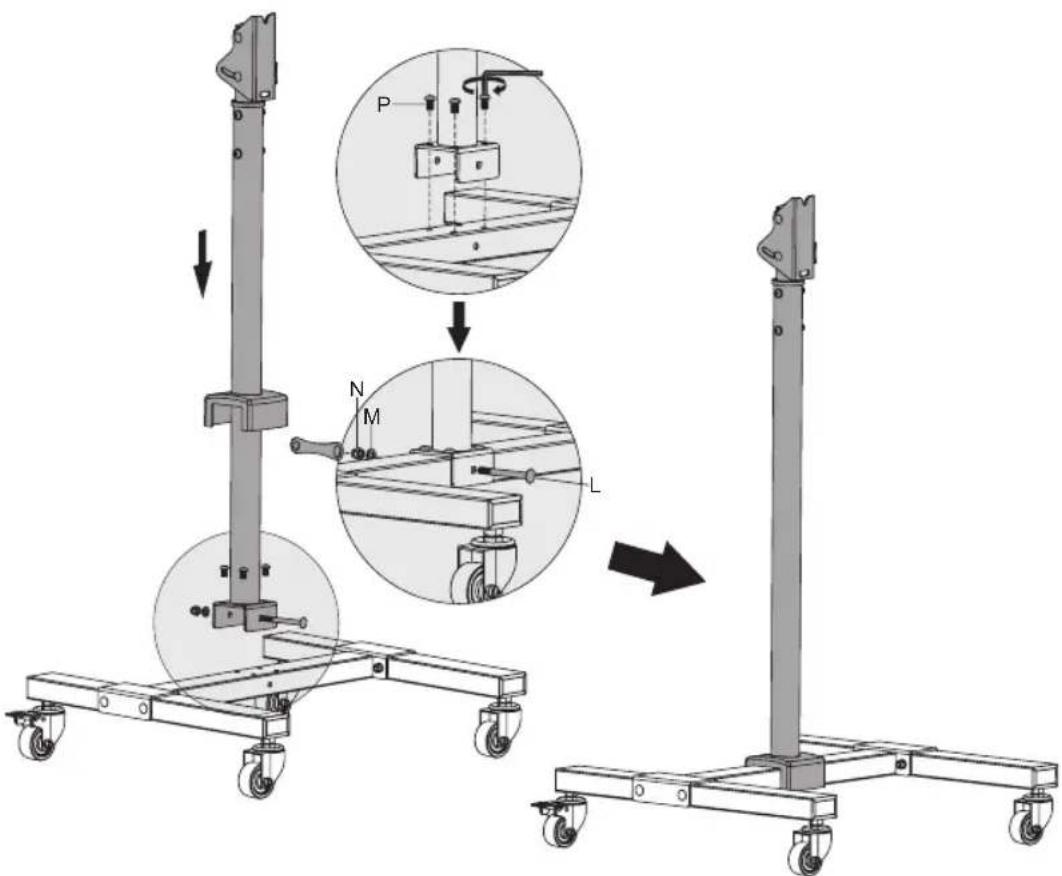
4. KpeHne HeBepKanbHoi OnOpbl B c6ope KoCHOBaHIO
5. Kpenenne nactnbl VESA 3aedne naen nnncn
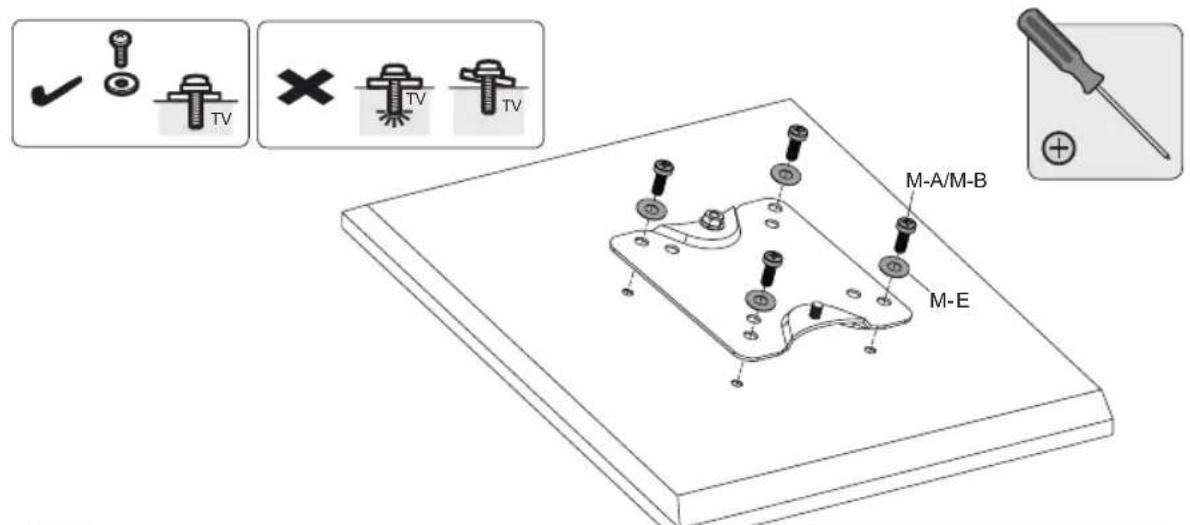
5a.Дидспльв Малоу И срднero pa3Mepa

PnKpeHneIeNcIIeK nIaactHe VESA CnIOb3ObaHem COOTBeTCTByIOUX BHTOB, NOCTABnEbx B KOMNIeKe. He nepetraBaIte BNhtbl.
5b.ДидспeeB 60bnwOro pa3Mepa cnNoIb30BaHHe m nepexoHnKOB nla nactnbl VESA (onuohanbHo)
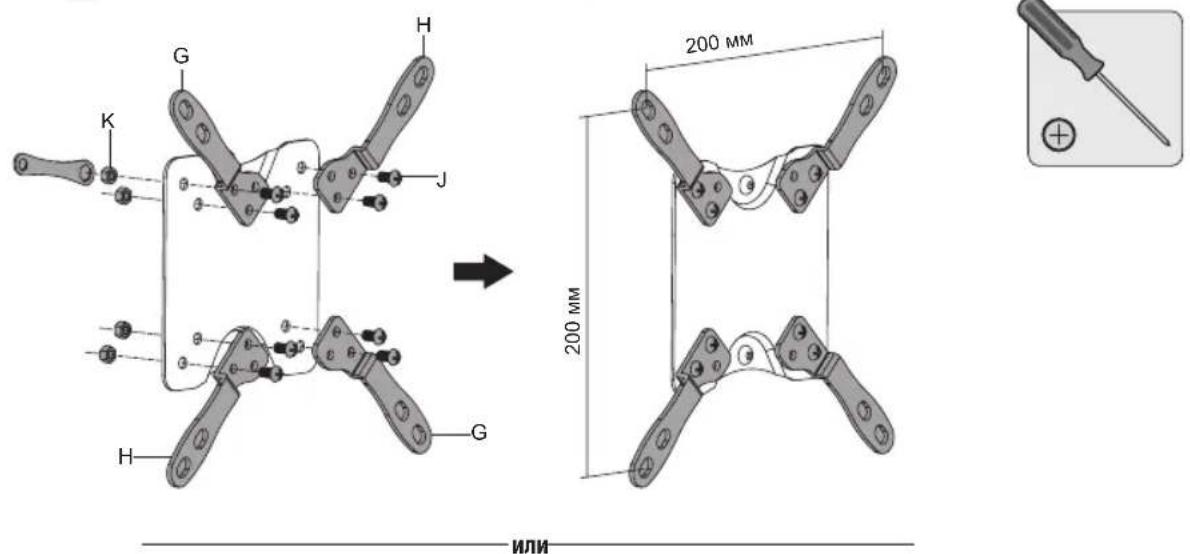
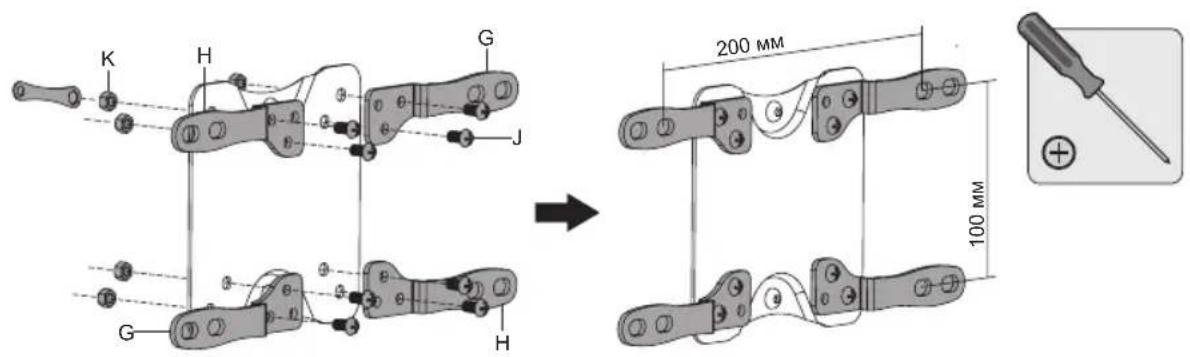
5b-1. Kpenenne nepexoHnKOB knnactne VESA
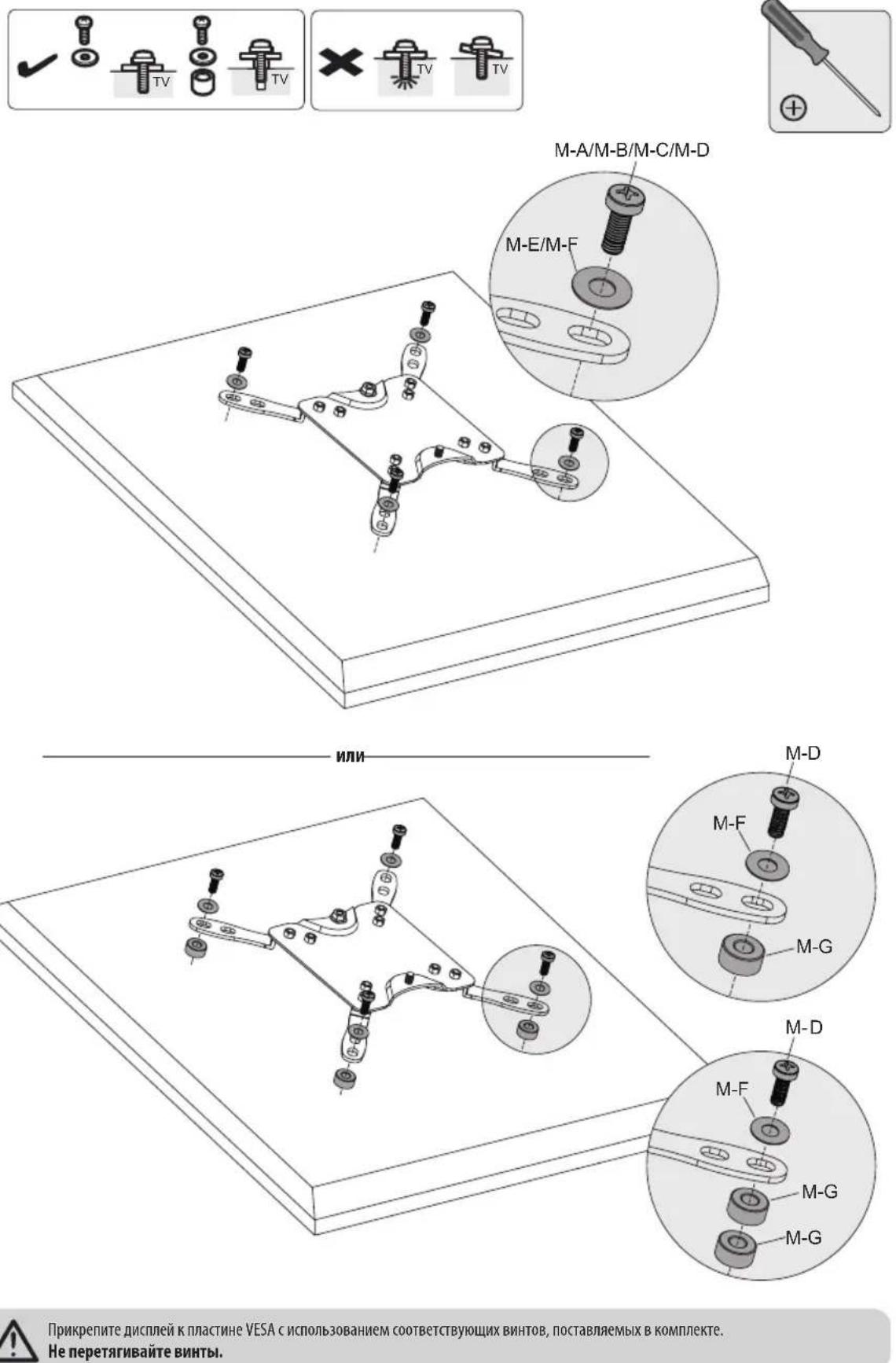
5b-2. Kpennenne nnaactnbl VESA c nepexoHnkaM K dncnneio
6. Kpenenne nne cnnn e VESA K Bepnkabho onope
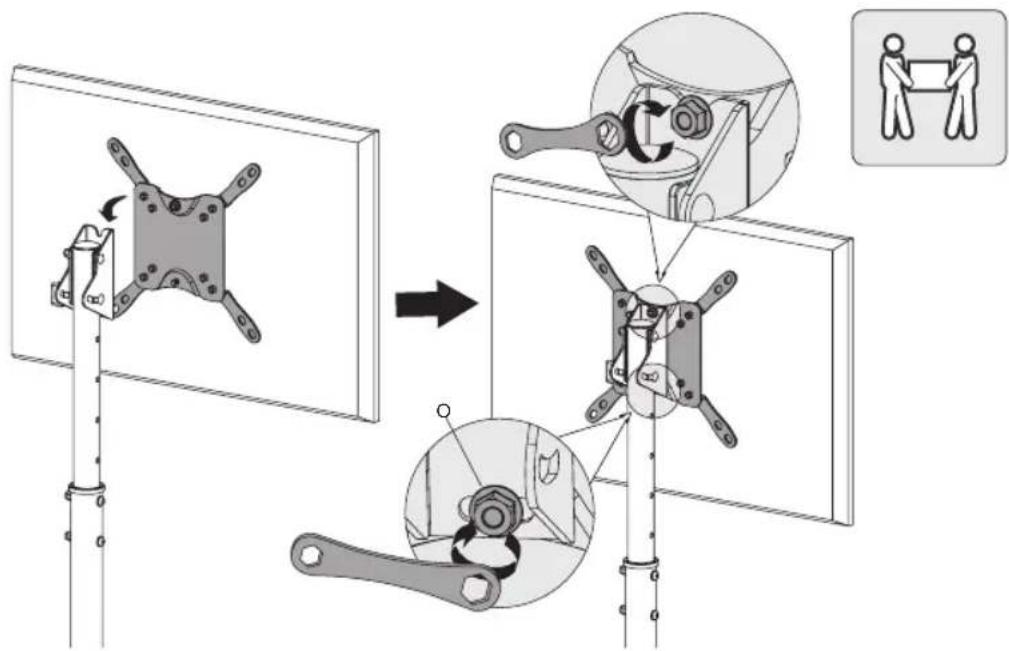
IgKpennnHnnbVESA u nCnne K Beptnkakbhoon onope nncnoBnyte noctabnEmb b KOMnneKe raeyhbl Klno. Ipeekde emontyntb nncne, y6euntecb TOM, UTO OH naexko 3aKpennieH.
7. KoppeKtupOBKa noJoxeHnA
Texnueckoe o6cnnykmbaHne
Peynnpno (he pexe, yem pa3 B tpm mecua) npoepaHTe HndexHoCTb KpennneHKePOHHTeHa N 630anacHOCTb erO ICNOB3OBaHMA.
B cyuae Bo3nKHOBeHna KaKx-Ni6o BOpocOB nocetute cTpaHmuy triplite.com/support.

1111 West 35th Street, Chicago, IL 60609 USA - triplite.com/support
Benutzerhandbuch
75x75/100x100/ 200x100/200x200

English 1 • Espanol 9 • Français 17 • Pycckn 25

1111 West 35th Street, Chicago, IL 60609 USA • triplite.com/support