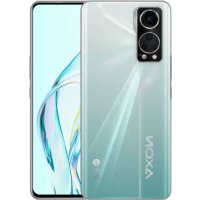
Axon 30 5G - Mobile Phone ZTE - Free user manual and instructions
Find the device manual for free Axon 30 5G ZTE in PDF.


| Product Type | 5G Mobile Phone (Smartphone) |
| Network | 5G NR, LTE, WCDMA, GSM; dual nano-SIM |
| Expandable Storage | microSDXC (shared with SIM slot) |
| Connectivity | Bluetooth 5.1, Wi-Fi 802.11a/b/g/n/ac/ax, NFC, USB Type-C 3.1, GPS |
| Display | Display with integrated blue light reduction |
| Battery | Non-removable lithium-ion; charging via ZTE-approved USB-C charger |
| Power | USB-C compatible power adapter (not included) |
| Dimensions (approx.) | 170.2 x 77.8 x 7.8 mm |
| Weight (approx.) | 189 g |
| Head SAR (FCC) | 1.10 W/kg |
| Body SAR (FCC) | 0.98 W/kg (at 15 mm) |
| Head SAR (EU) | 1.363 W/kg |
| Trunk SAR (EU) | 1.772 W/kg (at 5 mm) |
| Safety | Do not disassemble, avoid extreme temperatures, keep 15 mm from body |
| Care and Cleaning | Clean with a soft, dry cloth; avoid any liquid |
| Spare Parts and Repairability | Non-removable battery; repair by authorized center recommended |
| Warning | Do not use while driving, do not expose to magnetic fields |
| General Information | 97-page manual available in multiple languages upon request |
Frequently Asked Questions - Axon 30 5G ZTE
User questions about Axon 30 5G ZTE
0 question about this device. Answer the ones you know or ask your own.
Ask a new question about this device
Download the instructions for your Mobile Phone in PDF format for free! Find your manual Axon 30 5G - ZTE and take your electronic device back in hand. On this page are published all the documents necessary for the use of your device. Axon 30 5G by ZTE.
USER MANUAL Axon 30 5G ZTE
Copyright © 2021 ZTE CORPORATION.
All rights reserved.
No part of this publication may be quoted, reproduced, translated or used in any form or by any means, electronic or mechanical, including photocopying and microfilm, without the prior written permission of ZTE Corporation.
Notice
ZTE Corporation reserves the right to make modifications on print errors or update specifications in this guide without prior notice.
We offer self-service for our smart terminal device users.
Please visit the ZTE official website (at www.ztedevices.
com) for more information on user manual, self-service and supported product models. Information on the website takes precedence.precedence.
Disclaimer
ZTE Corporation expressly disclaims any liability for faults and damages caused by unauthorized modifications of the software.
Images and screenshots used in this guide may differ from the actual product. Content in this guide may differ from the actual product or software.
Trademarks
ZTE and the ZTE logos are trademarks of ZTE Corporation. Android™ is a trademark of Google LLC.
The Bluetooth® word mark and logos are registered trademarks owned by the Bluetooth SIG, Inc. and any use of such marks by ZTE Corporation is under license.

microSDXC Logo is a trademark of SD-3C, LLC.

Qualcomm aptX Adaptive
Qualcomm® aptX™ is a product of Qualcomm Technologies, Inc. and/or its subsidiaries.
Qualcomm is a trademark of Qualcomm Incorporated, registered in the United States and other countries. aptX is a trademark of Qualcomm Technologies International, Ltd., registered in the United States and other countries.

For DTS patents, see http://patents.dts.com. Manufactured under license from DTS Licensing Limited. DTS, the Symbol, & DTS and the Symbol together, DTS:X, the DTS:X logo, and DTS:X Ultra are registered trademarks or trademarks of DTS, Inc. in the United States and/or other countries. © DTS, Inc. All Rights Reserved.
Other trademarks and trade names are those of their respective owners.
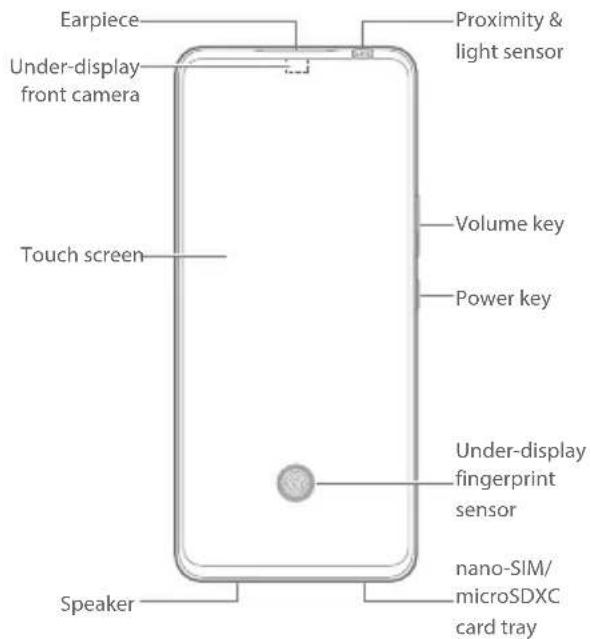
Getting to Know Your Phone
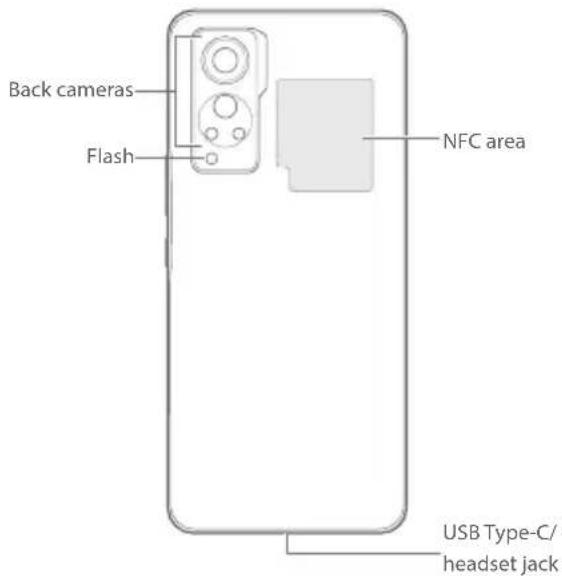
Setting Up Your Phone
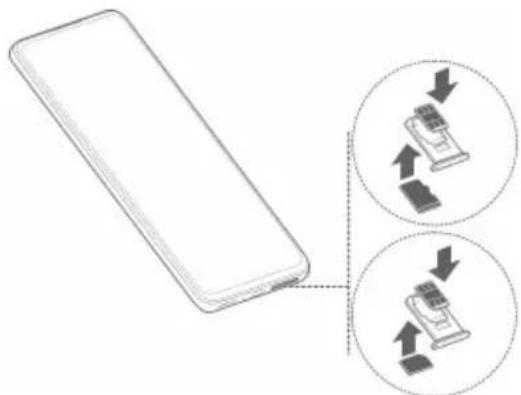
The nano-SIM card(s) can be installed or removed while the phone is turned on.

WARNING!
To avoid damage to the phone, do not use any other kind of SIM cards, or any non-standard nano-SIM card cut from a SIM card. You can get a standard nano-SIM card from your service provider.
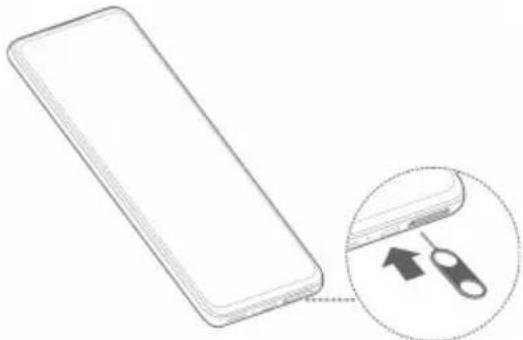
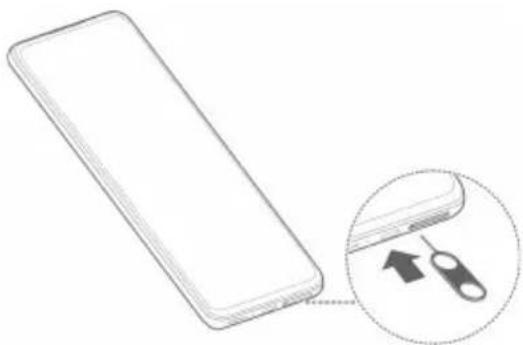
- Insert the tip of the tray eject tool into the hole on the card tray.
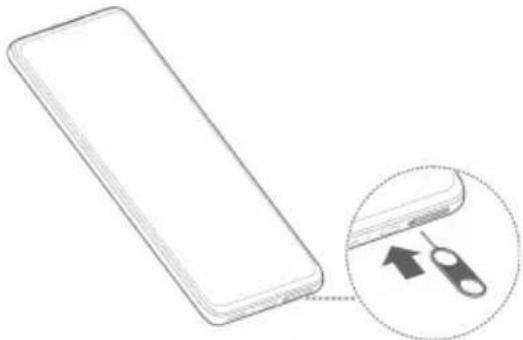

CAUTION:
Never replace the included tray eject tool with sharp objects. Ensure that the tray eject tool is perpendicular to the hole. Otherwise, the phone may be damaged.
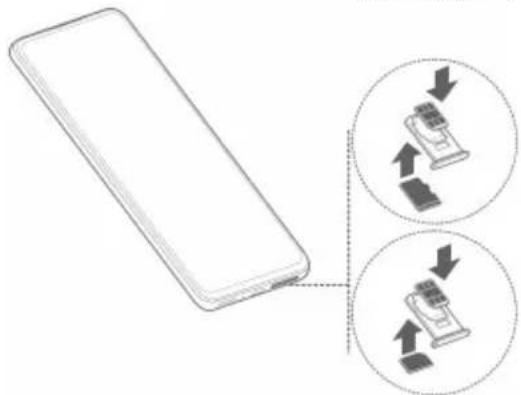
- Pull out the card tray and place a nano-SIM card into the card slot on one side and another nano-SIM card or a microSDXC card (optional) into the card slot on the other side, as shown. Note the notch and the shape of the cards and the card slots. Carefully slide the tray back into place.
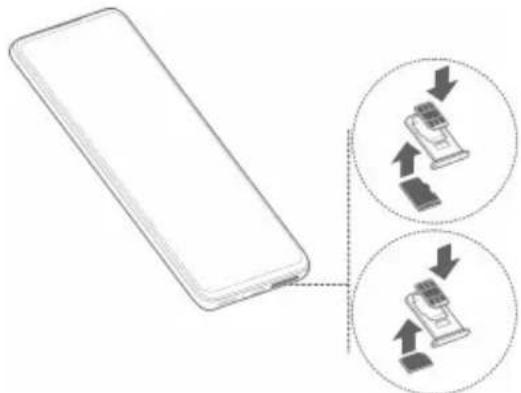

NOTE:
If two nano-SIM cards are installed, you can use either card for mobile data and that card can connect to the 5G network.
Charging the Phone
Your phone's battery should have enough power for the phone to turn on, find a signal, and make a few calls. You should fully charge the battery as soon as possible.

WARNING!
Use only ZTE-approved chargers and USB Type-C cables. The use of unapproved accessories could damage your phone or cause the battery to explode.

WARNING!
Do not remove the back cover. The battery is not removable. Removal may cause fire or explosion.
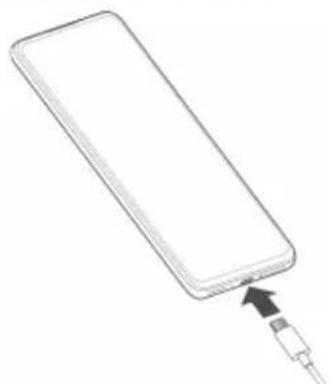
- Connect the adapter to the charging jack.
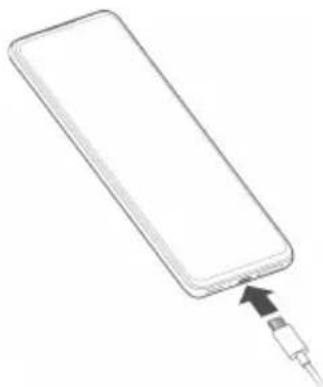
- Connect the charger to a standard AC power outlet.
- Disconnect the charger when the battery is fully charged.
NOTE:
If the battery is extremely low, you may be unable to power on the phone even when it is being charged. In this case, try again after charging the phone for at least 20 minutes. Contact the customer service if you still cannot power on the phone after prolonged charging.
Powering On/Off Your Phone
Make sure the battery is charged before powering on.
- Press and hold the Power key to turn on your phone.
- To power off, press and hold the Power key to open
the options menu, and touch ().
NOTE:
If the screen freezes or takes too long to respond, try pressing and holding the Power key for over 10 seconds to restart the phone.
Lowering Blue Light
Blue light with wavelengths between 415 nm and 455 nm is considered harmful for the eyes. It may cause eye discomfort, suppress melatonin, and affect sleep quality and circadian rhythm. This product has the function of reducing blue radiant energy.
To avoid eye fatigue, it is recommended to place the product at an appropriate distance from your eyes and rest for 20 minutes to look into the distance after two hours of continuous viewing.
To enable eye protection, open the Settings app and touch Display > Night Light > Turn on now. Use Turn on automatically to enable eye protection between sunset and sunrise or during customized time. In addition, you can adjust the protection effect by changing the blue light filter and white point reduction levels.
Product Safety Information
| Don't make or receive phone calls while driving. Never text while driving. | |
| Keep your phone at least 15 mm away from your body while making calls. | |
| Small parts may cause choking. | |
| Your phone can produce a loud sound. | |
| To prevent possible hearing damage, do not listen at high volume levels for long periods. Exercise caution when holding your phone near your ear while the loudspeaker is in use. | |
| Avoid contact with anything magnetic. | |
| Keep away from pacemakers and other electronic medical devices. | |
| Turn off when asked to in hospitals and medical facilities. | |
| Turn off when told to on aircraft and at airports. | |
| Turn off when near explosive materials or liquids. | |
| Don't use at gas stations. | |
| Your phone may produce a bright or flashing light. | |
| Don't dispose of your phone in fire. | |
| Avoid extreme temperatures. | |
| Avoid contact with liquids. Keep your phone dry. |
| Do not attempt to disassemble your phone. | |
| Only use approved accessories. | |
| For pluggable equipment, the socket-outlet shall be installed near the equipment and shall be easily accessible. | |
| Don't rely on your phone as a primary device for emergency communications. |
FCC RF Exposure Information (SAR)
This phone is designed and manufactured not to exceed the emission limits for exposure to radio frequency (RF) energy set by the Federal Communications Commission of the United States.
During SAR testing, this device was set to transmit at its highest certified power level in all tested frequency bands, and placed in positions that simulate RF exposure in usage against the head with no separation, and near the body with the separation of 15mm . Although the SAR is determined at the highest certified power level, the actual SAR level of the device while operating can be well below the maximum value. This is because the phone is designed to operate at multiple power levels so as to use only the power required to reach the network. In general, the closer you are to a wireless base station antenna, the lower the power output.
The exposure standard for wireless devices employing a unit of measurement is known as the Specific Absorption Rate, or SAR. The SAR limit set by the FCC is 1.6W / kg
This device is complied with SAR for general population/ uncontrolled exposure limits in ANSI/IEEE C95.1-1992 and had been tested in accordance with the measurement methods and procedures specified in IEEE1528.
The FCC has granted an Equipment Authorization for this model phone with all reported SAR levels evaluated as in compliance with the FCC RF exposure guidelines.
SAR information on this model phone is on file with the FCC and can be found under the Display Grant section of www.fcc.gov/oet/ea/fccid after searching on FCC ID: SRQ-ZTEA2322G. The FCC ID also can be found on the device when you open Settings > About phone > FCC ID.
For this device, the highest reported SAR value for usage against the head is 1.10W / kg and for usage near the body is 0.98W / kg .
While there may be differences between the SAR levels of various phones and at various positions, they all meet the government requirements.
SAR compliance for body-worn operation is based on a separation distance of 15mm between the unit and the human body. Carry this device at least 15mm away from your body to ensure RF exposure level compliant or lower to the reported level. To support body-worn operation, choose the belt clips or holsters, which do not contain
metallic components, to maintain a separation of 15mm between this device and your body.
RF exposure compliance with any body-worn accessory, which contains metal, was not tested and certified, and using such body-worn accessory should be avoided.
FCC Regulations
This device complies with part 15 of the FCC Rules. Operation is subject to the following two conditions: (1) This device may not cause harmful interference, and (2) this device must accept any interference received, including interference that may cause undesired operation.
This equipment has been tested and found to comply with the limits for a Class B digital device, pursuant to part 15 of the FCC Rules. These limits are designed to provide reasonable protection against harmful interference in a residential installation. This equipment generates, uses and can radiate radio frequency energy and, if not installed and used in accordance with the instructions, may cause harmful interference to radio communications. However, there is no guarantee that interference will not occur in a particular installation. If this equipment does cause harmful interference to radio or television reception, which can be determined by turning the equipment off and on, the user is encouraged to try to correct the interference by one or more of the following measures:
- Reorient or relocate the receiving antenna.
- Increase the separation between the equipment and receiver.
- Connect the equipment into an outlet on a circuit different from that to which the receiver is connected.
- Consult the dealer or an experienced radio/TV technician for help.
CAUTION:
Changes or modifications not expressly approved by the manufacturer could void the user's authority to operate the equipment.
The antenna(s) used for this transmitter must not be collocated or operating in conjunction with any other antenna or transmitter.
EU Specific Absorption Rate (SAR)
Your mobile device is a radio transmitter and receiver. It is designed not to exceed the limits for exposure to radio waves recommended by international guidelines. These guidelines were developed by the independent scientific organization ICNIRP and include safety margins designed to assure the protection of all persons, regardless of age and health.
The guidelines use a unit of measurement known as Specific Absorption Rate, or SAR. For mobile devices, the SAR limit is 2W / kg for the head and the body. The highest SAR value for this device when tested at the head was 1.363W / kg^ , and when tested at the body was 1.772W / kg^ with 5mm distance. The limb (0mm) SAR limit for mobile devices is 4W / kg . The highest SAR value for this device when tested at the body with 0mm distance was 3.440W / kg^ . As mobile devices offer a range of functions, they can be used in other positions, such as on the body as described in the user manual*.
As SAR is measured utilizing the device's highest transmitting power, the actual SAR of this device while operating is typically below that indicated above. This is due to automatic changes to the power level of the device to ensure it only uses the minimum power required to communicate with the network.
- The tests are carried out in accordance with EN 50360, EN 50566, EN 50663, EN 62209-1 and EN 62209-2.
** Please see body worn operation in the user manual.
Specification
| EUT tested radios application | GSM900/1800 WCDMA Band 1,8 FDD LTE Band 1,3,7,8,20,28 TDD LTE Band 38,40,41 5G NR Band N1,3,28,38,41,77,78 802.11a/b/g/n/ac/ax Bluetooth V5.1+BR/EDR/LE NFC GPS |
| WCDMA Version Rel.9 LTE Version Rel.15 | |
| Maximum RF output power | GSM900: 33.5 dBm GSM1800: 29.5 dBm WCDMA Band 1: 25 dBm WCDMA Band 8: 25.5 dBm FDD LTE Band 1: 24.8 dBm FDD LTE Band 3: 25.5 dBm FDD LTE Band 7: 25.5 dBm FDD LTE Band 8: 25.5 dBm FDD LTE Band 20: 25.5 dBm FDD LTE Band 28: 25.5 dBm TDD LTE Band 38: 25.5 dBm TDD LTE Band 40: 25.5 dBm TDD LTE Band 41: 25.5 dBm 5G NR Band N1: 24.5 dBm 5G NR Band N3: 24.6 dBm 5G NR Band N28: 25.5 dBm 5G NR Band N38: 19 dBm 5G NR Band N41: 21 dBm 5G NR Band N77: 19 dBm 5G NR Band N78: 21 dBm 802.11b/g/n/ax: 17.82 dBm 802.11a/n/ac/ax: 20.77 dBm Bluetooth BR/EDR: 3.34 dBm Bluetooth LE: 2.54 dBm NFC: -18.79 dBμA/m @10m GPS (RX Only) |
CE Caution / UKCA Caution
Battery Caution
- There is a risk of explosion if battery is replaced by an incorrect type.
- Dispose of used batteries according to the instructions.
- Do not dispose of a battery into fire or a hot oven, or mechanically crush or cut a battery. Doing so can result in an explosion.
- Leaving a battery in an extremely high temperature surrounding environment can result in an explosion or the leakage of flammable liquid or gas.
- A battery subjected to extremely low air pressure may result in an explosion or the leakage of flammable liquid or gas.
USB Port
This product can be connected to a USB interface of version USB 3.1.
Proper Use
As described in this guide, your device can be used only in right location. If possible, please do not touch the antenna area on your device.
Do not expose your device to extreme temperatures lower than -10^ and higher than +45^ .
Charge your device only between -10^ and +40^ .
Disposal of Your Old Appliance
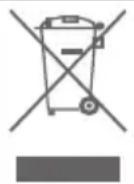
- When this crossed-out wheeled bin symbol is attached to a product, it means the product is covered by the European Directive 2012/19/EU.
- All electrical and electronic products should be disposed of separately from the municipal waste stream via designated collection facilities appointed by the government or the local authorities.
- The correct disposal of your old appliance will help prevent potential negative consequences for the environment and human health.
For this product's recycling information based on WEEE directive, please send an e-mail to weee@zte.com.cn
EU DECLARATION OF CONFORMITY

ZTE
Hereby, ZTE Corporation declares that the radio equipment type ZTE A2322G is in compliance with Directive 2014/53/EU. The full text of the EU declaration of conformity is available at the following Internet address:
https://certification.ztedevices.com
The device is restricted to indoor use only when operating in the 5150 to 5350 MHz frequency range.
| AT BE BG HR CY CZ DK | |||
| EE FI FR DE EL HU IE | |||
| IT LV LT LU MT NL PL | |||
| PT RO SK SI ES SE UK(NI) |
UKCA DECLARATION OF CONFORMITY
Hereby, ZTE Corporation declares that the radio equipment type ZTE A2322G is in compliance with Radio Equipment Regulations 2017.
The full text of the UKCA declaration of conformity is available at the following Internet address: https://certification.ztedevices.com
The device is restricted to indoor use only when operating in the 5150 to 5350MHz frequency range.

ErP Conformity
The external power supply of this product conforms to the Energy-related Product Directive (ErP) 2009/125/EC of the European Parliament and the Council.
The detailed ErP information is available on ZTE website https://certification.ztedevices.com.
Copyright © 2021 ZTE CORPORATION.
Qualcomm aptX Adaptive
Copyright © 2021 ZTE CORPORATION.
Qualcomm aptX Adaptive
Qualcomm aptXT es un produit de Qualcomm Technologies, Inc. y/o sus subsidiaries.
https://certification.ztedevices.com
Copyright © 2021 ZTE CORPORATION.
Qualcomm aptX Adaptive
https://certification.ztedevices.com
https://certification.ztedevices.com
Copyright © 2021 ZTE CORPORATION.
Qualcomm aptX Adaptive
https://certification.ztedevices.com
https://certification.ztedevices.com
Copyright © 2021 ZTE CORPORATION.
Qualcomm aptX Adaptive
Telif Hakki © 2021 ZTE CORPORATION.
Qualcomm aptX Adaptive
Copyright © 2021 ZTE CORPORATION.
All rights reserved.
microSDXC Logo is a trademark of SD-3C, LLC.

Qualcomm aptX Adaptive
https://certification.ztedevices.com
它的下位是5150~5350MHz的周波数范围为
作用的场合には屋内使用の与制限さし。
ErP適合S
certification.ztedevices.com)之入手之
ZTE AXON 305G
nannrnnnaa
yannnnn
Copyright © 2021 ZTE CORPORATION.
n "uunnn nannnnnnnnnnnnnnnnnnnnnnnnnnnnnnnnnnnnnnnnnnnnnnnnnnnnnnnnnnnnnnnnnnnnnnnnnnnnnnnnnnnnnnnnnnnnnnnnnnnnnnnnnnnnnnnnnnnnnnnnnnnnnnnnnnnnnnnnnnnnnnnnnnnnnnnnn nn nannn nn nannn nn nannn nn nannn nn nannn nn nannn nn nannn nn nannn nn nannn nn nannn nn nannn nn nannn nn nannn nn nannn nn nannn nn nannn nn nannn nn nannn nn nannn nn nannn nn nannn nn nannn nn nannn nn nannn nn nannn nn nennn nn nannn nn nannn nn nannn nn nannn nn nannn nn nannn nn nannn nn nannn nn nannn nn nannn nn nannn nn nannn nn nannn nn nannn nn nannn nn nannn nn nannn nn nannn nn nannn nn nannn nn nannn nn nannn nn nannn nn nannn nn n ann
W
ZTE Corporation 10000000000000000000000000000000000000000000000000000000000000
y 1nnsuunnuunauunauunue nnuunnuunnuunnu unnuunnuun ZTE (w www.ztedevicem) wauayauuuuuuuuuuu uuuuuuuuuuuuuuuuuuuuuuuuuuuuuuuuuuuuuuuuuuuuuuuuuuuuuuuuuuuuuuuuuuuuuuuuuuuuuuuuuuuuuuuuuuuuuuuuuuuuuuuuuuuuuuuuuuuuuuuuuuuuuuuuuuuuuuuuuuuuuuuuuuuuuuuuuuuuuuuuuuuuuuuuuuuuuuuuuuuuuuuUU
y
ZTE Corporation 1234567890123456789012345678901234567890123456789012345678901234567890123456789012345678901234567890123456789
Android" uawuwwuunwurugu "uogoo Google LLC
nbluetooth uauuau "Bluetooth uauuuvuunuunuunu "
nuuuuuauu Bluetooth SIG, Inc. uauuunu u
nuuuuuuuuuuuuuuuuuuuuuuuuuuuuuuuuuuuuuuuuuuuuuuuuuuuuuuuuuuuuuuuuuuuuuuuuuuuuuuuuuuuuuuuuuuuuuuuuuuuuuuuuuuuuuuuuuuuuuuuuuuuuuuuuuuuuuuuuuuuuuuuuuuuuuuuuuuuuuuuuuuuuuuuuuuuuuuuuuuuuuuuuuuuuUU

microSDXC uunnnnnae SD-3C,LLC.

Qualcomm aptX Adaptive
Qualcomm aptXTM uwwuowau Qualcomm Technologies, Inc. u/wwuwwuwwu Qualcomm u uwwuwwuwwu uwwuwwuwwuwwuwwuwwuwwuwwuwwuwwuwwuwwuwwuwwuwwuwwuwwuwwuwwuwwuwwuwwuwwuwwuwwuwwuwwuwwuwwuwwuwwuwwuwwuwwuwwuwwuwwuwwuwwuwwuwwuwwuwwuwwuwwuwwuwwuwwuwwuwwuwwwuuuuuuuuuuuuuuuuuuuuuuuuuuuuuuuuuuuuuuuuuuuuuuuuuuuuuuuuuuuuuuuuuuuuuuuuuuuuuuuuuuuuuuuuuuuuuuuuuuuuuuuuuuuuuuuuuuuuuuuuuuuuuuuuuuuuuuuuuuuuuuuuuuuuuuuuuuuuuuuuuuuuuuuuuuuuuuuuuuuuUU
aunnaananaananaananaananaananaananaananaananaananaananaananaananaananaananaananaananaananaananaananaananaananaananaananaananaananaananaananaananaananaananaananaananaananaananaananaananaananaananaananaananaananaananaananaananaananaananaananaananaananaananaanaraannaa
- 1
-
12 auiiaaaiy
-
nanaanrnnnnaaannnnnnnnnnnnnnnnnnnnnnnnnnnnnnnnnnnnnnnnnnnnnnnnnnnnnnnnnnnnnnnnnnnnnnnnnnnnnnnnnnnnnnnnnnnnnnnnnnnnnn
y
nnaaannnnnnnnnnnnnnnnnnnnnnnnnnnnnnnnnnnnnnnnnnnnnnnnnnnnnnnnnnnnnnnnnnnnnnnnnnnnnnnnnnnnnnnnnnnnnnnnnnnnnnnnnnnnnnnnnnnnnnnnnnnnnnnnnnnnnnnnnnnnnnn nn n
nla/1aunwvuaan
nannnnnnnnnnnnnnnnnnnnnnnnnnnnnnnnnnnnnnnnnnnnnnnnnnnnnnnnnnnnnnnnnnnnnnnnnnnnnnnn
nul Power puiu waiinwau
unuruaaauuunnau Power uulwauu
iAn uua
NOTE:
wnnnnnae nn nnnnnnnnnnnnnnnnnnnnnnnnnnnnnnnnnnnnnnnnnnnnnnnnnnnnnnnnnnnnnnnnnnnnnnnnnnnnnnnnnnnnnnnnnnnnnnnnnnnnnnnnnnnnnnnnnnnnnnnnnnnnnnnnnnnnnnn
nwnwaaunu
415 455 nnnnnae
2yanaaunaaanw
FFC a wunwunuRF (SAR)
15uu.
" 7uunrnnnRF uunnsuue 9
uuuunuunuunuunuunuunuunu unuunuunuunuunuunu uuuuuuuuuuuuuuuuuuuuuuuuuuuuuuuuuuuuuuuuuuuuuuuuuuuuuuuuuuuuuuuuuuuuuuuuuuuuuuuuuuuuuuuuuuuuuuuuuuuuuuuuuuuuuuuuuuuuuuuuuuuuuuuuuuuuuuuuuuuuuuuuuuuuuuuuuuuuuuuuuuuuuuuuuuuuuuuuuuuuuuuuuuuuuuuUU
FCC
aunnauu 15 wong FCC nssuovnuay
nae "aaunauvnsrnnnna: (1) aunauuu "auuvnu
in uannnuu uauuue (2) unauuu "auuvnu
snuuua n uauu uauu uauu uauu uauu uauu uauu uauu uauu uauu uauu uauu uauu uauu uauu uauu uauu uauu uauu uauu uauu uauu uauu uauu uauu uauu uauu uauu uauu uauu uauu uauu uauu uauu
Bàn quyên © 2021 ZTE CORPORATION.
Bao luu moi quyen.
Khong duoc trich dan, sao chep, dich hoac su dung bat ky phan nao cua an pham nay theo bat ky hinh thuc nao hoac bang bat ky phuong tien nao, dien tu hoac co hocbao gom sao chup va vi phim, khi chu a co su cho hep truc bang van bao cua ZTE Corporation.
Thong bao
Qualcomm aptX Adaptive
Qualcomm aptX la mot san pham cua Qualcomm Technologies, Inc. va/hoac cac cóng ty con.
Qualcomm làMZt thuong hiéu cua Qualcomm Incorporated, duçc dang ky tai Hoa Ky va cac quoc gia khac. aptX laMZt thuong hiéu cua Qualcomm Technologies International, Ltd., duçc dang ky tai Hoa Ky va cac quocgia khac.

Doi voi bang sang che DTS, hay xem http://patents.dts.com. Dugc san xuat theo giay phep tu DTS Licensing Limited. DTS, Biieu tuong, & DTS va Biieu tuong cung nhau, DTS:X, logo DTS:X va DTS:X Ultra la cac nhuan hiieu thuong mai da dang ky hoac nhuan hiieu thuong mai cua DTS, Inc. tai Hoa Ky va/hoac cac quoc gia khac. © DTS, Inc. Bao luu moi quyen.
Cac thuong hiieu va ten thuong mai khac la cua chu so huu tuong ung.
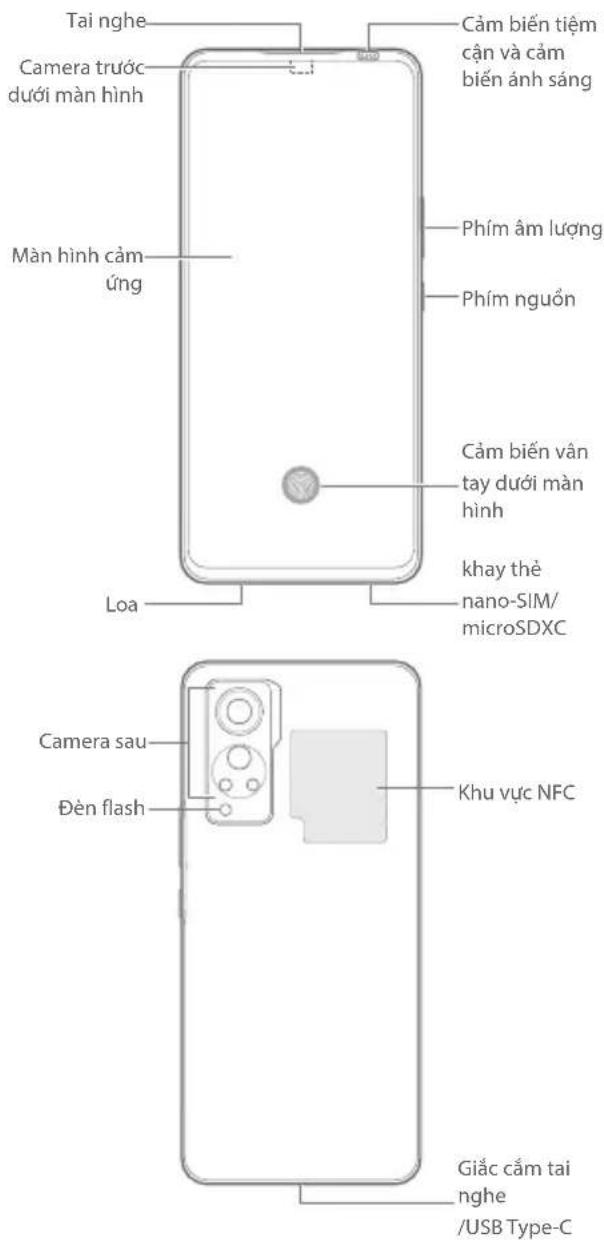
Lam quen voi dien thoai cua ban
Cai dāt dièn thoai cua ban
(Các) the nano-SIM co the duoc lap dat hoac thao rastrong khi bat dien thoai.

CANH BAO!
De tranh lam hong dien thoiq, khong su dung bat ky loai the SIM nao khac hoac the nano-SIM khong tiieu chu an cat tu the SIM. Ban co the nhan the nano-SIM tiieu chu an tu nha cung cap dich vu cua minh.
- Dua dαu cua dung cu day khay vao lo trn khay the.

THANTRONG:
Khong duoc thay the dung cu day khay di kem bang cac vat sac nhon. Cong cu day khay phai vuong goc voi lo. Neu khong, dien thoai co the bi hong.
- Kéo khay the ra va dua mot the nano-SIM vao khe cam the o mot ben va mot the nano-SIM khac hoac the microSDXC (tuy chon) vao khe cam the o phia ben kia, nu minh hoa. Luu y den phan ranh va hinh dang cua the va cac khe cam the. Can than trut khay tro lai dung vi tri.

LUUY:
Néu lap hai the nano-SIM, ban co the su dung mot trong hai the cho du lieu di dong va the do co the két noi voi mang 5G.
Sac dien thoai
Pin cua dien thoai phai co du nang luong de bat dien thoai len, tim tin hiieu va thuc lien vai cuoc goi. Ban nen sac day pin cang som cang tot.

CANH BAO!
Chi su dung cac bo sac duoc ZTE chap thuan va cap USB Type-C. ViEc su dung cac phu kien khong duoc phe duyet co the lam hong dien thoai cua ban hoac lam no pin.

CANH BAO!
Khong thao nap lung. Pin khong thao roi duoc. Viec thao roi co the gay chay hoac no.
Ty Lé Hap Thu Rieng theo Chau Au (SAR)
Thiet bi di dong cua ban la moot thiet bi phat va thu song vo tuyen. Thiiet bi duoc thiet ke khong vuot qua gioi han tiep xuc voi song vo tuyen theo khuyen nghi cua huong dan quoc te. Cac huong dan nay do to chuc khoa hoc doc lap la ICRNRP phat trien va bao gom cac bien do an toan duoc thiet ke de dam bao bao vétat ca moi nguoi, thuoc moi do tuoi va tinh tranq suc khoe.
Huóng dān nay su dung don vi do luong duoc goi la Ty Lé HAp Thu Rieng, hay SAR. Giói han SAR cho thiet bi di dong la 2 W/kg va gia tri SAR cao nhát cho thiet bi nay khi thu nghiem dδi voi dai la 1,363 W/kg, va khi tu nghiem doi vovi co the la 1,772 W/kg o khoang cach 5 mm. Khi cac thiet bi di dong cung cap nhieu chuc nang, chung co the duoc su dung o cac vi tri khac, chang han nu trén phan co the nu duoc mo tastrong huóng dān su dung**.
Mac du SAR duoc do bang cach su dung nang luong phat song o muc cao nhat cua thiet bi, SAR thuc te cua thiet bi nay trong khi van hanh thuong thap hon gi tri nei o tren. Do la do tinh nang tu dong thay doi ve muc nang luong cua thiet bi de dam bao thiet bi chi su dung nuong toi theu can thiet ma mang yeu cau.
Cac thu nghiem duoc thuc hien theo tiue chu'an EN 50360, EN 50566, EN 50663, EN 62209-1 va EN 62209-2.
* Vui long xem hoat dong deo trèn co the trong huáng dān su dung.
Thong so kkythuat
| Ung dung radio EUT dã duçc thu nghiém | GSM900/1800 WCDMA Band 1,8 FDD LTE Band 1,3,7,8,20,28 TDD LTE Band 38,40,41 5G NR Band N1,3,28,38,41,77,78 802.11a/b/g/n/ac/ax Bluetooth V5.1+BR/EDR/LE NFC GPS |
| WCDMA Version Rel.9 LTE Version Rel.15 | |
| Näng luong dãu ra RF toí da | GSM900: 33.5 dBm GSM1800: 29.5 dBm WCDMA Band 1: 25 dBm WCDMA Band 8: 25.5 dBm FDD LTE Band 1: 24.8 dBm FDD LTE Band 3: 25.5 dBm FDD LTE Band 7: 25.5 dBm FDD LTE Band 8: 25.5 dBm FDD LTE Band 20: 25.5 dBm FDD LTE Band 28: 25.5 dBm TDD LTE Band 38: 25.5 dBm TDD LTE Band 40: 25.5 dBm TDD LTE Band 41: 25.5 dBm 5G NR Band N1: 24.5 dBm 5G NR Band N3: 24.6 dBm 5G NR Band N28: 25.5 dBm 5G NR Band N38: 19 dBm 5G NR Band N41: 21 dBm 5G NR Band N77: 19 dBm 5G NR Band N78: 21 dBm 802.11b/g/n/ax: 17.82 dBm 802.11a/n/ac/ax: 20.77 dBm Bluetooth BR/EDR: 3.34 dBm Bluetooth LE: 2.54 dBm NFC: -18.79 dBμA/m @10m GPS (Chì trong RX) |
Lu y CE / Canh bao UKCA
Thantrongvipin
- Cónguy cān néu pin duoc thay the bang loai khong dung.
- Thai bo pin da qua sutung theo huong dan.
- Khong thai bo pin vao lua hao clo nuong nong, hao nghien nat hay cat pin bang co hoc. Lam nhu vay co the gay no.
- Dé pintrong moi truong có nhiet do xung quanh rát cao có thegay nô hoac rì chat long hoac khi dé cháy.
Pin chiu ap suat khirat thap co the gay no hoac roi chat long hoac khi dechy.
Cong USB
Toan vān tuyén bó tuán thu UKCA có tai dia chi Internet sauday: https://certification.ztedevices.com
Thiet bi chi duoc su dung trong nhà khi vān hanh trong dai tan so tu 5150 den 5350 MHz.

Tuan tu ErP
Nguon dien ben ngoai cua san pham nay phu hcp voi Chi thi San pham Nang luong (ErP) 2009/125/EC cua Nghi vien Chau Au va Hoi dong Chau Au.
Thong tin chi tiét vé ErP co trén tranq web cua ZTE tai dia chi https://certification.ztedevices.com.
ZTESLALI jglg 1
.2014/53/EU A2322G
jie jie jie jie jie jie jie jie jie jie jie jie jie jie jie jie jie jie jie jie jie jie jie jie jie jie jie
https://certification.ztedevices.com:
https://certification.ztedevices.com:
.https://certification.ztedevices.com
yjll jieall no calisill
Jy jll yjbjllal aalq l qj r jleie.1 2012/19/EU 2012/19/EU 2012/19/EU 2012/19/EU 2012/19/EU 2012/19/EU 2012/19/EU 2012/19/EU 2012/19/EU 2012/19/EU 2012/19/EUl 2012/19/EUl 2012/19/EUl 2012/19/EUl 2012/19/EUl 2012/19/EUl 2012/19/EUl 2012/19/EUl 2012/19/EUl 2012/19/EUl 2012/19/EU
gill 1111111111111111111111111111111111111111111111111111
UKCA 4 CE
i 1
J 1 1 1 1 1 1 1 1 1 1 1 1 1 1 1 1 1 1 1 1 1 1 1 1 1 1 1 1 1 1 1 1 1 1 1 1 1 1 1 1 1 1 1 1 1 1 1 1 1 1 0
USB
| GSM900/1800 WCDMA 1,8 23 24 FDD LTE 1,3,7,8,20,28 23 24 TDD LTE 38,40,41 23 24 5G NR N1,3,28,38,41,77,78 23 24 802.11a/b/g/n/ac/ax Bluetooth V5.1+BR/EDR/LE NFC 64 24 25 GPS | EUT |
| WCDMA 9 24 25 LTE 15 24 25 | |
| GSM900:33.5 DSSS SSS SSS WCDMA 1:25 23 DSSS SSS SSS WCDMA 8:25.5 23 DSSS SSS SSS WCDMA 1:24.8 23 DSSS SSS SSS WCDMA 8:25.5 23 DSSS SSS SSS WCDMA 1:25.5 23 DSSS SSS SSS WCDMA 8:25.5 23 DSSS SSS SSS WCDMA 1:25.5 23 DSSS SSS SSS WCDMA 8:25.5 23 DSSS SSS SSS WCDMA 1:25.5 23 DSSS SSS SSS WCDMA 1:25.5 23 DSSS SSS SSS WCDMA 8:25.5 23 DSSS SSS SSS WCDMA 1:25.5 23 DSSS SSS SSS WCDMA 8:25.5 23 DSSS SSS SPP LTE 40:25.5 23 DSSS SSS SPP LTE 41:25.5 23 DSSS SSS SPP LTE 41:25.5 23 DSSS SSS SPP LTE 41:25.5 23 DSSS SPP LTE 41:25.5 23 DSSS SPP LTE 41:25.5 23 DSSS SPP LTE 41:25.5 23 DSSS SPP LTE 41:25.5 23 DSSS SPP LTE 41:25.5 23 DSSS SPP LTE 41:25 23 DSSS SPP LTE 41:25 23 DSSS SPP LTE 41:25 23 DSSS SPP LTE 41:25 23 DSSS SPP LTE 41:25 23 DSSS SPP LTE 41:25 23 DSSS SPP LTE 41:25 22 DSSS SPP LTE 41:25 23 DSSS SPP LTE 41:25 23 DSSS SPP LTE 41:25 23 DSSS SPP LTE 41:25 23 DSSS SPP LTE 41:25 23 DSSS SPP LTE 41:25 23 DSS SSS SPP LTE 41:25 23 DSS SPP LTE 41:25 23 DSS SPP LTE 41:25 23 DSS SPP LTE 41:25 23 DSS SPP LTE 41:25 23 DSS SPP LTE 41:25 23 DSS SPP LTE 41:25 23 DSS SPP LTE 41:20 23 Bluetooth BR/EDR:3.34 Bluetooth LE:2.54 10 24 25 Bluetooth LE:2.54 Bluetooth LE:2.54 Bluetooth LE:2.54 Bluetooth LE:2.54 Bluetooth LE:2.54 Bluetooth LE:2.54 Bluetooth LE:2.54 Bluetooth LE:2.54 Bluetooth LE:2.54 Bluetooth LE:2.54 Bluetooth LE:2.54 Bluetooth LE:2.54 Bluetooth LE:2.54 Bluetooth LE : -18.79 (Lab RX) GPS |
- = ( x1,y1) , = ( x2,y2)
jll jll plll aal lal jll aal as
jie jie jie jie jie jie jie jie jie jie jie jie jie jie jie jie jie jie jie jie jie jie jie jie jie jie jie jie jie jie jie jie jie jie jie jie jie jie jie jie
jJlJjI jzg jglg 1
(SAR)
a aaii iiaai jai jai jai jai jai jai jai
y
ailllll 1
jai (ICNIRP) jai
jaii jaiy jaiy jaiy jaiy jaiy jaiy jaiy jaiy jaiy jaiy jaiy jaiy jaiy jaiy jaiy jaiy jaiy jaiy jaiy jaiy jaiy jaiy jaiy jaiy jaiy jaiy jaiy jaiy jaiy jaiy jaiy jaiy jaiy jaiy
aannn yeaal
j gill jolal 1 jao puiy a, yao wai o, cuii j
1ab32aaljSAR)
SAR
1.772 1
a. gaa aai jaaal 5 10 5
ga las sioa aal gic g jai gai gai gai gai gai
**puiuill 1
Jluj 1e jiei (SAR) g jil jai
ie jzlal (SAR) gil jz
111 111 111 111 111 111 111 111
gaii jaoi i 100 100 100
Aii juiuui u11ba aia sina
EN50663,EN50566,EN50360
. EN 62209-2, EN 62209-1,
g a 100000000000000000000000000000000000000000000000
A. B J. B. J. J. J. J. J. J. J. J. J. J. J. J. J. J. J. J. J. J. J. J. J. J. J. J. J. J. J. J. J. J. J. J. J. J. J. J. J. J. J. J. J. J. J. J. J. J. J. J. J. J.
:abaa
i 15 i 20
Jnana-SIM 2
microSDXC nan-SIM 1
Ls. Jnana-SIM (a)
Jy.
AP_2 = 40^

alalalalalalalalalalalalalalalalalalalalalalalalalalalalalalal
ZTE Jn Suaaal USB Type-C 5g jaiy pril
1
a11j 111j111j111j111j111j
5.2.1.3
aalnlae lal nana-SIM (al)
1
0
SIM clllby j (s)j e j (j) j (j) j (j) j (j) j (j)
sSIM 1aIbJn JaaJy nana-SIM cdIbJ
Aolal jaojao nanooSIM aoljag
AaBaaBaaBaaBaaBaaBaaBaaBaaBaaBaaBaaBaaBaaBaaBaaBaaBaaBaaBaaBaaBaaBaaBaaBaaBaaBaaBaaBaaBaaBaaBaaBaaBaaBaaBaaBaaBaaBaaBaaBaaBaaBaaBaaBaaBaaBaaBaaBaaBaaBaaBaaa
A
1 1
aillil 1
sila cui jao gic jaoi
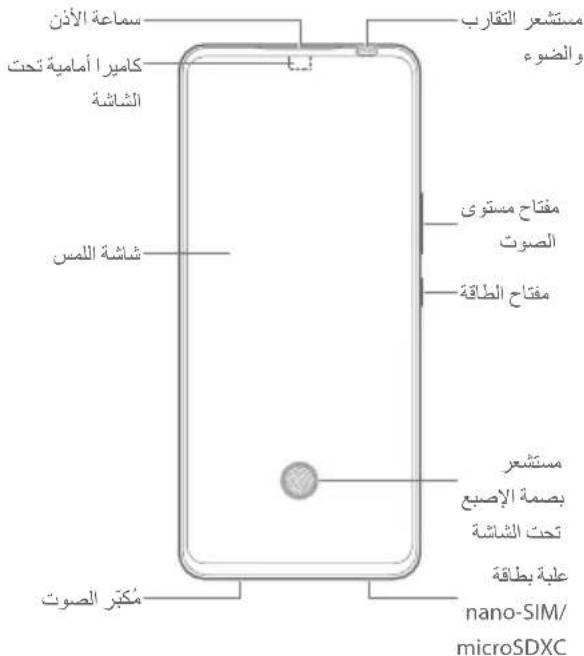
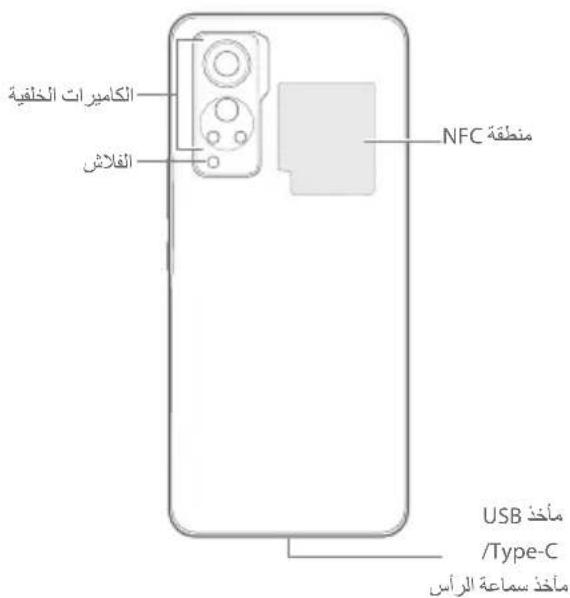
. SD-3C, LLC J microSDXC

Qualcomm aptX Adaptive
Qualcomm aq
i 1. aill s y /s.Technologies, Inc.
Qualcomm 45 45 45 45 45 45 45 45 45 45 45 45 45 45 45 45 45 45 45 45 45 45 45 45 45 45 45 45 45 45 45 45 45 45

http://patents.dts.com DTS.1.DTS Licensing Limited 2DTS:X Ultra, DTS:X JDS;DTS:X, DTS:K, DTS:J, DTS:J, DTS:J, DTS:J, DTS:J, DTS:J, DTS:J, DTS:J, DTS:J, DTS:J, DTS:J, DTS:J, DTS:J, DTS:J, DTS:J, DTS:J, DTS:J, DTS:J, DTS:J, DTS:J, DTS:
aal lal aal alal alal alal alal alal
.2021 ZTE CORPORATION
aBaa
1 1 1 1 1 1 1 1 1 1 1 1 1 1 1 1 1 1 1 1 1 1 1 1 1 1 1 1 1 1 1 1
ZTE 8
ZTE 53
ZTE 8
ZTE 10
ZTE 12
ZTE 14
ZTE 16
ZTE 18
ZTE 20
ZTE 22
ZTE 24
ZTE 26
ZTE 28
ZTE 30
ZTE 32
ZTE 34
ZTE 36
ZTE 38
ZTE 40
ZTE 42
ZTE 44
ZTE 46
ZTE 48
ZTE 50
ZTE 52
ZTE 54
ZTE 56
ZTE 58
ZTE 60
ZTE 62
ZTE 64
ZTE 66
ZTE 68
ZTE 70
ZTE 72
ZTE 74
a_1 = 90% = 30( 2)