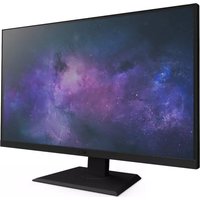
Canvas 27Q - Monitor NZXT - Free user manual and instructions
Find the device manual for free Canvas 27Q NZXT in PDF.


| Product Type | Gaming Monitor |
| Brand | NZXT |
| Model | Canvas 27Q |
| Screen Size | 27 inches (68.6 cm) |
| Resolution | QHD 2560 x 1440 |
| Refresh Rate | 165 Hz |
| Response Time | 1 ms (GTG) |
| Sync Technology | AMD FreeSync Premium |
| HDR | HDR10 |
| Brightness | 300 cd/m² |
| Viewing Angle | 178° horizontal / 178° vertical |
| Display Colors | 16.7 million |
| Color Gamut | DCI-P3 90%, sRGB 99% |
| Video Inputs | 2x HDMI 2.0, 1x DisplayPort 1.2, 1x USB-C (DisplayPort Alt) |
| USB Ports | 2x USB 3.0 Type A (downstream), 1x USB 3.0 Type B (upstream) |
| Audio Output | 3.5mm Headphone Jack |
| Power Supply | External adapter 19V, 3.42A |
| Power Consumption | 0.5 W (standby), 0.3 W (off) |
| Dimensions (with stand) | 615 x 526.6 x 222.8 mm |
| Net Weight | 6.3 kg (panel + stand) |
| VESA Mounting | 100 x 100 mm (M4 x 15 mm screws) |
| Ergonomic Adjustments | Tilt -5° to +20°, Swivel -20° to +20°, Height 0-120 mm, Pivot 90° |
| Screen Features | Flicker-free, Blue light filter, Anti-glare coating, Motion blur reduction |
| Control Software | NZXT CAM (profile customization) |
| Maintenance and Cleaning | Use a soft lint-free cloth; unplug before cleaning; do not use chemical cleaners |
| Safety | Do not expose to moisture, do not block ventilation, use on a flat and stable surface, disconnect during prolonged inactivity |
Frequently Asked Questions - Canvas 27Q NZXT
User questions about Canvas 27Q NZXT
0 question about this device. Answer the ones you know or ask your own.
Ask a new question about this device
Download the instructions for your Monitor in PDF format for free! Find your manual Canvas 27Q - NZXT and take your electronic device back in hand. On this page are published all the documents necessary for the use of your device. Canvas 27Q by NZXT.
USER MANUAL Canvas 27Q NZXT
natural_image
Line drawing of a computer monitor with a stand and paperclip (no text or symbols)CANVAS 27Q
MONITEUR GAMING 27" QHD (2 560 X 1 440) 165 HZ
NZXT CAM
TABLE DES MATIERES
VERSION 1.0
-
PRÉFACE 02
-
CONFIGURATION DE L'AFFICHAGE À L'ÉCRAN (OSD OU ON-SCREEN DISPLAY) DU MONITEUR 25
-
DÉMARRAGE....05
-
CONFIGURATION DU LOGICIEL CAM 30
-
INSTALLATION 12
-
ANNEXE A-1
1. PRÉFACE
CANVAS 27Q

natural_image
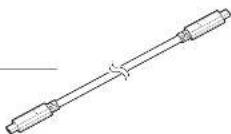
Technical line drawing of a mechanical component with a cylindrical shaft and threaded end (no text or symbols)F. USB C / DP Alt
x1
text_image
Technical diagram showing assembly of a device with labeled parts and a magnified inset highlighting a component detail.3.1 INSTALLATION DU SUPPORT DU MONITEUR
CANVAS 27Q

ÉTAPE 3
natural_image
Technical illustration of a mechanical assembly with a component and a magnified view (no text or symbols)3.1 INSTALLATION DU SUPPORT DU MONITEUR
CANVAS 27Q

ÉTAPE 4
text_image
NZXT NZXT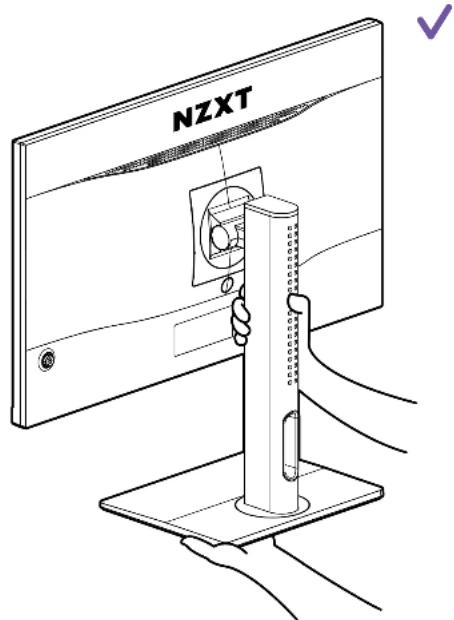
text_image
NZXT3.2 AJUSTEMENT DE L'ORIENTATION DU MONITEUR
CANVAS 27Q

text_image
NZXT DP OR HDMI3.3 RACCORDEMENT DU MONITEUR AU PC
CANVAS 27Q

ÉTAPE 3
text_image
Cable Management CLIP3.5 DÉVERROUILLAGE RAPIDE DU SUPPORT DU MONITEUR
CANVAS 27Q

Download and install NZXT CAM from nzxt.com/camapp.
Descargue e instale NZXT CAM en nzxt.com/camapp.
This NZXT Global Warranty Policy governs the sale of products by NZXT to you.
I. WARRANTY LENGTH
Any replacement product will be covered under warranty for the remainder of the warranty period or thirty days, whichever is longer. Proof of purchase is required for warranty service.
II. WHO IS PROTECTED
The Warranty covers only NZXT products purchased by the original consumer.
NEW NZXT PRODUCT WARRANTY LENGTH FOR PARTS
Computer Cases 2 Years
Temperature Meters 2 Years
Fans 2 Years
Lighting 2 Years
Accessories 2 Years
Kraken M Coolers
Headset/Headphone
Headset/Headphone Storage
Mixer
Motherboards
Gold Power Supply
Bronze Power Supply
Kraken X/Z Coolers
Mini ITX Case with PSU, AIO, and Riser Card
Monitors 3 Years
3-year warranty on case, riser card, and AIO. 10-year warranty on PSU.
REFURBISHED NZXT PRODUCT
All NZXT Certified Refurbished Products
WARRANTY LENGTH FOR PARTS
1 Years
III. WHAT IS AND IS NOT COVERED
Please note that our warranty is not an unconditional guarantee. If the product, in NZXT's reasonable opinion, malfunctions within the warranty period, NZXT will provide you at its sole discretion with a repaired or replacement product, either new or refurbished, with a similar function that is equal or greater in value depending on supply.
Our warranty does not cover the following:
- any product or serial number/warranty sticker modification applied without permission from NZXT;
- any damage that is not a manufacturing defect;
- damage, deterioration or malfunction resulting from: accident, abuse, misuse, neglect, fire, water, lightning, or other acts of nature, unauthorized product modification or failure to follow instructions included with the product;
- improper installation, unauthorized alterations or modifications, or repair or attempted repair by anyone not authorized by NZXT;
- shipping or transport damage (claims must be made with the carrier);
• normal wear and tear.
NZXT does not warrant that this product will meet your requirements. It is your responsibility to determine the suitability of this product for your purpose. For NZXT Store orders, we cover two way return shipping for all exchanges and returns. For all other authorized dealers, NZXT Support does not cover return shipping and only covers one way shipping from NZXT back to the end user for exchanges. Two way expedited shipping is provided for all PSUs covered under the Less Than Three program, indiscriminate of purchase location, provided the location is an approved NZXT reseller.
IV. EXCLUSION OF DAMAGES (DISCLAIMER)
NZXT's sole obligation and liability under this warranty is limited to the repair or replacement of a defective product with either a new or refurbished product with a similar function that is equal or greater in value at our option. NZXT shall not, in any event, be liable for any incidental or consequential damage, including but not limited to damages resulting from interruption of service and loss of data, business, or for liability in tort relating to this product or resulting from its use or possession.
V. LIMITATIONS OF IMPLIED WARRANTYEST
Here are no other warranties, expressed or implied, including but not limited to those of merchantability or fitness for a particular purpose. The duration of implied warranties is limited to the warranty length specified in Paragraph I.
VI. TO OBTAIN TECHNICAL SUPPORT
If you have already referenced your product owner's manual and still need help, you may contact us by phone at +1 (800) 228-9395, by email at service@nzxt.com, or visit the NZXT Support site at nzxt.com/customer-support.
VII. HOW TO OBTAIN A WARRANTY SERVICE FROM NZXT
To receive a warranty service for your product when purchased directly from NZXT, you must submit a request via the NZXT Support site outlining the problem. If a technician deems the product defective or requiring testing, you will be required to provide a copy of your proof of purchase, which will enable you to submit a Return Merchandise Authorization "RMA" request.
Once approved, you'll receive an RMA number, upon which you will be asked to ship the defective item back to NZXT with the RMA number clearly marked or labelled on the package. NZXT recommends that appropriate measures are taken to safeguard the product from damage during shipping.
VIII. APPLICABLE LAW AND ADDITIONAL LEGAL RIGHTS FOR CONSUMERS
This warranty gives you specific legal rights. These conditions are governed and construed in accordance with the laws of California (with exception of its conflict of law provisions), and the application of the United Nations Convention of Contracts for the International Sale of Goods is expressly excluded. The non-exclusive jurisdiction of the courts of California is agreed, which means that you may bring a claim to enforce your consumer protection rights in connection with this Global Warranty in the country which you have your habitual residence where you may have additional rights. These rights may vary.
For original consumers who are covered by consumer protection laws or regulations in their country, state, or province of purchase or, if different, their country, state, or province of residence, the benefits conferred by this warranty are in addition to all rights and remedies conveyed by such consumer protection laws and regulations. To the extent that liability under such consumer laws can be limited, NZXT's liability is limited, and its sole option, to repair or replacement, either new or refurbished, with a similar function that is equal or greater in value depending on supply.
In the United Kingdom:
- For NZXT products sold to customers in the UK, during the expected lifespan of your product your legal rights entitle you to the following:
Up to 30 days: if your goods are faulty, then you can get an immediate refund.
Up to six months: if your goods can't be repaired or replaced, then you're entitled to a full refund, in most cases.
Up to six years: if your goods do not last a reasonable length of time you may be entitled to some money back. - If the person seeking to rely on the guarantee is not the original consumer, the NZXT Warranty will cover the product in relation to that person provided that they are able to provide proof of the transfer of the benefit of the guarantee from the original consumer.
- The implied warranties under the Consumer Rights Act 2015 says that your goods must be as described, fit for all purposes for which such goods are usually supplied, and of satisfactory quality.
In the EU:
- If you are a consumer and have your habitual residence in the EU, you additionally enjoy the protection afforded to you by provisions that cannot be derogated from by agreement by virtue of the law where you have your habitual residence.
IX. WARRANTY SERVICE FROM RESELLERS
In the event that a warranty service is sought, you must provide proof of purchase (store receipt or invoice) in order to receive the service and if deemed necessary, repair or replacement product.
In North America:
Within the first 60 days after purchase, please return your product (or for power supplies installed within our enclosures, just the failed power supply) to your dealer or reseller for a replacement. If the product is still within warranty and you can no longer return it to your dealer, please contact NZXT Customer Support (see above) for assistance and instructions. NZXT will not accept returns without prior approval and an RMA number.
In Europe:
Within the first year after purchase, please return your product (or for power supplies installed within our enclosures, just the failed power supply) to your dealer or reseller for a replacement. If the product is still within warranty and you can no longer return it to your dealer, please contact NZXT Customer Support (see above) for assistance and instructions. NZXT will not accept returns without prior approval.
In Australasia:
Within the first two years after purchase, please return your product (or for power supplies installed within our enclosures, just the failed power supply) to your dealer or reseller for a replacement. If the product is still within warranty and you can no longer return it to your dealer, please contact NZXT Customer Support (see above) for assistance and instructions. NZXT will not accept returns without prior approval.
The cost of shipping will be borne at the first instance by you; however, if the purchased item is defective, NZXT will reimburse reasonable postage or transportation of costs.
Outside North America, Europe, and Australasia:
If your product needs to be returned within the warranty period, please contact the retailer or distributor from whom you purchased the product.
X. NZXT.COM STORE RETURNS/EXCHANGE POLICY
Eligible products under this NZXT Warranty qualify for a full refund or exchange only with an authorized RMA number and if the item is returned to the NZXT.com store inventory within 30 days of purchase. Returns are not allowed beyond 30 days of the purchase date. The NZXT.com Store reserves the right to deny any return or exchange. Refunds will be credited to the original method of payment. To initiate a return, simply submit a request via NZXT support site.
NZXT, Inc./ 15736 E Valley Blvd, City of Industry, CA 91744, USA
NZXT Europe GmbH/ Industriering Ost 66 | 47906 Kempen | Germany +1 (800) 228-9395 / service@nzxt.com / NZXT.com
Visit nzxt.com/warranty and support.nzxt.com for information on warranty coverage and service.
Visite el sitio Web nzxt.com/warranty y support.nzxt.com para obtener información sobre la cobertura y el servicio de la garantía.
Visitez nzxt.com/warranty et support.nzxt.com pour les informations de la couverture de la garantie et du service.
Informationen zu Geltungsbereich und Service der Garantie finden Sie unter support.nzxt.com und nzxt.com/warranty.
Visitare il sito nzxt.com/warranty e support.nzxt.com per informazioni sulla copertura e sul servizio della garanzia.
Visite nzxt.com/warranty e support.nzxt.com para obter informações sobre a cobertura da garantia e assistência.
Подробную информацию об условиях гарантийного обслуживания см. на веб-сайте nzxt.com/warranty и support.nzxt.com.
제품 보증 범위와 서비스 정보를 확인하시러면 nzxt.com/warranty 또는 support.nzxt.com을 방문해 주시기 바랍니다.
保証範囲およびサービスに関する情報については、support.nzxt.com と nzxt.com/warranty にアクセスしてください。
请造访 nzxt.com/warranty 和 support.nzxt.com 了解保修范围和服务的信息。
請訪問 nzxt.com/warranty 和 support.nzxt.com 了解產品保固範圍和更多服務訊息。
SUPPORT AND SERVICE
If you have any questions or problems with the NZXT product you purchased, please don't hesitate to contact us using our support system. support.nzxt.com
Please include a detailed explanation of your problem and your proof of purchase. For comments and suggestions, you can e-mail our design team, designer@nzxt.com. Lastly we would like to thank you for your support by purchasing this product.
For more information about NZXT, please visit us online. NZXT Website: NZXT.com
SOPORTE Y SERVICIO
DÉCLARATION DE CONFORMITÉ FCC
DÉCLARATION CANADIAN DEPARTMENT OF COMMUNICATIONS
Batteries, battery packs, and accumulators should not be disposed of as unsorted household waste. Please use the public collection system to return, recycle, or treat them in compliance with the local regulations.

TAIWAN
For better environmental protection, waste batteries should be collected separately for recycling or special disposal.

CALIFORNIA, USA
The button cell battery may contain perchlorate material and requires special handling when recycled or disposed of in California. For further information please visit: http://www.dtsc.ca.gov/hazardouswaste/perchlorate

CAUTION
- There is a risk of explosion, if battery is incorrectly replaced. Replace with the same or equivalent type recommended by the manufacturer.
6.8 WEEE (WASTE ELECTRICAL AND ELECTRONIC EQUIPMENT) STATEMENT
CANVAS 27Q

ENGLISH
To protect the global environment and as an environmentalist, NZXT must remind you that...
Under the European ("EU") Directive on Waste Electrical and Electronic Equipment, Directive 2012/19/EU, effective February 14, 2014, products of "electrical and electronic equipment" cannot be discarded as municipal wastes, and manufacturers of covered electronics must take back such products at the end of their useful life. NZXT will comply with the product take back requirements at the end-of-life of NZXT products that are sold within the EU. You can return these products to local collection points.