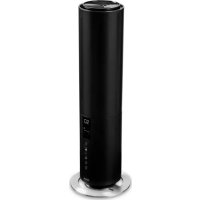
Beam 2 - Humidifier DUUX - Free user manual and instructions
Find the device manual for free Beam 2 DUUX in PDF.



| Product type | Humidifier |
| Brand | Duux |
| Model | Beam 2 |
| Model number | DXHU10/11 |
| Net weight | 2 kg |
| Power consumption | 28 W |
| Tank capacity | 5 L |
| Maximum mist output | 350 ml/h |
| Maximum runtime | 25 h |
| Power cord length | 1.5 m |
| Main materials | ABS, PP |
| Mist output levels | 3 (Low, Medium, High) |
| Operating mode | Manual, Automatic (hygrostat) |
| Timer | Yes (1, 2, 4, 6, 8 h) |
| Connectivity | WiFi (Duux app) |
| Remote control | Yes (integrated in control panel) |
| Essential oil tray | Yes (under the cover) |
| Filter | Yes (removable filter) |
| Humidification type | Ultrasonic |
| Display | Ambient temperature and humidity |
| Safety | Automatic shut-off when water is low |
| Power supply | Mains (220-240 V) |
Frequently Asked Questions - Beam 2 DUUX
User questions about Beam 2 DUUX
0 question about this device. Answer the ones you know or ask your own.
Ask a new question about this device
Download the instructions for your Humidifier in PDF format for free! Find your manual Beam 2 - DUUX and take your electronic device back in hand. On this page are published all the documents necessary for the use of your device. Beam 2 by DUUX.
USER MANUAL Beam 2 DUUX
Thank you for choosing Duux.
We're so glad you decided to read the Instructions to your new DuPont ultrasonic Humidifier. Many users usually dislike instructions and seek up (figure 2) but on their own. But studies show that people who read instructions will get up to speed more quickly and efficiently than those who spoke around with trial and error.
At 12:00 we believe in the Importance of a comfortable and healthy living environment. Enhancing your well-being by designing appealing, functional and effective products is the passion that drives us every day. With our range of innovative air treatment products we aim to provide you the best possible indoor air quality.
Dry skin , dry throat or regular headaches? Chancese are the air inside your home is too dry . Melt Burn 2 .the versatile high - capacity humidifier with a minimal footprint . Its large water tank capacity of 5 liters andhigh mist output of 350 mlh ensures optimum performance . Filling the Burn 2 is easy thanks to its topfilling capability . And it built in hygrostat and built in temperature sensor work wonders when it comes toease of use .
Read this manual carefully to get the most out of your beam ultrasonic humidifier.
Table of contents
1.Product overview 4
2. Installation & use 5
3. Functions 8
4. Mlntg2026.13
5. Technical specifications 16
5. FAQ 17
1. Product overview 2. Installation and use
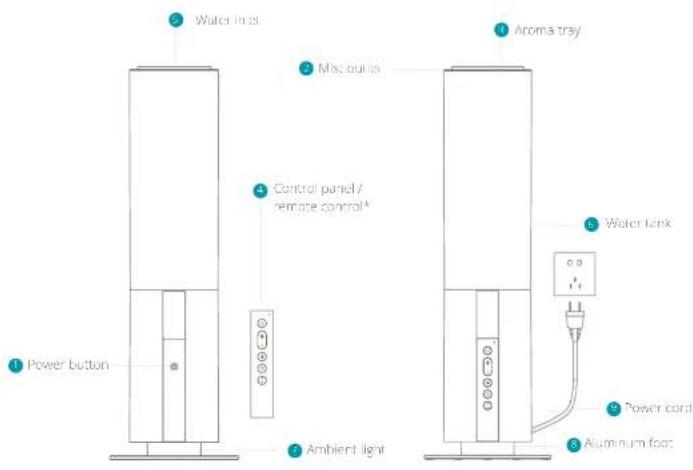
*=To use the remote control, please it from the dock by goby pulling out from the bottom
A. Note: Please take notice of below instructions and the separately included warning sheet before using the protocol.
General cautions
- Check the voltage on the device label before use. Only connect the device to sockets that correspond to the voltage of the device. If you are unsure whether your connections meet the requirements, consult an electrician or your electricity supplier.
- Do not disassemble and repair the appliance without authorization.
If the power cord is damaged, in order to avoid danger, it must be replaced by the manufacturer or its maintenance department, and not by yourself.
If there is any abnormality, please unplug the power cord immediately and it must be repaired by the manufacturer or its maintenance department.
Regularly clear the dust on the power cord plug - Before cleaning or moving, please turn off the power and unplugging the power cord.
- When on the plug, hold the power plug inoscent or pulling the power cord.
-
Do not touch the water and parts of the product while the powder is on!
-
Do not cover the air inlet and the mist outlet with items such as towels.
This is not my. To avoid accidents, keep it away from babies and children. Do not put it in a cradle, or tell or playpen. Please do not let children and all babies play and use the device. - Do not use the device on a shipping table; it should be placed in a flat and stable surface.
Do not add flavors or similar substances produced or supervised by the company, at the water tank and water tank in the device. You can use the designated anemicty under normal law to do aromatherapy.
Do not use in the kitchen. Please keep away from heat sources, avoid direct sunlight, and keep away from furniture and other household appliances 1 meters away from moisture use.
Be aware that high city levels may encourage the growth of biological organisms in the environment. - Do not permit the area around the humidifier to become damp or wet if dampness occurs, turn the output of the humidifier down. If the humidifier output volume cannot be turned down, use the humidifier insufficiency. Do not allow asorbent materials, such as carpeting, curtains, drapes, or tablecloths, to become damp.
- Never leave water in the reservoir when the appliance is mol in use.
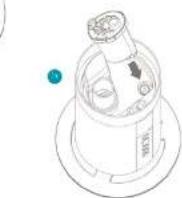
Installing the filter
Take out the filter from the box
Remove the plastic bag from the filter holder and rinse 5 minutes before first use
- FFC the cover ann water inlet tray to open the water tank
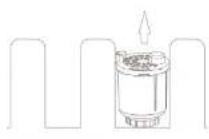
Place the filter holder in the designated position.
Push and gently turn to fix the filter holder.


3


Empty and clean the humidifier before storage. Clean the humioffer before next use
Warning: Micro-organisms that may be present in the water or in the environment where the appliance is used are stored, too grown in the water reservoir and be blown in the air causing very serious health risks when the waver is not renewed and the toxic. Renew water every 3 days.
Installing the product
Unpack the device and remove the packing materials from the device. Store the packing materials for possible future transportation.
Plug the power cord in a wall outlet. You will hear a beep and the power indicator will blink.
Press the power button to switch on the device and the display will light up.
Filling the water tank
A. Note: Always remove the plug when filling the water tank. Preferably use clean tap or distilled water to prevent bacteria and scale inside the water tank.
Warning:Only with cold or no worm water Not or buling water will stomege the device.
Please add water to the water tank before using the device according to the steps below:
1 remove the power plug and take off the lid on the top sink;
1 Fill the water tank with water using a watering can or container (do not excess the transparent water inlet cover).
Place back the top cover and make sure it fits properly. You may now switch on the device.
Note: When using the device for the first time, the water may have a slight smell and discoloration. This is normal and not harmful for your health.
Warning: Never use any other liquid than water Only use oromia in the pleated aroma tray.
3. Functions
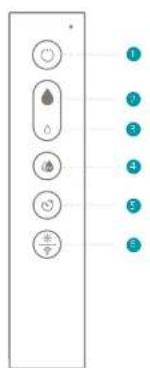
Control panel/remote control
Power
Increase mist output
Decrease mist outpout
Auto mode
Timet
Ambient light/Wifi mode
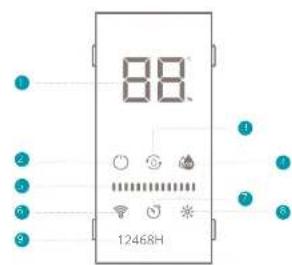
Display
Temperature (oC)/Humidity (%) display
Power indicator
Refill water indication
Auaeaeindicatior
Mist output levels bars
WFI indicator
Time indicator
Ambient light indicator
9 Timer hour(s) indicator

Power
Press the power button to switch on the device. The corresponding indicator will light up on the display and the ambient light will switch on. The Wi-Fi indicator will link to look for devices on pain. The monitoring screen will show the actual temperature and humidity every 5 seconds. Press again to switch off the device (the device will remain in stand-by mode until the plug is removed from the wall out of). The default humidity setting is MEDIUM output.
A. Note: you can also switch on the device with the touch button on the device, located behind the control panel / remote control.

Increase/decrease mist output
Press the button increase the mist output. The mist output level bars will change accordingly. Pressing the button will decrease the mist output. The are three mist output levels: LOW MEDIUM HIGH
A: Note:The most efficient setting will exist cycle when processing or ,hence multiple times.

Auto mode
Preshe the button to activate the self regulating hygrostrum. The micro output intensity will now se regulate according to the ambient relative humidity. Press multiple times to change the desired humidity in the following order: 40% > 45% > 60% > 65% > 60% > 65% > 70% > 75% > 80% > 85% > 90% > ACTUAL HUMIDITY > 40% > 50% > and so on. Fast press will increase with 53% . Ok releases, this selected humidity will blink 3 seconds to confirm your choice.
When the hygrosat is set above the actual humidity, the device will operate in high space until the observed humidity has been reached. When the hygrosat is set below the actual humidity, the device will not humidify. After setting the hygrosat, the display will show the ambient relative humidity,

Timer
Press the key to activate the time setting. With every touch the timer will increase with one hour in the following sequence: 1h > 2h > 4h > 6h > 8h > OFF. Once the timer is activated, the device will automatically shut down after the set timer has been completed.

Ambient light
Press the button to activate the ambient light Press again to deactivate

WIFI mode
Press and hold the 8075 button for 5 seconds to initiate the WIIF movie. The indicator will quickly disappear and then flash rapidly (searching for devices to pair).
WIFI and APP operation
Start below QR code to download the Duxx APP or search Duxx APP in the App Store or GooglePlay Store to start the procedure to download the APP Once installed, enter your email address and complete the registration.

APPSTOREPLAYSTORE

Connect to WIFI
Once registered, clickAdd duplicate device on the main screen or use the "I" button in the top-right corner to add a new device.
Search for 'Beam' and press to continue
Connect to your preferred WiFi network and enter the corresponding password.
Follow the instructions in the app to complete the pairing process.
Display icons

Power
When the indicator on, the device is switched on. If it binds, the device is in standby.

Water replacement indicator
When the indicator looses red, it indicates that there is water shortage. Please remove the top cover and add water.

Auto mode
When this indicator lights on, it means the humidifier is operating in AULO mode.

Mist output level bars
The amount of parts determine the mist output intensity set in manual operation mode. There are three mist output variables: IOW,
MEDIV HIGH

WIFI indicator
When the indicator light barks, it means its idle and looking for a device to pair. If it's solid, it means the device is connected. Press and hold the button for 5 seconds to cancel the pairing operation.

Timer indicator
When the indicator lights up, it means you have entered. In timer mode. Below you will see the number (1,2,4,6 or 8) of hours on which the timer is activated.
Display brightness
The dial may automatically dim after the last touch or press:
Water shortage
If there is no water remaining in the water tan , abeep will sound 3 times , and the water shortage .Icon will automatically return to the standby star after flashing 50 times
Aroma tray/sponge
Below the top covers you will find a small handle which hides the aroma tray. Lift the handle to release the tray and pour a few drops of aromatherapy on the sponge. Place back the aroma tray and top cover to continue the operation.
Note: Only use aromatherapy that is suitable for ultrasonic homeothers. Other types of aromatherapy may damage the device. Refrction from using an o-based aromatherapy at all times
Control panel / remote control
The control panel is integrated in the remote control. When not in use, we recommend placing the remote control back in the holder on the device. Remote control batteries are included (type AAA). Please note the polarity when inserting the batteries.
4. Maintenance
A. Important: Be sure to remove the power plug from the outer before carrying out maintenance.
A.Important: Do not take animesee the power plug or the device in water.

on water tank every 2 days .
Water replacement
In order to maintain the best performance of the humidifier, the water in the water tank and the water tank itself should be cleaned every 2 days.
Cleaning
- Please use a soft cloth to wipe the dust on the body. If the surface is too dirty, it is better to wipe it clean with a damped cloth mixed with neutral detergent.
- Do not use chemical solvents, gasoline, polishing powder, etc., to clean the surface of the devices.
- Do not place the device or any of its parts in the dishwasher to clean. It is best to clean it with clean water.
Please use a soft cloth to clean the parts (see image) regularly. If the regular cleaning isn't remove the scale on the inside of the water tank
mice some canon vinogar with ukwawm water (water and lemon vinegar ratio 10ml tip Four everything into a large container and let it soak for 5 minutes. Then gently scrut the scale surface with a soft brush until the scale is removed

Storage
When the appliance is not used for a long time, please clean all the components, dry them, and put them into the original box and store them in a city place.
Spare parts
Spare parts and accessories can be requested at the point of purchase or local distributor.
Disposal
The European directive 2012/79/CL on Waste Electrical and Electronic Equipment (WEEE), requires that o household electrical appliances must not be disposed in the normal unsorbed municipal waste stream. Cleo appliances must be collected separately in order to minimize the recovery and recycling of the materials they contain and reduces the impact on human health and the environment. The crossed out 'wheeled bin' symbol on the product reminds you of your obligation, that when you dispose of the appliance it must be separately collected. Consumers should contact their legal authority or retailer for information concerning the correct disposal of their waste bins.

The smart and powerful humidifier with minimal footprint
5. Technical specifications
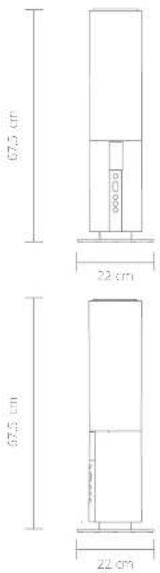
Weight 2 kg
Power consumption: 28W
Water tank capacity: 5L
Effective area 40m²
MIST output(max): 350ml/h
Max operation times 25h
Power cord length: 1.5m
Main materials: ABS, PP
Output settings 3
Model no: DXHU10/11
The appearance and specification of the device may be changed without notice.
6. FAQ
Q. The power/water supply indicator does not light up and mist does not come out.
A. Insert the power plug into this way to track back of the socket or check if there is a power cut.
Q. The power/water supply indicator is red and the power is off, even though the power button is pushed.?
A: There is not enough water. Please fill the water tank with water.
Q. Strange noises accompany the use of the product.
A. A "burbling" sound carries out of the main body. This sound is the sound of water being supplied from the water tank to the main body and does not mean the product is defective.
Q. A strange noise can be heard from the removed water tank.
When you remove an empty or nearly empty water tank from the main body, an abnormal sound from the water tank can be heard. This sound is related to pressure within the water tank and does not mean the product is defective.
Q. Mist can't be seen even when the power is connected.
A- Is the power/water supply display flurng? red? There is insufficient water. Fill it flusing red. Please fill the water tank with water. -The mix may not be visible depending on the balance between the room temperature and humidity.
Q. The floor is wet / There is a water leakage.
A Is the floor wet due to excessive humidity? Wet floors from mist can occur due to the room environment and conditions of use. Please switch the mist volume to minimum output or AUTO mode
his hte wrrressopoe 3 dogen
Water verversen
Or de uchtewichtig in optimale comitite houden, moet net water regem strog werden verwertst en die wasserink eke 8 ragen worden gereinigt:
Reinigen
Sauoeae coe ene at e aen dntree
Warning: For non-standard orders for women Wausser befoilen.
Simplified EU declaration of conformity
Hereby, Duix declares that this environmental control radio equipment is in compliance with Directive 2014/53/EU. The full text of the EUI Declaration of Conformity is available at the following Internet address: www.duix.com/doc
Designed in The Netherlands by Duux BV. Made in P.R.C. Duux BV, P.O. Box 145, 5400 AC Uden Netherlands, www.duux.com
© 2022 Duux. All rights reserved.
DUUX® is a trademark of Duux BV,
registered in the EU and other countries.
The brand cited belongs exclusively to the respective owners.
Specifications are subject to modification without notice.


- Thank you for choosing Duux.
- Table of contents
- Product overview 2. Installation and use
- General cautions
- Installing the filter
- Installing the product
- Filling the water tank
- Functions
- Control panel/remote control
- Display
- Power
- Increase/decrease mist output
- Auto mode
- Timer
- Ambient light
- WIFI mode
- WIFI and APP operation
- Connect to WIFI
- Display icons
- Water replacement indicator
- Mist output level bars
- WIFI indicator
- Timer indicator
- Display brightness
- Water shortage
- Aroma tray/sponge
- Control panel / remote control
- Maintenance
- Water replacement
- Cleaning
- Storage
- Spare parts
- Disposal
- The smart and powerful humidifier with minimal footprint
- Technical specifications
- FAQ
- Water verversen
- Reinigen
- Simplified EU declaration of conformity
Brand : DUUX
Model : Beam 2
Category : Humidifier