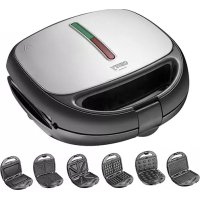
CR 3057 - Toaster CAMRY - Free user manual and instructions
Find the device manual for free CR 3057 CAMRY in PDF.



| Product type | Multifunction toaster with interchangeable plates |
| Brand | Camry |
| Model | CR 3057 |
| Power supply | 220-240 V ~ 50/60 Hz |
| Power | 800 W (max 1200 W) |
| Dimensions (approx.) | 30 x 25 x 15 cm |
| Weight (approx.) | 2 kg |
| Number of plates included | 5: waffle, sandwich (2 thicknesses), grill, cookie "nut", omelette |
| Plate material | Non-stick |
| Main functions | Grill, toast, cook waffles, omelettes, sandwiches, cookies |
| Adjustable thermostat | Yes, with green (ready) and red (power) indicator light |
| Locking clip | Yes, for even cooking |
| Safety | Automatic shut-off (not specified), hot surface warning, do not immerse |
| Cleaning and maintenance | Clean with a damp or dry cloth, do not use abrasive sponges |
| Repairability | Do not repair yourself; contact authorized service |
| Spare parts | Interchangeable cooking plates available |
| Warranty | Manufacturer warranty (terms not specified) |
| General information | Household use only; do not use near flammable materials |
| Included accessories | 5 cooking plates, instruction manual |
Frequently Asked Questions - CR 3057 CAMRY
User questions about CR 3057 CAMRY
0 question about this device. Answer the ones you know or ask your own.
Ask a new question about this device
Download the instructions for your Toaster in PDF format for free! Find your manual CR 3057 - CAMRY and take your electronic device back in hand. On this page are published all the documents necessary for the use of your device. CR 3057 by CAMRY.
USER MANUAL CR 3057 CAMRY
natural_image
Exterior view of a modern kitchen grater with a black handle and green stripe (no text or symbols visible)CR 3057
(GB) user manual 3
SAFETY CONDITIONS IMPORTANT INSTRUCTIONS ON SAFETY OF USE PLEASE READ CAREFULLY AND KEEP FOR FUTURE REFERENCE
The warranty conditions are different, if the device is used for commercial purpose.
- Before using the product please read carefully and always comply with the following instructions. The manufacturer is not responsible for any damages due to any misuse.
- The product is only to be used indoors. Do not use the product for any purpose that is not compatible with its application.
- The device should only be connected to a grounded socket 220-240V \~50/60Hz For safety reasons it is not appropriate to connect multiple devices to one power outlet.
- Please be cautious when using around children. Do not let the children to play with the product. Do not let children or people who do not know the device to use it without supervision.
5.WARNING: This device may be used by children over 8 years of age and persons with reduced physical, sensory or mental capabilities, or persons without experience or knowledge of the device, only under the supervision of a person responsible for their safety, or if they were instructed on the safe use of the device and are aware of the dangers associated with its operation. Children should not play with the device. Cleaning and maintenance of the device should not be carried out by children, unless they are over 8 years of age and these activities are carried out under supervision.
-
After you are finished using the product always remember to gently remove the plug from the power outlet holding the outlet with your hand. Never pull the power cable!!!
-
Never put the power cable, the plug or the whole device into the water. Never expose the product to the atmospheric conditions such as direct sun light or rain, etc.. Never use the product in humid conditions.
-
Periodically check the power cable condition. If the power cable is damaged the product should be turned to a professional service location to be replaced in order to avoid hazardous situations.
-
Never use the product with a damaged power cable or if it was dropped or damaged in any other way or if it does not work properly. Do not try to repair the defected product yourself because it can lead to electric shock. Always turn the damaged device to a professional service location in order to repair it. All the repairs can be done only by authorized service professionals. The repair that was done incorrectly can cause hazardous situations for the user.
-
Never put the product on or close to the hot or warm surfaces or the kitchen appliances like the electric oven or gas burner.
-
Never use the product close to combustibles.
12.Do not let cord hang over edge of counter or touch hot surfaces.
-
Never leave the product connected to the power source without supervision. Even when use is interrupted for a short time, turn it off from the network, unplug the power.
-
In order to provide additional protection, it is recommended to install residue current device (RCD) in the power circuit, with residual current rating not more than 30 mA. Contact professional electrician in this matter.

-
Accessible surface temperatures can be high when the appliance is operating. Never touch the hot surfaces of the appliance.
-
Due to the high temperature you should be careful when removing the prepared dishes, removing hot grease or other hot liquids. Be careful, there can be hot steam presence during use of the appliance.
-
This electrical appliance contains a heating function. Surfaces, also different than the functional surfaces, can develop high temperatures. The equipment shall be touch only at intended handles and gripping surfaces, and use heat protection like gloves or similar. During or after use, please do not touch the baking tray or the hot area on the shell before the temperature goes down.
-
The device must cool down before you store it.
-
Do not place products made of cardboard, paper, plastic materials or other flammable or meltable objects in the device.
-
The device is not designed to work with external schedulers or separate remote control system.
-
Do not insert food portions that use whole oven volume, as it may cause fire and destruction of the device.
-
The power cord may not be placed above the device and it may not touch or be located near hot surfaces. Do not place the device under a mains socket.
-
Do not move or carry the device during operation. After the operation it can be moved only if it had enough time for cooling down.
-
Open device by holding the handle. Before that, release the buckle (4).
-
Before and during use, make sure that the power cord is not stretched over an open flame or other heat source or sharp edges that may damage the insulation of the cable.
-
Before first use, remove all packaging components. Attention! In the case of a casing with metal parts, on these elements a slightly visible protective foil can be stretched, which should also be removed.
-
NEVER cover the device during operation or when it does not cool down completely, remember that the heating elements of the device take time to cool down completely.
-
SAVE CAREFULLY if you use the device on surfaces sensitive to high temperatures. It is recommended then to use insulating washers
-
The device can not be used with external time switches or other separate remote control systems.
DESCRIPTION OF THE DEVICE
(1) toaster cover (2) power indicator light (red) (3) thermostat lamp (green)
(4) closing clip (5) heating plate lock (6) waffle plate
(7) plate for thinner toasted bread sandwiches (8) plate for thicker bread sandwiches (9) grill plate
(10) plate for cookies "nuts" (11) Omelette plate
BEFORE FIRST USE
- Remove the packaging and all stickers and accessories that are outside and inside the device - between the hobs.
- Wipe the hobs with a moist cloth and then with a dry cloth.
- Lightly grease the plates with vegetable oil or other fat, close the device and connect to the power - the power indicator light (2) will light up.
- Leave the device turned on for a few minutes to get rid of the odor. At this time, the device can emit a small amount of smoke. This is a normal phenomenon.
- Clean the device in accordance with the "Cleaning" section of these operating instructions.
USE
- Connect the device to a mains socket with earthling - the power indicator (2) will light up.
- Wait about 10 minutes for the device to warm up to the right temperature. The thermostat control lamp (3) will then light up.
- In the meantime you can prepare sandwiches for toasting / cake for waffles / food for grilling / cake for cookies / omelette mixture
- The device is ready for use when the thermostat control lamp (3) comes on.
- Open the device completely and place pre-prepared food on the bottom cooking plate.
- sandwiches: ingredients should not stick out of the bread
- waffle cake: will grow, do not pour the dough full, just enough to cover the bottom plate with cake
- nut cakes: form balls of 1.5cm in diameter and fill in the dimples with nut
• pour the omelette mixture evenly to the non-stick cooking plate
-
Close the device by the closing clip (4) on the lower holder. Do not close the upper cover (1) by force. When closing and opening, watch out for the steam coming out of the sides of the device. Even when food is being baked, hot steam may come out from under the lid.
-
During toasting, the thermostat control lamp (3) will light up and go out - the thermostat maintains the right temperature of the heating plates.
-
The toasting time is different and depends on the type of food, additives used and taste preferences. We recommend:
- thin sandwiches: 2-3 minutes or until golden brown
- thicker sandwiches: 5-6 minutes or until golden brown
- contact grill: vegetables or meat - individual match your preferences
- waffles: minimum 8 minutes, preferably 10-11 minutes, depending on the ingredients of the dough
- nut cakes: 2-3 minutes or until golden
- omelette: 6-8 minutes until fluffy.
- Open the top cover (1) of the device completely and remove the food using only a wooden or plastic spatula.
ATTENTION ! Do not use metal cutlery or sharp kitchen tools as they may damage the special non-stick coating of the hobs.
-
Before loading the next batch of food, close the device, so that the hobs are heated to the right temperature. The lighting of the thermostat lamp (3) indicates readiness for browning.
-
After the toasting is finished, remove the plug from the power socket and let the appliance cool down.
CLEANING THE DEVICE
- Before cleaning the device, unplug the appliance from the power socket and allow the device to cool down.
- Clean using a damp and then dry cloth (or paper towel).
- Use a small amount of edible oil to remove leftovers and after a few minutes, gently remove them with a wooden spatula.
- Do not clean the hobs with sharp, abrasive cloths or sponges, or use cleaning powders as they may damage the smooth non-stick coatings.
- Do not immerse the device in water.
TECHNICAL DATA
Supply voltage: 220-240V \~ 50 / 60Hz
Power: 800W
Maximum power: 1200W

To protect your environment: please separate carton boxes and plastic PE bags and dispose them in corresponding waste bins. Used appliance should be delivered to the dedicated collecting points due to hazarsous components, which may effect the environment. Electrical appliance must be returned in order to reduce its reuse and utilization. If the device contains batteries they should be delivered to dedicated points separately.
DEUTSCH
BESCHRIJVING VAN HET APPARAAT
(1) broodroosterafdekking
HET APPARAAT SCHOONMAKEN
TECHNISCHE GEGEVENS

SLOVENŠČINA
VARNOSTNE RAZMERE. PREBERITE NAVODILA ZA UPORABO IN JIH SKRBNO SHRANITE ZA PRIHODNJO UPORABO.
eners consignments aux autres industries (٨) consignments aux industries (٩) consignments aux industries (٧) consignments aux industries (٤) consignments aux industries (١) consignments aux industries (٣) consignments aux industries (٢) consignments aux industries (٤) consignments aux industries (٥) consignments aux industries (٥) consignments aux industries (٦) consignments aux industries (٦) consignments aux industries (٧) consignments aux industries (٩) consignments aux industries (١) consignments aux industries (١) consignments aux industries (٢) consignments aux industries (٣) consignments aux industries (٤) consignments aux industries (٥) consignments aux industries (١) consignments aux industries (١) consignments aux industries (٢) consignments aux industries (٣) consignments aux industries (٤) consignments aux industries (٥) consignments aux industries (١) consignments aux industries (٢) consignments aux industries (٣) consignments aux industries (٤) consignments aux industries (٥) consignments aux industries (١) consignments aux industries (٢) consignments aux industries (٣) consignments aux industries (٤) consignments aux industries (٥) consignments aux industries (١)
"preschen بسكويت "مکسرات (۱۰)
natural_image
Golden kettle with black handle and silver rim, no visible text or symbols on the device itself.ELECTRIC KETTLE CR 1292

natural_image
Black hair dryer with a black handle and orange flame (no visible text or symbols)HAIR DRYIER CR 2261

natural_image
Golden Roasted 19TH toaster with black handle and control buttons (no visible text or symbols)TOASTER 2 SLICES CR 3217

natural_image
Modern glass kettle with blue liquid inside, placed on a control panel (no visible text or symbols)ELECTRIC GRILL CR 3044

natural_image
Product photo of a blender with pink liquid and black handle, next to a metallic stand (no text or symbols visible)PERSONAL BLENDER CR 4615

natural_image
Exterior view of a black and white stainless steel grating (no visible text or symbols)WAFFLE MAKER CR 3046

natural_image
Black and white photo of a steamer with a handle and spout (no visible text or symbols)GARMENT STEAMER CR 5033
natural_image
White cylindrical device with black control panel and circular button (no visible text or symbols)AIR HUMIDIFIER CR 7964

natural_image
Front view of a white electronic device with a small black component and mounting holes (no visible text or symbols)GLASS HEATER CR 7721

natural_image
Exterior view of a modern washing machine (no visible text or symbols)WASHING MACHINE CR 8054

natural_image
Exterior view of a black horizontal solar power heater with cooling fans and wheels (no visible text or symbols)OIL FILLED RADIATOR CR 7810
natural_image
White and gray portable electronic device with a closed lid (no visible text or symbols)HEATING LUNCHBOX CR 4483
natural_image
Exterior view of a modern electric lamp (no visible text or symbols)MOSQUITO KILLER LAMP SONIC TOOTHBRUSH CR 7935 CR 2173


natural_image
Folded blanket with floral pattern and a small electronic device attached (no text or symbols visible)HEATING UNDERBLANKET CR 7430

natural_image
Exterior view of a modern hair dryer with pink filter and silver body (no text or symbols visible)HAIR DRYER CR 2256
www.camryhome.eu
camry
Premium
natural_image
Glass watercolor kettle with black handle and lid, no visible text or symbolsELECTRIC KETTLE CR 1290

natural_image
Exterior view of a modern coffee maker with control panel and side-mounted lever (no visible text or symbols)ESPRESSO MACHINE CR 4410

natural_image
Exterior view of a modern office building (no signage)SANDWICH MAKER
CR 3054

natural_image
Black electronic device with digital display and control buttons (no visible text or symbols)RETRO RADIO CR 1182

natural_image
White portable air conditioner unit with circular vent and grid grille (no visible text or symbols)AIR CONDITIONER CR 7925

natural_image
Modern kitchen mixer with digital display and control knob (no visible text or symbols)FOOD PROCESSOR CR 4223

natural_image
White kitchen hand mixer with whisk, no visible text or symbolsMIXER CR 4220

natural_image
Close-up of a black and silver meat broker with handle and side blades (no visible text or symbols)MEAT MINCER CR 4812
natural_image
Exterior view of a modern stainless steel air fryer with digital display (no visible text or symbols)AIR FRYER OVEN CR 6311

natural_image
Exterior view of a modern office building (no signage)BAGLESS VACUUM CLEANER CR 7046

natural_image
White portable air purifier with perforated grille and four wheels (no visible text or symbols)AIR DEHUMIDIFIER CR 7851

Trimmer CR 2921

natural_image
White portable electronic device with textured back panel and handle (no visible text or symbols)CERAMIC FAN HEATEROIL FILLED RADIATOR CR 7732 CR 7812
natural_image
Black rectangular solar water heater with multiple cooling fans and a digital display (no visible text or symbols)
natural_image
Exterior view of a silver industrial machine with open lid and internal tray (no visible text or symbols)PORTABLE FRIDGE CR 8076

natural_image
A gray oval pet bed with a black cable inserted, showing the interior and side (no text or symbols visible)HEATED ANIMAL DEN CR 7431
camry
Premium

natural_image
Black and red vacuum cleaner with handle and wheels (no visible text or symbols)VACUUM CLEANER CR 7045
natural_image
Exterior view of a black multi-level electric heater with wheels and control panel (no visible text or symbols)OIL FILLED RADIATOR CR 7814

Stand Fan
CR 7306
natural_image
Black and white photo of a modern kettle with textured surface (no visible text or symbols)Electric Kettle CR 1169

natural_image
Vintage wooden radio with visible grille and control knobs (no text or symbols)RETRO RADIO CR 1188

natural_image
Illustration of a pair of hair curling iron (no text or symbols)HAIR STRAIGHTENER
CR 2320

natural_image
Close-up of a person's legs using an orange massage press on a white foam roller (no text or symbols visible)FOOT SPA CR 2174

ELECTRIC SHAVER
CR 2925

natural_image
Black portable electronic device with sound waves and a digital display (no visible text or symbols)INTERNET RADIO CR 1180

natural_image
White portable air conditioner unit with control panel and display (no visible text or symbols)AIR CONDITIONER CR 7926

natural_image
Exterior view of a modern stainless steel kettle with black handle and control knob (no visible text or symbols)ELECTRIC KETTLE CR 1291
natural_image
Exterior view of a modern stainless steel toaster with black handle and side panel (no visible text or symbols)TOASTER 2 SLICES CR 3215

natural_image
White and black electric heater device next to a remote control unit (no visible text or symbols)CONVECTION HEATER CERAMIC FAN HEATER
CR 7724 CR 7772
MOSQUITO KILLER
CR 7937

natural_image
Exterior view of a modern office building (no signage)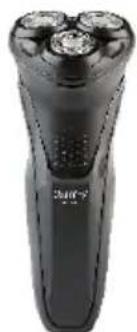
natural_image
Black handheld electric shaver with three buttons and a small silver contact (no visible text or symbols)ELECTRIC SHAVER CR 2927

AFTER SALE SERVICE NOTICE
| GB | If you want to buy spare parts or make any complaints, please contact the seller who issued the rec directly. |
| DE | Wenn Sie Ersatzteile kaufen oder reklamieren möchten, wenden Sie sich bitte direkt an den Verkäder die Quittung ausgestellt hat. |
| FR | Si vous souhaitez acheter des pièces de rechange ou faire des réclamations, veuillez contacter directement le vendeur qui a émis le reçu. |
| ES | Si desea comprar repuestos o presentar alguna queja, comuníquese directamente con el vendedor e emitió el recibo. |
| PT | Se você quiser comprar peças de reposição ou fazer alguma reclamação, entre em contato diretamo com o vendedor que emitiu o recibo. |
| LT | Jei norite ësigyti atsarginių dalių ar pateikti nusiskundimų, susisiekite tiesiogiai su kvitą išdavusų pardavėju. |
| LV | Ja vēlaties iegādāties rezerves daļas vai izteikt pretenzijas, lūdzu, sazinieties tieši ar pārdevēju, kuri izsniedza čeku. |
| EST | Kui soovite osta varuosi või esitada pretensioone, võtke otse ühendust kviitungi väljastanud műtija. |
| HU | Ha pótalkatrészeket szeretne vásárolni, vagy panaszt szeretne tenni, forduljon közvetlenül a bizony kiállító eladóhoz. |
| BS | Ako želite kupiti rezervne dijelove ili napraviti reklamaciju, obratite se direktno prodavaču koji je račun. |
| RO | Если вы хотите купить запчасти или предъявить какие-либо претензии, пожалуйста, свяжит напрямую с продавцом, выдавшим чек. |
| CZ | Chcete-li zakoupit náhradní díly nebo uplatnit jakoukoli reklamaci, kontaktujte přímo prodejce, kt účtenku vystavil. |
| RU | Dacă doriți să cumpărați piese de schimb sau să faceți vreo reclamație, vă rugăm să contactați dire vânzătorul care a emis chitanța. |
| GR | Eăv θέλετε να αγοράσετε ανταλλακτικά ή να κάνετε οποιαδήποτε παράπονα, επικοινωνήστε απευθείας με τον πωλητή που εξέδωσε την απόδειξη. |
| MK | Ako сакате да купите резервни делови или да поднесете какви било поплаки, контакријте директно со продавачот koj ja издал сметката. |
| NL | Als u reserveonderdelen wilt kopen of een klacht wilt indienen, neem dan rechtstreeks contact op i verkoper die de bon heeft afgegeven. |
| SL | Če želite kupiti nadomestne dele ali vložiti reklamacije, se obrnite neposredno na prodajalca, ki je račun. |
| FI | Jos haluat ostaa varaosia tai tehdä valituksia, ota yhteyttä suoraan kuitin antaneeseen myyjään. |
| PL | W przypadku chęci zakupu części zamiennych lub zgłoszenia ewentualnych reklamacji należy kontaktować się bezpośrednio ze sprzedawcą, który wystawił paragon. |
| IT | Se desideri acquistare pezzi di ricambio o presentare reclami, contatta direttamente il venditore ch remesso la ricevuta. |
| HR | Se desideri acquistare pezzi di ricambio o presentare reclami, contatta direttamente il venditore ch remesso la ricevuta. |
| SV | Om du vill köpa reservdelar eller göra några reklamationer, vänligen kontakta säljaren som utfärda kvittot direkt. |
| DK | Hvis du ønsker at købe reservedele eller reklamere, bedes du kontakte sælgeren, som har udstedk kvitteringen, direkte. |
| UA | Якщо ви хочете придбати запчастини або подати будь-які претензії, зверніться безпосередни продавця, який видав чек. |
| SR | Ako желите да купите резервне делове или да уложите рекламацију, обратите се директно продавцу који је издао рачун. |
| SK | Ak si chcete cúpit’ náhradné diely alebo uplatnit’ akúkol’vek reklamáciu, kontaktujte priamo pređať ktorý účtenku vystavil. |
| AR | و غيارقطعاعرش في تрг Beef کنتاذ! شكوي́أيainment، لاصтта فيرжи مباشرلاصibiaً رедсаً يذلا بالبانيغ |
| BG | Aко искате да закупите резервни части или да направите оплаквания, моля, свържете се дир с продавача, който е издал касовата бележка. |
| AZ | Ehtiyat hissələri almaq və ya hər hansı śikayət etmək istəyirsinizsə, qəbzi verən satıcı ilə birbaşa əlaqə saxlayın. |
| ALB | Nëse dëshironi të blini pjesë këmbimi ose të bëni ndonjë ankesë, j 1 temi kontaktoni drejtpërdrejt shitësin që ka lësh ar !at rën. |
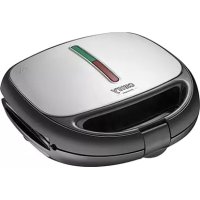
- CR 3057
- SAFETY CONDITIONS IMPORTANT INSTRUCTIONS ON SAFETY OF USE PLEASE READ CAREFULLY AND KEEP FOR FUTURE REFERENCE
- DESCRIPTION OF THE DEVICE
- BEFORE FIRST USE
- USE
- CLEANING THE DEVICE
- TECHNICAL DATA
- DEUTSCH
- BESCHRIJVING VAN HET APPARAAT
- HET APPARAAT SCHOONMAKEN
- TECHNISCHE GEGEVENS
- SLOVENŠČINA
- VARNOSTNE RAZMERE. PREBERITE NAVODILA ZA UPORABO IN JIH SKRBNO SHRANITE ZA PRIHODNJO UPORABO.
- camry
- Premium
Brand : CAMRY
Model : CR 3057
Category : Toaster