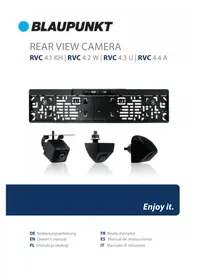
RVC 4.4 A - Rear Camera BLAUPUNKT - Free user manual and instructions
Find the device manual for free RVC 4.4 A BLAUPUNKT in PDF.
Download the instructions for your Rear Camera in PDF format for free! Find your manual RVC 4.4 A - BLAUPUNKT and take your electronic device back in hand. On this page are published all the documents necessary for the use of your device. RVC 4.4 A by BLAUPUNKT.
USER MANUAL RVC 4.4 A BLAUPUNKT
1. Select suitable flat position near the license plate light and mark it.
2. Drill a hole according to the bolt diameter.
3. Put the bolt vertically (against ground) into the hole and fix the bolt
with the screw supplied from inside.
4. Some models come with up/down image switch option, and can be
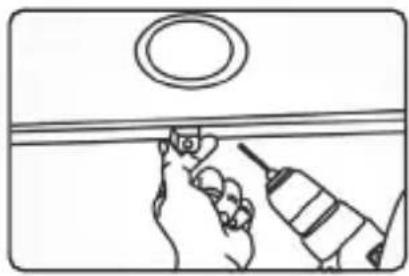
mounted with its bolt horizontal (against ground) and its lens downward. 1.Choose a flat position near license plate light and make a small hole for the first screw with a drill.
2. Use a screw driver to fix the first
screw (but not tightly).
3. Get the power/video cables connected,
and then adjust the camera properly to find the best position for the other screw according to the camera image in monitor.
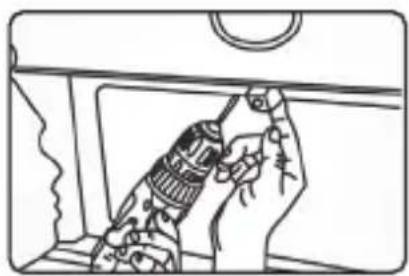
4. Mark the position found for second
screw and make a hole with a drill.
5. Fix the second screw with a
screw driver. A. Installation Guide For Flush-Mount Camera
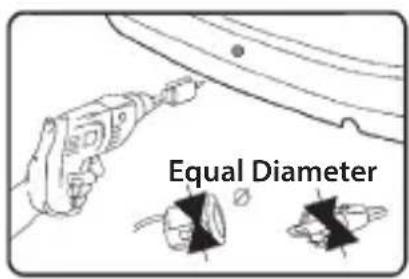
1.Check to be sure the hole saw used is with equal diameter to that of camera.
2. Adjust the camera to turn the
UP arrow mark straight upwards.
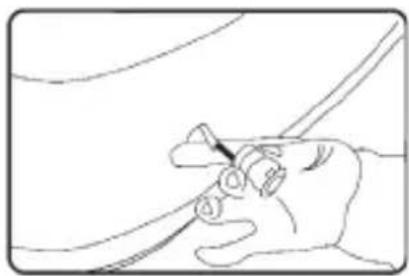
3. Put the harness through the
hole made on bumper before fixing the camera.
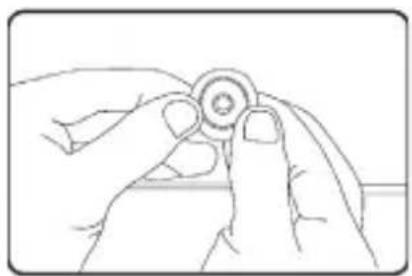
4. Put the camera into the hole and
use your two thumbs to press it evenly for tight and flat mounting.
Special type installation locationUniversal type installation location Parameters Current Consumption Power Waterproof Grade Operating temperature range Other Optional accessories -20℃ ~ +65℃ VK-RVC 4.X (10 meter RCA extension cable); SF-RVC 4.X (signal filter) Rear view with parking line, formal/ mirror switch, parking line swich, dual-coil control dual functions Video signal Signal Effective Pixels Voltage Min Illumination CVBS NTSC DC12V
1. Select suitable flat position near the license plate light and mark it.
2. Drill a hole according to the bolt diameter.
3. Put the bolt vertically (against ground) into the hole and fix the bolt
with the screw supplied from inside.
4. Some models come with up/down image switch option, and can be
mounted with its bolt horizontal (against ground) and its lens downward. 1.Choose a flat position near license plate light and make a small hole for the first screw with a drill.
2. Use a screw driver to fix the first
screw (but not tightly).
3. Get the power/video cables connected,
and then adjust the camera properly to find the best position for the other screw according to the camera image in monitor.
4. Mark the position found for second
screw and make a hole with a drill.
5. Fix the second screw with a
screw driver. A. Installation Guide For Flush-Mount Camera
1.Check to be sure the hole saw used is with equal diameter to that of camera.
2. Adjust the camera to turn the
UP arrow mark straight upwards.
3. Put the harness through the
hole made on bumper before fixing the camera.
4. Put the camera into the hole and
use your two thumbs to press it evenly for tight and flat mounting.
Special type installation locationUniversal type installation location Parameters Current Consumption Power Waterproof Grade Operating temperature range Other Optional accessories -20℃ ~ +65℃ VK-RVC 4.X (10 meter RCA extension cable); SF-RVC 4.X (signal filter) Rear view with parking line, formal/ mirror switch, parking line swich, dual-coil control dual functions Video signal Signal Effective Pixels Voltage Min Illumination CVBS NTSC DC12V
688X528 <40mA IP67 Storage temperature range -30℃ ~ +80℃ <0.35W KameraVebindungsschleife EEqquuaall DDiiaammeetteerr UUPP UUPP B. Installation Guide For Bracket-Mount Camera Blue loop: Cut to switch to front view Purple or white loop: Cut to turn off parking line Switch Loop Instructions: Wiring Diagram Remarks: Beside flush and bracket mount cameras, we also have bolt mount camera series, which is mounted by following steps:
1. Select suitable flat position near the license plate light and mark it.
2. Drill a hole according to the bolt diameter.
3. Put the bolt vertically (against ground) into the hole and fix the bolt
with the screw supplied from inside.
4. Some models come with up/down image switch option, and can be
mounted with its bolt horizontal (against ground) and its lens downward. 1.Choose a flat position near license plate light and make a small hole for the first screw with a drill.
2. Use a screw driver to fix the first
screw (but not tightly).
3. Get the power/video cables connected,
and then adjust the camera properly to find the best position for the other screw according to the camera image in monitor.
4. Mark the position found for second
screw and make a hole with a drill.
5. Fix the second screw with a
screw driver. A. Installation Guide For Flush-Mount Camera
1.Check to be sure the hole saw used is with equal diameter to that of camera.
2. Adjust the camera to turn the
UP arrow mark straight upwards.
3. Put the harness through the
hole made on bumper before fixing the camera.
4. Put the camera into the hole and
use your two thumbs to press it evenly for tight and flat mounting.
Special type installation locationUniversal type installation location Parameters Current Consumption Power Waterproof Grade Operating temperature range Other Optional accessories -20℃ ~ +65℃ VK-RVC 4.X (10 meter RCA extension cable); SF-RVC 4.X (signal filter) Rear view with parking line, formal/ mirror switch, parking line swich, dual-coil control dual functions Video signal Signal Effective Pixels Voltage Min Illumination CVBS NTSC DC12V
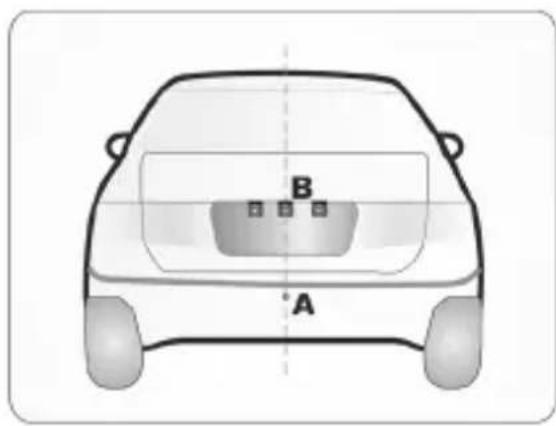
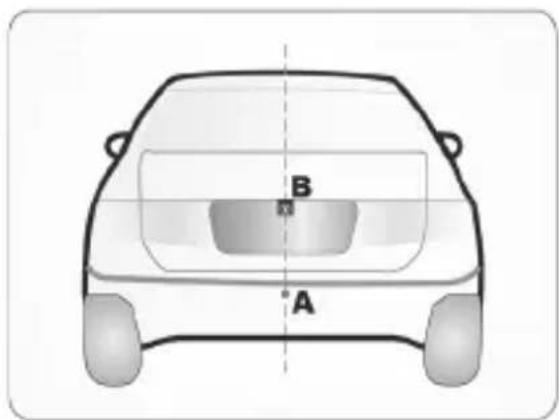
Universal type installation location
the hole saw used is with equal diameter to that of camera.
2. Adjust the camera
to turn the UP arrow mark straight upwards.
through the hole made on bumper before xing the camera.
4. Put the camera into
the hole and use your two thumbs to press it evenly for tight and at mounting. Special type installation location A. Installation Guide For Flush-Mount Camera Equal DiameterINSTALLATION
1. Choose a at position
near license plate light and make a small hole for the rst screw with a drill.
3. Get the power/video
cables connected, and then adjust the camera properly to nd the best position for the other screw according to the camera image in monitor.
2. Use a screw driver to
x the rst screw (but not tightly).
4. Mark the position
found for second screw and make a hole with a drill.
5. Fix the second screw
with a screw driver. B. Installation Guide For Bracket-Mount Camera Remarks: Beside ush and bracket mount cameras, we also have bolt mount camera series, which is mounted by following steps:
1. Select suitable at position near the license plate light and mark it.
2. Drill a hole according to the bolt diameter.
3. Put the bolt vertically (against ground) into the hole and x the bolt with the
screw supplied from inside.
4. Some models come with up/down image switch option, and can be mounted
with its bolt horizontal (against ground) and its lens downward.PARAMETERS WIRING DIAGRAM
Video signal CVBS Current Consumption <40mA Signal NTSC Power <0.35W Eective Pixels 688X528 Waterproof Grade IP67 Voltage DC12V Operating temperature range -20 °C ~ +65 °C Min Illumination 0.1 Lux Storage temperature range -30 °C ~ +80 °C Optional accessories VK-RVC 4.X (10 meter RCA extension cable); SF-RVC 4.X (signal lter) Other Rear view with parking line, formal/ mirror switch, parking line swich, dual-coil control dual functions Watch the arrows when plugging EEqquuaall DDiiaammeetteerr UUPP UUPP B. Installation Guide For Bracket-Mount Camera Blue loop: Cut to switch to front view Purple or white loop: Cut to turn off parking line Switch Loop Instructions: Wiring Diagram Remarks: Beside flush and bracket mount cameras, we also have bolt mount camera series, which is mounted by following steps:
1. Select suitable flat position near the license plate light and mark it.
2. Drill a hole according to the bolt diameter.
3. Put the bolt vertically (against ground) into the hole and fix the bolt
with the screw supplied from inside.
4. Some models come with up/down image switch option, and can be
mounted with its bolt horizontal (against ground) and its lens downward. 1.Choose a flat position near license plate light and make a small hole for the first screw with a drill.
2. Use a screw driver to fix the first
screw (but not tightly).
3. Get the power/video cables connected,
and then adjust the camera properly to find the best position for the other screw according to the camera image in monitor.
4. Mark the position found for second
screw and make a hole with a drill.
5. Fix the second screw with a
screw driver. A. Installation Guide For Flush-Mount Camera
1.Check to be sure the hole saw used is with equal diameter to that of camera.
2. Adjust the camera to turn the
UP arrow mark straight upwards.
3. Put the harness through the
hole made on bumper before fixing the camera.
4. Put the camera into the hole and
use your two thumbs to press it evenly for tight and flat mounting.
Special type installation locationUniversal type installation location Parameters Current Consumption Power Waterproof Grade Operating temperature range Other Optional accessories -20℃ ~ +65℃ VK-RVC 4.X (10 meter RCA extension cable); SF-RVC 4.X (signal filter) Rear view with parking line, formal/ mirror switch, parking line swich, dual-coil control dual functions Video signal Signal Effective Pixels Voltage Min Illumination CVBS NTSC DC12V
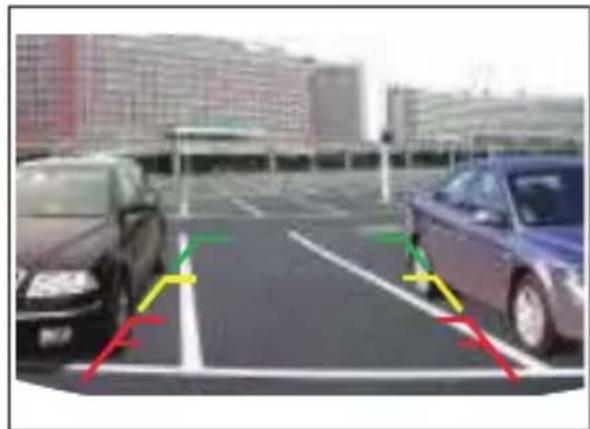
688X528 <40mA IP67 Storage temperature range -30℃ ~ +80℃ <0.35W Camera to RCA video input of Monitor Power adaptor Red wire to Reverse Lamp (+12V) Black wire to Ground The wiring diagram applies to most (but not all) camera models, and when making the connections, please also refer to the labels or marks on the wires. LCD Monitor to Ground to reverse light CameraOPTIONSParking Guide Line: Available on partial models, refer to image above. Option can be realized by following Switch Loop Instructions.Mirror/right image switch: Available on partial models. Option can be realized by following Switch Loop Instructions.Up/down image switch: Available on partial bolt mount type models. Option can be realized by following Switch Loop Instructions.Switch Loop Instructions:Blue loop: Cut to switch to front viewPurple or white loop: Cut to turn o parking lineCamera Image w/o parking guide line Camera image with parking guide line EEqquuaall DDiiaammeetteerr UUPP UUPP B. Installation Guide For Bracket-Mount Camera Blue loop: Cut to switch to front view Purple or white loop: Cut to turn off parking line Switch Loop Instructions: Wiring Diagram Remarks: Beside flush and bracket mount cameras, we also have bolt mount camera series, which is mounted by following steps:
1. Select suitable flat position near the license plate light and mark it.
2. Drill a hole according to the bolt diameter.
3. Put the bolt vertically (against ground) into the hole and fix the bolt
with the screw supplied from inside.
4. Some models come with up/down image switch option, and can be
mounted with its bolt horizontal (against ground) and its lens downward. 1.Choose a flat position near license plate light and make a small hole for the first screw with a drill.
2. Use a screw driver to fix the first
screw (but not tightly).
3. Get the power/video cables connected,
and then adjust the camera properly to find the best position for the other screw according to the camera image in monitor.
4. Mark the position found for second
screw and make a hole with a drill.
5. Fix the second screw with a
screw driver. A. Installation Guide For Flush-Mount Camera
1.Check to be sure the hole saw used is with equal diameter to that of camera.
2. Adjust the camera to turn the
UP arrow mark straight upwards.
3. Put the harness through the
hole made on bumper before fixing the camera.
4. Put the camera into the hole and
use your two thumbs to press it evenly for tight and flat mounting.
Special type installation locationUniversal type installation location Parameters Current Consumption Power Waterproof Grade Operating temperature range Other Optional accessories -20℃ ~ +65℃ VK-RVC 4.X (10 meter RCA extension cable); SF-RVC 4.X (signal filter) Rear view with parking line, formal/ mirror switch, parking line swich, dual-coil control dual functions Video signal Signal Effective Pixels Voltage Min Illumination CVBS NTSC DC12V
688X528 <40mA IP67 Storage temperature range -30℃ ~ +80℃ <0.35W Cameraswitch loop EEqquuaall DDiiaammeetteerr UUPP UUPP B. Installation Guide For Bracket-Mount Camera Blue loop: Cut to switch to front view Purple or white loop: Cut to turn off parking line Switch Loop Instructions: Wiring Diagram Remarks: Beside flush and bracket mount cameras, we also have bolt mount camera series, which is mounted by following steps:
1. Select suitable flat position near the license plate light and mark it.
2. Drill a hole according to the bolt diameter.
3. Put the bolt vertically (against ground) into the hole and fix the bolt
with the screw supplied from inside.
4. Some models come with up/down image switch option, and can be
mounted with its bolt horizontal (against ground) and its lens downward. 1.Choose a flat position near license plate light and make a small hole for the first screw with a drill.
2. Use a screw driver to fix the first
screw (but not tightly).
3. Get the power/video cables connected,
and then adjust the camera properly to find the best position for the other screw according to the camera image in monitor.
4. Mark the position found for second
screw and make a hole with a drill.
5. Fix the second screw with a
screw driver. A. Installation Guide For Flush-Mount Camera
1.Check to be sure the hole saw used is with equal diameter to that of camera.
2. Adjust the camera to turn the
UP arrow mark straight upwards.
3. Put the harness through the
hole made on bumper before fixing the camera.
4. Put the camera into the hole and
use your two thumbs to press it evenly for tight and flat mounting.
Special type installation locationUniversal type installation location Parameters Current Consumption Power Waterproof Grade Operating temperature range Other Optional accessories -20℃ ~ +65℃ VK-RVC 4.X (10 meter RCA extension cable); SF-RVC 4.X (signal filter) Rear view with parking line, formal/ mirror switch, parking line swich, dual-coil control dual functions Video signal Signal Effective Pixels Voltage Min Illumination CVBS NTSC DC12V
688X528 <40mA IP67 Storage temperature range -30℃ ~ +80℃ <0.35W1. Some of the functions described in the instructions may be model-specic and may not be supported by every model.
2. Do not modify or tamper with the device. There are no user-serviceable parts
3. Observe the performance limits of the device. Have repairs and, if necessary,
installation done by a professional.
4. Install the device only if you have needed experience installing such devices
and are familiar with the vehicle’s electrical system. Observe the information marked on the unit connections.
5. Ensure that all wires transfer the correct signals or voltages.
6. The installation of the radio must not interfere with or prevent the activation
of airbags and other safety devices and/or controls.
7. Disconnect the vehicle battery (negative terminal, ground) before installing
the device, as doing otherwise may cause malfunctions or damage to the device or the vehicle electronics. Observe the vehicle manufacturer’s safety instructions (airbag, alarm system, on-board computer, immobiliser, etc.).
8. The rear (front) view camera functions technically as a driver assistance
device, which cannot be taken as substitute for driver’s responsibility when operating the vehicle.
9. To keep the camera/monitor working properly, please clean the camera/
monitor regularly to free it from dirt, water drops, snowdrops etc.
10. Although the camera is designed to be waterproof, please do NOT use
high-pressure water jet to wash the camera as this may break the glass lens.
11. Keep the cables of the camera/monitor away from high temperature objects
such as engine or exhaust.
12. If the camera model you have comes without in-built LED lights, please turn
on your license plate light for better vision at night or in dark areas.
13. The camera/monitor are applicable to vehicles with DC 12V power output
(10 % higher or lower allowed), please do NOT use the 5.1 model on vehicles with DC 24V or other power output out of this range, otherwise it is very likely to get burned.
14. The specications of the camera/monitor are subject to change without
1. Select suitable flat position near the license plate light and mark it.
2. Drill a hole according to the bolt diameter.
3. Put the bolt vertically (against ground) into the hole and fix the bolt
with the screw supplied from inside.
4. Some models come with up/down image switch option, and can be
mounted with its bolt horizontal (against ground) and its lens downward. 1.Choose a flat position near license plate light and make a small hole for the first screw with a drill.
2. Use a screw driver to fix the first
screw (but not tightly).
3. Get the power/video cables connected,
and then adjust the camera properly to find the best position for the other screw according to the camera image in monitor.
4. Mark the position found for second
screw and make a hole with a drill.
5. Fix the second screw with a
screw driver. A. Installation Guide For Flush-Mount Camera
1.Check to be sure the hole saw used is with equal diameter to that of camera.
2. Adjust the camera to turn the
UP arrow mark straight upwards.
3. Put the harness through the
hole made on bumper before fixing the camera.
4. Put the camera into the hole and
use your two thumbs to press it evenly for tight and flat mounting.
Special type installation locationUniversal type installation location Parameters Current Consumption Power Waterproof Grade Operating temperature range Other Optional accessories -20℃ ~ +65℃ VK-RVC 4.X (10 meter RCA extension cable); SF-RVC 4.X (signal filter) Rear view with parking line, formal/ mirror switch, parking line swich, dual-coil control dual functions Video signal Signal Effective Pixels Voltage Min Illumination CVBS NTSC DC12V
1. Select suitable flat position near the license plate light and mark it.
2. Drill a hole according to the bolt diameter.
3. Put the bolt vertically (against ground) into the hole and fix the bolt
with the screw supplied from inside.
4. Some models come with up/down image switch option, and can be
mounted with its bolt horizontal (against ground) and its lens downward. 1.Choose a flat position near license plate light and make a small hole for the first screw with a drill.
2. Use a screw driver to fix the first
screw (but not tightly).
3. Get the power/video cables connected,
and then adjust the camera properly to find the best position for the other screw according to the camera image in monitor.
4. Mark the position found for second
screw and make a hole with a drill.
5. Fix the second screw with a
screw driver. A. Installation Guide For Flush-Mount Camera
1.Check to be sure the hole saw used is with equal diameter to that of camera.
2. Adjust the camera to turn the
UP arrow mark straight upwards.
3. Put the harness through the
hole made on bumper before fixing the camera.
4. Put the camera into the hole and
use your two thumbs to press it evenly for tight and flat mounting.
Special type installation locationUniversal type installation location Parameters Current Consumption Power Waterproof Grade Operating temperature range Other Optional accessories -20℃ ~ +65℃ VK-RVC 4.X (10 meter RCA extension cable); SF-RVC 4.X (signal filter) Rear view with parking line, formal/ mirror switch, parking line swich, dual-coil control dual functions Video signal Signal Effective Pixels Voltage Min Illumination CVBS NTSC DC12V
688X528 <40mA IP67 Storage temperature range -30℃ ~ +80℃ <0.35W Kamerapętla łączeniowa EEqquuaall DDiiaammeetteerr UUPP UUPP B. Installation Guide For Bracket-Mount Camera Blue loop: Cut to switch to front view Purple or white loop: Cut to turn off parking line Switch Loop Instructions: Wiring Diagram Remarks: Beside flush and bracket mount cameras, we also have bolt mount camera series, which is mounted by following steps:
1. Select suitable flat position near the license plate light and mark it.
2. Drill a hole according to the bolt diameter.
3. Put the bolt vertically (against ground) into the hole and fix the bolt
with the screw supplied from inside.
4. Some models come with up/down image switch option, and can be
mounted with its bolt horizontal (against ground) and its lens downward. 1.Choose a flat position near license plate light and make a small hole for the first screw with a drill.
2. Use a screw driver to fix the first
screw (but not tightly).
3. Get the power/video cables connected,
and then adjust the camera properly to find the best position for the other screw according to the camera image in monitor.
4. Mark the position found for second
screw and make a hole with a drill.
5. Fix the second screw with a
screw driver. A. Installation Guide For Flush-Mount Camera
1.Check to be sure the hole saw used is with equal diameter to that of camera.
2. Adjust the camera to turn the
UP arrow mark straight upwards.
3. Put the harness through the
hole made on bumper before fixing the camera.
4. Put the camera into the hole and
use your two thumbs to press it evenly for tight and flat mounting.
Special type installation locationUniversal type installation location Parameters Current Consumption Power Waterproof Grade Operating temperature range Other Optional accessories -20℃ ~ +65℃ VK-RVC 4.X (10 meter RCA extension cable); SF-RVC 4.X (signal filter) Rear view with parking line, formal/ mirror switch, parking line swich, dual-coil control dual functions Video signal Signal Effective Pixels Voltage Min Illumination CVBS NTSC DC12V
1. Select suitable flat position near the license plate light and mark it.
2. Drill a hole according to the bolt diameter.
3. Put the bolt vertically (against ground) into the hole and fix the bolt
with the screw supplied from inside.
4. Some models come with up/down image switch option, and can be
mounted with its bolt horizontal (against ground) and its lens downward. 1.Choose a flat position near license plate light and make a small hole for the first screw with a drill.
2. Use a screw driver to fix the first
screw (but not tightly).
3. Get the power/video cables connected,
and then adjust the camera properly to find the best position for the other screw according to the camera image in monitor.
4. Mark the position found for second
screw and make a hole with a drill.
5. Fix the second screw with a
screw driver. A. Installation Guide For Flush-Mount Camera
1.Check to be sure the hole saw used is with equal diameter to that of camera.
2. Adjust the camera to turn the
UP arrow mark straight upwards.
3. Put the harness through the
hole made on bumper before fixing the camera.
4. Put the camera into the hole and
use your two thumbs to press it evenly for tight and flat mounting.
Special type installation locationUniversal type installation location Parameters Current Consumption Power Waterproof Grade Operating temperature range Other Optional accessories -20℃ ~ +65℃ VK-RVC 4.X (10 meter RCA extension cable); SF-RVC 4.X (signal filter) Rear view with parking line, formal/ mirror switch, parking line swich, dual-coil control dual functions Video signal Signal Effective Pixels Voltage Min Illumination CVBS NTSC DC12V
1. Select suitable flat position near the license plate light and mark it.
2. Drill a hole according to the bolt diameter.
3. Put the bolt vertically (against ground) into the hole and fix the bolt
with the screw supplied from inside.
4. Some models come with up/down image switch option, and can be
mounted with its bolt horizontal (against ground) and its lens downward. 1.Choose a flat position near license plate light and make a small hole for the first screw with a drill.
2. Use a screw driver to fix the first
screw (but not tightly).
3. Get the power/video cables connected,
and then adjust the camera properly to find the best position for the other screw according to the camera image in monitor.
4. Mark the position found for second
screw and make a hole with a drill.
5. Fix the second screw with a
screw driver. A. Installation Guide For Flush-Mount Camera
1.Check to be sure the hole saw used is with equal diameter to that of camera.
2. Adjust the camera to turn the
UP arrow mark straight upwards.
3. Put the harness through the
hole made on bumper before fixing the camera.
4. Put the camera into the hole and
use your two thumbs to press it evenly for tight and flat mounting.
Special type installation locationUniversal type installation location Parameters Current Consumption Power Waterproof Grade Operating temperature range Other Optional accessories -20℃ ~ +65℃ VK-RVC 4.X (10 meter RCA extension cable); SF-RVC 4.X (signal filter) Rear view with parking line, formal/ mirror switch, parking line swich, dual-coil control dual functions Video signal Signal Effective Pixels Voltage Min Illumination CVBS NTSC DC12V
688X528 <40mA IP67 Storage temperature range -30℃ ~ +80℃ <0.35W Caméraboucle de connexion EEqquuaall DDiiaammeetteerr UUPP UUPP B. Installation Guide For Bracket-Mount Camera Blue loop: Cut to switch to front view Purple or white loop: Cut to turn off parking line Switch Loop Instructions: Wiring Diagram Remarks: Beside flush and bracket mount cameras, we also have bolt mount camera series, which is mounted by following steps:
1. Select suitable flat position near the license plate light and mark it.
2. Drill a hole according to the bolt diameter.
3. Put the bolt vertically (against ground) into the hole and fix the bolt
with the screw supplied from inside.
4. Some models come with up/down image switch option, and can be
mounted with its bolt horizontal (against ground) and its lens downward. 1.Choose a flat position near license plate light and make a small hole for the first screw with a drill.
2. Use a screw driver to fix the first
screw (but not tightly).
3. Get the power/video cables connected,
and then adjust the camera properly to find the best position for the other screw according to the camera image in monitor.
4. Mark the position found for second
screw and make a hole with a drill.
5. Fix the second screw with a
screw driver. A. Installation Guide For Flush-Mount Camera
1.Check to be sure the hole saw used is with equal diameter to that of camera.
2. Adjust the camera to turn the
UP arrow mark straight upwards.
3. Put the harness through the
hole made on bumper before fixing the camera.
4. Put the camera into the hole and
use your two thumbs to press it evenly for tight and flat mounting.
Special type installation locationUniversal type installation location Parameters Current Consumption Power Waterproof Grade Operating temperature range Other Optional accessories -20℃ ~ +65℃ VK-RVC 4.X (10 meter RCA extension cable); SF-RVC 4.X (signal filter) Rear view with parking line, formal/ mirror switch, parking line swich, dual-coil control dual functions Video signal Signal Effective Pixels Voltage Min Illumination CVBS NTSC DC12V
1. Select suitable flat position near the license plate light and mark it.
2. Drill a hole according to the bolt diameter.
3. Put the bolt vertically (against ground) into the hole and fix the bolt
with the screw supplied from inside.
4. Some models come with up/down image switch option, and can be
mounted with its bolt horizontal (against ground) and its lens downward. 1.Choose a flat position near license plate light and make a small hole for the first screw with a drill.
2. Use a screw driver to fix the first
screw (but not tightly).
3. Get the power/video cables connected,
and then adjust the camera properly to find the best position for the other screw according to the camera image in monitor.
4. Mark the position found for second
screw and make a hole with a drill.
5. Fix the second screw with a
screw driver. A. Installation Guide For Flush-Mount Camera
1.Check to be sure the hole saw used is with equal diameter to that of camera.
2. Adjust the camera to turn the
UP arrow mark straight upwards.
3. Put the harness through the
hole made on bumper before fixing the camera.
4. Put the camera into the hole and
use your two thumbs to press it evenly for tight and flat mounting.
Special type installation locationUniversal type installation location Parameters Current Consumption Power Waterproof Grade Operating temperature range Other Optional accessories -20℃ ~ +65℃ VK-RVC 4.X (10 meter RCA extension cable); SF-RVC 4.X (signal filter) Rear view with parking line, formal/ mirror switch, parking line swich, dual-coil control dual functions Video signal Signal Effective Pixels Voltage Min Illumination CVBS NTSC DC12V
1. Select suitable flat position near the license plate light and mark it.
2. Drill a hole according to the bolt diameter.
3. Put the bolt vertically (against ground) into the hole and fix the bolt
with the screw supplied from inside.
4. Some models come with up/down image switch option, and can be
mounted with its bolt horizontal (against ground) and its lens downward. 1.Choose a flat position near license plate light and make a small hole for the first screw with a drill.
2. Use a screw driver to fix the first
screw (but not tightly).
3. Get the power/video cables connected,
and then adjust the camera properly to find the best position for the other screw according to the camera image in monitor.
4. Mark the position found for second
screw and make a hole with a drill.
5. Fix the second screw with a
screw driver. A. Installation Guide For Flush-Mount Camera
1.Check to be sure the hole saw used is with equal diameter to that of camera.
2. Adjust the camera to turn the
UP arrow mark straight upwards.
3. Put the harness through the
hole made on bumper before fixing the camera.
4. Put the camera into the hole and
use your two thumbs to press it evenly for tight and flat mounting.
Special type installation locationUniversal type installation location Parameters Current Consumption Power Waterproof Grade Operating temperature range Other Optional accessories -20℃ ~ +65℃ VK-RVC 4.X (10 meter RCA extension cable); SF-RVC 4.X (signal filter) Rear view with parking line, formal/ mirror switch, parking line swich, dual-coil control dual functions Video signal Signal Effective Pixels Voltage Min Illumination CVBS NTSC DC12V
688X528 <40mA IP67 Storage temperature range -30℃ ~ +80℃ <0.35W Cámarabucle de conexión EEqquuaall DDiiaammeetteerr UUPP UUPP B. Installation Guide For Bracket-Mount Camera Blue loop: Cut to switch to front view Purple or white loop: Cut to turn off parking line Switch Loop Instructions: Wiring Diagram Remarks: Beside flush and bracket mount cameras, we also have bolt mount camera series, which is mounted by following steps:
1. Select suitable flat position near the license plate light and mark it.
2. Drill a hole according to the bolt diameter.
3. Put the bolt vertically (against ground) into the hole and fix the bolt
with the screw supplied from inside.
4. Some models come with up/down image switch option, and can be
mounted with its bolt horizontal (against ground) and its lens downward. 1.Choose a flat position near license plate light and make a small hole for the first screw with a drill.
2. Use a screw driver to fix the first
screw (but not tightly).
3. Get the power/video cables connected,
and then adjust the camera properly to find the best position for the other screw according to the camera image in monitor.
4. Mark the position found for second
screw and make a hole with a drill.
5. Fix the second screw with a
screw driver. A. Installation Guide For Flush-Mount Camera
1.Check to be sure the hole saw used is with equal diameter to that of camera.
2. Adjust the camera to turn the
UP arrow mark straight upwards.
3. Put the harness through the
hole made on bumper before fixing the camera.
4. Put the camera into the hole and
use your two thumbs to press it evenly for tight and flat mounting.
Special type installation locationUniversal type installation location Parameters Current Consumption Power Waterproof Grade Operating temperature range Other Optional accessories -20℃ ~ +65℃ VK-RVC 4.X (10 meter RCA extension cable); SF-RVC 4.X (signal filter) Rear view with parking line, formal/ mirror switch, parking line swich, dual-coil control dual functions Video signal Signal Effective Pixels Voltage Min Illumination CVBS NTSC DC12V
1. Select suitable flat position near the license plate light and mark it.
2. Drill a hole according to the bolt diameter.
3. Put the bolt vertically (against ground) into the hole and fix the bolt
with the screw supplied from inside.
4. Some models come with up/down image switch option, and can be
mounted with its bolt horizontal (against ground) and its lens downward. 1.Choose a flat position near license plate light and make a small hole for the first screw with a drill.
2. Use a screw driver to fix the first
screw (but not tightly).
3. Get the power/video cables connected,
and then adjust the camera properly to find the best position for the other screw according to the camera image in monitor.
4. Mark the position found for second
screw and make a hole with a drill.
5. Fix the second screw with a
screw driver. A. Installation Guide For Flush-Mount Camera
1.Check to be sure the hole saw used is with equal diameter to that of camera.
2. Adjust the camera to turn the
UP arrow mark straight upwards.
3. Put the harness through the
hole made on bumper before fixing the camera.
4. Put the camera into the hole and
use your two thumbs to press it evenly for tight and flat mounting.
Special type installation locationUniversal type installation location Parameters Current Consumption Power Waterproof Grade Operating temperature range Other Optional accessories -20℃ ~ +65℃ VK-RVC 4.X (10 meter RCA extension cable); SF-RVC 4.X (signal filter) Rear view with parking line, formal/ mirror switch, parking line swich, dual-coil control dual functions Video signal Signal Effective Pixels Voltage Min Illumination CVBS NTSC DC12V
1. Select suitable flat position near the license plate light and mark it.
2. Drill a hole according to the bolt diameter.
3. Put the bolt vertically (against ground) into the hole and fix the bolt
with the screw supplied from inside.
4. Some models come with up/down image switch option, and can be
mounted with its bolt horizontal (against ground) and its lens downward. 1.Choose a flat position near license plate light and make a small hole for the first screw with a drill.
2. Use a screw driver to fix the first
screw (but not tightly).
3. Get the power/video cables connected,
and then adjust the camera properly to find the best position for the other screw according to the camera image in monitor.
4. Mark the position found for second
screw and make a hole with a drill.
5. Fix the second screw with a
screw driver. A. Installation Guide For Flush-Mount Camera
1.Check to be sure the hole saw used is with equal diameter to that of camera.
2. Adjust the camera to turn the
UP arrow mark straight upwards.
3. Put the harness through the
hole made on bumper before fixing the camera.
4. Put the camera into the hole and
use your two thumbs to press it evenly for tight and flat mounting.
Special type installation locationUniversal type installation location Parameters Current Consumption Power Waterproof Grade Operating temperature range Other Optional accessories -20℃ ~ +65℃ VK-RVC 4.X (10 meter RCA extension cable); SF-RVC 4.X (signal filter) Rear view with parking line, formal/ mirror switch, parking line swich, dual-coil control dual functions Video signal Signal Effective Pixels Voltage Min Illumination CVBS NTSC DC12V
688X528 <40mA IP67 Storage temperature range -30℃ ~ +80℃ <0.35W Videocameranodo di collegamento EEqquuaall DDiiaammeetteerr UUPP UUPP B. Installation Guide For Bracket-Mount Camera Blue loop: Cut to switch to front view Purple or white loop: Cut to turn off parking line Switch Loop Instructions: Wiring Diagram Remarks: Beside flush and bracket mount cameras, we also have bolt mount camera series, which is mounted by following steps:
1. Select suitable flat position near the license plate light and mark it.
2. Drill a hole according to the bolt diameter.
3. Put the bolt vertically (against ground) into the hole and fix the bolt
with the screw supplied from inside.
4. Some models come with up/down image switch option, and can be
mounted with its bolt horizontal (against ground) and its lens downward. 1.Choose a flat position near license plate light and make a small hole for the first screw with a drill.
2. Use a screw driver to fix the first
screw (but not tightly).
3. Get the power/video cables connected,
and then adjust the camera properly to find the best position for the other screw according to the camera image in monitor.
4. Mark the position found for second
screw and make a hole with a drill.
5. Fix the second screw with a
screw driver. A. Installation Guide For Flush-Mount Camera
1.Check to be sure the hole saw used is with equal diameter to that of camera.
2. Adjust the camera to turn the
UP arrow mark straight upwards.
3. Put the harness through the
hole made on bumper before fixing the camera.
4. Put the camera into the hole and
use your two thumbs to press it evenly for tight and flat mounting.
Special type installation locationUniversal type installation location Parameters Current Consumption Power Waterproof Grade Operating temperature range Other Optional accessories -20℃ ~ +65℃ VK-RVC 4.X (10 meter RCA extension cable); SF-RVC 4.X (signal filter) Rear view with parking line, formal/ mirror switch, parking line swich, dual-coil control dual functions Video signal Signal Effective Pixels Voltage Min Illumination CVBS NTSC DC12V
EasyManual