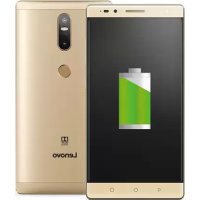
PHAB2 Plus - Smartphone LENOVO - Free user manual and instructions
Find the device manual for free PHAB2 Plus LENOVO in PDF.


| Product Type | Smartphone |
| Brand | Lenovo |
| Model | PHAB2 Plus (PB2-670M) |
| Dimensions | 173.5 x 88.5 x 9.6 mm |
| Weight | Approximately 218 g |
| Power | Built-in rechargeable lithium-ion battery, charging via micro-USB cable and supplied power adapter |
| Display | 6.4-inch touchscreen |
| Main functions | Dual SIM (micro-SIM + nano-SIM), fingerprint reader, rear camera with laser focus, Dolby Atmos speaker, brightness/proximity sensor, multiple microphones |
| Expandable storage | microSD card up to 128 GB (FAT32 format) |
| Connectors | micro-USB connector, 3.5 mm headphone jack |
| Network | WLAN + LTE (Voice) |
| Maintenance and cleaning | Clean with a soft, dry cloth; avoid abrasive products or solvents; do not expose to moisture |
| Safety | Built-in non-removable battery; use at moderate volume to protect hearing; avoid contact with water and heat sources |
| Spare parts and repairability | Battery not user-replaceable; for any repair, contact Lenovo support or an authorized center |
| General information | Lenovo limited warranty (duration varies by country), CE and R&TTE compliance, recycling via WEEE channels |
Frequently Asked Questions - PHAB2 Plus LENOVO
User questions about PHAB2 Plus LENOVO
0 question about this device. Answer the ones you know or ask your own.
Ask a new question about this device
Download the instructions for your Smartphone in PDF format for free! Find your manual PHAB2 Plus - LENOVO and take your electronic device back in hand. On this page are published all the documents necessary for the use of your device. PHAB2 Plus by LENOVO.
USER MANUAL PHAB2 Plus LENOVO
Safety, Warranty & Quick Start Guide Lenovo PB2-670M
Contents
English 1
Deutsch. 12
Français. 16
Italiano 28
Portugues. 39
Nederlands. 50
Dansk. 61
Svenska 65
Norsk bokmål 69
Suomi. 73
Espanol 84
Eesti 95
Latviešu 107
Lietuviu 119
Islenska. 131
English
Read this guide carefully before using your device.
Reading first - regulatory information
Be sure to read the Regulatory Notice for your country or region before using the wireless devices contained in your device. To obtain a PDF version of the Regulatory Notice, refer to the "Downloading publications" section below.
Getting support
To get support on network service and billing, contact your wireless network operator. To learn how to use your device and view its technical specifications, go to http://support.lenovo.com.
Downloading publications
Electronic versions of your publications are available from http://support.lenovo.com. To download the publications for your device, go to http://support.lenovo.com and follow the instructions on the screen.
Accessing your User Guide
Your User Guide contains detailed information about your device. To access your User Guide, go to http://support.lenovo.com and follow the instructions on the screen.
Legal notices
Lenovo and the Lenovo logo are trademarks of Lenovo in the United States, other countries, or both.
Other company, product, or service names may be trademarks or service marks of others.
Manufactured under license from Dolby Laboratories. Dolby, Dolby Atmos, and the double-D symbol are trademarks of Dolby Laboratories.
LIMITED AND RESTRICTED RIGHTS NOTICE: If data or software is delivered pursuant to a General Services Administration "GSA" contract, use, reproduction, or disclosure is subject to restrictions set forth in Contract No. GS-35F-05925.
Lenovo PHAB2 Plus overview
| Model Version | |
| WLAN + LTE (Voice)Lenovo PB2-670M |
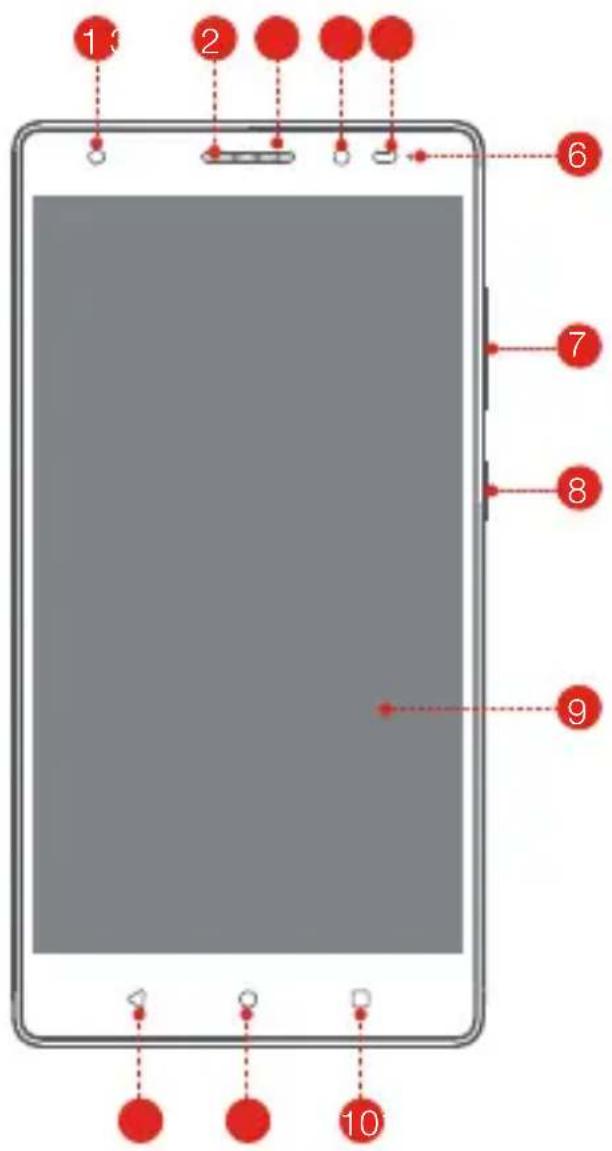
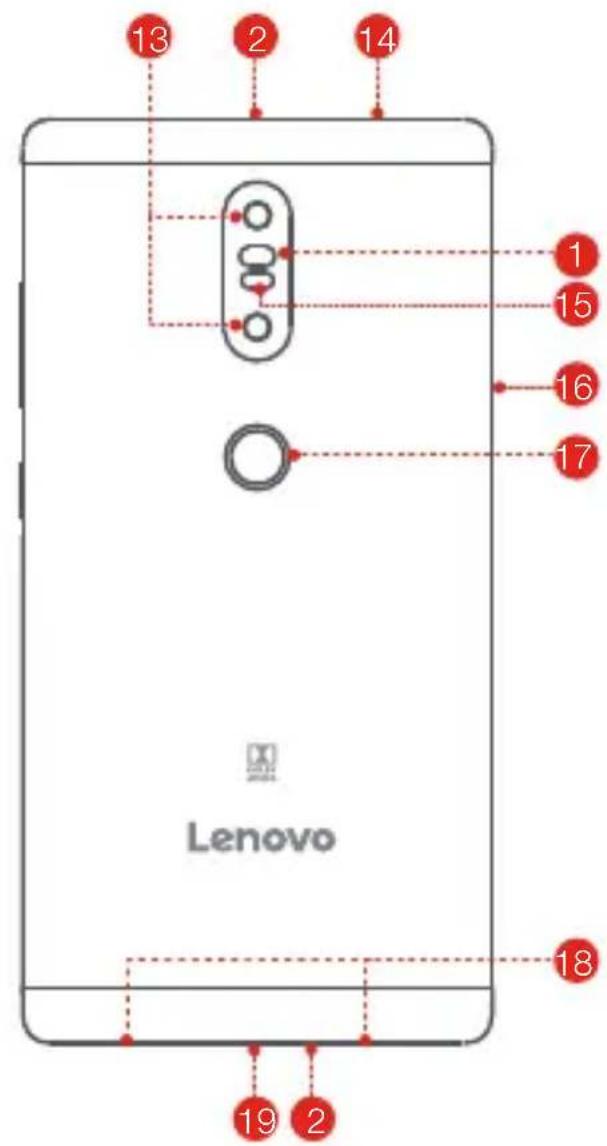
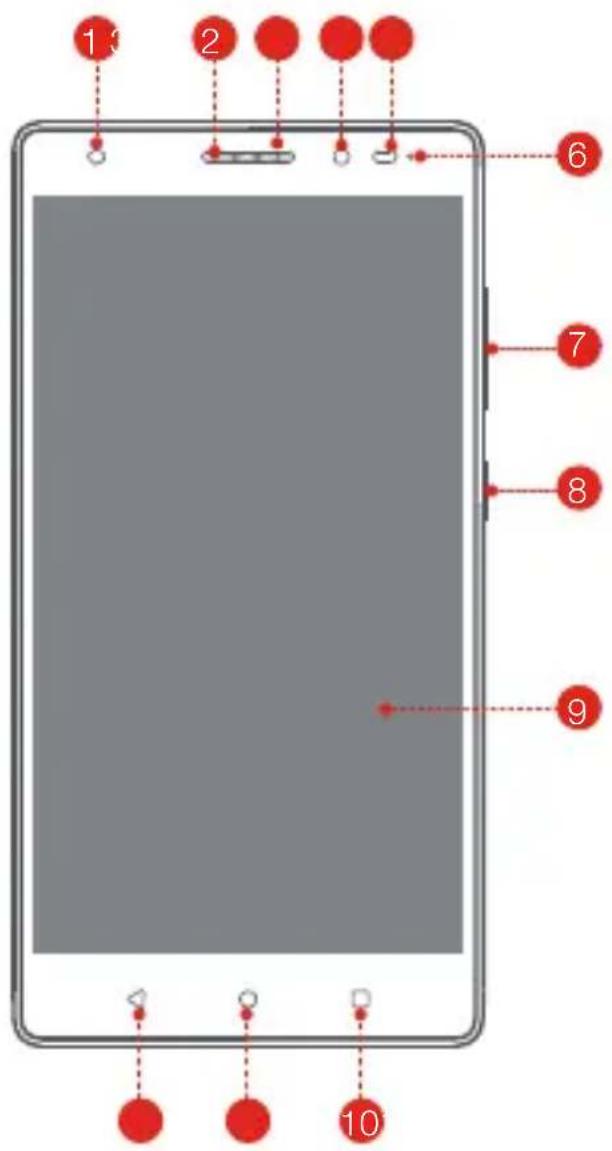
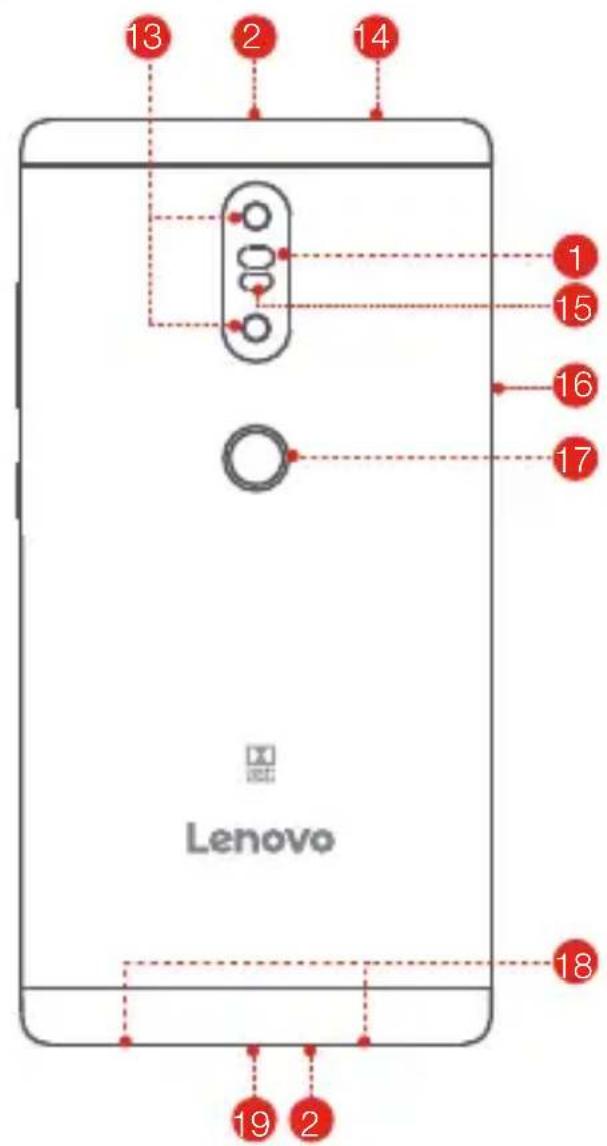
1 Flash
2 Microphones
3 Receiver
4 Front camera Light/Proximity sensor Indicator
6
Volume buttons
8 On/Off button
9 Touch screen
10 Multitask button Back buttonHome button
12
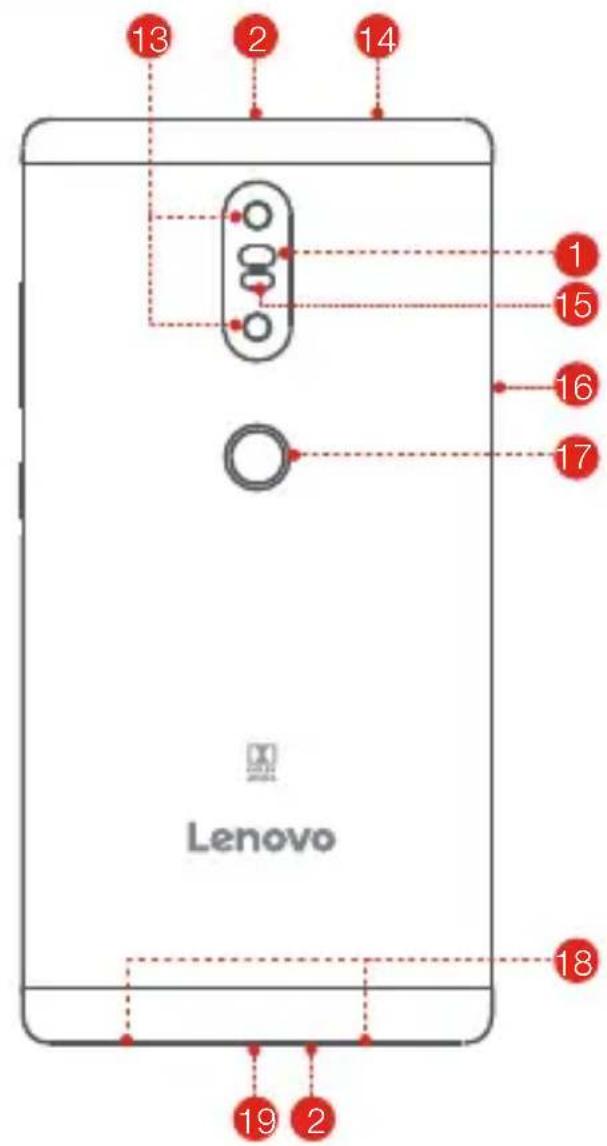
13 Rear camera
14
Laser focusHeadset jack
16 Card tray
Fingerprint sensor
18 Speaker
19 Micro USB connector
Preparing your device
You can use cellular services by inserting the Micro-SIM card or Nano-SIM card provided by your carrier.
Install the SIM cards and the microSD card as shown.
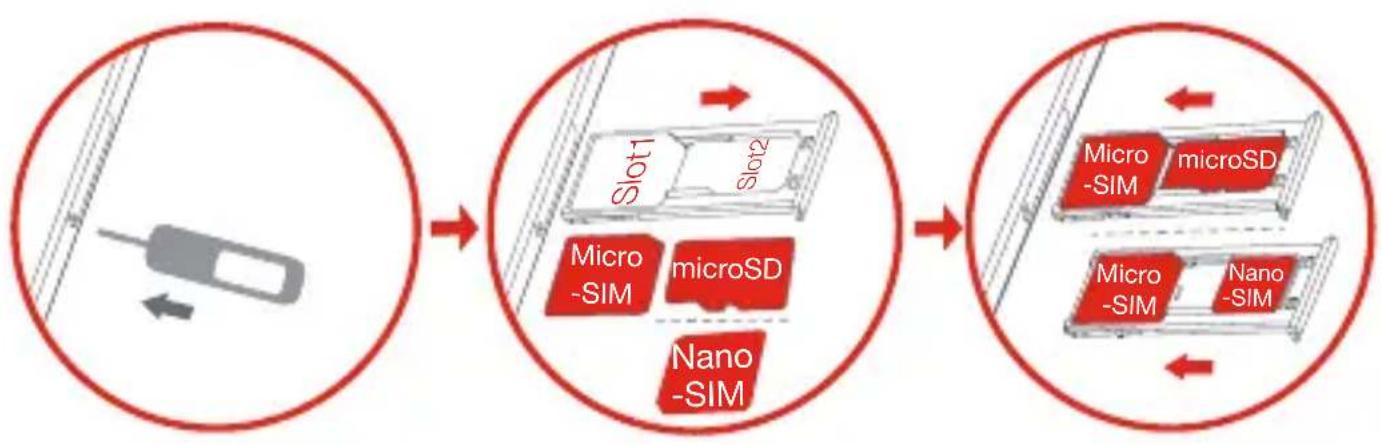
Step 1. Insert the eject tool that comes with your device into the hole in the card tray.
Step 2. Pull out the card tray and do one of the following:
- Insert a Micro-SIM card in Slot 1 and a microSD card in Slot 2:
- Insert a Micro-SIM card in Slot 1 and another Nano-SIM card in Slot 2.
Step 3. Carefully insert the tray with the installed cards back into the slot.
Micro-SIM and Nano-SIM cards work with your device.
- Only microSD cards formatted with FAT32 work with your device. You might need to format your microSD card before using by following the instructions on the screen.
Do not insert or remove the SIM card while your device is on. Doing so can permanently damage your SIM card or device.
Starting to use your device
You might need to charge the battery before using your device.
Charge the battery as shown.
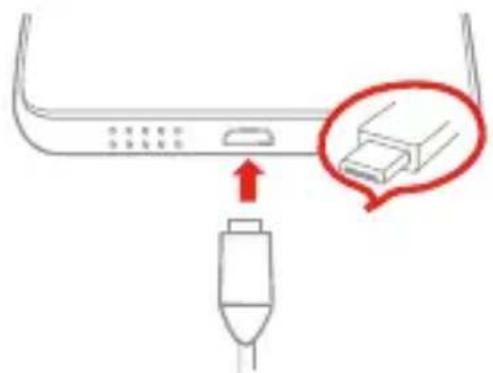
Connect your device to a power outlet using the cable and USB power adapter provided.

Low battery Fully charged


Charging
Turning on/off
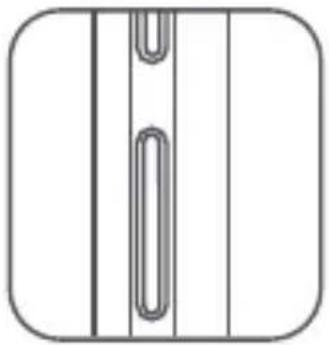
Turn on: Press and hold the On/Off button until the Lenovo logo appears.
Tum off: Press and hold the On/Off button for a few seconds, then tap Power off.
Restart: Press and hold the On/Off button for a few seconds, then tap Reboot.
Taking screenshots
Press and hold the On/Off button and the Volume down button at the same time.
Important safety and handling information
Plastic bag notice
Danger: Plastic bags can be dangerous. Keep plastic bags away from babies and children to avoid danger of suffocation.
Built-in rechargeable battery notice
Danger: Do not attempt to replace the internal rechargeable lithium ion battery. Risk of explosion if the battery is replaced with an incorrect type. Contact Lenovo Support for factory replacement.
Caution about high volume usage
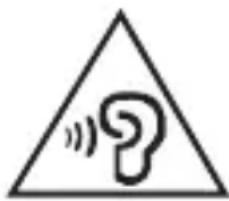
Warning: Exposure to loud noise from any source for extended periods of time may affect your hearing. The louder the sound, the less time is required before your hearing could be affected. To protect your hearing:
- Limit the amount of time you use headsets or headphones at high volume.
- Avoid turning up the volume to block out noisy surroundings.
- Turn the volume down if you can't hear people speaking near you.
If you experience hearing discomfort, including the sensation of pressure or fullness in your ears, ringing in your ears or muffled speech, you should stop listening to the device through your headset or headphones and have your hearing checked.
European Union compliance statement European Union conformity
EU contact: Lenovo, Einsteinova 21, 851 01 Bratislava, Slovakia
C€0560①
Compliance with the R&TTE Directive
This product is in compliance with the essential requirements and other relevant provisions of the EU Council Radio and Telecommunications Terminal Equipment (R&TTE) Directive, 1999/5/EC. The Declaration of Conformity information is located in the Regulatory Notices, which you can download from the Lenovo Support Web site. See "Downloading publications" in this document for additional information.
NOTE: R&TTE 1999/5/EC remains in force during the transition period of Radio Equipment Directive (RED) 2014/53/EU until 12 June, 2017. After then, RED 2014/53/EU will take the place of R&TTE 1999/5/EC.
EurAsia compliance mark
EAC
Service and support information
The following information describes the technical support that is available for your product, during the warranty period or throughout the life of your product. Refer to the Lenovo Limited Warranty (LLW) for a full explanation of Lenovo warranty terms. See "Lenovo Limited Warranty notice" later in this document for details on accessing the full warranty.
Online technical support
Online technical support is available during the lifetime of a product at:
http://www.lenovo.com/support
Telephone technical support
You can get help and information from the Customer Support Center by telephone.
Before contacting a Lenovo technical support representative, please have the following information available: model and serial number, the exact wording of any error message, and a description of the problem.
Your technical support representative might want to walk you through the problem while you are at your device during the call.
Worldwide Lenovo support telephone list
Important: Telephone numbers are subject to change without notice. The most up-to-date telephone list for the Customer Support Center is always available at: http://www.lenovo.com/support/phone
If the telephone number for your country or region is not listed, contact your Lenovo reseller or Lenovo marketing representative.
Warranty information
Lenovo Limited Warranty notice
This product is covered by the terms of the LLW, version L505-0010-02 08/2011. You can read the LLW at http://www.lenovo.com/warranty/lw_02. You can read the LLW in a number of languages from this Web site. If you cannot view the LLW from the Web site, contact your local Lenovo office or reseller to obtain a printed version of the LLW.
Warranty period and type of warranty service
| Country or region | Warranty period | Type of warranty service |
| Germany, Italy, Austria, United Kingdom, Israel, Australia, New Zealand | Parts and Labor - 1 year Battery Pack/Earphone - 1 year | 1,3 |
| Indonesia, Vietnam, India, Malaysia, Thailand, Philippines, Singapore, Hong Kong | Parts and Labor - 1 year Battery Pack/Earphone - 1 year | 1,4 |
| Russia, Ukraine, Egypt, Lebanon, Morocco, South Africa, Tunisia, Mauritius, Mozambique, United Arab Emirates, Jordan, Kenya, Nigeria, Uganda, Ghana, Oman,Tanzania, Namibia, Pakistan | Parts and Labor - 1 year Battery Pack/Earphone - 1 year | 4 |
| Japan 1,5 | Parts and Labor - 1 year Battery Pack/Earphone - 1 year | |
| Taiwan, South Korea 3,4 | Parts and Labor - 1 year Battery Pack/Earphone - 1 year | |
| Spain, Switzerland, Portugal, Netherlands, Belgium, Sweden, Denmark, Norway, Finland, Estonia, Latvia, Lithuania, Iceland, France | Parts and Labor - 2 years Battery Pack/Earphone - 1 year | 1,3 |
| Czech Republic, Hungary, Romania, Bulgaria, Greece, Croatia, Slovenia, Slovakia, Cyprus, Poland | Parts and Labor - 2 years Battery Pack/Earphone - 1 year | 1,5 |
| Turkey | Parts and Labor - 2 years Battery Pack/Earphone - 2 years | 3,4 |
| Saudi Arabia | Parts and Labor - 2 years Battery Pack/Earphone - 2 years | 4 |
| Serbia 1,4 | Parts and Labor - 2 years Battery Pack/Earphone - 1 year |
- Excludes some components. 90-day limited warranty for power adapters, keyboards, plastics and hinges.
Type of warranty service
- Customer Replaceable Unit ("CRU") Service
- On-site Service
- Courier or Depot Service
- Customer Carry-In Service
- Mail-in Service
- Customer Two-Way Mail-in Service
- Product Exchange Service
For a full explanation of the types of warranty service, refer to the full warranty. See "Lenovo Limited Warranty notice" for details on accessing the full warranty.
Environmental, recycling, and disposal information
General recycling statement
Lenovo encourages owners of information technology (IT) equipment to responsibly recycle their equipment when it is no longer needed. Lenovo offers a variety of programs and services to assist equipment owners in recycling their IT products. For information on recycling Lenovo products, go to http://www.lenovo.com/recycling.
Important battery and WEEE information
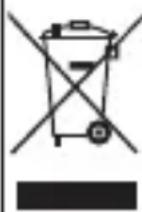
Batteries and electrical and electronic equipment marked with the symbol of a crossed-out wheeled bin may not be disposed as unsorted municipal waste. Batteries and waste of electrical and electronic equipment (WEEE) shall be treated separately using the collection framework available to customers for the return, recycling, and treatment of batteries and WEEE. When possible, remove and isolate batteries from WEEE prior to placing WEEE in the waste collection stream. Batteries are to be collected separately using the framework available for the return, recycling, and treatment of batteries and accumulators. Country-specific information is available at: http://www.lenovo.com/recycling
Recycling information for India
Recycling and disposal information for India is available at:
http://www.lenovo.com/social_responsibility/us/en/sustainability/ptb_india.html
Additional recycling statements
Additional information about recycling device components and batteries is in your User Guide. See "Accessing your User Guide" for details.
Battery recycling marks
Battery recycling information for Taiwan

廢電池請回收
Battery recycling information for the European Union
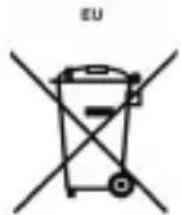
Batteries or packaging for batteries are labeled in accordance with European Directive 2006/66/EC concerning batteries and accumulators and waste batteries and accumulators. The Directive determines the framework for the return and recycling of used batteries and accumulators as applicable throughout the European Union. This label is applied to various batteries to indicate that the battery is not to be thrown away, but rather reclaimed upon end of life per this Directive.
In accordance with the European Directive 2006/66/EC, batteries and accumulators are labeled to indicate that they are to be collected separately and recycled at end of life. The label on the battery may also include a chemical symbol for the metal concerned in the battery (Pb for lead, Hg for mercury, and Cd for cadmium). Users of batteries and accumulators must not dispose of batteries and accumulators as unsorted municipal waste, but use the collection framework available to customers for the return, recycling, and treatment of batteries and accumulators. Customer participation is important to minimize any potential effects of batteries and accumulators on the environment and human health due to the potential presence of hazardous substances. For proper collection and treatment, go to: http://www.lenovo.com/recycling
Restriction of Hazardous Substances Directive (RoHS)
Turkey
The Lenovo product meets the requirements of the Republic of Turkey Directive on the Restriction of the Use of Certain Hazardous Substances in Waste Electrical and Electronic Equipment (WEEE).
RoHS compliant as per E-Waste (Management & Handling) Rules, 2011.
Vietnam
Lenovo products sold in Vietnam, on or after September 23, 2011, meet the requirements of the Vietnam Circular 30/2011/TT-BCT ("Vietnam RoHS").
European Union
Lenovo products sold in the European Union, on or after 3 January 2013 meet the requirements of Directive 2011/65/EU on the restriction of the use of certain hazardous substances in electrical and electronic equipment ("RoHS recast" or "RoHS 2"). For more information about Lenovo progress on RoHS, go to:
http://www.lenovo.com/social Responsibility/us/en/RoHS_Communication.pdf
Deutsch
http://www.lenovo.com/social Responsibility/us/en/sustainability/ptb_india.html
Directive européen RoHS (Restriction of Hazardous
Substances)
Turquie
RoHS compliant as per E-Waste (Management & Handling) Rules, 2011.
Vietnam
http://www.lenovo.com/social Responsibility/us/en/RoHS_Communication.pdf

http://www.lenovo.com/socialresponsibility/us/en/sustainability/ptb_india.html
RoHS compliant as per E-Waste (Management & Handling) Rules, 2011.
Vietnam
http://www.lenovo.com/social Responsibility/us/en/sustainability/ptb_india.html
RoHS compliant as per E-Waste (Management & Handling) Rules, 2011.
Vietname
Os produits da Lenovo vendidos no Vietnamese après 23 de setembro de 2011, inclusive, cumprem os requisitos da Circular do Vietnamese n.° 30/2011/TT-BCT ("RoHS no Vietnamese").
União Europeia
Laser focusHeadset-aanslu
16 Kaarthouder
17 Vingerafduksensor
18 Luidspreker
http://www.lenovo.com/socialresponsibility/us/en/sustainability/ptb_india.html
RoHS compliant as per E-Waste (Management & Handling) Rules, 2011.
Vietnam
Sādan fār du support
| Model Version | |
| Lenovo PB2-670M | WLAN+LTE (Tale) |
1 Flash
2 Mikrofoner
3 Modtager
4 Frontkamera
5 Lys-/afstandssensor
6 Indikator
7 Lydstyrkeknapper
Taend/sluk-knap
Berøringsskaerm
10 Multitask-knap Tilbage-knapStart-knap
12
13 Bagsidekamera
Stik til hovedsæt
Laserfokus
16 Kortbakke
17 Fingeraftrykssensor
18 Hojttaler
19 Micro USB-stik
Klargøring af din enched
RoHS compliant as per E-Waste (Management & Handling) Rules, 2011.
Vietnam
RoHS compliant as per E-Waste (Management & Handling) Rules, 2011.
Vietnam
http://www.lenovo.com/social Responsibility/us/en/sustainability/ptb_india.html
RoHS compliant as per E-Waste (Management & Handling) Rules, 2011.
Vietnam
Vietnamis alates 23. septembrist 2011 muddud Lenovo tooted vastavad Vietnam ringkirja 30/2011/TT-BCT ("Vietnami RoHS") nõuetele.
Euroopa Liit
http://www.lenovo.com/social Responsibility/us/en/sustainability/ptb_india.html
Cita informacija par pärstradi
Papildu informacija par ierices dalu un akumulatora pärstradi ir lietotaja celvedi. Papildinformaciju skatiet sadala "Piekluve lietotaja celvedim".
RoHS compliant as per E-Waste (Management & Handling) Rules, 2011.
Vjetnama
Sakot no 2011. gada 23. septembra, Vietnamā pardotte Lenovo izstrādājumi atbilst Vjetnamas noteikumu 30/2011/TT-BCT ("Vietnam RoHS") prasibām.
Eiropas Savieniba
http://www.lenovo.com/social Responsibility/us/en/sustainability/ptb_india.html
Papildomi pareiskimai del perdirbimo
RoHS compliant as per E-Waste (Management & Handling) Rules, 2011.
Vietnamas
| Gerő Ütgáfa | |
| Lenovo PB2-670M | WLAN+LTE (tal) |
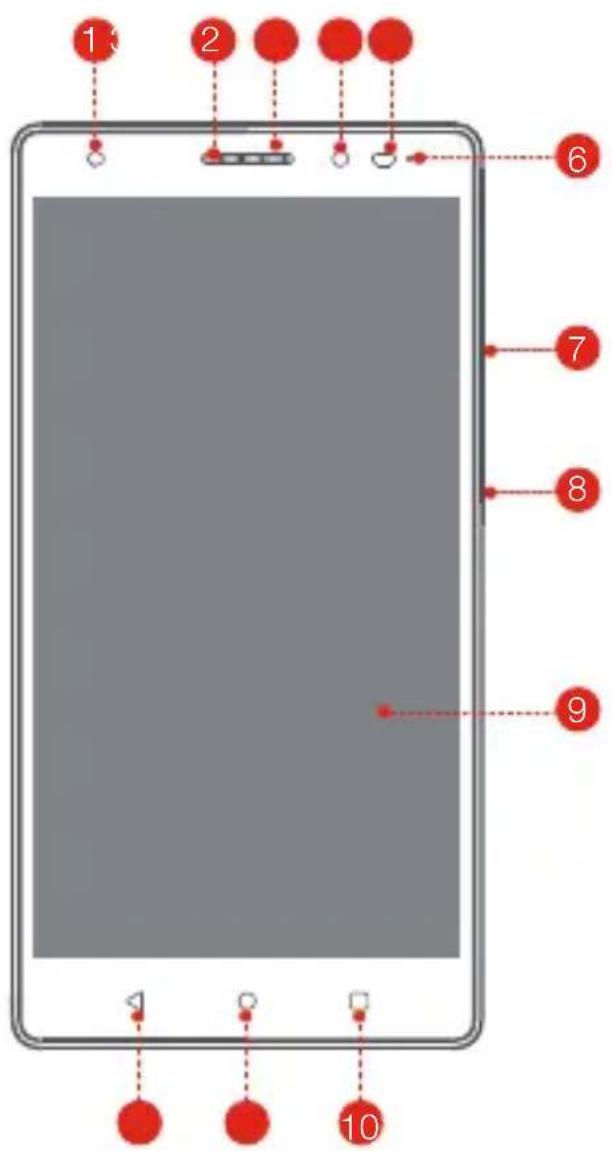
1 Flass
2 Hljóðnemar
3 Mottakari
4 Myndavélaframan
5 Ljos/nalaeogər skynjari
6 Visir
7 Hnappar fyir hljóostyrk
8 Rofi
9 Snertiskjár
10 Fjölvirknihnappur BakktakHeimahnappur
12
13 Myndavel ao aftan
http://www.lenovo.com/social Responsibility/us/en/sustainability/ptb_india.html
Viðbótar endurvinnsluylfírsingar
Frekari upplysingar um endurvinnslu á hlutum tækisins og rafhlöðum eru i notendaleiöbeiningum. Itarlegri upplysingar má finna i hlutanum „Sækja notendaleiöbeiningar".
RoHS compliant as per E-Waste (Management & Handling) Rules, 2011.
Vietnam
Lenovo-vörur sem seldar eruí Vietnam hinn 23. september 2011 eôa siðar uppfylla paer kröfur sem koma fram i dreifibréfi 30/2011/TT-BCT (,,vietnamskar RoHS").
Evrópusambandið
http://www.lenovo.com/social Responsibility/us/en/RoHS_Communication.pdf
© Copyright Lenovo 2016.
© Autoriöigus Lenovo 2016.
© Lenovo autortiesibas 2016.
© „Lenovo“, 2016 m.
Reduced Reuse Recycle

V1.1 20160715
70119091
MC
Printed in China
- Safety, Warranty & Quick Start Guide Lenovo PB2-670M
- Contents
- English
- Reading first - regulatory information
- Getting support
- Downloading publications
- Accessing your User Guide
- Legal notices
- Lenovo PHAB2 Plus overview
- Preparing your device
- Starting to use your device
- Turning on/off
- Taking screenshots
- Important safety and handling information
- Plastic bag notice
- Built-in rechargeable battery notice
- Caution about high volume usage
- European Union compliance statement European Union conformity
- C€0560①
- Compliance with the R&TTE Directive
- EurAsia compliance mark
- EAC
- Service and support information
- Online technical support
- Telephone technical support
- Worldwide Lenovo support telephone list
- Warranty information
- Lenovo Limited Warranty notice
- Warranty period and type of warranty service
- Type of warranty service
- Environmental, recycling, and disposal information
- General recycling statement
- Important battery and WEEE information
- Recycling information for India
- Additional recycling statements
- Battery recycling marks
- 廢電池請回收
- Battery recycling information for the European Union
- Restriction of Hazardous Substances Directive (RoHS)
- Turkey
- Vietnam
- European Union
- Deutsch
- Directive européen RoHS (Restriction of Hazardous
- Substances)
- Turquie
- Vietname
- União Europeia
- Sādan fār du support
- Klargøring af din enched
- Euroopa Liit
- Cita informacija par pärstradi
- Vjetnama
- Eiropas Savieniba
- Papildomi pareiskimai del perdirbimo
- Vietnamas
- Viðbótar endurvinnsluylfírsingar
- Evrópusambandið
Brand : LENOVO
Model : PHAB2 Plus
Category : Smartphone