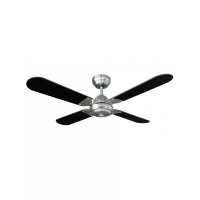
Summer Breeze DCF42BR - Fan BESTRON - Free user manual and instructions
Find the device manual for free Summer Breeze DCF42BR BESTRON in PDF.



| Product type | Ceiling fan |
| Brand | Bestron |
| Model | Summer Breeze DCF42BR |
| Blade diameter | 107 cm (42 inches) |
| Number of blades | 4 |
| Speeds | 3 (low, medium, high) |
| Control | Remote control included |
| Operating modes | Summer (downward airflow) and winter (upward air circulation) |
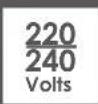
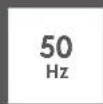
| Power supply | 230 V ~ 50 Hz |
| Minimum hanging height | 2.30 m from the floor |
| Mounting | Ceiling mounting plate (screws included) |
| Plate load capacity | Minimum 10 kg |
| Color | White and black (black blades) |
| Material | Metal and plastic |
| Warranty | 60 months (5 years) |
| Cleaning | Soft dry cloth; do not immerse |
| Repairability | Entrust to a qualified technician; do not repair yourself |
| Included accessories | Remote control, receiver, mounting kit, balancing kit |
Frequently Asked Questions - Summer Breeze DCF42BR BESTRON
User questions about Summer Breeze DCF42BR BESTRON
0 question about this device. Answer the ones you know or ask your own.
Ask a new question about this device
Download the instructions for your Fan in PDF format for free! Find your manual Summer Breeze DCF42BR - BESTRON and take your electronic device back in hand. On this page are published all the documents necessary for the use of your device. Summer Breeze DCF42BR by BESTRON.
USER MANUAL Summer Breeze DCF42BR BESTRON
natural_image
Modern black and white industrial fan with four blades, no visible text or symbols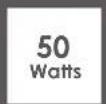

DCF42BR INSTRUCTION MANUAL
DE
Bedienungsanleitung
EN
Instruction manual
SE
Instruktionsmanual
FR
Mode d'emploi
IT
R. Neyman Quality control
natural_image
Diagram of a soldering iron being inserted into a device with a stop button (no text or symbols)natural_image
Hand holding a screwdriver inserted into a mechanical component (no text or symbols visible)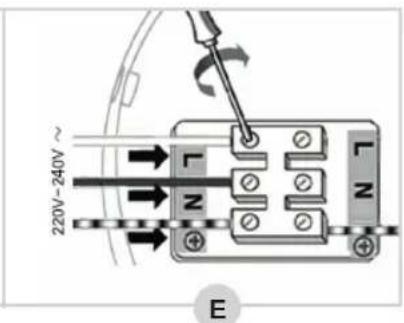
natural_image
Technical line drawing of a ceiling fan assembly with visible blades and mounting bracket (no text or symbols)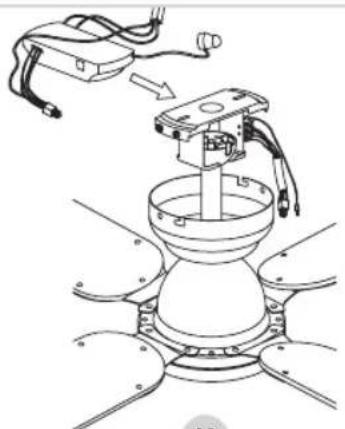
natural_image
Technical line drawing of a robotic arm with a central component and wiring, showing no text or symbols.K
natural_image
Technical line drawing of a robotic arm mounted on a dome-shaped base (no text or symbols)L
natural_image
Diagram of a mechanical assembly showing two views of a dome-like component with rotating arms (no text or symbols)M
PROBLEME LÖSEN
DÉCLARATION DE CONFORMITÉ CE
R. Neyman
Contrôle qualité
| DESCRIPTION SYMBOLE VALEUR UNITÉ | |||
| DÉBIT D’AIR MAXIMAL F 73,02 M3/MIN | |||
| PUISSANCE ABSORBÉE P 43,4 W | |||
| VALEUR DE SERVICE | SV | 1,68 | (M3/MIN)/W |
| CONSOMMATION D’ÉLECTRICITÉ EN MODE «VEILLE» | PSB | 0 | W |
| NIVEAU DE PUISSANCE ACOUSTIQUE | LWA | 43 | dB(A) |
| VITESSE MAXIMALE DE L’AIR | C | 1,49 | METERS/SEC |
| NORME DE MESURE DE LA VALEUR DE SERVICE | IEC 60879:196(CORR.1992) | ||
| COORDONNÉES DE CONTACT POUR TOUT COMPLÉMENT D’INFORMATION : WWW.BESTRON.COM | |||
natural_image
Diagram of a soldering iron being inserted into a device with wires, showing a left-hand rule and a stop button (no text or symbols)natural_image
Hand holding a screwdriver inserted into a mechanical component (no text or symbols visible)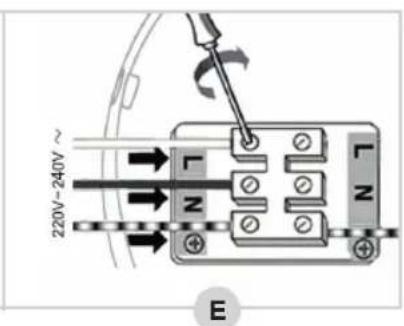
G
natural_image
Line drawing of a mechanical assembly with hands operating a tool and a base component (no text or symbols)H
natural_image
Technical line drawing of a ceiling fan assembly with visible blades and mounting bracket (no text or symbols)J
natural_image
Technical line drawing of a robotic arm with a sensor and control panel (no text or symbols)K
natural_image
Technical line drawing of a robotic arm mounted on a dome-shaped base (no text or symbols)L
natural_image
Technical illustration of a mechanical assembly with two views showing a rotating component (no text or symbols present)M
PROBLEMEN OPLOSSEN
DISPOSITIONS CONCERNANT LA GARANTIE
WAT U MOET WETEN OVER DIT APPARAAT
R. Neyman
Quality control
| OMSCHRIJVING SYMBOOL WAARDE EENHEID | |||
| MAXIMAAL VENTILATORDEBIET F 73,02 M3/MIN | |||
| BEDRIJFSWAARDE P 43,4 W | |||
| ELEKTRICITEITSVERBRUIK IN DE STAND-BY-STAND | SV | 1,68 | (M3/MIN)/W |
| GELUIDSVERMOGEN VAN DE VENTILATOR | PSB | 0 | W |
| MAXIMALE LUCHTSNELHEID | LWA | 43 | dB(A) |
| MAXIMALE LUFTGESCHWINDIGKEIT | C | 1,49 | METERS/SEC |
| MEETNORM VOOR BEDRIJFSWAARDE | IEC 60879:196(CORR.1992) | ||
| CONTACTGEGEVENS VOOR NADERE INFORMATIE: WWW.BESTRON.COM | |||
WERKING - Algemeen
natural_image
Line drawing of a mechanical assembly with hands operating a tool, no text or symbols presentH
natural_image
Technical line drawing of a ceiling fan assembly with visible blades and mounting bracket (no text or symbols)J
natural_image
Technical line drawing of a mechanical device with a base and housing, showing assembly or assembly process (no text or symbols)K
natural_image
Technical line drawing of a robotic arm mounted on a dome-shaped base with no visible text or symbolsL
natural_image
Diagram of a mechanical assembly showing two views of a dome-like component mounted on a base, with no visible text or symbols.M
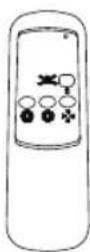 | KNOP FUNCTIE | |
| 0 VENT. AAN/UIT | ||
| MAX. VENT. SNELHEID | ||
| MED. VENT. SNELHEID | ||
| MIN. VENT. SNELHEID | ||
GEBRUIK - Zomer- en winterstand
PROBLEMEN OPLOSSEN
GARANTIEBEPALINGEN
Congratulations with the purchase of this Bestron product. These instructions tell you how the product works and how to use it. Read the instructions carefully before you start using the appliance. Only use the appliance in the manner described in the instructions. Keep these instructions in a safe place for future reference.
Defects:
If the appliance is defective, do not try to repair it yourself. Always have a qualified mechanic carry out any repairs.
Children:
- This appliance may be used by children over the age of 8 years old and persons with reduced physical, sensory or mental capabilities or lack of experience and know-how, but only if supervised or if they have been instructed on how to use the appliance safely and are aware of its potential dangers.
• Children are not allowed to clean and maintain the appliance, except if they are over the age of 8 years old and supervised. - Keep the appliance and the cable out of reach of children under the age of 8 years old.
- Keep an eye on children to ensure that they do not play with the appliance.
WHAT YOU SHOULD KNOW ABOUT ELECTRICAL APPLIANCES
- Check that the mains voltage corresponds with that shown on the rating plate of an electrical appliance before you use it.
- Check that the socket to which you connect the electrical appliance is earthed.
• Always install electrical appliances on a stable and level surface where it cannot fall over. - Certain parts of an electrical appliance may become warm or sometimes hot. Do not touch them as you may burn yourself.
• Make sure your hands are dry when you touch an electrical appliance, a cord or a plug. - Electrical appliances must be able to lose their heat to avoid fire hazards. Therefore, make sure that the appliance has sufficient clearance around it and that it does not come into contact with flammable materials. Electrical appliances must never be covered.
- Make sure that electrical appliances, cords or plugs do not come into contact with water.
Never immerse electrical appliances, cords or plugs in water or any other liquid.
- Do not touch electrical appliances if they have fallen in the water. Immediately pull the plug out of the socket. Stop using the appliance.
• Make sure that electrical appliances, cords and plugs do not come into contact with heat sources, such as a hot hob or open fire. - Never let cords hang over the edge of the sink, a worktop or a table.
• Always remove plug from the socket when you are not using the electrical appliance. - Remove the plug from the socket by pulling the plug itself and not the cord.
- Regularly check if the cord of the electrical appliance is not damaged. Do not use the electrical appliance if the cord shows signs of damage. If the cord is damaged, it should be replaced by the manufacturer, a technical service provider or a person with an equivalent qualification, to avoid any danger.
- The appliance may not be switched on with the aid of an external time switch, or by a separate system with remote control.
WHAT YOU SHOULD KNOW ABOUT THIS APPLIANCE
- Be careful when using the appliance outdoors.
- Never use the appliance in damp or wet locations.
- Thoroughly clean the appliance after use (see Cleaning and Maintenance).
• We recommend the installation be performed by a qualified electrician who can check the strength of the supportive ceiling members and make proper electrical connection. - To reduce the risk of personal injury, use only the two steel screws (and lock washer) provided for mounting.
• To reduce the risk of personal injury, do not bend the blade holders when installing the holders, balancing the blades or cleaning the fan.
ENVIRONMENT
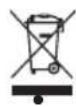
- Dispose of packaging material such as plastic and cardboard boxes in the designated containers.
Do not dispose of this product as normal domestic waste at the end of its life, but hand it in at a collection point for the reuse of electric and electronic equipment. Look for the symbol on the product, the user instructions or the packaging showing the type of waste.
- The materials can be used as indicated. By helping us reuse and process the materials or otherwise recycle the old equipment, you will be making an important contribution towards the protection of the environment.
- Your municipality can tell you where to find the designated waste collection point in your neighbourhood.
CE DECLARATION OF CONFORMITY
This product meets the requirements of European guidelines.
R. Neyman Quality control
| DESCRIPTION SYMBOL VALUE UNIT | |||
| MAXIMUM FAN FLOW RATE F 73,02 M3/MIN | |||
| FAN POWER INPUT P 43,4 W | |||
| SERVICE VALUE | SV | 1,68 | (M3/MIN)/W |
| STANDBY POWER CONSUMPTION | PSB | 0 | W |
| FAN SOUND POWER LEVEL | LWA | 43 | dB(A) |
| MAXIMUM AIR VELOCITY | C | 1,49 | METERS/SEC |
| MEASUREMENT STANDARD FOR SERVICE VALUE | IEC 60879:196(CORR.1992) | ||
| CONTACT DETAILS FOR OBTAINING MORE INFORMATION: WWW.BESTRON.COM | |||
OPERATION - General
The appliance is only intended for household purposes, not for professional use.
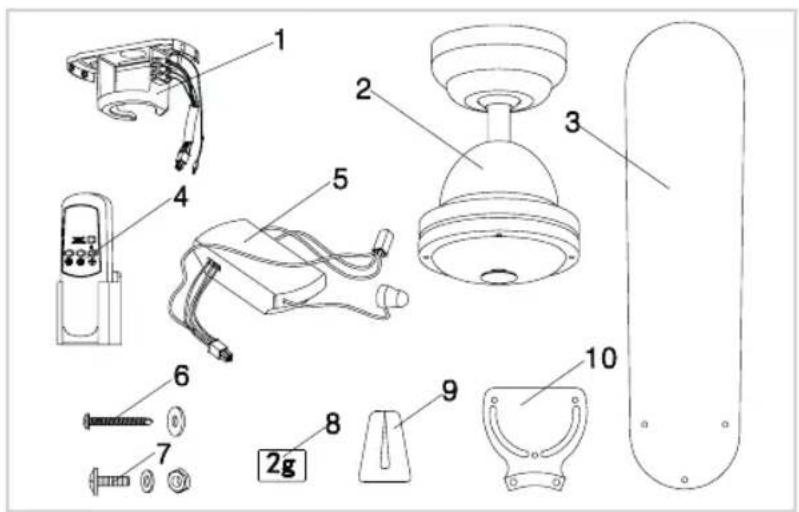
- Mounting bracket
- Motor
- Fan blade (4x)
- Remote control
- Remote control receiver
- Screw set mounting plate (2x)
- Fan blade screw set (12x)
- Balance weight
- Balance clip
- Fan blade holder (4x)
MOUNTING - Installing the mounting bracket
PLEASE NOTE:
- ALWAYS SWITCH OFF THE POWER IN YOUR METER BOX BEFORE STARTING MOUNTING THE CEILING FAN.
• Make sure to hang the fan where the distance between fan blades and the floor will be at least 2.30 m.
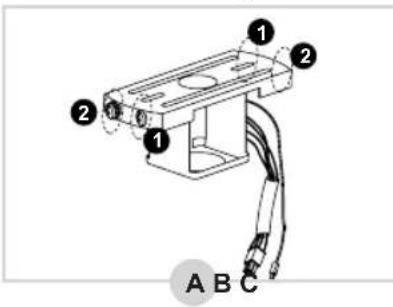
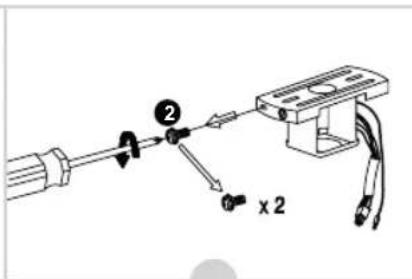
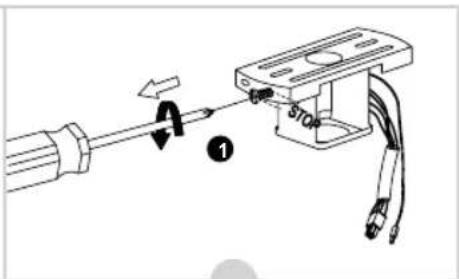
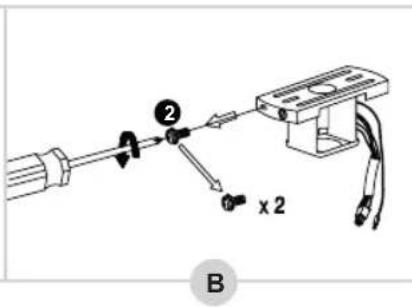
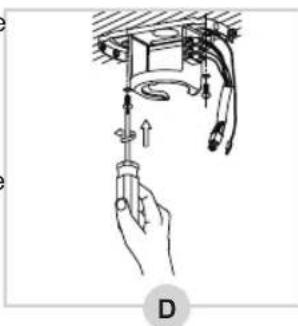
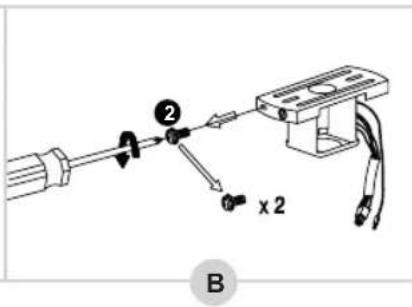
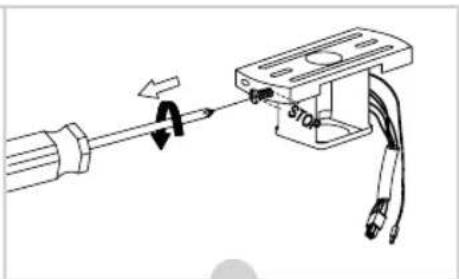
- In the package the mounting bracket has 4 screws mounted on (see figure A)
- Loosen the two screws ① half a turn (B).
-
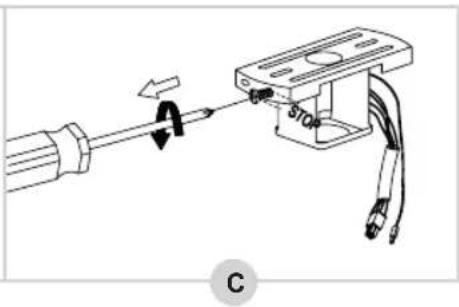
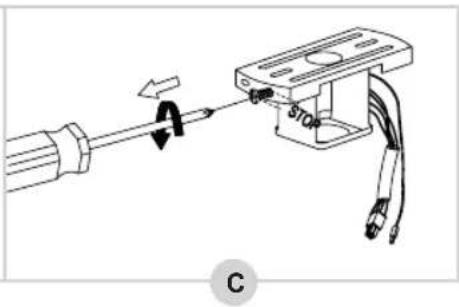
Then completely loosen and remove the two screws ② (C).
-
Remove the mounting bracket from the decorative cover and attach the mounting bracket securely to the ceiling (D). Make sure the mounting bracket is mounted firmly enough to support a weight of at least 10 kg.
-
Now screw the wiring correctly into the terminal block (E):
-
Blue wire → N
• Brown or black wire → L
• Ground wire (green/yellow) → ⏻
natural_image
Hand holding a tool with arrows indicating direction, next to a mechanical component (no text or symbols)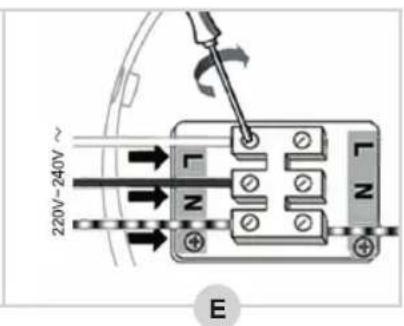
MOUNTING - Mounting the fan blades to the motor housing
- Take a fan blade holder and place it on a fan blade (see figure F).
- Thread a screw with a red ring through the fan blade holder and the fan blade.
- Place the supplied ring and then the bolt on the screw and tighten it properly.
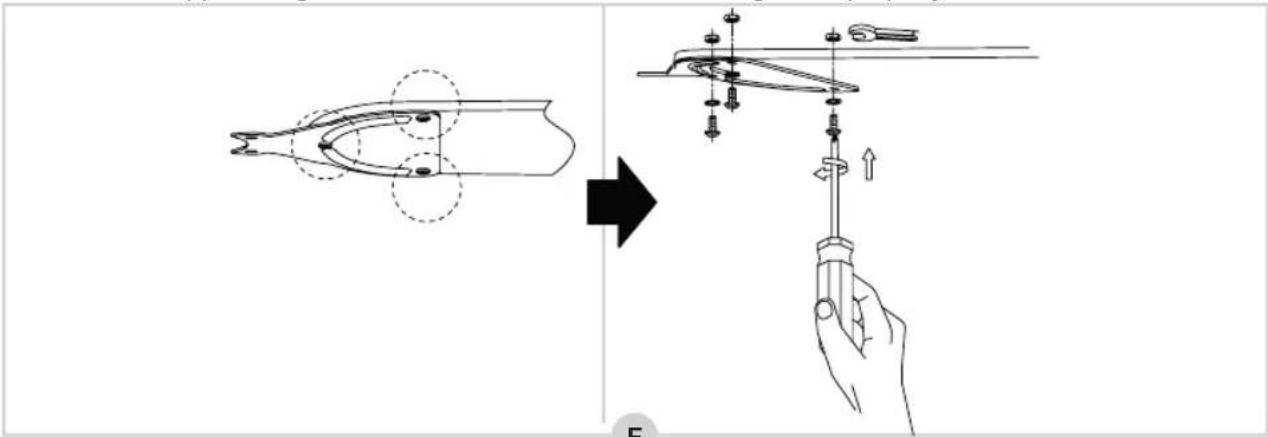
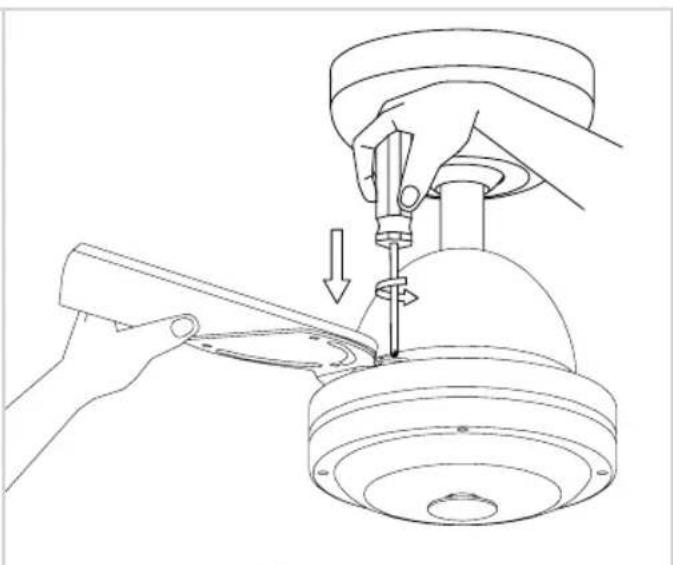
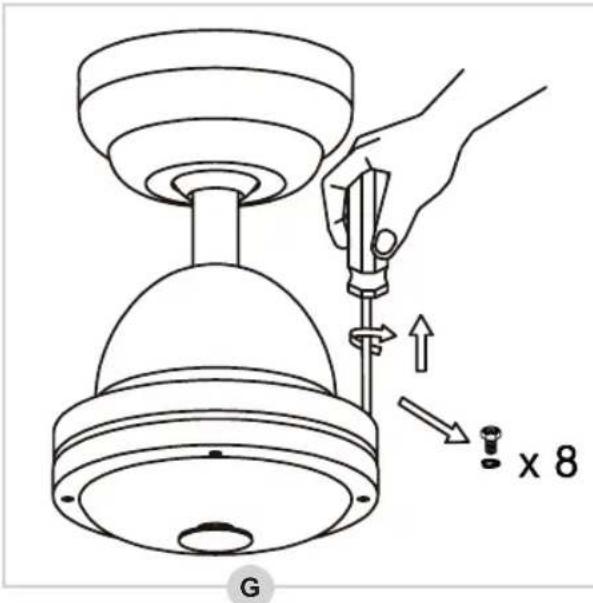
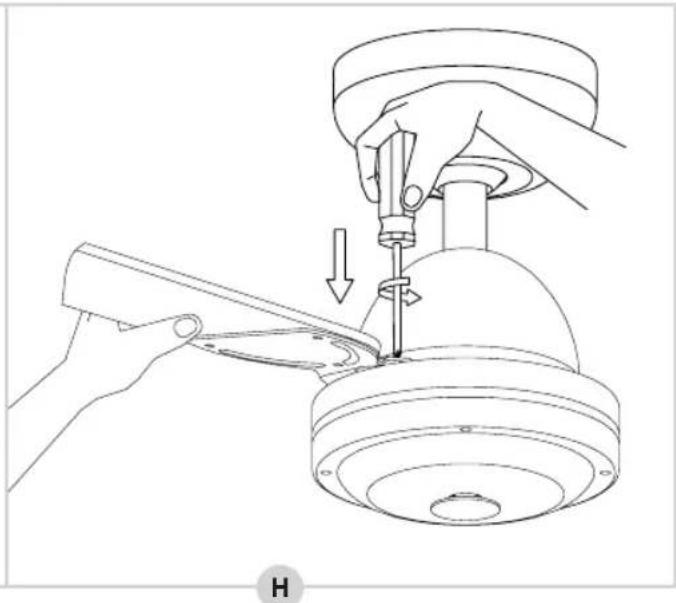
- Remove the two screws at the top of the motor housing (see figure G), then place a fan blade incl. holder (with the black side down) and screw it tight with the two screws (H).
- Repeat for the other three fan blades.
natural_image
Line drawing of a hand using a tool to adjust or install a mechanical component, with no visible text or symbols.The fan blades are now properly mounted.
MOUNTING - Mounting the fan motor on the mounting bracket
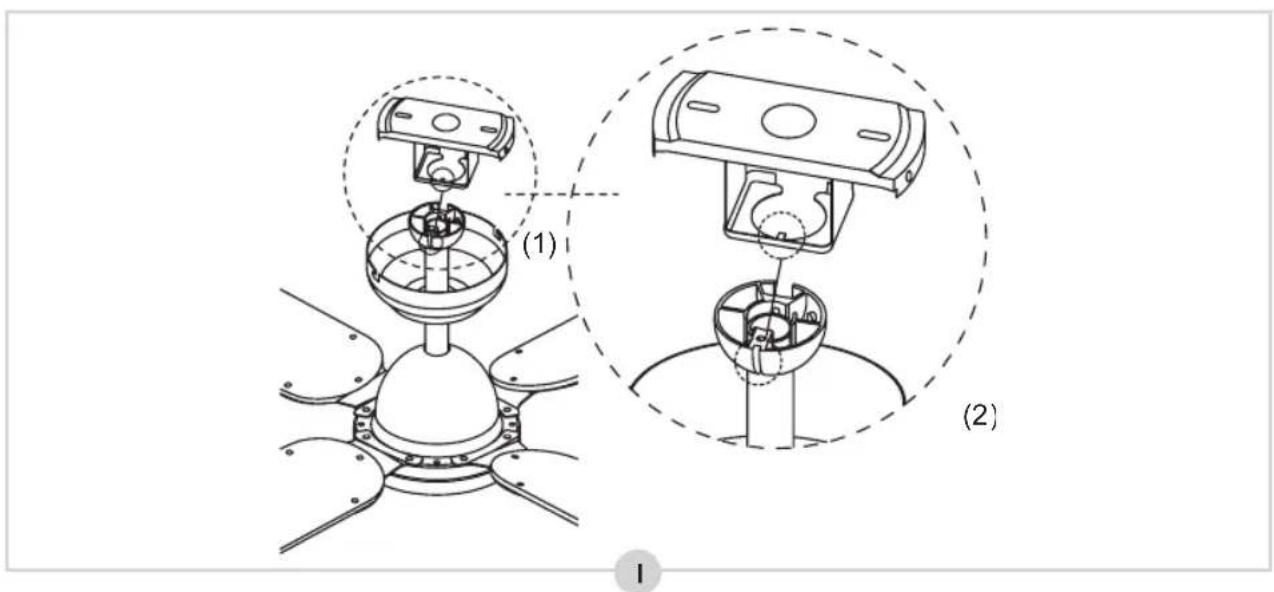
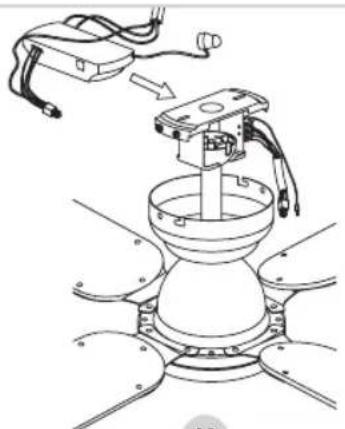
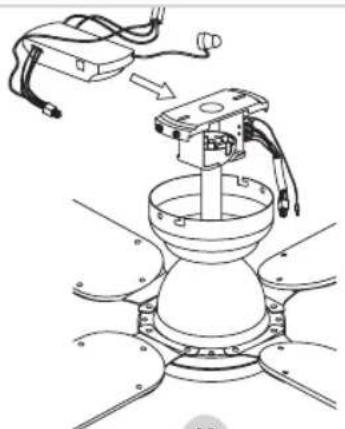
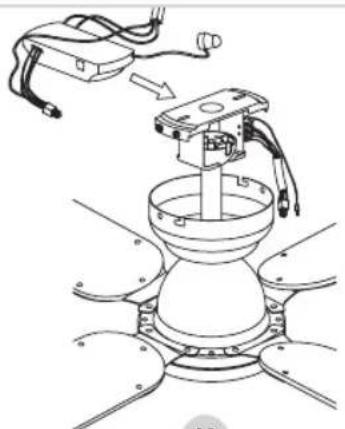
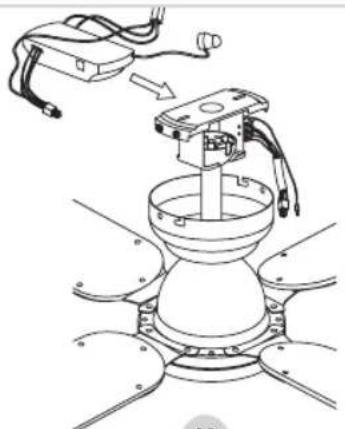
- Carefully insert the fan motor through the mounting bracket (I). Turn the fan motor until the protruding pin (1) falls into the notch (2).
natural_image
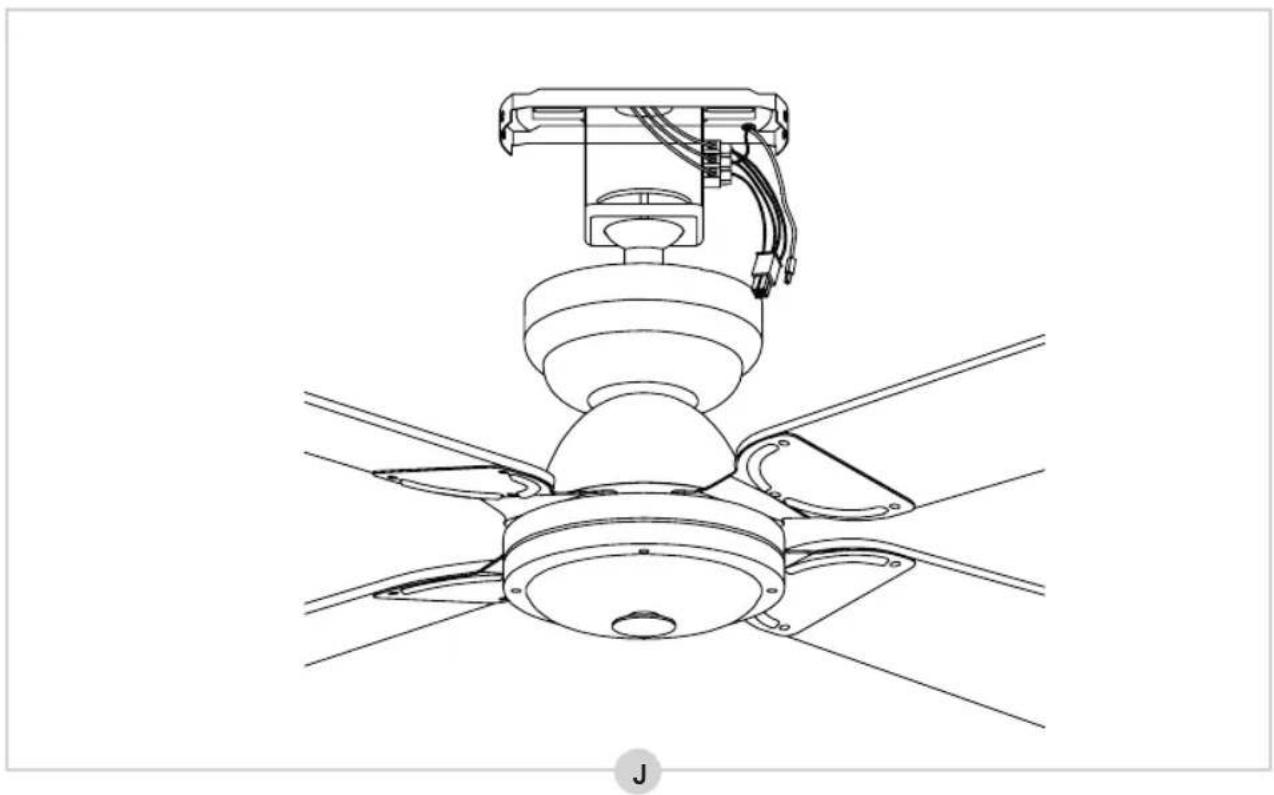
Technical line drawing of a ceiling fan with visible blades and mounting bracket (no text or symbols)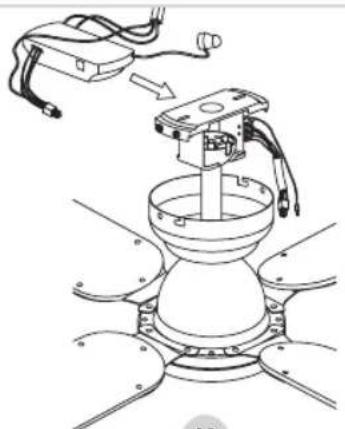
natural_image
Technical line drawing of a mechanical device with a base and housing, showing assembly or assembly process (no text or symbols)K
natural_image
Technical line drawing of a robotic arm mounted on a dome-shaped base with no visible text or symbolsL
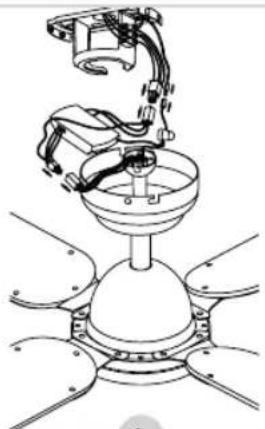
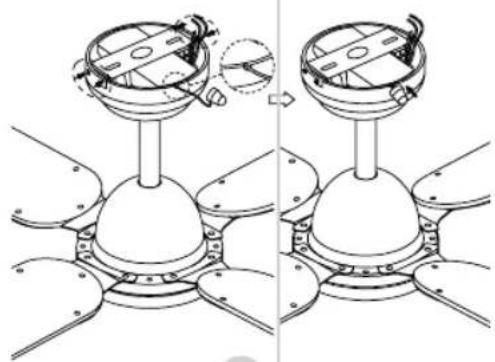
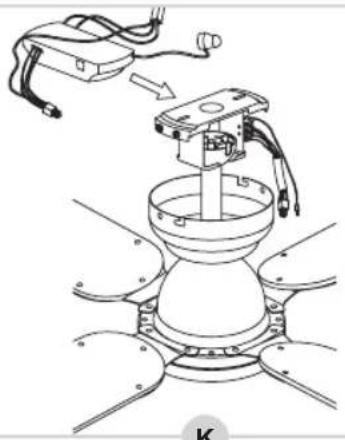
- Now slide the receiver into the mounting bracket (K).
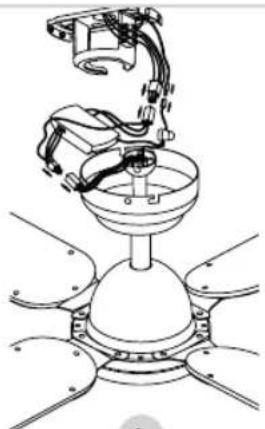
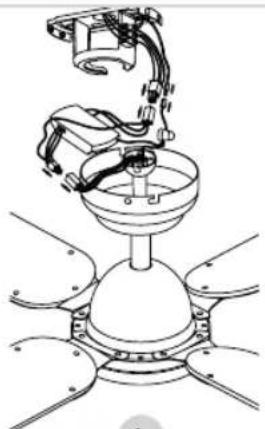
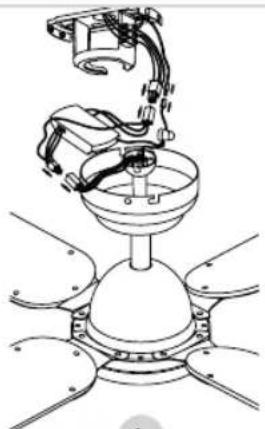
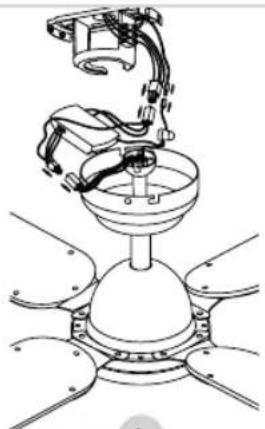
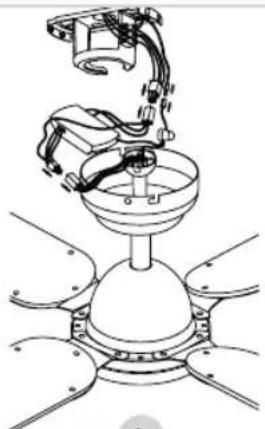
- Connect the connectors of the fan and the receiver, (see figure L).
natural_image
Diagram of a mechanical assembly showing two views of a dome-like component mounted on a base, with no visible text or symbols.M
MOUNTING - Mounting the fan to the mounting bracket
- Now place the decorative cover over the mounting bracket and screw it on (M).
NOTE: place the cable with sensor in the recess of the decorative cover and then stick it on the ceiling with the sticker on the bottom.
- Replace the two screws in the decoration cover and tighten them too (M).
The fan is now properly mounted. You can now switch on the power again in your meter box.
USE - Operation
The fan can be operated with the remote control included. The device has 3 speeds, each of which can be operated via a separate button: fast, medium and slow.
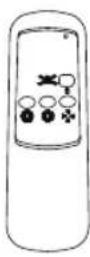 | BUTTON FUNCTION | |
| 0 VENT. ON/OFF | ||
| MAX. VENT. SPEED | ||
| MED. VENT. SPEED | ||
| MIN. VENT. SPEED | ||
USE - Summer and winter mode
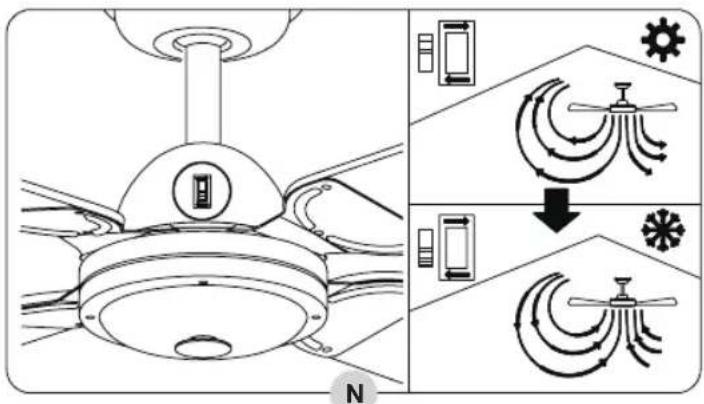
The fan is equipped with a summer and winter mode: in summer mode, the fan blows air directly downwards for a cool breeze, while in winter mode, air is circulated through the room, for example to spread the heat from your heating throughout the room.
- Switch up to activate summer mode.
- Switch down to activate winter mode.
PROBLEM SOLVING
| Trouble Probable Cause Suggested Remedy | ||
| Fan won't start. | 1. The fan is connected to a wall light switch and it is not turned on.2. Power in the meter cupboard has not been switched back on or has failed.3. Wires to the fan are loose. | 1. Make sure the light switch is turned on.2. Check whether the main power supply in the meter box is switched on.3. Check for loose wires in the wiring to the fan.PAY ATTENTION:Make sure the main power supply is turned off before checking the wiring! |
| Fan is noisy. 1. | The mounting plate is not properly mounted. | 1. Check whether the mounting plate is (still) properly attached to the ceiling. See ‘Mounting - Installing the mounting plate’. |
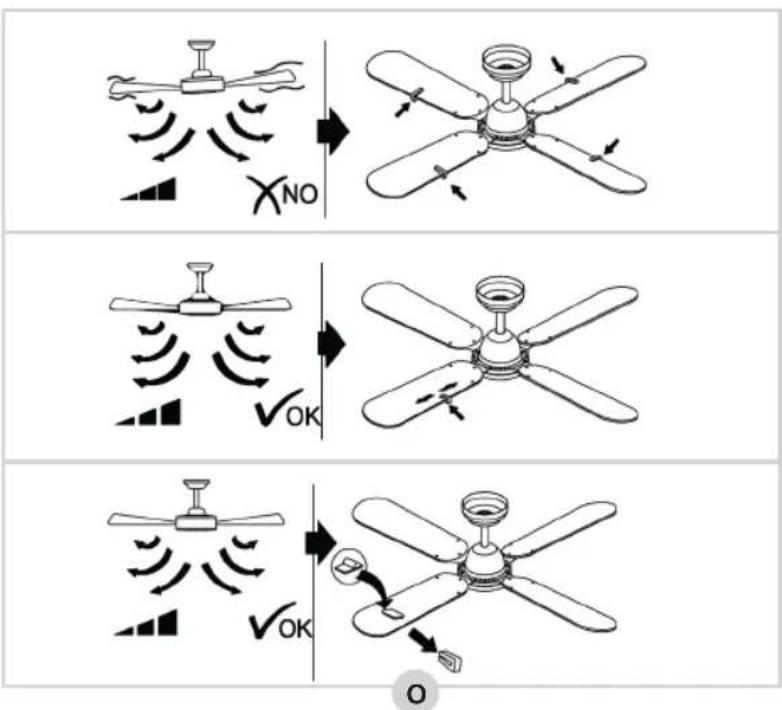
BALANCING FAN BLADES
We do our utmost to deliver the product to in perfect condition. However, there's always a possibility that the blades occasionally need to be balanced. First, follow the 2 possible solutions above. If this does not work, try swapping 2 fan blades. Is the fan still unbalanced? Then try to balance it using the supplied balance set (see figure O).
WARRANTY CONDITIONS
Bestron offers a 60-month warranty on this equipment against defects resulting from manufacturing and/or material errors, subject to the following conditions.
-
No labour or material costs will be charged during this warranty period.
-
Any repairs carried out under the warranty will not extend the warranty period.
-
Faulty parts, or in the event of exchange, the faulty equipment itself, will automatically become the property of Bestron.
-
The warranty is valid for the first buyer only and is non-transferable.
-
The warranty is not valid for damage caused by:
- Accidents
- Improper use
- Wear and tear
- Neglect
- Faulty installation
- Connection to a different mains voltage than indicated on the type plate
• Unauthorised changes
• Repairs carried out by unqualified third parties
- Use in violation with the applicable statutory, technical or safety standards
- Careless transport without suitable packaging or other protection
- Warranty cannot be claimed:
- For damage during transport
- If the serial number of the appliance is removed or changed
- Items excluded from warranty are:
- Cords
- Lamps
- Glass parts
-
The warranty does not entitle the purchaser to compensation for any damage other than replacement or repair of the faulty parts. Bestron cannot in any event be held liable for any indirect or consequential losses caused by or in relation to the equipment it has provided.
-
Claims under a warranty may only be submitted to your (online) retailer or directly to the Bestron Service Department. Never send items without being asked to. We may refuse the parcel and you will be liable for the costs. Contact us first and we tell you how the appliance should be packaged and sent. Each claim under a warranty must be accompanied by the relevant receipt.
SERVICE
If an unexpected problem occurs, please contact the BESTRON service department: www.bestron.com/service
COMPLIMENTI!
natural_image
Diagram of a soldering iron being inserted into a device with a stop button (no text or symbols)natural_image
Technical line drawing showing hands operating a mechanical device with a tool, no text or symbols presentnatural_image
Technical diagram of a mechanical assembly with two views (1 and 2), showing internal components and connections without any text or symbols.1
natural_image
Technical line drawing of a ceiling fan assembly with visible blades and mounting bracket (no text or symbols)J
natural_image
Technical line drawing of a robotic arm with a central component and wiring, showing no text or symbols.K
natural_image
Technical line drawing of a robotic arm mounted on a dome-shaped base (no text or symbols)L
natural_image
Technical illustration of a mechanical assembly with two views showing internal components and alignment (no text or symbols)M
R. Neyman
Controllo qualità
natural_image
Diagram of a soldering iron being inserted into a terminal block with wires, showing no text or symbolsnatural_image
Hand holding a tool inside a mechanical device with tubing and arrows indicating movement (no text or symbols)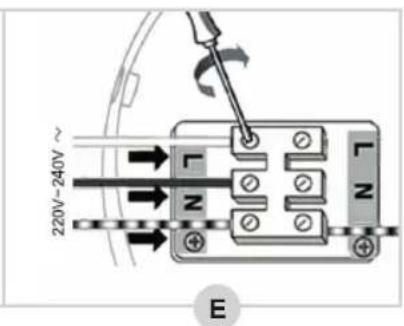
natural_image
Technical line drawing of a mechanical assembly with hands operating a tool (no text or symbols present)natural_image
Technical line drawing of a ceiling fan assembly with mounting bracket and blades (no text or symbols)J
natural_image
Technical line drawing of a mechanical assembly with no visible text or symbols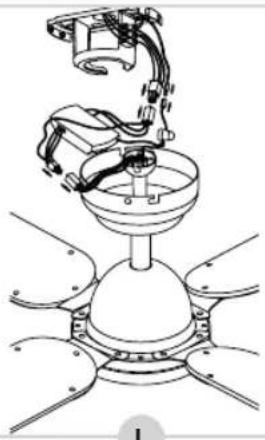
natural_image
Technical line drawing of a robotic arm assembling a dome-shaped component (no text or symbols)natural_image
Technical illustration of a mechanical assembly with two views showing components mounted on a base (no text or symbols)M
CONDICIONES DE GARANTÍA
R. Neyman Kvalitetskontroll
| BESKRIVNING SYMBOL VÄRDE ENHET | |||
| FLÄKTENS HÖGSTA FLÖDESHASTIGHET F 73,02 M3/MIN | |||
| FLÄKTENS INEFFEKT P 43,4 W | |||
| DRIFTSVÄRDE | SV | 1,68 | (M3/MIN)/W |
| EFFEKTFÖRBRUKNING I STANDBYLÄGE | PSB | 0 | W |
| FLÄKTENS LJUDEFFEKTNIVÅ | LWA | 43 | dB(A) |
| MAXIMAL LUFTHASTIGHET | C | 1,49 | METERS/SEC |
| STANDARD SOM ANVÄNTS FÖR MÄTNING AV DRIFTSVÄRDE | IEC 60879:196(CORR.1992) | ||
| KONTAKTUPPGIFTER FÖR ATT FÅ MER INFORMATION: WWW.BESTRON.COM | |||
natural_image
Line drawing of hands operating a mechanical device with a tool, no text or symbols presentH
natural_image
Technical diagram of a mechanical assembly with two views (1 and 2), showing internal components and connections without any text or symbols.1
natural_image
Technical line drawing of a ceiling fan assembly with visible blades and mounting bracket (no text or symbols)J
natural_image
Technical line drawing of a robotic arm with rotating components and wiring (no text or symbols)K
natural_image
Technical line drawing of a robotic arm mounted on a dome-shaped base (no text or symbols)L
natural_image
Diagram of a mechanical assembly showing two views of a dome-like component mounted on a base, with no visible text or symbols.M
PROBLEMLÖSNING
• Felaktig installation
NEED HELP? CHAT WITH US! WHATSAPP CUSTOMER SERVICE

BESTRON.COM/WHATSAPP
- DCF42BR INSTRUCTION MANUAL
- Neyman Quality control
- PROBLEME LÖSEN
- DÉCLARATION DE CONFORMITÉ CE
- PROBLEMEN OPLOSSEN
- DISPOSITIONS CONCERNANT LA GARANTIE
- WAT U MOET WETEN OVER DIT APPARAAT
- Neyman
- Quality control
- WERKING - Algemeen
- GARANTIEBEPALINGEN
- Defects:
- Children:
- WHAT YOU SHOULD KNOW ABOUT ELECTRICAL APPLIANCES
- WHAT YOU SHOULD KNOW ABOUT THIS APPLIANCE
- ENVIRONMENT
- CE DECLARATION OF CONFORMITY
- OPERATION - General
- MOUNTING - Installing the mounting bracket
- PLEASE NOTE:
- MOUNTING - Mounting the fan blades to the motor housing
- MOUNTING - Mounting the fan to the mounting bracket
- USE - Operation
- USE - Summer and winter mode
- PROBLEM SOLVING
- BALANCING FAN BLADES
- WARRANTY CONDITIONS
- SERVICE
- COMPLIMENTI!
- Controllo qualità
- CONDICIONES DE GARANTÍA
- PROBLEMLÖSNING
Brand : BESTRON
Model : Summer Breeze DCF42BR
Category : Fan