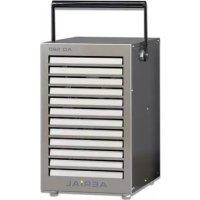
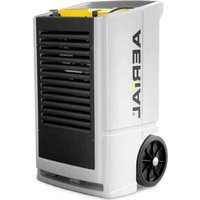
AD 520 - Dehumidifier Aerial - Free user manual and instructions
Find the device manual for free AD 520 Aerial in PDF.



| Product type | Dehumidifier |
| Brand | Aerial |
| Model | AD 520 |
| Bucket capacity | 7 liters |
| Operating temperature range | 1 °C to 34 °C (fan level 2) 1 °C to 31 °C (fan level 1) |
| Adjustable ambient humidity | 31 % to 70 % (continuous operation possible) |
| Fan levels | 2 levels (level 1: low, level 2: high) |
| Display | Screen with actual humidity, setpoint, operating hours, power meter |
| Electrical connection | Grounded mains plug, suitable mains voltage (see rating plate) |
| Dimensions (approx.) | Height: approx. 60 cm, Width: approx. 40 cm, Depth: approx. 30 cm |
| Weight (approx.) | Approx. 15 kg |
| Handle | Folding handle for transport |
| Drainage | Removable bucket (7 l) or continuous drainage via optional hose (12 x 2 mm) |
| Air filter | Washable or replaceable (use original filters) |
| Cleaning | Clean the filter regularly, use a mild detergent for surfaces |
| Safety | Automatic shut-off if bucket full, protection against extreme temperatures, error messages |
| Included accessories | Bucket, instruction manual |
| Optional accessories | Pump kit, dew point kit, wall console, drainage hose |
| Maintenance | Empty the bucket regularly, clean the filter, periodic inspection |
| Repairability | Spare parts available via authorized dealer or AERIAL service |
| Warranty | According to manufacturer's conditions (contact after-sales service) |
Frequently Asked Questions - AD 520 Aerial
User questions about AD 520 Aerial
0 question about this device. Answer the ones you know or ask your own.
Ask a new question about this device
Download the instructions for your Dehumidifier in PDF format for free! Find your manual AD 520 - Aerial and take your electronic device back in hand. On this page are published all the documents necessary for the use of your device. AD 520 by Aerial.
USER MANUAL AD 520 Aerial
natural_image
Three industrial air purifiers with ventilation grilles and wheels, no visible text or symbols on the devices themselves.AD 520
AD 540
AD 560
AD 580
AD 660
AD 680
AD 810
EN Instructions for use 12
FI Käyttöohje 22
Fig. 2: Rückansicht
natural_image
Close-up of a mechanical assembly with a black arrow pointing to a component (no visible text or symbols)natural_image
Close-up of a mechanical component with a metallic bracket and a small inset showing a button, no visible text or symbols.natural_image
Close-up of an electronic control panel with indicator lights and connectors (no readable text or symbols)Ausschalten
Vorgehensweise
1 Models 12
2 Product overview 13
3 Overview of control panel 14
4 About these operating instructions 15
5 Product description 15
6 Safety 15
7 Unpacking 16
8 Transport and connection 16
9 Operation 18
10 Maintenance and care 19
11 Troubleshooting 20
12 Decommissioning, storage and disposal 21
EC Declaration of Conformity 21
1 Models
These operating instructions relate to various models. The functions and operation are virtually identical. You can find out which model you have from the identification plate. Further information can be found in the Technical Data (page 128).
| Model | Main characteristics |
| AD 520 / AD 540 | Hinged handle; feet; 7.0 l basin |
| AD 560 / AD 580 | Carry handles; 4 castors 14.0 l basin |
| AD 660 / AD 680 | Frame; 2 large castors; 14.0 l basin |
| AD 810 | Carry handles; 4 castors; built-in pump (no basin) |
2 Product overview
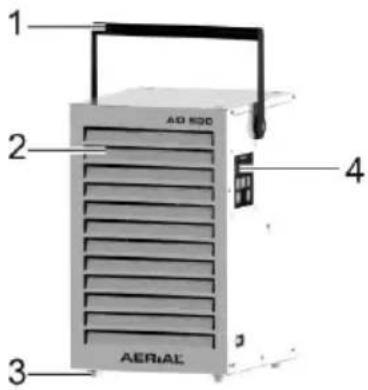
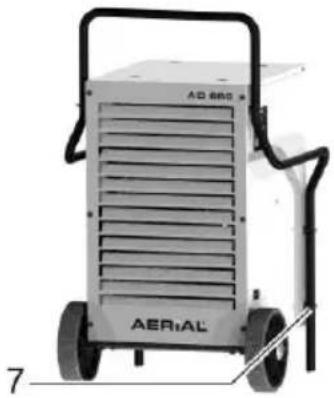
natural_image
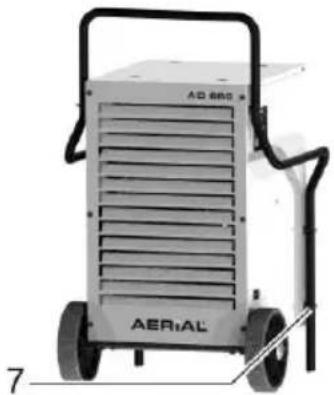
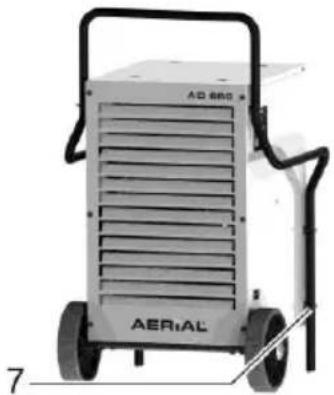
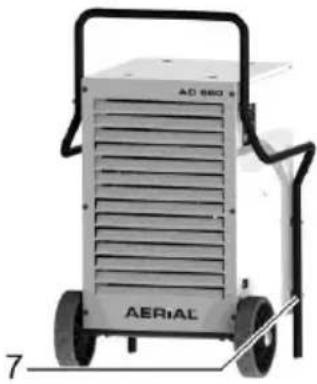
Exterior view of a modern industrial gasifier with labeled components (no readable text or symbols beyond branding)Fig. 1: Front view
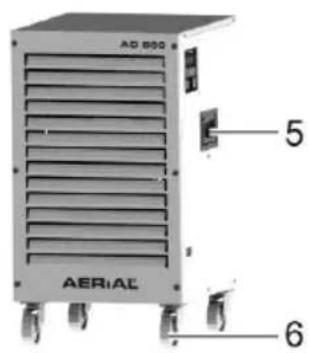
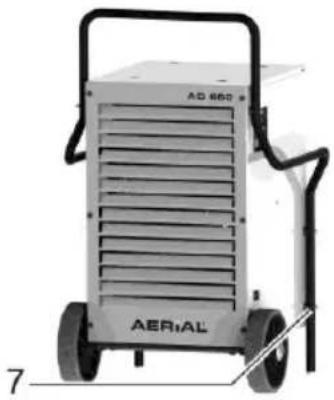
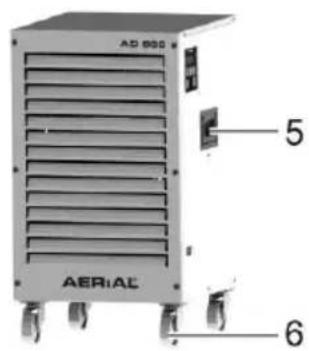
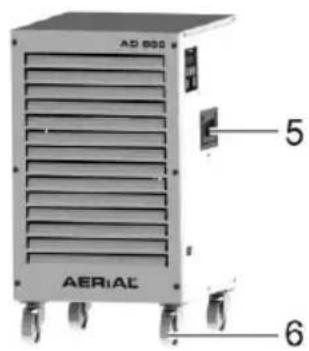
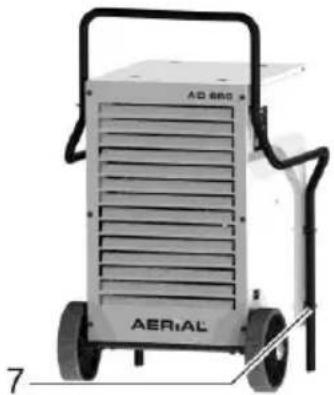
| 1 | Hinged handle | 5 | Carry handle |
| 2 | Air outlet | 6 | Castors |
| 3 | Feet | 7 | Frame |
| 4 | Control panel |
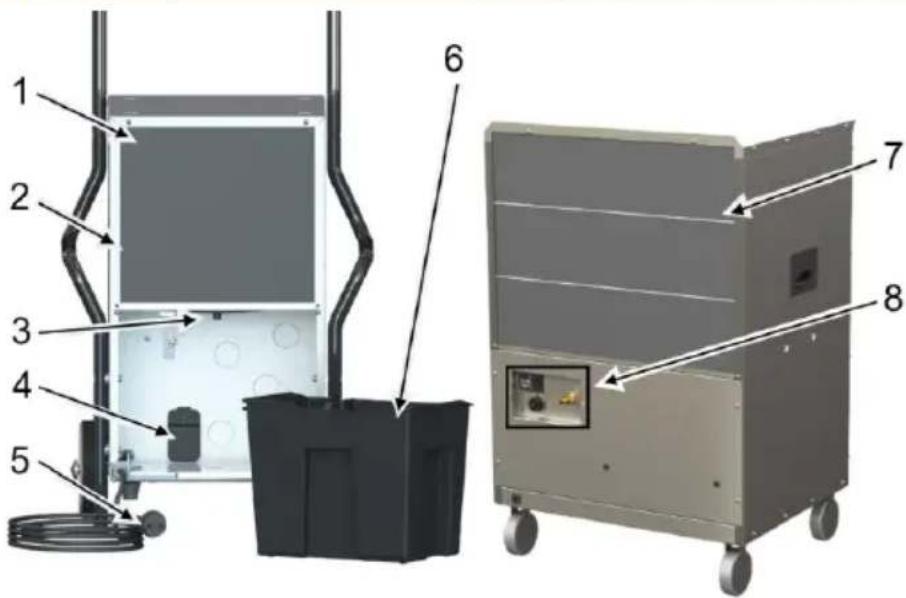
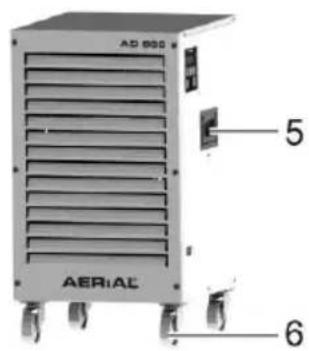
Fig. 2: Back view
| 1 | Room sensor (behind filter) | 5 | Mains plug |
| 2 | Air intake area with filter | 6 | Basin |
| 3 | Discharge nozzle for an optional discharge hose | 7 | Filter holder |
| 4 | Ports for pump kit/Dew point kit (optional accessory) | 8 | Pump control section (AD 810 only) with Amphenol socket for dewpoint kit and connection nozzle |
3 Overview of control panel
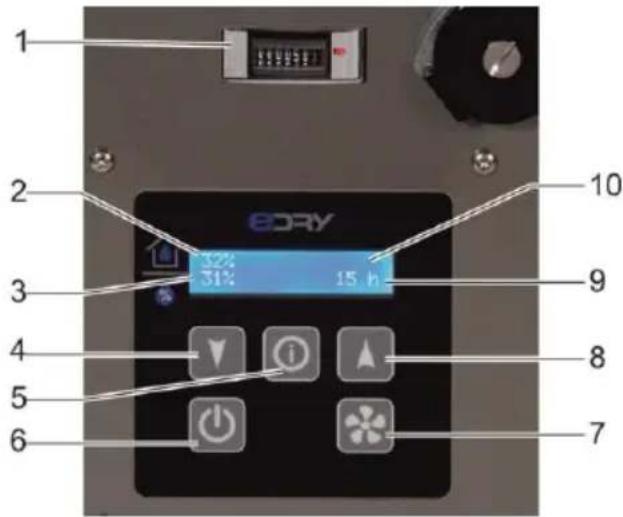
Fig. 3: Overview of control panel
| 1 | Load counter (MID)(not for AD 810, the counter for this is included in the display) |
| 2 | Actual room humidity |
| 3 | Target room humidity |
| 4 | Lower room humidity |
| 5 | Info button |
| 6 | On/off |
| 7 | Fan setting |
| 8 | Increase room humidity |
| 9 | Operating hours |
| 10 | Display |
| Button | Press briefly | Press for 5s | Display |
 | Lower/increase room humidity in 1% increments | Lower/increase room humidity in 5% increments | |
 | In the “Language” menu: select language | ||
 | Switch dehumidifier on/off | Start45% 12345 h | |
| Stop | |||
 | Change fan levelsLevel 2: Higher fan powerLevel 1: Lower fan power | fan speed high | |
| fan speed low | |||
 | If the mains plug has been unplugged and plugged in again: displays language. | LanguageEnglish |
4 About these operating instructions
These operating instructions must not be reproduced, duplicated or distributed without the written consent of the manufacturer.
Important: Read carefully before use.
Keep for later reference.
5 Product description
The dehumidifier controls the air humidity in the room. The condensate water produced is collected in a basin or pumped away by an internal pump (AD 810 only). The dehumidifier has an automatic defrost function.
Package contents
■ Dehumidifier
■ Basin (in appliance)
■ Operating instructions
■ AD 810 only: discharge hose 14 x 2 mm; quick connector, hose clamp 10-16 mm
Optional accessories
■ Pump kit
■ Dewpoint kit
■ Wall bracket for AD 520/540
■ Discharge hose
Identification plate
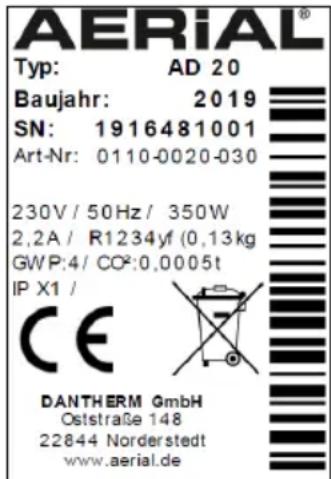
The identification plate is on the housing.
6 Safety
Intended use and conditions of use
The dehumidifier is used to remove humidity from air where there is atmospheric pressure in closed indoor rooms, such as basements, garages or warehouses.
The dehumidifier must only be set up, used and stored in rooms with larger than 4 m2 .
The dehumidifier must only be used in compliance with the Technical Data (page 128).
Persons with physical, sensory or mental restrictions and children are not permitted to use the dehumidifier.
Every user must have read and understood the operating instructions.
Foreseeable misuse
The dehumidifier must not be used:
■ In rooms with potentially explosive atmospheres.
■ In rooms with an aggressive atmosphere (e.g. caused by chemicals).
■ In rooms with water with a pH value below 7.0 or above 7.4.
In rooms with salt or liquids with a salt content > 1%, e.g. brine baths.
In rooms with ozone-treated air, high solvent concentrations or high dust pollution.
General safety information
WARNING! Risk of explosion, burns and poisoning from refrigerants!
The appliance contains an odourless, flammable refrigerant which, if handled incorrectly, could result in explosions and fire as well as injuries and burns. The refrigerant circuit is pressurised.
Do not use any objects to accelerate the thawing process.
Do not store the dehumidifier in rooms with permanent sources of ignition, such as open flames, operational gas appliances or electric heaters.
Do not drill open or ignite dehumidifiers.
- Only operate the appliance in a room larger than 4 m 2 .
- Any work to the refrigerant circuit must be performed by the manufacturer or the manufacturer's authorised technical personnel. Before working on the refrigerant circuit, it must be depressurised using the designated mechanisms.
Observe the national regulations for gas installations.
Do not dump refrigerants or dispose of them as household waste.
- Avoid coming into contact with the refrigerant.
WARNING! Electrocution!
Working on live components or water on live components can cause life-threatening electrocution.
Avoid contact between water and live components.
Always switch off and unplug the de-humidifier before moving it to another location.
Always empty the water collection container before moving it to another location.
Only allow the manufacturer or authorised personnel to carry out work on electric components.
7 Unpacking
Procedure
- Check that the package contents are complete. Contact your stockist in the event of damage or missing contents.
- Remove the packaging and dispose of it in accordance with local regulations.
8 Transport and connection
Transport
WARNING! Crushing as a result of instability!
- Transport the dehumidifier in an upright position and secure it so that it cannot tip over or slip.
- Position the dehumidifier on a stable, even surface.
WARNING! Crushing or cutting from reaching into the grille of the air filter!
- Use the handles to transport the de-humidifier.
Do not reach into the air filter.
CAUTION! Crushing or ergonomic damage when transporting the dehumidifier!
- Use the handles to transport the de-humidifier.
→ Heavy appliances should always be transported by two people.
Procedure
- Make sure that the basin is empty / the condensate water has been pumped out.
- Make sure that the discharge hose (optional) and the mains cable have been disconnected from the appliance.
- Release the brakes on the castors.
- Transport the dehumidifier to where it is going to be used.
Heavy appliances that do not have castors/wheels should be carried by two people. - Lock the brakes on the castors to secure the appliance.
NOTE: The air must circulate freely. Do not cover the air openings. There must be a clearance of at least 1 m in front of the air outlet and the air filter.
Preparing the basin
Does not apply to the AD 810 or if an optional discharge hose is connected.
Procedure
Slide the basin into the dehumidifier.
: Connecting the discharge hose
With the AD 810 it is essential to connect the discharge hose provided.
Important! Inadequate appliance output!
Do not bend the discharge hose.
Do not place any objects on the hose.
Procedure
-
Attach the quick connector to the discharge hose and secure using the hose clamp.
-
Attach the discharge hose provided to the back of the appliance at the connection nozzle.
-
Run the discharge hose away from the dehumidifier to a drain or into a suitable container (maximum height difference: 4 m).
Connecting an optional discharge hose
If necessary, with all appliances (except for AD 810) the condensate water can be drained off via a discharge hose instead of into the basin. To do this, proceed as follows:
Important! Inadequate appliance output!
Do not place the end of the hose in the water (backwater possible).
Do not bend the discharge hose.
Do not place any objects on the hose.
Procedure
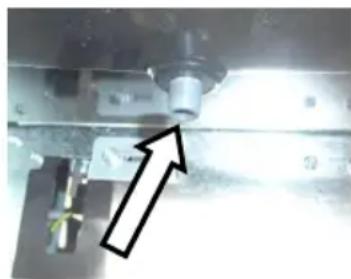
- Remove the basin.
- Attach a suitable hose (12 x 2 mm) to the discharge nozzle using a pipe clip.
natural_image
Close-up of a mechanical assembly with a black arrow pointing to a component (no visible text or symbols)-
Make sure that the end of the hose is lower than the start of the hose at the discharge nozzle. Minimum slope of 5% (5 cm/metre).
-
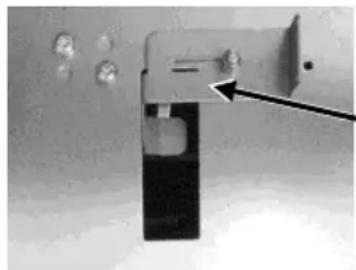
Slide the top cover sheet in front of the notch. To do this, loosen the screw on the cover sheet and slide the cover sheet to the left.
natural_image
Close-up of a metallic door handle with a black arrow pointing to a component (no visible text or symbols)- Run the end of the hose into a drain or a suitable container.
Electrical connection
Procedure
- Make sure that the supply voltage is the same as the connection voltage in the technical data.
- Provide an adequate fuse for the socket and the power supply.
- Install an earth leakage circuit breaker in damp rooms and building sites.
- Make sure that the mains plug is suitable for the socket of the building.
- Make sure that the socket used is earthed.
- Plug the mains plug into the socket.
9 Operation
Setting the language
Procedure
- Make sure that the dehumidifier is switched off and the mains plug is pulled out.
- Plug in the mains plug.
- Hold the key down for 5 seconds.
- The display will show the current language.
- Set the desired language using the
arrow keys - Wait 3 seconds until the selected language stops flashing.
The language cannot be changed during operation.
Dehumidifying the room
NOTE: Allow the dehumidifier to rest in its final position for approx. 15 minutes before starting up, after transport and after prolonged storage.
Procedure
- Make sure that the condensate water can drain off through a discharge hose or into the basin.
- Press the key.

"Start" will flash in the display. The dehumidifier will start operating. Operation is not possible when "Stop" or "Start" is flashing.
-
Set the desired humidity using the
arrow keys . The dehumidifier will only start if the actual room humidity is higher than the target room humidity. -
Select the fan level. To do this, press the key.
The dehumidifier runs until the target room humidity has been reached or the basin is full, then it will stop running.
Emptying the basin
The display indicates "Watertank Full".
Procedure
- Empty the basin.
Humidity reached
The display indicates "Humidity O.K.". The set target room humidity is lower than actual room humidity.
Procedure
If necessary, reduce the target room humidity or set to continuous operation (continuous operation 31% to 70%).
AD 810: Pumping out water
The condensate water can be pumped away if necessary as follows:
Procedure
- Make sure that the discharge hose runs into a drain or suitable container.
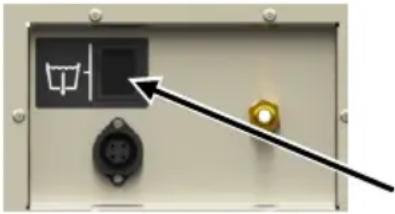
- Switch on the pump at the pump control section. To do this, press and hold the toggle switch until the condensate water has been pumped away.
natural_image
Close-up of a control panel with indicator lights and a black arrow pointing to a component (no readable text or symbols)Switching off
Procedure
-
Empty the basin or pump water out of AD 810 if necessary.
-
Press the key.
10 Maintenance and care
WARNING! Damage to health from dust!
- Only clean the dehumidifier and filter with compressed air in open spaces.
Wear a protective mask and goggles.
Important! Damage to property!
- Cleaning agents can damage surfaces. Only use mild detergents.
- Only use approved original spare parts.
Cleaning and inspection
Procedure
- Switch off the dehumidifier.
- Unplug the mains plug.
- Remove and clean the air filter (e.g. with vacuum cleaner) or replace it.
- Check the discharge nozzle and discharge hose, if connected.
- Insert a new or clean filter. Only use an original filter.
- Plug in the mains cable.
- Switch on the dehumidifier if necessary.
Spare parts and customer service
If you have any questions about the de-humidifier or require spare parts, contact your authorised dealer or AERIAL Service.
11 Troubleshooting
Please check the following points in the event of a fault. If necessary contact AERIAL Service.
WARNING! Poisoning from refrigerant, burns, crushing or electrocution during maintenance work!
Only allow the manufacturer or authorised personnel to carry out repairs and maintenance work.
In the event of malfunctions, switch off the dehumidifier and secure it so that it cannot be switched back on again.
Allow any hot components to cool sufficiently before working on them.
Error messages
| Display message | Possible cause | Remedial action |
| Error | Filter dirty. | Clean the filter or replace if necessary. |
| Appliance faulty. | Contact AERIAL Service. | |
| Pump def | Pump faulty. | Contact AERIAL Service. |
| Room temp 35 °C | Outside temperature < 1°C or >34°C (high) or < 1°C or >31°C (low) | Appliance will automatically restart as soon as the temperature is >5°C or < 30°C. |
| Sensor error | Room sensor faulty | Contact AERIAL Service. |
Faults
| Problem | Possible cause | Remedial action |
| The dehumidifier is not performing well/removing moisture. | Air filter is dirty. The dehumidifier is not getting enough air. Dirty filters can damage the appliance in the long term. | Clean the filter or replace if necessary. |
| The dehumidifier is out of operation / fan and compressor are not working. | Dehumidifier is switched off. | Switch on the dehumidifier. |
| There is no power supply to the dehumidifier. | Check the power supply. |
12 Decommissioning, storage and disposal
Decommissioning
Procedure
- Switch off the dehumidifier.
- Empty the basin or pump the water out (AD 810).
- Unplug the mains plug.
- Cover the dehumidifier with a cloth to protect it from dust.
Storage
CAUTION! Injury!
Do not stack more than two dehumidifiers on top of each other.
The AD 810 is not stackable!
- Secure the dehumidifiers so that they do not fall over.
Procedure
Store the dehumidifier between 0irc C and +40irc C.
Disposal
Important! Danger from materials and substances
Sort materials according to type and recycle in accordance with local regulations.
When disposing of auxiliary and operating materials, observe the local regulations and information on the safety data sheets.
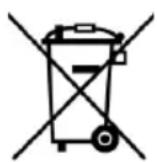
Do not dispose of the dehumidifier as household waste but rather in accordance with the legal regulations.
EC Declaration of Conformity
EC Declaration of Conformity in accordance with Machinery Directive 2006/42/EC Appendix II 1.A
Manufacturer: Dantherm GmbH
Oststrasse 148
22844 Norderstedt
Product: Dehumidifier
Blue Dry
Product no.: AD 520AD 540/AD560/AD580/AD660/AD680/AD810
Functional description: The dehumidifier is used to remove humidity from air where there is atmospheric pressure in closed rooms.
We hereby confirm that the product complies with the relevant provisions of the following directives:
■ 2006/42/EG Machinery directive
■ 2014/30/EU Directive on electromagnetic compatibility (EMC)
The following harmonised standards have been applied:
EN 60335-1:2012
EN 60335-2-40:2003
EN 60204-1:2006
EN378-2:2016
Person authorised to compile the technical documentation:
Norderstedt, 16 October 2019
Manfred Föhlisch - Managing Director
natural_image
Exterior view of a gray industrial gasifier with labeled components (no readable text or symbols beyond branding)Kuva 1: Etupuoli
Kuva 2: Taustapuoli
natural_image
Close-up of a mechanical assembly with a highlighted arrow pointing to a component (no visible text or symbols)natural_image
Close-up of a mechanical component with a lever and circular features, no visible text or symbolspainamalla painiketta
Sammuttaminen
Toimintaohjeet
natural_image
Exterior view of a gray industrial gasifier with labeled components (no readable text or symbols beyond branding)Fig. 1: Vista frontale
Fig. 2: Vista posteriore
natural_image
Close-up of a mechanical assembly with a highlighted arrow pointing to a component (no visible text or symbols)natural_image
Close-up of a metallic door handle with a black arrow pointing to a component (no visible text or symbols)natural_image
Close-up of a control panel with indicator lights and connectors (no readable text or symbols)Disinserimento
Procedimento
natural_image
Exterior view of a modern industrial gasifier with wheels and control handle (no visible text or symbols)Fig. 1: Vue de face
Fig. 2: Vue arrière
8 Transport et raccordement
natural_image
Close-up of a mechanical component with an arrow pointing to a bright light spot (no visible text or symbols)natural_image
Close-up of a mechanical component with a pointed tip and internal features, no visible text or symbolsÉteindre
Méthode
Fig. 2: Set bagfra
natural_image
Close-up of a mechanical component with an arrow pointing to a feature, no visible text or symbolsnatural_image
Close-up of a metallic door handle with a black arrow pointing to a small component (no visible text or symbols)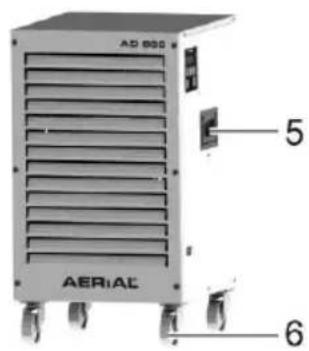
natural_image
Exterior view of a modern industrial gasifier with labeled components (no readable text or symbols beyond branding)Fig. 1: Sett forfra
Fig. 2: Sett bakfra
| 1 | Romsensor (bak filteret) | 5 | Støpsel |
| 2 | Luftinnsugning med filter | 6 | Bøtte |
| 3 | Avløpsstuss for avløpsslange (ekstrautstyr) | 7 | Filterholder |
| 4 | Tilkoblinger for pumpesett / duggpunktsett (tilbehør som er ekstrautstyr) | 8 | Betjeningspunkt for pumpen (kun AD 810) med Amphenol-kontakt for duggpunktsett og tilkoblingsstuss |
natural_image
Close-up of a mechanical assembly with a black arrow pointing to a component (no visible text or symbols)natural_image
Close-up of a mechanical component with a black arrow pointing to a detail (no visible text or symbols)natural_image
Close-up of a control panel with indicator lights and a black arrow pointing to a component (no readable text or symbols)Slå av
Fremgangsmåte
natural_image
Close-up of a mechanical assembly with a black arrow pointing to a component (no visible text or symbols)natural_image
Close-up of a mechanical component with a handle and circular features, no visible text or symbolsnatural_image
Close-up of an electrical control panel with indicator lights and a black arrow pointing to the next component (no readable text or symbols)Wyłączanie
Sposób postępowania
natural_image
Exterior view of a modern industrial gasifier with labeled components (no text or symbols beyond branding)Fig. 1: Vista dianteira
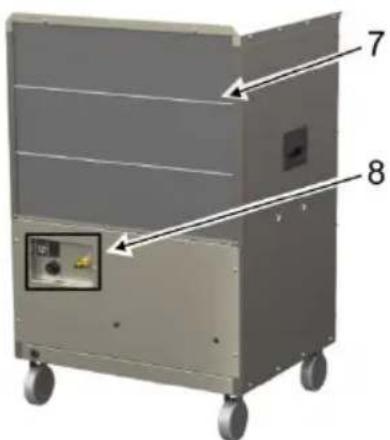
Fig. 2: Vista traseira
natural_image
Close-up of a mechanical component with an arrow pointing to a bright light source (no visible text or symbols)natural_image
Close-up of a mechanical component with a metallic bracket and circular elements, no visible text or symbolsDesligar
Procedimento
natural_image
Exterior view of a modern industrial gasifier with labeled components (no readable text or symbols beyond branding)Fig. 1: Framifrån
| 1 | Fällbart handtag | 5 | Bärhandtag |
| 2 | Luftutlopp | 6 | Rullar |
| 3 | Apparatfötter | 7 | Ramar |
| 4 | Manöverpanel |
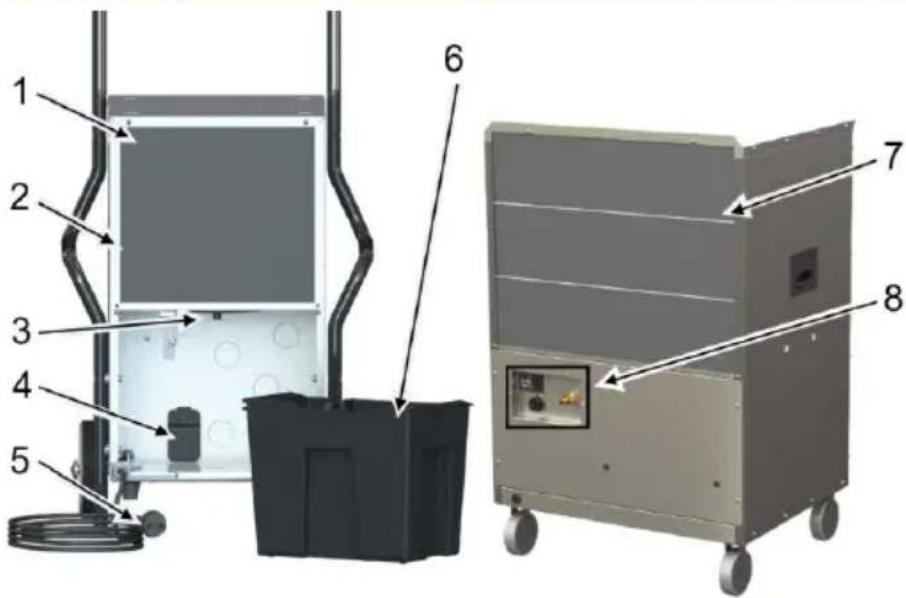
Fig. 2: Bakifrån
natural_image
Close-up of a mechanical component with an arrow pointing to a bright spot, no visible text or symbols.natural_image
Close-up of a mechanical component with a metallic bracket and a small inset showing a button, no visible text or symbols.natural_image
Close-up of an electrical control panel with indicator lights and a black arrow pointing to a component (no readable text or symbols)Stänga av
Gör så här
natural_image
Exterior view of a portable industrial machine labeled 'AERIAL' with wheels and handle (no additional text or symbols visible)Fig. 1: Vista delantera
| 1 | Mango plegable | 5 | Mango |
| 2 | Salida de aire | 6 | Rodillos |
| 3 | Pies del aparato | 7 | Marco |
| 4 | Cuadro de mandos |
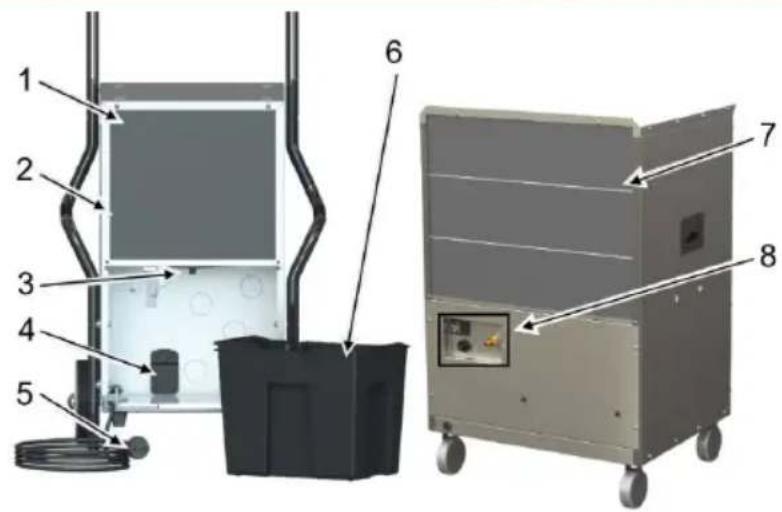
Fig. 2: Vista trasera
natural_image
Close-up of a mechanical component with an arrow pointing to a bright light source (no visible text or symbols)natural_image
Close-up of a mechanical component with a black arrow pointing to a small feature, no visible text or symbols.Desconectar
Procedimiento
natural_image
Exterior view of a modern industrial water heater with labeled components (no text or symbols on the device itself)natural_image
Close-up of a mechanical assembly with a highlighted arrow pointing to a component (no visible text or symbols)natural_image
Close-up of a mechanical lock or latch component with a black arrow pointing to a handle (no visible text or symbols)Uitschakelen
Werkwijze
- Ausschalten
- Vorgehensweise
- Models
- Product overview
- Overview of control panel
- About these operating instructions
- Product description
- Package contents
- Optional accessories
- Identification plate
- Safety
- Foreseeable misuse
- General safety information
- WARNING! Risk of explosion, burns and poisoning from refrigerants!
- WARNING! Electrocution!
- Unpacking
- Procedure
- Transport and connection
- Transport
- WARNING! Crushing as a result of instability!
- WARNING! Crushing or cutting from reaching into the grille of the air filter!
- CAUTION! Crushing or ergonomic damage when transporting the dehumidifier!
- Preparing the basin
- Important! Inadequate appliance output!
- Connecting an optional discharge hose
- Electrical connection
- Operation
- Setting the language
- Dehumidifying the room
- Emptying the basin
- Humidity reached
- AD 810: Pumping out water
- Switching off
- Maintenance and care
- WARNING! Damage to health from dust!
- Important! Damage to property!
- Cleaning and inspection
- Spare parts and customer service
- Troubleshooting
- Decommissioning, storage and disposal
- Decommissioning
- Storage
- CAUTION! Injury!
- Disposal
- Important! Danger from materials and substances
- EC Declaration of Conformity
- Sammuttaminen
- Toimintaohjeet
- Disinserimento
- Procedimento
- Transport et raccordement
- Méthode
- Fremgangsmåte
- Wyłączanie
- Sposób postępowania
- Desligar
- Stänga av
- Gör så här
- Procedimiento
- Uitschakelen
- Werkwijze
Brand : Aerial
Model : AD 520
Category : Dehumidifier