PCTA 1193 - Toaster PROFICOOK - Free user manual and instructions
Find the device manual for free PCTA 1193 PROFICOOK in PDF.



User questions about PCTA 1193 PROFICOOK
0 question about this device. Answer the ones you know or ask your own.
Ask a new question about this device
Download the instructions for your Toaster in PDF format for free! Find your manual PCTA 1193 - PROFICOOK and take your electronic device back in hand. On this page are published all the documents necessary for the use of your device. PCTA 1193 by PROFICOOK.
USER MANUAL PCTA 1193 PROFICOOK
natural_image
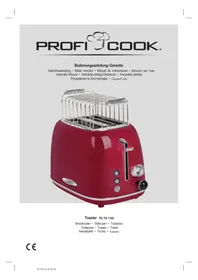
Red Kiosk with a 3D grater and metal grates (no visible text or symbols)Toaster PC-TA 1193
Broodrooster • Grille-pain • Tostadora
Tostapane • Toaster • Toster
Kenyérpirító · Тостер · محصة
CE
Bedienungsanleitung......Seite 4
Gebruiksaanwijzing......Pagina 10
Mode d'emploi.... Page 15
Manual de instrucciones ...... Página 20
Istruzioni per l'uso....Pagina 25
Instruction Manual...... Page 30
Instrukcja obsługi......Strona 35
Használati utasítás .... Oldal 41
Руководство по эксплуатации ...... стр. 46
54 صفحة ____ دليل التعليمات
Behuizing, broodjesrek
Thank you for choosing our product. We hope you will enjoy using the appliance.
Symbols in this Instruction Manual
Important information for your safety is specially marked. It is essential to comply with these instructions in order to avoid accidents and prevent damage to the appliance:

WARNING:
This warns you of dangers to your health and indicates possible injury risks.

CAUTION:
This refers to possible hazards to the appliance or other objects.

NOTE:
This highlights tips and information.
Contents
Overview of the Components ....3
General Notes......30
Special Safety Precautions for this Appliance....30
Designated Use 32
Unpacking the Appliance 32
Overview of the Components / Scope of Delivery ......32
Notes for Use 32
Operation 32
Cleaning 33
Storage....33
Troubleshooting ....34
Technical Data....34
Disposal....34
General Notes
Read the operating instructions carefully before putting the appliance into operation and keep the instructions including the warranty, the receipt and, if possible, the box with the internal packing. If you give this appliance to other people, please also pass on the operating instructions.
- The appliance is designed exclusively for private use and for the envisaged purpose. This appliance is not fit for commercial use.
- Do not use it outdoors. Keep it away from sources of heat, direct sunlight, humidity (never dip it into any liquid) and sharp edges. Do not use the appliance with wet hands. If the appliance is humid or wet, unplug it immediately.
- When cleaning or putting it away, switch off the appliance and always pull out the plug from the socket (pull the plug itself, not the lead) if the appliance is not being used and remove the attached accessories.
- Do not operate the appliance without supervision. If you leave the room you should always turn the appliance off. Remove the plug from the socket.
- The appliance and the mains lead have to be checked regularly for signs of damage. If damage is found the appliance must not be used.
- Use only original spare parts.
- In order to ensure your children's safety, please keep all packaging (plastic bags, boxes, polystyrene etc.) out of their reach.

WARNING:
Do not allow small children to play with the plastic foil. There is a danger of suffocation!
Special Safety Precautions for this Appliance
You will find the following symbol with warning character on the appliance:
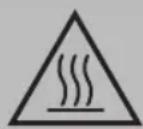
WARNING: Hot Surface! Danger of Burns!
The temperature of accessible surfaces can be very hot during and after operation.
• The metal parts get hot!
- Do not insert your fingers into the toasting slots.
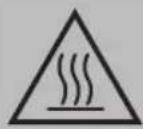
WARNING: Hot Surface! Danger of Burns!
- Do not carry or lift the appliance during operation, but turn it off first and then disconnect the mains plug. Wait until the appliance has cooled down.
• Always watch the appliance while it is being used!

WARNING:
Very dry bread can start to burn when being toasted!
- Do not operate the appliance without the crumb tray inserted, as it also serves as heat protection.
- Do not insert forks, knives or other objects in the toasting slot.
- Do not set up the appliance next to inflammable objects (e.g. curtains, wood, etc.)!
- Do not operate the appliance with an external timer or separate remote control system.
- Do not repair the appliance by yourself. Always contact an authorized technician. If the supply cord is damaged, it must be replaced by the manufacturer, its service agent or similarly qualified persons in order to avoid a hazard.
- This appliance can be used by children aged from 8 years and above and persons with reduced physical, sensory or mental capabilities or lack of experience and knowledge if they have been given supervision or instruction concerning use of the appliance in a safe way and understand the hazards involved.
• Children shall not play with the appliance.
- Cleaning and user maintenance shall not be made by children unless they are older 8 years and supervised.
- Keep the appliance and its cord out of reach of children less than 8 years.

CAUTION:
This appliance is not intended to be immersed in water during cleaning. Please observe the instructions that we have included for you in the chapter “Cleaning”.
Designated Use
This appliance is designed to toast slices of bread and rolls by using the toasting attachment.
It is intended for domestic use and use of similar areas. It may only be used in the manner described in this instruction manual. The appliance may not be used for commercial purposes.
Any other use is considered as not intended and may lead to damage of property or even to personal injury.
The manufacturer assumes no liability for damage which may occur through incorrect use.
Unpacking the Appliance
- Remove the appliance from its packaging.
- Remove all packaging material such as plastic films, filler material, cable ties and cardboard packaging.
- Check the content for any missing parts.
- In the event that the packaging content should be incomplete or if damages are noticeable, do not operate the appliance. Return it to the dealer immediately.

NOTE:
There may be dust and production residue on the appliance. We recommend cleaning the appliance as described under "Cleaning".
Overview of the Components / Scope of Delivery
1 Toasting well
2 Carriage lever
3 "Degree of browning" display
4 Controller "Degree of browning"
5 button "Stop" (with indicator light)
6 button "Warming" (with indicator light)
7 button "Thawing" (with indicator light)
8 Crumb tray
9 Housing
No Illustration
Removable bread roll attachment
Notes for Use
Before Initial Use

CAUTION:
In order to remove the protective layer on the heating coil you should operate the appliance approximately three times when it is empty. Please select the maximum level of browning.

NOTE:
Any smoke or smells produced during this procedure are normal. Please ensure sufficient ventilation.
Mains Lead
Unwind the mains lead completely. Pass the cord through the cable guide at the back of the appliance.
Electrical Connection
Check whether the mains voltage that you want to use, corresponds with that of the appliance. You will find the information about it on the rating plate.
Operation
- Connect the appliance only to a correctly installed safety socket.
- Use the controller to set the degree of browning to any level between 1 (lightest) and 6 (darkest). If you are not sure start with a lower setting. The degree of browning is displayed above the controller.
- Insert the slices of bread in the toasting slot and lower the slide with the lever until it snaps into place. The indicator light at the ⏱ button lights up.
- The appliance starts the toasting. When the set level of browning is reached, the appliance switches off automatically. The slide pops up automatically.

WARNING:
There is a danger of burns when removing small slices of bread!
- Disconnect the power supply from the socket when you are not using the appliance.
Special Functions
The buttons on the appliance can only be used if the appliance has been turned on by using the carriage lever.

NOTE:
Warming or thawing:
The relevant LED indicates the function.

Stop To stop toasting in process.

Warming To warm bread already toasted.

Thawing To thaw and toast deep-frozen bread.
Bread Roll Attachment (Removable)
Want to warm up or toast some rolls?
Place the bread roll attachment onto the toasting slot.

CAUTION:
- Do not overload the bread roll attachment! Place a maximum of one roll on the bread roll attachment!
- Set the browning control to level 3 at maximum.
- Wait for one minute between two toasting cycles.
- Never coat the roll with fat or butter. Fat could drip down and ignite!

WARNING: Danger of burns!
Let the bread roll attachment cool down before storing it again.

NOTE:
In addition, you can also serve toast slices in the bread roll attachment.
Cleaning

WARNING:
- Pull the mains plug out of the mains socket before you clean the appliance and allow the appliance to cool down.
- Do not immerse the appliance in water! Doing so may result in an electric shock or fire.

CAUTION:
- Do not use any wire brush or other abrasive objects.
- Do not use abrasive or aggressive cleaners.
Housing, Bread Roll Attachment
Only use a slightly damp cloth to clean the outside of the appliance.
Crumb Tray
The crumb tray is located on the opposite side to the carriage lever.
- Pull the crumb tray out by the handle, remove the small pieces of bread and push the tray back in place.
Storage

WARNING:
As the housing and the metal parts become hot during operation, allow the appliance to cool down before putting it away.
- Clean the appliance as described and allow to dry completely. We recommend to keep the appliance in the original packaging if the appliance will not be used for long periods.
• Always keep the appliance out of the reach of children in a dry, well ventilated place.
Mains Cable Take-Up Appliance
The mains cable can be wound up on the base.
Troubleshooting
| Problem Possible cause | Solution | |
| The appliance does not function. | The appliance has no power supply. | Test the socket with another appliance. |
| Plug in the mains plug correctly. | ||
| Check the main circuit breaker. | ||
| The appliance is faulty. Contact our service centre or a specialist. | ||
| The bread is too dark. | The toaster setting was too high. Select a lower toaster setting. | |
| The bread is too light. | The toaster setting was too low. Select a higher toaster setting. | |
| The toasting slots no longer rise. | A slice of bread is trapped in the slot. | WARNING:Disconnect the plug from the socket! Allow the appliance to cool down! |
| Free the slice of bread with an insulated object, e. g. a wooden stick. If necessary turn the toaster over so that the slice of bread falls out. | ||
Technical Data
Model: PC-TA 1193
Power supply: 220 - 240 V\~, 50 / 60 Hz
Power consumption: 685-815W
Protection class:....I
Net weight: .... approx. 1.52 kg
The right to make technical and design modifications in the course of continuous product development remains reserved.
This appliance has been tested according to all relevant current CE guidelines, such as electromagnetic compatibility and low voltage directives, and is manufactured according to the latest safety regulations.
Disposal
Meaning of the "Dustbin" Symbol
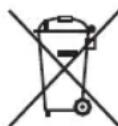
Protect our environment: do not dispose of electrical equipment in the domestic waste.
Please return any electrical equipment that you will no longer use to the collection points provided for their disposal.
This helps avoid the potential effects of incorrect disposal on the environment and human health.
This will contribute to the recycling and other forms of re-utilisation of electrical and electronic equipment.
Information concerning where the equipment can be disposed of can be obtained from your local authority.
Instrukcja obsługi
CTC Clatronic Sp. z o.o
Ul. Brzeska 1
45-960 Opole
Usuwanie
| الحل | المشكلة السبIP المчитل | |
| تحق من عمل لم能否 باستخدام جهاز أخرى. | لاتصل طاقة كهربائية إلى الجهاز. | الجهاز لا يعمل. |
| وصصل م能否 كبل التوصيل الرئيسي بصورة صحیحة. | ||
| فحص قاطع الدائرة الرئيسية. | ||
| ...,INTTEL هركر الصيانة cardiac بنأ أوitaحد المتخصصين. | هناك عيب بالجهاز.اتصل هركر الصيانة cardiac بنأ أوitaحد المتخصصين. | |
| ...ا...ا...ا...ا...ا...ا...ا...ا...ا...ا...ا...ا...ا...ا...ا...ا...ا...ا...ا...ا...ا...ا...ا...ا...ا...ا...ا...ا...ا...ا...ا...ا...ا...ا...ا...ا...ا...ا...ا...ا...ا...ا...ا...ا...ا...ا...ا...ا...ا...ا...а...ا...ا...ا...ا...ا...ا...ا...ا...ا...ا...ا...ا...ا...ا...ا...ا...ا...ا...ا...ا...ا...ا...ا...ا...ا...ا...ا...ا...ا...ا...ا...ا...ا...ا...ا...ا...ا...ا...ا...ا...ا...ا...ا...ا...ا...ا...ا...ا...ا...أ...ا...ا...ا...ا...ا...ا...ا...ا...ا...ا...ا...ا...ا...ا...ا...ا...ا...ا...ا...ا...ا...ا...ا...ا...ا...ا...ا...ا...ا...ا...ا...ا...ا...ا...ا...ا...ا...ا...ا...ا...ا...ا...ا...ا...ا...ا...ا...ا...ا...a...a...a...a...a...a...a...a...a...a...a...a...a...a...a...a...a...a...a...a...a...a...a...a...a...a...a...a...a...a...a...a...a...a...a...a...a...a...a...a...a...a...a...a...a...a...a...a...a...a...b...a...a...a...a...a...a...a...a...a...a...a...a...a...a...a...a...a...a...a...a...a...a...a...a...a...a...a...a...a...a...a...a...a...a...a...a...a...a...a...a...a...a...a...a...a...a...a...a...a...u...a...a...a...a...a...a...a...a...a...a...a...a...a...a...a...a...a...a...a...a...a...a...a...a...a...a...a...a...a...a...a...a...a...a...a...a...a...a...a...a...a...a...a...a...a...a...a...a...a...n...a...a...a...a...a...a...a...a...a...a...a...a...a...a...a...a...a...a...a...a...a...a...a...a...a...a...a...a...a...a...a...a...a...a...a...a...a...a...a...a...a...a...a...a...a...a...a...a...a...m...a...a...a...a...a...a...a...a...a...a...a...a...a...a...a...a...a...a...a...a...a...a...a...a...a...a...a...a...a...a...a...a...a...a...a...a...a...a...a...a...a...a...a...a...a...a...a...a...a...g...a...a...a...a...a...a...a...a...a...a...a...a...a...a...a...a...a...a...a...a...a...a...a...a...a...a...a...a...a...a...a...a...a...a...a...a...a...a...a...a...a...a...a...a...a...a...a...a...a...y...a...a...a...a...a...a...a...a...a...a...a...a...a...a...a...a...a...a...a...a...a...a...a...a...a...a...a...a...a...a...a...a...a...a...a...a...a...a...a...a...a...a...a...a...a...a...a...a...a...c...a...a...a...a...a...a...a...a...a...a...a...a...a...a...a...a...a...a...a...a...a...a...a...a...a...a...a...a...a...a...a...a...a...a...a...a...a...a...a...a...a...a...a...a...a...a...a...a...a... a...a...a...a...a...a...a...a...a...a...a...a...a...a...a...a...a...a...a...a...a...a...a...a...a...a...a...a...a...a...a...a...a...a...a...a...a...a...a...a...a...a...a...a...a...a...a...a...a...a...A...a...a...a...a...a...a...a...a...a...a...a...a...a...a...a...a...a...a...a...a...a...a...a...a...a...a...a...a...a...a...a...a...a...a...a...a...a...a...a...a...a...a...a...a...a...a...a...a...a...i...a...a...a...a...a...a...a...a...a...a...a...a...a...a...a...a...a...a...a...a...a...a...a...a...a...a...a...a...a...a...a...a...a...a...a...a...a...a...a...a...a...a...a...a...a...a...a...a...a...e...a...a...a...a...a...a...a...a...a...a...a...a...a...a...a...a...a...a...a...a...a...a...a...a...a...a...a...a...a...a...a...a...a...a...a...a...a...a...a...a...a...a...a...a...a...a...a...a...a...o...a...a...a...a...a...a...a...a...a...a...a...a...a...a...a...a...a...a...a...a...a...a...a...a...a...a...a...a...a...a...a...a...a...a...a...a...a...a...a...a...a...a...a...a...a...a...a...a...a...al...a...a...a...a...a...a...a...a...a...a...a...a...a...a...a...a...a...a...a...a...a...a...a...a...a...a...a...a...a...a...a...a...a...a...a...a...a...a...a...a...a...a...a...a...a...a...a...a...a...at ... |