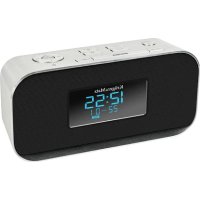
KM1150 - Radio Krüger&Matz - Free user manual and instructions
Find the device manual for free KM1150 Krüger&Matz in PDF.

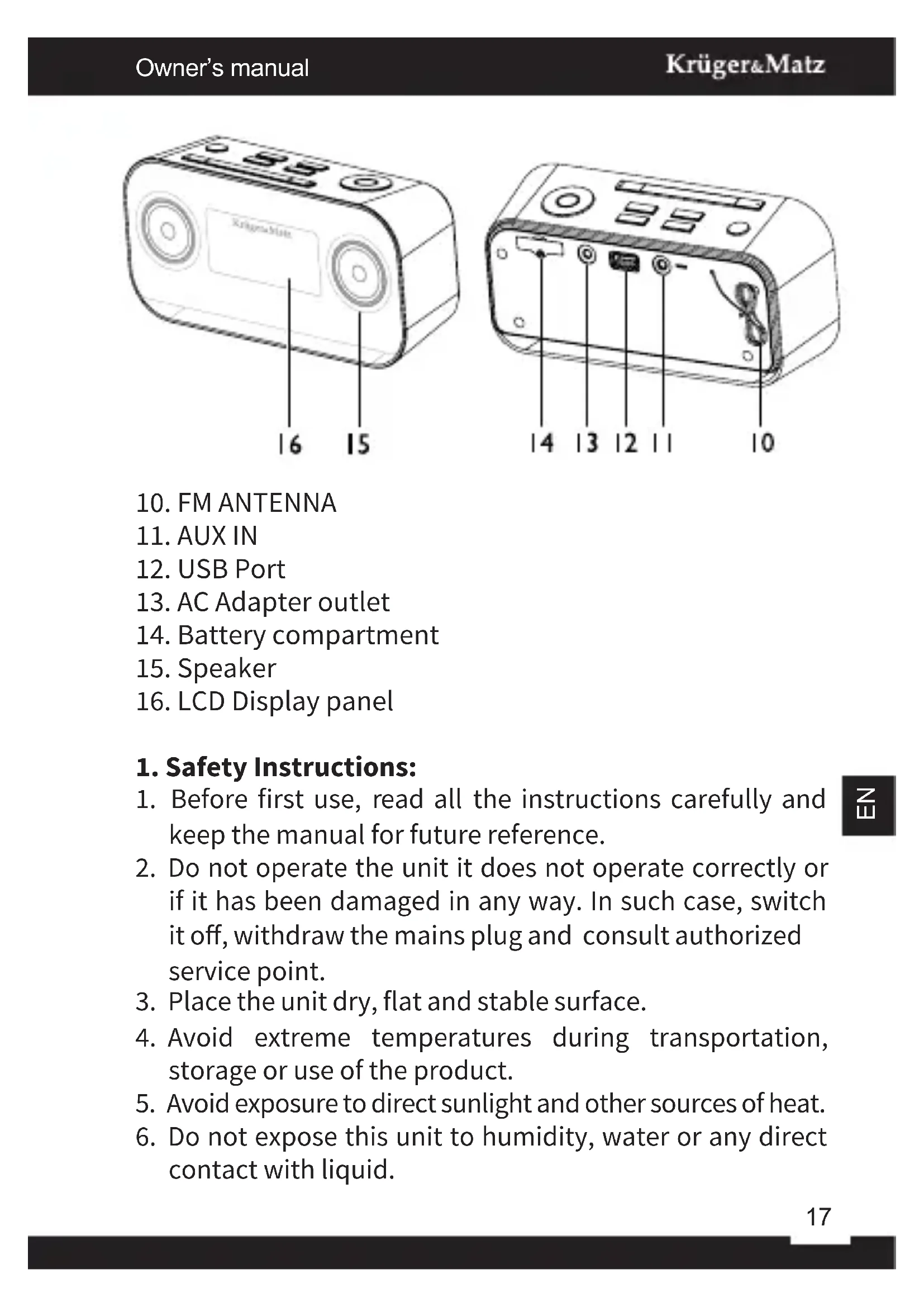


| Brand | Krüger&Matz |
| Model | KM1150 |
| Product type | Clock radio |
| Housing material | Aluminium |
| FM frequency range | 87.5 - 108 MHz |
| Station memory | 20 presettable stations |
| Bluetooth | Yes, with A2DP profile |
| USB port | Yes (5 V, 1 A) for playback and charging |
| AUX input | Yes (3.5 mm jack) |
| Mains power | 100-240 V, 50/60 Hz |
| Backup battery | Yes (CR2032 type) |
| Output power | 2 x 3 W RMS |
| Dual alarm | Yes, independent |
| Snooze function | Yes, 9 minutes |
| Sleep timer | Yes, adjustable from 15 to 120 minutes |
| Display | Screen with brightness adjustment |
| RDS | Yes |
| Cleaning | Soft damp cloth, without detergent |
| Safety | Do not open the device; contact an authorized service center |
| Included accessories | Power adapter, FM antenna |
Frequently Asked Questions - KM1150 Krüger&Matz
User questions about KM1150 Krüger&Matz
0 question about this device. Answer the ones you know or ask your own.
Ask a new question about this device
Download the instructions for your Radio in PDF format for free! Find your manual KM1150 - Krüger&Matz and take your electronic device back in hand. On this page are published all the documents necessary for the use of your device. KM1150 by Krüger&Matz.
USER MANUAL KM1150 Krüger&Matz
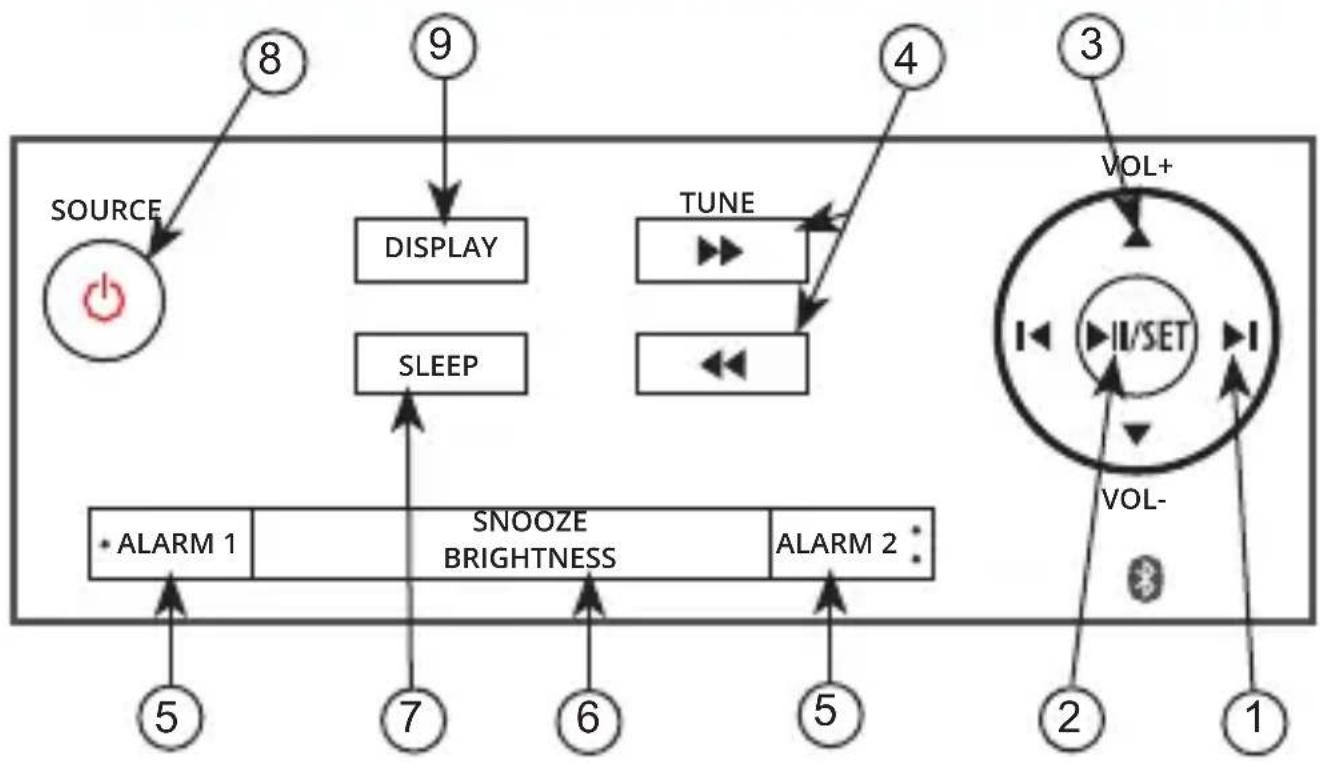
- Previous/Next:
- Play/Pause/SET: ▶ II/SET
- Volume: VOL+▲ / VOL-▼
- TUNE▶▶/TUNE◀◀
- ALARM1/ALARM2
- SNOOZE/BRIGHTNESS
- SLEEP
- ⏻/SOURCE
- DISPLAY
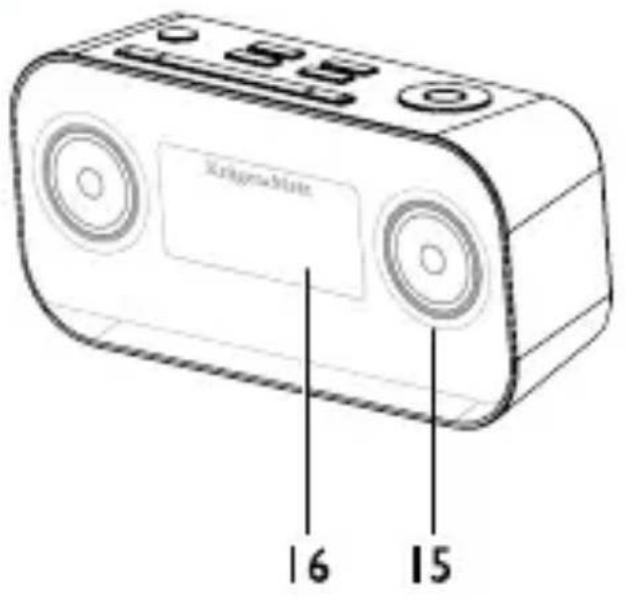
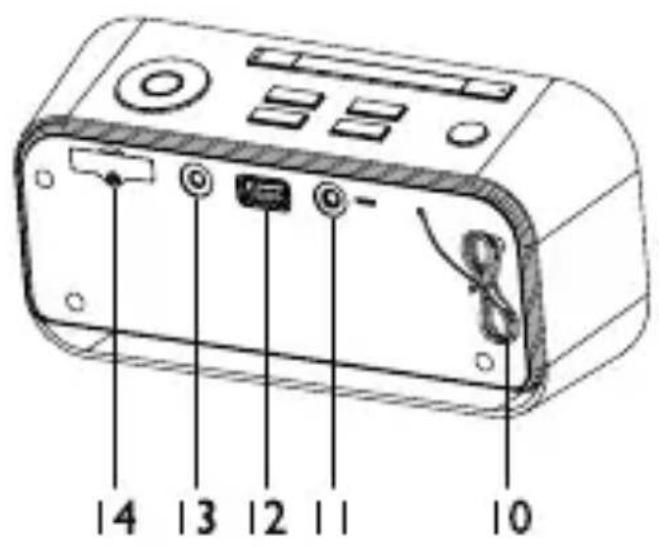
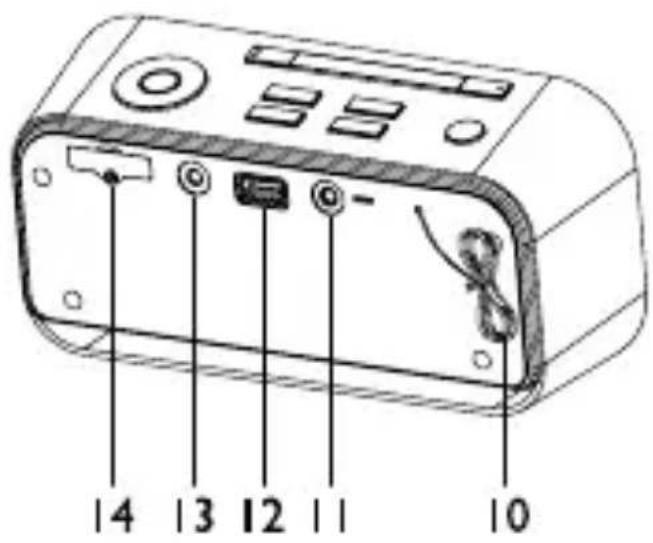
- FM ANTENNA
- AUX IN
- USB Port
- AC Adapter outlet
- Battery compartment
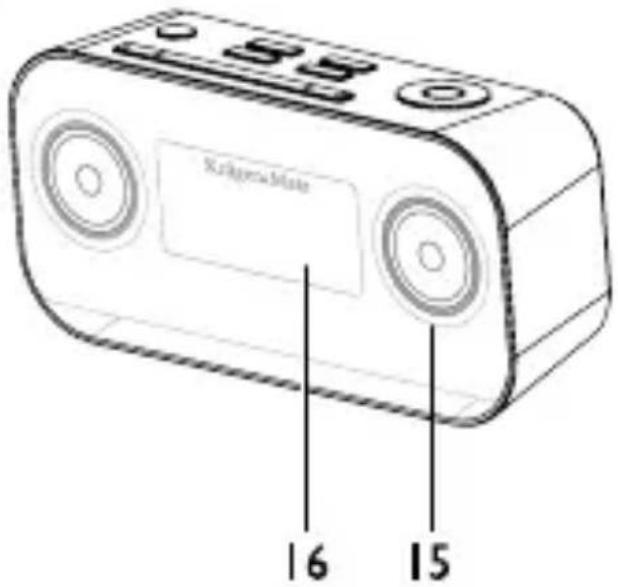
- Speaker
- LCD Display panel
1. Safety Instructions:
- Before first use, read all the instructions carefully and keep the manual for future reference.
- Do not operate the unit it does not operate correctly or if it has been damaged in any way. In such case, switch it off, withdraw the mains plug and consult authorized service point.
- Place the unit dry, flat and stable surface.
- Avoid extreme temperatures during transportation, storage or use of the product.
- Avoid exposure to direct sunlight and other sources of heat.
-
Do not expose this unit to humidity, water or any direct contact with liquid.
-
Do not place the unit on or near appliances which may cause electromagnetic interference. If you do, it may adversely affect the operating performance of the unit, and cause a distorted picture or sound.
- Keep the device as well as its batteries beyond the reach of children. Make sure the battery compartment is always securely closed.
- Do not attempt to repair this device on your own. Any repair should be carried out exclusively by authorized service point.
2. Batteries:
- Remove the protective tab to activate the unit battery.
- Loosen the screw on the battery compartment cover with a screwdriver.
- Place a new battery with correct polarity (+/-) as indicated.
- Close the battery compartment to the original position and tighten the screw with a screwdriver.
3. AC Power supply:
Insert the AC adapter's DC plug into the unit, then insert one side of AC power cord into a wall outlet.
Note: Unplug the power adapter from the outlet if the device is not in use.
II. GENERAL OPERATION
1. Power On / Off:
To turn the device ON, press the ⏻ button, the unit switches to the last selected source.
To switch the system to standby mode, press and hold the ⏻ button. The time (if set) will appear on the display panel.
2. Setting the Clock:
- In standby mode, press and hold the SET button for 2 seconds. The [12 H] or [24 H] will begin to blink on the display panel.
- Set the 12/24 hour format with the ◀/▶ buttons.
- Press the SET button to confirm and move forward. The hour digits begin to blink.
- Repeat above steps 2-3 to set the hour, minute, month, day, and year.
Note: If no button is pressed within 15 seconds, the unit exits clock setting mode automatically.
3. Volume control:
Adjust volume level during play, press the VOL+/VOL-buttons to increase/decrease the volume level.
4. Brightness control:
Press the BRIGHTNESS button repeatedly to select different levels of display brightness.
5. Radio:
For optimal reception, fully extend and adjust the position of the antenna.
6. uning in to a Station:
-
When the device is ON, repeatedly press SOURCE button to select the FM source.
-
Select a station using one of the following methods:
- Auto Tuning:
Press and hold the TUNE▶▶/TUNE◀◀ buttons for one second or more, the frequency changes down or up automatically until a station is found.
- Manual Tuning:
Repeatedly press the TUNE▶▶/TUNE◀◀ buttons to change the frequency until you find the station you want.
To select a preset radio station, repeatedly press the ◀ or ▶ buttons to select the desired preset number. Its band and frequency are displayed on the front panel. You can program a maximum of 20 preset radio stations.
7. Automatically:
While in FM mode, press and hold the SET button for two second or more to activate automatic program mode. [AUTO] is displayed. All available stations are programmed. The first programmed radio station is broadcast automatically.
8. Manually:
- Tune to a radio station.
- Press the SET button to activate program mode. The preset number will blink.
- Repeatedly press the ▶ or ▶ buttons to allocate a number to this radio station.
- Press the SET button again to store the station.
- Repeat above steps 1 to 4 for each station you want to store.
Note: If the system is unplugged or if a power failure occurs, the preset stations will not be erased.
9. RDS information :
Many FM stations are broadcasting added data compatible with Radio Data System (RDS). This radio set offers convenient functions using such data. Press the DISPLAY button repeatedly to select the information that displayed as follows.
• Programme Service Name
When an RDS station is received, the RDS name of that station instead of the frequency. When the DISPLAY button is pressed during Programme Service display, the Clock Time is displayed for few seconds, then Programme Service display returns.
- Programme Type
Programme type identification signal (Example: News, Rock, Classical music).
- Radio Text
This displays the news of stations.
- Clock Time System
The Clock Time system may not properly operate in areas where RDS Clock Time service is not available. Once Clock Time service is received, the Clock Time system keeps operating. “RDS CLOCK” is displayed in areas where no Clock Time services are available.
- Changing Display
During Programme Service display, press the DISPLAY button repeatedly to select the Clock Time, Programme Type or Frequency. They will be displayed for a few seconds, then the Programme Service display returns.
10. USB:
Note: Not every USB mass storage is compatible with this device.
Connect an USB mass storage device (USB flash memory, USB flash player or USB memory card adapter) to this unit, and enjoy the device's stored music through the unit.
- Insert the USB plug into the USB socket at the rear of the unit.
- Repeatedly press SOURCE button to select the USB source.
- The device's stored music will be played automatically.
• To pause/resume play, press: ▶
• To skip to a track, press: /▶/
- To fast-forward/fast-backward the track, long press:▶/◀◀
- To select to previous/next a folder, press:▶▶/◀◀
• To increase or decrease the volume, press: VOL+ / VOL-
For devices with USB Cables:
- Insert one plug of the USB cable to the USB socket at the rear of the unit.
- Insert the other plug of the USB cable to the USB output terminal of the USB device.
For memory cards:
- Insert the memory card into a card reader/USB memory card adapter.
- Use a USB cable to connect the card reader into the USB socket at the rear of the unit/Insert USB adapter into USB socket of the device.
11. Select repeat/shuffle play options:
During play, long press the SET button to enter the play
mode option, then repeatedly press the SET button to select a repeat option or the random play mode:
• NORMAL: normal play
- REPT ONE: play current track repeatedly
• REP ALL: play all tracks repeatedly
• RANDOM: play tracks randomly
12. Charging external devices:
When the unit is connected to power, the USB socket on the rear of the unit can serve as a power supply to charge an external device connected to the Radio (e.g. phone).
13. Bluetooth:
The unit has a Bluetooth function that connects with external device and plays music stored in their memory. Pairing the unit with a Bluetooth device to listen to music:
- Repeatedly press SOURCE button to select the Bluetooth source (BT).
- Activate your Bluetooth device and select the search mode.
- "KM1150" will appear on your Bluetooth device.
- Select "KM1150" and if necessary enter "0000" password.
- Play music on your Bluetooth device. Control playing mode from both the radio and your phone.
Note: If the signal strength is weak, your Bluetooth receiver may disconnect, but it will re-enter pairing mode automatically. This unit supports A2DP (Advanced Audio Distribution Profile).
14. Listening to an external device:
To listen to an external audio device through this unit,
follow the instructions below:
- Repeatedly press SOURCE button to select the AUDIO IN source.
- Connect the audio cable to the AUX IN jack (3.5mm) on the back of the unit and the headphone jack on an external device.
- Start and control the music on your external device.
15. Set the alarm timer:
You can set two alarms which go off at different time.
- Ensure that you have set the clock correctly.
-
Press and hold the ALARM1 or ALARM2 buttons for 2 seconds or more, the 🔒 / 🔒 and the hour digits begin to blink.
-
Set the hour with the ◀ or ▶ buttons.
-
Press the SET button to confirm and the minute digits begin to blink.
-
Repeat above steps 3-4 to set the minute, select whether to ring alarm the whole week, on weekdays, or at weekend and to set the alarm tone (FM, BUZZ or USB) as well as its volume.
Note: If USB source is selected and the audio cannot be played, BUZZ is activated automatically.
To deactivate or re-activate an alarm timer Press the ALARM1 or ALARM2 buttons twice to activate alarm function and again to deactivate it. Alarm icons on the screen will appear/disappear accordingly.
16. Repeat alarm :
When the alarm rings, press the SNOOZE button, the alarm repeats ringing 9 minutes later.
17. Stop alarm ring:
When the alarm rings, press the corresponding ALARM1 or ALARM2 buttons, the alarm stops but the alarm settings remain.
View the alarm settings press the corresponding ALARM1 or ALARM2 buttons.
18. Setting the Sleep Timer:
You can set the unit to turn off automatically after a certain period of time:
- When the unit is turned on, press the SLEEP button repeatedly to select a set period of time (in minutes): OFF, 120, 90, 60, 45, 30, 15.
- When sleep timer is activated, the "SLEEP" is displayed.
- To deactivate sleep timer repeatedly press the SLEEP button until „OFF” is displayed. When sleep timer is deactivated, the “SLEEP” disappears.
19. Cleaning:
Clean this device with a soft, slightly damp cloth. Do not use any type of abrasive pad or abrasive cleaning solutions as these may damage the unit's surface.
20. Troubleshooting:
| Problem: Solution: | |
| No sound: Adjust the volume. | |
| Timer does not work: Make sure, the clock is set correctly. Switch on the timer again. | |
| Clock/timer setting has been erased: | Power has been interrupted or the power cord has been disconnected. Reset the clock/timer. |
Poor radio reception: F
ully extend and adjust the FM antenna, and check the radio station reception. Also, make sure to increase the distance between the radio unit and your TV or VCR, as their vicinity may interfere sound/image reception.
III. TECHNICAL SPECIFICATIONS
- Aluminium casing
- FM Radio
• FM frequency range 87.5\~108 MHz
• 20 Preset Stations memory - Dual Alarm
- Bluetooth
- Ports: AUX-in, USB
• Voltage: 100-240 V, 50/60 Hz - Output Power: 2x 3 W (RMS)
Specifications are subject to change without notice.
The Lechpol company declares that product KM1150 is consistent with the essential requirements and other relevant provisions of directive 1999/5/EC. The proper declaration for download from www.lechpol.eu

English Correct Disposal of This Product (Waste Electrical & Electronic Equipment)

(Applicable in the European Union and other European countries with separate collection systems). This marking shown on the product or Its literature, indicates that It should not be disposed with other household wastes at the end of its working life. To prevent possible harm to the environment or human health from uncontrolled waste disposal, please separate this from other types of wastes and recycle it responsibly to promote the sustainable reuse of material resources. Household users should contact either the retailer where they purchased this product, or their local government office, for details of where and how they can take this item for environmentally safe recycling. Business users should contact their supplier and check the terms and conditions of the purchase contract This product should not be mixed with other commercial wastes for disposal.
Made in China for LECHPOL Zbigniew Leszek, Miętne, 1 Garwolińska Street, 08-400 Garwolin.
I. DESCRIPTION
flowchart
graph TD
    A["SOURCE"] --> B["DISPLAY"]
    B --> C["SLEEP"]
    C --> D["SNOOZE BRIGHTNESS"]
    D --> E["ALARM 1"]
    D --> F["ALARM 2"]
    G["TUNE"] --> H["VOL+"]
    H --> I["II/SET"]
    I --> J["VOL-"]
    K["3"] --> L["VOL+"]
    L --> M["II/SET"]
    M --> N["VOL-"]
    O["8"] --> P["SOURCE"]
    Q["9"] --> R["SOURCE"]
    S["4"] --> T["SOURCE"]
    U["5"] --> V["SOURCE"]
    W["7"] --> X["SOURCE"]
    Y["6"] --> Z["SOURCE"]
    AA["5"] --> AB["SOURCE"]
    AC["2"] --> AD["SOURCE"]
    AE["1"] --> AF["SOURCE"]
- Précedent/Suivant:
- Lecture/Pause/Réglage: ▶ II/SET
- Volume: VOL+▲ / VOL-▼
- Réglage de la radio TUNE▶▶/TUNE◀◀
- ALARME 1/ALARME 2 ALARM1/ALARM2
- LUMINOSITE/SNOOZE SNOOZE/BRIGHTNESS
- VEILLE SLEEP
- SOURCE / ACTIVER ⏻/SOURCE
- AFFICHAGE DISPLAY
1. Activer / Désactiver:
- FM antenne
- AUX IN
- USB poort
- Spanningskabelingang
- Batterijenklep
- Luidspreker
- Display
1. Veiligheid:
natural_image
Solid dark gray image with no visible content, text, or symbols.
natural_image
Solid dark gray rectangular bar with no visible text, symbols, or features.
line
| X | Y | |---|---| | 0.0 | 0.0 | | 0.1 | 0.1 | | 0.2 | 0.3 | | 0.3 | 0.5 | | 0.4 | 0.7 | | 0.5 | 0.9 | | 0.6 | 1.1 | | 0.7 | 1.3 | | 0.8 | 1.5 | | 0.9 | 1.7 | | 1.0 | 1.9 | | 1.1 | 2.1 | | 1.2 | 2.3 | | 1.3 | 2.5 | | 1.4 | 2.7 | | 1.5 | 2.9 | | 1.6 | 3.1 | | 1.7 | 3.3 | | 1.8 | 3.5 | | 1.9 | 3.7 | | 2.0 | 3.9 | | 2.1 | 4.1 | | 2.2 | 4.3 | | 2.3 | 4.5 | | 2.4 | 4.7 | | 2.5 | 4.9 | | 2.6 | 5.1 | | 2.7 | 5.3 | | 2.8 | 5.5 | | 2.9 | 5.7 | | 3.0 | 5.9 | | 3.1 | 6.1 | | 3.2 | 6.3 | | 3.3 | 6.5 | | 3.4 | 6.7 | | 3.5 | 6.9 | | 3.6 | 7.1 | | 3.7 | 7.3 | | 3.8 | 7.5 | | 3.9 | 7.7 | | 4.0 | 7.9 | | 4.1 | 8.1 | | 4.2 | 8.3 | | 4.3 | 8.5 | | 4.4 | 8.7 | | 4.5 | 8.9 | | 4.6 | 9.1 | | 4.7 | 9.3 | | 4.8 | 9.5 | | 4.9 | 9.7 | | 5.0 | 9.9 | | 5.1 | 10.1 | | 5.2 | 10.3 | | 5.3 | 10.5 | | 5.4 | 10.7 | | 5.5 | 10.9 | | 5.6 | 11.1 | | 5.7 | 11.3 | | 5.8 | 11.5 | | 5.9 | 11.7 | | 6.0 | 11.9 | | 6.1 | 12.1 | | 6.2 | 12.3 | | 6.3 | 12.5 | | 6.4 | 12.7 | | 6.5 | 12.9 | | 6.6 | 13.1 | | 6.7 | 13.3 | | 6.8 | 13.5 | | 6.9 | 13.7 | | 7.0 | 13.9 | | 7.1 | 14.1 | | 7.2 | 14.3 | | 7.3 | 14.5 | | 7.4 | 14.7 | | 7.5 | 14.9 | | 7.6 | 15.1 | | 7.7 | 15.3 | | 7.8 | 15.5 | | 7.9 | 15.7 | | 8.0 | 15.9 | | 8.1 | 16.1 | | 8.2 | 16.3 | | 8.3 | 16.5 | | 8.4 | 16.7 | | 8.5 | 16.9 | | 8.6 | 17.1 | | 8.7 | 17.3 | | 8.8 | 17.5 | | 8.9 | 17.7 | | 9.0 | 17.9 | | 9.1 | 18.1 | | 9.2 | 18.3 | | 9.3 | 18.5 | | 9.4 | 18.7 | | 9.5 | 18.9 | | 9.6 | 19.1 | | 9.7 | 19.3 | | 9.8 | 19.5 | | 9.9 | 19.7 | | 10.0 |Krüger&Matz
IT'S YOUR JUST

natural_image
Abstract wavy line pattern with gradient shading, no text or symbols present


- Safety Instructions:
- Batteries:
- AC Power supply:
- GENERAL OPERATION
- Power On / Off:
- Setting the Clock:
- Volume control:
- Brightness control:
- Radio:
- uning in to a Station:
- - Auto Tuning:
- - Manual Tuning:
- Automatically:
- Manually:
- RDS information :
- • Programme Service Name
- - Programme Type
- - Radio Text
- - Clock Time System
- - Changing Display
- USB:
- For devices with USB Cables:
- For memory cards:
- Select repeat/shuffle play options:
- Charging external devices:
- Bluetooth:
- Listening to an external device:
- Set the alarm timer:
- Repeat alarm :
- Stop alarm ring:
- Setting the Sleep Timer:
- Cleaning:
- Troubleshooting:
- TECHNICAL SPECIFICATIONS
- English Correct Disposal of This Product (Waste Electrical & Electronic Equipment)
- Activer / Désactiver:
- Veiligheid:
- Krüger&Matz
Brand : Krüger&Matz
Model : KM1150
Category : Radio