 ManualGo.com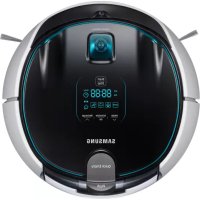
SR10J5050U - Vacuum Cleaner SAMSUNG - Free user manual and instructions
Find the device manual for free SR10J5050U SAMSUNG in PDF.



Download the instructions for your Vacuum Cleaner in PDF format for free! Find your manual SR10J5050U - SAMSUNG and take your electronic device back in hand. On this page are published all the documents necessary for the use of your device. SR10J5050U by SAMSUNG.
USER MANUAL SR10J5050U SAMSUNG
- Beforeoperatingthisunit,pleasereadtheinstructionscarefully.
- Forindooruseonly. VR5000_EN_00734A-00.indd 1 2015-02-27 오후 5:53:562 Contents Preparation Safety information 3 Safetyinformation 3 Importantsafetyinstructions 4 Installation Installation 12 Accessories 13 Charging 14 Installing the virtual guard (Optional) 16 Partnameofthevirtualguard 17 Insertingbatteries 17 Operations Using the robot vacuum cleaner 18 Cleaningmethodforeachmode 20 Using the remote control 21 Name of each part 25 Setting time/schedule 26 Settingthetime 26 Settingtheschedule 26 Maintenance Cleaning and maintaining 27 Cleaningthedustbin 27 Emptyingthedustbin(QuickEmpty) 28 Cleaningthedrivingwheel 28 Cleaningthesensorsandthecamera 28 Cleaningthepowerbrush 29 Cleaningthesidebrush 30 Appendices Notes and cautions 31 Charging 31 Inuse 31 Cleaningandmaintenance 33 Aboutthebattery 33 AbouttheIrDAsensor 34 Information codes 35 Troubleshooting 36 Warnings about battery 38 Howtoremovethebattery 38 Specications 40 Open source announcement 41 VR5000_EN_00734A-00.indd 2 2015-02-27 오후 5:53:563 Preparation Safety information WARNING
- Beforeoperatingtheappliance,pleasereadthismanualthoroughlyand retainitforyourreference. WARNING
- Becausethesefollowingoperatinginstructionscovervariousmodels,the characteristicsofyourvacuumcleanermaydifferslightlyfromthose describedinthismanual. Caution/Warning symbols used WARNING Indicatesthatadangerofdeathorseriousinjuryexists. CAUTION Indicatesthatariskofpersonalinjuryormaterialdamageexists. Other symbols used NOTE Indicatesthatthefollowingtextcontainsadditionalimportantinformation. Safety information Preparation VR5000_EN_00734A-00.indd 3 2015-02-27 오후 5:53:564 Preparation Important safety instructions Whenusinganelectricalappliance,basicprecautionsshouldbeobserved, includingthefollowing: Read all instrucrions before using your robot vacuum cleaner. Unplugthecharger(station)fromoutletwhennotinuseandbefore conductingmaintenance. WARNING Toreducetheriskofre,electricshock,orinjury: General
- Useonlyasdescribedinthismanual.
- Donotoperatetherobotvacuumcleanerorcharger(station)ifithas beendamagedinanyway.
- Iftherobotvacuumcleanerisnotworkingasitshould,hasbeen dropped,damaged,leftoutdoors,ordroppedinwater,returnittoa customercarecenter.
- Donothandlethecharger(station)orrobotvacuumcleanerwithwet hands.
- Useonlythecharger(station)suppliedbythemanufacturertorecharge.
- Donotpickuphardorsharpobjectssuchasglass,nails,screws,coins, andetc.
- Donotusewithoutalterinplace.Whenservicingtheunit,neverput ngersorotherobjectsintothefanchamberincasetheunitaccidentally turnson.
- Donotputanyobjectsintoopenings.Donotusewithanyopenings blocked;keepopeningsfreeofdust,lint,hair,andanythingthatmay reduceairow.
- Donotusetopickuptoxicmaterials(chlorinebleach,ammonia,drain cleaner,etc.).
- Donotusetopickupanythingthatisburningorsmoking,suchas cigarettes,matches,orhotashes.
- Besuretherobotvacuumcleanerdoesnotpassthroughortouchany kindofliquids. – Therobotvacuumcleanercanbeseverelydamagedanditmay contaminateotherareasifthewheelspassthroughliquid.
- Alwayskeepthecliffsensorcleanforyoursafety. In use
- Ifanyabnormalsounds,smellsorsmokecomefromtherobotvacuum cleaner,immediatelyshutoffthepowerswitchatthebottomoftherobot vacuumcleanerandcontactaservicecenter. Cleaning and maintenance
- Insertthedustbinbeforeusingtherobotvacuumcleaner.
- Donotusetherobotvacuumcleaneronblackcoloredoors. – Therobotvacuumcleanermaynotbeabletooperatenormally.
- Donotpickuptherobotvacuumcleanerbythedustbinholder.
- Donotplaceanyobjectswithin0.5mtobothsidesand1mtothefront ofthecharger.
- Moveanyobstaclesthatmaydisturbtherobotvacuumcleaner’s movement(suchaschildren’sindoorswingorslides)beforecleaning. VR5000_EN_00734A-00.indd 9 2015-02-27 오후 5:53:5710 Preparation In use
- Usingtherobotvacuumcleaneronthickcarpetmaydamageboththe robotvacuumcleanerandthecarpet. – Therobotvacuumcleanercannotpassovercarpetthatisthickerthan1 cm.
- Donotusetherobotvacuumcleanerontablesorotherhighsurfaces. – Thereisariskofdamageifitfalls.
- Therobotvacuumcleanermaybumpintochair,desklegsthereforemove themawayforfasterandefcientcleaning.
- Whentherobotvacuumcleanerisoperating,donotliftituporcarryit toanotherarea.
- Donotholdtherobotvacuumcleanerbyitsdrivingwheelswhen carryingittoanotherarea.
- Donotputanyobjectsontopoftherobotvacuumcleanersinceitmay causemalfunction.
- Removeanylargepapersorplasticbagsfromtheoorbeforeusingthe robotvacuumcleanersincetheymayblocktheintake.
Charginglampduringcharging(green) 1 Turn on the power switch on the bottom. Youmustturnonthepowerswitchtoturn ontherobotvacuumcleaner. 2 Manually charge the robot vacuum cleaner by placing it on the charger. Makesurethechargepinsoftherobot vacuumcleanerandthechargerisaligned. 3 Check the charging status. “ ”willturnonaccordingtocharging progressand“FULL”willturnonwhen chargingiscomplete. VR5000_EN_00734A-00.indd 14 2015-02-27 오후 5:53:5815 Installation Automatic charging Whenthebatteryindicatorblinksduring cleaning,therobotvacuumcleanerwill returntothechargertochargeitself automatically. Recharge Youcancommandtherobotvacuum cleanertorechargeatthechargerwhileit isincleaningprocess. Low battery (Lo) Manuallychargetherobotvacuumcleaner byplacingitonthecharger. Steps to take if recharging is not being executed. Check the installation status of the charger when:
- thechargerislocatedinaplacewheretherobotvacuumcleanercannoteasilyaccess.
- distancebetweenthechargerandrobotvacuumcleanerisover5mapart. – Itmaytakealongtimefortherobotvacuumcleanertoreturntothechargerfor recharging. Manually charge the robot vacuum cleaner when:
- thechargerislocatedinacorner.
- batteryisfullyexhausted.
- therobotvacuumcleanerisstuckbyobstacles(furnitureetc.).
- therobotvacuumcleanercan’tclimbthresholdnearcharge.(Heightofthethreshold thattherobotvacuumcleanercanclimb:about1.5cmandbelow)
- whenthebatteryindicatorblinksand“Lo”isdisplayed.
1 Open the battery cover of the Virtual guard by pressing the locking tab and lift it up.
2 Insert the batteries (D type) as shown in the illustration (check the +, - polarity).
3 Insert the tip of the cover into the slot and push the other end to close the battery cover. VR5000_EN_00734A-00.indd 17 2015-02-27 오후 5:53:5918 Operations Using the robot vacuum cleaner Youmustturnonthepowerswitchbeforeusingtherobotvacuumcleaner. WARNING
- PressandholdthePointcleaningbutton tomovetheredlighttothedesiredspot. Thetherobotvacuumcleanerwillfollow thelightwhilecleaning. Operating distance of the remote control Height of the remote control 0.5m 1m 1.5m Operating distance About 1.5m About
- Youmustsetthecurrenttimebeforeusingtheone-time/dailyschedule.
- PresstheSchedulebuttonshortlytosetone-timeschedule.
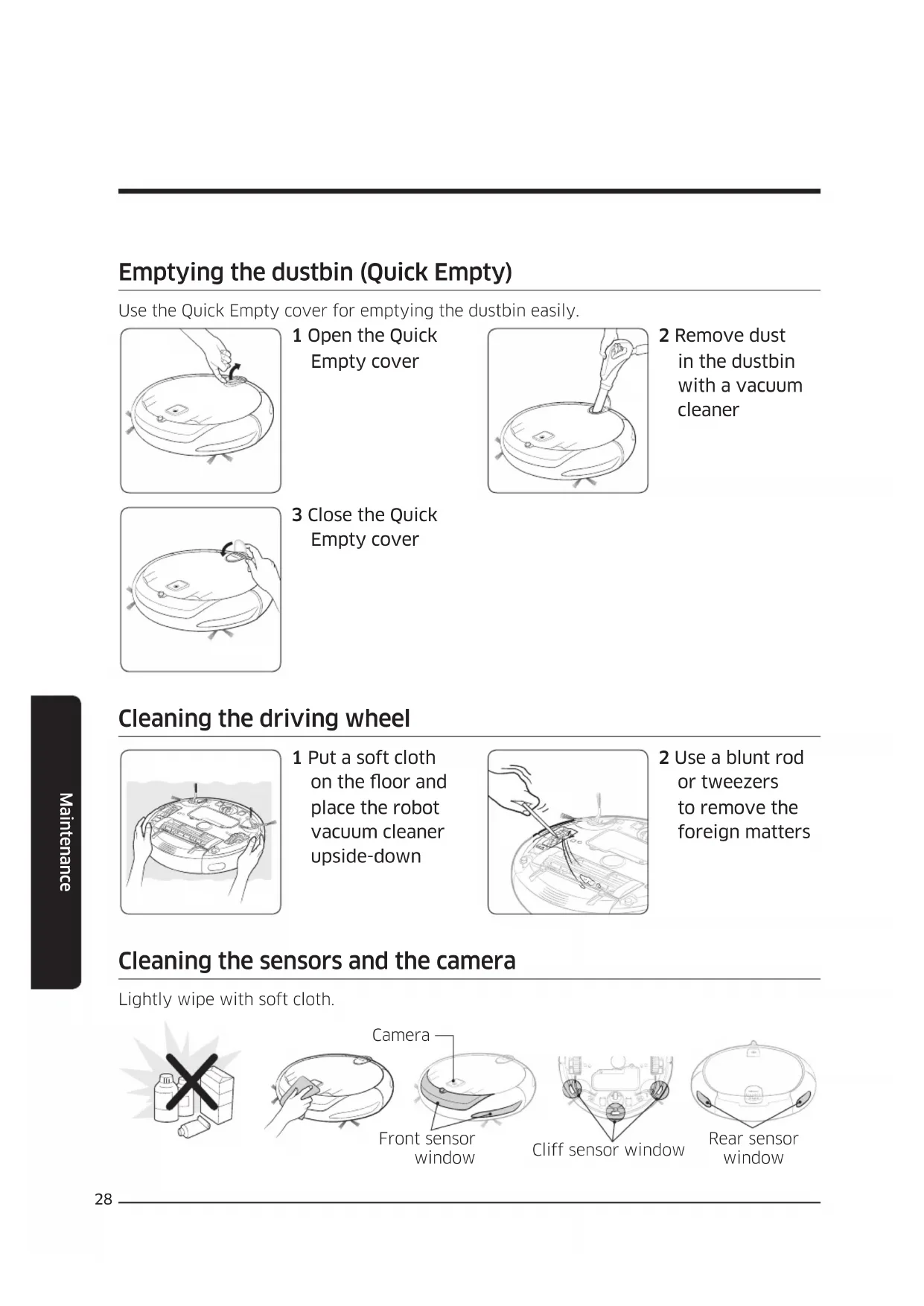
- PresstheSchedulebuttonfor3secondstosetdailyschedule. Select"One-time"or "Daily"schedule Select"Minute"Select"Hour" or or or or Setting complete Startsetting Cancelling during setup CancellingOne-time/Dailyschedule To cancel the one-time schedule Cancelcomplete To cancel the daily schedule Pressfor3sec. Cancelcomplete VR5000_EN_00734A-00.indd 26 2015-02-27 오후 5:54:0927 Maintenance Cleaning and maintaining Youmustturnoffthepowerswitchbeforecleaningtherobotvacuumcleaner. Cleaning the dustbin Cleanthedustbinifthere’stoomuchdustinthedustbin. 1 Remove the dustbin 2 Open the dustbin cover 3 Remove the lter from the dustbin 4 Remove dust in the dustbin and the lter 5 Wash the dustbin and the lter 6 Reassemble the lter into the dustbin 7 Close the dustbin cover 8 Reinsert the dustbin into the robot vacuum cleaner Maintenance VR5000_EN_00734A-00.indd 27 2015-02-27 오후 5:54:1028 Maintenance Emptying the dustbin (Quick Empty) UsetheQuickEmptycoverforemptyingthedustbineasily. 1 Open the Quick Empty cover 2 Remove dust in the dustbin with a vacuum cleaner 3 Close the Quick Empty cover Cleaning the driving wheel
1 Put a soft cloth on the oor and place the robot vacuum cleaner upside-down
2 Use a blunt rod or tweezers to remove the foreign matters Cleaning the sensors and the camera Lightlywipewithsoftcloth. Cliffsensorwindow Rearsensor window Camera Frontsensor window VR5000_EN_00734A-00.indd 28 2015-02-27 오후 5:54:1229 Maintenance Cleaning the power brush 1 Remove the dustbin 2 Remove the power brush cover 3 Remove the power brush 4 Clean the power brush 5 Reassemble the power brush 6 Reassemble the power brush cover VR5000_EN_00734A-00.indd 29 2015-02-27 오후 5:54:1430 Maintenance Cleaning the side brush Cleanthesidebrushifthere’sforeignmatteronthebrush. 1 Dip soft cloth into warm water
2 Wrap the side brushes with the cloth for about 10seconds and then wipe it Ifhairorstringiscaughtbetweenthemainunitandthesidebrush,followthebelow steps.
1 Remove the side brushes
2 Clean the side brushes
- Ifthebatteryoverheatsduringcharging, itmaytakelongertocharge.
- DonotliedownaroundtheRobot Vacuumthatisrunning. – Yourhairmaybecaughtbetween thepowerbrushandthesidebrush, resultinginphysicalinjury.
- Therobotvacuumcleanermayget caughtonthresholds,etc.during cleaning. – Torestartoperation,shutoffthe powerswitch,movetherobotvacuum cleanertoanareawhereitcanmove easilyandthenturnonthepower again.
- Therobotvacuumcleanercannot completelycleanareasitcannotenter, suchascorners,betweenthewalland sofa,etc. – Pleaseuseanothercleaningtoolto cleanthemregularly.
- Therobotvacuumcleanercannot vacuumclumpsofdirt,sosomemay remainontheooraftercleaning. – Pleaseuseanothercleaningtoolto cleanthemregularly. Notes and cautions Appendices VR5000_EN_00734A-00.indd 31 2015-02-27 오후 5:54:1632 Appendices
- Iftherobotvacuumcleaneristurned off,powercannotbeturnedonbythe Powerbuttonoftheremotecontrol. PressandholdtheStart/Stopbuttonon therobotvacuumcleaner.
- IfthebatterybecomeslowduringAuto/ Maxcleanmode,therobotvacuum cleanerwillrechargeandnishcleaning theremainingareaafterrecharging. (Repeatcleaningfrequency:1time)
- IfthePointcleaningbuttonispressed whiletherobotvacuumcleaneris charging,itwillmovebackwardabout 250mmandrotate180º.
- Iftherobotvacuumcleanersensesthe bumpingimpactorfall,itwillmove backwardautomatically.
- Ifyouwashedthedustbinandlterwith water, – Dustbin:Completelywipeoutthe water. – Filter:Completelydryitinashade beforeusing. CAUTION
- Watchyourngerswhenattachingor detachingthelter,sincetheymayget stuckinthedustbin’sintake.
- Toavoidblockagesbyforeignmatter, donotlettoothpicks,cottonswabsetc. frombeingvacuumedbytherobot vacuumcleaner.
andmodelnamebeforepurchasing.
- Donotdiscardthebatterieswithyour householdtrash.
- Beforeyoudiscardtherobotvacuum cleaner,disposeofthebatteriesinan environmentallysafemanner. – Followalllocalregulationswhen disposingofbatteries.
- Therobotvacuumcleanerispowered byanenvironment-friendlyNickelMetal Hydride(NiMH)rechargeablebattery, andanover-chargepreventionfunction guaranteesanextendedlifetime.
- Anincreasedchargingtimeanda shorterbatterylifeindicatesthecloser endofthebatterylife.Pleasecontact anauthorizedcustomercarecenterto replaceyourbattery.
- Thebatterywarrantyperiodis6months fromthedateofpurchase. About the IrDA sensor CAUTION
- Infraredsignaltransmissionmaynotbe smoothinlocationsexposedtohalogen lampsorinoutdoorlocations.
- Ifmorethanonerobotvacuumcleaners isusedsimultaneously,theymay malfunctionduetointerferenceofthe infraredsignals. VR5000_EN_00734A-00.indd 34 2015-02-27 오후 5:54:1635 Appendices Information codes Information codes Checklist The robot vacuum cleaner is caught, stuck or trapped while moving around.
- Turnoffthepowerswitchandmovetherobotvacuum cleanertoanotherarea. Foreign matter caught in the Power brush.
- Turnoffthepowerswitchandremovetheforeignmatter fromthePowerbrush. Foreign matter caught in the left Driving wheel.
- Turnoffthepowerswitchandremovetheforeignmatter fromtheDrivingwheel. Foreign matter caught in the right Driving wheel.
- Turnoffthepowerswitchandremovetheforeignmatter fromtheDrivingwheel. Bumper sensor needs to be checked.
- Turnoffthepowerswitchandturnitbackon.
- Contactaservicecenterifinformationcodedoesnot disappear. Foreign matter accumulated on the obstacle sensor.
- Turnoffthepowerswitchandcleanthefrontandrear sensorwithasoftcloth. Foreign matter accumulated on the cliff sensor.
- Turnoffthepowerswitchandcleanthecliffsensorwitha softcloth. Foreign matter caught on the side brush.
- Replacethebatteries(AAAtype)whentheremote controllerisnotworking.
- Iftheintake(onbottomofTherobotvacuumcleaner)is blockedbyforeignmatters,turnoffthepowerswitchand removeforeignmatterfromtheintake.
- Removeanyobstaclesaroundthecharger(about1min frontandabout0.5mtobothsidesofthecharger)that maydisturbtherobotvacuumcleanerfromreturningto thecharger.
- Makesureyouareusingalkalinebatteries.