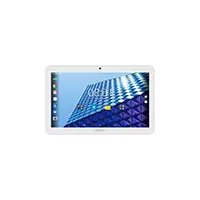
70c Neon - Graphic tablet ARCHOS - Free user manual and instructions
Find the device manual for free 70c Neon ARCHOS in PDF.



| Product type | Touchscreen tablet |
| Brand | ARCHOS |
| Model | 70c Neon |
| Operating system | Android 6.0 |
| Screen size | 7 inches |
| Screen type | Capacitive touchscreen |
| Screen resolution | 1024 x 600 pixels (estimated) |
| Processor | Quad-core 1.3 GHz (estimated) |
| RAM | 1 GB (estimated) |
| Internal storage | 8 GB (estimated) |
| Expandable storage | MicroSD |
| Connectivity | WiFi 802.11 b/g/n, micro-USB 2.0 |
| Battery | 3000 mAh (estimated) |
| Power supply | Power adapter (micro-USB charger) |
| Weight | 300 g (estimated) |
| Dimensions (L x W x H) | 190 x 110 x 10 mm (estimated) |
| Main features | Internet browsing, Android apps, multimedia playback, camera (if present) |
| Care and cleaning | Clean with a soft dry cloth, avoid liquids |
| Security | Screen lock, Android Device Manager |
| Spare parts and repairability | Standard micro-USB charger, non-removable battery |
Frequently Asked Questions - 70c Neon ARCHOS
User questions about 70c Neon ARCHOS
0 question about this device. Answer the ones you know or ask your own.
Ask a new question about this device
Download the instructions for your Graphic tablet in PDF format for free! Find your manual 70c Neon - ARCHOS and take your electronic device back in hand. On this page are published all the documents necessary for the use of your device. 70c Neon by ARCHOS.
USER MANUAL 70c Neon ARCHOS
Congratulations for the purchase of an ARCHOS device! This quick start guide helps you to start using your device properly. If you have more questions concerning the use of your device, visit us at:

twitter.com/archos

www.facebook.com/archos
Blog
https://blog.archos.com/

http://faq.archos.com/

www.archos.com, click Support > After-sales support

www.archos.com, click Support > Downloads > Declaration of conformity
As we are often updating and improving our products, your device's software may have a slightly different appearance or modified functionality than presented in this quick start guide.

Unboxing
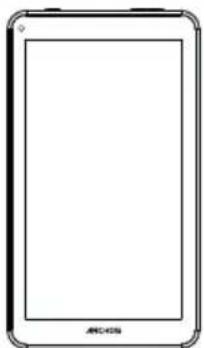
ARCHOS 70 Neon
Quick start guide
Warranty, legal and safety notice

Charger adapter
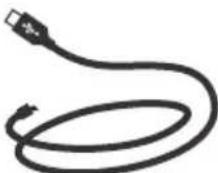
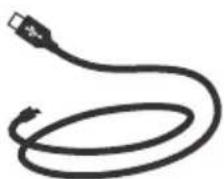
Charging cable
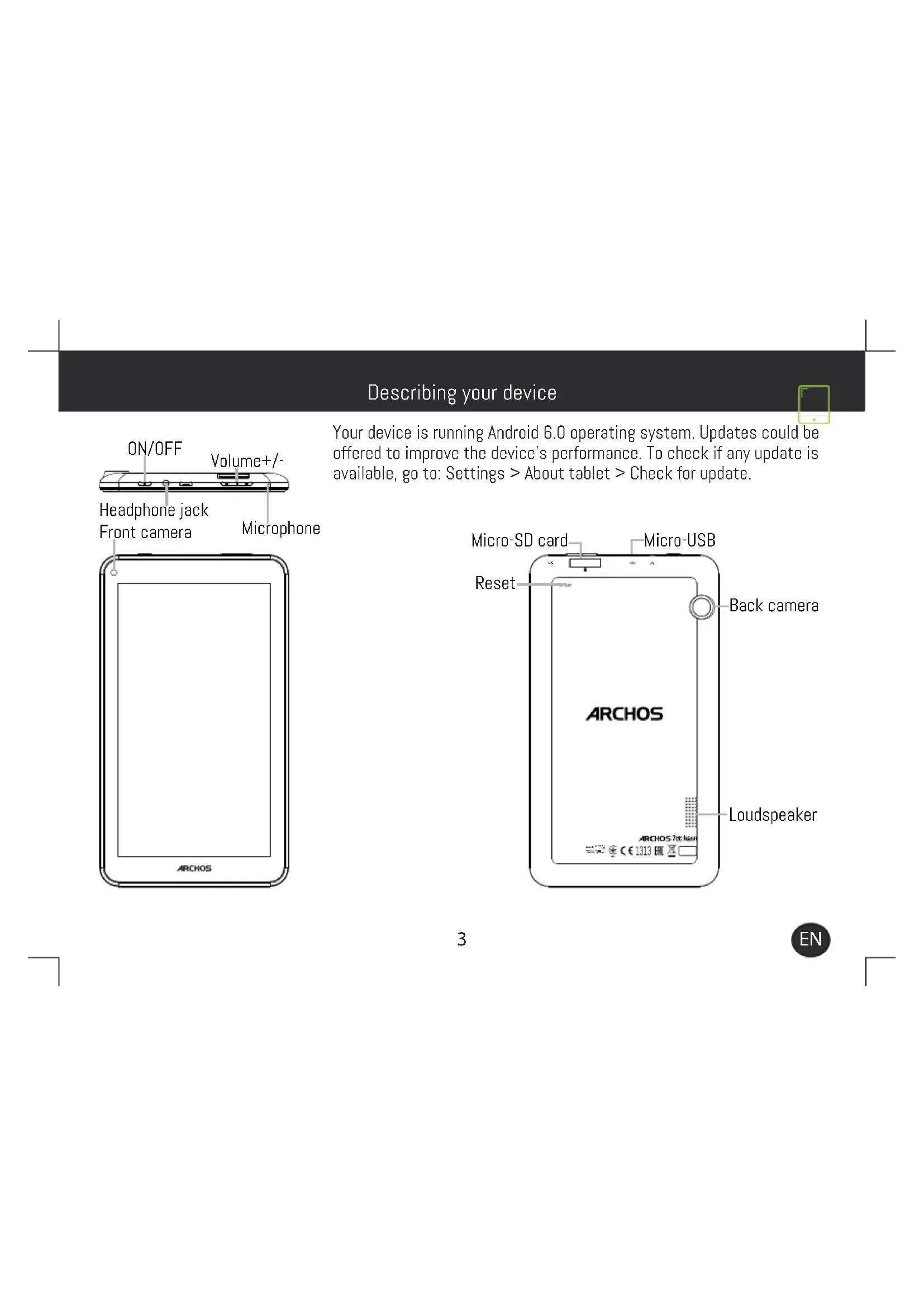
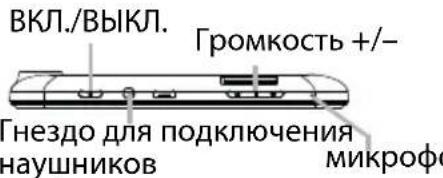
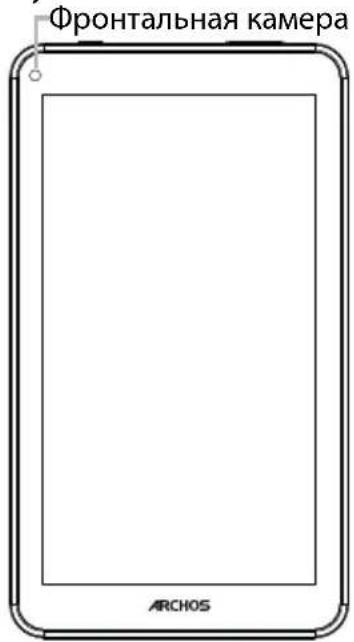
Describing your device
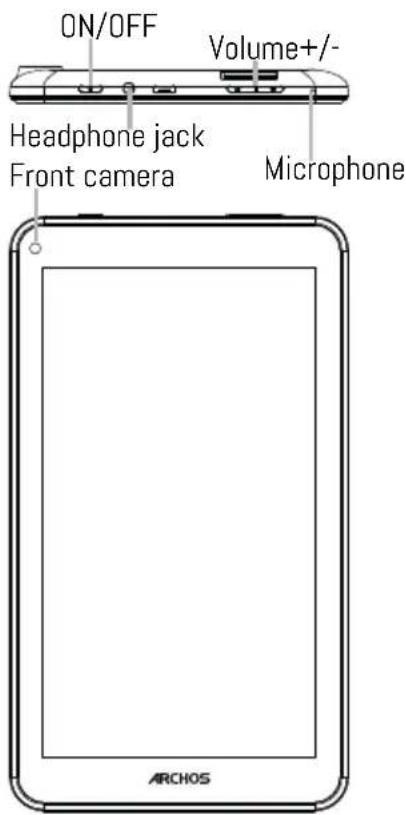
Your device is running Android 6.0 operating system. Updates could be offered to improve the device's performance. To check if any update is available, go to: Settings > About tablet > Check for update.
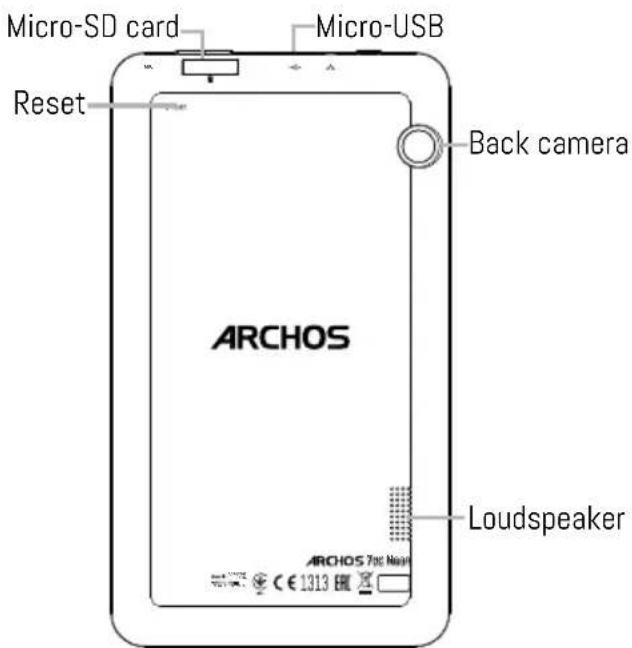

Starting up
Charging your battery completely
Plug the charging cable in the Micro-USB port and the adapter in a power outlet.
Leave the device until the battery is fully charged.
Turning ON
- Press and hold the ON/OFF button to turn on the device.
- Follow the instructions to set up your device: language, WiFi, copy your data, enter your name, set up email, protect your phone, notifications to be shown, Google services, third party apps.
NOTE: You can skip some steps and define them later from the Settings app.
Moving a home screen item: Touch and hold your finger onto it until the positioning gridlines appear, then slide it to the desired location, and release your finger.
Removing a home screen item: Touch and hold it, slide your finger towards the top of the screen and drop it over the Remove icon.
Uninstalling an item: From the All apps screens, touch and hold it, slide your finger towards the top of the screen and drop it over Uninstall bin.
Creating application folders: Drop one app icon over another on a home screen and the two icons will be combined.
Changing your wallpaper: Hold your finger on a home screen at an empty location, then choose from the list: Wallpaper.
Hints & tips

Widgets: Hold your finger on a home screen at an empty location, then choose from the list: Widgets.
Securing your device: Define a lock screen to protect your privacy. Select the Settings app, then Security. Choose a screen lock.
Android device manager: When your device is lost, you can use the android device manager page (https:// www.google.com/android/devicemanager) to erase all your contents, to lock the device, to locate the device or to make it ring.
Scheduled power on&off: Schedule power on & off to set when the device turns off and turn on. For example, you can set it for sleep time.

Troubleshooting
- If your device is frozen:
Press the ON/OFF button for 10 seconds.
-
If your device doesn't turn on:
-
Charge your device.
-
Press the ON/OFF button for 10 seconds.
-
If your device functioning is too slow:
Close all apps which are not currently used.
- If your WiFi reception is too low:
Make sure you are not far from the WiFi hotspot.
Update the firmware of the device: http://www.archos.com/support.
Reset and redefine your connection parameters.
Contact your WiFi connection provider.
- If your device has dysfunctions:
Reinitialize your device. Go to Settings > Backup & reset > Factory data reset. If you can't have access to the settings for any reason, consult our FAQs about the reinitialization process.
For more answers about your technical difficulties, do not hesitate to visit: faq.archos.com

Contactez-nous

www.archos.com, click Support > After-sales support

www.archos.com, cliquez Support > Tetechargesments > DeclaratiOn de conformite
PpncoeHnHnTecb KHaM!

Iop3dpabnem c npno6peTeHnem ycTpoiCTBa ARCHOS! DaHHoe kpaTkoe pyKOBOCTBO no npImeHnIO NOMOKeT C nepBbIX MNHy T npABnIBHO NOJb3OBaTbcr yCTpoiCTBOM. EcIny BaC BO3NkHYt dpYrNe BONPOCbI OTHOCHTeNbHO npIMeHnRA 3TOrO ycTpoiCTBa, nocETnTe Be6caNTbl:

twitter.com/archos

www.facebook.com/archos
Blog
https://blog.archos.com/

http://faq.archos.com/

Ha cTpaHnue www.archos.com BbI6epnte MeHIO POnpepKka >PoclenpoJaxnay POnpepKka

Ha cTpaHnue www.archos.com BbI6epnte MeHIO PoIepeXka > 3arpy3kn> JeKlapaunca COOTBeTCTBn
IockoBky Mbl qacto o6HOBLaem n COBepHcTByem CBOH N3dJIIN, nporpaMMHOe 06ecneueHHe Ha BaWe mYCTpOJCTBe MOKeT He3HaHTeJIbHO OTNIuHaTbcra NO BHeUHEmy BVnIy IIN FyHKUHOHaJIbHOCTn OT ppeCTaBLeHHoro B DaHHOM KpaTKOM pyKOBoDCTBe.


PacnaKOBka
ARCHOS 70c Neon
KpaTKoe pyKOBOdCTBO
TapaHTn n nHCTpyKcnn no 6e3OnaCHOCTn

AanTepeaepHoro yctpoicTba
Kabel 3apdHoro yctpoiCTBa
OncanHe yctpoiCTBa
Данhoe yctpoctBO pa60taeT noJypaBneHnem onepauonHOHc nCtEmbI Android 6.0.MorytppeJnaraTbc8 o6HOBHeHn, PO3BOJIOUne yJyUWHTb 3KcnNyaTaUOnHHbIe xapaKTEpncTNk yCTPOCTBa.ДЯ npOBepKn HAnuHn o6HOBHeHn BblONHnTe nepexoJ: Settings >About tablet >Check for update (Hactpoyn> O nJaHwete> PpOBepntb HAnuHne o6HOBHeHn).
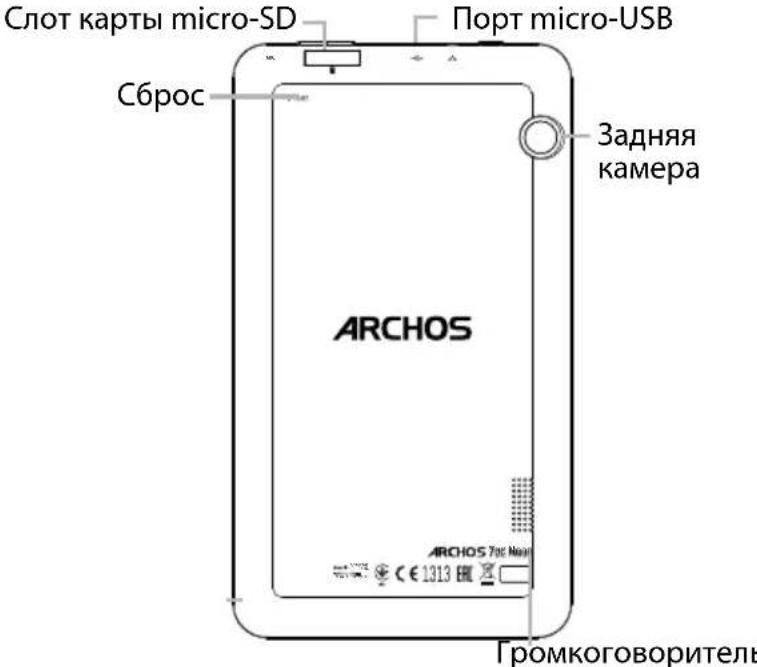

Hauana pa60TbI
Полна зардka aKKулТopa
BCTaBbTe Ka6eNb 3apAnHoro yctpoiCTBa B nopT micro-USB, nocne yero BcTaBbTe aanTe p 3apAnHoro yctpoiCTBa B po3eTKy cEtN eJekTpOnuHa.
Oxntecb noHOn 3apKn aKKymyJTopa. BkIIOueHne
-
HaxmTe u ydepXnBaTe KhONkY BKl./BblKl, yTo6bl BkIouHTy cTPOiCTBO.
-
CnéduyIe HNCTpykCnM DnB BbINONHeHn HaCTpoKn ycTpoiCTBa: Bb6opa J3bika, napametpoB Wi-Fi, KOnnpoBaHn DaHHbIX, BBOda NMeHn, HAcTpoKn 3JeKtpoHHoN NOuTbI, 3aunTbI TenefoHa, Bb6opa OTO6paXaembIX yBeDOMneHn, cnJx6 Google n npInOKeHn CTOPOHHX pON3BOOnTeJIeN.
IPIIMEYAHIE: HeKOTOpBie Oepaun MOxHNo npOnyCTnTb N HAcTpOuNTb No3dHee B npNJIOJKeHN. Settings (HaCtpoiKn).
BCTaBA Ka SIM-KapT:YTo6bI yctaHOBnTB SIM-KapTy, BCTaBBTe ee JInCeBOB CTOpOHOB Hn3 B THe3do SIM.
Bctabka Kaptbi namrtn:peetaute KapTu namrtn B cnot micro-SD.
3aKpbItHe:YcTaHOBInTe KpbIshky aKKymyIaTopa, TaK UTo6bI OHa CO UeJIyKOM CTaHa Ha MeCTO.
IepemeHHe 3eMeHTa Ha rnaBHom 3KpaHe: KOCHNTecb 3eMeHTa naIbueM ydepxBaTe ero, NOKa He NOBRTc JINHn CETKN I03uNIOHnpOBaHn, 3aTeM NepetraHte eRO B HxKHOe MeCTO n OTnyCTnte NaJeU.
YdaJIeHHe 3IeMeHTa C rJaBHOrO 3KpaHa: KOCHITecb 3IeMeHTa nJaBcE m yJepKnBaIte erO, 3aTeM nepeTAHTE erO B BepXHIO uactb 3KpaHa n OTNyCTnte Ha3Nauchom Remove (ydaJIeHne).
Дeнсталляць Элем enta: Hab ekpahe All Apps (Bce npiloxkeHn) KocHTecb Элем enta nabueM ydepxkBaIte erO, 3aTeM nepetraHnte erO B BepxHIOU qactb ekpaHa N OTnyCTITE NaKOP3HOB Uninstall (Дeнсталляць).
COBeTbI NO IcNoJIb3OBAHnIO

COnaHne npIOJKeHn: Ha rIaBHom 3KpaHe nepeTAHte OINH 3HaUOK npIOJKeHn Ha dpyroN nOTnyCTnte; DbA 3tNX 3HaUka 6ydyT oBeeHNHeHb B ONDH nnke.
I3MeHeHne fOHOBOr pucyHka: ydepxuBaTe najeu Ha rnaBHOM 3KpaHe B NcyTOM MeCTe, 3aTEM Bb6epnte u3 cnncKa: Wallpaper (OHObBn pucyHok).
BnJKeTb: yepKuBaTe naleu Ha rIaBHOM 3KpaHe B nyCTOM MeCTe, 3aTem Bbl6epNTe n3 cnncka: Widgets(BnJKeTb).
3aunTa yctpoiCTBa: aKTHBnpyuTe 6IokpOBky 3KpaHa dJa 3aunTb KOHnDEHcuaJIbHOCTN. 3anyctnte npinoXeHne Settings (HactpoKn), 3aTeM Bb6epnte Security (BezonacHocTb).
Bb6epnte 6noknpOBky 3kpaHa.
YdaenHoe ynpabHe He Android: ecn Bawe ycTpoiCTBO yTepeHO, Bbl MoKeTe BocnoB3OBaTbCstpaHneydaenHoro ynpabHeHra Android (https://www.google.com/android/ devicemanager), uTo6bI cTepeTb C Hero BCE coepxHmoe, 3a6nOKnPOBaTb ycTpoiCTBO, hain erO MeCTOnoJoxHe Hnn 3actABHTb ycTpoiCTBO 3BOHHTb.
BkIoueHne n BbIKIoueHne no paCncaHIO: 3aJaTe paCncaHne BKIOUeHna N BbIKIOUeHna, TTO6bl yCTPOcTB O BbIKIOuALOCb N BKIOUaLOCb B Ha3HaueHHoe BpeM. HanpImep, MoXHO 3aJIaHINPOBaTb BbIKIOUeHne yCTPOcTBa Ha BpeM cHa.


ПОИСК И yYSTpaHHeHne HeINcPpABHOCTeI
- Ecnn yctpoinCTBO 3aBnCNo:
Haxmnte KhoNky BKJ./BblKJI. Ha 10 ceKyHd.
- EcIn yCTpoINCTBO He BKInouaTeC:
1.3apndte yctpoonCTBO.
-
Haxmnte KhoNky BKJ./BblKJ. Ha 10 ceKyHd.
-
Ecnn yctpoiCTBO pa6oTaet cniuKOM MeJleHHO:
3akpoTe npnloxehna, KOtOpbIe He uCNoJIb3yIOCTcB DaHHbIMOMeHT.
- Ecnn KauecTBO CBa3n Wi-Fi CnNtKom Hn3Koe:
Y6eHNTecb, YTO BbI He HaxoNTecb CnIshKOM daleko OT ToKu Doctyna Wi-Fi.
06HOBIne MmKpOnporpaMMy ycTpoiCTBa: http://www.archos.com/support.
C6pocbTe n 3aadTte 3aHOBO npaMeTpbl NOKIOUeHn.
CbXntecc npoBaJepom noKnIOueHn Wi-Fi.
- Ecnn yctpoiCTBO yHKUHOHpye HnpaBnblho:
BbIOnHnTe NOBTOpHyU INHnuaJIIN3aCIO UcTPOiCTBa.IpeuInTe B Settings > Backup & reset > Factory data reset (HacToKn> C6poc n BocctaHOBJeHne> C6poc K 3aBOdCKm HAcTPOiKaM). Ecnn no KaKIM-Im6o npuHHam DoCTyNa K HAcTPOiKaM HeT, cm. OnncAHe NpOuecca NOBTOpHO INHnuaJIIN3aCIO B pa3deJe qacto 3aJaBAeMbIX BOIpOCOB IOTBeTOB.
National restrictions
This device is intended for home and office use in all EU countries (and other countries following the EU directive 1999/5/EC) without any limitation except for the countries mentioned below:
Country Restriction ReasonRemark
Bulgaria None General authorization required for outdoor use and public service
France Outdoor use limited to
Military Radiolocation use. Refarming of the 2.4 GHz band has been
10 mW e.i.r.p. within the ongoing in recent years to allow current relaxed regulation. Full band 2454-2483.5 MHz implementation planned 2012
Italy None If used outside of own premises, general authorization is required.
Luxembourg None General authorization required for network and service supply (not for spectrum)
Norway Implemented This subsection does not apply for the geographical aera within a radius of 20 km from the centre of Ny-Alesund
Russian None Only for indoor applications
Federation
Note: Frequency 2454-2483.5MHZ are restricted to indoor use in France.
Consult the declaration of conformity on http://www.archos.com/products/declaration_conformity.html Archos company (Contact address : ARCHOS SA 12 Rue Ampère 91430 Igny France) declares that this device is in compliance with the essential requirements and other relevant provisions of Directive 1999/5/EC: http://www.archos.com/support/download/conformity/CE_DOC_AC70CNE.pdf
com/support/download/conformity/CE_DOC_AC70CNE.pdf
C∈1313