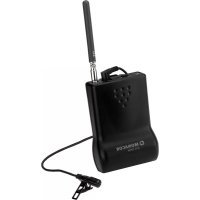
ATS10TM - Wireless audio system Monacor - Free user manual and instructions
Find the device manual for free ATS10TM Monacor in PDF.



| Product type | Wireless audio transmitter (16-channel transmission system) |
| Brand | Monacor |
| Model | ATS-10TM |
| Dimensions (without antenna) | 65 × 92 × 25 mm (w × h × d) |
| Weight (without batteries/accumulators) | 78 g |
| Power supply | 2 × 1.5 V R6 batteries or 2 × 1.2 V NiMH rechargeable batteries R6 |
| Radio frequency | 863–865 MHz, 16 selectable channels |
| Transmission power | ≤ 10 mW (EIRP) |
| Range | Approx. 190 m (free field) |
| Microphone | Built-in + external microphone input (3.5 mm jack) with included lavalier microphone |
| Functions | Channel selector (16 positions), volume control, ON/STANDBY/OFF switch, status LED (green/red), belt clip |
| Operating temperature | 0–40 °C |
| Care and cleaning | Dry, soft cloth; no chemicals or water |
| Safety | Indoor use only, protect from moisture and heat |
| Included accessories | Lavalier microphone with wind shield, antenna, instruction manual |
| Spare parts and repairability | Replaceable batteries/accumulators; optional chargers (ATS-10PS, ATS-12C, ATS-30C); repair by qualified personnel |
| General information | Compliant with Directive 2014/53/EU; declaration of conformity at www.monacor.com |
Frequently Asked Questions - ATS10TM Monacor
User questions about ATS10TM Monacor
0 question about this device. Answer the ones you know or ask your own.
Ask a new question about this device
Download the instructions for your Wireless audio system in PDF format for free! Find your manual ATS10TM - Monacor and take your electronic device back in hand. On this page are published all the documents necessary for the use of your device. ATS10TM by Monacor.
USER MANUAL ATS10TM Monacor
ATS-10R
ATS-10TM
Audio Transmission System
These instructions are intended for users without any specific technical knowledge. Please read the instructions carefully prior to operation and keep them for later reference.
All operating elements and connections described can be found on the fold-out page 3.
1 Operating Elements and Connections
(fig. 1: transmitter, fig. 2: receiver)
1 Threaded jack for screwing on the antenna
2 Transmitter: 3.5 mm jack for connecting the supplied tie clip microphone
Receiver: 3.5 mm jack for connecting the supplied earphone
3 Sliding switch for switching on or off
- ON: unit switched on and ready for operation
- STAND BY: unit in stand-by mode
Transmitter: The unit is switched on but does not transmit any audio signal.
Receiver: The unit is switched on but the sound is not reproduced via speaker or earphone.
- OFF: unit switched off
4 Status LED
A Normal operation:
Transmitter: After switching on, the LED briefly flashes in red before permanently showing green. After switching off, it briefly shows red before it is extinguished.
Receiver: After switching on or off, the LED briefly flashes in red. During operation, it permanently shows green:
- LED shows a bright green light if a radio signal is received from the transmitter,
- LED shows a dim green light if no radio signal is received from the transmitter.
B Low batteries:
If the LED permanently shows red, the batteries are almost discharged.
5 Antenna
6 Volume control
7 Transmitter: integrated microphone
Receiver: integrated speaker
8 Contacts for charging the inserted rechargeable batteries via the charging station ATS-10PS or the charging case ATS-12C or ATS-30C
9 Clip to attach the unit to your clothes (e. g. belt)
10 Selector switch for the transmission channel (16 positions)
11 Battery compartment cover
2 Important Notes
This unit corresponds to all relevant directives of the EU and is therefore marked with C€
- The unit is suitable for indoor use only. Protect it against humidity and heat (admissible ambient temperature range 0–40 °C).
- For cleaning only use a dry, soft cloth; never use chemicals or water.
- Always insert two batteries of the same type.
- If the unit is not used for a longer period of time, remove the batteries as a precaution to prevent damage to the unit in case of battery leakage.
- No guarantee claims for the unit and no liability for any resulting personal damage or material damage will be accepted if the unit is used for other purposes than originally intended, if it is not correctly operated or if it is not repaired in an expert way.
If the unit is to be put out of operation definitively, dispose of the unit in accordance with local regulations.
3 Applications
In combination with one receiver or several receivers of the type ATS-10R and a transmitter ATS-10TM, a wireless 16-channel audio transmission system operating in the frequency range of 863 – 865 MHz can be set up. The system is ideally suited for applications where the signal of a single audio source is to be fed to several persons, e. g. guided tours or multilingual lectures.
3.1 Conformity and approval
Herewith, MONACOR INTERNATIONAL declare that the receiver ATS-10R and the transmitter ATS-10TM comply with the directive 2014/53/EU. The EU declarations of conformity are available on the Internet: www.monacor.com
The units are generally approved for operation in EU and EFTA countries. The operation of the units is licence-free and requires no registration.
4 Inserting Batteries
1) Slightly press the grooves on the battery compartment cover (11) while pulling the cover downwards at the same time.
2) Insert two 1.5 V batteries or rechargeable 1.2 V NiMH batteries of size AA with the positive and negative connections as printed in the compartment.
3) Replace the cover and make sure it en gages.
Never put batteries in the household waste. Always dispose of the batteries in accordance with local regulations.
Hint: For quick and easy charging of the rechargeable batteries used in ATS-10R and ATS-10TM, MONACOR offers special chargers:
- charging station ATS-10PS for charging the batteries of up to 2 units at the same time
- charging case ATS-12C for charging the batteries of up to 12 units at the same time
- charging case ATS-30C for charging the batteries of up to 30 units at the same time
5 Connections
On each unit, screw the supplied antenna (5) into the threaded jack ANT. (1).
Transmitter: The integrated microphone (7) or the supplied tie clip microphone may be used. When using the tie clip microphone, connect it to the jack MIC. (2) [the integrated microphone is switched off in this case]. Place the supplied windshield on the tie clip microphone. Fasten the microphone to your clothes (e.g. tie, lapel) via its clip.
Receiver: The sound can be reproduced via the integrated speaker (7) or via the supplied earphone. When using the earphone, connect it to the jack EAR. (2) [the speaker is switched off in this case] and attach the earphone to your ear.
6 Operation
1) With the channel selector switch CHANNEL SELECT (10) on the transmitter, select the channel for transmission from the 16 transmission channels: Use a narrow object, e. g. screwdriver, to set the switch to one of the 16 positions.
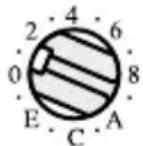
Example:
In this switch position, channel 1 is selected.
On the receiver(s), set the switch CHANNEL SELECT (10) to the same channel.
2) Switch on the transmitter: Set the sliding switch (3) to ON. (In the mid-position STAND BY, the transmitter is also switched on but it is mute, i. e. no sound is transmitted.) After switching on, the LED BATT. LOW (4) briefly flashes in red before permanently showing green.
Switch on the receiver(s): Set the sliding switch (3) to ON. (In the mid-position STAND BY, the receiver is also switched on but it is mute, i. e. no sound is reproduced via the speaker or
earphone.) After switching on, the LED BATT. LOW (4) briefly flashes in red before permanently showing green. (If the LED shows a dim green light only, no radio signal is received, i. e. the transmitter is switched off or set to a different channel than the receiver.)
If the LED BATT. LOW of a unit permanently shows red, the batteries are almost discharged.
3) On the transmitter, speak into the integrated microphone or into the microphone connected and use the control VOL (6) to adjust the volume for the audio signal transmitted.
On the receiver(s), use the control VOL (6) to adjust the reproduction volume.
4) In case of poor or disturbed reception, check if
a) the reception can be improved by using a different transmission channel.
b) the distance between the transmitter and the receiver is too long.
c) the reception is disturbed by objects in the transmission path.
d) the reception can be improved by turning the antenna of the transmitter.
5) To switch off the units, set the sliding switch (3) to OFF:
Transmitter: The LED BATT. LOW (4) turns from green to red before it is extinguished.
Receiver: The LED BATT. LOW (4) briefly flashes in red before it is extinguished.
Note concerning multichannel operation:
The number of channels to be used in parallel depends on the conditions at the place of application (e. g. on interference due to other wireless systems or high-frequency sources such as fluorescent lamps). In ideal conditions, up to seven channels can be operated at the same time without mutual interference. Two examples of a suitable channel selection for four wireless transmission paths:
Example 1:
channel 0 – channel 2 – channel 5 – channel B
Example 2:
channel 5 – channel 8 – channel E – channel F
7 Specifications
Radio frequency
range: 863–865 MHz, divided into 16 channels
Transmitting power: .. ≤ 10 mW (EIRP)
Range:..... approx. 190 m
Ambient temperature:. 0–40°C
Power supply
for each unit: 2 × 1.5 V battery or 2 × rechargeable 1.2 V NiMH battery, size AA
Dimensions
without antenna: .... 65 × 92 × 25 mm (W × H × D)
Weight
without batteries
ATS-10R:....85g
ATS-10TM: ..... 78g
Subject to technical modification.
All rights reserved by MONACOR® INTERNATIONAL GmbH & Co. KG. No part of this instruction manual may be reproduced in any form or by any means for any commercial use.
Alcance: ....aprox. 190 m
Temperatura ambiente: . 0–40 °C
Alimentación para
Brand : Monacor
Model : ATS10TM
Category : Wireless audio system