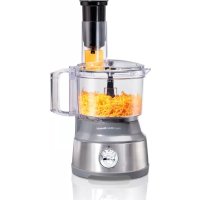
70735 - Food processor HAMILTON BEACH - Free user manual and instructions
Find the device manual for free 70735 HAMILTON BEACH in PDF.



User questions about 70735 HAMILTON BEACH
0 question about this device. Answer the ones you know or ask your own.
Ask a new question about this device
Download the instructions for your Food processor in PDF format for free! Find your manual 70735 - HAMILTON BEACH and take your electronic device back in hand. On this page are published all the documents necessary for the use of your device. 70735 by HAMILTON BEACH.
USER MANUAL 70735 HAMILTON BEACH
For recipes, tips and product information.
hamiltonbeach.ca
Open to US customers only • Ce concours
natural_image
Exterior view of a Hamilton Beach blender oven with visible internal components (no text or symbols on the device itself)Spiralizing Food Processor
When using electrical appliances, basic safety precautions should always be followed to reduce the risk of fire, electric shock, and/or injury to persons, including the following:
- Read all instructions.
- This appliance is not intended for use by persons with reduced physical, sensory, or mental capabilities, or lack of experience and knowledge, unless they are closely supervised and instructed concerning use of the appliance by a person responsible for their safety.
- This appliance shall not be used by children. Keep the appliance and its cord out of reach of children.
- Close supervision is necessary when any appliance is used near children. Children should be supervised to ensure that they do not play with the appliance.
- To protect against risk of electrical shock, do not put cord, plug, base, or motor in water or other liquid.
- Turn the appliance OFF (☐) then unplug from outlet when not in use, before putting on or taking off parts, and before cleaning. To unplug, grasp the plug and pull from the outlet. Never pull from the power cord.
- Avoid contacting moving parts. Keep fingers out of feed chute.
- Keep hands and utensils away from moving blade and disc while processing food to reduce the risk of severe personal injury and/or damage to the food processor. A rubber scraper may be used but must be used ONLY when the food processor is not running.
- Blades are sharp. Handle cutting blades carefully when inserting or removing, emptying the bowl, and during cleaning. Store out of reach of children.
-
To reduce the risk of injury, be sure to insert or remove blade and disc using hubs provided for this purpose. Use caution when removing blade and disc from the bowl, when emptying the bowl, and when cleaning.
-
Do not operate any appliance with a damaged supply cord or plug, or after the appliance malfunctions or has been dropped or damaged in any manner. Supply cord replacement and repairs must be conducted by the manufacturer, its service agent, or similarly qualified persons in order to avoid a hazard. Visit hamiltonbeach.com for information on examination, repair, or adjustment. Contact Customer Service for information on examination, repair, or adjustment as set forth in the Limited Warranty.
- The use of attachments not recommended or sold by the appliance manufacturer may cause fire, electric shock, or injury.
- Do not use your food processor if any part is broken.
- Do not use outdoors.
- Do not let cord hang over edge of table or counter or touch hot surfaces, including stove.
- Do not place on or near a hot gas or electric burner, or in a heated oven.
- Check that the appliance is OFF (☐) before plugging cord into wall outlet. To disconnect, turn the control to OFF (☐) then remove plug from wall outlet. To unplug, grasp the plug and pull from the outlet. Never pull from the power cord.
- Be sure to turn switch to OFF (①) position after each use. Always use the pushers to clear the food chute. When this method is not possible, unplug cord from outlet and disassemble unit to remove the remaining food.
- Be certain lid is securely locked in place before operating appliance.
- Never feed food into food chute by hand. Always use the food pushers.
- Do not attempt to defeat any interlock mechanism.
- To reduce the risk of injury, never place cutting blade or disc on
base without first putting bowl properly in place.
-
Make sure the blade or disc has come to a full stop before removing lid.
-
Do not use appliance for other than intended purpose.
-
The appliance is not intended for commercial, professional, or industrial use. It is designed and built exclusively for household use only.
-
Never use appliance for a longer period or with a larger amount of ingredients other than that recommended by appliance manufacturer.
-
Be careful if hot liquid is poured into the food processor bowl as it can be ejected out of the appliance due to a sudden steaming.
-
Do not fill the bowl above the marked maximum fill line (or rated capacity) to avoid risk of injury due to damage to the cover or bowl.
-
CAUTION! In order to avoid a hazard due to inadvertent resetting of the thermal cut-out, this appliance must not be supplied through an external switching device, such as a timer, or connected to a circuit that is regularly switched on and off by the utility.
-
The maximum rating of this unit is based on using the chopping/mixing blade. Using the slicing/shredding disc or spiral slicer may draw significantly less power.
SAVE THESE INSTRUCTIONS
Other Consumer Safety Information
This appliance is intended for household use only.
⚠ WARNING Electrical Shock Hazard: This appliance is provided with a polarized plug (one wide blade) to reduce the risk of electric shock. The plug fits only one way into a polarized outlet. Do not defeat the safety purpose of the plug by modifying the plug in any way or by using an adapter. If the plug does not fit fully into the outlet, reverse the plug. If it still does not fit, have an electrician replace the outlet.
The length of the cord used on this appliance was selected to reduce the hazards of becoming tangled in or tripping over a longer cord. If a longer cord is necessary, an approved extension cord may be used. The electrical rating of the extension cord must be equal to or greater than the rating of the appliance. Care must be taken to arrange the extension cord so that it will not drape over the countertop or tabletop where it can be pulled on by children or accidentally tripped over.
To avoid an electrical circuit overload, do not use another high-wattage appliance on the same circuit with this appliance.
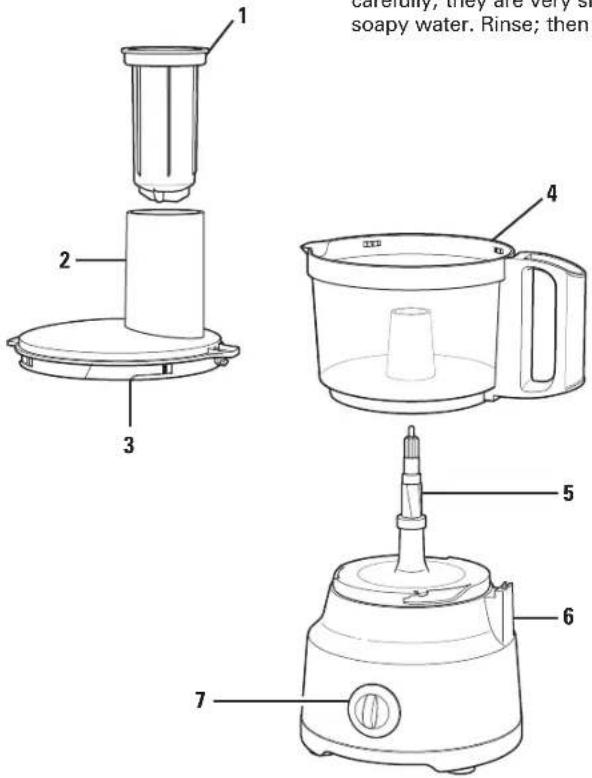
Parts and Features
To order parts, visit: hamiltonbeach.com/parts
| 1 | Food Pusher |
| 2 | Food Chute |
| 3 | Lid |
| 4 | Bowl |
| 5 | Nonremovable Motor Shaft |
| 6 | Base |
| 7 | Control Knob |
| 8 | Chopping/Mixing Blade |
| 9 | Reversible Slicing/Shredding Disc |
| 10 | Spiral Blade |
| 11 | Ribbon Blade |
| 12 | Spiral Slicing Plate |
| 13 | Cleaning Brush (with select models) |
text_image
carefully, they are very so soapy water. Rinse; then 1 2 3 4 5 6 7Before first use: Carefully unpack Food Processor, saving cardboard sleeve from Disc for storage. Handle Chopping/Mixing Blade, Reversible Slicing/Shredding Disc, Spiral Blade, and Ribbon Blade carefully; they are very sharp. Wash all parts except base in hot, soapy water. Rinse; then dry.
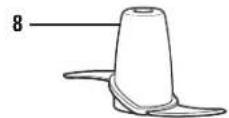
Use to coarsely chop, grate, mince, mix, or puree food.

Use to shred or to slice a variety of foods (such as cheese, carrots, onions, tomatoes, peppers, and cucumbers).
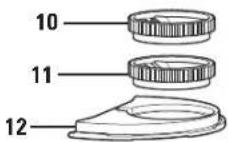
Spiral Slicer Use to spiralize vegetables. NOTE: Do not use with other attachments installed.

How to Assemble Spiral Slicer
WARNING Cut Hazard.
- Blades are sharp; handle carefully.
- Inspect parts before use. Do not use if parts are cracked, bent, or damaged.
-
Do not place fingers or utensils into the blade while in use.
-
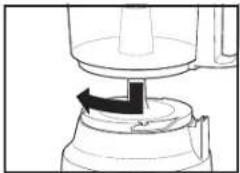
Align Bowl and Base. Turn Bowl clockwise to lock into place.
- With the tabs on the Spiral Slicing Plate aligned to the tabs on inside of Bowl, insert Spiral Slicing Plate into the Bowl facing handle. Refer to graphic on the Spiral Slicing Plate. Ensure the small hole on the Spiral Slicing Plate aligns with the Motor Shaft.
- Place end of Spiral Blade or Ribbon Blade into Spiral Slicing Plate, as shown at right.
- Replace Lid.
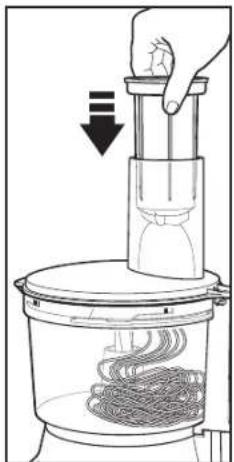
- Slide Food Pusher into Food Chute.
natural_image
Simple line drawing of a mechanical device with an arrow indicating rotation or movement (no text or symbols)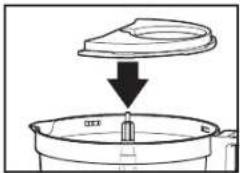
natural_image
Diagram showing a container with liquid being poured into a larger tank (no text or symbols)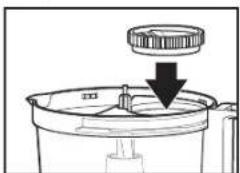
natural_image
Diagram of a mechanical component with a downward arrow indicating a process or assembly (no text or symbols present)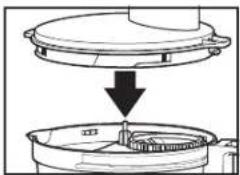
natural_image
Diagram showing a mechanical component being lifted or removed, with no visible text or symbols.How to Use Spiral Blade and Ribbon Blade
- Plug into outlet.
- Place the food in center of the Food Chute. Process only one piece of food at a time.
- Press Food Pusher securely into food by pushing down on the Food Pusher.
- Turn Control Knob to 1.
- Apply light, constant pressure to Food Pusher while processing food. Allow the Food Pusher and motor to work at their own pace.
- Keep processing until food stops being cut. About 1 inch (2.5 cm) of food will always remain unprocessed.
- Remove the small cone-shaped piece of food left on the Food Pusher. Use as a snack or add to stock, soup, or salads.
- Check Spiral Blade before spiralizing more food. If pulp is caught in Blade, clean with a brush and rinse.
- When finished, switch to OFF (Q) Unplug. NOTES:
- Pressing harder will not speed up the process or make the Spiral Slicer cut better. The Spiral Blade turns, not the food.
- Do not lift up the Food Pusher during processing. This can cause the Food Pusher to lose its grip on the food.
natural_image
Diagram of a hand using a vertical tool to press or lift a spring into a container (no text or symbols present)Successful Spiralizing
- Start by choosing the best foods for spiralizing. Here is a general rule: Think about what foods will work well on a manual food grater. If you can grate a food, it should spiralize well.
- Solid fruits or vegetables work better than those that have seeds. Seeds get caught in the Blade and will not make uniform spirals. For vegetables such as butternut squash, use the solid part and save the end with seeds for another use.
- Size does matter. The best foods for spiralizing are the ones that most closely fit the size of the Food Chute.
- When making ribbons, symmetrical foods (like zucchini or cucumbers) will produce better results. Large foods can be cut to fit the Food Chute but ribbons may not be as uniform or pretty.
- Scrub or peel your fruits and vegetables before spiralizing. When practical, you should peel the food. Peels add to the pulp that can get caught in the Blade. Zucchini, yellow squash, cucumbers, and apples are examples that you could leave unpeeled.
- Center the item in the Spiral Slicer for more even cutting. Foods that are held vertically with the Food Pusher will give the best results.
- Apples, pears, and potatoes are examples of foods that turn brown quickly when cut. To avoid browning, sprinkle fruit with lemon juice and place potatoes in water until ready to use. Be sure to pat dry thoroughly with paper towels.
- Spiralized fruits and vegetables can be eaten raw or cooked. Most noodles can be stored 2 to 3 days in the refrigerator in covered containers.
- Dry the noodles with paper towels before serving or, if desired, blanch them in water to avoid watery sauces. Reduce sauces before topping noodles to prevent thinned-down sauces.
- Spiralized fruits and vegetables will be processed in very long strands. Use a knife or scissors to cut the produce into serving-sized pieces.
- Use tongs or a pasta fork to serve the noodles.
- The 1-inch (2.5 cm) leftover piece from processing can be eaten as a snack or saved to use in stock, soups, or salads.
- When spiralizing long food items, guide the item to keep it centered in the Food Chute.
How to Use Chopping/Mixing Blade
natural_image
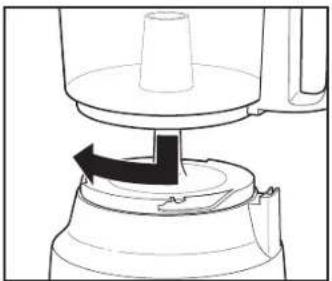
Diagram of a mechanical device with a rotating knob and base, showing no text or symbols- Align Bowl and Base. Turn Bowl clockwise to lock into place. NOTE: Unit will not work unless Bowl is locked.
natural_image
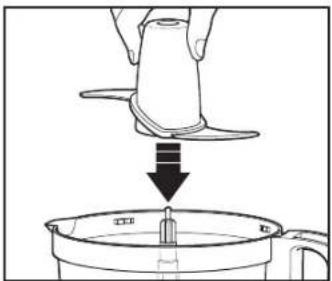
Illustration of a hand using a tool to lift a small object into a container (no text or symbols)- Carefully place Blade straight down onto the Motor Shaft.
⚠ WARNING Laceration Hazard. Handle blade carefully; it is very sharp. Make sure control knob is turned to OFF (●) and unit is unplugged.
NOTE: Operate using only one blade or disc at a time.
natural_image
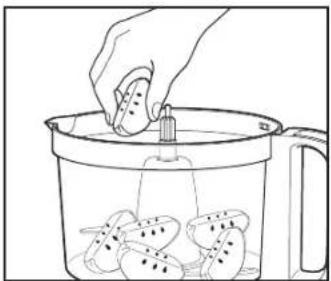
Line drawing of a hand pouring liquid into a container filled with food items (no text or symbols)- Add food to Bowl.
natural_image
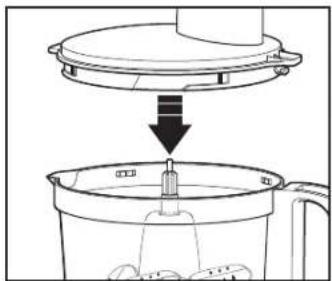
Diagram showing a kitchen utensil being inserted into a container, with no text or symbols present.- Align Lid and Bowl.
natural_image
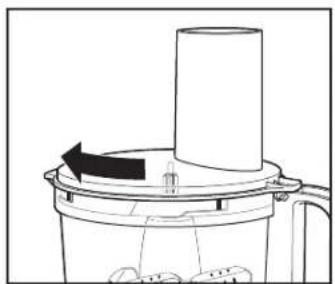
Diagram of a mechanical device with a cylindrical component and directional arrow indicating rotation (no text or symbols)- Turn Lid clockwise to lock into place. NOTE: Unit will not work unless Lid is locked.
natural_image
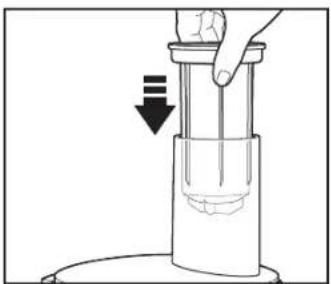
Illustration of a hand pressing down on a cylindrical device with a downward arrow indicating compression (no text or symbols)- Place Food Pusher in Food Chute.
WARNING Laceration Hazard. Always use food pusher to feed food into the chute. NEVER PUSH FOOD THROUGH CHUTE WITH HANDS OR OTHER OBJECTS.
How to Use Chopping/Mixing Blade (cont.)
text_image
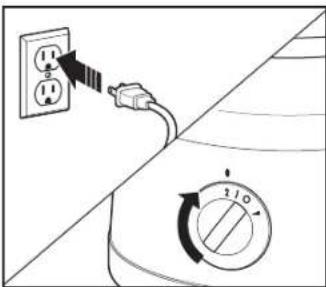
Diagram showing a power outlet connected to a wall-mounted switch with a rotary dial indicating clockwise rotation.- Plug into outlet. Select 1, 2, or P on Control Knob. 1 or 2: Processor will run continuously. P (pulse): For instant on and off control.
text_image
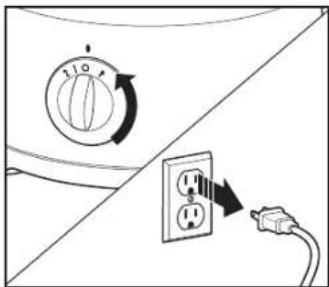
Diagram showing a washing machine control panel and its electrical outlet, with directional arrows indicating rotation and power connection.- When finished, turn to OFF (Φ and unplug.
WARNING Laceration Hazard. Always unplug unit before removing lid.
natural_image
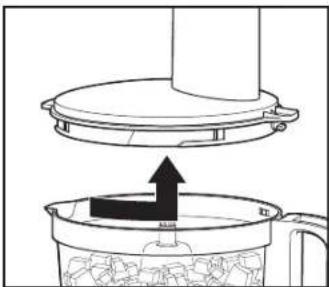
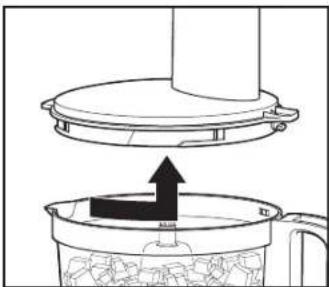
Diagram showing a lid being inserted into a container with granular material, no text or symbols present- Turn Lid counterclockwise to unlock and pull up to remove. Always remove Lid before removing Bowl to avoid possible damage to appliance.
natural_image
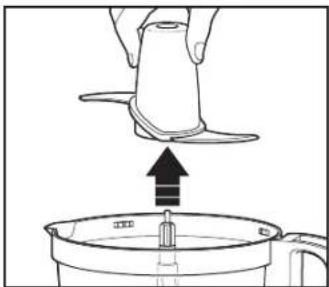
Illustration of a hand pouring liquid into a container with an upward arrow (no text or symbols)- Carefully lift up to remove Blade from Motor Shaft.
natural_image
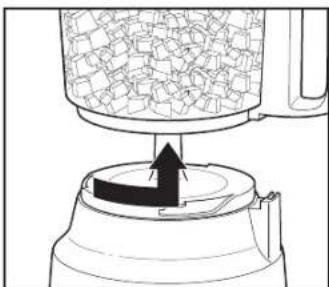
Diagram of a mechanical press or stamping device with a container and arrow indicating motion (no text or symbols)- Turn Bowl counterclockwise to unlock and pull up to remove.
natural_image
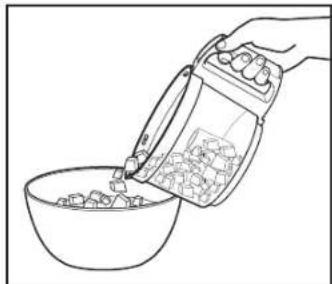
Line drawing of a hand pouring liquid into a bowl (no text or symbols)- Using a rubber spatula, remove food from Bowl.
How to Use Reversible Slicing/Shredding Disc
WARNING Laceration Hazard.
Handle disc carefully; it is very sharp.
Make sure Control Knob is turned to OFF (Sand Food Processor is unplugged.
NOTE: Operate using only one Blade or Disc at a time.
natural_image
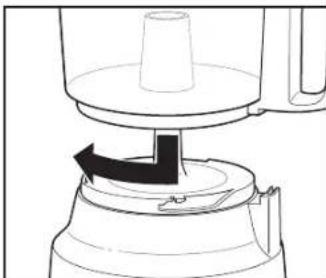
Line drawing of a mechanical device with a rotating knob and base, showing no text or symbols.- Align Bowl and Base. Turn Bowl clockwise to lock into place. NOTE: Unit will not work unless Bowl is locked.
text_image
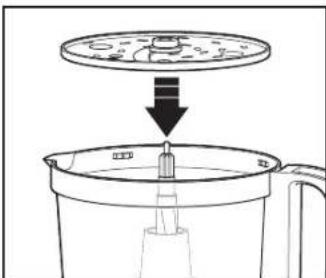
Diagram showing a device with a lid and arrow indicating downward motion, likely illustrating a process or assembly step.- Using finger holes of Disc, carefully place Disc onto Motor Shaft with desired function facing up. ("SLICE" or "SHRED" is stamped on each side of the Blade.)

natural_image
Diagram of a kitchen appliance with a downward arrow indicating a process (no text or symbols present)- Align Lid and Bowl.
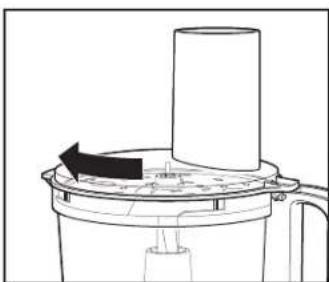
natural_image
Diagram of a mechanical device with a cylindrical component and a rotating arrow, no text or symbols present- Turn Lid clockwise to lock into place. NOTE: Unit will not work unless Lid is locked.
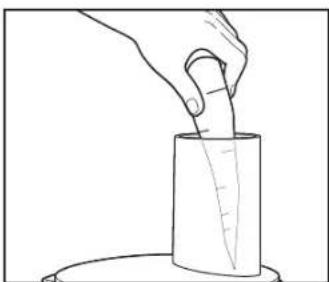
natural_image
Line drawing of a hand holding a cylindrical object with a measuring rod inserted (no text or symbols)- Cut food to fit Food Chute. Fill Chute with food.
NOTE: Soft cheese like mozzarella must be placed in the freezer for 30 minutes prior to processing to ensure it is firm enough for shredding.
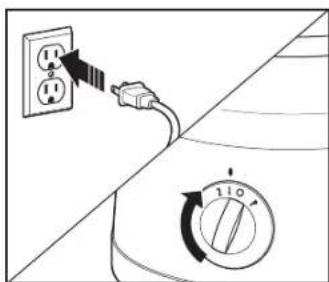
text_image
Diagram showing a power outlet connected to a switch and a 110-degree rotary dial, illustrating electrical circuit or appliance operation.- Plug into outlet. Select 1 on the Control Dial for continuous operation at the lowest speed.
How to Use Reversible Slicing/Shredding Disc (cont.)
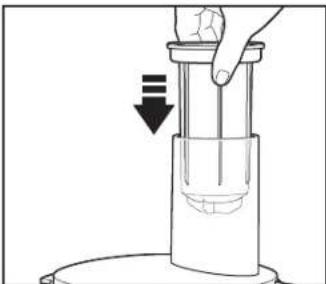
natural_image
Diagram of a hand pressing down on a cylindrical object with a downward arrow indicating motion (no text or symbols)- ⚠️ WARNING Laceration Hazard. Always use food pusher to feed food into the chute. NEVER PUSH FOOD THROUGH CHUTE WITH HANDS OR OTHER OBJECTS.
text_image
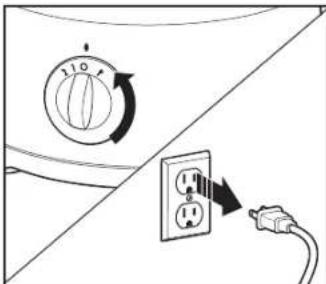
Diagram showing a rotary switch and power outlet with labeled terminals and directional arrows indicating rotation or connection.- When finished, turn OFF (●) and unplug.
WARNING Laceration Hazard. Always unplug unit before removing lid.
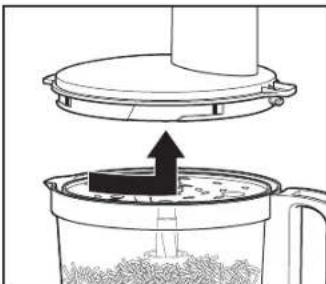
natural_image
Diagram showing a lid being inserted into a container with granular material, no text or symbols present- Turn Lid counterclockwise to unlock and pull up to remove. Always remove Lid before removing Bowl to avoid possible damage to the appliance.
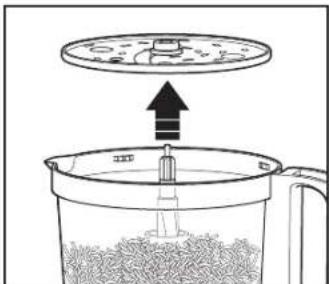
text_image
Diagram showing a container with granular material being stirred by a lid, with an upward arrow indicating heating or reaction.- Using finger holes on Disc, carefully lift up to remove from Motor Shaft.
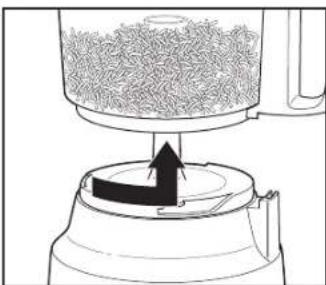
natural_image
Diagram of a mechanical press or stamping device with a rotating component and granular material (no text or symbols)- Turn Bowl counterclockwise to unlock and pull up to remove.
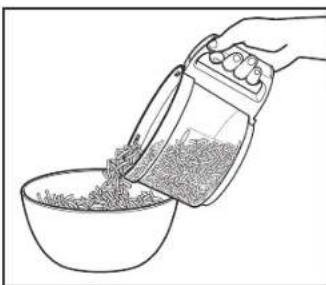
natural_image
Line drawing of a hand pouring granular material into a bowl (no text or symbols)- Using a rubber spatula, remove food from Bowl.
Tips and Techniques
- For a more uniform consistency, start with pieces of food that are similar in size. Cut food into 1-inch (2.5-cm) pieces before processing with Chopping/Mixing Blade and leave room in Bowl for food to be tossed around.
- This Food Processor is excellent to chop, mix, slice, or shred most foods. However, to maintain peak performance, do not use Food Processor to grind grain, coffee beans, or spices; slice frozen meats; knead dough; or crush ice.
- When chopping foods, pulsing on and off will produce best results and control to attain desired size pieces.
-
Operating time will depend on quantity of food being processed. Most foods can be sliced, chopped, or shredded in seconds. If unit is operated continuously for an extended period of time, let Processor rest about 4 minutes before continuing.
-
Do not puree or mash starchy vegetables like potatoes as they are easily overprocessed and will become gummy.
- To slice or shred cheese, use only firm cheese like Cheddar or Swiss that has been chilled for at least 30 minutes. Cheese should be processed immediately after being removed from the refrigerator. Soft cheese like mozzarella must be placed in the freezer for 30 minutes prior to processing to ensure it is firm enough for shredding.
- The Reversible Slicing/ Shredding Disc has a slicing blade on one side and shredding teeth on the other. The name stamped on the blade, facing up, is the function selected. Place on motor shaft with desired cutting edge facing up.
Processing Charts
Disc attachment is reversible and labeled. The label should face up for the desired function. When using Disc, do not process past the MAX LEVEL on the Bowl.
ATTACHMENT FOOD
| Chopping/Mixing Blade Chop: nuts, meat, garlic, onions, peppers, celery, herbs, bread (for crumbs), crackersMince/Puree: vegetables, fruitMix: salad dressingsPuree: soups, saucesGrate: cheese, such as Parmesan (chilled) | |
| Slicing Disc(SLICE facing up) | Cucumbers, apples, mushrooms, carrots, potatoes, cabbage, tomatoes, pepperoni, peppers, radishes, firm cheeses (chilled) |
| Shredding Disc(SHRED facing up) | Cabbage, potatoes, carrots, cheese (chilled) |
For best results do not exceed the following amounts when chopping, mincing, or pureeing with the Chopping/Mixing Blade.
FOOD MAXIMUM AMOUNT
| Fruits and Vegetables 2 to 3 cups (500 to 750 ml)(cut into 1-in. [2.5-cm] cubes) |
| Meats 0.7 lb. (350 g) (cut into 1-in. [2.5-cm] cubes) |
| Parmesan or Romano 5 ounces (140 g) (cut into 1-in. [2.5-cm] cubes) |
| Cheddar, Jack, Mozzarella8 ounces (226 g) (cut into 1-in. [2.5-cm] cubes) |
| Crackers 10 cups (2.3 L) (can fill bowl and lid up into chute) |
Care and Cleaning
WARNING Laceration Hazard. Store slicing/shredding disc with slicing side down. Handle blades carefully.
WARNING Electrical Shock Hazard. Disconnect power before cleaning. Do not immerse cord, plug, or base in any liquid.
⚠ WARNING Cut Hazard. Blades are sharp; handle blades with care.
- Wipe Base, Controls, and cord with a damp cloth or sponge. If necessary, use a mild nonabrasive cleanser. Never place in water or rinse under running water or other liquid.
- Wash Bowl, Lid, Food Pusher, Blade, Disc, Spiral Blade, Ribbon Blade, and Spiral Slicing Plate in hot, soapy water or place in dishwasher. Rinse and dry.
- DO NOT use the "SANI" setting when washing in the dishwasher, top-rack only. "SANI" cycle temperatures could damage your product. All removable parts may also be cleaned in the sink with hot, soapy water. Use caution when washing Chopping/Mixing Blade and Slicing/Shredding Disc.
Storage
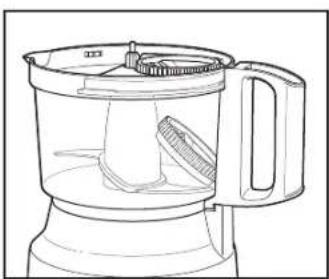
natural_image
Line drawing of a blender with handle and lid, showing internal structure (no text or symbols)- Place Chopping/Mixing Blade onto Motor Shaft. Then install the Spiral Slicer Plate into Bowl. Place Spiral Blade in Spiral Slicing Plate. Loosely place Ribbon Blade inside Bowl.
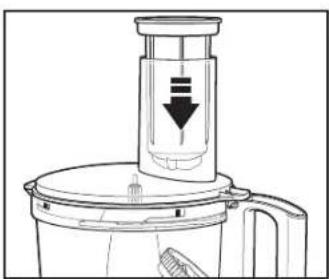
natural_image
Line drawing of a blender with a downward arrow indicating compression (no text or symbols)- Turn Lid clockwise to lock into place with Food Chute aligned to Bowl handle. Place Food Pusher in Food Chute.
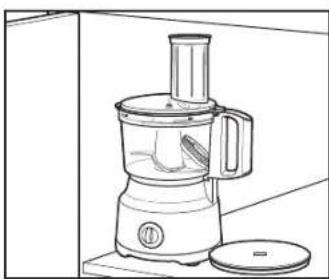
natural_image
Line drawing of a kitchen blender with handle and lid, no text or symbols present- Place saved cardboard sleeve on Disc and store next to Food Processor.
WARNING Laceration
Hazard. Store slicing/shredding disc with slicing side down. Handle carefully.
Troubleshooting
Unit does not operate on any speed or Pulse.
- The unit is not plugged in or outlet does not work.
- The Bowl and Lid are not locked in place. See "How to Use" sections.
Food is not sliced or shredded uniformly.
- Packing too much food in the Food Chute or pushing too hard on the Food Pusher may cause processed food to be irregularly sliced or shredded. Refer to "Processing Charts" for recommended sizes and quantities.
- For smaller, thinner foods, like carrots, cut in half and load pieces side by side in the Food Chute in an upright position to prevent the food from falling over. This will result in more uniform slices.
Unit stops and will not come back on.
- The Bowl and Lid are not locked in place. They may have moved slightly during processing. See "How to Use" sections.
- The outlet is not working. Check it by plugging in a working lamp or other appliance. You may have overloaded the circuit and blown a fuse or tripped the circuit breaker.
Unit has a burning smell.
- There may be a residue left on motor from the manufacturing process, causing a slight odor during initial use. This will go away. If a strong odor or any visible smoke appears, unplug unit IMMEDIATELY and visit hamiltonbeach.com.
Motor seems weak.
- The recommended food size and quantity to be processed have not been used. Refer to "Processing Charts" for recommended food sizes and speeds.
Cheese is not shredding well.
- Cheese should be processed immediately after being removed from the refrigerator. Soft cheese like mozzarella must be placed in the freezer for 30 minutes prior to processing to ensure it is firm enough for shredding.
Vegetables are not shredding, spiralizing, or slicing.
- Store vegetables with high water content in refrigerator prior to processing. Room-temperature vegetables are less firm and do not perform as well.
Vegetables are not spiralizing consistently.
- Remove and clean any food debris from the Blade. Reinstall the Spiral Slicer and continue use.
Food won't spiralize. Food mashes or breaks apart.
- Some soft or overripe foods may not be suitable for spiralizing. Choose firm foods. A success tip is to think of foods that can be grated on a manual food grater. If a food can be grated, it is appropriate for spiralizing.
- Not pressing hard enough or pressing too hard. Apply light, constant pressure to Food Pusher while spiralizing. Allow the Spiral Slicer to work at its own pace. NOTE: Pressing harder will not speed up the process or make the Spiral Slicer cut better.
- Food is not centered in the Food Chute. Stop the motor. Cut a flat edge on the food and try again. Best results occur when the food most closely fits the size of the Food Chute and when it is held vertically with the Food Pusher securely inserted in the end, not allowing the food to fall over on its side.
Recipes
Pimento Cheese
8 ounces (227 g) Vermont sharp white cheddar cheese
4 ounces (113 g) sharp cheddar cheese
3/4 cup (177 ml) mayonnaise
Directions:
- Using Shredding Disc with Food Processor running, add cheeses through Food Chute until shredded.
- In a large bowl, stir mayonnaise, pimentos, salt, and pepper until combined.
- Stir in cheeses until well blended.
- Cover and refrigerate overnight.
Serves: 8 to 10
1 jar (4 oz. [113 g]) chopped pimentos, drained
1/2 teaspoon (2.5 ml) salt
1/4 teaspoon (1.2 ml) black pepper
Roasted Red Pepper Hummus
2 cloves garlic
2 green onions, white portion and half of green tops
2 cans (15 oz. [425 g] each) garbanzo beans (chickpeas), drained
1 jar (14 oz. [397 g]) roasted red peppers, drained
1/4 cup tahini (sesame paste) stirred
2 tablespoons (30 ml) lemon juice
2 teaspoons (10 ml) olive oil
1/4 teaspoon (1.3 ml) ground cumin
Dash cayenne pepper
Salt and pepper to taste
Dash paprika
Pita chips or cut vegetables
Directions:
- Assemble Food Processor with Chopping/Mixing Blade. With Processor running, drop garlic cloves and onion into Food Chute.
- Add garbanzo beans, roasted red peppers, tahini, lemon juice, olive oil, cumin, cayenne, salt and pepper. Continue to process until smooth.
- Place in serving bowl and garnish with paprika. Serve with pita chips and/or vegetables. Refrigerate to store.
Serves: 4 to 6
Recipes (cont.)
Lemon Garlic Shrimp and Veggie Pasta
2 large zucchini
2 large yellow squash
2 large thick carrots, peeled
3/4 cup (177 ml) butter
4 cloves garlic, minced
1 tablespoon (15 ml) cornstarch
1/2 cup (118 ml) chicken broth plus 2 tablespoons (30 ml), divided
1 pound (454 g) (20 to 24 count) peeled and deveined shrimp
Directions:
- Using Spiral Slicer, make spirals of zucchini, yellow squash and carrots.
- Fill a large saucepan two-thirds full of water. Over high heat, boil water. Add zucchini, yellow squash and carrot spirals. Cook until tender, about 15 seconds. Drain and cover to keep warm.
- In a large skillet over medium-high heat, melt butter. Add garlic and cook until tender, 1 to 2 minutes.
- In a small bowl, dissolve cornstarch in 2 tablespoons (30 ml) chicken broth. Add to skillet with shrimp, remaining chicken broth, lemon juice, salt and black pepper. Cook until shrimp are opaque throughout and sauce is thickened, about 2 minutes.
- Stir in capers and lemon zest. Serve over veggie pasta.
- Sprinkle with parsley before serving.
Serves: 4–6
1/4 cup (59 ml) lemon juice
1 teaspoon (5 ml) salt
1/2 teaspoon (2.5 ml) coarse black pepper
2 tablespoons (30 ml) drained capers
1 teaspoon (5 ml) lemon zest Chopped fresh parsley
Beets With Orange and Goat Cheese Salad
2 pounds (907 g) fresh beets (about 6 medium), peeled
3 teaspoons (15 ml) salt, divided
6 tablespoons (89 ml) fresh orange juice
1/2 cup (118 ml) vegetable oil
2 tablespoons (30 ml) rice vinegar
2 tablespoons (30 ml) honey
1 tablespoon (15 ml) fresh thyme leaves
Directions:
- Using Spiral Slicer, make ribbons of beets.
- Fill a large saucepan two-thirds full of water and 2 teaspoons (10 ml) salt. Over high heat, boil water. Add beets and cook until tender, 1 to 2 minutes.
- Chill in an ice bath. Drain and dry ribbons with paper towels.
- To make dressing, assemble Food Processor with Chopping/Mixing Blade. Add orange juice, oil, vinegar, honey, thyme leaves, garlic, 1 teaspoon (5 ml) salt and coarse black pepper to Food Processor. Process until slightly thickened.
- On a salad plate, arrange fresh greens, beets and orange segments. Top with goat cheese and toasted walnuts.
Serves: 8
Limited Warranty
This warranty applies to products purchased and used in the U.S. and Canada. This is the only express warranty for this product and is in lieu of any other warranty or condition.
This product is warranted to be free from defects in material and workmanship for a period of five (5) years from the date of original purchase in Canada and one (1) year from the date of original purchase in the U.S. During this period, your exclusive remedy is replacement of this product or any component found to be defective, at our option; however, you are responsible for all costs associated with returning a product or component under this warranty to you. If the product or component is unavailable, we will replace with a similar one of equal or greater value.
This warranty does not cover glass, filters, wear from normal use, use not in conformity with the printed directions, or damage to the product resulting from accident, alteration, abuse, or misuse. This warranty extends only to the original consumer purchaser or gift recipient. Keep the original sales receipt, as proof of purchase is required to make a warranty claim. This warranty is void if the product is used for other than single-family household use or subjected to any voltage and waveform other than as specified on the rating label (e.g., 120 V \~ 60 Hz).
We exclude all claims for special, incidental, and consequential damages caused by breach of express or implied warranty. All liability is limited to the amount of the purchase price. Every implied warranty, including any statutory warranty or condition of merchantability or fitness for a particular purpose, is disclaimed except to the extent prohibited by law, in which case such warranty or condition is limited to the duration of this written warranty. This warranty gives you specific legal rights. You may have other legal rights that vary depending on where you live. Some states or provinces do not allow limitations on implied warranties or special, incidental, or consequential damages, so the foregoing limitations may not apply to you.
To make a warranty claim, do not return this appliance to the store. Please write Hamilton Beach Brands, Inc. 4421 Waterfront Dr., Glen Allen, VA 23060, or visit hamiltonbeach.com/customer-service in the U.S. or hamiltonbeach.ca/customer-service in Canada. For faster service, locate the model, type, and series numbers on your appliance.
PRÉCAUTIONS IMPORTANTES
natural_image
Line drawing of a kitchen mixer with a handle and side arm (no text or symbols)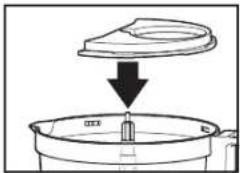
natural_image
Diagram showing a container with liquid being poured into a larger tank (no text or symbols)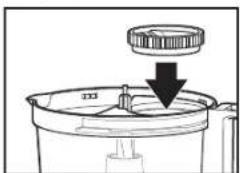
natural_image
Diagram of a mechanical component with a downward arrow indicating a process or assembly (no text or symbols present)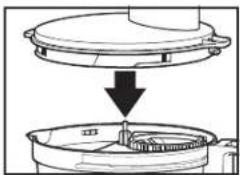
natural_image
Diagram showing a mechanical component with a downward arrow indicating process (no text or symbols present)natural_image
Line drawing of a hand using a vertical tool to press or lift a spring inside a container (no text or symbols)natural_image
Diagram of a mechanical device with a rotating arrow indicating motion (no text or symbols)natural_image
Illustration of a hand using a tool to lift a small object into a container (no text or symbols)natural_image
Diagram of a mechanical device with a cylindrical component and rotating arrow, no visible text or symbolsnatural_image
Line drawing of a hand pouring liquid into a container filled with food items (no text or symbols)natural_image
Diagram showing a kitchen utensil being inserted into a container, with no text or symbols present.natural_image
Illustration of a hand pressing down on a cylindrical device with a downward arrow indicating compression (no text or symbols)text_image
Diagram showing a power outlet connected to a wall-mounted switch with a rotary dial indicating clockwise rotation.text_image
Diagram showing a washing machine control panel with rotary dial and power outlet, alongside an electrical plug.natural_image
Diagram showing a lid being inserted into a container with granular material (no text or symbols)natural_image
Illustration of a hand pouring liquid into a container with an upward arrow (no text or symbols)natural_image
Diagram of a mechanical press or stamping device with a container and rotating component (no text or symbols)natural_image
Line drawing of a hand pouring granular material into a bowl (no text or symbols)natural_image
Line drawing of a kitchen appliance with a conical lid and a directional arrow indicating rotation (no text or symbols)text_image
Diagram showing a mechanical device with a circular component above it and a downward arrow indicating motion or force direction.natural_image
Diagram of a kitchen appliance showing a lid and base with a downward arrow indicating a process (no text or symbols present)natural_image
Diagram of a mechanical device with a cylindrical component and directional arrow (no text or symbols)natural_image
Line drawing of a hand holding a cylindrical object with a handle, placed on a circular base (no text or symbols)text_image
Diagram showing a power outlet connected to a switch and a 1:10 rotary dial, illustrating electrical circuit or appliance control.natural_image
Diagram of a hand pressing down on a cylindrical object with a downward arrow indicating motion (no text or symbols)text_image
Diagram showing electrical switch rotation and power connection with labeled componentsnatural_image
Diagram showing a lid being inserted into a container with granular material (no text or symbols)text_image
Diagram showing a container with granular material being stirred by a lid, with an upward arrow indicating heating or reaction.natural_image
Diagram of a mechanical press or stamping device with a container and arrow indicating motion (no text or symbols)natural_image
Line drawing of a hand pouring granular material into a bowl (no text or symbols)natural_image
Line drawing of a blender with handle and side panel (no text or symbols)natural_image
Line drawing of a blender with a downward arrow indicating compression (no text or symbols)natural_image
Line drawing of a kitchen blender with handle and lid, no text or symbols presentnatural_image
Line drawing of a kitchen presser with a handle and lever mechanism (no text or symbols)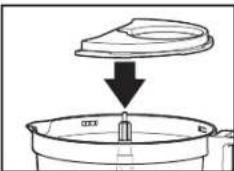
natural_image
Diagram showing a container with liquid being poured into a container (no text or symbols present)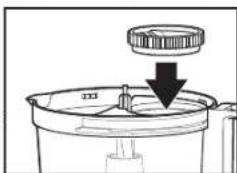
natural_image
Diagram of a mechanical component with a downward arrow indicating a process or assembly (no text or symbols present)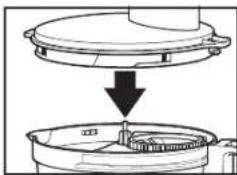
natural_image
Diagram showing a mechanical component with a downward arrow indicating process (no text or symbols present)natural_image
Illustration of a hand using a stand mixer to lift a coiled cord in a container (no text or symbols)natural_image
Line drawing of a mechanical device with a rotating knob and base, showing no text or symbols.natural_image
Illustration of a hand using a tool to press down a small object into a container (no text or symbols)natural_image
Line drawing of a hand pouring food into a steamer with food inside (no text or symbols)natural_image
Diagram showing a lid being inserted into a container with a handle, no text or symbols presentnatural_image
Diagram of a kitchen mixer with a cylindrical tank and directional arrow indicating rotation (no text or symbols)natural_image
Illustration of a hand pressing down on a cylindrical object with a downward arrow indicating compression (no text or symbols)text_image
Diagram showing a power outlet connected to a switch and a rotary dial with pointer indicating 210 degrees.text_image
Diagram showing a washing machine control panel with rotary dial and power outlet, alongside an electrical plug.- Cuando termine, apague (Oy desenchufe.
natural_image
Diagram showing a lid being inserted into a container with granular material (no text or symbols)natural_image
Illustration of a hand pouring liquid into a container with an upward arrow (no text or symbols)natural_image
Diagram of a mechanical press or stamping device with a container and base, showing internal components (no text or symbols)natural_image
Line drawing of a hand pouring liquid into a bowl (no text or symbols)natural_image
Line drawing of a kitchen appliance with a rotating knob and handle (no text or symbols)text_image
Diagram showing a mechanical device with a circular component above it and a downward arrow indicating motion or force direction.natural_image
Diagram of a kitchen appliance showing a lid and base with a downward arrow indicating a process (no text or symbols present)natural_image
Diagram of a mechanical device with a cylindrical component and directional arrow (no text or symbols)natural_image
Line drawing of a hand holding a cylindrical object with a measuring rod inserted (no text or symbols)text_image
Diagram showing a power outlet connected to a switch and a 1:10 rotary dial, illustrating electrical circuit or appliance control.natural_image
Diagram of a hand pressing down on a cylindrical object with a downward arrow indicating motion (no text or symbols)- ADVERTENCIA Riesgo
text_image
Diagram showing a rotary switch and power outlet with labeled components and directional arrows indicating rotation or connection.- Cuando termine, apague (Py desconecte.
natural_image
Diagram showing a lid being inserted into a container with granular material (no text or symbols)text_image
Diagram showing a container with granular material being inserted into a lid, with an upward arrow indicating process direction.natural_image
Diagram of a mechanical press or stamping device with a rotating component and granular material (no text or symbols)40