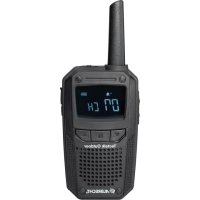
Tectalk Outdoor - Walkie-talkie ALBRECHT - Free user manual and instructions
Find the device manual for free Tectalk Outdoor ALBRECHT in PDF.

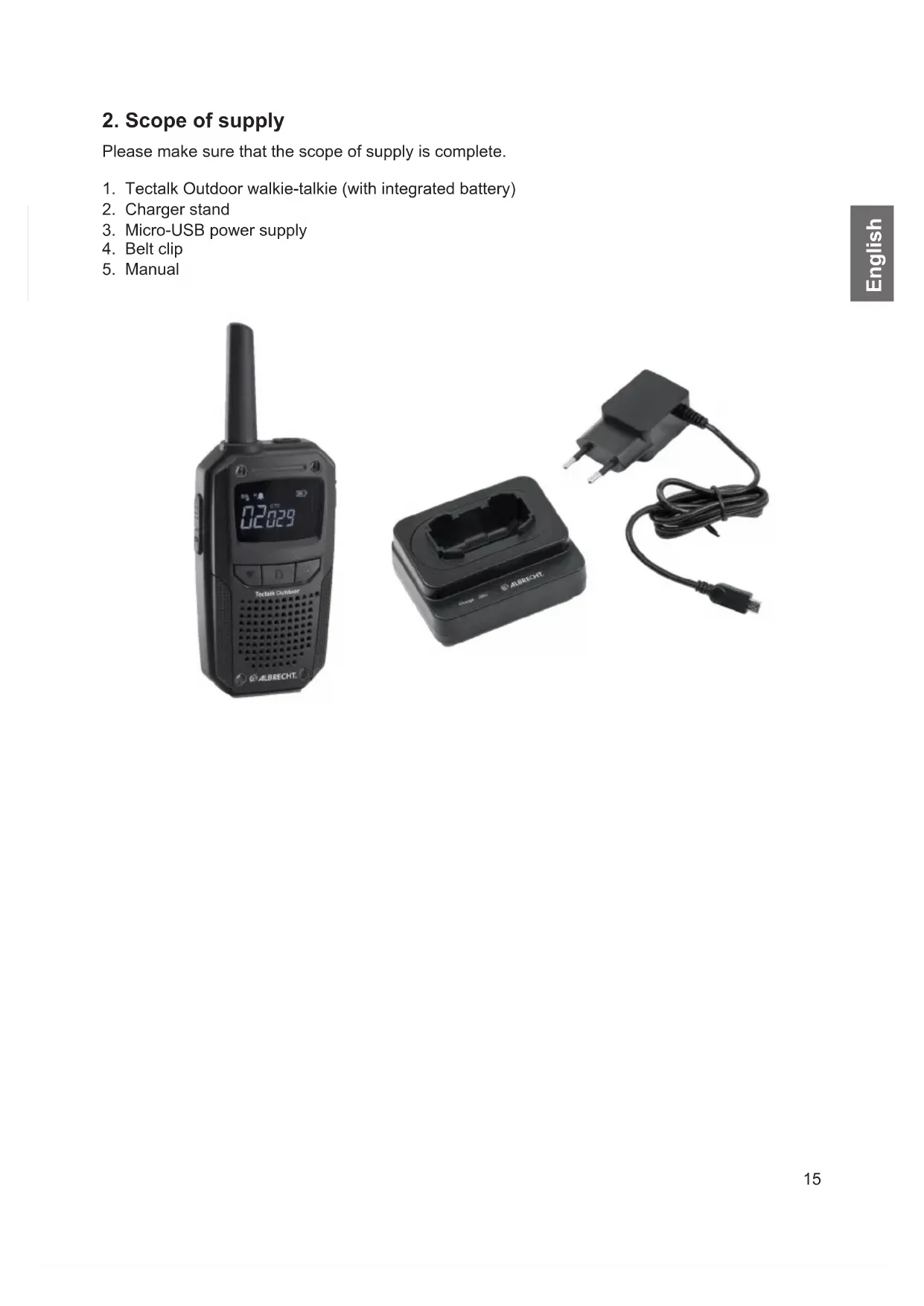


| Product type | PMR446 two-way radio |
| Brand | Albrecht |
| Model | Tectalk Outdoor |
| Power supply | Integrated lithium-ion battery 3.7 V, 1100 mAh |
| Number of channels | 16 PMR446 channels |
| Frequency range | 446.00625 MHz - 446.19375 MHz |
| Transmission power | 500 mW (max.) / adjustable to ~10% (eco) |
| Coding | 53 CTCSS tones and 104 DCS codes |
| Hands-free function (VOX) | Yes, adjustable (off, low, high sensitivity) |
| Noise suppressor (squelch) | Yes, 5 sensitivity levels |
| Dual channel monitoring | Yes |
| Display | Yes, displays all information |
| Keyboard lock | Yes |
| Channel scanning | Yes, automatic |
| End-of-transmission tone (Roger beep) | Yes, 3 different sounds |
| Water resistance | Splash resistant (do not immerse) |
| Battery life | Approximately 5 hours in low power mode, varies with usage |
| Operating temperature | -20°C to +50°C |
| Charging | Included vertical charger, charging time ~3-4 hours |
| Included accessories | Vertical charger, micro-USB plug, belt clip, instructions |
| Maintenance | Clean the battery terminals, use a soft dry cloth |
| Safety | Do not modify the device, repairs by a professional, do not expose to excessive heat |
| Repairability | Spare parts not specified, contact customer service |
Frequently Asked Questions - Tectalk Outdoor ALBRECHT
User questions about Tectalk Outdoor ALBRECHT
0 question about this device. Answer the ones you know or ask your own.
Ask a new question about this device
Download the instructions for your Walkie-talkie in PDF format for free! Find your manual Tectalk Outdoor - ALBRECHT and take your electronic device back in hand. On this page are published all the documents necessary for the use of your device. Tectalk Outdoor by ALBRECHT.
USER MANUAL Tectalk Outdoor ALBRECHT
| Kanal Frequenz (MHz) Kanal Frequenz (MHz) |
| 1 446.00625 9 446.10625 |
| 2 446.01875 10 446.11875 |
| 3 446.03125 11 446.13125 |
| 4 446.04375 12 446.14375 |
| 5 446.05625 13 446.15625 |
| 6 446.06875 14 446.16875 |
| 7 446.08125 15 446.18125 |
| 8 446.09375 16 446.19375 |
CTCSS (Continuous Tone Coded Squelch System)/DCS (Digital Coded Squelch)
1. Table of Contents
- Table of Contents 14
- Scope of supply 15
3.Walkie-talkie overview 16
3.1. Buttons and functions 16
3.2.Display 17
4.Walkie-talkie operation 18
4.1. Charging the device 18
4.2. Connecting a headset/LOUDspeaker microphone 18
4.3.Available channels 18
- Transmission and reception 19
- Main menu 19
6.1. Channel 19
6.2.CTCSS/DCS coding 19
6.3.Squelch 19
6.4. Hands-free function (VOX) 20
6.5. Two-channel monitoring 20
6.6.Key tones 20
6.7. Busy Channel Lock-Out (BCLO) 20
6.8. Transmission power 20
6.9. Roger Beep Signal 20
6.10. Standby indicator 20
6.11. Reset 20
- Additional functions 20
7.1.Monitor 20
7.2. Channel search 20
7.3.Key lock 21
-
Technical specifications 21
-
Safety instructions 22
-
Troubleshooting 22
-
Electronic waste law and recycling 22
- Declaration of conformity 22
- Warranty information 23
- Service address and technical hotline 23
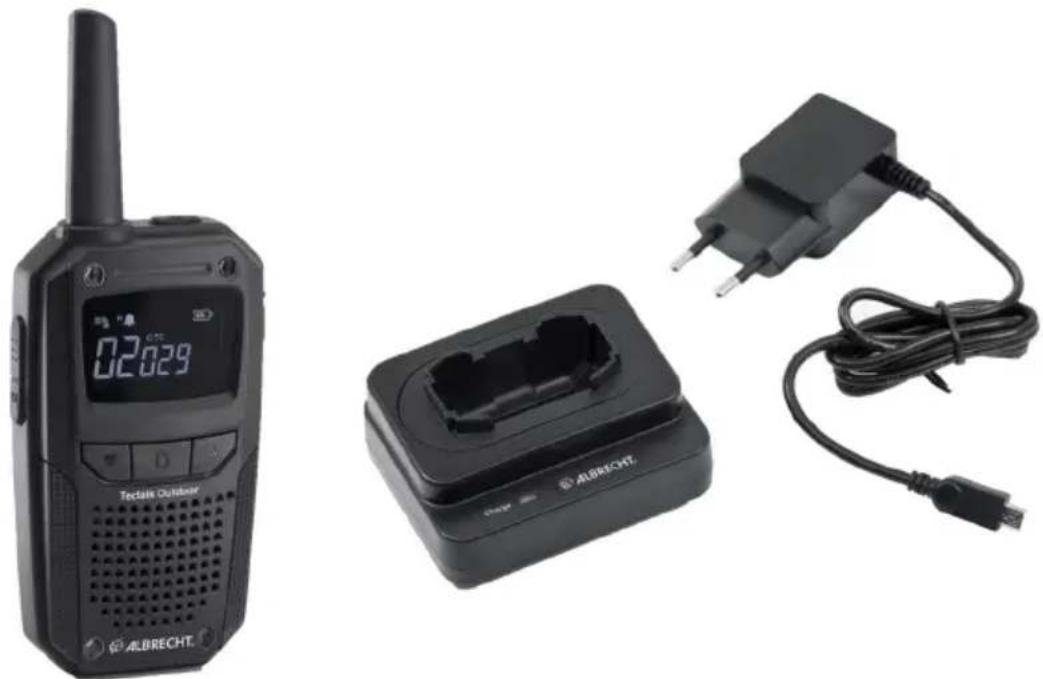
2. Scope of supply
Please make sure that the scope of supply is complete.
- Tectalk Outdoor walkie-talkie (with integrated battery)
- Charger stand
- Micro-USB power supply
- Belt clip
- Manual
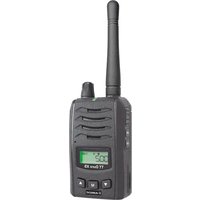
3. Walkie-talkie overview
3.1. Buttons and functions
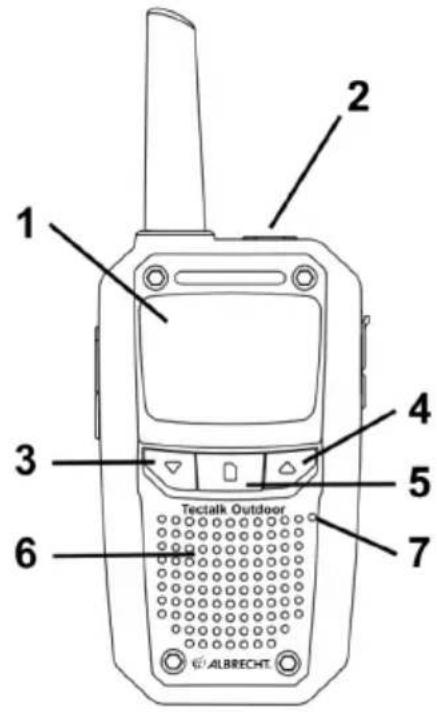
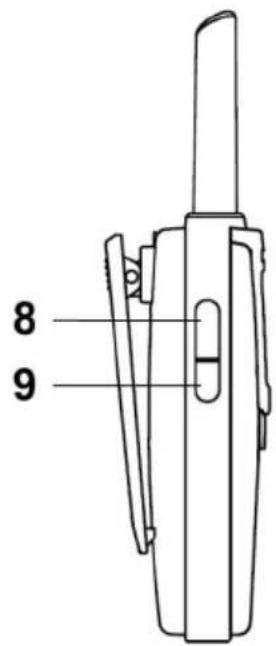
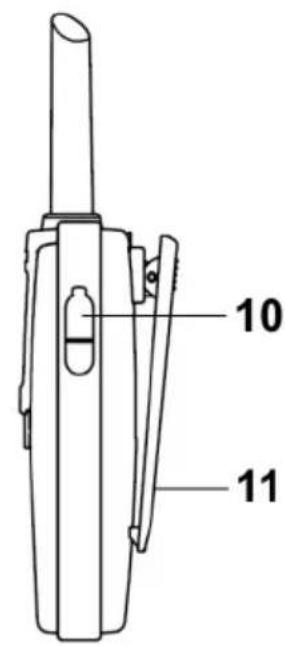
| No. | Description Function | |
| 1 | Display Overview of all current settings | |
| 2 | On/off switch Turn the walkie-talkie on or off | |
| 3 | Down Move down in menus | |
| 4 | Up Move up in menus | |
| 5 | Main menu Opens the main menu | |
| 6 | Loudspeaker | Received messages are output via the loudspeaker |
| 7 | Microphone Speak into the microphone | one at a distance of approx. 10 cm |
| 8 | PTT button Press and hold down the transmission button to transmit a radio message | |
| 9 | Function button Activates various special functions | |
| 10 | Headset port Port for connecting external headsets | |
| 11 | Belt clip To remove, release the lock at the top |
3.2.Display
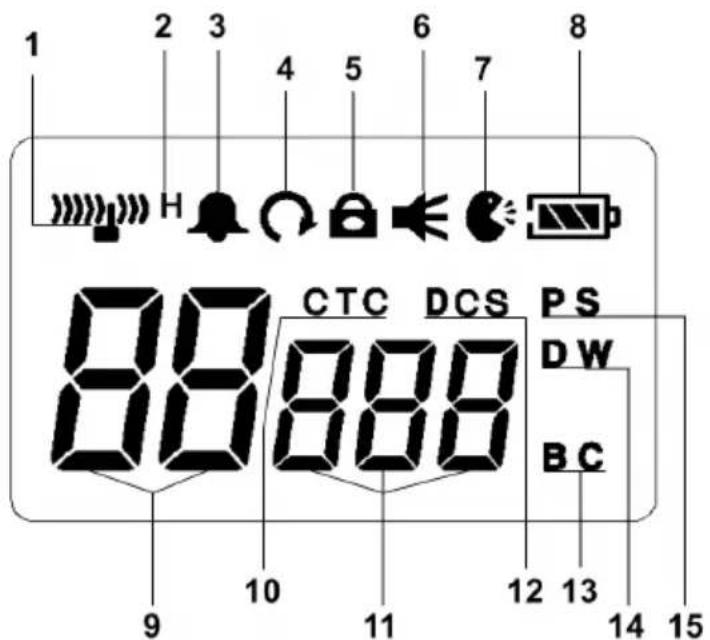
| No. Description Function | ||
| 1 | Signal strength | Received signal strength |
| 2 | High/Low power (“H”) Displays | “H” when the high power mode is active |
| 3 | Key tones | Key tones are activated |
| 4 | Scan | Channel scan is active |
| 5 | Key lock | Key lock is activated |
| 6 | Monitor | Monitor function is active |
| 7 | VOX | VOX hands-free function is activated |
| 8 | Battery status | Current battery status |
| 9 Channel (“CH”) Displays the currently used channel | ||
| 10 CTCSS (“CTC”) CTCSS coding is active | ||
| 11 CTCSS/DCS number Displays the currently used CTCSS/DCS coding | ||
| 12 DCS DCS coding is active | ||
| 13 Busy channel (“BC”) Busy channel lockout (busy channel) | ||
| 14 Dual Watch (“DW”) Active two-channel monitoring | ||
| 15 Power saving function (“PS”) Power saving function is activated | ||
4. Walkie-talkie operation
4.1. Charging the device
Please fully charge the integrated battery once before using the device for the first time. Your walkie-talkie can be charged using the supplied charger stand.
- Plug the Micro-USB power supply into the charger stand.
- Connect the power supply to the mains outlet.
- Plug the walkie-talkie into the charger stand.
- Make sure the battery sits securely in the charging tray. When the battery is charging, the status LED on the charging stand glows red.
- Normally, the device requires approx. 3-4 hours to be fully charged. When it is fully charged, the status LED turns green.
Please note: A new battery or a battery that has been stored longer than 2 months will not reach full capacity the first time it is charged. It will reach full capacity after two or three full charging cycles.
4.1.1. Low battery status warning:
If the battery charge drops to a low level, you will hear a warning beep every 5 seconds. Be sure to charge the device to continue using it.
4.2. Connecting a headset/LOUDspeaker microphone
Plug the headset into the "Speaker/Mic" socket on the right-hand side of the walkie-talkie. The radio supports headsets with 2.5mm stereo plug (Albrecht / Midland norm). If you connect the headset after the device is turned on and the set volume is above 50% , the volume will automatically be reduced to protect your hearing.
Please note: The Tectalk Outdoor is not completely waterproof anymore, when external accessories are connected to it. Please ensure that the rubber cover over the headset socket is closed when no external accessories are connected to the device.
4.3. Available channels
The walkie-talkie operates on 16 license-free PMR446 channels. Older walkie-talkies support only 8 PMR446 channels. If you want to use the Albrecht Tectalk Outdoor with an older 8-channel walkietalkie, you need to use the first 8 channels of the Tectalk Outdoor. These channels are compatible with all walkie-talkies.
| Channel | Frequency (MHz) | Channel | Frequency (MHz) |
| 1 | 446.00625 | 9 | 446.10625 |
| 2 | 446.01875 | 10 | 446.11875 |
| 3 | 446.03125 | 11 | 446.13125 |
| 4 | 446.04375 | 12 | 446.14375 |
| 5 | 446.05625 | 13 | 446.15625 |
| 6 | 446.06875 | 14 | 446.16875 |
| 7 | 446.08125 | 15 | 446.18125 |
| 8 | 446.09375 | 16 | 446.19375 |
Please note: according to the current legal situation (September 2020), not all EU countries have permitted the use of 16 channels. Please check the current legal situation before using the device in other countries.
5. Transmission and reception
When the walkie-talkie is turned on, it is automatically in reception mode as long as you are not transmitting. When a wireless message is received, the reception indicator lights up on the display. Use the / buttons to adjust the volume.
To transmit, press and hold down the PTT (transmission) button and speak into the microphone at a normal volume and distance of approx. 10cm . The transmission indicator on the display lights up during transmission. Release the PTT button at the end of your transmission.
6. Main menu
Call up the main menu by pressing and holding down the main menu button: You can then switch through the following settings by briefly pressing the main menu button:
| Menu item Display indication | |
| 6.1. Channel CH | |
| 6.2. CTCSS/DCS coding CTC | |
| 6.3. Squelch SL | |
| 6.4. Hands-free function (VOX) Uo | |
| 6.5. Two-channel monitoring dc | |
| 6.6. Key tones | bP |
| 6.7. Busy Channel Lock-Out (BCLO) bc | |
| 6.8. Transmission power Po | |
| 6.9. Roger Beep Signal A6 | |
| 6.10. Standby indicator bL | |
| 6.11. Reset r5 |
Use the / buttons to change the desired setting. To exit the menu, press the PTT button.
6.1. Channel
Select the desired transmission and reception channel. There are 16 channels available (see chapter "4.3. Available channels", page 18)
6.2. CTCSS/DCS coding
CTCSS (Continuous Tone Coded Squelch System)/DCS (Digital Coded Squelch)
There are 53 CTCSS and 104 DCS tones available: CTCSS is an undertone inaudible to users while DCS is a digital code.
With CTCSS or DCS, you can block unwanted incoming wireless messages and only receive messages from people with the same tone or code.
6.3. Squelch
Squelch suppresses annoying channel noise and has five adjustable sensitivity levels.
Level 1 = least sensitive
Level 5 = most sensitive
6.4. Hands-free function (VOX)
With the VOX function, you can transmit wireless messages without pressing the PTT button. The Tectalk Outdoor automatically goes into transmission mode as soon as the VOX function detects that someone is speaking into the microphone. The VOX function has the following levels: off, low sensitivity (lo) and high sensitivity (hi).
6.5. Two-channel monitoring
You can specify a channel to be monitored along with the current main channel. Wireless messages on this additional channel are also put out via the speaker.
6.6. Key tones
This function enables/disables the key tones that confirm each button press.
6.7. Busy Channel Lock-Out (BCLO)
When activated, the function prevents wireless messages from being transmitted to an already occupied channel. If you press the PTT button in this case, your transmission will be blocked.
6.8. Transmission power
In cases where the maximum range is not required, the transmission power can be reduced to about 10% of the output power. This increases the average battery life of the device by up to five hours.
6.9. Roger Beep Signal
The Tectalk Outdoor can automatically append a signal tone to your wireless messages in order to signal the end of a message to your conversation partner. There are three different signal tones to choose from.
6.10. Standby indicator
If this function is enabled, the battery icon on the display lights up briefly once every 25 seconds in standby mode. Therefore you can see that the device is still able to receive messages. This function reduces the average battery life by about an hour.
6.11. Reset
Here you can select the desired function (1 - reset to defaults; 2 - reset to defaults except for the currently selected channel and subchannel (CTCSS/DCS). Use the PTT button to confirm the reset.
7. Additional functions
7.1. Monitor
The monitor function is very useful if you want to adjust the volume or receive weak signals (which would be suppressed by squelch). Squelch will be disabled for a short time and you will hear all signals including background noise. To activate this function hold the function button and then press the main menu button. Press one of the two buttons to disable the function again.
Please note: it is recommended to turn down the volume in advance!
7.2. Channel search
To automatically search all channels for signals, keep the function button pressed and then press the button. If a signal is found during the channel search, the walkie-talkie will automatically stop on that channel. The channel search continues if the device no longer receives any wireless messages for more than 5 seconds. To stop the channel search, use the same button combination.
7.3.Key lock
The key lock prevents settings such as the current channel from being changed. To enable the key lock, keep the function button pressed and then press the button. Use the same button combination to disable the key lock.
8. Technical specifications
| General | |
| Frequency range PMR446: 446.00625 – 446.19 | 375 MHz |
| Channels 16 | |
| Battery 1100 mAh/3.7 V DC | |
| Frequency stability ±2.5 ppm | |
| Operating temperature -20 °C to +50 °C |
| Transmitter | |
| Transmission power 500 mW | |
| Maximum frequency deviation ≤2.5 kHz | |
| Interference radiation ≤1 μW | |
| Adjacent channel power ≤-60 dB | |
| SNR ≥-36 dB | |
| Power consumption ≤750 mA |
| Receiver | |
| Sensitivity ≤26.5 dBμV/m (20 dB SINAD) | |
| Audio output power | 0.95 W (at 8 ohms) |
| Adjacent channel selectivity | ≥81.3 dBμV/m |
| Noise suppression | ≥91.3 dBμV/m |
| Power consumption ≤400 mA |
9. Safety instructions
- Repairs should only be carried out by specialist dealers.
- Do not make any changes to the walkie-talkie.
- Walkie-talkies should not be exposed to excessive heat.
- Do not immerse the device completely in water.
10. Troubleshooting
| The device will not switch on or switches off automatically. | 1. Charge the battery. 2. Clean the battery terminals before charging. |
| I cannot converse with other participants. | 1. Make sure you are using the same channel and subchannel (CTCSS/DCS). 2. You are outside the transmission range of the other walkie-talkies. |
| You can hear the other participant, but they cannot hear you. | The participant uses a subchannel (CTCSS/DCS), but you do not. Adjust the settings of both walkie-talkies to match each other. |
| Other participants only hear you intermittently. 1 | The signal is too weak - you are too far away from one another. 2. Is the external microphone defective? Please contact a specialist dealer. |
| I hear wireless messages from other groups. Other users are using the same channel as you do - switch the channel. | |
11. Electronic waste law and recycling

European laws prohibit the disposal of defective or unusable devices in the household waste. If you want to dispose of your device, make sure you hand it over to one of the municipal collection points for recycling. These collection points are financed by industry and ensure the environmentally sound disposal and recycling of valuable raw materials.
12. Declaration of conformity

Alan Electronics GmbH hereby declares that the Tectalk Worker 2 walkie-talkie complies with Directive 2014/53/EU. The full text of the EU declaration of conformity is available at the following Internet address: http://service.alan-electronics.de/CE-Papiere/
13. Warranty information
We are obliged to include information on disposal, legal warranty provisions and EC declarations of conformity with instructions on the use of devices in various countries in the scope of supply of every device.
This information can be found below.
Legal warranty for 2 years from the date of purchase
The seller of this device grants you a legal warranty of two years from the date of purchase of the device. This warranty covers all failures that occur due to defective components or faulty functions within the warranty period, other than failures resulting from normal wear and tear, such as used batteries, scratches on the screen, housing defects, broken antennas, as well as defects due to external effects such as corrosion, overvoltage due to improper external power supply or use of unsuitable accessories. The warranty also excludes failures resulting from improper use of the device.
In the event of a warranty claim, please contact the dealer from whom you purchased the device or our service partner without delay. The dealer will either repair or replace your device, or it will refer you to a specialist service centre.
If you send in your device, please do not forget your purchase receipt as proof of the date of purchase and describe the fault that occurred as accurately as possible.
14. Service address and technical hotline
(for devices purchased in Germany)
You can call our service hotline at
+49 (0) 6103 9481 66 (at a fee of the German landline network)
or email us et service@albrecht-midland.de
Before you send us back a supposedly defective device in the event of a problem, you can save your time and shipping costs by using our hotline service for support.
Print errors excepted.
Information in this manual is subject to change without notice.

ALBRECHT
Tectalk Outdoor
Radio PMR446
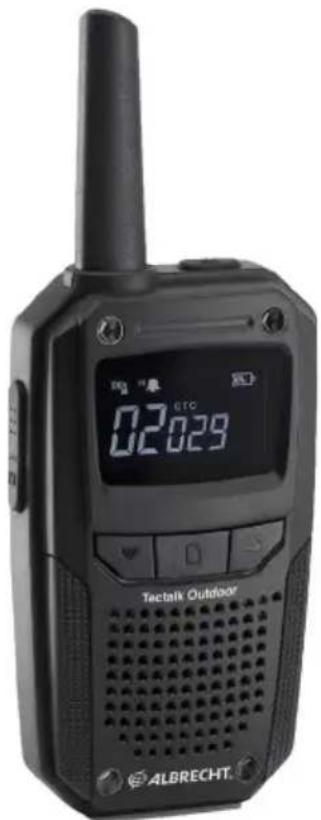
Instructions
François
CTCSS (Continuous Tone Coded Squelch System)/DCS (Digital Coded Squelch)
CTCSS (Continuous Tone Coded Squelch System)/DCS (Digital Coded Squelch)




- TABLE OF CONTENTS
- SCOPE OF SUPPLY
- WALKIE-TALKIE OVERVIEW
- BUTTONS AND FUNCTIONS
- 3.2.DISPLAY
- WALKIE-TALKIE OPERATION
- CHARGING THE DEVICE
- LOW BATTERY STATUS WARNING
- CONNECTING A HEADSET/LOUDSPEAKER MICROPHONE
- AVAILABLE CHANNELS
- TRANSMISSION AND RECEPTION
- MAIN MENU
- CHANNEL
- CTCSS/DCS CODING
- SQUELCH
- HANDS-FREE FUNCTION (VOX)
- TWO-CHANNEL MONITORING
- KEY TONES
- BUSY CHANNEL LOCK-OUT (BCLO)
- TRANSMISSION POWER
- ROGER BEEP SIGNAL
- STANDBY INDICATOR
- RESET
- ADDITIONAL FUNCTIONS
- MONITOR
- CHANNEL SEARCH
- 7.3.KEY LOCK
- TECHNICAL SPECIFICATIONS
- SAFETY INSTRUCTIONS
- TROUBLESHOOTING
- ELECTRONIC WASTE LAW AND RECYCLING
- DECLARATION OF CONFORMITY
- WARRANTY INFORMATION
- LEGAL WARRANTY FOR 2 YEARS FROM THE DATE OF PURCHASE
- SERVICE ADDRESS AND TECHNICAL HOTLINE
- ALBRECHT
- TECTALK OUTDOOR
Brand : ALBRECHT
Model : Tectalk Outdoor
Category : Walkie-talkie