
ATR 400 - Walkie-talkie ALBRECHT - Free user manual and instructions
Find the device manual for free ATR 400 ALBRECHT in PDF.


| Type of product | PMR446 Two-Way Radio Talkie Walkie |
| Dimensions | Approximately 50 x 120 x 30 mm |
| Weight | Approximately 150 g (including batteries) |
| Power source | 3x AAA alkaline batteries (not included) |
| Main functions | Two-way communication, 8 channels, CTCSS privacy codes, VOX hands-free, scan, monitor |
| Maintenance and cleaning | Wipe with a soft, dry cloth. Do not use water or cleaning agents. |
| Safety | Keep away from children under 3 years. Use only specified batteries. Do not disassemble. |
| Spare parts and repairability | Replaceable antenna and battery compartment. Repairs by authorized service center only. |
| General information | Brand: Albrecht | Model: ATR 400 | Color: Black | Frequency band: 446 MHz |
Frequently Asked Questions - ATR 400 ALBRECHT
User questions about ATR 400 ALBRECHT
0 question about this device. Answer the ones you know or ask your own.
Ask a new question about this device
Download the instructions for your Walkie-talkie in PDF format for free! Find your manual ATR 400 - ALBRECHT and take your electronic device back in hand. On this page are published all the documents necessary for the use of your device. ATR 400 by ALBRECHT.
USER MANUAL ATR 400 ALBRECHT
ALBRECHT®
ATR 400 / ATT 400
ALBRECHT®
ATR 400 / ATT 400
Tourist Guide Radios
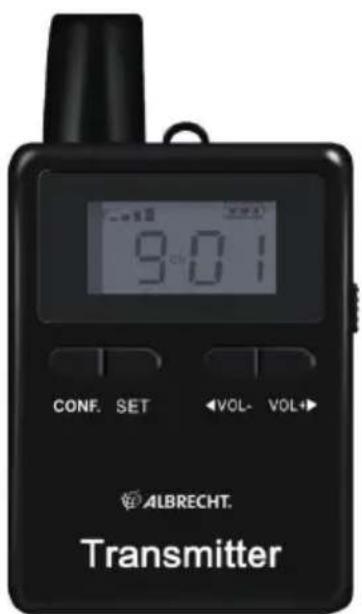

Manual English
1. Content
- Content......8
- Delivery Content......8
- Overview Radio 9
3.1. Controls 9
- Operation Instruction 10
4.1. Charging 10
4.2. Turn the unit on/off....10
4.3. Insert microphone/earphone....10
4.4. Adjust Volume 10
4.5. Create Tourist Groups / Manage the Receivers ..... 10
4.6. Change channel manually 10
-
Technical specification....11
-
Warranty and Recycling Information .... 12
2. Delivery Content
Please make sure that the packing contains the following accessories:
Tourist Guest Receiver:
• ATR 400 Tourist Guest radio
- Earphone
- Lanyard
Tourist Guide Transmitter:
• ATT 400 Tourist Guide radio
• Behind-the-neck microphone
- Lanyard
- Belt Clip
3. Overview Radio
Please take some time to study the manual and read about all functions.
3.1. Controls


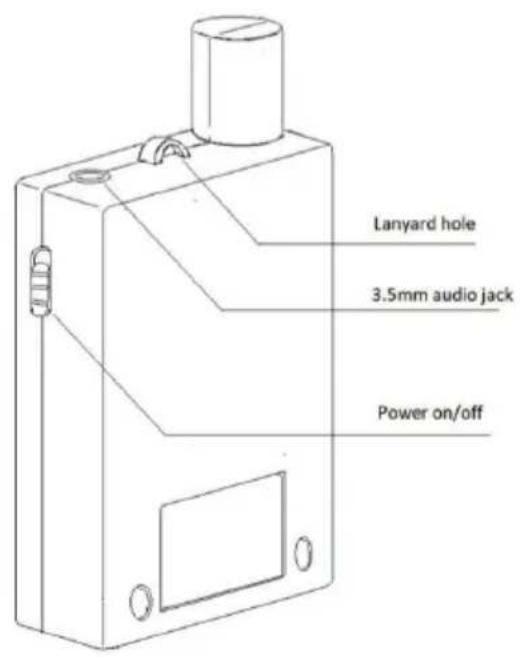
4. Operation Instruction
4.1. Charging
All units should be charged completely before using them the first time. The units should be turned off before charging and it will take about 3-4 hours to fully charge them. The red LED will be flashing during charging and will stop once finished charging.
4.2. Turn the unit on/off
To turn on the unit, push the "Power on/off" button on the right side of the unit down. The status of the signal strength, battery level, volume and channel will be displayed on the screen.
4.3. Insert microphone/earphone
Guest Receiver: Insert the earphone into the socket EAR on top of the receiver. Please note that only the original earpieces can be used with the ATR400 receivers.
Guide Transmitter: Insert the microphone into the socket MIC on top of the transmitter.
4.4. Adjust Volume
Press "<Vol-" button to decrease the volume.
Press ">Vol+" button to increase the volume.
The maximum volume of the receiver is level 9.
The volume setting on the transceiver does not have any function.
4.5. Create Tourist Groups / Manage the Receivers (only for Tourist Guide Transmitter ATT400 available)
Before you start using the Tourist receivers and transmitter, you will have to create a group of units. Therefore turn on all units you want to be in one group. Select a channel on the ATT400 transceiver which is currently not used (for example if you have several tourist groups in a Museum).
Make sure that all receivers of your group are within the range of 150m. Then press the function button "CONF." for 5 seconds on the transceiver. The channel of all receiver units will automatically change to the same channel as selected on the transceiver. All receivers are now assigned to your group.
If one or several Tourist Guest accidentally change the channel and cannot hear the Tourist Guide anymore, just press the "CONF." button again for 5 seconds and all receiver units are synchronised to your channel again.
Notice:
- All receivers which are once assigned to a group, can only be managed by its original transmitter. Management function of other transmitters will not affect these units.
- DO NOT use the same channel for different groups at the same place and the same time.
4.6. Change channel manually
Normally your Tour Guide will manage all channels and you do not have to change it manually. Should it be necessary anyway, follow these steps:
1.) Press the SET button, you will see "SET" blinking on the screen
2.) Select one of the 50 channels by pressing "
3.) Press the function button "CONF." to confirm the selected channel.
5. Technical specification
| ATR 400 Receiver | |
| Frequency Range 2.4GHz: 2400 - | 2480 MHz |
| Operating Range up to 200m | |
| Channels 50 | |
| Earphone Sensitivity 75db | |
| Earphone Impedance 32 Ohm | |
| Earphone Power 0.5W | |
| Battery Type Built-In Lithium Battery | |
| Battery Working Time 18-20 hours | after full charging |
| Battery Feature 3.7V / 1000mAh / | Working current: 40 - 50mA |
| Sensitivity -102dbm | |
| Frequency Response 50 Hz - 12 KHz | |
| Dimensions 86x50x19mm | |
| Weight 50g |
| ATT 400 Transmitter | |
| Frequency Range 2.4GHz: 2400 - | 2480 MHz |
| Operating Range up to 200m | |
| Channels 50 | |
| Mic Sensitivity -38db | |
| Mic Impedance 32 Ohm | |
| Mic Frequency Response | 75 Hz - 8 Khz |
| Battery Type Built-In Lithium Battery | |
| Battery Working Time 8-10 hours after full charging | |
| Battery Feature 3.7V / 1500mAh / | Working current: 170-200mA |
| RF Output Power | 10mW |
| Frequency Response 50 Hz - 12 KHz | |
| Dimensions 86x50x19mm | |
| Weight 68g |
6. Warranty and Recycling Information
We are legally obliged to include disposal and warranty information as well as EU declaration of conformity with the use instructions in different countries for every unit. Please find this information on the following pages.
2-Year Warranty from Date of Purchase
The manufacturer/retailer guarantees this product for two years from date of purchase. This warranty includes all malfunctions caused by defective components or incorrect functions within the warranty period excluding wear and tear, such as exhausted batteries, scratches on the display, defective casing, broken antenna and defects due to external effects such as corrosion, over voltage through improper external power supply or the use of unsuitable accessories. Defects due to unintended use are also excluded from the warranty.
Please contact your local dealer for warranty claims. The dealer will repair or exchange the product or forward it to an authorized service center. You can also contact our service partner directly. Please include your proof of purchase with the product and describe the malfunction as clearly as possible.
WEEE and Recycling

The European laws do not allow any more the disposal of old or defective electric or electronic devices with the household waste. Return your product to a municipal collection point for recycling to dispose of it. This system is financed by the industry and ensures environmentally responsible disposal and the recycling of valuable raw materials.
Service Address And Technical Hotline (for units sold in Germany)
Contact our service hotline by phone +49 (0) 6103 9481 66 (regular costs for German fixed network) or e-mail at service@albrecht-midland.de
Declaration of Conformity
Hereby, Alan Electronics GmbH declares that the radio equipment type ATR 400 / ATT 400 is in
compliance with Directive 2014/53/EU. The full text of the EU declaration of conformity
is available at the following internet address:
http://service.alan-electronics.de/CE-Papiere/

Printing errors reserved.
Information in this user manual are subject to change without prior notice.



- ALBRECHT®
- ATR 400 / ATT 400
- CONTENT
- DELIVERY CONTENT
- TOURIST GUEST RECEIVER
- TOURIST GUIDE TRANSMITTER
- OVERVIEW RADIO
- CONTROLS
- OPERATION INSTRUCTION
- CHARGING
- TURN THE UNIT ON/OFF
- INSERT MICROPHONE/EARPHONE
- ADJUST VOLUME
- CREATE TOURIST GROUPS / MANAGE THE RECEIVERS (ONLY FOR TOURIST GUIDE TRANSMITTER ATT400 AVAILABLE)
- NOTICE
- CHANGE CHANNEL MANUALLY
- TECHNICAL SPECIFICATION
- WARRANTY AND RECYCLING INFORMATION
- 2-YEAR WARRANTY FROM DATE OF PURCHASE
- WEEE AND RECYCLING
- SERVICE ADDRESS AND TECHNICAL HOTLINE (FOR UNITS SOLD IN GERMANY)
- DECLARATION OF CONFORMITY
Brand : ALBRECHT
Model : ATR 400
Category : Walkie-talkie