
Homeland Laser - Vacuum Cleaner TAURUS - Free user manual and instructions
Find the device manual for free Homeland Laser TAURUS in PDF.


| Brand | Taurus |
| Model | Homeland Laser |
| Product type | Robot vacuum cleaner |
| Power supply | Rechargeable Li-ion battery, mains charger |
| Battery life | Variable depending on mode, automatic return to base |
| Connectivity | Wi-Fi 2.4 GHz, Taurus Homeland app |
| Cleaning functions | Auto, spiral, perimeter, max, return to base |
| Programming | Clock and schedule via remote control |
| Remote control | With directional buttons and specific modes |
| Wet cleaning | Water tank with microfibre mop pad |
| Filtration system | Textile pre-filter, HEPA filter, sponge filter |
| Brushes | Central rotating brush + 2 side brushes |
| Dust bin capacity | Not specified, but requires emptying after each use |
| Detection | Infrared detectors (front impact, drop, base) |
| Maximum obstacle height | 8 cm (blocking low furniture) |
| Recommended maintenance | Empty bin after each use, clean filters weekly, brushes monthly |
| Safety | Automatic shutoff, surge protection, anti-drop sensors |
| Remote control batteries | 2 AAA batteries |
| Charging temperature | Between 4 and 40°C |
| Included accessories | Charging base, charger, remote control, water tank, mop pad |
| Spare parts available | Filters, brushes, battery (via approved service center) |
Frequently Asked Questions - Homeland Laser TAURUS
User questions about Homeland Laser TAURUS
0 question about this device. Answer the ones you know or ask your own.
Ask a new question about this device
Download the instructions for your Vacuum Cleaner in PDF format for free! Find your manual Homeland Laser - TAURUS and take your electronic device back in hand. On this page are published all the documents necessary for the use of your device. Homeland Laser by TAURUS.
USER MANUAL Homeland Laser TAURUS
Automatic vacuum-cleaner
Robot aspirador
Aspirateur robot
Robot Aspirapolvere
Robot aspirador
Robot aspirador
natural_image
Top-down line drawing of a circular mechanical component with a central oval and two side protrusions (no text or symbols)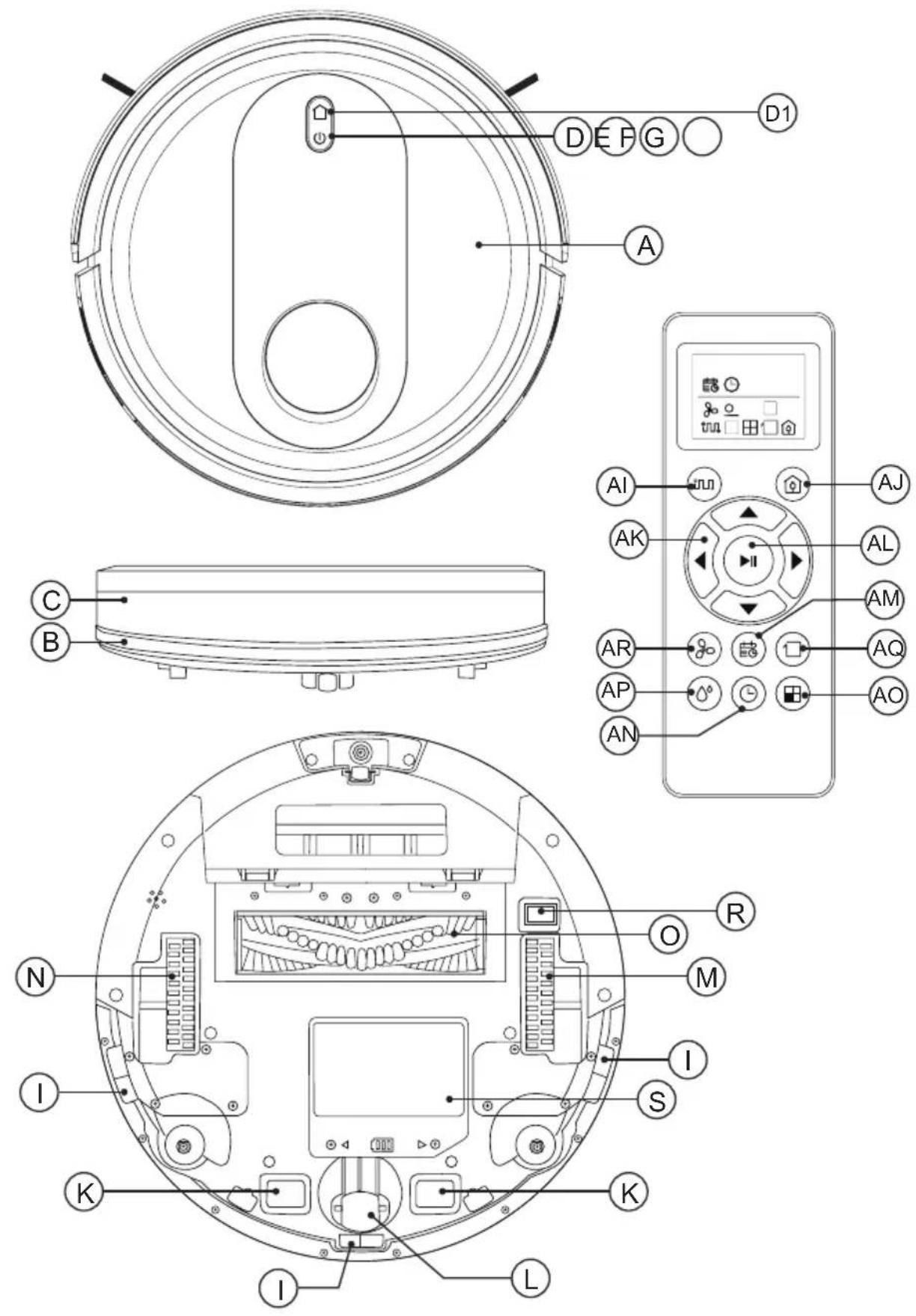
English
Robot Vacuum cleaner HOMELAND LASER
Dear customer,
Many thanks for choosing to purchase a TAURUS brand product.
Thanks to its technology, design and operation and the fact that it exceeds the strictest quality standards, a fully satisfactory use and long product life can be assured.
Read these instructions carefully before switching on the appliance and keep them for future reference. Failure to follow and observe these instructions could lead to an accident.
USE AND CARE:
- Do not use the appliance if its accessories are not properly fitted.
- Do not use the appliance to gather up water or any other liquid.
- Do not use the appliance if the on/off switch does not work.
- Respect the MAX level indicator.
- Remove the batteries from the appliance if you are not going to use it for some time.
- Store this appliance out of reach of children and/or persons with physical, sensory or reduced mental or lack of experience and knowledge.
- Do not work on areas where there are metal objects, such as nails and/or screws.
- Never vacuum hot or sharp objects (cigarette butts, ashes, nails, etc.).
- Do not open the battery/ies under any circumstances whatsoever.
- When the battery/ies is not in use, keep it away from other metal objects like paper clips, coins, keys, screws ... that could connect a terminal to another.
- Do not shortcircuit the battery terminals as this may cause an explosion or fire.
- The battery/ies should be stored at a temperature of below 40^ C.
- Recharge the battery/ies only with the charger supplied by the manufacturer. A charger that is suitable for one type of battery may cause explosion or fire hazard when used with other battery/ies.
- Use the device only with the battery/ies for which has been specifically designed. The use of any other battery/ies can cause an explosion or fire hazard.
SERVICE:
- Make sure that the appliance is serviced only by specialist personnel, and that only original spare parts or accessories are used to replace existing parts/accessories.
- CAUTION: There is a risk of fire if the appliance's cleaning is not done according to these instructions.
- Any misuse or failure to follow the instructions for use renders the guarantee and the manufacturer's liability null and void.
DESCRIPTION
TOP VIEW
A Robot vacuum cleaner top cover
B Antiscratch band
C Front impact infrared sensor
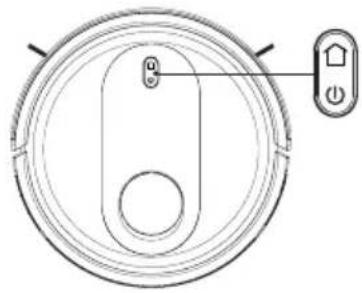
D Operation button
D1 Button Go Home
E Red light fixed or blinking error
F Operating light
G Charge light indicator.
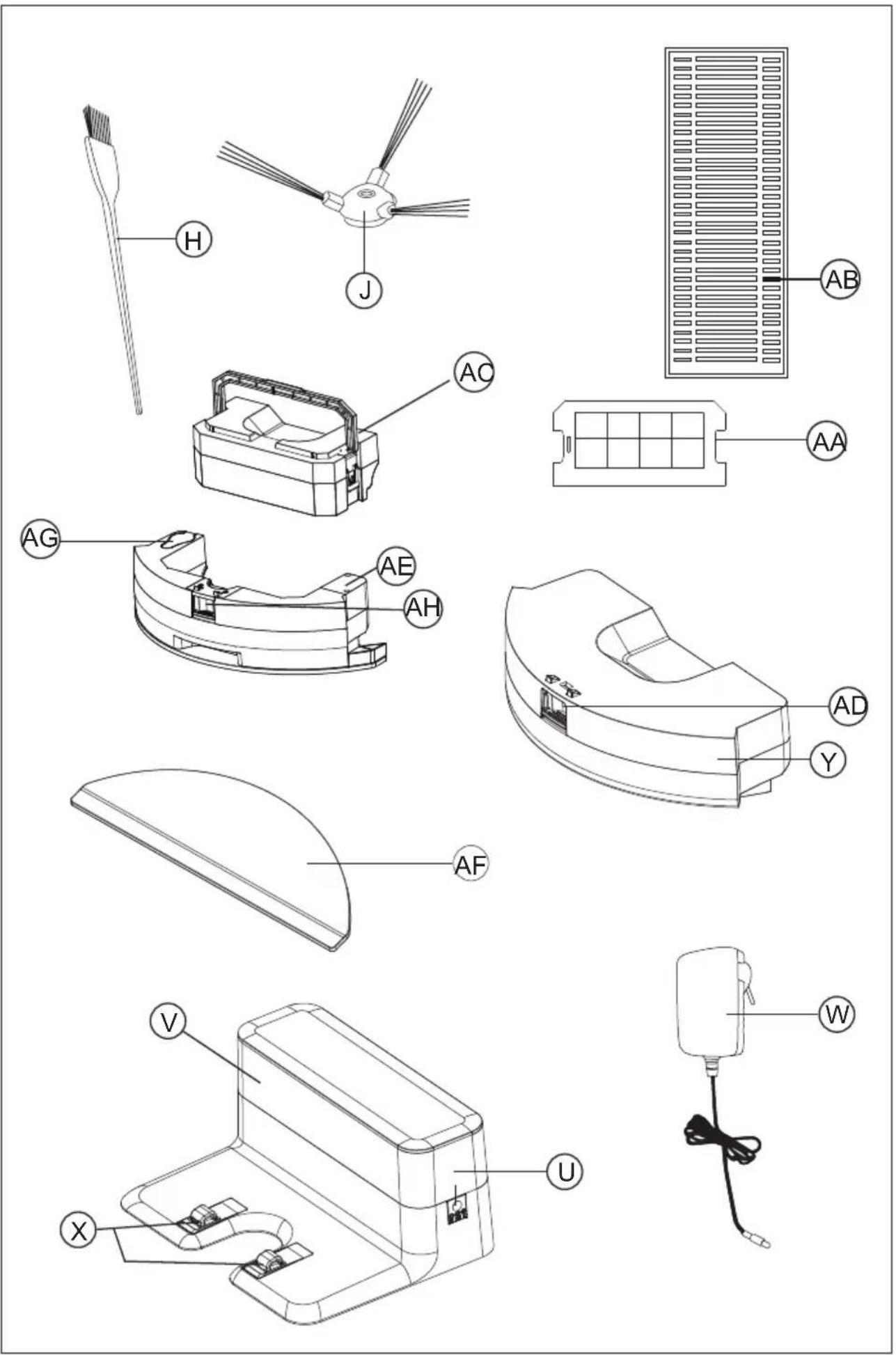
H Selfcleaning brush
BOTTOM VIEW
I Antifall sensors
J Side brushes
K Load contact points
L Swivel wheels
M Right wheel
N Left wheel
O Main rotative brush
R Power interruptor
S Battery cover
CHARGING BASE
U Charging base
V Sensor base
W Charger
X Load contact points
DUST TANK
Y Dust tank
AA Textile prefilter
AB HEPA Filter
AC Sponge Filter
AD Dust container removal button
WATER TANK
AE Water tank
AF Microfiber mop
AG Hermetic water tank lid
AH Water tank removal button
REMOTE CONTROL
AI MODE button
AJ Button Cleaning mode Go Home
(returns to the charging station automatically)
AK Direction buttons
(up / down / right / left)
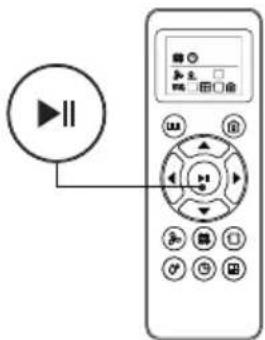
AL Start button or stop
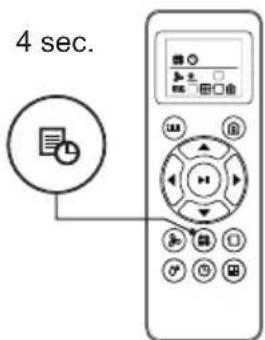
AM Button to select the schedule
AN Button to select the time
AO Spiral Cleaning mode
AP Washing Power
NOTA: Insert 2 AAA batteries before using the remote control for the first time. Make sure that the positive and negative poles are located in the correct direction in the battery compartment.
If the model of your appliance does not have the accessories described above, they can also be bought separately from the Technical Assistance Service.
IMPORTANT:
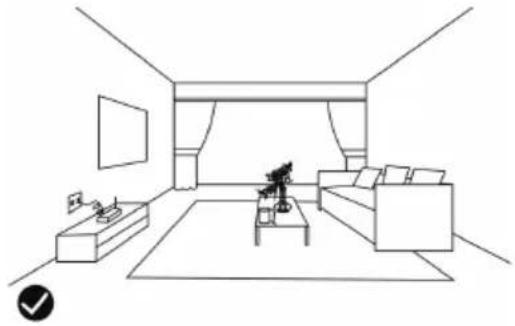
- Cables or other objects on the ground can hinder the mobility of the robot. Remove these objects before using the robot vacuum cleaner.
natural_image
Line drawing of a modern living room interior with sofa, coffee table, and wall (no text or symbols)- Use the vacuum cleaner the robot only on short pile carpets.
- Furniture less than 8cm can block the robot. Lift the furniture if you need to clean this area.
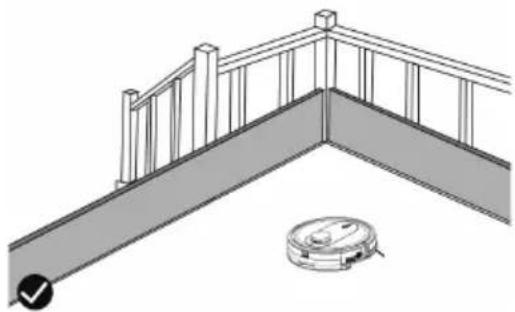
- Put a safety barrier on the stairs to prevent it from falling in case the fall arrest sensors do not work properly.
natural_image
Diagram of a balcony railing with a robotic vacuum cleaner at the base (no text or symbols)INSTALLATION
- Be sure to remove all packaging material from inside the appliance.
WIFI CONNECTION & DOWNLOADING THE APP
- To be able to use the Homeland Laser robot from anywhere, the Taurus Homeland App has to be downloaded.



SETUP:
- Download the Taurus Homeland App from the App Store or Google Play.
- Sign up using your email address and a password.
- Confirm registration using the verification code that will be sent to your email account.
- Create your home, name your home, establish
the geographical location and select the room where you are going to place the smart device.
- Add Homeland Laser by following the steps described in THE QUICK GUIDE.
LUMINOUS WI-FI INDICATOR:
- To connect the Robot to the Wi-Fi:
- Press the button power interrutor (R).
- Press the Operation button (D) until the button light flashes.
IMPORTANT:
- The device only supports a 2.4G Wi-Fi network.
- If the connection fails again, then check the following:
The robot is too far away from the router.
The Wi-Fi password is incorrect.
The Wi-Fi network is not 2.4GHz
CHARGING BASE POSITION:
- Connect the charger to the charging base.
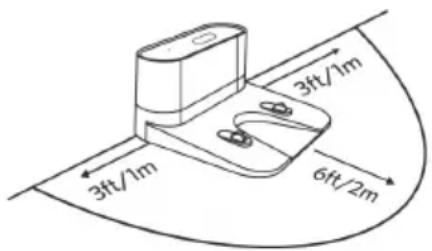
- Place the load base flat and next to the wall.
- To receive a good signal, you must leave a radius of 1m to the right and left and 2 meters forward of the base.
- Connect to the power.
INSTALL SIDE BRUSHES:
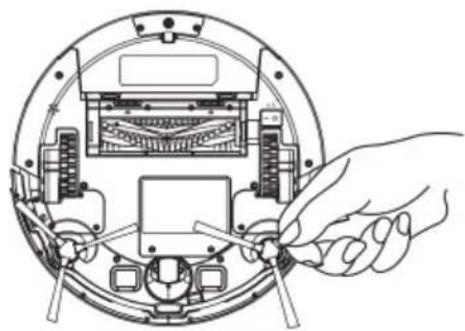
- Mount the side brushes on the bottom of the robot by pressing the brushes into its slot.
natural_image
Line drawing of a hand inserting a tool into a circular device with internal components (no text or symbols)BATTERY CHARGE:
- Warning: A new battery does not come with a full charge and must be fully charged before using the device for the first time.
- Charge the battery at room temperature between 4 and 40°C.
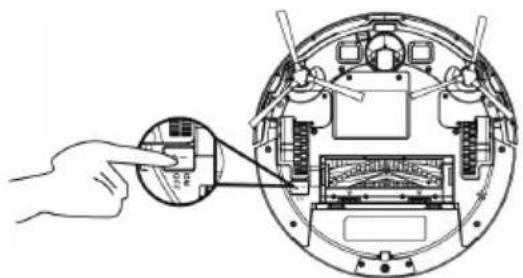
- Turn on the ON / OFF button located on the bottom of the robot.
natural_image
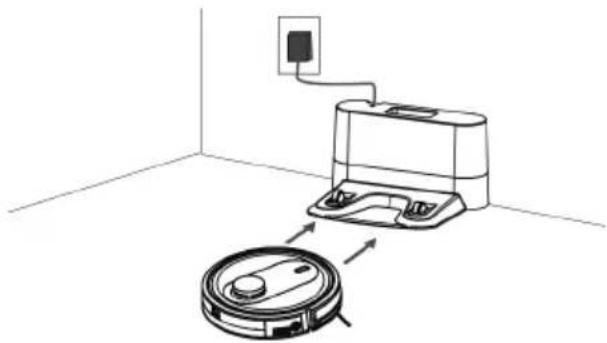
Diagram showing a hand inserting a device into a circular mechanical component (no text or symbols visible)- Put the robot in the charging base and ensure that the automatic charging poles are aligned correctly.
natural_image
Diagram showing a robotic vacuum cleaner connected to a mounted device in a room with an electrical outlet (no text or symbols present)- Operation button (D): the red LED will light blinking. When the LED stops blinking the robot is loaded. Load the robot for 4 hours before the first use.
ACTIVATE THE ROBOT
- Before starting use, ensure that the power switch (R) is on.
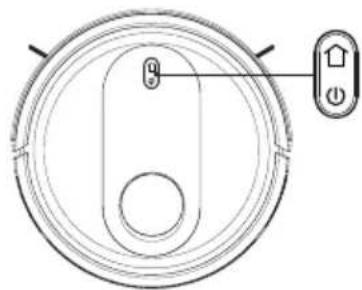
- Press the operation button (D) to awaken the robot.
natural_image
Top-down schematic of a circular device with internal components and a control panel (no text or symbols)- Press the operation button (D) to start cleaning, you can also start cleaning by pressing the button (AL) on the remote control.
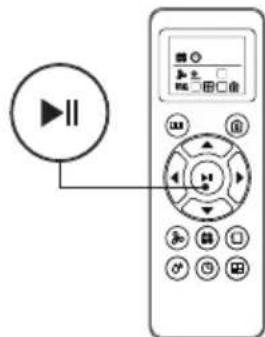
NOTE: If the battery is about to run out, the robot will return to the charging base automatically to recharge.
NOTE: If the load base is inaccessible, the robot can not be recharged, it will return to the initial situation and the cleaning system will end. In this case, place the robot manually in the charging base so that it can be recharged correctly.
PAUSE THE ROBOT
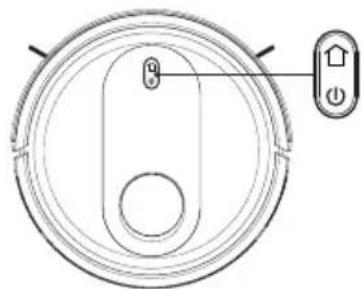
- To stop the robot press the operation button (D) or press the on / off button (AL) on the remote control.
natural_image
Top-down schematic of a circular device with internal components and a control panel (no text or symbols)- To resume the cleaning cycle, press the operation button (D) again.
- For the robot to return to the charging base (U) press the Go Home button (AJ).
POWER OFF THE ROBOT
- To turn off the robot press the operation button (D) next until the operation indicator goes off.
natural_image
Top-down schematic of a circular device with internal components and a control panel (no text or symbols)CLEANING MODES
AUTO CLEANING MODE
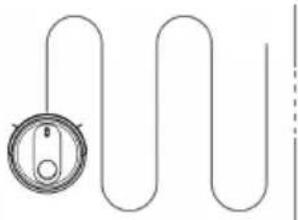
- The robot starts to vacuum automatically and combines the different cleaning modes in one optimizing the cleaning of your home to the maximum. To use the AUTO cleaning mode, press the button (AI) on the remote control.
natural_image
Pure diagram of a coiled tube with a circular component, no text or symbols present- When the cleaning cycle ends or if the battery runs out, it returns to the charging base automatically.
SPIRAL CLEANING MODE
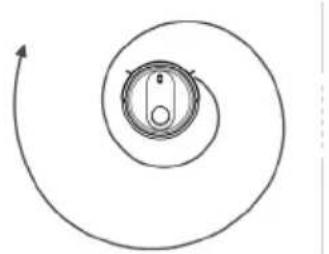
- The robot starts vacuum at a particular point by spiraling outward approximately (1 meter) in diameter and then spiraling inward to where it started. To use the spiral cleaning mode, press the (AO) button on the remote control.
natural_image
Simple spiral diagram with a central circular component and directional arrows (no text or symbols)MAX CLEANING MODE
- The robot increases its suction power to provide a deeper cleaning.
- To use the MAX cleaning mode, press the (AR) button on the remote control.
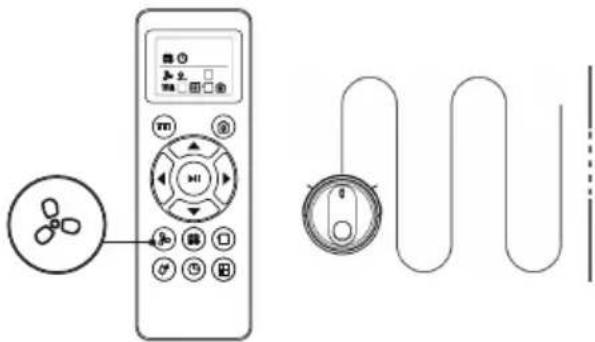
- MAX cleaning mode can only be activated during operation in AUTO cleaning mode.
EDGE CLEANING MODES
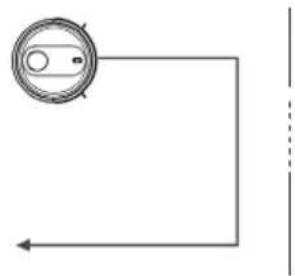
- Once the robot finishes cleaning the open areas of your floor, use the perimeter mode to make sure it has been cleaned along the walls and around the legs of the furniture.
natural_image
Simple line drawing of a circular component with an arrow pointing left, no text or symbols present- If you prefer a faster cleaning of the edges, press the button (AP) on the remote control.
GO HOME MODE
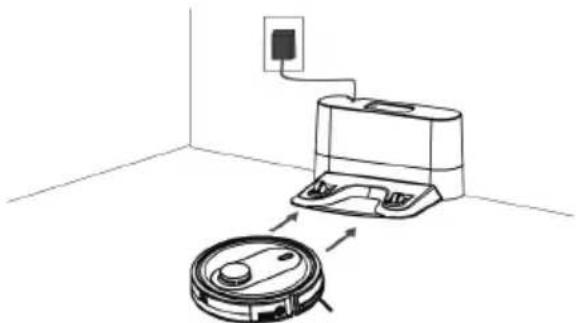
- Mode of return to the charging base automatically when the robot detects that only 15% of the battery is left.
natural_image
Diagram showing a robotic vacuum cleaner connected to a wall-mounted device, with no text or symbols present.- To activate the Go Home mode, press the (AJ) button on the remote control.
WATER TANK ICONCONTROL MODE
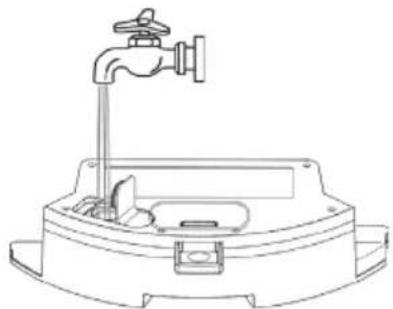
- At the end of the suction process, you can change the dust deposit through the water tank (AE) to continue cleaning. The water tank works by dripping so the mop will moisten and
mop the floor.
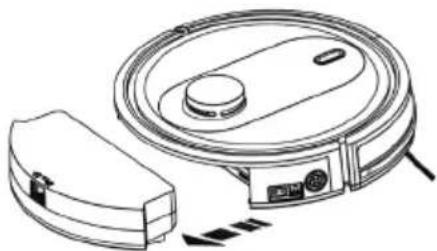
- Open the hermetic lid of the tank (AG) and introduce water into the tank.
natural_image
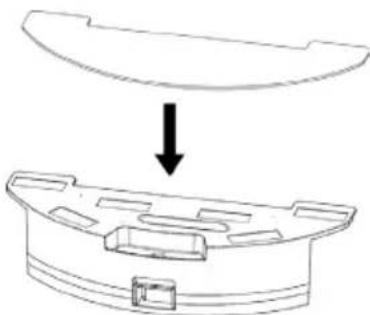
Line drawing of a mechanical device with a faucet and internal components (no text or symbols)- Put the mop that is fastened securely.
natural_image
Diagram showing a mechanical component with an arrow indicating downward motion (no text or symbols present)- Enter the water tank and select the cleaning mode you need.
natural_image
Line drawing of a robotic vacuum cleaner with control panel and sensor (no text or symbols)IMPORTANT:
- Do not use the mop outdoors.
- Remove the carpets to avoid damaging them.
- Before loading the robot, remove the water tank and the mop.
- During scrubbing, if the floor surface is too smooth, the robot wheels may slip
CLEANING SCHEDULE
- The robot vacuum cleaner has cleaning schedule settings that allow you to customize when you clean your home.
- These settings can only be confirmed via the remote control.
IMPORTANT:
- Make sure that the remote control is close to the robot while setting the clock or time.
- Make sure that the power switch is in the ON position.
1) CONFIGURE THE CLOCK OF THE REMOTE CONTROL
- Press the (AN) button on the remote control, the time selector starts blinking.
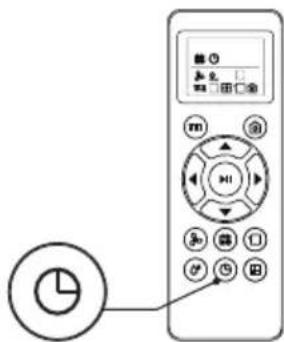
- Press the button▲ to select the current day, press the (AL) button to confirm, and enter the setting.
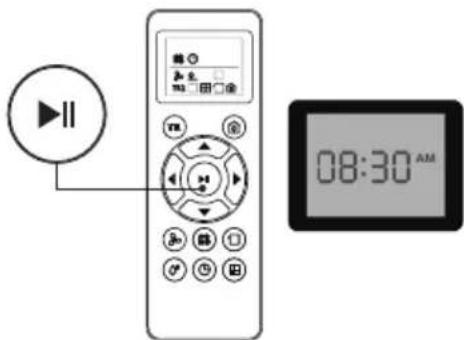
- The hour (Hr) starts to flash, press the ▲/▼ button to set the time, press the ◀ button to switch between hours and minutes, with each press, the time increases or decreases 1.
- Press the (AL) button in progress or stop the robot will beep when the time setting is completed.
2) CONFIGURE THE CLEANING HOURS
- Press the (AM) button to select and the date will start flashing. If you don't select a date, the "SUN" indicator for the day of the week will start flashing (SUN, MON, TUE, WED, THU, FRI, SAT).
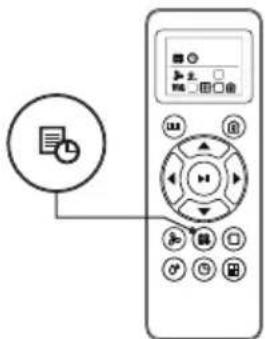
- Press ▲ / ▼button to change the date. After setting, press the (AL) button to confirm and enter the time setting.
- The hour will begin to flash, press ▲/ ▼ button to adjust time, and press ◀ → switch between hours and minutes. With each press, the time increases or decreases 1.
- Press the (AL) button in progress or stop the robot will beep when the time setting is completed.
3) CANCEL THE SETTINGS OF THE CLEANING HOURS
- Press the (AM) button on the remote control for 4 seconds, the vacuum cleaner will emit a beep when the cleaning schedule confirmation is canceled.
LED INDICATOR
| LED LIGHT ROBOT STATUS | |
| Flashing green Charging | |
| Flashing yellow/ Solidyellow/Solid Green | Standby / Cleaning / Fully charged |
| Off Robot is off. To conserve power, the light automatically turns off when robot is not docked to the charging doc and has been inactive for 1 minute. | |
| Red/Yellow light flash, or Red&Grenn/ Red& Yellow light flash, Solid Red +ding dong | Robot has an error. Refer to the troubleshooting section "Anomalies" in this manual for solutions |
MAINTENANCE
- Disconnect the battery charger from the mains and allow it to cool before undertaking any cleaning task.
- Clean the equipment with a damp cloth with a few drops of washingup liquid and then dry.
- Do not use solvents, or products with an acid or base pH such as bleach, or abrasive products, for cleaning the appliance.
- Do not let water or any other liquid get into the air vents to avoid damage to the inner parts of the appliance.
- Never submerge the appliance in water or any other liquid or place it under running water.
- Never submerge the connector in water or any other liquid or place it under running water.
| HOMELAND LASER | CLEANING | REPLACEMENT FREQUENCY |
| Dust Bin | After each use | - |
| Filters | Once every week | Every 2 months |
| Rolling Brush | Once every week | Every 6-12 months |
| Side Brushes | Once every month | Every 3-6 months(or when visibly worn) |
| Sensors | Once every month | - |
| Charging Pins | Once every month | - |
| Swivel wheel | Once every month | - |
EMPTYING THE POWDER TANK:
- Empty the dust container after each use.
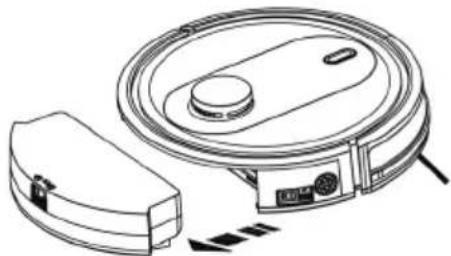
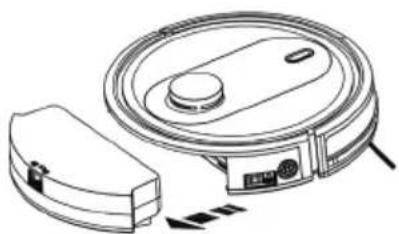
- Uncouple the dust container from the appliance.
natural_image
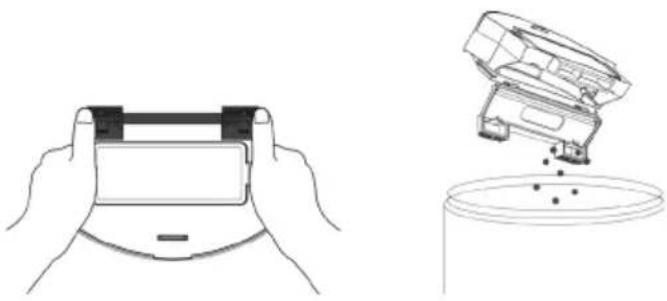
Line drawing of a robotic vacuum cleaner with control panel and sensor components (no text or symbols)- Open the emptying lid of the tank where indicated by the arrows and pour its contents into an appropriate waste container.
natural_image
Line drawings of hands holding a device and pouring liquid into a container (no text or symbols)CHANGE OF FILTERS:
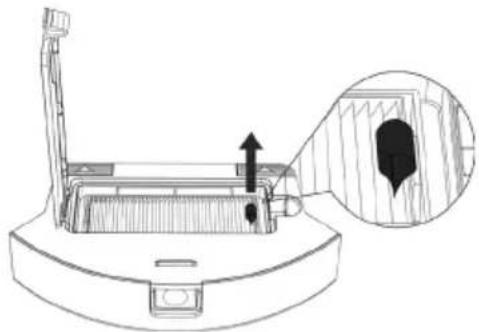
- Disconnect the powder container from the appliance.
- Open the lid of the filter compartment located in the upper part of the dust tank.
natural_image
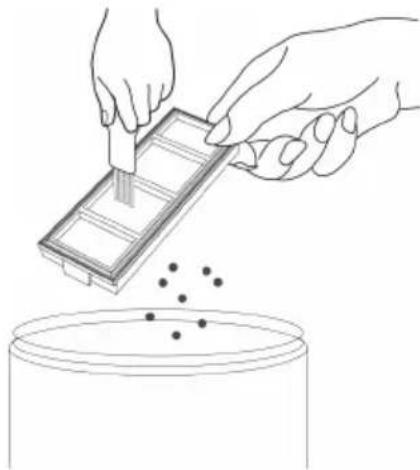
Technical line drawing of a mechanical device with an inset showing a close-up view of internal components (no text or symbols)- Extract the filter and shake lightly to expose the dust.
natural_image
Illustration of hands using a tool to process a component into a container with scattered dots (no text or symbols)CHANGE OF BATTERY:
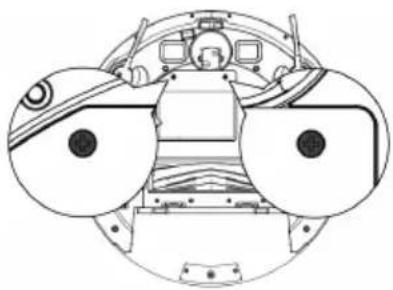
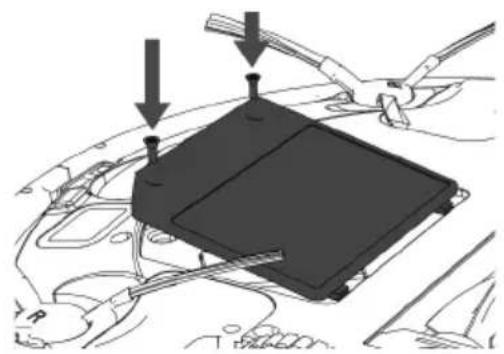
- Unscrew the screw of the battery cover and remove the cover.
natural_image
Technical line drawing of a mechanical assembly with circular components and no visible text or symbols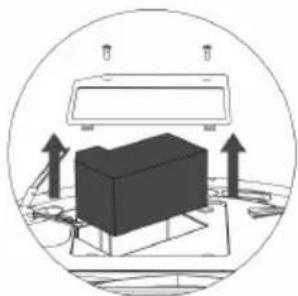
natural_image
Diagram of a device with upward arrows indicating motion or force, enclosed in a circular frame (no text or symbols)- Disconnect the plug between the battery and the robot.
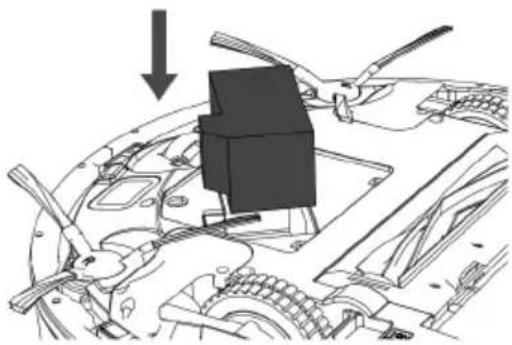
natural_image
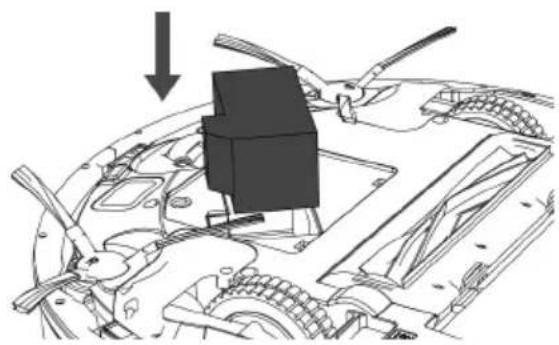
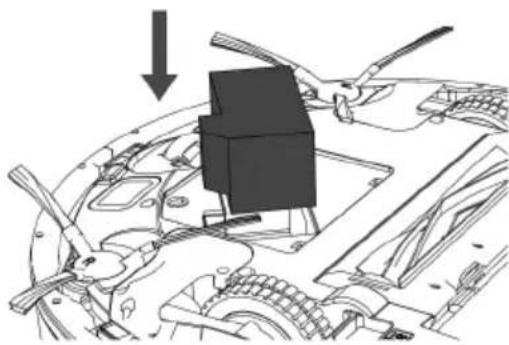
Mechanical assembly diagram showing a component being inserted into a car hood, with no visible text or symbols.- Insert the new battery, connect it to the robot and close the lid.
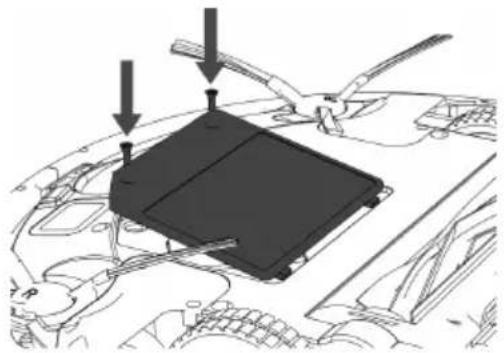
natural_image
Diagram of a car engine bay with a black plastic tray and three arrows pointing to the tray (no text or symbols present)CLEANING MOP
- Remove the tank lid.
- Wash the mop with water and let it dry.
CLEANING ROBOT'S MAIN ROTATIVE BRUSH AND SIDE BRUSHES:
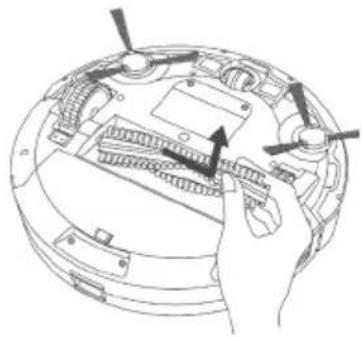
- Open the compartment lid, remove the brush and clean the compartment with a damp cloth.
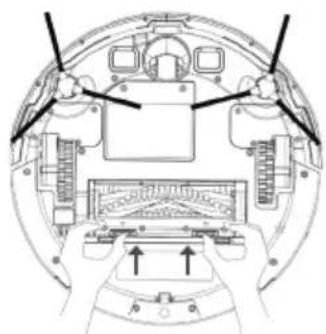
natural_image
Top-down schematic of a helicopter cockpit showing internal components and directional arrows (no text or labels)- Clean the central rotating brush. Cut the hair wrapped in the brush with the blade that includes the selfcleaning brush.
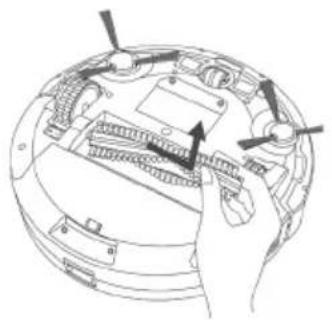
natural_image
Technical line drawing of a mechanical device with internal components and arrows indicating motion (no text or symbols)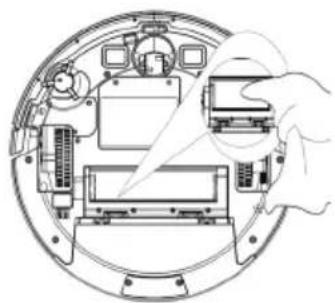
natural_image
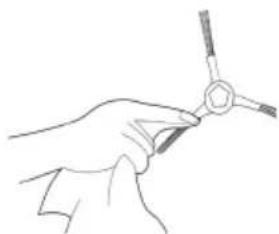
Technical line drawing of a mechanical assembly with no visible text or symbols- Remove the side brushes using a damp cloth to clean them.
natural_image
Line drawing of a hand holding a small tool with a hexagonal base (no text or symbols)CLEANING ROBOT'S SWIVEL WHEEL:
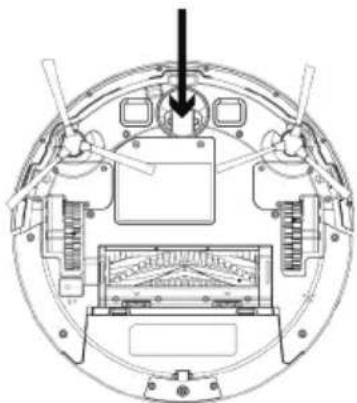
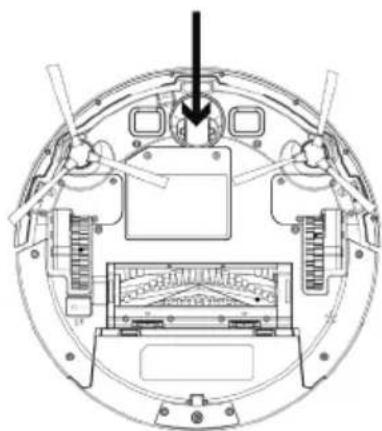
- Remove the castor wheel and then use the selfcleaning brush to clean the dust.
natural_image
Technical diagram of a mechanical assembly with no visible text or symbolsCLEANING ROBOT'S ANTIFALLING SENSORS:
natural_image
Technical line drawing of a mechanical assembly with no visible text or symbolsCLEANING ROBOT'S LOAD CONTACT POINTS:
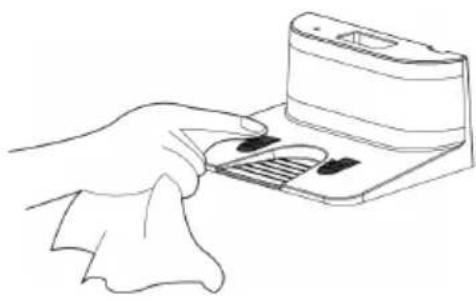
- Clean the automatic loading poles and load it with the cleaning cloth and a dry cloth.
natural_image
Line drawing of a hand using a handheld device to press or install a device (no text or symbols visible)REPAIR
- Take the appliance to an authorised technical support service if product is damaged or other problems arise. Do not attempt to disassemble or repair the appliance yourself as this may be dangerous.
FOR EU PRODUCT VERSIONS AND/OR IN CASE THAT IT IS REQUESTED IN YOUR COUNTRY:
ECOLOGY AND RECYCLABILITY OF THE PRODUCT
- The materials of which the packaging of this appliance consists are included in a collection, classification and recycling system. Should you wish to dispose of them, use the appropriate public recycling bins for each type of material.
- The product does not contain concentrations of substances that could be considered harmful to the environment.
This symbol means that in case you wish to dispose of the product once its working life has ended; take it to an authorised waste agent for the selective collection of Waste from Electric and Electronic Equipment (WEEE).
This symbol means that product may include a battery or batteries; user must to remove them before disposing of the product. Remember that batteries must be disposed of in duly authorised containers. Do not dispose of them in fire.
HOW TO REMOVE THE BATTERIES FROM THE INTERIOR OF THE DEVICE:
- CAUTION: It is important that the batteries are fully discharged prior to its withdrawal from the apparatus.
- CAUTION: the appliance must be disconnected from the supply mains when removing the batteries.
- To remove the batteries, once the life of the appliance, proceed as follows:
- Unscrew the screw of the battery cover and remove the cover.
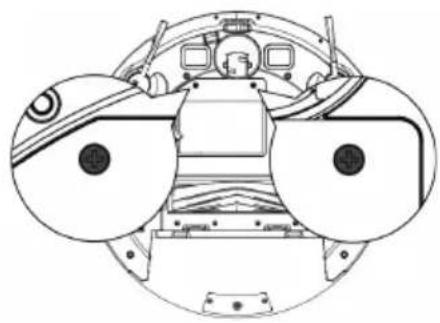
natural_image
Top-down technical line drawing of a mechanical component with circular features and control panels (no text or symbols)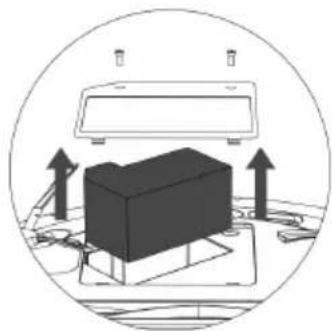
natural_image
Diagram showing a 3D object with upward arrows inside a circular frame, no text or symbols present- Disconnect the plug between the battery and the robot.
natural_image
Mechanical assembly diagram showing a component inserted into a vehicle headstock with no visible text or symbolsThis appliance complies with Directive 2014/35/EU on Low Voltage, Directive 2014/30/EU on Electromagnetic Compatibility, Directive 2011/65/EU on the restrictions of the use of certain
ANOMALIES
- In case of detecting any anomaly, check the following table:
| STATUS LIGHT COLOR SOLUTION | ||
| Standby/Stop The yellow light flickers | ||
| Working The yellow light is always on | ||
| Return charger The green light flickers | ||
| Recharging The green light flickers slowly | ||
| Low power The green light flickers | ||
| Full charger The green light is always on | ||
| Abnormal bottom sensor | The red and yellow light flickers and with ding-dong voice | Re-put the host bakc to the floor. |
| Abnormal bumper switch | The red and yellow light flickers and with ding-dong voice | Check the sensitivity of the front bumper. |
| Side brush overloaded | The red light flickers and with ding-dong voice | Check the side brush. |
| Left drive wheel overloaded | The red and green light flickers and with ding-dong voice | Check the left drive wheel. |
| Right drive wheel overloaded | The red and green light flickers and with ding-dong voice | Check the right drive wheel. |
| Abnormal fan | The yellow light flickers fast and with ding-dong voice | Check the fan. |
| Abnormal laser | The red light flickers fast and with ding-dong voice | Check the laser. |
| Abnormal appliance | The red light always on and with ding-dong voice | |
| Abnormal roller brush | The red light flickers and with ding-dong voice | Check the roller brush. |
Español
Robot Aspirador HOMELAND LASER
natural_image
Line drawing of a modern living room with sofa, coffee table, TV, and wall (no text or symbols)natural_image
Architectural diagram of a balcony with railing and a circular object (no text or symbols)INSTALACIÓN
INDICADOR LUMINOSO WI-FI:
natural_image
Illustration of a hand using a tool to adjust or install electronic components inside a circular device (no text or symbols visible)CARGA DE LA BATERÍA
natural_image
Diagram showing a hand inserting a device into a circular device component (no text or symbols visible)natural_image
Diagram showing a robotic vacuum cleaner next to an appliance, with no text or symbols present.natural_image
Technical line drawing of a circular mechanical component with a central hub and a control panel (no text or symbols)natural_image
Top-down schematic of a circular device with internal components and a control panel (no text or symbols)natural_image
Top-down schematic of a circular device with internal components and a control panel (no text or symbols)MODOS DE LIMPIEZA
MODO DE LIMPIEZA AUTO
natural_image
Pure electrical circuit lines without any symbolsnatural_image
Simple spiral diagram with concentric circles and an arrow, no text or symbols presentMODO DE LIMPIEZA MAX
natural_image
Simple line drawing of a circular object with a dot inside, connected to a rectangular outline (no text or symbols)natural_image
Diagram showing a robotic vacuum cleaner next to an electrical outlet, with no text or symbols present.natural_image
Line drawing of a faucet mounted on a baseplate (no text or symbols)natural_image
Diagram showing a mechanical component with an arrow indicating downward motion (no text or symbols present)natural_image
Line drawing of a robotic vacuum cleaner with control panel and sensor array (no text or symbols)IMPORTANTE:
natural_image
Line drawing of a robotic vacuum cleaner with attached device (no text or symbols)natural_image
Line drawings of a hand holding a device and a mechanical component with particles falling into a circular container (no text or symbols)CAMBIO DE FILTROS:
natural_image
Technical line drawing of a mechanical device with an inset showing a close-up of a textured surface (no text or symbols)natural_image
Line drawing of hands using a tool to spread a rectangular object onto a cylindrical surface, with scattered dots below (no text or symbols)CAMBIO DE BATERIA:
natural_image
Technical diagram showing two views of a mechanical assembly with internal components and a 3D box component (no text or symbols)natural_image
Mechanical assembly diagram showing a component inserted into a vehicle headstock with toolbars and a downward arrow indicating motion (no text or symbols present)natural_image
Diagram of a mechanical component with arrows indicating assembly or adjustment, no visible text or symbolsLIMPIEZA DE LA MOPA:
natural_image
Diagram of a mechanical device with gears and a hand holding a knob (no text or symbols)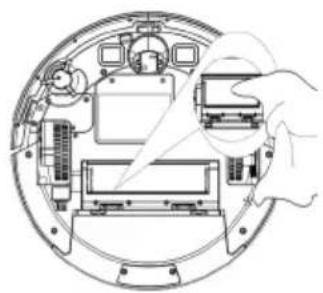
natural_image
Diagram of a mechanical assembly with a hand inserting a component into a circular housing (no text or labels)natural_image
Line drawing of a hand holding a small mechanical component (no text or symbols)natural_image
Technical diagram of a circular mechanical or electronic component with internal components and a black arrow pointing to a feature (no text or symbols present)LIMPIEZA DE LOS SENSORES DE DESNIVEL:
natural_image
Technical line drawing of a mechanical assembly with no visible text or symbolsnatural_image
Line drawing of a hand using a handheld device to press or press a keyboard (no text or symbols present)CONSUMIBLES
natural_image
Top-down schematic of a vehicle cockpit with two circular components and control panels (no text or labels)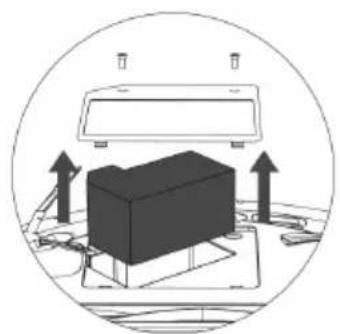
natural_image
Diagram showing a computer monitor with an open box and two upward arrows indicating orientation or movement (no text or symbols present)natural_image
Mechanical assembly diagram showing a component inserted into a vehicle headstock with no visible text or symbolsnatural_image
Line drawing of a modern living room interior with sofa, coffee table, and TV (no text or symbols)natural_image
Architectural diagram of a balcony with railing and a small robotic vacuum cleaner (no text or symbols)INSTALLATION
natural_image
Illustration of a hand using a tool to adjust or install electronic components on a circular device (no text or symbols visible)CHARGEMENT DE LA BATTERIE
natural_image
Diagram showing a hand inserting a device into a circular mechanical component with internal components (no text or symbols)natural_image
Diagram showing a robotic vacuum cleaner next to a mounted device in a room with an electrical outlet (no text or symbols)natural_image
Top-down schematic of a circular device with internal components and a control panel (no text or symbols)natural_image
Technical line drawing of a circular mechanical component with a keyway and a control panel (no text or symbols)natural_image
Top-down schematic of a circular device with internal components and a control panel (no text or symbols)MODES DE NETTOYAGE
MODE NETTOYAGE AUTO
natural_image
Pure diagram of a coiled cable or wire with a circular component, no text or symbols presentnatural_image
Abstract spiral diagram with concentric circles and an arrow, no text or symbols presentMODE NETTOYAGE MAX
natural_image
Diagram showing a remote control with a fan icon and connected audio equipment (no text or symbols)natural_image
Simple line drawing of a circular object with a small internal symbol, enclosed by an arrow (no text or labels)natural_image
Line drawing of a robotic vacuum cleaner inside a room with an electrical outlet (no text or symbols)natural_image
Line drawing of a mechanical device with a faucet and base plate (no text or symbols)natural_image
Technical line drawing of a mechanical component with an arrow indicating downward motion (no text or symbols)natural_image
Line drawing of a robotic vacuum cleaner with control panel and sensor (no text or symbols)IMPORTANT :
2) CONFIGURER L'HORAIRE DE NETTOYAGE
3) ANNULER LA CONFIGURATION DE L'HORAIRE DE NETTOYAGE
natural_image
Line drawing of a robotic vacuum cleaner with control panel and sensor (no text or symbols)natural_image
Line drawings of hands holding a device and pouring liquid into a container (no text or symbols)natural_image
Technical line drawing of a mechanical component with an inset magnified view showing internal structure (no text or symbols)natural_image
Illustration of hands using a tool to process a component into a container with scattered dots (no text or symbols)REEMPLACEMENT DE LA BATTERIE :
natural_image
Top-down schematic of a vehicle cockpit with circular components and no visible text or symbols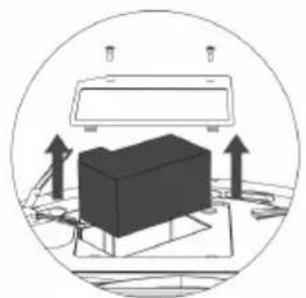
natural_image
Diagram of a 3D box mounted on a platform with upward arrows indicating motion or force, enclosed in a circular frame (no text or symbols)natural_image
Diagram of a car engine bay with a black component and directional arrow indicating motion (no text or symbols)natural_image
Diagram of a car interior with a black rectangular component and two arrows pointing to it, surrounded by tools (no text or symbols present)NETTOYAGE DE LA SERPILLIÈRE :
natural_image
Top-down schematic of a helicopter cockpit showing internal components and directional arrows (no text or labels)natural_image
Technical line drawing of a mechanical component with arrows indicating assembly or movement (no text or symbols)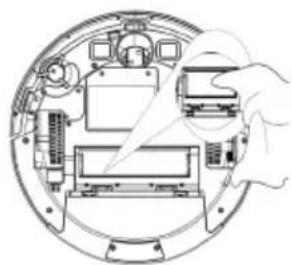
natural_image
Diagram of a mechanical assembly inside a circular housing, showing internal components and a hand holding a tool (no text or labels)natural_image
Line drawing of a hand holding a small object with a hexagonal base, no text or symbols presentNETTOYAGE DE LA ROUE PIVOTANTE :
natural_image
Technical diagram of a mechanical assembly with no visible text or symbolsnatural_image
Technical line drawing of a mechanical assembly with no visible text or symbolsnatural_image
Line drawing of a hand inserting a card into a device (no text or symbols)ACCESSOIRES
natural_image
Top-down schematic of a vehicle cockpit with two large circular components (no text or labels)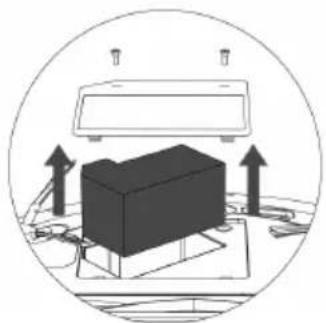
natural_image
Diagram of a computer setup with monitor, keyboard, and monitor with upward arrows indicating orientation (no text or symbols)natural_image
Mechanical assembly diagram showing a component inserted into a vehicle headstock with a downward arrow indicating motion (no text or symbols present)natural_image
Line drawing of a modern living room interior with sofa, coffee table, and TV (no text or symbols)natural_image
Architectural diagram of a two-story balcony with railings and a circular object on the floor (no text or symbols)INSTALLAZIONE
SPIA LUMINOSA WI-FI:
natural_image
Illustration of a hand adjusting a mechanical component with no visible text or symbolsnatural_image
Diagram showing a hand inserting a device into a circular mechanical component with internal components (no text or symbols)natural_image
Diagram showing a robotic vacuum cleaner connected to a wall-mounted device, with no text or symbols present.natural_image
Top-down schematic of a circular device with internal components and a control panel (no text or symbols)natural_image
Top-down schematic of a circular device with internal components and a control panel (no text or symbols)natural_image
Technical line drawing of a circular device with a central knob and a control panel (no text or symbols)MODALITÀ DI PULIZIA
MODALITÀ PULIZIA AUTO
natural_image
Pure diagram of a coiled pipe or tube with a circular component, no text or symbols presentnatural_image
Simple spiral diagram with a central circular element and an arrow, no text or symbols present.MODALITÀ PULIZIA MAX
natural_image
Simple line drawing of a circular object with a small dot inside, connected to a rectangular frame (no text or symbols)natural_image
Line drawing of a robotic vacuum cleaner inside a room with an electrical outlet (no text or symbols)natural_image
Line drawing of a faucet mounted on a mechanical base (no text or symbols)natural_image
Diagram showing a mechanical component with an arrow indicating downward motion (no text or symbols present)natural_image
Line drawing of a robotic vacuum cleaner with attached sensor and control panel (no text or symbols)IMPORTANTE:
natural_image
Line drawing of a robotic vacuum cleaner with attached device (no text or symbols)natural_image
Line drawings of a hand holding a device and a mechanical component with particles falling into a container (no text or symbols)CAMBIO DEI FILTRI:
natural_image
Technical line drawing of a mechanical device with an inset showing a close-up view of internal components (no text or symbols)natural_image
Line drawing of hands placing a component into a container with dots (no text or symbols)natural_image
Top-down schematic of a spacecraft cockpit with visible internal components and no text or labels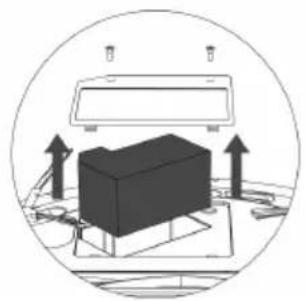
natural_image
Diagram of a 3D printer with arrows indicating orientation, enclosed in a circular frame (no text or symbols)natural_image
Diagram of a car engine bay with a black component being inserted, showing no text or symbolsnatural_image
Diagram of a mechanical component with arrows indicating assembly or adjustment, no visible text or symbolsPULIZIA DEL PANNO-SPAZZOLA:
natural_image
Technical diagram of a mechanical device with hands operating a control panel (no text or symbols visible)natural_image
Technical line drawing of a mechanical component with arrows indicating assembly or adjustment (no text or symbols)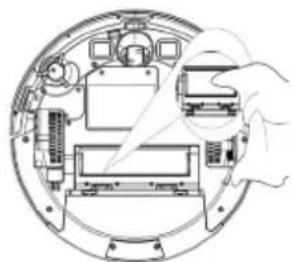
natural_image
Diagram of a device interior with labeled components and a hand holding a device (no text or symbols present)natural_image
Line drawing of a hand holding a small mechanical component (no text or symbols)PULIZIA DELLA RUOTA GIREVOLE:
natural_image
Technical diagram of a circular mechanical or electronic device with internal components and a pointer arrow (no text or symbols)PULIZIA DEI SENSORI DI DISLIVELLO:
natural_image
Technical line drawing of a mechanical assembly with no visible text or symbolsnatural_image
Line drawing of a hand using a handheld device to press or press a keyboard (no text or symbols present)MATERIALI DI CONSUMO
natural_image
Top-down schematic of a spacecraft cockpit with two circular views showing internal components (no text or labels)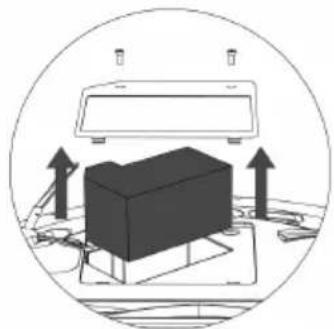
natural_image
Diagram of a computer setup with a monitor and monitor array, showing upward arrows indicating orientation or movement (no text or symbols present)natural_image
Mechanical assembly diagram showing a component being inserted into a vehicle hood, with no visible text or symbols.natural_image
Line drawing of a modern living room interior with sofa, coffee table, and TV (no text or symbols)natural_image
Architectural diagram of a balcony with railings and a small robotic vacuum cleaner (no text or symbols)INSTALAÇÃO
INDICADOR LUMINOSO WI-FI:
natural_image
Illustration of a hand adjusting a mechanical component with wires and components (no text or symbols visible)natural_image
Diagram showing a hand inserting a device into a circular electronic device with measurement instruments (no text or symbols present)natural_image
Diagram showing a robotic vacuum cleaner connected to a wall-mounted device, with no text or symbols present.natural_image
Technical line drawing of a circular mechanical component with a central hub and a separate electrical outlet (no text or symbols)natural_image
Technical line drawing of a circular mechanical component with a central hub and a separate electrical outlet (no text or symbols)natural_image
Technical line drawing of a circular mechanical component with a small inset showing a button (no text or symbols)MODOS DE LIMPEZA
MODO DE LIMPEZA AUTOMÁTICA
natural_image
Pure diagram of a coiled pipe or tube with a circular component, no text or symbols presentnatural_image
Diagram of a spiral-shaped mechanical component with a central circular housing and directional arrow (no text or symbols)MODO DE LIMPIEZA MAX
natural_image
Simple line drawing of a circular component with an arrow pointing left, no text or symbols presentnatural_image
Diagram showing a robotic vacuum cleaner inside a room with an electrical outlet connected to a mounted device (no text or symbols present)natural_image
Line drawing of a faucet mounted on a baseplate with a handle and outlet (no text or symbols)natural_image
Diagram showing a mechanical component with an arrow pointing to its base, no text or symbols present.3) Insira o deposito de água e seleccione o modo de limpeza desejado.
natural_image
Line drawing of a robotic vacuum cleaner with a circular head and attached component (no text or symbols)IMPORTANTE
2) CONFIGURAR O HORÁRIO DA LIMPEZA
natural_image
Line drawing of a robotic vacuum cleaner with control panel and sensor array (no text or symbols)natural_image
Line drawing showing a hand holding a device and a close-up of a mechanical component with particles (no text or symbols)natural_image
Technical line drawing of a mechanical device with an inset showing a close-up view of internal components (no text or symbols)natural_image
Illustration of hands using a tool to apply material to a container with scattered particles (no text or symbols)natural_image
Top-down schematic of a vehicle cockpit with two large circular components (no text or symbols)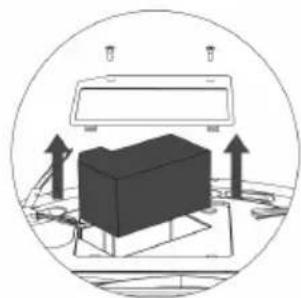
natural_image
Diagram of a 3D object with upward arrows indicating motion or force, enclosed in a circular frame (no text or symbols)natural_image
Technical diagram of a car engine bay with a black component being inserted, showing no text or symbols.natural_image
Diagram of a mechanical assembly with arrows indicating force or adjustment, no visible text or symbolsLIMPIEZA DA MOPA:
natural_image
Technical diagram of a vehicle interior showing dashboard, steering wheel, and instrument (no text or labels)- Limpe a escova rotativa central. Corte os cabelos enrolados na escova com a tesoura incluída na escova de auto limpeza.
natural_image
Diagram of a hand holding a device with arrows indicating motion or assembly (no text or symbols present)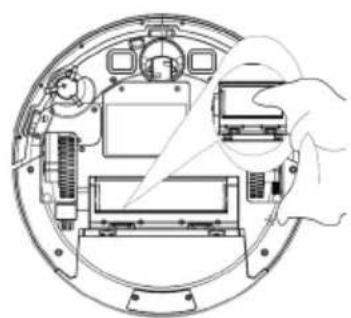
natural_image
Diagram of a device interior showing internal components and a hand holding a device (no text or symbols present)natural_image
Line drawing of a hand holding a small mechanical component (no text or symbols)LIMPEZA DA RODA PIVÔ:
- Retire a roda pivô e utilize a escova de auto limpeza para limpar o pó.
natural_image
Technical diagram of a circular mechanical or electronic component with internal components and a central display (no text or symbols visible)natural_image
Technical line drawing of a mechanical assembly with top and side views (no text or symbols)natural_image
Line drawing of a hand using a laptop to press or install a card (no text or symbols present)CONSUMÍVEIS
natural_image
Top-down technical diagram of a vehicle cockpit showing front, rear, and top views with no visible text or symbols.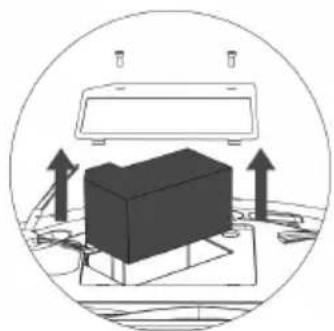
natural_image
Diagram showing a 3D object on a desk with upward arrows indicating motion or orientation, enclosed in a circular frame (no text or symbols)- Desligue a ficha entre a bateria e o robot.
natural_image
Technical diagram of a car engine bay with a black component and directional arrow (no text or symbols)natural_image
Line drawing of a modern living room interior with sofa, coffee table, and TV (no text or symbols)natural_image
Architectural diagram of a balcony with railings and a small robotic vacuum cleaner (no text or symbols)INSTAL·LACIÓ
INDICADOR LLUMINÓS WI-FI:
natural_image
Diagram of a hand inserting or adjusting a device into a circular mechanical component (no text or symbols visible)CÀRREGA DE LA BATERIA
natural_image
Diagram showing a hand inserting a component into a circular device interior (no text or symbols visible)natural_image
Diagram showing a robotic vacuum cleaner connected to an appliance in a room, with no visible text or symbols.natural_image
Technical line drawing of a circular mechanical component with a control knob and indicator button (no text or symbols)natural_image
Top-down schematic of a circular device with internal components and a control panel (no text or symbols)natural_image
Top-down schematic of a circular device with internal components and a control panel (no text or symbols)MODES DE NETEJA
MODE DE NETEJA AUTO.
natural_image
Pure diagram of a coiled tube with a circular component, no text or symbols presentnatural_image
Diagram of a spiral with concentric circles and an arrow indicating direction (no text or symbols)MODE DE NETEJA MAX
natural_image
Simple line drawing of a circular component with a rectangular end, connected by an arrow (no text or symbols)natural_image
Diagram showing a robotic vacuum cleaner connected to a wall-mounted device, with no text or symbols present.natural_image
Line drawing of a faucet mounted on a baseplate with a handle and valve (no text or symbols)natural_image
Diagram showing a mechanical component with an arrow pointing downward, no text or symbols presentnatural_image
Line drawing of a robotic vacuum cleaner with attached sensor and control panel (no text or symbols)IMPORTANT:
2) CONFIGURAR L'HORARI DE NETEJA
natural_image
Line drawing of a robotic vacuum cleaner with attached sensor and control panel (no text or symbols)natural_image
Line drawings of hands holding a device and a mechanical component with particles, no text or symbols presentCANVI DE FILTRES:
natural_image
Technical line drawing of a mechanical device with an inset showing a close-up view of internal components (no text or symbols)natural_image
Line drawing of hands using a pipette to process a wafer or sample on a surface, with scattered dots below (no text or symbols)CANVI DE BATERIA:
natural_image
Technical diagram showing two views of a mechanical assembly with no visible text or symbolsnatural_image
Technical diagram of a car engine bay with a black component and directional arrow indicating assembly (no text or symbols present)- Inserir la nova bateria, connectar-la al robot i tancar la tapa.
natural_image
Diagram of a mechanical component with arrows indicating assembly or adjustment, no visible text or symbolsNETEJA DEL TIRÀS:
natural_image
Technical diagram of a mechanical assembly with labeled components (no text or symbols present)natural_image
Diagram of a mechanical device with gears and a hand operating it (no text or symbols)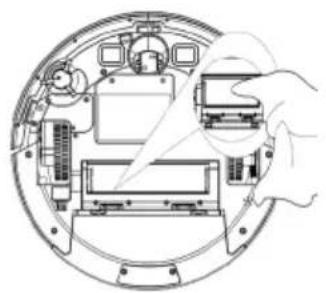
natural_image
Diagram of a device interior showing internal components and a hand holding a device (no text or symbols present)natural_image
Line drawing of a hand holding a small mechanical component (no text or symbols)NETEJA DE LA RODA PIVOTANT:
natural_image
Technical diagram of a mechanical device with internal components and a central display (no text or symbols)NETEJA DELS SENSORS DE DESNIVELL:
natural_image
Technical line drawing of a mechanical assembly with no visible text or symbolsnatural_image
Line drawing of a hand using a handheld device to press or install a card (no text or symbols visible)CONSUMIBLES
natural_image
Top-down schematic of a vehicle cockpit with two large circular components and control panels (no text or labels)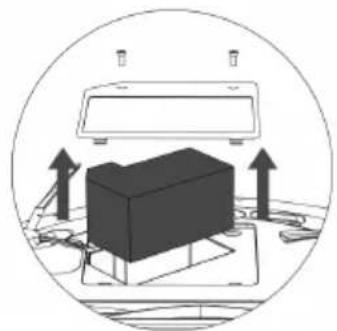
natural_image
Diagram showing a 3D object on a platform with upward arrows indicating motion or force, enclosed in a circle (no text or symbols)natural_image
Mechanical assembly diagram showing a black component inserted into a car body with tool holders (no text or labels)This product enjoys the recognition and protection of the legal guarantee in accordance with current legislation. To enforce your rights or interests you must go to any of our official technical assistance services.
You can find the closest one by accessing the following web link: http://taurus-home.com/
You can also request related information by contacting us.
You can download this instruction manual and its updates at http://taurus-home.com/
Français
GARANTIE ET ASSISTANCE TECHNIQUE
COUNTRY ADDRESS PHONE
| Algeria Zone d'Activite, N° 62, Constantine 213770777756 | ||
| Argentina Av. del Libertador 1298,(B1638BEY), Vicente López (Pcia. Buenos Aires) | 541153685223 | |
| Belgium Mariëndonkstraat 5, 5154 EG, Elshout 31620401500 | ||
| Bulgaria | 265,Okolovrasten Pat, Mladost 4, 1766, Sofia | 35929211120 / 35929211193 |
| Congo (Republic of) 98 Blvd General Charles de Gaulle, Pointe Noire 242066776656 | ||
| Cyprus 20, Bethlehem Str. / P.O.Box 20430, 2033, Strovolos | 35722711300 | |
| Czech Republic Milady Horakove 357/4, 568 02, Svitavy 420 461 540 130 | ||
| Equatorial Guinea | SN Av Patricio Lumumba y C/ Jesus B, Bata | 00240 333 082958 / 00240 333 082453 |
| Equatorial Guinea | Calle de las Naciones Unidas, PO box 762, Malabo | 240333082958 / 240333082453 |
| España | Avda Barcelona, S/N, 25790 Oliana (Lleida) atencioncliente@taurus.es | 902 118 050 |
| France | Za les bas musats 18, 89100, Malay-le-Grand | 03 86 83 90 90 |
| Ghana | Ederick Place, Accra-Ghana | 302682448 / 302682404 |
| Gibraltar | 11 Horse Barrack Lane, 54000, Gibraltar | 00350 200 75397 / 00350 200 41023 |
| Greece Sapfous 7-9, 10553, Athens +30 21 0373 7000 | ||
| Hong Kong | Unit H,13/F., World Tech Centre, Hong kong | (852) 2448 0116 / 9197 3519 |
| Hungary | Késmárk utca 11-13, 1158, Budapest | +36 1 370 4519 |
| India | C-175, Sector-63, Noida, Gautam Budh Nagar - 201301, Delhi | (+91) 120 4016200 |
| Ivory Coast 01 Rue Des Carrossiers-Zone 3, B.P 3747, Abidjan 01 (RCI) | 22521251820 / 225 21 353494 | |
| Luxembourg Mariëndonkstraat 5, 5154 EG, Elshout 31620401500 | ||
| Marruecos Big distribution society 4 Rue 13 Lot. Smara Oulfa, Casablanca | (+212) 522 89 40 21 | |
| Mauritania 134 Avenue Gamal Abdener Ilot D, Nouakchott 2225254469 / 2225251258 | ||
| Mexico Rosas Moreno N° 4-203 Colonia de San Rafael C.P. 06470 – Delegación Cuauhtémoc, Ciudad de México | (+52) 55 55468162 | |
| Montenegro Rastovac bb, 81400, Niksic +382 40 217 055 | ||
| Netherlands Mariëndonkstraat 5, 5154 EG, Elshout 31620401500 | ||
| Nigeria 8, Isaac; John Str,G.R.A Ikeja Lagos 23408023360099 | ||
| Paraguay Denis Roa 155 c/ Guido Spano, Asunción 21665100 | ||
| Peru Calle los Negocios 428, Surquillo, Lima (511) 421 6047 | ||
| Portugal | Avenida Rainha D. Amélia, n°12-B, 1600-677, Lisboa | +351 210966324 |
| Romania | Dudesti Pantelimon 23, 410554, Bucharest | 031.805.49.58 |
| Serbia | Rastovac bb, 81400, Niksic +382 40 217 055 | |
| Slovakia | Milady Horakove 357/4, 568 02, Svitavy | 420 461 540 130 |
| Southafrica | Unit 25 & 26, San Croy Office Park, Die Agora Road, Croydon, Kempton Park, 1619, Johannesburg | (+27) 011 392 5652 |
| Tunisia | 2, Rue de Turquie, Tunis | 21671333066 |
| Ukraine | Block 6, Ap Housing Estate Topol-2, B, 49000, Dnepropetrovsk | 380563704161 / 380563704161 |
| Uruguay | Luis Alberto de Herrera 3468, 11600, Montevideo | 598 2209 28 00 |
| Vietnam | Lot 7 Ind. Zone for, Ha Noi | 84437658111 / 84437658110 |


- English
- Robot Vacuum cleaner HOMELAND LASER
- USE AND CARE:
- SERVICE:
- DESCRIPTION
- TOP VIEW
- BOTTOM VIEW
- CHARGING BASE
- DUST TANK
- WATER TANK
- REMOTE CONTROL
- IMPORTANT:
- INSTALLATION
- WIFI CONNECTION & DOWNLOADING THE APP
- SETUP:
- LUMINOUS WI-FI INDICATOR:
- CHARGING BASE POSITION:
- INSTALL SIDE BRUSHES:
- BATTERY CHARGE:
- ACTIVATE THE ROBOT
- PAUSE THE ROBOT
- POWER OFF THE ROBOT
- CLEANING MODES
- AUTO CLEANING MODE
- SPIRAL CLEANING MODE
- MAX CLEANING MODE
- EDGE CLEANING MODES
- GO HOME MODE
- WATER TANK ICONCONTROL MODE
- CLEANING SCHEDULE
- 1) CONFIGURE THE CLOCK OF THE REMOTE CONTROL
- 2) CONFIGURE THE CLEANING HOURS
- 3) CANCEL THE SETTINGS OF THE CLEANING HOURS
- LED INDICATOR
- MAINTENANCE
- EMPTYING THE POWDER TANK:
- CHANGE OF FILTERS:
- CHANGE OF BATTERY:
- CLEANING MOP
- CLEANING ROBOT'S MAIN ROTATIVE BRUSH AND SIDE BRUSHES:
- CLEANING ROBOT'S SWIVEL WHEEL:
- CLEANING ROBOT'S ANTIFALLING SENSORS:
- CLEANING ROBOT'S LOAD CONTACT POINTS:
- REPAIR
- FOR EU PRODUCT VERSIONS AND/OR IN CASE THAT IT IS REQUESTED IN YOUR COUNTRY:
- ECOLOGY AND RECYCLABILITY OF THE PRODUCT
- HOW TO REMOVE THE BATTERIES FROM THE INTERIOR OF THE DEVICE:
- ANOMALIES
- Español
- Robot Aspirador HOMELAND LASER
- INSTALACIÓN
- INDICADOR LUMINOSO WI-FI:
- CARGA DE LA BATERÍA
- MODOS DE LIMPIEZA
- MODO DE LIMPIEZA AUTO
- MODO DE LIMPIEZA MAX
- IMPORTANTE:
- CAMBIO DE FILTROS:
- CAMBIO DE BATERIA:
- LIMPIEZA DE LA MOPA:
- LIMPIEZA DE LOS SENSORES DE DESNIVEL:
- CONSUMIBLES
- CHARGEMENT DE LA BATTERIE
- MODES DE NETTOYAGE
- MODE NETTOYAGE AUTO
- MODE NETTOYAGE MAX
- IMPORTANT :
- 2) CONFIGURER L'HORAIRE DE NETTOYAGE
- 3) ANNULER LA CONFIGURATION DE L'HORAIRE DE NETTOYAGE
- REEMPLACEMENT DE LA BATTERIE :
- NETTOYAGE DE LA SERPILLIÈRE :
- NETTOYAGE DE LA ROUE PIVOTANTE :
- ACCESSOIRES
- INSTALLAZIONE
- SPIA LUMINOSA WI-FI:
- MODALITÀ DI PULIZIA
- MODALITÀ PULIZIA AUTO
- MODALITÀ PULIZIA MAX
- CAMBIO DEI FILTRI:
- PULIZIA DEL PANNO-SPAZZOLA:
- PULIZIA DELLA RUOTA GIREVOLE:
- PULIZIA DEI SENSORI DI DISLIVELLO:
- MATERIALI DI CONSUMO
- INSTALAÇÃO
- MODOS DE LIMPEZA
- MODO DE LIMPEZA AUTOMÁTICA
- IMPORTANTE
- 2) CONFIGURAR O HORÁRIO DA LIMPEZA
- LIMPIEZA DA MOPA:
- LIMPEZA DA RODA PIVÔ:
- CONSUMÍVEIS
- INSTAL·LACIÓ
- INDICADOR LLUMINÓS WI-FI:
- CÀRREGA DE LA BATERIA
- MODES DE NETEJA
- MODE DE NETEJA AUTO.
- MODE DE NETEJA MAX
- 2) CONFIGURAR L'HORARI DE NETEJA
- CANVI DE FILTRES:
- CANVI DE BATERIA:
- NETEJA DEL TIRÀS:
- NETEJA DE LA RODA PIVOTANT:
- NETEJA DELS SENSORS DE DESNIVELL:
- Français
- GARANTIE ET ASSISTANCE TECHNIQUE
Brand : TAURUS
Model : Homeland Laser
Category : Vacuum Cleaner