MPA2400 - Hi-fi system GEMINI - Free user manual and instructions
Find the device manual for free MPA2400 GEMINI in PDF.



| Product Type | Portable amplified speaker with cart |
| Brand | Gemini |
| Model | MPA2400 |
| Peak Power | 240 W |
| Frequency Response | 55 Hz - 18 kHz |
| Sensitivity | 96 dB +/- 2 dB (1 W @ 1 m) |
| Woofer | 10" with 1" voice coil |
| Tweeter | 3" full range |
| Battery Life | Up to 18 hours |
| Power Supply | 100-240 V AC, 50-60 Hz |
| Protection Rating | IPX4 (splash resistant) |
| Connectivity | Bluetooth, USB, AUX (3.5 mm jack), FM radio |
| Microphone/Guitar Inputs | 2 x 1/4" jacks with volume and echo |
| Display | LED with indicators |
| Equalizer | 6 DSP presets (Normal, Pop, Rock, Classic, Country, Jazz) + bass/treble adjustments |
| Remote Control | Yes, included |
| Cart | Retractable handle and wheels for transport |
| Included Accessories | Power cable, remote control, manual |
Frequently Asked Questions - MPA2400 GEMINI
User questions about MPA2400 GEMINI
0 question about this device. Answer the ones you know or ask your own.
Ask a new question about this device
Download the instructions for your Hi-fi system in PDF format for free! Find your manual MPA2400 - GEMINI and take your electronic device back in hand. On this page are published all the documents necessary for the use of your device. MPA2400 by GEMINI.
USER MANUAL MPA2400 GEMINI
At Gemini, our highest priority is making your experience unforgettable.
Need help with setting up, troubleshooting, or looking for some tips?
We're here for you, Monday through Friday 9AM-5PM EST.

hello@geminisound.com

1-844-GEMINI9

www.geminisound.com
INDEX
ENGLISH //
CONTENTS 2
FUNCTION 3
CONNECTION DIAGRAM 4
TRANSPORT CONTROLS 4
BLUETOOTH PAIRING 4
DSP EQ PRESETS 4
DYNAMIC DSP EQ 4
DEVICE CHARGING 5
VOLUME AND ECHO CONTROLS 5
FM RADIO MODE 5
USB MODE 5
TROLLEY 5
SPECIFICATIONS 5
WARNINGS AND PRECAUTIONS 6
FCC COMPLIANCE STATEMENT 7
ESPAÑOL //
CONTENIDO 8
FUNCIÓN 9
Please ensure that you find these accessories included with your MPA-2400:
(1) MPA-2400 Rechargeable Weather
Resistant Trolley Speaker
(1) User Manual
(1) Power Cable
(1) Remote Control
CONTENIDO ESPAÑOL //
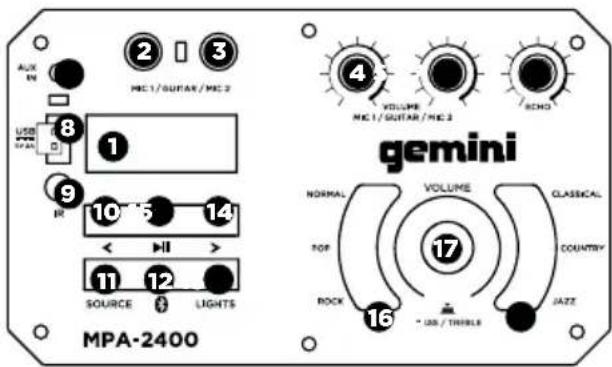
- LED Display
- 1/4" Connector for Mic 1 or Guitar
- 1/4" Connector for Mic 2 or Guitar
- Volume Knob for Mic 1 Input
- Volume Knob for Mic 2 Input
- Echo Effect for Mic 1 and 2 Inputs
- 1/8" Connector for AUX Input
- USB Port
-
IR Receiver for Remote Control
-
BACK Button Short Press: Play Previous Song Long Press: Volume Down
-
SOURCE Button
-
BLUETOOTH Button
-
LIGHTS Button
-
FWD Button Short Press: Play Next Track Long Press: Volume Up
-
PLAY/PAUSE Button Short Press: Play / Pause Track Long Press: Enter FOLDER View
-
NORMAL / POP / ROCK DSP EQ Buttons
-
VOLUME Knob Turn: Increase or decrease volume Press: Access DSP EQ Bass and Treble control
-
CLASSICAL / COUNTRY / JAZZ DSP EQ Buttons
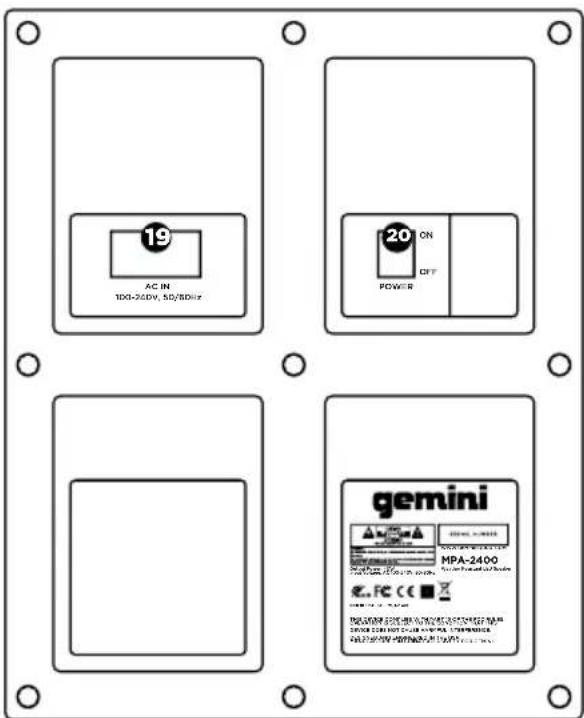
REAR PANEL
-
AC Power Input
-
POWER Button
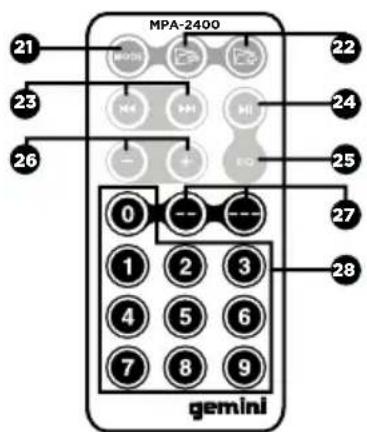
REMOTE CONTROL
- MODE Button Select Audio Source (USB / Bluetooth / FM Radio)
- BACK / FWD Folder Buttons Navigate to Previous or Next Folder
- BACK / FWD Track Buttons Play Previous or Next Track
- PLAY / Pause Button Play or Pause the Current Track
- EQ Button toggle through DSP EQ Presets
- Volume Buttons increase or decrease volume
- Direct Entry Buttons to enter tens and hundreds
- Number Buttons for numeric entry
LATERAL PANEL
REAR PANEL
REMOTE CONTROL
ENGLISH //
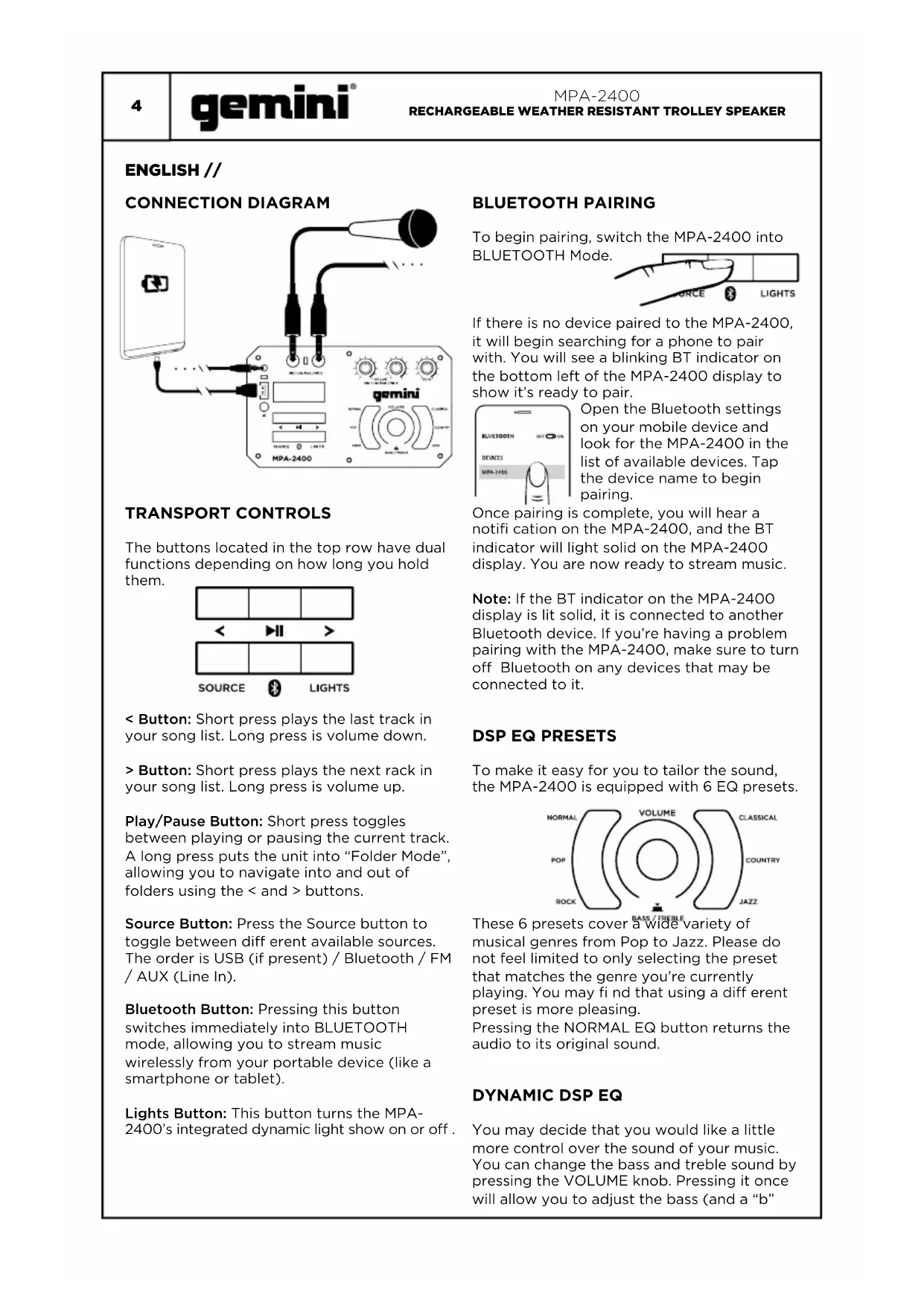
CONNECTION DIAGRAM
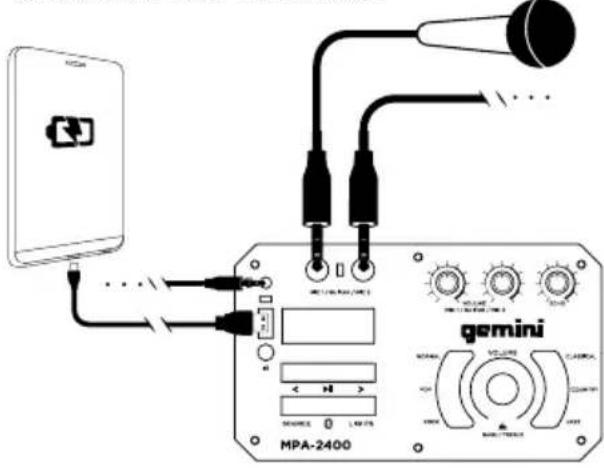
TRANSPORT CONTROLS
The buttons located in the top row have dual functions depending on how long you hold them.
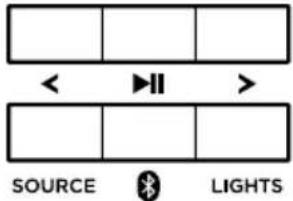
< Button: Short press plays the last track in your song list. Long press is volume down.
Button: Short press plays the next rack in your song list. Long press is volume up.
Play/Pause Button: Short press toggles between playing or pausing the current track. A long press puts the unit into "Folder Mode", allowing you to navigate into and out of folders using the < and > buttons.
Source Button: Press the Source button to toggle between different available sources. The order is USB (if present) / Bluetooth / FM / AUX (Line In).
Bluetooth Button: Pressing this button switches immediately into BLUETOOTH mode, allowing you to stream music wirelessly from your portable device (like a smartphone or tablet).
Lights Button: This button turns the MPA-2400's integrated dynamic light show on or off.
BLUETOOTH PAIRING
To begin pairing, switch the MPA-2400 into BLUETOOTH Mode.
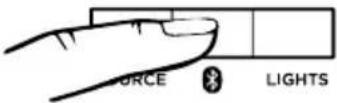
If there is no device paired to the MPA-2400, it will begin searching for a phone to pair with. You will see a blinking BT indicator on the bottom left of the MPA-2400 display to show it's ready to pair.
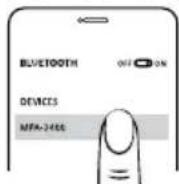
Open the Bluetooth settings on your mobile device and look for the MPA-2400 in the list of available devices. Tap the device name to begin pairing.
Once pairing is complete, you will hear a notification on the MPA-2400, and the BT indicator will light solid on the MPA-2400 display. You are now ready to stream music.
Note: If the BT indicator on the MPA-2400 display is lit solid, it is connected to another Bluetooth device. If you're having a problem pairing with the MPA-2400, make sure to turn off Bluetooth on any devices that may be connected to it.
DSP EQ PRESETS
To make it easy for you to tailor the sound, the MPA-2400 is equipped with 6 EQ presets.
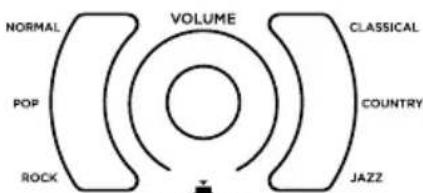
These 6 presets cover a wide variety of musical genres from Pop to Jazz. Please do not feel limited to only selecting the preset that matches the genre you're currently playing. You may find that using a different preset is more pleasing.
Pressing the NORMAL EQ button returns the audio to its original sound.
DYNAMIC DSP EQ
You may decide that you would like a little more control over the sound of your music. You can change the bass and treble sound by pressing the VOLUME knob. Pressing it once will allow you to adjust the bass (and a "b"
will appear on screen". Pressing it again will give you control of the treble (and will show a "t" on screen). Finally, pressing it once more will return you to volume control (indicated on screen with a "v").
DEVICE CHARGING
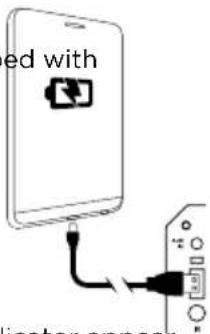
The MPA-2400 comes equip a USB port that can be used to charge external devices, like smartphones.
Using your manufacturer-supplied USB charging cable, connect to the USB port on the MPA-2400 and your portable device.
You should see a charging indicator appear on your mobile device, indicating charging is in progress.
VOLUME AND ECHO CONTROLS
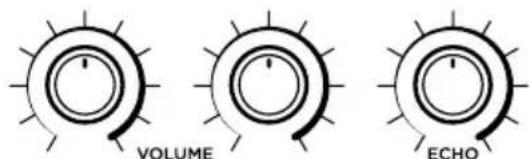
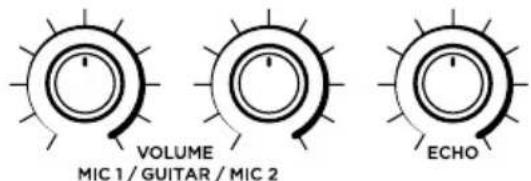
If you have a microphone or Guitar connected to the inputs of the MPA-2400, you can use the Volume knobs (located above the EQ section) to control their volume.
There is also an ECHO effect available to connected Mics or Guitars, which adds an incredible, professional-sounding effect. The ECHO knob controls the amount of this effect added to both inputs.
FM RADIO MODE
To use FM mode, you will first need to scan for strong stations in your area. To begin the scan, press the PLAY/PAUSE button. This will begin scanning, and any strong signals will be saved as presets.
Once scanning is complete, you will be able to use the < and > buttons to jump to the saved station presets. Presets will be numbered, and the FM frequency will be displayed.
When a USB drive containing music is inserted into the MPA-2400, the unit will automatically switch to the USB source and begin playback of any music located in the root directory of the USB drive. Use the TRANSPORT CONTROLS to choose your music.
TROLLEY
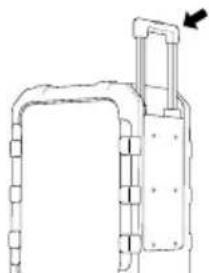
To make transport easier, the MPA-2400 is equipped with a retractable trolley handle. To extend the trolley, pull up on the handle while pressing the locking button. This will extend the handle.
natural_image
Pure technical line drawing of a mechanical component without any text, numbers, or symbolsOn the side of the MPA-2400 under the trolley handle are wheels. Use the trolley handle to tilt the unit on to the wheels - allowing the unit to roll across the ground easily.
SPECIFICATIONS
| IP Rating | IPX4 (Splash Proof) |
| Peak Power | 240W |
| Frequency Response | 55Hz - 18KHz |
| Sensitivity | 96dB +/-2dB 1W @ 1M |
| Woofer 10" High Excursion with 1" Voice Coil | |
| Tweeter | 3" Full Range |
| Battery Life | Up to 18 hours |
| Power | 100-240V AC 50-60Hz |
ENGLISH //
WARNINGS AND PRECAUTIONS
PREVENTIVE MEASURES
-
Please read these instructions carefully.
-
Keep all information and instructions in a safe place.
-
Follow the instructions.
-
Observe all safety warnings. Never remove safety warnings or other information from the equipment.
-
Use the equipment only in the intended manner and for the intended purpose.
-
Use only sufficiently stable and compatible stands and/or mounts (for fixed installations). Make certain that wall mounts are properly installed and secured. Make certain that the equipment is installed securely and cannot fall.
-
During installation, observe the applicable safety regulations for your country.
-
Never install and operate the equipment near radiators, heat registers, ovens or other sources of heat. Make certain that the equipment is always installed so that it is cooled sufficiently and cannot overheat.
-
Never place sources of ignition, e.g., burning candles, on the equipment.
-
Ventilation slits must not be blocked.
-
Keep a minimum distance of 20 cm around and above the device.
-
Do not use this equipment in the immediate vicinity of water (does not apply to special outdoor equipment - in this case, observe the special instructions noted below). Do not expose this equipment to fl ammable materials, fluids or gases. Avoid direct sunlight!
-
Make certain that dripping or splashed water cannot enter the equipment. Do not place containers filled with liquids, such as vases or drinking vessels, on the equipment.
-
Make certain that objects cannot fall into the device.
-
Use this equipment only with the accessories recommended and intended by the manufacturer.
-
Do not open or modify this equipment.
-
After connecting the equipment, check all cables to prevent damage or accidents, e.g., due to tripping hazards.
-
During transport, make certain that the equipment cannot fall and possibly cause property damage and personal injuries.
-
If your equipment is no longer functioning properly, if fluids or objects have gotten inside the equipment or if it has been damaged in another way, switch it OFF immediately and unplug it from the mains outlet (if it is a powered device). This equipment may only be repaired by authorized, qualified personnel.
-
Clean the equipment using a dry cloth.
-
Comply with all applicable disposal laws in your country. During disposal of packaging, please separate plastic and paper/cardboard.
-
Plastic bags must be kept out of reach of children.
-
Please note that changes or modifications not expressly approved by the party responsible for compliance could void the user's authority to operate the equipment.
FOR EQUIPMENT THAT CONNECTS TO THE POWER MAINS
-
CAUTION: If the power cord of the device is equipped with an earthing contact, then it must be connected to an outlet with a protective ground. Never deactivate the protective ground of a power cord.
-
If the equipment has been exposed to strong fluctuations in temperature (for example, after transport), do not switch it on immediately. Moisture and condensation could damage the equipment. Do not switch on the equipment until it has reached room temperature.
-
Before connecting the equipment to the power outlet, fi rst verify that the mains voltage and frequency match the values specifi ed on the equipment. If the equipment has a voltage selection switch, connect the equipment to the power outlet only if the equipment values and the mains power values match. If the included power cord or power adapter does not fi t in your wall outlet, contact your electrician.
-
Do not step on the power cord. Make certain that the power cable does not become kinked, especially at the mains outlet and/or power adapter and the equipment connector.
-
When connecting the equipment, make certain that the power cord or power adapter is always freely accessible. Always disconnect the equipment from the power supply if the equipment is not in use or if you want to clean the equipment. Always unplug the power cord and power adapter from the power outlet at the plug or adapter and not by pulling on the cord. Never touch the power cord and power adapter with wet hands.
-
Whenever possible, avoid switching the equipment on and off in quick succession because otherwise this can shorten the useful life of the equipment.
-
IMPORTANT INFORMATION: Replace fuses only with fuses of the same type and rating. If a fuse blows repeatedly, please contact an authorized service center.
-
To disconnect the equipment from the power mains completely, unplug the power cord or power adapter from the power outlet.
-
Unplug the power cord and power adapter from the power outlet if there is a risk of a lightning strike or before extended periods of disuse.

To reduce the risk of electric shock, do not remove cover (or back). There are no user serviceable parts inside. Maintenance and repairs should be exclusively carried out by qualified service personnel.

The warning triangle with lightning symbol indicates dangerous uninsulated voltage inside the unit, which may cause an electrical shock. The warning triangle with exclamation mark indicates important operating and maintenance instructions.
CAUTION! HIGH VOLUMES IN AUDIO PRODUCTS!
This device is meant for professional use. Hearing damage due to high volume and prolonged exposure: When in use, this product can produce high sound-pressure levels (SPL) that can lead to irreversible hearing damage in performers, employees, and audience members. For this reason, avoid prolonged exposure to volumes more than 90dB.
| MPA-2400RECHARGEABLE WEATHER RESISTANT TROLLEY SPEAKER | gemini® | 7 |
Responsible Party Name:
Innovative Concepts & Designs
Company address:
107 Trumbull St-F8 2nd Floor
Elizabeth, NJ, 07206 USA

FCC Compliance Statement
This device complies with Part 15 of the FCC Rules. The operation is subject to the following two conditions: (1) This device may not cause harmful interference, and (2) This device must accept any interference received, including interference that may cause undesired operation.
This device and its antenna(s) must not be co-located or operating in conjunction with any other antenna or transmitter.
The device has been evaluated to meet general RF exposure requirements. The device can be used in portable exposure conditions without restriction. Note: This equipment has been tested and found to comply with the limits for a class B digital device, pursuant to Part 15 of the FCC Rules. This equipment generates, uses and can radiate radio frequency energy and if not installed and used in accordance with the instructions, may cause harmful interference to radio communications. However, there is no guarantee that interference will not occur in a particular installation. If this equipment does cause interference to radio or television reception, which can be determined by turning the equipment off and then on, the user is encouraged to try to correct the interference by one or more of the following measures:
- Reorient or relocate the receiving antenna.
- Increase the separation between the equipment and receiver.
- Connect the equipment to a different outlet so that the equipment and receiver are on different branch circuits.
- Consult the dealer or an experienced radio/TV technician for help.
FCC ID: 2AE6G - MPA2400
FUNCIÓN ESPAÑOL //
PANEL LATERIAL
natural_image
Diagram showing a smartphone connected to an audio jack via cable (no text or symbols present)CONTROLES DE VOLUMEN Y ECO
natural_image
Technical line drawing of a mechanical device with mounting holes and a handle (no text or symbols)natural_image
Technical line drawing of a mechanical device with no visible text or symbolsCARACTÉRISTIQUES
TRANSPORT KONTROLLEN
natural_image
Diagram of a device with an AC input cable and connected to a battery port (no text or symbols present)natural_image
Line drawing of a mechanical device with mounting holes and a handle (no text or symbols)SPEZIFIKATIONEN
natural_image
Diagram of a smartphone connected to an external port with cable (no text or symbols)VOLUME E CONTROLLI ECHO



natural_image
Line drawing of a suitcase with a handle and side panel, no text or symbols presentWARRANTY AND REPAIR:
All Gemini products are designed and manufactured to the highest standards in the industry. With proper care and maintenance, your product will provide years of reliable service.
LIMITED WARRANTY
A. Gemini guarantees its products to be free from defects in materials and workmanship for one (1) year from the original purchase date. Exceptions: Laser assemblies on CD Players, cartridges, and crossfaders are covered for 90 days.
B. This limited warranty does not cover damage or failure caused by abuse, misuse, abnormal use, faulty installation, improper maintenance or any repairs other than those provided by an authorized Gemini Service Center.
C. There are no obligations of liability on the part of Gemini for consequential damages arising out of or in connection with the use or performance of the product or other indirect damages with respect to loss of property, revenues, of profit, or costs of removal, installation, or reinstallation. All implied warranties for Gemini, including implied warranties for fitness, are limited in duration to one (1) year from the original date of purchase, unless otherwise mandated by local statutes.
RETURN/REPAIR
A. In the U.S.A., please call our helpful Customer Service Representatives at (732) 346-0061, and they will be happy to give you a Return Authorization Number (RA#) and the address of an authorized service center closest to you.
B. After receiving an RA#, include a copy of the original sales receipt, with defective product and a description of the defect. Send by insured freight to: Gemini and use the address provided by your customer service representative. Your RA# must be written on the outside of the package, or processing will
be delayed indefinitely!
C. Service covered under warranty will be paid for by Gemini and returned to you. For non-warrantied products, Gemini will repair your unit after payment is received. Repair charges do not include return freight. Freight charges will be added to the repair charges.
D. On warranty service, you pay for shipping to Gemini, we pay for return shipping within the continental United States. Alaska, Hawaii, Puerto Rico, Canada, Bahamas, and the Virgin Islands will be charged for freight.
E. Please allow 2-3 weeks for return of your product.
Under normal circumstances your product will spend no more than 10 working days at Gemini. We are not responsible for shipping times.
IN THE USA:
If you experience problems with this unit, call 732-346-0061 for Gemini customer service. Do not attempt to return this equipment to your dealer.
Parts of the design of this product may be protected by worldwide patents. Information in this manual is subject to change without notice and does not represent a commitment on the part of the vendor. Gemini shall not be liable for any loss or damage whatsoever arising from the use of information or any error contained in this manual. No part of this manual may be reproduced, stored in a retrieval system or transmitted, in any form or by any means, electronic, electrical, mechanical, optical, chemical, including photocopying and recording, for any purpose without the express written permission of Gemini. It is recommended that all maintenance and service on this product is performed by Gemini or its authorized agents. Gemini will not accept liability for loss or damage caused by maintenance or repair performed by unauthorized personnel.
Gemini Worldwide Headquarters
107 Trumbull Street, Building F8 • Elizabeth, NJ 07206 • USA • Tel: (732)346-0061 • Fax: (732)346-0065
© Innovative Concepts and Design LLC, All Rights Reserved.
Register your product online at
WWW.GEMINISOUND.COM
to be eligible for great prize giveaways!
- INDEX
- ENGLISH //
- ESPAÑOL //
- CONTENIDO ESPAÑOL //
- REAR PANEL
- REMOTE CONTROL
- TRANSPORT CONTROLS
- BLUETOOTH PAIRING
- DSP EQ PRESETS
- DYNAMIC DSP EQ
- DEVICE CHARGING
- VOLUME AND ECHO CONTROLS
- FM RADIO MODE
- TROLLEY
- WARNINGS AND PRECAUTIONS
- PREVENTIVE MEASURES
- FOR EQUIPMENT THAT CONNECTS TO THE POWER MAINS
- CAUTION! HIGH VOLUMES IN AUDIO PRODUCTS!
- Responsible Party Name:
- Company address:
- FCC Compliance Statement
- FUNCIÓN ESPAÑOL //
- PANEL LATERIAL
- CARACTÉRISTIQUES
- TRANSPORT KONTROLLEN
- VOLUME E CONTROLLI ECHO
- WARRANTY AND REPAIR:
- LIMITED WARRANTY
- RETURN/REPAIR
- IN THE USA:
- Gemini Worldwide Headquarters
Brand : GEMINI
Model : MPA2400
Category : Hi-fi system