SDABS100 - Dashcam PIONEER - Free user manual and instructions
Find the device manual for free SDABS100 PIONEER in PDF.


User questions about SDABS100 PIONEER
0 question about this device. Answer the ones you know or ask your own.
Ask a new question about this device
Download the instructions for your Dashcam in PDF format for free! Find your manual SDABS100 - PIONEER and take your electronic device back in hand. On this page are published all the documents necessary for the use of your device. SDABS100 by PIONEER.
USER MANUAL SDABS100 PIONEER
Instruction Manual and Installation Guide
Important (Serial number)
The serial number is located on the top of the main unit. For your own security and convenience, be sure to record the number.
Contents
Thank you for buying this Pioneer product.
Please read through these instructions so you will know how to operate this product properly. After you have finished reading the instructions, keep this document in a safe place for future reference.
Precaution. 3
Information to Customer 3
Important Safety Information. 4
After-Sales Service 5
Three Year Limited Warranty. 5
Visit our Website 5
■ Alert Conditions. 6
System Indicators. 6
Item List 8
■ Installation Diagram 9
■ Wire Connection Diagram 10
■ Installation Guide 11
Step 1: License Plate Bar Installation 12
Step 2: Left/Right Turn Signal Installation. 13
Step 3: LED Indicator Installation 13
Step 4: Speaker Installation. 14
Step 5: GPS Antenna Installation 14
Step 6: Main Unit Installation 14
Technical Specifications 15
Troubleshooting. 16
Precaution
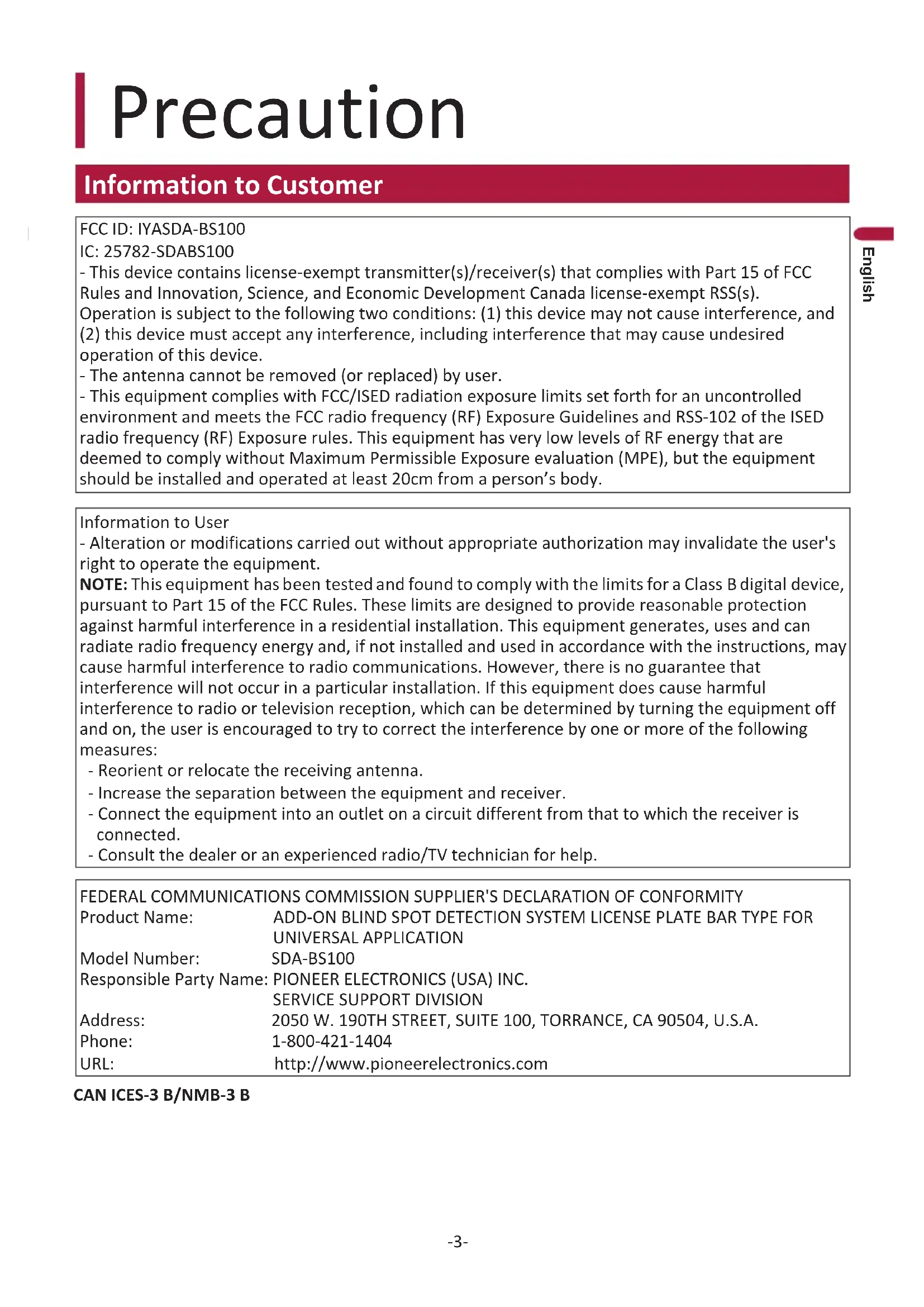
Information to Customer
FCC ID: IYASDA-BS100
IC: 25782-SDABS100
- This device contains license-exempt transmitter(s)/receiver(s) that complies with Part 15 of FCC Rules and Innovation, Science, and Economic Development Canada license-exempt RSS(s).
Operation is subject to the following two conditions: (1) this device may not cause interference, and (2) this device must accept any interference, including interference that may cause undesired operation of this device.
- The antenna cannot be removed (or replaced) by user.
- This equipment complies with FCC/ISED radiation exposure limits set forth for an uncontrolled environment and meets the FCC radio frequency (RF) Exposure Guidelines and RSS-102 of the ISED radio frequency (RF) Exposure rules. This equipment has very low levels of RF energy that are deemed to comply without Maximum Permissible Exposure evaluation (MPE), but the equipment should be installed and operated at least 20cm from a person's body.
Information to User
- Alteration or modifications carried out without appropriate authorization may invalidate the user's right to operate the equipment.
NOTE: This equipment has been tested and found to comply with the limits for a Class B digital device, pursuant to Part 15 of the FCC Rules. These limits are designed to provide reasonable protection against harmful interference in a residential installation. This equipment generates, uses and can radiate radio frequency energy and, if not installed and used in accordance with the instructions, may cause harmful interference to radio communications. However, there is no guarantee that interference will not occur in a particular installation. If this equipment does cause harmful interference to radio or television reception, which can be determined by turning the equipment off and on, the user is encouraged to try to correct the interference by one or more of the following measures:
- Reorient or relocate the receiving antenna.
- Increase the separation between the equipment and receiver.
- Connect the equipment into an outlet on a circuit different from that to which the receiver is connected.
- Consult the dealer or an experienced radio/TV technician for help.
FEDERAL COMMUNICATIONS COMMISSION SUPPLIER'S DECLARATION OF CONFORMITY
Product Name: ADD-ON BLIND SPOT DETECTION SYSTEM LICENSE PLATE BAR TYPE FOR UNIVERSAL APPLICATION
Model Number: SDA-BS100
Responsible Party Name: PIONEER ELECTRONICS (USA) INC. SERVICE SUPPORT DIVISION
Address: 2050 W. 190TH STREET, SUITE 100, TORRANCE, CA 90504, U.S.A.
Phone: 1-800-421-1404
URL: http://www.pioneerelectronics.com
CANICES-3B/NMB-3B

CAUTION
- Special vehicle conditions that should be considered
During system startup and initialization, it may take up to 2 minutes for the system to establish a GPS connection. If the vehicle is driven before a GPS connection is established or if the GPS connection is interrupted (inside a tunnel, parking structure, etc.), the system may not function properly, producing incorrect or false warnings or failing to produce a warning. Once the GPS connection is established or re-established, both LED indicators will flash twice to indicate the system is ready for use.
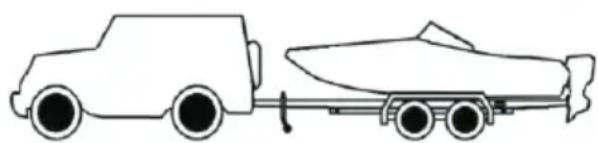
The license plate bar's performance can be affected if installed on a vehicle that has items obstructing the license plate location (e.g. bike rack, trailer). In addition, the license plate bar cannot be installed correctly if the license plate is offset or on the far side of the vehicle and not centered.
This system can be used on any vehicle that has a standard license plate location but can be affected by metal objects that may block or interfere with the operation of the system.
The following may compromise the effectiveness of the system:
- Vehicles with permanent trailers attached.
- Vehicles with metal obstructions in front of the license plate, i.e. spare tire mount, rear bike racks or equipment for disabled persons.
Standard license plates that are mounted on the right or left side of the vehicle.
(Center Installation Required)
- Situations that cannot be detected
If a vehicle is passing your vehicle.
- Your vehicle is moving slower than the sensing speed threshold setting, such as in slow moving traffic.
- When your vehicle is reversing, the relative speed between your vehicle and objects is less than 5 mph (8 km/h).
If a vehicle is approaching / overtaking your vehicle and the relative speed between your vehicle and the overtaking vehicle is greater than 50 mph (80 km/h). For example, if you are traveling at 55 mph (88 km/h), the system cannot detect vehicles approaching from behind if their speed exceeds 105 mph (169 km/h).
Situations that may affect system detection accuracy
Metal objects are in the direct path of the sensing signal.
- Weather such as heavy rain and snow, and icy road conditions, which can cause changes in sensitivity.
Gravel roads, which may cause interference due to dust and flying stones.
Important Safety Information
WARNING
THIS PRODUCT FUNCTIONS AS AN AID
FOR NOTIFYING THE PRESENCE OF OBSTACLES IN VEHICLE BLIND SPOTS.
IT DOES NOT DETECT ALL DANGERS AND OBSTACLES
AND IS NOT A SUBSTITUTE FOR YOUR JUDGEMENT AND CAREFUL ATTENTION.
BEFORE ANY MANEUVER, VISUALLY CHECK BOTH SIDES OF THE VEHICLE TO CONFIRM.
WARNING
-
Check license plate bar unit installation before driving.
-
Are the screws loose?
- Is the unit firmly secured?
-
If the unit comes loose while you are driving, it may cause an accident.
-
Pioneer does not recommend that you install this product yourself. This product is designed for professional installation only. We recommend that only authorized Pioneer service company personnel who have specialized training and experience in mobile electronics set up and install this product. NEVER SERVICE THIS PRODUCT YOURSELF. Installing or servicing this product and its connecting cables may expose you to the risk of electric shock or other hazards, and can cause damage to this product that is not covered by warranty.
- Do not allow the main unit to come into contact with liquids. Electrical shock, damage to the product, smoke, and overheating could result from contact with liquids. (The license plate bar is waterproof with IPX6/IPX7 rating)
- Do not disassemble or modify this product, as there are high-voltage components inside that may cause an electric shock. Be sure to consult your dealer or the nearest authorized Pioneer service company for internal inspection, adjustments or repairs.
- Always observe safe driving rules and follow all existing traffic regulations. If you experience difficulty in operating this product, pull over, park your vehicle in a safe location and apply the parking brake before making the necessary adjustments.
- Keep this manual handy as a reference for operating procedures and safety information.
After-Sales Service
Please contact the authorized Pioneer dealer from which you purchased this product for after-sales service (including warranty service) or any other information. If you still need help, please contact our Customer Support Division.
Please do not ship your product in for repair without first contacting Customer Support for return authorization. Please review the Limited Warranty for instructions on receiving warranty service.
-USA & CANADA
Pioneer Electronics (USA) Inc.
CUSTOMER SUPPORT DIVISION
P.O.Box 1720 Long Beach,CA 90801-1720
Three Year Limited Warranty
When purchased from an authorized Pioneer dealer, this product is covered by Pioneer's Three Year Limited Warranty. Please visit http://pioneerelectronics.com/warranty to review and download the full terms and conditions of the Limited Warranty, or you can receive a copy by calling 1-800-421-1404 or writing to the address below.
Customer Support:
Pioneer Electronics (USA) Inc.
P.O. Box 1720, Long Beach, California 90801 U.S.A.
Visit our Website
Visit us at the following sites:
In the U.S.: http://www.pioneerelectronics.com
In Canada: http://www.pioneerelectronics.ca
1 Register your product.
2 Receive updates on the latest products and technologies.
3 Download owner's manuals, order product catalogs, research new products, and much more.
Alert Conditions
When the system is on and functioning, the system is designed to detect the following events:
- Blind spots while driving: Objects in the blind spot areas around your vehicle - in the lanes on the left/right and directly behind the vehicle at a distance of up to 50 ft (approximately 15.2m ).
- Blind spots while being passed / overtaken: When vehicles are approaching / overtaking your vehicle from behind.
- Cross-Traffic Detection: When your vehicle is reversing, vehicles approaching from your left and right.
CAUTION
The SDA-BS100 only detects objects approaching your vehicle from behind. It does not detect objects your vehicle is approaching or overtaking. Under certain driving scenarios, the SDA-BS100 may detect objects in an unintended way. The following conditions below are examples of scenarios where fault notifications may occur.
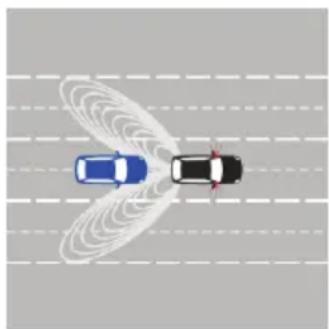
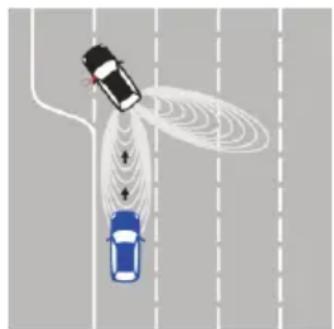
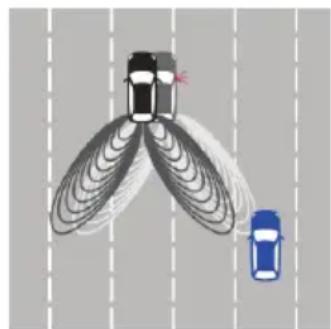
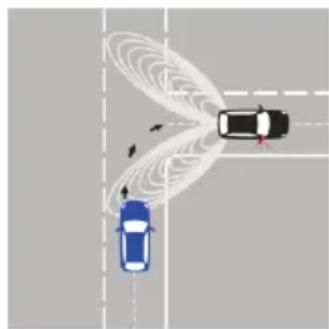
Fig 1 Fig 2 Fig 3 Fig 4
System Indicators
A. When the system is turned on each time (your vehicle ignition or ACC is switched on), both LED indicators will flash once to indicate system start up and initialization. Once a GPS connection is established, which may take up to 2 minutes, both LED indicators will flash twice to indicate the system is ready for use. The GPS connection is used to calculate your vehicle's speed. The system features a sensing speed threshold that is set when the system is installed. When your vehicle is traveling slower than this threshold setting, the system will not produce warnings.
Threshold 1: System warns at any speed above 5 mph (8 km/h)
Threshold 2: System warns at any speed above 10mph (16 km/h)
Threshold 3: System warns at any speed above 15mph (24km / h)
Threshold 4^* : System warns at any speed above 20 mph (32 km/h)
*The factory default sensing speed threshold is Threshold 4.
B. Blind spot detection toward the right rear of your vehicle:
- The Right LED indicator will illuminate and remain illuminated when there is an object or vehicle approaching.
- If your vehicle's right turn signal is activated when there is an object or vehicle approaching, the Right LED indicator will flash repeatedly and the included speaker will beep (bi-bi-bi) one time.
C. Blind spot detection toward the left rear of your vehicle:
- The Left LED indicator will illuminate and remain illuminated when there is an object or vehicle approaching.
- If your vehicle's left turn signal is activated when there is an object or vehicle approaching, the Left LED indicator will flash repeatedly and the included speaker will beep (bi-bi-bi) one time.
D. Cross-Traffic Detection:
- When your vehicle is reversing and the system detects an object or vehicle approaching from your right, the Right LED indicator will illuminate and remain illuminated and the included speaker will beep repeatedly
- When your vehicle is reversing and the system detects an object or vehicle approaching from your left, the Left LED indicator will illuminate and remain illuminated and the included speaker will beep repeatedly
Note: The system will not detect or warn of standing objects or objects moving under 5 mph (8 km/h).
Item List
| Number | Item Name Quantity Pictures | ||
| 1 Main Unit | 1 PC | ||
| 2 | Main Harness | 1 PC | |
| 3 | Sensor Cable | 1 PC | |
| 4 | LED Extension Cable | 1 SET | |
| 5 | License Plate Bar with Configurable Radar Sensors | 1 PC | |
| 6 | LED Indicator | 1 SET | |
| 7 | Extra LED Indicator Lens and Double Sided Tape | 2 PCS | |
| 8 | GPS Antenna | 1 PC | |
| 9 | Speaker | 1 PC | |
| 10 | Hook-and-loop Fastener and Double-sided Tape | 4 PCS hook-and-loop fastener & double-sided tape | |
| 11 | Screws & Hexagon Wrench | 2 PCS M6*12 mm Screws & 1 PC Hexagon wrench | |
| 12 | Wedges | 2 PCS 5 degree2 PCS 10 degree2 PCS 15 degree | |
| 13 | M6*16 mm Screw | 2 PCS | |
| 14 | M6*20 mm Screw | 2 PCS | |
Required tools for installation: Insulation tape; Multi-meter; Screwdriver; Cleaning cloth; M6 Screw; Hexagon wrench; Clamps; Pry Tools.
Installation Diagram
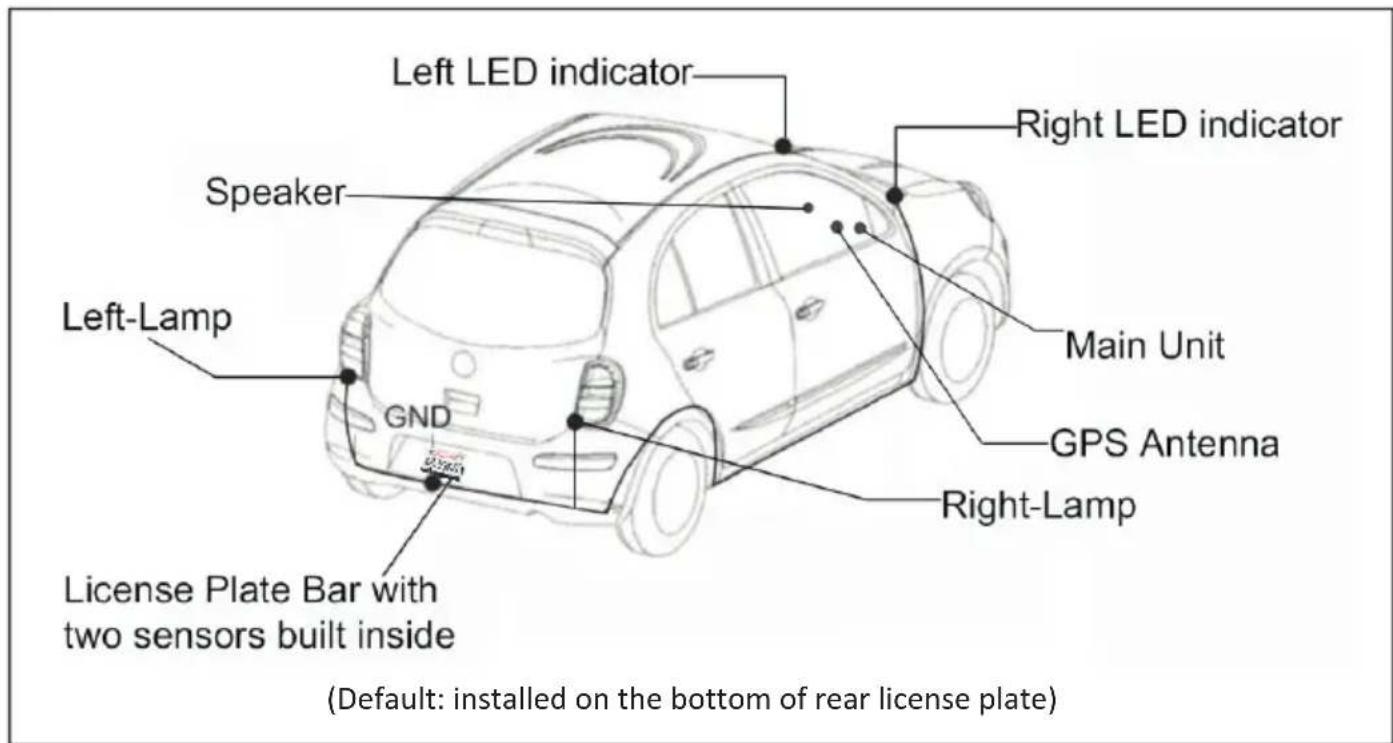
usu
Note: If you cannot connect to the rear tail lamp (turn signal lights combined with brake lights), then connect at the front fuse box.
Wire Connection Diagram
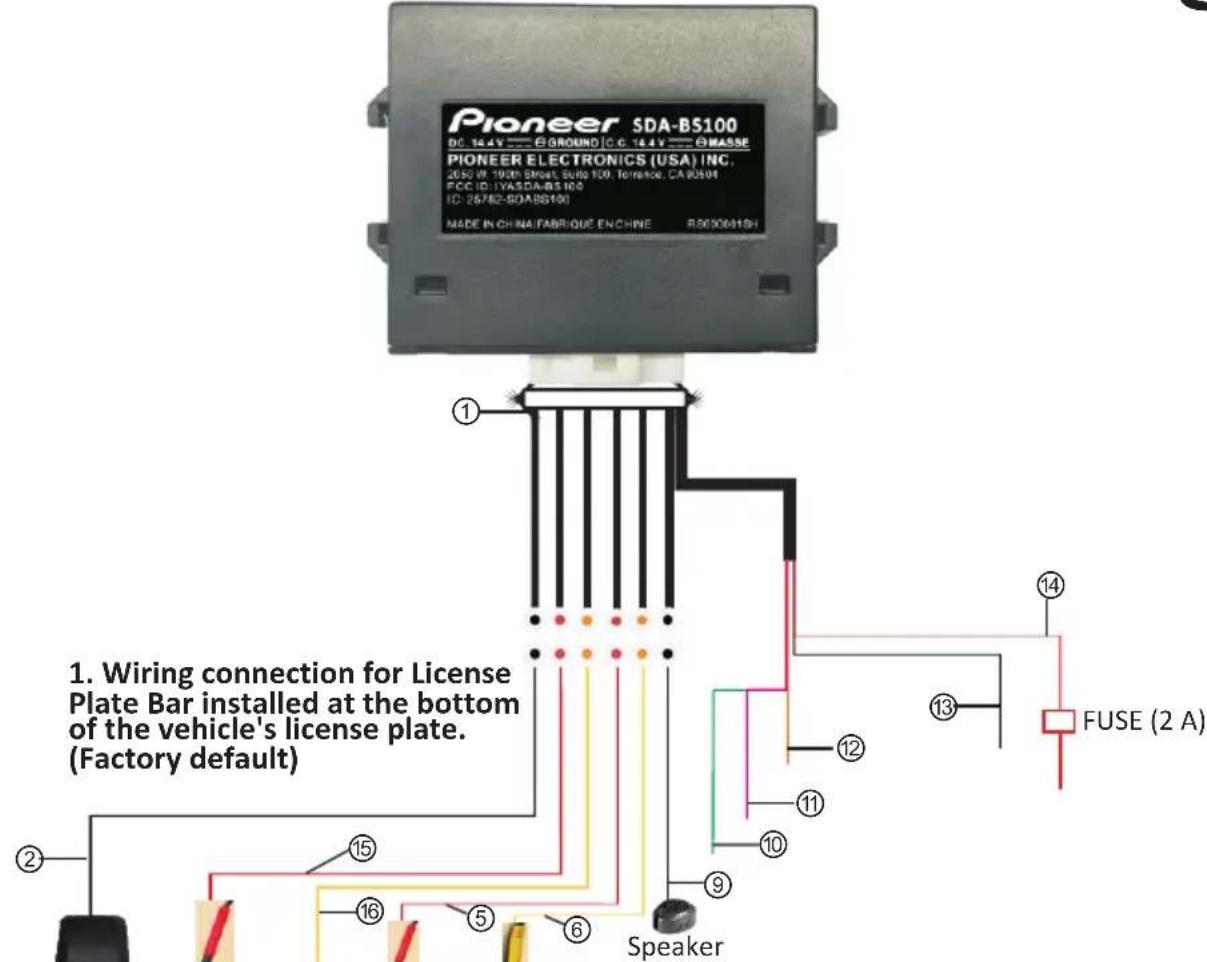

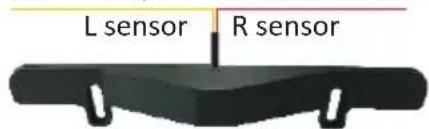
License Plate Bar with two sensors built inside (Default: installed on the bottom of license plate)
2. Wiring connection for License Plate Bar installed at the top of the vehicle's license plate.
(Option 2: installed on the top of license plate)
① Main connectors cable - 2.6 ft (80 cm)
② GPS antenna - 10.5 ft (320 cm)
③ Red L sensor - 2.6 ft (80 cm)
④ Yellow R sensor - 2.6 ft (80 cm)
⑤ Red LED extension cable - 22.9 ft (700 cm)
⑥ Yellow LED extension cable - 22.9 ft (700 cm)
⑦ Red Left LED indicator cable - 1.6 ft (50 cm)
Yellow Right LED indicator cable - 1.6 ft (50 cm)
Speaker cable - 10.5 ft (320 cm)
Green reverse trigger wire - 5.9 ft (180 cm)
① Pink left-turn signal trigger wire - 5.9 ft (180 cm)
12 Orange right-turn signal trigger wire - 5.9 ft (180 cm)
③ Black GND-5.9 ft (180 cm)
⑭ Red ACC/IGN - 15.7 ft (480 cm)
⑤ Red sensor extension cable - 22.9 ft (700 cm)
Yellow sensor extension cable - 22.9 ft (700 cm) If cannot be connected to rear tail lamp (turn signal lights maybe combined with brake lights) then connect at the front fuse box.
Installation Guide
WARNING
- For professional installation only by personnel with specialized training and experience in mobile electronics.
- Do not install the Main Unit or the LED Indicators where it may (i) obstruct the driver's vision, (ii) impair the performance of any of the vehicle's operating systems or safety features, including air bags or hazard lamp buttons or (iii) impair the driver's ability to safety operate the vehicle.
- Never install this product in front of or next to the place in the dashboard, door, or pillar from which one of your vehicle's airbags would deploy. Please refer to the vehicle's owner's manual for reference to the deployment area of the airbags.
- Do not install the Main Unit in places subject to high temperatures or humidity, such as:
- Close to a heater, vent or air conditioner.
- Places that may be exposed to rain, such as close to the door or on the vehicle's floor.
- If the Main Unit is installed in the passenger compartment, anchor it securely so it does not break free while the vehicle is moving and cause injury or an accident.
- Secure all wiring with cable clamps or electrical tape. Do not allow any bare wiring to remain exposed.
- Make sure that the cables and wires will not interfere with or become caught in any of the vehicle's moving parts, especially brake, doors, or any of the vehicle's controls.
- If the wiring of this unit is located under a front seat, make sure it does not obstruct seat movement. Route all leads and cords carefully around the sliding mechanism so they do not get caught or pinched in the mechanism and cause a short circuit.
- Do not shorten any leads. If you do, the protection circuit (fuse holder, fuse resistor or filter, etc.) may fail to work properly.
- When replacing the fuse, be sure to use a fuse only of the rating prescribed on this product.
- Use only the parts included with the unit to ensure proper installation. The use of unauthorized parts can cause malfunctions.
- Never feed power to other electronic products by cutting the insulation of the power supply lead of this product and tapping into the lead. The current capacity of the lead will be exceeded, causing overheating.
- Use this unit with a 12-volt battery and negative grounding only. Failure to do so may result in a fire or malfunction.
- The graphical symbol --- placed on the product means direct current.
- Disconnect the negative terminal of the battery before installation.
- Secure the wiring with cable clamps or adhesive tape. Wrap adhesive tape around wiring that comes into contact with metal parts to protect the wiring.
- Do not perform installation in rain or fog.
- Do not cover the license plate number, name of issuing state and/or registration decals. It is illegal in some states if these items are covered by the license plate bar.

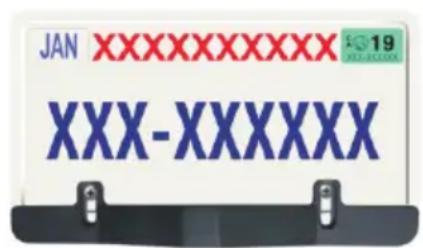

CAUTION
- Ensure that the connector is inserted correctly and according to the corresponding label and the arrow marks of the wire connector at the connection point. When connecting, ensure that the KEY or raised area of the connector mates with the opposite connector. Do not force any connection and ensure that the connector mates properly.
- To avoid any damage to the connectors, align the arrows on each of the corresponding items, then firmly press connectors together to ensure a good connection. Failure to properly install and connect the system components may cause damage to the product and operation of the system.
Step 1: License Plate Bar Installation
Two installation options available: the License Plate Bar can be installed on the bottom or on top of the rear license plate. The default is installation on the bottom of the license plate. Route the cable behind the license plate into the vehicle and connect to the system Main Unit.
Option 1. Install the License Plate Bar on the bottom of the license plate (see Fig 5).
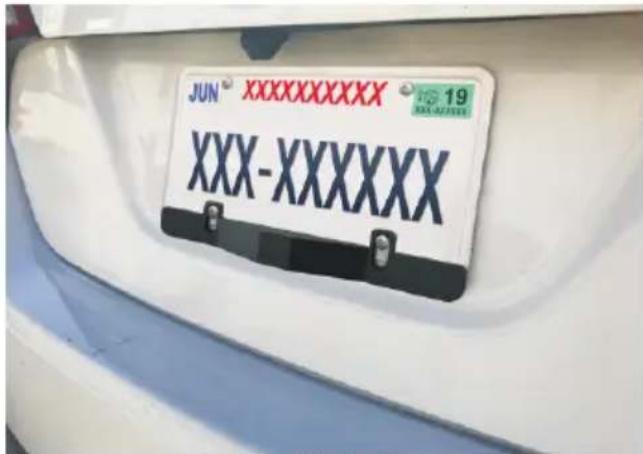
Fig 5
Option 2. The License Plate Bar can also be installed at the top of the license plate if the bottom is obstructed or does not have sufficient space for License Plate Bar installation (see Fig 6).
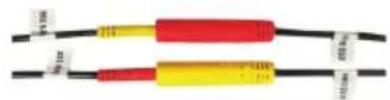
Note: When using Option 2, please exchange the left and right connectors of the sensor for LED in order to get the correct signal (see Fig 7).
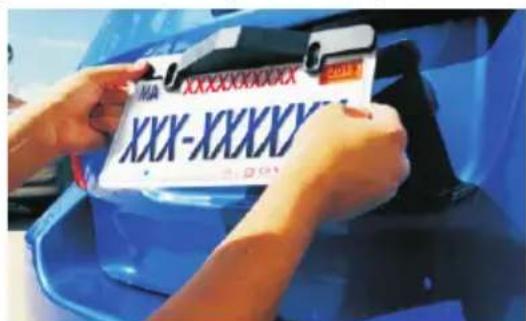
Fig 6
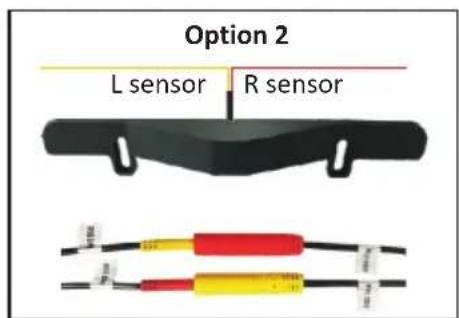
Fig 7

CAUTION
On certain vehicles where the license/tag plate position is higher than 4 ft (1.2 m) and not perpendicular to the ground, please use the included wedges along with different size screws to ensure that the bar is properly aligned perpendicular to the ground, but also secured at rear license/tag plate. Please select the appropriate wedges behind the license plate bar to find an accurate angle as close to perpendicular to ground as possible. Use the license plate screws to attach the appropriate wedge for correct installation (see Fig 8 and Fig 9). This product cannot be used for front vehicle application.

Fig 8
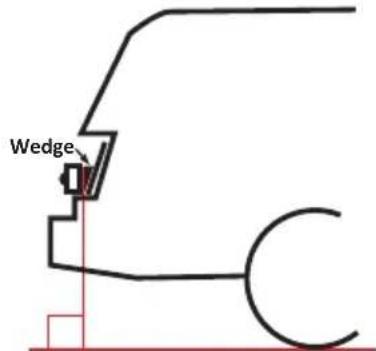
Fig 9
Step 2: Left/Right Turn Signal Installation
Using a voltage multi-meter, locate the isolated left and isolated right turn signal trigger wires, commonly found behind the vehicle's left and right tail lamp assemblies. If turn signal lights are combined with brake lights, then connect the turn signal trigger wires at the front fuse box. Once verified, connect the left and right turning signal wires to the appropriate corresponding input wires of the SDA-BS100 wire harness (see Fig 10, Fig 11, Fig 12). Turn signal inputs of SDA-BS100 is +12VDC only (not switchable to -12VCD); please check with a voltage multi-meter.

Fig 10
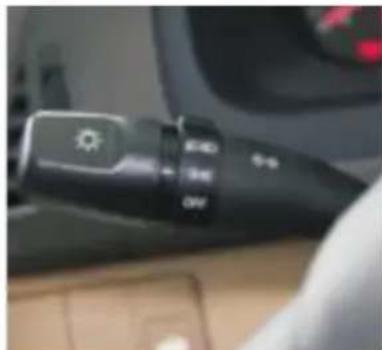
Fig 11
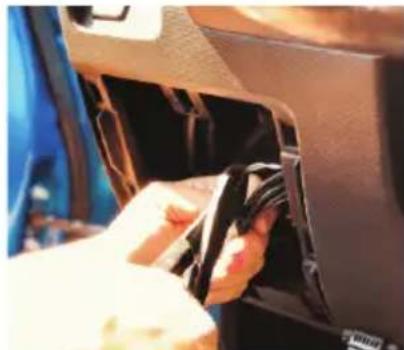
Fig 12
Step 3: LED Indicator Installation
Install the Left LED indicator and Right LED indicator in a location that is visible to the driver, ideally in or around the vehicle's A-pillars (see Fig 13, Fig 14). Place the LED indicators away from the side curtain air bags, so as not to hinder the deployment of airbag function. Appropriate placement is usually at the lowest part of the A-pillars, but you must consult the vehicle manual.
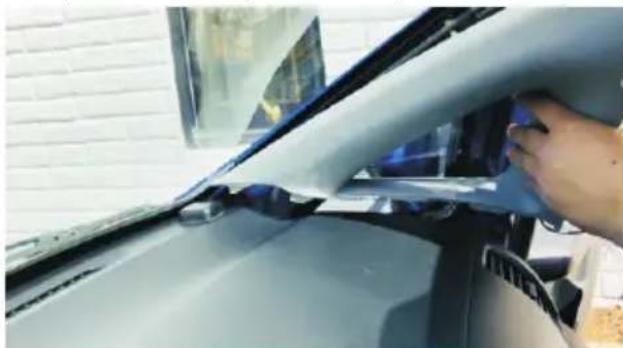
Fig 13
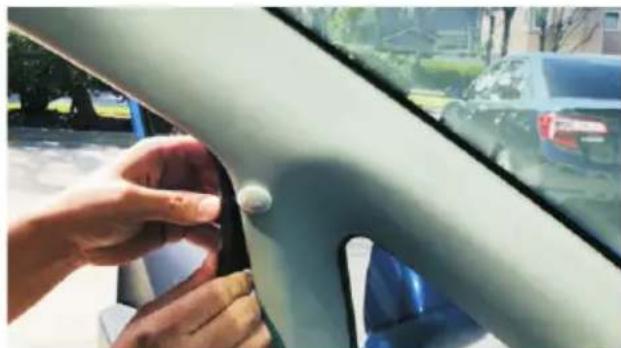
Fig 14
NOTE:
- Changing the LED housing color
-
The system includes two options for the LED indicator housing. Depending on the customer's choice and/or vehicle's interior color, you may change the LED cover from grey (default) to black.
-
First peel back 3M^® tape from the LED indicator housing.
- Using a small flat head screwdriver, remove the cover.
- Align wire notch from the new cover, and snap into place.
- Use the supplied 3M tape and re-apply behind LED.
Step 4: Speaker Installation
While installing the speaker, make sure it is not obstructed by any panels inside the vehicle (see Fig 15).
NOTE:
To adjust volume on the speaker, toggle the switch to the desired setting, "HI/LOW/OFF".

Fig 15
Step 5: GPS Antenna Installation
When installing the GPS Antenna, make sure it is not obstructed by any panels inside the vehicle (see Fig 16).
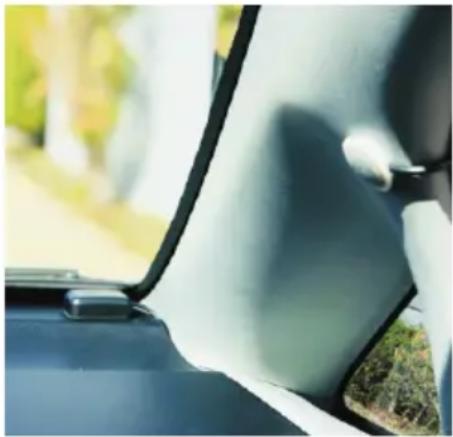
Fig 16
Step 6: Main Unit Installation
The Main Unit is not waterproof and must be installed securely inside the vehicle.
Finschalsuritalde klaatboorfcnbleeStaintyisteconfirm that
the sensor wire length is sufficient to reach from the bumper to the Main Unit location before proceeding.
Soldering all wiring is recommended. Securely tape and insulate all connections soldered.
-
Secure all wires neatly to hide and prevent wire pinch.
-
+12 VDC ACC/IGN - Locate the +12 VDC (ACC/IGN) and connect the red wire from the Main Unit.
- Chassis Ground (Black) - Connect the black wire from the Main Unit to chassis ground.
- +12 VDC reverse signal (Green) - Locate the +12 VDC reverse signal (reverse light or other location) and connect the green wire from the Main Unit.
-
Orange Right-Turn signal Trigger - Locate the +12 VDC Isolated turn signal and connect the Right (Orange) wire from the Main Unit.
-
Pink Left-Turn Signal Trigger - Locate the +12 VDC Isolated turn signal and connect the Left (Pink) wire from the Main Unit.
- Connect the power harness into the Main Unit.
- Make all the appropriate connections (LED's, Speaker, License Plate Bar) on the Main Unit harness.
- Connect the negative terminal of the battery to the vehicle.
- Test the system's operation, ensuring that all features operate according to this manual. After operation is tested, finalize connections and secure wires.
Technical Specifications
| 52 degrees ( ) HorizontalDetection Range | |
| Speed Range 0.5 mph (0.8 km/h) 137 mph (220 km/h) ~ | |
| Speed Accuracy | < 0.5 mph (0.8 km/h) |
| Speed Restriction | 1. The GPS needs to detect restricted speed to activate the sensors. There are four speed restriction options:5 mph (8 km/h) --- Switch Setting 110 mph (16 km/h) -- Switch Setting 215 mph (24 km/h) -- Switch Setting 320 mph (32 km/h) -- Switch Setting 4Default speed setting is 20 mph (32 km/h).2. If no GPS signal is detected or satellites not found, the system will be activated at any speed. |
| Direction of Movement | Approached by vehicles |
| Detection Range | 1 ft (0.3 m) 50 ft (15 m) ~ |
| Operating Voltage 9 18 V | ~ |
| Waterproof | License Plate Bar: IPX6/IPX7Other items such as cables and Main Unit: NOT waterproof |
| Working Current | < 100 mA |
| Working Temperature | -4°F ~ 158°F (-20°C ~ 70°C) |
| FUSE rating value | 2A |
Troubleshooting
| NO. | Issues | Reasons | Solutions |
| 1 | LED light does not work | Incorrect connection or pins not making contact | Check the harness and make sure connection is correct |
| LED light is broken Replace LED | light | ||
| 2 | Opposite LED indicator | Microwave sensor or LED indicators are plugged in to the opposite connector | Make sure RED is on the left side and YELLOW is on the right side if installed at the bottom of the License Plate.If the Licensal Plate Bar the top position, the sensor wires must be reconfigured during installation. |
| 3 | Speaker does not work | Wrong connection or pins not making contact | Check the harness and make sure connection is correct |
| Defective Speaker | Replace Speaker | ||
| 4 | Sensor or GPS does not work | Sensor or GPS Antenna module is covered by the metal bumper or other metal | Find the best location where the sensor or GPS Antenna cannot be blocked by any metal |
| 5 | Unit does not work after GPS Antenna is connected | Blind spot system does not trigger the sensor if the speed is less than 20 mph (32 km/h)* | The system features sensing speed threshold settings of 5 mph, 10 mph, 15 mph or 20 mph. The factory default setting is 20 mph (32 km/h). The setting can be changed by the installer. |
| 6 | FUSE is blown | Over current / Power surge Exchange FUSE (2 A) | |
| 7 | Blind area object detection not consistent or unstable | Not Installed in center (See Fig 17) | Find the location in the center of vehicle.**Find the location where the radar sensing area is not blocked by objects(s). |
| Installed with wrong angle (pointing upward) | |||
| Installed at a location with object in front (See Fig18) | |||
- Under the default setting, GPS restriction speed can be changed according to the four speed threshold options; please refer to Speed Restriction, Page 15.
** This product can be installed on almost any vehicle, not limited to the license plate location, as long as the installation location is in the center of the vehicle and meets the angle and other installation location requirements.
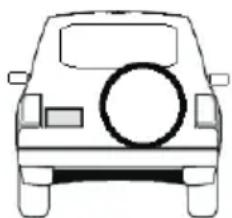
Fig 17 Fig 18
SDA-BS100
SYSTEME DE DETECTION D'ANGLES MORTS AVEC INSTALLATION UNIVERSELLE POUR PLAQUE D'IMMATRICULATION (BARRE)
URL: http://www.pioneerelectronics.com
CANICES-3B/NMB-3B

ATTENTION
Pioneer Electronics (USA) Inc.
SERVICEÀLACLIENTÉLE
P.O.Box 1720 Long Beach,CA 90801-1720
Pioneer Electronics (USA) Inc.
P.O. Box 1720, Long Beach, California 90801 U.S.A.
Specifications techniques
PIONEER ELECTRONICS (USA) INC.
P.O. Box 1540, Long Beach, California 90801-1540, U.S.A.
TEL: (800) 421-1404