IAN 321222 - Precision magnifier POWERFIX - Free user manual and instructions
Find the device manual for free IAN 321222 POWERFIX in PDF.



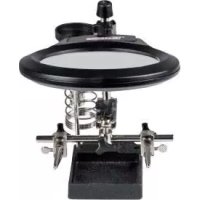
| Product type | Precision magnifying glass with LED lighting |
| Brand | Powerfix |
| Model | IAN 321222 |
| Dimensions (L x H x D) | Approx. 23 x 12 x 16 cm |
| Power supply | 3 AAA 1.5 V batteries (non-rechargeable) |
| Operating voltage | 4.5 V |
| Nominal power (LED) | 2 x 0.06 W |
| Magnification | x2.5 and x5 |
| Lighting | 2 integrated LEDs (non-replaceable) |
| Main functions | Crocodile clips, soldering iron holder, repair device |
| Use | Indoor only, non-commercial |
| Safety | Do not look at the sun, keep out of reach of children, avoid extreme temperatures |
| Maintenance | Clean with a dry, lint-free cloth; do not use abrasive products |
| Disposal | Recycle according to local regulations; batteries separately |
| After-sales service (France) | 0800 919270 / owim@lidl.fr |
| After-sales service (Belgium) | 070 270 171 (€0.15/min) / owim@lidl.be |
| Package contents | 1 magnifying glass, 3 AAA batteries, 1 instruction manual |
| Base material | Plastic (estimated) |
| Weight | Approx. 0.5 kg (estimated) |
Frequently Asked Questions - IAN 321222 POWERFIX
User questions about IAN 321222 POWERFIX
0 question about this device. Answer the ones you know or ask your own.
Ask a new question about this device
Download the instructions for your Precision magnifier in PDF format for free! Find your manual IAN 321222 - POWERFIX and take your electronic device back in hand. On this page are published all the documents necessary for the use of your device. IAN 321222 by POWERFIX.
USER MANUAL IAN 321222 POWERFIX
natural_image
Black-and-white photo of a soldering machine with a magnifying glass and circuit board, next to a soldering iron (no text or symbols visible)FEINMECHANIKER-SET MIT LED-LUPE / PRECISION TOOL HOLDER WITH LED MAGNIFYING GLASS / LOUPE À LED POUR TRAVAUX DE PRÉCISION
DE AT CH
FEINMECHANIKER-SET MIT LED-LUPE
SÚPRAVA NA JEMNÚ MECHANIKU S LED LUPOU
Pokyny pre obsluhu a bezpečnostné pokyny
GB IE
PRECISION TOOL HOLDER WITH LED MAGNIFYING GLASS
Operation and safety notes
NL BE
FIJNMECHANICA-SETMET LED-VERGROOTGLAS
LED LUPA NA JEMNOU MECHANIKU
GB / IE Operation and safety notes Page 19
natural_image
Symbol of two gloves inside a black circle (no text or numbers)● = Problem
= Ursache
O = Lösung
Intended use......Page 20
Description of parts......Page 21
Technical data......Page 22
Includes......Page 22
Safety Page 23
General safety information......Page 23
Safety instructions for batteries / rechargeable batteries ...... Page 25
Before initial use ...... Page 26
Inserting the batteries......Page 26
Attaching the repair device....Page 27
Mounting the magnifying glass......Page 27
Placement of the base......Page 28
Use Page 28
Using the product......Page 28
Changing the batteries ......Page 29
Troubleshooting Page 29
Cleaning and maintenance ......Page 30
Disposal Page 30
Service Page 32
| List of pictograms used | |
| —— | Direct current |
Precision tool holder with LED magnifying glass
- Introduction

We congratulate you on the purchase of your new product. You have chosen a high quality product. The instructions for use are part of the product. They contain important information concerning safety, use and disposal. Before using the product, please familiarise yourself with all of the safety information and instructions for use. Only use the product as described and for the specified applications. If you pass the product on to anyone else, please ensure that you also pass on all the documentation with it.
- Intended use
The product is designed for 2.5- / 5-fold magnification of objects. The integrated LEDs only serve for better contrast and shadow-free visualization of the object to be enlarged. In addition, the product has 2 fixing clamps and a soldering iron holder. Other uses or changes to the product are considered to be contrary to the Intended use and may harbour risks of injury and damage. The manufacturer does not accept any
liability for injury or damage resulting from use of this product contrary to its Intended use. The product is intended for indoor use only. The product is not intended for commercial use or for use in other application.

Not suitable for ordinary lighting in household room illumination.
• Description of parts
| 1 | Precision engineer's LED magnifying glass |
| 2 | Lens (magnification 2.5 / 5 times) |
| 3 | Battery compartment cover |
| 4 | Battery compartment |
| 5 | Ball joint |
| 6 | Retaining screw (lens ball joint) |
| 7 | Magnifying glass fixing clamp |
| 8 | Retaining screw (magnifying glass height adjustment) |
| 9 | On/off switch |
| 10 | Supporting rod (height adjustment) |
| 11 | Fixing clamp (repair device) |
| 12 | Retaining screw (repair device height adjustment) |
| 13 | Soldering iron holder |
| 14 | Base |
| 15 | Repair device |
| 16 | Retaining screw (repair device ball joint) |
| 17 | Retaining screw (repair device) |
| 18 | Alligator clips |
| 19 | Retaining screws (alligator clips) |
20 LED lamps (Fig. B)
21 Batteries (Fig. C)
22 Supporting rod (holding Alligator clips)
23 Locking screws (tightening Alligator clips)
24 Ribbon (inside battery compartment)
- Technical data
Operating voltage: 4.5 volts =
Batteries: 3 x 1.5 V, AAA type
Max. power rating: 2 x 0.06 W
Bulbs: 2 x LED (not replaceable)
Magnification/
magnifying glass: 2.5 / 5 times
Dimensions: approx. 23 x 12 x 16 cm (W x H x D)
Chromaticity
coordinate: X < 0.27 or X > 0.530; Y < -2.3172 X
+ 2. 3 6 5 3 X - 0. 2 1 9 9 or Y gt; - 2. 3 1 7 2 X ^ 2
+ 2. 3 6 5 3 × - 0. 1 5 9 5
Includes
Immediately after unpacking please check the package contents for completeness and if all parts and the product are in good condition. Do not under any circumstances use the product if the delivery is incomplete.
1 Precision LED magnifying glass
3 Batteries, 1.5 V=, AAA
1 Operating Instructions

Safety
- General safety information
KEEP ALL THE SAFETY ADVICE AND INSTRUCTIONS IN A SAFE PLACE FOR FUTURE REFERENCE!


ANGER OF DEATH
AND ACCIDENTS FOR TODDLERS AND CHILDREN! Never leave children unsupervised
with the packaging material. The packaging material represents a danger of suffocation. Children frequently underestimate the dangers. Always keep children away from the packaging material. This is not a toy.
This product can be used by children aged from 8 years and above and persons with reduced physical, sensory or mental capabilities or lack of experience and knowledge if they have been given supervision or instruction concerning use of the product in a safe way and understand the hazards involved. Children shall not play with the product. Cleaning and user maintenance shall not be made by children without supervision.

CAUTION! RISK OF INJURY! Please do not use this product if you find that it is damaged in any way.
- Check whether all of the parts are correctly fitted. If the product is not correctly assembled there is a danger of injury.
- Keep the product away from humidity.
CAUTION! RISK OF EYE INJURIES! Never look through the product into the sun or other sources of light. Severe eye injuries may be the result.
CAUTION! DANGER OF FIRE!
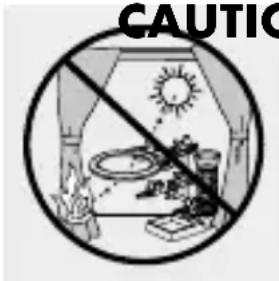
Never expose the product to direct sun-light or other sources of light. Never leave the product unattended. Otherwise there is a danger of fire resulting from concentrated rays of light and concentrated heat.
■ The product must be stored in a dark environment.
Do not subject the product to any extreme temperatures or severe mechanical stress. Otherwise this may result in deformation of the product.
Make sure that the lens does not come into contact with sharp or pointed objects. Otherwise this may result in damage to the product.
Do not leave the soldering gun (separate device) unattended whilst on. The soldering iron holder 13 is only suitable for holding the soldering iron for a limited time.

Safety instructions for batteries / rechargeable batteries
■ DANGER TO LIFE! Keep batteries/rechargeable batteries out of reach of children. If accidentally swallowed seek immediate medical attention.
DANGER OF EXPLOSION! Never recharge

non-rechargeable batteries. Do not short-circuit batteries/rechargeable batteries and/or open them. Overheating, fire or bursting can be the result.
■ Never throw batteries / rechargeable batteries into fire or water.
Do not exert mechanical loads to batteries / rechargeable batteries.
Risk of leakage of batteries / rechargeable batteries
- Avoid extreme environmental conditions and temperatures, which could affect batteries / rechargeable batteries, e.g. radiators / direct sunlight.
If batteries / rechargeable batteries have leaked, avoid contact with skin, eyes and mucous membranes with the chemicals! Flush immediately the affected areas with fresh water and seek medical attention!
WEAR PROTECTIVE GLOVES! Leaked or

damaged batteries/rechargeable batteries can cause burns on contact with the skin.
Wear suitable protective gloves at all times if such an event occurs.
In the event of a leakage of batteries / rechargeable batteries, immediately remove them from the product to prevent damage.
Only use the same type of batteries / rechargeable batteries. Do not mix used and new batteries / rechargeable batteries.
■ Remove batteries / rechargeable batteries if the product will not be used for a longer period.
Risk of damage of the product
■ Only use the specified type of battery / rechargeable battery!
- Insert batteries / rechargeable batteries according to polarity marks (+) and (-) on the battery / rechargeable battery and the product.
- Clean the contacts on the battery / rechargeable battery and in the battery compartment before inserting!
■ Remove exhausted batteries / rechargeable batteries from the product immediately.
- Before initial use
Note: Remove all packaging materials from the product.
- Inserting the batteries (Figure C)
Remove the battery compartment cover from the battery compartment 4 by pulling in the direction of the arrow.
☐ Insert the three batteries supplied into the battery compartment 4.
Note: Ensure the ribbon 24 is under the batteries and the batteries with the correct polarity. This is shown in the battery compartment 4.
☐ Push the battery compartment cover in the opposite direction to the arrow back to its original position in order to close the battery compartment 4.
- Attaching the repair device
☐ Insert the ball joint of the repair device 15 into the corresponding recess of the fixing clamp 11.
☐ Fix the repair device 15 in place by tightening the fastening screw 16 clockwise.
☐ Tightening the retaining screws 17 in clockwise direction for holding the supporting rod 22 properly.
☐ Turn the locking screws 23 tightly for fixing the Alligator clips 18 properly.
☐ Push the fixing clamp 11 onto the mounting rod 10, set the desired height and tighten the fastening screw 12 clockwise.
- Mounting the magnifying glass
☐ Insert the ball joint 5 into the corresponding recess and tighten the fastening screw 6 for the ball joint 5 clockwise (Fig. A).
☐ Push the fixing clamp 7 on to the mounting rod 10 and set the desired height. Tighten the fastening screw 8 by turning it clockwise.
- Placement of the base (Figure D)
The soldering iron holder could be installed on either right or left side on base 14 with screwdriver (not included) as an option for left or right-handed user.
The soldering iron holder should be adjusted the correct position to rear side of the base 14 as shown in Figure D in order to prevent restriction on use of the precision engineer's LED magnifying glass 1, fixing clamp 11 and alligator clips 18.
Use
• Using the product
Turn the retaining screws on the alligator clips 18 in a clockwise direction. Clamp the item to be repaired with the alligator clips 18 in the repair device 15.
☐ Move the On / Off switch 9 into position "ON" to switch on the LEDs 20.
Note: The LED bulbs 20 are non-replaceable.
Point the precision engineer's LED magnifying glass with the LED lamps 20 at the clamped work piece.
☐ Release the alligator clips in order to remove the work piece.
☐ Move the On / Off switch 9 into position "OFF" to switch off the LEDs 20.
• Changing the batteries
☐ Pull the battery compartment cover 3 in the direction of the arrow to remove it from the battery compartment 4 .
☐ Use the ribbon to remove the old batteries.
Place the new batteries of type 1.5 V=7AAA into the battery compartment 4.
Note: Ensure the correct polarity. This is shown in the battery compartment 4.
☐ Push the battery compartment cover back in the opposite direction to the arrow back in order to close the battery compartment 4.
- Troubleshooting
● = Problem
= Cause
O = Solution
● The LED lamps 20 do not light up.
The batteries 21 are flat.
- Replace the used batteries 21 with new ones (see: "Changing the batteries").
The batteries 21 have been inserted incorrectly.
Check the correct polarity of the batteries 21 (see: "Inserting the batteries").
- Cleaning and maintenance

CAUTION! Clean the precision engineer's LED magnifying glass 1 very carefully in order to avoid scratches.
Do not use corrosive or abrasive cleaners under any circumstances.
Use a cleaning cloth for cleaning the product. Moisten it a little if necessary.
☐ Use a dry, fluff-free cloth for cleaning the lens.
□ Never immerse the product in water or other liquids under any circumstances.
If you are not using the product, store it in such a way that the precision engineer's LED magnifying glass 1 is not scratched. Wrap the product in a soft cloth.
●Disposal
The packaging is made entirely of recyclable materials, which you may dispose of at local recycling facilities.
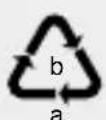
Observe the marking of the packaging materials for waste separation, which are marked with abbreviations (a) and numbers (b) with following
meaning: 1-7: plastics / 20-22: paper and fibreboard / 80-98: composite materials.

The product and packaging materials are recyclable, dispose of it separately for better waste treatment. The Triman logo is valid in France only.

Contact your local refuse disposal authority for more details of how to dispose of your worn-out product.
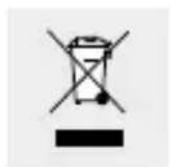
To help protect the environment, please dispose of the product properly when it has reached the end of its useful life and not in the household waste. Information on collection points and their opening hours can be obtained from your local authority.
Faulty or used batteries / rechargeable batteries must be recycled in accordance with Directive 2006/66/EC and its amendments. Please return the batteries / rechargeable batteries and / or the product to the available collection points.
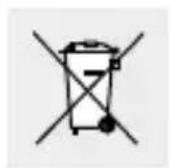
Environmental damage through incorrect disposal of the batteries / rechargeable batteries!
Batteries / rechargeable batteries may not be disposed of with the usual domestic waste. They may contain toxic heavy metals and are subject to hazardous waste treatment rules and regulations. The chemical symbols for heavy metals are
as follows: Cd = cadmium, Hg = mercury, Pb = lead. That is why you should dispose of used batteries / rechargeable batteries at a local collection point.
Service
GB Service Great Britain
Tel.: 0800 404 7657
E-Mail: owim@lidl.co.uk
IE Service Ireland
Tel.: 1890 930 034
(0,08 EUR / Min., (peak)) (0,06 EUR / Min.,
(off peak))
E-Mail: owim@lidl.ie
CE
NOSTE OCHRANNÉ RUKAVICE! Vyte-

- FEINMECHANIKER-SET MIT LED-LUPE / PRECISION TOOL HOLDER WITH LED MAGNIFYING GLASS / LOUPE À LED POUR TRAVAUX DE PRÉCISION
- FEINMECHANIKER-SET MIT LED-LUPE
- SÚPRAVA NA JEMNÚ MECHANIKU S LED LUPOU
- PRECISION TOOL HOLDER WITH LED MAGNIFYING GLASS
- FIJNMECHANICA-SETMET LED-VERGROOTGLAS
- LED LUPA NA JEMNOU MECHANIKU
- Safety Page 23
- Before initial use ...... Page 26
- Use Page 28
- Troubleshooting Page 29
- Cleaning and maintenance ......Page 30
- Disposal Page 30
- Service Page 32
- - Introduction
- - Intended use
- • Description of parts
- - Technical data
- Includes
- Safety
- - General safety information
- ANGER OF DEATH
- Safety instructions for batteries / rechargeable batteries
- Risk of leakage of batteries / rechargeable batteries
- Risk of damage of the product
- - Before initial use
- - Inserting the batteries (Figure C)
- - Attaching the repair device
- - Mounting the magnifying glass
- - Placement of the base (Figure D)
- Use
- • Using the product
- • Changing the batteries
- - Troubleshooting
- - Cleaning and maintenance
- ●Disposal
- Environmental damage through incorrect disposal of the batteries / rechargeable batteries!
- Service
- GB Service Great Britain
- IE Service Ireland
- CE
Brand : POWERFIX
Model : IAN 321222
Category : Precision magnifier