Mirage 7470410 - Induction hob Vollrath - Free user manual and instructions
Find the device manual for free Mirage 7470410 Vollrath in PDF.



User questions about Mirage 7470410 Vollrath
0 question about this device. Answer the ones you know or ask your own.
Ask a new question about this device
Download the instructions for your Induction hob in PDF format for free! Find your manual Mirage 7470410 - Vollrath and take your electronic device back in hand. On this page are published all the documents necessary for the use of your device. Mirage 7470410 by Vollrath.
USER MANUAL Mirage 7470410 Vollrath
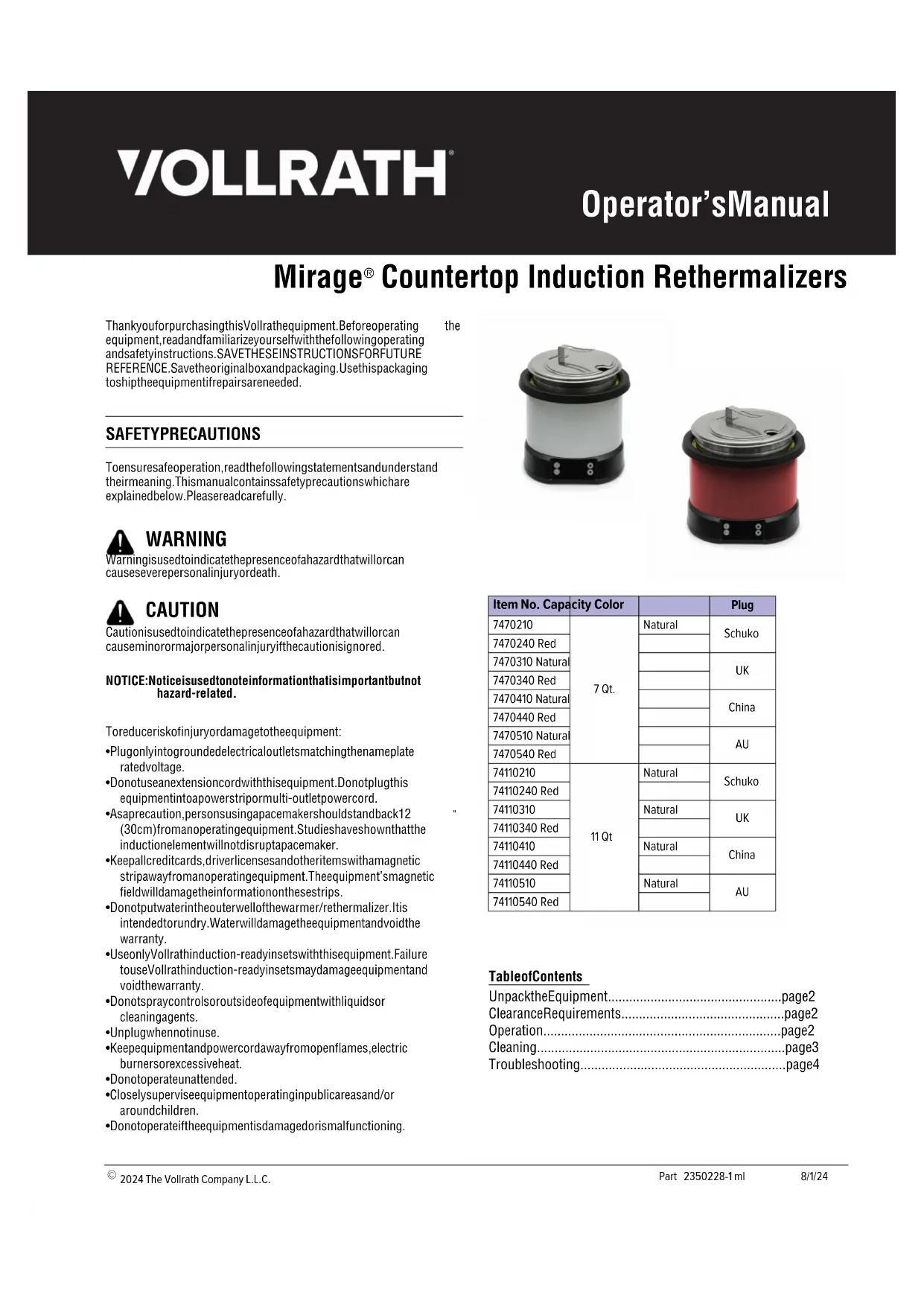
Mirage® Countertop Induction Rethermalizers
ThankyouforpurchasingthisVollrathequipment.Beforeoperating equipment,readandfamiliarizeyourselfwiththefollowingoperating andsafetyinstructions.SAVETHESEINSTRUCTIONSFORFUTURE REFERENCE.Savetheoriginalboxandpackaging.Usethispackaging toshiptheequipmentifrepairsareneeded.
the
SAFETYPRECAUTIONS
Toensuresafeoperation, read the following statements and understand their meaning. This manual contains safety precautions which are explained below. Pleaseread carefully.

WARNING
Warningisusedtoindicatethepresenceofahazardthatwillorcan causeseverepersonalinjuryordeath.

CAUTION
Cautionisusedtoindicatethepresenceofahazardthatwillorcan causeminorormajorpersonalinjuryifthecautionisignored.
NOTICE: Notice is used to note information that is important but not hazard-related.
Toreduceriskofinjuryordamagetotheequipment:
- Plugonlyintogroundedelectricaloutletsmatchingthenameplate ratedvoltage.
- Donotuseanextensioncordwiththisequipment.Donotplugthis equipmentintoapowerstripormulti-outletpowercord.
- Asaprecaution, persons using apacemakers should stand back 12 (30cm) from an operating equipment. Studies have shown that the induction element will not disrupt apacemaker.
- Keepallcreditcards, driverlicenses and other items with electromagnetic strip away from an operating equipment. The equipment's magnetic field will damage the information on these strips.
- Donotputwaterintheouterwellofthewarmer/rethermalizer.Itis intendedtorundry.Waterwilldamagetheequipmentandvoidthe warranty.
- UseonlyVollrathinduction-readyinsetswiththisequipment.Failure touseVollrathinduction-readyinsetsmaydamageequipmentand voidthewarranty.
- Donotspraycontrolsoroutsideofequipmentwithliquidsor cleaningagents.
- Unplugwhennotinuse.
- Keepequipmentandpowercordawayfromopenflames,electric burnersorexcessiveheat.
- Donotoperateunattended.
- Closelysuperviseequipmentoperatinginpublicareasand/or aroundchildren.
- Donotoperateiftheequipmentisdamagedorismalfunctioning.
natural_image
Exterior view of a modern cylindrical appliance with black and white casing (no visible text or symbols)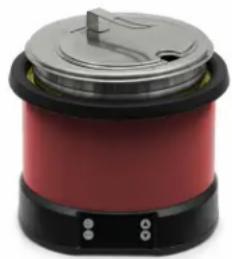
natural_image
Red and black portable food cooker with lid and control buttons (no visible text or symbols)| Item No. | Capacity Color | Plug | |
| 7470210 | 7 Qt. | Natural | Schuko |
| 7470240 Red | |||
| 7470310 Natural | UK | ||
| 7470340 Red | |||
| 7470410 Natural | China | ||
| 7470440 Red | |||
| 7470510 Natural | AU | ||
| 7470540 Red | |||
| 74110210 | 11 Qt | Natural | Schuko |
| 74110240 Red | |||
| 74110310 | Natural | UK | |
| 74110340 Red | |||
| 74110410 | Natural | China | |
| 74110440 Red | |||
| 74110510 | Natural | AU | |
| 74110540 Red |
TableofContents
UnpacktheEquipment......page2
ClearanceRequirements......page2
Operation......page2
Cleaning......page3
Troubleshooting......page4
FUNCTIONANDPURPOSE
All models are intended to keep food at proper serving temperatures. For hot food holding, food must beat proper serving temperature when placed into the drop-in. The equipment is not designed to cook raw food.
800W models are intended to thermalize refrigerated, previously cooked food and hold hot food at a safe serving temperatures.
UseonlyVollrathinduction-readyinsets(items88184or88204). FailuretouseVollrathInduction-readyinsetsmaydamageequipment andvoidthewarranty.
This equipment is not intended for household, industrial or laboratory use.
FCCSTATEMENT
This equipment has been tested and found to comply with Part 18 of FCC Rules. These limits are designed to provide reasonable protection against harmful interference in a residential installation. This equipment generates, uses and can radiate radiofrequency energy and, if not installed and used in accordance with the instructions, may cause harmful interference or radiocommunications. However, there is no guarantee that interference will not occur in particular installation. If this equipment does cause harmful interference or radioortelevision reception, which can be determined by turning the equipment off and, the user is encouraged to try to correct the interference by one or more of the following measures:
•Reorientorrelocatethereceivingantenna
- Increase these separation between the equipment and receiver
- Connecttheequipmentintoanoutletonacircuitdifferentfromthat towhichthereceiverisconnected
- Consultthedealeroranexperiencedradio/TVtechnicianforhelp Toassurecontinuedcompliance,anychangesormodificationsnot expresslyapprovedbythepartyResponsibleforcompliancecouldvoid theuser'sauthoritytooperatethisequipment.
UNPACKTHEEQUIPMENT
- Remove all packing material and tape, as well as any protective plastic from the equipment.
- Cleananyglueresidueleftoverfromtheplasticortape.
CLEARANCEREQUIREMENTS
Donotblockairflowtothebottomoftheequipment.Sufficientairflow mustbeallowed.Blockingtheairflowcouldcausetheequipmentto overheat.
OPERATION


WARNING
ElectricalShockHazard
Keepwaterandotherliquidsfromenteringtheinsideofthe equipment. Liquidinsidetheequipmentcouldcausean electricalshock. Donotspraywaterorcleaningproducts. Liquidcouldcontacttheelectricalcomponentsandcausea shortcircuitoranelectricalshock.


CAUTION
BurnHazard
Donottouchhotfood, liquidorheatingsurfaceswhile equipmentisheatingoroperating.
Hotfoodandliquidscanburnskin.Inductionheatingsurfacesheat rapidly.
NOTICE: Donotputwaterinthewell. It is intended forundry. Water will damage the equipment and void the warranty.
text_image
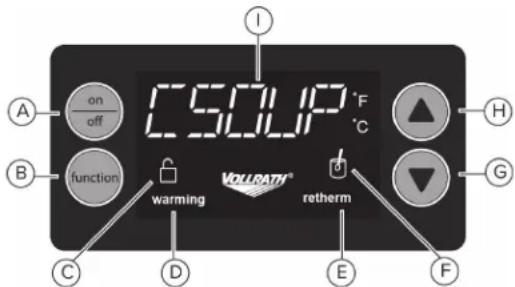
on off C I F °C A B function warming VOLUATH® retherm G C D E FAON/OFFbutton.Presstoturnequipmenton.
BFunctionbutton.Changesthefunctionormodeofoperation.
CLocklight. Illuminateswhenthecontrolpanelislocked.
DWarminglight.Illuminateswhentheequipmentisoperatingin warmingmode.Blinkswhilethefoodheatstotemperature.
ERethermlight. Illuminateswhentheequipmentisoperatingin rethermalizingmode.Blinkswhilethefoodheatstotemperature.
FStirlight. Flasheswhenthefoodshouldbestirred.
GArrowDownbutton. Lowersthetemperaturesetting.
HArrowUpbutton. Raisesthetemperaturesetting.
IDisplaypanel.Displaysthetemperatureoranerrorcode, dependinguponthemodeselected.
JAlarm(notshown).Beepswhenthereisafaultcode.
Rethermalization
- Press the ON/OFF button to turn on the equipment.
- Fill the included Vollrath induction ready inset with cooked, chilled food. Place the inset into the equipment. Close the lid. For best results keep the lid closed while heating and serving.
- Press the function button to select the Retherm (Rethermalize) mode.
- While the food is rethermalizing, the retherm light will illuminate and the display will show the target temperature of 74^ C.
- The stir light may blink to indicate the food should be stirred for even heating. For best results stir the food often, approximately every 15 minutes.
- Monitor the food temperature closely for food safety. The United States Public Health Service recommends that hot food be held at a minimum of 140 °F ( 60 °C ) to help prevent bacteria growth.
Note: This equipment monitors the temperature of the inset and automatically adjusts the output to maintain the user controlled set point. Temperatures displayed may vary from actual food temperatures depending on the type of food and stirring frequency. For best results adjust the settings as needed to achieve the desired temperature of each menu item. Some foods may require a higher setting to hold at the desired temperature.
-
The display will blink if the inset is removed.
-
After the inset has reached approximately 74^ C, the equipment will switch to hot food holding mode. The warm light will illuminate and the display will show the default setting for Hot Food Holding.
-
Follow the instructions for Hold Hot Food at Serving Temperature. Do not add cold food to rethermalized hot food.
Hot Food Holding
Select a temperature at which to hold hot food.
Preheat the Warmer
- Press the ON/OFF button to turn on the equipment.
- Place the empty Vollrath induction ready inset into the equipment.
- Press the up arrow to select a temperature above 68 °C.
- Allow the equipment to heat for 5 minutes.
Hold Hot Food at Serving Temperature
- Fill the included Vollrath induction ready inset with pre-heated food, above 68 °C. Place the inset into the drop-in. For best results keep the lid closed while heating and serving.
- Select a holding temperature. Press the function button to select Warming.
- The warming light blinks until the inset heats to the set temperature.
- The stir light may blink to indicate the food should be stirred for even heating. For best results stir the food often, approximately every 15 minutes.
- Monitor the food temperature closely for food safety. The United States Public Health Service recommends that hot food be held at a minimum of 140 °F ( 60 °C ) to help prevent bacteria growth.
Note: This equipment monitors the temperature of the inset and automatically adjusts the output to maintain the user controlled set point. Temperatures displayed may vary from actual food temperatures depending on the type of food and stirring frequency. For best results adjust the settings as needed to achieve the desired temperature of each menu item. Some foods may require a higher setting to hold at the desired temperature.
- The display will blink if the inset is removed.
Lock the Control Panel (optional)
Lock
At the same time, press and hold the function button and the arrow down button until the lock light appears.
Unlock
At the same time, press and hold the function button and the arrow down button until the unlock light appears.
CLEANING


WARNING
Electrical Shock Hazard
Keep water and other liquids from entering the inside of the equipment. Liquid inside the equipment could cause an electrical shock. Do not spray water or cleaning products. Liquid could contact the electrical components and cause a short circuit or an electrical shock.


CAUTION
Burn Hazard
Hot surfaces and food can burn skin. Allow the hot surfaces to cool before handling. Do not drop or spill water onto the cooking surface as it can spray or splatter.
To maintain the appearance and increase the service life, clean this equipment daily.
What you will need:
- Three soft clean cloths, one each for cleaning, rinsing and drying
- Mild dish washing detergent
- Clean warm water
NOTICE: Failure to follow these cleaning instructions may lead to product damage that will not be covered under warranty.
- Unplug the equipment and let it completely cool.
- Use a soft cloth moistened with warm water and a mild dish washing detergent to clean the well and the rim.
NOTICE: Do NOT use cleaning solutions that contain chlorine or bleach ingredients. Use of solutions with these ingredients will damage the well and will void the warranty. - Use the second clean soft clean soft cloth moistened with clean warm water to wipe all detergent from the well and the rim.
- Use the third soft clean cloth to dry the well and the rim.
NOTICE: Failure to thoroughly remove all detergent or thoroughly dry the equipment may result in damage to the equipment.
- The stainless steel insert is dishwasher safe.
TROUBLESHOOTING
| ProblemMightbeCausedByCourseofAction | ||
| Theequipmentison,butnotheating andthedisplayisflashing. | TheinsetisnotaVollrathinduction-ready insetoristhewrongsizeVollrathinduction-readyinset. | ReplacetheinsetwiththecorrectsizeVollrathinduction-ready insetfortheequipment.Vollrathinduction-readyinsetsare stamped“InductionReady.”Resettheequipmentbyturningit OFFandthenON. |
| Troublewiththeelectricalconnectionis causinglowinputvoltage. | Makesuretheplugisfullyinsertedintoanelectricaloutletthat matchstheratingontheequipment’snameplate. | |
| Makesuretheelectricalcircuitisnotoverloaded. | ||
| Alarmissounding.Anerror.SeetheDisplayMessagesinthetablebelow. | ||
| Theequipmentsuddenlystopped working. | Theequipmentmaybetooclosetoan externalheatsourceortheairintakemaybe restricted. | Relocatetheequipmentawayfromexternalheatsources.Clear anyobstructionstotheairintake.ContactVollrathTechnical Servicesiftheproblempersists. |
| Theinsetmaybetoohot.Removetheinset.Allowtheinsetandequipmenttocoolbefore resuminguse.ContactVollrathTechnicalServicesifthe problempersists. | ||
| DisplayMessageCauseCourseofAction | ||
| BadPanTheinsetisnotaVollrathinduction-readyinsetoristhewrongsize Vollrathinduction-readyinset. | ReplacetheinsetwiththecorrectsizeVollrathinduction-ready insetfortheequipment.Vollrathinduction-readyinsetsare stamped“InductionReady.”Resettheequipmentbyturningit OFFandthenON. | |
| HOTIftheequipmentisturnedoff,thisisnormal.Itindicatesthe equipmentisstillhot. | Allowtheequipmenttocool(about5-10minutes)before cleaning. | |
| Remove the inset. Allow the inset and equipment to cool before resuminguse.Donotplaceexcessivelyhotfoodintotheinset.Donotanplaceexcessivelyhotinsetintotheequipment.ContactVollrathTechnicalServicesiftheproblempersists. | ||
| F-2 | The inset may be too hot. | Remove the inset. Allow the inset and equipment to cool before resuminguse.Donotplaceexcessivelyhotfoodintotheinset.Donotanplaceexcessivelyhotinsetintotheequipment.ContactVollrathTechnicalServicesiftheproblempersists. |
| F-1 | The equipment may have overheated. | Relocate the equipment away from external heat sources. Clear anyobstructionstotheairintake.ContactVollrathTechnical Servicesiftheproblempersists. |
| F-8 | ||
| Othererror codes | Internalerror. | ContactVollrathTechnicalServices. |
SERVICEANDREPAIR
Serviceable parts are available on vollrathfoodservice.com.
To avoid serious injury or damage, never attempt to repair the unit or replace a damaged power cord yourself. Do not send units directly to The Vollrath Company LLC. Please contact Vollrath Technical Services for instructions.
When contacting Vollrath Technical Services, please be ready with the item number, model number (if applicable), serial number, and proof of purchase showing the date the unit was purchased.
WARRANTYSTATEMENTFORTHEVOLLRATHCO.
This warranty does not apply to products purchased for personal, family or household use, and The Vollrath Company LLC does not offer a written warranty to purchasers for such uses.
The Vollrath Company LLC warrants the products it manufactures or distributes against defects in materials and workmanship as specifically described in our full warranty statement. In all cases, the warranty runs from the date of the end user's original purchase date found on the receipt. Any damages from improper use, abuse, modification or damage resulting from improper packaging during return shipment for warranty repair will not be covered under warranty.
For complete warranty information, product registration and new product announcement, visit vollrathfoodservice.com.
The Vollrath Company, L.L.C. Headquarters 1236 North 18th Street
Sheboygan, Wisconsin
53081-3201 USA
Main Tel: 800-624-2051 or 920-457-4851 Main
Fax: 800-752-5620 or 920-459-6573 Canada
Customer Service: 800-695-8560 Tech Services:
techservicereps@vollrathco.com
vollrathfoodservice.com
Pujadas
Ctra. de Castanyet,
132 P.O. Box 121
17430 Santa Coloma de Farners
(Girona) – Spain
Tel. +34 972 84 32 01
info@pujadas.es
Vollrath of China
Vollrath Shanghai Trading Limited
Room 201, Building A
Xin Yi Plaza
1618 Yi Shan Road
Shanghai, 201103
China, P.R.C.
Tel: +86-21-5058-9580
Vollrath de Mexico S. de R.L. de C.V.
Periferico Sur No. 7980 Edificio 4-E
Col. Santa Maria Tequepexpan
45600 Tlaquepaque, Jalisco | Mexico
Tel:(52)333-133-6767
Tel:(52)333-133-6769
Fax:(52)333-133-6768
natural_image
Exterior view of a modern white and black appliance with a lid and control buttons (no text or symbols visible)
natural_image
Red and black electric cooker with lid and cooling button (no visible text or symbols)| No d'art. Contenance Couleur | Fiche | ||
| 7470210 | 7 Qt.(6.6 L) | Natural | Schuko |
| 7470240 | Rouge | ||
| 7470310 | Naturel | R.-U. | |
| 7470340 | Rouge | ||
| 7470410 | Naturel | Chine | |
| 7470440 | Rouge | ||
| 7470510 | Naturel | AU | |
| 7470540 | Rouge | ||
| 74110210 | 11 Qt(10.4 L) | Naturel | Schuko |
| 74110240 | Rouge | ||
| 74110310 | Naturel | R.-U. | |
| 74110340 | Rouge | ||
| 74110410 | Naturel | Chine | |
| 74110440 | Rouge | ||
| 74110510 | Naturel | AU | |
| 74110540 | Rouge | ||
Tabledesmatières
text_image
I on off C A B function warming VOLPATH® retherm H G C D E FGARANTIEDETHEVOLLRATHCO.
The Vollrath Company, L.L.C. Headquarters
1236 North 18th Street
Sheboygan, Wisconsin 53081-3201 USA Main
Tel: 800-624-2051 or 920-457-4851 Main Fax:
800-752-5620 or 920-459-6573 Canada
Customer Service: 800-695-8560 Tech
Services: techservicereps@vollrathco.com
vollrathfoodservice.com
Spain
Vollrath Pujadas Sau
CTRA De Castanyet, 132
P.O. Box 121
17430 Santa Coloma de Farners
Girona
Spain
Tel. +34 972 843 201
info@pujadas.es
China
Vollrath (Shanghai) Trading Limited
Rm 906, Building A
Hongwell Plaza
1308 Lianhua Road
Minhang District
Shanghai, 201102
Tel. +86-21-50589580
info@pujadas.es
Mexico
Vollrath de Mexico S. de R.L.
de C.V. Periferico Sur No.
7980 Edificio 2-C Col. Santa
Maria Tequepexpan 45601
Tlaquepaque, Jalisco | Mexico
Tel: +52-33-3133-6767
Tel: +52-33-3133-6769
Fax: +52-33-3133-6768
natural_image
Exterior view of a modern kitchen appliance with a lid and black handle (no text or symbols visible)
natural_image
Red and black portable food cooker with lid and control buttons (no visible text or symbols)| Núm. de artículo Capacidad Color | Enchufe | ||
| 7470210 | 7 Qt.(6.6 L) | Natural | Schuko |
| 7470240 Rojo | |||
| 7470310 Natural | R.-U | ||
| 7470340 Rojo | |||
| 7470410 Natural | China | ||
| 7470440 Rojo | |||
| 7470510 Natural | AU | ||
| 7470540 Rojo | |||
| 74110210 | 11 Qt(10.4 L) | Natural | Schuko |
| 74110240 Rojo | |||
| 74110310 | Natural | R.-U | |
| 74110340 Rojo | |||
| 74110410 | Natural | China | |
| 74110440 Rojo | |||
| 74110510 | Natural | AU | |
| 74110540 Rojo | |||
Contenido
Desembaladodelequipo......page2
Requisitosdeespacio......page2
operación......page2
Limpieza......page3
Solucióndeproblemas......page4
FUNCIÓNYPROPÓSITO
The Vollrath Company, L.L.C. Headquarters
1236 North 18th Street
Sheboygan, Wisconsin 53081-3201 USA Main
Tel: 800-624-2051 or 920-457-4851 Main Fax:
800-752-5620 or 920-459-6573 Canada
Customer Service: 800-695-8560 Tech
Services: techservicereps@vollrathco.com
vollrathfoodservice.com
Spain
Vollrath Pujadas Sau
CTRA De Castanyet, 132
P.O. Box 121
17430 Santa Coloma de Farners
Girona
Spain
Tel. +34 972 843 201
info@pujadas.es
China
Vollrath (Shanghai) Trading Limited
Rm 906, Building A
Hongwell Plaza
1308 Lianhua Road
Minhang District
Shanghai, 201102
Tel. +86-21-50589580
info@pujadas.es
Mexico
Vollrath de Mexico S. de R.L.
de C.V. Periferico Sur No.
7980 Edificio 2-C Col. Santa
Maria Tequepexpan 45601
Tlaquepaque, Jalisco | Mexico
Tel: +52-33-3133-6767
Tel: +52-33-3133-6769
Fax: +52-33-3133-6768