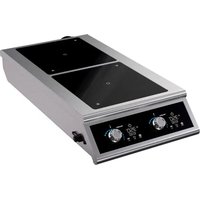
DualI 3500FB - Cooker Vollrath - Free user manual and instructions
Find the device manual for free DualI 3500FB Vollrath in PDF.


| Product Type | Dual Burner Countertop Induction Cooktop |
| Brand | Vollrath |
| Model | DualI 3500FB |
| Category | Cooktop |
| Number of Burners | 2 (front/back) |
| Power per Burner | 3.5 kW (3500 W) |
| Power Supply | 208-240 V, 60 Hz, single-phase |
| Required Outlet | Grounded outlet matching rated voltage |
| Dimensions (approx.) | Width: 35.6 cm, Depth: 40.6 cm, Height: 10.2 cm (approx) |
| Weight (approx.) | 8 kg (approx) |
| Required Clearances | Min. 5.08 cm on sides, 7.62 cm at rear |
| Surface Material | Durable non-porous ceramic glass |
| Compatible Cookware Types | Flat bottom, diameter 12.1-35.6 cm, ferrous stainless steel, iron, cast iron |
| Cooking Functions | Power level (1-100%), temperature control (degree precision), preset programs (chocolate, fajita, simmer, reheat) |
| Timer | Yes, adjustable in 30-second increments |
| Temperature Probe | Yes, for precise food temperature control (front burner only) |
| USB Port | Yes, for loading custom programs |
| Display | LED: power/temperature, timer, program and probe indicators |
| Safety | Pan detection, overheat protection, automatic shutdown, cracked cooktop surface |
| Cleaning | Damp cloth and soapy water; do not immerse cord |
| Intended Use | Indoor, commercial foodservice establishments |
| Warranty | Vollrath limited warranty (see full policy at vollrathfoodservice.com) |
| After-Sales Service | Contact Vollrath technical support |
| Spare Parts | Available at vollrathfoodservice.com |
Frequently Asked Questions - DualI 3500FB Vollrath
User questions about DualI 3500FB Vollrath
0 question about this device. Answer the ones you know or ask your own.
Ask a new question about this device
Download the instructions for your Cooker in PDF format for free! Find your manual DualI 3500FB - Vollrath and take your electronic device back in hand. On this page are published all the documents necessary for the use of your device. DualI 3500FB by Vollrath.
USER MANUAL DualI 3500FB Vollrath
INDUCTION RANGES WITH INDUCTIQ™ TECHNOLOGY
Thank you for purchasing this Vollrath® product! Save this manual for reference and the packaging in case shipping is necessary.
SAFETY PRECAUTIONS
To help ensure safe use, please read and fully understand this manual and all safety messages before operation!

WARNING
Warning indicates a hazardous situation which, if not avoided, could result in death or serious injury.

CAUTION
Caution indicates a hazardous situation which, if not avoided, could result in minor or moderate injury.
NOTICE: addresses practices not related to physical injury.
To reduce risk of injury or damage to the unit
• Equipment must be installed by a qualified person in accordance with codes, regulations, and ordinances.
- Use only grounded electrical circuits and outlets that match the nameplate-rated voltage. Do not use extension cords or power strips.
- Never modify the wiring, cord, or plug. This could damage the unit and cause injury and will void the warranty.
• Use unit in a flat, level position.
- Keep unit and power cord away from open flames, electric burners, and excessive heat.
- Only operate properly functioning, undamaged units.
• Always attend the unit when operating.
- If supply cord is damaged, it must be replaced by the manufacturer, service agent, or qualified person.
- As a precaution, persons using a pacemaker should stand back 12" (30 cm) from an operating unit. Studies have shown that the induction element will not disrupt a pacemaker.
- Keep all credit cards, driver licenses and other items with a magnetic strip away from an operating unit. The unit's magnetic field will damage the information on these strips.
• Turn equipment off and unplug before cleaning or moving.
- The heating surface is made of a strong, non-porous material. However, should it crack or break, stop using and immediately unplug the unit. Cleaning solutions and spills could penetrate the broken cooktop and create a risk of electrical shock.
- Do not spray controls or outside of equipment with liquids or cleaning agents and do not immerse the cord.
- Do not operate equipment in public areas or around children.
UNPACKING THE UNIT
- Remove all packing material, tape, and protective plastic.
- Clean any glue residue left over from the plastic or tape.
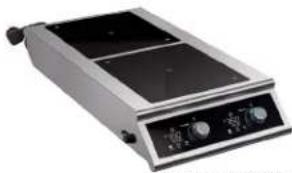
natural_image
Exterior view of a portable electrical appliance with two heat sinks and control knobs (no visible text or symbols)natural_image
Exterior view of a stainless steel electrical appliance with two switches and dual monitors (no visible text or symbols)DUALI-2900SS
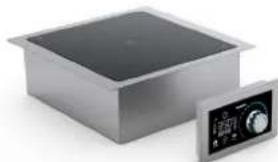
natural_image
Exterior view of a stainless steel heating appliance with a control panel (no visible text or symbols)natural_image
Exterior view of a modern office building (no signage)natural_image
Exterior view of a stainless steel electric stove with control knobs (no visible text or symbols)912HDI-2900
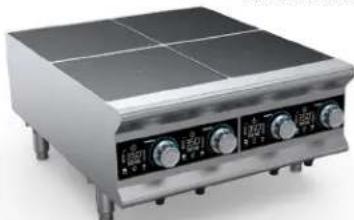
natural_image
Exterior view of a stainless steel portable appliance with four heat sinks (no visible text or symbols)924HDI-2900
| Item Description | |
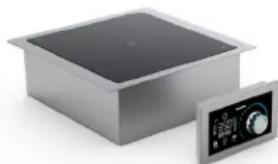
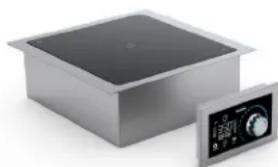
| FC-IDI-D3500 Dual- Hob Drop-In, 3.5 KW/hob | |
| FC-IDI-D2900 Dual- Hob Drop-In, 2.9 KW/hob | |
| FC-IDI-S3500 Single Drop-In, 3.5 KW with Programs, | |
| FC-IDI-S2900 Single Drop-In, 2.9 KW with Programs, | |
| DUALI-3500FB Dual- Hob Front to Back Countertop, 3.5 KW/hob | |
| DUALI-2900FB Dual- Hob Front to Back Countertop, 2.9 KW/hob | |
| DUALI-2900SS Dual- Hob Side to Side Countertop, 2.9 KW/hob | |
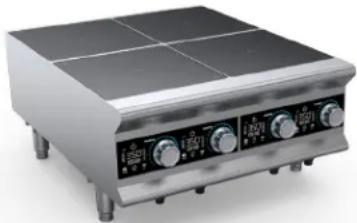
| 912HDI-2900 2-Hob BOH HD Induction Range, 2.9 KW/hob | |
| 924HDI-2900 4-Hob BOH HD Induction Range, 2.9 KW/hob | |
FUNCTION AND PURPOSE
This unit is intended for indoor use at commercial food service establishments, with Vollrath® induction-ready cookware to optimize performance; other cookware may have different properties. Units are not intended for household, industrial, or laboratory use.
The Temperature Control Probe is intended to provide advanced-temperature control. It is not intended as a thermometer for measuring food temperature. The temperature-control-probe port is intended for use only with a Vollrath supplied probe; it is not a headphone jack. The USB port is intended for use only with the supplied USB flash drive.
FEATURES AND CONTROLS
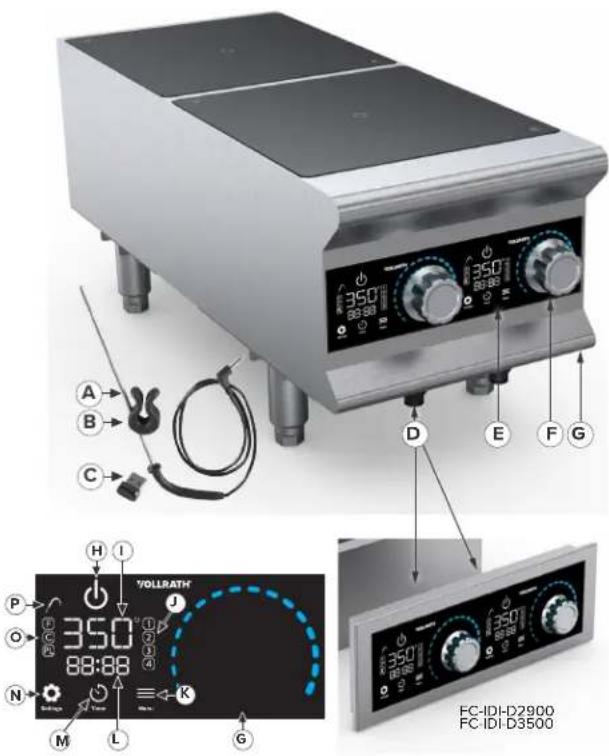
A. Temperature-Control Probe—Measures food so range adjusts to cook to set temperature.
B. Temperature-Probe Clip—Secures the probe to the pan.
C. USB Flash Drive—Used to load pre-established programs.
D. USB Port (2, 912HDI or 4, 924HDI)—Where USB Flash Drive connects to the unit or control panel; behind control panel on Drop-In models.
E. Control Panel—Where operator controls the unit.
F. Control Knob (2, 912HDI or 4, 924HDI)—Sets power level.
G. Temperature-Control-Probe Port (not visible: 1, 912HDI or 2, 924HDI)—Where probe connects to the unit.
H. Power Button—Turns unit on or off.
I. Power and Temperature Display—Displays the temperature setting or the power level. Does not display food temperature when the probe is in use with the front hob.
J. Program Indicators—Identify which program is in use.
K. Menu—Allows access to choose a program.
L. Timer Display—Indicates time remaining for the timer.
M. Timer Button—Allows operator to set desired time.
N. Settings Button—Allows change of temperature units between F and C an power level.
O. Unit and Power Indicator—Indicates temperature unit setting, C for Celcius and F for Farenheit; when PL is illuminated, Power Level from 1–100% will display.
P. Probe Indicator—Illuminates when the probe is in use.
LOCATION, CLEARANCE, & COOKWARE
Location
- Unit requires a dedicated indoor electrical circuit that matches the nameplate rating.
- Locate the range away from other heat-producing equipment; where maximum ambient temperature at intake is < 104^ (40 °C).
Cookware
- Flat, 4 ^3/4 " to 14" (12.1–35.6) diameter base. Only the area above the induction coil will heat when cookware with a larger diameter is used.
- Induction-ready (ferrous stainless steel, iron, cast iron), Vollrath® brand recommended. Low-quality cookware may not perform well.
Clearance
• 912/924 countertop units require a minimum of 12 " (1.3 cm) clearance on the sides and 1" (2.5 cm) at the back.
- Drop-in models require a minimum clearance of 2" (5.08 cm) at the rear and 2" (5.08 cm) at the bottom and a minimum 2.25" x 8" (5.72 x 20.32 cm) vent is required directly behind the exhaust.
- Countertop units require a minimum of 2" (5.08 cm) clearance on the sides and 3" (7.62 cm) at the back.
OPERATION


WARNING
Electrical Shock and Fire Hazard.
Using voltage other than the nameplate-rated voltage, modifying the cord or electrical components, and/or using extension cords, surge protectors, or power strips could damage the unit and create a potential fire hazard, and will void the warranty.
Liquid inside the unit could cause an electrical shock.


WARNING
Burn Hazard.
Do not touch cookware, heating surface, food, or liquid while heating.


WARNING
Explosion Hazard.
Airtight or heat-sealed cans and containers can explode if placed on a range in operation.
NOTICE:
- Do not preheat empty cookware nor leave empty cookware on an operating range; this can cause damage.
- Surfaces and control panel could break if objects fall onto them; this type of damage is not covered in the warranty.
- When Temperature-Control Probe or USB Flash Drive are not in use, install covers over ports to protect against food debris and moisture; this type of damage is not covered by the warranty.
OPERATION CONTINUED
-
Plug the cord into an outlet that matches the nameplate rating; ensure range is on a flat, stable surface.
-
Place an induction-ready, flat base 4^3/4 to 14" (12.1 to 35.6 cm) diameter pan containing food or liquid onto the cooking surface.
-
Press to turn the unit on.
4. A. Set Power Level
• Responsive, gas-flame-like control
- Good for fast, powerful heating such as boiling, sauteing, and searing.
A. Press 📍 until PL is selected: PLCF
B. Rotate the Control Knob to select power level.
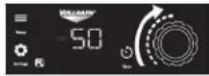
4. B. OR Set Temperature
• Single-degree increments in °F or °C
- Steady, controlled heat, good for more-precise temperatures for sauces, stocks, and poaching.
A. Tap until C or F is selected:

B. Rotate Control Knob to select a temperature; starting lower and gradually increasing temperatures is recommended for delicate foods.
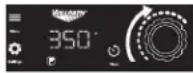
4. C.OR Choose a Program
- Four default programs:
① Chocolate—Use probe Heat to 110 °F; hold at 90 °F, no timer.
② Fajita Heater—Power level 100 for 1 minute.
③ Simmer—Use probe. Heat to 190 °F, No timer.
④ Rethermalize Chilled Food—Use probe, Heat to 165 °F. Hold 2 minutes, then hold at 155 °F, no timer.
• See the Edit Default Programs section to create custom programs.
A. Tap until program numbers flash.
B. Tap ≡ until desired program is steady-lit. After three seconds, program will start and number will flash to indicate program is running.
C. To Cancel the Program, press ≡ until all program numbers are not illuminated.
- Set the Timer (optional) by tapping ⏻ until the time on the display flashes.
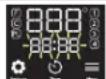
-
Rotate the Control Knob ☐ to adjust the time in 30-second increments. After three seconds, time begins to count down and ⏻ will flash to indicate timer is in use. When the timer reaches 0, a buzzer will sound and END will display. To change the time if needed, repeat steps 5 & 6. To cancel the timer, press ⏻ twice.
-
Use the Temperature-Control Probe (optional for front hob only) by first wiping the tip of the probe, with a soft clean cloth—probe must be clean to work properly).
-
Next, remove the probe port cover and plug the probe in.
-
Place the probe so it is suspended in the center of the food by attaching it to the pan with the included clip; the probe must not rest on the bottom of the cookware. The probe monitors the temperature of the food and automatically adjusts the heat to maintain food at the selected temperature; it is not a thermometer. For best performance and food quality, stir food often.
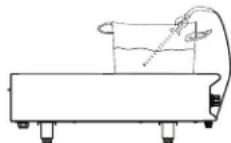
- Set the temperature according to Step 4, B above; the Probe Icon will flash as the food heats to the set temperature.
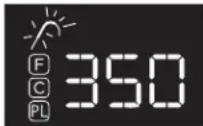
When the probe detects the food has reached a set temperature, the icon will stop flashing and stay lit steadily.
EDIT DEFAULT PROGRAMS/CREATE CUSTOM PROGRAMS
• One USB Flash Drive can be used to program multiple ranges; drive can be stored in the unit.
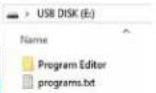
- Load the Program Editor by removing USB flash drive from range and plugging it into a computer USB port.
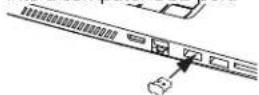
- Create up to four programs, up to three stages each.
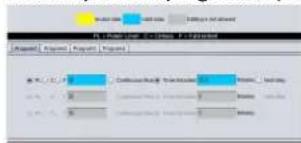
- Transfer Programs to Range by inserting USB Flash Drive into a range that is plugged in, but off—then close USB port cover—only Vollrath® logo should display.
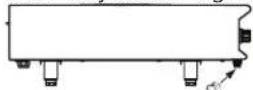
- Open the Programs folder.
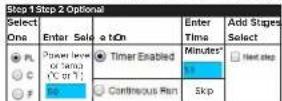
- Choose an option for each stage. Enter half minutes as .5.
-
When programs are loaded and P-0 displays, turn unit on by pressing ⏻ New programs are now ready for use.
-
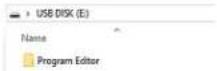
Double-click Programs Editor.
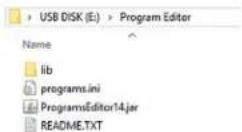
- To edit another program, click Program Tab and repeat

- Save Programs by clicking Generate File.

If file does not open or you are asked to choose a program, try installing/update Java; it can be downloaded for free from java.com.
- When Insert or re-insert your USB flash drive. displays, remove—then reinsert USB Flash drive.
Programs are saved when you see:
Validate program for file is written Insert into induction unit USB port to complete configuration file transfer F-IO will be displayed

CLEANING

WARNING
Electrical Shock Hazard.
Liquid or foam inside unit could cause electrical shock.

WARNING
Burn Hazard.
Do not touch cookware, heating surface, food, or liquid while heating.
- Each day, turn off and unplug the unit; allow unit to cool completely until HOT is no longer displayed on the control panel.
- Use a damp cloth or sponge dipped in soapy water to wipe the unit; rinse thoroughly with a clean, damp cloth or sponge.
Clean USB and Temperature Control Probe Ports (As needed)
USB and Temperature Control Probe Port covers should be in place; if food/debris enters the ports, clean by:
- Ensuring the range is unplugged and cool, then use a cotton swab dipped in isopropyl alcohol to gently remove debris.
- Allow ports to dry, then plug the USB Drive back into the port and put the USB port cover back on.
TROUBLESHOOTING
| Problem | Potential Cause | Course of Action |
| Unit does not have power. | Unit is not plugged in or switched on. | Plug unit in and turn power on. |
| Range is plugged into outlet with correct voltage, but logo is not illuminated. | Internal electrical connection is disconnected. | Contact Vollrath Technical Service. |
| Display is flashing. | A pan is not on the range or not induction ready. | This is normal; turn unit on & place a proper pan. |
| Range turned off after 10 minutes. | ||
| Pan suddenly stopped heating; power level or temperature is not displayed. | Timer was in use and is now expired. | This is normal; program with timer might have been in use or timer was accidentally activated. |
| Logo is not illuminated, but unit is plugged in. | Proper voltage is not in use. | Ensure voltage is correct; move unit to another outlet as needed. |
| Electrical supply has an issue. | Test outlet by plugging something else in. | |
| Internal electrical connection is disconnected. | Contact Vollrath Technical Service. | |
| Temperature probe icon is blinking. | There is no issue; this is normal. | Food is heating to the set temperature. |
| Program editor does not open. | Java might need to be installed or updated. | Go to java.com and download or update. |
| Problem Potential Cause Course of Action | ||
| Drop-in unit UI not lighting up. UI cable came unplugged. | Ensure cable is fully plugged into bottom of unit and back of UI module. | |
| Displayed temperature does not match food temperature when food is checked with a thermometer. | Temperature Control Probe is not correctly positioned. | Ensure probe is centered in food and not touching bottom of the pan; adjust as needed. |
| Food thermometer and probe measured temperatures in different areas of the food. | Stir food often to help ensure even heating. | |
| F-01 | Range overheated possibly due to being too close to other heat-producing equipment. | Relocate the unit; Contact Vollrath Technical Service if the problem persists. |
| F-02 Cookware was too hot when placed on unit. | Remove cookware; allow it to cool. Contact Vollrath Technical Service if problem persists. | |
| F-05, F-06, F-07, F-10, F-11, F-24, F-25 There is an internal fault. | Turn unit off, then on to try and clear code. Contact Vollrath Technical Service if problem persists. | |
| F-08 | Range might have overheated due to insufficient air flow. | Ensure unit has proper clearance according to corresponding section of this manual. Contact Vollrath Technical Services if problem persists.1 |
| F-16 | Sensor may have detected an empty pan or pan was on the range for too long. | Remove the pan, then clear the error by turning the range off then on. |
| F-17, F-18, F-19, F-20 | There might be an issue with incoming power supply or there may have been a power surge (F-19 or F20) | Plug range into outlet on a different circuit; Contact Vollrath Technical Services if problem persists. |
| F-22 | There was a prolonged power surge. | Turn unit on, then off to clear the code. Contact Vollrath Technical Service if problem persists. |
| Range is plugged into an outlet with incorrect voltage. | ||
| F-23 | Ensure electrical outlet matches unit's rating; plug into equally-rated outlet. | |
| HOT | User turned off the range; cooking surface is still hot. | Surface is still hot. This is normal operation. |
| Food not heating evenly or taking too long. | Cookware is too large or there is another issue with it. | Verify cookware is compatible; adjust if needed. |
| Food needs more time to heat or there is too much. | Try Power Level mode or reducing food amount & stir food often. | |
| There is a noise coming from vent(s). This is a problem with the fan(s). Contact Vollrath Technical Service. | Service. | |
| Fan is running slow or not at all. There is no issue. No action is necessary; fan runs as needed. | ||
SERVICE AND REPAIR
Serviceable parts are available on vollrathfoodservice.com.
To avoid serious injury or damage, never attempt to repair the unit or replace a damaged power cord yourself. Do not send units directly to The Vollrath Company LLC. Please contact Vollrath Technical Services for instructions.
When contacting Vollrath Technical Services, please be ready with the item number, model number (if applicable), serial number, and proof of purchase showing the date the unit was purchased.
WARRANTY STATEMENT FOR THE VOLLRATH CO. L.L.C.
The Vollrath Company LLC warrants to the original commercial end user that each of Vollrath's foodservice products will be free from defects in materials and workmanship.
For warranty period, exclusions, and details, visit vollrathfoodservice.com/vollrath-resources/warranty-info/warranty-policy.
The Vollrath Company, L.L.C. Headquarters
1236 North 18th Street
Sheboygan, Wisconsin 53081-3201 USA
Main Tel: 800-319-9549 or 920-457-4851
Main Fax: 800-752-5620 or 920-459-6573
Canada Customer Service: 800-695-8560
Tech Services: techservicereps@vollrathco.com
vollrathfoodservice.com
Pujadas Vollrath of China
Ctra. de Castanyet, Vollrath Shanghai Trading 132
P.O. Box 121 Limited
17430 Santa Coloma de Farners 23A
Time Square Plaza | 500
(Girona) – Spain Zhang Yang Road
Tel. +34 972 84 32 01 Pudong, Shanghai 200122
info@pujadas.es Tel: 86-21-5589580
Vollrath de Mexico S. de R.L.
de C.V. Periferico Sur No.
7980 Edificio 4-E Col. Santa
Maria Tequepexpan 45600
Tlaquepaque, Jalisco | Mexico
Tel: (52) 333-133-6767
Tel: (52) 333-133-6769
Fax: (52) 333-133-6768
VOLLRATH®
MANUEL D'UTILISATION
natural_image
Exterior view of a stainless steel electrical appliance with dual switches and control knobs (no visible text or symbols)natural_image
Exterior view of a dual-chamber electric stove or appliance with control knobs and indicator lights (no visible text or symbols)DUALI-2900SS
natural_image
Exterior view of a modern office building (no signage)natural_image
Exterior view of a stainless steel heating appliance with dual vented panels (no visible text or symbols)natural_image
Exterior view of a stainless steel kitchen appliance with control knobs (no visible text or symbols)912HDI-2900
natural_image
Exterior view of a stainless steel electric stove with four heat sinks (no visible text or labels)924HDI-2900
The Vollrath Company, L.L.C. Headquarters
1236 North 18th Street
Sheboygan, Wisconsin 53081-3201 USA
Main Tel: 800-319-9549 or 920-457-4851
Main Fax: 800-752-5620 or 920-459-6573
Canada Customer Service: 800-695-8560
Tech Services: techservicereps@vollrathco.com
vollrathfoodservice.com
Pujadas Vollrath of China
Ctra. de Castanyet, Vollrath Shanghai Trading 132
P.O. Box 121 Limited
17430 Santa Coloma de Farners 23A
Time Square Plaza | 500
(Girona) – Spain Zhang Yang Road
Tel. +34 972 84 32 01 Pudong, Shanghai 200122
info@pujadas.es Tel: 86-21-5589580
Vollrath de Mexico S. de R.L.
de C.V. Periferico Sur No.
7980 Edificio 4-E Col. Santa
Maria Tequepexpan 45600
Tlaquepaque, Jalisco | Mexico
Tel: (52) 333-133-6767
Tel: (52) 333-133-6769
Fax: (52) 333-133-6768
VOLLRATH®
MANUAL DEL OPERADOR
natural_image
Exterior view of a laboratory heating device with dual monitors and control knobs (no visible text or symbols)natural_image
Exterior view of a modern kitchen appliance with dual monitors and control knobs (no visible text or symbols)DUALI-2900SS
natural_image
Exterior view of a stainless steel heating appliance with a digital display (no visible text or symbols)natural_image
Exterior view of a modern office building (no signage)natural_image
Exterior view of a stainless steel industrial appliance with control knobs (no visible text or symbols)912HDI-2900
natural_image
Exterior view of a stainless steel electric stove with four heat sinks (no visible text or symbols)924HDI-2900
Generate file to USB flash drive
LIMPIEZA


ADVERTENCIA
The Vollrath Company, L.L.C. Headquarters
1236 North 18th Street
Sheboygan, Wisconsin 53081-3201 USA
Main Tel: 800-319-9549 or 920-457-4851
Main Fax: 800-752-5620 or 920-459-6573
Canada Customer Service: 800-695-8560
Tech Services: techservicereps@vollrathco.com
vollrathfoodservice.com
Pujadas Vollrath of China
Ctra. de Castanyet, Vollrath Shanghai Trading 132
P.O. Box 121 Limited
17430 Santa Coloma de Farners 23A
Time Square Plaza | 500
(Girona) – Spain Zhang Yang Road
Tel. +34 972 84 32 01 Pudong, Shanghai 200122
info@pujadas.es Tel: 86-21-5589580
Vollrath de Mexico S. de R.L.
de C.V. Periferico Sur No.
7980 Edificio 4-E Col. Santa
Maria Tequepexpan 45600
Tlaquepaque, Jalisco | Mexico
Tel: (52) 333-133-6767
Tel: (52) 333-133-6769
Fax: (52) 333-133-6768
- INDUCTION RANGES WITH INDUCTIQ™ TECHNOLOGY
- SAFETY PRECAUTIONS
- WARNING
- CAUTION
- NOTICE: addresses practices not related to physical injury.
- To reduce risk of injury or damage to the unit
- UNPACKING THE UNIT
- FUNCTION AND PURPOSE
- FEATURES AND CONTROLS
- LOCATION, CLEARANCE, & COOKWARE
- Location
- Cookware
- Clearance
- OPERATION
- Electrical Shock and Fire Hazard.
- Burn Hazard.
- Explosion Hazard.
- NOTICE:
- OPERATION CONTINUED
- A. Set Power Level
- B. OR Set Temperature
- C.OR Choose a Program
- EDIT DEFAULT PROGRAMS/CREATE CUSTOM PROGRAMS
- CLEANING
- Electrical Shock Hazard.
- Clean USB and Temperature Control Probe Ports (As needed)
- SERVICE AND REPAIR
- WARRANTY STATEMENT FOR THE VOLLRATH CO. L.L.C.
- VOLLRATH®
- MANUEL D'UTILISATION
- MANUAL DEL OPERADOR
- LIMPIEZA
- ADVERTENCIA
Brand : Vollrath
Model : DualI 3500FB
Category : Cooker