91739 - Memory card reader DeLOCK - Free user manual and instructions
Find the device manual for free 91739 DeLOCK in PDF.


| Product type | Memory card reader |
| Brand | DeLOCK |
| Model | 91739 |
| Interface | USB-C™ |
| Supported card formats | SD, microSD (and other formats via adapter) |
| Compatible file systems | FAT32, exFAT |
| Power supply | USB bus (5 V, <500 mA) |
| Dimensions (approx) | 50 x 30 x 10 mm |
| Weight (approx) | 10 g |
| Main functions | Reading and writing memory cards, automatic recognition |
| LED indicator | Blue – memory card recognized |
| Compatibility | Android devices, PC, Mac, Linux (with USB-C port or adapter) |
| Safety instructions | Protect from humidity and direct sunlight |
| Maintenance and cleaning | Clean with a soft, dry cloth |
| Spare parts and repairability | Not user-serviceable |
Frequently Asked Questions - 91739 DeLOCK
User questions about 91739 DeLOCK
0 question about this device. Answer the ones you know or ask your own.
Ask a new question about this device
Download the instructions for your Memory card reader in PDF format for free! Find your manual 91739 - DeLOCK and take your electronic device back in hand. On this page are published all the documents necessary for the use of your device. 91739 by DeLOCK.
USER MANUAL 91739 DeLOCK
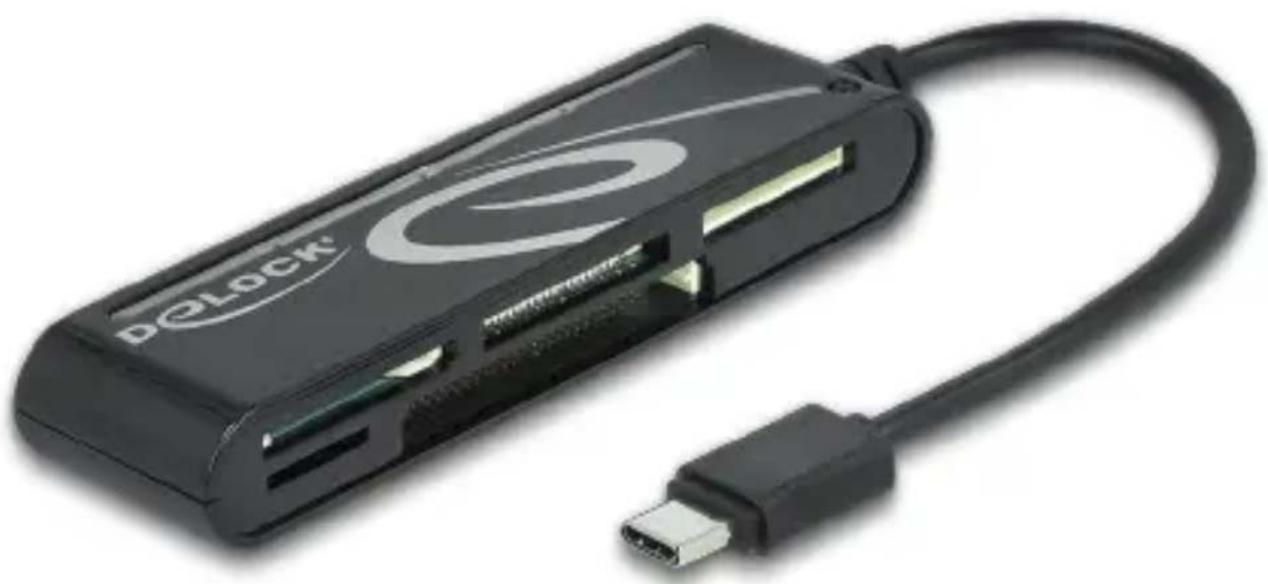
USB Type-C™ Card Reader for CF, SD, Micro SD, MS, xD
natural_image
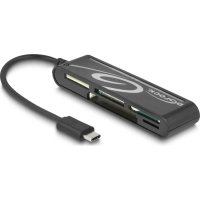
Black Delock device with attached cable and connector (no visible text or symbols)Layout
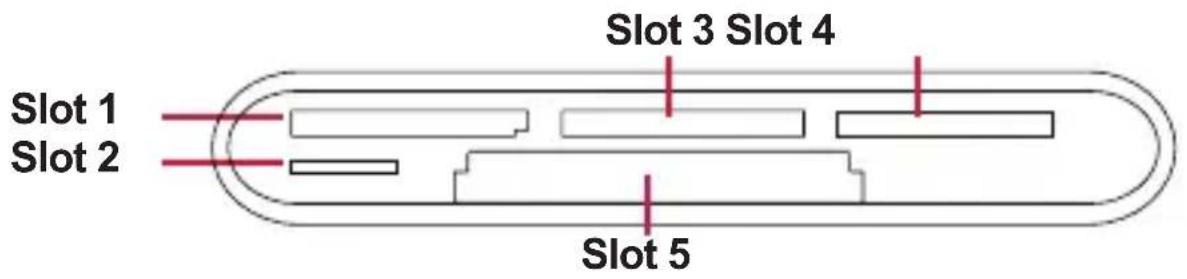
| Slot 1Secure Digital /Multi Media Card | SD, SDHC, SDXC, Extreme SD, Extreme II SD,Extreme III SD, Ultra SD, Ultra II SD,Ultra II SD P Plus, SD- Ultra-X, Ultra Speed SD,SD Pro, SD Elite Pro, HS SD, MMC, MMC 4.0 |
| Slot 2Micro SD | MicroSD, Micro SDHC, Micro SDXC |
| Slot 3 xD xD, xD 1.21 | |
| Slot 4 MS MS, MS | Pro Duo, MS MG Pro, MS MG Pro Duo,HS MS MG Pro Duo, HS MS Pro Duo |
| Slot 5 CF CF I, CF | II, CF 3.0, CF4.0, Extreme III CF,Extreme CF, Ultra II CF, HS CF, XS-XS CF,CF Elite Pro, CF Pro, CF Pro II |
Description
The card reader by Delock can be used for reading and writing memory cards and can be connected to the USB-C™ interface of e.g. PCs, laptops, MacBooks, Chromebooks or smartphones.
Technical details
- Connectors:
1 x USB 2.0 Type-C™ male
5 x Card Reader slots - Chipset: MA8168
• Supports memory: up to 2 TB SD 3.0 (UHS-I), MS
• Data transfer rate up to 480 Mbps
• LED indicator blue for read and write process
- Android devices: data medium can only be used in FAT32 and exFAT format
- It can only be used one storage medium, not several at the same time
• No external power supply needed
- Plug & Play
- Dimensions (LxWxH): ca. 101.5 x 27 x 15 mm
- Cable length incl. connector: ca. 15 cm
- Colour: black
System requirements
- Android 6.0 or above
• Mac OS 10.12 or above - Windows 7/7-64/8.1/8.1-64/10/10-64/11
• Device with a free USB Type-C™ port
Package content
- Card reader
- User manual
Safety instructions
- Protect the product against moisture
- Protect the product against direct sunlight
Android device
- Connect the card reader to the USB-C™ port of your device.
- "USB connector connected" will appear on the display.
- You can now insert the memory card into the suitable slot, by pushing it slightly. The blue LED lights up when the memory card is recognized.
-
"USB mass storage connected" will appear on the display.
-
Enter the menu and go to Applications > "My Files" > "All files" > "UsbDriveA", where you can find all data files of your memory card.
-
In order to remove the memory card, just push it slightly and take it out from the slot.
Note: Please note that only storage media in FAT32 / exFAT format can be recognized.
Other devices
-
Connect the card reader to the USB-C™ port of your device.
-
You can now insert the memory card into the suitable slot, by pushing it slightly. The blue LED lights up when the memory card is recognized.
-
In order to remove the memory card, just push it slightly and take it out from the slot.
Support Delock
If you have further questions, please contact our customer support support@delock.de
You can find current product information on our homepage:
www.delock.com
Final clause
Information and data contained in this manual are subject to change without notice in advance. Errors and misprints excepted.
Copyright
No part of this user manual may be reproduced, or transmitted for any purpose, regardless in which way or by any means, electronically or mechanically, without explicit written approval of Delock.
Edition: 04/2025
Sicherheitshinweise
Declaration of conformity
Products with a CE symbol fulfill the EMC directive (2014/30/EU) and RoHS directive (2011/65/EU+2015/863+2017/2102), which were released by the EU-comission.
The declaration of conformity can be downloaded under documents: https://www.delock.de/produkte/G_91739/merkmale.html
WEEE-notice
The WEEE (Waste Electrical and Electronic Equipment)-directive, which became effective as European law on February 13th 2003, resulted in an all out change in the disposal of disused electro devices. The primarily purpose of this directive is the avoidance of electrical waste (WEEE) and at the same time the support of recycling and other forms of recycling in order to reduce waste. The WEEE-logo on the device and the package indicates that the device should not be disposed in the normal household garbage. You are responsible for taking the disused electrical and electronic devices to a respective collecting point. A separated collection and reasonable recycling of your electrical waste helps handling the natural resources more economical. Furthermore recycling of electrical waste is a contribution to keep the environment and thus also the health of men. Further information about disposal of electrical and electronic waste, recycling and the collection points are available in local organizations, waste management enterprises, in specialized trade and the producer of the device.