64349 - Network adapter DeLOCK - Free user manual and instructions
Find the device manual for free 64349 DeLOCK in PDF.


| Product Type | USB Type-C™ to 10 Gigabit LAN Network Adapter |
| Brand | DeLOCK |
| Model | 64349 |
| Dimensions (approx.) | 10 x 5 x 2 cm |
| Weight (approx.) | 50 g |
| Power Supply | USB bus (self-powered via USB-C port) |
| Main Functions | 10 Gigabit Ethernet wired network connection via USB Type-C™ or Thunderbolt™ 3/4 |
| Supported Operating Systems | Windows 11, macOS 14.5 or later, Linux Kernel 6.5 or later |
| Package Contents | Adapter, USB-C to USB-C cable (30 cm), user manual |
| Driver Installation | Windows: download from DeLOCK website; macOS: automatic |
| Maintenance and Cleaning | Clean with a dry, soft cloth. Avoid moisture and chemicals. |
| Safety | Protect from moisture and direct sunlight. Disconnect during thunderstorms. |
| Spare Parts and Repairability | Not user-repairable. Contact DeLOCK customer service. |
| General Information | CE compliant. Recyclable according to local regulations. |
Frequently Asked Questions - 64349 DeLOCK
User questions about 64349 DeLOCK
0 question about this device. Answer the ones you know or ask your own.
Ask a new question about this device
Download the instructions for your Network adapter in PDF format for free! Find your manual 64349 - DeLOCK and take your electronic device back in hand. On this page are published all the documents necessary for the use of your device. 64349 by DeLOCK.
USER MANUAL 64349 DeLOCK
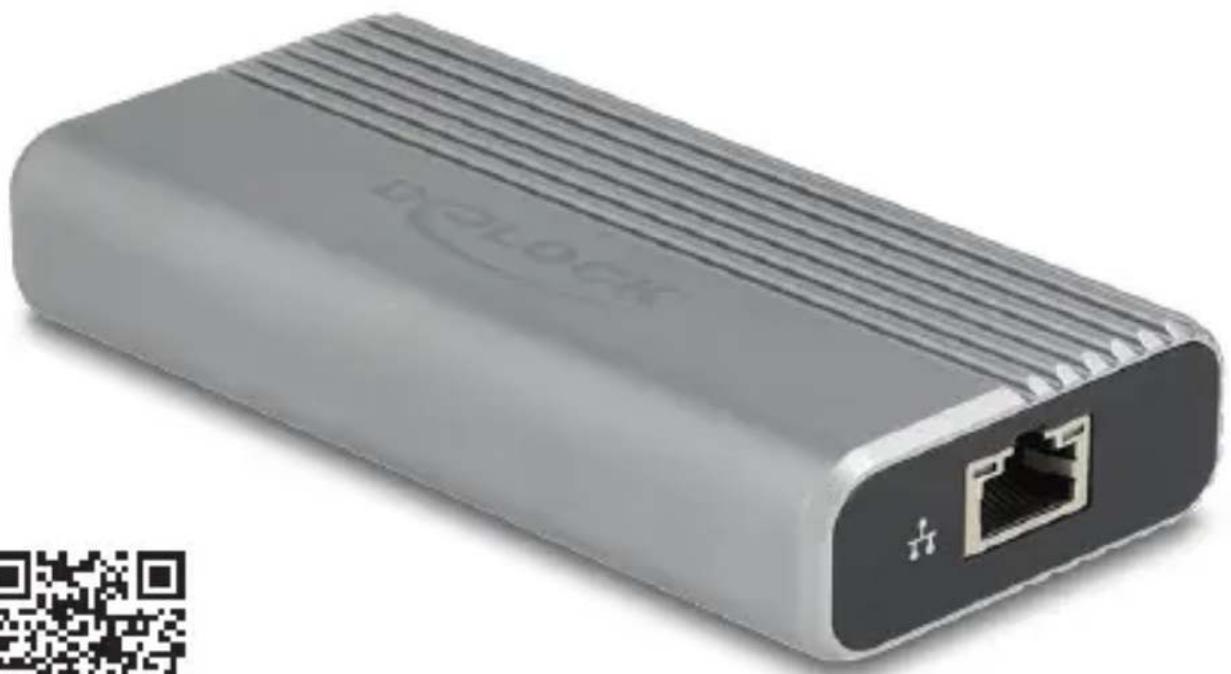
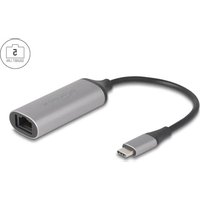
10 Gigabit LAN Adapter with USB Type-C™ 40 Gbps interface
natural_image
Exterior view of a gray rectangular electronic device with a network port and ports, no visible text or symbols on the body.
![CE FC | [REDACTED CIRCULature Symbol]®](/content/2026/04/738655/images/aaa2cb1d9108f3db825270043722a7b8baec9b4aab55276a4300b666658e10ac.jpg)
Product-No: 64349
User manual no: 64349-a
www.delock.com
High speed: Data transfer rates up to 10 Gbps
This USB network adapter by Delock offers a reliable and fast network connection. With a transmission speed of up to 10 gigabits per second, it enables efficient working and smooth streaming.
NBASE-T for higher speed
Modern services and new technologies require higher bandwidths. NBASE-T technology enables speeds of 1 Gbps, 2,5 Gbps and 5 Gbps with conventional networking cables. The best possible transmission rate is set automatically.
Thunderbolt™ 3, Thunderbolt™ 4 or USB-C™ 40 Gbps
The adapter can be connected to a PC or laptop via Thunderbolt™ 3, Thunderbolt™ 4 or USB-C™ 40 Gbps interface. Operation on slower USB ports is not possible.
Technical details
- Connectors:
1 x USB 40 Gbps USB Type-C™ male
1 x 10 Gigabit LAN RJ45 jack - Chipset: Aquantia AQC113CS, Asmedia ASM2464PDX
- Data transfer rate:
Ethernet up to 10 Mbps
Fast Ethernet up to 100 Mbps
Gigabit Ethernet up to 1 Gbps
NBASE-T with up to 2.5 Gbps and 5 Gbps
10 Gigabit Ethernet up to 10 Gbps
• Supports IEEE 802.3az (Energy Efficient Ethernet)
• Supports 16k Jumbo Frames
• Supports IEEE 802.1Q Virtual LAN (VLAN)
• Supports Wake On LAN (WOL)
• LED indicator for link and activity - USB bus powered
-
Robust aluminum housing
-
Fanless
- Colour: silver
- Dimensions (LxWxH): ca. 111 x 55 x 25 mm
System requirements
• Linux Kernel 6.5 or above
• Mac OS 14.5 or above
- Windows 11
- PC or laptop with a free USB Type-C™ 40 Gbps or Thunderbolt™ 3/4 port
Package content
- USB Type-C™ 10 Gigabit LAN adapter
- USB Type-C™ to USB Type-C™ cable, length ca. 30 cm
- User manual
Safety instructions
- Protect the product against moisture
- Protect the product against direct sunlight
Driver Installation
Windows 11
- Switch on your computer.
- Connect the adapter to an available USB port of your computer.
- Download the driver from the product page: https://www.delock.com/produkte/G_64349/treiber.html.
- Follow the instructions of the driver installation.
- Restart your system after the installation.
- After restart you can start using the device immediately.
Mac OS 14.5
- Switch on your computer.
- Connect the adapter to an available USB port of your computer.
- The driver will be found automatically and installed.
- You can now start to use the device.
Support Delock
If you have further questions, please contact our customer support support@delock.de
You can find current product information on our homepage: www.delock.com
Final clause
Information and data contained in this manual are subject to change without notice in advance. Errors and misprints excepted.
Copyright
No part of this user manual may be reproduced, or transmitted for any purpose, regardless in which way or by any means, electronically or mechanically, without explicit written approval of Delock.
Edition: 05/2025
Declaration of conformity
Products with a CE symbol fulfill the EMC directive (2014/30/EU) and RoHS directive (2011/65/EU+2015/863+2017/2102), which were released by the EU-comission.
The declaration of conformity can be downloaded under documents: https://www.delock.de/produkte/G_64349/merkmale.html
WEEE-notice
The WEEE (Waste Electrical and Electronic Equipment)-directive, which became effective as European law on February 13th 2003, resulted in an all out change in the disposal of disused electro devices. The primarily purpose of this directive is the avoidance of electrical waste (WEEE) and at the same time the support of recycling and other forms of recycling in order to reduce waste. The WEEE-logo on the device and the package indicates that the device should not be disposed in the normal household garbage. You are responsible for taking the disused electrical and electronic devices to a respective collecting point. A separated collection and reasonable recycling of your electrical waste helps handling the natural resources more economical. Furthermore recycling of electrical waste is a contribution to keep the environment and thus also the health of men. Further information about disposal of electrical and electronic waste, recycling and the collection points are available in local organizations, waste management enterprises, in specialized trade and the producer of the device.
- Gigabit LAN Adapter with USB Type-C™ 40 Gbps interface
- High speed: Data transfer rates up to 10 Gbps
- NBASE-T for higher speed
- Thunderbolt™ 3, Thunderbolt™ 4 or USB-C™ 40 Gbps
- Technical details
- System requirements
- Package content
- Safety instructions
- Driver Installation
- Windows 11
- Mac OS 14.5
- Support Delock
- Final clause
- Copyright
- Declaration of conformity
- WEEE-notice
Brand : DeLOCK
Model : 64349
Category : Network adapter