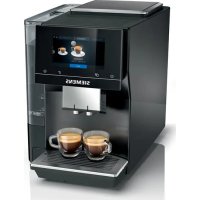
TP703R19 - Coffee maker SIEMENS - Free user manual and instructions
Find the device manual for free TP703R19 SIEMENS in PDF.



User questions about TP703R19 SIEMENS
0 question about this device. Answer the ones you know or ask your own.
Ask a new question about this device
Download the instructions for your Coffee maker in PDF format for free! Find your manual TP703R19 - SIEMENS and take your electronic device back in hand. On this page are published all the documents necessary for the use of your device. TP703R19 by SIEMENS.
USER MANUAL TP703R19 SIEMENS
Further information and explanations are available online:

Table of contents
1 Safety. 7
1.1 General information.. 7
1.2 Intended use 7
1.3 Restriction on user group.. 7
1.4 Safety information.. 7
2 Environmental protection and saving energy. 11
2.1 Disposing of packaging 11
2.2 Tips for saving energy 11
3 Installation and connection..... 11
3.1 Scope of delivery 11
3.2 Installing and connecting the appliance 11
4 Familiarising yourself with your appliance. 12
4.1 Appliance 12
4.2 Controls 12
5 Accessories. 13
6 Before using for the first time .. 13
6.1 Preparing and cleaning the appliance 13
6.2 Checking the water hardness 13
6.3 Water filter 14
6.4 Performing initial start-up 14
6.5 General information 15
7 Basic operation 15
7.1 Switching the appliance on or off 15
7.2 Dispensing beverages 16
7.3 doubleShot and tripleShot..... 16
7.4 Dispensing a coffee beverage with milk 16
7.5 Dispensing two cups at once.. 17
8Grinder 17
8.1 Adjusting the grinding level.... 17
9 Childproof lock. 18
9.1 Activating the child-proof lock 18
9.2 Deactivating the childproof lock 18
10 Cup heater 18
10.1 Activating and deactivating the cup heater1 18
11 Favourites. 18
11.1 Saving beverages from the beverage selection 18
11.2 Saving the beverage in the menu 18
11.3 Changing beverage settings 18
11.4 Deleting favourites 19
11.5 Sorting favourites 19
12 Home Connect 19
12.1 Setting up the Home Connect app 19
12.2 Setting up Home Connect.... 20
12.3 Home Connect settings.. 20
12.4 Remote diagnostics 21
12.5 Data protection 21
en
13 Basic settings. 21
13.1 Changing the basic settings 21
13.2 Overview of the basic settings 21
14 Cleaning and servicing. 23
14.1 Dishwasher-safe components 23
14.2 Cleaning agent 23
14.3 Cleaning the appliance 24
14.4 Cleaning the drip tray and coffee dregs container 24
14.5 Service programmes 24
15 Troubleshooting 27
16 Transportation, storage and disposal 32
16.1 Activating frost protection .... 32
16.2 Disposing of old appliance ... 32
17 Customer Service 32
18 Technical specifications. 33
19 Declaration of Conformity 33
17.1 Product number (E-Nr.), production number (FD) and consecutive numbering (Z-Nr.) 32
18.1 Information regarding Free and Open Source Software... 33

1 Safety
Observe the following safety instructions.
1.1 General information
; Read this instruction manual carefully.
i Keep the instruction manual and the product information safe for future reference or for the next owner.
Do not connect the appliance if it has been damaged in transit.
1.2 Intended use
Only use this appliance:
j for preparing hot drinks.
in private households and in enclosed spaces in a domestic environment.
up to an altitude of max. 2000 m above sea level.
1.3 Restriction on user group
This appliance may be used by children aged 8 or over and by people who have reduced physical, sensory or mental abilities or inadequate experience and/or knowledge, provided that they are supervised or have been instructed on how to use the appliance safely and have understood the resulting dangers.
Do not let children play with the appliance.
Children must not perform cleaning or user maintenance unless they are at least 8 years old and are being supervised.
Keep children under the age of 8 years away from the appliance and power cable.
1.4 Safety information
WARNING - Risk of suffocation!
Children may put packaging material over their heads or wrap themselves up in it and suffocate.
- Keep packaging material away from children.
- Do not let children play with packaging material.
en Safety
Children may breathe in or swallow small parts, causing them to suffocate.
- Keep small parts away from children.
- Do not let children play with small parts.
WARNING - Risk of electric shock!
Incorrect installation is dangerous.
- Connect and operate the appliance only in accordance with the specifications on the rating plate.
- Connect the appliance to a power supply with alternating current only via a properly installed socket with earthing.
The protective conductor system of the domestic electrical installation must be properly installed.
If the appliance or the power cord is damaged, this is dangerous.
- Never operate a damaged appliance.
- Never operate an appliance with a cracked or fractured surface.
- Never pull on the power cord to unplug the appliance. Always unplug the appliance at the mains.
- If the appliance or the power cord is damaged, immediately unplug the power cord or switch off the fuse in the fuse box.
- Call customer services. Page 32
Improper repairs are dangerous.
- Repairs to the appliance should only be carried out by trained specialist staff.
- Only use genuine spare parts when repairing the appliance.
- If the power cord of this appliance is damaged, it must be replaced by the manufacturer, the manufacturer's Customer Service or a similarly qualified person in order to prevent any risk.
An ingress of moisture can cause an electric shock.
- Never immerse the appliance or the power cord in water.
- Liquids must not be spilled on the appliance plug connection.
- Only use the appliance in enclosed spaces.
- Never expose the appliance to intense heat or humidity.
- Do not use steam- or high-pressure cleaners to clean the appliance.
WARNING - Risk of fire!
The appliance will become hot.
- Ventilate the appliance adequately.
- Never operate the appliance in a cupboard.
It is dangerous to use an extended power cord and non-approved adapters.
- Do not use extension cables or multiple socket strips.
- Only use adapters and power cords approved by the manufacturer.
- If the power cord is too short and a longer one is not available, please contact an electrician to have the domestic installation adapted.
WARNING - Risk of burns!
Some parts of the appliance become very hot.
- Never touch hot appliance parts.
- Allow hot appliance parts to cool down before touching.
WARNING - Risk of scalding!
Freshly prepared drinks are very hot.
- Leave drinks to cool down if necessary.
- Do not let escaping liquids or steam come into contact with your skin.
A remote start via the Home Connect app while the appliance is unattended may cause scalding to third parties.
- Do not reach under the coffee outlet during the dispensing of drinks.
- Keep other persons, in particular children, away from the appliance.
WARNING - Risk of injury!
Improper use of the appliance may endanger the user.
- To avoid injuries, only use the appliance for its intended purpose.
Trapped fingers when closing the appliance door. - Be careful of your fingers when closing the appliance door.
en Safety
The grinder rotates.
- Never reach into the grinder.

WARNING - Danger: Magnetism!
The appliance contains permanent magnets. These may affect electronic implants, e.g. pacemakers or insulin pumps.
- People with electronic implants must stand at least 10cm away from the appliance.
- This minimum distance of 10cm must also be observed for the water tank when removed.

WARNING - Risk of harm to health!
Soiling on the appliance may be harmful to health.
- To ensure hygiene, follow the cleaning instructions for the appliance.
2 Environmental protection and saving energy
2.1 Disposing of packaging
The packaging materials are environmentally compatible and can be recycled.
- Sort the individual components by type and dispose of them separately.
2.2 Tips for saving energy
If you follow these instructions, your appliance will use less power.
Set the interval for automatic switchoff to the smallest value.
- If the appliance is not being used, it will switch itself off earlier.
"Basic settings", Page 21
Do not interrupt the dispensing process prematurely.
- The amount of water or milk that is heated is used optimally.
Descale the appliance regularly.
Limescale deposits increase the appliance's energy consumption.
3 Installation and connection
3.1 Scope of delivery
After unpacking all parts, check for any damage in transit and completeness of the delivery.
Note: Different accessories are enclosed depending on the appliance model. This accessory is shown in a frame with a dashed line.
Fig. 1
| A | Fully automatic coffee machine |
| B | Milk tube |
| C | User manual |
| D | Insertion aid for water filter |
| E | Descaling tablet1 |
| F | Cleaning tablet1 |
| G | Water filter1 |
| H | Water hardness testing strip |
| I | Microfibre cloth |
1 Depending on the appliance specifications
3.2 Installing and connecting the appliance
ATTENTION!
Risk of damage to the appliance. If the appliance is not started up correctly, it may be damaged.
- Use the appliance in frost-free rooms only.
-
If the appliance has been transported or stored below 0^ , wait 3 hours at room temperature before starting it up.
After plugging in, always wait approx. 5 seconds. -
Place the appliance on a level, water-resistant surface that is capable of bearing its weight.
- Using the mains plug, connect the appliance to an earthed socket that has been correctly installed.
4 Familiarising yourself with your appliance
4.1 Appliance
You can find an overview of the parts of your appliance here.
Note: Individual details and colours may differ, depending on the appliance model.
Fig. 2
1 Touch fields
2 Cup heater
3 Aroma lid
4 Bean container
5 Rotary selector for grinder setting
6 Tablet compartment
7 Cover for water tank
8 Water tank
9 Touch display
10 Cup lighting
11 Brewing chamber door
12 Rating plate
13 Milk system
14 Beverage outlet cover
15 Milk hose and suction pipe
16 Drip tray
1 Depending on the appliance specifications
4.2 Controls
You can find an overview of the controls for your appliance here.
Touch fields
Here you can find an overview of the symbols that are always visible.
| ① | Switch the appliance on or off. |
| ② | Dispense two cups. |
| ③ | Open or close the service programmes. |
| ④ | Open or exit the settings. |
Touch display
The touch display functions both as a display and a control.
| Favour- ites | Select saved beverages with personal settings. → Page 18 |
| Classic | Select standard bev- ages. |
| coffee- World | Select basic beverages which can be extended in conjunction with Home Connect. |
| ∑∑∑ | Cup warmer is switched on. |
| ∑ | Appliance is connected to Home Connect. |
Note: When the appliance is switched on, you have additional operating options with relevant displays and messages, e.g. beverage settings.
| ① | Set strength. |
| ② | Set per-cup quantity. |
| ③ | Set milk ratio. |
| ④ | Set aroma. |
| ⑤ | Set temperature. |
5 Accessories
Use original accessories. These have been made especially for your appliance.
| Accessories Retail Customer service | ||
| Cleaning tablets TZ80001A | TZ80001B | 00312097 00312098 |
| Descaling tablets TZ80002A | TZ80002B | 00312094 00312095 |
| Water filter TZ70003 00575491 | ||
| Water filter pack of 3 TZ70033A | ||
| Microfibre cloth - 00460770 | ||
| Care set TZ80004A | TZ80004B | 00312105 00312106 |
6 Before using for the first time
Prepare the appliance for use.
6.1 Preparing and cleaning the appliance
Remove the protective foils and clean the appliance and individual parts. Follow the illustrated instructions at the beginning of this manual.
ATTENTION!
Unsuitable beans can block the grinder.
- Only use pure, roasted bean mixes that are suitable for use in fully automatic coffee or espresso machines.
Do not use glazed coffee beans. - Do not use caramelised coffee beans.
- Do not use coffee beans that have been treated with additives containing sugar.
Do not add instant coffee.
Fig. 3 - 16
Note: Fill the water tank each day with fresh, cold, non-carbonated water.
Tip: To keep the coffee beans at their best, store them in a sealed container in a cool place. You can keep the coffee beans in the bean container for several days without them losing their aroma.
6.2 Checking the water hardness
It is important to set the water hardness correctly so that your appliance indicates in good time that it needs descaling. You can use the enclosed test strip to check the water hardness or ask your local water company.
- Briefly dip the test strip in fresh tap water.
- Allow the water to drain off the test strip.
- Read the water hardness off the test strip after 1 minute.
The table shows allocation of the levels to the different degrees of water hardness:
en first time
| Level German degrees in °dH | Total hardness in mmol/ l |
| 1 1-7 < 1.3 | |
| 2 8-14 1.3-2.5 | |
| 3 15-21 2.5-3.8 | |
| \( 4^1 \) | 22-30 > 3.8 |
Factory setting
Note: If a water softening system is installed in your house, you can select "Water softening system".
Tips
- You can change the settings at any time.
→ "Basic settings", Page 21
If the water hardness exceeds 21^ (3.8 mmol/l), you can fill the water tank with prefiltered water to reduce limescale deposits.
6.3 Water filter
You can use a water filter to minimise limescale deposits and reduce impurities in the water.
Inserting the water filter
ATTENTION!
Possible damage to the appliance due to limescale build-up.
- Change the water filter in good time.
- Change the water filter after 2 months at the latest.
-
Observe the display messages.
-
Press
- Press "INTENZA filter" and follow the instructions on the display.
Changing or removing the water filter
You can also operate your appliance without a water filter.
- Press
- Press "INTENZA filter".
- Press "Replace" or "Remove" and follow the instructions on the display.
Tips
- You should also change your water filter for reasons of hygiene.
- With a water filter you need to descale your appliance less frequently.
If you use a water filter, your coffee will be more flavoursome.
If your appliance has not been used for a long time, for example if you were on holiday, you should rinse the water filter before use by dispensing a cup of hot water.
The water filter can be purchased from retailers or customer service. "Accessories", Page 13
6.4 Performing initial start-up
After connecting the appliance to the power supply, configure the settings for initial start-up. Initial start-up only appears when switching on for the first time.
- Press to switch the appliance on.
- Follow the instructions on the display.
The display will guide you through the programme.
Notes
If you want to set up Home Connect now, follow the instructions in the Home Connect app. "Setting up Home Connect", Page 20
If "Demo mode" is selected, only the displays will work. You cannot dispense a beverage or run a programme.
6.5 General information
Please bear this information in mind so that you can get the best out of your appliance.
Notes
The appliance has been programmed at the factory with standard settings for optimum operation.
The grinder has been factory-set for optimum operation. If coffee is only dispensed drop by drop or is too thin and with too little crema, you can adjust the grinding level when the grinder is running. "Adjusting the grinding level", Page 17
During operation water droplets may form at the ventilation slits and on the lid of the tablet compartment.
If you do not perform any actions on the appliance for a certain period, it will switch off automatically. You can change the duration in the basic settings.
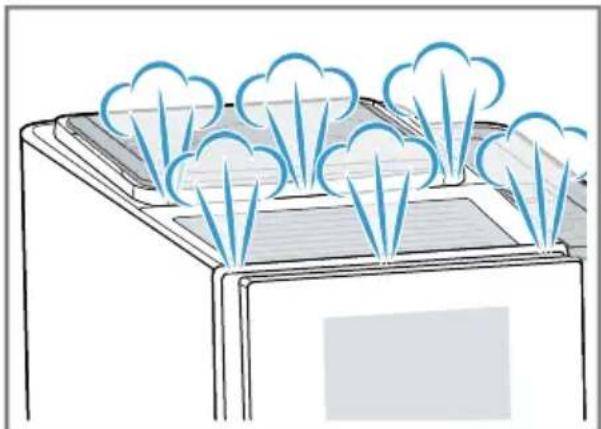
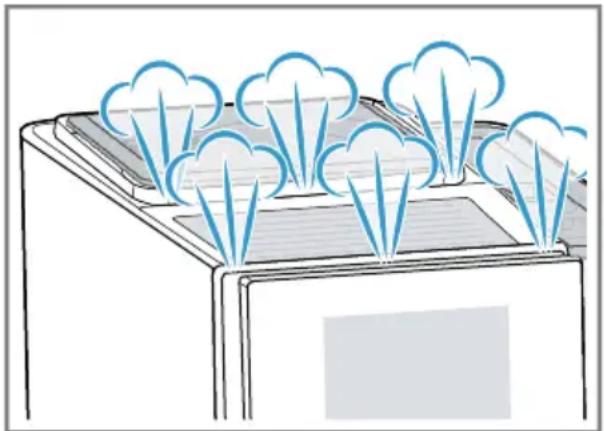
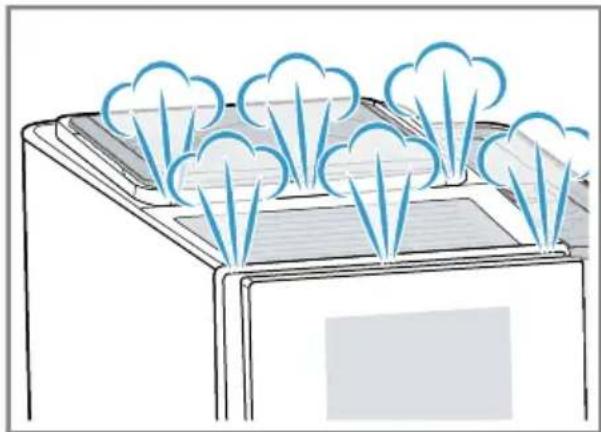
- For technical reasons steam can escape from the appliance.
The first beverage will not yet have its full aroma if:
- You are using the appliance for the first time.
- You have run a service programme.
- You have not used the appliance for a long time.
Do not drink the beverage.
Tip: You will get a stable, fine-pored crema after you have started up your appliance and dispensed a few cups.
7 Basic operation
7.1 Switching the appliance on or off
Press
When the appliance switches on, the display shows the logo. When the appliance is switched on or off, it will rinse itself automatically. When switched off, the appliance will emit steam into the drip tray for cleaning. The appliance will not rinse itself if the appliance is still warm when switched on or if no beverage was dispensed before it was switched off.
7.2 Dispensing beverages
Find out how to prepare a drink of your choice.

WARNING
Risk of scalding!
Freshly prepared drinks are very hot.
- Leave drinks to cool down if necessary.
- Do not let escaping liquids or steam come into contact with your skin.
Notes
- With a number of settings your coffee is prepared in several steps. Wait until the process is fully completed.
If you are dispensing a beverage with milk, always connect a container filled with milk to the milk hose and suction pipe.
If the milk system has not been cleaned, small amounts of milk may escape when hot water is dispensed.
7.3 doubleShot and tripleShot
Your appliance grinds the coffee two or three times.
To ensure that only pleasant-tasting and easily digestible aromatic substances are released, coffee beans are freshly ground and brewed again by the appliance.
The longer coffee brews, the more bitter substances and undesirable aromas are released. These bitter substances and undesirable aromas affect the taste and digestibility of coffee.
Note: The functions "doubleShot" and "tripleShot" depend on the beverage strength and beverage size selected.
7.4 Dispensing a coffee beverage with milk
An example explains how to make a latte macchiato.

WARNING
Risk of burns!
The milk system can become extremely hot.
- Never touch the milk system when it is hot.
- Allow the hot milk system to cool down before touching it.
Requirements
-
The milk hose with the suction pipe is connected to the milk system.
The suction pipe is immersed in milk. -
Place a glass underneath the beverage outlet.
- Press "Classic".
-
Select and press the beverage symbol for latte macchiato.
-
To change the strength, press
- To change the per-cup quantity, press .
-
To change the milk ratio, press
-
Press "Start" and wait until the process is complete.
-
To completely stop dispensing the beverage, press "Stop".
- To only stop the current dispensing step, press "Skip". After preparing the beverage, the milk system will automatically clean itself with a short jet of steam.
Notes
If you do not change any settings for approx. 30 seconds, the appliance will exit settings mode.
The appliance saves the settings automatically.
Tips
- You can also pre-heat cups before dispensing using hot water or the cup heater1.
- You can also use plant-based alternatives to milk, e.g. soya milk.
The quality of the milk froth depends on the type of milk or plant-based alternative used.
7.5 Dispensing two cups at once
Depending on your beverage, you can make 2 cups at the same time.
Note: If the "doubleShot" or "tripleShot" function is active, the function for dispensing two cups at once is not possible.
- Press the symbol for your desired drink.
- Press
The display shows the setting.
3. Place two cups on the left and right underneath the beverage outlet.
4. Press "Start".
The beverage is prepared in 2 steps. The beans are ground in 2 grinding operations.
- The beverage is brewed and then runs into the cups.
- Wait until the process is complete.
8Grinder
Your appliance has an adjustable grinder, which you can use to customise the grinding level of your coffee beans.
8.1 Adjusting the grinding level
Set the desired grinding level while the coffee beans are being ground.
WARNING Risk of injury!
The grinder rotates.
- Never reach into the grinder.
ATTENTION!
Risk of damage to the grinder. The grinder may be damaged if the grinding level is not set properly.
- Only set the grinding level when the grinder is running.
- Select the grinding level using the rotary selector step by step.
Grinding level Setting
Fine grinding level for lightly roasted beans
Turn rotary selector anticlockwise.

Coarse grinding level for dark-roasted beans
Turn rotary selector clockwise.

The grinding level setting only takes effect after the second cup.
Tip: If the coffee is only dispensed drop by drop, set a coarser grinding level.
If the coffee is too thin with too little crema, set a finer grinding level.
9 Childproof lock
You can lock the appliance, to protect children against scalding and burns.
9.1 Activating the child-proof lock
Requirement: The appliance is switched on.
Press and hold for at least 3 seconds.
The childproof lock is activated.
9.2 Deactivating the childproof lock
Press and hold for at least 3 seconds.
The childproof lock is deactivated.
10 Cup heater1
You can use the cup heater to preheat your cups.
10.1 Activating and deactivat ing the cup heater
WARNING Risk of burns!
The cup heater can become very hot.
- Never touch the cup heater1 while hot.
- Allow the hot cup heater to cool down before touching it.
Tip: Place the cups with their base on the cup heater to warm them to optimum effect1.
11 Favourites
Save beverages with your personal settings as a favourite.
You can mark your favourites with a colour. A favourite is a beverage with personal settings. You can change the settings at any time.
Note: To exit the settings, press or start dispensing the beverage.
11.1 Saving beverages from the beverage selection
- Select a beverage from "Classic" or "coffeeWorld".
- Select the personal beverage settings.
- Press "Favourite".
- Select the required colour for the beverage.
- Press "Save".
11.2 Saving the beverage in the menu
- Press "Favourites".
- Press
The display shows all available beverages.
- Select the required beverage.
- Select the personal beverage settings.
- Press "Next".
- Select the required colour for the beverage.
- Press "Save".
11.3 Changing beverage settings
-
Press "Favourites".
-
Select the beverage and press briefly.
- Change the beverage settings.
- Press "Apply".
The new settings are saved.
11.4 Deleting favourites
- Press "Favourites".
- Select the beverage.
- Press the beverage for at least 3 seconds.
- Confirm "Delete".
11.5 Sorting favourites
- Press "Settings".
- Press "Personalisation".
- Press "Sort favourites".
- Sort favourites, e.g. by name or colour.
12 Home Connect
This appliance is network-capable. Connecting your appliance to a mobile device lets you control its functions via the Home Connect app, adjust its basic settings and monitor its operating status.
The Home Connect services are not available in every country. The availability of the Home Connect function depends on the availability of Home Connect services in your country. You can find information about this at: www.home-connect.com. To be able to use Home Connect, you must first set up the connection to the WLAN home network (Wi-Fi1) and to the Home Connect app.
The Home Connect app guides you through the entire login process. Follow the instructions in the Home Connect app to configure the settings.
Tip: Please also follow the instructions in the Home Connect app.
Notes
- Please note the safety precautions in this instruction manual and make sure that they are also observed when operating the appliance via the Home Connect app. "Safety", Page 7
- Operating the appliance on the appliance itself always takes priority. During this time it is not possible to operate the appliance using the Home Connect app.
12.1 Setting up the Home Connect app
- Install the Home Connect app on your mobile device.

2
- Start the Home Connect app and set up access for Home Connect. The Home Connect app guides you through the entire login process.
12.2 Setting up Home Connect
Requirements
-
The Home Connect app has been installed on your mobile device.
The appliance is receiving signals from the WLAN home network (WiFi) at its installation location. -
Open the Home Connect app and scan the following QR code.

- Follow the instructions in the Home Connect app.
12.3 Home Connect settings
Adapt Home Connect to your needs. You can find the Home Connect settings in the basic settings for your appliance. Which settings the display shows will depend on whether Home Connect has been set up and whether the appliance is connected to your home network.
Overview of the Home Connect settings
You can find an overview of the Home Connect settings and network settings here.
| Basic setting Selection Description | ||
| WiFi connection On | Off | Switch off the wireless module during long absences or to save energy. Note: In networked standby mode your appliance requires max. 2 W. |
| Remote start On | Off | Switch remote start on the appliance on and off. Note: With the Home Connect app only switch-off is possible. |
| Add mobile device | - Connect the appliance to the "Home Connect" app or additional accounts. | |
| Network information | - Display network information and appliance information. | |
| Delete network settings | - Note: You cannot operate your appliance via the "Home Connect" app without a network connection. | |
| Software update - Note: This setting is only available with a software update. | ||
12.4 Remote diagnostics
Customer Service can use Remote Diagnostics to access your appliance if you contact them, have your appliance connected to the Home Connect server and if Remote Diagnostics is available in the country in which you are using the appliance.
Tip: For further information and details about the availability of Remote Diagnostics in your country, please visit the service/support section of your local website: www.home-connect.com.
12.5 Data protection
Please see the information on data protection.
The first time your appliance is registered on a home network connected to the Internet, your appliance will transmit the following types of data to the Home Connect server (initial registration):
-
Unique appliance identification (consisting of appliance codes as well as the MAC address of the Wi-Fi communication module installed).
Security certificate of the Wi-Fi communication module (to ensure a secure data connection). -
The current software and hardware version of your appliance.
- Status of any previous reset to factory settings.
This initial registration prepares the Home Connect functions for use and is only required when you want to use the Home Connect functions for the first time.
Note: Please note that the Home Connect functions can only be utilised with the Home Connect app. Information on data protection can be retrieved in the Home Connect app.
13 Basic settings
You can configure the basic settings for your appliance to meet your needs and call up additional functions.
13.1 Changing the basic settings
-
Press
-
The display shows the list of basic settings.
- Change the required basic setting.
- The appliance saves the basic setting automatically.
- To exit the basic settings, press
13.2 Overview of the basic settings
You can find an overview of the basic settings here.
| Beverage setting Brewing temperature Set the brewing temper- ature. |
| Milk sequence Select the sequence for milk and coffee. |
| Latte macchiato pause Select the pause between milk and coffee. |
| 1 Depending on the appliance specifications |
en Basic settings
| Resetting beverage para-meters | Reset the beverage set-tings. | |
| Appliance setting Cup heater | 1 | Switch the cup heater1on or off. |
| Automatic switch-off Set the time after which the appliance switches off. | ||
| Display brightness Set the brightness in steps. | ||
| Sounds • Switch sounds on and off. • Set the volume. | ||
| Water hardness Set the water hardness. | ||
| Language Set the language. | ||
| Factory settings Reset the appliance to the factory settings. | ||
| Personalisation | ||
| Operation after switch-on Set the display screen for "Favourites", "Classic" or "coffeeWorld". | ||
| Sort favourites Set the sequence of favours. | ||
| Home Connect Information about Home Connect | → "Setting up Home Connect", Page 20 | |
| Appliance information Beverage counter Display the number of beverages dispensed. | ||
| Cleaning information Time until the water filter should next be changed or a service programme started. | ||
| Version information Display network informa-tion and appliance in-formation. | ||
| Licence information Display FOSS licence text. | ||
| Mode for demo purposes | Switch "Demo mode" on or off. | |
| 1 Depending on the appliance specifications | ||
14 Cleaning and servicing
To keep your appliance working efficiently for a long time, it is important to clean and maintain it carefully.
14.1 Dishwasher-safe components
Here you can find an overview of the components you can clean in the dishwasher.
ATTENTION!
Some components are sensitive to heat and may be damaged if they are cleaned in a dishwasher.
-
Follow the operating instructions of the dishwasher.
-
Only clean dishwasher-safe components in the dishwasher.
Only use programmes that do not heat the components above 60^
Suitable:
Drip tray
- Drip plate
- Coffee dregs container
- Mechanical fill level indicator
Milk system with adapter
Not suitable:
Water tank
Water tank lid
Brewing unit
- Beverage dispenser cover
14.2 Cleaning agent
Only use suitable cleaning agents.
ATTENTION!
Unsuitable cleaning products may damage the surfaces of the appliance.
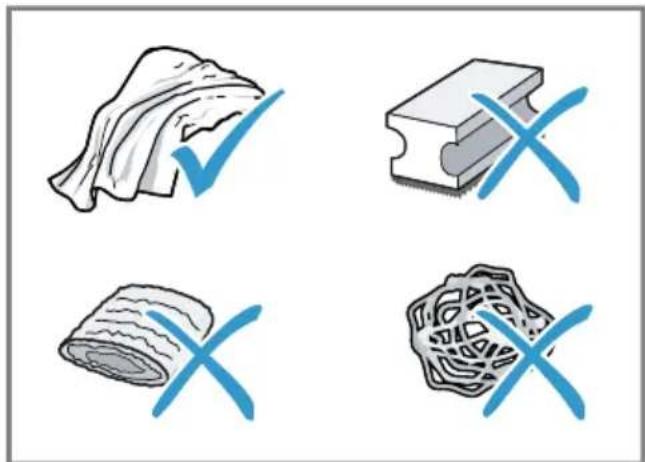
- Do not use harsh or abrasive detergents.
- Do not use cleaning agents containing alcohol or spirits.
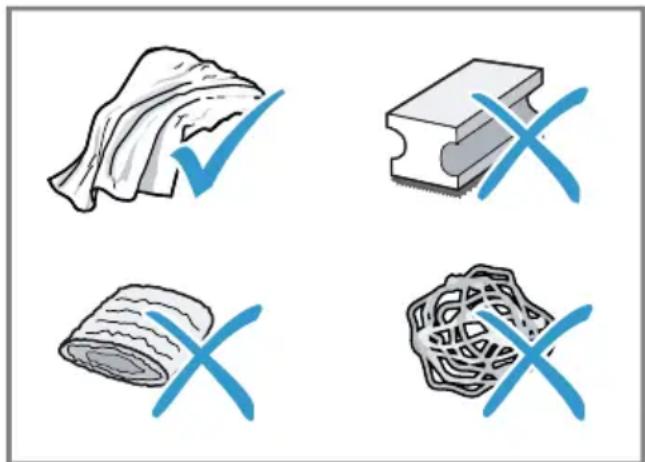
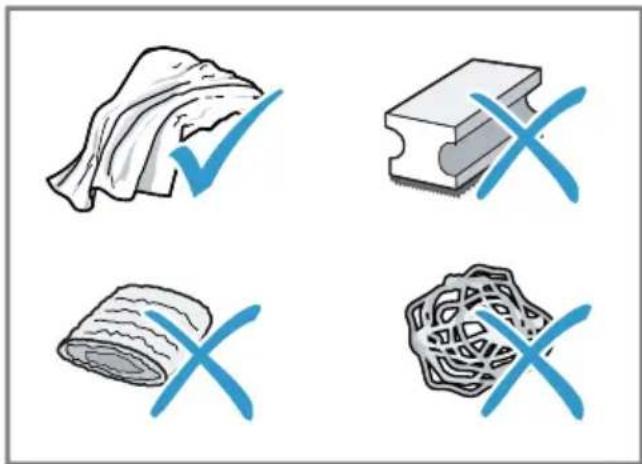
- Do not use hard scouring pads or cleaning sponges.
Unsuitable cleaning and descaling agents may damage the appliance.
- Do not use pure citric acid, vinegar or any vinegar-based agents to descale the appliance.
- Do not use descending agent with phosphoric acid.
- Only use cleaning tablets and descaling tablets that have been specially developed for the appliance. "Accessories", Page 13
Tips
- Wash new sponge cloths thoroughly to remove any salt adhering to them. Salt can cause rust film to develop on stainless steel surfaces.
Always remove any residues of limescale, coffee, milk and cleaning/descaling solutions immediately to prevent corrosion.
14.3 Cleaning the appliance

WARNING
Risk of electric shock!
An ingress of moisture can cause an electric shock.
- Never immerse the appliance or the power cord in water.
- Liquids must not be spilled on the appliance plug connection.
- Do not use steam- or high-pressure cleaners to clean the appliance.

WARNING
Risk of burns!
Some parts of the appliance become very hot.
- Never touch hot appliance parts.
-
Allow hot appliance parts to cool down before touching.
-
Clean the housing, the high-gloss surfaces and the control panel with the enclosed microfibre cloth.
- Clean the outlet system with a soft, damp cloth after beverages have been dispensed.
- Rinse the water tank with fresh, clean water.
- If the appliance has not been used for a long time, e.g. after a holiday, clean the entire appliance, including moving parts such as the brewing unit or water tank.
Note: The appliance will rinse itself automatically if you switch it on when it is cold or switch it off after it has dispensed coffee. The system is therefore self-cleaning.
14.4 Cleaning the drip tray and coffee dregs container
Clean and empty the drip tray and coffee dregs container every day to prevent deposits. Follow the illustrated instructions at the beginning of this manual.
Fig. 17 - 18
14.5 Service programmes
Use the service programmes if you insert or remove a water filter or in order to clean your appliance thoroughly. Your appliance will tell you when you need to perform a service programme, e.g. cleaning.
ATTENTION!
Improper cleaning and descaling or a delay in doing so may damage the appliance.
- Immediately perform the descending process in accordance with the instructions.
- Only use cleaning tablets in the tablet compartment.
- Do not put descending tablets or other products in the tablet compartment.
Notes
The display indicates the progress of the descending or cleaning process.
If your appliance has been locked, you can only operate it again once the descending process has been carried out.
Tip: In addition to the automatic rinsing process, regularly also remove and clean the brewing unit.
Using the service programmes
-
Press
-
Press the symbol for the required programme.
The display will guide you through the programme.
Overview of service programmes
You can find an overview of the service programmes here.
Note: The start image shows the remaining number of beverages that can be dispensed until running the programme and the duration.
| BRITA | INTENZA filter Insert, replace or remove the water fil-ter. |
| Milk system cleaning Rinse the milk system automatically. | |
| calc'nClean Combine cleaning and descaling. Remove residues of limescale and cof-fee from the pipes. | |
| Cleaning Remove residues of coffee from the pipes. | |
| Descaling Remove residues of limescale from the pipes. | |
| Brewing unit cleaning The display shows optimum cleaning of the brewing unit step by step. | |
| Beverage outlet cleaning The display shows optimum cleaning of the outlet step by step. | |
| Frost protection Drain the pipes to protect the appli-ance during transport or storage. | |
| Special rinsing If a service programme is interrupted, e.g. due to a power failure, it will rinse itself automatically. The appliance is then ready for use again. |
Tips
If you are starting the "Descending" or "calc'nClean" programme, keep a container with a capacity of min. 1 l at the ready.
If you use a water filter, this will prolong the time until you have to run a service programme.
en Cleaning and servicing
- You can combine "Descending" and "Cleaning" with the "calc'nClean" service programme.
15 Troubleshooting
You can rectify minor faults on your appliance yourself. Read the troubleshooting information before contacting after-sales service. This will avoid unnecessary costs.
WARNING
Risk of electric shock!
Improper repairs are dangerous.
- Repairs to the appliance should only be carried out by trained specialist staff.
- Only use genuine spare parts when repairing the appliance.
- If the power cord of this appliance is damaged, it must be replaced by the manufacturer, the manufacturer's Customer Service or a similarly qualified person in order to prevent any risk.
Fault Cause and troubleshooting
| Appliance no longer responds. | Appliance has a fault. 1. Pull out the mains plug and wait 60 seconds. 2. Re-insert the mains plug. | |
| Home Connect is not working properly. | Different causes are possible. → Go to www.home-connect.com. | |
| Appliance only dis-penses water, not cof-fee. | Empty bean container is not detected by the appli- ance. → Pour in coffee beans. | |
| Coffee shaft on brewing unit is blocked. → Clean the brewing unit. | ||
| Coffee beans are too oily and do not fall into the grinder. → Gently tap the bean container. → Change the coffee variety. → Do not use oily beans. → Clean the empty bean container with a damp cloth. | ||
| Brewing unit is not inserted properly. 1. Check whether the brewing unit is inserted correctly and is securely locked. 2. Push the red lever up to the left. 3. Insert the brewing unit cover. | ||
| Appliance is not dis- pensing milk froth. | Milk system is soiled. → Clean the milk system in the dishwasher. | |
| Milk tube not immersed in milk. → Use more milk. | ||
| Fault Cause and troubleshooting | ||
| Appliance is not dis-pensing milk froth. | Check whether the milk tube is immersed in the milk. | |
| Heavy build-up of limescale in the appliance. • Descale the appliance. | ||
| No milk intake by the milk system. | The milk system is assembled incorrectly. • Assemble the milk system correctly. | |
| Milk tube not immersed in milk. • Use more milk. • Check whether the milk tube is immersed in the milk. | ||
| Milk froth is too cold. Milk is too cold. • Use lukewarm milk. | ||
| Appliance is not dis-pensing hot water. | Milk system is soiled. • Clean the milk system in the dishwasher. | |
| Appliance is not dis-pensing drinks. | Air is in the water filter. 1. Immerse the water filter in water with the opening facing upwards until no more air bubbles escape. 2. Reinsert the filter. • Firmly press the water filter straight down into the tank connection. | |
| Residues of limescale remover are blocking the water tank. 1. Remove the water tank. 2. Clean the water tank thoroughly. | ||
| There is dripping wa-ter on the inner floor of the appliance. | Drip tray was removed too soon. • Wait a few seconds after the last drink was dispensed before removing the drip tray. | |
| Brewing unit cannot be removed. | Locking device cannot be released, brewing unit is jammed. • Switch the appliance off and back on after 3 minutes. | |
| Grinder won't start. Appliance is too hot. 1. Disconnect the appliance from the mains. 2. Wait 1 hour so the appliance can cool down. | ||
| Fault Cause and troubleshooting | ||
| Grinder is not grinding any coffee beans despite full bean container. | Coffee beans are too oily and do not fall into the grinder. • Gently tap the bean container. • Change the coffee variety. • Do not use oily beans. • Clean the empty bean container with a damp cloth. | |
| Coffee or milk froth quality varies widely. | Build-up of limescale in the appliance. • Descale the appliance. | |
| Milk froth quality varies widely. | Milk froth quality depends on the type of milk or plant-based alternative used. • Optimise the result through the selection of the milk or vegetable-based drink type. | |
| Coffee is not dispensed or has slowed to a trickle. | Grinding level is set too fine. • Set a coarser grinding level. → "Adjusting the grinding level", Page 17 | |
| Set quantity is not reached. | Heavy build-up of limescale in the appliance. • Descale the appliance. Air is in the water filter. 1. Immerse the water filter in water with the opening facing upwards until no more air bubbles escape. 2. Reinsert the filter. Appliance is soiled. • Clean the brewing unit. • Descale and clean the appliance. | |
| Coffee has no crema. | Type of coffee is not optimal. • Use a coffee variety with a higher proportion of Robusta beans. • Use beans with a darker roast. Coffee beans are no longer freshly roasted. • Use fresh coffee beans. Grinding level is not appropriate for coffee beans. • Adjust the grinder to a finer setting. → "Adjusting the grinding level", Page 17 | |
| Coffee is too acidic. | Grinding level is set too coarse. • Adjust the grinder to a finer setting. → "Adjusting the grinding level", Page 17 Type of coffee is not optimal. • Use a coffee variety with a higher proportion of Robusta beans. | |
| Fault Cause and troubleshooting | ||
| Coffee is too acidic. ▶ Use beans with a darker roast. | ||
| Coffee is too bitter. Grinding level is set too fine. ▶ Set a coarser grinding level. → "Adjusting the grinding level", Page 17 | ||
| Type of coffee is not optimal. ▶ Change the coffee variety. | ||
| Coffee tastes burnt. Grinding level is set too fine. ▶ Set a coarser grinding level. → "Adjusting the grinding level", Page 17 | ||
| Type of coffee is not optimal. ▶ Change the coffee variety. | ||
| Coffee temperature setting is too high. ▶ Set the coffee temperature lower. | ||
| Coffee grounds are not compact and are too wet. | The grinding level is not set optimally. ▶ Adjust the grinder to a coarser or finer setting. → "Adjusting the grinding level", Page 17 | |
| Coffee beans are too oily. ▶ Use a different type of bean. | ||
| Display shows "Please insert brewing unit". | Cover is wrongly inserted. 1. Check whether the brewing unit is inserted correctly and is securely locked. 2. Push the red lever up to the left. 3. Insert the brewing unit cover. | |
| Display shows "Please fill water tank." despite the fact that the water tank is full. | Water tank is wrongly inserted. ▶ Insert the water tank correctly. | |
| Carbonated water is in the water tank. ▶ Fill the water tank with fresh tap water. | ||
| Float is stuck in the water tank. 1. Remove the water tank. 2. Clean the water tank thoroughly. | ||
| New water filter was not rinsed as per instructions. 1. Rinse the water filter according to the instructions. 2. Place the water filter into operation. | ||
| Air is in the water filter. 1. Immerse the water filter in water with the opening facing upwards until no more air bubbles escape. 2. Reinsert the filter. | ||
| Water filter is old. | ||
| Fault Cause and troubleshooting | |
| Display shows "Please fill water tank." despite the fact that the water tank is full. | Insert a new water filter. |
| Limescale deposits in the water tank are blocking the system.1. Clean the water tank thoroughly.2. Start the descaling programme. | |
| Display shows "Please clean brewing unit". | Brewing unit is soiled.Clean the brewing unit.Mechanism of brewing unit is stiff.Clean the brewing unit. |
| Display shows "Over-voltage or under-voltage". | There are problems with the power supply.Only operate the appliance at 220 - 240 V. |
| Display shows "Error in water system.Please restart appliance"." | Appliance has a fault.1. Pull out the mains plug and wait 60 seconds.2. Re-insert the mains plug. |
| Display very frequently shows "Please run calc'nClean pro-gramme!". | Decalcified water still contains small amounts of lime.1. Insert a new water filter.2. Set the corresponding water hardness.Incorrect or too little descaling agent used.◆ When descaling, only use suitable tablets. |
| Service programme has not been carried out in its entirety.◆ Start the "Special rinsing" service programme.→ "Service programmes", Page 24 | |
16 Transportation, storage and disposal
16.1 Activating frost protection
Protect your appliance from frost during transport and storage.
ATTENTION!
Residues of liquid in the appliance may damage it during transport or storage.
-
Empty the pipe system before transport or storage.
-
Run the "Frost protection" programme.
- Disconnect the appliance from the power supply.
16.2 Disposing of old appliance
Valuable raw materials can be reused by recycling.
- Unplug the appliance from the mains.
- Cut through the power cord.
- Dispose of the appliance in an environmentally friendly manner. Information about current disposal methods are available from your specialist dealer or local authority.
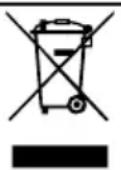
This appliance is labelled in accordance with European Directive 2012/19/EU concerning used electrical and electronic appliances (waste electrical and electronic equipment - WEEE). The guideline determines the framework for the return and recycling
of used appliances as applicable throughout the EU.
17 Customer Service
Function-relevant genuine spare parts according to the corresponding Ecodesign Order can be obtained from Customer Service for a period of at least 7 years from the date on which your appliance was placed on the market within the European Economic Area.
Note: Under the terms of the manufacturer's warranty the use of Customer Service is free of charge.
Detailed information on the warranty period and terms of warranty in your country is available from our after-sales service, your retailer or on our website.
If you contact Customer Service, you will require the product number (E-Nr.), the production number (FD) and the consecutive numbering (Z-Nr.) of your appliance.
The contact details for Customer Service can be found in the enclosed Customer Service directory or on our website.
17.1 Product number (E-Nr.), production number (FD) and consecutive numbering (Z-Nr.)
You can find the product number (ENr.), the production number (FD) and the consecutive numbering (Z-Nr.) on the appliance's rating plate.
Make a note of your appliance's details and the Customer Service telephone number to find them again quickly.
18 Technical specifications
| Voltage 220- | 240 V ~ |
| Frequency 50 Hz | |
| Connection rating 1500 W | |
| Maximum static pump pressure | 20 bar |
| Maximum capacity of water tank (without filter) | 2,6 l |
| Maximum capacity of bean container | 350 g |
| Length of the power cable | 100 cm |
| Appliance height 38 cm | |
| Appliance width 30 cm | |
| Appliance depth 46,7 cm | |
| Weight, empty 9 kg | |
| Type of grinder Ceramic |
This product contains light sources from energy efficiency classes D and F. These light sources are available as spare parts and may only be replaced by trained specialist staff.
18.1 Information regarding Free and Open Source Software
This product includes software components that are licensed by the copyright holders as free or open source software.
The applicable licence information is stored on your home appliance. You can also access the applicable licence information via your Home Connect app: "Profile -> Legal
information -> Licence Information". You can download the licence information on the brand product website. (Please search on the product website for your appliance model and additional documents). Alternatively, you can request the relevant information from oss-
The source code will be made available to you on request.
Please send your request to ossrequest@bshg.com or BSH Hausgeräte GmbH, Carl-Wery-Str.34, 81739 Munich, Germany.
Subject: ,OSSREQUEST"
The cost of performing your request will be charged to you. This offer is valid for three years from the date of purchase or at least as long as we offer support and spare parts for the relevant appliance.
19 Declaration of Conformity
BSH Hausgeräte GmbH hereby declares that the appliance with Home Connect functionality conforms to the essential requirements and other relevant provisions of Directive 2014/53/EU.
A detailed RED Declaration of Conformity can be found online at siemens-home.bsh-group.com among the additional documents on the product page for your appliance.

en Declaration of Conformity
Hereby, BSH Hausgeräte GmbH declares that the appliance with Home Connect functionality is in compliance with relevant statutory requirements. A detailed Declaration of Conformity can be found online at siemens-home.bsh-group.com/uk/ among the additional documents on the product page for your appliance.

2.4 GHz band (2400-2483.5 MHz): Max. 100 mW
5 GHz band (5150-5350 MHz + 5470-5725 MHz): max. 200 mW
| BE BG CZ DK DE EE IE EL ES | |||||||
| FR HR IT CY LI LV LT LU HU | |||||||
| MT NL AT PL PT RO SI SK FI | |||||||
| SE NO CH TR IS UK (NI) | |||||||
| 5 GHz WLAN (Wi-Fi): For indoor use only. | |||||||
| AL | BA | MD | ME | MK | RS | UK | UA |
| 5 GHz WLAN (Wi-Fi): For indoor use only. | |||||||
usages (waste electrical and electronic equipment - WEEE).
WAARSCHUWING - Kans op verstikking!
WAARSCHUWING Kans op letsel!
12.1 Home Connect app instellen
12.3 Home Connect instellin-gen
7.3 doubleShot tripleShot
7.3 doubleShot a tripleShot
12.3 Home Connect Nastaveni
Prizpúsobte Home Connect svym potrebám.
He npdnyckaite dete K MeIKNM deTaIaM.
He no3BOJnTe DeTm nIgpaTb C MeNKIMn DeTaJIaMn.
I PPEyIeHNE - Onacnoctb nopajehn 3JIeKtpuecknM TOKOM!
I P E D U N P E X J D E H N E - O n a c h o c t b o w n a p n b a n h y!
CBeKe nproToBneHHbIe HAnNTKn OueHb ropyHe.
Ecnn notpebyetc, daTe octbItb HapNTkam.
H36eTaTe KOHTaKTa BbIeJIHOUHXcR JnIDKOcTei n napOB c KoJKei. BeckoHTpOlbHbI dNCTaHcUHOHbI 3aNyCK uepe3 npInIoJKeHne Home Connect MoKet npNBecTn K OShnapBaHNIO TpeTbNx IuC.
Bo Bpemr po3nBa HAnITka pyKn He DoJXHbI HaxOaNTbcr PoD dnc- neHcepom drr Kofoe.
He npynyckaite K npbopy IIOe, ocobehno deTei.
I P E D U N P E X K I E H N E - O n a c h o c t b T p a B M n p o B a H N A!
I P E D U N P E X K I E H N E - O n a c h o c t b: m a r h e T n 3 m!
"Ba30BbIe yCTaHOBKn", CtpaHua 176
He npepbIbaIte npeKdEBypeMeHNo npiroTOBJIeHne HAnITKa.
HarpeToe KOJIuYeCTBO BOIbI INMMOKc HcNoJIb3yETcN ONTImaJIbHO.
Perynno ouuau Te np6op ot hKninn.
HaKnIb npNBOiNT K NOBblIeHHOMy 3HeprONOTpe6JIeHNo.
3 YctaHOBka I NOdkJIIOUeHne
3.1 Komnlektaun
Iocne paacnakOBKn npOBepbTe BCE deTaJIH Na OTCyTCTBHe TpaHCnOpTHbIX NOBpeKdEHN, a TaKKe KOMnleKTHOcTB NoCTaBKN.
3aMeTka:B 3aBnCmOCTn OT Tnna npnbopa OH nocTaBnETCa pa3NnUHbIMn npHaJnEeKHOCTMa. 3TN npHaJnEeKHOCTNo6o3HaueHbI WtPnXOBaHHo paMKoN.
→Pc.1
HactpoIte TemnepaTpy.
5 Akceccyapbl
IcnoIb3yIte opuHaJIbHbIe akceccyapbl. OHI aanTnpoBaHbI K daHHOMy npnbOpy.
EcnBbI XOTHTe HAcTPONTb ceuac Home Connect, cJeDyIte yKa3aHnM B npInoJKeHH Home Connect. "HAcTpoNkaHomeConnect", CtpaHnca 174
EcnBbIbpaHO "DEmOHcTpaHnHbIn peKHM",yHKuOHpyET ToJIbKO HndnKaun Ha DnCnIee.Bi He MoKeTe npIroTOBHTb HAnITOK NIN BbINOJHHTb IpO-rgpAMMy.
6.5 Ośuţne yka3aHHa
Co6IIOdaIte yka3aHnI dIy ONTImaJIbHOro IcNoJIb3OBAHnI npI6opa.
PpimmeaHnA
Ha 3aBoJe-He3roTOBHTe ne 3anporpaMMPOBaHbI cTaHdApTHbIe HAcTpoIKnДЯ ONTImaJIbHOrO peKIMa pa6oTbI np6opa.
Ha 3aBoDe yCTaHOBHeN ONTmAlbHbI peKHM paBoTB KoΦeMOnKn. EcIn KoΦe BbIXOHT JINb OTJeNbHbIMN KaJIaMn INN CInuKOM XnDkn N IMeET CnUkOM MaIO NeHKN, MOXHO n3MeHHTb CTe-NeHb NOMoJa np PaBoTaHOse KΦeMOnKe. "YCTaHOBka CTeNEHn NOMoJa", CtpaHnca 171
BoBpeMa pa6Otbl Ha BeHTnIaIauHbIX OTBepCTnAX HnHa KpbIuKe OTCeKa DJIra Ta6JeTOK MoYr O6pa3OBaTbcr KaIeNb- KN BOdbl.
EcnBbI He noJIb3yeTeCb npIbOpom B TeueHHe ONpeDeJIeHHOro BpeMeHN, OH aBTOMaTHueCKN OTKJIHOHTcR. JInTeJIbHOCTb MOJHO N3MeHHTb B 6a3OBbIX Ha-CTPOINKax.
- По ТхнческIM пичим ИЗ пибopa может ВьхODNTb nap.
-
Первын haNTOK euple He obna daet нолныm apOMaTOM, ecn:
-
Bbl nCNoIb3yeTe npH6Op B nepBbI pa3;
BbIBbIIOJIHHJIN CepBnCHyO IpOprpAMMy; - BblДЛNTeIbHoeBpeM He HcNoJIb30BaJIn npI6Op.
He neiTe 3TOT HAnITOK.
PekomeHaacn: CtaBbHO MeIkonopnCTa KOHCnCTeHcN IeHbI DOCTnraeTcNocIe BBOda np6opa B 3KcnnyatauHIO nprirotOBHeHH HeCKoJIbKx qaWeK.
7 CtaHdapTHoe ynpabJeHne
7.1 Bключени nIbИьключe-нe npибopa
HaKmTe ①
Pn BkHoueHN Ha dncnlee NOBnE Tcra IOROTn. Pn BkHoueHN N BbIKHOueHN BblONHReTcA ABTOMaTHueCKa npombIbKa np6opa. Pn BbIKHOueHN np6op BblNyckaet nap B loTOK dna c6opa Kaenb C ceIbO ouNCTKn. Ecnn
ru ynpaBneHne
Pn6op Pn BkHoueHn eue HarpeT Nn nepei BbIKHoueHem HAnITOK He ROTOBnCra, npombyka np6opa He BblnoHReTc.
3decb onHcHo, KaK npnroTOBHTb HAnITOK no BaWemy BbIbOpy.
I PDEyPExK DeHne Onachocb ownapBaHn!
CBeKe nproTOBHeHHbIe HAnNTKn OueHb roPraHne.
Ecnn noTppebyetc, daHte ocTbITb HAnNTkAm.
H36eraIte KOHTaKTa BbldeJIIOUHXcJHKIOCTeN InapOB C KOKei.
PpimmeaHnA
HeKOTOpbIe HacTPOkN npEiNoIaraiot npnroTOBLeHne KoFe B HeCKoJIbKO Ia- roB. DoJntecb OkOHcTeJIbHOrO 3a- BePseHnI pOuCecca.
ДлгпригOTOBнЯнHaNTka CMOKOM CJIeDyET BceRda NOdCoEINHrTb 3a-NOJHeHHYIO MOJOKOM EMKOCTb ДлгMOJOKa C MOJOnHbIM WJaHROM I BCaCbIBAHOUeN Tpy6KoN.
Ecnn cncema nodaun MOoka He ouh- ueHa,TO npn HauBaHnn Topayen BODbC Heu MoKeT BixOHTb He6oJbUoe KOJIueCTBO MOlOKa.
7.3 doubleShot n tripleShot
Ipi6op Dba Hn Tpr pa3a Melet Kofoe. UTo6bI BbcBO6OHTb ToIbKO IerKoycBOReMble H npAThbIe Ha BKyc apOMaTHueCKne BeIecTBA, np6op NOBTOpHO nepMaJIbIBaET H 3aBapNBaET KOfoHbIe 3epHa. Yem DoJIbWe 3abAPNBaETcR Kofoe, TeM 60JIbWe rOpkIX BeIecTB N HeKeJatEJIbHbIX apOMaTOB NOnaDaET B HAnITOK. TOpbKne BeIecTBA HHexKeJatEJIbHbIe apOMaTBIOTPnUaTeJIbHO BnHOT Ha BKyc I DeJaOT Kofoe MeHee npAHTbIM dJa yNtpe6JeHHra.
3aMetka:Функци "doubleShot" n "tripleShot" 3abncrt OT BbIbpaHHo KpeNoCTn HAnNTka I erO obema.
10 PoiDorpeBaTeIb yauWeK
UaMn MoJHo NDoOrpeTb, Nolb3yrcb NDoOrpeBaTeIem YaWeK.
10.1 BkIIOUeHne N BbIKIOUeHne NOIOrpeBa YaWeK
I PEPdUYPeXJDEHNE Onachoctb oXora!
IodorpeBaTeB yawek' cnIbHo HarpeBa-etca.
HnB Koem cnyae He npKacaiTecb K ropaemy noDorpeBaTeIHO yaWeK1.
- Ipeed KOHTaKTOM C ropaym noDorpeBaTeIeM qAweK' daIte eMy OCTbITb.
PekomeHdaun: IJIa ONTImaJIbHOrO NOOrpeBa yCTaHaBJIbBaIe Te aUKN DHom Ha NODOrpeBaTeIb 1.
11 H36paHHoe
CoXpaHnTe HAnNTKn C nepcoHaJIbHbIMn HAcTpoiKaMn B n36paHHOM. Bbl MoXeTe 06o3NaUaTb n36paHHbIe HAnNTKn OnPedeJIeHHbIM uBETom. KaJdbI IJIeMeHT n36paHHoro - 3TO HAnITOK C nepcoHaJIbHbIMn HAcTpoiKaMn. HAcTpoIKN MOxHO n3MeHHTb B IIO6oe BpeMn.
3aMeTka:ДЯВbIXOdaИЗpeKIMHaCTpoeK HaKMITE< HnHauchHnte npHroTOBJIeHne HAnHTKOB.
11.1 CoxpaHeHne HAnrTKa n3 Bbl6opa HAnrTKOB
- Виберпешаниток ИЗ "Класка" ИИ "coffeeWorld".
- 3aJaTe nepcoHaJIbHbIe HacTpoiKn IJn HaNTka.
- Haxmnte "N36paHHoe".
- BbIbePte XeIaEmbl UBeT dIra HAnITKa.
- HaXMMTe "CoXpaHHTb".
11.2 CoxpaHeHne HAnNTka B MeHIO
- Haxmte "H36paHHoe".
- Haxmnte
Ha nncnnee oTo6paKaHOTcBce NMeIO- UneCn HAnNTKn.
3. BbIepeHTe HxHHbHaHnTOK.
4. 3aaiTe nepcoHaJIbHbIe HacTpoiKn IJa HaNTka.
5. HaxmTe "daIbIe".
6. BbIbePte XeHaembl uBET dJa HAnNTKa.
7. Haxmte "CoxpaHtB".
YTo6bI BocNoJIb3OBAtbcra yHKnueH
Home Connect, BHaayane ycTaHOBnTe
CBa3b c DomaunHei ceTbIO WLAN (Wi-Fi1)
IC npInoJKeHem Home Connect.
PpnoJKeHneHomeConnectnomoKeT Bam npoHTn BeCb npoecc perncTpaun. Iy BbINOJIHeHnHaCTpoeK cJeDyIte yKa3aHmB pnpOKeHn Home Connect.
PekomeHdaun: TaKke co6nOdaJe yKa3aHn, npBBeHeHHbE B npNIOKeHHn Home Connect.
PpHmeeaHH
CobIoJaIe n3IOKeHHbIe B daHHO IHCTpyKuIN npaBnla TexHKn 6e3Oanac-HocTH, B TOM YncIe npu ynpabJeHHn npnbopom uepe3 npINOKeHne Home Connect.
"5e30nacHocTB", CtpaHua 160
- Пионитейьим яВлЯETСУпраВлень
- НесордCTBEнHO Ha CamOM пибove.
- В заTom сCityаоДНоврЕмEHoe упраВ-
- Ленье чepe3 пиложень
- Home Connect HeBo3MOxHo.
12.1 YcTaHOBka npNIOJKeHnA Home Connect
- Ппложене Home Connect yctaHOJIeHo Ha MObNbHOM yCTpoiCTBe.
1
- 3aynctte npnoxene Home Connect n Hacptoe doctyn dny Home Connect.
Приложене Home Connect nomoket Bam npoITn BeCb npoceC pernctpa.
12.2 HacrtpoiKa Home Connect
Tpe6oBaHn
-
Пиложене Home Connect Habtpoe-Ho Ha MObHOM yCTpoiCTBe.
MecTo yCTaHOBKn npHbopa hAXOHTcB paAnyCe DeiCTBnI DOMaunHeN cETn WLAN (Wi-Fi). -
OtkpoTe npinloJKeHne Home Connect n otckaHpyTe cIeDyUoUn QR-KoD.
- Cnéдуй Te yka3aHЯ m B npiloxKeHn Home Connect.
12.3 Home Connect YctaHOBKN
BbINONHnTe HacTpoKy Home Connect B COOTBETCTBn C BaUHMN NOTpe6HOCTAMN. HAcTPOKn Home Connect Bbl HaNdTe B MeHIO 6a3OBbIX yCTaHOBOK BaUero np6Opa. IpeueHb HAcTpoE, OTO6paKaembIX Ha DnCnIee, 3aBNCHT OT TOrO, yCTaHOBNeHO nn npInoXeHne Home Connect n noDknIOueH nn np6Op K DomauHei CETn.
O63op Hactpoek Home Connect
3decb bbl haIndete o63op hactpoek Home Connect n ceteBbix hactpoek.
13 Ba30BbIe yCTaHOBKn
BbIMoKeTe 3aDaTb 6a3OBbIe yCTaHOBKn np6Oba B COOTBeTcTBn C BaUHM NOpTe6HocTmN N Bbl3BaTb DOJONHHTeJIbHbIe fYHKun.
13.2 063op 6a3OBbIX HacTpoeK
3decb npnBOdntc8 o63op 6a3OBbIX HAcTpoEK.
He nCnoB3yIte arpeCnBhIe nn a6pa- 3NBHbIe YnCTaUne CpeDCTBa.
He nCnoIb3yIte yIcT8uIne cpeIcTBA, coedePkaune aIkoIorIb/cnIPT.
He nCnoB3yIe JKeCTKne MoaJIKN nn ng6Kn.
Henodxoaduune ynctraune cpeoctba n cpeoctba dny ydaeneHaKnn MOyT noBpeintb np6op.
Дя удаленин Накни He И спользуITE chCTYIO JIMMOHHyO KNCLOTy, yKcyc ИИС cpeДCTBa Ha OCHOBE yKcyca.
He nCnoJIb3yIte cpeIcTBo dIaJeHnHaKnI, coepKaUee focOfOpHyIO KNCIoTy.
HcnoIb3yIte Toblko CneuaJIbHo pa3pa6oTaHHbIe NOD KOHKpeTHbI np6Op Ta6JeTKn DJIaJaJIeHNHaKINN OuNCtKN.
"Akeccyapbl", CtpaHnua 167
PekomeHdaucn
TtataelbHO npomOnTe HOBbie ry6aTbie caJIΦETK, YTO6bI ydaNTb CoN, KOTOp bie MOrYT HmEtbcra Ha Hnx. CoN MoYr npInBeCTn K O6pa3OBAHIO HaJeTa pKaBUnHbHa NOBepxHOCTaX n3 CTaII.
OcTaTKn HaKnH, KoFe, MoIOKa, MOIOx CpeDCTB n CpeDCTB dJa ydaJIeHn HaKnN BceIa ydaJIaIte HeMeIeHNO, UTO6bl npEoTbpaTb o6pa3OBaHne Kopp03H.
14.3 OuNTka npnbopa
I PENEYPENKDEHNE
Onachoctb nopaxeHHa 3JIeKTpHuYeCKHM TOKOM!
IpoHnKwaB npnbop BnaRa MoKeT cTaTb npuHNo nopaKeHn TOKOM.
Kateropnueckn 3anpeuaeTcnaorpyXaTB npbOp nnn ceTeBOB KaBeIb B BOy.
3anpeuetaTcI nonaHaHne HnKocTei Ha ITekepHoe coeHHeHne np6opa.
He nCnoJb3yInTe dIa OunCTKn npnbopa napooOuHnCTHTeIN HIN OUnCTHTeIN BbICOKoro DaBJIeHHa.
I PEPdUpPEJDEHNE
Onachoctb oXora!
HeKOTOpBie qactn npnbopa cnIbHo HArpeBaIOTc.
He npikacaiTecb K ropaym qactm npibopa.
HcnoIb3OBaB np6Op, npei KOHTaKTOM C ropuIMN qactmN daTe NM OCTbITb.
1. OuHCTIe KOpNyc, NOInpoBaHHbIe NOBepxHOCTn I NaHeIb ynpaBLeHnI npIlaHaUSeIcR MkPoΦn6pOBoI caIΦeTkoI.
2. Поссе приноюня HanNTka OYHCTNTe CnCTeMy Do3aTopa MfKoB BJaXHOtTKaHbIO.
3. ПомоTe emKocTb ДЯ BODbl CBeJKeJ UHCTOu BOdOJ.
4. EcIn np6opom DoJro He noJIb3OBAIncb (HaIpIMep, BO BpeM oTnycka),Nouchte BeCb np6Op BKIOUHTeJIbHO C NOdBnKhbIM qAcTMy (HaIpIMep, 3aBapOuHbIM 6IOKOM IIN eMKoCTbIO DJIa BOdbl).
3ametka: Ecn np6op BkIIOyaeTcB XoJIoHOM COCTOHHN HIN BBIKIOyaeTc NocIe npiroTOBHeHn Kofo, IpombIBKa np6opa BblONHReTcABTOMaTHueckn. TaKIM o6pa3OM CnCTema OUnIaETcCaMOCTOARTbHO.
14.4 OuNTka POnDoHa n eMkoCTn IJIa KoΦeHNo rUzN
EkeDHeBHO Ounuatae H OnopoknHrTe NOdOnH N EMKoCTb DnKofoHOr rUzN, UTO6bI He BO3HNKaJI N OTIOKeHnR. CJeDyTe INHCTpyKcII B KApTINKkax, PpNBedeHHO B Haueane 3TOrO DOkymeHTa.
→Pnc.17 18
14.5 CepBnchbIe nporpaMMbl
Ipn yctaHOBKe/CHaTnH φnlbTpαДЯ BOdBi IIN TuaTeJIbHOJ OUHCTKn Pnp6opA NC-NoJIb3yIne cepBnCHbIe nporpaMMbl. Ipn HEo6xOAnMoCTN BblONHHTb CepBnCHyIO nporpaMMy (HaPnIMep, ouHcTKy) np6Op yBeDomnReT 06 3Tom.
BHIMAHHE!
HenpaBnIbHoe Hn HeCBoEbpMeHHoe BblOnHeHHe OunchKn ydaJeHHaKnIM MoKeT HaHeCTn yuepe6 npibopy.
- Pocne coo6eHn HemeJeHNO BbINOHnTe npouecc ydaJeHn HaKnHn.
BOTCEK DnT Ta6NeTOK KnaIte TOnbKO YnCTaUe Ta6NeTKN.
He KlaIte Ta6NeTKn IJy ydaJIeHnHaKnnI npOuHne CpeIcTBA B OTceK IJrTa6NeTOK.
PpHmeeaHH
-Диспелей пoka3ыВаeТ ДИNTeЛьНOCтьnpоцecca.
Ecn np6op 6loKnpoBaH, m MOxHO 6ydet CHOba nIb3ObaTbcra TOnbKO nOcne BblONHeHHoro ydaJIeHnHaKnHn.
PekomeHa: OONHHTeBHO KaBToMaTHueCKo PnOMbIBKe Heo6xOdmo peryJIaRHO BbIHMaTb N OUnuTaB 3aBapOchbI 6Jok.
Использоване сервсныnpограмm
-
Haxmte
-
Haxmte Ha cHBOJ HyKHO nporpaM Mbl.
Hndkaun Ha dncnnee Beet no nyHK-Tam nporpaMMbl.
O63op cepBnchbIX npoPpAMM
3decb npBODHTc8 o63Op cepBnchbIX nporpaMM.
3aMeTka:HaHaayabHOM 3KpaHe OTo6paKaetc KOnuYeCTBO HaNTKOB, OCTaBUnXcRdo BbIOpJIHeHn IporpaMMbl, IV BpeMa.
I P E D U N P E X D E H N E
Onachoctb nopaxeHHa 3neKtpnueckm TOKOM!
Pn HeKbAInHΦuHOBaHHOM pEmoHTe npHOp MOKeT CtaB HCTOuHkOM OnaCHOCTN.
- PemontpoBaTb np6op pa3peWaeTc TOnbKO KBaHnΦuNPOBaHHbIM cneuaJIncTaM.
Ipa moHaOpMaKHO HcNoB3OBaTb TOnbKO OpHnHaJIbHbIe 3aNuaCTn.
Bo n36eXaHHe onachOCTe 3aMeHa NOBpeKdEHHoro ceTeBOro Ka6eJa DaHHoro npbOpa MoKeT 6bITb BbINOJIHeHa TOnbKO npOn3BOdnteJeM IIn ABTOpN3OBaHHo IM cepBcHoi cnyXbO Jn60 JnCtOM, HMeEOUm aHaIOnHyU KBaIIΦKaUHO.
HencnpabHoctb PnunHa n ycTaPHeHne HencnpaBHOCTe
poB (waste electrical and electronic equipment - WEEE).
ДанныеHopMbIОпедл- IOТ DeHCTByUOuNHe Ha TeppnTOpIN EbpocOHO3a npaBnla BO3Bpata N yTuHn3aunn CtaPbIX npH6OpOB.
17 CepBnchna cnjx6a
BaJHbIe IJIyHKUHOHPOBAHnI np6bopa opHnHaJIbHbIe 3aIuaCTn, COOTBeTCTByO- Une DInpeKTHBe EC no 3KOJIoRNUeCKOMy npoeKTHoPAHnIO 3JIeKTPoNtpe6JIHOuSeI npOdyKcII, Bbl MoKeTe 3aKa3aTb B HaWei cepBnCHOn ClyX6e, KaK MHHmym, B TeueHne 7 let c MOMeHTa npOdaJN BaWero np6bopa B npedeJax Ebponeckoro 3KOHOMnueCKOro npocTpaHCTBa.
3aMeTka: Pn BbIOJHHeHH rapaHTnHbIX yCIOBn Ipon3BOJnteIpa6Otbl BbIOJHrIOTc cepBnCHOH cnyK6oB 6ecnHaTHo.
IopnoHyu HOpMauno rapaHTnHOM cpoKe n ycNoBnx rapaHTn B BaWei CTpaHe Bbl MoKeTe 3aPocntb B HaWei cepBnChOn cnJxBe, y BaWero npOdaUa IIN HaTn Ha Haem caTe.
Ampc H Tepeoh cepBnCHoN cnyK6bl MOxHO HaHTN B npnilaraemom nepeueHe cepBnCHbIX clyX6 nHn HaHaWeM Be6caIte.
Дяdoctyna K KOHTaKTam CnyK6 KIneHTCKORO cepBnca, Bbl TaKKe MOKeTe Nc-NoIb3OBaTb DaHnBu QR KoI.https://www.siemens-home.bsh-group.ru

HmnpTeP/OpraHn3aun, npHmHaOua
npTeH3n no KaueCTby/TOO «BSH Home
Appliances (BCX Xoym AnnaaHcoc) Pecny6nka Ka3axctan, r. AImatbl, yI.
XadKn Mykana, 22/5, 7 3taxe-mail: ala-infokz@bshg.com
CpOK cnjK6bl ycTpoiCTBa-7 let.
Ha Tepptopn H Pecny6nkn Ka3axctan,
pn ObnapyKeHHn HeNCnPabHOCTN, 3BOHNTE B cepBnCHbIKoHTaKT-ueHTp 5454 (ToIbKO dIra Mo6nIbHbIX TeJefoHOB).
3a6oponeHOnPiHocHTn pyky iDIO3aTOp nId yac BnJauch HanoHO.
He pndny too.
YBAGA! - He6e3neKa TpaBMyBaHHa!
HenpaBnIbHe BnKOpNCTaHHn IprnlaNy MoKe CTBOpNTn He6e3NeKy dIy KOpNCTyBaHa.
Lio6 yHnKHyTn TpaBM, KopnCTyIeTcR npIaIom Iiue 3a npN3HaueHHaM.
3aTnCKaHH naIbciB nID yac 3aunHeHHn DBePrt npnilady.
3aunHouynDbepaTapnilady,bepejItb naIbci.
Kabomolka oboptaetbca.
He npocobyte naIbci B KaBOMoky.
YBAGA! - He6e3neka: marHeTn3M!
Ley npilad miCTnb noctiHi marHITn. BOH moKytb BnIbATn Ha eIeKtpoHHi iMnlaHTaTn, Hapniklad kapdioCTmMyJrTOPn nn IHCyIHOBI NOMN.
Людям 3[elektroHHmimIIMnlaHTaTamn Heo6xIDHO TpMaTncaHa 6e3neuHi BicTaHI - npHauMHi 10 cm BiD npuJa.
- Be3neuHy BiDcTaHb y 10 cm cIiD TpImaTn BiD BnHrTOrO pe3epByapa dIy BoN.
YBAGA! - He6e3neKa shKOdn 3dOpOB'HO!
3a6pydHeHH npilady moKe cTaHOBHTn He6e3neky dIy 3OpOB'J.
BnkohyTe Bka3iBkn 1oDo ririHicHoro uHneHH npnaNy.
2 Oxopoha IOBkijnna OuandaJIbVe KOpNCtYBaHHa
2.1 YtNiI3aIyIaKOBKn
NaKyBaJIbHi MaTepiAn eKoIorIuHO 6e3neuHi i MOxTyB BnKOpNCTOByBaTnCra NOBTOpHo.
- Okpei ckslaHnKn Notpi6Ho po3-copTyBaTu n yTuJIi3yBaTu p03-dIbHO.
He nepeepBaIte npriToyBaHnHaNoiB nepeDuaCHO.
Harpita KijbkiCTb BOAn a6o MoIoka 6ynde BnKOpncTaHa ONTImaJIbHO.
Perylaepno BuaaIaIte 3 npnaNy HauNII.
BiklaHnHaKnnyPiBnUyOteheprocnoXnBaHHa.
3 YctaHOBJIeHHn iId-KJIHOUeHHn
3.1 Komnlekt noctabkn
Picra po3naKyBaHHn nepeBipTe, uKOMnIeKT NOBn i uH He N0uKOAnIOrKicb YactuHn Ni d uac TpaHcnpTyBaHHa.
3ayBaKeHHa: 3aJexKHO BiD MoJeI npJaNy B KOMJIeKT BXOJrTb pi3Hi akceCyapn. Joatkoi akceCyapn no- 3NaueH I NyKTHnpHO paMKoIO.
→MaJI. 1
A KaBOMaunHa
B Tpyoka Jnmoka
C I nctpykui 3 ekcnnyatauii
DДOnomixHa HapmHa IJI BCTaHOBHeHHa 伊bTpA.
E TaBneTka IJIa BnDaJIeHHaKIny 1
F TaBneTka dIy OunuHnH
G ΦiNbTpДЯ BODn
H Cmykka nla Bn3HaueHHJ KOpCTKoCTi BOIN
CepBetka 3 miKpOBoJokHa
3.2 YctaHOBJIeHHI niKJIO-ueHHI npJaIy
YBARA!
He6e3neKa NOsKOJxHnI npIaNy. HenpaBnIbHe BBeDeHHB EKcNlyatauIO MOKe NOnKoDHTn IpIaI.
BukopncToByte npnilad Inwe B npimiueHHx, 3axnueHnx BiMOP03y.
-
RaKIO npIaI TpaHcNoptyOTo b a6o 36epiraOTo 3a TeMnepaTpyn, HxKyOi BiD 0^ , nepeI BBeJeHNrM B eKcnLyatauio CII D BHTpUmAtn NOro 3 roJ. 3a KIMHaTHoi TEMpepatypn.
-Писяя Кожного пдкюченгслд поукеати риблн3но 5c. -
YctaHOBIb npilaHa pIBHi BDOCTiKiIOBepxHi, 3daTHH INTPMAtn Ioro Bary.
- BCTaBTe 7TeNceJIbHy BNILKy npIJa- dy Do HaleXHM YHOM BCTaHOBJIeHOI pO3ETKN.
4 3HaHOMCTBO
4.1 Празад
Tyt MoXHa N03HaNOMITnC8 3i CKlaADHnKamn npnaIy.
3ayBaKeHHa: 3aJIeXHo BiI MoJeI npUlaNy MOxJIuBi DeJr BiIMiHHOCTi KOJIbOpy Ta DetaleN.
→MaJI. 2
BnKOpncToBvIe opuHaJIbHe npIaIaIa.BoHO po3po6JIeH eIra BaIoro npIaIy.
1 3aBODcbKa HacTpoiKa
3ayBaKeHHa:KIO B ocei e npnCTpiI dIy NOM'AKWeHHBODN,MOXHaBnOpATn BapiaHT "PncTpiI dJIYOM'AKWeHHBODN".
Iopapn
HaIaIaTyBaHHa MoXHa 3MiHNTn B6yIb-IAKNI MOMENT.
"OCHOBHI napaMeTpN", CToP. 207
■ 阿K卍O TBepДICTb BODn BnUa 3a 21°dH (3,8 MMoJIb/Л),MOxHa 3aIITN B pe3epByap NONepeHbO BiΦIbTpOBaHy BOy, ζO6 3MeHUnTn IHTEHcNBHICTb yTBOpEH HЯ BaHЯKObIX BiKlaIiB.
6.3 BɔdǎHn ΦiNbTp
3a donomoroq pfjbtpa Iy BODn MoKHa cnoBilbHOBATN NOBy HaKNy IPOBNTN BDOy uNCTiWOIO.
BcTaBneHnIeNbTpApIJIbBoN
YBAGA!
MozJIInBe N0UKOJKeHnI npUaNy BHaCJIiOK NOBn HaKIny.
CboeacHO 3aMIHIOIte fIbTp IJI BODN.
3amHATn pIbTp dna BODn nOTpi-6HO He ni3Hiwe HIX uepe3 2 Mic..
3BaXaIte Ha dncnneHny iHnka- ciHO.
1.HaTnCHiB
2. Hatncitb "ΦiNbTp INTENZA" i BnKoHynte Bka3iBKN, 10 3'YBnTmMyTbcr Ha DnCnJIeI.
3amHa a6o BndaJeHnI IbTpapdJIa BOH
PpIaIOM MoXHa KOpNCTyBaTnCn I 6e3 fIbTp a Ila BOn.
1.HaTnCHiB
2. HataChitb "Φilbtp INTENZA".
3. HataHcHtB "3amHHTn" a6o "PpN-6patn" i BnKOHyTe Bka3iBKn, 3'ABNTMMyTbCnHa DnCnIeI.
PopaH
3amHn pIbTp Ira BOn cIa TaKoX i3 ririEHIuHNx MIPKyBaHb.
3a HaraBHOCTI BOJHOrO pInbTp a BuaJIaTn HaKIN i3 npUaNy MoXHa piJe.
3a HaBHOCTi fIbTpA dIy BOIN KaBOI HANOI BHXOJrTb CmaHiiMN.
■Якwo Bn DoBRO He KOpNCTyBaJINcA npIaIOM (HanpNKlaI,6yIy y BiIpyCTci),TO nepei KOpNCTyBaHHM npOMnIte BCTaHOBJIeHNI BOJHNI φIbTp, pnproTsyBaBUn YaShKy rapY Ooi BOJN.
■Пинбати Фільтpr Дя ВODи можна в магашиаabo cepbiCHOMy ueHTpi. "PpnilaДЯ", CToP. 198
6.4 Першевскорецаннaya\ прILAу
PicnpiEHaHHdo eKtpomepeXi HalaTuYte npnaDnepwoBnKopuctaHH. MeHbBBeHHeB EKCnnyatauO 3'ABnEtbcTilbKn nCn nepworo BBIMKHeHH.
-
YbIMKHiTb npnlaKHOJIKOIO ①
-
BnKOHyIe Bka3iBKN, 3'YBJIaTNMyTbCnHa DnCnJIeI.
Ha nncnnei 3'ABnArymTybcra iH-CTpyKci 3 BnKOHaHH nporpaMn.
Bka3iBKN
-Як soo Tepep Bn Home Connect XOueTe BnKoHaTu HaJaWtYBaHHa, DTpIMyItecB Bka3iBOK 3aCTOCyHkyHomeConnect. "HaJauTByBaHHaHomeConnect", CToP.205
■Якwo BnOpaHo BapiaHT "ДeMoHcTpaUiHn PexKm", npa- tIOE TIlbKn DInCnIeHa iHnKaci. TOTyBaTu Hanoi Yu BNKOHyBaTu npoRpaMn HEMOXJIINBO.
6.5 3araJIbHi Bka3iBKN
OOnTmAlbHo KOpNCTyBaTnCn npIaIOM, 3BaJkaITe Ha Bka3iBKn.
Bka3iBKN
Ha 3aBODI BCTaHOBNeHO CTAHdApTHi npaMeTpN DnO NTmAlbHoRo peKIMy pO6OTn PpInaNy.
KabOMolky BiDpeRyIbObaHo Ha 3aBoDi IJRA ONTImaJIbHOI PO6OTn. RaKIO Kaba Teue IINSe KpaPnA Mn a6o HAdTO pIKa N Mae 3aMaLo nIHKn, MoXHa NiDKOpNryBaTn CTyniHb NOMeNy NiJ uac PO6OTn KaBOMOLKn. "Bn6ip cTypeHr NOMeY", CToP.203
Пд уас Користува на BeHTиляцинх сilinнax i Кршци BiDciky Дд ТаБлетOK можлina NOЯВa Kpaneь BODи.
■Як sooHiOro HepoBHTn 3 npna- dom ynpoDobK neBHO racy,BiH aBTomatuHo BmKHeTbCra. TpI- BaJIcTb cboRo nepioy MoxHa 3MiHHTn B OCHOBHX napaMeTpax.
3TexhiHnx npuHn 3cepeHN npnaJy MOKe BNXoNTn napa.
Iepn npirotoBaHn Hani He 6ynde matu BnpaxKeHOr apomaty, AKUO:
- Bn kopructyeTece npnilaom ynpse.
- Bn ⅢOioHO BVkoHaJInc cepBicHy npoRpaMv.
- Bn IOBRO He BMUKaII npIaI. He NiIte cbofo HanoIO.
Iopana: CtabiNbHa dpioHOnOpncta KpeMoBaPiHKa DocraeTbcra NiCJI npriroTyBaHHa KilbKOx Yauok BiD Noouatky KopncTyBaHHa PpnaIaOM.
7 Ochobhi BiDomocTi npo KopnCTyBaHn
7.1 YbIMKHeHHa6o BnMKHeHHa npHaNy
HaTnCHiTb ①
Iid yac yBIMKHeHHHa dncnnei 3'ABNTbcra IOROTIN. Iid yac yBIMKHeHHa BUMKHeHH npilaad aBTOMATNUHO pOMNBAeTbcra.
Bumkaouncb, npnilad ynctntbcra, BnynyckaoynapyB niooh. Jkso npnilaHa MOMeHT yBIMKHeHHA TeIIN aOpeD BImKHeHHAM Hanoi He rotYbaII, npnilad He npommbaetbcra.
7.2 Ппготуванг Наоь
Tyt Bn Di3HaeTeC8, YK npnroTyBaTN BnOpaHn Hani.
yBATA!
He6e3neka oniky!
LioHNO npiroTOBaHI Hanoi Dyke ra-paui.
Y pa3i notpe6n daBaIte HANOm OXOJIOHyTn.
YHnKaIe nOtpaPnJIaHHHa IWKIpy pIDIN i napN, IO BNXoJrTb i3 npnJaNy.
Bha3iBKN
3a DejKnx napaMeTpib Kaba roTyec TbcB KInbKa etanib. 3auekaTe, DOKN IpOuec npnroTyBaHHI NOBHICTHO 3aBepuNTbcra.
IIO6 npnroTyBaTH Hani 3 MoLOKOM,do npnaDy NOTpioHO pnpEHaHTN 3aNOBHeHIM MOLOKOM KOHTeINHeP 3 MOLOuHm IlaHROM IBCMOKTOBAJIbHOIO TpyOKOIO.
Якшо молоча систema He NOчишина,HaJInta rapяча BOДA MOже MICTHTN He3HaUHl ДOMiшКИ MOLOKa.
7.3 doubleShot i tripleShot
PpnilaMmeLeKaByDbiacyoTpnui.
Uo6BnBiBnHnncraTilbKn npneMHi Ha
cMaKIOOpe3acBOHOBaHi apomatN
uHi peOBoHN, Ppnila3aHOBO Mele
3epHa 3aBapIOe KaBy.
YIM DOBwe 3aBapIOeTbCRA Kaba, TMM BIBwe ripKnx peOBoHH i HeoKaHnX apOMatIB BIViBnHReTbcra. IipKi peOoBNH N HeoKaHi apOMATN NoripShyOTb CMAk i 3acBOIOBaHicTh KaBN.
3ayBaHexHH:ФyHKi"doubleShot" i "tripleShot" 3aIeKatb BiD Bn6paHnx MiHocTi Ta o6'emy Hano.
7.4 ПпгOTуВаHHЯ KaBOBOrO HANOHO 3 MOJOKOM
YcBOMy npNKlaDi Mn po3rJHEmo, YK npNROTyBaTn IaTe-MaK'raTo.

YBAGA!
He6e3neKa onikiv!
MolouHa CnCTema DyKe CnIbHo Ha-rpiBaCTbCra.
Hikon He TopkaTecra rapyoi MOJIOHOI CNCTEMN.
- Persh Hix TopkaTnca MoNoUHOI cnCTeMn, daTe iN OxONoHyTu.
BHMORN
Molouhni 3 YCMOKTyBaJIbHOIO Tpy6KOIO npneIHaHNI DO MOLOUHOI CnCTeMI.
YCMOKTyBaJIbHa Tpy6ka 3aHypeHa B MOJOKO.
- NocTaBTe cKJIaHky iI dO3aTOp.
- HatncHtB "Klacnka".
-
Bn6epiB i HATNCHITb CmBOJ IaTeMaK'rTO.
-
Lio6 3miHHTM MiUHICTb, HATNCKaIte
- 3MInTuO6'Em HanoIO, HATnCKaITe
-
3MInTuacTKy MoIoka, HATNCKaIe
-
Hatachitb "Start" i doyekaTece3aBepweHn npoccy.
-
Lio6 nobHicTIO 3ynnHnTn npiroToYBaHHaHO,HaTNCHiTb "Stop".
- 3ynHnTn TlBKn nOToHn H ean nproTyBaHHa,HaTncHtB "PpOyCTnTn".
Iicra npnrotybaHHa MOnOuHa cnCTema aBtOMaTnUHO OUnuAeTbcKOPOTKIM imnybcom napi.
Bka3IBKN
■Якwo He 3miHHTn JODHO npapametpa npotrrom npu6Jn3HO 30c, npnilaBniDe 3 peKmMy HalaStyBaHHa.
- Пилад збepirae napametpn abToMaTnUHNo.
Поради
IpeepnpirotoyBaHHnHaHanoiB ya- shKNMOxHaPiirpiBaTu rapaOIO BOIOo a6o CneuaIbHM PiirpiBaueM1.
3amictbMOJOKaMOXHaBnKOpNCTOByBaTIHanoiPOcINHHORO NOxODKeHHa,HaPnKlaDcoCBe MOJOKO.
■ЯкICTb MOnOuHOi NiHKn 3aJIeKHTb BiI COPTy BnKOpNCTOBYBaHOro MoJIOka a60 HAnOIO pocInHHOro IOXODKeHHa.
7.5 Ondohouache npnroTuBaH-HraDBOXaWOK
Дя Deякнх HanoiB MoXHa rOtyBaTn BOHouac DiBi yaShKn.
3ayBaKeHHa:KolnakTnBHaФyHKci "doubleShot"abo "tripleShot", OndHocHe nprirotyBaHHa DBOX a- WOK He NiIDTpIMyETbCra.
- Hatachitb cIMBOI 6aXaHOro HanoIO.
- Hatnchitb
Ha nCnIeI 3'ABNTbcra HanaWtYBaH
3. NocTaBTe DBi YauKn NiD Do3aTOp, liBOpyu i npabOpyu.
4. HaTnChiTb "Start".
PnroTyBaHHa HanoIO CKlaJaAcTbCa 3 TakoI KInbKocTi etanIB: 2. 3epHa MeHOTbcTaKaY KInbKicTb pa3iB: 2.
Hani 3abapioctbca, a notim Teue B yaWKn.
Iid yac MOJOTT KaBOBUX 3epeH MoXHa BCTaHOBNIOBATN 6aKaHn CTyPiHb NOMeLy.

YBARA!
He6e3neKa TpaBMyBaHHa!
Kabomolka oepTaetbca.
He npocobyte naIbci B KaBOMOJky.
YBARA!
Hebe3neKa NOxKOJKeHHaKABOMOJIKN. HnpaBnIbHe BCTaHOBJIeHHaCTypeHr NOMEly MoKe CnpuHHTN NOxKOJKeHHaKABOMOJIKN.
YCTaHOBJIIOHTe CTyINb NOMEny TiIbKN TODi, KOJI NaBOMOJka npa-UCOe.
CTyniHb nomely moXHa cTyniHua-CTO peryIIOBaTn IOBOPOTHM peYJrTOpOM.
Bmora: Ppnila yBIMKHeHO.
- HATnCHiTb BTPmYyTe 0oHaHMeHwe 3 c.
ΦyHKciIO «БLOKyBaHHBiД IOCTuPy DiTei» aKTINBOBaHO.
9.2 DeaKTHBaucia 6IokyBaHHa BIDdoCTyni ditei
HaTnCHiTB BTPMMyTe OHaHMeHwe 3 c.
BLOKYBaHHa BID DOCTyNy dTeiNe daKTINBOBaHe.
10Підірів чашок1
UaMKn MoKHa NiirpiBaTn 3a DonOMo- roI O niirpiBaua yaWok.
10.1 AkTnBaCi i DeaKtNbCaIi nidiRpiBaay awok
yBATA!
He6e3neka onikib!
Пдирьачашok' Дуже нарьacTбс.
Hikon He TopkaTecra rapuoro nirdirpiBaua awoK1.
- Perш Нix TopkaТСЯ rapaQuO NiДirpiВача уawok, ДайтЕ ИOMY OXOLOHyTN.
Iopada: IJI ONTIMaJIbHOrO NiIrpiBy uawok CTaBTe uawkn dHom Ha niIrpiBaU.
11 YIIO6JIeHe
Hanoi 3 nepcoHaJI3OBaHIMn Hana- shTyBaHHrMn MOxHa 36epiratn k yIIO6JeHi.
YIIO6JIeHI HANOi MOxHa No3HauaTn KOJbOpOM. YIIO6JIeHn Hani -Ze Hani 3 nepcoHaJIi3OBaHmN Hala- WHTyBaHHaMn. 3MiHNTn HalaWtBuHHa HANOIO MOxHa B 6yDb-IAKNI MOMENT.
3ayBaKeHHa: 5o6 BnTn 3 MeHb HanaStyBaHHa,HaTNCiTB a0o 3anyCTiTb npnroTyBaHHa HanoH.
11.1 36epeXeHHaHIO 3 MeHIO Bn6Opy
-
Bn6epitb Hani3 po3diIy "KlaCnKa" a6o "coffeeWorld".
2.Персанізуітіпapametрінаною. -
Hatnchitb "YJIIO6JIeHn Hani".
- BnbepiB dIa HanoIO baxaHn KoIip.
- Hatnchitb "36epeTn".
11.2 36epexeHHaHO B MeHIO
- HataNCHiTB "YJIHO6JIeHe".
2.HaTnCHiB
Диспелій noka3ye Bci HaBHi Hanoi.
12.1 BcTaHOBJIeHHa3acTocyHky Home Connect
- 3actocy Hok Home Connect BCTaHOBJIeHn Ha MObIbHOMy npu- cTpoi.


2
- 3anyctitb 3actocyHOK Home Connect Ta halaustyute doctyn Do Home Connect. 3actocyHok Home Connect donomoxe npoTn Bci KpOK peectpaui.
12.2 Hanaштуваиму Home Connect
BHMORN
Ha MobilbHomy KInCeBOMy npnctpoi BCTaHOBHeHO 3aCTOCyHOK Home Connect.
Ha Micci BCTaHOBLeHn npilaI npiMae CnHaI DomaunHbOi MepeXi WLAN (Wi-Fi).
uk Home Connect
- BiДкриTe 3aCToCyHOK Home Connect Ta npocKaHyIte NaCTyNHi QR-KoDiN.

- BnkoHyTe iHCTpyKu, 3o 3'ABJIaTINMyTbCBy 3aCTOCyHkyHome Connect.
12.3 Паразу Home Connect
AaantyteHomeConnectdoCboix notpe6.
IapametpnHome Connect moxha 3HaHTB MeHIO OCHOBHX
napametpiB npilaNy.Jki napametpn BIDOBpaKaATMBybCS Ha DnCnJIe, 3aJExKITb BiD TORO, nn Hana-
WTOBaHO Home Connecti nnPiDKIo-
yeHo npilaDo DomaunHbOI MepeKi.
OrnaynapaMeptipbHomeConnect
Tyt haVeHn oIyI napaMeTpB Home Connect i mepeXi.
13.2 OrlaOCHOBHnX npaMeTpib
Tyt haBeHn OIaD OCHOBHX napametpiB.
Bn MojkeTe BCTaHOBNTu OCHOBHi UCTaHOBKn BaWOrO IprnaIy BiINOBiH NO Do BlaChNX Notpe6, a TaKoX BN-KInKaTn DoTaTKOBI yHKciI.
13.1 3miHa OCHOBHX HaJa-UTyBaHb
- HATnCHiTb
Дисплей поka3ye спнocOK OCHOBHNX napaMeTpib.
2. 3miHitb Notpi6Hn OCHOBn npaMeTp.
Пилад abTomatnUHO 36epiraocHOBnnapaMeTp.
3.卍o6 BnTn 3 OCHOBnX npaMeTpIB,HaTNCiTb
He BndaJnTe HaKn 3a DOnOMoTIO UcHToI JIMOHHOI KNCJOTN, OUY aO 3acOIB Ha OCHOBI OUY.
uk YnueHH Ta DOrIaI
He BnKOpNCToBvIe 3acO6n IaBnIaJIeHHHaKIny,IO MICTaTbocDopHy KNCOTV.
BukopncToByte IInIe CneiaJIbHo pO3po6IeHI NiKoHKpeTHn npIaTaeTKN dIy BuaJIeHHHaKIny NuIeHHa. "PpIaIaI"CTOp.198
Iopadn
PeteIbHO MInTe HOBi rY6Kn, 106 BnDaJIHTN MoXJIbI peWtKn CoJe. CoI MoKyTb CnpuHrTn NOrBy HaIbOTy ipKi Ha MeTaJIeBnx IOBepxHax.
Ioo6 3anobirn Kopo3i, 3aBXn HeBiklaIHO npnbpaTe 3aIIuKn HaKIny, KaBn, MOlOKa, PO3UnHIB IJr OunueHHry BndaJIeHHra HaKIny.
14.3 YnueHH npnilaNy
yBATA!
He6e3neKa ypaKeHHa eJeKtpnHm cTpyMOM!
PidnHa, 0BTEKna, MoKe CnpuHnTN ypaXeHH eJeKTPuHm CTpymOM.
Hikon He 3aHypOHTe Hi npnilad, Hi Ka6eIb KINBJIeHHY V BODV.
Ha po3HIMn 3'eHyBaU npuJaY He Maec NOTpAnIaTn PiDnHa.
He MoxHa uHCTHTn npIa3a DonOMoHO npOBOrO a60 BnCOKOTNCKOBOrO npIaIy.
yBAGA!
He6e3neka onikib!
Betreff: ,OSSREQUEST"
5-GHz-Band (5150-5350 MHz +
5470-5725 MHz): max. 200 mW

BE BG CZ DK DE EE IE EL ES
FR HR IT CY LI LV LT LU HU
MT NL AT PL PT RO SI SK FI
SE NO CH TR IS UK (NI)
Valid within Great Britain:
Imported to Great Britain by
BSH Home Appliances Ltd.
Grand Union House
Old Wolverton Road
Wolverton, Milton Keynes
MK12 5PT
United Kingdom
BSH Hausgeräte GmbH
Carl-Wery-StraBe 34
81739 Munchen, GERMANY
siemens-home.bsh-group.com

8001292624 (030620)
en, fr, nl, pl, cs, ru, uk, de
