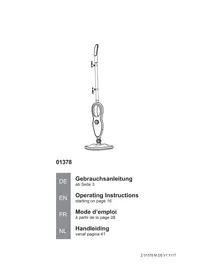
01378 - Steam cleaner Cleanmaxx - Free user manual and instructions
Find the device manual for free 01378 Cleanmaxx in PDF.



| Brand | Cleanmaxx |
| Model | 01378 |
| Product type | Steam cleaner |
| Model number | JJ-SC-013A1 |
| Supply voltage | 220-240 V~, 50 Hz |
| Power | 1500 W |
| Protection class | I |
| Protection rating | IPX4 |
| Water tank capacity | 370 ml max. |
| Steam temperature | Approximately 100 °C |
| Dimensions (approx.) | Not specified in the manual |
| Weight (approx.) | Not specified in the manual |
| Main functions | Steam cleaning of floors, smooth surfaces, textiles, joints; no integrated suction; adjustable steam functions |
| Included accessories | Long brush, spatula, plinth nozzle, circular brush, adapter, filling cup, window nozzle, microfiber cloth, carpet glider, mop cloth (x2), cleaning foot, handle, grip |
| Steam adjustment | Knob with indicator light (red/blue) and two levels (low/high) |
| Maintenance and cleaning | Body wiped with damp cloth; nozzles washable with warm water; mop cloth and microfiber cloth washable per label; not dishwasher or dryer safe |
| Safety | Hot surface, risk of burns; do not direct at people, animals, plants; minimum distance 30 cm; do not use on unsealed wood, soft plastics, leather |
| Spare parts and repairability | After-sales service by DS Produkte GmbH; no user repair |
| General information | Household use only; cord length not specified; cord winding hooks |
| Customer service | DS Produkte GmbH, Am Heisterbusch 1, 19258 Gallin, Germany, Tel. +49 38851 314650 |
| Package contents | Body, handle grip, long brush, spatula, plinth nozzle, circular brush, adapter, filling cup, window nozzle, microfiber cloth, carpet glider, mop cloth (x2), cleaning foot, handle, instruction manual |
Frequently Asked Questions - 01378 Cleanmaxx
User questions about 01378 Cleanmaxx
0 question about this device. Answer the ones you know or ask your own.
Ask a new question about this device
Download the instructions for your Steam cleaner in PDF format for free! Find your manual 01378 - Cleanmaxx and take your electronic device back in hand. On this page are published all the documents necessary for the use of your device. 01378 by Cleanmaxx.
USER MANUAL 01378 Cleanmaxx
natural_image
Line drawing of a vacuum cleaner with handle and control panel (no text or symbols)01378
DE
Gebrauchsanleitung
ab Seite 3
EN
Operating Instructions
starting on page 16
FR
Mode d'emploi
natural_image
Diagram of two mechanical device parts with arrows indicating movement or assembly (no text or symbols)natural_image
Diagram of two identical foot-shaped objects with arrows indicating movement or force direction (no text or symbols)natural_image
Line drawing of a sewing machine needle striking a fabric (no text or symbols)natural_image
Illustration of a sewing machine needle stitching a shoe (no text or symbols)natural_image
Diagram of a sewing machine needle stitching fabric, showing mechanical components and a circular pattern (no text or symbols)natural_image
Diagram of a mechanical assembly with a downward arrow indicating a process (no text or symbols present)natural_image
Two identical line drawings of a handheld electronic device with a screw tip, shown from different angles (no text or symbols)natural_image
Diagram showing two views of a device with arrows indicating direction, no text or symbols present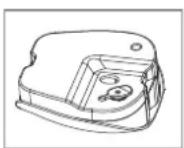
Safety Instructions 17
Items Supplied 20
Device Overview 20
Functions of the Attachments 21
Before Initial Use 21
Assembling the Device 22
Filling the Water Tank 23
Use 24
Cleaning the Device 26
Technical Data 26
Disposal 26
Troubleshooting 27
Explanation of the Symbols


Safety instructions: Read through these carefully and follow them to prevent personal injury.
Caution: hot surfaces!
Warning of the danger of scalding!
Read instructions before use!
Supplementary information
Explanation of the Signal Words
DANGER warns of serious injuries and danger to life
WARNING warns of possible serious injuries and danger to life
CAUTION warns of slight to moderate injuries
NOTE warns of damage to property
Dear Customer,
We are delighted that you have chosen our steam cleaner.
Before using the device for the first time, please read through the operating instructions carefully and keep them for future reference or other users. Also follow the instructions on the device.
If you have any questions about the device and about spare parts/accessories, contact the customer service department via our website: www.service-shopping.de
Intended Use
- The device is intended to be used for cleaning heat-resistant and moisture-resistant surfaces, objects and textiles.

- The device is not suitable for cleaning unsealed wooden floors, soft plastic, wooden furniture or leather.
- Synthetic fabrics, velvet or other delicate materials must not be treated with the device.
-
In the case of surfaces treated with wax, the heat and steam may remove the wax coating.
-
The device is designed for personal use only and is not intended for commercial applications.
- The device should only be used as described in these operating instructions. Any other use is deemed to be improper. Incorrect operation and incorrect handling may cause faults with the device and cause injury to the user.
- The warranty does not cover faults caused by incorrect handling, damage, calcification or repair attempts. This also applies to the normal wear and tear of the individual components.
Safety Instructions
This device may be used by people with reduced physical, sensory or mental abilities or a lack of experience and/or edge, provided they are supervised or have received instruction on how to use the device safely and understand the dangers resulting from this. Children must not play with the device.
- The device must be kept away from children when it is switched on or cooling down.
- The device should only be used and stored out of the reach of children and animals. Improper use of the device can lead to injuries, scalding and electric shock.
- The device must always be disconnected from the mains by pulling out the mains plug when it is left unattended and before as-
sembling, disassembling, filling or emptying the water tank and before cleaning the device.
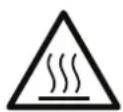
■ CAUTION – Hot surface! You should only hold the device by the handle when you are using it. Parts of the device may also still be very hot shortly after use. Always allow them to cool down completely first before touching them.
- The feed opening for the water tank must not be opened during use. Always ensure that the water tank is firmly shut prior to use.
- The liquid or steam must not be aimed directly at electrical equipment and devices containing electrical components, e.g. the inside of ovens.
- The device must not be used if it has been dropped, if obvious signs of damage are visible or if it has leaks.
- Do not make any modifications to the device. If the device, the mains cable or the mains plug of the device is damaged, it must be replaced by the manufacturer, customer service department or an authorised retailer in order to avoid any hazards.

DANGER – Danger of Electric Shock from Water!
■ Use and store only in closed rooms.
- Do not use the device in rooms with high humidity.
- Never immerse the device, the mains cable or the mains plug in water or other liquids. Ensure that the device, the mains cable and the mains plug cannot fall into water or become wet.
- Should the device fall into water, switch off the power supply immediately. Do not attempt to pull the device out of the water while it is still connected to the mains power!
- Never touch the device, mains cable or mains plug with wet hands when these components are connected to the mains power.

WARNING – Danger of Electric Shock from Damage and Inappropriate Use!
- Only connect the device to a socket with safety contacts that is properly installed and matches the indications on the rating plate of the device. The socket must also be readily accessible after connection so that the connection to the mains can quickly be isolated.
- Only use suitable extension cables corresponding to the indications on the rating plate of the device.
■ The device must be switched off when inserting or removing the mains plug.
In the event of a thunderstorm or damage / faults (e.g. unusual noises, odour or smoke development), switch the device off and pull the mains plug out of the plug socket. Have the device checked by an expert before it is used again.

WARNING - Danger of Scalding from Hot Steam!
This device works with hot steam. Never aim steam directly at people, animals or plants!
- Maintain a distance of at least 30 cm from parts of the device that emit steam.
■ Wear closed shoes when cleaning floors.

WARNING – Danger of Injury!
- Danger of strangulation! Make sure that the mains cable is always kept out of the reach of small children and animals.
- Danger of tripping! Make sure that the connected mains cable does not present a trip hazard.

WARNING – Danger of Fire!
- Do not use the device in rooms containing easily ignitable substances or poisonous and explosive fumes.
- Do not use the device in the vicinity of highly flammable materials.
- Do not cover the device during operation in order to prevent it from catching fire. Do not insert anything into the openings of the device and make sure that these do not become clogged.
- Do not connect the device along with other consumers (with a high wattage) to a multiple socket in order to prevent overloading and a possible short circuit (fire).
NOTE – Risk of Damage to Material and Property
- The device should only be used if it is in full working order and has been completely assembled.
Before you first use it, ensure that the material which is to be treated is suitable for steam cleaning (note the information from the manufacturer!). You should also test the device first on an inconspicuous spot.
■ Very cold glass surfaces (windows in winter) must not be cleaned with the device. They may shatter if they come into contact with hot steam.
■ Never direct the steam on one spot for longer than around 10 seconds. This may damage the surface.
■ Make sure that the mains cable is not squashed, bent or laid over sharp edges and does not come into contact with hot surfaces. Do not wrap the mains cable around the device (danger of the cable breaking).
■ Never pull or carry the device by the mains cable. When the mains plug is removed from the plug socket, always pull on the mains plug and never the mains cable!
■ Never operate the device without water.
■ Protect the device from heat, naked flames, direct sunlight, sub-zero temperatures, strong temperature fluctuations, persistent moisture and wet conditions.
- Do not place any heavy objects on the device, the mains plug, the mains cable or the accessories. Do not subject the device to any collisions.
Items Supplied
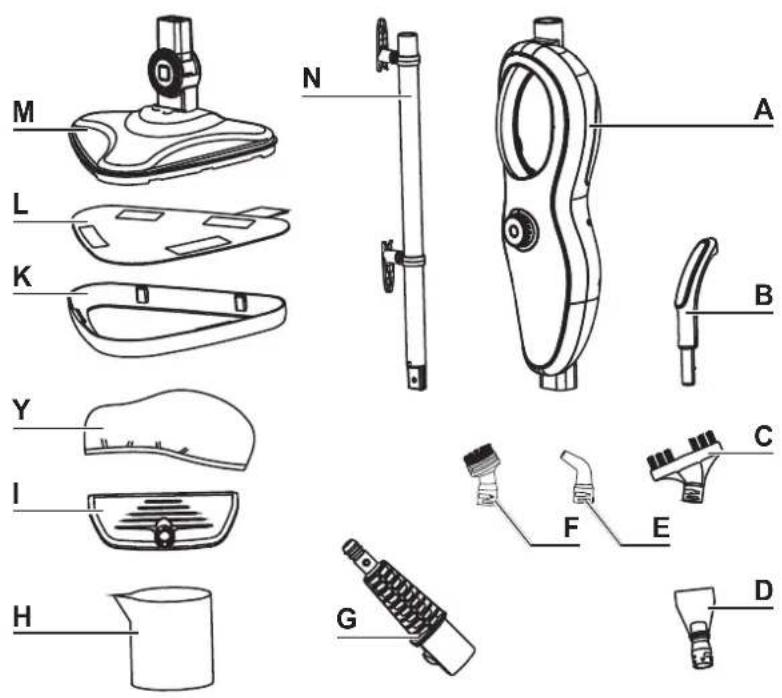
A Main unit (1 x)
B Stem handle (1 x)
C Long brush (1 x)
D Scraper (1 x)
E Crevice attachment (1 x)
F Round brush (1 x)
G Adapter (1 x)
H Measuring cup (1 x)
I Window cleaning attachment (1 x)
J Microfi bre cloth (1 x)
K Carpet glider (1 x)
L Floor cloth (2 x)
M Cleaning foot (1 x)
N Stem (1 x)
- Operating instructions
Device Overview
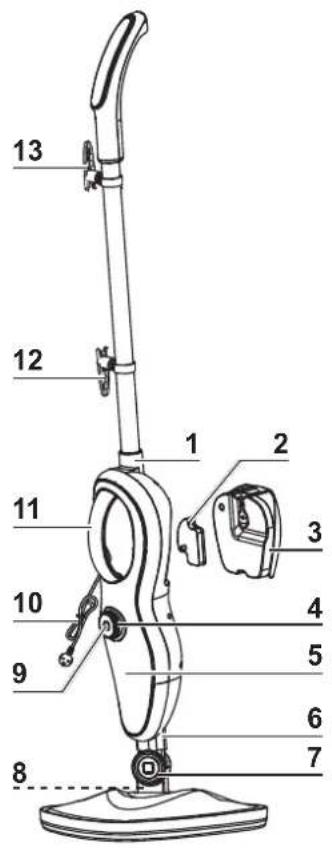
1 Stem mount
2 Anti-limescale cartridge
3 Water tank
4 Wheel for setting the steam power with heat control lamp (red: heating up; blue: the set operating temperature has been reached)
5 2 lights for displaying the set steam power 📄 little steam / 🔊 lots of steam
6 Attachment mount
7 Joint
8 Steam nozzle
9 ⏻ On / Off switch
10 Mains cable with mains plug
11 Handle with steam button (for use as a handheld device without a stem. When the stem is inserted, the steam button is deactivated.)
12 Lower hook for winding up cable, rotatable
13 Upper hook for winding up cable, rotatable
Functions of the Attachments
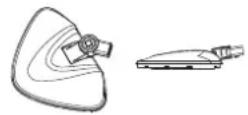
Cleaning foot (M) with floor cloth (L): for steam-cleaning smooth floors and, together with the carpet glider (K), carpets. The angle of the cleaning foot relative to the main unit (A) is infinitely adjustable.
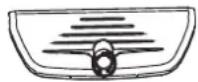
Window cleaning attachment (I): for smooth surfaces such as windows, tiles or mirrors.
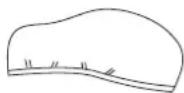
If the associated microfibre cloth (J) is fitted on the window cleaning attachment, textiles can be smoothed and freshened up.

Round brush (F): for cleaning all sorts of possible objects, e.g. ovens, bathroom fittings, bathtubs, sinks, toys.

Crevice attachment (E): for cleaning crevices, corners, recesses or other places which are hard to reach.
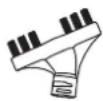
Long brush (C): for removing dirt in crevices and grooves.
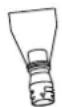
Scraper (D): for removing stubborn areas of dirt, e.g. on stoves, ovens, extractor hoods.
Before Initial Use

PLEASE NOTE!
- WARNING – Danger of Suffocation! Keep children and animals away from the packaging material.
- Unpack all parts and check the items supplied for completeness (see "Items Supplied") and possible transport damage. If you find any damage to the components, do not use them (!), but contact our customer service department.
- Assemble the device (see "Assembling the Device").
NOTE: Any water residues in the tank are due to the fact that this device has been tested.
Assembling the Device

PLEASE NOTE!
■ Use only original spare parts from the manufacturer!
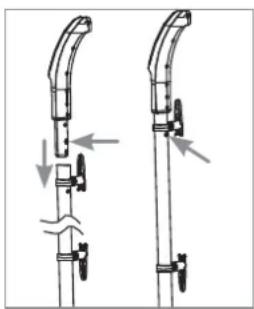
Attaching / Removing the Stem Handle and Stem
natural_image
Diagram of two mechanical device components with arrows indicating motion or assembly (no text or symbols)Attaching:
- Plug the end piece of the stem handle (B) into the stem (N). When you do this, press the locking lug on the end piece so that it fits into the stem. If necessary, rotate the stem handle from side to side a little until the locking lug engages in the stem.
natural_image
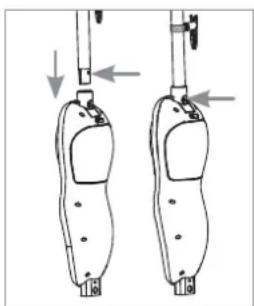
Diagram of two identical mechanical device components with arrows indicating motion or force direction (no text or symbols)- Plug the stem into the stem mount (1) of the main unit (A). The stem must engage.
Removing the stem / stem handle:
- Press the corresponding locking lug and at the same time pull out the stem / stem handle.
Winding Up and Unwinding the Mains Cable
- Winding up: Turn up the upper hook for winding up the cable (13) and turn down the lower hook (12). Then wind the mains cable (10) around the two hooks.
- Unwinding: To quickly unwind the mains cable again, turn down the upper hook for winding up the cable.
Attaching / Detaching the Cleaning Foot
natural_image
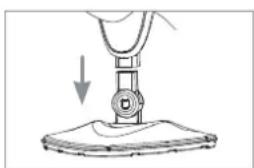
Diagram of a hand using a sewing machine to lift a fabric or material (no text or symbols present)- Attaching: Plug the end piece of the cleaning foot (M) into the attachment mount (6) of the main unit (A). The locking lug must engage in the associated opening of the attachment mount.
natural_image
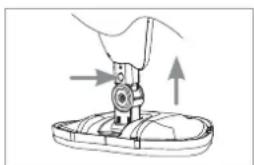
Illustration of a sewing machine needle stitching fabric (no text or symbols)- Detaching: Hold the cleaning foot on the floor with your foot, for example, press the locking lug and pull the main unit upwards.
Attaching the Floor Cloth and Carpet Glider
natural_image
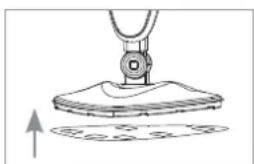
Diagram of a sewing machine needle stitching fabric, showing measurement setup (no text or symbols)- The floor cloth (L) attaches to the cleaning foot (M) by means of Velcro fasteners. It is simply pressed onto the bottom of the cleaning foot and removed after use.
natural_image
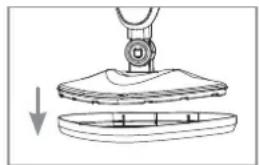
Diagram showing a mechanical assembly with a downward arrow indicating a process (no text or symbols present)- Place the carpet glider (K) flat on the floor and insert the cleaning foot with floor cloth into it.
Attaching / Removing Attachments
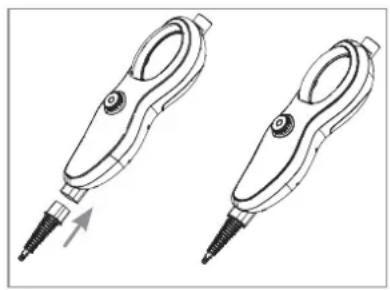
The adapter (G) is required to secure the smaller attachments (C, D, E, F, I) on the main unit (A).
natural_image
Two identical line drawings of a handheld device with a pointed tip and handle, shown from different angles (no text or symbols)- Attaching the adapter: Plug the adapter into the attachment mount (6) of the main unit (A). The locking lug must engage in the associated opening in the attachment mount.
- Removing the adapter: Press the locking lug and at the same time pull out the adapter.
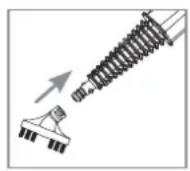
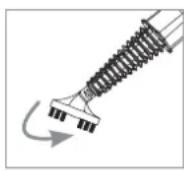
- Attaching an attachment to the adapter: Plug the attachment as far as it will go onto the adapter nozzle and rotate it by 90°.
- Removing an attachment from the adapter: Rotate the attachment on the adapter back by 90^ and then pull it off.
Filling the Water Tank

PLEASE NOTE!
■ Do not overfill the water tank!
- Only ever pour tap water and not distilled water or other liquids into the water tank to prevent any damage to the device!
- Never pour any cleaning agent or additives into the water tank. This might damage the device.
natural_image
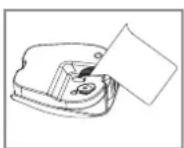
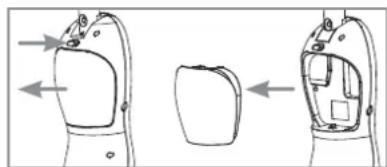
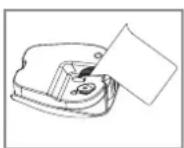
Technical line drawing of a car hood and seat assembly (no text or symbols)- Pull the water tank (3) out of the main unit (A). To do this, press the release button above the water tank and pull it out.
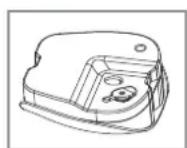
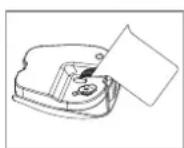
- Pull the seal plug out of the water tank.
- Use the measuring cup (H) that is supplied to pour cold, clean water into the water tank. It holds up to 370 ml.
- Plug the seal plug into the feed opening.
- Insert the water tank into the main unit. It must engage.
Use
Read the safety instructions prior to use!
Cleaning the Floor

PLEASE NOTE!
■ To use the device on laminate flooring, the following must be ensured:
- The laminate must be properly laid and have no gaps or cracks into which moisture could penetrate.
- Test the device first on an inconspicuous spot. Then check it for any waves or ingress of moisture. If the test spot is unblemished, the device can be used to clean the entire laminate floor.
Before using the device, always check the floor cloth for signs of wear. A floor cloth that is worn or has holes in it must not be used. The flooring could be damaged.
If the device is parked after use, a wet spot may form beneath the cleaning foot. With sensitive floors, a cloth should therefore be placed beneath the cleaning foot or parking for a prolonged period of time should be avoided.
- Give the floor a general sweep or vacuum before using the device.
- Attach the stem (N) with stem handle (B) and the cleaning foot (M) with floor cloth (L) to the main unit (A). If a carpet is to be cleaned, use the carpet glider (K) (see "Assembling the Device").
- Fill the water tank (3) with water (see "Filling the Water Tank").
- Unwind the mains cable (10). To do this, turn down the upper hook for winding up the cable (13).
- Stand the device upright. The joint (7) of the cleaning foot locks in place in a vertical position.
-
Insert the mains plug into a properly installed plug socket that is easily accessible.
-
To switch on the device, press the ⏻ On/Off switch (9).
-
Use the wheel for setting the steam power (4) to set the steam power you want. Depending on the setting, one of the two lights (5) switches on (little steam / a lot of steam).
-
The heat control lamp on the wheel for setting the steam power lights up red during the heating process. Once the operating temperature has been reached, the colour changes to blue. The device then starts to emit steam automatically. You can now start cleaning the floor.
-
Hold the device by the stem handle and lower the main unit slightly towards the floor to release the locked standing position. Then slide the cleaning foot slowly across the floor. The floor is cleaned as you do this.
-
If the device makes pumping / humming noises, there is not enough water in the water tank. It needs to be topped up. Switch off the device before topping it up ( ⏻ press the On/Off switch) and pull the mains plug from the plug socket.
-
After use, follow the instructions in the "After Use" section.
Use as Handheld Steam Device

WARNING - Danger of Scalding!
- Never attempt to smooth clothing on people! Hang clothing on a hanger with sufficient clearance on all sides so that heat and moisture cannot cause any damage to any living creatures or objects.
- Detach the stem (N) and the cleaning foot (M) from the main unit (A).
- Secure the adapter (G) with the attachment you want (C, D, E, F, I) on the main unit (see "Functions of the Attachments and "Assembling the Device"). For steam-pressing textiles, the microfibre cloth (J) is fixed to the window cleaning attachment (I).
- Fill the water tank (3) with water (see "Filling the Water Tank").
- Unwind the mains cable (10). To do this, turn down the upper hook for winding up the cable (13).
- Insert the mains plug into a properly installed plug socket that is easily accessible.
- To switch on the device, press the ⏻ On / Off switch (9).
- Use the wheel for setting the steam power (4) to set the steam power you want. Depending on the setting, one of the two lights (5) switches on (little steam / lots of steam).
- During heating, the heat control lamp is lit red. Once the operating temperature has been reached, the colour changes to blue. The steam cleaning can now begin.
- Hold the main unit by the handle (11). Press the button under the handle if you want the device to emit a blast of steam. Allow the attachment to glide slowly over the surface to be cleaned.
- If the device makes pumping / humming noises, there is not enough water in the water tank. It needs to be topped up. Switch off the device before topping it up ( ⏻ press the On / Off switch) and pull the mains plug from the plug socket.
- After use, follow the instructions in the "After Use" section.
After Use

PLEASE NOTE!
■ Empty the water tank fully before storing away the device.
- Switch off the device ( press the On/Off switch (9)) and pull the mains plug from the plug socket.
- Allow the device and accessories to cool down completely.
- Remove the water tank (3) from the main unit after each use and empty it completely.
- Allow the used attachments to dry. Wash the used floor cloth (L) in the manner described in "Cleaning the Device".
- Once all parts are dry, store the device and accessories in a location that is protected from direct sunlight and is out of the reach of children and animals.
Cleaning the Device

PLEASE NOTE!
-
Do not use any solvents, aggressive cleaning agents or cleaning pads for cleaning. They could damage the device.
The attachments are not machine-washable, dishwasher-safe or suitable for tumble drying! Only ever allow them to dry in the air! -
If necessary, wipe down the main unit (A), the water tank (3), the stem (N), the stem handle (B) and the cleaning foot (M) with a soft, slightly damp cloth and then dry them with a soft cloth.
- Apart from the cleaning foot (M), dirty attachments (C, D, E, F, I) can be rinsed with lukewarm water and a mild cleaning agent if necessary. Then allow them to dry in the air.
- Wash the floor cloth (L) and the microfibre cloth (J) in accordance with the instructions on the washing label. Do not use any fabric softener or bleach!
Technical Data
Article number: 01378
Model number: JJ-SC-013A1
Voltage supply: 220 – 240 V\~; 50 Hz
Power: 1500 W
Protection class: I
Degree of protection: IPX4
Capacity of water tank: max. 370 ml
Steam temperature: approx. 100°C



Disposal

Dispose of the packaging material in an environmentally friendly manner and take it to a recycling centre.
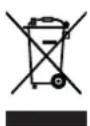
Dispose of the device in an environmentally friendly manner at a recycling centre for used electrical and electronic devices. It should not be disposed of in the regular domestic waste. More information is available from your local authorities.
Troubleshooting
If the device does not work properly, check whether you are able to rectify the problem yourself. If the problem cannot be solved with the steps below, contact the customer service department.

Do not attempt to repair a defective electrical device yourself!
| Problem Possible cause Fix | ||
| The device does not work. / The control lamps do not light up. | The mains plug (10) is not inserted correctly in the socket. | Check the fi t of the mains plug. |
| The socket is defective. Try another socket. | ||
| No mains voltage is present. | Check the fuse of the mains connection. | |
| The device has not been switched on. | Press the ⏻ On / Off switch (9). | |
| No steam is emerging. | The device has not been switched on.PLEASE NOTE: the button under the handle (11) is deactivated when the stem (N) is inserted in the main unit (A). | Press the ⏻ On / Off switch (9). |
| The steam power which is set is too low. | Increase the steam power using the wheel for setting the steam power (4). | |
| The device is not yet ready to operate. | The device needs to heat up for a few seconds before steam can emerge. | |
| The water tank (3) is empty. | Top up the water tank (see “Fill-ing the Water Tank”). | |
| The water tank (3) is not inserted in the main unit (A) correctly. | Check that the water tank fi ts correctly. | |
| The steam nozzle (8) is clogged up. | Clean the steam nozzle. | |
| Loud humming noise | The water tank (3) is empty. | Top up the water tank (see “Fill-ing the Water Tank”). |
Customer Service / Importer:
DS Produkte GmbH
Am Heisterbusch 1
19258 Gallin
Germany
Tel.: +49 38851 314650
(Calls to German landlines are subject to charges. The cost varies depending on the service provider.)
Contenu
Attention, surfaces chaudes!
www.service-shopping.de
natural_image
Diagram of two mechanical device parts with arrows indicating motion or assembly (no text or symbols)Mise en place :
natural_image
Diagram of two identical footshells with arrows indicating movement or force direction (no text or symbols)natural_image
Illustration of a hand using a tool to press down a piece of material, with no visible text or symbols.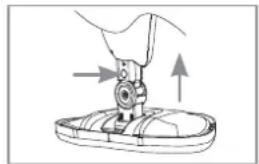
natural_image
Diagram of a sewing machine needle insertion into a base, showing mechanical components and motion arrows (no text or symbols)natural_image
Diagram of a mechanical device with a circular component and a base, showing an upward arrow (no text or symbols)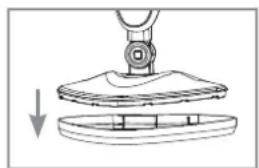
natural_image
Diagram showing a mechanical assembly with a downward arrow indicating a process (no text or symbols present)natural_image
Two identical line drawings of a handheld electronic device with a screw tip and handle, shown from different angles (no text or symbols)natural_image
Technical line drawing of a device's front and side views, showing internal components without any text or symbols.WAARSCHUWING – Verwondingsgevaar!
WAARSCHUWING – Brandgevaar!
natural_image
Diagram of two mechanical device components with arrows indicating motion direction (no text or symbols)natural_image
Diagram of two identical foot pushers with arrows indicating movement or force direction (no text or symbols)natural_image
Diagram of a mechanical device with a downward arrow indicating force or movement (no text or symbols present)natural_image
Illustration of a sewing machine needle stitching a shoe (no text or symbols)natural_image
Diagram of a sewing machine needle with a base and clasp, showing no text or symbolsnatural_image
Diagram of a mechanical assembly with a downward arrow indicating motion or force (no text or symbols present)natural_image
Two identical line drawings of a handheld tool with screw tips, shown from different angles (no text or symbols)natural_image
Diagram showing two views of a device with arrows indicating direction, no text or symbols present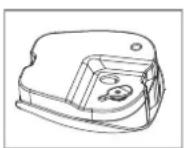
WAARSCHUWING – Verbrandingsgevaar!


- Explanation of the Symbols
- Explanation of the Signal Words
- Intended Use
- Safety Instructions
- DANGER – Danger of Electric Shock from Water!
- WARNING – Danger of Electric Shock from Damage and Inappropriate Use!
- WARNING - Danger of Scalding from Hot Steam!
- WARNING – Danger of Injury!
- WARNING – Danger of Fire!
- NOTE – Risk of Damage to Material and Property
- Items Supplied
- Device Overview
- Functions of the Attachments
- Before Initial Use
- PLEASE NOTE!
- Assembling the Device
- Attaching / Removing the Stem Handle and Stem
- Attaching:
- Removing the stem / stem handle:
- Winding Up and Unwinding the Mains Cable
- Attaching / Detaching the Cleaning Foot
- Attaching the Floor Cloth and Carpet Glider
- Attaching / Removing Attachments
- Filling the Water Tank
- Use
- Cleaning the Floor
- Use as Handheld Steam Device
- WARNING - Danger of Scalding!
- After Use
- Cleaning the Device
- Technical Data
- Disposal
- Troubleshooting
- Do not attempt to repair a defective electrical device yourself!
- Contenu
- Mise en place :
- WAARSCHUWING – Verwondingsgevaar!
- WAARSCHUWING – Brandgevaar!
- WAARSCHUWING – Verbrandingsgevaar!
Brand : Cleanmaxx
Model : 01378
Category : Steam cleaner