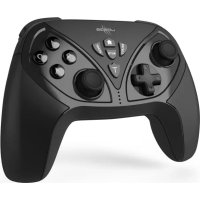
uRage Vendetta 300 Unleashed - Controller HAMA - Free user manual and instructions
Find the device manual for free uRage Vendetta 300 Unleashed HAMA in PDF.



| Product Type | Wireless Game Controller |
| Brand | Hama |
| Model | uRage Vendetta 300 Unleashed |
| Connectivity | 2.4 GHz wireless via nano-USB dongle |
| Range | Up to 10 meters |
| Power Source | Li-Po battery 3.7 V 400 mAh |
| Battery Life | Approximately 12 hours |
| Charging Time | Approximately 2.5 hours |
| Battery Type | Built-in, rechargeable via USB-C |
| Programmable Buttons | 2 M buttons with action button programming |
| Turbo Function | Yes, on action buttons (1/2/3/4/L/R/L2/R2/L3/R3) |
| Auto Function | Yes, on the same buttons as Turbo |
| Vibration | Haptic feedback with motors |
| Compatibility | PC |
| Package Contents | Controller, USB-C cable, nano-USB dongle, manual |
| Maintenance | Clean with a lint-free damp cloth, avoid harsh detergents |
| Safety | Domestic use, keep away from heat, out of reach of children |
| Warranty | Exclusion in case of modification or non-compliant use |
| Recycling | Compliant with European directives 2012/19/EU and 2006/66/EC |
Frequently Asked Questions - uRage Vendetta 300 Unleashed HAMA
User questions about uRage Vendetta 300 Unleashed HAMA
0 question about this device. Answer the ones you know or ask your own.
Ask a new question about this device
Download the instructions for your Controller in PDF format for free! Find your manual uRage Vendetta 300 Unleashed - HAMA and take your electronic device back in hand. On this page are published all the documents necessary for the use of your device. uRage Vendetta 300 Unleashed by HAMA.
USER MANUAL uRage Vendetta 300 Unleashed HAMA
OperatingInstructions
Bedienungsanleitung
Moded'employoi
Instruccionesdeuso
Gebruiksaanwijzing
Istruzioniperl'uso
Instrukcjaobslugi
Hasznalatiutmutató
Manualdeutilizare
Návodk p oužiti
Návodnapoužitie
Manualdeinstruções
Bruksanvisning
PykoBODCTBOONKcNlyaTaun
Pa6oTHaHHCTpyKcIa
O8nyiecxponc
Kullanmakilavuzu
Käyttoohje
Whetheritbesportssimulationsorbeat-em-ups, experienceyourgameevenmore intensively: with our Vendetta series, you really are in the centre of the action right fromtheget-go. Equippedwithmotorsandvibrationfunctions, theyofferyou situation-dependent reactions you can feel to your game play. Assign your additional keys as you wish with individual functions or entire combos. An ergonomic design and idealgripmakeourproductsespeciallycomfortable. Theyallowyoutoenjoycomplete andprecisecontrolatanyspeed.
1.Explanationof warningsymbolsandnotes
Warning
Thisssymbolisusedtoindicatesafetyinstructionsontodrawyourattentionontospecifichazardsandrisks.

Note
This symbolisusedtoindicateadditionalinformationorimportantnotes.

2.Packagecontents
- Vendetta300gamepad
-USB-Cchargingcable
NanoUSBdongle
Theseoperatingsinstructions
3.Safetyinstructions
The product is intended for private, non-commercial use only.
- Donotusetheproductintheimmediatevicinityofheaters,otherheatsourcesorindirectsunlight.
- As with all electrical products, this device should be kept out of the reach of children.
- Donotdroptheproductanddonotexposeittoanymajorshocks.
- Do not operate the product outside the power limits specified in the technical data.
- Do not use the product in areas in which electronic products are not permitted.
- Be considerate. High volumes can disturb or interfere with your surroundings.
- Donotopenthedevicereorcontinuetooperateititifbet建成后
- Thebatteryispermanentlyinstalledandcannotberemoved;disposeftheproduct asawholeinaccordancedwiththestatutoryregulations.
- Keep the packaging material out of the reach of children due to the risk of suffocation.
- Disposeofpackagingmaterialimmediatelyinaccordancewiththelocallyapplicable regulations.
- Do not modify the product in any way. Doing so voids the warranty.
4.Start-upandoperation
Note-Pairingthecontroller

- Notethatthemaximumrangeis10metreswithoutobstaclessuchaswalls, people,etc.
4.1 Connecting the controller
- ConnecttheUSBdongleofthecontroller toyourPCandpresstheHomebutton on thecontroller.
4.2Chargingthebattery
Warning- r rechargeablebattery

- OnlyusesuitablechargingdevicesorUSBportstochargetheproduct.
- DonotusedefectivechargersorUSBportsanddonotattempttorepairthem.
- Donotstore, chargeorusethedeviceminextremetemperatures.
-
Chargeregularly(atleastquarterly)duringperiodsofprolongedstorage.
-
Fully charge the controller once before using it for the first time.
- ConnectthesuppliedUSB-CchargingcabletotheUSB-Cportonthecontroller.
- Connect the free plug on the USB-C charging cable to a suitable USB charger. To do this, consult the operating instructions for the USB charger you are using.
- During the charging procedure, therespective LEDslightupred.
- If the controller is not connected to the PC, all 4 LEDs will flash.
Note- c hargingprocedure

A c o m p l e t e c h a r g i n g c y c l e t a k e s a b o u t 2 . 5 h o u r s
- The controller's rechargeable battery can be charged both when it is connected and when on standby.
- If the battery capacity is too low, the player LED will flash and the vibration functionwillstart
- PleaseusetheenclosedUSB-Ccableonlyforchargingthecontroller.
- Theactualbatterylifewillvarydependingonhowyouusethedevicethesettings andtheenvironmentalconditions(batterieshavea limitedlife).
4.3Additionalkeys
The following action keys can be assigned to the additional keys: 1/2/3/4/L/R/L2/R2/L3/R3/D-PAD
- Individualfunctionsorkeycombinationscanbprogrammed.
- Your settings remain active after an interruption to the connection.
- Programmingmodeisabortedafter30seconds.
- Programmingmodeisendedafter25keys.
4.4Programmingtheadditionalkeys
- Press and hold the respective M button and Start briefly.
ThefourLEDswillnowflashalternately. - Nowentertheindividualkeyorkeycombination.
To finish, press the relevant M key again. - To delete the M keys, hold "Start" and an M key pressed.
- Now press the M key for which you wish to delete the setting.
5.Careandmaintenance
- Only clean this product with a slightly damp, lint-free cloth and do not use aggressivecleaningagents.
6.Turbofunction
- The following action keys can be assigned a Turbo function: 1/2/3/4/L/R/L2/R2/L3/R3
- To assign the relevant key, press and hold the action key and Turbo key at the same time.
- To remove the Turbo function, repeat the procedure.
- Your settings will be reset after an interruption to the connection.
7.Autofunction
The following action keys can be assigned theAutofunction:
1/2/3/4/L/R/L2/R2/L3/R3
- To assign the relevant key, press and hold the action key and then press the Turbo keytwice.
- To remove the Auto function, repeat the procedure.
- Your settings will be reset after an interruption to the connection.
8.Warranty disclaimer
Hama GmbH & Co KG assumes no liability and provides no warranty for damage resulting from improper installation/mounting, improper use of the product from failure to o bserve the operating instructions and/or safety notes.
9. Technical data

| Batt.type3.7V L i-Po | |
| Min.capacity410mAh/ 1 .52Wh | |
| Typecapacity400mAh/ 1 .48Wh | |
| ChargingtimeApprox.2.5hours | |
| OperatingtimeApprox.12hours |
10.Recyclinginformation
Noteonenvironmentalprotection:
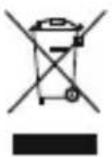
Following the implementation of European Directives 2012/19/EU and
2006/66/EUtothenationallegalsystems, the following applies:
Electricalandelectronicdevicesaswellasbatteriesmustnotbedisposed
of with household waste. Consumers are obliged by law to return electrical
andelectronicdevicesaswellasbatteryestohedesignatedpubliccollectionpointstorthepointofsaleattheendoftheirservicelives.Detailedinformationonthistopicis defined in the national laws of the respective country. This presence of the abovesymbolontheproduct,operatinginstructionssorpackageindicatesthatheproductissubjecttotheseregulations.Byrecycling,reusingthematerialsorotherformsofutilising old devices/batteries, you are making an important contribution to protectingourenvironment.
11.DeclarationofConformity

Hama GmbH & Co KG hereby declares that the radio equipment type [00186075] is in compliance with Directive 2014/53/EU. The full text of the EU declaration of conformity can be found on the following website: www.
hama.com->00186075->Downloads.
Frequencyband(s)2400-2 483MHz
Maximumradio-frequencypowertransmitted0 d B m
IT'SALL A BOUTU!
hama.com -> 00186075 -> Downloads.
com->00186075->Downloads.
Frekvenciasáv(ok)2400- 2 483MHz
Maximalissugarzottjelerosseg0 d B m
IT'SALL A BOUTU!
com->00186075->Downloads.
3.Yka3aHnIyntExHnKe6e3OnacHOCTu
-Изденипразданauthею ДлДOMaшero,HenpOMbIшлсногОпрIMeHeHЯ.
He nCnoJIb3yIte n3dJIeN B HEnOcpeICTBeHHoB 6JIu3OCTn OT CnCTem OTOnJIeHnA, dpyrNX nCTOCHNKOBTePnAnJInIOpIprMbIMCOLHeuHbIMNuLyamn.
-Данhoeидени,кakИВCEэл ektpuueckne npi6opbl,Clenyet 6peybOT deTe!
-ИЗбeraи Te naдени nIЗделя n He noДberpaIte erO cnIbHbIM BnIbpaIyM.
-ПиИСпОЛьЗOBAHИИЗДeЛЯНeДОуСКaIТeнpeВыISeHЯnpeДeЛamOuHOCtN, yKa3aHHOrOB T exHnueCKnXXapakTepnCTnKax.
- He npimehnayte B 3aipethblx 30hax.
-Приипговиманue.ВысокиуровьгрмкостиможeТмeшаТьрабоTe OKржадце罗оборудованя.
- He BCKpbIbAaTe n3dJIeNHe nICNoJIb3yIte ero npu HaJIuHn NOBpeKdEHH.
- AkkyjITop YBJIeTcA tauHOapHbIM n He NOJLeXHT deMOHTaXy; yTNJIIN3npyuTe N3JeJIne ceJIKOM B COOTBeTCTBmC 3aKOHoJaTeJbHbIMn PpeJNCSAHJMaM.
He donyckaite deten kynakoobohomy MaTePnaLy, cyueCTByet ONaCHOCTb ydysb.
Cpa3yyTnIIN3npyIteynakOBOHbIMaTePnaLCORlaCHOJeCTByIOUmmMeCTHbIM npednncAHmnoyTnIIN3aun.
- He BnOcIte B n3dJIe NOKCTpyKTHBHe i3MeHEny. B pe3yJIbTaTe 3TOro JIO6bIe rapaHTnHbIE06a3aTeJIbCTBaTepeJIOTCBOIOCNly.
4. BBOD B éKcnnyatauio npa6ota
Yka3aHHe:coprrxehneKoHTpOJIepa

- YuHTbIbAaTe, yTO daJIbHOCTb DeIcTBn npn OTCyTCTBn npenrTCTBn, HApnPmep CTeH, JIOJeN T. D., COCTaBnaRt MaKc. 10 MetpoB.
4.1PoiKJIoueHneKOHTpOJIpe
- Bctabte USB-aanTep kohtpoJIpepa B baw PIK n haxmTe KhoNky Home ha koHTpoJIpe.
4.23apЯdkaakKymyIaTopa
IpeynpeXeHne-aKkyMylTOp

Pa3pe7aetcnoB30BaTbIJa3apJIKUToBkoCBMeCTmBie3apJHbIe yctpoiCTbaIUSB-pa3bEmbl.
He nCnoJb3yIe HeNCnpaBhIe 3apAINHbIe yCTpoiCTBa IIN USB-pa3beMbI IN He nbITaITecbIXpeMOHTnPOBaTb.
- Избeraи Te xpaHeHn, 3apIck n IcNoJIb3OBaHn yI3eJIpy npI npeIeIbHbIX Tempepatypax.
-Придпintьномхраненируларно3apяжайten3дели(eнержеденогор pa3ab K Bavtan).
- IpeepBbIMnpmHeHemHeo6xOdmoN0HOCTbIO3apAINTbKOHToJIeP.
- Повлочиприлагамь зapадный ka6eь USB-C к pa3bemy USB-C КOHтроллеса.
- Поdkлочte свобоньшт ekр зардногкабел USB-CК похору Emy 3apdHOMy yctpoCTBy c USB-noptom. Co6lnoJaTe pykoBoDCTBO NO kCnIpyatauIN ncnoJb3yeMOrO3apdHOroUSB-yctpoCTBa.
- Bobpem3apJdKNCBETOIDIObIMrAOTKpaChbIMCBeTOM.
- Ecni KOHTpoJInep He noIckJIIOueH K KOMnbHOtepy, BCE 4 CBeToIIOJa MmraHOT.
YkaaHne - npouee3aprKn

-Полныйптосясаразякдлintсаяково2,5уасов
3apKa aKKyMylTopa KOHTpOJIpepa MoKet BbIIOJHrTbc KaK B NOKJIIOUeHHOM COCToHn,TaKn B pexmEoxuHaHn.
- Ecnu ypoBeHb 3apraCnUkOM Hn3Kn, CBeToIOoI npNCtABKn Muraet, cyHKcuaBn6paunOTKlOuaETc
- История BXODЯць вkomплковаю USB-C толъкдя зараздки Контюлега.
8.MCKJIIOUeHHeoETBcTBeHHOCTn
Hama GmbH & Co. KG He HeceT OTBeTCTBHeHOctn 3a NOBpeXdEnn, BO3NkUne B pe3yIbTaTe HeHaJIeXaUeYCTaHOBKn, MOHTaXa N HeHaJIeXaUeRO NCNoJIb3OBAHn I3DeJIINIIHecO6JIIODeHnA Tpe6OBAHnpyKOBoDCTBaNO3KcNlYaTaUuNN/IIu IyKa3aHnINotExHnKe6e3ONaCHOCTn.
9.TexHnuecknexapaKTepeNTnK

3.Yka3aHn83a6e3oNaCHOCT
- PpOdyKbT e npEeBnEe 3a JInuHa, HeCToNaHcKa 6ntoBa ynoTe6a.
He n3noJ3BaIte npOdykTa B HEnocpeIcTBeHa 6JIn30CT Jo OToPJIteJIHn UpeNi, dpyrN i3TOUHNi Ha TOnJIHa IIn Ha DInpeKTHa CbHueBa CBETNIHa. - Побно на BCNUKи eilektpnueckn npoynkT, to3n npoynkT He 6nBa da nonaDa B pbute Naedeza!
He no3BoJyBaIte Ha npOdykTa da naJa u He ro n3JaRaIte Ha cnJIHn Bn6paCNI.
He n3noJ3BaIte npOdyKta n3BbH HeROBInTe rpaHnCn Ha MoUcHocTt, NOCoYeHN BTEXHueCKInTe d aHHN.
He n3noJ3BaIte npOdyKta B 30Hn, B KOINTo He ca pa 43peWeH eJeKtpoHNn npOdyKT.
CbO6pa3aBaIe ce. CnHInTe 3ByuMOrat da npevat nn Da BpeJr Ha 3aObkaJaAata BucpeHa.
He oTbaprIe npOdykTa n npn noBpeJa He npOdbJkaBaIte da ro I3noJ3BaTe. - BaTePnIa e HeNoBnXnHO BrpaIeHa n He MoXe Da ce Maxa, N3XBbPJIeTe npOyKTa KaTo 1JIoNOpEa 3 aKOHOBnTEpa3nopeI6n.
- 3aʌbʌŋxɪteɪnHO ἀρβʌxTe Maʌknte έεια έληeʊe OT OnaKOBbHŋa Mætpɪaŋ,ɪMa onaCHOCT OT3aʌduyʌbaVe.
- I3xBbPte ONaKOBbHnMaTePnaJI BeDHaRa CbIaCHO DeiCTBaUHTe Ha MAcTO pa3npoeBn3aN3XBbPJIHe H a O TnAdbu.
He npabete npomeni B ypea. Taka 3aurybnte npabo Ha BCaKBN rapaHIOHNI pTeHcnn.
8.N3KJIIOUyBaHeHaOtroBOPHOCT
Hama GmbH & Co KG He noema OTROBOPHOCT nIi rapaHnue 3a nobpeDi, KOIToc a pe3yIiTat OT He npabnHa nHCTaIauN, MOHTax n ynoTpe6a Ha npOdyKta nIi OTHecna3BaHeHapbKOBOdCTBOT03aEKcNloaTaUeN/IIInHayKa3aHnraT3a 6e3oNaChOCT.
9.TexHnuecknDaHHN

| Бат.Tир3.7VLi-Po | |
| Мин. КалачитET | 410mAh / 1.52Wh |
| ТиркалачитET400mAh/ 1 .48Wh | |
| Вөрemeзazapжданеоколо2,5час | |
| РавOTновөрemeоколо12час |
10.Yka3aHn3aun3XbBpJnHe
Yka3aHneOTHOcH03aUNTaTaHaOKoJHaTacpeJa:
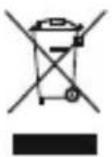
OTMOMeHTaHa npnlaRaHeToHaebPoneNcKnteIpeKtBn2012/19/ECn 2006/66/EO B H aUHOHaJIHOTOpaBOHaCbOTBeTHNTeCTpaHNBaXn CNeIHDOTO:
EneKtpnuecknte n eJeKtpoHHnte ypei n 6aTeepnnte He 6nBa da
ce n3xBbPJIr c 6ntOBnTe OTnAbu. IOTpeBnTeJIr e JIbXeH NO 3aKOH da BbpHe eJekTpncEcknTe N eJekTPOHHnTe ypeN IN 6aTePnIne B KpaHa TeXnna EKcIIoataUHOHeHcPOKaHn3rgaDeHnTe3aueNTaO6ueCTBeHNyHKTOBe3a C6bnpaHaHOtNaDbUcnINHaTbProBCKnro6ekt. IOpno6HoCTnToENOBnPoCaca PerlaMeHTnpAHn B 3aKOHOdaTeJICTBOTo Ha CbOTBeTHata CTpaHa. CmMBoJIbT BbpxY npOdykTa, yNbTBaHeto 3a yNoTpe6a INIOn ONAKBkATA HACOUBKaTn HAcOUBKa Tn Ka3nPa3nope6n. Upe3peuKnIPAheTo, npepa60TKaTahAmATEpHaJIteUNIpyrnΦopMnHa ONoJ3OTBOPRABaHnactapnteypen/6aTePnNBneDOpnPnHacrTe3a3aUHTaHa Na7aTaoKOLHacpeDa.
11.ДeКларuaи3acbOTBETCTBnE

C hactoTo Hama GmbH & Co KG DeKnappa, Ye TnBt Ha paAnoo6OpyDbaHeTo [00186075] cBoTBcTbHa Na DnpeKtNbBa 2014/53/EC. TbJHnAaTeKCTHaECdKeLapauaTa3acBoTBcTBnEe H aJIuHennHa
Cleidnna nHTepHet aDPEC: www.hama.com->00186075->N3TeTJIaHnI.
| Чектона лесда/чектонлесда | 2400 - 2483 MHz |
| Мakсимализльчateелhamоц�数0 d B m |
IT'SALL A BOUTU!
EITE npoketai yia npoooioiown a0hnoaivv eite yia Beat 'em Up - znote to naixvi, twa pa akouma nio evtova: Me tn oepa Vendetta macpiokeote oTo kevpto nC dpao. Eonlloevnuekvntnpcekaileitoupyiecfoanoc,acnpooepeiagooonmuewtc avldpaaceic oTo naiydi ac, avaloya me tvkataoan. AvtioxioTe miovwve c λitoupyiec n oloknpouc ouvduoouc ota eninleov nnktpa, onwc thet. O epyovoukoocxodiaoockaitokaletepokpatnaakavouvtanpoiovtamaiaitepa aveta. ZAC pooepouvakpiBec xepiogkai nnpn eleyxo eonoiadnnote taxuteta.
com->00186075->Downloads.
| Frekvensbånd2400- 2 483MHz | |
| Maksimalsendeeffekt0 d B m |
IT'SALL A BOUTU!
com->00186075->Downloads.
| Frekvensbänd2400- 2 483MHz | |
| Avstråltmaksimalsendeeffekt0 d B m |
IT'SALL A BOUTU!
Bilo da se radi o sportskim simulacijama ili Beat 'em Ups - doživi tvoju igru još intenszivnije: Sa našom Vendetta serijom si odmah zaista u igri. Opremljeni motorima i funkcjija vibracija, u zavisnosti od situacije nude ti primetne reakcjje na tvoj Gameplay.Zauzmidodatnetastereslobodnprematvojimželjamasapojejinačnim funkcjija ili celim kombinacijama. Ergonomski dizajn i njabolje držanjeČine naše proizvode posebno udobnim. Oni ti omogucavaju precizno upravljanje i potpunu kontrolupribilokojojbrzini.
1.Objasnjenjesimbolaupozorenjainapomena
Upozorenje
86652Monheim/Germany

- 1.EXPLANATIONOF WARNINGSYMBOLSANDNOTES
- WARNING
- NOTE
- 2.PACKAGECONTENTS
- 3.SAFETYINSTRUCTIONS
- 4.START-UPANDOPERATION
- NOTE-PAIRINGTHECONTROLLER
- 4.1 CONNECTING THE CONTROLLER
- 4.2CHARGINGTHEBATTERY
- WARNING- R RECHARGEABLEBATTERY
- NOTE- C HARGINGPROCEDURE
- 4.3ADDITIONALKEYS
- 4.4PROGRAMMINGTHEADDITIONALKEYS
- 5.CAREANDMAINTENANCE
- 6.TURBOFUNCTION
- 7.AUTOFUNCTION
- 8.WARRANTY DISCLAIMER
- TECHNICAL DATA
- 10.RECYCLINGINFORMATION
- NOTEONENVIRONMENTALPROTECTION
- 11.DECLARATIONOFCONFORMITY
- IT'SALL A BOUTU
- 3.YKA3AHNIYNTEXHNKE6E3ONACHOCTU
- BBOD B ÉKCNNYATAUIO NPA6OTA
- YKA3AHHE:COPRRXEHNEKOHTPOJIEPA
- 4.1POIKJIOUEHNEKOHTPOJIPE
- 4.23APЯDKAAKKYMYIATOPA
- IPEYNPEXEHNE-AKKYMYLTOP
- YKAAHNE - NPOUEE3APRKN
- 8.MCKJIIOUEHHEOETBCTBEHHOCTN
- 9.TEXHNUECKNEXAPAKTEPENTNK
- 3.YKA3AHN83A6E3ONACHOCT
- 8.N3KJIIOUYBAHEHAOTROBOPHOCT
- 9.TEXHNUECKNDAHHN
- 10.YKA3AHN3AUN3XBBPJNHE
- YKA3AHNEOTHOCH03AUNTATAHAOKOJHATACPEJA
- 11.ДEКЛАРUAИ3ACBOTBETCTBNE
- 1.OBJASNJENJESIMBOLAUPOZORENJAINAPOMENA
- UPOZORENJE
Brand : HAMA
Model : uRage Vendetta 300 Unleashed
Category : Controller