054692 - Controller HAMA - Free user manual and instructions
Find the device manual for free 054692 HAMA in PDF.


Pick your language and provide your email: we'll send you a specifically translated version.
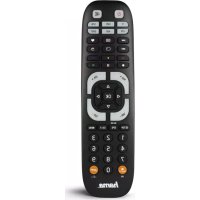
| Product type | Universal remote control |
| Brand | Hama |
| Model | 054692 |
| Color | Black |
| Dimensions (LxWxD) | 17 x 5 x 2.5 cm |
| Weight | Approximately 100 g |
| Power supply | 2 AAA batteries (1.5 V) not included |
| Range | Up to 10 meters |
| Frequency | Infrared (IR) |
| Number of keys | 30 keys |
| Programming | Automatic and manual by codes |
| Compatible devices | TV, set-top box, DVD/Blu-ray player, amplifier |
| Learning function | Yes |
| Memory | Up to 4 devices |
| Care and cleaning | Clean with a soft, dry cloth |
| Safety | Keep out of reach of children, do not expose to moisture |
| Spare parts and repairability | Standard batteries available commercially; device not user-repairable |
| General information | Manual available online, delivered without batteries |
Frequently Asked Questions - 054692 HAMA
How to program the remote for my TV?
To program the remote, turn on your TV and the remote. Press the SET key until the indicator flashes. Enter the 4-digit code for your brand (refer to the code list). If the indicator turns off, programming is successful. Test the functions (volume, source). If it doesn't work, try automatic search.
Which codes to use for my TV brand?
The codes are provided in the manual. For common brands: Samsung (0123, 0456), LG (1122, 1345), Sony (2111, 2212), Philips (3111, 3212). You can also perform an automatic search to find the correct code.
How to perform an automatic search?
Turn on the device to control. Hold the SET key until the indicator flashes. Point the remote at the device and press VOL+ repeatedly. When the device turns off, press SET to save the code. Then test the functions.
How to replace the batteries?
Open the battery compartment on the back of the remote. Insert two AAA batteries observing polarity (+/-). Close the cover. Use new branded batteries for optimal performance. Remove batteries if you do not use the remote for a long time.
What to do if the remote does not work?
First check the batteries: are they correctly inserted and not depleted? Make sure there is no obstruction between the remote and the device. Verify that the device is on and compatible. If the problem persists, reset the remote or reprogram it.
How to reset the remote?
Remove the batteries, wait 10 seconds, then reinsert them. Simultaneously press and hold the SET and VOL- keys for 5 seconds until the indicator flashes rapidly. This erases all programming. You will need to reprogram your devices.
Is the remote compatible with all devices?
The remote is compatible with most brands of TVs, set-top boxes, DVD players, and amplifiers using infrared. However, some very recent or older models may not be supported. Refer to the brand and code list in the manual.
How to add a new device?
Repeat the programming procedure for each device. Use the device selection keys (TV, DVD, etc.) to choose the device to control. You can program up to 4 different devices. Each selection key corresponds to one device.
What is the maximum range of the remote?
The infrared range can reach up to 10 meters in direct line of sight. The operating angle is approximately 30 degrees on each side. For best reception, point the remote directly at the device's receiver.
Where to find the complete user manual?
The manual is available for free download at notice-facile.com in PDF format. You can also request a translation by choosing your language and providing your email address on the product page.
User questions about 054692 HAMA
0 question about this device. Answer the ones you know or ask your own.
Ask a new question about this device
No questions yet. Be the first to ask one.
Download the instructions for your Controller in PDF format for free! Find your manual 054692 - HAMA and take your electronic device back in hand. On this page are published all the documents necessary for the use of your device. 054692 by HAMA.
USER MANUAL 054692 HAMA
Manual assistant
Powered by Anthropic
Waiting for your message
Product information
Brand : HAMA
Model : 054692
Category : Controller