PAKP004E - Keyboard TARGUS - Free user manual and instructions
Find the device manual for free PAKP004E TARGUS in PDF.


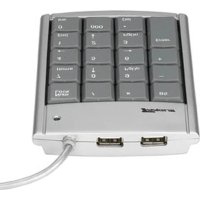
| Product type | Mini numeric keypad with 2-port USB hub |
| Brand | Targus |
| Model | PAKP004E |
| Dimensions | 134.2 x 90 x 15.5 mm |
| Weight | 130 g |
| Power supply | USB bus (5 V DC ± 10 %, 100 mA max) |
| Interface | USB low speed (1.5 Mbps) |
| Compatible operating systems | Windows 98/Me/2000/XP |
| Main functions | Numeric input, cursor movement keys, Num Lock |
| Number of keys | 20 keys (standard numeric keypad) |
| Indicators | Num Lock indicator |
| Built-in USB hub | 2 downstream USB ports |
| Material | ABS plastic |
| Color | Black |
| Included accessories | Built-in USB cable |
| Maintenance and cleaning | Disconnect the USB cable, clean with a soft, dry cloth. Do not use liquids or abrasive products. |
| Safety and usage conditions | Use on a flat, stable surface, do not expose to moisture, avoid shocks and extreme temperatures. |
| Warranty | 2 years, covers hardware and manufacturing defects |
| Technical support | Website: www.targus.com/support, phone: +33 0 1-64-53-9151 (France) |
Frequently Asked Questions - PAKP004E TARGUS
User questions about PAKP004E TARGUS
0 question about this device. Answer the ones you know or ask your own.
Ask a new question about this device
Download the instructions for your Keyboard in PDF format for free! Find your manual PAKP004E - TARGUS and take your electronic device back in hand. On this page are published all the documents necessary for the use of your device. PAKP004E by TARGUS.
USER MANUAL PAKP004E TARGUS
USB MINI KEYPAD WITH 2-PORT HUB

Making Your Mobile Life Easier.®
Visit our Web site at: www.largus.com
Features and specifications are subject to change without notice.
© 2004 Tergus Group International and Targus, Inc.
400-0153-003A
USER'S GUIDE
Making Your Mobile Life Easier.®
BRUSSELS HANNOVER BARCELONA TOKYO MILANO AMSTERDAM SINGAPORE LONDON PARIS NEW YORK LOS ANGELES TORONTO HONG KONG SYDNEY
PMS Black 15%
PMS Black 100%
English
Introduction 4
Installing Default Drivers 4
Using the Keypad 5
Specifications 5
Technical Support 6
Deutsch
Einführung 9
Support technique 22
Italiano
Introduzione 25
TARGUS USB MINI KEYPAD WITH 2-PORT HUB
Introduction
Congratulations on your purchase of the Targus USB Mini Keypad with 2-Port Hub. This user's guide describes how to connect the keypad to your computer and install default software drivers.
System Requirements
To use the keypad your computer must meet the following hardware requirements and run one of the operating systems listed below.
Hardware
- PC with an Intel ^ Pentium ^ processor or equivalent
- USB 1.1 or 2.0 interface
Operating System
- Wind®o98/Mse/2000/XP
Installing Default Drivers
1 Turn off your computer.
2 Plug the USB connector into an available USB port on your computer.
3 Turn on your computer.
Your computer's operating system identifies the keypad and begins installing the default driver. Follow any on-screen procedures to complete the default driver installation.
Using the Keypad
Activate Num Lock (default is on)
Definition of the keys:
| Host Keypad Description | ||
| ON | ON Both | input numbers |
| OFF | Host: Input numbersKeypad: Control direction key | |
| OFF | ON | Host: Input lettersKeypad: Input numbers |
| OFF | Host: Input lettersKeypad: Control direction key | |
Specifications
Power Consumption DC5V±10% under 100mA without downstream device
USB Bus Power low speed (1.5Mbs)
Dimensions 134.2 x 90 x 15.5mm
Weight 130 g
Technical Support
For technical questions, please visit:
Internet: http://www.targus.com/support.asp
Australia
Internet: www.targus.com.au
Email: infoaust@targus.com
Monday through Friday, 8:30 a.m. (08:30) to 5:30 p.m.
(17:30) Eastern time: 1-800-641-645
Canada
Monday through Friday, 9:00 a.m. (09:00) to 5:00 p.m.
(17:00) Eastern time: 888-827-4877
Europe
Belgium +32 0 02-717-2451
Denmark +45 0 35-25-8751
Finland +35 8 922948016
France +33 0 1-64-53-9151
Germany +49 0 21-16-579-115
Italy +39 0 24-827-1151
Netherlands +31 0 2-0504-0671
Norway +47 2 2577729
Spain +34 0 91-745-6221
Sweden +46 0 8-751-4058
Switzerland +41 0 1-212-0007
United Kingdom +44 0 20-7744-0330
Eastern Europe & others +31 0 20-504067
New Zealand
Monday through Friday, 8:30 a.m. (08:30) to 5:30 p.m.
(17:30) Eastern time: 0800-633-222
Product Registration
Targus recommends that you register your Targus accessory shortly after purchasing it.
To register your Targus accessory, go to:
http://www.targus.com/registration.asp
You will need to provide your full name, email address, phone number, and company information (if applicable).
Warranty
Targus warrants this product to be free from defects in materials and workmanship for one year. If your Targus accessory is found to be defective within that time, we will promptly repair or replace it. This warranty does not cover accidental damage, wear and tear, or consequential or incidental loss. Under no conditions is Targus liable for loss of, or damage to a computer; nor loss of, or damage to, programs, records, or data; nor any consequential or incidental damages, even if Targus has been informed of their possibility. This warranty does not affect your statutory rights.
Warranty Registration at:
http://www.targus.com/registration.asp
Regulatory Compliance
This device complies with Part 15 of the FCC Rules. Operation is subject to the following two conditions: (1) This device may not cause harmful interference, and (2) This device must accept any interference received, including interference that may cause undesired operation.
FCC Statement
Tested to Comply
This equipment has been tested and found to comply with the limits of a Class B digital device, pursuant to Part 15 of the FCC Rules. These limits are designed to provide reasonable protection against harmful interference in a residential installation. This equipment generates, uses, and can radiate radio frequency energy and if not installed and used in accordance with the instructions, may cause harmful interference to radio communications. However, there is no guarantee that interference will not occur in a particular installation.
If this equipment does cause harmful interference to radio or television reception, which can be determined by turning the equipment off and on, the user is encouraged to try to correct the interference by one or more of the following measures:
- Reorient or relocate the receiving antenna
- Increase the separation between the equipment and receiver
- Move the computer away from the receiver
- Connect the equipment into an outlet on a circuit different from that to which the receiver is connected.
Features and specifications subject to change without notice. All trademarks and registered trademarks are the property of their respective owners. © 2003, All Rights Reserved, Targus Group International and Targus, Inc., Anaheim, CA 92806 USA.
TARGUS MINITASTATUR MIT ZWEI USB- ANSCHLÜSSEN
Einführung
Segunda a Sexta, 8:30 a.m. (08:30) às 8:00 p.m. (17:30)
Hora do Leste: 1-800-641-645
Canadá
Segunda a Sexta, 9:00 a.m. (09:00) às 5:00 p.m. (17:00)
Hora do Leste: 888-827-4877
Europa
Bélgica +32 0 02-717-2451
Dinamarca +45 0 35-25-8751
França +33 0 1-64-53-9151
Finland +35 8 922948016

- USB MINI KEYPAD WITH 2-PORT HUB
- English
- Deutsch
- Italiano
- TARGUS USB MINI KEYPAD WITH 2-PORT HUB
- Introduction
- System Requirements
- Hardware
- Operating System
- Installing Default Drivers
- Using the Keypad
- Specifications
- Technical Support
- Australia
- Canada
- Europe
- New Zealand
- Product Registration
- Warranty
- Regulatory Compliance
- FCC Statement
- Tested to Comply
- TARGUS MINITASTATUR MIT ZWEI USB- ANSCHLÜSSEN
- Einführung
- Canadá
- Europa
Brand : TARGUS
Model : PAKP004E
Category : Keyboard