
DVD-LS82 - DVD player PANASONIC - Free user manual and instructions
Find the device manual for free DVD-LS82 PANASONIC in PDF.
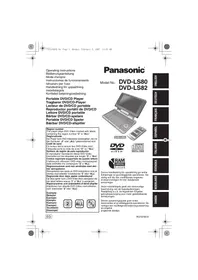

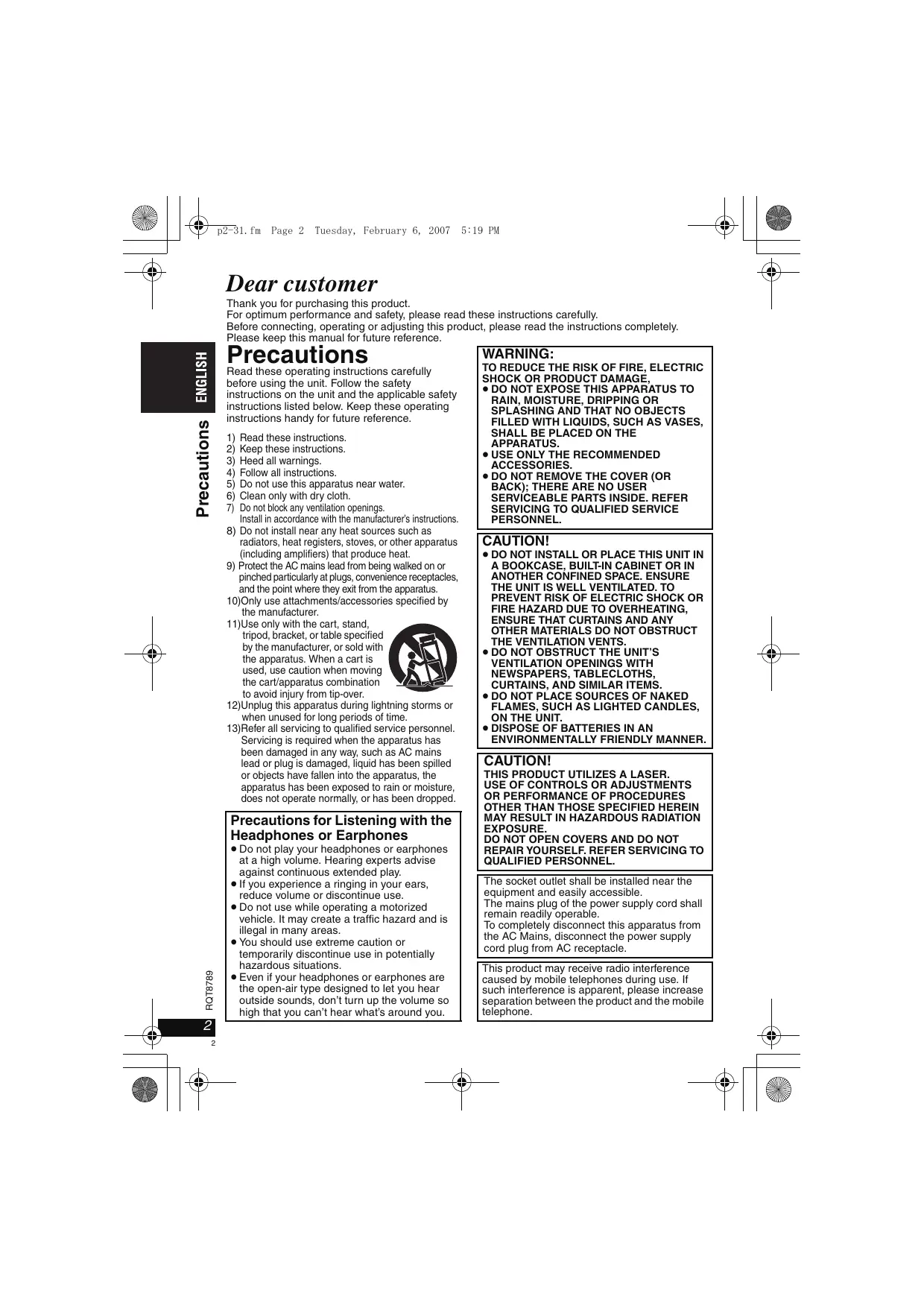


| Product Type | Portable DVD Player |
| Brand | Panasonic |
| Model | DVD-LS82 |
| Dimensions (L × D × H) | 242.6 mm × 173.5 mm × 46.0 mm (without battery) |
| Weight | Approximately 1120 g (with battery), 890 g (without battery) |
| Screen | 8.5-inch active matrix LCD, widescreen format |
| Power Supply | AC adapter 100-240 V AC, 50/60 Hz; lithium-ion battery 7.2 V DC |
| Power Consumption | 14 W (unit alone 12 W), standby 0.4 W |
| Battery | Lithium-ion, 7.2 V, 4500 mAh (model CGR-H712) |
| Battery Life | Up to 12 h (screen off); 5 to 7 h depending on brightness |
| Compatible Discs | DVD-Video, DVD-RAM, DVD-R/RW, +R/RW, CD, CD-R/RW (MP3, WMA, JPEG, MPEG4, DivX) |
| Audio Formats | MP3, WMA, CD-DA |
| Video Formats | MPEG4, DivX, Video CD, SVCD |
| Image Formats | JPEG |
| Outputs | Composite video (3.5 mm mini-jack), stereo audio (3.5 mm mini-jack), headphone (2 x mini-jack) |
| Included Accessories | Remote control, battery, AC adapter, audio/video cable, car DC adapter, headrest mount |
| DVD Region Code | Region 2 or All Regions |
| Operating Temperature | 5 °C to 35 °C |
| Maintenance and Cleaning | Soft, dry cloth; lens blower; LCD screen cleaner |
| Safety | Do not use near water; keep batteries out of reach of children; do not block vents |
| Repairability | Spare parts available through Panasonic dealer (references in manual) |
Frequently Asked Questions - DVD-LS82 PANASONIC
User questions about DVD-LS82 PANASONIC
0 question about this device. Answer the ones you know or ask your own.
Ask a new question about this device
Download the instructions for your DVD player in PDF format for free! Find your manual DVD-LS82 - PANASONIC and take your electronic device back in hand. On this page are published all the documents necessary for the use of your device. DVD-LS82 by PANASONIC.
USER MANUAL DVD-LS82 PANASONIC
Operating Instructions
Operating Instructions
Operating Instructions
The player plays DVD-Video marked with labels containing the region number “2” or “ALL”.
Regional code




Thank you for purchasing this product.
For optimum performance and safety, please read these instructions carefully.
Before connecting, operating or adjusting this product, please read the instructions completely.
Please keep this manual for future reference.
Precautions
Read these operating instructions carefully before using the unit. Follow the safety instructions on the unit and the applicable safety instructions listed below. Keep these operating instructions handy for future reference.
1) Read these instructions. 2) Keep these instructions. 3) Heed all warnings. 4) Follow all instructions. 5) Do not use this apparatus near water. 6) Clean only with dry cloth. 7) Do not block any ventilation openings. Install in accordance with the manufacturer's instructions. 8) Do not install near any heat sources such as radiators, heat registers, stoves, or other apparatus (including amplifiers) that produce heat. 9) Protect the AC mains lead from being walked on or pinched particularly at plugs, convenience receptacles, and the point where they exit from the apparatus. 10) Only use attachments/accessories specified by the manufacturer.
11) Use only with the cart, stand, tripod, bracket, or table specified by the manufacturer, or sold with the apparatus. When a cart is used, use caution when moving the cart/apparatus combination to avoid injury from tip-over.

12) Unplug this apparatus during lightning storms or when unused for long periods of time.
13) Refer all servicing to qualified service personnel. Servicing is required when the apparatus has been damaged in any way, such as AC mains lead or plug is damaged, liquid has been spilled or objects have fallen into the apparatus, the apparatus has been exposed to rain or moisture, does not operate normally, or has been dropped.
Precautions for Listening with the Headphones or Earphones
- Do not play your headphones or earphones at a high volume. Hearing experts advise against continuous extended play.
- If you experience a ringing in your ears, reduce volume or discontinue use.
- Do not use while operating a motorized vehicle. It may create a traffic hazard and is illegal in many areas.
- You should use extreme caution or temporarily discontinue use in potentially hazardous situations.
- Even if your headphones or earphones are the open-air type designed to let you hear outside sounds, don't turn up the volume so high that you can't hear what's around you.
WARNING:
TO REDUCE THE RISK OF FIRE, ELECTRIC SHOCK OR PRODUCT DAMAGE,
- DO NOT EXPOSE THIS APPARATUS TO RAIN, MOISTURE, DRIPPING OR SPLASHING AND THAT NO OBJECTS FILLED WITH LIQUIDS, SUCH AS VASES, SHALL BE PLACED ON THE APPARATUS.
- USE ONLY THE RECOMMENDED ACCESSORIES.
- DO NOT REMOVE THE COVER (OR BACK); THERE ARE NO USER SERVICEABLE PARTS INSIDE. REFER SERVICING TO QUALIFIED SERVICE PERSONNEL.
CAUTION!
- DO NOT INSTALL OR PLACE THIS UNIT IN A BOOKCASE, BUILT-IN CABINET OR IN ANOTHER CONFINED SPACE. ENSURE THE UNIT IS WELL VENTILATED. TO PREVENT RISK OF ELECTRIC SHOCK OR FIRE HAZARD DUE TO OVERHEATING, ENSURE THAT CURTAINS AND ANY OTHER MATERIALS DO NOT OBSTRUCT THE VENTILATION VENTS.
- DO NOT OBSTRUCT THE UNIT'S VENTILATION OPENINGS WITH NEWSPAPERS, TABLECLOTHS, CURTAINS, AND SIMILAR ITEMS.
- DO NOT PLACE SOURCES OF NAKED FLAMES, SUCH AS LIGHTED CANDLES, ON THE UNIT. • DISPOSE OF BATTERIES IN AN ENVIRONMENTALLY FRIENDLY MANNER.
CAUTION!
THIS PRODUCT UTILIZES A LASER. USE OF CONTROLS OR ADJUSTMENTS OR PERFORMANCE OF PROCEDURES OTHER THAN THOSE SPECIFIED HEREIN MAY RESULT IN HAZARDOUS RADIATION EXPOSURE. DO NOT OPEN COVERS AND DO NOT REPAIR YOURSELF. REFER SERVICING TO QUALIFIED PERSONNEL.
The socket outlet shall be installed near the equipment and easily accessible.
The mains plug of the power supply cord shall remain readily operable.
To completely disconnect this apparatus from the AC Mains, disconnect the power supply cord plug from AC receptacle.
This product may receive radio interference caused by mobile telephones during use. If such interference is apparent, please increase separation between the product and the mobile telephone.
Unless otherwise indicated, illustrations in these operating instructions are of DVD-LS82.
DVD-LS82 Operations in these instructions are described mainly with the main unit, but you can do the operations on the remote control if the remote controls are the same.
Accessories
Use numbers indicated in parentheses when asking for replacement parts.
(Product numbers correct as of January 2007. These may be subject to change.)
☐ 1 Remote control (N2QAHC000021) only included with DVD-LS82 ☐ 1 Button-type battery for remote control only included with DVD-LS82 (for replacement, see page 7)
- Keep out of the small children. Accidental swallowing of batteries can result in stomach and intestinal damage.
□ 1 Audio/video cable
□ 1 AC adaptor
□ 1 AC mains lead
- For use with this unit only. Do not use it with other equipment. Also, do not use cords for other equipment with this unit.
□ 1 Car DC Adaptor
☐ 1 Headrest Mounting Bracket
☐ 1 Rechargeable battery pack
| Included | Optional | |
| DVD-LS80 | CGR-H711 | CGR-H701CGR-H712 |
| DVD-LS82 | CGR-H712 |
- Depending on the battery pack, playback time may differ. (→ page 7, Approximate recharging and play times)
- DVD-LS80 CGR-H711 is not available as option. When purchasing a replacement, request one of the optional batteries listed above.
CAUTION
Danger of explosion if battery is incorrectly replaced. Replace only with the same or equivalent type recommended by the manufacturer. Dispose of used batteries according to the manufacturer's instructions.
Warning
Keep the Button-Type battery out of the reach of children. Never put Button-Type battery in mouth. If swallowed call your doctor.
THIS UNIT IS INTENDED FOR USE IN MODERATE CLIMATES.
Product Identification Marking is located on the bottom of units.
Table of contents
Precautions 2
Accessories 3
Discs that can be played .... 4
Tips for making data discs....5
Preparations
① Attaching the battery....6 ② Recharging the battery ..... 6 ③ The remote control ..... 7 ④ Adjusting the LCD angle ..... 7
Playing discs 8
Useful functions ..... 10
Enjoying higher quality audio and video ... 13
Program/Random play 14
Playing HighMAT™ discs ..... 15
Playing programs/playlists.....15
Playing CD using menus ..... 15
Playing audio (WMA/MP3), picture (JPEG) and video (MPEG4/DivX) discs. . . . 16
About DivX VOD content ..... 17
Using On-Screen Menus..... 18
Changing the player settings.....20
Enjoying in a car 22
Using this unit with other equipment .. 25
Troubleshooting guide 26
Frequently asked questions..... 29
Maintenance.... 29
Specifications 30
Index....Inner pages of the back cover
Batteries
- Battery pack (Lithium ion battery pack)
- Use this specified unit to recharge the battery pack.
- Do not use the battery pack with equipment other than the specified unit.
- Do not use the player outside if it is snowing or raining. (The battery pack is not waterproof.)
- Do not get dirt, sand, liquids, or other foreign matter on the terminals.
- Do not touch the plug terminals (+ and -) with metal objects.
- Do not disassemble, remodel, heat or throw into fire.
- Do not store the battery pack in temperature over 60 °C.
- Button-type battery (Lithium battery)
- Insert with poles aligned.
- Do not touch the terminals (+ and -) with metal objects.
- Do not disassemble, remodel, heat or throw into fire.
- Keep out of reach of children
If any electrolyte should come into contact with your hands or clothes, wash it off thoroughly with water. If any electrolyte should come into contact with your eyes, never rub the eyes.
Rinse eyes thoroughly with water, and then consult a doctor.
- Disposing of the batteries
Check and follow your local regulations before disposal.
Discs that can be played
Commercial discs
| Disc Logo | Indicated in these instructions by | Remarks |
| DVD-VideoDVDVIDEOVIDEO | DVD-V | High quality movie and music discs |
| Video CDCOMPACTDISCGI DIGITAL VIDEOSUPER VIDEO | VCD | Music discs with video Including SVCD (Conforming to IEC62107) |
| CDCOMPACTDISCGI DIGITAL AUDIOTEXT | CD | Music discs |
■ Discs that cannot be played
Blu-ray, HD DVD, AVCHD discs, DVD-Audio, Version 1.0 of DVD-RW, DVD-ROM, CD-ROM, CDV, CD-G, SACD and Photo CD, DVD-RAM that cannot be removed from their cartridges, 2.6-GB and 5.2-GB DVD-RAM and "Chaoji VCD" available on the market including CVD, DVCD and SVCD that do not conform to IEC62107.
Recorded disc (○: Available —: Not available)
| Disc Logo | Recorded on a DVD recorder, etc. | Recorded on a personal computer, etc. | Necessity of finalize*4 | |||||
| DVD-VR *2 | DVD-V *3 | WMA | MP3 | JPEG | MPEG4 | DivX | ||
| DVD-RAM[IMAGE] | ○ | — | — | ○ | ○ | ○ | ○ | Not Necessary |
| DVD-R/RWDVDR R 4.7 [IMAGE] | ○ | ○ | — | ○ | ○ | ○ | ○ | Necessary |
| DVD-R DLDVR DL | ○ | ○ | — | — | — | — | — | Necessary |
| +R/+RW— | — | (○) | — | — | — | — | — | Necessary |
| +R DL— | — | (○) | — | — | — | — | — | Necessary |
| CD-R/RW*1— | — | — | ○ | ○ | ○ | ○ | ○ | Necessary*5 |
- It may not be possible to play the above discs in all cases due to the type of discs, the condition of the recording, the recording method and how the files were created (→ page 5, Tips for making data discs). 1 This unit can play CD-R/RW recorded with CD-DA or Video CD format. (WMA MP3 JPEG This unit also plays HighMAT ™ discs.) *2 Discs recorded on DVD recorders, DVD video cameras, etc. using Version 1.1 of the Video Recording Format (a unified video recording standard). For DVD-R DL: Discs recorded on DVD recorders or DVD video cameras using Version 1.2 of the Video Recording Format (a unified video recording standard). *3 Discs recorded on DVD recorders or DVD video cameras using DVD-Video Format. For +R/+RW and +R DL: Discs recorded using a format different from DVD-Video Format, therefore some functions cannot be used. 4 A process that allows play on compatible equipment. To play a disc that is displayed as “Necessary” on this unit, the disc must first be finalized on the device it was recorded on. *5 Closing the session will also work.
Tips for making data discs
| Format | Disc | Extension | Reference |
| WMA | CD-R/RW | “.WMA”“.wma” | Compatible compression rate: between 48 kbps and 320 kbpsYou cannot play WMA files that are copy protected.This unit is not compatible with Multiple Bit Rate (MBR: a file that contains the same content encoded at several different bit rates). |
| MP3 | DVD-RAMDVD-R/RWCD-R/RW | “.MP3”“.mp3” | Sampling frequency:DVD-RAM, DVD-R/RW :11.02, 12, 22.05, 24, 44.1 and 48 kHzCD-R/RW :8, 11.02, 12, 16, 22.05, 24, 32, 44.1 and 48 kHzCompatible compression rate: between 32 kbps and 320 kbpsThis unit is not compatible with ID3 tags. |
| JPEG | DVD-RAMDVD-R/RWCD-R/RW | “.JPG”“.jpg”“.JPEG”“.jpeg” | JPEG files taken on a digital camera that conform to DCF Standard Version 1.0 are displayed.- Files that have been altered, edited or saved with computer picture editing software may not be displayed.This unit cannot display moving pictures, MOTION JPEG and other such formats, still pictures other than JPEG (e.g. TIFF) or play pictures with attached audio. |
| MPEG4 | DVD-RAMDVD-R/RWCD-R/RW | “.ASF”“.asf” | You can play MPEG4 data [conforming to SD VIDEO specifications (ASF standard)/MPEG4 (Simple Profile) video system/G.726 audio system] recorded with the Panasonic SD multi cameras or DVD recorders with this unit.The recording date may differ from that of the actual date. |
| DivX | DVD-RAMDVD-R/RWCD-R/RW | “.DIVX”“.divx”“.AVI”“.avi” | Plays all versions of DivX video (including DivX® 6) [DivX video system/MP3, Dolby Digital or MPEG audio system] with standard playback of DivX® media files.Functions added with DivX Ultra are not supported.DivX files greater than 2 GB or have no index may not play properly on this unit.This unit supports all resolutions up to maximum of 720 × 480 (NTSC)/ 720 × 576 (PAL).You can select up to 8 types of audio and subtitles on this unit. |
- If groups were created away from the root like “002 group” in the illustration below, the eighth one and onwards is displayed on the same vertical line in the menu screen.
- There may be differences in the display order on the menu screen and computer screen.
- This unit cannot play files recorded using packet writing.
Naming folders and files on data discs (Files are treated as contents and folders are treated as groups on this unit.)
At the time of recording, prefix folder and file names. This should be with numbers that have an equal number of digits, and should be done in the order you want to play them (this may not work at times).
DVD-RAM
• Discs must conform to UDF 2.0.
DVD-R/RW
- Discs must conform to UDF bridge (UDF 1.02/ISO9660).
- This unit is not compatible with multi-session. Only the default session is played.
CD-R/RW
- Discs must conform to ISO9660 level 1 or 2 (except for extended formats).
- This unit is compatible with multi-session but if there are a lot of sessions it takes more time for play to start. Keep the number of sessions to a minimum to avoid this.
e.g. MP3 root![graph TD A["001 group"] --> B["001 track.mp3"] A --> C["002 track.mp3"] A --> D["003 track.mp3"] A --> E["002 group"] F["003 group"] --> G["001 track.mp3"] F --> H["002 track.mp3"] F --> I["003 track.mp3"] F --> J["004 track.mp3"]](/content/2019/10/56078/images/f0c8971d48ee64f98160982f67150623a5665d98f4ea02dd863a1f0b0f35755a.jpg)
Preparations
① Attaching the battery (When the unit is off)
The illustrations shown are of CGR-H712; however the steps for CGR-H711 (included with DVD-LS80) or CGR-H701 (optional) are the same.
Bottom side of this unit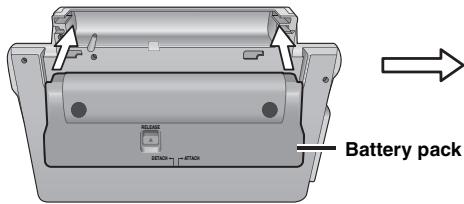
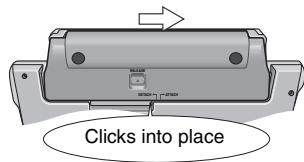
Check to make sure it is securely fastened.
Detaching
- Turn the unit off before detaching the battery pack.
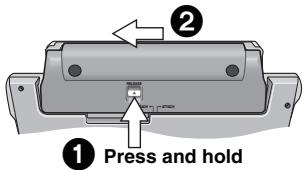
When not using for long periods of time
- Remove the battery pack (→ left). (Even when the unit is turned off, there is a small amount of voltage running through the unit, and this may result in a malfunction.) ●Recharge the battery for re-use.
② Recharging the battery
The battery is not charged at the time of purchase. Charge before initial use.
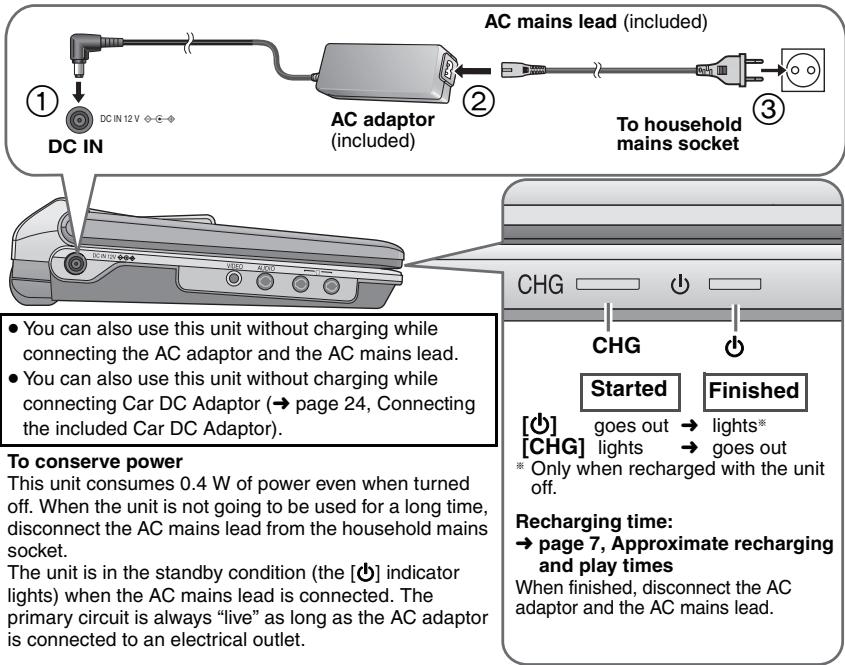
Approximate recharging and play times (Hours)
| Battery pack | Recharging(When the unit is off) | Play (at room temperature using headphones) | |||
| LCD brightness level | LCD Off | ||||
| -5 | 0 | 5 | |||
| CGR-H711 *1 | 4 | 6 | 3.5 | 2.5 | 8 |
| CGR-H712 *2 | 7 | 12 | 7 | 5 | 16 |
| CGR-H701 (option) | 4 | 5.5 | 3 | 2 | 7 |
※1 included with DVD-LS80 (not available as option) ※2 included with DVD-LS82 - The times indicated above may differ depending on use. - To change the LCD brightness (→ page 10, When selecting “USER MODE”).
Checking the remaining battery charge
When the unit is on (→ page 8) and powered by the battery pack Press [DISPLAY] to check on the LCD (Displays for a few seconds).
![graph LR A["(screen)"] --> B["Chamber"] B --> C["Chamber"] C --> D["Chamber"] D --> E["(flashing)"] E --> F["Recharge"] F --> G["Appears automatically when there is only a few minutes of charge remaining."]](/content/2019/10/56078/images/f7c1f7b3a5574a3bfcf1e7224b98f6ec4858dc9e17649fdf6d9c7bd048e8051b.jpg)
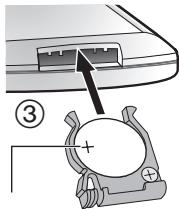
③ The remote control DVD-LS82
Insert the button-type battery (included)
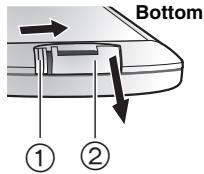
While sliding (①), pull out (②).
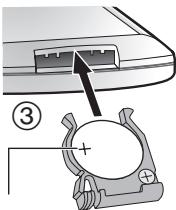
- facing up Lithium battery: CR2025
Range of use
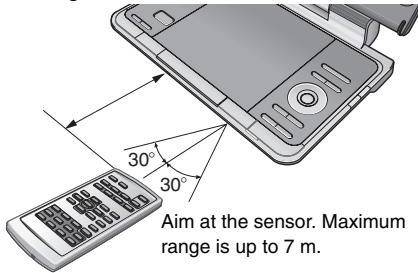
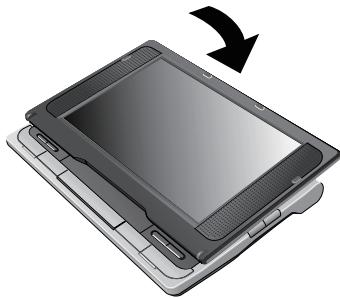
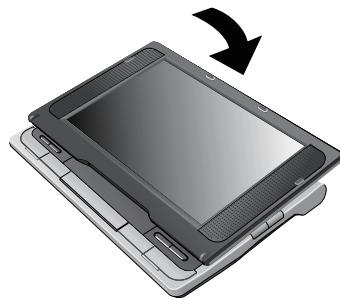
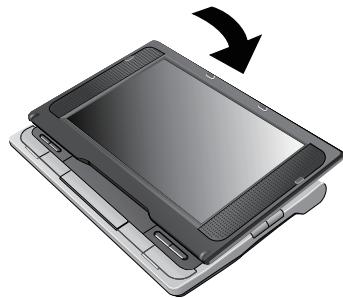
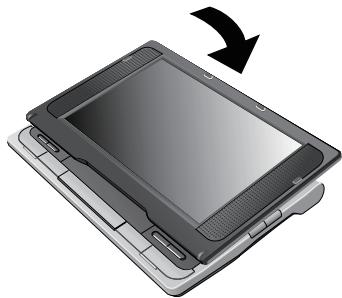
④ Adjusting the LCD angle
![graph LR A["Open the LCD"] --> B["Standard"] B --> C["Free Slide"] C --> D["Compact"] C -->|Clicks!| D](/content/2019/10/56078/images/08cba69feaa01c14f0ad273a42530712a205bce85356d9f6dca85ed65a710dfa.jpg)
- When moving the unit : Close the LCD. Don't hold by the LCD.
- Functions operated by buttons on the unit will not work when the LCD is closed.
Playing discs
1 Open the lid.
Headphone terminals [○] φ 3.5 mm stereo mini jack
2 Insert a disc and close the lid.
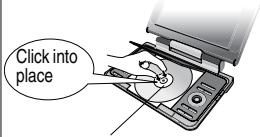
Load double-sided discs so the label for the side you want to play is facing up.
- DVD-RAM: Remove discs from their cartridges before use.
- Some discs start to play automatically when the unit is on.
3 Press and hold.
The unit turns on and play begins.
- When “AUX” is displayed, press [AV SELECT]. (Watching video from other equipment → page 25)
4 Adjust the volume.

When using headphones, turn down the volume before connection.
- To play audio (MP3), picture (JPEG) or video (MPEG4 DivX) on DVD-RAM with recorded titles (DVD-VR), select "Play as Data Disc" (→ page 19, Other Menu).
- While stopped, the unit automatically turns off once 15 minutes (after approximately 5 minutes when using the battery pack) have elapsed.
- Total title number may not be displayed properly on +R/+RW.
- If you are experiencing problems, refer to troubleshooting guide (→ page 26).
Note
- DISCS CONTINUE TO ROTATE WHILE MENUS ARE DISPLAYED. Press [■, -OFF] when you finish to preserve the unit's motor.
Main unit operations
| Turn unit on/play | When the unit is off:Press and hold and the power comes on and play begins.When the unit is on:Press and play begins. | |
| Pause | Press [▶, ON] to restart play. | |
| Stop | The position is memorized when “Press PLAY to resume play” appears on the screen.• Press [▶, ON] to resume. (Resume play)Opening the disc lid or pressing [■, -OFF] while “Press PLAY to resume play” appears on the screen cancels the memorized position. | |
| Turn unit off | Press and hold until “OFF” is displayed. | |
 | Skip | Press [◀◀,▶▶].DVD-VR Can also skip to the markers. |
| Search | Press and hold [◀◀,▶▶] (up to 5 steps). | |
| Slow play | Press and hold [◀◀,▶▶] (up to 5 steps) while paused. Press [▶,ON] to return to normal play.VCD [▶▶] onlyMPEG4 DivX: Does not work. | |
 | Top menu | DVD-V |
| Playing programs | DVD-VR (→ page 15) | |
| Playback Menu | WMA MP3 JPEG MPEG4 DivX(→ page 16) | |
 | Menu | DVD-V |
| Playing playlists | DVD-VR (→ page 15) | |
| Navigation Menu | WMA MP3 JPEG MPEG4 DivX(→ page 16) | |
RETURN | Return | Returns to the previous screen.VCD (with playback control) Returns to the menu. |
 | Menu operation | Press [▲▼◀▶] to select an item and press [ENTER] to confirm. |
| Number Select | VCD (with playback control)1While the disc menu is displayed, press [DISPLAY] to display On-Screen Menus.2Press [▲▼] to select “Number Select”.3Press [▶] then [▲▼] to enter number.●Press and hold [▲▼] to alter faster.4Press [ENTER]. | |
| Frame-by-frame | DVD-VR DVD-V VCDWhile paused, press [◀▶].VCD [▶] only | |
| Group skip | WMA MP3 JPEG MPEG4 DivXPress [▲▼].● Does not work while paused. |
Remote control operations DVD-LS82
 | Turn unit on/off | ● You cannot turn on the unit with the remote control if the unit is powered by the battery pack. |
PLAY | Play | Press and play begins. |
  | Skip | Press [◀◀,▶▶].DVD-VR Can also skip to the markers. |
  | Search | Press [◀◀,▶▶] (up to 5 steps). |
| Slow play | Press [◀◀,▶▶] (up to 5 steps) while paused. Press [▶] (PLAY) to return to normal play.VCD [▶▶] only●MPEG4 DivX: Does not work. | |
| 1 2 34 5 6 ≥107 8 9 0 | Enter number | DVD-VR DVD-V VCD CDe.g. To select 12:[≥10] → [1] → [2]WMA MP3 JPEG MPEG4 DivXe.g. To select 123:[1] → [2] → [3] → [ENTER] |
Useful functions
Selecting how to show 4:3 aspect pictures on the LCD
LCD-SIZE
MONITOR NORMAL: Normal
MONITOR FULL: Stretched horizontally
MONITOR OFF: No picture
LCD-SIZE - If you are not using the LCD on this unit, select "MONITOR OFF" to conserve power. (The [O] indicator flashes) Press to change. - The LCD turns off automatically if you close it.
Selecting the picture quality on the LCD
BRIGHT-LCD
DAYLIGHT: Displays the picture a bit brighter.
MOONLIGHT: Displays the picture a bit darker.
USER MODE: → below
Press to change.
■ When selecting "USER MODE"
Press [▲▼] to select the item, and [◀▶] to change the setting.
BRIGHT: Adjusts the brightness of the picture (-5 to 5)
COLOUR: Adjusts the shade of the picture's color (-5 to 5)
- To exit the screen: Press [RETURN].
Repeat play (Only when the elapsed play time can be displayed.
JPEG: you can use even if there is no elapsed time display.)
REPEAT
Press several times to select the content to be repeated.

Menu
Repeat Off
To repeat a specified section (A-B Repeat)
Only when the elapsed play time can be displayed.
Except DVD-VR (still picture part), DivX, JPEG, and MPEG4.
1
DISPLAY

During play, press once.
2
① Press [▲▼] to select “Other Settings”. ② Press [▶] then [▲▼] to select “Play Menu”. ③ Press [▶] then [▲▼] to select “A-B Repeat”. ④ Press [ENTER] at the starting and ending points.
- Press [ENTER] again to cancel.
- To exit the screen: Press [RETURN].

Menu
A-B Repeat **
Reviewing titles/programs to play (Advanced Disc Review)
DVD-VR, DVD-V (Except +R/+RW)
1
2
① Press [▲▼] to select “Other Settings”.
② Press [▶] then [▲▼] to select “Play Menu”.
③ Press [▶] then [▲▼] to select “Advanced Disc Review”.
④ Press [ENTER].
Reviews each title/program.
⑤ Press [▶, ON] when you find a title/program to play.

- You can also review each 10 minutes. Select "Interval Mode"
(→ page 20, “Advanced Disc Review” in “Disc” tab).
- This may not work depending on the play position.
• DVD-VR Does not work:
-with still picture part.
—when playing a playlist.
- To exit the screen : Press [RETURN].
Changing play speed DVD-VR DVD-V
1
During play, press once.
2
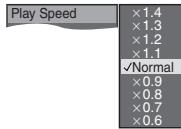
① Press [▲▼] to select "Other Settings". ② Press [▶] then [▲▼] to select "Play Speed". ③ Press [ENTER] and [▲▼] to select "Normal" or "×0.6" to "×1.4" (in 0.1 units). ④ Press [ENTER].
- Press [▶, ON] to return to normal play.
- After you change the speed, H.Bass (→ page 13), Advanced Surround (→ below) and Sound Enhancement (→ page 19, Audio Menu) do not work.
- This may not work depending on the disc's recording.
- To exit the screen: Press [RETURN].
Enjoying virtual surround (Advanced Surround)
Motion pictures with 2 or more channels
1
Press once.
2
① Press [▲▼] to select "Other Settings". ② Press [▶] then [▲▼] to select "Audio Menu". ③ Press [▶] then [▲▼] to select "Advanced Surround". ④ Press [▶] then [▲▼] to select "SP 1 Natural", "SP 2 Enhanced", "HP 1 Natural" or "HP 2 Enhanced". ⑤ Press [ENTER].
A surround sound effect can be made using 2 speakers (on other equipment).
- When using headphones, press to select "HP 1 Natural" or "HP 2 Enhanced".
- When using discs recorded with surround sound, sound seems to come from speakers on either side of you.
- Optimum seating position is 3 to 4 times the distance between the front left and right speakers or the width of the television if using the television's speakers.
- This does not work when H.Bass (→ page 13) is on.
- Do not use in combination with surround effects on other equipment.
- To exit the screen: Press [RETURN].
Useful functions
Changing soundtracks Motion pictures
1
2
Press once.
① Press [▲▼] to select “Audio”. ② Press [▶] then [▲▼] to select the soundtrack. ③ Press [ENTER].
DVD-VR DivX
“L”, “R” or “L R” can be selected.
VCD
“L”, “R”, “L R” or “L + R” can be selected.
DVD-V (Karaoke discs)
① Press [▲▼] to select "Vocal". ② Press [▶] then [▲▼] to select "On" or "Off" for vocals. Read the disc's instructions for details.
- DVD-LS82 This menu is also displayed by pressing [AUDIO] on the remote control.
- To exit the screen: Press [RETURN].
Signal type/data
LPCM/☐☐ Digital/DTS/MP3/MPEG: Signal type kHz (Sampling frequency)/bit/ch (Number of channels)
Example: 3/2 .1ch
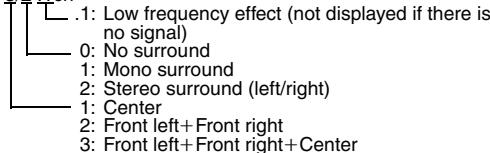
- DivX It may take some time for play to start if you change the audio on a DivX video disc.
Changing subtitles Discs with subtitles
1
2
Press once.
DVD-VR DVD-V VCD DivX
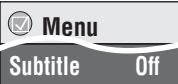
① Press [▲▼] to select "Subtitle". ② Press [▶] then [▲▼] to select "Off" or "On" and the subtitle language.
③ Press [ENTER].
- On +R/+RW, a subtitle number may be shown for subtitles that are not displayed. • DVD-VR (with subtitle on/off information)
– On or Off only can be selected.
- Subtitle on/off information cannot be recorded using Panasonic DVD Recorders.
- DVD-LS82 This menu is also displayed pressing [SUBTITLE] on the remote control.
- To exit the screen: Press [RETURN].
Angle select DVD-V with multiple angles /Still picture rotation JPEG
1
2
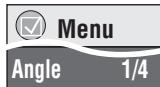
① Press [▲▼] to select “Angle” or “Rotate Picture”. ②Press [▶] then [▲▼] to select the angle or rotate the still picture.
③ Press [ENTER].
- DVD-LS82 This menu is also displayed pressing [ANGLE] on the remote control.
- To exit the screen: Press [RETURN].

Menu
Audio
1
e.g. DVD-V
Basics Press twice.
Details Press three times.
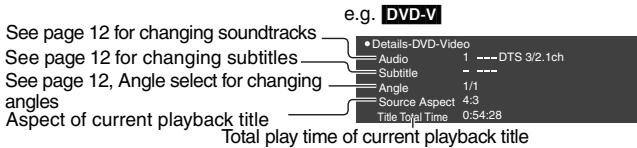
- MPEG4 DivX Video and audio information is not displayed during search.
- To exit the screen: Press [RETURN].
Enjoying higher quality audio and video
Enjoying heavy bass with the speakers (H.Bass) DVD-V DVD-VR
1
Press once.
2
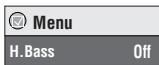
① Press [▲▼] to select “Other Settings”. ② Press [▶] then [▲▼] to select “Audio Menu”. ③ Press [▶] then [▲▼] to select “H.Bass”. ④ Press [▶] then [▲▼] to select “On” or “Off”. ⑤ Press [ENTER].
- This is effective on 5.1 channel DVD-Video and DVD-VR discs. This is also effective on some portions of 2 channel discs as well.
- If the sound is distorted or there is noise, set to "Off".
- To exit the screen: Press [RETURN].
Providing the suitable picture quality for enjoying movies (Cinema1/Cinema2)
Cinema1: Mellows images and enhances detail in dark scenes.
Cinema2: Sharpens images and enhances detail in dark scenes.
1
Press once.
2
① Press [▲▼] to select “Other Settings”. ② Press [▶] then [▲▼] to select “Picture Menu”. ③ Press [▶] to select “Picture Mode”. ④ Press [▶] then [▲▼] to select “Cinema1” or “Cinema2”. ⑤ Press [ENTER]. - To exit the screen: Press [RETURN].
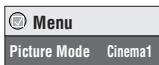
Reducing noise in pictures (Depth Enhancer/MPEG DNR)
Depth Enhancer: Reduces the rough noise in the background to give a greater feeling of depth. MPEG DNR: Smooths block noise and reduces the smudging that appears around contrasting sections of the picture.
1
Press once.
2
① In the procedure 2—④ (→ above, Cinema1/Cinema2), select “User” and press [ENTER]. ② Press [▲▼] to select “Picture Adjustment” and press [ENTER]. ③ Press [▲▼] to select “Depth Enhancer” or “MPEG DNR”. ④ Press [◀▶] to change the setting. (Depth Enhancer: 0 to +4, MPEG DNR: 0 to +3) - To exit the screen: Press [RETURN].
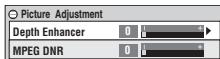
The above indicated features may not work depending on the disc's recording.
Program/Random play
Except DVD-VR
DVD-LS82 (Remote control only)

While stopped Press to change.
Program play→ Random play ↑ Off (Normal play) ←
- Disable HighMAT disc play to use random and program play. Select "Play as Data Disc" in Other Menu (→ page 19).
Program play (up to 32 items)
e.g. DVD-V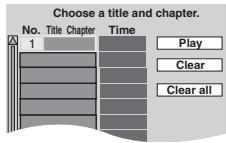
1
Press to select an item (→ page 9, Enter number).
Repeat this step to program other items.
2
PLAY

Selecting all the items (on the disc or in the title or group)
Press [ENTER] and [▲▼] to select "ALL", then press [ENTER] again to register.
Changing the program
Press [▲▼] to select an item.
-To change an item, repeat step 1.
-To clear an item, press [CANCEL] (or select "Clear" and press [ENTER]).
Clearing the whole program
Select "Clear all" and press [ENTER]. The whole program is also cleared when the unit is turned off or the disc lid is opened.
Random play
e.g. DVD-V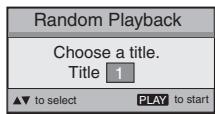
1 DVD-V WMA MP3 JPEG MPEG4 DivX
1 2 3
4 5 6 ≥10
7 8 9 0 number).
2
PLAY

To exit the program or random mode
Press [PLAYMODE] several times while stopped.
Playing HighMAT™ discs
WMA MP3 JPEG
While the menu is displayed
Press [▲▼◀▶] to select items and press [ENTER].

Menu:
Takes you to the next menu which shows playlists or another menu.

Playlist:
Play starts.
- To return to the menu screen, press [TOP MENU] then press [RETURN] several times.
- To change the menu background, press [DISPLAY]. The background changes to the one recorded on the disc.
- To display/exit the screen: press [TOP MENU].
Selecting from the list
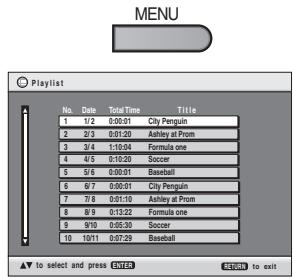
- Press [MENU].
- Press [◀] then [▲ ▼] to switch among “Playlist”, “Group” and “Content” lists.
- Press [▶] then [▲ ▼] to select an item and press [ENTER].
- To exit the screen: Press [MENU].
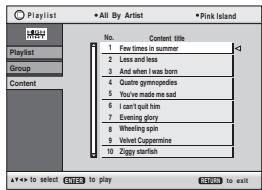
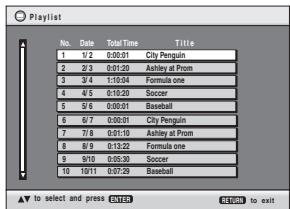
Playing programs/playlist
DVD-VR
- Titles appear only if they have been entered.
- You cannot edit playlists and titles.
1 To play programs:
To play playlists:
2
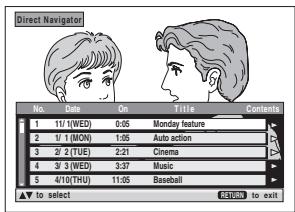
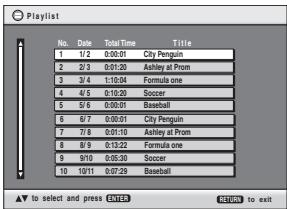
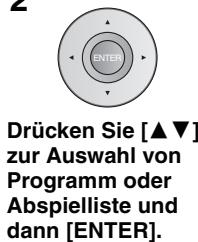
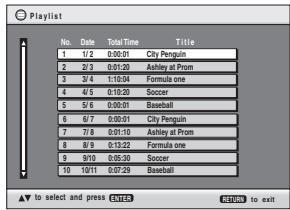
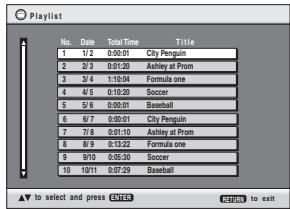
Press [▲▼] to select the program or playlist and press [ENTER].
- Only when the disc contains a playlist.
- DVD-LS82 You can also use the numbered buttons on the remote control (→ page 9).
- Press [▶] to show the contents of the program (Only when playing the program).
- To exit the screen: Press [RETURN].
Playing CD using menus
CD
Titles appear with CD text playback.
1
e.g. CD text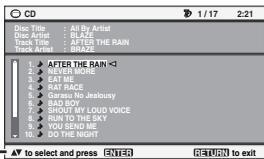
2
Press [▲▼] to select the tracks and press [ENTER].
- To exit the screen: Press [RETURN].
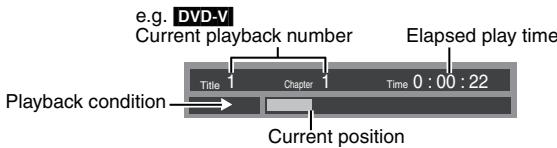
Press [DISPLAY] to switch between guide messages and the playback condition indicator.
Playing audio (WMA/MP3), picture (JPEG) and video (MPEG4/DivX) discs WMA MP3 JPEG MPEG4 DivX
Select "Play as Data Disc" (→ page 19, Other Menu) in the following cases:
-To play HighMAT discs without using the HighMAT function
-To play audio (MP3), picture (JPEG) or video (MPEG4 DivX) on DVD-RAM with recorded titles (DVD-VR)
- To return to playing titles (DVD-VR), select "Play as DVD-VR" in "Other Menu" (→ page 19).
Playing items in order (Playback Menu)
While the menu is displayed
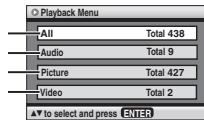
Press [▲▼] to select "All", "Audio",
"Picture" or "Video" and press [ENTER].
- To display/exit the screen:
Press [TOP MENU].
All content
WMA/MP3
JPEG
MPEG4 and
DivX video
Playing from the selected item (Navigation Menu)
1
Press once.
2
Press [▲▼◀▶] to select the group and press [ENTER].
- To play content in the group in order: Press [ENTER].
- To start play from the selected content: Press [▲▼] to select and press [ENTER].
Group and content number currently playing
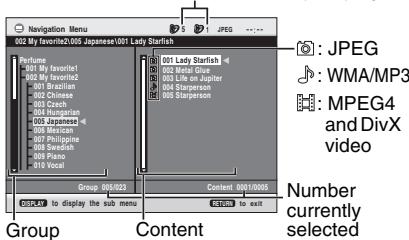
- To listen to WMA/MP3 while showing a JPEG image on the screen, select a JPEG file first, and then select WMA/MP3. (The opposite order is not effective.)
- To exit the screen: Press [MENU].
■ Using the submenu
While the navigation menu (→ see above) is displayed.
1. Press [DISPLAY]. 2. Press [▲▼] to select the submenu and press [ENTER].
Submenu
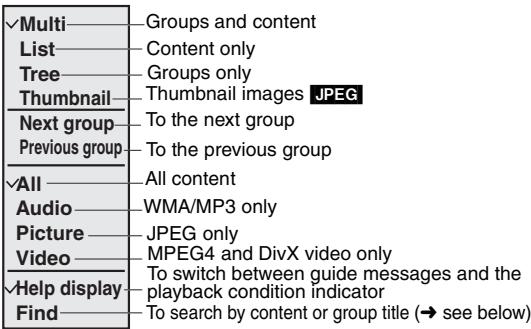
■ Searching by a content or group title
Press [◀▶] to highlight a group title to search a group, or a content title to search its content.
1. Select "Find" and press [ENTER]. (→ see above) 2. Press [▲▼] to select a character and press [ENTER].
- Repeat to enter another character. ● Lower case is also searched.
- Press and hold [◀◀, ▶▶] to skip between A, E, I, O, and U.
- Press [◀] to erase a character.
- Erase the asterisk (*) to search for titles starting with that character.
3. Press [▶] to select "Find" and press [ENTER]. The search result screen appears. 4. Press [▲▼] to select the content or group and press [ENTER].

About DivX VOD content
DivX Video-on-Demand (VOD) content is encrypted for copyright protection. In order to play DivX VOD content on this unit, you first need to register the unit.
Follow the online instructions for purchasing DivX VOD content to enter the unit's registration code and register the unit. For more information about DivX VOD, visit www.divx.com/vod.
Display the unit's registration code
(→ page 21, "DivX Registration" in "Others" tab)
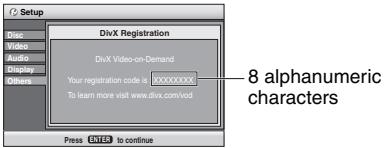
- We recommend that you make a note of this code for future reference.
- After playing DivX VOD content for the first time, another registration code is then displayed in "DivX Registration". Do not use this registration code to purchase DivX VOD content. If you use this code to purchase DivX VOD content, and then play the content on this unit, you will no longer be able to play any content that you purchased using the previous code.
- If you purchase DivX VOD content using a registration code different from this unit's code, you will not be able to play this content. ("Authorization Error" is displayed.)
Regarding DivX content that can only be played a set number of times
Some DivX VOD content can only be played a set number of times. When you play this content, the remaining number of plays is displayed. You cannot play this content when the number of remaining plays is zero. ("Rented Movie Expired" is displayed.)
When playing this content
- The number of remaining plays is reduced by one if
- you turn off the unit or display "Setup" menu.
- you press [■]. (Press [■] to stop play.)
- you press [◀◀, ▶▶] or [◀◀, ▶▶] (DVD-LS82 Remote control) etc. and arrive at another content or the start of the content being played.
- Resume play (→ page 8, Stop) does not work.
Using On-Screen Menus
1
2
Press once.
① Press [▲▼] to select the menu. ② Press [▶] to go to the next menu and [▲▼] to set.
Repeat step ② if necessary.
- Items shown differ depending on the type of software.
- Press [◀] to go to the previous menu.
- DVD-LS82 There are items which you can select using the numbered buttons and [ENTER] on the remote control.
- If the setting does not change, press [ENTER].
- To exit the screen: Press [RETURN].
Main menus
| Program, Group, Title Chapter, Track, Playlist Content | To start from a specific item● Press [▲▼] to select and press [ENTER].● Press and hold [▲▼] to alter faster. | |
| Time | To skip incrementally or decrementally (Time Slip for play only) (Except +R/+RW)1. Press [ENTER] twice to show Time Slip indicator.2. Press [▲▼] to select the time and press [ENTER].●Press and hold [▲▼] to alter faster.To change remaining/elapsed time display | |
| Video | To display pixel numberDivX fps (frame per second) is also displayed. | |
| Audio | (→ page 12, Changing soundtracks) | |
| To display the current bitrate or sampling frequency | ||
| Number SelectVCD (with playback control) | To enter number●Press and hold [▲▼] to alter faster. | |
| Thumbnail | To show thumbnail images | |
| Subtitle | (→ page 12, Changing subtitles) | |
| Marker (VR) | To recall a marker recorded on DVD recorders | |
| Angle | (→ page 12, Angle select) | |
| Rotate Picture | (→ page 12, Still picture rotation) | |
| Slideshow | To turn on/off slideshowTo change the slideshow timing (“1 Fast” to “5 Slow”)● When using Slideshow, Skip/Rotate picture may not work correctly depending on the play position. | |
| Other Settings | (→ See below) | |
Other Settings
| Play Speed | (→ page 11, Changing play speed) |
Play Menu (Only when the elapsed play time can be displayed.
JPEG: The Repeat function can be used.)
| Repeat | (→ page 10, Repeat play) |
| A-B Repeat | (→ page 10) |
| Advanced Disc Review | (→ page 11) |
Picture Menu
| Picture Mode | (→ page 13, Cinema1/Cinema2/Depth Enhancer/MPEG DNR) |
| Source Select DivX | When you select “Auto” the constructing method of the DivX contents is automatically distinguished and output. If the picture is distorted, select “I (Interlace)” or “P (Progressive)” depending on which constructing method was used when the contents were recorded to disc. |
| Auto I (Interlace) P (Progressive) |
Audio Menu
| H.Bass | (→ page 13) |
| Advanced Surround | (→ page 11) |
| Dialogue Enhancer | To make the dialogue in movies easier to hearDVD-V(Dolby Digital, DTS, MPEG, 3-channel or over, with the dialoguerecorded in the center channel)DivX(Dolby Digital, 3-channel or over, with the dialogue recorded in thecenter channel)On ←→ Off |
| Sound Enhancement | You can enjoy comfortable, analog-like sound.DVD-VR DVD-V (recorded with 48 kHz only) VCD CDWMA MP3 (recorded with other than 8 kHz, 16 kHz or 32 kHz)On ←→ OffThis feature does not work with MP3 on DVD-RAM or DVD-R/RW.This does not work when H.Bass (→ page 13) or Advanced Surround(→ page 11) is on.This may not work depending on the disc's recording. |
Display Menu
| Information | On Off |
| Subtitle Position | 0 to -60 (in 2 units) |
| Subtitle Brightness | Auto, 0 to -7 |
| Just Fit Zoom | Motion picturesTo expand the letterbox picture to fit the screen.Press [▲▼] to select the preset aspect ratio or “Auto”.DVD-VR DVD-V VCDAuto 4:3 Standard European Vista 16:9 Standard Cinemascope2 Cinemascope1 American Vista● Depending on the disc, the preset aspect ratio may not be displayed.MPEG4 DivXStandard Original Full |
| Manual Zoom | Motion picturesPress [▲▼] for fine adjustments. (Press and hold to alter faster.)–from × 1.00 to × 1.60 (in 0.01 units) –from × 1.60 to × 2.00 (in 0.02 units)MPEG4 DivX only–from × 2.00 to × 4.00 (in 0.05 units)It may not be possible to zoom up to × 4.00 depending upon the connected television and its settings. |
| Bit Rate Display | Motion pictures On Off |
| GUI See-through | Off, On, Auto (Switches on automatically when the images appear on the display.) |
Other Menu
| Setup | (→ page 20, Changing the player settings) |
| Play as DVD-VR | Select “Play as Data Disc” in the following cases: |
| Play as HighMAT or Play as Data Disc | -To play HighMAT discs without using the HighMAT function-To play audio (MP3), picture (JPEG) or video (MPEG4 DivX) on DVD-RAM with recorded titles (DVD-VR)To return to playing titles (DVD-VR), select “Play as DVD-VR”. |
Changing the player settings
- Referring to pages 20 to 21, change as required.
- Underlined items are the factory presets. The settings remain intact even if you switch the unit to standby.
1
2
① Press [▲▼] to select “Other Settings”. ② Press [▶] then [▲▼] to select “Other Menu”. ③ Press [▶] then [▲▼] to select “Setup”. ④ Press [ENTER].
Press once.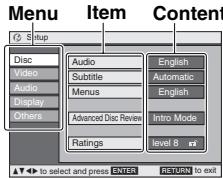
- Press [▲ ▼ ◀▶] to select the menu, item, content and press [ENTER].
- To enter number: press [▲▼] to select and Press [ENTER].
- To return to the previous screen: press [RETURN].
- To exit the screen: Press [RETURN].
- DVD-LS82 This menu is also displayed pressing [SETUP] on the remote control.
"Disc" tab
| Audio | ●English ●Original *1●Other* * * * * *3 | Language Options●French ●German●Italian ●Spanish●Polish ●Swedish●Dutch |
| Subtitle | ●Automatic*2 ●English●Other* * * * * * *3 | |
| Menus | ●English ●Other* * * * * * *3 | |
| Advanced Disc ReviewSelect how to review(→ page 11). | ●Intro Mode: Reviews each title/program.●Interval Mode: Reviews each 10 minutes. | |
| RatingsSet a ratings level to limit DVD-Video play.●Follow the on-screen instructions. | Setting ratings (When level 8 is selected)●8 No Limit●1 to 7: To prohibit play of DVD-Video with corresponding ratings recorded on them.●0 Lock All: To prevent play of discs without ratings levels.When setting a ratings level, a password screen is shown.Follow the on-screen instructions.Do not forget your password.A message screen will be shown if a DVD-Video exceeding the ratings level is inserted in the unit. Follow the on-screen instructions. | |
1 The original language designated on the disc is selected. *2 If the language selected for "Audio" is not available, subtitles appear in that language (If available on the disc). 3 Input a code number referring to the table on page 21.
"Video" tab
| TV AspectChoose the setting to suit your television and preference. | ● 4:3 Pan&Scan: Regular aspect television (4:3)The sides of the widescreen picture are cut off so it fills the screen (unless prohibited by the disc).  ● 4:3 Letterbox: Regular aspect television (4:3)Widescreen picture is shown in the letterbox style. ● 4:3 Letterbox: Regular aspect television (4:3)Widescreen picture is shown in the letterbox style.  ● 16:9: Widescreen television Use the television's screen modes to change the way the picture is shown. ● 16:9: Widescreen television Use the television's screen modes to change the way the picture is shown. | |
| Still ModeSpecify the type of picture shown when paused. | ● Automatic● Field: The picture is not blurred, but picture quality is lower.● Frame: Overall quality is high, but the picture may appear blurred. | |
| NTSC Disc OutputChoose PAL 60 or NTSC output when playing NTSC discs. | ●PAL60: When connected to a PAL television● NTSC: When connected to an NTSC television | |
| Picture/Video OutputChoose the video signal format to be output for JPEG, MPEG4 and DivX video. | ●Automatic ●PAL● NTSC/PAL60: Output will depend on “NTSC Disc Output” setting (→ above).If picture output is not smooth during playback, change the setting. | |
"Audio" tab
| Dynamic Range Compression | ● Off● On: | Adjusts for clarity even when the volume is low through compressing the range of the lowest sound level and the highest sound level. Convenient for late night viewing. (Only works with Dolby Digital.) |
"Display" tab
| Menu Language | ● English ●Français ●Deutsch ●Italiano ●Español● Polski ●Svenska ●Nederlands | |
| On-Screen Messages | ● On ● Off | |
| Background during PlaySelect background during JPEG, MPEG4 and DivX video playback. | ● Black ● Grey | |
"Others" tab
| DivX Registration | You need this registration code to purchase and play DivX Video-on-Demand (VOD) content. (→ page 17) |
| Re-initialise SettingThis returns all values in the Setup menus to the default settings. | ● Yes: The password screen is shown if “Ratings” (→ page 20) is set.Please enter the same password and press [ENTER]. When “Initialised” appears on the screen, wait for about 10 seconds.Press [ENTER] and turn the unit off and on again.● No |
Language code list
| Abkhazian: | 6566 | Catalan: | 6765 | Hausa: | 7265 | Lithuanian: | 7684 | Rhaeto-Romance: | Tajik: | 8471 |
| Afar: | 6565 | Chinese: | 9072 | Hebrew: | 7387 | Macedonian: | 8277 | Tamil: | 8465 | |
| Afrikaans: | 6570 | Corsican: | 6779 | Hindi: | 7273 | 7775 | Romanian: | 8279 | Tatar: | |
| Albanian: | 8381 | Croatian: | 7282 | Hungarian: | 7285 | Malagasy: | 7771 | Russian: | 8285 | Telugu: |
| Ameharic: | 6577 | Czech: | 6783 | Icelandic: | 7383 | Malay: | 7783 | Samoan: | 8377 | Thai: |
| Arabic: | 6582 | Danish: | 6865 | Indonesian: | 7378 | Malayalam: | 7776 | Sanskrit: | 8365 | Tibetan: |
| Armenian: | 7289 | Dutch: | 7876 | Interlingua: | 7365 | Maltese: | 7784 | Scots Gaelic: | Tigrinya: | |
| Assamese: | 6583 | English: | 6978 | Irish: | 7165 | Maori: | 7773 | 7168 | Tonga: | |
| Aymara: | 6589 | Esperanto: | 6979 | Italian: | 7384 | Marathi: | 7782 | Serbian: | 8382 | Turkish: |
| Azerbaijani: | 6590 | Estonian: | 6984 | Japanese: | 7465 | Moldavian: | 7779 | Serbo-Croatian: | Turkmen: | |
| Bashkir: | 6665 | Faroeese: | 7079 | Javanese: | 7487 | Mongolian: | 7778 | 8372 | Twi: | |
| Basque: | 6985 | Fiji: | 7074 | Kannada: | 7578 | Nauru: | 7865 | Shona: | 8378 | Ukrainian: |
| Bengali, Bangla: | Finnish: | 7073 | Kashmiri: | 7583 | Nepali: | 7869 | Sindhi: | 8368 | Urdu: | |
| 6678 | French: | 7082 | Kazakh: | 7575 | Norwegian: | 7879 | Singhalese: | 8373 | Uzbek: | |
| Bhutani: | 6890 | Frisian: | 7089 | Kirghiz: | 7589 | Oriya: | 7982 | Slovak: | 8375 | Vietnamese: |
| Bihari: | 6672 | Galician: | 7176 | Korean: | 7579 | Pashto, Pushto: | Slovenian: | 8376 | ||
| Breton: | 6682 | Georgian: | 7565 | Kurdish: | 7585 | 8083 | Somali: | 8379 | Volapük: | |
| Bulgarian: | 6671 | German: | 6869 | Laotian: | 7679 | Persian: | 7065 | Spanish: | 6983 | Welsh: |
| Burmese: | 7789 | Greek: | 6976 | Latin: | 7665 | Polish: | 8076 | Sundanese: | 8385 | Wolof: |
| Byelorussian: | Greenlandic: | 7576 | Latvian, Lettish: | Portuguese: | 8084 | Swahili: | 8387 | Xhosa: | ||
| 6669 | Guarani: | 7178 | 7686 | Punjabi: | 8065 | Swedish: | 8386 | Yiddish: | ||
| Cambodian: | 7577 | Gujarati: | 7185 | Lingala: | 7678 | Quechua: | 8185 | Tagalog: | 8476 | Yoruba: |
| Zulu: |
Enjoying in a car
- Do not leave the unit on a surface that may become hot such as a dashboard. The unit is not heat-resistant so may malfunction.
- The driver must not operate this unit while the vehicle is moving. Do not operate this unit where it can be viewed by the driver. Driver operation or viewing of this unit while the vehicle is moving will cause distraction which may result in serious accident and personal injury or property damage.
Enjoying video in the back seat with the Headrest Mounting Bracket
You can enjoy video in the back seat attaching the unit to the back of the front seat.
- Please insert the disc before attaching the unit to the headrest bracket.
- Do not attach or detach while driving, and do not attach in the following locations, otherwise it may result in injury or traffic accidents:
-anywhere other than the back of the seat
-in a location that interferes with the driver's view or operation of the car
-in a location that interferes with the operation of an airbag
-in a location that interferes with the driving instruments
- Make sure that the bracket belt is securely fastened, and check the lock on the unit.
In the event of an accident, sudden acceleration, or braking, the unit could become loose and cause injury.
1 Attaching the headrest bracket to the front seat.
① Adjust the headrest so there is an open
space of about 3 cm.
Headrest Mounting Bracket (included)
Attach to the seat so that the label side of the bracket can be seen from the rear of the seat.
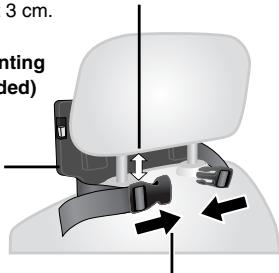
② Close the buckle and adjust the belt until it fits tightly around the headrest.
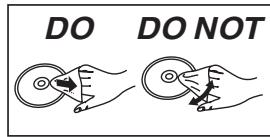
Side view DO DO NOT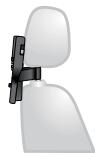
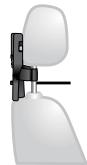
If this space is larger than 3 cm, the unit could become loose and cause injury in the event of an accident etc.
2 Adjusting the monitor.
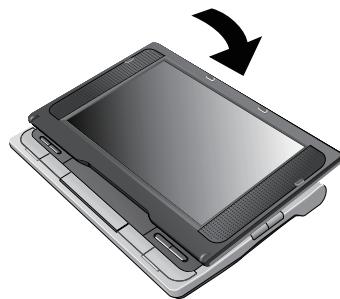
① Fold the monitor down towards the front of the unit.
② Rotate the monitor backwards so the screen is facing out.
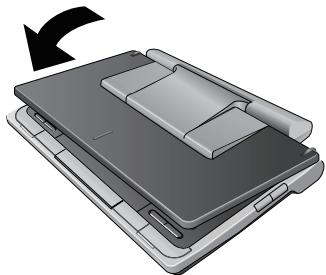
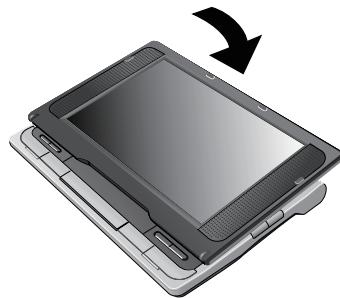
3 Attaching the unit to the bracket.
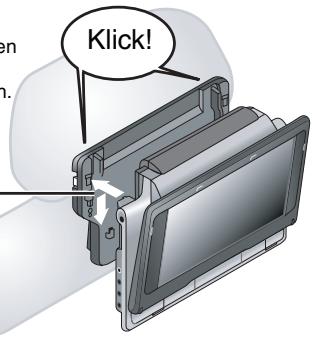
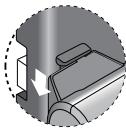
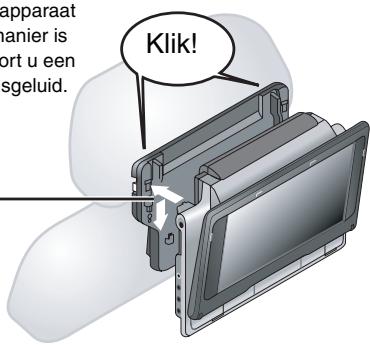
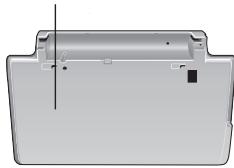
While holding the unit with both hands, line up the unit just below the protruding sections on the bracket. Press the unit down about 4 to 5 mm so that the protrusions on the bracket fit into the holes on the bottom of the unit.
- Please check the following points before use.
–The bracket is securely fastened to the unit. –The unit is not loose and cannot be lifted upwards.
Line up the protruding sections here.
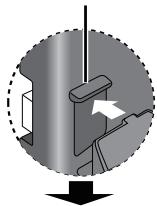
When correctly attached, you will hear a locking sound.
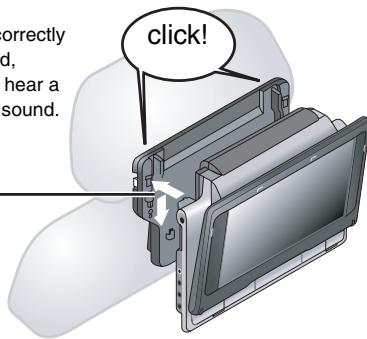
Diagram of attached bracket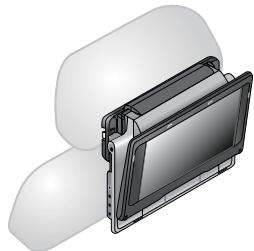
Use the monitor in the open position as shown in the illustration to the right to prevent abnormal audio or damage resulting from vibrations in the car. The angle of the monitor can be adjusted up to about 30° .
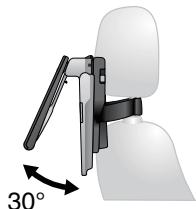
- The angle of the monitor may shift while driving due to vibration, etc.
- Depending on the type of headrest, you may not be able to attach the bracket.
DO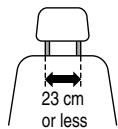
DO NOT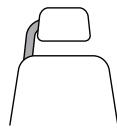
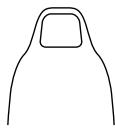
In the event of an accident etc., the unit could become loose and cause injury.
-Releasing the unit from the bracket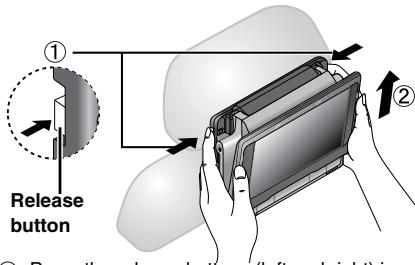
① Press the release buttons (left and right) in towards the center of the bracket. ② Lift the unit up to release it. - Do not press the release buttons any time other than when detaching the unit from the bracket.
Enjoying in a car
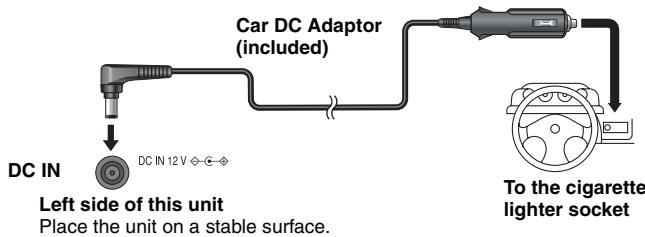
Connecting the included Car DC Adaptor
Before connection, consult your car owner's manual or your dealer.
- Connect to the cigarette lighter socket of a vehicle that has a 12 V battery. It is not compatible with a vehicle that has a 24 V battery.
- This is a special negative grounded Car DC Adaptor. Using this Car DC Adaptor with a plus grounded car can cause malfunction and lead to fire.
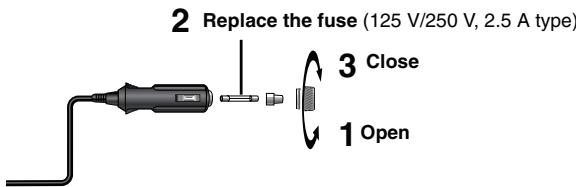
Replacing the fuse
Replace only with the specified 125 V/250 V, 2.5 A fuse. Use of any other type can cause fire.
Cautions
- To avoid draining your car battery
- Disconnect the Car DC Adaptor from the cigarette lighter after use. The Car DC Adaptor continues to consume some power even if it is not being used, and if a battery pack is attached to this unit, it will start recharging which uses more power.
-Do not use the Car DC Adaptor for long periods when the engine is not running.
- Turn the unit off before stopping the engine while using Car DC Adaptor, otherwise resume play (→ page 8) may not work.
- Leave some slack in the cord.
- No responsibility will be taken for damage that occurs due to faulty installation.
(Left side of this unit)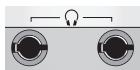
You can enjoy audio through your car audio system by connecting a car stereo cassette adaptor (not included) to the headphone jack on the left side of this unit.
Using this unit with other equipment
Turn off all equipment before connecting and read the appropriate operating instructions.
Enjoying stereo audio
Amplifier/System component
Enjoying with a television
Connect the video output from this unit directly to the television.

Use the RCAJ adaptor (not included) if your TV has a 21-pin SCART terminal.
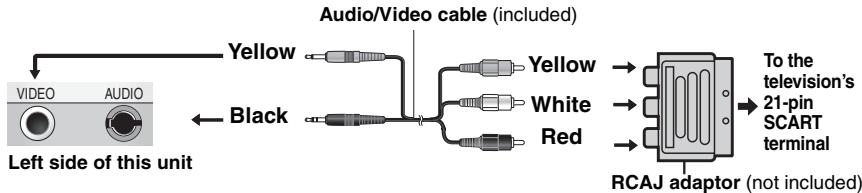
- The unit's speakers do not have magnetic shielding. Do not place the unit near televisions, personal computers or other devices easily influenced by magnetism. Do not keep this unit and magnetized cards (bank cards, commuter passes, etc.) close together.
- If you raise the volume on the television while playing this unit, the volume may abruptly become very loud when you switch to a television broadcast. Return the volume to its normal level before changing.
Watching video from other equipment
1 Connect the equipment to this unit.

2 Press [AV SELECT] to switch to "AUX".
"AUX" lights on the unit's display.
- Operate playback using the connected equipment. (Please read the operating instructions for the connected equipment)
- The unit does not turn off automatically while “AUX” mode is on. Turn the unit off when you have finished using it.
Troubleshooting guide
Before requesting service, make the following checks. If you are in doubt about some of the check points, or if the solutions indicated in the chart do not solve the problem, consult your dealer for instructions. (Reference pages are shown in parentheses.)
The following do not indicate malfunction.
●Sound from the AC adaptor during recharging. ●The battery pack warming up when recharging or during use. ●The surface and area around the unit becoming warm when used for long periods.
Power
| No power. | Check connections to the AC adaptor or battery pack. (6)DVD-LS82 You cannot turn on the unit with the remote control if the unit is powered by the battery pack.The unit has protection circuitry that is activated if it becomes too hot or too cold. The unit will not work if this occurs. Use the unit between 5 °C and 35 °C. |
| Unit turns off automatically. | The unit turns off after it has been stopped for about 15 minutes (5 minutes when the unit is powered by the battery pack) to conserve power. Turn the unit on again. |
| Cannot charge or the [CHG] indicator fails to light. | The charging time increases when the temperature is too hot or too cold, and charging may not be possible under some circumstances.Check connections to the AC adaptor or battery pack. (6) |
| Play time dramatically reduced after recharging. | The battery pack has reached the end of its service life (It can be recharged about 300 times). |
No operation
| No response when any buttons pressed. | This unit cannot play discs other than the ones listed in these operating instructions.(4)The unit may not be operating properly due to lightning, static electricity or some other external factor. Turn the unit off and then back to ON. Alternatively, turn the unit off, disconnect the power source (AC or battery pack), and then reconnect it.Condensation has formed: Wait 1 to 2 hours for it to evaporate.Please insert the disc correctly.(8) |
| DVD-LS82 No response when remote control buttons pressed. | Check that the battery is installed correctly.(7)The battery is depleted: Replace it with new one.(7)Point the remote control at the remote control sensor and operate.(7) |
| You have forgotten your ratings password. | While stopped, press and hold [|◀◀] and [■■] on the unit and then also press and hold [▶, ON] on the unit until “initialised” disappears from the screen. Turn the unit off and on again. All settings will return to the default values. |
| No picture or sound. | Check that the disc has something recorded on it. |
Specific operation impossible or incorrect
| It takes time before play starts. | ● Play may take time to begin when an MP3 track has still picture data. Even after the track starts, the correct play time will not be displayed; however, this is normal. ● This is normal on DivX video. |
| DVD-LS82 The program and random play functions do not work. DVD-V | ● These functions do not work with some DVD-Videos. |
| Menu doesn’t appear. VCD with playback control | ● Press [■, -OFF] twice and then press [▶, ON]. |
| Subtitle position is wrong. | ● Adjust the position. (“Subtitle Position” in Display Menu) (19) |
| No subtitles | ● Display the subtitles. (12) |
| In A-B repeat, point B is automatically set. | ● If you have set only the starting point (point A), the end of an item becomes point B when it is reached. |
| Play doesn’t start. | ● This unit may not play WMA and MPEG4 that contains still picture data. ●If playing DivX VOD content, refer to the homepage where you purchased the DivX VOD content. (Example: www.divx.com/vod) ●If a disc contains CD-DA and other formats, proper playback may not be possible. |
Picture incorrect
| Picture distorted. | There may be some video distortion during search, but this is normal.Picture quality may worsen or some frames may be skipped when viewing MPEG4, but this is normal.DivX Change “Source Select” in Picture Menu. (19) |
| Picture stops. | Picture may stop if the DivX files are greater than 2 GB. |
| No picture on the LCD. | Check connections. (6)Select a LCD-SIZE other than “MONITOR OFF” (No picture).(10, Selecting how to show 4:3 aspect pictures on the LCD). |
| The LCD is dark. | Select “DAYLIGHT” or adjust the brightness. (10) |
| LCD pixels turn black or radiate different colors. | The LCD is constructed with precision technology so 99.99 % of the pixels are active, but of the remaining of 0.01 %, there are pixels that may be black or emit light constantly. This phenomenon is not a malfunction. |
| Picture doesn’t appear on the television (or the size of the picture seems wrong). | Check connections. (25)Check that the television is on.Check that the input mode on the television is correct.Check the settings in “Video—TV Aspect”. (20)Turn off the zooming feature on your television if you are using Zoom. (19)Ensure that the unit is connected directly to the television, and is not connected through a video cassette recorder. (25)Use the television to change the aspect.Adjust “Just Fit Zoom” in Display Menu. (19) |
| Menu not displayed correctly. | Restore the zoom ratio to ×1.00. (19)Set “Subtitle Position” in Display Menu to “0”. (19) |
| Auto zoom function does not work well. | Turn off the zooming feature on your television.Use the other preset aspect ratios or manual adjustment. (19)Zoom function may not work well, especially in dark scenes and may not work depending on the type of disc. |
Troubleshooting guide
Sound incorrect
| Sound distorted. | Select “Off” in “Advanced Surround”. (11)Move unit away from mobile phones.Noise may occur when playing WMA or MPEG4 files. |
| Effects do not work. | Some audio effects do not work or have less effect with some discs.H.Bass, Advanced Surround and Sound Enhancement do not work if you have changed the play speed. |
| No sound from the unit's speaker. | The speaker is off if the LCD is closed or headphones are connected.Turn up the volume. (8) |
| No sound from other speakers. | Check all connections and settings. (25) |
| No sound when you change the play speed. | There may be a pause in sound. This is not a malfunction. |
| No sound. | DivX Audio may not be output due to how files were created. (5) |
Displays
| “ ” | ● The operation is prohibited by the unit or disc. |
| No On-Screen display. | ● Select “On” for “On-Screen Messages” in “Display” tab. (21) |
| “Check the disc.”“U11” | ● Clean the disc. (29)● You inserted a disc that has not been finalized. (4) |
| “ERROR 01” | ● A problem has occurred with the battery pack. Consult your dealer. |
| “ERROR 02” | ● The battery pack has been recharging for 20 hours but has failed to recharge for some reason. Recharge again. |
| “ERROR 03” | ● You are recharging in a location that is too hot or too cold. Recharge at normal temperature (+5 to +35 °C). |
| “H □□”□□ stands for a number. | ● Trouble has occurred. The number appearing after “H” depends on the problem. Turn the unit off and on again. Alternatively, turn the unit off, disconnect the power source (AC or battery pack), reconnect the power and turn the unit on again.If the service numbers fail to clear, note the service numbers and consult your dealer. |
| “Cannot display group xx, content xx” | ● You are trying to play incompatible groups or content. (5) |
| “Authorization Error” | ● You are trying to play the DivX VOD content that was purchased with a different registration code. You cannot play the content on this unit. (17) |
| “Rented Movie Expired” | ● The DivX VOD content has zero remaining plays. You cannot play it. (17) |
[∅] and [CHG] indicators
| The [⏻] indicator flashes rapidly. | ● The unit has malfunctioned. Consult your dealer. |
| The [⏻] indicator flashes slowly. | ● The unit is on and the LCD is closed or the LCD-SIZE is set to “MONITOR OFF” (No picture). Turn the unit off when you have finished. |
| The [CHG] indicator flashes rapidly. | ● There is a problem with the battery pack. Turn the unit on and check the message on the LCD. (above) |
| The [CHG] indicator flashes slowly. | ● Battery pack charge is low. The unit will turn off automatically after a few minutes. |
Frequently asked questions
Reference pages are shown in parentheses.
| Can I play a DVD-Video bought in another country? | You can play if the region number includes “2” or “ALL”. Check the disc jacket. (Cover) |
| Can I use on an airplane or in a hospital? | Electromagnetic waves that are emitted from this unit may affect equipment on an airplane or in a hospital.Please obey the rules and/or instructions indicated by the hospital or airline. |
| Can I use in a car? | ● You can use this unit by connecting with the included Car DC Adaptor for power. Damage may occur if you do not use the specified car adaptor. (24)● You can enjoy video in the back seat with the included Headrest Mounting Bracket. (22) |
| Can I connect with a computer? | You can enjoy use of the computer as a television monitor when connecting with the AV input terminal on a computer. However, you cannot operate this unit as peripheral equipment. |
Maintenance
To clean this unit, wipe with a soft, dry cloth.
- Use eyeglass cleaner to remove stubborn dirt from the LCD.
- Never use alcohol, paint thinner or benzine to clean this unit.
Maintenance of the lens
- Remove dust carefully with an air blower for camera lenses (optional).
- Recommended product: Lens cleaner kit (SZZP1038C) (Available from Panasonic dealers.)
- You cannot use a CD type lens cleaner. - Be careful not to touch the lens with your fingers.
To clean discs
- Wipe with a damp cloth and then wipe dry.
Disc handling precautions
- Do not attach labels or stickers to discs (This may cause disc warping, rendering it unusable).
- Do not write on the label side with a ball-point pen or other writing instrument.
- Do not use record cleaning sprays, benzine, thinner, static electricity prevention liquids or any other solvent.
- Do not use scratch-proof protectors or covers.
- Do not drop, stack, or impact discs. Do not place objects on them.
- To protect discs from scratches and dirt, return them to their cases or cartridges when you are not using them.
- Do not use the following discs:
– Discs with exposed adhesive from removed stickers or labels (rented discs etc). – Discs that are badly warped or cracked. – Irregularly shaped discs, such as heart shapes.
Specifications
Operating temperature range:
+5 to +35 °C
Operating humidity range:
5 to 85 % RH (no condensation)
Discs played (8 cm or 12 cm):
(1) DVD (DVD-Video, DivX※6, 8) (2) DVD-RAM (DVD-VR*9, JPEG*4, 6, 7, MP3*2, 6, MPEG4*5, 6, DivX*6, 8) (3) DVD-R (DVD-Video, DVD-VR*9, JPEG*4, 6, 7, MP3*2, 6, MPEG4*5, 6, DivX*6, 8) (4) DVD-R DL (DVD-Video, DVD-VR※9) (5) DVD-RW (DVD-Video, DVD-VR*9, JPEG*4, 6, 7, MP3*2, 6, MPEG4*5, 6, DivX*6, 8) (6) +R/RW (Video) (7) +R DL (Video) (8) CD, CD-R/RW [CD-DA, Video CD, SVCD*1, MP3*2, 6, WMA*3, 6, JPEG*4, 6, 7, MPEG4*5, 6, DivX*6, 8, HighMAT Level 2 (Audio and Image)]
Signal system: PAL/PAL 60 (NTSC) selectable LCD screen: 8.5" α-Si, TFT wide-screen LCD
Composite-video output/input:
Output/input level: 1 Vp-p (75 Ω)
Output/input terminal: φ 3.5 mm mini jack
Number of terminals: 1 system (output/input selectable)
Audio output/input:
Output/input level: 1.5 Vrms (1 kHz, 0 dB, 10 kΩ)
Output/input terminal: φ 3.5 mm stereo mini jack
Number of terminals: 1 system (output/input selectable)
Audio performance:
(1) Frequency response: - DVD (linear audio): 4 Hz to 22 kHz (48 kHz sampling) 4 Hz to 44 kHz (96 kHz sampling) - CD audio: 4 Hz to 20 kHz (2) S/N ratio: - CD audio: 115 dB (3) Dynamic range: ● DVD (linear audio): 91 dB - CD audio: 92 dB (4) Total harmonic distortion: - CD audio: 0.01 %
Headphone output:
Output: φ 3.5 mm stereo mini jack Number of terminals: 2 systems
Pickup:
Wave length: 662 nm/785 nm (DVD/CD) Laser power: CLASS 1M/CLASS 1M (DVD/CD)
Power supply: DC 12 V (DC IN terminal)/DC 7.2 V (Exclusive battery terminal)
Power consumption (using included AC adaptor): 14 W (Unit only: 12 W)
Power consumption in Standby mode (using included AC adaptor):
approx. 0.4 W
Power consumption in Recharge mode
(using included AC adaptor): 12 W
AC adaptor:
Power source: AC 100 to 240 V, 50/60 Hz Power consumption: 22 W DC output: 12 V, 1.3 A
Car DC Adaptor:
DC output: 12 V, 1.5 A (Vehicle with 12 V battery only)
Battery pack (lithium ion)
DVD-LS80 CGR-H711 (included): Voltage: 7.2 V Capacity: 2250 mAh
DVD-LS82 CGR-H712 (included): Voltage: 7.2 V Capacity: 4500 mAh
Dimensions (W×D×H)
(excluding protrusions and battery): 242.6 mm×173.5 mm×46.0* mm *23.9 mm at lowest point DVD-LS80 (D=173.5 mm including battery) (H=46.6 mm including battery) DVD-LS82 (D=179.3 mm including battery) (H=51.5 mm including battery)
Mass:
(including battery):
DVD-LS80 approximately 1032 g DVD-LS82 approximately 1120 g (without battery): approximately 890 g
Note
Specifications are subject to change without notice.
*1 Conforming to IEC62107 *2 MPEG-1 Layer 3, MPEG-2 Layer 3 *3 Windows Media Audio Ver.9.0 L3 Not compatible with Multiple Bit Rate (MBR)
*4 Exif Ver 2.1 JPEG Baseline files Picture resolution: between 160×120 and 6144×4096 pixels (Sub sampling is 4:0:0, 4:2:0, 4:2:2 or 4:4:4)
*5 MPEG4 data recorded with the Panasonic SD multi cameras or DVD recorders Conforming to SD VIDEO specifications (ASF standard)/MPEG4 (Simple Profile) video system/G.726 audio system
*6 The total combined maximum number of recognizable audio, picture and movie contents and groups: 4000 audio, picture and movie contents and 400 groups.
*7 Extremely long and slender pictures may not be displayed.
*8 Plays all versions of DivX® video (including DivX®6) with standard playback of DivX® media files. Certified to the DivX Home Theater Profile.
*9 CPRM doesn't cope with it.
Manufactured under license from Dolby Laboratories. Dolby and the double-D symbol are trademarks of Dolby Laboratories.
"DTS" is a registered trademark of DTS, Inc. and "DTS 2.0" is a trademark of DTS, Inc.
This product incorporates copyright protection technology that is protected by method claims of certain U.S. patents and other intellectual property rights owned by Macrovision Corporation and other rights owners. Use of this copyright protection technology must be authorized by Macrovision Corporation, and is intended for home and other limited viewing uses only unless otherwise authorized by Macrovision Corporation. Reverse engineering or disassembly is prohibited.
This product is licensed under the MPEG-4 Visual patent portfolio license for the personal and non-commercial use of a consumer for (i) encoding video in compliance with the MPEG-4 Visual Standard (“MPEG-4 Video”) and/or (ii) decoding MPEG-4 Video that was encoded by a consumer engaged in a personal and non-commercial activity and/or was obtained from a video provider licensed by MPEG LA to provide MPEG-4 Video. No license is granted or shall be implied for any other use. Additional information including that relating to promotional, internal and commercial uses and licensing may be obtained from MPEG LA, LLC. See http://www.mpegla.com.
HighMAT™ and the HighMAT logo are either trademarks or registered trademarks of Microsoft Corporation in the United States and/or other countries.

Windows Media and the Windows logo are trademarks or registered trademarks of Microsoft Corporation in the United States and/or other countries.
This product is protected by certain intellectual property rights of Microsoft Corporation and third parties. Use or distribution of such technology outside of this product is prohibited without a license from Microsoft or an authorized Microsoft subsidiary and third parties.
WMA is a compression format developed by Microsoft Corporation. It achieves the same sound quality as MP3 with a file size that is smaller than that of MP3.
Official DivX® Certified product.
Plays all versions of DivX® video (including DivX® 6) with standard playback of DivX® media files.
DivX, DivX Certified, and associated logos are trademarks of DivX, Inc. and are used under license.

Do not rest the unit on your lap for a long time while using it. The unit can become hot and cause burns.
To prevent damage
Avoid the following:
- Spraying flammable insecticides near the unit.
- Pressing the LCD.
- Touching the lens and other parts of the laser pickup.
Do not use the unit in the following places:
- Sandy places such as beaches.
- On top of cushions, sofas, or hot equipment such as amplifiers.
Do not leave in an unventilated automobile or exposed to direct sunlight and high temperatures.
WARNING:
The driver must not operate this unit while the vehicle is moving.
Do not operate this unit where it can be viewed by the driver.
Driver operation or viewing of this unit while the vehicle is moving will cause distraction which may result in serious accident and personal injury or property damage.
AC adaptor
This AC adaptor operates on AC between 100 V and 240 V.
But
- Obtain a suitable plug adaptor if the plug does not fit the AC mains socket.
If correctly
attached, you will
hear a
closing sound.
TO REDUCE THE RISK OF FIRE, ELECTRIC SHOCK, OR PRODUCT DAMAGE,
- DO NOT EXPOSE THIS DEVICE TO RAIN, MOISTURE, DRIPPING OR SPLASHING LIQUIDS, AND DO NOT PLACE ANY CONTAINER FILLED WITH LIQUID, SUCH AS A VASE, ON TOP OF IT.
- USE ONLY RECOMMENDED ACCESSORIES.
- DO NOT REMOVE THE COVER (OR BACK): THERE ARE NO USER-SERVICEABLE PARTS INSIDE. REFER ALL SERVICING TO QUALIFIED PERSONNEL.
WARNING!
- DO NOT INSTALL OR PLACE THE DEVICE IN A BOOKCASE, ENCLOSED CABINET, OR ANY OTHER CONFINED SPACE TO ENSURE PROPER VENTILATION. MAKE SURE THAT NO CURTAINS OR OTHER MATERIALS BLOCK THE VENTILATION TO AVOID ANY RISK OF ELECTRIC SHOCK OR FIRE DUE TO OVERHEATING.
- DO NOT COVER THE DEVICE'S VENTILATION OPENINGS WITH NEWSPAPERS, TABLECLOTHS, CURTAINS, OR SIMILAR OBJECTS.
- DO NOT PLACE OPEN FLAME SOURCES, SUCH AS LIT CANDLES, ON THE DEVICE.
- DISPOSE OF BATTERIES IN AN ENVIRONMENTALLY FRIENDLY MANNER.
WARNING!
THIS APPARATUS USES A LASER. USE OF CONTROLS OR ADJUSTMENTS OR PERFORMANCE OF PROCEDURES OTHER THAN THOSE SPECIFIED HEREIN MAY RESULT IN HAZARDOUS RADIATION EXPOSURE. DO NOT OPEN COVERS OR ATTEMPT TO REPAIR YOURSELF. REFER ALL SERVICING TO QUALIFIED PERSONNEL.
□ 1 Rechargeable battery
| Inclus | En option | |
| DVD-LS80 | CGR-H711 | CGR-H701 |
| DVD-LS82 | CGR-H712 | CGR-H712 |
Preparation
1


1


Playback starts.
Power: 12 V DC (DC IN terminal)/
Preparativos
(screen)
![graph LR A["Battery"] --> B["Capacitor"] B --> C["Grid"] C --> D["Parpadea"]](/content/2019/10/56078/images/114719bec58b8ceec33e941f0113abe89b18e5f4f30fa9a49a512789ce1df36d.jpg)
Charging
Virtual Surround Sound (Advanced Surround)
1

2
PLAY
Virtual Surround (Advanced Surround)
Press for 2
1 DVD-V WMA MP3 JPEG MPEG4 DivX
LCD screen: 8.5" α-Si, widescreen TFT LCD
● DVD (linear audio): 91 dB
- CD audio: 92 dB
While pushing (①), pull out (②).
③ The remote control
DVD-LS82
NOT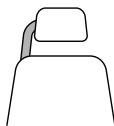
Manufactured under license from Dolby Laboratories.
Information on Disposal for Users of Waste Electrical & Electronic Equipment (private households)

This symbol on the products and/or accompanying documents means that used electrical and electronic products should not be mixed with general household waste.
For proper treatment, recovery and recycling, please take these products to designated collection points, where they will be accepted on a free of charge
basis. Alternatively, in some countries you may be able to return your products to your local retailer upon the purchase of an equivalent new product.
Disposing of this product correctly will help to save valuable resources and prevent any potential negative effects on human health and the environment which could otherwise arise from inappropriate waste handling. Please contact your local authority for further details of your nearest designated collection point.
Penalties may be applicable for incorrect disposal of this waste, in accordance with national legislation.
For business users in the European Union
If you wish to discard electrical and electronic equipment, please contact your dealer or supplier for further information.
Information on Disposal in other Countries outside the European Union
This symbol is only valid in the European Union.
If you wish to discard this product, please contact your local authorities or dealer and ask for the correct method of disposal.
GERMAN
Advanced Surround .....11
Angle select....12
AV SELECT....25
BBRIGHT-LCD .....10
©Car DC Adaptor....24
CD text playback .....15
Cinema1/Cinema2....13
Depth Enhancer....13
Dialogue Enhancer .....19
DISPLAY....10, 18, 20
DivX 4,5,17
Dolby Digital ....12
DTS....12
Finalize....4
H.Bass 13
Headrest Mounting Bracket .....22
HighMAT....15
Just Fit Zoom....19
LCD-SIZE .....10
M Manual Zoom....19
MENU 9, 15, 16
MPEG DNR....13
MPEG4 4,5
Navigation Menu .....16
Number Select....9, 18
On-Screen Menus .....18
Play speed....11
Playback Menu ....16
Playlist ....15
Programs ....15
Program/Random play (DVD-LS82). .14
@Quick OSD ....13
Re-initialise Setting....21
REPEAT ....10
Resume play ....8
Rotate Picture .....12
Setup 20
Sound Enhancement.....19
Soundtrack....12
Subtitle....12
Time Slip for play only .....18
TOP MENU .....9, 15, 16
DEUTSCH
Index
A-A-B Repeat 10
Abspielliste.... 15
Advanced Disc Review ..... 11
Advanced Surround..... 11
DISPLAY....13, 18, 20
DivX.... 4,5,17
Dolby Digital.... 12
DTS 12
F Finalizing.... 4
H.Bass.... 13
HighMAT 15
Just Fit Zoom 19
Re-initialize Setting 21
REPEAT 10
Setup....20
Advanced Surround 11
DISPLAY....13, 18, 20
DivX.... 4,5,17
Dolby Digital.... 12
DTS 12
F Finalizing.... 4
H.Bass.... 13
HighMAT 15
Just Fit Zoom 19
LCD-SIZE 10
Re-initialise Setting 21
REPEAT 10
© Cinema1/Cinema2 13
D Depth Enhancer 13
Dialogue Enhancer.... 19
DISPLAY 13, 18, 20
DivX....4,5,17
Dolby Digital....12
DTS 12
Re-initialise Setting ..... 21
REPEAT.... 10
Advanced Surround .....11
AV SELECT....25
BBRIGHT-LCD .....10
©Cinema1/Cinema2....13
Depth Enhancer....13
Dialogue Enhancer .....19
DISPLAY....13, 18, 20
DivX 4,5,17
Dolby Digital .....12
DTS....12
Re-initialise Setting....21
REPEAT ....10
TOP MENU....9, 15, 16
Audio track....12
THIS PRODUCT USES A LASER.
OPERATION OF CONTROLS, ADJUSTMENTS OR OTHER PROCEDURES OTHER THAN THOSE SPECIFIED HEREIN MAY RESULT IN HAZARDOUS RADIATION EXPOSURE.
DO NOT OPEN COVERS AND NEVER ATTEMPT TO REPAIR THE UNIT YOURSELF. ALL SERVICE AND REPAIR WORK MUST BE PERFORMED BY QUALIFIED PERSONNEL.
WARNING!
- THE APPARATUS MUST NOT BE PLACED IN A BOOKSHELF, A BUILT-IN CABINET OR ANY OTHER ENCLOSED PLACE WHERE VENTILATION CONDITIONS ARE INADEQUATE. MAKE SURE THAT CURTAINS OR SIMILAR DO NOT WORSEN THE VENTILATION CONDITIONS, SO AS TO AVOID THE RISK OF ELECTRIC SHOCK OR FIRE CAUSED BY OVERHEATING.
- THE APPARATUS'S VENTILATION OPENINGS MUST NOT BE COVERED WITH NEWSPAPERS, TABLECLOTHS, CURTAINS AND THE LIKE.
- DO NOT PLACE OPEN FLAMES, SUCH AS LIT CANDLES, ON TOP OF THE APPARATUS.
- USED BATTERIES MUST BE DISPOSED OF WITHOUT ENDANGERING THE ENVIRONMENT.
THIS APPARATUS IS INTENDED FOR USE UNDER MODERATE CLIMATIC CONDITIONS.
CLASS 1 LASER PRODUCT


- REGIONAL CODE
- PRECAUTIONS
- PRECAUTIONS FOR LISTENING WITH THE HEADPHONES OR EARPHONES
- WARNING
- CAUTION
- ACCESSORIES
- TABLE OF CONTENTS
- PREPARATIONS
- BATTERIES
- DISCS THAT CAN BE PLAYED
- DISCS THAT CANNOT BE PLAYED
- TIPS FOR MAKING DATA DISCS
- NAMING FOLDERS AND FILES ON DATA DISCS (FILES ARE TREATED AS CONTENTS AND FOLDERS ARE TREATED AS GROUPS ON THIS UNIT.)
- DVD-RAM
- DVD-R/RW
- CD-R/RW
- ① ATTACHING THE BATTERY (WHEN THE UNIT IS OFF)
- DETACHING
- WHEN NOT USING FOR LONG PERIODS OF TIME
- ② RECHARGING THE BATTERY
- APPROXIMATE RECHARGING AND PLAY TIMES (HOURS)
- CHECKING THE REMAINING BATTERY CHARGE
- ③ THE REMOTE CONTROL DVD-LS
- ④ ADJUSTING THE LCD ANGLE
- PLAYING DISCS
- OPEN THE LID
- INSERT A DISC AND CLOSE THE LID
- PRESS AND HOLD
- ADJUST THE VOLUME
- NOTE
- USEFUL FUNCTIONS
- SELECTING HOW TO SHOW 4:3 ASPECT PICTURES ON THE LCD
- SELECTING THE PICTURE QUALITY ON THE LCD
- PRESS TO CHANGE
- WHEN SELECTING "USER MODE
- TO REPEAT A SPECIFIED SECTION (A-B REPEAT)
- REVIEWING TITLES/PROGRAMS TO PLAY (ADVANCED DISC REVIEW)
- CHANGING PLAY SPEED DVD-VR DVD-V
- ENJOYING VIRTUAL SURROUND (ADVANCED SURROUND)
- CHANGING SOUNDTRACKS MOTION PICTURES
- PRESS ONCE
- SIGNAL TYPE/DATA
- CHANGING SUBTITLES DISCS WITH SUBTITLES
- DVD-VR DVD-V VCD DIVX
- ANGLE SELECT DVD-V WITH MULTIPLE ANGLES /STILL PICTURE ROTATION JPEG
- ENJOYING HIGHER QUALITY AUDIO AND VIDEO
- ENJOYING HEAVY BASS WITH THE SPEAKERS (H.BASS) DVD-V DVD-VR
- PROVIDING THE SUITABLE PICTURE QUALITY FOR ENJOYING MOVIES (CINEMA1/CINEMA2)
- REDUCING NOISE IN PICTURES (DEPTH ENHANCER/MPEG DNR)
- PROGRAM/RANDOM PLAY
- PROGRAM PLAY (UP TO 32 ITEMS)
- SELECTING ALL THE ITEMS (ON THE DISC OR IN THE TITLE OR GROUP)
- CHANGING THE PROGRAM
- CLEARING THE WHOLE PROGRAM
- RANDOM PLAY
- TO EXIT THE PROGRAM OR RANDOM MODE
- PLAYING HIGHMAT™ DISCS
- SELECTING FROM THE LIST
- PLAYING PROGRAMS/PLAYLIST
- TO PLAY PROGRAMS
- TO PLAY PLAYLISTS
- PLAYING CD USING MENUS
- PLAYING AUDIO (WMA/MP3), PICTURE (JPEG) AND VIDEO (MPEG4/DIVX) DISCS WMA MP3 JPEG MPEG4 DIVX
- PLAYING ITEMS IN ORDER (PLAYBACK MENU)
- PLAYING FROM THE SELECTED ITEM (NAVIGATION MENU)
- USING THE SUBMENU
- SEARCHING BY A CONTENT OR GROUP TITLE
- ABOUT DIVX VOD CONTENT
- DISPLAY THE UNIT'S REGISTRATION CODE
- REGARDING DIVX CONTENT THAT CAN ONLY BE PLAYED A SET NUMBER OF TIMES
- USING ON-SCREEN MENUS
- CHANGING THE PLAYER SETTINGS
- ENJOYING IN A CAR
- ENJOYING VIDEO IN THE BACK SEAT WITH THE HEADREST MOUNTING BRACKET
- ATTACHING THE HEADREST BRACKET TO THE FRONT SEAT
- ADJUSTING THE MONITOR
- ATTACHING THE UNIT TO THE BRACKET
- CONNECTING THE INCLUDED CAR DC ADAPTOR
- REPLACING THE FUSE
- CAUTIONS
- TO AVOID DRAINING YOUR CAR BATTERY
- USING THIS UNIT WITH OTHER EQUIPMENT
- ENJOYING STEREO AUDIO
- ENJOYING WITH A TELEVISION
- WATCHING VIDEO FROM OTHER EQUIPMENT
- CONNECT THE EQUIPMENT TO THIS UNIT
- PRESS [AV SELECT] TO SWITCH TO "AUX
- TROUBLESHOOTING GUIDE
- THE FOLLOWING DO NOT INDICATE MALFUNCTION
- SOUND INCORRECT
- FREQUENTLY ASKED QUESTIONS
- MAINTENANCE
- MAINTENANCE OF THE LENS
- TO CLEAN DISCS
- DISC HANDLING PRECAUTIONS
- SPECIFICATIONS
- TO PREVENT DAMAGE
- AC ADAPTOR
- PREPARATION
- PREPARATIVOS
- CHARGING
- VIRTUAL SURROUND SOUND (ADVANCED SURROUND)
- VIRTUAL SURROUND (ADVANCED SURROUND)
- PRESS FOR
- DVD-V WMA MP3 JPEG MPEG4 DIVX
- ③ THE REMOTE CONTROL
- INFORMATION ON DISPOSAL FOR USERS OF WASTE ELECTRICAL & ELECTRONIC EQUIPMENT (PRIVATE HOUSEHOLDS)
- FOR BUSINESS USERS IN THE EUROPEAN UNION
- INFORMATION ON DISPOSAL IN OTHER COUNTRIES OUTSIDE THE EUROPEAN UNION
- GERMAN
- DEUTSCH
- INDEX
Brand : PANASONIC
Model : DVD-LS82
Category : DVD player