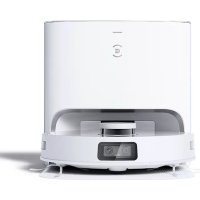
Deebot T10 Plus - Vacuum Cleaner ECOVACS - Free user manual and instructions
Find the device manual for free Deebot T10 Plus ECOVACS in PDF.



| Product type | Robot vacuum with automatic emptying station |
| Brand | ECOVACS |
| Model | Deebot T10 Plus (DBX33) |
| Robot dimensions (approx.) | 35 x 35 x 10 cm |
| Robot weight | 4.5 kg |
| Power supply | Integrated rechargeable battery, charging station with power cord 220-240 V~50/60 Hz |
| Emptying station | Model CH2117, input 220-240 V~50/60 Hz 0.3 A, output 20 V=1 A, emptying power 1000 W |
| Navigation | TrueMapping (laser) + AIVI camera |
| Mopping system | OZMO Pro 3.0 vibrating, with water tank |
| Connectivity | Wi-Fi 2.4 GHz, ECOVACS HOME app |
| Main functions | Automatic cleaning, automatic emptying, mapping, no-go zones, scheduled cleaning, voice control |
| Brushes | Floating main brush + 2 side brushes |
| Dustbin capacity (robot) | 400 ml |
| Station dust bag | Capacity 2.5 L |
| Maintenance | Regular cleaning of brushes, filters, sensors, camera; replace dust bag, mopping cloths, deodorizing capsule |
| Safety | Anti-fall sensors, obstacle detection, automatic stop in case of problem, indoor use only |
| Spare parts | Side brushes, main brush, filters, mopping cloths, dust bag, deodorizing capsule (sold separately) |
| Repairability | Battery replaceable by a professional, contact customer service |
| General information | Indoor domestic use, operating temperature -5°C to 40°C, Wi-Fi band 2.4 GHz, Wi-Fi power <100 mW |
Frequently Asked Questions - Deebot T10 Plus ECOVACS
User questions about Deebot T10 Plus ECOVACS
0 question about this device. Answer the ones you know or ask your own.
Ask a new question about this device
Download the instructions for your Vacuum Cleaner in PDF format for free! Find your manual Deebot T10 Plus - ECOVACS and take your electronic device back in hand. On this page are published all the documents necessary for the use of your device. Deebot T10 Plus by ECOVACS.
USER MANUAL Deebot T10 Plus ECOVACS
Important Safety Instructions IMPORTANT SAFETY INSTRUCTIONS
When using an electrical Appliance, basic precautions should always be followed, including the following:
READ ALL INSTRUCTIONS BEFORE USING THIS APPLIANCE SAVE THESE INSTRUCTIONS
- This Appliance can be used by children aged from 8 years and above and persons with reduced physical, sensory or mental capabilities or lack of experience and knowledge if they have been given supervision or instruction concerning use of the Appliance in a safe way and understand the hazards involved. Children shall not play with the Appliance. Cleaning and user maintenance shall not be made by children without supervision.
-
Clear the area to be cleaned. Remove power cords and small objects from the floor that could entangle the Appliance. Tuck rug fringe under the rug base, and lift items such as curtains and tablecloths off the floor.
-
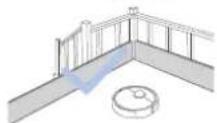
If there is a drop off in the cleaning area due to a step or stairs, you should operate the Appliance to ensure that it can detect the step without falling over the edge. It may become necessary to place a physical barrier at the edge to keep the unit from falling. Make sure the physical barrier is not a trip hazard.
- Only use as described in this manual. Only use attachments recommended or sold by the manufacturer.
- Please make sure your power supply source voltage matches the power voltage marked on the Empty Station.
- For INDOOR household use ONLY. Do not use the Appliance in outdoor, commercial or industrial environments.
- Use only the original rechargeable battery and Empty Station provided with the Appliance from the manufacturer. Non-rechargeable batteries are prohibited.
- Do not use without Auto-Empty Dust Bin and/or filters in place.
-
Do not operate the Appliance in an area where there are lit candles or fragile objects.
-
Do not use in extremely hot or cold environments (below -5°C / 23°F or above 40°C / 104°F ).
- Keep hair, loose clothing, fingers, and all parts of body away from any openings and moving parts.
- Do not operate the Appliance in a room where an infant or child is sleeping.
- Do not use Appliance on wet surfaces or surfaces with standing water.
- Do not allow the Appliance to pick up large objects like stones, large pieces of paper or any item that may clog the Appliance.
- Do not use Appliance to pick up flammable or combustible materials such as gasoline, printer or copier toner, or use in areas where they may be present.
- Do not use Appliance to pick up anything that is burning or smoking, such as cigarettes, matches, hot ashes, or anything that could cause a fire.
-
Do not put objects into the suction intake. Do not use if the suction intake is blocked. Keep the intake clear of dust, lint, hair, or anything that may reduce air flow.
-
Take care not to damage the power cord. Do not pull on or carry the Appliance or Empty Station by the power cord, use the power cord as a handle, close a door on the power cord, or pull power cord around sharp edges or corners. Do not run Appliance over the power cord. Keep power cord away from hot surfaces.
- If the power cord is damaged, it must be replaced by the manufacturer or its service agent in order to avoid a hazard.
- Do not use the Empty Station if it is damaged. The power supply is not to be repaired and not to be used any longer if it is damaged or defective.
- Do not use with a damaged power cord or receptacle. Do not use the Appliance or Empty Station if it is not working properly, has been dropped, damaged, left outdoors, or come in contact with water. It must be repaired by the manufacturer or its service agent in order to avoid a hazard.
-
Turn OFF the power switch before cleaning or maintaining the Appliance.
-
The plug must be removed from the receptacle before cleaning or maintaining the Empty Station.
- Remove the Appliance from the Empty Station, and turn OFF the power switch to the Appliance before removing the battery for disposal of the Appliance.
- The battery must be removed and discarded according to local laws and regulations before disposal of the Appliance.
- Please dispose of used batteries according to local laws and regulations.
- Do not incinerate the Appliance even if it is severely damaged. The batteries can explode in a fire.
- When not using the Empty Station for a long period of time, please unplug it.
- The Appliance must be used in accordance with the directions in this Instruction Manual. ECOVACS ROBOTICS cannot be held liable or responsible for any damages or injuries caused by improper use.
-
The robot contains batteries that are only replaceable by skilled persons. To replace the robot's battery, please contact Customer Service.
-
If the robot will not be used for a long time, power OFF the robot for storage and unplug the Empty Station.
- WARNING: For the purposes of recharging the battery, only use the detachable supply unit CH2117 provided with the Appliance.
To satisfy RF exposure requirements, a separation distance of 20cm or more should be maintained between this device and persons during device operation.
To ensure compliance, operations at closer than this distance is not recommended. The antenna used for this transmitter must not be co-located in conjunction with any other antenna or transmitter.
Device Update
Typically, some devices are updated bi-monthly, but not always so specific.
Some devices, especially those that went on sale more than three years ago, will only be updated if a critical vulnerability is found and fixed.
| Class II |
| Short-circuit-proof safety isolating transformer |
| Switch mode power supply |
| For indoor use only |
| Direct current |
| Alternating current |
For EU Countries
For EU Declaration of Conformity information, visit https://www.ecovacs.com/global/compliance.
For UK
For UK Declaration of Conformity information, visit https://www.ecovacs.com/global/compliance.
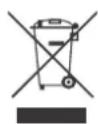
Correct Disposal of this Product
This marking indicates that this product should not be disposed of with other household waste throughout the EU. To prevent possible harm to the environment or human health from uncontrolled waste disposal, recycle it responsibly to promote the sustainable reuse of material resources. To recycle your used device, please use the return and collection systems or contact the retailer where the product was purchased. They can safely recycle this product.
The remote surveillance is for the absolute private use of non-public, private owned places for the pure self-protection and single control intended only. Please be aware of the local data protection based legal obligations in case of use. No surveillance of public places, especially with clandestine intent and/or on the part of the employer without justified reasons. Such not justified use is in the risk and responsibility of the user only.
Package Contents
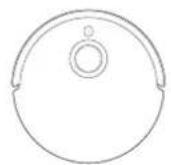
Robot
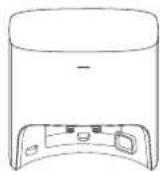
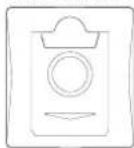
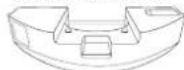
Dust Container Base
Power Cord
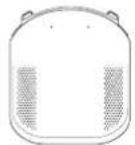

Instruction ManualDust Bag (Pre-installed)
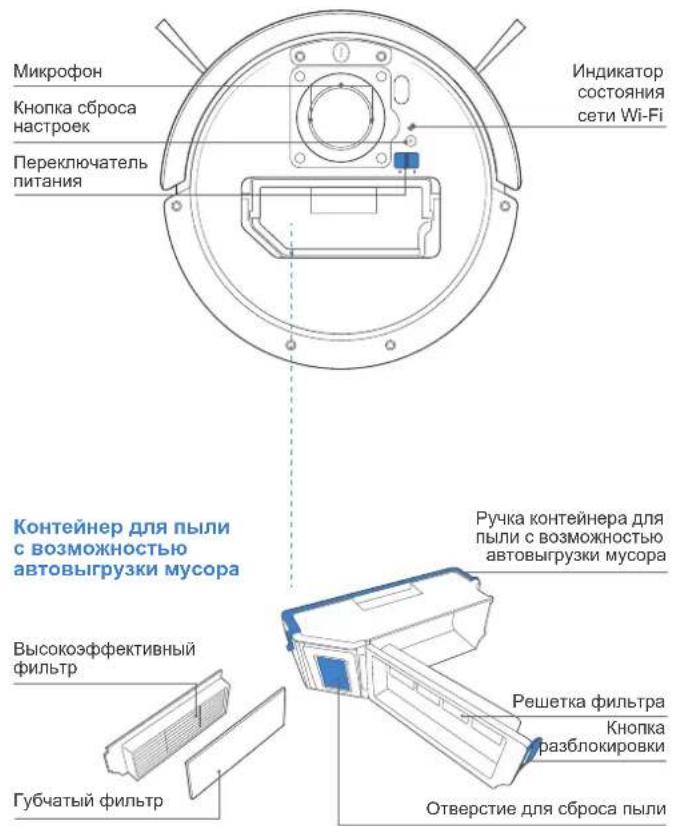
Product Diagram
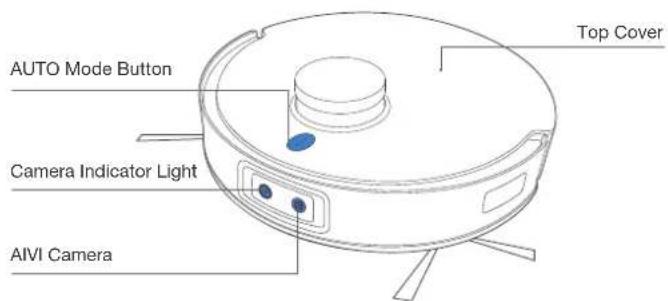
Robot
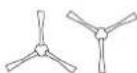
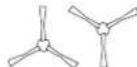
Dual Side Brushes
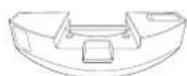
OZMOTM Pro 3.0 Oscillating Mopping System
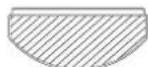
Washable Mopping Pad (Pre-installed)
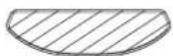
Disposable Mopping Pads
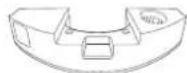
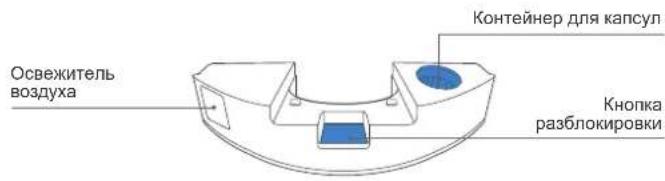
Air Freshener (Pre-installed)

Multi-Function Cleaning Tool
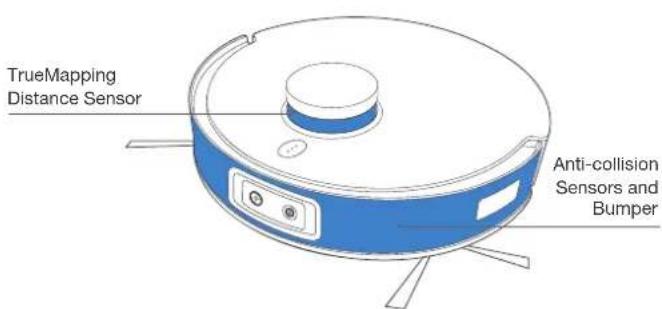
Note: Figures and illustrations are for reference only and may differ from actual product appearance. Product design and specifications are subject to changes without notice.
* Air Freshener Capsule is sold separately that works with Air Freshener. Explore more accessories at https://www.ecovacs.com/global.
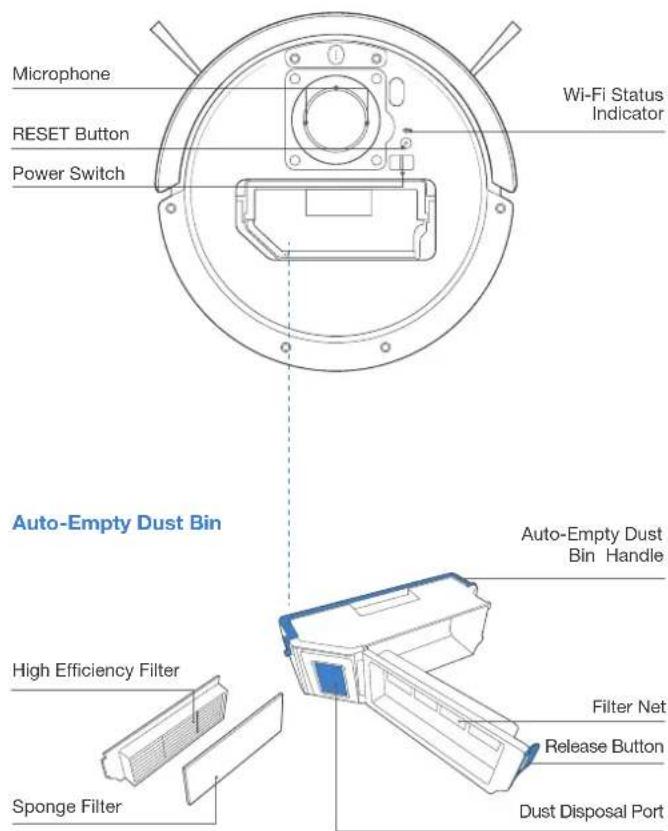
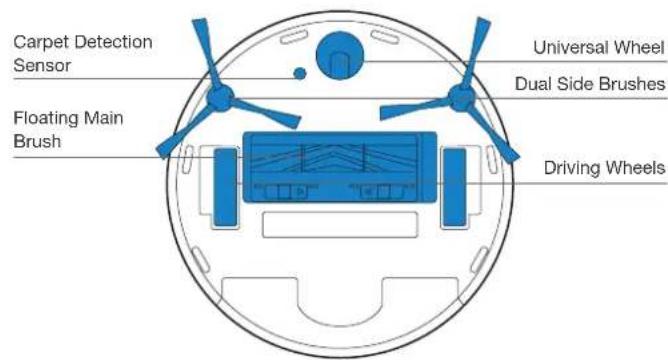
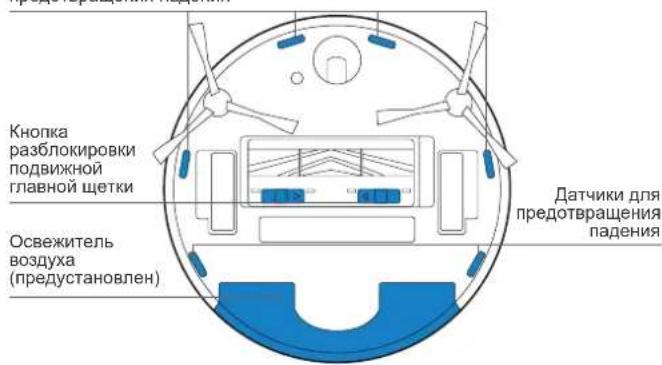
Bottom View
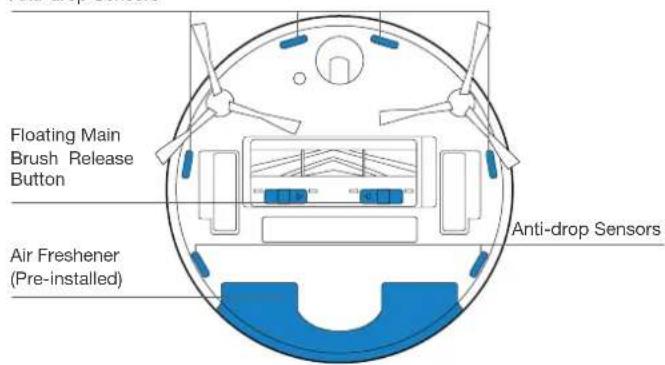
Anti-drop Sensors
OZMO™ Pro 3.0 Oscillating Mopping System
Air Freshener (Pre-installed)
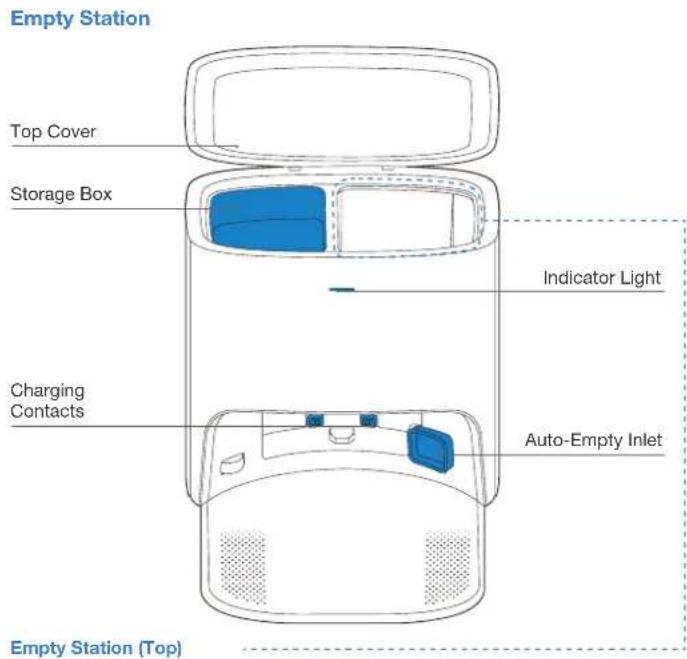
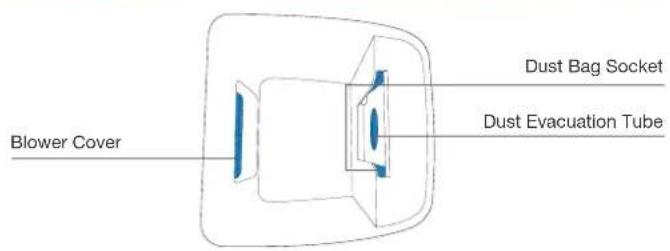
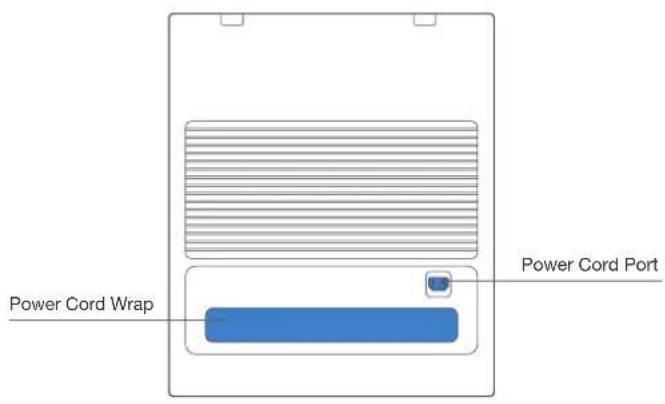
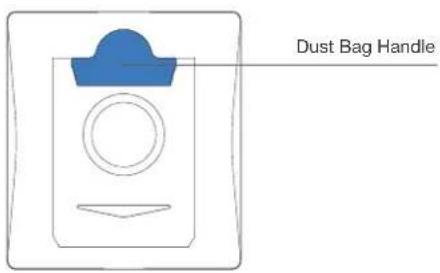
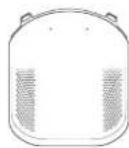
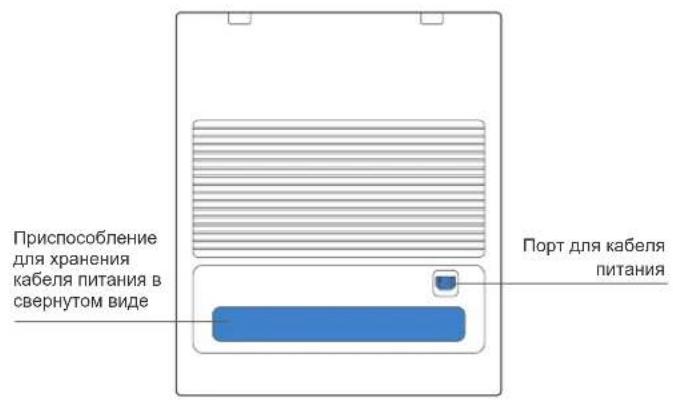
Empty Station (back)
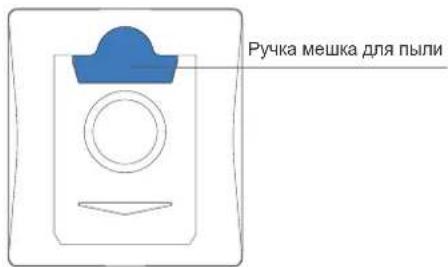
Dust Bag
Notes Before Cleaning
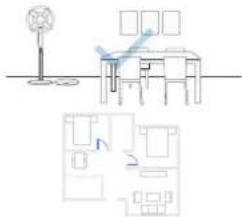
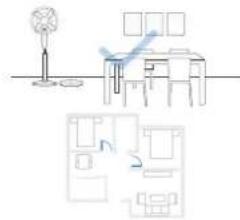
Tidy up the area to be cleaned by putting furniture, such as chairs, in their proper place.
During the first use, make sure each room door is open to help DEEBOT fully explore your house.
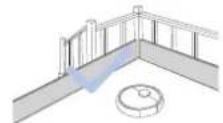
It may be necessary to place a physical barrier at the edge of a drop to stop the unit from falling over the edge.
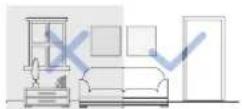
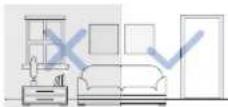
Make sure areas to be cleaned are well illuminated so AlVI Camera works properly. Remove power cords and small objects from the floor to ensure cleaning efficiency.

Put away objects including cables, cloths and slippers, etc. on the floor to improve the cleaning efficiency.

Clean the A/VI Camera and TrueMapping Distance Sensor with a clean cloth, and avoid using any detergent or cleaning spray.

Before using the product on a rug with tasseled edges, please fold the rug edges under.

Please do not stand in narrow spaces, such as hallways, and make sure not to block the AIVI Camera.
Quick Start
Before using DEEBOT, please remove all protective films or protective strips on DEEBOT and Empty Station.
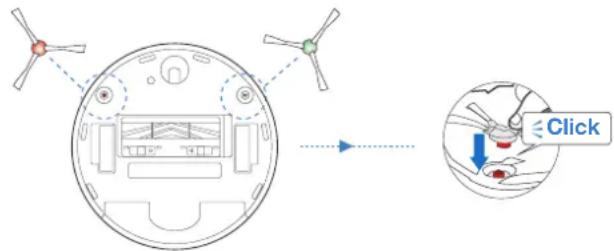
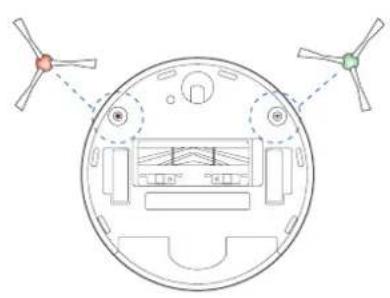
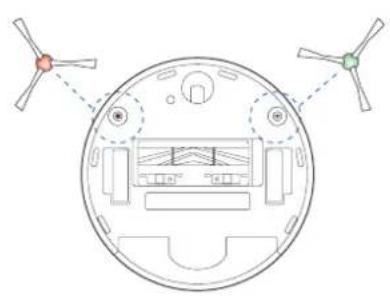
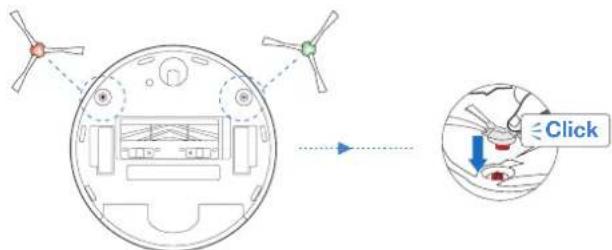
Install the Dual Side Brushes
Make sure the color of Dual Side Brushes are consistent with that of mounting slot.
ECOVACS HOME App
To enjoy all available features, it is recommended to control your DEEBOT via the ECOVACS HOME app.
Before you start, make sure that:
- Your mobile phone is connected to a Wi-Fi network.
The 2.4GHz band wireless signal is enabled on your router. - The Wi-Fi indicator light on DEEBOT is slowly flashing.


Wi-Fi Indicator Light
| Slowly flashing | Disconnected to Wi-Fi or waiting for Wi-Fi connection |
| Rapidly flashing Connecting to Wi-Fi | |
| Solid Connected to Wi-Fi |
Wi-Fi Connection
Before Wi-Fi setup, make sure DEEBOT, mobile phone, and Wi-Fi network meet the following requirements.
DEEBOT and Mobile Phone Requirements
- DEEBOT is fully charged and the power switch of DEEBOT is turned on.
Wi-Fi status light slowly flashes. - Turn off mobile phone's cellular data (you can turn it back on after setup).
Wi-Fi Network Requirements
- You are using a 2.4GHz or 2.4/5 GHz mixed network.
- Your router supports 802.11b/g/n and IPv4 protocol.
- Do not use a VPN (Virtual Private Network) or Proxy Server.
- Do not use a hidden network.
WPA and WPA2 using TKIP, PSK, AES/CCMP encryption. - WEP EAP (Enterprise Authentication Protocol) is not supported
- Use Wi-Fi channels 1-11 in North America and channels 1-13 outside North America (refer to local regulatory agency).
- If you are using a network extender/repeater, the network name (SSID) and password are the same as your primary network.
After Wi-Fi connection, DEEBOT will enter into Networked Standby mode if it has no signal input within 10 minutes.
Please be aware that the realization of intelligent functions such as remote startup, voice interaction, 2D/3D map display and control settings, and personalized cleaning (depending on different products) requires users to download and use ECOVACS HOME App, which is constantly updated. You need to agree to our Privacy Policy and User Agreement before we can process some of your basic and necessary information and enable you to operate the product. If you do not agree with our Privacy Policy and User Agreement, some of the aforementioned intelligent functions cannot be realized through ECOVACS HOME App, but you can still use the basic functions of this product for manual operation.
Charging DEEBOT
1 Connect the Power Cord
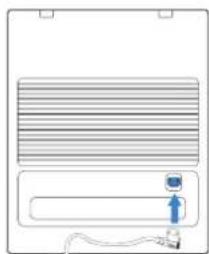
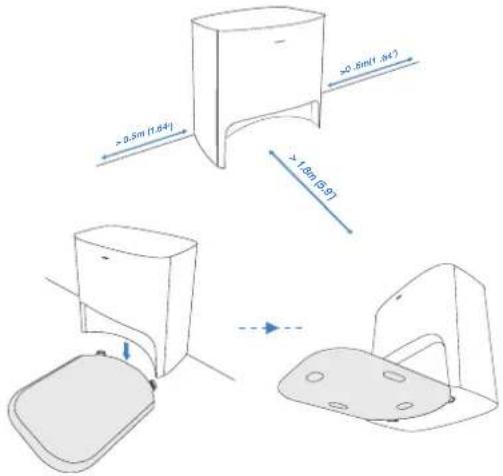
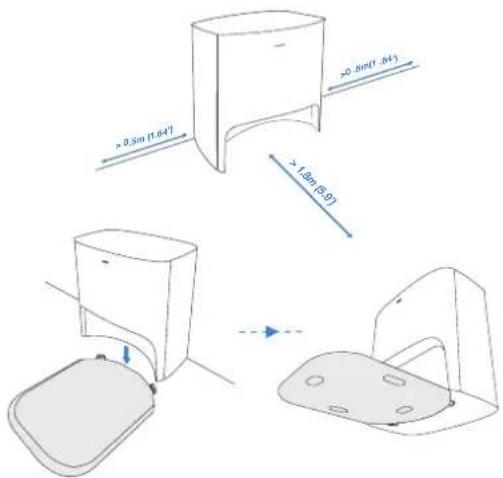
2 Empty Station Placement and Assembly
Note: Please do not place the Empty Station on the carpet.
Keep the area around the Station clear of objects and reflective object surfaces.
3 Power ON
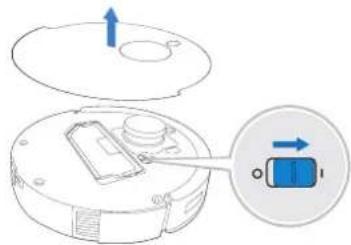
Note: I = ON, O = OFF.
DEEBOT cannot be charged when being powered OFF.
Charge DEEBOT
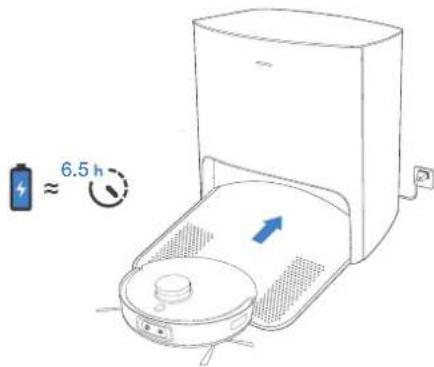
Please make sure that DEEBOT starts cleaning from the Station. Do not move the Station while cleaning.
When cleaning is complete, it is recommended to remove the Mopping Pad and manually place DEEBOT into the Station.
Operating DEEBOT
For the first-time cleaning, please ensure that DEEBOT is fully charged. During the first cleaning:
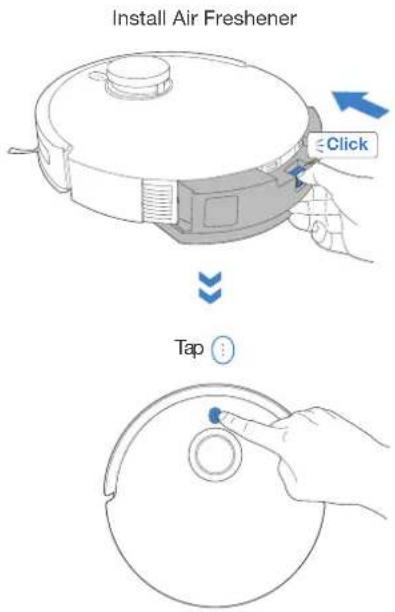
- Please make sure to install Air Freshener to create a home map, including carpet area in ECOVACS HOME App
- Please ensure that DEEBOT is fully charged.
- Please supervise DEEBOT and assist it should there be a problem.
1 Start

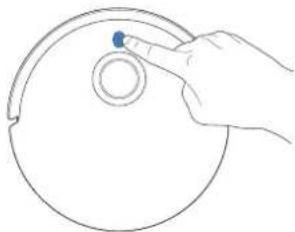
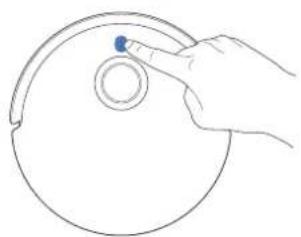
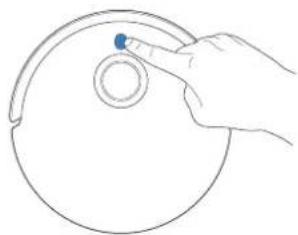
Pause/Wake Up
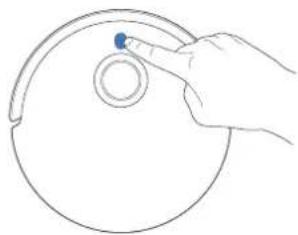
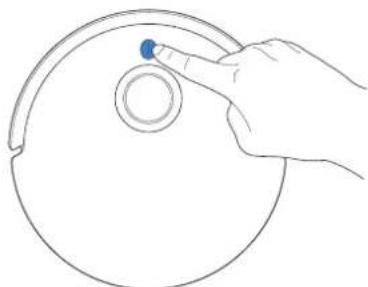
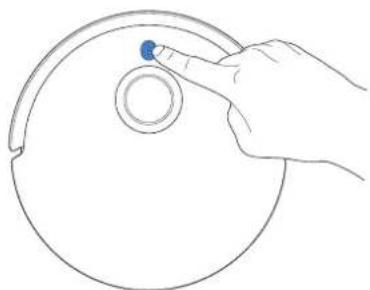
Note: The robot's Control Panel stops glowing after the robot is paused for a few minutes. Tap the AUTO Mode Button on DEEBOT to wake up the robot.

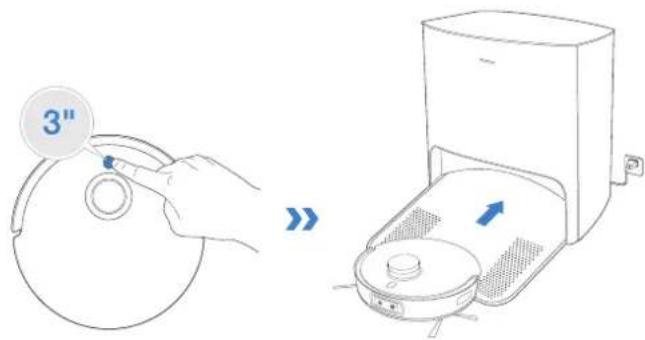
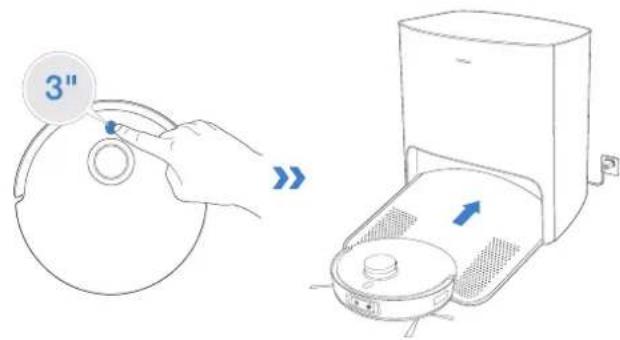
Return to Charge
Tap for 3 seconds to send DEEBOT back to the Empty Station.
OZMO™ Pro 3.0 Oscillating Mopping System
Note:
1.Install OZMO™ Pro 3.0 Oscillating Mopping System for floor scrubbing.
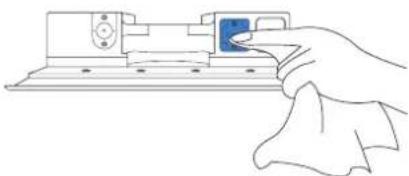
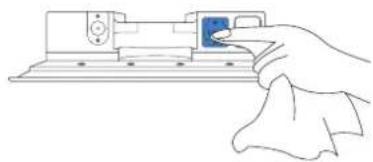
2.Before installing OZMO™ Pro 3.0 Oscillating Mopping System, please make sure the contacts are thoroughly dry.
3. Please avoid using OZMO™ Pro 3.0 Oscillating Mopping System on the carpet.
4. It is recommended to drench and wring out the Mopping Pad before installing it to have a better cleaning.

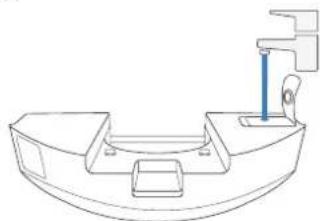
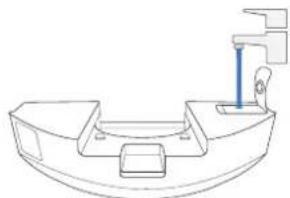
Add Water
To prolong the service life of OZMOTM Pro 3.0 Oscillating Mopping System, it is recommended to use purified water or ECOVACS DEEBOT Cleaning Solution. Explore more accessories at https://www.ecovacs.com/global.
- Do not soak OZMO™ Pro 3.0 Oscillating Mopping System in water.

Dry Contacts Thoroughly

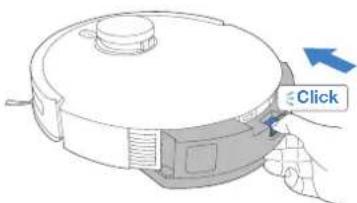
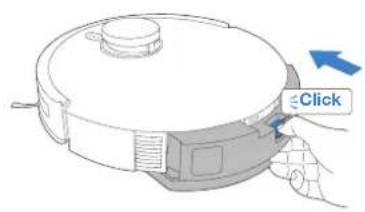
Install OZMO™ Pro 3.0 Oscillating Mopping System

Start Cleaning
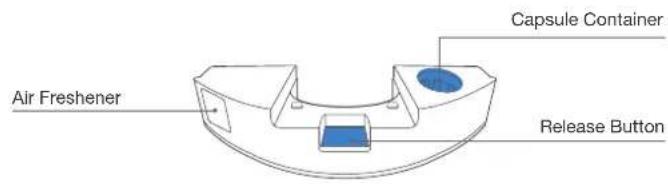
Air Freshener
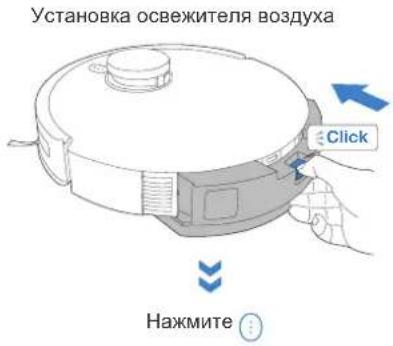
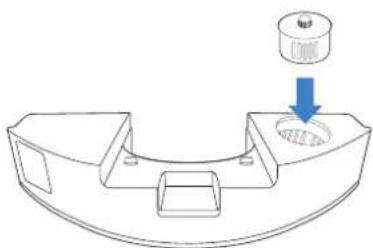
Install Air Freshener Capsule (sold separately)
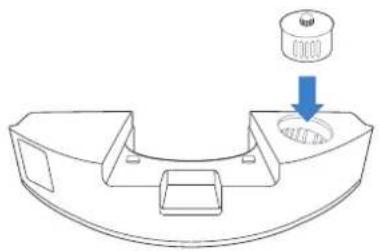
Install Air Freshener
Regular Maintenance
To keep DEEBOT running at peak performance, perform maintenance tasks and replace parts with the following frequencies:
| Robot Part Maintenance | Frequency Replacement Frequency | |
| Air Freshener Capsule(sold separately) | / Every 2 months | |
| Washable Mopping Pad / Every | 1-2 months | |
| Disposable Mopping Pad After each use Replace after each use | ||
| Dust Bag / Replace when voice prompts | ||
| Dual Side Brushes Once every 2 weeks Every 3-6 months | ||
| Floating Main Brush Once per week Every 6-12 months | ||
| Sponge Filter/High Efficiency Filter Once per week Every 3-6 months | ||
| AIVI CameraTrueMapping Distance SensorUniversal WheelAnti-Drop SensorsBumperCharging Contacts | Once per week | / |
| Auto-Empty Dust Bin | Once per month | / |
| Empty Station | Once per month | / |
Before performing cleaning and maintenance tasks on DEEBOT, turn the robot OFF and unplug the Empty Station.
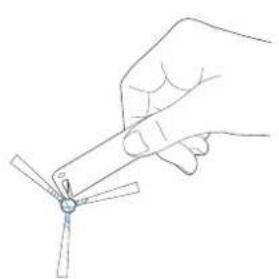
A multi-function Cleaning Tool is provided for easy maintenance. Handle with care, this cleaning tool has sharp edges.
Note: ECOVACS manufactures various replacement parts and fittings. Please contact Customer Service for more information on replacement parts.
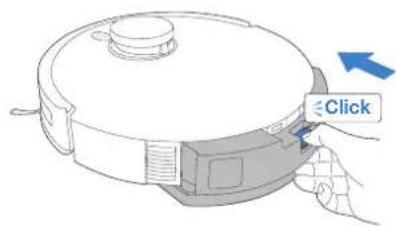
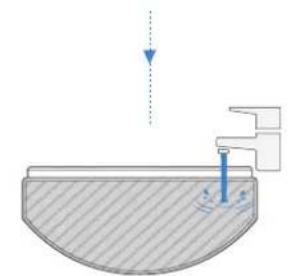
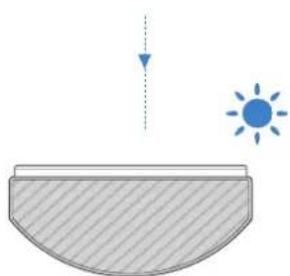
Maintain OZMO™ Pro 3.0 Oscillating Mopping System
1 Remove OZMO™ Pro 3.0 Oscillating Mopping System Washable Mop3g Pad
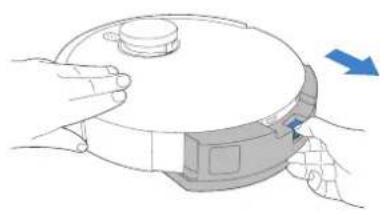
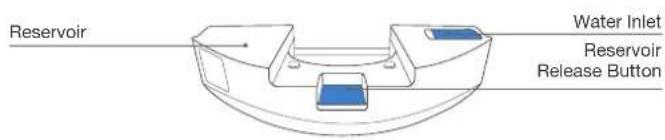
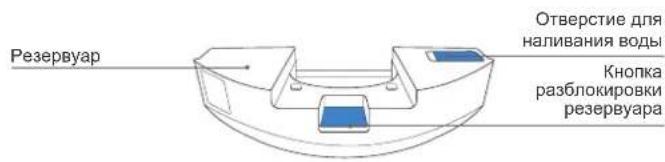
- After DEEBOT finishes mopping, please empty the reservoir.
2 Wipe OZMO™ Pro 3.0 Oscillating Mopping System Clean
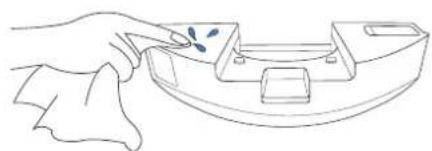
Wipe OZMO™ Pro 3.0 Oscillating Mopping System with a clean, dry cloth. Do not soak into water.
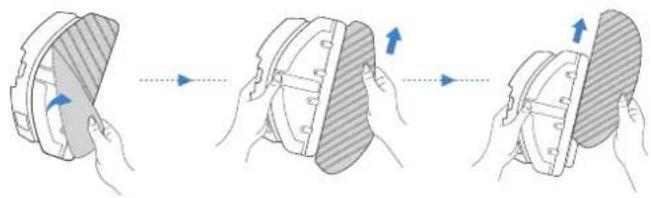

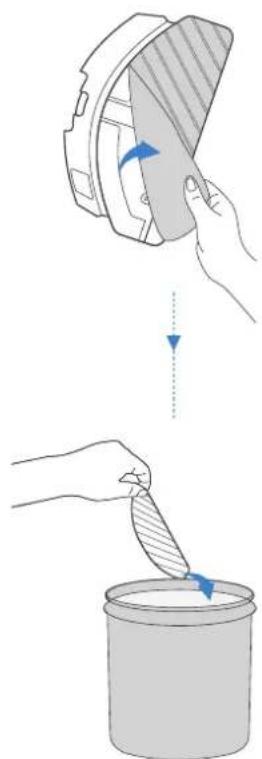
Disposable Mopping Pad
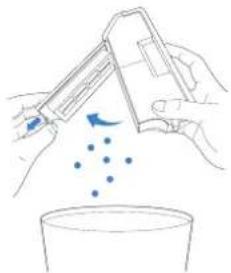
Maintain Auto-Empty Dust Bin and Filters
1
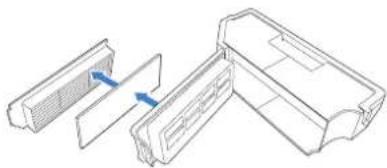
2
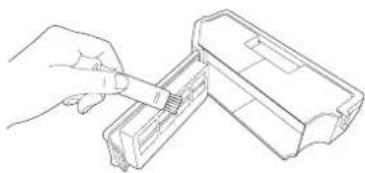
3
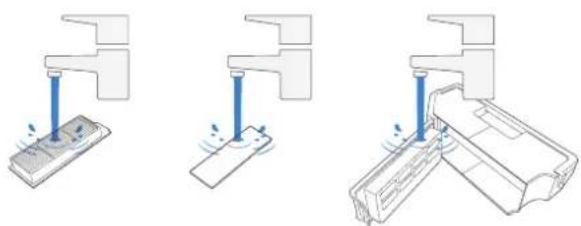
4
Note:
- Please rinse the filter with water as shown above.
- Do not use finger or brush to clean the filter.
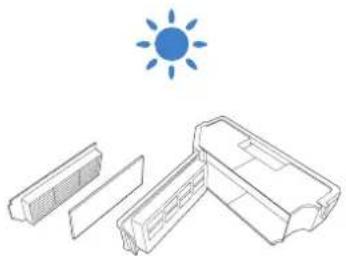
5
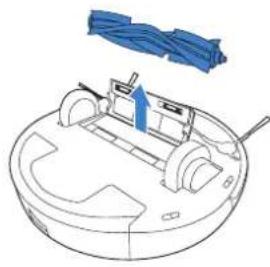
Maintain Floating Main Brush and Dual Side Brushes
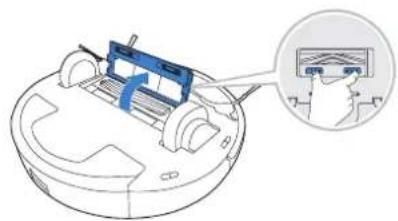
Floating Main Brush
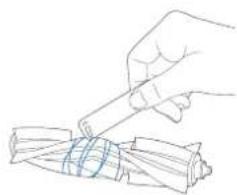
Dual Side Brushes
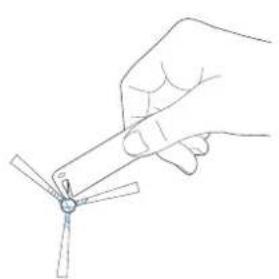
Maintain Empty Station
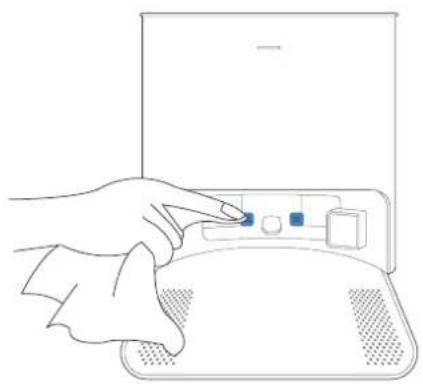
Note: Before performing cleaning and maintenance on Empty Station, unplug it first.
- For a proper maintenance, wipe with a clean dry cloth, and avoid using any detergent or cleaning spray.
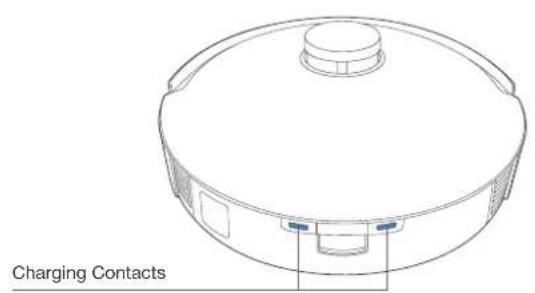
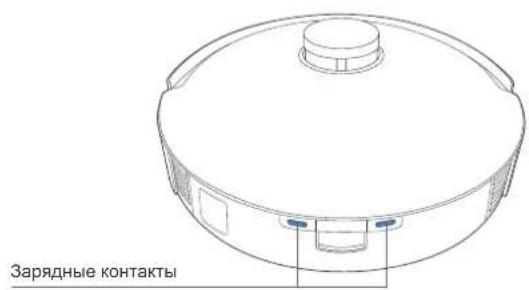
Charging Contacts
Dust Bag
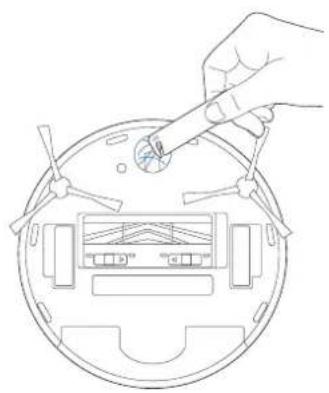
1 Dispose the Dust Bag
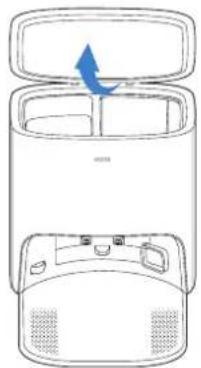
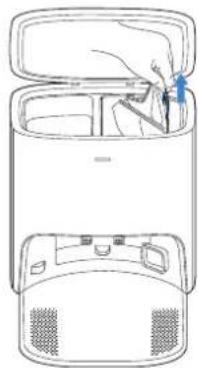
* Hold the Handle to lift out the Dust Bag, which can effectively prevent dust leakage.
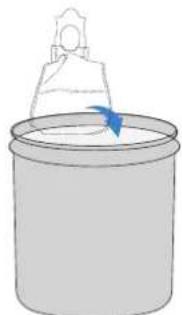
2 Clean the Blower Cover Install the Dust Bag Close t3 Dust Container Lid
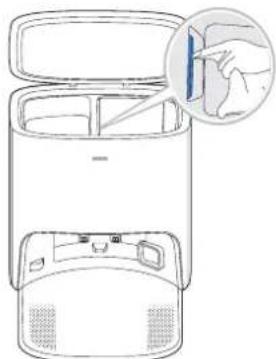
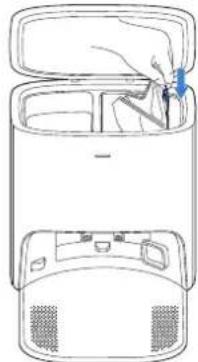
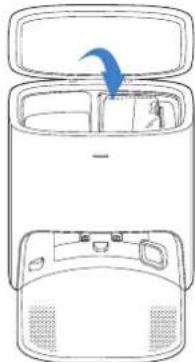
4
Maintain Other Components
Note: Wipe the components with a clean, dry cloth. Avoid using cleaning sprays or detergents.
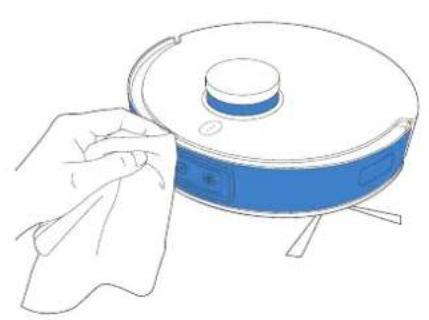
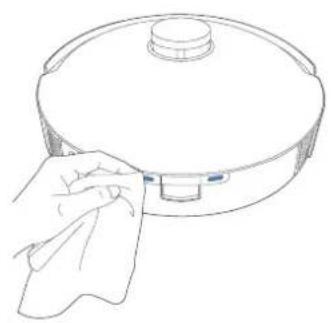
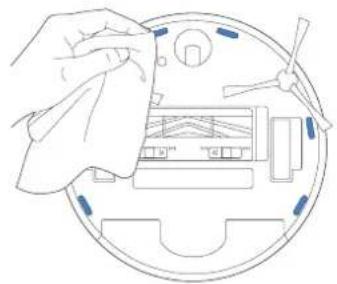
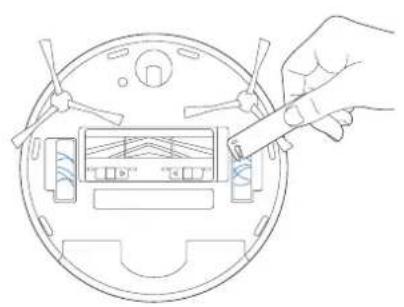
Empty Station
The light effect of the Status Indicator on Empty Station corresponds to different conditions and solutions. For more support, please refer to ECOVACS HOME App or the Troubleshooting Section of this manual.
| Light Effect Status Solutions | ||
| Indicator light off | The Empty Station is in standby. / | |
| DEEBOT is in Do Not Disturb Mode. / | ||
| Glowing a solid WHITE | DEEBOT returns to the Empty Station and starts to Auto-Empty. | / |
| DEEBOT is Auto-Emptying. / | ||
| DEEBOT pairs successfully with the Empty Station. / | ||
| Glowing a solid RED | The Dust Bag is not installed. Please install the Dust Bag. | |
| The Empty Station's suction power decreased. Please check the Dust Bag. | ||
| The Empty Station failed to Auto-Empty the dust. | Please check the solution in the App. | |
| The Dust Container Lid is not closed. Please make sure the Dust Container Lid is firmly closed. | ||
Troubleshooting
| No. | Malfunction Possible Causes | Solutions | |
| 1 | DEEBOT is not able to connect to ECOVACS HOME App. | Incorrect home Wi-Fi username or password entered. | Enter the correct home Wi-Fi username and password. |
| DEEBOT is not within range of your home Wi-Fi signal. | Make sure DEEBOT is within range of your home Wi-Fi signal. | ||
| DEEBOT is not in the configuration state. | Make sure DEEBOT is connected to the power supply and turned on. Open the cover, and press RESET Button. DEEBOT will enter the configuration state when you hear a voice prompt. | ||
| Incorrect App installed. Please download and install | ECOVACS HOME App. | ||
| Not using a 2.4GHz or 2.4/5 GHz mixed network. | DEEBOT does not support 5GHz network. Please use a 2.4GHz or 2.4/5 GHz mixed network. | ||
| 2 | Unable to create furniture map on App. | DEEBOT does not start cleaning from the Station. | DEEBOT must start cleaning from the Station. |
| Move DEEBOT when cleaning might cause the mop lost. | During cleaning, do not move DEEBOT as far as possible. | ||
| Auto cleaning is not complete. | Make sure DEEBOT automatically return to the Station after cleaning. | ||
| 3 | DEEBOT Dual Side Brushes drop out of place during use. | The Dual Side Brushes are not correctly installed. | Make sure the Dual Side Brushes click into place when installing. |
| 4 | No singal found. Unable to return to the Station. | The Station is incorrectly placed. | Please place the Station correctly according to the instructions in the [Charging DEEBOT] section. |
| The Station is out of power or manually moved. | Check whether the Station is connected to power supply. Do not move the Station. | ||
| DEEBOT does not start cleaning from the Station. | It is recommended that DEEBOT start cleaning from the Station. | ||
| The charging route is blocked. For example, the door of the room with the Station is closed. | Keep the charging route clear. | ||
| 5 | DEEBOT returns to the Station before it has finished cleaning. | The room is large and DEEBOT needs to return to recharge. | Please turn on Continuous Cleaning. For more details, please follow the App guidance. |
| DEEBOT is unable to reach certain areas blocked by furniture or barriers. | Tidy up the area to be cleaned by putting furniture and small objects in their proper place. | ||
| 6 | DEEBOT is not charging. | DEEBOT is not switched ON. Switch ON DEEBOT. | |
| DEEBOT's Charging Contacts are not connected to the Station's Contacts. | Make sure that the robot's Charging Contacts have connected to the Station's Contacts and the AUTO Mode Button flashes. Check whether DEEBOT'S Charging Contacts and the Station are dirty. Please clean these parts according to the instructions in the [Maintenance] section. | ||
| The Station is not connected to the power supply. | Make sure the Power Cord is firmly connected to the Station. | ||
| The battery is completely discharged. Please contact Customer Care for help. | |||
| 7 | Running is very loud during cleaning. | Dual Side Brushes and Floating Main Brush are entangled. Auto-Empty Dust Bin and filter are blocked. | It is recommended to clean the Dual Side Brushes, Floating Main Brush, Auto-Empty Dust Bin, filter, etc. regularly. |
| DEEBOT is in Strong Mode. Switch to Standard Mode. | |||
| 8 | DEEBOT gets stuck while working and stops. | DEEBOT is tangled with something on the floor (electrical wires, curtains, carpet fringing, etc.). | DEEBOT will try various ways to free itself. If it is unsuccessful, manually remove the obstacles and restart. |
| DEEBOT might be stuck under furniture with an entrance of similar height. | Please set a physical barrier, or set a Virtual Boundary in the ECOVACS HOME App. | ||
| 9 | During cleaning, DEEBOT appears in the route disorder, running bias, repeated cleaning, small area leakage and so on.(If there is a large area that has not been swept temporarily, DEEBOT will make up the leakage independently. Sometimes DEEBOT will re-enter a cleaned room to find any missing area.) | Objects such as wires and slippers placed on the ground affect the normal operation of DEEBOT. | Please tidy up the scattered wires, slippers and other objects on the ground before cleaning. And reduce the scattered objects on the ground as far as possible. If there is any area leakage, DEEBOT will correct the leakage by itself, please do not interfere (such as moving DEEBOT or blocking the route). |
| It may be that the Driving Wheels slips on the ground when DEEBOT climbs steps, thresholds and door bars, thus affecting the its judgment of the whole house environment. | It is recommended to close the door of this area and clean the area separately. After cleaning, DEEBOT will return to the starting point. Please rest assured to use. | ||
| Work on freshly waxed and polished floors or smooth tiles, resulting in less friction between the Driving Wheels and the floor. | Please wait for wax to dry before cleaning. | ||
| Due to different home environments, some areas cannot be cleaned. | Clean the home environment to ensure that DEEBOT can enter for cleaning. | ||
| The TrueMapping Distance Sensor is dirty or blocked by foreign matters. | Wipe the TrueMapping Distance Sensor with a clean soft cloth or remove foreign matters. | ||
| 10 | Video Manager cannot open or has no screen. | Wi-fi connection failed. | Check the Wi-Fi connection status. DEEBOT must be in an area with good Wi-Fi signal to enable the Video Manager. |
| Due to the network latency, you may not be able to open Video Manager temporarily. | Try again later. | ||
| The AIVI Camera is blocked. Remove the shield. | |||
| 11 | Delay in remote control. | The Wi-Fi signal is poor, causing the video loading to be slow. | Use DEEBOT in areas with good Wi-Fi signals. |
| 12 | AIVI Camera cannot recognize objects. | The cleaning area is not well illuminated. | Smart Recognition requires sufficient lighting. Please make sure the areas to be cleaned are well illuminated. |
| AIVI Camera lens is dirty or blocked. | Clean the lens with a clean soft cloth, and make sure the AIVI Camera is not blocked. Avoid using any detergent or cleaning spray while cleaning. | ||
| 13 | DEEBOT does not start auto-emptying after returning to the Empty Station. | The Dust Container Lid is not closed. Close the Dust | Container Lid. |
| The Dust Bag is not installed to the Empty Station. | Install the Dust Bag and close the Dust Container Lid. | ||
| Manually move DEEBOT to the Empty Station will not trigger Auto-Emptying. | In order to make sure DEEBOT starts auto-emptying successfully, avoid picking up and moving the Empty Station during the cleaning. | ||
| DEEBOT returns to the Auto-Emptying Station running Video Manager in the App. | This is normal. | ||
| Do Not Disturb mode is enabled in ECOVACS HOME App. | This is normal. Disable Do Not Disturb mode in the App, or start auto-emptying manually. | ||
| The Dust Bag is full. Replace the Dust Bag and close the Dust Container Lid. | Please contact customer service. | ||
| If the possible causes are excluded, it might be a component malfunction. | |||
| 14 | DEEBOT fails to auto-empty the Auto-Empty Dust Bin . | The Auto-Empty Dust Bin is not installed. Please install the Auto-Empty Dust Bin . | |
| The Dust Bag is full. Replace the Dust Bag and close the Dust Container Lid. | |||
| The Dust Disposal Port on the Auto-Empty Dust Bin is stuck by debris. | Uninstall the Auto-Empty Dust Bin and clean the debris on the Dust Disposal Port. | ||
| Dust Evacuation Tube is blocked. Clean the Dust Evacuation Tube. | |||
| 15 | There is debris in the Dust Container. | Fine particles are absorbed inside the Dust Container through the Dust Bag. | Clean the Dust Container Lid and inner wall. |
| The Dust Bag is damaged. Check the Dust Bag and replace it. | |||
| 16 | DEEBOT leaks dust or debris while cleaning. | The Dust Disposal Port are stuck by debris. Uninstall the Auto-Empty Dust Bin and clear the debris. | |
| 17 | Air Freshener makes an abnormal noise. | Objects have fallen into the Air Freshener. Please | contact Customer Service for assistance. |
| 18 | DEEBOT does not respond to the Station instruction. | DEEBOT is too far away from the Station. | If it is beyond the available distance, the ECOVACS HOME App can also be used to operate DEEBOT. |
| DEEBOT and the Station are not paired. | Unplug the Station plug and wait for 10 seconds to reinsert the plug. Manually push the robot up to the Station, and ensure that the charging contacts are correctly connected. Then, DEEBOT will start charging, and voice prompt pairing successful. | ||
| 19 | Driving wheels are blocked. | Driving wheels are blocked by foreign objects. | Please rotate and press the driving wheels to check whether there is any foreign object wrapped or stuck. If there is any foreign object, please clean it in time. If this problem persists, please contact Customer Care for help. |
| 20 | DEEBOT OZMOT™ Pro 3.0 Oscillating Mopping System drops out of the place during use. | The OZMOT™ Pro 3.0 Oscillating Mopping System is not correctly installed. | Make DEEBOT OZMOT™ Pro 3.0 Oscillating Mopping System clicks into place when installing. |
| 21 | DEEBOT is stuck when cleaning with OZMOT™ Pro 3.0 Oscillating Mopping System installed. | DEEBOT may have difficulty climbing over obstacles when using OZMOT™ Pro 3.0 Oscillating Mopping System. | Please assist DEEBOT if there is a problem. |
Technical Specifications
| Model DBX33 | |
| Rated Input | 20V =4A |
| Empty Station Model CH2117 | |
| Rated Input (Charging) | 220-240V~50-60Hz 0.3A |
| Rated Output | 20V =4A |
| Power(Auto-Emptying) 1000W | |
| Frequency bands 2400-2483.5MHz | |
| Networked Standby Power Less than 2.00W | |
Output power of the Wi-Fi module is less than 100mW .
Note: Technical and design specifications may be changed for continuous product improvement.
Explore more accessories at https://www.ecovacs.com/global.
2 Pause/Reactivation
Brosses laterales doubles
Entretenir la station de vidage
Download on the App Store

GETITON Google Play
Spia Wi-Fi
AHTeHHa, INcNoIb3yEmaJa DaHHoro
pePaTcNka, He DoJxHa HaxOuTbcra PraDM
nIN nCpOJIb3OBaTbcra CoBMeCTHO C IIO6oI
dpyro aHTeHHO INI nepeDaTuKOM.
06HOBJIeHne yCTpOInCTBa
Kak npabnno, HeKOToPbIe ycTpoiCTBa 06HOBJIOTcKaJDbIe DBA MeCra, Ho 3TO He BCerDa TAK.
HeKOTOpbIe yCTpOINCTBa,OCo6eHNO Te, KOToPbIE NoCTyINnB INpoDAxKy 6OJee Tpex JeT Ha3aI,6yDyT O6HOBJIeHbI TOJbKO B Cnyae. 6hApUKeHnI yCTpaHEnHn KpNTnuecko Iy3BIMOcTn.
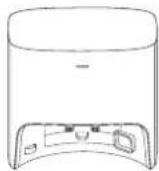
KoHTeHep nIy nbIy Baa
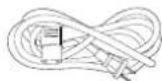
Ka6eJIb nHTaHn
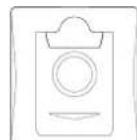
MewoKdIpyIbIyI (npedyctaHOBNeH)

PykoBOOCTBOI0 3KcNJIyataaM
Довьныебokobль
штк
CnCTeMaMbTbIPOB OZMO™Pro3.0c BnOpaUOnHbIMPnBODOM
MhoroporaBamcHbHnBn
Odnapo3bIbe cIaIeTkn dIJI BIAKHOYb6OpKn
OCBeKHTeBbO3yDxa (npeyctohOBneH)
MHorodyHKIOHOHbH MyCTAun HNCTPymeHT
PnMueHHe. PnCynHKn HnNIOCTpaun npBedeHb B O3HaKOMNTeHbHIX
IeHN M NORYT OTNIATCBOT oFkTNNEcKO BHEWHERO BMDA I3dENH
KOHCTpyKUN N TExHHNeCKeXe PAkAKeTepNCTKN I3dENHMOr TY 6bT bN3MeHeHb
6e3 ppeBapntEhHoro yBeDMnEHn
Kancyna OcbexHNTen BO3Dyxa NpOOBpeTaTcR OTdEhBO H NOxOHTn DnI HcNOfB3oBAHnC OCBexHNTen BO3Dyxa. DonOnHNTeBnBHe AkeCCecCyapb MoHO KHaTHn HA Be6-CaIte https://www.ecovacs.com/global.
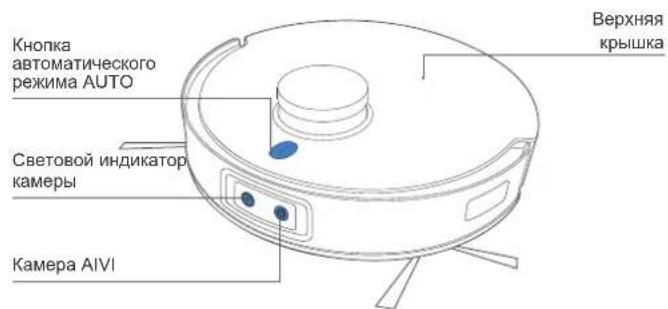
Cxema n3eJnna
Po60T
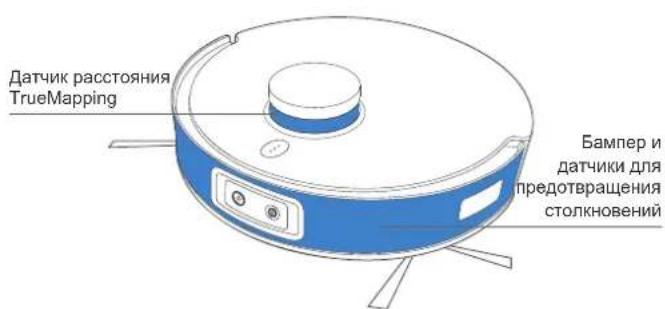
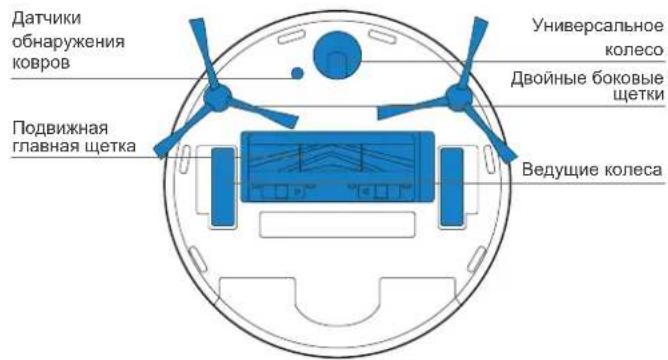
Bud chn3y
DaTynKnDn
npedotbpaueHnnaeHn
CnCTemaMbIbIaIOB OZMO™ Pro 3.0 c BvIbpaUOHHbIM npHBOIDOM
OcBeKHTenb Bo3dyxa (npedyTaHOBneH)
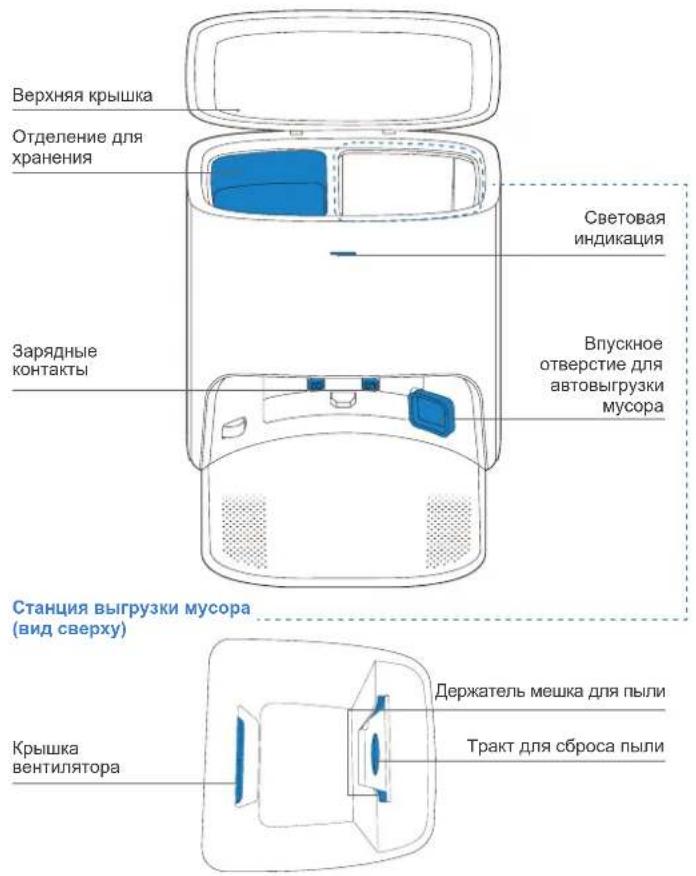
CTaHnIy BbIrpy3Km Mycopa
CTaHnra BbIrpy3Kn Mycopa (BnD c3aDi)
Mewokdnyblln
Poirotobka ky6opke
PnBEnTE B nopAOK 3OHy y6OpKn, pacCTaBm Me6eIb, HApIMep cTynb, Ha CBOE O6bHHe MecTo.
Pn nepBOM NcONb3OBaHm OTkpoTte DBepn BO BCE KOMHaTbI, YTObI pOBoT DEEBOT NOIHocTBIO HCCNeDoban BaW DOM.
Bo3MOKHO,Notpe6yetc yTaHOBnTB
fN3UeCKoe npenrTCTBne Ha rpaHnue
nepena Da BbICOTbl, YTo6bl npeoTbpAITb
naHeHne np6opa.
Y6eNTecb, YTO 30HbI, NOJNEXaUne
y6Opke, xopsoO ocBeuHenbI, YTObI
o6eNeHTb npAunBHyIO pa6Ory KaMepBI
AIVI. y6OpTe c nona Ka6en nITAHnI N
He6oBUNe ppeMeTb IJIra o6eNeueHnE
3fFekTtBHO y6OpKn.

Y6epnte c nona TaKne npedMeTb, KaK Ka6enn, canfETKn, TanoUKN I.Д..ДЯ NOBbIWeHn 3ΦΦeKTHBHOCTN y6Opkn.

OuCTnTe KaMepy AIVI n DaTnK pacctToHnR
TrueMapping YcTcTou TkAhbU He NcNoB3yTe
MOUQue CpeCTBa HnN YncTae Cnpen.

Ipeep nocnolb3oBaHem npnbopa Ha KOBpe c 6axpomoi no kpaM Heo6xOaMo IOBepHyTb KpaKOBpa.

He cToTe B y3kXn IpocTpaHCTbax, HapnpMeK KopmDopax, n 6eInTEcB, TTO Bbl He npenPaTcBye TaPobTe Kamepb AIVI.
KpaTKoe pyKOBOdCTBO
Ipeep nCnoJb3oBaHnem po6oTa DEEBOT cHmnte Bce 3aunTHbie JeHTbl nn nn neHKn C po6oTa HcTaNn BBirpy3Kn Mycopa.
YCTAHOBNTE DBOHBIE 6OKOBbIe 9eTKN
Y6eNTecb, YTO BET DBOHbIX 6OKOBbIX UETOK COOTBETCTBYET UBTy pa3bema dnn KpeIeHn.
Прилобкени ECOVACS HOME
TtobBocnoJb3OBAbCBAcEMNIOCTyHbIMBO3MOXHOCTAMn,
IynpaBHeHnpo6oTom DEEBOT peKomeHdyeTCnNoJb3OBAb
npnoKeHne ECOVACS HOME.
PpeXe Yem npctyntb K nCnoIb3ObaHIO, y6eIITecB B CJeDyUoE M.
- MoibnBbI TepeoH noKIOUeH K cTeN Wi-Fi.
HaMapuPyTu3aTopeNcNoIb3yETcRcHnB6ecnpoBOHOcBra3nB dnaana3OHe2,4Tt. - INHnKaTOp ceTu Wi-Fi Ha poBoTe DEEBOT MeDneHNO Mnraet.

Download on the App Store

GET ON Google Play
Hdikatop cetn Wi-Fi
PpmeaHHe. He pa3MeaIte cTaHcHb BbIrpyKm Mycopa Ha KOBpe.
Bokpy CTaHm He DoJHKHO 6bTb HnKaHX NocToPOHHX OBeKTOB INI OtpKaIOxNOBepXHOCTe.
BknHueHe nHTaHn
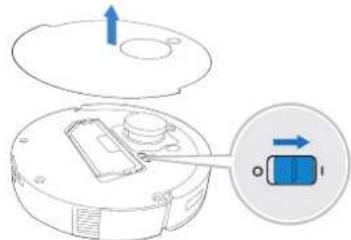
ПиMuMeЧанe.«I» =«ВКЛ.》,«O» =«ВыКЛ.
Po6oT DEEBOT He 3apjkaetc, KOrda erO nHTaHne OTKIOUeHO.
3apyaKa po6oTa DEEBOT
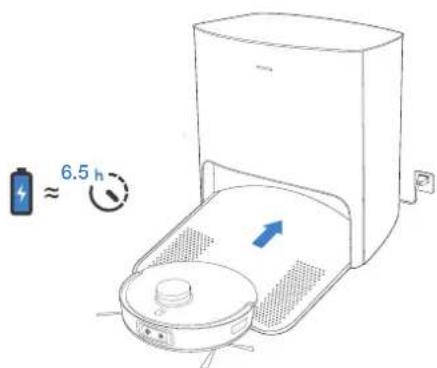
Y6eNTecb, yTO pO6OT DEEBOT HauHaeT y6Opky CO CTaHm.
He npemeeaute ctaunio BO Bpey ybopkn
Pocne 3aBepseHn y60pKn peKOMeHnyTc nHbCaHfTeKy dIra BnAaxHOy60pKn nBpyHyO yCTaHOBHTp o6oT DEEBOT Ha cTaHIO.
3ксплуатаць робота DEEBOT
Pn nepBoy y6opKe y6eHntecb, YTO po6oT DEEBOT nonHoctb0 3apJxHe.
BoBpeMa nepBoy y6opKn:
1.ObaTeIbHO yCTAHOBITE OCBEXHITb BO3dyxa, YTO6bI CO3dTaB KapTy DOMA, BKNIOUAnOyU B Ce6ra 30HbIC KOBOBbIM NOKpbITHeM, B npINOxKeHH ECOVACS HOME.
2.Y6eHntecb,yTo po6oT DEEBOT nonHoctbio 3apxkeH.
3.CneIe 3a pa6oToy yctpoiCTBa DEEBOT n nomoraiTe emy npn BO3HNIHOBeHHN np6JIem.
3anyck
2 PnnoctaHOBKa pa6oTb/ BbIXoN3 cnIeero peXmHa
PnmeHne. HanBb npaBnHH po6ota nepectaet cBeTntbCn no PpoeeCTBn HECKOBKx MNHT noocle npnoCTHOBKn pa60bTy yctpoiCTBa. HAnMeTHe KONkY ATOmatNaeckoro peXkMa AUTO Ha po6oTe DEEBOTd nBa BbBOda yCTPOCTBA n3 cnAepepeXkMa.
3 Bo3BaPaeHHe Ha 3apdHyIO cTaHcIIO
HaKMMTe N yDepKINBaIe KHOKNy B TeueHne 3 ckyHd IaIa OTnpaBKn po6oTa DEEBOT o6paTHO Ha cTaNIO BbIpy3Kn Mycopa.
CnctemaMbITbI NOIob OZMO TM Pro 3.0 c Bn6paunOHbIM npIBoDOM
PnmuMeaHne.
- YCTAHOBITE CNTEMy MbITbI NOIOB OZMOTM Pro 3.0 c Bn6paHNOHBIM PnIBODOM Dn IHTEHCBHO OHCTKN Nona.
2.Пелед установский CTeMbI MblTbI NOOB OZMO TPro 3.0 c Bn6paHNOHBIM npBODOM y6eINTecb, YTO KOHTAKTBI NOHOCTbO cyXHe.
3.He nnoB3yIe cIcTeMyMbITbI NOOB OZMOTM Pro 3.0 c Bn6paHnhbIM npNBODOM Ha KOpe.
4.ДЯбОЛЕЗФБКТMHOBYbOPKpeKOMeHpyETcHAMOHTbNOTXaTb canfeKtkyDЯBnAkhOHy6OpKnpePeYCTaHOBkoN
1 HaneiTe Body
IINI npOeHnIc pOka cnyk6bl cHCTeMb MyTb noNob OZMT Pro 3.0 c BnB6paUMHbIM pNBOOM peKoMeHpyTeC nONtB0a8b OHuEHNyO body Nnnr TcHHTe CpeCtBO ECOVACS DEEBOT.DonlntHeNbIbe aKeCCcyapb MoKHO HauHn No cNeDuOmyA apCy: https://www.eovacs.com/global.
He norpykaTe cncTemy MbITb noIOB OZMO™ Pro 3.0 c Bn6paHnhbIM npINBOOM B BOY.
TuaTeJIbHO npocyuHTE KOHTaKTbl
3 YctahOBITE CnCTeMyMbITbNoIOB OZMOTM Pro 3.0 c Bn6paunOHbIM npuBOOM
4 HauHnTe y6Opky
Ocbexntelb Bo3nyxa
YcTaHOBkaKancyIbIOCBExNTeIa BO3Dyxa (npno6peTaetcOtDenbHo)
2 YctaHObKa OCBekKTeJIb BO3dyxa
Perynphoe o6cnyxnbHne
Yto6bIpo6oT DEEBOT npo0JxKan o6ceNvBaTb HauNyUe e KaecTBo y6opKn, BblonHnTe 06cnyKuBaHne n 3ameHy pacxoDnKOB B COOTBeTCTBm co CneDuOUMn HcTpyKunMn.
Download on the App Store

GET ON Google Play
Wskaznik Wi-Fi
Download on the App Store

GETITON Google Play
No.518 Songwei Road, Wusongjiang Industry Park, Guoxiang Street, Wuzhong District, Suzhou, Jiangsu, China.
451-2113-0300


- IMPORTANT SAFETY INSTRUCTIONS IMPORTANT SAFETY INSTRUCTIONS
- READ ALL INSTRUCTIONS BEFORE USING THIS APPLIANCE SAVE THESE INSTRUCTIONS
- DEVICE UPDATE
- FOR EU COUNTRIES
- FOR UK
- CORRECT DISPOSAL OF THIS PRODUCT
- PACKAGE CONTENTS
- PRODUCT DIAGRAM
- NOTES BEFORE CLEANING
- QUICK START
- ECOVACS HOME APP
- WI-FI CONNECTION
- WI-FI NETWORK REQUIREMENTS
- CHARGING DEEBOT
- 2 EMPTY STATION PLACEMENT AND ASSEMBLY
- OPERATING DEEBOT
- 1 START
- OZMO™ PRO 3.0 OSCILLATING MOPPING SYSTEM
- NOTE
- AIR FRESHENER
- REGULAR MAINTENANCE
- MAINTAIN OZMO™ PRO 3.0 OSCILLATING MOPPING SYSTEM
- MAINTAIN AUTO-EMPTY DUST BIN AND FILTERS
- MAINTAIN FLOATING MAIN BRUSH AND DUAL SIDE BRUSHES
- DUAL SIDE BRUSHES
- MAINTAIN EMPTY STATION
- DUST BAG
- 1 DISPOSE THE DUST BAG
- 2 CLEAN THE BLOWER COVER INSTALL THE DUST BAG CLOSE T3 DUST CONTAINER LID
- MAINTAIN OTHER COMPONENTS
- EMPTY STATION
- 2 PAUSE/REACTIVATION
- BROSSES LATERALES DOUBLES
- ENTRETENIR LA STATION DE VIDAGE
- 06HOBJIEHNE YCTPOINCTBA
- POIROTOBKA KY6OPKE
- KPATKOE PYKOBODCTBO
- ПРИЛОБКЕНИ ECOVACS HOME
- BKNHUEHE NHTAHN
- ПИMUMEЧАНE.«I» =«ВКЛ.》,«O» =«ВЫКЛ
- 3APYAKA PO6OTA DEEBOT
- 3КСПЛУАТАЦЬ РОБОТА DEEBOT
- CNCTEMAMBITBI NOIOB OZMO TM PRO 3.0 C BN6PAUNOHBIM NPIBODOM
- PNMUMEAHNE
- 1 HANEITE BODY
- TUATEJIBHO NPOCYUHTE KOHTAKTBL
- OCBEXNTELB BO3NYXA
- PERYNPHOE O6CNYXNBHNE
Brand : ECOVACS
Model : Deebot T10 Plus
Category : Vacuum Cleaner