EasyManual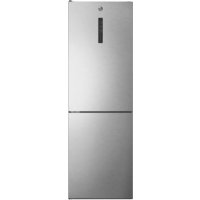
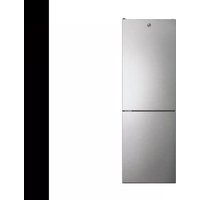
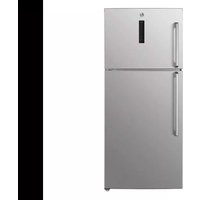
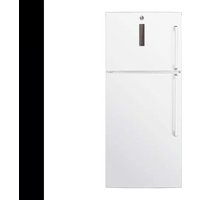
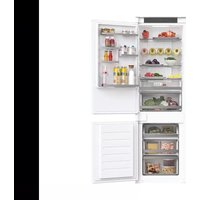
HOCE7618DX - Fridge HOOVER - Free user manual and instructions
Find the device manual for free HOCE7618DX HOOVER in PDF.


User questions about HOCE7618DX HOOVER
0 question about this device. Answer the ones you know or ask your own.
Ask a new question about this device
Download the instructions for your Fridge in PDF format for free! Find your manual HOCE7618DX - HOOVER and take your electronic device back in hand. On this page are published all the documents necessary for the use of your device. HOCE7618DX by HOOVER.
USER MANUAL HOCE7618DX HOOVER
Discover extra contents and
create your inventory list


EN 1
BG. 11
CS 22
DA 33
DE 43
EL 54
ES. 66
FI. 75
FR 86
HR 96
HU 106
IT 116
NL 126
NO 136
PL 146
PT. 156
RO. 166
RU 177
SK 188
SL 198
SR 208
SV 218
UK 228
AR 238
Summary
PRODUCT DESCRIPTION 2
Space requirements 2
USE. 3
Use 3
Customized temperature 4
Super Cool function 4
Super Freeze function 5
Eco mode 5
Holiday function 5
Defrosting 5
Demo mode 6
Error Codes 6
WI-FIUSE 7
Step 1 7
Step 2 7
Step 3 7
Wi-Fi Use. 8
DOOR REVERSIBILITY 9
TROUBLESHOOTING
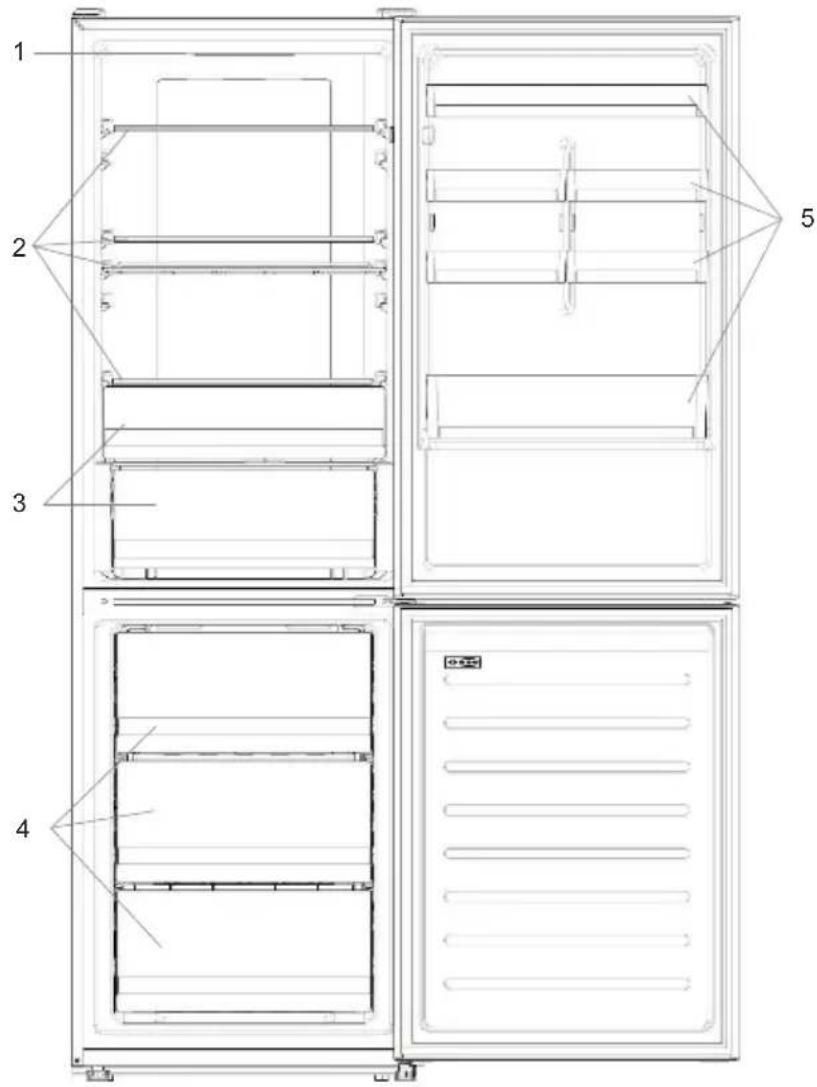
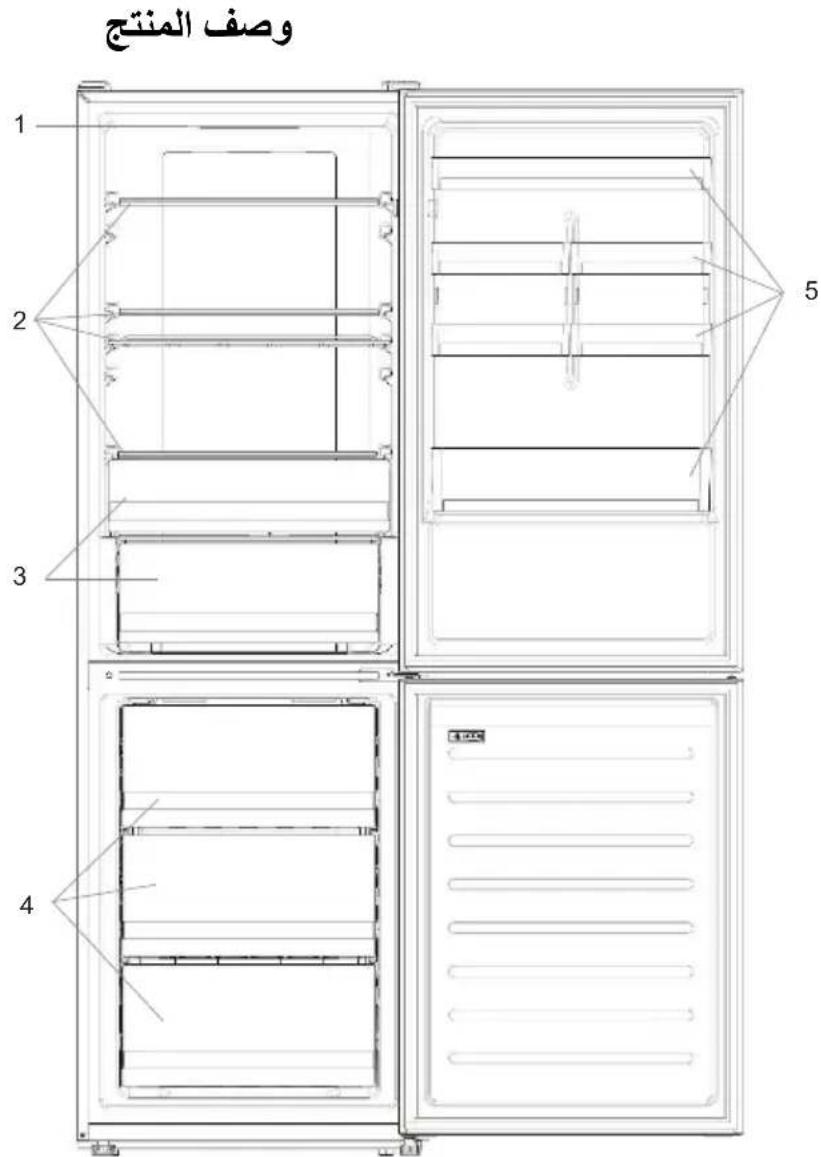
PRODUCT DESCRIPTION
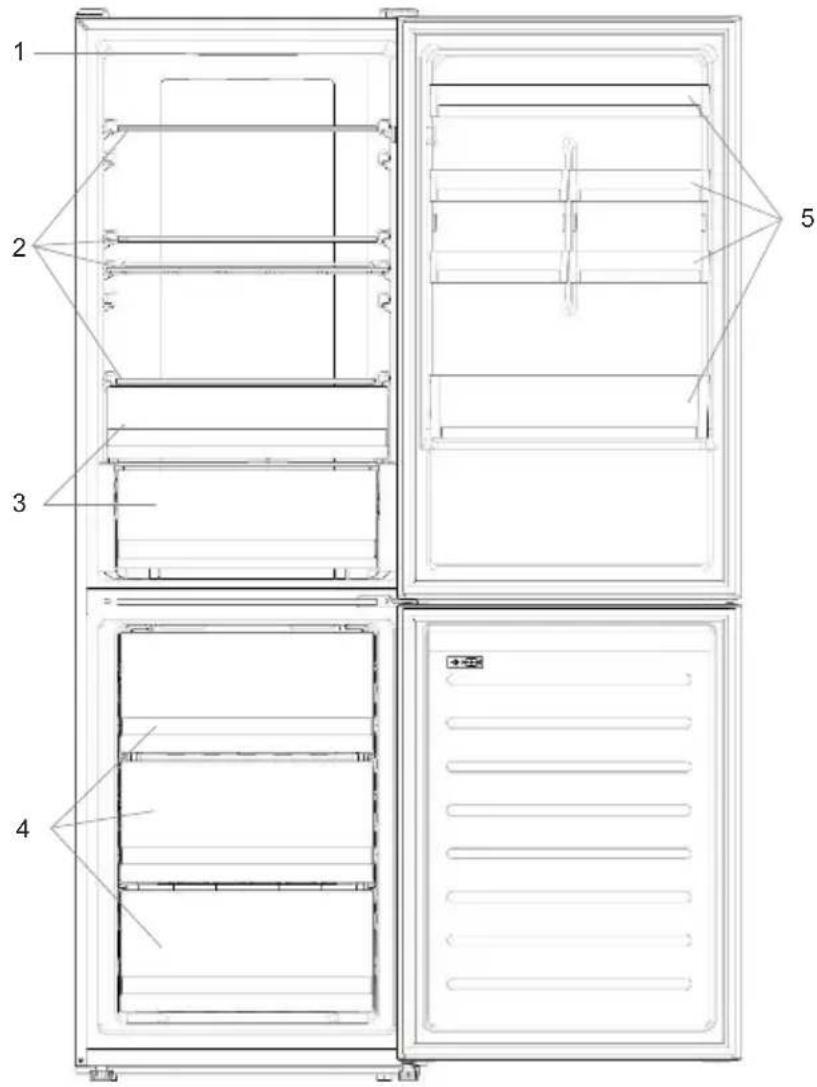
- Control Panel
- Shelves
- Crispers
- Freezer Boxes
-
Door rack
-
The most energy-saving configuration requires drawers, food box and shelves to be positioned in the product, please refer to the above pictures.
** The pictures above are only for reference. The actual configuration will depend on the physical product or statement by the distributor.
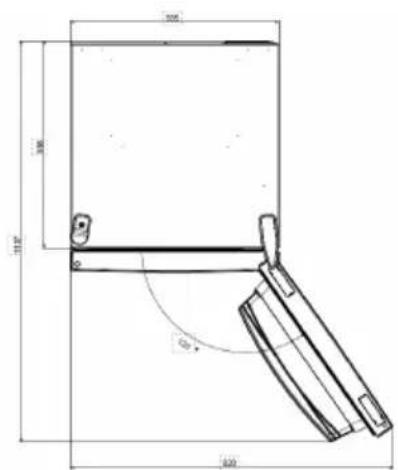
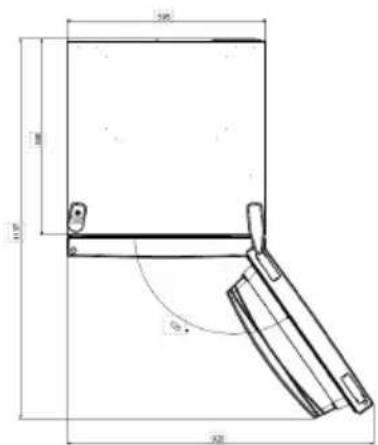
Space requirements
The unit's door must be able to fully open as shown. Spare enough space for convenient opening of the doors and drawers.
Keep a distance of at least 50mm between the side walls of the product and adjacent parts.
Width: min. 920~mm
Depth: min. 1137mm
USE
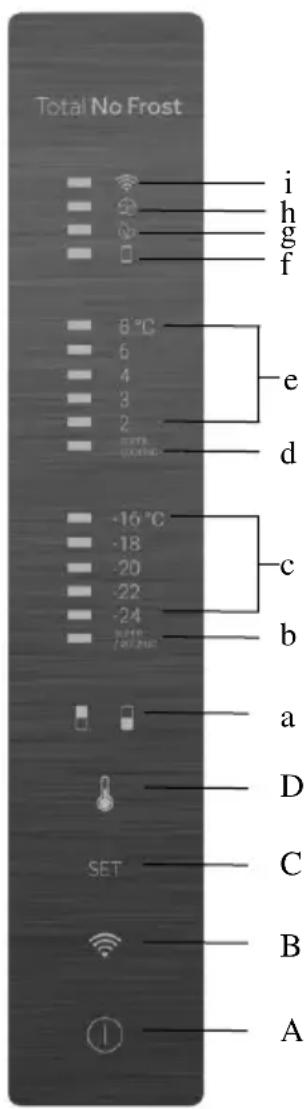
A. ON/OFF key, used to switch on/off the appliance
B. Wi-Fi key, used to switch on/off the Wi-Fi
C. Mode key, used to selected the desired function
D. TEMP key, used to selected the fridge and freezer temperature
a. Fridge /freezer area icon, shows which compartment of the appliance is selected
b. Super Freeze icon, shows if the Super Freeze function is activated
c. Freezer temperature levels, show which is the selected temperature in the freezer
d. Super Cool icon, shows if the Super Cool function is activated
e. Fridge temperature levels, show which is the selected temperature
f. Customized temperature icon, show if the temperature has been selected by app
g. Eco mode icon, shows whether the eco mode is activated
h. Holiday function icon, show whether the holiday function is activated
i. Wi-Fi Icon, shows whether the Wi-Fi is working and the appliance is connected
Use
- Plug on the appliance, it automatically turns on. The temperature will automatically set at 4^ in the fridge and -18^ in the freezer.
- To change the temperature, press the TEMP key for 5 seconds, an acoustic signal is made and the icon of the selected compartment (fridge or freezer) as well as all the temperature LEDs of the corresponding compartment turn on for 2s, after 2s the selection of the compartment is confirmed. With the selected compartment icon on, quick press the TEMP key to change the temperature. When the setting increases, the corresponding LED light will turn on. An acoustic signal is made every time the TEMP key is pressed and the temperature is changed, after 5 seconds the selection is confirmed. After 30s without operation the fridge/freezer icon area turns off, while the LEDs of the selected temperatures stay on. When the TEMP key is touched again, the icon of the last are selected (Fridge or freezer) turns on.
-
In case of power loss, the last cooling level set will be restored
-
To restore the default setting, long press the Temp key button and click the ON/OFF key button 5 times (in 5 seconds)
- Under the normal operating condition (in spring and autumn), it is recommended to set the temperature at 4^ . In summer when the ambient temperature is high, it is recommended to set temperature at 6 8^ , so as to guarantee the fridge and freezer temperatures and reduce the refrigerator continuous running time; and in winter when the ambient temperature is low, it is recommended to set temperature at 3 4^ to avoid frequent start/stop of the refrigerator.
Customized temperature
From the app it is possible to customize the temperature for both fridge and freezer. The temperature can be set with 1^ sensitivity. It is possible to select a temperature from 2^ to 8^ in the fridge, and from -16^ to -24^ in the freezer.
When the temperature is selected by the app, the customized temperature icon turns on, while all the temperature LED lights of the affected compartment are turned off (i.e. if the refrigerator temperature is selected from the app, LEDs from 2^ to 8^ are turned off. If the freezer temperature is selected from the app, LEDs from -16^ to -24^ are turned off). If only a single area (freezer or fridge) has the customized temperature, the temperature selection of the other area is not changed and the LED light of the selected temperature of that area remains on. An acoustic signal is made every time the temperature is changed.
Super Cool function
It is suggested to switch on the Super Cool function if a large quantity of food should be stored (for example after the purchase). The Super-Cool function accelerates the cooling of fresh food and protects the goods already stored from undesirable warming. When the function is activated, the temperature of the fridge is automatically set at 2^ . How to use the Super Cool function:
- The function can be activated by long pressing TEMP key to select the fridge compartment, and then quick pressing the TEMP key until the Super Cool icon led is turned on, or it can be turned on from the app. When the function is activated, the Super Cool LED is always ON.
- To exit the Super Cool function, press the TEMP key or turn it off from the app.
- The Super Cool function automatically ends when the function has lasted for more than 30 hours.
- When the Super Cool ends, the icon of the control panel is switched off and the previously set cooling level is restored.
Note: Super Cool and Super Freeze function cannot be activated simultaneously
Super Freeze function
The super freezing function accelerates the freezing of fresh food and protects the goods already stored from undesirable warming. If a large amount of food has to be freeze, it is recommended to set the Super-Freeze function on 24h before the usage. When the function is activated, the temperature is automatically set at -24^ .
How to use the Super Freeze function:
- The function can be launched by long pressing TEMP key to select the freezer compartment, and then quick pressing TEMP key until the Super Freeze icon led is turned on, or it can be turned on from the app. When the function is activated, the Super Freeze LED is always ON.
- To exit the Super Freeze function, press the TEMP key or turn it off from the app.
- The Super Freeze function automatically ends when the function has lasted for more than 50 hours.
- When the Super Freeze ends, the icon of the control panel is switched off and the previously set freezing level is restored.
Note: Super Cool and Super Freeze function cannot be activated simultaneously
Eco mode
The Eco mode can be activated to optimize the performance of the appliance, whereas obtaining the best food storage. The Eco mode will automatically set the temperature at 5^ in fridge and at -18^ in the freezer
How to use the Eco mode:
- The function can be activated from control panel by pressing the "mode" key until the Eco mode icon turns on (an acoustic signal confirms the selection), or by selecting the function from the app. When the function is activated, the Eco mode icon is always ON.
- To exit the Eco turn it off from the app or chose another function from the control panel.
- When the Eco Mode ends, the icon of the control panel is switched off and the previously set cooling levels are restored.
Holiday function
The Holiday function can be used to reduce the energy consumption of the appliance, when it is not used regularly. When the function is on, the LED lights are off (even if the door is open) and the fridge is turned off, whereas the freezer will keep working normally.
How to use the Holiday function:
- The function can be activated from control panel by pressing the "mode" key until the Holiday icon turns on (an acoustic signal confirms the selection), or by selecting the function from the app. When the function is activated, the Holiday icon is always ON.
- To exit the Holiday function, turn it off from the app or chose another function from the control panel.
- When the Holiday function ends, the icon of the control panel is switched off and the previously set cooling levels are restored.
Defrosting
The defrosting of the refrigerator and freezer compartment are done automatically: no manual operation is needed.
Slider
Near the vegetable basket there is a slider that allows you to adjust the humidity inside it: moving it to the right decreases the humidity, moving it to the left increases the humidity.
Demo mode
To enter the demo mode, with the display unlocked, keep pressed the SET key and press the WiFi key 5 times within 5 seconds. To exit the demo mode, perform the same operation or power off the refrigerator.
Error Codes
- Communication error
[-16^; - 18^; - 20^; - 22^; - 24^] lights in the freezer turn on sequentially, it means there has been a communication error between the main control board and the display board. Please, contact the technical assistance to help solve the problem
Fan
[-16^; -20^; -22^; -24^] lights in the freezer flashing simultaneously if the fan is not working properly. Please, contact the technical assistance to help solve the problem
WI-FI USE
Step 1
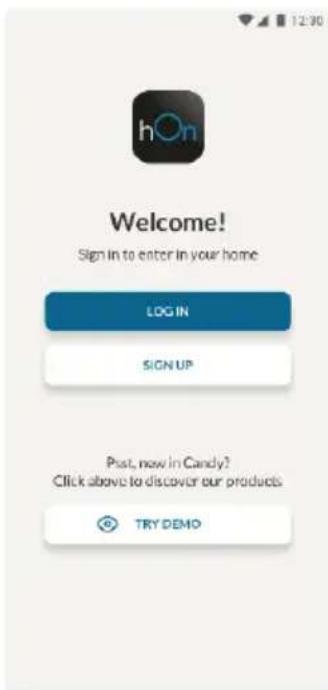
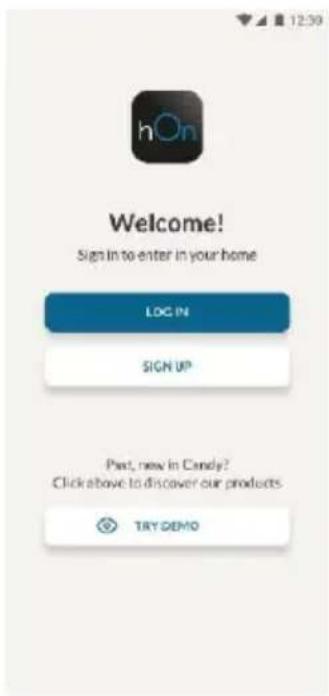
Download the hOn app on the stores


Step 2
- Create your account on the hOn App or log in if you already have an account
Step 3
- Follow pairing instructions in the hOn App
Wi-Fi Use
If the Wi-Fi has not been configured yet, when the refrigerator turns on, it will automatically enter the configuration mode and keep this status for 30 minutes. The Wi-Fi icon blinks and product enrollment can start.
- Follow in app instructions to configure the Wi-Fi (see above)
- Once the Wi-Fi is configured and the connection established, the Wi-Fi icon is on and fixed.
After 30 minutes without performing any operation, the Wi-Fi will automatically exit the configuration mode - If the Wi-Fi has already been configured, it will automatically reconnect according to the configuration information.
To reset the Wi-Fi, press Wi-Fi key and SET key for 2s.
To turn off the Wi-Fi, press Wi-Fi key for 3s.
Radio-module - Technical data
| Frequency rate (OFR) | 2400 MHz-2843.5 MHz |
| Channel frequencies | 2412...2472 MHz(step size 5 MHz) |
| Maximum power(EIRP) | 100 mW |
Radio equipment type is in compliance with Directive 2014/53/EU.
DOOR REVERSIBILITY
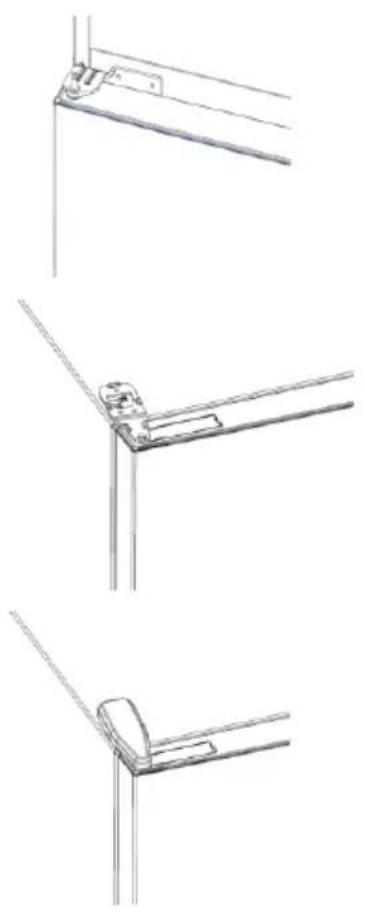
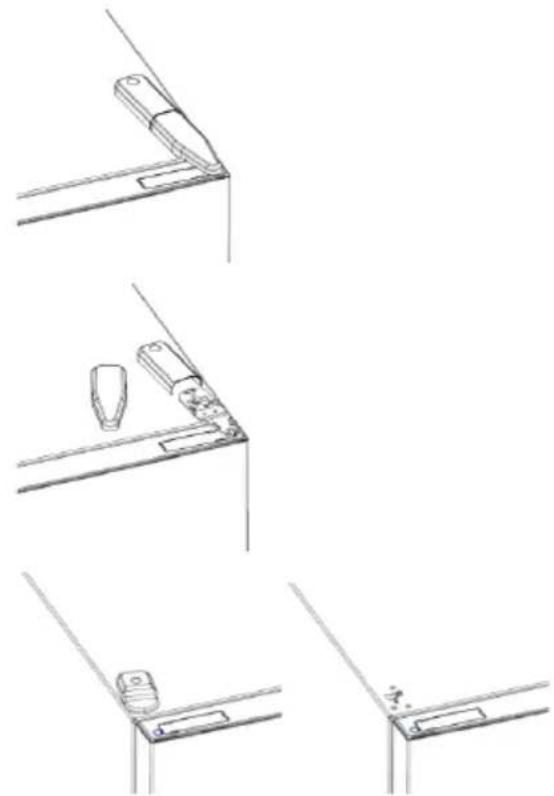
Tools needed: Electric screwdriver
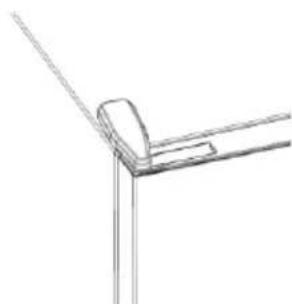
- Remove the top hinge cover
- Unscrew the top hinge
- Remove the top hinge cover (left)
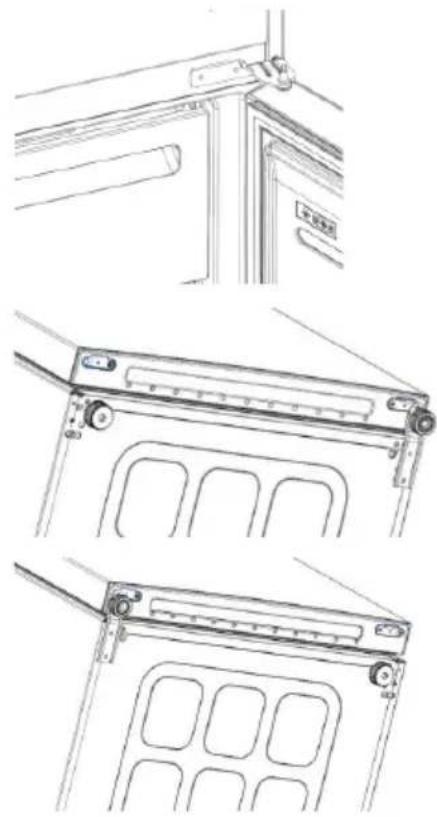
- Remove middle hinge
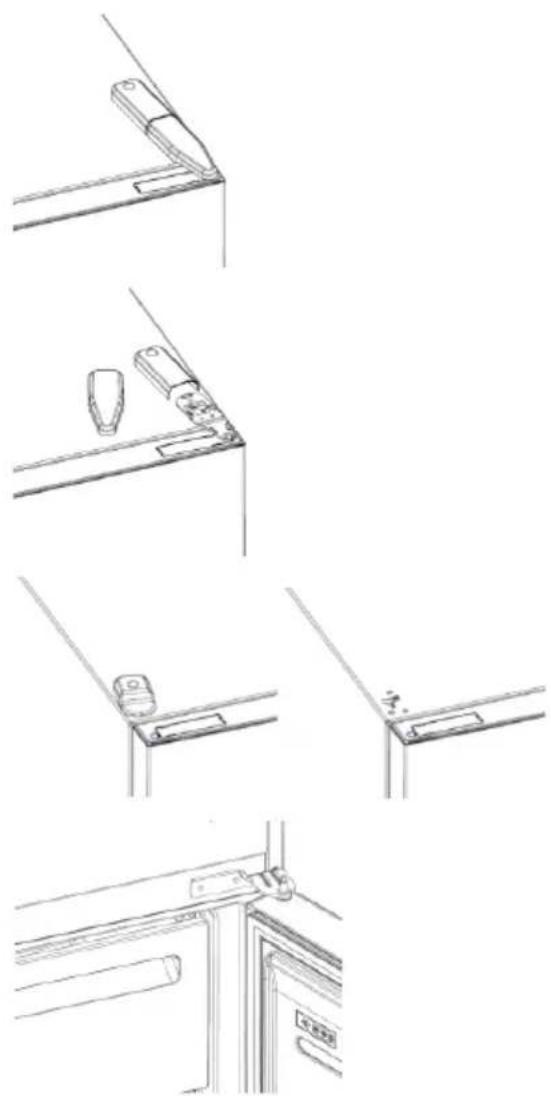
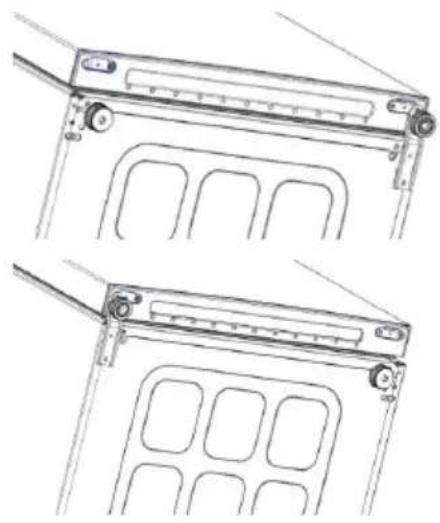
- Remove lower hinge
- Mount hinge foot
- Mount middle hinge
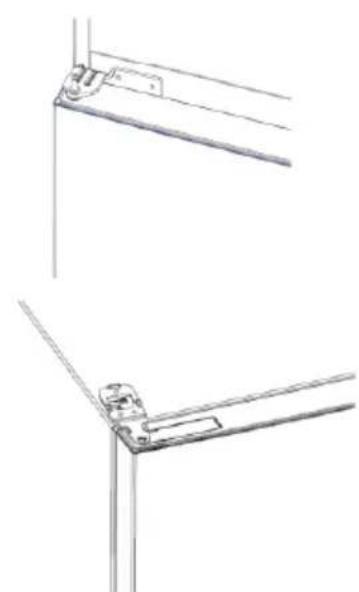
- Mount the upper hinge plate
- Mount the upper hinge cover
TROUBLESHOOTING
| The inside light bulb does not turn on. | ·No electricity. | ·The power cable is not properly plugged in. ·Check if the appliance is switched off (see Temperature Adjustment). ·Check the power socket is working correctly (e.g. with another electric device). |
| ·Holiday Mode is activated. | ·Deactivate Holiday mode. | |
| The internal temperature of the refrigerator and/or freezer is not cold enough. | ·The doors are not closed. | ·Check that the door and gaskets close properly. |
| ·The doors are frequently opened. | ·Avoid opening the doors unnecessarily for some time. | |
| ·Incorrect temperature setting. | ·Check the temperature setting and, if possible, set a lower temperature (see Temperature Adjustment). | |
| ·The refrigerator and/or freezer are too full. | ·Wait for the temperature of the refrigerator/ freezer to stabilise. ·Avoid filling the refrigerator and freezer excessively. | |
| ·The surrounding temperature is too low. | ·Move the unit to a warmer place or heat the current room. | |
| ·Warm items have been stored. | ·Always allow items to cool before storing them. | |
| The food in the refrigerator freezes. | ·Incorrect temperature setting. | ·Check the temperature setting and, if possible, increase the temperature. |
| ·Food in contact with the back wall. | ·Keep the food away from the refrigerator's back wall. | |
| The bottom of the refrigerator compartment is wet or water droplets are present. | ·The drain hose could be clogged. | ·Clean the drain hose with a stick or similar item to allow the water to drain. |
| Presence of drops of water or frost on the rear wall of the refrigerator. | ·Depending on the function, drops of water or frost form on the rear wall of the refrigerator during operation. | ·It is not a defect. |
| ·Warm items have been stored. | ·Always allow items to cool before storing them. | |
| ·There are open food containers or liquids. | ·Always cover food and liquids. | |
| ·The doors are not closed. | ·Check that the door and gaskets close properly. | |
| ·The doors are frequently opened. | ·Avoid opening the doors unnecessarily for some time. | |
| Presence of water in the vegetable drawer. | ·Lack of air circulation. | ·Verify that your appliance is not too full. |
| ·Vegetables and fruit with too much moisture. | ·Wrap the fruit and vegetables in plastic materials, e.g. cling film, bags or containers. | |
| The motor runs continuously. | ·The doors are not closed. | ·Make sure the doors are closed and check the seals close properly. |
| ·The doors are opened frequently. | ·Avoid opening the doors unnecessarily for some time. | |
| ·Ambient temperature is very high. | ·Verify that the ambient temperature is in the range set out in the specifications on the appliance tag. ·Set the display screen/thermostat to a warmer temperature. | |
| ·The appliance has been off (no power) for some time. | ·It normally takes the appliance 8-12h to cool completely. | |
| The frozen food is thawing. | ·Surrounding temperature is too low. | ·Move the unit to a warmer place or heat the current room. |
| ·The freezer door is not closed. | ·Make sure the door is closed and that the gasket is sealing properly. | |
| Fridge door alarm. | ·Fridge door alarm (acoustic beep) activates whenever the door is left open for more than 3 minutes. | ·Avoid leaving the door open when not needed. The beep ceases when the door is closed. |
| The appliance makes noises such as gurgling, buzzing, clicking, creaking. | ·No breakdowns. An engine is running, e.g. refrigeration unit, fan. The refrigerant flows into the pipes. Motor, switches and solenoid valves are switched on or off. | ·No action needed. |
| ·The appliance is not located on level ground. | ·Adjust the feel to level the appliance. | |
| ·The appliance touches an object around it. | ·Remove objects around the appliance. | |
| The appliance does not cool, the temperature and lighting indicators are on. | ·Demo mode is activated. | ·Deactivate DEMO mode. |
| Strong ice and frost in the freezer compartment. | ·The items were not adequately packaged. | ·Always pack the items well. |
| ·A door/drawer of the appliance is not tightly closed. | ·Close the door/drawer. | |
| ·The door/drawer has been opened too frequently or for too long. | ·Do not open the door/drawer too frequently. | |
| ·The door/drawer gasket is dirty, worn, cracked or mismatched. | ·Clean the door/drawer gasket or replace it with a new one. | |
| ·Something on the inside prevents the door/drawer from closing properly. | ·Reposition the shelves, door racks or internal containers to allow the door/drawer to close. | |
| The sides of the appliance are warm. | ·This is normal. |
Pe3HMe
Описане на порожда 12
I3nckBaHna 3a npoctpaHCTBO 13
YIOTPEBA 14
YnoTe6a 14
IepcoHaJIIN3npaHa TeMpePaTypa 15
Download on the App Store

EXPLORE IT ON AppGallery
CTbnka 2
Cb3daIte cBoi npoФnB npuLoXeHneTo hOn nIIN BNe3Te, aKO BeYe IMaTe TaKbB
CTbnka 3
CneDbaiTe nHCTpyKcInTE 3a cDBoBaHe B npnIOxKeHHeTo hOn
N3noJ3BaHe Ha Wi-Fi
Ako Wi-Fi BCE OSe He e KOHcHypnpaHo, KOraTO XnaJINHKbT Ce BkIouN, Toa ABToMaTuHNo 1e Bne3e BpeKIM Ha KOHcHypnpaHe N 1e 3aNa3n TOBa CbCTOraHne 3a 30 MNHTN. IKOHaTa "Wi-Fi" Mura n MoKe da 3anOue PerncTpnpaHeto Ha npoDyKTA.
CneBbAitte HnctpykunTe B npuOKeHneTo, 3a da KOHpIpypapTe Wi-Fi (Bx. no-rope)
Cnei KaTo Wi-Fi e KOHcHpypnpaHO n Bpb3KaTa e yCTaHOBeHa, IKoHaTa 3a Wi-Fi e BKIOUeHa n cKcnpaHa.
Cnei 30 MNHytn, 6e3 da ce n3BbPwBa HnkaKBO DeiCTBne, Wi-Fi mpekata aBTOMaTHUHO ige n3Ie3e OT peKIMa Ha KOHcHypnpaHe
Ako Wi-Fi Beue e KOHcHpynpaHo, To aBtOMaTnUHO ue ce cBbpxe, n3noJ3BaIKN HOpMaIraTa 3a KOHcHpypaIraTa.
3a da hynpate Wi-Fi Bpb3kata, haTnchete 6yToHa „Wi-Fi" n 6yToHa „SET" 3a 2 cekyHdN.
3a da n3knIOHTe Wi-Fi Bpb3kata, HATINCHete 6yToHa ,Wi-Fi"i 3a 3 cekyn.
Papnoomodyn - TexHnueckn daHHN
Download on the App Store

EXPLORE IT ON AppGallery
Krok 2
Download on the App Store

EXPLORE IT ON AppGallery
Bnμα 2
UPORABA MREZE WI-FI. 102
1.korak 102
2korak 102
3korak 102
Uporaba mreze Wi-Fi 103
REVERZIBILNOSTVRATA. 104
RJESAVANJE PROBLEMA
OPIS PROIZVODA
- Upravljacka ploča
- Police
- Ladica za você i pourée
- Spremnici za zamrzivač
- Police na vratima
Za konfiguraciju s najvecom ustedom energije treba smestiti ladice, kutiju za hranu i police unutar proizvoda, pogledajte gore navedene slike.
* Gore navedene slike služe samo za referentnu uporabu. Stvarna konfiguracija ovisi o fizičkom proizvodu ili izjavi distributera.
Prostorni zahtjevi
Download on the App Store

EXPLORE IT ON AppGallery
Fase 2
UPORABA OMREŽJA WI-FI
1. korak
Download on the App Store

EXPLORE IT ON AppGallery
2. korak
- Ustvarite svoj racun v aplikaciji hOn ali se prijavite, ce racun ze imate
3. korak
PRODUKTBESKRIVING 219
BNIKOPNUCTAHHRI WI-FI
Kpok 1
3aBaHTaxTe DoaToK hOn


GETITON GooglePlay

Download on the App Store

EXPLORE IT ON AppGallery
Kpok 2
CTBOpITb 0bnikOBn 3aNNc ydoataky hOn a6o BBiIniTb y cnCTeMy, kUO y BAC BKe e 0bnikOBn 3aNNc
Kpok 3
Padiomodyb - TexhiHi daHi
| Частota (OFR) | 2400 MHz-2843.5 MHz |
| Частоти каналу | 2412...2472 MHz(pondулиху 5 MHz) |
| Мakсималha потужнист(b(EIRP) | 100 mW |
TnIpaioo6JaHaHnBbIIOBiaac InpekTnBi 2014/53/EU.
NEPEBIUBAHNA BEPaT
Heo6xidiHInCtpymEnTn: EJIeKTpnuHa BnKpyTkA
- 3Himitb KpnuKy BepXhboi netnI
- BnKpyTiB BepxHIO neTIO
- 3himiTb KpUkky BepXHboi netni (3niBa)
- 3HIMITb cepeHIO neTJIHO
- 3HimiTb HxKHO nTeTIO
- BctaHOBiB onopy netni
- BctaHOBiBt bcepeHIO neTIO
- BctaHOBITb pnaCTnHy BepXHboi netni
- BcTaHOBITb KpUShky BepXHboi netnI
NOWYK TA YCYHEHHA HECNPABHOCTEN
| BvHTPIHnHa IaMnOuKa He BmKNaeTbC# | Hemac enektpkxmbuHHe. | Kobetb XbIeHNHHe HIEIIOHOHcHcHcHcHcHcHcHcHcHcHcHcHcHcHcHcHcHcHcHcHcHcHcHcHcHcHcHcHcHcHcHcHcHcHcHcHcHcHcHcHcHcHcHcHcHcHcHcHcHcH |
| Pexim Holiday akTmboHa. | BIMkhHbpeKIM Holiday. | |
| BvHTPIHnHa Tempepatyra XoNoDInbHnKa Ta/a6o Mop03NbHoi Kamepi HEDocTtMbO HmBka. | DBepratra He ZaunHHe. | PepoknHaeTce, ZO daeprata To yuizlkbovabzai zauHHa HauKmYuHOM. |
| DBepratra Tacto BlduHJouTbc. | DeRanm YacHe BlduHJouTe DBepratra Be3nOtepbEi. | |
| HepaBnblHe HanaUytBuHnA Tempepatyra. | PepoeipTe HanaUytBuHnA Tempepatyra Ta, RkUTo MoxKINBO, BCTe HNkUy Tempeptpyru (DIB. PerylkoBAAH Tempepatyra). | |
| XoNoDInbHK Ta/a6o Mop03NbHa Kamepa 3aONBHeJI. | DoyckaeTce cta6i13a2i Tempepatryx XoNoDInbHKa/ Mop03Hk. | |
| KamAp, YmKAnrTe HauMDPHO HauOBHbHnKA To Mop03HbHk KaMepri. | ||
| Tempepatyra HauKoNtBuO cepeoBuHsza ahaia HnBka. | Pepemictb prinad y tyePiue Micse abo o6bjrprrte notoohne prinmienn. | |
| Ha 36epirAHn NocJaedei TeynI prOuyKtn xapUbyBaHn. | Peru HxK lKlactn prOuyKtn Do prOuyIady o6ob'3xOxoDBaayte im oxoLohytn. | |
| HepaBnblHe HanaUytBuHnA Tempepatyra. | PepoeipTe HanaUytBuHnA Tempepatyra Ta, RkUTo MoxKINBO, 36lnbHtB Tempepatyru. | |
| IpOduKtn B XoNoDInbHnKya ZamepzaoTb | PrOuyKtn KOHTAcTyIOb I3 zAdHbOio CTIKOO. | Trpmaire prOuyKtn noaIaBdZdo hTbnHcXoDInbHnK. |
| Dho XoNoDInbHo Kamepi BonoRe a6o npiscTyh i kpanPi BoDm. | 3ZnivBn ShlaH MocKe 6yTu 3a6ntn. | Ochcttb ZaIaBn MloAnr NaunKko A6o NodibHm pmedetom, 6o6Boa dStkana. |
| 3aIeXeHb VbIf yuKuII pddacpoTo Hn a3dNt CxoNoDInbHnka YTBOPoTOBc KpansnBoDm a6o NamOpO3b. | Lle He deFekr. | |
| Ha 36epirAHn PocJaedei TeynI prOuyKtn xapUbyBaHn. | Porpiu HxN knaCtns prOuyKtn Do prOuyIady o6ob'3axoOdo daaai Te IM oxoOnyHt. | |
| € BIDkrITI KONTeHnerpn IdrA xapOboHx prOuyKttB a piDinH. | 3aBxdz nOxprBaiTe iKy Ta pIdnH. | |
| DBepratra He zauHHei. | PepoknHaeTce, ZO daeprata To yuizlkbovabzai zauHHa HauKmYuHOM. | |
| DBepratra Tacto BlduHJouTbc. | Dpemiam YacHe BlduHJouTe DBepratra Be3nOtepbEi. | |
| HaaBnHcTb Kpanel BovDa a6o HAMOpoc Ha 3aDn b StiHc XoNoDInbHnKa. | BIDcYnHb Tce 3a4nDcYpKUaIy Nobitpr. | PepoknHaeTce, ZO daeprata To yuizlkbovabzai zauHHa HauKmYuHOM. |
| OBoi II fprKts 33aHaDTo BefNKOIO KInbIcTc BO7OTo. | 3aOrnHb Tce, ZO daeprata To yuizlkbovabzai materiapi, HauPKnAid, y xapOceyPiiaBy, abo nOmcTb ix y naKetTe CH konTeHepri. | |
| DambHyn npaLoo6 Be3nepebpHnO. | DBepratra He zauHn E3aunH. | PepoknHaeTce, ZO daeprata To yuizlkbovabzai nmei, i nepaepTe, Ch zauHHe HauKmYuHOM uuiLbHnE. |
| DBepratra Tacto BlduHJouTbc. | Dpemiam YacHe BlduHJouTe DBepratra Be3nOtepbEi. | |
| TEmpepatyra HauKoNtBuO cepeoBuHsza duyke BvSOCA. | PepoknHaeTce, ZO daeprata To yuizlkbovabzai c9uHxOyBuB DzaiOzOy, 3a6xOyBuB DzaiHcXu HauKmYuHOM. | |
| Ppimlad 6yB VBMKnHeN (63 JxWbLHeN) npOTARo DeAkoTO qacy. | 3aBvHn Dm PobHO OoOxOoDjKHeN (pImlad 6yB 120MH. | |
| 3aMopoxeni I prOduKtn po3mOpoxkyotbc | TEmpepatyra HauKoNtBuO cepeoBuHsza ahaia HnBka. | Pepemictb prinad y tyePiue Micse abo o6bjrprrte notoHne prinmienn. |
| DBepratra MOpOzINbHOJ Karmepri He zauHHei. | PepoknHaeTce, ZO daeprata To yuizlkbovabzai nmei, i zuHHe HauKmYuHOM. | |
| CsinHanniazi BvdUnHEnix DBeprat r XoNoDInbHnKa. | CsinHanniazi BvdUnHEnix DBepratr XoNoDInbHnKa (38yKoBn CsinHAN) cpaIaOBVc KeoHOrO paay, KOni DBepratra 3a1aHObTc BvdUeHn, XoNoDInbHa YTBIOK. | He zauHHaie TbeDBepratra BvdUnHEnix B63 o9oTeB. 38yKoBn C BVMKnactcy, KOni DBepratra 3a1aHObTc BvdUeHn. |
| Ppimlad NpOtae Taaki 38yKo,ЯкБуКаннДзИЗУСТМФИЗКлAZaUNHnI KlaUaHnA, Crpin. | DII ne otpIbHI. | |
| Ppimlad He po3aTaOuBAn Hn pIbHn nobErxHi. | BvdUeYnToTe HxKo, xozb avpIaHnTAtn prinlad. | |
| Ppimlad TogKaTb CzIaOTo TpdeMeTa nop4Iz IzhM. | BvdIaTb prOdemTe HauKoTo prinlad. | |
| Ppimlad He oxoNoDxuCyTc, HdNkatoTg Tempepatyrn i ocBiltenn HcBItbCz. | DEmoHCTpauiHn peKmik AOKTBoBaHO. | BVMKnHb DEMOHCTPAUIHn pexim. |
| 3aHaHa KInbKcTb IbOody I HAMOp03b U moPozHn BmOpzHn Kamepi. | PpOduKtn He 6byo HauJeHmim CUnHOM yuaKoBaHO. | 3aAxxDn Dz6pe nakyTe prOuyKtn. |
| DBepratra/YaunKn Prinlady He 3aUChHeNDo DOCTaBbU SIlbHo. | 3aUChHb DBepratra/YaunK. | |
| DBepratra/YaunKn BvdUnHInLnc 3aHaDTo cHaTo a6bHa HauHa TdTo TpBVAH. | He bUdHnNeTbe DBepratra/YaunK 3aHaDTo cHaTo. | |
| UyilnbHouBa DBepratr YaunKn 3a6pUdHnenn, 3aUoHnenn, TricHyTN a6bHe BVDIAE BVMKOrA. | OcHtB yUaIiHouBa DBepratr/YaunK 3aHaDTo cHaTmH. | |
| Uc06 TcepeDuHnapeoHn 3aUHHeHn DBepratr/YaunK. | 3MaHtB nOnuKHe NpUH. | |
| 5BCHi CTiHKn prinlad tyenli. | LcHoprMaJIbHo. |
233
233
234
234
235
235 "Super Cool
236. "Super Freeze
236. "g" ECO
237
237
238
238
238. bill ja
239 WI-FI
236 1
239 2.
239 3
240 Wi-Fi
241
1
5aill 1
2
3
4
.5
11 11
aalwaii ciibio
J 12
J 12
J 16]
J 16]
aagall
WI-FI
- hOn


Jbbl bI Jg 1hOn 1
3