SF16 - Loudspeaker Sonus Faber - Free user manual and instructions
Find the device manual for free SF16 Sonus Faber in PDF.

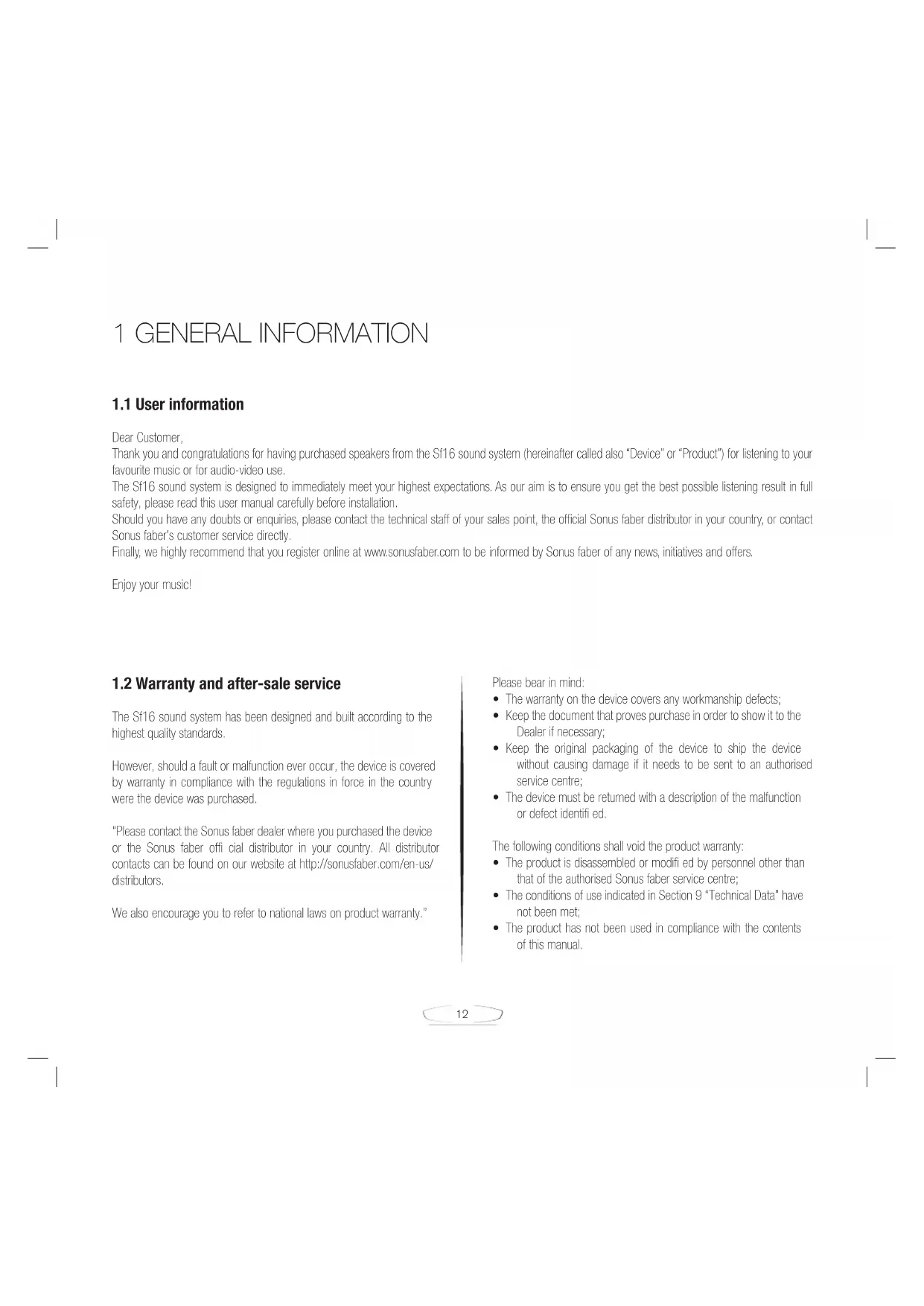


| Product Type | 3-way sound reproduction system with built-in amplification |
| Brand | Sonus Faber |
| Model | SF16 |
| Output Power | 4 x 350 W (total 1400 W) |
| Amplification | 4 channels |
| Channels | 3-way (bass, midrange, treble) |
| Wireless Connectivity | Wi-Fi with DTS Play-Fi |
| Audio Inputs | Coaxial digital S/PDIF, optical digital Toslink, analog AUX |
| USB Port | For software updates (do not use for storage) |
| Power Supply | Mains (power cable supplied) |
| Standby Power Consumption | Less than 0.5 W |
| Remote Control | Infrared with CR2032 battery |
| Specific Function | Sound Field Shaper for soundstage optimization |
| Satellites | Motorized, adjustable position (open/close) |
| Maintenance | Cleaning with provided Cristalux kit and microfiber cloth |
| Safety | Do not open the device, avoid moisture, do not obstruct air vents |
| Warranty | According to regulations in the country of purchase |
| Support | Sonus Faber authorized after-sales service |
| Package Contents | SF16, user manual, remote control, CR2032 battery, power cable, photo book, cleaning kit |
Frequently Asked Questions - SF16 Sonus Faber
User questions about SF16 Sonus Faber
0 question about this device. Answer the ones you know or ask your own.
Ask a new question about this device
Download the instructions for your Loudspeaker in PDF format for free! Find your manual SF16 - Sonus Faber and take your electronic device back in hand. On this page are published all the documents necessary for the use of your device. SF16 by Sonus Faber.
USER MANUAL SF16 Sonus Faber
Emotion. Connection. Desire.
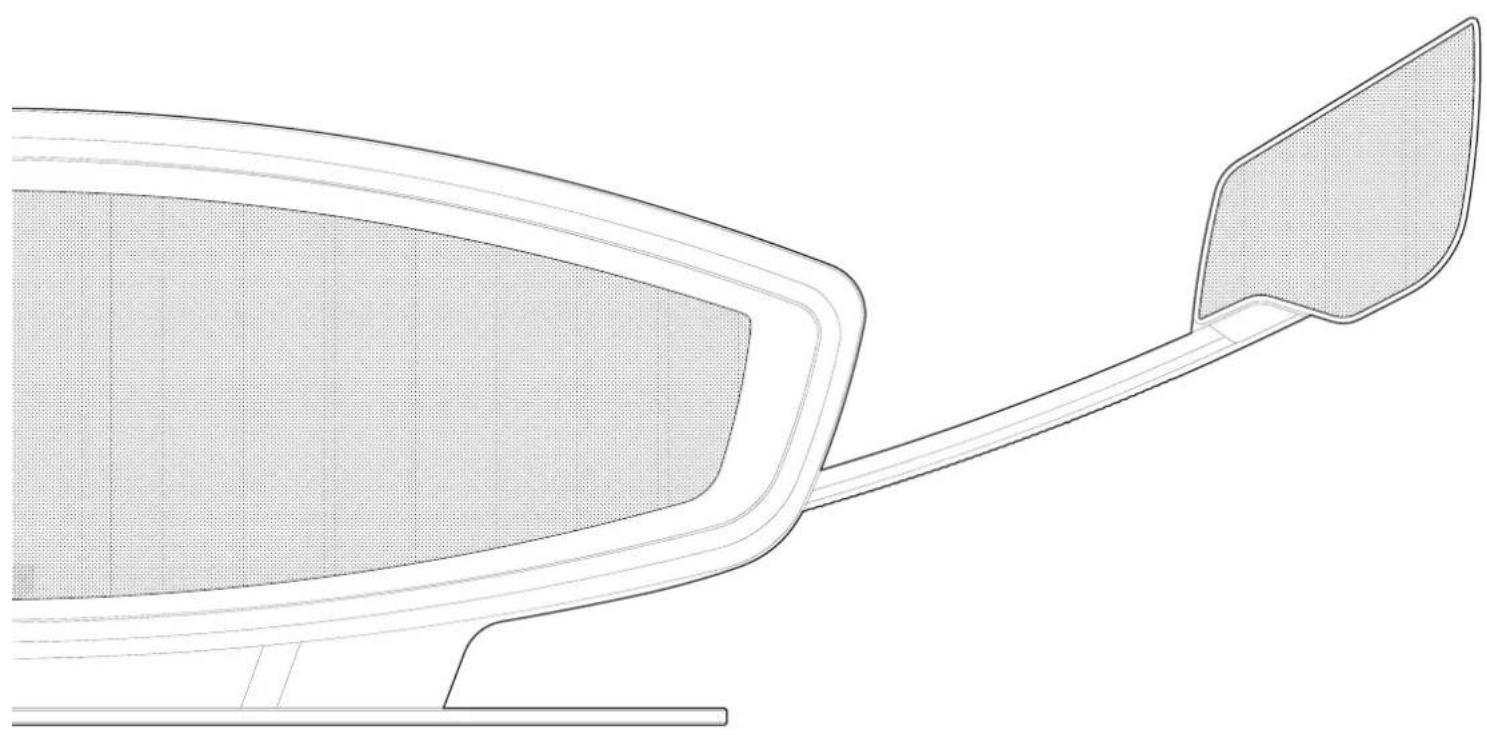
OWNER'S MANUAL

5F16
Sonus faber
Emotion. Connection. Desire.
SISTEMA DI RIPRODUZIONE AUDIO ALL IN ONE ALL-IN-ONE SOUND SYSTEM ALL-IN-ONE AUDIOSYSTEM SISTEM DE REPRODUCTION SONORE TOUT-EN-
1.1 User information 12
1.2 Warranty and after-sale service 12
1.3 Declaration of conformity 13
1.4 Conformity with international standards 14
1.4.1 FCC Information (for US and Canada Customers) 14
2 Safety 15
2.1 General instructions 15
2.1.1 Safety information 15
3 Description and characteristics 15
4 Installation 16
4.1 Unpacking 16
4.1.1 Content of packaging 17
4.2 Connections 17
5Operation 17
5.1 Remote control 17
5.1.1 Fitting the battery in the remote control 17
5.2 Operation 18
5.3 Wi-Fi connection via DTS Play-Fi® 18
5.3.1 Setting the Sf16 with DTS Play-Fi® 18
6 Troubleshooting and solutions 19
7 Maintenance 19
7.1 Cleaning 19
8 Disposal 19
DEUTSCH
1 Allgemein 20
Electromagnetic Compatibility and Radio spectrum Matters (ERM); Electromagnetic Compatibility (EMC) standard for radio equipment and services; Part 1: Common technical requirements.
EN 301 489-17 V2.2.1: 2009
Electromagnetic Compatibility and Radio spectrum Matters (ERM); Electromagnetic Compatibility (EMC) standard for radio equipment and services; Part 17: Specific conditions for Broadband Data Transmission System.
EN 300 328 V1.9.1: 2009
Electromagnetic Compatibility and Radio spectrum Matters (ERM); Wideband transmission systems; Data transmission equipment operating in the 2,4 GHz ISM band and using wide band modulation techniques; Harmonized EN covering the essential requirements of article 3.2 of the R&TTE Directive.
Digital IN (OPTICAL)
Emotion. Connection. Desire.
1 GENERAL INFORMATION
1.1 User information
Dear Customer:
Thank you and congratulations for having purchased speakers from the Sf16 sound system (hereinafter called also "Device" or "Product") for listening to your favourite music or for audio-video use.
The Sf16 sound system is designed to immediately meet your highest expectations. As our aim is to ensure you get the best possible listening result in full safety, please read this user manual carefully before installation.
Should you have any doubts or enquiries, please contact the technical staff of your sales point, the official Sonus faber distributor in your country, or contact Sonus faber's customer service directly.
Finally, we highly recommend that you register online at www.sonusfaber.com to be informed by Sonus faber of any news, initiatives and offers.
Enjoy your music!
1.2 Warranty and after-sale service
The Sf16 sound system has been designed and built according to the highest quality standards.
However, should a fault or malfunction ever occur, the device is covered by warranty in compliance with the regulations in force in the country were the device was purchased.
"Please contact the Sonus faber dealer where you purchased the device or the Sonus faber offi cial distributor in your country. All distributor contacts can be found on our website at http://sonusfaber.com/en-us/distributors.
We also encourage you to refer to national laws on product warranty."
Please bear in mind:
The warranty on the device covers any workmanship defects;
- Keep the document that proves purchase in order to show it to the Dealer if necessary;
- Keep the original packaging of the device to ship the device without causing damage if it needs to be sent to an authorised service centre;
The device must be returned with a description of the malfunction or defect identified.
The following conditions shall void the product warranty:
The product is disassembled or modified by personnel other than that of the authorised Sonus faber service centre;
The conditions of use indicated in Section 9 "Technical Data" have not been met;
The product has not been used in compliance with the contents of this manual.
C E
1.3 Declaration of conformity
Bonus Faber SpA with headquarters in Via Antonio Meucci, 10 36057 Arcugnano (VI) Italy, declare under our sole responsibility that the playback device:
SF16
to which this declaration relates is in conformity to:
Directive:
2014/30/EU (EMC) Electromagnetic compatibility.
2014/35/EU (LVD) Low Voltage.
2014/53/UE (RTT&E) Radio equipment and telecommunications terminal equipment.
2009/125/EC (ErP) Eco design requirements for energy-related products.
2011/65/EU (RoHS) Restriction of the use of certain hazardous substances in electrical and electronic equipment.
2012/19/EU (WEEE) Waste electrical and electronic equipment.
2006/1907/EC (REACH) Registration, Evaluation, Authorisation and Restriction of Chemical Standards:
EN 60065:2014
Audio, video and similar electronic apparatus - Safety requirements.
EN 62311:2008
Assessment of electronic and electrical equipment related to human exposure restrictions for electromagnetic fields (0 Hz - 300 GHz).
EN 55032:2015
Electromagnetic compatibility of multimedia equipment - Emission requirements
EN 55020:2014
Sound and television broadcast receivers and associated equipment - Immunity characteristics - Limits and methods of measurement.
EN 55022:2014
Information technology equipment - Radio disturbance characteristics - Limits and methods of measurement.
EN 61000-4-3:2009
Electromagnetic Compatibility (EMC) Part 4-3: Testing and measurement techniques; Radiated, radio-frequency, electromagnetic field immunity test.
EN 61000-6-1:2007
Generic standards - Immunity for residential, commercial and light-industrial environments.
EN 61000-6-3:2013
Generic standards - Emission standard for residential, commercial and light-industrial environments.
EN 301 489-1 V1.9.2:2011
Electromagnetic Compatibility and Radio spectrum Matters (ERM); Electromagnetic Compatibility (EMC) standard for radio equipment and services; Part 1: Common technical requirements.
EN 301 489-17 V2.2.1:2009
Electromagnetic Compatibility and Radio spectrum Matters (ERM); Electromagnetic Compatibility (EMC) standard for radio equipment and services; Part 17: Specific conditions for Broadband Data Transmission System.
EN 300 328 V1.9.1:2009
Electromagnetic Compatibility and Radio spectrum Matters (ERM); Wideband transmission systems; Data transmission equipment operating in the 2,4 GHz ISM band and using wide band modulation techniques; Harmonized EN covering the essential requirements of article 3.2 of the R&TTE Directive.
Arcugnano, 30.06.2016
Mauro Grange
CEO
1.4 Conformity with international standards
IEC 60065:2014
Audio, video and similar electronic apparatus - Safety requirements and equivalent.
UL 60065-1 7th Edition
Standard for audio, video and similar electronic apparatus - Safety requirements and equivalent.
CAN/CSA-C22.2 60065-3 + A1:2006
Audio, video and similar electronic apparatus - Safety requirements and equivalent.
California Air Resources Board: code of regulation ATCM 93120 phase 2 compliant for formaldehyde emission.
1.4.1 FCC information
(for US and Canada Customers)
This product contains
TRANSMITTER MODULE FCC ID: 2AAWQ-CAPRICA2L
FCC WARNING: Changes or modifi cations not expressly approved by the party responsible for compliance could void the user's authority to operate the equipment.
NOTE: This product has been tested and found to comply with the limits for a Class B digital device, pursuant to Part 15 of the FCC Rules. These limits are designed to provide reasonable protection against harmful interference in a residential installation.
This product generates, uses and can radiate radio frequency energy
and, if not installed and used in accordance with the instructions, may cause harmful interference to radio communications. However, there is no guarantee that interference will not occur in a particular installation.
If this product does cause harmful interference to radio or television reception, which can be determined by turning the product OFF and ON, the user is encouraged to try to correct the interference by one or more of and ON, the user is encouraged to try to correct the interference by one or more of the following measures:
Reorient or relocate the receiving antenna.
- Increase the separation between the equipment and receiver.
- Connect the product into an outlet on a circuit different from that to which the receiver is connected.
- Consult the local retailer authorized to distribute this type of product or an experienced radio/TV technician for help.
PRODUCT: This product complies with RSS-210 of Industry Canada. Operation is subject to the following two conditions:
- this product may not cause harmful interference;
- this product must accept any interference received, including interference that may cause undesired operation.
This Class B digital apparatus complies with Canadian ICES-003.2.
RF Exposure Information: This equipment complies with FCC/IC radiation exposure limits set forth for an uncontrolled environment and meets the FCC radio frequency (RF) Exposure Guidelines in Supplement C to OET65 and RSS-102 of the IC radio frequency (RF) Exposure rules. This equipment has very low levels of RF energy that are deemed to comply without testing of specific absorption ratio (SAR).
CAUTION: The device must be kept more than 20 cm from all persons.
2 SAFETY
2.1 General instructions
- Read this user manual carefully before performing any operation on the Sf16 sound system;
- Keep this user manual in a safe and readily reachable place for consultation. The user manual is part and parcel to the product and must be kept with the product in the case of transfer of the device;
- Observe the installation conditions in this manual to allow safe and efficient use of the product (see Section 9 "Technical Data");
- Do not install the device in these conditions:
Near sources of heat or naked flames
- In places exposed to great humidity or splashes of liquids of any type;
- Outdoors, exposed to bad weather or direct sunlight;
- Placed on unstable furniture or stands which, if knocked against by people or animals, can make the device fall.
- Do not put the device on containers holding liquids or naked flames (candles or other);
- Do not install the device in such a way that the power cord or other connection cables are not too taut, walked on or can cause the tripping of people or animals;
- Do not let children play or tamper with the device;
- Connect the power cord only to sockets provided with connection to an effcient earthing system;
- Disconnect the power cord from the mains socket during lightning storms and in the event that the device is not used for extended periods of time;
- Do not try to open the device or repair it and do not remove the cover panels.
2.1.1 Safety information
Observe all safety instructions in this manual by referring also to the following symbols:

Generic warning signal Danger: Live voltage purpose of as special waste

3 DESCRIPTION AND CHARACTERISTICS
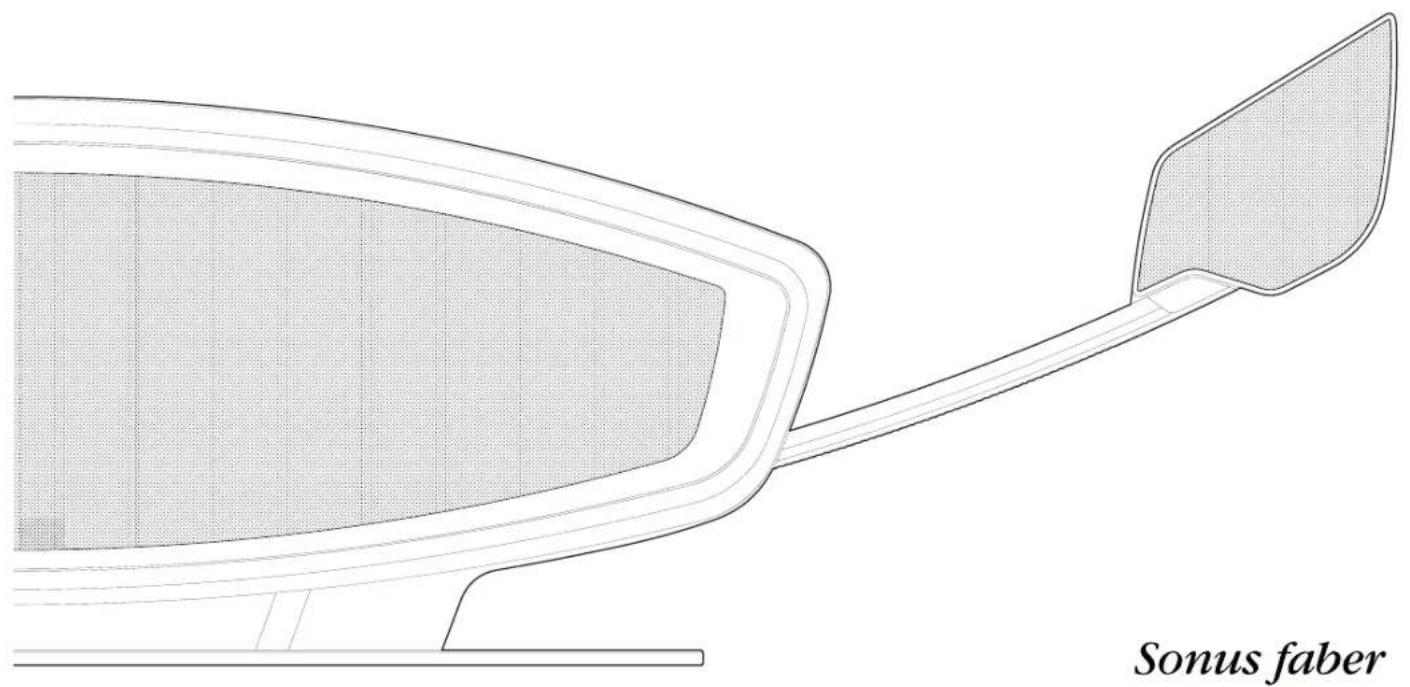
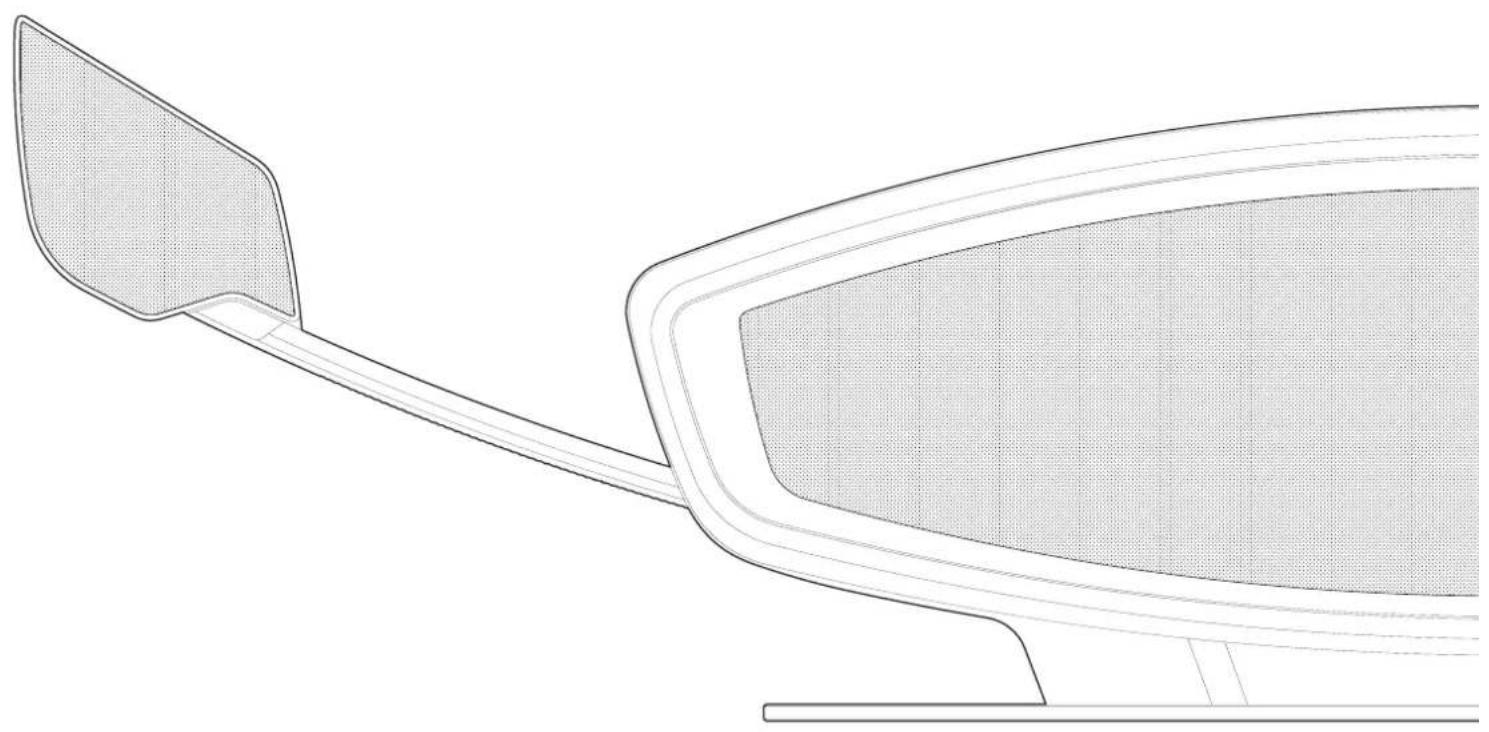
The sf16 sound system is able to play music in different formats by using a Wi-Fi network connection (through the DTS Play-Fi® system) or the connection of digital or analogue audio sources. It features an amplification system with 4 channels, 350W each, and 3 groups of speakers that form a 3-way system. The incorporated "Sound Field Shaper" system manages the rear speakers and the adjustable front satellites speakers for medium-high frequencies, providing improved spatiality and amplitude of the soundstage.
Please refer to Section 9 "Technical Data" and images of Section 10 "Illustrations."
| 1 | Adjustable satellite speakers (open closed) |
| 2 | Rear bass unit |
| 3 | Remote control IR receiver |
| 4 | Front bass unit |
| 5 | Rear connections panel |
| 6 | Base |
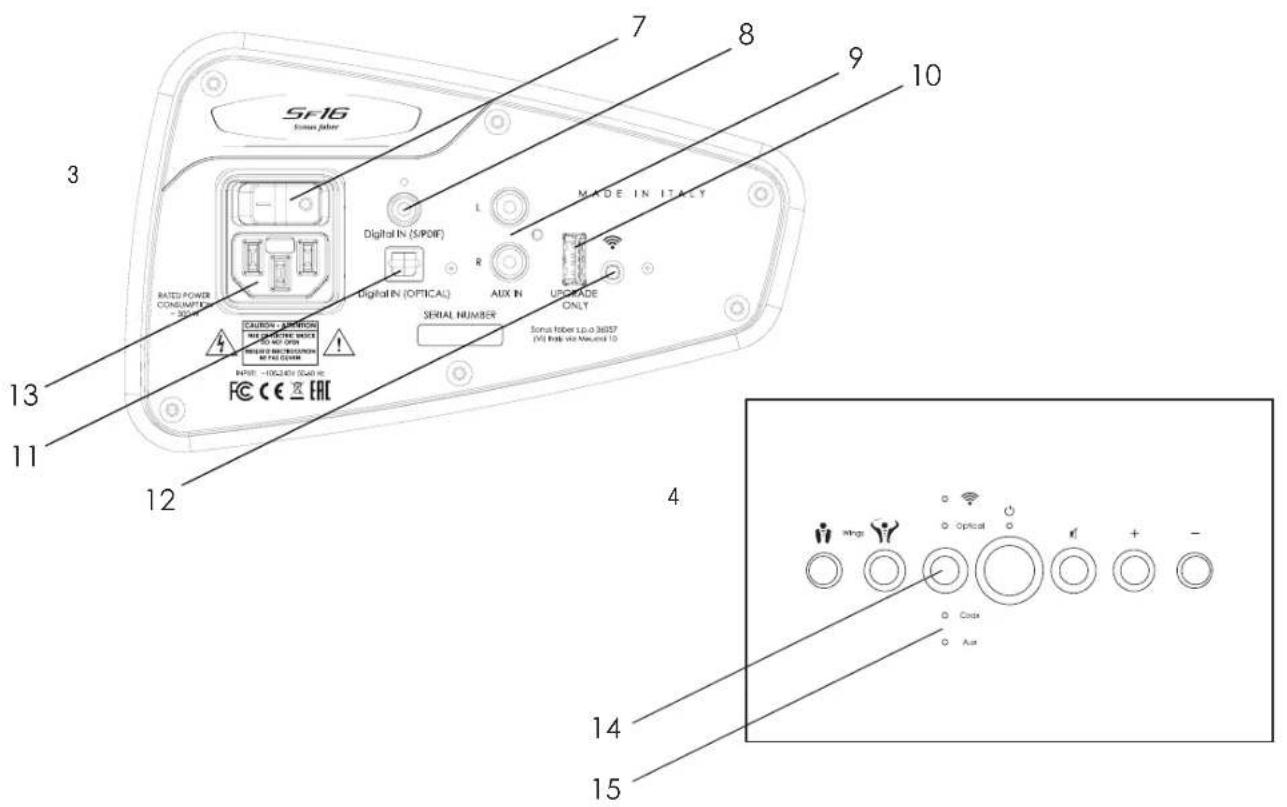
| 7 | ON-OFF switch |
| 8 | S/PDIF coaxial cable digital input |
| 9 | Analogue input |
| 10 | USB connection for software update |
| 11 | Toslink optical cable digital input |
| 12 | Wi-Fi pairing |
| 13 | Power cord socket |
| 14 | Input selection button: Optical Digital, Coaxial Digital, Analogue |
| 15 | Indicator LED of selected input |
| Satellite close button | |
| Satellite open button | |
| ON/Stand-by button | |
| Muting button | |
| +/- | Volume control buttons |
| The supplied remote control features the same functions as the control panel. | |
| Do not use the USB connection to connect USB sticks, external hard disks or other devices containing audio files. | |
4 INSTALLATION
Refer also to the instructions in Section 2 "Safety."
The Sf16 is designed for installation indoors, in a domestic environment, sheltered against splashes and heat sources.
- Place the Sf16 on a solid, stable and level surface. A height between 50 and 100 cm and a minimum distance of 15 cm from the wall on the rear side is recommended for optimal listening.
- Do not obstruct air intakes in the lower side of the base
- Please refer to 5.1 "Remote Control" to set up remote control use.
4.1 Unpacking
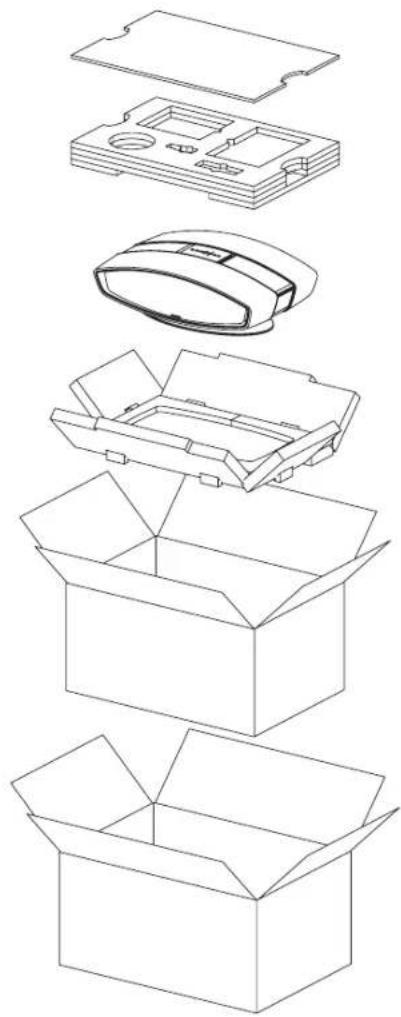
Unpack as illustrated below. Please refer to Section 10 "Illustrations."
| Hold the device securely with both hands to avoid dropping! The illustrated steps are carried out with greater safety and ease by two people. | Packaging materials may be pollutant! Do not dispose of these materials as household waste but send them to a waste collection and recycling centre. | Do not leave packing materials available to children! Danger of poisoning or suffocation due to ingestion. |
- Cut the closing tape on top of the package using a cutter;
2 Open the package completely; - Take out the device by lifting it by the lower part
It is recommended to keep the original packaging in case of future transport needs of the Sf16.
4.1.1 Content of packaging
At the time of the opening the package, check that these components are present:
- Sf16 sound system;
- User manual;
Infrared remote control;
CR2032 button cell battery for remote control
Power cord - Photo book
- Cleaning kit composed of Cristalux and microfiber cloth
If any of these items is missing, inform the dealer where the purchase was made.
4.2 Connections
Connect the audio components before connecting to the mains.
All connections are to be made with the device OFF
Please refer also to Section 3 "Description and characteristics"
to Section 9 "Technical Data" and to the images of Section 10 "Illustrations."
Please refer also to the user manuals of the devices to be connected to the Sf16 for information on their connection and operation.
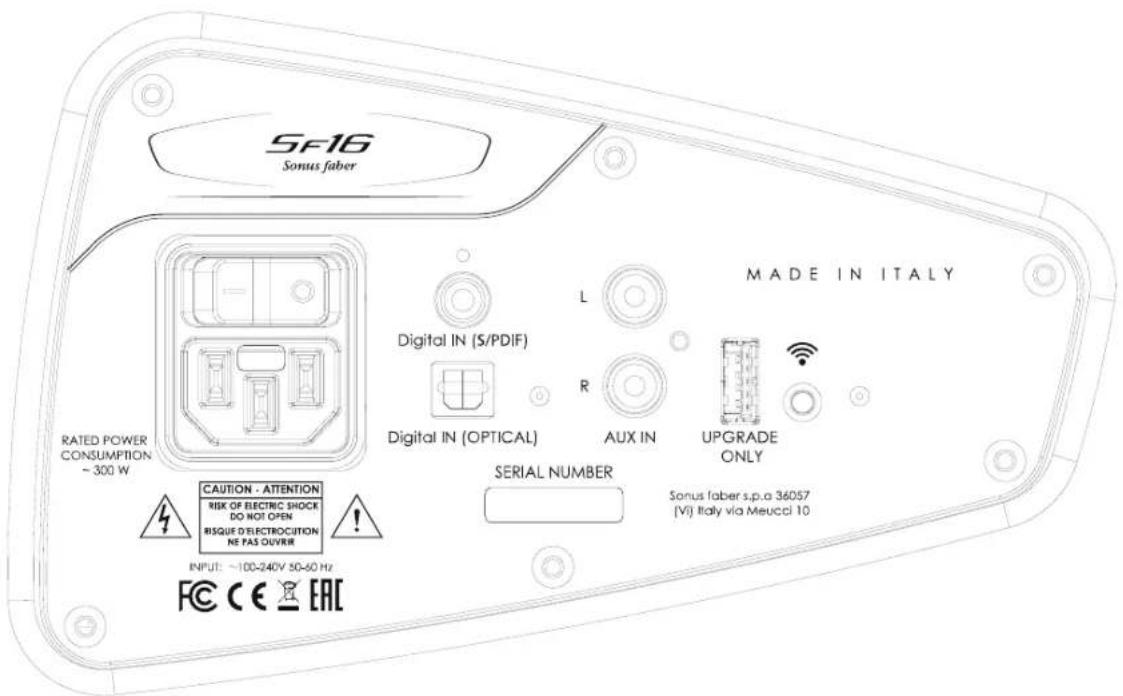
Digital IN (S/PDIF)
S/PDIF coaxial cable digital input. Connect here the DIGITAL OUT S/PDIF of a device such as a CD player, digital recorder, video device or other
Digital IN (OPTICAL)
Toslink optical cable digital input. Connect here the DIGITAL OUT OPTICAL of a device such as a CD player, digital recorder, video device or other.
AUX IN
Analogue input. You can connect an analogue output of a device such as CD player, video recorder, record player with incorporated RIAA card, cassette recorder or other.
Rear ON-OFF switch
This switch turns the device on and off. With this switch in OFF position, it is not possible to switch the device on using the remote control.
You can use the button on the remote control to switch the device on or off (STAND-BY) only if this switch is in ON position.
5 OPERATION
5.1 Remote control
The remote control supplied with the Sf16 features the same functions of the control panel located on the top of the device. The remote control is powered by a CR2032 button cell battery.
5.1.1 Fitting the battery in the remote control
Please refer to Section 10 "Illustrations."
| ! | Danger of damage to the remote control! ·Use only batteries of the type specified in this manual. ·Do not reverse the direction of insertion of the battery in order not to reverse the polarity. ·Remove the battery from the remote control if the device is not used for extended periods of time. ·Do not leave the remote control or the battery under direct sunlight, in the vicinity of heat sources or exposed to moisture or splashes. |
| ! | Dead batteries contain toxic substances and may pollute the environment! ·Disposed of used batteries at an authorised collection centre. ·Do not leave used batteries within the reach of children in order to avoid the danger of poisoning or suffocation if ingested. |
Install the battery as described below.
- Remove the cover of the battery compartment;
- Insert the battery (supplied) in the dedicated space by orienting it with the side with the “+” symbol facing up;
- Fit the cover door of the battery compartment again.
5.2 Operation
Please refer also to Section 3 "Description and characteristics", to Section 9 "Technical Data" and to the images of Section 10 "Illustrations."
- Shift the main switch (7) to position "l"
STAND BY: after 30 minutes of idle time the system is no longer visible in the network and energy consumption is less than 0.5 W. The POWER LED flashes slowly. - Press the Standby button on the remote control or on the control panel of the Sf16;
- The satellite speakers project from the sides of the Sf16. If the satellites are blocked in their movement, their return/exit movement is automatically commanded (with respect to the position of the obstacle).

Danger of damaging the satellite speakers or their movement mechanism!
-
Do not insert any objects in the space of the Sf16 intended for the satellite speakers and do not block their movement.
Make sure that at least 30~cm of space is available on both sides of the device for the movement of the satellite speakers. -
Reduce the playback volume with the “-” button on the remote control or control panel to prevent the emission of loud sounds that could damage the speakers or be too bothersome;
- The device performs a search of the available Wi-Fi network; when searching the Wi-Fi LED, it flashes
- The Wi-Fi input is enabled by default;
- Select a different audio input if desired (14);
- The corresponding indicator will light up on the selected input (15).
- Operate the corresponding source according to the instructions in the user manual of the connected device;
- Set the listening volume as needed (+/-) on the Sf16;
- Adjust the position of the satellite speakers with the open / close buttons. The device achieves maximum performance with the satellite speakers completely open.
5.3 Wi-Fi connection via DTS Play-Fi®
DTS Play-Fi® is a wireless sound system that delivers audio from mobile devices using a proprietary streaming, synchronisation and authentication technology. It works over both Wi-Fi and Ethernet networks and is available for Android, iOS and Windows systems on smartphones, tablets and PC.
"It supports many streaming services including Deezer, KKBOX, Rhapsody, Songza, Tidal, Spotify®, Amazon Music, iHeartRadio, Pandora, Sirius XM and Internet radios.
Some services may not be available in certain regions and may not be enabled for all applications. In addition, it may be necessary to subscribe to a plan."
The S116 sound system can operate in connection with a mobile device on which you have installed the DTS Play-Fi® software (app).
You can download the software that is compatible with your device from the website https://play-fi .com, where you will also find the set-up and update instructions.
5.3.1 Setting the Sf16 with DTS Play-Fi®
The following steps require that you have already installed the software on your device.
- Switch the St16 on;
- The Wi-Fi LED flashes until the device finds a wireless network;
- Once the network is authenticated and connected, the LED remains lit with a steady light;
-
Start the DTS Play-Fk® app according to the system in use: iOS Users
-
Open the Wi-Fi settings menu on your phone or tablet;
- Select "DTS Play-Fi© Device" from the available options and open the DTS Play-Fi© app.
Android and Windows users:
-
Open the application as provide for by the system in use.
-
The software will find your Sf16 and connect it to the Wi-Fi network. All you need to do is enter once the password for the network and then the software will manage the connection.
6 TROUBLESHOOTING AND SOLUTIONS
For any tht t t t t t t t t t t t t t t t t t t t t t t t t t t t t t t t t t t t t t t t t t t t t t t t t t t t t
| It is not possible to switch the Sf16 on with the remote control | ·Check that the main switch is in ON position ·Check that the power cord is connected correctly in the connections panel ·Try to replace the remote control battery; it is probably dead |
| It is not possible to connect to the wireless device | ·Check the operation of your network: check that the Wi-Fi LED is on; otherwise the network has not yet been authenticated or there is no network signal (flashing LED) ·Check that the transmitting Wi-Fi device is on |
| No signal from the selected input | ·Check that you have selected the right input ·Check that the selected device is connected correctly ·Check that the connected device is working ·Check that the volume is not set to minimum |
7 MAINTENANCE 8 DISPOSAL
No maintenance by the user is required for the Sf16 sound system. In the event of malfunctions contact the Sonus faber dealer where the purchase was made or your nearest Sonus faber offcial distributor.
7.1 Cleaning
Regularly remove dust on the casing of the Sf16, using the cleaning kit supplied.

Risk of damage to the device casing! Do not use cleaning products, furniture wax, liquid detergents or alcohol. Do not use rough cloths.
If not used for prolonged periods of time, cover the device with a soft cloth of suitable size.
At the end of its life cycle the Sf16 cannot be eliminated as domestic waste.
The materials contained therein can be recycled and, if not disposed of properly, can pollute the environment.
Eliminate the device according to the directives on recycling and waste disposal in force in your country.

This device contains materials that can pollute if dispersed in the environment.
Take the device to be disposed of to waste sorting centre.
1 ALLGEMEIN
Electromagnetic Compatibility and Radio spectrum Matters (ERM); Electromagnetic Compatibility (EMC) standard for radio equipment and services; Part 1: Common technical requirements.
EN 301 489-17 V2.2.1: 2009
Electromagnetic Compatibility and Radio spectrum Matters (ERM); Electromagnetic Compatibility (EMC) standard for radio equipment and services; Part 17: Specific conditions for Broadband Data Transmission System.
EN 300 328 V1.9.1: 2009
Electromagnetic Compatibility and Radio spectrum Matters (ERM); Wideband transmission systems; Data transmission equipment operating in the 2,4 GHz ISM band and using wide band modulation techniques; Harmonized EN covering the essential requirements of article 3.2 of the R&TTE Directive.
Arcugnano, 30.06.2016
Mauro Grange
CEO
Digital IN (OPTICAL)
5.3 Wi-Fi connection via DTS Play-Fi®
Chere cliente, cher client,
Electromagnetic Compatibility and Radio spectrum Matters (ERM); Electromagnetic Compatibility (EMC) standard for radio equipment and services; Part 1: Common technical requirements.
EN 301 489-17 V2.2.1:2009
Electromagnetic Compatibility and Radio spectrum Matters (ERM); Electromagnetic Compatibility (EMC) standard for radio equipment and services; Part 17: Specific conditions for Broadband Data Transmission System.
EN 300 328 V1.9.1:2009
Electromagnetic Compatibility and Radio spectrum Matters (ERM); Wideband transmission systems; Data transmission equipment operating in the 2,4 GHz ISM band and using wide band modulation techniques; Harmonized EN covering the essential requirements of article 3.2 of the R&TTE Directive.
Arcugnano, 30.06.2016
Mauro Grange
CEO
1.4 Conformity with international standards
IEC 60065:2014
Audio, video and similar electronic apparatus - Safety requirements and equivalent.
UL 60065-1 7th Edition
Standard for audio, video and similar electronic apparatus - Safety requirements and equivalent.
CAN/CSA-C22.2 60065-3 + A1:2006
Audio, video and similar electronic apparatus - Safety requirements and equivalent.
California Air Resources Board: code of regulation ATCM 93120 phase 2 compliant for formaldehyde emission.
Digital IN (OPTICAL)
Emotion. Connection. Desire.
9 TECHNICAL SPECIFICATIONS
| Audio Inputs | - 1x AUX ( analog RCA ) - 1x Digital S/polf coaxial - 1x Digital Tcsink optical - 1x Pay-F Wireless standards 802.11a/b/g/n protocol |
| File Formats | MP3, AAC, FLAG, WAV |
| File Quality | Lossless file reproduction up to 16 bit/44 kHz (CD Quality) and full compatibility with all high-resolution music up to 24bit/192k. Plays all format bitrates [kbps]. BTS Play-F transmits hi-resolution files but it does a down-sample in order to distribute them throughout your home. |
| Supported Internet music services | Doozer, KKbox, Rhassody, Songza, Tidal, Spotfy® , Amazon music, Hearth radio, Pandora, Sirius XM, Internet radios. |
| Supported media server | DLNA |
| Connectivity | Remote control Wi-Fi (802.11b/g) |
| Loudspeaker System | 3 ways, Sound Held Shaper technology, Bipole/Dipole radiation for enhanced stereo width |
| Drivers | 2.5" long throw subwoofer, push-push structure, "zero vibration technology" 2 satellite Front/Back with 4 ceramic 2" Mildrange + 4.5/8" tweeter point source silk dome |
| Amplifi cation | 1400 W total, 4 Ω |
| Dimensions (H×W×D) | Closed: 230 x 640 x 415 mm Open: 262 x 1080 x 415 mm |
| Weight | 25 Kg |
| A.C. Mains voltage | 100V, 115V, 230V, 50/60 Hz |
| Power consumption | Typical use 30W Stand by <0,5W |
10
ILLUSTRAZIONI
ILLUSTRATIONS
ERLÄUTERUNGEN
ILLUSTRATIONS
SF16
Sonus faber
Emotion. Connection. Desire.
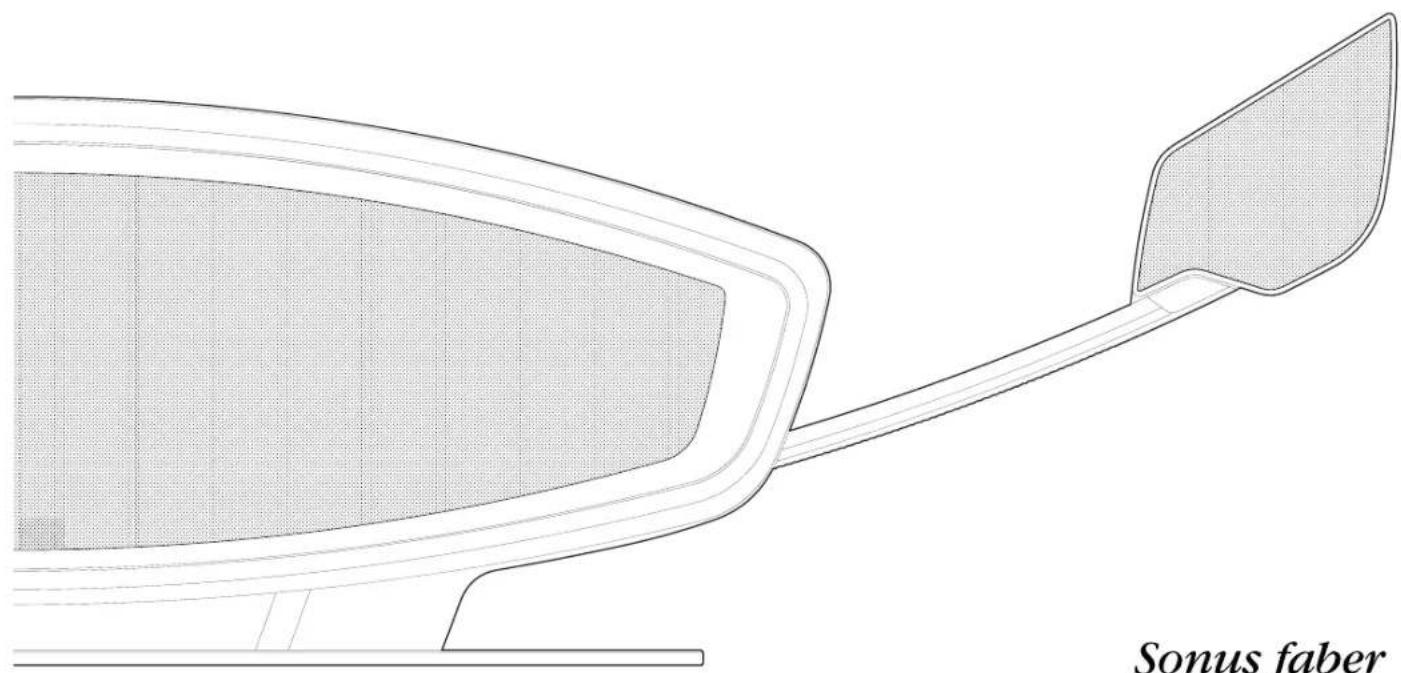
Sonus faber
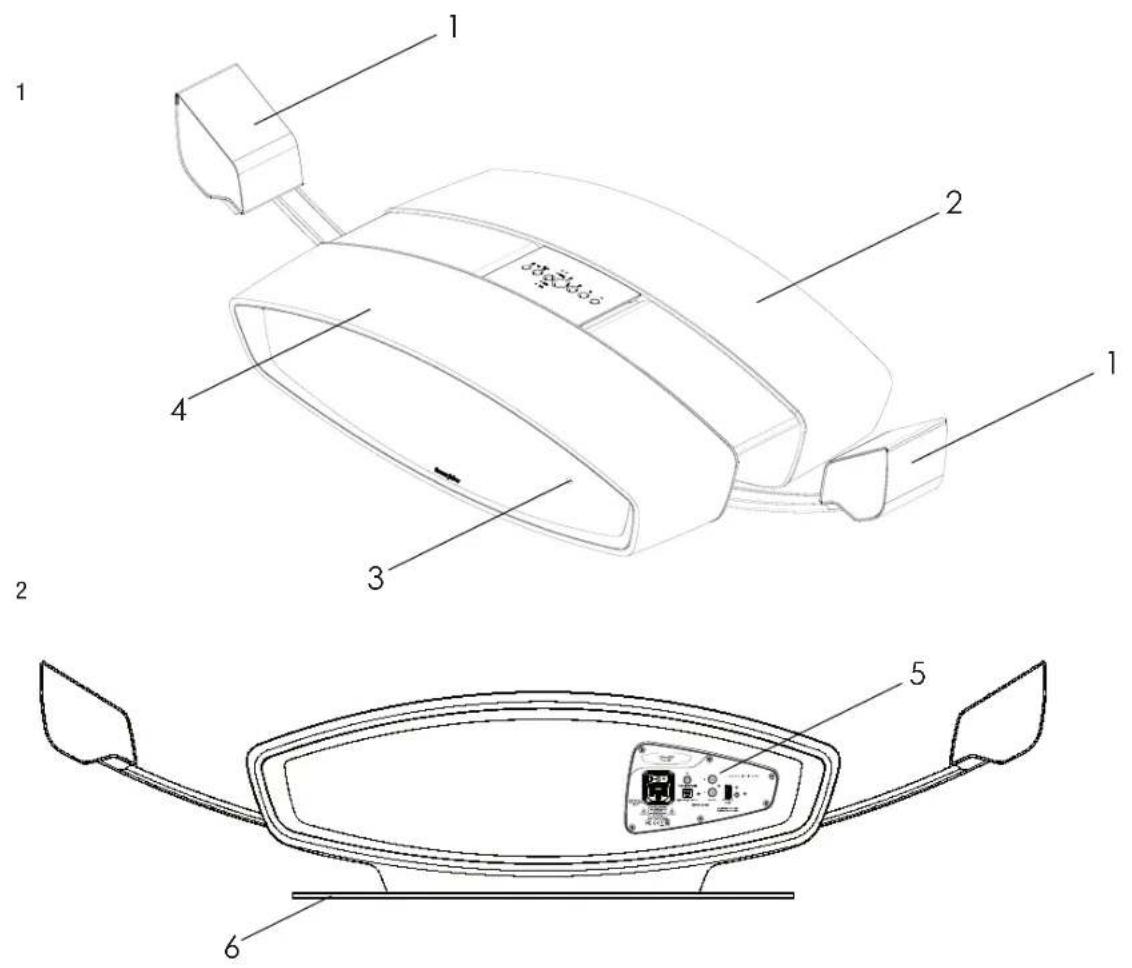
10.1 Descirione dell' Sf16 10.1 Description of the Sf16 10.1 Beschreibung des Sf16 10.1 Description du Sf16
| Figura 1 - Vista generale Figure 1 - General view Abbildung 1 - Hauptansicht Figure 1 - Vue générale | |||
| Figura 2 - Vista posteriori Figure 2 - Rear view Abbildung 2 - Rückansicht Figure 2 - Vue arrêté | |||
| Figura 3 - Pannello collegamenti | Figure 3 - Connections panel Abbildung 3 - Anschlussblende | Figure 3 - Panneau des raccordements | |
| Figura 4 - Pannello comandi Figure 4 - Control panel Abbildung 4 - Bedienblende | Figure 4 - Panneau de commande | ||
5
10.2 Dimensioni di ingombro 10.2 Overall dimensions 10.2 Abmessungen 10.2 Dimensions d'encombremen
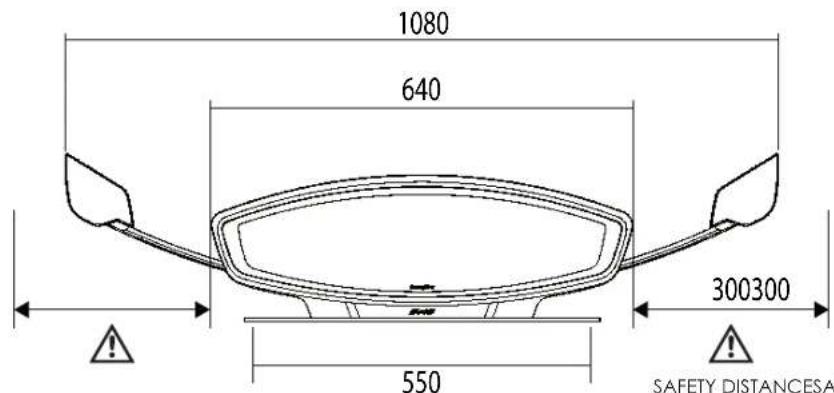
SAFETY DISTANCESAFETY DISTANCE
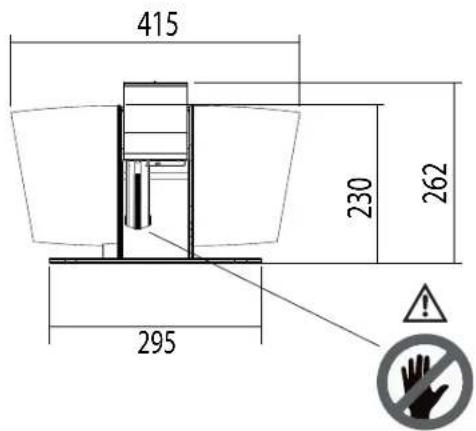
| Figura 5 Dimensioni di ingombro | Figure 5 Overall dimensions | Abbildung 5 Abmessungen | Figure 5 Dimensions d'encombrement |
10.3 Disimballo 10.3 Unpacking 10.3 Auspacken 10.3 Deballage
6
10.4 Collegamenti 10.4 Connections 10.4 Anschlüsse 10.4 Raccordements
7
10.5 Telekomando 10.5 Remote control 10.5 Fernbedienung 10.5 Telekomande
GLOSSARIO
| Streaming (audio) | Data flow transmitted from a source to one or more destinations via a telematic network. These data are reproduced as they arrive at destination. |
| WI-FI | Technology that allows different terminals to connect with one another via a local network in wireless mode (without connection cables) based on the specifi cations of the IEEE 802.11 standard. This local network can be connected to the Internet. |
| DLNA | Common standard for communication over a local network of multiple audio and video devices. The DLNA standard is currently used by over 250 companies. |
| S/PDIF | Standard for the transmission of digital stereo audio signals between devices. Transmission takes place via an electric cable ( coaxial or RCA). |
| TOSLINK | Standard fibre optic connection used on domestic audio equipment for the transmission of a digital audio stream between the components. Transmission of the signal takes place over a suitable optical cable. |
GLOSSAR
World copyright reserved






- SISTEMA DI RIPRODUZIONE AUDIO ALL IN ONE ALL-IN-ONE SOUND SYSTEM ALL-IN-ONE AUDIOSYSTEM SISTEM DE REPRODUCTION SONORE TOUT-EN-
- Safety 15
- Description and characteristics 15
- Installation 16
- 5Operation 17
- Troubleshooting and solutions 19
- Maintenance 19
- Disposal 19
- DEUTSCH
- Allgemein 20
- EN 301 489-17 V2.2.1: 2009
- EN 300 328 V1.9.1: 2009
- Digital IN (OPTICAL)
- GENERAL INFORMATION
- User information
- Warranty and after-sale service
- C E
- Declaration of conformity
- SF16
- Directive:
- EN 60065:2014
- EN 62311:2008
- EN 55032:2015
- EN 55020:2014
- EN 55022:2014
- EN 61000-4-3:2009
- EN 61000-6-1:2007
- EN 61000-6-3:2013
- EN 301 489-1 V1.9.2:2011
- EN 301 489-17 V2.2.1:2009
- EN 300 328 V1.9.1:2009
- Conformity with international standards
- IEC 60065:2014
- UL 60065-1 7th Edition
- CAN/CSA-C22.2 60065-3 + A1:2006
- FCC information
- (for US and Canada Customers)
- TRANSMITTER MODULE FCC ID: 2AAWQ-CAPRICA2L
- SAFETY
- General instructions
- Safety information
- DESCRIPTION AND CHARACTERISTICS
- INSTALLATION
- Unpacking
- Content of packaging
- Connections
- Digital IN (S/PDIF)
- AUX IN
- Rear ON-OFF switch
- OPERATION
- Remote control
- Fitting the battery in the remote control
- Operation
- Please refer also to Section 3 "Description and characteristics", to Section 9 "Technical Data" and to the images of Section 10 "Illustrations."
- Wi-Fi connection via DTS Play-Fi®
- Setting the Sf16 with DTS Play-Fi®
- Android and Windows users:
- TROUBLESHOOTING AND SOLUTIONS
- MAINTENANCE 8 DISPOSAL
- Cleaning
- ALLGEMEIN
- TECHNICAL SPECIFICATIONS
- Disimballo 10.3 Unpacking 10.3 Auspacken 10.3 Deballage
- Collegamenti 10.4 Connections 10.4 Anschlüsse 10.4 Raccordements
- GLOSSARIO
- GLOSSAR
Brand : Sonus Faber
Model : SF16
Category : Loudspeaker