USER MANUAL BX3 BT M-AUDIO
User Guide (English)
Introduction
Box Contents
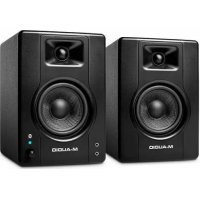
BX3 BT Speakers (Stereo Pair)
1/8" to 1/8" TRS Aux Cable
Foam Feet
1/8" TRS to RCA Cable
2-Prong IEC Power Cable
User Guide
1/8" TS Speaker Interconnect Cable
Safety & Warranty Manual
Product Registration and Support
To download your included software, follow the instructions below:
- Visit m-audio.com/softwaredownload.
- Follow the on-screen instructions to register your product.
- Upon successful registration, any applicable software downloads, product codes and promotions will show in your account.
Note: A high-speed internet connection is recommended. If you need assistance, do not return your product to the dealer. Instead, please contact our helpful technical support team by visiting m-audio.com/support.
Setup
The configuration and placement of your BX3 BT monitors on speaker stands or your desktop workstation may affect the performance of the speakers. Use the following tips to achieve the best performance out of your BX3 BT monitors.
Tip: If possible, place your BX3 BT monitors on speaker stands instead of your desktop. Desks tend to resonate sympathetically at low frequencies and may adversely affect the bass response of your monitors. If speaker stands are not possible due to space restrictions and you notice a buildup in bass, try placing the monitors on isolation pads to acoustically decouple the monitors from the desk.
Precautions
- Correct Power Operation: Since the BX3 BT contains amplifiers, it must be connected to a power outlet. Before connecting power, please make sure that the Vol/Power knob is set to the off position.
- Foam Feet: In order to maximize physical stability, we recommend you use the provided foam feet on the bottoms of the BX3 BT monitors.
- Connecting to a Computer Sound Card or Other Audio Output Device: Your BX3 BT speakers have a variety of inputs for use with a multitude of devices. Before connecting the BX3 BT speakers, make sure the power from the computer or other output device has been turned off and the BX3 BT speakers are also turned off. Connect the RCA or 1/4'' (6.35 mm) input jacks to the corresponding output connectors of a computer sound card, portable music player, etc. You can also use the included 1/8'' (3.5 mm) TRS stereo aux cable to connect a secondary audio device to the Aux input on the front of the BX3 BT or connect via Bluetooth®.
Speaker Placement
The placement of your speakers has a huge impact on how well they will perform in your studio. Although nearfield studio monitors are designed to be more forgiving when it comes to placement, you should do your best to make sure they form an equilateral triangle relative to your head. In other words, make sure that each speaker is equally distant from both your head as well as the other speaker. Once each speaker has been placed, rotate the speakers slightly so that the drivers are pointing toward the listener.
Take a look at the diagram on the right. Notice that the distance from the listener's head to each speaker is the same as the distance between the left and right speakers. Also note that the speakers are turned slightly so that the drivers are facing the listener. This is an ideal setup but if it is not practical (or possible) to do this, try to match this setup as closely as possible.
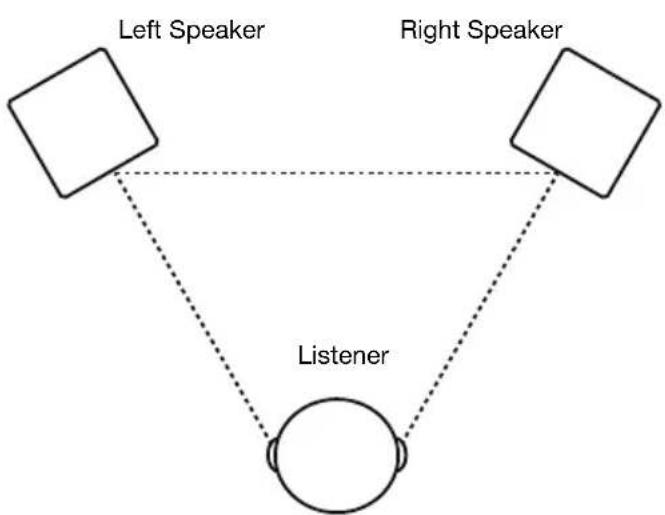
The speakers and listener should be at the three corners of a triangle having equal length sides.
Speaker Height
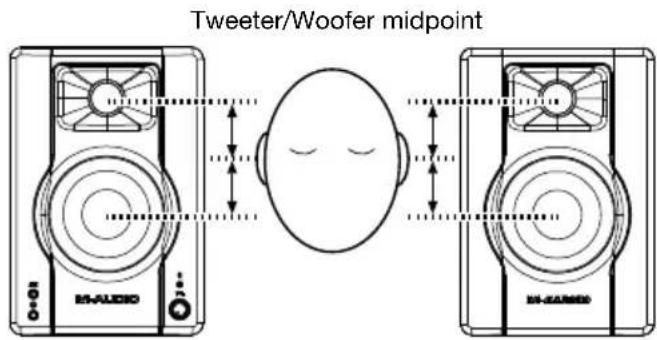
The ideal height for BX3 BT is so that the speaker is parallel to the ground and that the midpoint of the woofer and tweeter is at ear-height.
The diagram to the right demonstrates the ideal placement height of the speakers relative to the listener. Notice that the listener's ears are directly between the woofer and tweeter.
Speaker Orientation
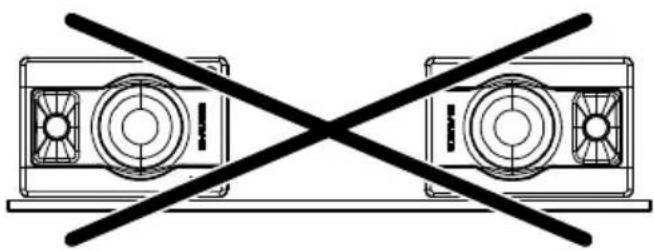
If possible, place the BX3 BT monitors in their upright position and avoid laying the speakers on their sides. The BX3 BT woofer and tweeter are vertically aligned and will provide the best performance when the speakers are placed upright. Placing them on their sides may create strong reflections from nearby surfaces resulting in spectrally unbalanced sound.
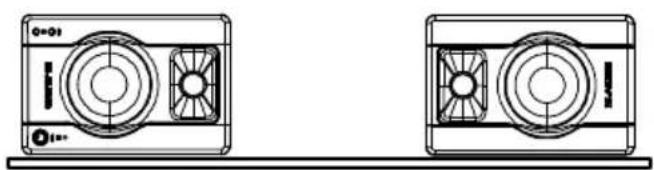
If your BX3 BT monitors must be oriented horizontally due to space or line-of-sight considerations, place the speakers so that their tweeter is on the "inside" to improve imaging.
Connection Diagrams
Items not listed under Introduction > Box Contents are sold separately.
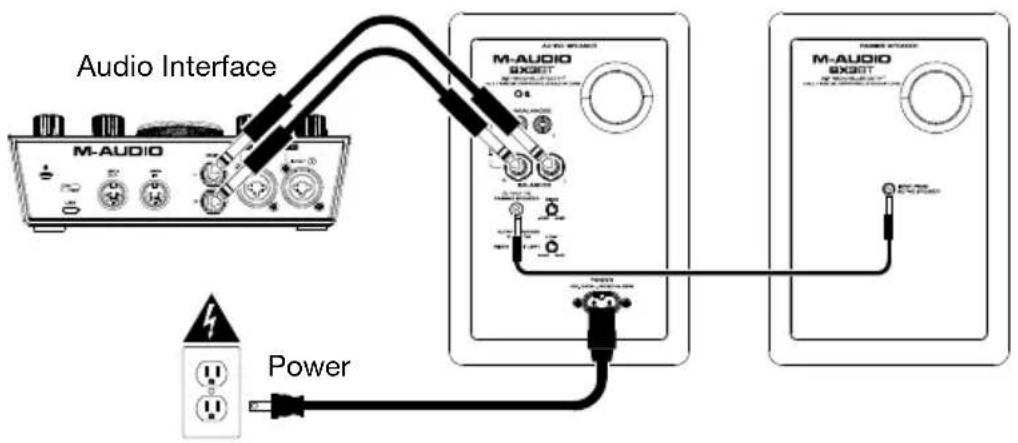
Example 1 - Connecting to an Audio Interface
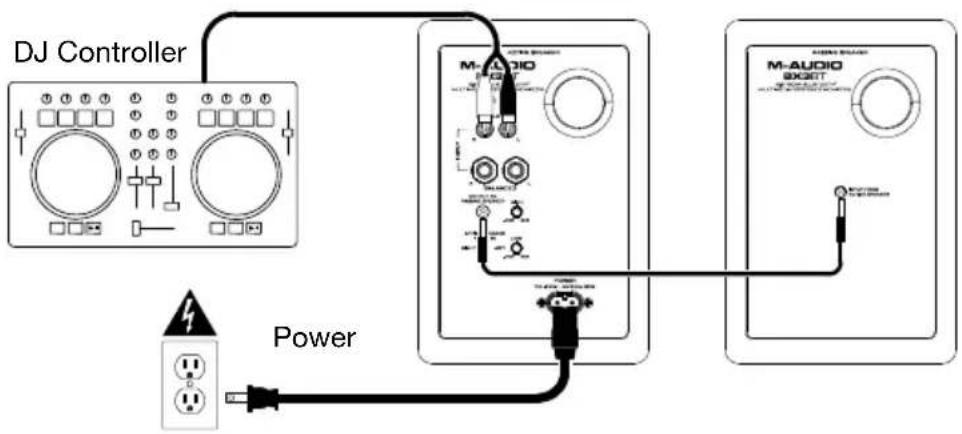
Example 2 - Connecting to A DJ Controller
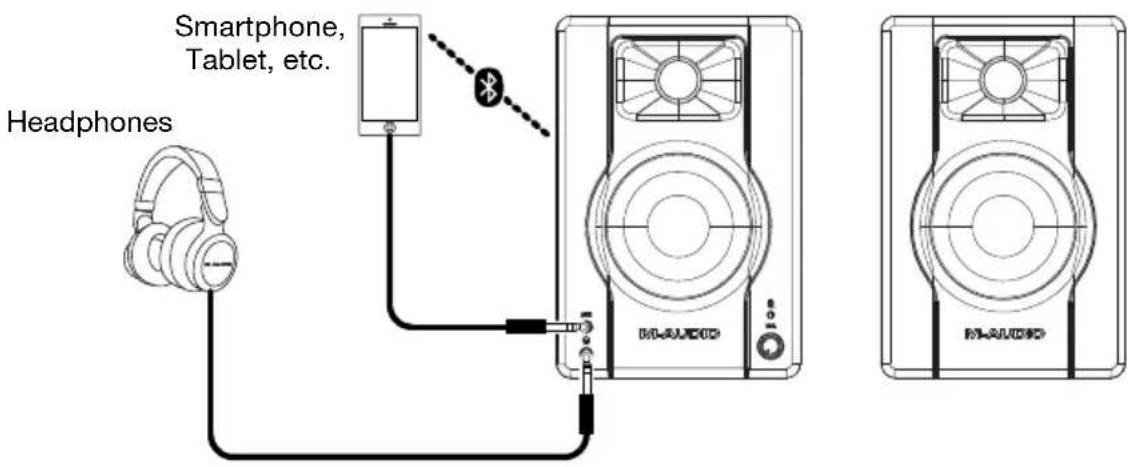
Example 3 - Connecting to an Auxiliary Media Player
Features
Rear Panel
- Rear Port: The rear port enhances the bass generated by the woofer, increasing the low frequencies. Make sure these ports are not obstructed since this will adversely affect bass response.
- Bluetooth Button: Press this button to disconnect a paired Bluetooth device and enter pairing mode. See Pairing a Bluetooth Device for more information.
- RCA Inputs: Use the included audio cable or other RCA cables (sold separately) to connect external sound sources to these inputs.
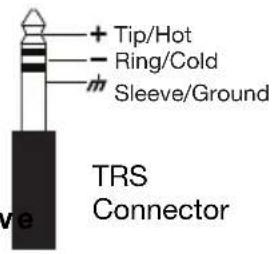
- 1 / 4'' (6.35 mm) TRS Inputs: Use 1 / 4'' (6.35 mm) audio cables (sold separately) to connect external sound sources to these inputs.
- 1/8" (3.5 mm) TS Output to Passiv
Speaker: This is the audio connection to the passive speaker. Use the included 1/8 (3.5 mm) TS interconnection cable to connect the active speaker to the passive speaker.
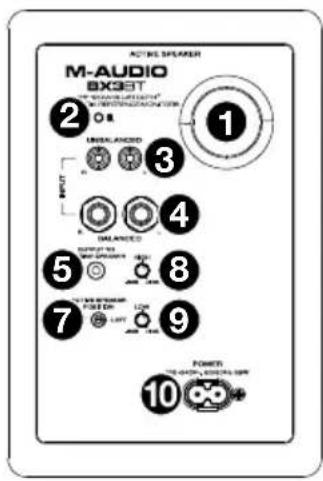
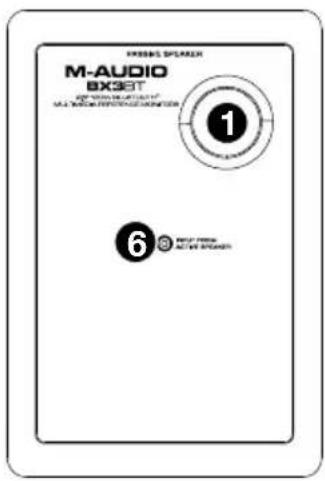
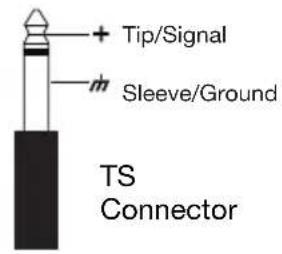
- 1/8" (3.5 mm) TS Input from Active Speaker: Use the included 1/8" (3.5 mm) TS interconnection cable to connect the active speaker to this passive speaker.
- Active Speaker Position: Adjust this to set the position for the active speaker in the stereo field. This allows you to choose to have the active speaker on either your left or right depending on your preferences and where your connections are.
- High EQ: Turn this knob to boost or cut the high-frequency equalization of the speakers.
- Low EQ: Turn this knob to boost or cut the low-frequency equalization of the speakers.
- Power Connector: Plug the included 2-prong IEC power cable here.
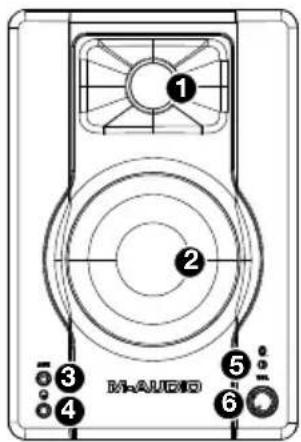
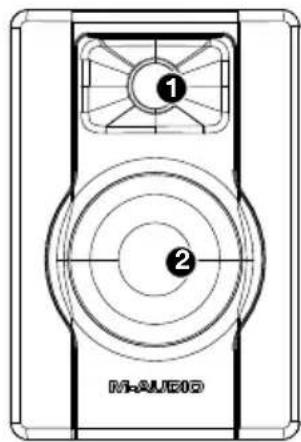
Front Panel
-
Tweeter: This outputs the high frequencies.
-
Woofer: This outputs the low frequencies.
-
1 / 8'' (3.5 mm) TRS Aux Input: This stereo 1 / 8'' (3.5 mm) TRS input can be used to connect an MP3 player or other audio source.
-
Headphones: Connect your 1/8" (3.5 mm) headphones to this output to hear the mix through your headphones. Note that while headphones are connected to BX3 BT, you will not be able to hear sound out of your speakers until the headphones are disconnected.
-
Power/Bluetooth LED: This LED will illuminate when the speakers are turned on. When pairing to a Bluetooth device the LED will flash blue, and when pairing is successful it will be lit solid blue.
-
Vol/Power: This knob is used to turn the speakers on and adjust their volume. To turn on, simply turn up the knob. You will feel a click when the speakers turn on. To turn off, simply turn the volume all the way down.
Pairing a Bluetooth Device
- Turn on your Bluetooth device.
- Power on BX3 BT and press the Bluetooth button to go into pairing mode to search for Bluetooth devices. You will know you are in pairing mode when the Power/Bluetooth LED is flashing blue.
Note: If you have previously paired a device, BX3 BT will reconnect automatically.
- Navigate to your Bluetooth device's setup screen, find BX3 BT and connect. If your Bluetooth device prompts for a pairing code, enter 0000.
- The Power/Bluetooth LED will be lit solid blue when a device is "paired" to BX3 BT.
To disconnect a paired Bluetooth device and enter pairing mode, press the Bluetooth button. To connect to another device, repeat step 3.
Technical Specifications
| Frequency Response | 80 Hz – 22 kHz |
| Output Power | 120 W (total peak), 2 x 25 W (RMS) |
| LF Driver | 3.5” / 88.9 mm |
| HF Driver | 1” / 25.4 mm; silk dome |
| Audio Inputs 1 RCA stereo input pair |
| 2 1/4" (6.35 mm) TRS inputs |
| 1 1/8" (3.5 mm) stereo auxiliary input |
| Headphone Output | 1/8” (3.5 mm) stereo output |
| Interconnection Cable | 1/8” (3.5 mm) TRS |
| Bluetooth Range | 100' (30.5 m) |
| Power | 100–240 VAC, 50/60 Hz, 85 W |
| Dimensions | 5.5” x 5.7” x 8.2" |
| (width x depth x height, per speaker) | 140 x 145 x 208 mm |
| Weight | 7.39 lbs. |
| (per pair of speakers) | 3.35 kg |
Specifications are subject to change without notice.
Trademarks & Licenses
M-Audio is a trademark of inMusic Brands, Inc., registered in the U.S. and other countries.
The Bluetooth word mark and logos are owned by the Bluetooth SIG, Inc. and any use of such marks by M-Audio is under license.
All other product or company names are trademarks or registered trademarks of their respective owners.
m-audio.com