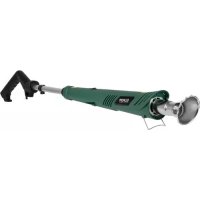
Weedcleaner - Electric gardening tool Eurom - Free user manual and instructions
Find the device manual for free Weedcleaner Eurom in PDF.


| Product type | Cordless electric weed brush |
| Brand | Eurom |
| Model | Weedcleaner |
| Rated voltage | 18 V |
| Brush diameter | 100 mm |
| Telescopic tube length | 37 to 64 cm |
| Sound pressure level | 72 dB(A) |
| Vibration level | 0.696 m/s² (K=1.5 m/s²) |
| Battery charging time | 1.5 hours |
| Dimensions (L x H x P) | 126 x 22 x 16 cm |
| Weight | 1.95 kg |
| Power supply | 18 V lithium-ion battery (included) |
| Main functions | Weeding of joints between paving stones and bricks |
| Adjustable head angle | 5 positions: -36°, -18°, 0°, 18°, 36° |
| Brush type | Nylon brush (2 supplied) |
| Safety | Protection against overload, deep discharge, overheating, overvoltage and short circuit |
| Maintenance and cleaning | Clean with a clean cloth and compressed air; no aggressive detergents |
| Included accessories | Battery, charger, 2 nylon brushes, protective cover |
| Warranty | Manufacturer's warranty (see conditions) |
Frequently Asked Questions - Weedcleaner Eurom
User questions about Weedcleaner Eurom
0 question about this device. Answer the ones you know or ask your own.
Ask a new question about this device
Download the instructions for your Electric gardening tool in PDF format for free! Find your manual Weedcleaner - Eurom and take your electronic device back in hand. On this page are published all the documents necessary for the use of your device. Weedcleaner by Eurom.
USER MANUAL Weedcleaner Eurom
natural_image
Exterior view of a precision tool with a metal rod and attached power supply unit (no text or symbols visible)Weedcleaner Cordless
Art.Nr. 248234
Betekenis symbolen

WAARSCHUWING.

Montage van de beschermkap en borstel
natural_image
Close-up of a metallic mechanical component with arrows pointing to features (no visible text or symbols)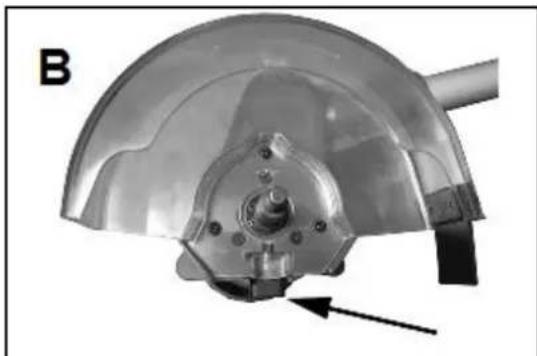
natural_image
Close-up of a metallic mechanical component with a curved top and central hub, showing internal structure and a black arrow indicating a specific point (no text or symbols present)natural_image
Mechanical component with a fan-like structure and a pointed tip, labeled 'C' in the corner (no text or symbols on the object itself)natural_image
Mechanical pipe fitting with a black connector and arrow indicating direction (no text or symbols)Opladen van de accu
natural_image
Two black industrial charging machines with a directional arrow indicating left-side movement (no visible text or symbols on the devices themselves)natural_image
Close-up of a black plastic electronic component with a black arrow pointing to a small square feature (no text or symbols visible)natural_image
Close-up of a hand holding a black EUROM-branded device (no visible text or symbols on the device itself)natural_image
Symbol of a trash bin crossed with no text or numbers, representing waste sorting or disposal (no text present)natural_image
Icon of a person using a computer inside a circle (no text or symbols)natural_image
Symbol of a person standing next to a vertical barrier, with bidirectional arrow indicating distance (no text or labels)natural_image
Warning sign depicting a person falling into a slope, enclosed in a triangle (no text or symbols)natural_image
Weather protection symbol with no text or numbersnatural_image
White headset icon on dark background, enclosed in a circle (no text or symbols)
natural_image
Simple line drawing of a person's head wearing glasses, enclosed in a circle (no text or symbols)natural_image
Close-up of a metallic mechanical component with arrows pointing to features (no visible text or symbols)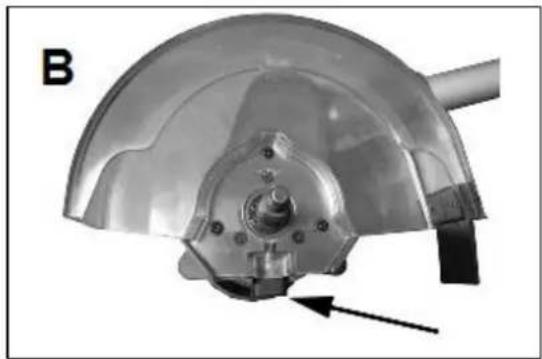
natural_image
Close-up of a metallic mechanical component with a curved top and central hub, showing internal features and a black arrow indicating direction (no text or symbols)natural_image
Mechanical component with fan and handle assembly (no visible text or symbols)natural_image
Mechanical component with a black threaded rod and a black housing, labeled 'D' (no text or symbols on the object itself)Aufladen des Akkus
natural_image
Two black industrial batteries with a digital display and label, one partially stacked and one partially unrolled (no visible text or symbols on the main body)natural_image
Close-up of a black plastic electronic component with a small square button and an arrow pointing to it (no visible text or symbols)natural_image
Symbol of a trash bin with crossed lines indicating no waste or discharge, and a solid black rectangle below (no text or labels)Read the instruction manual carefully before use. It contains important safety warningsinstructions that you must obey.
natural_image
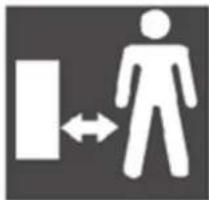
Symbol of a human figure with bidirectional arrow between two vertical bars (no text or numbers present)Keep bystanders, especially children but also pets. at a distance to everything and keep distance to everything and everyone.

Attention: gravel and stones etc., may splash up.

natural_image
No sign depicting rain with a cloud and raindrops, crossed out by a diagonal line (no text or symbols)Do not use in the rain or expose to moisture.

natural_image
White headset icon inside a circle on dark background (no text or symbols)
natural_image
Simple line icon of a person wearing glasses inside a circle (no text or symbols)Always wear hear and eye protection
Thank you
Thank you very much for choosing for a EUROM device. You have made a good choice! We hope you will be satisfied about its functioning.
To get maximum profit from your product, it is important to read this manual attentive and totally before use, and to understand what is written. Read especially the safety instructions: they are there to protect you and your environment.
Keep the manual in a safe place for future reference. Store also the package: that is the best protection for your product in times of no-use. And if you at any time pass the appliance on, pass on the manual and package too.
We wish you a lot of fun with the Weedcleaner Cordless!
Eurom
Kokosstraat 20
8281 JC Genemuiden (NL)
info@eurom.nl
www.eurom.nl
This manual has been complied with the utmost care. Nevertheless, we reserve the right to optimize this manual at any time and to adjust it technically. The image used may differ.
Technical specification
| Voltage | 18 V |
| Brush | 100 mm |
| Telescope tube | 37-64 cm |
| Noise level | 78,2 dB |
| Vibration level | 0.696 m/s ^2 , K=1.5 m/s ^2 |
| Charging time battery | 1,5 hour |
| Dimension | 126 x 22 x 16 cm |
| Weight | 1,95 kg |
Warnings and security
Warnings general
- Read all instructions. Failure to follow these instructions may result in electric shock, fire and / or serious personal injury.
- Keep all safety instructions and other instructions for future use.
- This device may not be used by individuals who are not familiar with its operation and who have not read the instruction manual. The user is responsible for any accidents that occur with other individuals or objects!
- Not following the safety instructions can cause damage, fire or personal injury. They will void the warranty and the supplier, importer or manufacturer will not accept any responsibility for the consequences!
Warnings working environment
- A messy and dark work area is an open invitation for accidents. The work area should be clean and well lit, and tidy and free of surplus objects and rubbish. Be extra careful if the ground is slippery due to dampness, grease, sand, gravel or other materials.
- Do not use the device indoors and in an area where a danger of fire or explosion exists due to the use or storage of flammable or light inflammable liquids and gases such as paint, lacquer, petrol and so forth.
- Neither use the device in a dusty environment. Electronic tools can cause sparks that can ignite dust and vapours.
- Keep children and spectators away when you use the device. Pay attention to the direction of the airflow, it may move objects that can cause personal injury and/or property damage.
- Check the area where the work will be carried out for wires and other refuse that may cause damage to the device or injury. If necessary, use a rake or broom first to remove undesirable objects before you begin blowing.
Warnings electricity
- The electrical voltage and frequency, as indicated on the battery charger, must agree with the power socket to be used. The electrical installation must be secured with an earth leakage switch (max. 30 mA). Use only a suitable socket.
- Do not expose the device to humidity or rain and do not use it under humid or wet circumstances.
- Keep the electrical cable away from heat, oil, sharp corners and moving parts.
Warnings for personal safety
- Use your common sense and always pay close attention to what you are doing during your activities. Never use the device when you are tired, using medication that causes drowsiness or if you have used alcohol or drugs. Take regular breaks.
- Stand firmly in balance, do not reach too far and always wear strong closes shoes with a good tread profile, long trousers and gloves. Do not wear loose hanging clothing or jewelry that can be pulled around the brush. Tie back long hair and keep it away from the air inlet. During use wear protective dust goggles. In order to prevent irritation from dust, it is advisable to wear a dust mask. Ear protection is recommended for long-term use. If you are working in an area where there is a possibility of being struck by falling objects, wear a helmet.
- Prevent the unintentional starting of the device. Check if the device is switched off before you place the battery in the device. Always remove the plug from the socket (battery charger) and the battery from the device if you do not use it.
- Never put your hand / feet or any other object into the rotating parts of the machine, which produce suction force.
- Make sure the brush is not touching stones or debris before starting the power-tool
- Keep your arms and legs at a safe distance from the power tool, especially when starting the motor.
- Protect yourself against electric shock and prevent physical contact with earthed surfaces such as pipes, radiators, etc.
Warnings for use and care
- This device is designed solely for removing weed and intended for use by private individuals only. It should not be used for commercial purposes.
- Use the device for the purpose for which it is designed only and in the manner described in this instruction manual. Do not overload the device and do not use it for long consecutive periods, as this will reduce its useful life.
- Before using your device (including battery and battery charge), check for visible damage and / or strange noise. Never use a damaged device and return it to your supplier for replacement.
- Always check the device for damage or wear and tear before using. Also check whether the electrical cable and extension cord has the correct insulation, any cuts or worn areas and the condition of the connectors. Do not use the device if you notice any damage/wear and tear/deficiencies to the device, electrical cable or plug, or when it works poorly, has fallen or shows any other signs of malfunction. Return the entire device to your supplier or an approved electrician to be checked and repaired. Always ask for original parts.
- Never use the device when protective parts, switches or safety provisions are broken, not correctly attached or missing.
- Do not use the device if it is not completely assembled.
- Immediately switch off the device when it starts vibrating abnormally. Abnormal vibrations point to mechanical problems that may cause bodily harm and/or property damage.
- Remove the plug from the socket, remove the battery from the device before you clean the device, assembling /
removing the brush, adjusting the angle of the brush head or storing the device.
- Ensure that there is careful supervision when this device is used in the presence of children, incapable individuals or pets. Keep them away from the device! This device is not suitable for use by individuals (including children) with a physical, sensory or mental handicap, or lack of experience and knowledge, irrespective of whether there is supervision or instruction has been given regarding the use of the device by an individual who is responsible for their safety. Measures should be taken to ensure that children do not play with the device.
- This device may not be used by children. Store the device out of reach of children.
- Switch off the device and wait for all rotating parts to come to a standstill before you store the device.
- Do not make any changes or modifications to the device. The device, battery and battery charger (including the electrical cable and plug) may only be opened and repaired by authorized and qualified individuals.
- Maintain the device properly. Check regularly if the rotating parts did not get blocked and parts were not assembled incorrectly or if there are other factors that may affect the functionality.
- Never use spare-parts or accessories that are not recommended by the manufacturer.
- Always make sure that the ventilation openings are free form debris. Avoid accidental starting by never carrying the power tool with your finger on the power switch.
- Familiarize yourself with how the tool should be hold,
- If a new stretch is to be worked always hold the power tool in the normal working position before start.
Additional warnings / instructions for battery-operated devices
- These instructions for use contain important safety and user information about the battery and the battery charger.
- Read all instructions and warnings on the battery, battery charger and in the instruction booklet accurately before you start using the battery and the battery charger.
- Only use the battery charger that is recommended by the manufacturer. The use of a battery charger that is meant for a different type of battery may result in a fire hazard.
- Only use a battery that was designed specifically for this device. The use of other battery models may result in bodily harm or fire.
- If the battery is not being used then keep it away from other metal materials, e.g. paperclips, coins, nails and screws that can short-circuit battery connections. The short-circuiting of battery connections may cause burns or fire.
- Incorrect use may result in liquid leaking from the battery. Avoid all contact with this liquid. In case of unintended contact with this liquid, immediately rinse the skin thoroughly with water. If this liquid gets in your eyes then rinse carefully with water and quickly seek medical assistance. Liquid from the battery may irritate the skin or cause burns. Replace the leaking battery.
- Never place a cracked or damaged battery in the battery charger.
- hazard of electrical shock.
- Never expose the battery charger to water or another liquid. - hazard of electrical shock or property damage.
- To make sure that the battery and the battery charger cool off faster after use, they cannot be placed in a warm space or closed cabinets, etc.
- Do not try to charge batteries other than those that were delivered with the device.
- hazard of electrical shock and/or fire.
- Never place objects on the battery charger and never place the battery charger on a soft or flexible underground.
- hazard of overheating.
Do not place the battery charger near heat sources.
- Only use an appropriate socket and do not use the electricity cable to lift etc. the battery charger. To place the socket of the battery charger in the socket, or to remove it, always hold the socket in your hand; never pull the electricity cable.
- Completely unwind the electricity cable of the battery charger before you place the plug in the socket. Do not lead the cable under the carpet, do not cover it with mats, runners and the like and keep the cable away from the walking route. Make sure that it is not walked on and that no furniture is placed on it. Do not let the cable pass sharp edges and do not wind it up too tightly after use.
- It is not recommended to use an extension cord because this may cause overheating and fire. If the use of an extension cord is inevitable then make sure that an undamaged, approved extension cord of sufficient power is used.
- If the battery charger or the battery was exposed to hits or bangs or was otherwise damaged then they cannot be used until they were checked and repaired by a recognized electrician.
- Do not dismantle the battery charger, present it to a recognized electrician or service centre if it needs to be repaired. Messing or incorrect reassembly may lead to the risk of an electrical shock and/or fire.
- Remove the plug from the socket before you start cleaning the battery charger – hazard of electrical shock. It is not enough to merely remove the battery from the battery charger.
- Never try to connect two or more battery chargers.
- Never store the battery charger and never use it in circumstances where the temperature may be higher than 50°C.
- The battery charger is meant to be fed by a domestic socket of 220-240 Volt / 50 Hz and produce an output voltage of 18
volt. Never try to use the battery charger with different voltages.
- The battery is not completely charged upon delivery from the factory.
- The best lifecycle and performances are realized if the battery is charged at an ambient temperature of 18 to 24°C. Avoid charging of the battery at temperatures lower than 10°C or higher than 50°C. This reduces the risk of inferior performances and damage to the battery.
- Never burn batteries. Nor when they are damaged and can no longer be charged. Batteries may explode when they are burnt.
- Never try to open the battery. Do not use or charge the battery when the plastic housing is damaged or cracked.
- Only charge the battery in a properly ventilated area.
- The battery charger and the battery heat up during the charging. This is absolutely normal.
- Charge the battery, where possible, at normal ambient temperature.
- Do not cover the battery charger, risk of overheating.
- Avoid charging of the battery in direct sunlight or near heat sources.
- Keep the charger clean. This will reduce the risk of electric shock.
- Never use the charger near flammable materials (paper, textiles, etc.). This reduce risk of fire.
- Protect the battery from heat, direct sunlight and naked flames. This will reduce the risk of an explosion.
- Incorrect use of the battery and charger can result in the emission of vapour. This vapour can be harmful to health.
- Never short circuit the power tool. This will reduce the risk of an explosion.
- Damage of incorrect use can result in the emission of vapour from the power tool. If this is the case, consult a doctor to check your respiratory tracts.
Overloading security
The overloading security protects the battery against excessive loading. The battery charger switches off automatically when the battery has been charged completely in order to protect the battery against overloading.
Deep de-charging protection
The battery is secured against too deep de-charging. This prevents the battery from de-charging further when a too low battery tension is reached.
Overheating protection
The battery has a built-in temperature sensor that stops the charging when the battery overheats. The temperature sensor protects the battery when the device is being used. Otherwise the battery could reach a dangerously high level in case of overloading or long-term use. In case of overheating the battery must first cool off before it can be used again. Depending on the ambient temperature and how the device is being used, it can take up to 30 minutes before the battery has cooled off sufficiently.
Overvoltage security
The battery is temporarily switched off to prevent damage if the maximum voltage is exceeded. The normal battery function is reset automatically some seconds after this security has been activated.
Short-circuiting security
The short-circuiting security switches off and immediately interrupts the circuit of the battery when the battery short-circuits. This prevents damage to the battery and/or the device.
Other risks
Even if the device is being used according to the instructions then it is still impossible to exclude all risk factors. The following potential risks are related to the design and the functionality of the device:
- damage to the lungs if a dust mask is not being used;
- hearing loss if no hearing protection is being used;
- eye damage is safety goggles are not being used;
- vibration damage if the device is being used too long or is not being maintained properly.
Vibrations
- Specified vibration values were measured according to a standard test method and can be used for comparison between devices.
- The specified values can also be used for a provisional assessment of the exposure.
- Vibration levels may deviate from the specified value, depending on how the device is being used.
- Try to reduce the exposure to vibrations by, for instance, wearing gloves and by taking regular breaks.
Brushes
- Do not fit brushes on machines that run faster than the maximum brush speed.
- Do not use damaged brushes.
- Discoloring as a result of rust, or other signs of chemical or mechanical modification of the brush material, can cause the brush to wear out in advance.
- Store brushes in a suitable place, protected from the following:
- High relative humidity, heat, water and other liquids that can damage the brush.
- Acid of vapour from acid.
- Low temperatures that can result in condensation on the brush.
- Deformation of part of the brush
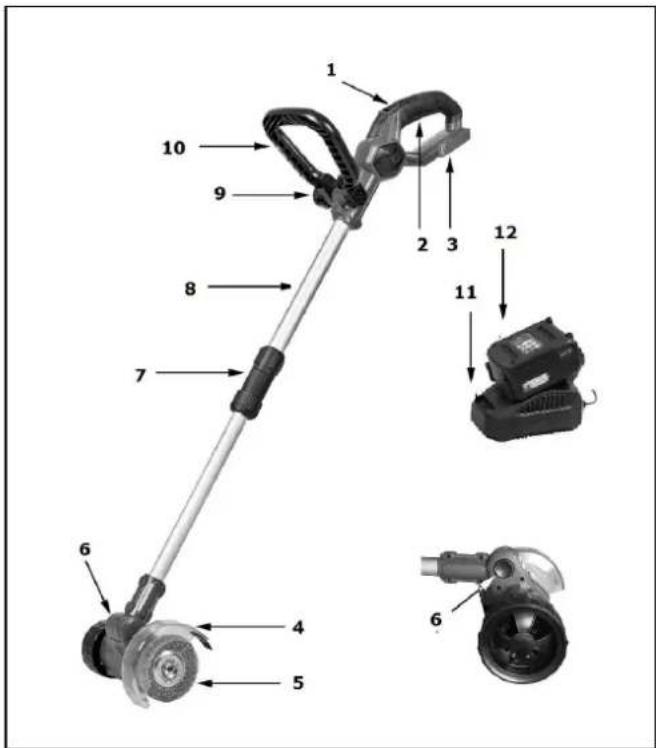
Description and assembly
- On/off switch
- Handle
- Battery holder
- Brush protective cap
- Brush
- Button for adjust the brush-head angle
- Screw for securing telescopic rod
- Telescope rod
- Button adjustable handle
- Adjustable handle
- Battery charger
- Battery
Do not use the machine before it is completely assembled, as in the picture!
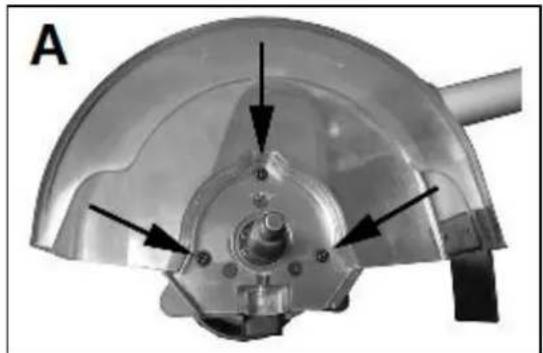
Assembly of protective cap and brush
- Secure the protective cap with the 3 screws to the brush head (see image A)
- Press on the axle lock (see image B). The axle is now locked and cannot turn.
natural_image
Close-up of a metallic mechanical component with arrows indicating features, no visible text or symbols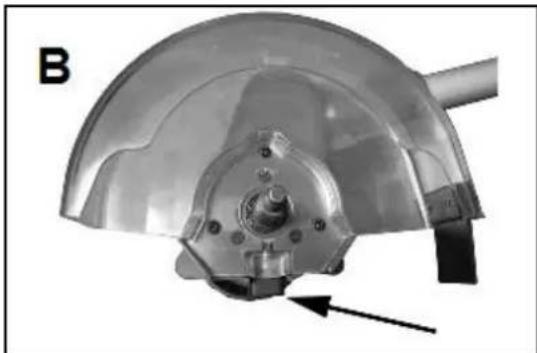
natural_image
Close-up of a metallic dome-shaped mechanical component with a central hub and mounting bracket, labeled 'B' in the corner (no text or symbols on the component itself)- Place the brush on the axle. Turn the wing-nut until tight on the axle while keeping the axle lock depressed.
- Release the axle lock.
Please note! Before you secure or change a brush, always turn the weed brush off and remove the battery from the battery holder. Wear protective gloves during assembly.
Adjusting angle of brush head
- Hold the weed brush securely
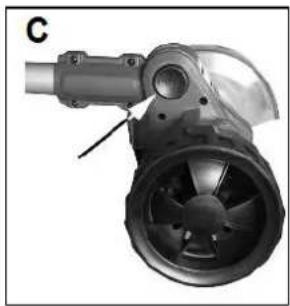
- Press the locking button to set the angle (see image C)
- Set the angle of the brush button to the required position
- The brush head can be set to 5 different positions (-36°, -18°, 0°, 18°, 36°)
- Release the locking button and check to ensure the brush head is locked.
Adjusting the length of the telescopic rod
- Unscrew the lower part of the locking screw (see image D).
- Adjust the length of the telescopic rod
- Secure the locking screw again
natural_image
Mechanical component with fan-like structure and cylindrical shaft (no visible text or symbols)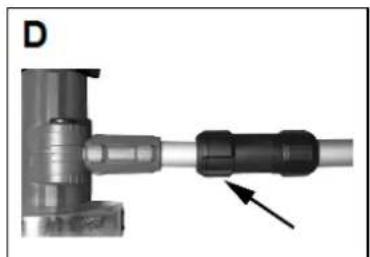
natural_image
Close-up of a mechanical pipe fitting with a black connector and an arrow pointing to it (no text or symbols visible)Charging the battery
The battery must be charged before the weed cleaner can be used.
After you have first charged the battery, use the weed cleaner until the battery has fully been de-charged. Repeat this 4 to 5 times.
- Place the battery charger on a solid underground and place the plug in a
220/240 Volt 50 Hz socket.
- The red light on the battery charger now lights up.
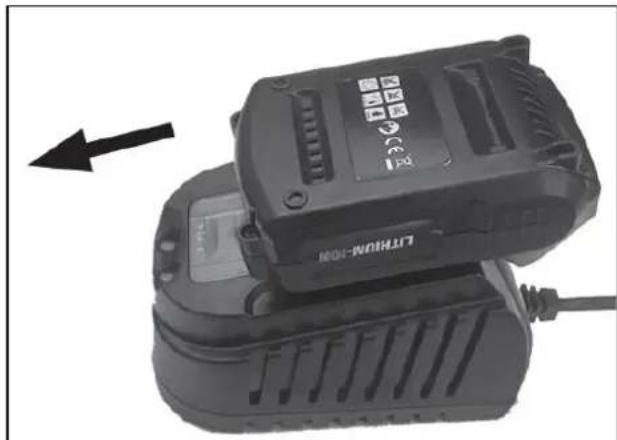
- Slide the battery delivered with the weed cleaner in the battery charger until you hear a click. (the metal plates of the battery charger in the grooves on the battery)
- One red light on the battery starts lighting up to indicate that the battery is being charged. (potential lights other than the red light on the battery indicate the
natural_image
Close-up of a black lithium-ion battery with a power cord and indicator lights, no visible text or symbols on the device itself.charging level). The green light also starts lighting on the battery charger to indicate that it is being charged. If no lights appear then the battery has not been placed in the battery charger correctly.
- When the battery has been charged in full then the red lights disappear on the battery and the red light of the battery charger also disappears. The green light
on the battery charger remains constantly on. The battery has now been charged in full.
- Remove the plug of the battery charger from the socket.
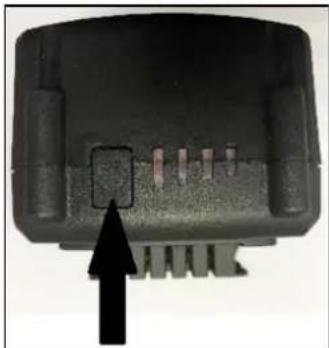
- Press the security button on the battery and slide the battery from the battery charger. The battery can now be placed in the weed cleaner.
To check the charging level of the battery, press the button on the battery (on the short side of the battery, alongside the red lights).
natural_image
Close-up of a black plastic electronic component with a black arrow pointing to a small inset slot (no text or symbols visible)Placing the battery in the weed cleaner
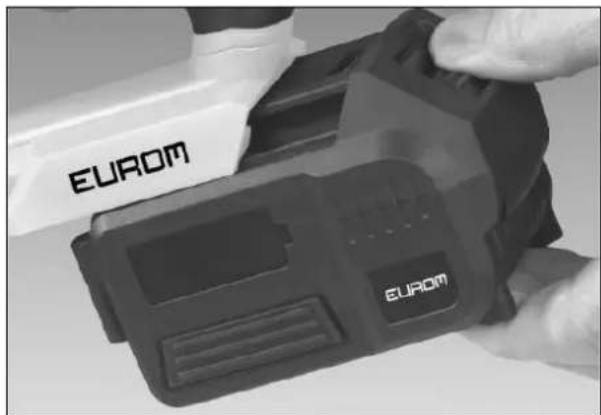
- Check if the on/off switch is set to off (0) before you place a battery in the weed cleaner.
- Slide the battery delivered with the weed cleaner in the weed cleaner until you hear a click. Do not force it to prevent damage to the battery and/or weed cleaner.
Removing the battery from the weed cleaner
- Press the security button on the batter and slide the battery from the battery charger.
natural_image
Close-up of a hand holding a black EUROM-branded device (no visible text or symbols on the device itself)Use of the weed brush
Your weed brush has been designed to remove weeds from between bricks and paving.
It is not designed to be used on tiled surfaces. Only use the weed brush for this purpose. Anything else is considered to be inappropriate usage and will nullify the guarantee. The weed brush is supplied with 2 nylon brushes.
- Always start with a test on a small section of the surface to be cleaned, in order to check the impact on the bricks/paving.
- Do not use the weed brush on delicate paving.
-
Do not use damaged or worn brushes.
-
Hold the weed brush with both hands.
- Make sure that the brush is not touching any stones or dirt before you start the electrical device.
-
Slide the ON/OFF switch forwards and squeeze the handle.
-
Move the weed brush between the joints.
- For the best result, work slowly and work on the joints repeatedly if necessary.
- Slide the ON/OFF switch backwards to switch the device off and wait until all moving components have come to a standstill before storing the device.
Cleaning, maintenance and storage
Cleaning and maintenance
Always remove the battery before carrying out any maintenance or cleaning the device.
- Always keep the safety devices, ventilation openings and motor housing free from dust and dirt.
- Wipe the power tool with a clean cloth and clean places difficult to get at with a compressed air.
- Do not use aggressive detergents. This can damage the plastic parts. Check that no water has got into the tool.
- Clean the casing with a brush.
Storage
- Remove the battery from the power tool before putting it away for long-term storage.
- Store the power tool and accessories out of reach of children in a dark, dry and frost-free place. The ideal storage temperature is 5-30°C.
- Store the power tool in the original packaging.
Removal
natural_image
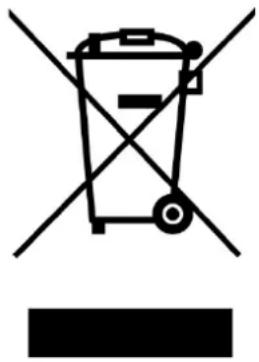
Symbol of a trash bin crossed with no text or numbers, representing environmental restriction (no text present)In the EU this symbol indicates that this product may not be disposed of as ordinary household waste. Old equipment contains valuable materials, suitable for recycling. These materials should be made suitable for reuse in order to prevent any adverse effects to health and the environment caused by unregulated waste collection. Therefore, please make sure that you bring old equipment to a designated collection point. Alternatively, contact the original supplier, who can make sure that as many of the components as possible can be recycled.
CE-declaration
See page 63.
Ces symboles significant

AVERTISSEMENT.

Protection anti-surcharge
natural_image
Close-up of a metallic mechanical component with mounting holes and a central hub (no visible text or symbols)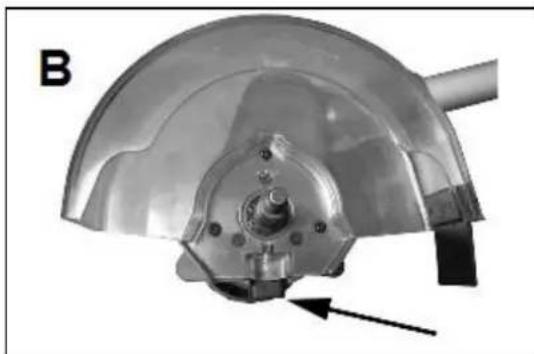
natural_image
Close-up of a metallic mechanical component with a curved top and central hub, showing a bolted joint and a directional arrow (no text or symbols)natural_image
Mechanical component with a fan and cylindrical shaft, labeled 'C' (no text or symbols on the object itself)natural_image
Mechanical pipe fitting with a black connector and arrow indicating direction (no text or symbols)natural_image
Close-up of a black LTRON-MON electric shaver with a power cord, showing internal components and a directional arrow (no text or symbols on the device itself)natural_image
Close-up of a black electronic component with a small inset slot and an arrow pointing to it (no visible text or symbols)natural_image
Close-up of a hand holding a black EUROM-branded device (no visible text or symbols on the device itself)natural_image
Symbol of a trash bin with crossed lines indicating no waste or discharge, and a solid black rectangle below (no text or labels)agrees with the demands of the subjoined standards:
Weedcleaner Cordless
EMC 2014/30/EU:
EN 55014-1:2017
EN 55014-2:2015
MD 2006/42/EC:
EN 60745-1:2009+A11
EN ISO 12100:2010
Battery Charger
Low Voltage Directive 2014/35/EU:
EN 60335-1:2012+A11+A13
EN 60335-2-29:2004+A2
EN 62233:2008
EMC 2014/30/EU:
EN 55014-1:2006+A1+A2
EN 55014-2:2015
EN 61000-3-2:2014
EN 61000-3-3:2013
Battery
IEC 62133-2017
Battery charger and Battery
EN 62841:2015
RoHS 2011/65/EU&(EU)2015/863
Genemuiden, 13-07-2020
W.J. Bakker, alg. dir.
EUROM
Kokosstraat 20
8281 JC Genemuiden
The Netherlands
info@eurom.nl
www.eurom.nl
130720