
TY-ER3D4ME - 3D TV Accessory PANASONIC - Free user manual and instructions
Find the device manual for free TY-ER3D4ME PANASONIC in PDF.
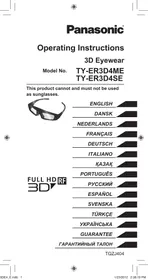


| Product Type | Active Shutter 3D Glasses |
| Brand | Panasonic |
| Model | TY-ER3D4ME |
| Dimensions (W x H x D) | 167.7 x 42.2 x 170.7 mm |
| Weight | Approx. 27 g |
| Power Supply | DC 5 V via USB charging cable (included) |
| Battery Type | Built-in rechargeable lithium-ion polymer |
| Battery Life | Approx. 30 hours |
| Charging Time | Approx. 30 minutes (fast charge: 2 min for 3 h use) |
| Communication | Bluetooth® 2.4 GHz FH-SS |
| Operating Range | Up to 3.2 m from TV |
| Lens Type | Liquid crystal shutter |
| Operating Temperature Range | 0 °C to 40 °C |
| Materials | Body: resin; Lenses: liquid crystal glass |
| Included Accessories | Charging cable (ref. K2KYYYYY00164) |
| Compatibility | Panasonic 3D compatible TVs with Bluetooth® logo |
| Cleaning | Soft, dry cloth; do not use benzene, thinner, or wax |
| Storage | Cool, dry place; fully charge every 6 months if unused |
| Safety | Do not use within 22 cm of a pacemaker; do not expose to heat |
| Disposal | Remove battery before disposal; follow local regulations |
Frequently Asked Questions - TY-ER3D4ME PANASONIC
User questions about TY-ER3D4ME PANASONIC
0 question about this device. Answer the ones you know or ask your own.
Ask a new question about this device
Download the instructions for your 3D TV Accessory in PDF format for free! Find your manual TY-ER3D4ME - PANASONIC and take your electronic device back in hand. On this page are published all the documents necessary for the use of your device. TY-ER3D4ME by PANASONIC.
USER MANUAL TY-ER3D4ME PANASONIC
Operating Instructions
3D Eyewear
Model No.
TY-ER3D4ME
TY-ER3D4SE
This product cannot and must not be used as sunglasses.
ENGLISH
DANISH
DUTCH
FRENCH
GERMAN
ITALIAN
KAZAKH
FULL HD RF 3D
PORTUGUESE
PYCKN
ESPNOL
SVENSKA
TÜRKÇE
YKPAHcBA
GUARANTEE
TAPAHNTNHBI TAIHO
Thank you for purchasing a Panasonic product.
Before using this product, be sure to read "Safety Precautions" and "Using Precautions" (pages 2-6). Before operating this product, please read the instructions carefully, and save this manual for future use.
This 3D Eyewear can be used for Panasonic HDTVs supporting 3D and the Bluetooth® Wireless technology, that have the logo as shown below. (page 15)

For the latest information on applicable models, visit our web site. http://panasonic.net/
Safety Precautions
Danger
About Prohibition of Heating
- Do not put 3D Eyewear in fire, heat it or leave it in places that can get hot. 3D Eyewear contains a lithium-ion polymer rechargeable battery, so heating may result in combustion or rupture that may cause burns or fire.
Warning
About Prohibited Place
- Do not use 3D Eyewear in hospitals or other medical facilities. Radio waves from 3D Eyewear may cause interference with medical equipment.
- Do not use 3D Eyewear near automatic control equipment, such as automatic doors, fire alarms, etc. Radio waves from 3D Eyewear may cause interference with automatic control equipment.
- Keep 3D Eyewear more than 22 cm (9 in.) away from implanted cardiac pacemakers or similar implantable medical devices at all times. Radio waves from 3D Eyewear may affect the operation of implanted cardiac pacemakers or similar devices.
Disassembly
- Do not disassemble or modify the 3D Eyewear.
- When disposing of this product, refer to "Disposal" (page 10) and disassemble properly to remove the rechargeable battery.
About Charging
- Charge by connecting the included charging cable to the USB terminal of a Panasonic TV that supports 3D. Charging with other devices may result in battery leakage, heating, or rupture.
- Do not use the included charging cable for purposes other than charging the 3D Eyewear.
Caution
About 3D Eyewear
- Do not drop, exert pressure on, or step on the 3D Eyewear. Be careful of the tips of the frame when putting on the 3D Eyewear. Always keep the 3D Eyewear in a cool, dry place. Be careful not to trap a finger in the hinge section of the 3D Eyewear. Pay special attention when children are using this product.
Viewing 3D Content
- Do not use the 3D Eyewear if you have a history of over-sensitivity to light, heart problems, or have any other existing medical conditions.
- Stop using the 3D Eyewear immediately if you feel tired, discomfort, or any other uncomfortable sensation. Take an appropriate break after viewing a 3D movie.
Take a break of between 30 - 60 minutes after viewing 3D content on interactive devices such as 3D games or computers. Be careful not to strike the television screen or other people unintentionally. When using the 3D Eyewear the distance between the user and screen can be misjudged. The 3D Eyewear must only be worn when viewing 3D content. Do not tilt your head and/or the 3D Eyewear while viewing 3D image. Keep your eyes and the 3D Eyewear on a horizontal level to the television. If you suffer from any eyesight problems (short/far-sighted, astigmatism, eyesight differences in left and right), please ensure to correct your vision before using the 3D Eyewear. Stop using the 3D Eyewear if you can clearly see double images when viewing 3D content. Do not use the 3D Eyewear at a distance less than the recommended distance.
The recommended viewing distance is at least 3 times of image height.
e.g. For a 50-inch TV 1.9 m or more For a 65-inch TV 2.4 m or more
- When the top and bottom area of the screen is blackened, such as movies, view the screen at a distance at least 3 times of the height of the actual image.
(That makes the distance closer than above recommended figure.)
3D Eyewear Use
3D Eyewear should not be used by children younger than 5 - 6 years old, as a guideline. All children must be fully supervised by parents or guardians who must ensure their safety and health throughout the using 3D Eyewear.
Before using the 3D Eyewear, ensure no breakable objects surrounding the user to avoid any accidental damage or injury. Remove the 3D Eyewear before moving around to avoid falling or accidental injury. Use the 3D Eyewear only for the intended purpose and nothing else. Do not use if the 3D Eyewear is physically damaged. Stop using the 3D Eyewear immediately if a malfunction or fault occurs. Stop using the 3D Eyewear immediately if you experience any redness, pain, or skin irritation around the nose or temples. In rare cases, the materials used in the 3D Eyewear may cause an allergic reaction.
Using Precautions
- Do not drop or bend the 3D Eyewear.
- Do not apply pressure to or scratch the surface of the liquid crystal shutter of the 3D Eyewear.
- Do not use devices (such as mobile phones or personal transceivers) that emit strong electromagnetic waves near the 3D Eyewear as this may cause the 3D Eyewear to malfunction.
- Do not use 3D Eyewear outside the specified usage temperature range (10 page 14). If the room is lit by fluorescent lights (50 Hz) and light appears to flicker when using the 3D Eyewear, switch off the fluorescent light. 3D content will not be correctly visible if the 3D Eyewear is worn upside down or back-to-front.
- Do not wear the 3D Eyewear when watching anything other than 3D images. Other kinds of displays (such as computer screens, digital clocks, or calculators etc.) may be difficult to see while wearing the 3D Eyewear.
Using radio waves
This unit uses the 2.4 GHz radio frequency ISM band (Bluetooth®). However other wireless equipment may use the same frequency. Be sure to take note of the following to prevent radio wave interference from other equipment.
- Restriction of use
For use only in your country.
- Range of use
The range of use is up to approximately 3.2 m. The range may be less depending on the structure of the building, the environment and any obstacles between the receiver and the transmitter. Such obstacles as reinforced concrete walls and metal doors, in particular, obstruct the transmitter's signals.
- Interference from other equipment
Due to radio interference, malfunctions may occur if the unit is placed too close to other equipment.
We recommend keeping the unit as far away as possible from the following devices:
Bluetooth® devices other than this unit, wireless LAN, microwaves, office automation devices, digital cordless telephones and other electronic devices.
The unit is designed to automatically avoid radio interference from these household devices.
However malfunctions may happen when radio interference occurs.
Accessories
Charging cable <1> (K2KYYYY00164)
- < > indicates the quantity.
Identifying Controls
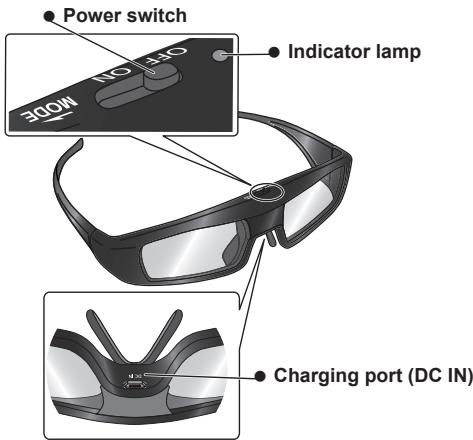
Power switch
ON/OFF
Slide the tab to the ON/OFF position to switch the power on/off.
MODE
Slide the tab once to the MODE position to change the mode between 3D and 2D.
- 2D: View a 3D image in 2D.
This is also used when registering the 3D Eyewear on the television. For details on registration, refer to the Registration page.
page 9
- Indicator lamp
Lights or flashes during use or charging to show the status of the rechargeable battery and the registration.
- Charging port
Connect the charging cable.
- Charge by connecting the included charging cable.
Indicator lamp status
| Indicator lamp | Status |
| Lights red for 2 seconds when turned on | Sufficient battery level |
| Flashes red 5 times when turned on | Low battery level |
| Flashes red and green alternately | Under registration |
| Flashes green once every 2 seconds | Under reconnecting to the TV |
| Lights green for 3 seconds | Registration or reconnecting is successfully completed. |
| Flashes red 3 times | Automatically power off (Registration or reconnecting fails or connection is lost) |
| Flashes red once every 2 seconds when in use | 3D mode is selected |
| Flashes red twice every 4 seconds when in use | 2D mode is selected |
Charging
Charging the 3D Eyewear
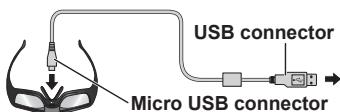
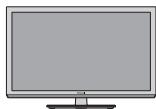
Connect the 3D Eyewear with the included charging cable to the television, then switch on the television.
- When the indicator lamp turns off, charging is complete. Refer to the specifications on page 14 for the approximate charging time.
NOTE
- Charge the 3D Eyewear before using the first time after purchase or after long periods of disuse.
- Be sure to turn the television power on when charging. The battery will not be charged when the television power is off.
Registration
■ First Registration
Perform the First Registration when the 3D Eyewear is used for the first time.
- Turn on the TV to see.
- Slide the tab from the OFF position to the ON position. The 3D Eyewear will power on and start registration. Place the 3D Eyewear within 50 cm from the TV while registration in progress.
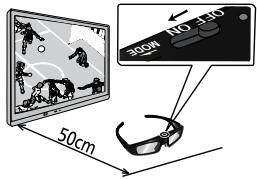
- The green LED lights on the 3D Eyewear for 3 seconds when the registration is successfully completed.
After first registration, the 3D Eyewear will reconnect with the TV automatically when 3D Eyewear is powered on near the TV in 3D mode.
■ Registration Again
When connection with registered TV fails, or when using with another TV, re-register the 3D Eyewear.
- Turn on the TV to see.
- Within 50 cm from the TV, hold the tab on the MODE position for more than 2 seconds.
The registration will start.
- The green LED lights for 3 seconds when the registration is successfully completed.
- If the registration failed, the 3D Eyewear will power off.
In this case, power off the TV and perform from step 1.
- Do not connect the charging cable while Registration Again.
- Release the tab when Registration Again starts.
Storage and Cleaning
- Clean using a soft, dry cloth.
- Wiping the 3D Eyewear with a soft cloth that is covered in dust or dirt may scratch the eyewear. Shake off any dust from the cloth before use.
- Do not use benzene, thinner, or wax on the 3D Eyewear, as doing so may cause the paint to peel off.
- Do not dunk the 3D Eyewear in liquid such as water when cleaning.
- Avoid storing the 3D Eyewear in hot or highly humid locations.
- During the long period of disuse, full charge the 3D Eyewear once every 6 months to keep the battery performance.
- As the liquid crystal shutters (lens) are fragile and easily broken, be very careful when cleaning them.
Disposal
A lithium-ion polymer rechargeable battery is built in to the 3D Eyewear. Please discard according to local regulations.
When disposing this product, disassemble properly by following the procedure on the next page, and remove
the internal rechargeable battery.

Do not disassemble this product except when disposing of it.
Danger
As the rechargeable battery is specifically for this product, do not use it for any other device.
Do not charge the removed battery.
- Do not throw the battery in a fire, or apply heat to it.
- Do not pierce the battery with a nail, subject it to an impact, or dismantle or modify it.
- Do not let the wires touch any other metal or each other.
- Do not carry or store the battery with a necklace, hair pin, or the like.
- Do not charge, use, or leave the battery in a hot location such as near a fire or under the hot sun.
Doing so may cause the battery to generate heat, ignite, or rupture.
Warning
Do not place the removed battery, screws, and other items within reach of infants.
Accidental swallowing of such an item may have an adverse effect on the body.
- In the event that you think such an item has been swallowed, consult a doctor immediately.
In the event of fluid leaking from the battery, take the following measure, and do not touch the fluid with bare hands.
Fluid entering into an eye may cause loss of eyesight.
- Wash the eye with water immediately without rubbing it, and then consult a doctor.
Fluid getting on your body or clothes may cause inflammation of the skin or injury.
- Sufficiently rinse with clean water, and then consult a doctor.
How to remove the battery
Disassemble this product after the battery has run out of power.
The following figures are intended to explain how to dispose of the product, not for describing how to repair.
The product cannot be repaired once it has been disassembled.
- Remove the screws of the 3D Eyewear with a precision Phillips (plus) screwdriver.
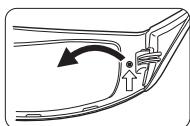
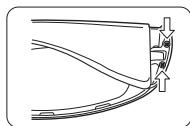
- Bend the frame inwards and pull it off from the side cover.
- If it is difficult to pull off, insert a flat-blade (minus) screwdriver and pry open it.
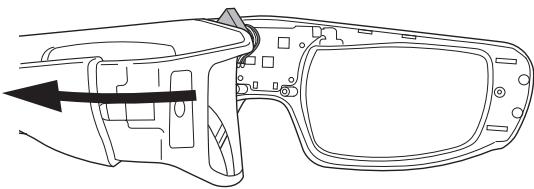
- Pull off the battery and separate it from the 3D Eyewear by cutting off the wires, one by one, with scissors.
- Insulate the wire parts of the removed battery with cellophane tape.
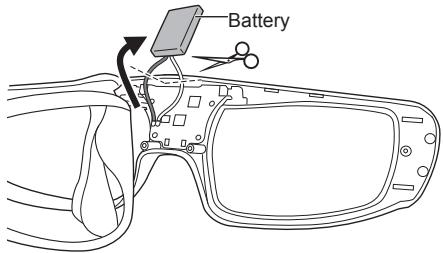
NOTE
- Take sufficient care when performing this work so as not to injure yourself.
- Do not damage or dismantle the battery.
Troubleshooting/Q&A
Check the following first. If they do not solve the problem, please contact the place of purchase.
Cannot register a 3D Eyewear to TV.
Does the TV support this 3D Eyewear?
Use the 3D Eyewear with compatible TVs. (page 2)
Did you allow more than 1 minute to elapse after setting the unit to the device registration mode?
The registration is automatically released if you allow more than 1 minute to elapse. Set the registration with the television and connected 3D Eyewear placed as close to each other as possible.
Images are not 3D.
Is the TV registered with the 3D Eyewear?
Perform the registration with the TV to see. (1 page 9)
Is the 3D Eyewear Mode set to 3D?
Slide the tab once to the MODE position to change the mode between 3D and 2D.
Are the image settings switched to 3D images?
Refer to the television operating instructions.
Individual differences may occur in which the 3D images are difficult to see, or cannot be seen especially in users that have a different level of eyesight between the left and right eyes.
Take the necessary steps (wearing glasses etc.) to correct your eyesight before use.
The power of the 3D Eyewear turns off by itself.
Are there any objects between the eyewear and television?
The indicator lamp does not light when the power switch is set to "ON".
Is the 3D Eyewear sufficiently charged?
If the indicator lamp does not light at all, the battery is completely flat. Perform the battery charging operation.
The battery does not charge, or operation time is short when charged.
Is the charging cable connected properly?
Make sure the charging cable is properly connected.
Is the television power off?
Switch the television power on, then charging will start.
The battery has reached the end of its lifespan.
If operation time is very short even when the battery is charged, the battery has reached the end of its lifespan. Please consult with the place of purchase.
Specifications
Lens type
Liquid Crystal Shutter
Usage temperature range
0°C - 40°C (32°F - 104°F)
Charging power supply
DC 5 V (supplied by USB terminal of a Panasonic TV)
Battery
Lithium-ion polymer rechargeable battery
DC 3.7 V, 40 mAh
Operation time*1: Approx. 30 hours
Charging time*1: Approx. 30 minutes
Quick charge (2 minutes charge enables approx. 3 hours use)
Viewing range*2
Within 3.2 m from front surface of the TV.
Materials
Main body: Resin
Lens section: Liquid crystal glass
Communication system
2.4 GHz band FH-SS (Frequency Hopping Spread Spectrum)
Dimensions (not including nose pad part)
| Models | TY-ER3D4ME | TY-ER3D4SE |
| Width | 167,7 mm | 160,5 mm |
| Height | 42,2 mm | 42,2 mm |
| Overall length | 170,7 mm | 167,6 mm |
| Mass | Approx. 27 g | Approx. 27 g |
*1 Operation time/Charging time
- The battery deteriorates after repeated use, and the operation time eventually becomes short. It may also take longer to charge, depending on where and how long it was stored. The figures above are at shipping from the factory, and are not a guarantee of performance.
*2 Viewing range
- There are differences in the viewing range of the 3D Eyewear among individuals.
- The 3D Eyewear may not operate correctly at the outside of the viewing range.
FULL HD RF FULL HD RF GLASSES 3D
These logos indicate products that are compatible with active shutter 3D glasses technology standards licensed by the Full HD 3D Glasses Initiative. The RF logo indicates products that operate on the wireless system, and can be used with any TV that has the same logo.
"Full HD 3D™" Logo indicates compatibility between TV products and 3D Eyewear which are compliant with the "Full HD 3D Glasses™" format, and does not indicate picture quality of 3D image which should be depend on the quality of TV products.
C E
Declaration of Conformity (DoC)
"Hereby, Panasonic Corporation declares that this 3D Eyewear is in compliance with the essential requirements and other relevant provisions of the Directive 1999/5/EC, 2006/95/EC and 2004/108/EC."
If you want to get a copy of the original DoC of this 3D
Eyewear, please visit the following website:
http://www.doc.panasonic.de
Authorized Representative:
Panasonic Testing Centre
Panasonic Marketing Europe GmbH
Winsberging 15, 22525 Hamburg, Germany
Information on Disposal for Users of Waste Electrical & Electronic Equipment (private households)

This symbol on the products and/or accompanying documents means that used electrical and electronic products should not be mixed with general household waste. Please dispose of this item only in designated national waste electronic collection schemes, and not in the ordinary dust bin.
For business users in the European Union
If you wish to discard electrical and electronic equipment, please contact your dealer or supplier for further information.
Information on Disposal in other Countries outside the European Union
This symbol is only valid in the European Union. If you wish to discard this product, please contact your local authorities or dealer and ask for the correct method of disposal.
"Full HD 3D Glasses™" logo and "Full HD 3D Glasses™" word are trademark of Full HD 3D Glasses Initiative.
The Bluetooth® word mark and logos are owned by the Bluetooth SIG, Inc. and any use of such marks by Panasonic Corporation is under license.
Other trademarks and trade names are those of their respective owners.
Pursuant to the directive 2004/108/EC, article 9(2)
Panasonic Testing Centre
Panasonic Service Europe, a division of Panasonic Marketing Europe GmbH
Winsberging 15, 22525 Hamburg, F.R. Germany
Panasonic Corporation
Web Site : http://panasonic.net/
© Panasonic Corporation 2012
FULL HD RF FULL HD RF GLASSES 3D
Panasonic Testing Centre
Panasonic Marketing Europe GmbH
Winsberging 15, 22525 Hamburg, Germany
In accordance with directive 2004/108/EC, article 9(2)
Panasonic Testing Centre
Panasonic Service Europe, a division of Panasonic
© Panasonic Corporation 2012
FULL HD RF FULL HD RF GLASSES 3D
Panasonic Testing Centre
© Panasonic Corporation 2012
Operating Instructions
3D Glasses
Model No.
TY-ER3D4ME TY-ER3D4SE
Rechargeable lithium-ion polymer battery DC 3.7 V, 40 mAh
FULL HD RF FULL HD RF GLASSES 3D
Panasonic Testing Centre
Panasonic Marketing Europe GmbH
Winsberging 15, 22525 Hamburg, Germany
Complies with Directive 2004/108/EC, Article 9(2)
Panasonic Testing Centre
© Panasonic Corporation 2012
Operating Instructions
3D Eyewear
Panasonic Testing Centre
Panasonic Marketing Europe GmbH
Winsberging 15, 22525 Hamburg, Germany
Panasonic Testing Centre
© Panasonic Corporation 2012
Operating Instructions
3D Glasses
Model No.
TY-ER3D4ME
TY-ER3D4SE
FULL HD RF FULL HD RF GLASSES 3D
Pursuant to the directive 2004/108/EC, article 9(2)
Panasonic Testing Centre
Panasonic Service Europe, a division of Panasonic Marketing Europe GmbH
Winsberging 15, 22525 Hamburg, F.R. Germany
Panasonic Corporation
Web Site : http://panasonic.net/
© Panasonic Corporation 2012
3D Eyewear
3D Glasses
Model No.
TY-ER3D4ME
TY-ER3D4SE
Thank you for purchasing this Panasonic product.
Please read these instructions carefully before using this product, and save this manual for future use. (Pages 1-6)
These 3D glasses are designed for use with Panasonic HDTV televisions that support 3D and Bluetooth wireless technology. (Page 15)
FULL HD RF GLASSES
For customer support and product information, visit our website: http://panasonic.net/
All instructions must be followed carefully to ensure proper use.
Safety instructions
Safety
Red color coding
Do not touch the 3D glasses with red, hot, or sharp objects. When using the 3D glasses, there is a risk of injury if the lenses are damaged, which may cause eye strain, headaches, or other discomfort.
Warning
Places with smoke or fire hazards
Do not use the 3D glasses near water or in humid environments. The 3D glasses may be damaged by strong magnetic fields. The 3D glasses have automatic doors, and if they are subjected to strong impacts, they may break. Do not use the 3D glasses near strong magnetic fields. - Always keep the 3D glasses away from the implantable medical device or similar devices. Keep a distance of at least 22 cm (9 inches) from the implantable medical device. The 3D glasses may affect the operation of the implantable medical device or similar devices.
Battery
Do not disassemble or modify the 3D glasses. If the 3D glasses are damaged, refer to the "Replacement Parts" (page 10-6) and replace them with the specified parts.
About charging
Charge the 3D glasses by connecting the charging cable to the USB terminal on the Panasonic TD-NI. Charging with other cables may cause overheating, fire, or injury. Do not use the charging cable if it is damaged.
Be careful
Do not use the 3D glasses
Do not drop, hit, or step on the 3D glasses. Do not use the 3D glasses if they are cracked or broken. Do not expose the 3D glasses to direct sunlight or high temperatures. Do not immerse the 3D glasses in water. Keep the 3D glasses away from children to prevent accidental ingestion of small parts.
3D glasses safety
If you have a history of epilepsy, seizures, or other medical conditions, consult a doctor before using 3D glasses. If you are pregnant, elderly, or have other health concerns, avoid using 3D glasses. You should not use 3D glasses if you are tired or unwell. 3D glasses should be used only for their intended purpose. You should take a break of 30-60 minutes after using 3D glasses with interactive content or 3D movies. Do not throw the glasses at the screen or other objects. When using 3D glasses, there may be a slight difference between the image and the screen. 3D glasses are only needed when viewing 3D content. If you experience dizziness or nausea while using 3D glasses, stop using them immediately. Do not use 3D glasses with other devices unless they are compatible. If you have a heart condition (such as high blood pressure, arrhythmia, or other heart problems), avoid using 3D glasses.
If you have difficulty seeing clearly with 3D content, stop using the 3D glasses. It is better to use 3D glasses in a well-lit room. The lighting should be at least three times brighter than the screen. For example,
For 50-inch screens, keep a distance of 1.9 meters or more; for 65-inch screens, keep a distance of 2.4 meters or more.
If the top of the glasses is not clearly visible, for example, if the screen appears dark, you should look at it from a distance of at least three times the screen height.
(This refers to the distance from the top of the glasses to the screen.)
Viewing 3D content
It is recommended that 3D glasses be used by children aged 5 and above. All children should be supervised by their parents or guardians during use to ensure their safety and well-being. Before using 3D glasses, ensure that there are no sharp objects or hazardous materials in the area. To prevent damage or injury, keep the 3D glasses away from children. Use 3D glasses only for their intended purpose. If the 3D glasses are damaged or broken, do not use them. If the glasses cause discomfort or pain, stop using them immediately. If you experience nausea, dizziness, or headache, stop using the 3D glasses right away. In some cases, materials used in 3D glasses may cause allergic reactions.
Safety
precautions
Usage
3D glasses are intended for viewing 3D images. The crystal clear image is transmitted without distortion. Do not place the 3D glasses near strong electromagnetic fields (such as microwave ovens, mobile phones, or other radio transmitting devices) as this may cause malfunctions. Do not expose the 3D glasses to high temperatures (see page 14). If the glasses are used under fluorescent lighting (50Hz), flickering may occur. If the 3D glasses are dropped or subjected to strong impact, the 3D image may be distorted. Keep the 3D glasses away from water and moisture. Other devices (such as computers, monitors, game consoles, calculators, etc.) may be viewed through the 3D glasses. The glasses operate within the 2.4 GHz radio frequency range (Bluetooth). Other wireless devices may interfere with the signal. To avoid interference, keep a safe distance from other wireless devices.
- The operating instructions are intended for your safety.
-Operating distance Operating distance: approximately 3.2 m. Depending on the device's screen size, the distance between the transmitter and the glasses may vary. As mentioned, metal doors or walls may affect the transmission range.
- Other devices' interference If this device is placed near other devices, radio interference may occur. Keep this device away from other devices: Bluetooth devices, wireless mice, microwave ovens, wireless routers, wireless telephones, and other electronic devices.
This device is designed to minimize radio interference from other devices. However, interference may still occur in some cases.
Accessories
Charging cable
(K2KYYYYY00164)
as needed.
The indicator light turns on when the device is set to "ON".
Is the 3D glasses battery fully charged?
If the indicator light does not turn on, the battery may be completely discharged. Do not perform the charging operation.
The battery may be depleted or the device may be in sleep mode.
Is the charging cable properly connected?
Check the connection of the charging cable.
The battery is charged, the charge level is sufficient.
The battery charge indicator is lit.
If the battery charge level is low, the battery charge indicator will light up. Please charge it in time.
Specifications
Lens type
Crystal lens
Operating temperature
0°C - 40°C (32°F - 104°F)
Charging time
Charging current 5 V (provided via the USB terminal of the Panasonic TD)
Battery
Battery type: NITIN-NOH battery
Charging current 3.7 V, 40 mAh
Charging time*1: approximately 30 minutes
Soak for 30 minutes.
Soaking (2 minutes soaking is possible with 3 hours of use).
Keep away from children*2
The product is not a toy. Keep out of reach of children.
MATERIALS
Main body: ABS resin
Lens: Acrylic crystal
Battery type
FULL HD RF FULL HD RF GLASSES 3D
The Full HD 3D Glasses Initiative has established standards for 3D glasses technology. The RF glasses are designed to work with all Full HD 3D compatible TVs.
The "Full HD 3D" logo and "Full HD 3D GlassesTM" logo indicate compatibility between 3D glasses and TVs, but the TV's ability to display 3D images is not guaranteed.
The "Full HD 3D GlassesTM" logo and the words "Full HD 3D GlassesTM" are trademarks of the Full HD 3D Glasses Initiative.
Information on disposing of old equipment
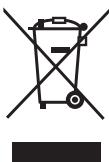
This symbol is only valid in the European Union. If you wish to discard this product, please contact your local authorities or dealer and ask for the correct method of disposal.
The Bluetooth® word mark and logos are registered trademarks owned by Bluetooth SIG, Inc. and any use of such marks by Panasonic Corporation is under license. Other trademarks and trade names are those of their respective owners.
© Panasonic Corporation 2012
Disassemble this product after the battery has run out of power.
FULL HD RF GLASSES 3D
Panasonic Testing Centre
Panasonic Marketing Europe GmbH
Winsberging 15, 22525 Hamburg, Germany
Pursuant to the directive 2004/108/EC, article 9(2)
Panasonic Testing Centre
Panasonic Service Europe, a division of Panasonic
Winsberging 15, 22525 Hamburg, F.R. Germany
Panasonic Corporation
Web Site : http://panasonic.net/
© Panasonic Corporation 2012
Precautions
Danger
Do not leave the 3D glasses in places where they may heat up. The 3D glasses contain lithium-ion polymer batteries, so heating may cause fire or explosion, which could lead to a fire or injury.
Warning
Places where use is prohibited
Do not use the 3D glasses in hospitals or other medical institutions.
Radio waves from the 3D glasses may cause interference with medical equipment.
Do not use the 3D glasses near equipment with automatic control, such as automatic doors, fire alarms, etc.
Radio waves from the 3D glasses may cause interference with equipment with automatic control.
Always keep the 3D glasses at a distance of at least 22 cm (9 inches) from an implanted cardiac pacemaker or similar implanted medical equipment.
Radio waves from the 3D glasses may affect the operation of an implanted cardiac pacemaker or similar medical equipment.
Disassembly
Do not disassemble or modify the structure of the 3D glasses. Before disposing of this product, refer to the disposal section (page 10) and disassemble it in the proper manner to remove the battery.
Charging
Charging is performed by connecting the included charging cable to the USB terminal of a Panasonic TV that supports the 3D function. Charging with other devices may cause battery oxidation, heating, or explosion. Do not use the included cable for other purposes except for charging the 3D glasses.
Precautions
Do not throw, press, or step on the 3D glasses. When putting them on, hold the 3D glasses carefully by the temples. Always keep the 3D glasses in a dry and cool place. Make sure that dust does not get into the lenses of the 3D glasses. Carefully supervise children when they use this device.
Prevention of accidental swallowing
Do not use the 3D glasses if you have increased sensitivity to light, heart problems, or any other illnesses. Carefully supervise children when they use this device. After watching a 3D movie, take a necessary break. Take a break of 30-60 minutes after watching 3D images using interactive devices such as 3D game consoles and computers. Be careful not to knock over the TV screen or be near it. While using the 3D glasses, the distance between the user and the screen may be perceived incorrectly.
The 3D glasses should be worn only for viewing 3D images. Do not tilt your head and/or the 3D glasses while viewing 3D images. Your eyes and the 3D glasses should be at the level of the TV screen during viewing. If you have vision problems (myopia/hyperopia, astigmatism, different visual acuity in the left and right eyes), correct your vision with the help of 3D glasses. Stop using the 3D glasses if you see double images when viewing 3D content. Do not use the 3D glasses at distances less than recommended.
The recommended viewing distance should be three times the height of the image.
For example:
For a TV with a 50-inch diagonal, 1.9 m or more
For a TV with a 65-inch diagonal, 2.4 m or more
If there are black bars at the top and bottom of the screen, for example, in movies, viewing should be done at a distance that is three times the height of the given image.
(The distance will be less than recommended above.)
Interference from other equipment.
Restriction of use: intended for use only in your country. The working distance is approximately up to 3.2 m.
The distance may be less depending on the construction of the building, surrounding conditions, and interference between the transmitter and receiver. In particular, concrete walls and metal doors obstruct the signals of the transmitter.
- Unscrew the screws with a Phillips (①) screwdriver.
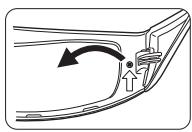
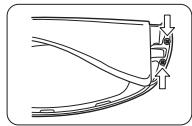
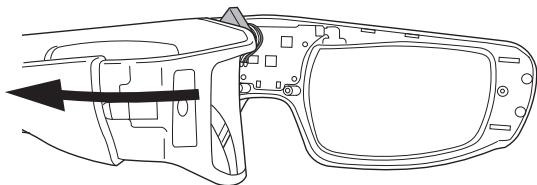
- Remove the right side cover by pulling it inward.
- If you encounter difficulty removing the side cover, insert a flathead screwdriver (一) into the slot, apply force, and remove the cover.
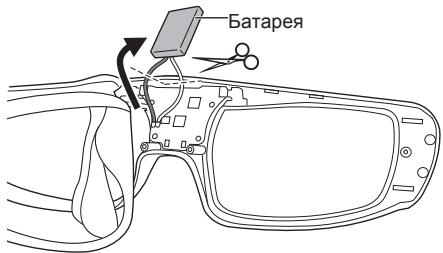
3. Remove the batteries from the 3D glasses one by one using scissors.
Insert the batteries into the battery compartment and close the cover.
NOTE
Be especially careful when performing this procedure to avoid damaging the glasses. Do not damage or disassemble the batteries.
Troubleshooting - Questions and Answers
First, try to resolve the issue using the method described in the following table. If the problem persists after trying the suggested solutions, contact the dealer or service center.
The 3D glasses are not connecting to the TV.
Does this TV support the use of these 3D glasses?
Use 3D glasses compatible with the TV (see page 1).
Is the device in standby mode for more than 1 minute after setup?
Registration stops automatically if more than 1 minute passes. Place the 3D glasses close to the TV and start registration again.
OtytCTByet 3D-n3o6paXeHne.
Bb6paHnnIa3D0uKOBpexM3D?
UcTaHOBInTe pepeKIOuateIb B nIoXeHne MODE InIpepeKIOUeHnIpeKIMoB 3D u 2D.
HacrpoKn n3o6paXeHmY yTaHOBJIeHbHa 3D?
O6paTntecb K INHCTpykUIN NO 3KcNpyaTaun TeNeBn30pa.
N3-3a INHINBNUdyaJIbHbIX OcO6eHHOCTeI
3D-иЗБбхЕнгМугТБьТБПLOXOВИДНИ Ип н He ВИДНБ BOОБи, OCOБEHHO y NOьЗOBATEEN C ра3нБIM урOBHEM ЗрEHN MEXДУ ПБВIM InpaBBIM rIaONAM.
Ipei nCOnIb3OBAHnEM npIMnTe Heo6xOaMnBe MepeI (OeHbTe OCHN I T.D.)ДЯ KORpeKUn 3peHn.
Mexdy TeIeBn3Opom N OUYKAMN ecTb KaKne-JIN6o npedMeTb?
HdkaTopnna lamna He ropnt, KOrda nepekniouatelb nItahnya yctahOBJen B noIooxehne «ON».
DoctaToUHNoJIN3apXKeHbI3DouKn?
EcIINHnDnKATOp He ropt,3To 03NaueAeT,HTO 6TaapeI NOHocTbIO pa3paJKeHa.3apdnte 6TaapeIo.
Batape He 3apjxaeTc, nIIN COKpaaetc Bpemra60tby yctpoiCTBa, KOrda 6atape 3apjxeha.
PpabnIbNo nnoKluoye Ka6eB dJra 3apdKn?
Y6eIntecb, yTo Ka6eJIb dIy 3apRdKn NOpKlnOueH npaBnIbHO.
Replace the battery.
Battery life has expired.
If the operating time of the device is reduced, even if the battery is charged, it means that its service life has expired. Please replace it with a new one.
Technical specifications
Lens type
Optical shutter on liquid crystals
Operating temperature range
0°C - 40°C (32°F - 104°F)
Power supply
5 V DC (Power supplied via USB port of Panasonic TV)
Battery
FULL HD RF FULL HD RF GLASSES 3D
This logo indicates products compatible with the standards of 3D glasses technology with active optical shutter, licensed by the Full HD 3D Glasses Initiative. The RF logo indicates products that are components of a wireless system and can be used with any TV that has the same logo.
The "Full HD 3DTM" logo indicates compatibility between the TV and 3D glasses that are compatible with the "Full HD 3D GlassesTM" format, and does not indicate the quality of the 3D image, which depends on the TV.
The "Full HD 3D Glasses™" logo and the "Full HD 3D Glasses™" name are trademarks of the Full HD 3D Glasses Initiative.
Panasonic Information Center
FULL HD RF FULL HD RF GLASSES 3D
Panasonic Testing Centre
Panasonic Service Europe, a division of Panasonic
© Panasonic Corporation 2012
FULL HD RF FULL HD RF GLASSES 3D
Panasonic Testing Centre
Panasonic Service Europe, a division of Panasonic
© Panasonic Corporation 2012
User Manual
3D Glasses
Model No.
TY-ER3D4ME
TY-ER3D4SE
FULL HD RF GLASSES 3D
Panasonic Testing Centre
Panasonic Service Europe, Panasonic Marketing Europe
Winsbergring 15, 22525 Hamburg, F.R. Germany
Panasonic Corporation
Website: http://panasonic.net/
© Panasonic Corporation 2012
Important Information
3D Glasses
Model No.
TY-ER3D4ME
TY-ER3D4SE
Do not use or reuse these glasses.
Safety Precautions
Danger
High temperature warning
Do not place the 3D eyewear in water, do not heat them, and do not expose them to high temperatures. The 3D eyewear contains a lithium-ion battery. High temperatures may cause the battery to leak or explode, which could result in fire or burns.
(Continued on next page)
Precautions
Places where the product should not be used
Do not use the 3D eyewear in medical facilities or other medical institutions.
Radio waves from the 3D eyewear may interfere with medical equipment.
Do not use the 3D eyewear near automated control equipment, such as automatic doors, fire alarms, and other devices.
Radio waves from the 3D eyewear may interfere with automated control equipment.
Keep the 3D eyewear at a distance of at least 22 cm (9 inches) from implanted pacemakers or similar implanted medical devices.
Radio waves from the 3D eyewear may affect the operation of implanted pacemakers or similar medical devices.
Disposal
Do not disassemble the 3D eyewear or modify their structure. If you need to dispose of this product, refer to the Disposal section (page 10) and follow the appropriate method to properly dispose of the battery.
Charging
Charge the battery using the charging cable (included in the package) connected to the USB port of a Panasonic TV that supports 3D images. Charging the battery with other devices may cause leakage, overheating, or explosion. Use the included charging cable only for charging the 3D eyewear.
Do not allow children to use 3D glasses, do not put them under pressure, and do not step on them. When using 3D glasses, be careful with the lenses. Always keep 3D glasses in a dry place. Be careful not to get your fingers caught in the hinges of the 3D glasses. Be careful when children use them.
Before viewing 3D images
Do not use 3D glasses if you suffer from heart disease, have light sensitivity, or have any other contraindications. Immediately stop using 3D glasses if you feel tired, discomfort, or any other unpleasant sensations. Take a break after watching a 3D movie. Take a break of 30-60 minutes after viewing 3D content on interactive devices, such as game consoles or computers. Be careful and do not use the glasses for extended periods. After using 3D glasses, the distance between the user and the screen may be determined incorrectly. 3D glasses should only be worn when viewing 3D content. Do not tilt your head and/or the 3D glasses while viewing 3D images. Keep the 3D glasses in a horizontal position relative to the TV. If you have vision problems (myopia, hyperopia, astigmatism, or if you have different vision in your left and right eyes), get your vision corrected before using 3D glasses.
Battery indicator
Do not charge the battery with a charger not intended for it.
Do not throw the battery into fire and do not expose it to high temperatures. Do not pierce the battery with sharp objects, do not subject it to impacts, do not disassemble, and do not modify the battery. Make sure that the battery does not come into contact with metal objects or liquids. Do not carry or store the battery together with metal objects, such as coins or keys. Do not charge, use, or leave the battery in high temperatures, for example, near a fire or in direct sunlight.
Failure to follow these recommendations may lead to overheating, fire, or battery explosion.
Precautions
Keep the battery, charger, and other accessories away from children.
Swallowing such an object may have a negative impact on the body of a child.
If you suspect that a child has swallowed such an object, immediately consult a doctor.
In case of battery leakage, take necessary measures and do not touch the leaked liquid with bare hands.
Failure to follow these instructions may result in loss of vision.
Remember to unplug it (when not using it) and return to the doctor.
Improper use may lead to injury or even death.
Drink plenty of clean water and return to the doctor.
Battery replacement
When the battery runs out, disassemble the device.
The instructions are provided to explain how to use the device, not to describe the repair procedure.
After the device is disassembled, it cannot be repaired.
- Unscrew the screws on the back using a Phillips screwdriver.
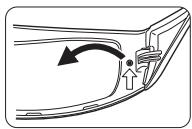
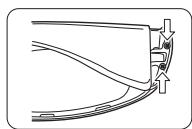
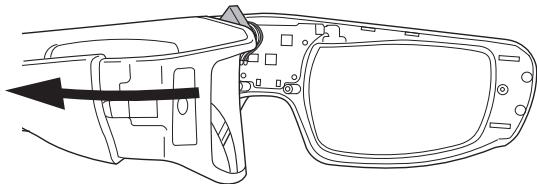
- Remove the cover inward and remove the inner cover.
When removing the inner cover, if the tube is in the way, insert the screwdriver with a flat tip and pry off the cover.
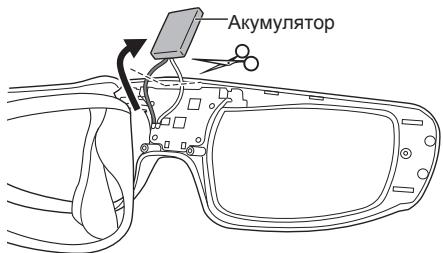
- Pull out the battery from the device: cut the wires with scissors.
Insert the new battery with the correct polarity.
NOTE
Please be careful when performing this procedure to avoid injury. Do not puncture or disassemble the battery.
The indicator light does not light up when the switch is set to "ON".
- Why does the battery charge indicator not light up?
The indicator lamp does not light up, the battery is completely discharged. Perform battery charging.
The battery does not charge because the charging time of the battery is too short.
Is the charging cable connected correctly?
Check the secure connection of the charging cable.
Is the TV turned off?
Turn off the TV; the charging data will be displayed.
The battery service life has expired.
If the charging time of the battery is too short, even if the battery is charged, the battery service life has expired. Contact the point of sale for assistance.
Specifications
Lens type
Aperture
Operating temperature range
0°C - 40°C (32°F - 104°F)
Power consumption
5 V DC (connected via USB port of Panasonic TV)
Battery
Lithium-ion polymer battery
3.7 V DC, 40 mA/h
Charging time: approx. 30 hours
Charging time*1: approx. 30 minutes
Quick charge (2-minute charge provides approximately 30 minutes of use)
FULL HD RF FULL HD RF GLASSES 3D
The logo indicates compatibility with standards of 3D glasses with active optical shutter, licensed by Full HD 3D Glasses Initiative. The RF logo indicates compatibility with components of a wireless system that can be used with any TV, including the logo.
The "Full HD 3D™" logo indicates the compatibility of the TV and 3D glasses, which are compatible in their operation with the "Full HD 3D Glasses™" format, and does not indicate the quality of the 3D image, which depends on the TV.
The "Full HD 3D Glasses™" logo and the phrase "Full HD 3D Glasses™" are used in accordance with the Full HD 3D Glasses Initiative.
The Bluetooth® word mark and logos are owned by Bluetooth SIG, Inc., and Panasonic Corporation uses them under license.
Other trademarks and trade names are the property of their respective owners.

This symbol is only valid in the European Union. If you need to dispose of this product, contact your local dealer or supplier for proper disposal methods.
Product Information
Made in China
Manufacturer:
Panasonic Corporation
Panasonic Corporation
Manufacturer's address:
Osaka, Japan
Importer:
PANEUROPEAN GUARANTEE
3D Eyewear
Communication Camera


Caution: Please retain your sales receipt.
The Panasonic Pan European Guarantee applies to your product. You may obtain a copy of the guarantee from:
- the dealer where you purchased your product -Website: www.panasonic.co.uk/euguarantee
- Panasonic Customer Communications Centre:
UK - 0844 844 3852 / Ireland - 01 289 8333
DEAT DEUTSCHLAND/ÖSTERREICH
Panasonic Romania SRL
Bulevardul Preciziei Nr.24, West Gate Park, Cladirea H3
Sector 6, Bucuresti, Romania, cod postal 062204
Tel: +4021 316 04 37 / 316 04 36 Fax: +4021 316 04 46
E-mail: service.bucharest@eu.panasonic.com
CZ CESKA REPUBLIKA
The Panasonic Pan European Guarantee applies to your product. You may obtain a copy of the guarantee from :
- the dealer where you purchased your product -Website: www.digitalplanet.com.mt
- Panasonic Customer Call Center: +356 21 24 1127 or +356 27 24 1127
- Email: support@digitalplanet.com.mt
CY KYIPOZ
The Panasonic Pan European Guarantee applies to your product.
MTopeite va atroktnoete eva atiypapo ts eyyunons aTIO:
-To katatatnia oTou ayopaoate To npoiov aC -Website: www.panasonic.com.cy - Kévtpo Ειμπρετησς Πελατών: +357 22 514629
BG BbIgAPnA
1) PanacohnK IOrOHTOnHa Ebpona, yN. HoMaH JnHyu 1, n.K. 1117, Bydanea, YHrapra, rapaHTIma To3 npOydt rpeCy npOIMBODCTBENi DeFeKTNI, kAKTO n CepBn3IpaHETo M y BytNHMOHOpEHNITE cepBn3HN ZeHTPBo Ha Panasonic 3a BbIrpAra, N3bPoEn H Ta3n KapTa INH na ye6 aDpEc www.panasonic.bg, 3a nepNoD ot 2 (DBe) roDiHN, ot dataT a H bpBOHaunHATA nokynka, 6ez 3aJIaUaHae 3a Tpyd n pe3epBHN qACTn.
Obui ycnobna Ha rapaunonHoo 6cnykBahe:
(1)PpOyKbT TpR6Ba Da 6bDe DoCTABeH Do hai 6bn3knnyBtHMOUeH cepBn3 (IIN CSbIPATEHe NpHT), 3aeDIO c rapaHUnOHATA KapTa IOpMHNaHATA KaKtypa INI Dpyr DokymeHT 3a nOKynka. NfOpmaa3a 3e cepinbte Moxe da Hamepnte Ha yeb caTt: www. panasonic.bg BHmAHne! Pfz kazynuBaHto na npOkyta, moJa da ce ybeptte, ye rapanuONHaTata Kapta e npAByInHO nI3qAno nonbIhena (Moedn, cepenH oMeP, data ha npOdaXba, noDmnc i neuat ha tBproHea). B npOtBeH cnuy-aRapuaHnTa Moxe da 6bde OTKa3Ana. (2)「apauunraHma daeB cnla npn cneHnte cnyaan: a) INHUENTHEI pRn TPAHCNTOPTHPAe N ToBAPO PA3TOBAPBN paBOTN H CbOTBEHTHNE BEPDIN B PESYNTAT HA TAKIBA INHUENTHEI. 6) DepeKTe IIN NOBPeBn EByeTnHn HApEnbIaHna YOnTpEba IIN hexaIcBo TO cTpaHa KInMeHTa, yNtOpeBa H npOyKaTo No HaHH, paIaHmE To 03nIOOCHeu INhCTpyKUnIte 3aNoI3BaAe, KaKTo I nI3ON2aBeHaNb 8n BiotBOE nekTOpOyePe 3a npOfeCnOHaHI, TbPBOBCN INHvDCTpUNHn CEi. B) Depekt IINI NOBpeDa B pe3yIaT ha NoXap, 3eMeTePeCeHne, HABOHeHNI, MbLNIM INI dpyrO pInPOHO 6bCTBVE, OTKNOHEHnA B HApReKeHneTO, BOHn IA NIs 6e3peDInIg B pe3yITAT HA peBOIoUma, 6bHT, dpyrN HnPeBdNDEHnIuIDHeNTi B bHbUNI qakToP r) PemOH, MOHTaK INI IN3MeHHeN HAnpaBHeN OTHeOTOpn3npaHO INIue, KaKO INMHCTaINpAne, MoDInΦkauM INI INOpeAaIM B HApUSeHMe HA TexNHueCKIne XapakTePNCtIKN HA IN3dJIeNTo INI INI IN3CKBaHnTAta 3a6E30NaCHOT. Д. Дюунгт, На КOTо СерIMНT HomeCemeHEN, NOДправЕн, ИИЗ 3лИЗЧен. e)Ko3MeTnUHn cactn n akcecoapn Ha n3denneto, lamnn, 6aTeepn, aykMnyIaTnp, rpaMoOPhHHn IInn, aHTHeN, ppeDa3HN eKpAnH, oTnaDbuHn TOpBcHKn, fOntpn, KOanH, eTKn andyTu cAactn C orpaHauHc eepBa3nE hJXBOT. (3)「GarapuHONHHaTcPOKHa namnata 3a LCD npoxekToptite e orpahnueNo 90 dIn oT daTaT aHa noKynka mN 200 caca paBota (koeto yocnboe e doCTNIHTAO pBPO).
Tana rapanuiae b aniHa cmo 3a terepinraHa EbponeieKnna CbO3 (EU), Ebponeckoto NkOHOMHneCKo npocptanctBO (EEA), Typua, Maekedonna, Cb6n, XbPata, Bocha & Xepetobovina n IIhBucapara, 3a npodkytnte, 3aknyenei n m3noIybaHn cmoBa pamkiTe na Tees ctpaan.
If the country of use is different from the country of purchase, the service will be provided in accordance with the standards and conditions applicable in the country of use. Exceptions are made for products with a warranty period in the country of purchase that is longer than that in the country of use; in this case, the warranty period applicable in the country of purchase will be applied. The commercial warranty is accepted and in no case limits the rights of consumers, according to Bulgarian legislation.
Panasonic Representative Office
1040 Sofia, 36 Dragan Tsankov Blvd.
Floor 6, Office B-615
Tel: +359 (2) 971 2969, Fax: +359 (2) 971 2970
E-mail: info@panasonic.bg, www.panasonic.bg
HR CROATIA
The signed importer/distributor warrants the correctness of this product and the servicing service at Panasonic authorized service centers, listed in the attached list, for a period of two (2) years from the date of purchase of the device, and free parts and service labor under the following conditions:
(1) The product must be delivered to the service center (or place of receipt) authorized by Panasonic Marketing Europe - South-East Europe Branch Office, Neumann János u.1., 1117 Budapest, Hungary, for servicing within the warranty period, together with this warranty card and the original receipt.
Panasonic Marketing Europe GmbH. - South-East Europe Branch Office -
PME-SEE Branch Office
Panasonic Representative Office Belgrade
Bulevar despota Stefana 41, 11000 Belgrade/Serbia
Tel: +381 11 33 40 124
+381 11 33 44 091
e mail:pbo@panasonic.rs
www.panasonic.rs
BIBH BOSNA I HERCEGOVINA
The signed importer/distributor guarantees the correctness of this product and servicing services in Panasonic authorized service centers, listed in the attached list, for a period of:
- Two (2) years for all products from the consumer electronics product portfolio (such as digital cameras, digital camcorders, LCD and plasma screens, home theaters, Hi-Fi devices, small household appliances, and personal care products).
- Two (2) years for all products from the white goods portfolio (refrigerators and washing machines), except for refrigerator compressors, for which there is an additional 3-year warranty for the part itself.
- Warranties for air conditioners are provided by authorized importers of these Panasonic products; the warranty duration may vary based on the offer and agreed maintenance modalities.
The aforementioned warranty period starts from the date of purchase of the device and guarantees free parts and service technician labor under the following conditions.
(1) The product must be delivered clean to the service center (or reception point) authorized by PSEE for performing service within the warranty period, along with this warranty card and the original receipt. At the time of purchase, the warranty card must be filled out correctly and completely and confirmed. Otherwise, the warranty will not be valid.
(2) The warranty does not cover the following cases: (a) Accidents, i.e., damage caused by improper handling during and at the time of delivery. (b) Malfunction or damage caused by improper handling of the product, negligence of the user, use of the product for purposes other than those described in the instructions, or if the product is used for commercial, professional, industrial, and similar purposes, such as with video recorders for mass copying, microwave ovens in catering establishments, etc. (c) Malfunction and damage caused by fire, earthquake, flood, storm, and other natural phenomena, improper voltage, war, unrest (revolution, uprising, etc.), unforeseeable accidents, or other external factors. (d) If the product has been modified, repaired, or adapted by an unauthorized person.
Also, if the product has been installed, modified, or used in a manner that is not in accordance with the technical specifications and/or safety measures. (e) If the serial number has been removed or altered from the product. (f) Parts of the housing, lamps, batteries, antennas, safety screens, garbage bags, filters, belts, brushes, and other parts with limited lifespan. (g) If original parts manufactured by Panasonic have not been used (e.g., toners, films, media...). (3) The warranty period is extended by the number of days the product was in service (not valid for telecommunications products). Repair under warranty must be completed within 45 days. (4) If the repair is not completed within the specified period, the customer has the right to a replacement of that product or a refund for that product. (5) Service support time is 7 years.
(6) Since there is no authorized service center at the place of residence, the transport costs to the nearest authorized service center or the place of receipt are borne by the service center in agreement with the customer, by railway, i.e., delivery service (only standard prices are acceptable, and the cheapest, i.e., most economical type of transport must be used). Possible damages during transport are at the customer's expense and risk.
Note: This warranty will not be valid if the required data in the warranty card are not fully filled in or if the content is in any way altered. This warranty card does not change the consumer rights valid in BiH nor the legally prescribed rights of the customer in relation to the seller.
PME - SEE Branch Office
Representative Office in Bosnia and Herzegovina
Zmaja od Bosne 4,
71000 Sarajevo
Bosnia and Herzegovina
Tel: +387 33 288 921
Fax: +387 33 288 921
E-mail: info@panasonic.ca
E-mail: customercare@panasonic.ca
MACEDONIA
Panasonic South-East Europe Sales Limited Liability Company, Neumann János U. 1., 1117 Budapest, Hungary, guarantees that this product is free from factory defects and that for any servicing in the authorized Panasonic service centers in Macedonia, listed in this document, for a period of 2 (two) years, counting from the date of purchase, no charges for labor and spare parts will be made.
General warranty conditions:
(1) The product must be delivered to the nearest authorized service center (or the designated collection point), together with the warranty card and the original invoice and other purchase documents. ATTENTION! When purchasing the product, please check that the warranty card is correctly and completely filled in (model, serial number, date of purchase/delivery, signature and stamp of the seller/deliverer). An incomplete warranty is invalid. (2) The warranty covers all its validity in the following cases: a) Damage and defects caused during transport and product handling, electrical shock, improper voltage or connection, lightning, earthquake, flood, fire, etc., as well as "force majeure", improper ventilation and airing, and improper use/handling. b) Damage and defects caused as a result of improper use and negligence on the part of the user, use of the product in a manner different from that described in the user manual, as well as use of the product for professional, commercial, or industrial purposes. c) Damage and defects that occur as a result of water, dust, insects, foreign objects, dirt, use in inappropriate spaces, and use of cleaning agents. d) Repairs, installation, or modifications of the product performed by unauthorized persons, installation, modifications, or alterations that lead to changes in the technical characteristics of the product and affect safety. e) The serial number is changed, erased, or made illegible. f) For normal wear and tear, inspection and maintenance of the product, as well as for accessories and consumable parts such as: cables, antennas, batteries, lamps, fuses, filters, and other parts, are limited to the warranty period.
The warranty period for repairs on the LCD projector is limited to 90 days from the date of purchase, or 200 working hours (whichever is achieved first).
The manufacturer's warranty is supplementary and in no way limits the rights of consumers, guaranteed by legal regulations.
This warranty is valid only in the territory of the European Union (EU), the European Economic Area (EEA), Turkey, Macedonia, Serbia, Croatia, Bosnia and Herzegovina, and Bulgaria for products purchased and used in these countries. If the country of use differs from the country of purchase, service will be provided in accordance with the applicable regulations in the country of use. However, if the warranty period in the country of purchase is longer than that in the country of use, the warranty period of the country of purchase shall apply.
KID doo Skopje
Skupi bb
1000 Skopje
Macedonia
Phone: ++389 2 3088 000
Fax: ++389 2 3088 080
E-mail: info@kik.com.mk
Panasonic®
WARRANTY TERMS (warranty card, warranty terms, warranty certificate, warranty card, warranty card, warranty card, warranty card, warranty card, warranty card, warranty card, warranty card)
WARRANTY TERMS
| Homer monéni (Homer monéni, monéniy) Homeréi, Hymar mädänb, model, model, unni, 800000, model raqam, modeliñ belgisi, modell shумарa, homéris monéri) |
| Dàta nočkyns (Dàta nočkyns, catbín aIbīnfrān Kni, data nábúză, data procurñi, alinna tarixi, quúùwù wùuùwúhμ, yóoz30b oxo600, olingan sana, data nočkyns, tabpínx xapid, catbín anyu kyu) |
| Cérénhí monér (Cérénhí monér, cérénl býk Homeréi, cérénl hýmár, numálal de série, seriya nömresi, útbufluùw uhuifùn, 800000 600000, serlyavly raqam, tapgyr belgisi, shympoan ciñcnilaí, cérénl býk Homeréi) |
| ΦIIO n teleφoH noκynatelē (im'ra, adερca ta teleφoH Tóckynuca, catbín anúyibn hánt-bjæni, imi i ārpac nakynika, numele, prenumele, patronimicul, adresa sì telefonul cumpáratorulii, alcirin adi, soyadi, atasínirn adi, Telefonu və unvani, qunŋh U.U.L. huigbμ l htnuñuμ, 800000 33560, 800000, 800000, 800000, 800000 90000060, xaridorming FIO va Telefoni, alyjyny F.A.A we telefony, HOM, HOMN padap Ba ten xarpɪnop, catbín anúyuyuyn H atb- jexeny menēn TeteφoH) |
| Adpec noρadaua (im'ra t oρiúnuHa anερca noctabu, catbín mekeMeHH aIb t k'æne 3aIb du Mekhen-Jaβli, naBaB i IópblbHn ārpac aprañizáübi, kajra npadae, denomirea sì adresa juridica a vinyatorulii, satan teşkiliatin advi və húquqi ünuán, 800000 wùuùwúuμn μl l húuWlUwUwUwUw huuugbμ, 800000 wùuùwúuμn μl l húuWlUwUwUw huuugbμ, 800000 wùuùwúuμn μl l húuWlUwUw sotuvchi korkanoning nomi va yuridik manzili, satyán guramanyñ ady we hukuk salgyS, catyuyu ykomdYM atb Jka haJa H oρiúnkaklbyd dapeRi, yHBON Ba ārpesc xуkykM co3MaHne ΦуpyuHaanda, catyuyu ykomdYM atb Jka haJa oρiúnkaklbyd dapeRi) |
| Ipondscno pordaua (nipnic noedaua, catyuiHNbH koJIb, noŋnic nopadaúya, semnàtura vínzatorulii, satcinin imzasi, lubuWlUwUwUwUw yóoz300ng unnuuŋpuŋnjuŋnμl, 800000 wúuWlUwUw sotuvchining imzosi, satyjynuyn goly, imzɔn ΦуpyuHaanda, catyuyuHuN kony) |
| Ipeayb noρadaua (neçatka pordaua, catyuiHNbH mekeMeHH MeRI, pηπača repraɪhɪaɪzüli, kajra nopadae, L. S., satan teşkiliatin moHir, lubuWlUwUwUw yóoz300ng unnuuŋpuŋnjuŋnμl, 800000 wúuWlUwUw sotuvchi korkonaning muxri, satyaf guramanyǔ mohri, myxri co3MaHmι ΦуpyuHaanda, catyuyu yomdyn dapeRi xaja Maeepy) |
WARRANTY TERMS
Repair table
© Panasonic Corporation 2012
Printed in China
S1111-1121
- OPERATING INSTRUCTIONS
- D EYEWEAR
- TY-ER3D4ME
- TY-ER3D4SE
- FULL HD RF 3D
- THANK YOU FOR PURCHASING A PANASONIC PRODUCT
- SAFETY PRECAUTIONS
- DANGER
- ABOUT PROHIBITION OF HEATING
- WARNING
- ABOUT PROHIBITED PLACE
- DISASSEMBLY
- ABOUT CHARGING
- CAUTION
- ABOUT 3D EYEWEAR
- VIEWING 3D CONTENT
- D EYEWEAR USE
- USING PRECAUTIONS
- USING RADIO WAVES
- ACCESSORIES
- IDENTIFYING CONTROLS
- POWER SWITCH
- ON/OFF
- MODE
- INDICATOR LAMP
- CHARGING PORT
- INDICATOR LAMP STATUS
- CHARGING
- CHARGING THE 3D EYEWEAR
- NOTE
- REGISTRATION
- FIRST REGISTRATION
- REGISTRATION AGAIN
- STORAGE AND CLEANING
- DISPOSAL
- AS THE RECHARGEABLE BATTERY IS SPECIFICALLY FOR THIS PRODUCT, DO NOT USE IT FOR ANY OTHER DEVICE
- HOW TO REMOVE THE BATTERY
- TROUBLESHOOTING/Q&A
- CANNOT REGISTER A 3D EYEWEAR TO TV
- IMAGES ARE NOT 3D
- THE POWER OF THE 3D EYEWEAR TURNS OFF BY ITSELF
- THE INDICATOR LAMP DOES NOT LIGHT WHEN THE POWER SWITCH IS SET TO "ON
- THE BATTERY DOES NOT CHARGE, OR OPERATION TIME IS SHORT WHEN CHARGED
- SPECIFICATIONS
- LENS TYPE
- USAGE TEMPERATURE RANGE
- CHARGING POWER SUPPLY
- BATTERY
- VIEWING RANGE
- MATERIALS
- COMMUNICATION SYSTEM
- FULL HD RF FULL HD RF GLASSES 3D
- C E
- INFORMATION ON DISPOSAL FOR USERS OF WASTE ELECTRICAL & ELECTRONIC EQUIPMENT (PRIVATE HOUSEHOLDS)
- FOR BUSINESS USERS IN THE EUROPEAN UNION
- INFORMATION ON DISPOSAL IN OTHER COUNTRIES OUTSIDE THE EUROPEAN UNION
- PANASONIC CORPORATION
- D GLASSES
- TY-ER3D4ME TY-ER3D4SE
- MODEL NO
- THANK YOU FOR PURCHASING THIS PANASONIC PRODUCT
- SAFETY INSTRUCTIONS
- SAFETY
- RED COLOR CODING
- PLACES WITH SMOKE OR FIRE HAZARDS
- BE CAREFUL
- DO NOT USE THE 3D GLASSES
- D GLASSES SAFETY
- PRECAUTIONS
- USAGE
- THE INDICATOR LIGHT TURNS ON WHEN THE DEVICE IS SET TO "ON
- THE BATTERY MAY BE DEPLETED OR THE DEVICE MAY BE IN SLEEP MODE
- OPERATING TEMPERATURE
- CHARGING TIME
- KEEP AWAY FROM CHILDREN
- BATTERY TYPE
- INFORMATION ON DISPOSING OF OLD EQUIPMENT
- FULL HD RF GLASSES 3D
- PLACES WHERE USE IS PROHIBITED
- PREVENTION OF ACCIDENTAL SWALLOWING
- TROUBLESHOOTING - QUESTIONS AND ANSWERS
- THE 3D GLASSES ARE NOT CONNECTING TO THE TV
- OTYTCTBYET 3D-N3O6PAXEHNE
- TECHNICAL SPECIFICATIONS
- OPERATING TEMPERATURE RANGE
- POWER SUPPLY
- USER MANUAL
- IMPORTANT INFORMATION
- DO NOT USE OR REUSE THESE GLASSES
- HIGH TEMPERATURE WARNING
- PLACES WHERE THE PRODUCT SHOULD NOT BE USED
- BEFORE VIEWING 3D IMAGES
- BATTERY INDICATOR
- THE INDICATOR LIGHT DOES NOT LIGHT UP WHEN THE SWITCH IS SET TO "ON
- THE BATTERY DOES NOT CHARGE BECAUSE THE CHARGING TIME OF THE BATTERY IS TOO SHORT
- POWER CONSUMPTION
- PRODUCT INFORMATION
- PANEUROPEAN GUARANTEE
- DEAT DEUTSCHLAND/ÖSTERREICH
- PANASONIC ROMANIA SRL
- CZ CESKA REPUBLIKA
- CY KYIPOZ
- BG BBIGAPNA
- PANASONIC REPRESENTATIVE OFFICE
- HR CROATIA
- PANASONIC MARKETING EUROPE GMBH. - SOUTH-EAST EUROPE BRANCH OFFICE
- PME-SEE BRANCH OFFICE
- BIBH BOSNA I HERCEGOVINA
- PME - SEE BRANCH OFFICE
- MACEDONIA
- KID DOO SKOPJE
- PANASONIC®
- WARRANTY TERMS (WARRANTY CARD, WARRANTY TERMS, WARRANTY CERTIFICATE, WARRANTY CARD, WARRANTY CARD, WARRANTY CARD, WARRANTY CARD, WARRANTY CARD, WARRANTY CARD, WARRANTY CARD, WARRANTY CARD)
Brand : PANASONIC
Model : TY-ER3D4ME
Category : 3D TV Accessory