
TY-CC20W - Video conferencing camera PANASONIC - Free user manual and instructions
Find the device manual for free TY-CC20W PANASONIC in PDF.
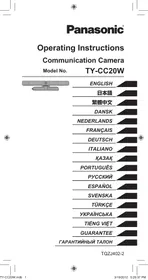


| Product type | Video conference camera |
| Brand | Panasonic |
| Model | TY-CC20W |
| Power supply | 5 V DC (USB) 500 mA |
| Power consumption | 0.5 W max. |
| Dimensions (L × H × D) | 180 × 47 × 28 mm |
| Weight (with cable) | 100 g |
| Temperature range | 0 °C to 40 °C |
| Lens | F/2.0 4P – FOV 56.8° (HD) |
| Microphone | 4 unidirectional microphones |
| Sensor | CMOS 1/4 inch |
| Video resolution | 1280 × 720 pixels |
| Focus | Fixed (60 cm to ∞) |
| Output formats | H.264, YUV |
| Frame rate | 30 fps max. |
| Interface | USB 2.0 |
| USB cable length | Approx. 1.5 m |
| Safety | Do not disassemble; secure installation; avoid moisture |
| Maintenance | Soft dry cloth; no benzene or thinner |
| Warranty | 1 year (see terms) |
Frequently Asked Questions - TY-CC20W PANASONIC
User questions about TY-CC20W PANASONIC
0 question about this device. Answer the ones you know or ask your own.
Ask a new question about this device
Download the instructions for your Video conferencing camera in PDF format for free! Find your manual TY-CC20W - PANASONIC and take your electronic device back in hand. On this page are published all the documents necessary for the use of your device. TY-CC20W by PANASONIC.
USER MANUAL TY-CC20W PANASONIC
Operating Instructions
Communication Camera
Model No.
TY-CC20W
ENGLISH
日本語
繁體中文
DANSK
NEDERLANDS
FRANÇAIS
DEUTSCH
ITALIANO
KA3AK
PORTUGUES
PYCCKN
SPANISH
SWEDISH
TURKISH
UKRAINIAN
VIETNAMESE
GUARANTEE
TAPAHNTNHBI TALOH
Thank you for purchasing a Panasonic product.
- Before operating this product, please read the instructions carefully, and save this manual for future use.
- Before using this product, be sure to read "Safety Precautions" and "Handling Precautions" (12 pages 2 - 3).
- This product is used to make video calls and audio calls via the Internet through a Panasonic high-definition television that is equipped with USB ports*. The television needs to be connected to the Internet using a broadband connection.
- Some television models do not support this product. For details on the television models that support this product, see the Panasonic web site. http://panasonic.jp/support/global/cs/tv/compatibility/usb/index.html
Safety Precautions
Warning
Disassembly
- Do not disassemble or modify this camera.
Doing so may cause fire or electric shock.
Caution
Drop Prevention
Make sure that the camera is installed securely.
The camera may cause injury if it falls from its installation location.
Do not wet
Always keep the camera in a cool, dry place.
Failure to do so may cause fire or electric shock.
Handling Precautions
- Do not touch the camera lens section with your hand. Doing so may cause the lens to become dirty, which may cause the image to become blurred.
- Do not unplug the USB cable during use. Doing so may cause the camera or television to stop working correctly. In this case, unplug and plug the mains lead of the television from the mains socket once, then reconnect the camera USB cable, and switch the television power on again.
- Do not pull the USB cable excessively.
Doing so may damage the camera.
■ Do not drop, strike, or shake the camera.
Doing so may damage the camera.
- Do not store or use this camera in high temperature areas or near strong magnetic fields.
Doing so may cause damage, deformation, or malfunctions of the camera.
- Do not use this camera in dusty, steamy, or smokey locations, or where it may be splashed with water or liquids.
Doing so may damage the camera.
Do not bend the stand section.
Doing so may damage the camera.
FCC STATEMENT
This equipment has been tested and found to comply with the limits for a Class B digital device, pursuant to Part 15 of the FCC Rules. These limits are designed to provide reasonable protection against harmful interference in a residential installation. This equipment generates, uses and can radiate radio frequency energy and, if not installed and used in accordance with the instructions, may cause harmful interference to radio communications. However, there is no guarantee that interference will not occur in a particular installation. If this equipment does cause harmful interference to radio or television reception, which can be determined by turning the equipment off and on, the user is encouraged to try to correct the interference by one or more of the following measures:
- Reorient or relocate the receiving antenna.
- Increase the separation between the equipment and receiver.
- Consult the Panasonic Service Center or an experienced radio/TV technician for help.
FCC Caution:
To assure continued compliance, follow the attached installation instructions and use only shielded USB interface cable when connecting to computer or TV. Any changes or modifications not expressly approved by Panasonic Corp. of North America could void the user's authority to operate this device.
FCC Declaration of Conformity
Models: TY-CC20W
Responsible Party: Panasonic Corporation of North America One Panasonic Way, Secaucus, NJ 07094
Contact Source: Panasonic Consumer Marketing Company of North America 1-877-95-VIERA (958-4372)
email: consumerproducts@panasonic.com
This device complies with Part 15 of the FCC Rules. Operation is subject to the following two conditions: (1) This device may not cause harmful interference, and (2) this device must accept any interference received, including interference that may cause undesired operation.
CANADIAN NOTICE:
For Model TY-CC20W
This Class B digital apparatus complies with Canadian ICES-003.
Installation
Names and Functions of Parts
Camera Front View
Camera Lens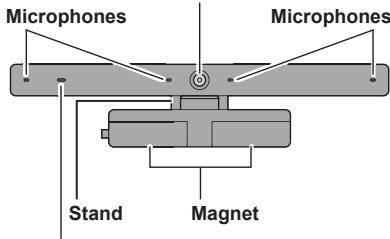
Tally Lamp
Lights red while the camera or microphone is active.
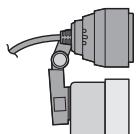
Camera Side View
USB Cable
Approx. 1.5 m (Approx. 4'11")
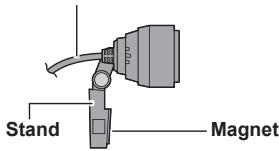
■ When installing the camera onto the television
Attach magnets on the camera stand to the top of the rear of the TV. If the rear of the TV is not made from metal, please attach the camera stand with adhesive tapes.
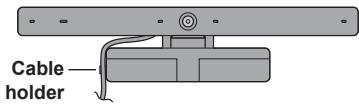
(Example installation at centre of display panel) Top of Display Panel
When placing the camera on a table surface etc.
Place the camera on a flat surface in front of the television, at approximately face height.
NOTE
- If the camera is placed near to the television speakers, a high-pitched noise known as "howling" may occur depending on the volume of the television. If howling occurs, lower the volume of the television speakers.
Connection
Connect the USB cable of the camera to the USB port on the television.
- Press the power button on the television to switch the television power off.
- Insert the USB cable of the camera into the USB port on the television.
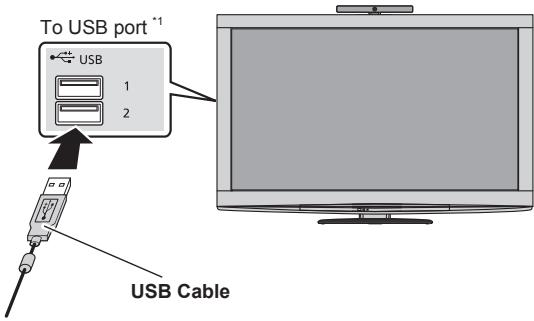
*1 For details of the connection to the USB port, see the television operating instructions.
Make sure the USB connector is facing the same direction as the USB port.
- Press the power button on the television to switch the television power on.
NOTE
- Always use the button on the television to switch the power ON and OFF.
- Do not use a USB hub to connect to the television. Always connect the camera USB connector directly to the television.
- You cannot connect this camera to a computer or other make of television for use.
Always connect this camera to a Panasonic television that is equipped with USB ports.
Using the Camera
The television needs to be connected to the Internet using a broadband connection. - Perform the following operations using the television remote control. For more details on operations using the television remote control, see the television operating instructions.
- Display the "VIERA Connect" on the television screen.
- Select the content you want to use with the camera (eg: "SkypeTM" etc.), and press "OK".
For the following procedures, follow the on-screen instructions to register an account, send and receive video and audio calls, and adjust the camera etc.

No emergency calls with Skype.
Skype is not a replacement for your ordinary telephone and cannot be used for emergency calling.
NOTE
- Provided contents, procedures or screen displays are subject to change without notice.
Maintenance
Clean the camera using a soft, dry cloth.
Wiping the camera with a dusty cloth may scratch the camera.
Therefore, always shake off any dust and dirt etc. from the cloth before cleaning.
Do not use benzine, thinners, or wax etc. on the camera, as doing so may cause the paint to peel off.
Specifications
ENGLISH
| Power Supply | DC 5 V (USB powered) 500 mA | |
| Power consumption | Max. 0.5 W | |
| Dimensions | Width 180 mm (7.09") Height 47 mm (1.86") Depth 28 mm (1.11") | |
| Mass | Approx. 100 g (Approx. 0.22 lbs.) (including USB cable) | |
| Operating Temperature Range | 0 °C - 40 °C (32 °F - 104 °F) | |
| Lens | F/2.0 4P Lens; FOV (D) 56.8° (in HD mode) | |
| Microphone | 4 unidirectional microphones | |
| Sensor | 1/4 inch CMOS Sensor | |
| Resolution | 1280 × 720 | |
| Focus | Fixed focus (Approx. 60 cm - ∞) | |
| Output Image | Max. 1280 × 720 (HD) | |
| Output Format | H.264, YUV | |
| Max. Frame Rate | 30 fps | |
| Interface | USB 2.0 | |
Troubleshooting/Q&A
Check the followings first. If they do not solve the problem, please contact the place of purchase.
The camera does not operate.
Is the USB cable of the camera connected correctly to the USB port on the television?
page 6)
Press the button on the television to switch the television power off, connect the USB cable of the camera again.
- Did you start a service (such as Skype) that uses the communication camera? (v7 page 7)
When a service that supports the communication service is started and operated correctly, the camera operates automatically.
- Does your television model support the camera? (10 page 2)
The images shot with the camera are dark or grainy.
There is probably not enough light.
When using the camera, make the room bright.
The images shot with the camera are blurred.
The camera is probably too close.
Use while at least 60 cm away from the camera.
If the distance is less, the image may be blurred.
The image received from the other person looks like it has stopped.
Depending on the Internet connection environment, it may not be possible to obtain a communication speed appropriate for using the camera.
Enhance the connection environment, or try changing the time of day that you use the camera.
Limited Warranty
(for U.S.A. and Puerto Rico only)
ONLY FOR U.S.A. AND PUERTO RICO
Panasonic Accessory Limited Warranty
Panasonic Consumer Marketing Company of North America, Division of Panasonic Corporation of North America
One Panasonic Way, Secaucus, New Jersey 07094
Limited Warranty Coverage (For USA and Puerto Rico Only)
If your product does not work properly because of a defect in materials or workmanship, Panasonic Consumer Marketing Company of North America (referred to as "the warrantor") will, for the length of the period on the chart below, which starts with the date of original purchase ("warranty period"), at its option either (a) repair your product with new or refurbished parts, (b) replace it with a new or a refurbished equivalent value product, or (c) refund your purchase price. The decision to repair, replace or refund will be made by the warrantor.
| Product | Parts | Labor |
| Communication Camera | 90 (Ninety) Days | Not applicable |
During the "Parts" warranty period, there will be no charge for parts. This Limited Warranty excludes both parts and labor for non-rechargeable batteries, antennas, and cosmetic parts (cabinet). This warranty only applies to products purchased and serviced in U.S.A. or Puerto Rico. This warranty is extended only to the original purchaser of a new product which was not sold "as is".
Mail-In Service
For assistance in the U.S.A. and Puerto Rico in obtaining replacement, please ship the product prepaid to:
Panasonic Exchange Center
4900 George McVay Drive
Suite B
McAllen, TX 78503
panacare@us.panasonic.com
When shipping the unit, carefully pack, include all accessories, and send it prepaid, adequately insured and preferably in the original carton. If Lithium Ion batteries are shipped by air the package must be labeled "Contains Lithium Ion Battery (No lithium metal)". Damaged batteries are prohibited from shipment
by US Mail. Batteries must be securely packed in a manner to prevent short-circuiting and a package cannot contain more than 3 Lithium Ion batteries. Include a letter detailing the complaint, a return address and provide a daytime phone number where you can be reached. A valid registered receipt is required under the Limited Warranty.
IF REPAIR IS NEEDED DURING THE WARRANTY PERIOD, THE PURCHASER WILL BE REQUIRED TO FURNISH A SALES RECEIPT/PROOF OF PURCHASE INDICATING DATE OF PURCHASE, AMOUNT PAID AND PLACE OF PURCHASE. CUSTOMER WILL BE CHARGED FOR THE REPAIR OF ANY UNIT RECEIVED WITHOUT SUCH PROOF OF PURCHASE.
Limited Warranty Limits And Exclusions
This warranty ONLY COVERS failures due to defects in materials or workmanship, and DOES NOT COVER normal wear and tear or cosmetic damage. The warranty ALSO DOES NOT COVER damages which occurred in shipment, or failures which are caused by products not supplied by the warrantor, or failures which result from accidents, misuse, abuse, neglect, mishandling, misapplication, alteration, faulty installation, setup adjustments, misadjustment of consumer controls, improper maintenance, power line surge, lightning damage, modification, introduction of sand, humidity or liquids, commercial use such as hotel, office, restaurant, or other business or rental use of the product, or service by anyone other than a Factory Service Center or other Authorized Servicer, or damage that is attributable to acts of God.
THERE ARE NO EXPRESS WARRANTY EXCEPT AS LISTED UNDER "LIMITED WARRANTY COVERAGE".
THE WARRANTYOR IS NOT LIABLE FOR INCIDENTAL OR CONSEQUENTIAL DAMAGE RESULTING FROM THE USE OF THIS PRODUCT, OR ARISING OUT OF ANY BREACH OF THIS WARRANTY.
(As examples, this excludes damages for lost time, travel to and from the servicer, loss of or damage to media or images, data or other memory or recorded content. The items listed are not exclusive, but for illustration only.)
ALL EXPRESS AND IMPLIED WARRANTY, INCLUDING THE WARRANTY OF MERCHANTABILITY, ARE LIMITED TO THE PERIOD OF THE LIMITED WARRANTY.
Some states do not allow the exclusion or limitation of incidental or consequential damages, or limitations on how long an implied warranty lasts, so the exclusions may not apply to you.
This warranty gives you specific legal rights and you may also have other rights which vary from state to state. If a problem
with this product develops during or after the warranty period, you may contact your dealer or Service Center. If the problem is not handled to your satisfaction, then write to the warrantor's Consumer Affairs Department at the addresses listed for the warrantor.
PARTS AND SERVICE, WHICH ARE NOT COVERED BY THIS LIMITED WARRANTY, ARE YOUR RESPONSIBILITY.
Customer Services Directory (United States and Puerto Rico)
Obtain Product Information and Operating Assistance; locate your nearest Dealer or Service Center; purchase Parts and Accessories; or make Customer Service and Literature requests by visiting our Web Site at:
http://www.panasonic.com/help
or, contact us via the web at:
http://www.panasonic.com/contactinfo
You may also contact us directly at:
1-800-211-PANA (7262)
Monday-Friday 9am-9pm, Saturday-Sunday 10am-7pm EST
For hearing or speech impaired TTY users, TTY: 1-877-833-8855
Accessory Purchases (United States and Puerto Rico)
Purchase Parts, Accessories and Instruction Books online for all Panasonic Products by visiting our Web Site at: http://www.pstc.panasonic.com
Or, send your request by E-mail to: npcparts@us.panasonic.com
You may also contact us directly at:
1-800-332-5368 (Phone) 1-800-237-9080 (Fax Only)
(Monday-Friday 9am-9pm EST)
Panasonic Consumer Marketing Company of North America - National Parts Center
20421 84th Avenue South, Kent, WA 98032
(We accept Visa, MasterCard, Discover Card, American Express, and Personal Checks)
For hearing or speech impaired TTY users, TTY: 1-866-605-1277
As of January 2012
Limited Warranty (for Canada)
Panasonic Canada Inc.
5770 Ambler Drive, Mississauga, Ontario L4W 2T3
PANASONIC PRODUCT - LIMITED WARRANTY
EXCHANGE PROGRAM
Panasonic Canada Inc. warrants this product to be free from defects in material and workmanship under normal use and for a period as stated below from the date of original purchase agrees to, at its option either (a) repair your product with new or refurbished parts, (b) replace it with a new or a refurbished equivalent value product, or (c) refund your purchase price. The decision to repair, replace or refund will be made by Panasonic Canada Inc.
Accessories including rechargeable batteries: One (1) year
This warranty is given only to the original purchaser, or the person for whom it was purchased as a gift, of a Panasonic brand product mentioned above sold by an authorized Panasonic dealer in Canada and purchased and used in Canada, which product was not sold "as is", and which product was delivered to you in new condition in the original packaging.
IN ORDER TO BE ELIGIBLE TO RECEIVE WARRANTY SERVICE HEREUNDER, A PURCHASE RECEIPT OR OTHER PROOF OF DATE OF ORIGINAL PURCHASE, SHOWING AMOUNT PAID AND PLACE OF PURCHASE IS REQUIRED
LIMITATIONS AND EXCLUSIONS
This warranty ONLY COVERS failures due to defects in materials or workmanship, and DOES NOT COVER normal wear and tear or cosmetic damage. The warranty ALSO DOES NOT COVER damages which occurred in shipment, or failures which are caused by products not supplied by Panasonic Canada Inc., or failures which result from accidents, misuse, abuse, neglect, mishandling, misapplication, alteration, faulty installation, setup adjustments, misadjustment of consumer controls, improper maintenance, power line surge, lightning damage, modification, introduction of sand, humidity or liquids, commercial use such as hotel, office, restaurant, or other business or rental use of the product, or service by anyone other than an Authorized Servicer, or damage that is attributable to acts of God.
Dry cell batteries are also excluded from coverage under this warranty.
THIS EXPRESS, LIMITED WARRANTY IS IN LIEU OF ALL OTHER WARRANTIES, EXPRESS OR IMPLIED, INCLUDING ANY IMPLIED WARRANTIES OF MERCHANTABILITY AND
FITNESS FOR A PARTICULAR PURPOSE. IN NO EVENT WILL PANASONIC CANADA INC. BE LIABLE FOR ANY SPECIAL, INDIRECT OR CONSEQUENTIAL DAMAGES RESULTING FROM THE USE OF THIS PRODUCT OR ARISING OUT OF ANY BREACH OF ANY EXPRESS OR IMPLIED WARRANTY. (As examples, this warranty excludes damages for lost time, travel to and from the Authorized Servicer, loss of or damage to media or images, data or other memory or recorded content. This list of items is not exhaustive, but for illustration only.)
In certain instances, some jurisdictions do not allow the exclusion or limitation of incidental or consequential damages, or the exclusion of implied warranties, so the above limitations and exclusions may not be applicable. This warranty gives you specific legal rights and you may have other rights which vary depending on your province or territory.
CONTACT INFORMATION
For product information and operation assistance, please contact: Our Customer Care Centre:
Telephone #: 1-800-561-5505
Fax#: (905) 238-2360
Email link: "Support → contact us → email" on
www.panasonic.ca
For defective product exchange within the warranty period, please contact the original dealer or our Customer Care Centre.
Warranty - Australia only
Panasonic Warranty
- The product is warranted for 12 months from the date of purchase. Subject to the conditions of this warranty Panasonic or its Authorised Service Centre will perform necessary service on the product without charge for parts or labour if, in the opinion of Panasonic, the product is found to be faulty within the warranty period.
- This warranty only applies to Panasonic products purchased in Australia and sold by Panasonic Australia or its Authorised Distributors or Dealers and only where the products are used and serviced within Australia or its territories. Warranty cover only applies to service carried out by a Panasonic Authorised Service Centre and only if valid proof of purchase is presented when warranty service is requested.
- This warranty only applies if the product has been installed and used in accordance with the manufacturer's recommendations (as noted in the operating instructions) under normal use and reasonable care (in the opinion of Panasonic). The warranty covers normal domestic use only and does not cover damage, malfunction or failure resulting from use of incorrect voltages, incorrect installation, accident, misuse, neglect, build-up of dirt or dust, abuse, maladjustment of customer controls, mains supply problems, thunderstorm activity, infestation by insects or vermin, tampering or repair by unauthorised persons (including unauthorised alterations), introduction of sand, humidity or liquids, commercial use such as hotel, office, restaurant, or other business or rental use of the product, exposure to abnormally corrosive conditions or any foreign object or matter having entered the product.
- This warranty does not cover the following items unless the fault or defect existed at the time of purchase:
(a) Cabinet Part(s) (b) Video or Audio Tapes (c) SD cards or USB devices (d) User replaceable Batteries (e) DVD Video, Blu-ray, or Recordable Discs (f) Video / Audio Heads from wear and tear in normal use (g) Information stored on Hard Disk Drive, USB stick or SD card (1) DTV reception issues caused by TV Aerial / Cableng / Wall socket(s) etc
- Some products may be supplied with Ethernet connection hardware. The warranty is limited on such products and will not cover
(a) Internet and or DLNA connection / setup related problems (b) Access fees and or charges incurred for internet connection (c) The use of incompatible software or software not specifically stipulated in the product operations manual; and (d) Any indirect or consequential costs associated with the incorrect use or misuse of the hardware, its connection to the internet or any other device.
- To claim warranty service, when required, you should:
- Telephone Panasonic's Customer Care Centre on 132600 or visit our website referred to below and use the Service Centre Locator for the name/address of the nearest Authorised Service Centre.
- Send or take the product to a Panasonic Authorised Service Centre together with your proof of purchase receipt as a proof of purchase date. Please note that freight and insurance to and / or from your nearest Authorised Service Centre must be arranged by you. Note that home or pick-up/delivery service is available for the following products in the major metropolitan areas of Australia or the normal operating areas of the nearest Authorised Service Centres: - Plasma/LCD televisions / displays (screen size greater than 103 cm)
- The warranties hereby conferred do not extend to, and exclude, any costs associated with the installation, de-installation or re-installation of a product, including costs related to the mounting, de-mounting or remounting of any screen, (and any other ancillary activities), delivery, handling, freight, transportation or insurance of the product or any part thereof or replacement of and do not extend to, and exclude, any damage or loss occurring by reason of, during, associated with, or related to such installation, de-installation, re-installation or transit. Panasonic Authorised Service Centres are located in major metropolitan areas and most regional centres of Australia, however, coverage will vary dependant on product. For advice on exact Authorised Service Centre locations for your product, please telephone our Customer Care Centre on 132600 or visit our website and use the Service Centre Locator.
In addition to your rights under this warranty, Panasonic products come with consumer guarantees that cannot be excluded under the Australian Consumer Law. If there is a major failure with the product, you can reject the product and elect to have a refund or to have the product replaced or if you wish you may elect to keep the goods and be compensated for the drop in value of the goods. You are also entitled to have the product repaired or replaced if the product fails to be of acceptable quality and the failure does not amount to a major failure.
If there is a major failure in regard to the product which cannot be remedied then you must notify us within a reasonable period by contacting the Panasonic Customer Care Centre. If the failure in the product is not a major failure then Panasonic may choose to repair or replace the product and will do so in a reasonable period of time from receiving notice from you.
THIS WARRANTY CARD AND THE PURCHASE DOCKET (OR SIMILAR PROOF OF PURCHASE) SHOULD BE RETAINED BY THE CUSTOMER AT ALL TIMES
If you require assistance regarding warranty conditions or any other enquiries, please visit the
Panasonic Australia website www.panasonic.com.au or contact by phone on 132 600
If phoning in, please ensure you have your operating instructions available.
Panasonic Australia Pty. Limited
ACN 001 592 187 ABN 83 001 592 187
1 Innovation Road, Macquarie Park NSW 2113
PRO-031-F11 Issue: 4.0 01-01-2011
WARRANTY - New Zealand only
WE WARRANTY that the Panasonic Product that you have purchased is free from defects in material and workmanship under normal home use and service. Accordingly, we undertake to repair, or at our option, replace without cost to the owner, either for material or labour, any part which within 12 months from the date of sale is found to be defective, provided that the appliance has been used for domestic purposes only and in accordance with the instructions given in the Instruction Book and not been subjected to misuse, neglect or faulty installation, dismantled, repaired or serviced by any other than an authorised Panasonic New Zealand Dealer or Panasonic New Zealand Authorised Service Centre.
NOTE
Before reporting a fault, please ensure that you read the item "Troubleshooting" in the information section of your Panasonic Instruction Book. It is important to retain your proof of purchase as this will be required by the serviceman or retailer as proof of purchase date, should service be required. In the event of service being required, contact your Panasonic New Zealand retailer or Panasonic New Zealand Authorised Service Centre.
IMPORTANT
Any request for warranty service must be through an Authorised Panasonic New Zealand Service Centre who during the period of the warranty, undertakes to make any necessary adjustment and fit any replacement part supplied by the manufacturer, during normal working hours, or alternatively will arrange for such service to be provided by some other Panasonic New Zealand Authorised Service Centre.
NEW ZEALAND
Distributed in New Zealand by Panasonic New Zealand Limited
350 Te Irirangi Drive East Tamaki, Private Bag 14911, Panmure Auckland
Tel. 09 272 0100
Customer Care Center
Email: Customerservice@nz.panasonic.com
www.panasonic.co.nz
Information on Disposal for Users of Waste Electrical & Electronic Equipment (private households)

This symbol on the products and/or accompanying documents means that used electrical and electronic products should not be mixed with general household waste. Please dispose of this item only in designated national waste electronic collection schemes, and not in the ordinary dust bin.
For business users in the European Union
If you wish to discard electrical and electronic equipment, please contact your dealer or supplier for further information.
Information on Disposal in other Countries outside the European Union
This symbol is only valid in the European Union.
If you wish to discard this product, please contact your local authorities or dealer and ask for the correct method of disposal.
[India Only]
![PANASONIC TY-CC20W - [India Only] - 1](/content/2019/11/55565/images/321e8cfdf13b301f4c7c7ef91c7da1b67db1dc5c5bb2bdeff0811f57d273060b.jpg)
For the purpose of recycling to facilitate effective utilization of resources, please return this product to a nearby authorized collection center, registered dismantler or recycler, or Panasonic service center when disposing of this product.
Please see the Panasonic website for further information on collection centers, etc.
http://www.panasonic.co.in/wps/portal/home
Environment care information for users in China

This symbol is only valid in China.
Pursuant to the directive 2004/108/EC, article 9(2) Panasonic Testing Centre Panasonic Service Europe, a division of Panasonic Marketing Europe GmbH Winsberging 15, 22525 Hamburg, F.R. Germany
Panasonic Corporation
Web Site: http://panasonic.net/ © Panasonic Corporation 2012
Operating Instructions (Japanese)
Warranty certificate
Model number TY-CC20W
Panasonic Testing Centre
Panasonic Service Europe, a division of Panasonic Marketing Europe GmbH
Winsberging 15, 22525 Hamburg, F.R. Germany
Panasonic Corporation
Web Site: http://panasonic.net/
© Panasonic Corporation 2012
Panasonic Testing Centre
© Panasonic Corporation 2012
User Manual
Panasonic Canada Inc.
5770, Ambler Drive, Mississauga (Ontario) L4W 2T3
PANASONIC PRODUCT - LIMITED WARRANTY
REPLACEMENT PROGRAM
Panasonic Testing Centre
Panasonic Service Europe, a division of Panasonic Marketing Europe GmbH
Winsberging 15, 22525 Hamburg, F.R. Germany
Panasonic Corporation
Web Site: http://panasonic.net/
© Panasonic Corporation 2012
Operating Instructions
Panasonic Testing Centre
© Panasonic Corporation 2012
User's Guide
Communication Camera
Model No.
TY-CC20W
Panasonic Testing Centre
Panasonic Service Europe, a division of Panasonic Marketing Europe GmbH
Winsberging 15, 22525 Hamburg, F.R. Germany
Panasonic Corporation
Web Site: http://panasonic.net/
© Panasonic Corporation 2012
Xymbic ICTey Hxckaybifbl
Байланы Камерасы
MoideJIb Hemipi
TY-CC20W
OcbI Panasonic eHimc catbIn aJfahbIhbl3fa aJfbc 6iDipem3.
MbHa naIanaHny HcyKaynapbIH MyKnT OKbIN sbfBIn, 6epilreH eHimDi dpybc naiDaIaHaTBiHbIb3Fa Ke3 XeTKi3iH3. - BybIMbI naJanaHb6ac 6ypbH "Kayinc3iK typaIb caKtBk waapanapbI"KonDany tpyanbI caKtbIK waapanapbI OKyfayMbITnAb3 (186etTep 1 - 2).
Bun eHIM nHTepHeT apKbIbI USB TepMNHaIaIapbIeMeh Xa6dbIKtanraH Panasonic aKbIHbIfbI KOFapbl TeJeINdapMeH 6eHne KOHbIpaYnap MeH dIbIbICTbIK KOHbIpaYnap COfY yuHn naJaIaHaIbIaNabI.* - TeteiДapIbI INThepHETKe KeH ayKbIMdbI XaNfay yNrici apKbJIbI Kocy kepeK.
- Kei6ip TeJeDiap yIrrinepi 6yI eHIMdi KOnJaMaIdbI. ByI eHIMdi KOnJaIbTH TeJeDiap yIrrinepi TypaIbMIJIeMeTTepDi Panasonic 6actanKbl 6betHeH KapaHbI3.
http://panasonic.jp/support/global/cs/tv/compatibility/usb/index.html
Kayinci3dk Typalbl CaKtbik shapaapanpbI
EckepTy
BykamepaHb6eJWeKTeMeHi3 HemeC e3repTneH3.
MHyI caKaTamay candapbIH an epTTIH sbIbyI hEmece 3JIeKTp TOrbIH COfYbl MymKiH.
A6aɪŋaɪbɪʒ
Kynatnay
KamepaHbIHMbIKTbOpHaTbIHaBbHaKe3XeTKi3IH3. KaMepa opHaTbIraH KepiHeN Kynan Ketce, aadMaIbJ kapaKaTTaybMyMKIIh.
Cy turi36ey
KamepaHbI epaaBIM cAikBih, KpyraK xepde yctahbi3. Oby opbyHdAmay caIapbHaH ept 1yfeHybI HEmece 3nEKT TOrblHc COYfbl MyMKIH.
KoПдану ТypалыcaКъКшаралры
Kamepa liH3acbHa KOBbIbI3dbI Turi36eH3. MybIcakTamay IIN3aHbIn kipJeYHe ce6en 6oIbIn, cpeTITI 6yNbHbIp erin Kepcetedi. Палдану ке3iHde USB kabeniin axbipatnaHBi. Орьимдама сандарын дурб icteп Турган камер hemece TeelenДдар xgMbIcbl TOKTAN kAnybl MymKIn. MHydай karдада TeelenДдардагы КУТ ТуМЕсimen TeelenДдарды eupin,Камерын USB kabeniin kaita kajraHbIs,coSbIh TeneДдарды kaJtadan KocBbIb. USB Ka6eJIiN KaTTbI TaPTnAbHbI3. MyHbOpbIHdAmayDAn Kamepa 3aKbIMdaJyby MyMkiH. KamaphaBkyKaIpyaHb3, yPmaHb3 Hemece waiKaMaHb3. MyHb oOpHaMauyDan KamaEaKbIMdAynb MyMKH. ■Бун камераны Когары Temператypалы Лжрелд Немец Кушт Магнг Осіпесі рійда саітамьлі Же пайдановь.
Мысы орьдамay candapьан камераны Зakbl'danyы, сьiptкы niiuHи зэрету 힢еме дүрсICTЕмі мійки. KamepaHbI lac, 6y Hemece TtTH XepJIpe De Hemece cy He cybIKtbIk Ishaibpaybl MyMKIN hepe naDanaHaB13. Mybl obpHdAmaydaan Kamepa 3akbIMdAbybl MyMKIN. Heri 6eJirin MaBictpMaHbI3. Myhbl opblamaydah kamepa 3akbIMdaJybl MyMkiH.
Ophaty
ByT TaHbTa TeK KbITaIra apHaJIFaH.
AkaayIbIKTapdbI Ty3eTy/CypaK-kaayan
AaIbImeKeIeNcIepiTeKcepiH3.ErepOnapdaakayIbIKtbo JKOIMaca,EHIIMDi catbIn aIraHxpeRe xabapnacbIbl3.
Camera system.
Camera USB cable, telephone USB port, or other devices? (Figure 4) To use the telephone, press the telephone button, and the camera USB cable is not connected. - The camera's battery is low (Figure 5). If the battery is low, the camera may turn off automatically. The telephone button is used to connect the camera? (Figure 1)
Images taken with the camera may appear darker or lighter.
Brightness may be insufficient.
When the camera is turned on, the brightness may be low.
Images taken with the camera may be unclear.
- The camera's brightness may be insufficient in low light conditions.
If the brightness is low, the image may be blurry.
Images taken from another device may appear with a green tint.
- When connecting to the internet, the camera's brightness may not be sufficient.
Check the camera's settings or the camera's brightness settings.
Further information:
Address, Japan
Phone:
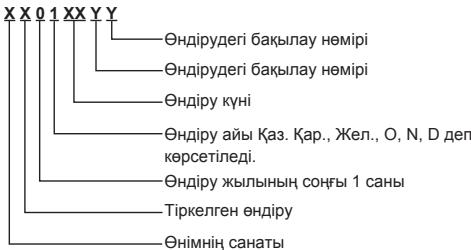
Panasonic authorized service center in Kazakhstan and Central Asia. For calls from Kazakhstan and Central Asia: +7 (727) 298-09-09
Panasonic Corporation
Web Site: http://panasonic.net/ © Panasonic Corporation 2012
Model No. TY-CC20W
Do not expose to moisture.
Always keep the camera in a dry and cool place. Failure to do so may result in electric shock or fire.
Precautions when handling the camera
Do not touch the camera lens with your hands.
Failure to comply with this requirement may result in damage to the lens or cause it to malfunction.
When using, pull out the USB cable.
Failure to comply with this requirement may result in damage to the camera or the television.
In this case, turn off the television power with the power button on the television, reconnect the camera's USB cable, and then turn on the television power again.
Do not pull the USB cable with force.
Failure to comply with this requirement may result in damage to the camera.
Do not drop, hit, or shake the camera.
Failure to comply with this requirement may result in damage to the camera.
Do not store or use this camera in places with high temperatures or near strong magnetic fields.
Failure to comply with this requirement may lead to deformation, damage, or malfunction of the camera.
Do not use this camera in places with oil splashes, steam, or smoke, as well as where water droplets or other liquids may get on the camera.
Failure to comply with this requirement may lead to damage to the camera.
Do not bend the cable.
Failure to comply with this requirement may lead to damage to the camera.
Installation
Names and functions of components
Camera lens
Camera lens
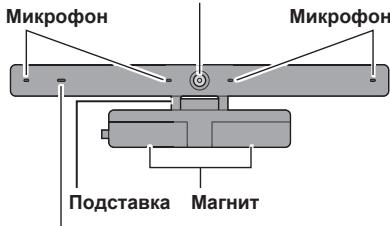
Shooting lamp
Lights red during camera operation or recording.
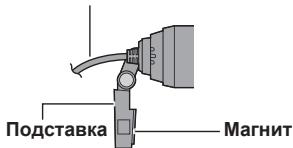
Camera view
USB cable
Approx. 1.5 m (approx. 4'11")
Skype is not a substitute for calling emergency services.
Skype is not a replacement for a regular telephone and cannot be used for calling emergency services.
NOTE
The supplied content, procedures, and images may be changed without prior notice.
Technical maintenance
Wipe the camera with a dry soft cloth.
Wiping the camera with a dirty cloth may cause scratches on the camera.
Therefore, before wiping the camera, always remove dust, dirt, etc. from the cloth.
Do not use benzene, thinner, or wax on the camera, as this may cause peeling of the paint.
Technical specifications
The camera image may appear blurry.
The camera should be placed as close as possible. The camera must be at a distance of less than 60 cm.
At a shorter distance, the image may be blurry.
The image obtained from the subject may appear frozen.
Depending on the parameters of the Internet connection, the communication speed may be insufficient for using the camera.
If these parameters are not suitable, try using the camera at a different time of day.
Information about the device
Service life
1 (one) year
The product is not subject to mandatory conformity assessment (for Russia only).
Made in China
Manufacturer:
Panasonic Corporation
Panasonic Corporation
Manufacturer's address:
Osaka, Japan
Importer: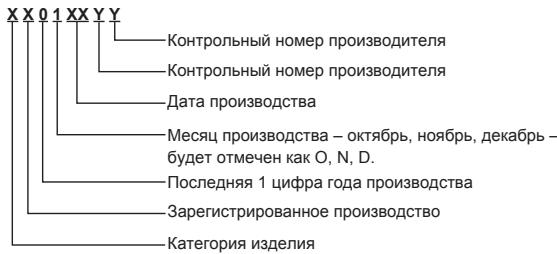
Panasonic Information Systems
For calls from Moscow: +7 (495) 725-05-65
Toll-free call within Russia: 8-800-200-21-00
Panasonic Testing Centre
Panasonic Service Europe, a division of Panasonic Marketing Europe GmbH
Winsberging 15, 22525 Hamburg, Germany
Panasonic Corporation
Web Site: http://panasonic.net/
© Panasonic Corporation 2012
Operating Instructions
Panasonic Testing Centre
Panasonic Service Europe, a division of Panasonic Marketing Europe GmbH
Winsberging 15, 22525 Hamburg, Germany
Panasonic Corporation
Web Site: http://panasonic.net/
© Panasonic Corporation 2012
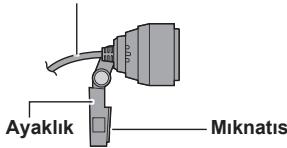
Do not drop, hit, or shake the camera.
Approx. 1.5m (Approx. 4'11")
Panasonic Testing Centre
Panasonic Service Europe, a company of the Panasonic Marketing Europe GmbH group
Winsberging 15, 22525 Hamburg, F.R. Germany
Panasonic Corporation
Web Site : http://panasonic.net/
© Panasonic Corporation 2012
Instructions for use
Camera for Video3D communication
Model No.
TY-CC20W
Do not disassemble or modify the camera.
Improper handling may cause electric shock.
Precautions
To avoid injury
Make sure the camera is installed correctly. If the camera is not installed correctly, it may cause injury.
Place the camera in a dry and ventilated place.
Improper use may cause damage or lead to electric shock.
Safety precautions when using the camera
Do not touch the lens with your fingers. Improper use may cause obstruction of the lens, which may result in unclear images. When using, do not pull the USB cable. Improper use may lead to abnormal operation of the camera or TV.
In this case, turn off the TV using the TV buttons, then disconnect the USB cable from the camera, and then turn the TV back on.
Do not pull the USB cable with force. Improper use may cause damage to the camera. Do not drop, hit, or shake the camera. Improper use may cause damage to the camera. Do not store or use the camera in places with high temperatures or near strong magnetic fields.
Improper use may cause damage, deformation, or malfunction of the camera.
Do not use the camera in dusty, humid, or smoky places, or where water splashes or other liquids may get on the camera.
Improper use may cause damage to the camera.
Do not disassemble the device. Improper use may cause damage to the camera.
Installation
Names of functional components
Camera view
Camera lens
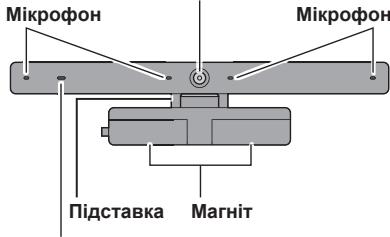
Jamna 3HOMKn
TOpntb YepBoHm nI d vac po60tn kamepn abo mikpOFOHa.
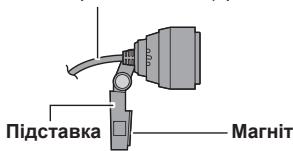
Budkamepn 360ky
USB-ka6eJb
Pn6m3.1,5 m (np6m3.4'11")
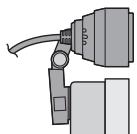
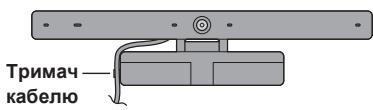
Y pa3i yctaHOBKN KaMepn Ha TeNeBi3Op
PnkrpiTb mArHIT, po3aIooBaHI ha kamePi, do BepXhBoI cactHHN 3adHbOi naHenI teNeBtOpa He metaneBa,6ydb nacka, npkrpiTb niDCTABky kamePi 3a donomorHO KneKoiO CTpIKM.
© Panasonic Corporation 2012
Huong dan sù dung
Camera giao tiép
Só model
TY-CC20W
Cám on ban dā mua san phám cúa Panasonic.
Truckhi sur dung san pham nay, vui long doc cac hong dan can than va giu lai sich hong dan nay de sur dung ve sau. - Trucó khi su dung san pham nay, hay chac chan doc phan "Luu y an toan" vā "Luu y su dung" (Trang 1 - 2).
- San pham nay duoc dung de thuc hi en cuoc goi hinh vai tieng qua Internet thong qua TV co do phan giai cao qua Panasonic co gan cong USB.*
- The TV must be connected to the Internet via a broadband connection.
- Some TV models do not support this product. To find out which TV models support this product, please visit the Panasonic website. http://panasonic.jp/support/global/cs/tv/compatibility/usb/index.html
Safety precautions
Warning
Disassembly
Do not disassemble or modify this camera.
Doing so may cause damage or electric shock.
Caution
Avoid dropping
Ensure that the camera is securely installed.
The camera may cause injury if it falls from its installation position.
Avoid moisture
Doing so may damage the camera.
Do not drop, hit, or shake the camera.
Doing so may damage the camera.
Do not cut or use this camera in places with high temperatures or near strong magnetic fields.
Doing so may cause the camera to be damaged, deformed, or malfunction.
Do not use the camera in dusty, humid, or smoky places, or where water or liquids may splash onto the camera.
Doing so may damage the camera.
Do not bend the base.
Doing so may damage the camera.
Installation
The camera does not work.
Images taken with the camera are dark or have noise.
This may be due to insufficient light.
The room must be bright when using the camera.
Images taken with the camera are blurry.
This may be because the camera is too close.
Use the camera at a distance of at least 60 cm.
If the distance is closer, the image may be blurry.
The image received from the other party appears blurred or distorted.
- Depending on the internet connection environment, the data transfer speed may not be sufficient for camera use.
Improve the network connection environment, or try changing the camera usage time.
Information on disposal of waste in countries outside the European Union

This symbol is only valid in the European Union.
If you wish to discard this product, please contact your local authorities or dealer and ask for the correct method of disposal.
Communication Camera

Caution: Please retain your sales receipt.
The Panasonic Pan European Guarantee applies to your product. You may obtain a copy of the guarantee from:
- the dealer where you purchased your product -Website: www.panasonic.co.uk/euguarantee
- Panasonic Customer Communications Centre:
UK - 0844 844 3852 / Ireland - 01 289 8333
Panasonic Romania SRL
Bulevardul Preczieiei Nr.24, West Gate Park, Cladirea H3
Sector 6, Bucuresti, Romania, cod postal 062204
Tel: +4021 316 04 37 / 316 04 36 Fax: +4021 316 04 46
E-mail: service.bucharest@eu.panasonic.com

CZECH REPUBLIC
The Panasonic Pan European Guarantee applies to your product. You may obtain a copy of the guarantee from:
- the dealer where you purchased your product - Website: www.digitalplanet.com.mt
- Panasonic Customer Call Center: +356 21 24 1127 or +356 27 24 1127
- Email: support@digitalplanet.com.mt

CYPRUS
This valve is a Panasonic product. It may be returned with a copy of the original receipt.
- The dealer where you purchased your product - Website: www.panasonic.com.cy - Customer Service Center: +357 22 514629

BULGARIA
1) Panasonic Europe, 1 Holman Rnyu, 1117 Budapest, Hungary, guarantees the product against manufacturing defects, as well as its servicing at authorized Panasonic service centers for Bulgaria, selected according to the address www.panasonic.bg, for a period of 2 (two) years from the date of the purchase receipt, without charge for labor and spare parts.
General warranty service conditions:
(1) The product must be delivered to an authorized service center (or sent by mail), together with the warranty card and the original receipt or other purchase document.
Information about the warranty can be found at: www.panasonic.bg. ATTENTION! When purchasing the product, please make sure that the warranty card is properly filled in (model, serial number, date of sale, signature of the seller). Otherwise, the warranty may be void.
Panasonic Representative Office
1040 Sofia, 36 Dragan Tsankov Blvd.
CTU Inter, Office B-615
Tel: +359 (2) 971 2969, Fax: +359 (2) 971 2970
E-mail: info@panasonic.bg, www.panasonic.bg
HR CROATIA
The signed importer/distributor warrants the proper functioning of this product and servicing in Panasonic authorized service centers, listed in the attached list, for a period of two (2) years from the date of purchase of the device, and free parts and service labor under the following conditions:
(1) The product must be delivered to a service center (or place of receipt) authorized by Panasonic Marketing Europe - South-East Europe Branch Office, Neumann János u.1., 1117 Budapest, Hungary, for servicing within the warranty period, together with this warranty card and the original receipt.
At the time of purchase, it is necessary to fill in the warranty card correctly and completely, and to have it confirmed.
Panasonic Marketing Europe GmbH. - South-East Europe Branch Office
PME-SEE Branch Office
Panasonic Representative Office Belgrade
Bulevar despota Stefana 41, 11000 Belgrade/Serbia
Tel: +381 11 33 40 124
+381 11 33 44 091
e mail: pbo@panasonic.rs
www.panasonic.rs
Bih BOSNA I HERCEGOVINA
The undersigned importer/distributor guarantees the correctness of this product and servicing services in Panasonic authorized service centers, listed in the attached list, for a period of:
- Two (2) years for all products from the consumer electronics product portfolio (such as digital cameras, digital camcorders, LCD and plasma screens, home cinema, Hi-Fi devices, small household appliances, and personal care products).
- Two (2) years for all products from the white goods portfolio (refrigerators and washing machines), except for refrigerator compressors, for which there is an additional 3-year warranty for the part itself.
- Warranties for air conditioners are provided by authorized importers of these Panasonic products; the warranty length may vary based on the offer and agreed maintenance modalities.
PME - SEE Branch Office
Representative Office in Bosnia and Herzegovina
Zmaja od Bosne 4,
71000 Sarajevo
Bosnia and Herzegovina
Tel: +387 33 288 921
Fax: +387 33 288 921
E mail: info@panasonic.ca
E-mail: customercare@panasonic.ca
Panasonic South-East Europe Sales Limited Liability Company, Neumann János U. 1., 1117 Budapest, Hungary, guarantees the proper functioning of the device and the provision of after-sales service. The authorized service centers in Macedonia, listed in this document, provide a warranty period of 2 (two) years from the date of purchase, excluding the working hours and spare parts.
Warranty terms:
(1) The buyer must present the device to an authorized service center (or to the point of sale), along with the warranty certificate and the original invoice or other proof of purchase. Attention! When purchasing, the seller must verify that the warranty certificate is properly filled in (model, serial number, date of purchase/installation, signature and stamp of the seller/installer). An incomplete warranty is not valid. (2) The warranty loses its validity in the following cases: a) Damage or defects caused by improper use, natural disasters, lightning, fire, flood, etc., as well as "force majeure", improper ventilation or incorrect connection. b) Damage or defects caused by improper use and negligence on the part of the user, use of the product for purposes other than those for which it is intended, as well as use of the product for professional, commercial or industrial purposes. c) Damage or defects resulting from moisture, dust, insects, foreign objects, dirt, use in inappropriate spaces or with aggressive agents. d) Repairs, installation or modifications of the product carried out by unauthorized persons, or installation, modifications and/or actions that alter the technical characteristics of the product and the safety conditions. e) The serial number has been changed, altered or made illegible. The warranty does not cover consumables, inspection and maintenance of the product, as well as the following parts: cables, antennas, batteries, adapters, bulbs, lamps, filters, fuses, etc., which are limited to the warranty period.
(3) The warranty for the lamp of the LCD projector is limited to 90 days from the date of purchase, or 200 working hours (whichever is reached first).
The warranty of the manufacturer does not in any way limit the rights of the buyer, guaranteed by the laws of the Republic of Macedonia.
This warranty is valid only in the territories of
the European Union (EU), the European Economic Area (EEA), Turkey, Macedonia, Serbia, Croatia, Bosnia and Herzegovina, and Switzerland for products purchased and used exclusively in these countries.
If the country of use is different from the country of purchase, the service will be provided in accordance with the warranty conditions in the country of use, except if the warranty period in the country of purchase is longer than in the country of use, in which case the warranty period in the country of purchase will apply.
Kik doo Skopje
Skupi bb
1000 Skopje
Macedonia
Phone: ++389 2 3088 000
Fax: ++389 2 3088 080
E-mail: info@kik.com.mk
Panasonic®
TAPAHINHBI TAIOH GNRL No
(warranty card, warranty terms, warranty certificate, guarantee slip, warranty card, warranty card, warranty card, bgg60000000000000000000000000000000000000000000000000000000000000000000000000000
| Homerp moelern (Homerp moelern, moedeln) |
| Homerpi, Hymap madzbl, model, model, umn1, doxoxoxo, model raqam, modeli belgisi, moedem shymapa, Homerpi moelern) |
| Datapokynikn (Data nokynki, catbip anbihraf kyni, data habbiu, data procurarii, alinma tarixi, qulw uwhuuphup, yoxoxob oxoxo, olingan sana, data nokynki, tabprixhi xapid, catbip anyy kyHy) |
| Ceprihny homoprr (Ceprihny homoprr, ceprihnyk) |
| Homerpi, cepbinyl, Hymap, numaral de seriese, seriya nomresi, ubhlwlu wuhup, doxoxoxo bo3do6o, serlyavly raqam, tapgyr belgisi, shymporan cnilcnila, ceprihnyk homepi) |
| ФИО и тelenpoH noKynatelera (im'я, adreca ta telenfoH POKynuia, catbip anubylnb atb-kehi, imr i adpac nakynika, numele, prenumele, patronimicul, adresa si Telefonul cumparatoruli, alcinnin adi, soyadi, atasinni adi, Telefonu ve unvani, quinph U.U.L. huwuglu lu hunuunup, doxoxoxo203do6o, b3do6o, a3do6o b3do6o, doxoxod6o 03 doxoxod6o, xaridorning FIO va Telefoni, aliyjynF.A.A we telefony, hom, homn padar ba ten xarpudop, catbip anyyuynu atb- jxenuy mehen telenoH) |
| Adpec noProdauza (im'я ta oprizduha adpeca noProdauza, catywi smekemehi atb xjxhe 3anbl meKEN-kaBt, na3ba i kopydBiHbIaHdpac aprahiazuI, kaJra pndae, demunirea si adresa juridica a vinyatoruli, satan ta5kalatin advi ve huoqi unvani, quoouwnh wuhuunupu lju wuhuunupu huogbu, doxoxoxo203do6o, doxoxoxo203do6o, doxoxod6o, sotuvchi korkonanding nomi va yuridik manzill, satyan guramany adjy we hukuk salgysu, catyyu yomdum atb jxahau oprizduk bilak dapeRi, yHBOH Ba aadereci xyukm co3MaHe fpyuHaanda, catyyu yomdum atb jxahau oprizduk bilak dapeRi) |
| Ipdncs noProdauza (nidncs noProdauza, catywiuhbH kOJIb, noDnic noPadauya, semnatura vinoZatoruli, satcinin imzasi, quoUwunh unnuuWuWuWuWuWuWuWuWuWuWuWuWuWuWuWuWuWuWuWuWuWuWuWuWuWuWuWuWuWuWuWuWuWuWuWuWuWuWuWuWuWuWuWuWuWuWuWuWuWuWu WU Imzosi, satyjynyngoly, im3oN chyuuynunda, catyyuynu kony) |
| Ipeat noProdauza (neatka noProdauza, catywiuhbH mekememH mepi, noDnic noPadauya, semnatura vinoZatoruli, kayra pndae, L S., satan ta5kalatin mohir, quoUwunh ljuHp, doxoxoxo203do6o, sotuvchi korkonanding muxri, satayf guramanyong mohri, myxpi co3maHH andy, catyyu yomdUn dapeRi xajua Meepy) |
Repair table
bogos6goo 3oamgdgo ldoaogggmgbogol
Panaoncoorporo 1000000000000000000000000000000000000000000000000000000000
Ggge Ggge Ggge Ggge Ggge Ggge Ggge Ggge Ggge Ggge Ggge Ggge Ggge Ggge Ggge Ggge Ggge Ggge Ggge Ggge Ggge Ggge Ggge Ggge Ggge Ggge Ggge Ggge Ggge Ggge Ggge Ggge Ggge Ggge Ggg
© Panasonic Corporation 2012
Printed in China
S1111-3032
<無料修理規定>
- OPERATING INSTRUCTIONS
- COMMUNICATION CAMERA
- THANK YOU FOR PURCHASING A PANASONIC PRODUCT
- SAFETY PRECAUTIONS
- WARNING
- DISASSEMBLY
- CAUTION
- DROP PREVENTION
- DO NOT WET
- HANDLING PRECAUTIONS
- FCC STATEMENT
- FCC CAUTION
- FCC DECLARATION OF CONFORMITY
- CANADIAN NOTICE
- INSTALLATION
- NAMES AND FUNCTIONS OF PARTS
- CAMERA SIDE VIEW
- WHEN INSTALLING THE CAMERA ONTO THE TELEVISION
- WHEN PLACING THE CAMERA ON A TABLE SURFACE ETC
- NOTE
- CONNECTION
- USING THE CAMERA
- NO EMERGENCY CALLS WITH SKYPE
- MAINTENANCE
- CLEAN THE CAMERA USING A SOFT, DRY CLOTH
- SPECIFICATIONS
- TROUBLESHOOTING/Q&A
- THE CAMERA DOES NOT OPERATE
- THE IMAGES SHOT WITH THE CAMERA ARE DARK OR GRAINY
- THE IMAGES SHOT WITH THE CAMERA ARE BLURRED
- THE IMAGE RECEIVED FROM THE OTHER PERSON LOOKS LIKE IT HAS STOPPED
- LIMITED WARRANTY
- ONLY FOR U.S.A. AND PUERTO RICO
- PANASONIC ACCESSORY LIMITED WARRANTY
- MAIL-IN SERVICE
- LIMITED WARRANTY LIMITS AND EXCLUSIONS
- THERE ARE NO EXPRESS WARRANTY EXCEPT AS LISTED UNDER "LIMITED WARRANTY COVERAGE
- ALL EXPRESS AND IMPLIED WARRANTY, INCLUDING THE WARRANTY OF MERCHANTABILITY, ARE LIMITED TO THE PERIOD OF THE LIMITED WARRANTY
- CUSTOMER SERVICES DIRECTORY (UNITED STATES AND PUERTO RICO)
- ACCESSORY PURCHASES (UNITED STATES AND PUERTO RICO)
- LIMITED WARRANTY (FOR CANADA)
- ACCESSORIES INCLUDING RECHARGEABLE BATTERIES: ONE (1) YEAR
- IN ORDER TO BE ELIGIBLE TO RECEIVE WARRANTY SERVICE HEREUNDER, A PURCHASE RECEIPT OR OTHER PROOF OF DATE OF ORIGINAL PURCHASE, SHOWING AMOUNT PAID AND PLACE OF PURCHASE IS REQUIRED
- LIMITATIONS AND EXCLUSIONS
- CONTACT INFORMATION
- WARRANTY - AUSTRALIA ONLY
- PANASONIC WARRANTY
- THIS WARRANTY CARD AND THE PURCHASE DOCKET (OR SIMILAR PROOF OF PURCHASE) SHOULD BE RETAINED BY THE CUSTOMER AT ALL TIMES
- WARRANTY - NEW ZEALAND ONLY
- IMPORTANT
- NEW ZEALAND
- DISTRIBUTED IN NEW ZEALAND BY PANASONIC NEW ZEALAND LIMITED
- INFORMATION ON DISPOSAL FOR USERS OF WASTE ELECTRICAL & ELECTRONIC EQUIPMENT (PRIVATE HOUSEHOLDS)
- FOR BUSINESS USERS IN THE EUROPEAN UNION
- INFORMATION ON DISPOSAL IN OTHER COUNTRIES OUTSIDE THE EUROPEAN UNION
- [INDIA ONLY]
- ENVIRONMENT CARE INFORMATION FOR USERS IN CHINA
- PANASONIC CORPORATION
- OPERATING INSTRUCTIONS (JAPANESE)
- WARRANTY CERTIFICATE
- MODEL NUMBER TY-CC20W
- USER MANUAL
- USER'S GUIDE
- XYMBIC ICTEY HXCKAYBIFBL
- БАЙЛАНЫ КАМЕРАСЫ
- MOIDEJIB HEMIPI
- TY-CC20W
- OCBI PANASONIC EHIMC CATBIN AJFAHBIHBL3FA AJFBC 6IDIPEM
- KAYINCI3DK TYPALBL CAKTBIK SHAPAAPANPBI
- ECKEPTY
- A6AꞮŊAꞮBꞮƷ
- KYNATNAY
- CY TURI36EY
- KOПДАНУ ТYPАЛЫCAКЪКШАРАЛРЫ
- OPHATY
- AKAAYIBIKTAPDBI TY3ETY/CYPAK-KAAYAN
- CAMERA SYSTEM
- IMAGES TAKEN WITH THE CAMERA MAY APPEAR DARKER OR LIGHTER
- IMAGES TAKEN WITH THE CAMERA MAY BE UNCLEAR
- IMAGES TAKEN FROM ANOTHER DEVICE MAY APPEAR WITH A GREEN TINT
- FURTHER INFORMATION
- PHONE
- MODEL NO. TY-CC20W
- DO NOT EXPOSE TO MOISTURE
- PRECAUTIONS WHEN HANDLING THE CAMERA
- NAMES AND FUNCTIONS OF COMPONENTS
- SKYPE IS NOT A SUBSTITUTE FOR CALLING EMERGENCY SERVICES
- TECHNICAL MAINTENANCE
- WIPE THE CAMERA WITH A DRY SOFT CLOTH
- TECHNICAL SPECIFICATIONS
- THE CAMERA IMAGE MAY APPEAR BLURRY
- THE IMAGE OBTAINED FROM THE SUBJECT MAY APPEAR FROZEN
- INFORMATION ABOUT THE DEVICE
- INSTRUCTIONS FOR USE
- CAMERA FOR VIDEO3D COMMUNICATION
- PRECAUTIONS
- TO AVOID INJURY
- SAFETY PRECAUTIONS WHEN USING THE CAMERA
- NAMES OF FUNCTIONAL COMPONENTS
- Y PA3I YCTAHOBKN KAMEPN HA TENEBI3OP
- HUONG DAN SÙ DUNG
- CAMERA GIAO TIÉP
- CÁM ON BAN DĀ MUA SAN PHÁM CÚA PANASONIC
- DO NOT DISASSEMBLE OR MODIFY THIS CAMERA
- AVOID DROPPING
- AVOID MOISTURE
- THE CAMERA DOES NOT WORK
- IMAGES TAKEN WITH THE CAMERA ARE DARK OR HAVE NOISE
- IMAGES TAKEN WITH THE CAMERA ARE BLURRY
- THE IMAGE RECEIVED FROM THE OTHER PARTY APPEARS BLURRED OR DISTORTED
- INFORMATION ON DISPOSAL OF WASTE IN COUNTRIES OUTSIDE THE EUROPEAN UNION
- PANASONIC ROMANIA SRL
- CZECH REPUBLIC
- CYPRUS
- BULGARIA
- PANASONIC REPRESENTATIVE OFFICE
- HR CROATIA
- PME-SEE BRANCH OFFICE
- BIH BOSNA I HERCEGOVINA
- PME - SEE BRANCH OFFICE
- WARRANTY TERMS
- KIK DOO SKOPJE
- PANASONIC®
- TAPAHINHBI TAIOH GNRL NO
- BOGOS6GOO 3OAMGDGO LDOAOGGGMGBOGOL
Brand : PANASONIC
Model : TY-CC20W
Category : Video conferencing camera