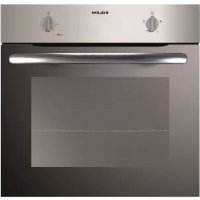
GFL402IX - Oven Glem Gas - Free user manual and instructions
Find the device manual for free GFL402IX Glem Gas in PDF.



| Product type | Multifunction built-in electric oven |
| Brand | Glem Gas |
| Model | GFL402IX |
| Approximate dimensions (H x W x D) | 595 x 595 x 560 mm |
| Approximate weight | 30 kg |
| Power supply | 220-240 V ~ 50/60 Hz |
| Maximum power | 2.5 kW (estimated) |
| Cooking functions | Fan-forced, natural convection, grill, defrost, ECO |
| Cleaning type | Easy-clean enamel interior; catalytic panels possible (depending on model) |
| Removable door | Yes, for cleaning |
| Interior lighting | Replaceable bulb, resistant to 300 °C |
| Child safety | Door lock function (depending on model); supervision recommended |
| Automatic shut-off | Not specified, but possible on some functions |
| Power cable | H05RR-F / H05VV-F / H05V2V2-F / H07RN-F / H05SS-F (non-pyrolytic); H05SS-F (pyrolytic) |
| Repairability | Spare parts available through technical service; bulb replaceable by user |
| Installation | Built-in installation, minimum depth 550 mm; side clearance 2 mm |
| Maximum altitude for use | 2,000 m |
| Standards | Compliant with EN 60350-1, Ecodesign 66/2014 and energy labeling 65/2014 |
Frequently Asked Questions - GFL402IX Glem Gas
User questions about GFL402IX Glem Gas
0 question about this device. Answer the ones you know or ask your own.
Ask a new question about this device
Download the instructions for your Oven in PDF format for free! Find your manual GFL402IX - Glem Gas and take your electronic device back in hand. On this page are published all the documents necessary for the use of your device. GFL402IX by Glem Gas.
USER MANUAL GFL402IX Glem Gas
Maintenance and Installation Generic Manual OVEN
Read this Instruction Manual carefully to obtain the best performance from your oven. Keep this manual so that it can be read by a new owner.
Electrical Safety
- If the power cable is not supplied with the oven, the following cables may be used in non-pyrolytic ovens: H05RR-F / H05WV-F / H05V2V2-F / H07RN-F / H05SS-F. In pyrolytic ovens, only the H05SS-F-type cable may be used. The connection diagram is shown in Figure 1.
- The oven must always be plugged into a sound earth connection and its installation must comply with current regulations.
- This appliance is intended for use at a maximum altitude of 2,000m .
- When installing the oven, total disconnection means must be incorporated into the fixed installation in accordance with the installation regulations (adapted to the current to be supported and with a minimum space between the contacts of 3mm ) based on surge protection category III conditions, for disconnection in the event of an emergency and when cleaning or changing the bulb. Under no circumstances must the earth wire pass through this switch.
- This switch may be replaced by a plug, provided it is accessible for normal use.
-
Any handling or repair to the appliance, including replacement of the power cable, should be carried out by authorised Technical Service Personnel using original spare parts. Repairs or handling by others may damage the appliance or cause malfunctioning that could be hazardous to your safety.
-
Unplug your oven if it malfunctions.
- In ovens combined with hobs, only those recommended by the manufacturer may be fitted.
Child Safety
- Do not allow children to come near the oven while in use or during the pyrolytic cleaning cycle as it can reach very high temperatures.
- Children under 8 years of age should be kept away from the appliance unless they are under permanent supervision. Children should not be allowed to play with the appliance.
- The appliance may be used by children over the age of 8 and people with reduced physical, sensory or mental capacities or a lack of experience or know-how, provided they have been given appropriate instructions or supervision on how to use the appliance safely and understand the dangers involved.
Safety in the use of the oven
- The oven must always be operated with the door closed.
- Only use the oven after it has been installed inside the kitchen unit (See Installing the Oven).
- Do not install the oven behind decorative doors. This can cause it to overheat.
- The manufacturer is not responsible for any use of the oven other than for the home preparation of food.
- Do not cover the bottom of the oven with aluminium foil, or any other material, as this may affect cooking performance and damage the enamel inside the oven and the interior of your kitchen unit.
-
Do not store oil, fats or inflammable materials inside the oven. This may be dangerous if the oven is turned on.
-
Do not lean or sit on the open oven door. It could be damaged and you could be injured.
- The tray and grill have a system for easy part removal and handling of food.
-
Always place the grids inside the oven in the following manner:
-
Between two runners of the side supports, or on one of the telescopic side rails if present, with the retention slots towards the back of the oven and facing downwards. Figure 19.
-
The surface of the grid on which containers will be placed remains below the side runners. Figure 20.
-
The oven heats up when in use, so please use oven gloves when performing operations inside the oven and avoid touching the heating elements.
- Only use the temperature probe supplied to measure the temperature inside the oven (in models that come with this feature).
Cleaning and Maintenance
- Disconnect the appliance from the mains power supply before any operation.
- Do not use abrasive cleaning products, or steam or pressurised water cleaning equipment.
- Do not use metal scouring pads, wire brushes or commercially available or abrasive powder cleansers to clean the oven door as they can scratch the surface and cause the glass to break.
-
Cleaning and maintenance tasks to be carried out by the user should not be done by children without supervision.
-
Before replacing a bulb, first make sure that the oven has been disconnected from the mains to avoid the possibility of receiving an electric shock.
- For your safety, never operate the oven without the back panel (that protects the fan) in place.
CAUTION
For the specific features and performance of your oven, please consult the Quick Start Guide that comes with this Manual.
Before First Use
There may be traces of grease and other substances in the oven as a result of its manufacturing process. These should be removed by means of the following procedure:
- Remove all of the packaging from your oven, including the protective plastic, if any.
- Turn the oven to setting else place it on the defect settingt 200^ , for 1 hour. Consult the Quick Start Guide accompanying this manual on how to do this.
Cool the oven with the door open so that it ventilates and no odours remain inside it. - Once cold, clean the oven and accessories. During this first operation, smoke and smells will be produced. The kitchen should therefore be well ventilated.
Environmentally Friendly Packaging
The packaging is made from totally recyclable materials which can be put to other uses. Consult your local council regarding the necessary procedures for disposing of these materials.
CAUTION
The symbol on the product or packaging indicates that this appliance cannot be disposed of as normal household waste. It should be taken to an electrical and electronic equipment collection point for recycling. In this way, any negative consequences for the environment and public health from incorrect handling can be avoided. Contact your local council, household waste disposal service or the establishment you bought the product from for more information on recycling the appliance.
Environmentally-friendly Use of the Oven
- Take any accessories that will not be used out of the oven.
-
Use oven proof containers, preferably in a dark colour.
-
Open the oven door as little as possible during cooking.
- Avoid preheating the oven while empty. Whenever the recipe allows, place the food in the cold oven.
- If your oven has an ECO function, use this function whenever the recipe allows.
- For recipes with long cooking times, switch off the oven 5 to 10 minutes before the end of the total cooking time to take advantage of residual heat.
- If your oven has ventilation features, cook multiple dishes at once.
Other important instructions
- The oven must always be operated with the door closed.
- The manufacturer takes no responsibility for any use of the oven other than for the home preparation of food.
- Do not store oil, fats or inflammable materials inside the oven. This may be dangerous if the oven is turned on.
- Do not lean or sit on the open oven door. You could damage it, as well as endanger your own safety.
- Do not cover the bottom of the oven with aluminium foil as this may affect cooking performance and damage the enamel inside the oven and the interior of your kitchen unit.
- To cook any food, insert the tray or grill in the side rails in the oven.
- Do not place containers or food on the bottom surface of the oven. Always use the trays and grill.
- Do not pour water on the bottom surface of the oven when in use; this may damage the enamel.
- It is normal for condensation to occur on the oven door when cooking dishes with a high liquid content.
- Clean the oven interior to remove traces of grease or food, which could later give off smoke and odours and cause stains to appear.
Cleaning and Maintenance
Caution:
Disconnect the appliance from mains power supply before any operation.
Cleaning the Oven Interior
1 Easy-to-clean enamel ovens
Use nylon brushes or sponges with warm soapy water to clean enamelled surfaces such as the bottom of the oven. Clean when the oven is cold. Use oven-cleaning products only on enamelled surfaces and always follow the manufacturer's instructions.
2 Ovens coated in special enamel adapted to other cleaning systems
Please consult the Specifications Sheet for your oven.
Caution
Do not clean the oven interior with steam or pressurised water cleaning equipment. Do not use metal scouring pads, wire brushes or any utensil that can scratch the enamel.
- Other oven models have a catalytic (self-cleaning) cleaning system. This system removes small traces of grease while cooking at high temperatures.
Use of Fold-down Grill (depending on Model)
To clean the top part of the oven:
- Wait until the oven is cold.
- Turn the screw (A) and lower the grill element as far as possible. Figure 1
- In other oven models, push the rod of the grill element (B) with both hands until it is released from the upper fastening point. Figure 2
- Turn the element round and clean the upper part of the oven.
- Finally, return the grill element to its original position.
Cleaning the Catalytic Panels
If the remains of food on the enamel cannot be cleaned off using normal (self-cleaning) methods, then:
1 Dismantle the panels and leave them to soak long enough to soften the remains.
2 Clean the panels with a sponge and clean water.
3 Dry the panels and mount them in the oven again.
4 Connect the oven for an hour at 200^ .
Caution
Do not use commercial cleaning products or abrasive powder cleansers on the surface of the catalytic panels.
Instructions for Dismantling the Flat Catalytic Panels and their Supports.
1 Remove all accessories from inside the oven.
2 Pull on the supports (C), releasing them from the nut (D). Figure 3
3 Unscrew the nut (D) to release the flat catalytic panels. Figure 4
4 To dismantle the panel at the back, remove the screw (E). Figure 5
5 To assemble, proceed in reverse order.
Caution
For your own safety, never turn the oven on without the rear panel in position since this protects the fan.
Cleaning the Oven Exterior and Accessories
Clean the outside of the oven and accessories with warm soapy water or with a mild detergent.
Take great care when cleaning stainless steel surfaces. Use only sponges or cloths that do not scratch.
Cleaning the Oven Door
Do not use metal scouring pads, wire brushes or commercially available abrasive powder cleansers to clean the oven door as they could scratch the surface and cause the glass to break.
In some oven models the door may be removed to make them easier to clean, by proceeding as follows:
1 Open the door.
2 Turn the two clamps (F) right round. Figure 6
3 Close the door until it fits in the two clamps. Figure 7
4 Holding the door at the sides with both hands, raise and remove the door from the oven until the hinges (G) have been completely removed. Figure 8
To mount the door, proceed in reverse order.
For other oven models, follow these instructions:
1 Open the oven door completely.
2 Insert the safety pins in the visible slots in the door hinges. Figure 9
3 Hold the door at the sides with both hands and close it almost completely.
4 Now lift the door and remove the hinges from the slots in the front of the oven by pulling them out. Figure 8
Caution
Do not remove the safety pins at any time since the hinge is taut and may cause injury. It would also be impossible to mount the door without the pins being in place.
To mount the door, hold it with both hands and insert the hinges in the appropriate openings in the front of the oven. Slowly open the door until it is fully open.
Cleaning the Large Inner Glass Door
Instructions for Removing / Replacing Inner Glass
1 Open the oven door.
2 Pull the glass outwards by the bottom (H). Figure 10
3 The inside glass will become loose. Remove it.
Caution
Be very careful when removing the inner glass, as the oven door will close.
4 Clean the inner glass and the inner surface of the oven door.
5 Return the glass supports to the upper door slots (I). Figure 11
6 Turn the glass towards the door (K).
7 Attach the glass to the door again by pushing the two lower supports (L) with both hands while pushing the glass towards the door (M). Figure 12
Instructions to remove / replace inside glass panels. 90 cm oven
1 Open the oven door.
2 Fully rotate the two clamps (N) to stop the door from closing. Fig 13
3 Squeeze point 1 located on the upper part of both sides of the oven door. Fig 14
4 Continue squeezing point 1 and pull out the upper clasp of the door. Fig 15
5 The inside glass panels will now be loose and can be easily cleaned with window cleaning liquid and a soft cloth.
Warning
If the door has not been blocked with the clamp (N), please take care when removing the inside glass panels as the oven door will close.
6 Once clean, return the glass panels in the same order so that the word TERMOGLASS can be read.
7 Replace the upper clasp of the door, making sure that the side tabs fit in point 1.
Changing the Oven Light bulb
Caution
First make sure the oven is unplugged before proceeding to change the bulb.
- Unscrew the bulb-holder glass cover.
- Replace the bulb and reassemble the glass cover.
The replacement bulb must be resistant to temperatures up to 300^ . You can order one from the Technical Assistance Service. Figure 16
For other oven models, follow these instructions:
- Loosen the lens from the lampholder with the help of the appropriate tool. Fig 17
Exchange the bulb. - Replace the lens, making sure it fits in the correct position without forcing it. Fig 18
If Something Goes Wrong
The oven stops working
Check the power connection.
Check the fuses and the circuit breaker
for your installation.
Make sure the timer is either in the manual
or programmed setting.
Check the position of the function
and temperature setting.
The light inside the oven does not go on
Change the bulb.
Check that it has been properly inserted.
according to the Instruction Manual.
The heating pilot light does not turn on
Select a temperature.
Select a function.
It should only come on while the oven
is heating up to the temperature selected.
Oven smoking during use
Normal during first use.
Clean the oven regularly.
Reduce the amount of grease or oil in the tray.
Do not use temperatures higher than
those indicated in the cooking chart.
The expected cooking results
are not achieved
Check the cooking chart for guidance
on how your oven operates.
Caution
If these problems persist despite these tips, contact Technical Service.
Technical Specifications
If the appliance does not work, inform Technical Service of the kind of problem you are experiencing and give the:
1 Serial Number (S-No)
2 Model of Appliance (Mod.)
You will find this information engraved on the identification plate. This plate is on the bottom of the oven and can be seen when opening the door.
Energy Information
Tested to comply with the requirements of the 66/2014 (Eco-Design) and 65/2014 (Energy Labelling) regulations in accordance with Regulation EN 60350-1.
Energy consumption measurements taken under different conditions may give different values from those indicated for your oven.
Consult the User's guide accompanying this manual to learn about the energy consumption of your oven.
Installation
This information is exclusively for the installer, who is responsible for the oven's assembly and electrical connection. If you install the oven yourself, the manufacturer will not accept liability for possible damage.
Prior to Installation
-
To unpack the oven, pull on the tab located at the bottom of the box and hold it by the side handles, never by the oven door handle.
-
The opening in the kitchen unit must be that indicated on the diagram. The minimum size of the unit base must be 550~mm .
- With built-in multifunction ovens, the rear of the unit, corresponding to the shaded area (A) in Figure 24, must have nothing projecting out (unit reinforcement, pipes, sockets, etc.).
- The adhesive used in the plastic lining the kitchen units must be able to withstand temperatures over 85^ C.
Electrical Connection
The installer must ensure that:
- The mains power voltage and frequency correspond to what is marked on the identification plate.
- The wiring system can withstand the maximum power marked on the identification plate.
After connecting the power, check that all electrical parts of the oven are working correctly.
Oven Installation
For all ovens, after the power has been connected:
1 Position the oven inside the unit and ensure that the power cable is not trapped or in contact with parts of the oven that heat up.
2 Anchor the oven to the unit with the screws supplied, screwing them into the unit through the holes that can be seen when the door is open.
3 Make sure that the body of the oven is not in contact with the walls of the unit and that there is a separation of at least 2mm with the adjacent units.
CONSIGNES DE SECURITE

- Electrical Safety
- Child Safety
- Safety in the use of the oven
- Cleaning and Maintenance
- CAUTION
- Before First Use
- Environmentally Friendly Packaging
- Environmentally-friendly Use of the Oven
- Other important instructions
- Caution:
- Cleaning the Oven Interior
- Easy-to-clean enamel ovens
- Ovens coated in special enamel adapted to other cleaning systems
- Use of Fold-down Grill (depending on Model)
- Cleaning the Catalytic Panels
- Instructions for Dismantling the Flat Catalytic Panels and their Supports.
- Cleaning the Oven Exterior and Accessories
- Cleaning the Oven Door
- Cleaning the Large Inner Glass Door
- Instructions for Removing / Replacing Inner Glass
- Instructions to remove / replace inside glass panels. 90 cm oven
- Warning
- Changing the Oven Light bulb
- If Something Goes Wrong
- The oven stops working
- The light inside the oven does not go on
- The heating pilot light does not turn on
- Oven smoking during use
- The expected cooking results
- are not achieved
- Technical Specifications
- Energy Information
- Installation
- Prior to Installation
- Electrical Connection
- Oven Installation
- CONSIGNES DE SECURITE
Brand : Glem Gas
Model : GFL402IX
Category : Oven