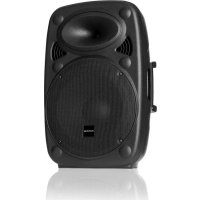
SLK10A - Loudspeaker Auna - Free user manual and instructions
Find the device manual for free SLK10A Auna in PDF.


| Product type | Active speaker |
| Brand | Auna |
| Model | SLK10A |
| Power supply | 230 V / 50 Hz |
| Enclosure material | Copolymer polypropylene |
| Main functions | MP3 playback, Bluetooth, USB, SD card, microphone input, line input |
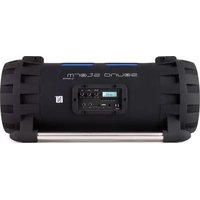
| MP3 control panel | Digital display, STOP, PLAY/PAUSE, NEXT buttons, USB/SD/BT selector |
| Bluetooth connection | Name "AUNA SLK", password 0000 |
| Audio inputs | 1 x microphone, 1 x Line-In (RCA), connection for second speaker |
| Settings | Microphone volume, line volume, tone |
| Power | 200 W RMS (estimated) |
| Maximum sound pressure level | 90 dB |
| Weight | 12 kg (estimated) |
| Dimensions (W x H x D) | 330 x 510 x 310 mm (estimated) |
| Usage | Indoor only |
| Mounting | Flat surface, stackable (max 60 kg), can be suspended |
| Maintenance and cleaning | Clean with a dry cloth, avoid moisture |
| Safety | Do not expose to water, do not open, risk of hearing damage above 90 dB |
| Spare parts and repairability | No user-serviceable parts, contact customer service |
| General information | Compliant with Directive 2014/53/EU, recycle at collection point |
| Supplied accessories | Power cable, user manual |
Frequently Asked Questions - SLK10A Auna
User questions about SLK10A Auna
0 question about this device. Answer the ones you know or ask your own.
Ask a new question about this device
Download the instructions for your Loudspeaker in PDF format for free! Find your manual SLK10A - Auna and take your electronic device back in hand. On this page are published all the documents necessary for the use of your device. SLK10A by Auna.
USER MANUAL SLK10A Auna
SLK-8-A 10-A 12-A 15-A Aktiver PA-Lautsprecher Aktive PA Speaker Enceinte PA active Altavoz PA activo Altoparlante PA attivo 10032271 10032272 10032273 10032274
www.auna-multimedia.com

bar
| Category | Value | |---|---| | Category 1 | 100 | | Category 2 | 100 | | Category 3 | 100 | | Category 4 | 100 | | Category 5 | 100 | | Category 6 | 100 | | Category 7 | 100 | | Category 8 | 100 | | Category 9 | 100 | | Category 10 | 100 | | Category 11 | 100 | | Category 12 | 100 | | Category 13 | 100 | | Category 14 | 100 | | Category 15 | 100 | | Category 16 | 100 | | Category 17 | 100 | | Category 18 | 100 | | Category 19 | 100 | | Category 20 | 100 | | Category 21 | 100 | | Category 22 | 100 | | Category 23 | 100 | | Category 24 | 100 | | Category 25 | 100 | | Category 26 | 100 | | Category 27 | 100 | | Category 28 | 100 | | Category 29 | 100 | | Category 30 | 100 | | Category 31 | 100 | | Category 32 | 100 | | Category 33 | 100 | | Category 34 | 100 | | Category 35 | 100 | | Category 36 | 100 | | Category 37 | 100 | | Category 38 | 100 | | Category 39 | 100 | | Category 40 | 100 | | Category 41 | 100 | | Category 42 | 100 | | Category 43 | 100 | | Category 44 | 100 | | Category 45 | 100 | | Category 46 | 100 | | Category 47 | 100 | | Category 48 | 100 | | Category 49 | 100 | | Category 50 | 100 | | Category 51 | 100 | | Category 52 | 100 | | Category 53 | 100 | | Category 54 | 100 | | Category 55 | 100 | | Category 56 | 100 | | Category 57 | 100 | | Category 58 | 100 | | Category 59 | 100 | | Category 60 | 100 | | Category 61 | 100 | | Category 62 | 100 | | Category 63 | 100 | | Category 64 | 100 | | Category 65 | 100 | | Category 66 | 100 | | Category 67 | 100 | | Category 68 | 100 | | Category 69 | 100 | | Category 70 | 100 | | Category 71 | 100 | | Category 72 | 100 | | Category 73 | 100 | | Category 74 | 100 | | Category 75 | 100 | | Category 76 | 100 | | Category 77 | 100 | | Category 78 | 100 | | Category 79 | 100 | | Category 80 | 100 | | Category 81 | 100 | | Category 82 | 100 | | Category 83 | 100 | | Category 84 | 100 | | Category 85 | 100 | | Category 86 | 100 | | Category 87 | 100 | | Category 88 | 100 | | Category 89 | 100 | | Category 90 | 100 | | Category 91 | 100 | | Category 92 | 100 | | Category 93 | 100 | | Category 94 | 100 | | Category 95 | 100 | | Category 96 | 100 | | Category 97 | 100 | | Category 98 | 100 | | Category 99 | 100 | | Total (Total) |TECHNISCHE DATEN
| Artikelnummer 100 | 32271 10032272 | 10032273 10032 | 274 | |
| Stromversorgung 230 V~ 50 Hz | ||||
| RMS 800 W 700 W | 400 W 300 W | |||
SICHERHEITSHINWEISE
Member of Berlin Brands Group
Handwerkerstr. 11
15366 Dahlwitz-Hoppegarten
Deutschland
natural_image
Symbol of a trash bin crossed with a diagonal line, no text or labels presentCongratulations on purchasing this equipment. Please read this manual carefully and take care of the following hints on installation and use to avoid technical damages. Any failure caused by ignoring the items and cautions mentioned in the operation and installation instructions are not covered by our warranty and any liability. Scan the QR code to get access to the latest user manual and more product information.
TECHNICAL DATA
| Item number 10032 | 271 10032272 10 | 032273 10032274 | ||
| Power supply 230 V~ 50 Hz | ||||
| RMS 800 W 700 W | 400 W 300 W | |||
SAFETY INSTRUCTIONS
- Hearing damage: Loudspeakers are easily capable of generating high sound pressure levels (SPL) sufficient to cause permanent hearing damage to performers, production crew and audience members. Caution should be taken to avoid prolonged exposure to SPL in excess of 90 dB.
- Do not overload the box to avoid damage to the speakers.
- Do not place an open fire (candle, etc.) on top or next to the box - FIRE HAZARD
- Only connect to an earthed mains outlet of 230Vac/50Hz.
- For indoor use only. If the box is used outdoors, you need to make sure that no humidity can enter the box.
- When not in use, unplug the unit from the mains.
- Unplug the unit from the mains prior to checking or replacing the fuse.
- Make sure that the box is placed on a stable, strong surface.
- The boxes can be stacked but do not put more than 60kg weight on the
box.
- The boxes can be hung. Use only strong and approved mounting material. During the mounting, make sure that nobody is standing below the mounting area.
- Place the stand always on a flat, level, and stable surface and that the legs do not present a trip hazard.
- Use only stands which are designed to support the weight of the speaker. Do not attempt to place more than one speaker on a stand designed for a single speaker.
- Route cables so that peoples will not trip over them pulling the speaker over.
- Do not place liquids on the box and protect it against humidity. Humidity can shorten the life time considerably.
- Only use suitable means of transportation if you want to move the box – BEWARE OF YOUR BACK !!
- If the unit is damaged to an extent that you can see internal parts, do not plug the unit in a mains outlet. In this case, please contact Tronios.
• Always unplug the unit during a thunderstorm or when it is not in use.
- If the unit has not been used for a longer period of time, condensation can occur inside the housing. Please let the unit reach room temperature prior to use.
- Never try to repair the unit yourself. It does not contain any user serviceable parts.
- Run the mains lead in such a way that nobody can fall over it and nothing can be put on it.
- Only use the supplied mains lead or another lead recommended by Auna.
- Set the unit to the lowest volume prior to switching it on
- Keep the unit out of the reach of children.
1 Input connector for microphones
2 Volume control for the microphone
3 Volume control for the line input
4 Volume control for the output
5 Tone control for the output
6 Output connector to a second box or amplifier (line level)
7 Line input connector for the audio input source e.g. mixer, CD player, etc.
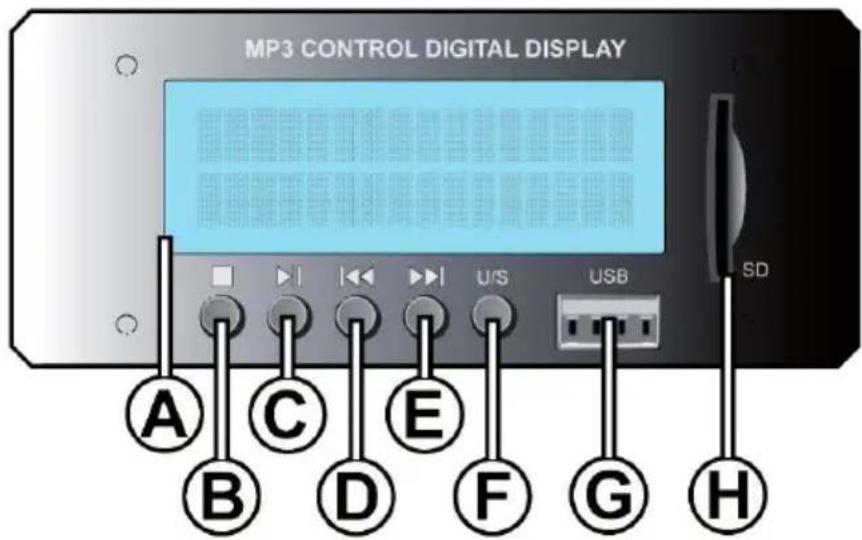
A. DISPLAY
Shows MP3 information
B. STOP
Track stop playing
C. PLAY/PAUSE
Track play or pause mode
D. PREV
Play previous track
E. NEXT
Play next track
F. USB/SD / BLUETOOTH SWITCH
Use switch for playing from USB stick, SD card or Bluetooth
G. USB CONNECTION
For connection of a USB stick with MP3 files
H. SD CARD CONNECTION
For connection of a SD CARD with MP3 files
How to connect with your BT device:
First turn on speaker, then press on "MODE" (F) till you see "AUX". Then use your mobile or computer to search a Bluetooth device. When you find the
"AUNA SLK" then connect. The password is: 0000
TROUBLESHOOTING
One certain method of determining if a speaker is faulty is to substitute a speaker that is known to work correctly for the suspected problem speaker. If the “normally correct speaker” is experiencing the same difficulties or problems as the suspected problem speaker, use the information below to isolate the problem.
| Error Possible cause Check | ||
| No output Cables Reset all connectors | Substitute known good cables Check solder joinsInspect cable for damageInspect wire or connector for stray strand that may short | |
| Intermittent Poor connections While it is possible for a faultyspeaker to exhibit intermittent output, it's more likely that an output cable/connector is the problem. Check the soldering on your connectors | ||
| Constant noise, buzzing and/or humming | Faulty electronic device in the signal | Any constant noise originates in the amplifier, mixer, signal processing, source device in the signal devices, or line-level wiring. Check and correct system grounding as required. Chain check for noisy sources or electronic components. Check wiring for shielding. |
| Poor low-frequency output | Improper polarity When two speakers in close proximity to each other are connected out-of-polarity, they can partially cancel each other out, especially at low frequencies. Check your speaker cables to be sure they are all identically wired and connected. Check the balanced line signal cables to be sure they are all correctly wired. | |
DISPOSAL CONSIDERATIONS
natural_image
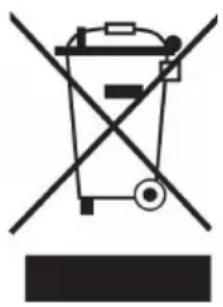
Symbol of a trash bin crossed with a diagonal line, representing waste or discharge (no text or labels)If there is a legal regulation for the disposal of electrical and electronic devices in your country, this symbol on the product or on the packaging indicates that this product must not be disposed of with household waste. Instead, it must be taken to a collection point for the recycling of electrical and electronic equipment. By disposing of it in accordance with the rules, you are protecting the environment and the health of your fellow human beings from negative consequences. For information about the recycling and disposal of this product, please contact your local authority or your household waste disposal service.
DECLARATION OF CONFORMITY
CE UK CA
Manufacturer:
Chal-Tec GmbH, Wallstrasse 16, 10179 Berlin, Germany.
Importer for Great Britain:
Berlin Brands Group UK Ltd
PO Box 1145
Oxford, OX1 9UW
United Kingdom
Hereby, Chal-Tec GmbH declares that the radio equipment type SLK-8-A 10-A 12-A 15-A is in compliance with Directive 2014/53/EU. The full text of the EU declaration of conformity is available at the following internet address: use.berlin/10032271
For Great Britain: Hereby, Chal-Tec GmbH declares that the radio equipment type SLK-8-A 10-A 12-A 15-A is in compliance with the relevant statutory requirements. The full text of the declaration of conformity is available at the following internet address: use.berlin/10032271
Cher client, chère cliente,
FICHE TECHNIQUE
| Numéro d'article 10 | 032271 10032272 | 10032273 10032274 | ||
| Alimentation 230 V~ | 50 Hz | |||
| RMS 800 W 700 W | W 400 W 300 W | |||
CONSIGNES DE SÉCURITÉ
flowchart
graph TD
    A["1"] --> B["MIC IN"]
    B --> C["LEVEL MAX"]
    C --> D["2"]
    B --> E["R L LINE IN"]
    E --> F["VOLUME MAX"]
    F --> G["3"]
    E --> H["TREBLE -12 +12"]
    H --> I["4"]
    E --> J["BASS -12 +12"]
    J --> K["5"]
    style A fill:#000,stroke:#fff,color:#fff
    style K fill:#000,stroke:#fff,color:#fff
    style D fill:#000,stroke:#fff,color:#fff
    style G fill:#000,stroke:#fff,color:#fff
    style K fill:#000,stroke:#fff,color:#fff
    note right of A: MIC IN
    note right of B: LEVEL MAX
    note right of C: LEVEL MAX
    note right of D: R L
    note right of E: LINE IN
    note right of F: VOLUME MAX
    note right of H: LINE OUT
    note right of J: BASS -12 +12
    note right of K: CLIP POWER
natural_image
Symbol of a trash bin crossed with a diagonal line, no text or numbers presentDÉCLARATION DE CONFORMITÉ

Fabricant :
Chal-Tec GmbH, Wallstraße 16, 10179 Berlin, Allemagne.
Berlin Brands Group UK Ltd
PO Box 1145
Oxford, OX1 9UW
United Kingdom
DATOS TÉCNICOS
Interruptor USB/SD/BT:
Cambio de funciones
natural_image
Symbol of a trash bin crossed with a diagonal line, no text or numbers presentDATI TECNICI
| Numero articolo 10 | 032271 10032272 | 10032273 1003 | 2274 | |
| Alimentazione 230 V~ 50 Hz | ||||
| RMS 800 W 700 W | 400 W 300 W | |||
AVVERTENZE DI SICUREZZA
natural_image
Symbol of a trash bin crossed with a diagonal line, no text or labels presentBerlin Brands Group UK Ltd
PO Box 1145
Oxford, OX1 9UW
United Kingdom
natural_image
Abstract white logo design on dark background, resembling stylized letter 'S' or wave form (no text or symbols)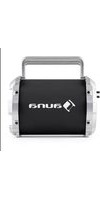
- SICHERHEITSHINWEISE
- Member of Berlin Brands Group
- Handwerkerstr. 11
- Dahlwitz-Hoppegarten
- Deutschland
- TECHNICAL DATA
- SAFETY INSTRUCTIONS
- TROUBLESHOOTING
- DISPOSAL CONSIDERATIONS
- DECLARATION OF CONFORMITY
- CE UK CA
- Manufacturer:
- Importer for Great Britain:
- Cher client, chère cliente,
- CONSIGNES DE SÉCURITÉ
- DÉCLARATION DE CONFORMITÉ
- Fabricant :
- Interruptor USB/SD/BT:
- AVVERTENZE DI SICUREZZA
Brand : Auna
Model : SLK10A
Category : Loudspeaker